lock MERCEDES-BENZ B-Class 2017 W246 Workshop Manual
[x] Cancel search | Manufacturer: MERCEDES-BENZ, Model Year: 2017, Model line: B-Class, Model: MERCEDES-BENZ B-Class 2017 W246Pages: 290, PDF Size: 19.81 MB
Page 92 of 290
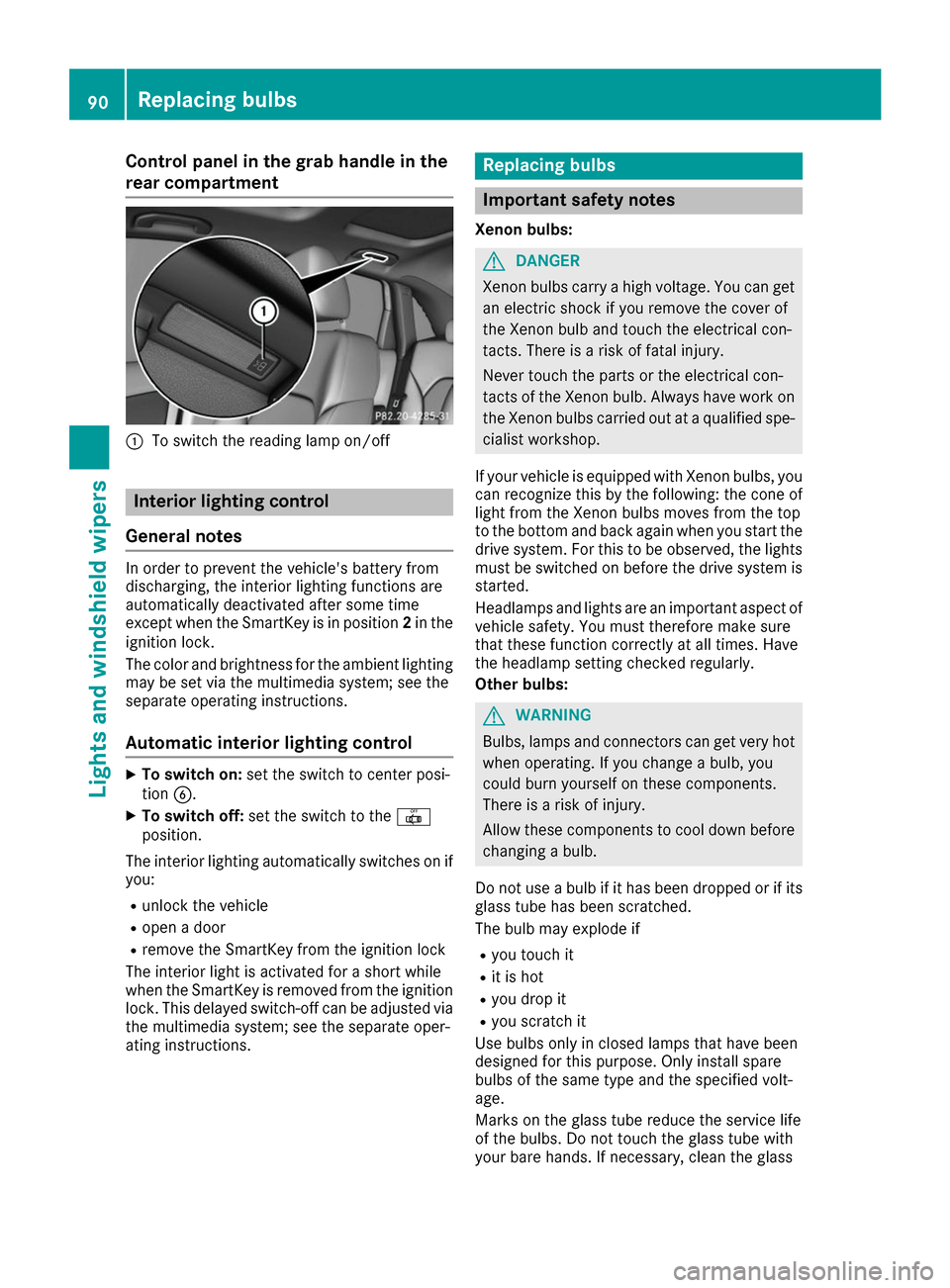
Control panel in the grab handle in the
rear compartment 0043
To switch the reading lamp on/off Interior lighting control
General notes In order to prevent the vehicle's battery from
discharging, the interior lighting functions are
automatically deactivated after some time
except when the SmartKey is in position 2in the
ignition lock.
The color and brightness for the ambient lighting
may be set via the multimedia system; see the
separate operating instructions.
Automatic interior lighting control X
To switch on: set the switch to center posi-
tion 0084.
X To switch off: set the switch to the 0033
position.
The interior lighting automatically switches on if you:
R unlock the vehicle
R open a door
R remove the SmartKey from the ignition lock
The interior light is activated for a short while
when the SmartKey is removed from the ignition
lock. This delayed switch-off can be adjusted via
the multimedia system; see the separate oper-
ating instructions. Replacing bulbs
Important safety notes
Xenon bulbs: G
DANGER
Xenon bulbs carry a high voltage. You can get an electric shock if you remove the cover of
the Xenon bulb and touch the electrical con-
tacts. There is a risk of fatal injury.
Never touch the parts or the electrical con-
tacts of the Xenon bulb. Always have work on
the Xenon bulbs carried out at a qualified spe-
cialist workshop.
If your vehicle is equipped with Xenon bulbs, you
can recognize this by the following: the cone of light from the Xenon bulbs moves from the top
to the bottom and back again when you start the
drive system. For this to be observed, the lights must be switched on before the drive system is
started.
Headlamps and lights are an important aspect of
vehicle safety. You must therefore make sure
that these function correctly at all times. Have
the headlamp setting checked regularly.
Other bulbs: G
WARNING
Bulbs, lamps and connectors can get very hot when operating. If you change a bulb, you
could burn yourself on these components.
There is a risk of injury.
Allow these components to cool down before changing a bulb.
Do not use a bulb if it has been dropped or if its glass tube has been scratched.
The bulb may explode if
R you touch it
R it is hot
R you drop it
R you scratch it
Use bulbs only in closed lamps that have been
designed for this purpose. Only install spare
bulbs of the same type and the specified volt-
age.
Marks on the glass tube reduce the service life
of the bulbs. Do not touch the glass tube with
your bare hands. If necessary, clean the glass 90
Replacing bulbsLights and windshield wipers
Page 94 of 290
Replacing front bulbs
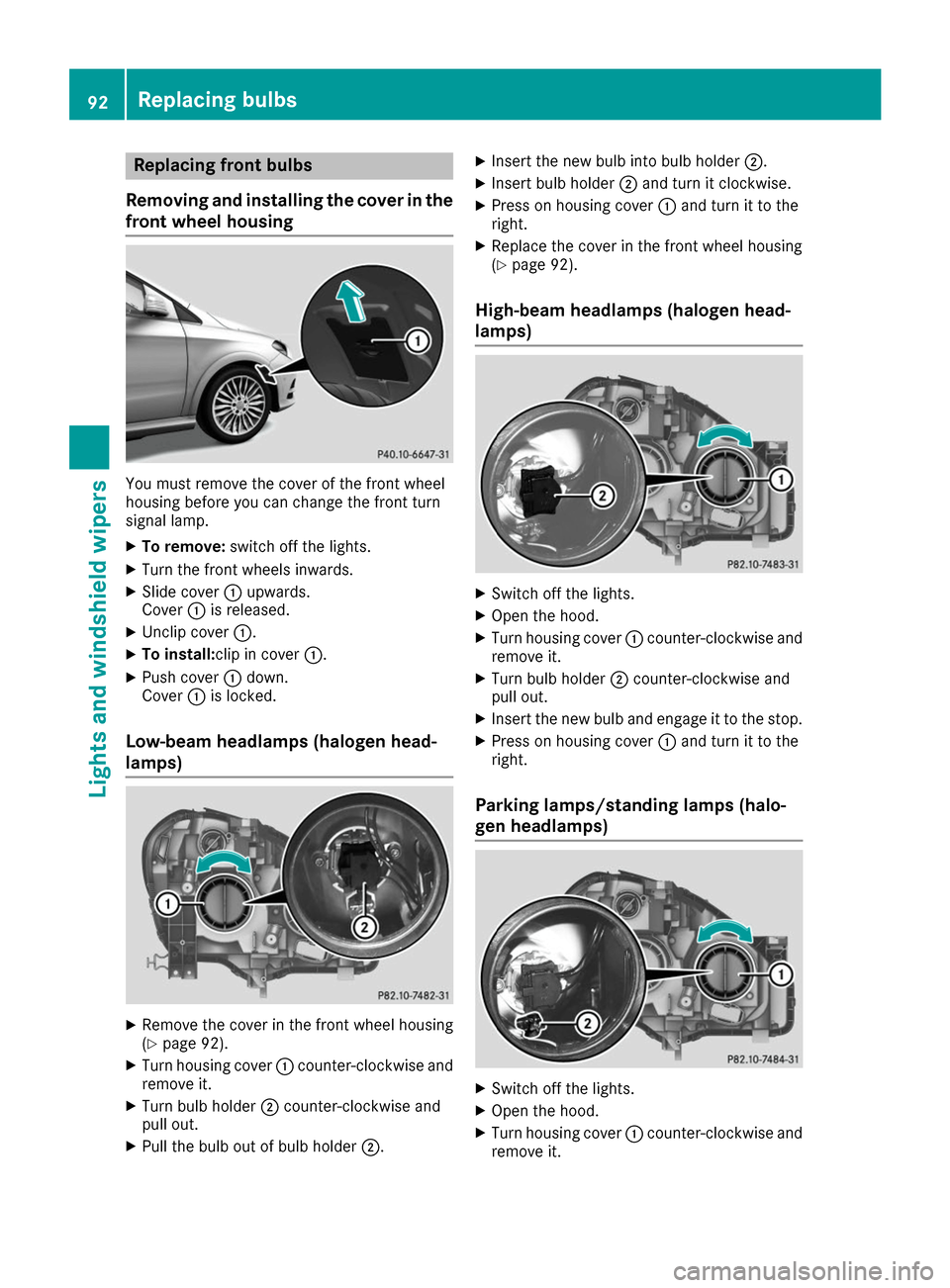
Removing and installing the cover in the
front wheel housing You must remove the cover of the front wheel
housing before you can change the front turn
signal lamp.
X To remove: switch off the lights.
X Turn the front wheels inwards.
X Slide cover 0043upwards.
Cover 0043is released.
X Unclip cover 0043.
X To install:clip in cover 0043.
X Push cover 0043down.
Cover 0043is locked.
Low-beam headlamps (halogen head-
lamps) X
Remove the cover in the front wheel housing
(Y page 92).
X Turn housing cover 0043counter-clockwise and
remove it.
X Turn bulb holder 0044counter-clockwise and
pull out.
X Pull the bulb out of bulb holder 0044.X
Insert the new bulb into bulb holder 0044.
X Insert bulb holder 0044and turn it clockwise.
X Press on housing cover 0043and turn it to the
right.
X Replace the cover in the front wheel housing
(Y page 92).
High-beam headlamps (halogen head-
lamps) X
Switch off the lights.
X Open the hood.
X Turn housing cover 0043counter-clockwise and
remove it.
X Turn bulb holder 0044counter-clockwise and
pull out.
X Insert the new bulb and engage it to the stop.
X Press on housing cover 0043and turn it to the
right.
Parking lamps/standing lamps (halo-
gen headlamps) X
Switch off the lights.
X Open the hood.
X Turn housing cover 0043counter-clockwise and
remove it. 92
Replacing bulbsLights and windshield wipers
Page 95 of 290
X
Pull out bulb holder 0044.
X Pull the bulb out of bulb holder 0044.
X Insert the new bulb into bulb holder 0044.
X Insert bulb holder 0044.
X Press on housing cover 0043and turn it to the
right.
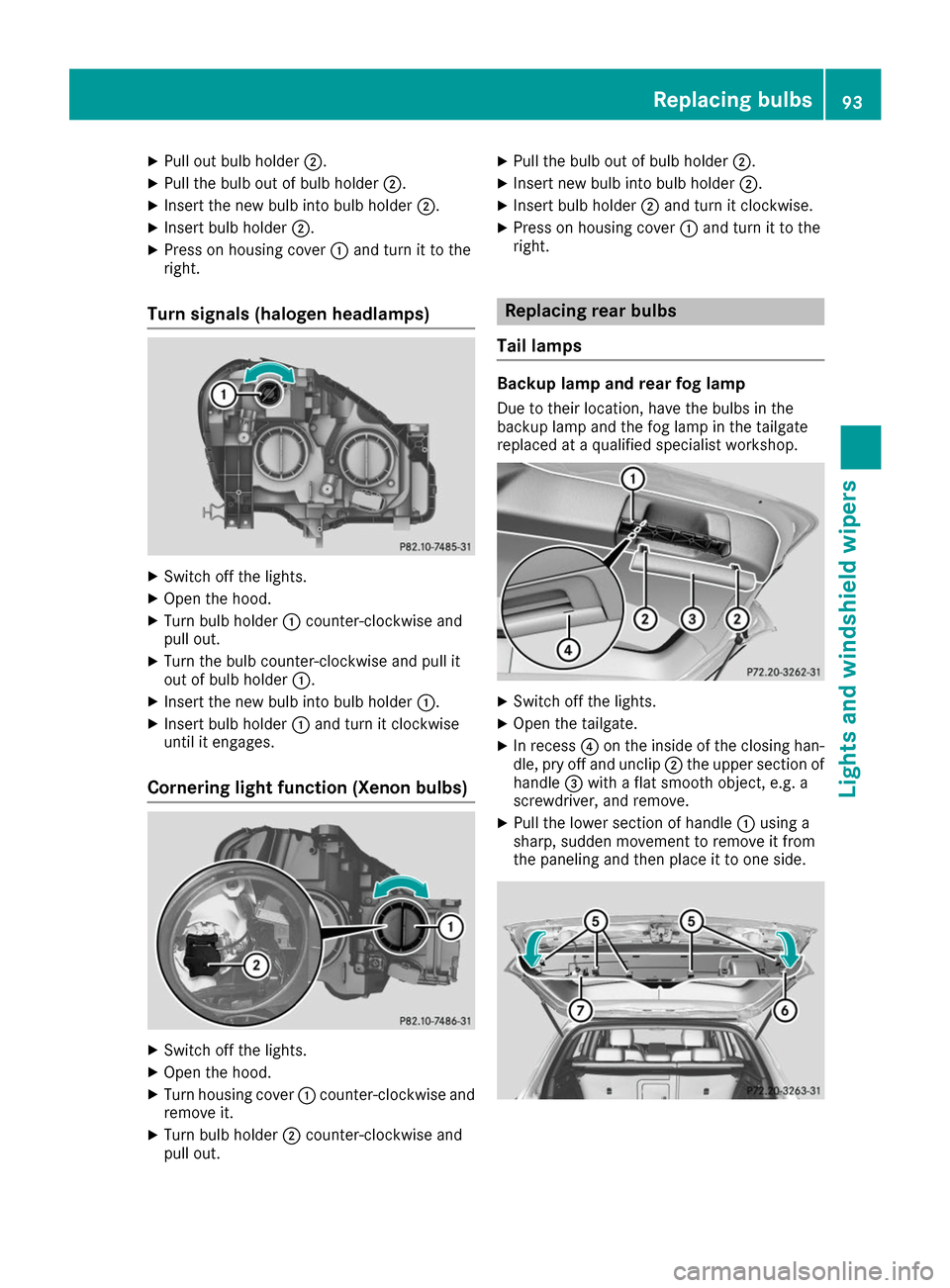
Turn signals (halogen headlamps) X
Switch off the lights.
X Open the hood.
X Turn bulb holder 0043counter-clockwise and
pull out.
X Turn the bulb counter-clockwise and pull it
out of bulb holder 0043.
X Insert the new bulb into bulb holder 0043.
X Insert bulb holder 0043and turn it clockwise
until it engages.
Cornering light function (Xenon bulbs) X
Switch off the lights.
X Open the hood.
X Turn housing cover 0043counter-clockwise and
remove it.
X Turn bulb holder 0044counter-clockwise and
pull out. X
Pull the bulb out of bulb holder 0044.
X Insert new bulb into bulb holder 0044.
X Insert bulb holder 0044and turn it clockwise.
X Press on housing cover 0043and turn it to the
right. Replacing rear bulbs
Tail lamps Backup lamp and rear fog lamp
Due to their location, have the bulbs in the
backup lamp and the fog lamp in the tailgate
replaced at a qualified specialist workshop. X
Switch off the lights.
X Open the tailgate.
X In recess 0085on the inside of the closing han-
dle, pry off and unclip 0044the upper section of
handle 0087with a flat smooth object, e.g. a
screwdriver, and remove.
X Pull the lower section of handle 0043using a
sharp, sudden movement to remove it from
the paneling and then place it to one side. Replacing bulbs
93Lights and windshield wipers Z
Page 96 of 290
X
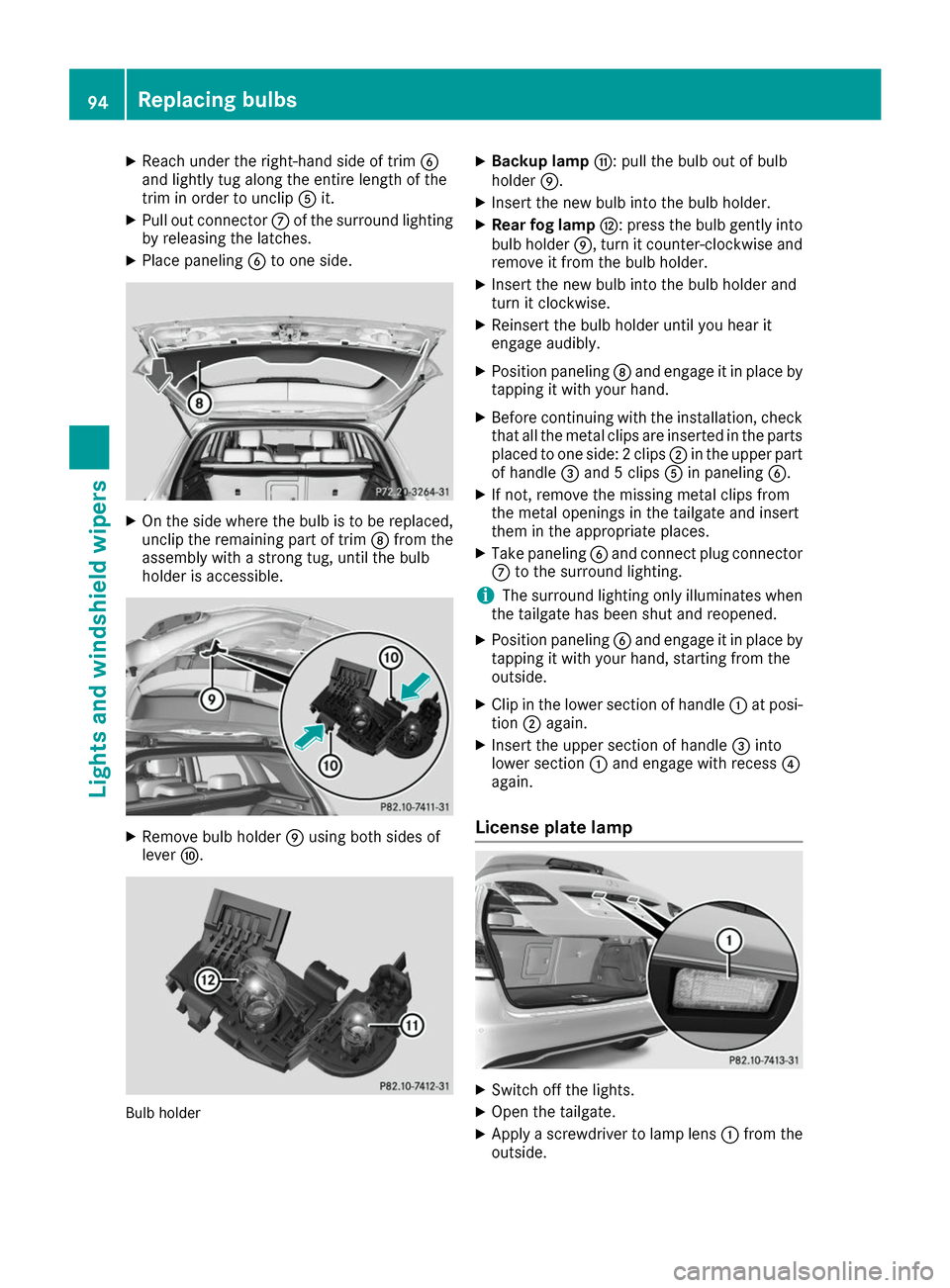
Reach under the right-hand side of trim 0084
and lightly tug along the entire length of the
trim in order to unclip 0083it.
X Pull out connector 006Bof the surround lighting
by releasing the latches.
X Place paneling 0084to one side. X
On the side where the bulb is to be replaced,
unclip the remaining part of trim 006Cfrom the
assembly with a strong tug, until the bulb
holder is accessible. X
Remove bulb holder 006Dusing both sides of
lever 006E. Bulb holder X
Backup lamp 006F: pull the bulb out of bulb
holder 006D.
X Insert the new bulb into the bulb holder.
X Rear fog lamp 0070: press the bulb gently into
bulb holder 006D, turn it counter-clockwise and
remove it from the bulb holder.
X Insert the new bulb into the bulb holder and
turn it clockwise.
X Reinsert the bulb holder until you hear it
engage audibly.
X Position paneling 006Cand engage it in place by
tapping it with your hand.
X Before continuing with the installation, check
that all the metal clips are inserted in the parts placed to one side: 2 clips 0044in the upper part
of handle 0087and 5 clips 0083in paneling 0084.
X If not, remove the missing metal clips from
the metal openings in the tailgate and insert
them in the appropriate places.
X Take paneling 0084and connect plug connector
006B to the surround lighting.
i The surround lighting only illuminates when
the tailgate has been shut and reopened.
X Position paneling 0084and engage it in place by
tapping it with your hand, starting from the
outside.
X Clip in the lower section of handle 0043at posi-
tion 0044again.
X Insert the upper section of handle 0087into
lower section 0043and engage with recess 0085
again.
License plate lamp X
Switch off the lights.
X Open the tailgate.
X Apply a screwdriver to lamp lens 0043from the
outside. 94
Replacing bulbsLights and windshield wipers
Page 98 of 290
Replacing the wiper blades
Important safety notes G
WARNING
If the windshield wipers begin to move while
you are changing the wiper blades, you could be trapped by the wiper arm. There is a risk of
injury.
Always switch off the windshield wipers and
ignition before changing the wiper blades.
! To avoid damaging the wiper blades, make
sure that you touch only the wiper arm of the
wiper.
! Never open the hood/tailgate if a wiper arm
has been folded away from the windshield/
rear window.
Never fold a windshield wiper arm without a
wiper blade back onto the windshield/rear
window.
Hold the windshield wiper arm firmly when
you change the wiper blade. If you release the
wiper arm without a wiper blade and it falls
onto the windshield/rear window, the wind-
shield/rear window may be damaged by the
force of the impact.
Mercedes-Benz recommends that you have
the wiper blades changed at a qualified spe-
cialist workshop.
Changing the windshield wiper blades Removing the wiper blades
X Vehicles without KEYLESS-GO: remove the
SmartKey from the ignition lock.
X Vehicles with KEYLESS-GO: switch off the
engine.
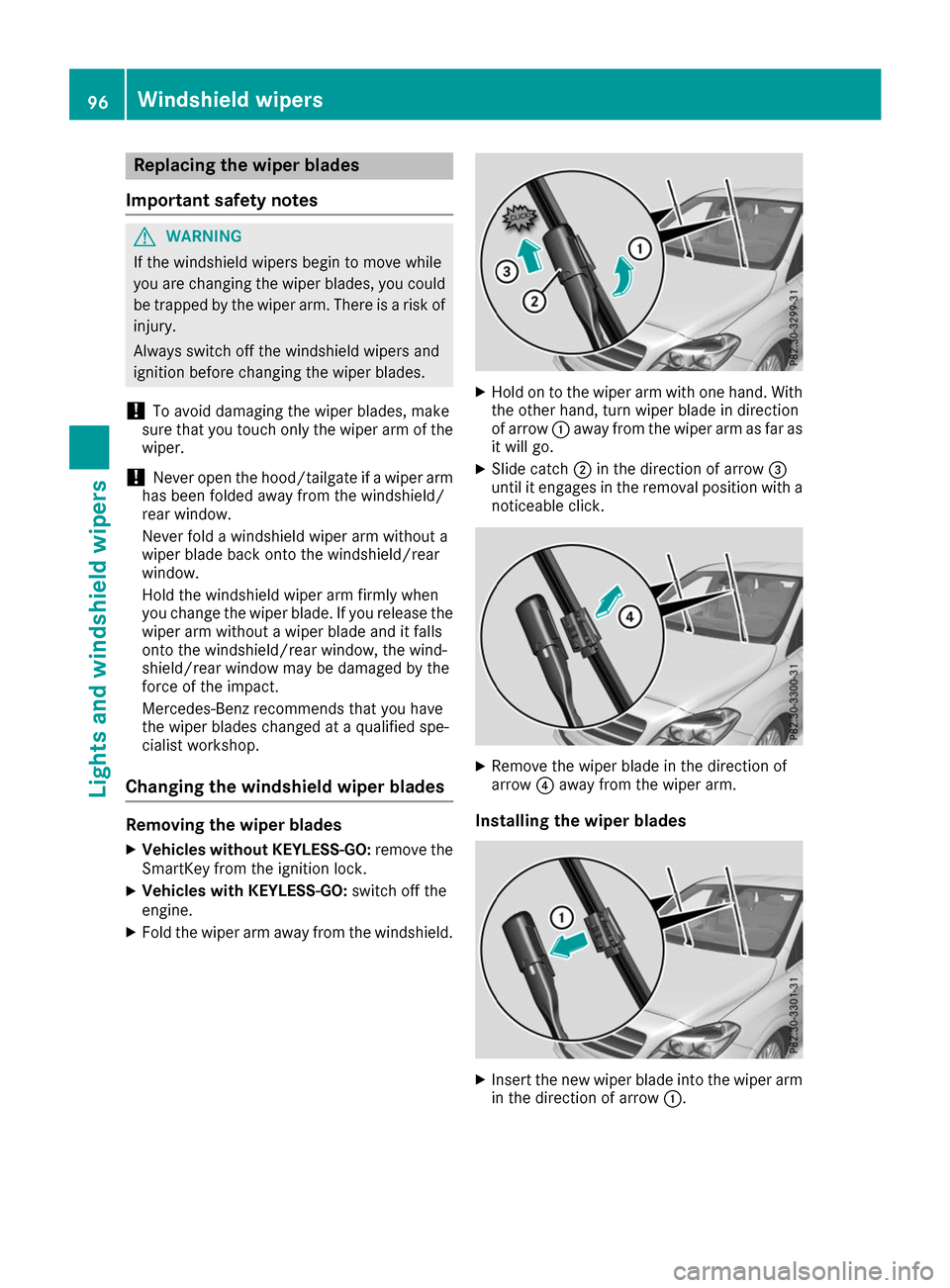
X Fold the wiper arm away from the windshield. X
Hold on to the wiper arm with one hand. With
the other hand, turn wiper blade in direction
of arrow 0043away from the wiper arm as far as
it will go.
X Slide catch 0044in the direction of arrow 0087
until it engages in the removal position with a noticeable click. X
Remove the wiper blade in the direction of
arrow 0085away from the wiper arm.
Installing the wiper blades X
Insert the new wiper blade into the wiper arm
in the direction of arrow 0043.96
Windshield wipersLights and windshield wipers
Page 99 of 290
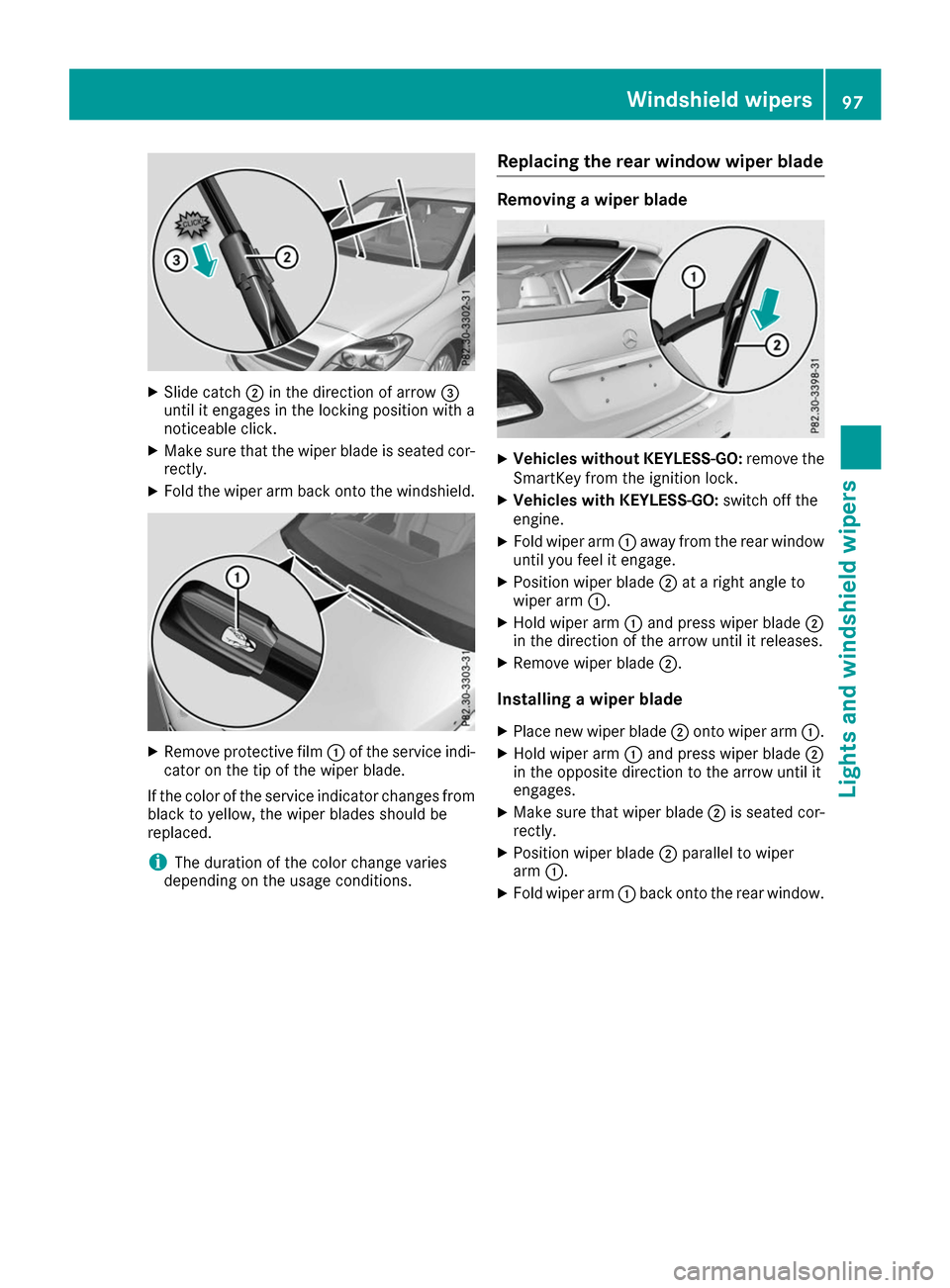
X
Slide catch 0044in the direction of arrow 0087
until it engages in the locking position with a
noticeable click.
X Make sure that the wiper blade is seated cor-
rectly.
X Fold the wiper arm back onto the windshield. X
Remove protective film 0043of the service indi-
cator on the tip of the wiper blade.
If the color of the service indicator changes from black to yellow, the wiper blades should be
replaced.
i The duration of the color change varies
depending on the usage conditions. Replacing the rear window wiper blade Removing a wiper blade
X
Vehicles without KEYLESS-GO: remove the
SmartKey from the ignition lock.
X Vehicles with KEYLESS-GO: switch off the
engine.
X Fold wiper arm 0043away from the rear window
until you feel it engage.
X Position wiper blade 0044at a right angle to
wiper arm 0043.
X Hold wiper arm 0043and press wiper blade 0044
in the direction of the arrow until it releases.
X Remove wiper blade 0044.
Installing a wiper blade
X Place new wiper blade 0044onto wiper arm 0043.
X Hold wiper arm 0043and press wiper blade 0044
in the opposite direction to the arrow until it
engages.
X Make sure that wiper blade 0044is seated cor-
rectly.
X Position wiper blade 0044parallel to wiper
arm 0043.
X Fold wiper arm 0043back onto the rear window. Windshield wipers
97Lights and windshield wipers Z
Page 100 of 290
Problems with the windshield wipers
Problem
Possible causes/consequences and
0050
0050Solutions The windshield wipers
are jammed. Leaves or snow, for example, may be obstructing the windshield wiper
movement. The wiper motor has been deactivated.
X For safety reasons, you should remove the SmartKey from the igni-
tion lock.
X Remove the cause of the obstruction.
X Switch the windshield wipers back on. The windshield wipers
fail completely. The windshield wiper drive is malfunctioning.
X Select another wiper speed on the combination switch.
X Have the windshield wipers checked at a qualified specialist work-
shop. The windshield washer
fluid from the spray noz-
zles no longer hits the
center of the windshield. The spray nozzles are misaligned.
X Have the spray nozzles adjusted at a qualified specialist workshop. 98
Windshield wipersLights and windshield wipers
Page 102 of 290
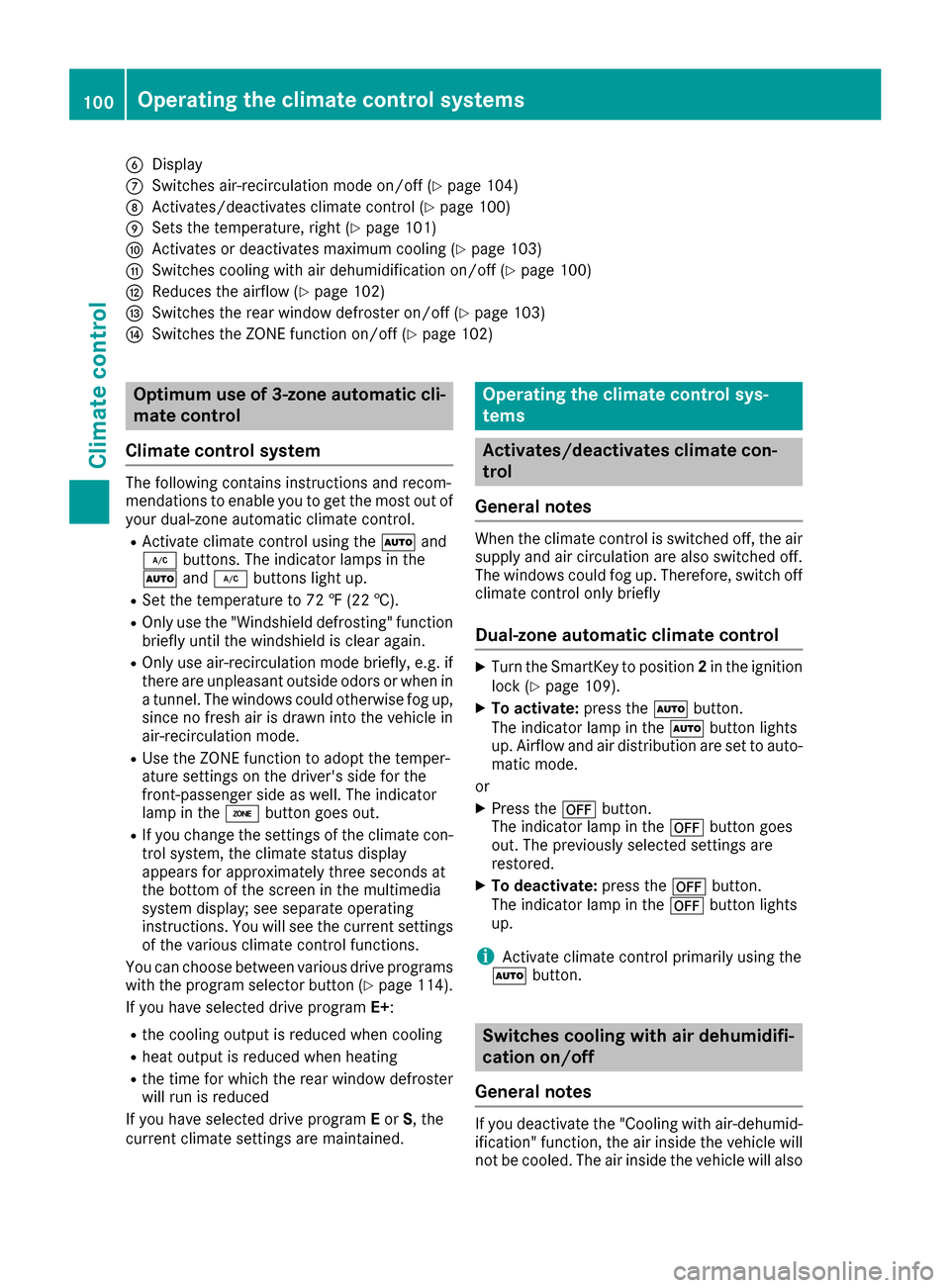
0084
Display
006B Switches air-recirculation mode on/off (Y page 104)
006C Activates/deactivates climate control (Y page 100)
006D Sets the temperature, right (Y page 101)
006E Activates or deactivates maximum cooling (Y page 103)
006F Switches cooling with air dehumidification on/off (Y page 100)
0070 Reduces the airflow (Y page 102)
0071 Switches the rear window defroster on/off (Y page 103)
0072 Switches the ZONE function on/off (Y page 102)Optimum use of 3-zone automatic cli-
mate control
Climate control system The following contains instructions and recom-
mendations to enable you to get the most out of
your dual-zone automatic climate control.
R Activate climate control using the 0058and
005A buttons. The indicator lamps in the
0058 and005A buttons light up.
R Set the temperature to 72 ‡ (22 †).
R Only use the "Windshield defrosting" function
briefly until the windshield is clear again.
R Only use air-recirculation mode briefly, e.g. if
there are unpleasant outside odors or when in a tunnel. The windows could otherwise fog up,
since no fresh air is drawn into the vehicle in
air-recirculation mode.
R Use the ZONE function to adopt the temper-
ature settings on the driver's side for the
front-passenger side as well. The indicator
lamp in the 00D6button goes out.
R If you change the settings of the climate con-
trol system, the climate status display
appears for approximately three seconds at
the bottom of the screen in the multimedia
system display; see separate operating
instructions. You will see the current settings
of the various climate control functions.
You can choose between various drive programs
with the program selector button (Y page 114).
If you have selected drive program E+:
R the cooling output is reduced when cooling
R heat output is reduced when heating
R the time for which the rear window defroster
will run is reduced
If you have selected drive program Eor S, the
current climate settings are maintained. Operating the climate control sys-
tems
Activates/deactivates climate con-
trol
General notes When the climate control is switched off, the air
supply and air circulation are also switched off.
The windows could fog up. Therefore, switch off
climate control only briefly
Dual-zone automatic climate control X
Turn the SmartKey to position 2in the ignition
lock (Y page 109).
X To activate: press the0058button.
The indicator lamp in the 0058button lights
up. Airflow and air distribution are set to auto- matic mode.
or X Press the 0078button.
The indicator lamp in the 0078button goes
out. The previously selected settings are
restored.
X To deactivate: press the0078button.
The indicator lamp in the 0078button lights
up.
i Activate climate control primarily using the
0058 button. Switches cooling with air dehumidifi-
cation on/off
General notes If you deactivate the "Cooling with air-dehumid-
ification" function, the air inside the vehicle will
not be cooled. The air inside the vehicle will also 100
Operating the climate control systemsClimate control
Page 103 of 290
not be dehumidified. The windows can fog up
more quickly. Therefore, only deactivate the
"Cooling with air-dehumidification" function
briefly.
The "Cooling with air-dehumidification" function is operational when the vehicle is ready to drive.
The air inside the vehicle is cooled and dehu-
midified according to the temperature selected.
Condensation may drip from the underside of
the vehicle when it is in cooling mode. This is
normal and not a sign that there is a malfunc-
tion. Activating/deactivating X
Press the 005Abutton.
The indicator lamp in the 005Abutton lights
up or goes out.
The indicator lamp in the button indicates that the respective function is activated. The
"Cooling with air dehumidification" function
has a delayed switch-off feature.
Problems with the "Cooling with air dehumidification" function Problem
Possible causes/consequences and
0050 0050Solutions The indicator lamp in the
005A button flashes
three times or remains
off. The "Cooling with air
dehumidification" func-
tion cannot be switched
on. Cooling with air dehumidification has been deactivated due to a mal-
function.
X Visit a qualified specialist workshop. Setting climate control to automatic
General notes In automatic mode, the set temperature is main-
tained automatically at a constant level. The
system automatically regulates the temperature of the dispensed air, the airflow and the air dis- tribution.
The "Cooling with air dehumidification" function
is activated automatically in automatic mode.
Setting climate control to automatic X
Turn the SmartKey to position 2in the ignition
lock (Y page 109).
X Set the desired temperature.
X To activate: press the0058button.
The indicator lamp in the 0058button lights
up. Automatic air distribution and airflow are
activated. X
To switch to manual mode:press the 004F
or 004A button.
or
X Press the 0097or0095 button.
The indicator lamp in the 0058button goes
out. Automatic air distribution and airflow are deactivated. Setting the temperature
Different temperatures can be set for the driv-
er's and front-passenger sides. The set temper-
ature is automatically maintained at a constant
level.
X Turn the SmartKey to position 2in the ignition
lock (Y page 109).
X To increase or decrease: turn control0043or
006D counter-clockwise or clockwise. Only
change the temperature setting in small
increments. Start at 72 ‡ (22 †). Operating the climate control systems
101Climate control
Page 104 of 290
Setting the air distribution
Air distribution settings 0061
Directs air through the defroster vents
009C Directs air through the center and side air
vents
009B Directs air through the footwell air vents
009F Directs air through the center, side and
footwell vents
0087 Directs air through the defroster, center
and side air vents
0086 Directs air through the defroster and
footwell vents
008F Directs air through the defroster, center,
side and footwell vents
i Regardless of the air distribution setting,
airflow is always directed through the side air
vents. The side air vents can only be closed if the adjusters are turned clockwise until they
engage.
Setting the air distribution X
Turn the SmartKey to position 2in the ignition
lock (Y page 109).
X Press the 004For004A button repeatedly
until the desired symbol appears in the dis-
play. Setting the airflow
X Turn the SmartKey to position 2in the ignition
lock (Y page 109).
X To increase or reduce:press the 0097or
0095 button. Switching the ZONE function on/off
X To activate: press the00D6button.
The indicator lamp in the 00D6button lights
up.
The temperature setting for the driver's side
is not adopted for the front-passenger side.
X To deactivate: press the00D6button.
The indicator lamp in the 00D6button goes
out.
The temperature setting for the driver's side
is adopted for the front-passenger side. Defrosting the windshield
General notes You can use this function to defrost the wind-
shield or to clear a fogged up windshield and
side windows.
i You should only select the "Windshield
defrosting" function until the windshield is
clear again.
Switching the "Windshield defrosting"
function on or off X
Turn the SmartKey to position 2in the ignition
lock (Y page 109).
X To activate: press the0064button.
The indicator lamp in the 0064button lights
up.
The climate control system switches to the
following functions:
R high airflow
R high temperature
R air distribution to the windshield and front
side windows
R air-recirculation mode off
Vehicles with windshield heating: the
windshield heating is switched on automati-
cally using the "Windshield defrosting" func-
tion.
i The "Windshield defrosting" function auto-
matically sets the blower output to the opti-
mum defrosting effect. As a result, the airflow
may increase or decrease automatically after
the 0064 button is pressed.
i You can adjust the blower output manually
while the "Windshield defrosting" function is
in operation:
Press the 00F2or00F3 button.
X To deactivate: press the0064button.
The indicator lamp in the 0064button goes
out. The previously selected settings are
restored. Air-recirculation mode remains
deactivated.
or X Press the 0058button.
The indicator lamp in the 0064button goes
out. Airflow and air distribution are set to
automatic mode. 102
Operating the climate control systemsClimate control