audio MERCEDES-BENZ B-Class 2017 W246 User Guide
[x] Cancel search | Manufacturer: MERCEDES-BENZ, Model Year: 2017, Model line: B-Class, Model: MERCEDES-BENZ B-Class 2017 W246Pages: 290, PDF Size: 19.81 MB
Page 162 of 290
Audio menu
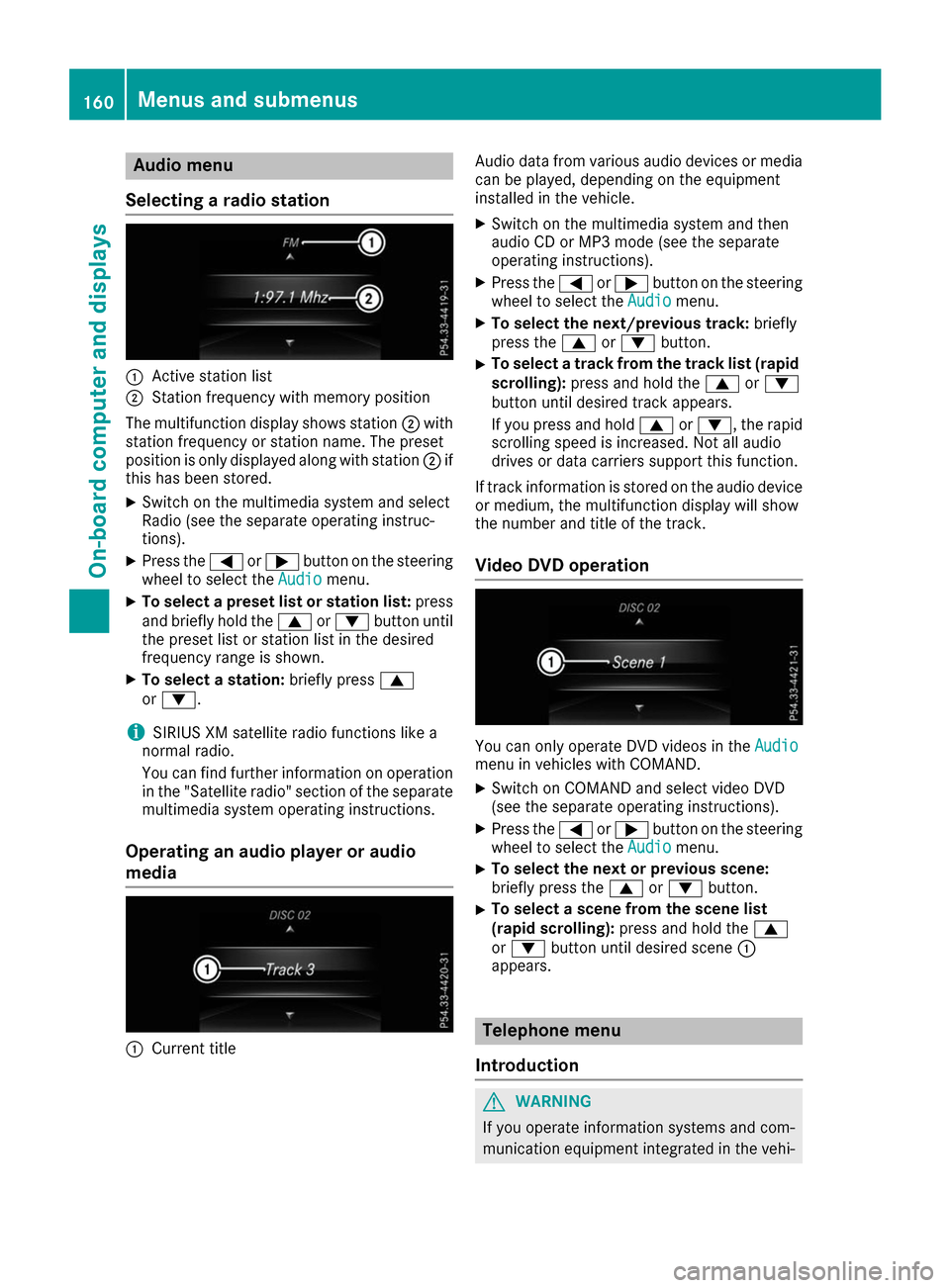
Selecting a radio station 0043
Active station list
0044 Station frequency with memory position
The multifunction display shows station 0044with
station frequency or station name. The preset
position is only displayed along with station 0044if
this has been stored.
X Switch on the multimedia system and select
Radio (see the separate operating instruc-
tions).
X Press the 0059or0065 button on the steering
wheel to select the Audio
Audio menu.
X To select a preset list or station list: press
and briefly hold the 0063or0064 button until
the preset list or station list in the desired
frequency range is shown.
X To select a station: briefly press0063
or 0064.
i SIRIUS XM satellite radio functions like a
normal radio.
You can find further information on operation in the "Satellite radio" section of the separate
multimedia system operating instructions.
Operating an audio player or audio
media 0043
Current title Audio data from various audio devices or media
can be played, depending on the equipment
installed in the vehicle.
X Switch on the multimedia system and then
audio CD or MP3 mode (see the separate
operating instructions).
X Press the 0059or0065 button on the steering
wheel to select the Audio Audiomenu.
X To select the next/previous track: briefly
press the 0063or0064 button.
X To select a track from the track list (rapid
scrolling): press and hold the 0063or0064
button until desired track appears.
If you press and hold 0063or0064, the rapid
scrolling speed is increased. Not all audio
drives or data carriers support this function.
If track information is stored on the audio device or medium, the multifunction display will show
the number and title of the track.
Video DVD operation You can only operate DVD videos in the
Audio Audio
menu in vehicles with COMAND.
X Switch on COMAND and select video DVD
(see the separate operating instructions).
X Press the 0059or0065 button on the steering
wheel to select the Audio
Audiomenu.
X To select the next or previous scene:
briefly press the
0063or0064 button.
X To select a scene from the scene list
(rapid scrolling): press and hold the 0063
or 0064 button until desired scene 0043
appears. Telephone menu
Introduction G
WARNING
If you operate information systems and com-
munication equipment integrated in the vehi- 160
Menus and sub
menusOn-board computer and displays
Page 204 of 290
Operating system
Overview
General notes !
Do not use the space in front of the display
for storage. Objects placed here could dam-
age the display or impair its function. Avoid
any direct contact with the display surface.
Pressure on the display surface may result in
impairments to the display, which could be
irreversible.
Wearing polarized sunglasses may impair your
ability to read the display.
The display has an automatic temperature-con- trolled switch-off feature. The brightness is
automatically reduced if the temperature is too
high. The display may temporarily switch off
completely.
Cleaning instructions !
Do not touch the display. The display has a
very sensitive high-gloss surface; there is a
risk of scratching. If you have to clean the
screen, however, use a mild cleaning agent
and a soft, lint-free cloth.
The display must be switched off and have
cooled down before you start cleaning. Do not
apply pressure to the display surface when
cleaning it, as this could cause irreversible dam-
age to the display.
Switching the multimedia system
on/off X
Press the 0043control knob.
Adjusting the volume X
Turn the 0043control knob.
The volume is adjusted:
R for the currently selected media source
R during traffic or navigation announcements
R in hands-free mode during a phone call
Switching the sound on or off X
Press the 0063button on the control panel.
If the audio output is switched off, the status
line will show the 0063symbol. If you switch the media source or set the volume, the sound
is automatically switched on.
i Navigation announcements will be heard
even if the sound is muted.
Functions The multimedia system has the following func-
tions:
R Radio mode
R Media mode with media search
R Sound systems
R Navigation system
COMAND: navigation via the hard drive
Audio 20: navigation via SD card
R Communication functions
R SIRIUS Weather (COMAND)
R Vehicle functions with system settings
R Favorites functions
Controller The controller in the center console lets you:
R select menu items on the display
R enter characters
R select a destination on the map
R save entries
The controller can be:
R turned 3
R slid left or right 1
R slid forwards or back 4
R slid diagonally 2
R pressed briefly or pressed and held 7
Back button You can use the
0038button to exit a menu or to
call up the basic display of the current operating mode.
X To exit the menu: briefly press the0038
button.
The multimedia system changes to the next
higher menu level in the current operating
mode.
X To call up the basic display: press the0038
button for longer than two seconds.
The multimedia system changes to the basic
display of the current operating mode. 202
Operating systemMultimedia system
Page 205 of 290
Favorites
Calling up and exiting favorites X
To call up: press the007Dbutton on the con-
troller.
X Select a favorite, e.g. Vehicle
Vehicle.
The favorites are displayed.
X To exit: press the 007Dbutton again.
Adding favorites Adding a predefined favorite
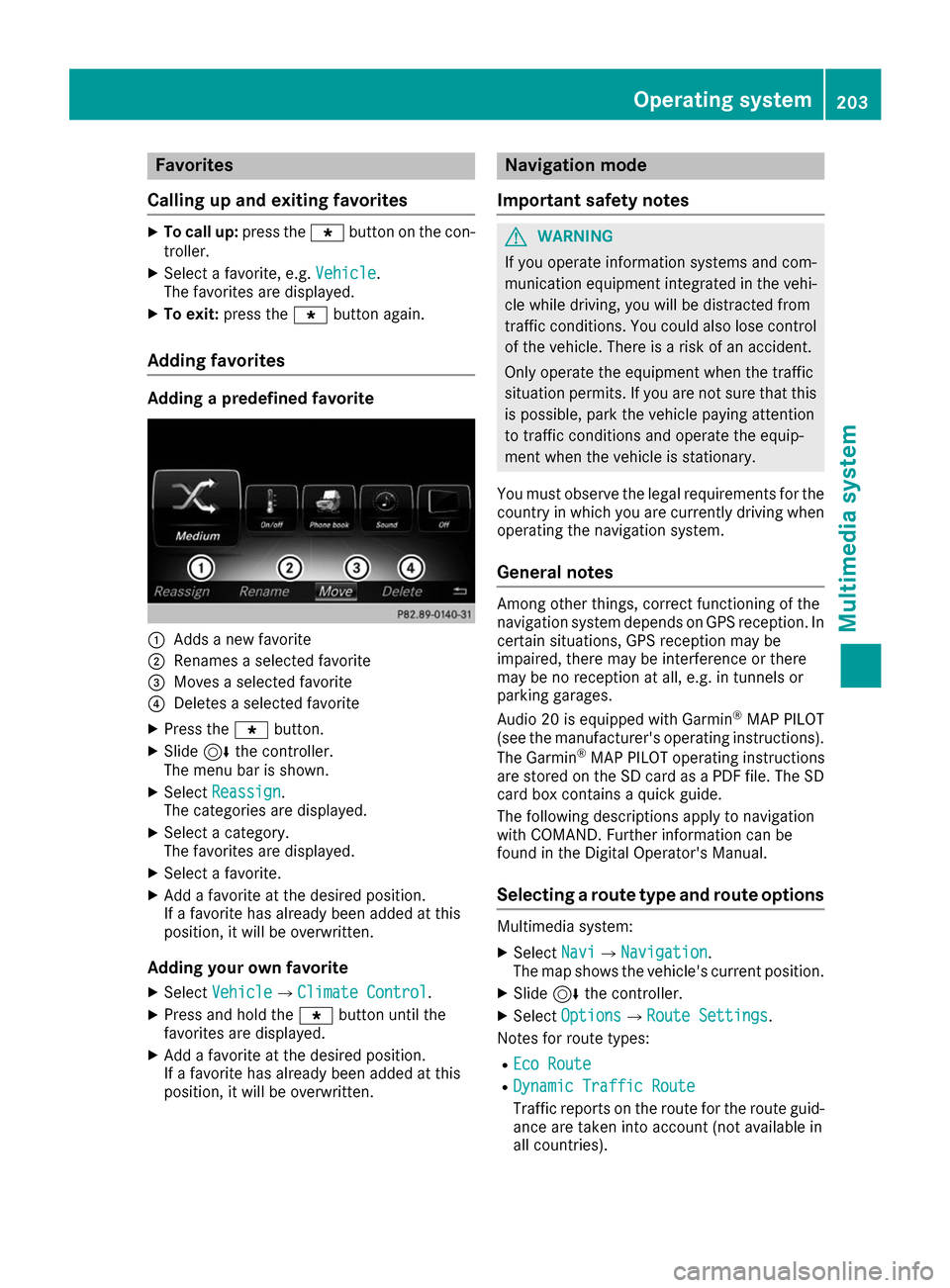
0043
Adds a new favorite
0044 Renames a selected favorite
0087 Moves a selected favorite
0085 Deletes a selected favorite
X Press the 007Dbutton.
X Slide 6the controller.
The menu bar is shown.
X Select Reassign
Reassign.
The categories are displayed.
X Select a category.
The favorites are displayed.
X Select a favorite.
X Add a favorite at the desired position.
If a favorite has already been added at this
position, it will be overwritten.
Adding your own favorite
X Select Vehicle
Vehicle007BClimate Control Climate Control.
X Press and hold the 007Dbutton until the
favorites are displayed.
X Add a favorite at the desired position.
If a favorite has already been added at this
position, it will be overwritten. Navigation mode
Important safety notes G
WARNING
If you operate information systems and com-
munication equipment integrated in the vehi- cle while driving, you will be distracted from
traffic conditions. You could also lose control of the vehicle. There is a risk of an accident.
Only operate the equipment when the traffic
situation permits. If you are not sure that this
is possible, park the vehicle paying attention
to traffic conditions and operate the equip-
ment when the vehicle is stationary.
You must observe the legal requirements for the country in which you are currently driving whenoperating the navigation system.
General notes Among other things, correct functioning of the
navigation system depends on GPS reception. In
certain situations, GPS reception may be
impaired, there may be interference or there
may be no reception at all, e.g. in tunnels or
parking garages.
Audio 20 is equipped with Garmin ®
MAP PILOT
(see the manufacturer's operating instructions).
The Garmin ®
MAP PILOT operating instructions
are stored on the SD card as a PDF file. The SD
card box contains a quick guide.
The following descriptions apply to navigation
with COMAND. Further information can be
found in the Digital Operator's Manual.
Selecting a route type and route options Multimedia system:
X Select Navi
Navi007BNavigation Navigation.
The map shows the vehicle's current position.
X Slide 6the controller.
X Select Options
Options007BRoute Settings Route Settings.
Notes for route types:
R Eco Route Eco Route
R Dynamic Traffic Route
Dynamic Traffic Route
Traffic reports on the route for the route guid-
ance are taken into account (not available in
all countries). Operating system
203Multimedia system Z
Page 222 of 290
Have the system checked at the nearest
Mercedes-Benz Service Center or contact the
following service hotlines:
Mercedes-Benz Customer Assistance Center at
1-800-FOR-MERCede s (1-800-367-6372) or
1-866-990-9007
Emergency call Important safety notes
G
WARNING
It can be dangerous to remain in the vehicle,
even if you have pressed the SOS button in an emergency if:
R you see smoke inside or outside of the vehi-
cle, e.g. if there is a fire after an accident
R the vehicle is on a dangerous section of
road
R the vehicle is not visible or cannot easily be
seen by other road users, particularly whendark or in poor visibility conditions
There is a risk of an accident and injury.
Leave the vehicle immediately in this or simi-
lar situations as soon as it is safe to do so.
Move to a safe location along with other vehi-
cle occupants. In such situations, secure the
vehicle in accordance with national regula-
tions, e. g. with a warning triangle.
General notes
Observe the notes on system activation
(Y page 219).
An emergency call is dialed automatically if an
air bag or Emergency Tensioning Device is trig-
gered. You cannot end an automatically trig-
gered emergency call yourself.
An emergency call can also be initiated man-
ually.
As soon as the emergency call has been initi-
ated, the indicator lamp in the SOS button
flashes. The Connecting Call
Connecting Call message
appears in the multifunction display.
The audio output is muted.
Once the connection has been made, the Call Call
Connected
Connected message appears in the multifunc-
tion display. All important information on the emergency is
transmitted, for example:
R current location of the vehicle (as determined
by the GPS system)
R vehicle identification number
R information on the severity of the accident
Shortly after the emergency call has been initi-
ated, a voice connection is automatically estab- lished between the Customer Assistance Center
and the vehicle occupants.
R If the vehicle occupants respond, the
Mercedes-Benz Customer Assistance Center
attempts to get more information on the
emergency.
R If there is no response from the vehicle occu-
pants, an ambulance is immediately sent to
the vehicle.
If no voice connection can be established to the
Mercedes-Benz Customer Assistance Center,
the system has been unable to initiate an emer- gency call.
This can occur, for example, if the relevant
mobile phone network is not available. The indi-cator lamp in the SOS button flashes continu-
ously.
The Call Failed Call Failed message appears in the mul-
tifunction display and must be confirmed.
In this case, summon assistance by other
means.
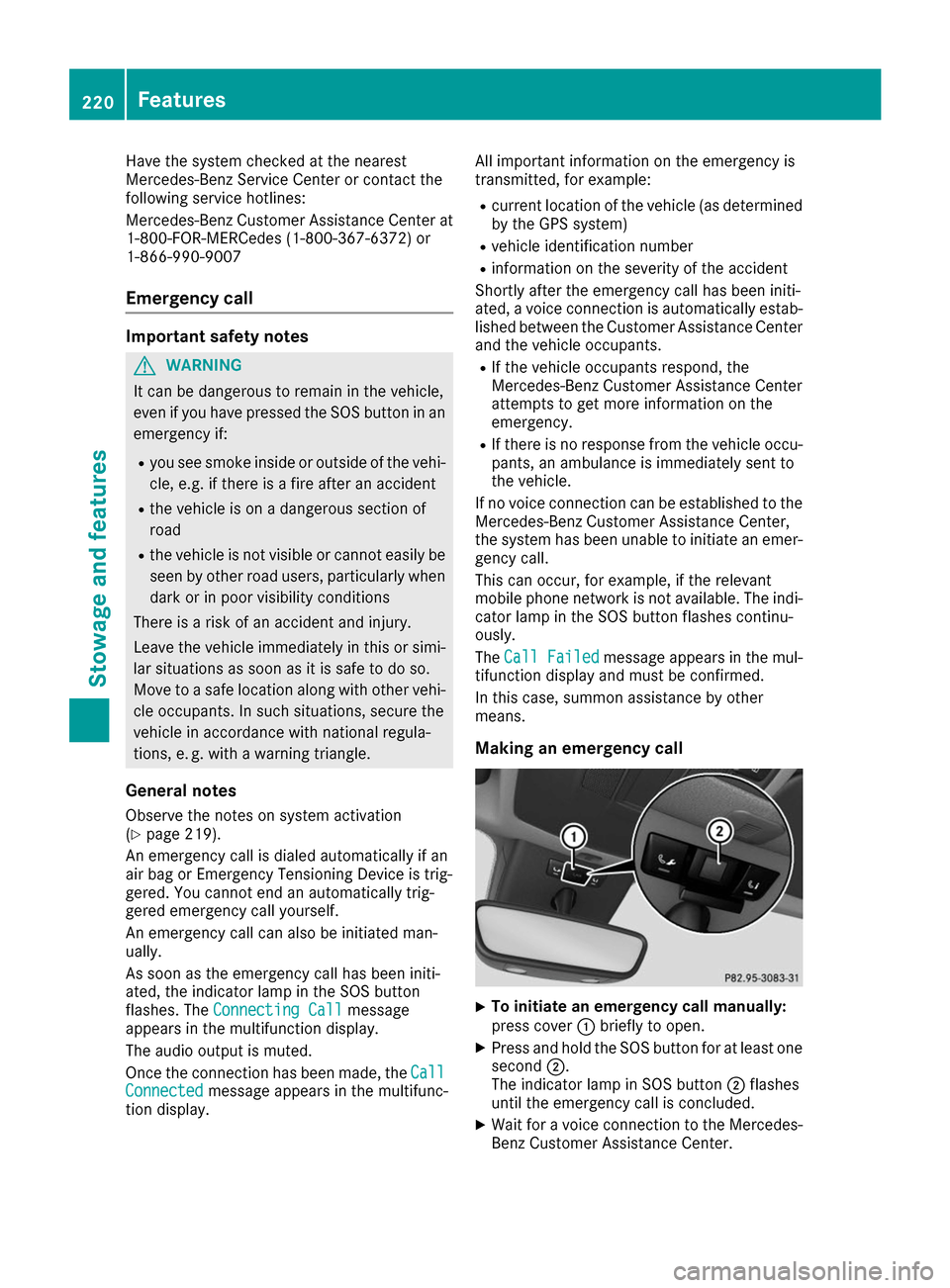
Making an emergency call X
To initiate an emergency call manually:
press cover 0043briefly to open.
X Press and hold the SOS button for at least one
second 0044.
The indicator lamp in SOS button 0044flashes
until the emergency call is concluded.
X Wait for a voice connection to the Mercedes-
Benz Customer Assistance Center. 220
FeaturesSto
wage an d features
Page 223 of 290
X
To end a call: press the0076button on the
multifunction steering wheel.
or X Press the corresponding multimedia system
button for ending a phone call.
X After the emergency call, close cover 0043.
If the mobile phone network is unavailable,
mbrace will not be able to make the emergency
call. If you leave the vehicle immediately after
pressing SOS button 0044, you do not know if
mbrace has successfully made the emergency
call. In this case, always summon assistance by other means.
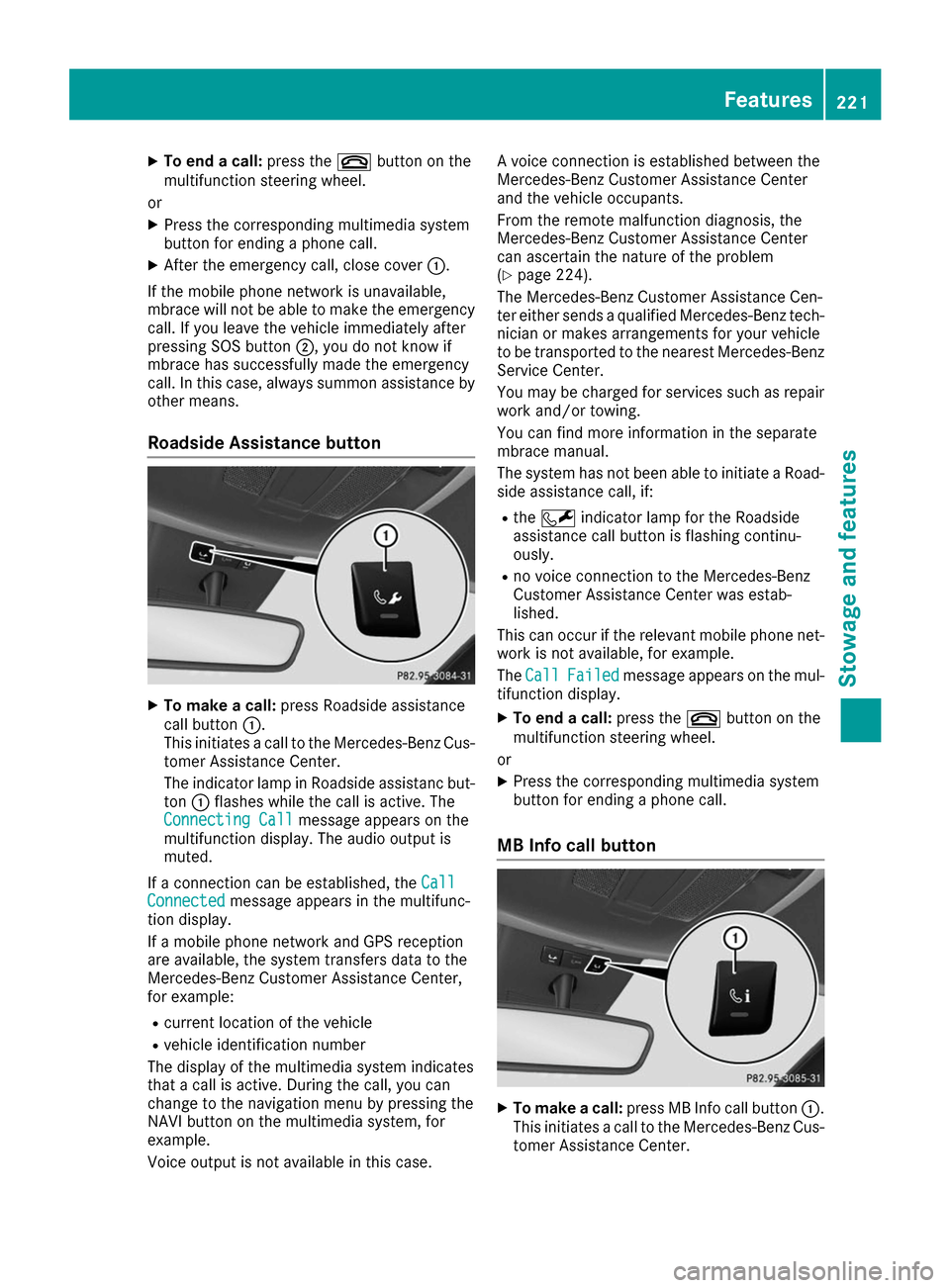
Roadside Assistance button X
To make a call: press Roadside assistance
call button 0043.
This initiates a call to the Mercedes-Benz Cus-
tomer Assistance Center.
The indicator lamp in Roadside assistanc but- ton 0043flashes while the call is active. The
Connecting Call
Connecting Call message appears on the
multifunction display. The audio output is
muted.
If a connection can be established, the Call
Call
Connected Connected message appears in the multifunc-
tion display.
If a mobile phone network and GPS reception
are available, the system transfers data to the
Mercedes-Benz Customer Assistance Center,
for example:
R current location of the vehicle
R vehicle identification number
The display of the multimedia system indicates
that a call is active. During the call, you can
change to the navigation menu by pressing the
NAVI button on the multimedia system, for
example.
Voice output is not available in this case. A voice connection is established between the
Mercedes-Benz Customer Assistance Center
and the vehicle occupants.
From the remote malfunction diagnosis, the
Mercedes-Benz Customer Assistance Center
can ascertain the nature of the problem
(Y
page 224).
The Mercedes-Benz Customer Assistance Cen-
ter either sends a qualified Mercedes-Benz tech-
nician or makes arrangements for your vehicle
to be transported to the nearest Mercedes-Benz
Service Center.
You may be charged for services such as repair work and/or towing.
You can find more information in the separate
mbrace manual.
The system has not been able to initiate a Road-
side assistance call, if:
R the 0052 indicator lamp for the Roadside
assistance call button is flashing continu-
ously.
R no voice connection to the Mercedes-Benz
Customer Assistance Center was estab-
lished.
This can occur if the relevant mobile phone net- work is not available, for example.
The Call Call Failed
Failed message appears on the mul-
tifunction display.
X To end a call: press the0076button on the
multifunction steering wheel.
or X Press the corresponding multimedia system
button for ending a phone call.
MB Info call button X
To make a call: press MB Info call button 0043.
This initiates a call to the Mercedes-Benz Cus-
tomer Assistance Center. Features
221Stowage an d features Z
Page 224 of 290
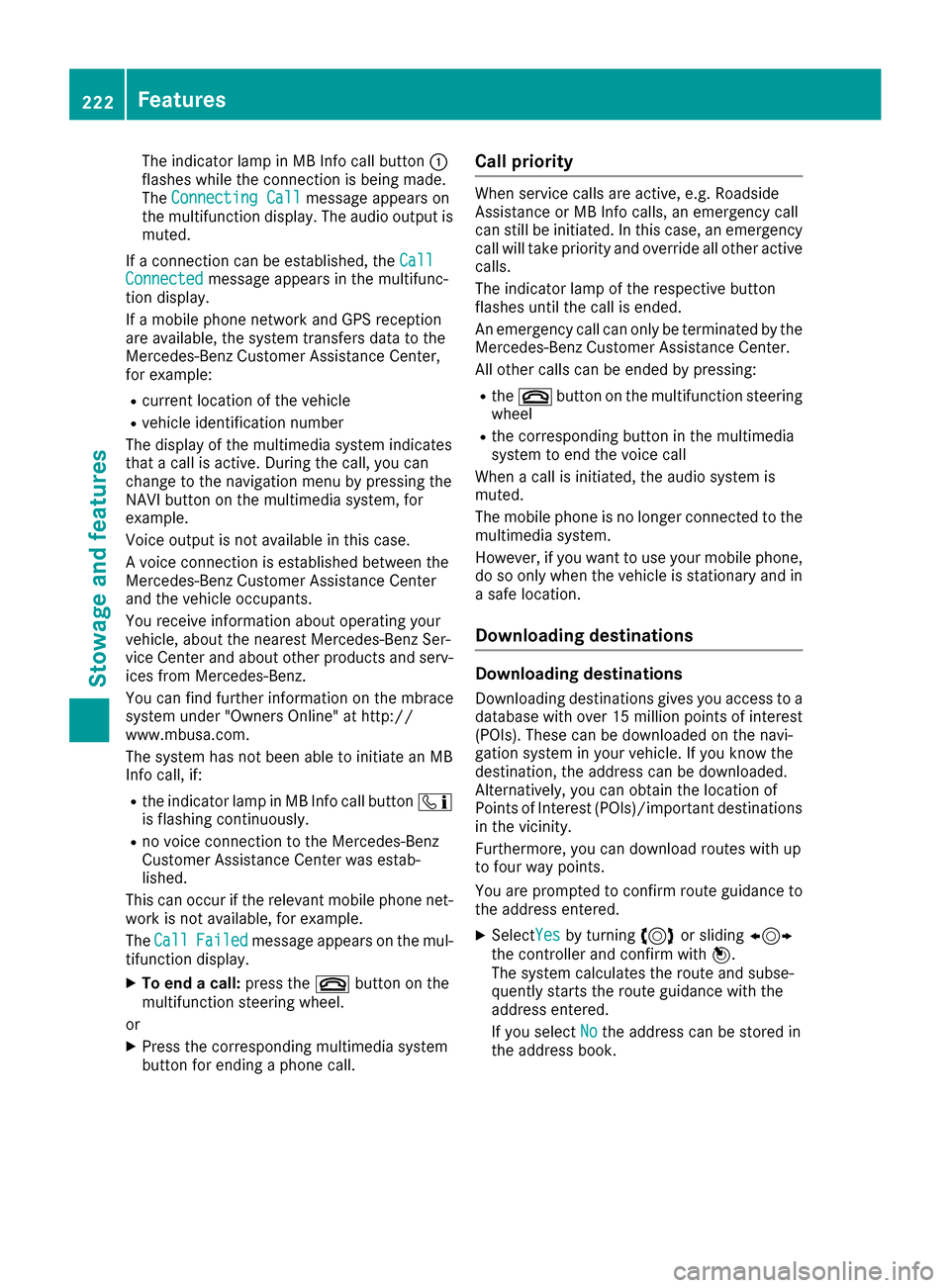
The indicator lamp in MB Info call button
0043
flashes while the connection is being made.
The Connecting Call
Connecting Call message appears on
the multifunction display. The audio output is
muted.
If a connection can be established, the Call
Call
Connected Connected message appears in the multifunc-
tion display.
If a mobile phone network and GPS reception
are available, the system transfers data to the
Mercedes-Benz Customer Assistance Center,
for example:
R current location of the vehicle
R vehicle identification number
The display of the multimedia system indicates
that a call is active. During the call, you can
change to the navigation menu by pressing the
NAVI button on the multimedia system, for
example.
Voice output is not available in this case.
A voice connection is established between the
Mercedes-Benz Customer Assistance Center
and the vehicle occupants.
You receive information about operating your
vehicle, about the nearest Mercedes-Benz Ser-
vice Center and about other products and serv- ices from Mercedes-Benz.
You can find further information on the mbrace
system under "Owners Online" at http://
www.mbusa.com.
The system has not been able to initiate an MB
Info call, if:
R the indicator lamp in MB Info call button 00D9
is flashing continuously.
R no voice connection to the Mercedes-Benz
Customer Assistance Center was estab-
lished.
This can occur if the relevant mobile phone net-
work is not available, for example.
The Call
Call Failed Failed message appears on the mul-
tifunction display.
X To end a call: press the0076button on the
multifunction steering wheel.
or X Press the corresponding multimedia system
button for ending a phone call. Call priority When service calls are active, e.g. Roadside
Assistance or MB Info calls, an emergency call
can still be initiated. In this case, an emergency
call will take priority and override all other active
calls.
The indicator lamp of the respective button
flashes until the call is ended.
An emergency call can only be terminated by the
Mercedes-Benz Customer Assistance Center.
All other calls can be ended by pressing:
R the 0076 button on the multifunction steering
wheel
R the corresponding button in the multimedia
system to end the voice call
When a call is initiated, the audio system is
muted.
The mobile phone is no longer connected to the
multimedia system.
However, if you want to use your mobile phone, do so only when the vehicle is stationary and ina safe location.
Downloading destinations Downloading destinations
Downloading destinations gives you access to a database with over 15 million points of interest(POIs). These can be downloaded on the navi-
gation system in your vehicle. If you know the
destination, the address can be downloaded.
Alternatively, you can obtain the location of
Points of Interest (POIs)/important destinationsin the vicinity.
Furthermore, you can download routes with up
to four way points.
You are prompted to confirm route guidance to
the address entered.
X SelectYes Yesby turning 3or sliding 1
the controller and confirm with 7.
The system calculates the route and subse-
quently starts the route guidance with the
address entered.
If you select No Nothe address can be stored in
the address book. 222
FeaturesStowage and features