heating MERCEDES-BENZ B-Class 2017 W246 User Guide
[x] Cancel search | Manufacturer: MERCEDES-BENZ, Model Year: 2017, Model line: B-Class, Model: MERCEDES-BENZ B-Class 2017 W246Pages: 290, PDF Size: 19.81 MB
Page 107 of 290
Notes on the automatic reversing feature for the
side windows (Y page 75).
i If you open the side windows manually after
closing them with the convenience closing
feature, they will remain in this position when
opened using the convenience opening fea-
ture. Pre-entry climate control via Smart-
Key
General notes Before getting in, the vehicle interior can be
briefly warmed or ventilated in advance. In addi-
tion, the air from the air vent can be pre-cooled.
The high-voltage battery must be sufficiently
charged before the "Pre-entry climate control
via key" function can be activated.
Activating/deactivating When the vehicle is unlocked using the Smart-
Key or KEYLESS-GO, the climate control func-
tions are activated.
The pre-cooling and pre-heating climate control functions last 5 minutes.
When the vehicle is pre-cooled, the following
functions are activated as necessary:
R Climate control system
R Cooling with air dehumidification
R Blower
When the vehicle is pre-heated, the following
functions are activated as necessary:
R Climate control system
R Blower
R Seat heating
R Windshield heating
R Rear window defroster
Pre-entry climate control is automatically
switched off when operational readiness mode
is requested.
Activating or deactivating You can activate and deactivate the pre-entry
climate control (via SmartKey) function using
the on-board computer in the E-CELL
E-CELL submenu
(Y page 164). i
If the condition of charge of the high-voltage
battery is below the specified minimum con-
dition of charge, pre-entry climate control will not be activated even if it has been set. Pre-entry climate control at departure
time and immediate pre-entry climate
control
Important safety notes G
WARNING
If persons, particularly children are subjected to prolonged exposure to extreme heat or
cold, there is a risk of injury, possibly even
fatal. Never leave children unattended in the
vehicle.
General notes Using the "Pre-entry climate control at depar-
ture time" function, you can cool or heat the
vehicle interior prior to the desired departure
time.
When using the "Pre-entry climate control at
departure time" function, the condition of
charge of the high-voltage battery must be
higher than the specified minimum condition of charge.
The running time of the climate control may be
reduced if:
R the vehicle is not connected to an electric
power supply
R the high-voltage battery is not fully charged
With active "Pre-entry climate control at depar-
ture time" the condition of charge of the high-
voltage battery can be reduced, even if the
charge cable connector is connected.
In certain situations, the desired interior tem-
perature cannot be reached.
When the vehicle is cooled, the following func-
tions are activated as necessary:
R Climate control system
R Cooling with air dehumidification
R Blower
When the vehicle is heated, the following func-
tions are activated as necessary:
R Climate control system
R Blower Operating the climate control systems
105Climate control Z
Page 108 of 290
R
Seat heating
R Windshield heating
R Rear window defroster
"Immediate pre-entry climate control" is auto-
matically switched off when operational readi-
ness mode is requested.
Setting the departure time You can set a departure time for the "Pre-entry
climate control at departure time". Your vehicle
will then be cooled or heated until the desired
temperature is reached in time for the set depar-
ture time. "Pre-entry climate control at depar-
ture time" will be activated a maximum of
35 minutes before departure. If the departure is delayed, the vehicle will be heated or cooled fora further five minutes.
You can set the desired departure time in the E-
E-
CELL
CELL submenu on the on-board computer
(Y page 163).
Activating immediate pre-entry climate
control You can activate "Immediate pre-entry climate
control" even if the vehicle interior is already at
the desired temperature. This means that the
vehicle interior continues to be cooled or
heated, e.g. if the journey is interrupted for up to
50 minutes, and the interior temperature is kept constant. You can only set the desired temper-
ature using the climate control unit. If you do not
pre-select a temperature, the last temperature
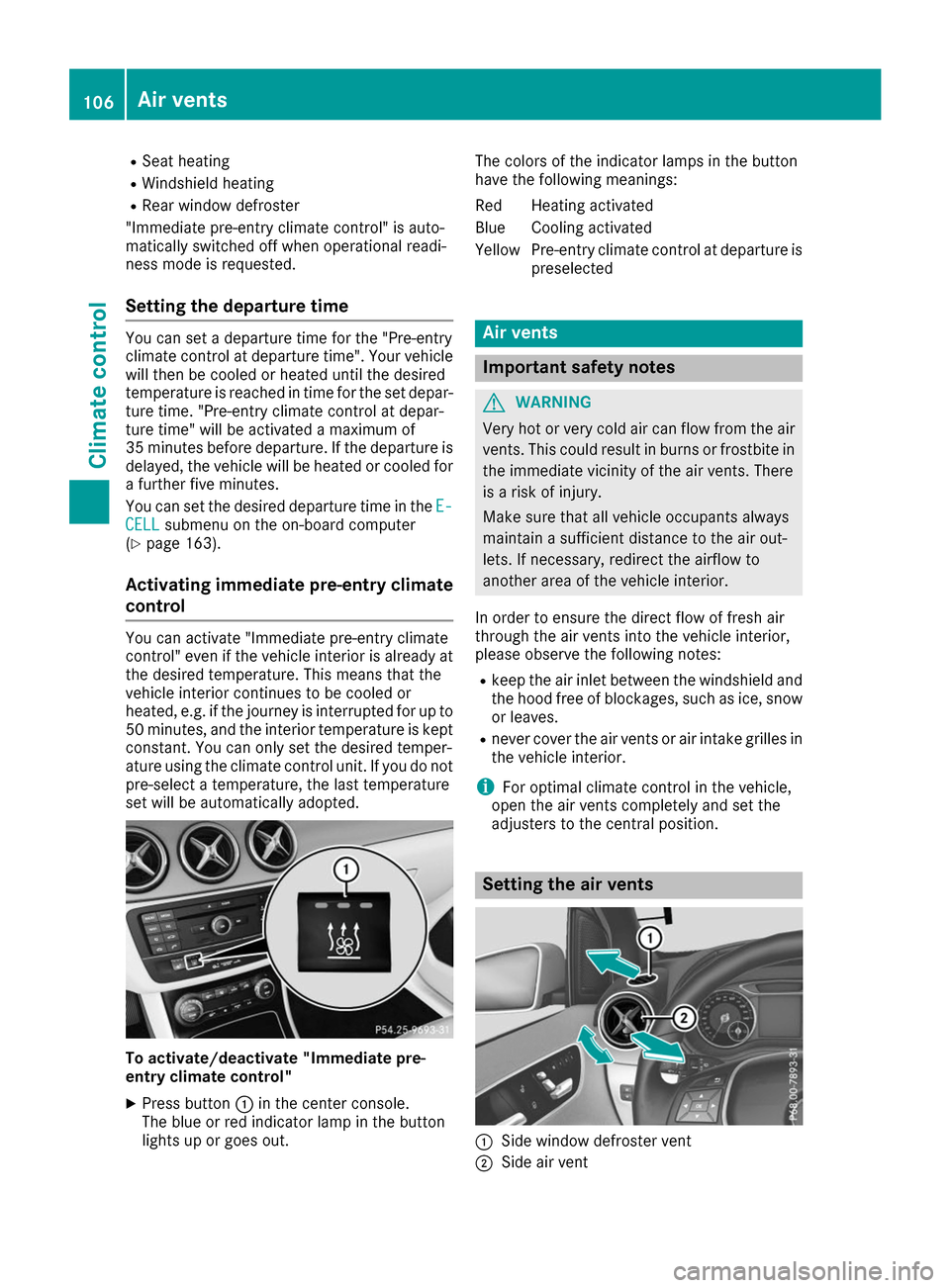
set will be automatically adopted. To activate/deactivate "Immediate pre-
entry climate control"
X Press button 0043in the center console.
The blue or red indicator lamp in the button
lights up or goes out. The colors of the indicator lamps in the button
have the following meanings:
Re
dH eating activated
Blue Cooling activated
Yellow Pre-entry climate control at departure is preselected Air vents
Important safety notes
G
WARNING
Very hot or very cold air can flow from the air vents. This could result in burns or frostbite in the immediate vicinity of the air vents. There
is a risk of injury.
Make sure that all vehicle occupants always
maintain a sufficient distance to the air out-
lets. If necessary, redirect the airflow to
another area of the vehicle interior.
In order to ensure the direct flow of fresh air
through the air vents into the vehicle interior,
please observe the following notes:
R keep the air inlet between the windshield and
the hood free of blockages, such as ice, snow or leaves.
R never cover the air vents or air intake grilles in
the vehicle interior.
i For optimal climate control in the vehicle,
open the air vents completely and set the
adjusters to the central position. Setting the air vents
0043
Side window defroster vent
0044 Side air vent 106
Air ventsClimate control
Page 117 of 290
E+ Economy Plus
Drive program
E+is characterized by the fol-
lowing:
R reduced torque and significantly reduced
power. This supports an especially efficient
and even driving style and results in a reduc-
tion in speed to approximately 70 mph
(110 km/h).
R the vehicle pulling away more gently in
forward gear unless the accelerator pedal is
depressed fully.
R the wheels are less likely to spin.
R particularly efficient overrun.
R full power output by using kickdown.
R the performance of air-conditioning system
and heating are reduced. Steering wheel paddle shifters
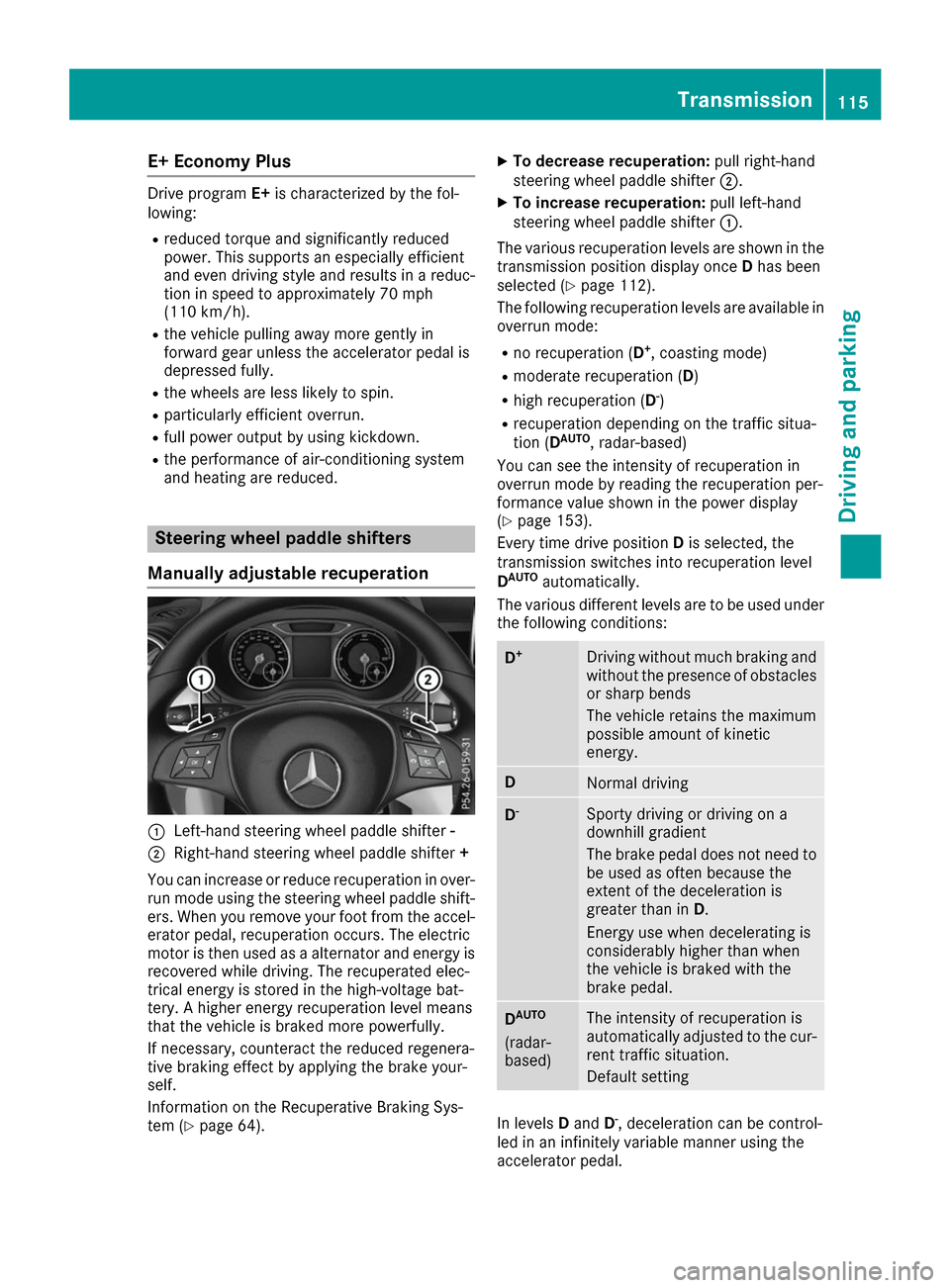
Manually adjustable recuperation 0043
Left-hand steering wheel paddle shifter -
0044 Right-hand steering wheel paddle shifter +
You can increase or reduce recuperation in over- run mode using the steering wheel paddle shift-
ers. When you remove your foot from the accel-
erator pedal, recuperation occurs. The electric
motor is then used as a alternator and energy is recovered while driving. The recuperated elec-
trical energy is stored in the high-voltage bat-
tery. A higher energy recuperation level means
that the vehicle is braked more powerfully.
If necessary, counteract the reduced regenera-
tive braking effect by applying the brake your-
self.
Information on the Recuperative Braking Sys-
tem (Y page 64). X
To decrease recuperation: pull right-hand
steering wheel paddle shifter 0044.
X To increase recuperation: pull left-hand
steering wheel paddle shifter 0043.
The various recuperation levels are shown in the
transmission position display once Dhas been
selected (Y page 112).
The following recuperation levels are available in
overrun mode:
R no recuperation (D +
, coasting mode)
R moderate recuperation ( D)
R high recuperation ( D-
)
R recuperation depending on the traffic situa-
tion (D AUTO
, radar-based)
You can see the intensity of recuperation in
overrun mode by reading the recuperation per-
formance value shown in the power display
(Y page 153).
Every time drive position Dis selected, the
transmission switches into recuperation level
D AUTO
automatically.
The various different levels are to be used under the following conditions: D
+ Driving without much braking and
without the presence of obstacles
or sharp bends
The vehicle retains the maximum
possible amount of kinetic
energy. D
Normal driving
D
- Sporty driving or driving on a
downhill gradient
The brake pedal does not need to
be used as often because the
extent of the deceleration is
greater than in D.
Energy use when decelerating is
considerably higher than when
the vehicle is braked with the
brake pedal. D
AUTO
(radar-
based) The intensity of recuperation is
automatically adjusted to the cur-
rent traffic situation.
Default setting In levels
Dand D-
, deceleration can be control-
led in an infinitely variable manner using the
accelerator pedal. Transmission
115Driving and parking Z
Page 120 of 290
R
Never use damaged charging cables.
R Do not extend the charging cable.
R Do not use an adapter.
R Always observe the safety notes in the wall-
box's operating instructions.
The vehicle's high voltage electrical system is
under high voltage.
R Do not handle high-voltage components or
the orange cables of the vehicle's high-volt-
age electrical system.
R Do not touch high-voltage components or the
orange cables of the high-voltage electrical
system when a vehicle has been involved in a
crash.
R Do not touch any damaged components or
damaged orange cables of the vehicle's high-
voltage electrical system.
R Do not remove the covers of the high-voltage
electrical system components that are
marked with a warning sticker. Notes on the charging cable
Handling the charging cable and charg-
ing cable controls Do not leave the charging cable controls
(Y
page 123) hanging loose from an electrical
outlet. Otherwise, this could result in a poor
contact with the electrical outlet and malfunc-
tions when charging the vehicle.
To ensure that the brackets within the charging cable controls are not subjected to incorrect
loads, observe the following:
R Never lift or carry the controls by the charging
cable connector or the mains plug.
R To transport the charging cable, the coiled
part can be:
- wrapped around the controls or
- secured to the housing of the controls
Heat generated by the charging cable
and charging cable connector Pay attention to the important safety notes
(Y page 117).
During the charging process, the charging cable
and charging cable connector may heat up. The charging cable and charging cable connec-
tor will only heat up within the permissible lim-
iting values, provided that:
R the power supply and the charging cable are
not damaged
R the instructions for handling the charging
cable and controls on the charging cable are
observed
Should the permissible heating temperature lim-
its be exceeded, have the mains power supply
checked.
Electrical fuse against overvoltage !
Voltage surges in the mains supply can dam-
age the vehicle. The vehicle is therefore
equipped with a device which protects it from voltage surges in the mains supply. This
device may be triggered during severe thun-
derstorms, for example, and may lead to the
building's fuse being tripped and an interrup-
tion in the power supply. These functions pro-
tect the vehicle. After the building fuse is
switched on again, the charging process
resumes automatically. Following an interrup-
tion in the power supply without tripping of
the building's fuse, it may take up to
15 minutes for charging to resume automat-
ically.
Switch on the building's fuse again after the
electrical fuse against overvoltage has been
tripped. Otherwise, the charging process cannot
be continued. The high-voltage battery will not
be charged and you may not be able to drive the vehicle.
If other devices are protected by the same pro-
tective device, these are switched off as well
when the protective device is triggered. Ensure
that these other devices are still operational
after reactivating the protection device. 118
High-voltage batteryDriving and parking
Page 122 of 290
Energy consumption and range
This range is reduced by:
R high and low outside temperatures
R a non-anticipatory driving style
R switching on consumers, e.g. air-conditioning
system or heating
The battery's physical characteristics are such
that leaving the vehicle parked for an extended
period at low outdoor temperatures without
charging it can lead to:
R a reduction in battery performance
R longer charge times
In extreme cases, this could mean that the vehi- cle cannot be started. For this reason, connect
the charging cable when leaving the vehicle
parked for long periods at low outdoor temper-
atures.
As a result of its basic characteristics, the
amount of energy available from the high-volt-
age battery decreases over the course of its life.
This reduces:
R the maximum range that can be achieved by
the vehicle
R the maximum output (acceleration) of the
vehicle
You can actively reduce the energy consump-
tion of your vehicle in a number of ways, for
example, by:
R an anticipatory driving style
R reducing the use of electrical consumers
R having the vehicle regularly maintained
The charging time of the high-voltage battery
may change over the course of its life.
Observe the displays on energy usage
(Y page 158) and range (Y page 158).
RANGE PLUS If you activate RANGE PLUS, the operating win-
dow of the battery will be extended at the next
charging process. An extended driving range will
be available to you for the next journey.
Using RANGE PLUS shortens the service life of
the battery. Therefore, only use RANGE PLUS if, for example:
R long journeys are planned or
R the availability of charging stations at the des-
tination is limited The more often RANGE PLUS is used, the more
the extended range is reduced.
Therefore always check the range display before
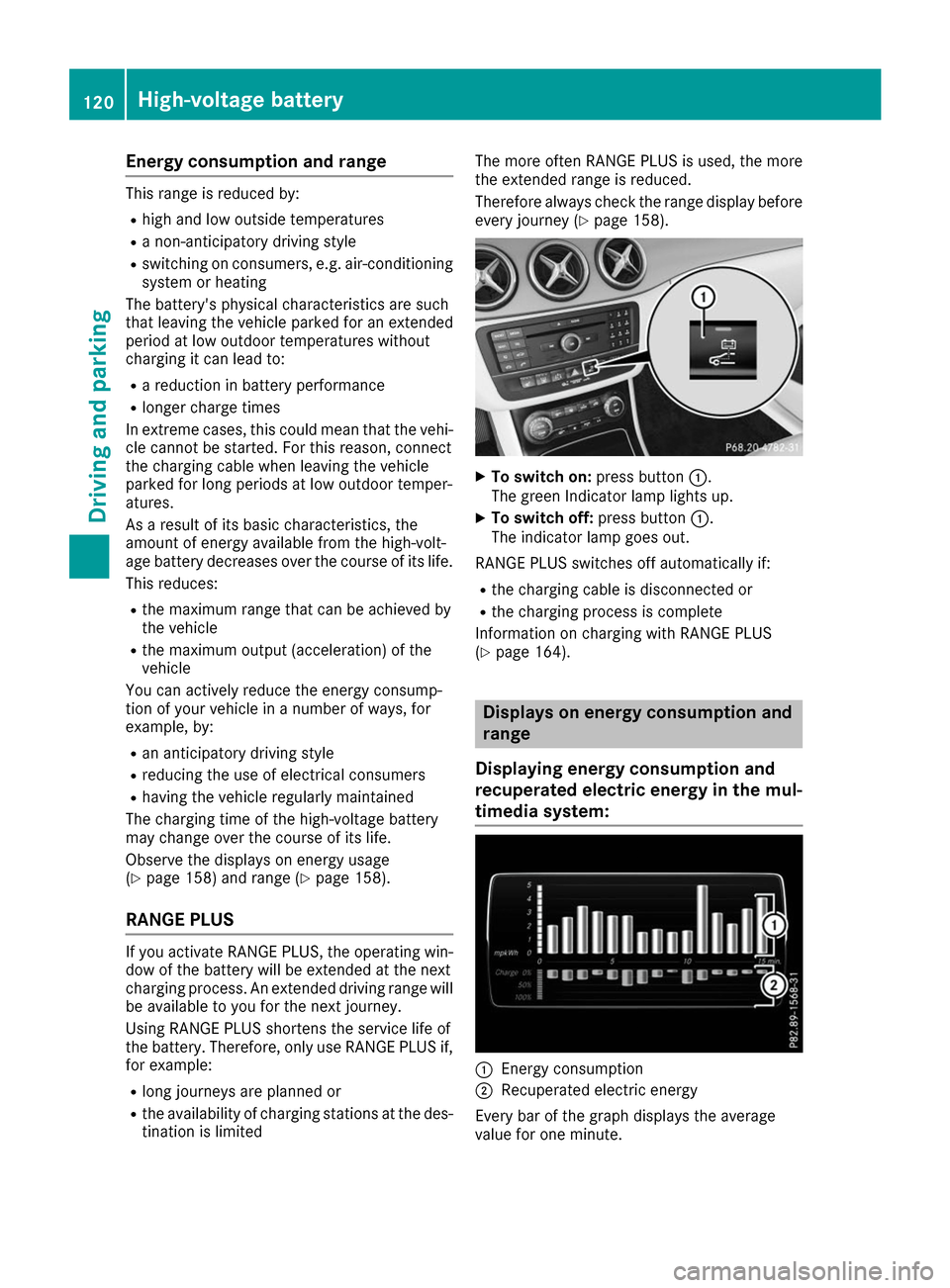
every journey (Y page 158). X
To switch on: press button0043.
The green Indicator lamp lights up.
X To switch off: press button0043.
The indicator lamp goes out.
RANGE PLUS switches off automatically if:
R the charging cable is disconnected or
R the charging process is complete
Information on charging with RANGE PLUS
(Y page 164). Displays on energy consumption and
range
Displaying energy consumption and
recuperated electric energy in the mul-
timedia system: 0043
Energy consumption
0044 Recuperated electric energy
Every bar of the graph displays the average
value for one minute. 120
High-voltage batteryDriving and parking
Page 125 of 290
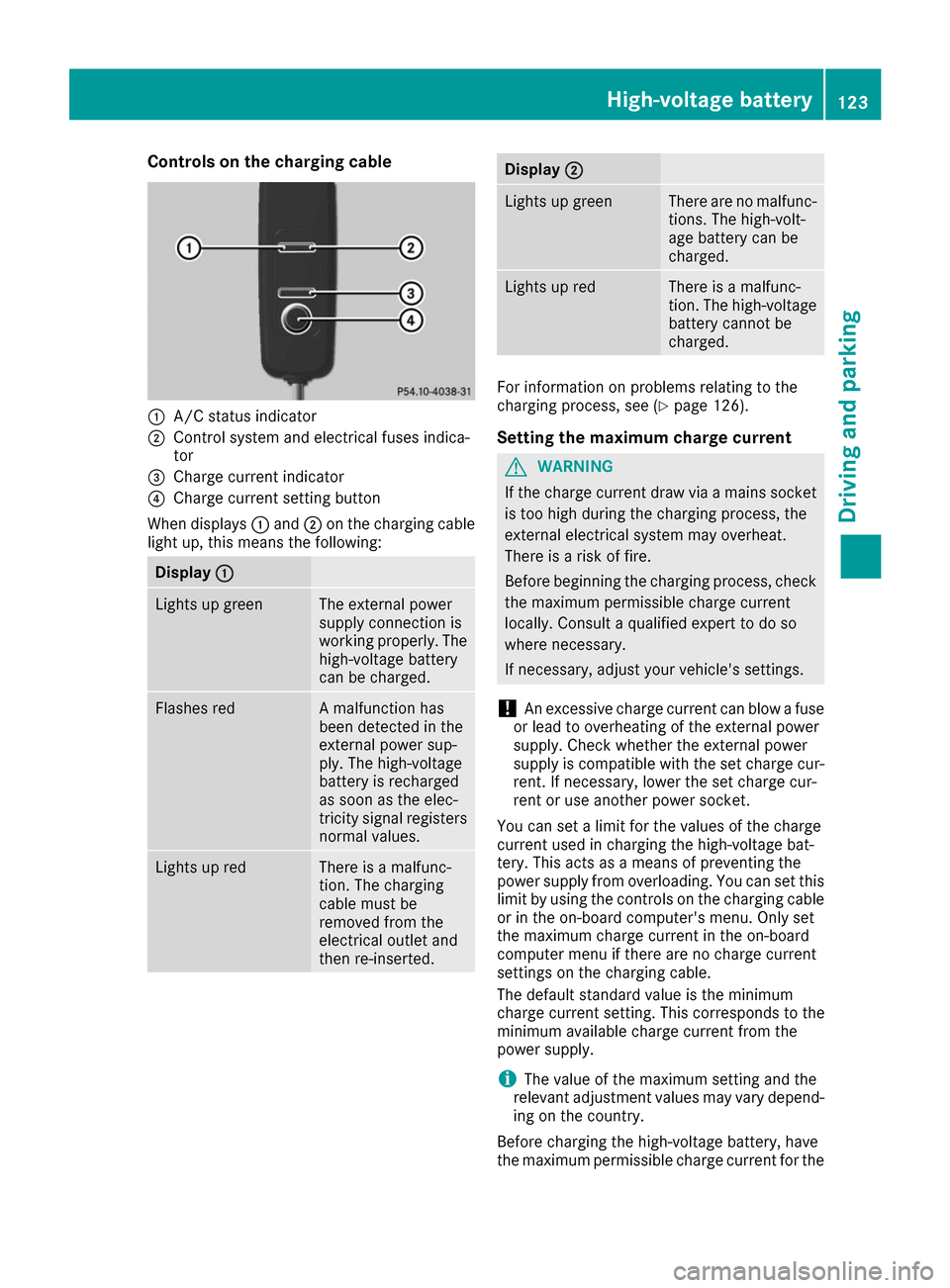
Controls on the charging cable
0043
A/C status indicator
0044 Control system and electrical fuses indica-
tor
0087 Charge current indicator
0085 Charge current setting button
When displays 0043and 0044on the charging cable
light up, this means the following: Display
0043 0043 Lights up green The external power
supply connection is
working properly. The
high-voltage battery
can be charged. Flashes red A malfunction has
been detected in the
external power sup-
ply. The high-voltage
battery is recharged
as soon as the elec-
tricity signal registers
normal values. Lights up red There is a malfunc-
tion. The charging
cable must be
removed from the
electrical outlet and
then re-inserted. Display
0044
0044 Lights up green There are no malfunc-
tions. The high-volt-
age battery can be
charged. Lights up red There is a malfunc-
tion. The high-voltage
battery cannot be
charged. For information on problems relating to the
charging process, see (Y
page 126).
Setting the maximum charge current G
WARNING
If the charge current draw via a mains socket is too high during the charging process, the
external electrical system may overheat.
There is a risk of fire.
Before beginning the charging process, check the maximum permissible charge current
locally. Consult a qualified expert to do so
where necessary.
If necessary, adjust your vehicle's settings.
! An excessive charge current can blow a fuse
or lead to overheating of the external power
supply. Check whether the external power
supply is compatible with the set charge cur-
rent. If necessary, lower the set charge cur-
rent or use another power socket.
You can set a limit for the values of the charge
current used in charging the high-voltage bat-
tery. This acts as a means of preventing the
power supply from overloading. You can set this limit by using the controls on the charging cable
or in the on-board computer's menu. Only set
the maximum charge current in the on-board
computer menu if there are no charge current
settings on the charging cable.
The default standard value is the minimum
charge current setting. This corresponds to the
minimum available charge current from the
power supply.
i The value of the maximum setting and the
relevant adjustment values may vary depend-
ing on the country.
Before charging the high-voltage battery, have
the maximum permissible charge current for the High-voltage battery
123Driving and parking Z
Page 130 of 290
must destroy documents containing the vehi-
cle verification code (VVC).
R If you have bought a used vehicle, it is possi-
ble that the previous owner still has access to
the "Vehicle Homepage". If in doubt, have a
new vehicle verification code (VVC) issued by
the Mercedes-Benz Center after purchase.
With the code you can set up access to your
vehicle, as described in the section "Setting
up a personal area" on the Vehicle Home-
page". There, you may also deactivate the
existing access of the previous owner.
Calling up functions in the "My
Mercedes Electric - Vehicle Homepage" The "My Mercedes Electric - Vehicle Homepage"
allows you access to information about your
vehicle and its functions using remote query and
remote configuration. For example, climate con- trol can be activated using remote configuration
which means that it need not be set in the vehi- cle. Power for the climate control is primarily
supplied via the charging cable connected to the mains supply. In most cases, this does not
reduce the range. If climate control is activated,the condition of charge and thus the range may
be reduced. The "Vehicle Homepage" provides
you with information all about how to use your
vehicle.
If the vehicle is entered in your personal area of
the "Vehicle Homepage", you can also access
the following functions:
R request the current condition of charge of the
high-voltage battery
R program the departure time (Y page 163)
R order and activate the "Pre-entry climate con-
trol at departure time" function
If the vehicle is charging, the predicted charging
time and the predicted range will also be shown.
This data is estimated and may be influenced by
the following factors:
R outside temperature
R switched on consumers, e.g. climate control
and seat heating
R personal driving style
R road and traffic conditions
R route characteristics
Therefore, allow for a sufficient reserve. i
Information on additional functions and
operating instructions can be found on the
"Vehicle Homepage".
Connecting the vehicle to the Internet Via a radio module
This function is not available in all countries and requires an activated mbrace access.
You can use the "Vehicle Homepage" if the vehi-
cle has a connection to the Internet via a mobile phone. The radio module uses a mobile phone
connection and transmits the necessary data by
radio. The vehicle automatically recognizes
whether a connection to the Internet via the
radio module is possible or not. No presets are
necessary.
To enable the transfer of data via the mobile
communications module, you do not need a SIM
card.
i Restrictions in reception are possible if the
vehicle is in an underground car park, for
example. Restrictions may also occur in areas with poor mobile network coverage. Parking
Important safety notes
G
WARNING
If you release the parking brake on uphill or
downhill gradients, the vehicle can begin to
move when in park position P. There is a risk
of an accident.
To avoid hazardous situations:
R prevent the parked vehicle from rolling on
uphill or downhill gradients by always
applying the parking brake.
R do not park the vehicle on uphill or downhill
gradients if the parking brake is malfunc-
tioning. 128
ParkingDriving and parking
Page 135 of 290
are completely filled at the same time, the driver
has adopted the most economical driving style
for the selected settings and prevailing condi-
tions. The ECO display border lights up.
The ECO display does not indicate the actual fuel
consumption. The additionally achieved range
displayed under Bonus fr. Start
Bonus fr. Start does not
indicate a fixed consumption reduction.
In addition to driving style, the actual consump- tion is affected by other factors, such as:
R Load
R Tire pressure
R Cold start
R Choice of route
R Active electrical consumers
These factors are not included in the ECO dis-
play.
An economical driving style specially requires
driving at moderate engine speeds.
To achieve a higher value in the categories
"Acceleration" and "Constant", drive the vehicle
in drive program E+orE.
On long journeys at a constant speed, e.g. on the highway, only the outer area for "constant" will
change.
The ECO display summarizes the driving style
from the start of the journey to its completion.
Therefore, there are more marked changes in
the outer areas at the start of a journey. On lon-
ger journeys, there are fewer changes. For more
marked changes, perform a manual rest
(Y page 158).
For more information on the ECO display, see
(Y page 156). Braking
Important safety notes G
WARNING
If you increase the recuperation level on slip- pery road surfaces, the drive wheels may lose
their traction. There is an increased danger of skidding and accidents.
Do not increase the recuperation level on slip-
pery road surfaces. The braking performance of the electric motor
using recuperative braking is, in some operating
modes, either reduced or not effective:
R when the condition of charge of the high-volt-
age battery increases
R if the high-voltage battery is not yet at a nor-
mal operating temperature
R when driving close to the maximum speed
R when the vehicle is almost stationary
R in transmission position N
R during and after ESP stability control
If you do not make an additional effort to apply
the brake yourself, the braking effect may not be
sufficient. If necessary, counteract the reduced regenerative braking effect by applying the
brake yourself.
Downhill gradients On long, steep gradients, you must reduce the
load on the brakes by selecting maximum recu-
peration. This helps you to avoid overheating the
brakes and wearing them out excessively.
Recuperation allows the vehicle to be deceler-
ated without placing a load on the braking sys-
tem.
Do not depress the brake pedal continuously
while the vehicle is in motion, e.g. causing the
brakes to rub by constantly applying light pres-
sure to the pedal. This results in excessive and
premature wear to the brake pads.
Heavy and light loads G
WARNING
If you rest your foot on the brake pedal while
driving, the braking system can overheat. This increases the stopping distance and can even
cause the braking system to fail. There is a
risk of an accident.
Never use the brake pedal as a footrest. Never
depress the brake pedal and the accelerator
pedal at the same time.
! Depressing the brake pedal constantly
results in excessive and premature wear to
the brake pads.
If the brakes have been subjected to a heavy
load, do not stop the vehicle immediately. Drive on for a short while. This allows the airflow to
cool the brakes more quickly. Driving tips
133Driving and parking Z
Page 138 of 290
their traction. There is an increased danger of
skidding and accidents.
Do not increase the recuperation level on slip- pery road surfaces.
Have your vehicle winter-proofed at a qualified
specialist workshop at the onset of winter.
Drive particularly carefully on slippery road sur- faces. Avoid sudden acceleration, steering and
braking maneuvers. Do not use cruise control.
If the vehicle threatens to skid or cannot be
stopped when moving at low speed:
X Shift the DIRECT SELECT lever to position N.
The outside temperature indicator is not
designed to serve as an ice-warning device and is therefore unsuitable for that purpose.
Changes in the outside temperature are dis-
played after a short delay.
Indicated temperatures just above the freezing
point do not guarantee that the road surface is
free of ice. The road may still be icy, especially in
wooded areas or on bridges.
You should pay special attention to road condi-
tions when temperatures are around freezing
point.
For more information on driving with snow
chains, see (Y page 259).
For more information on driving with summer
tires, see (Y page 259).
Observe the notes in the "Winter operation" sec-
tion (Y page 259). Driving systems
Cruise control
General notes Cruise control maintains a constant road speed
for you. It brakes automatically in order to avoid
exceeding the set speed. Change into transmis-
sion position D-
(Y page 115) on long and steep
downhill gradients. This increases recuperation
in overrun mode. This relieves the load on the
brake system and prevents the brakes from
overheating and wearing too quickly.
When the engine is running, you can use the
cruise control lever to limit the speed to any
speed between 20 mph (30 km/h) and the tech-
nically permitted maximum speed of the vehicle. Use cruise control only if road and traffic con-
ditions make it appropriate to maintain a steady
speed for a prolonged period.
The speed indicated in the speedometer may
differ slightly from the speed stored.
Important safety notes If you fail to adapt your driving style, cruise con-
trol can neither reduce the risk of an accident
nor override the laws of physics. Cruise control
cannot take into account the road, traffic and
weather conditions. Cruise control is only an
aid. You are responsible for the distance to the
vehicle in front, for vehicle speed, for braking in
good time and for staying in your lane.
Do not use cruise control:
R in road and traffic conditions which do not
allow you to maintain a constant speed e.g. in
heavy traffic or on winding roads
R on slippery road surfaces. Braking or accel-
erating could cause the drive wheels to lose
traction and the vehicle could then skid
R in poor visibility, e.g. due to fog, heavy rain or
snow
If there is a change of drivers, advise the new
driver of the speed stored.
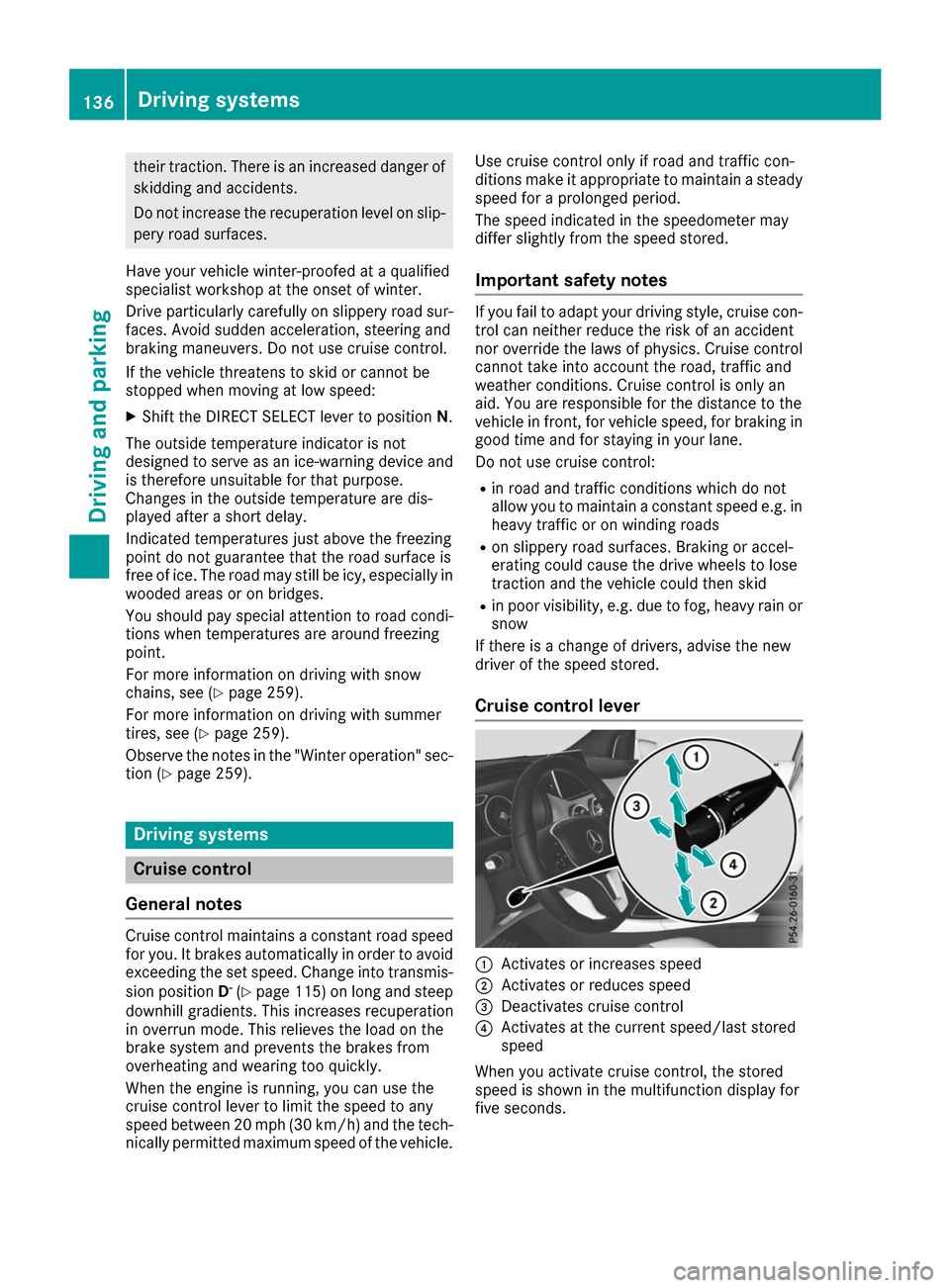
Cruise control lever 0043
Activates or increases speed
0044 Activates or reduces speed
0087 Deactivates cruise control
0085 Activates at the current speed/last stored
speed
When you activate cruise control, the stored
speed is shown in the multifunction display for
five seconds. 136
Driving systemsDriving an
d parking
Page 220 of 290
X
Vehicles with a stowage compartment
cover:
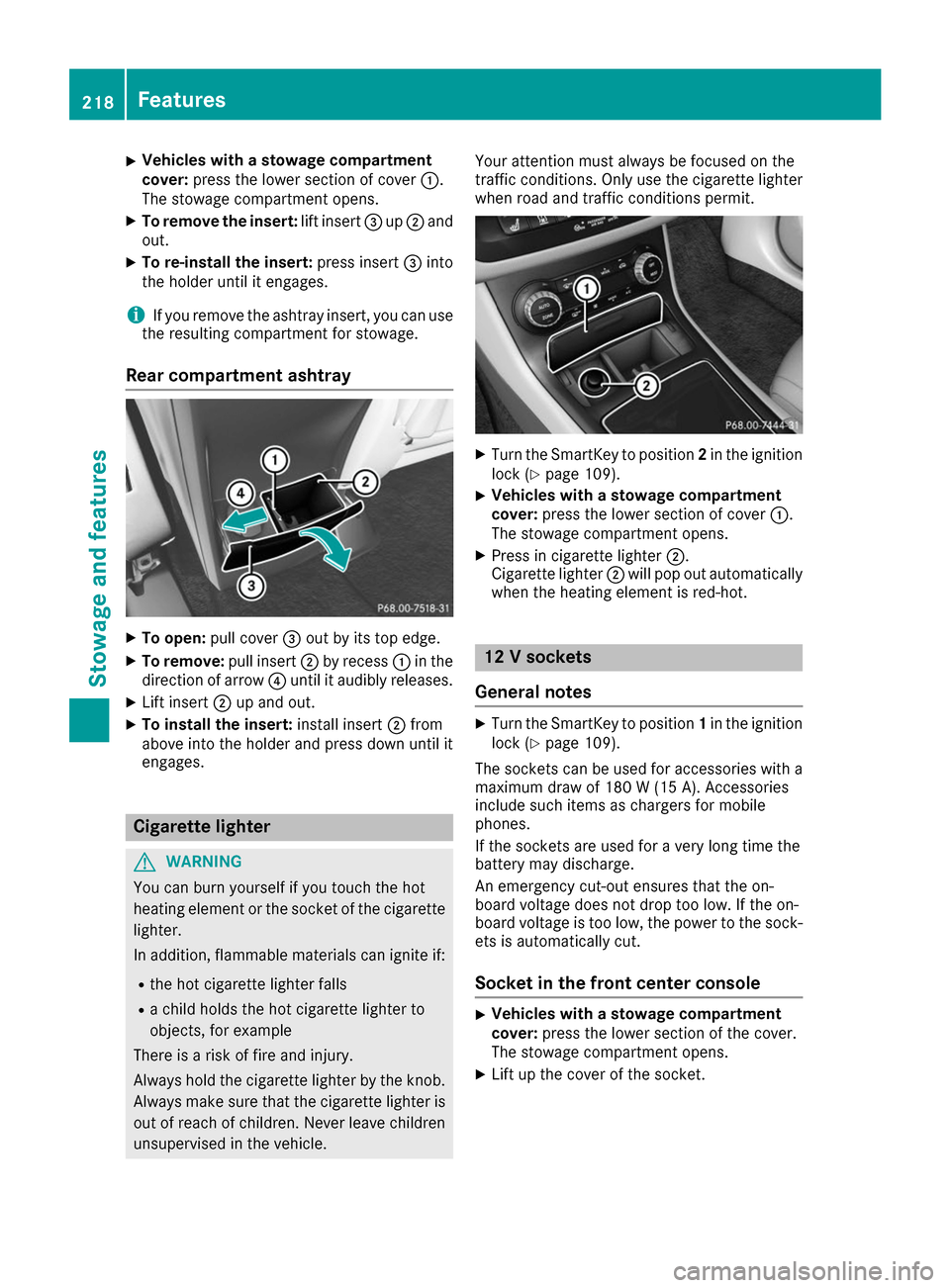
press the lower section of cover 0043.
The stowage compartment opens.
X To remove the insert: lift insert0087up0044 and
out.
X To re-install the insert: press insert0087into
the holder until it engages.
i If you remove the ashtray insert, you can use
the resulting compartment for stowage.
Rear compartment ashtray X
To open: pull cover 0087out by its top edge.
X To remove: pull insert0044by recess 0043in the
direction of arrow 0085until it audibly releases.
X Lift insert 0044up and out.
X To install the insert: install insert0044from
above into the holder and press down until it
engages. Cigarette lighter
G
WARNING
You can burn yourself if you touch the hot
heating element or the socket of the cigarette lighter.
In addition, flammable materials can ignite if:
R the hot cigarette lighter falls
R a child holds the hot cigarette lighter to
objects, for example
There is a risk of fire and injury.
Always hold the cigarette lighter by the knob.
Always make sure that the cigarette lighter is
out of reach of children. Never leave children unsupervised in the vehicle. Your attention must always be focused on the
traffic conditions. Only use the cigarette lighter when road and traffic conditions permit. X
Turn the SmartKey to position 2in the ignition
lock (Y page 109).
X Vehicles with a stowage compartment
cover: press the lower section of cover 0043.
The stowage compartment opens.
X Press in cigarette lighter 0044.
Cigarette lighter 0044will pop out automatically
when the heating element is red-hot. 12 V sockets
General notes X
Turn the SmartKey to position 1in the ignition
lock (Y page 109).
The sockets can be used for accessories with a maximum draw of 180 W (15 A). Accessories
include such items as chargers for mobile
phones.
If the sockets are used for a very long time the
battery may discharge.
An emergency cut-out ensures that the on-
board voltage does not drop too low. If the on-
board voltage is too low, the power to the sock-
ets is automatically cut.
Socket in the front center console X
Vehicles with a stowage compartment
cover:
press the lower section of the cover.
The stowage compartment opens.
X Lift up the cover of the socket. 218
FeaturesStowage and features