multimedia system MERCEDES-BENZ B-Class 2017 W246 User Guide
[x] Cancel search | Manufacturer: MERCEDES-BENZ, Model Year: 2017, Model line: B-Class, Model: MERCEDES-BENZ B-Class 2017 W246Pages: 290, PDF Size: 19.81 MB
Page 123 of 290
Energy consumption indicator
0043may differ
from the indicator in the From Start
From Start
(Y page 156) trip computer in the Trip
Tripmenu.
Displaying energy consumption and recu-
perated electric energy:
X Switch on the multimedia system (see sepa-
rate operating instructions).
X To select Vehicle Vehiclefrom the main function bar:
turn and press the controller.
The vehicle menu is displayed.
X To select Consumption
Consumption: turn and press the
controller.
Energy consumption 0043and recuperated
electric energy 0044for the last 15 minute s of
the journey are shown.
Exiting the vehicle settings: X Press the 0038button on the controller.
or X To select 0038: slide 6and press the con-
troller.
To reset values: the values are reset along with
the From Start
From Start trip computer (Y page 158).
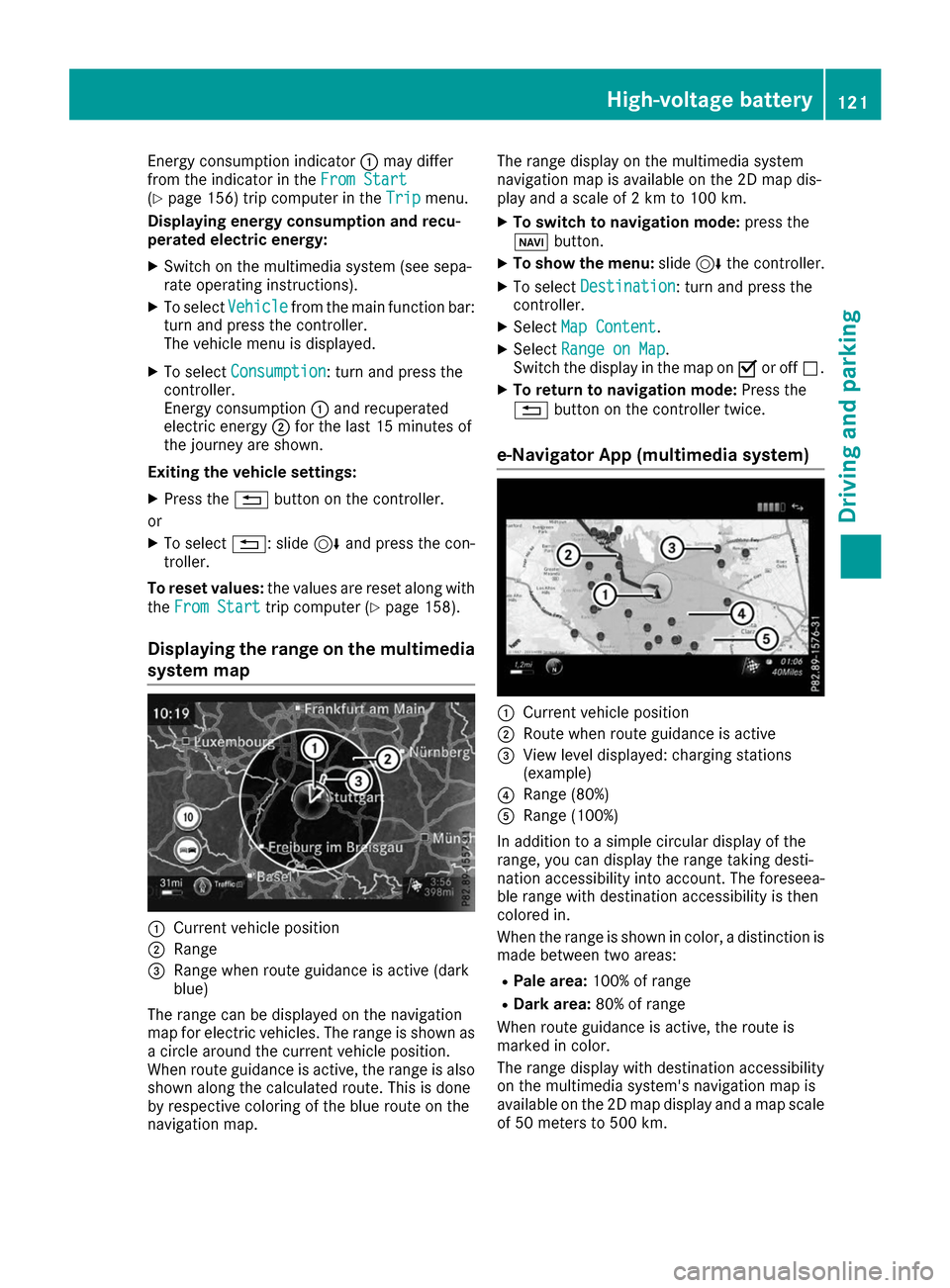
Displaying the range on the multimedia
system map 0043
Current vehicle position
0044 Range
0087 Range when route guidance is active (dark
blue)
The range can be displayed on the navigation
map for electric vehicles. The range is shown as
a circle around the current vehicle position.
When route guidance is active, the range is also
shown along the calculated route. This is done
by respective coloring of the blue route on the
navigation map. The range display on the multimedia system
navigation map is available on the 2D map dis-
play and a scale of 2 km to 100 km.
X To switch to navigation mode: press the
00CB button.
X To show the menu: slide6the controller.
X To select Destination
Destination: turn and press the
controller.
X Select Map Content
Map Content.
X Select Range on Map Range on Map .
Switch the display in the map on 0073or off 0053.
X To return to navigation mode: Press the
0038 button on the controller twice.
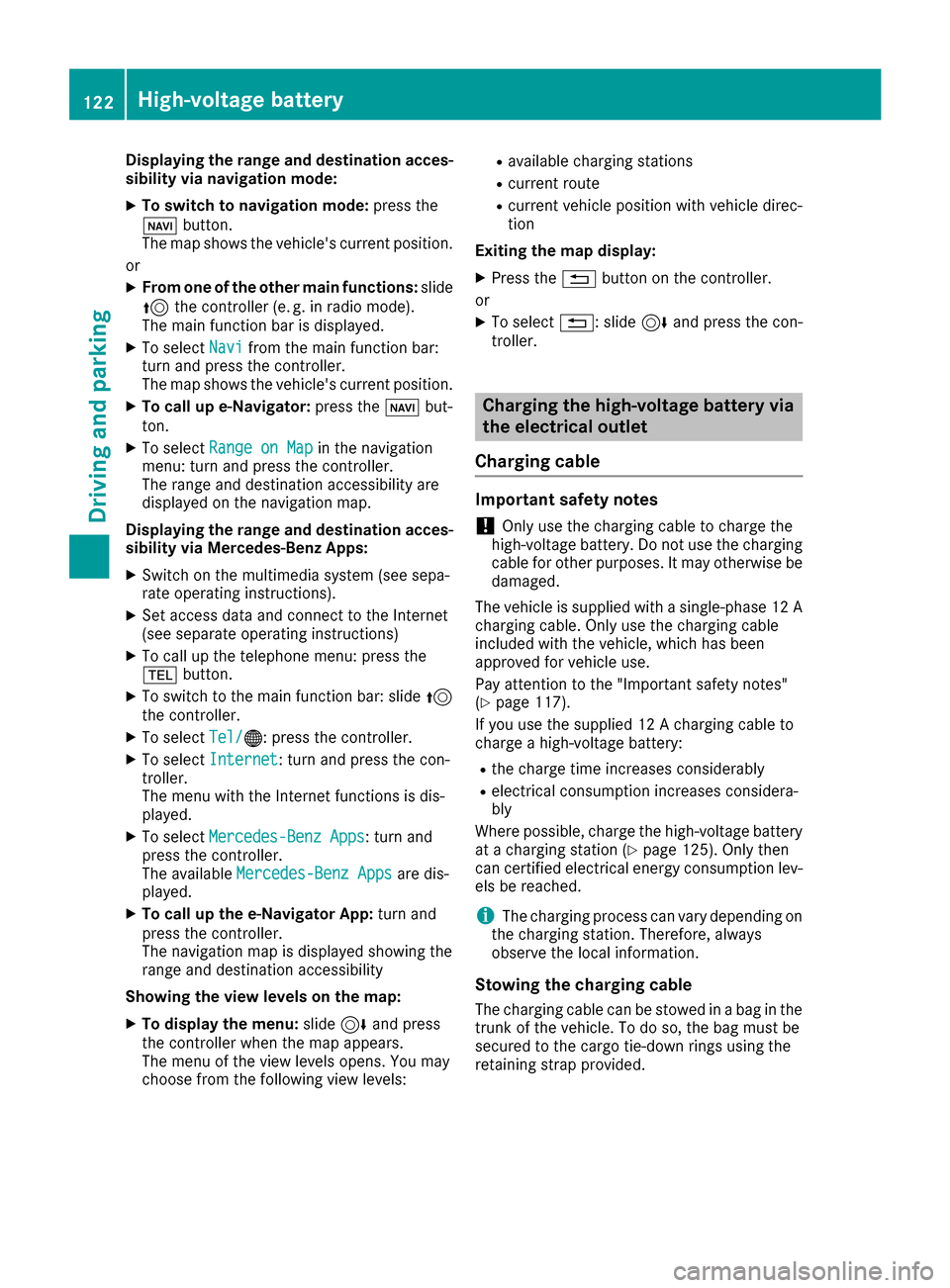
e-Navigator App (multimedia system) 0043
Current vehicle position
0044 Route when route guidance is active
0087 View level displayed: charging stations
(example)
0085 Range (80%)
0083 Range (100%)
In addition to a simple circular display of the
range, you can display the range taking desti-
nation accessibility into account. The foreseea-
ble range with destination accessibility is then
colored in.
When the range is shown in color, a distinction is made between two areas:
R Pale area: 100% of range
R Dark area: 80% of range
When route guidance is active, the route is
marked in color.
The range display with destination accessibility
on the multimedia system's navigation map is
available on the 2D map display and a map scale of 50 meters to 500 km. High-voltage battery
121Driving and parking Z
Page 124 of 290
Displaying the range and destination acces-
sibility via navigation mode:
X To switch to navigation mode: press the
00CB button.
The map shows the vehicle's current position.
or
X From one of the other main functions: slide
5 the controller (e. g. in radio mode).
The main function bar is displayed.
X To select Navi
Navi from the main function bar:
turn and press the controller.
The map shows the vehicle's current position.
X To call up e-Navigator: press the00CBbut-
ton.
X To select Range on Map
Range on Map in the navigation
menu: turn and press the controller.
The range and destination accessibility are
displayed on the navigation map.
Displaying the range and destination acces- sibility via Mercedes-Benz Apps:
X Switch on the multimedia system (see sepa-
rate operating instructions).
X Set access data and connect to the Internet
(see separate operating instructions)
X To call up the telephone menu: press the
002B button.
X To switch to the main function bar: slide 5
the controller.
X To select Tel/
Tel/00A7: press the controller.
X To select Internet
Internet: turn and press the con-
troller.
The menu with the Internet functions is dis-
played.
X To select Mercedes-Benz Apps
Mercedes-Benz Apps: turn and
press the controller.
The available Mercedes-Benz Apps
Mercedes-Benz Apps are dis-
played.
X To call up the e-Navigator App: turn and
press the controller.
The navigation map is displayed showing the
range and destination accessibility
Showing the view levels on the map:
X To display the menu: slide6and press
the controller when the map appears.
The menu of the view levels opens. You may
choose from the following view levels: R
available charging stations
R current route
R current vehicle position with vehicle direc-
tion
Exiting the map display:
X Press the 0038button on the controller.
or
X To select 0038: slide 6and press the con-
troller. Charging the high-voltage battery via
the electrical outlet
Charging cable Important safety notes
! Only use the charging cable to charge the
high-voltage battery. Do not use the charging
cable for other purposes. It may otherwise be damaged.
The vehicle is supplied with a single-phase 12 A charging cable. Only use the charging cable
included with the vehicle, which has been
approved for vehicle use.
Pay attention to the "Important safety notes"
(Y page 117).
If you use the supplied 12 A charging cable to
charge a high-voltage battery:
R the charge time increases considerably
R electrical consumption increases considera-
bly
Where possible, charge the high-voltage battery at a charging station (Y page 125). Only then
can certified electrical energy consumption lev- els be reached.
i The charging process can vary depending on
the charging station. Therefore, always
observe the local information.
Stowing the charging cable
The charging cable can be stowed in a bag in the trunk of the vehicle. To do so, the bag must be
secured to the cargo tie-down rings using the
retaining strap provided. 122
High-voltage batteryDriving and pa
rking
Page 147 of 290
useful, for example when you recognize that it is
already possible to pull out of the parking space.
Canceling Parking Pilot X
Stop the movement of the multifunction
steering wheel or steer yourself.
Parking Pilot is canceled immediately. The
Parking
Parking Pilot PilotCanceled
Canceled message appears
in the multifunction display.
or
X Press the PARKTRONIC button (Y page 141).
Parking Assist PARKTRONIC is switched off
and Parking Pilot is immediately canceled.
The Parking Pilot Canceled
Parking Pilot Canceled message
appears in the multifunction display.
Parking Pilot is canceled automatically when: R the electric parking brake is engaged
R transmission position Pis selected
R parking using Parking Pilot is no longer pos-
sible
R you are driving faster than 6 mph (10 km/h)
R a wheel spins, ESP ®
intervenes or fails. In
such cases the 00E5warning lamp lights up in
the instrument cluster
A warning tone sounds. The parking symbol dis-
appears and the multifunction display shows the
Parking Pilot Canceled Parking Pilot Canceled message.
When Parking Pilot is canceled, you must steer
and brake again yourself.
If a system malfunction occurs, the vehicle is
braked to a standstill. To drive on, depress the
accelerator again. Rear view camera
General notes Rear view camera
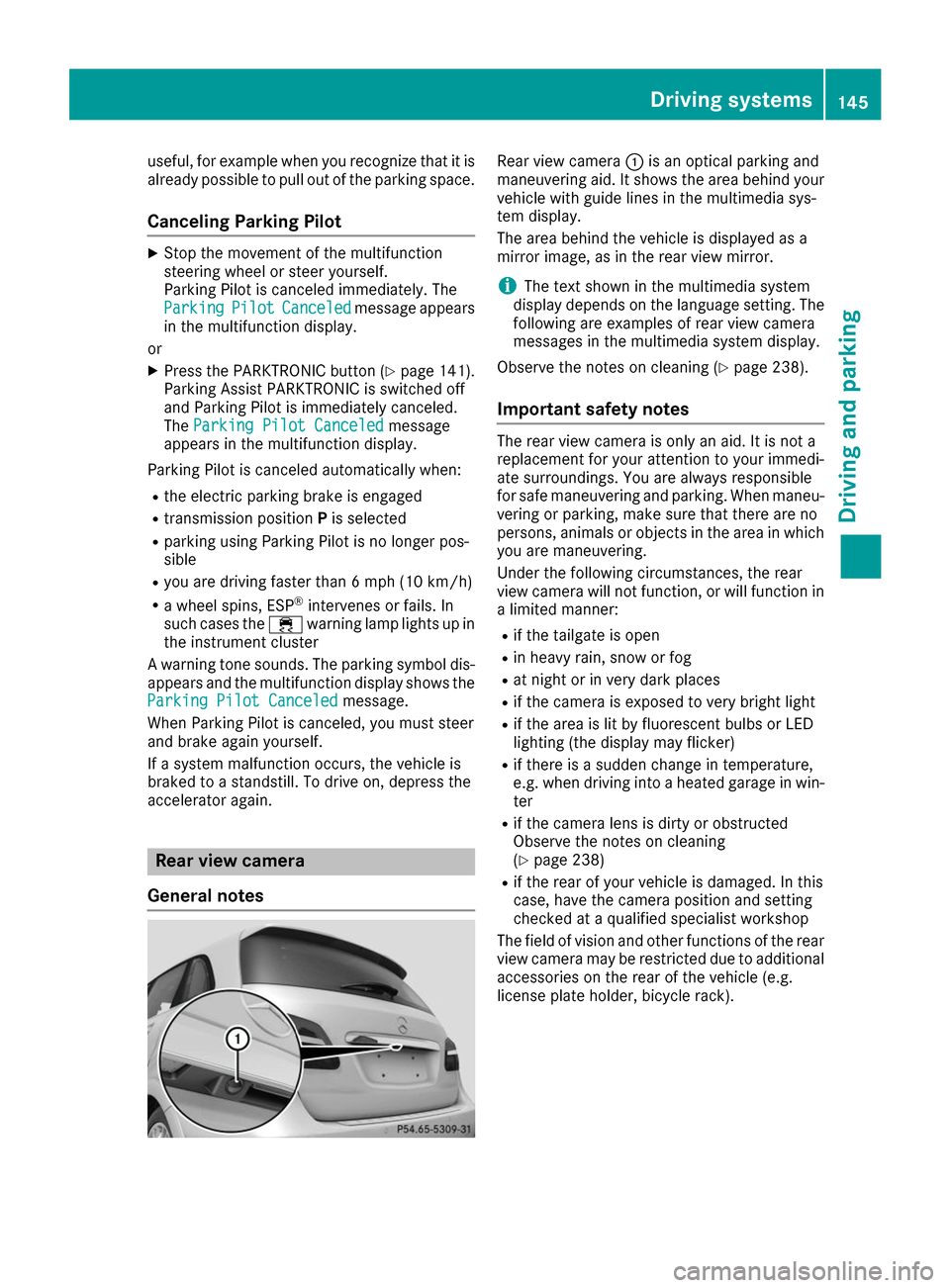
0043is an optical parking and
maneuvering aid. It shows the area behind your vehicle with guide lines in the multimedia sys-
tem display.
The area behind the vehicle is displayed as a
mirror image, as in the rear view mirror.
i The text shown in the multimedia system
display depends on the language setting. The following are examples of rear view camera
messages in the multimedia system display.
Observe the notes on cleaning (Y page 238).
Important safety notes The rear view camera is only an aid. It is not a
replacement for your attention to your immedi-
ate surroundings. You are always responsible
for safe maneuvering and parking. When maneu-
vering or parking, make sure that there are no
persons, animals or objects in the area in which you are maneuvering.
Under the following circumstances, the rear
view camera will not function, or will function in
a limited manner:
R if the tailgate is open
R in heavy rain, snow or fog
R at night or in very dark places
R if the camera is exposed to very bright light
R if the area is lit by fluorescent bulbs or LED
lighting (the display may flicker)
R if there is a sudden change in temperature,
e.g. when driving into a heated garage in win-
ter
R if the camera lens is dirty or obstructed
Observe the notes on cleaning
(Y page 238)
R if the rear of your vehicle is damaged. In this
case, have the camera position and setting
checked at a qualified specialist workshop
The field of vision and other functions of the rear
view camera may be restricted due to additional
accessories on the rear of the vehicle (e.g.
license plate holder, bicycle rack). Driving systems
145Driving and parking Z
Page 148 of 290
Activating/deactivating the rear view
camera X
To activate: make sure that the SmartKey is
in position 2in the ignition lock.
X Make sure that the Activation by R gear
Activation by R gear
function is selected in the multimedia system; see the Digital Operator's Manual.
X Engage reverse gear.
The area behind the vehicle is shown with
guide lines in the multimedia system display.
The image from the rear view camera is avail-
able throughout the maneuvering process.
To deactivate: the rear view camera deacti-
vates if you shift the transmission to Por after
driving forwards a short distance.
Messages in the multimedia system dis- play The rear view camera may show a distorted view
of obstacles, show them incorrectly or not at all.The rear view camera does not show objects in
the following positions:
R very close to the rear bumper
R under the rear bumper
R in the area immediately above the tailgate
handle
! Objects not at ground level may appear to
be further away than they actually are, e.g.:
R the bumper of a parked vehicle
R the drawbar of a trailer
R the ball coupling of a trailer tow hitch
R the rear section of an HGV
R a slanted post
Use the guidelines only for orientation.
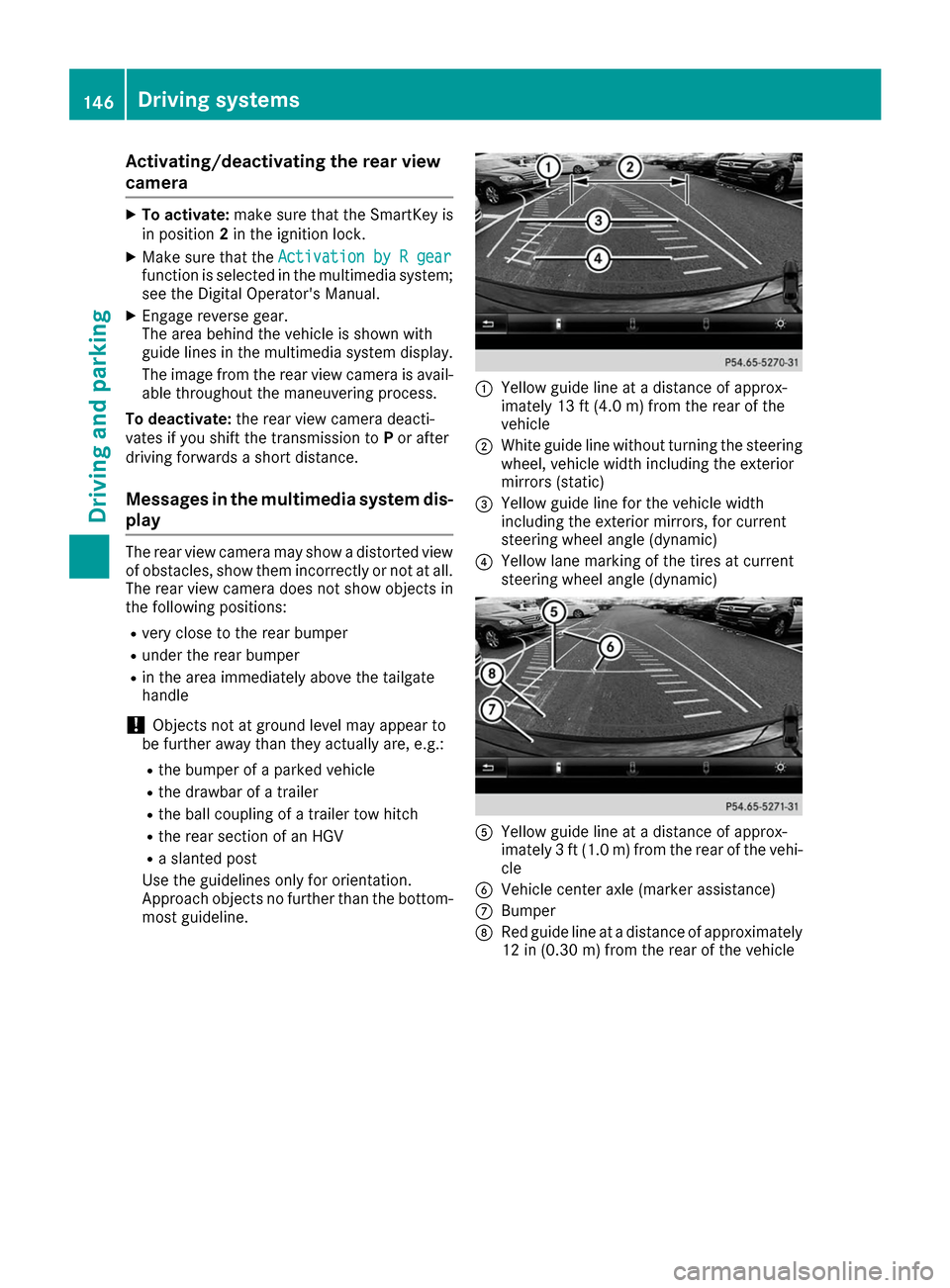
Approach objects no further than the bottom- most guideline. 0043
Yellow guide line at a distance of approx-
imately 13 ft (4.0 m) from the rear of the
vehicle
0044 White guide line without turning the steering
wheel, vehicle width including the exterior
mirrors (static)
0087 Yellow guide line for the vehicle width
including the exterior mirrors, for current
steering wheel angle (dynamic)
0085 Yellow lane marking of the tires at current
steering wheel angle (dynamic) 0083
Yellow guide line at a distance of approx-
imately 3 ft (1.0 m) from the rear of the vehi-
cle
0084 Vehicle center axle (marker assistance)
006B Bumper
006C Red guide line at a distance of approximately
12 in (0.30 m) from the rear of the vehicle 146
Driving systemsDriving an
d parking
Page 149 of 290
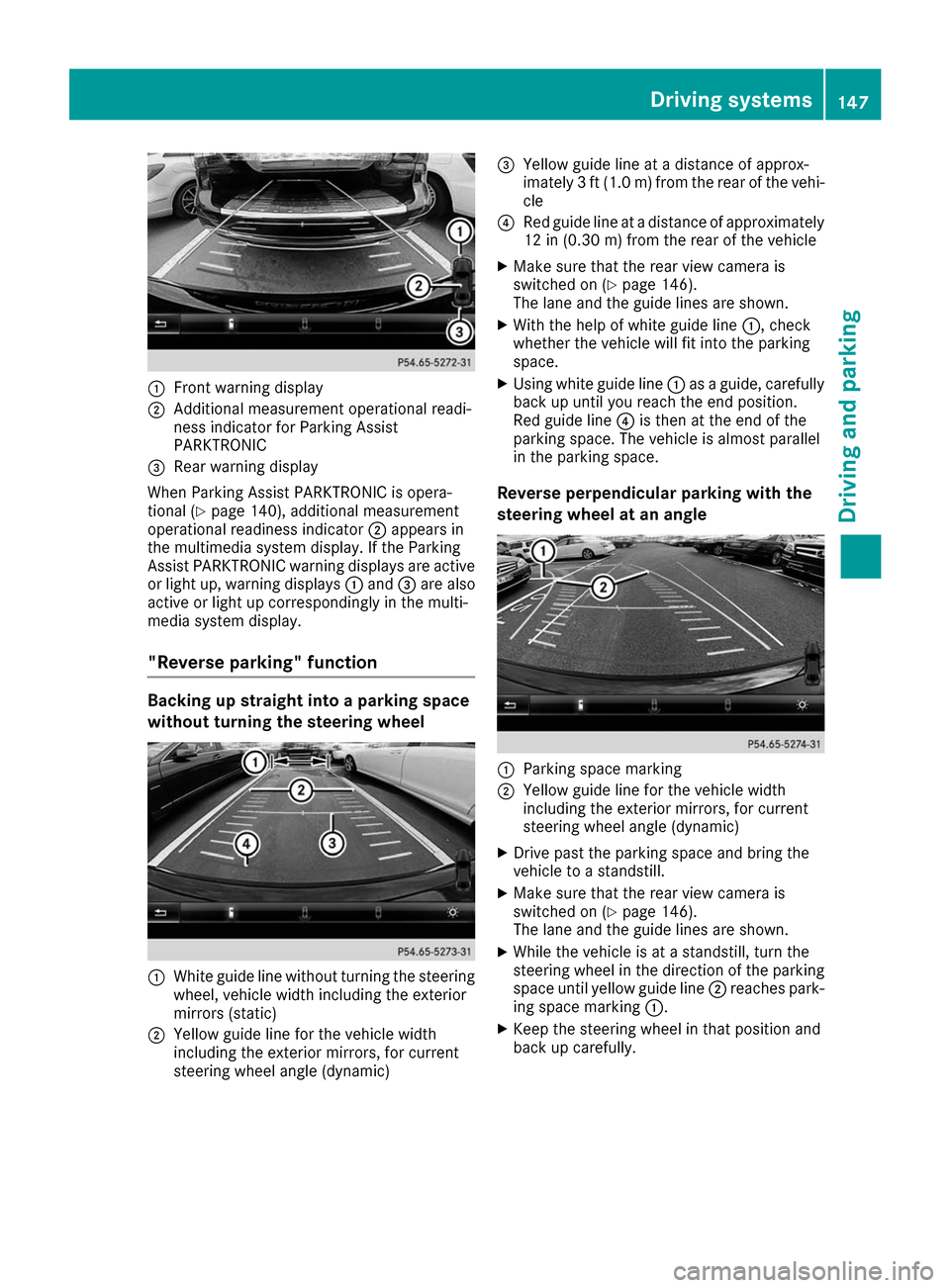
0043
Front warning display
0044 Additional measurement operational readi-
ness indicator for Parking Assist
PARKTRONIC
0087 Rear warning display
When Parking Assist PARKTRONIC is opera-
tional (Y page 140), additional measurement
operational readiness indicator 0044appears in
the multimedia system display. If the Parking
Assist PARKTRONIC warning displays are active
or light up, warning displays 0043and 0087are also
active or light up correspondingly in the multi-
media system display.
"Reverse parking" function Backing up straight into a parking space
without turning the steering wheel 0043
White guide line without turning the steering
wheel, vehicle width including the exterior
mirrors (static)
0044 Yellow guide line for the vehicle width
including the exterior mirrors, for current
steering wheel angle (dynamic) 0087
Yellow guide line at a distance of approx-
imately 3 ft (1.0 m) from the rear of the vehi-
cle
0085 Red guide line at a distance of approximately
12 in (0.30 m) fromthe rear of the vehicle
X Make sure that the rear view camera is
switched on (Y page 146).
The lane and the guide lines are shown.
X With the help of white guide line 0043, check
whether the vehicle will fit into the parking
space.
X Using white guide line 0043as a guide, carefully
back up until you reach the end position.
Red guide line 0085is then at the end of the
parking space. The vehicle is almost parallel
in the parking space.
Reverse perpendicular parking with the
steering wheel at an angle 0043
Parking space marking
0044 Yellow guide line for the vehicle width
including the exterior mirrors, for current
steering wheel angle (dynamic)
X Drive past the parking space and bring the
vehicle to a standstill.
X Make sure that the rear view camera is
switched on (Y page 146).
The lane and the guide lines are shown.
X While the vehicle is at a standstill, turn the
steering wheel in the direction of the parking
space until yellow guide line 0044reaches park-
ing space marking 0043.
X Keep the steering wheel in that position and
back up carefully. Driving systems
147Driving and parking Z
Page 152 of 290
X
If necessary, take a break.
X Confirm the message by pressing the 0076
button on the steering wheel.
On long journeys, take regular breaks in good
time to allow yourself to rest properly. If you do
not take a break and ATTENTION ASSIST still
detects increasing lapses in concentration, you will be warned again after 15 minutes at the
earliest. This will only happen if ATTEN-
TION ASSIST still detects typical indicators of
fatigue or increasing lapses in concentration.
Vehicles with the COMAND multimedia sys-
tem: if a warning is output in the multifunction
display, a service station search is performed in the multimedia system. You can select a servicestation and navigation to this service station will
then begin. This function can be activated or
deactivated in the multimedia system; see the
Digital Operator's Manual. Blind Spot Assist
General notes Blind Spot Assist monitors the areas on either
side of the vehicle that are not visible to the
driver with two lateral, rear-facing radar sen-
sors. A warning display in the exterior mirrors
draws your attention to vehicles detected in the
monitored area. If you then switch on the cor-
responding turn signal to change lane, you will
also receive an optical and audible warning.
Blind Spot Assist supports you from a speed of
approximately 20 mph (30 km/h).
Important safety notes G
WARNING
Blind Spot Assist does not react to:
R vehicles overtaken too closely on the side,
placing them in the blind spot area
R vehicles which approach with a large speed
differential and overtake your vehicle
As a result, Blind Spot Assist may not give
warnings in such situations. There is a risk of an accident.
Always observe the traffic conditions care-
fully, and maintain a safe lateral distance. Blind Spot Assist is only an aid. It may fail to
detect some vehicles and is no substitute for
attentive driving. Always ensure that there is
sufficient distance to the side for other road
users and obstacles.
i USA only:
This device has been approved by the FCC as a "Vehicular Radar System". The radar sensor
is intended for use in an automotive radar
system only. Removing, tampering with, or
altering the device will void any warranties,
and is not permitted by the FCC. Do not tam-
per with, alter, or use in any non-approved
way.
Any unauthorized modification to this device
could void the user’s authority to operate the
equipment.
Radar sensors The radar sensors for Blind Spot Assist are inte-
grated into the rear bumper. Make sure that the
bumpers are free from dirt, ice or slush. The
sensors must not be covered, for example by
cycle racks or overhanging loads. Following a
severe impact or in the event of damage to the
bumpers, have the function of the radar sensors
checked at a qualified specialist workshop.
Blind Spot Assist may no longer work properly.
Monitoring range of the sensors In particular, the detection of obstacles can be
impaired if:
R there is dirt on the sensors or anything else
covering the sensors
R there is poor visibility, e.g. due to fog, heavy
rain or snow
R a narrow vehicle traveling in front, e.g. a
motorbike or bicycle
R the road has very wide lanes
R the road has narrow lanes
R you are not driving in the middle of the lane
R there are barriers or other road boundaries
Vehicles in the monitoring range are then not
indicated.
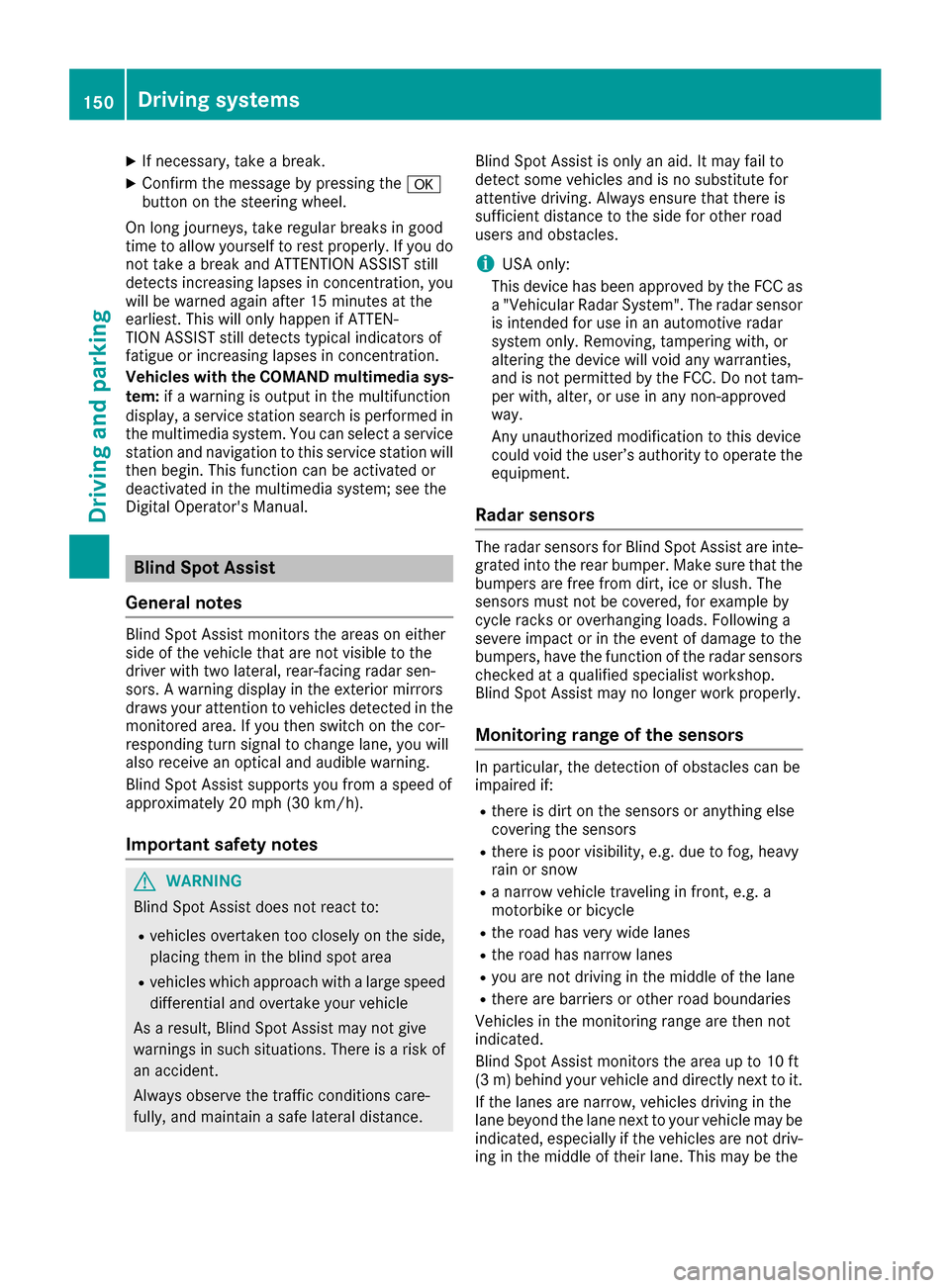
Blind Spot Assist monitors the area up to 10 ft
(3 m) behind your vehicle and directly next to it.
If the lanes are narrow, vehicles driving in the
lane beyond the lane next to your vehicle may be
indicated, especially if the vehicles are not driv-
ing in the middle of their lane. This may be the 150
Driving systemsDriving and parking
Page 158 of 290
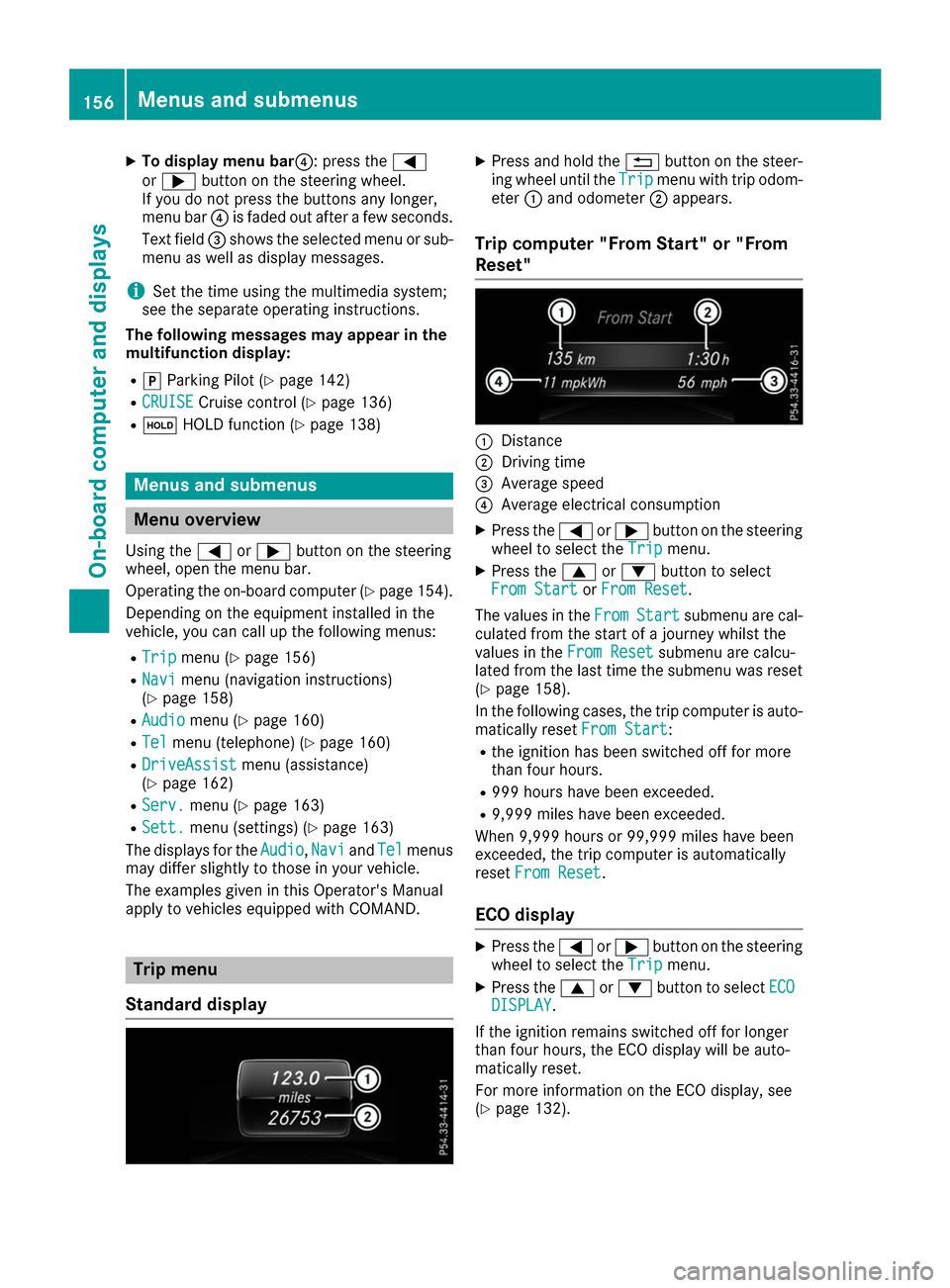
X
To display menu bar 0085: press the0059
or 0065 button on the steering wheel.
If you do not press the buttons any longer,
menu bar 0085is faded out after a few seconds.
Text field 0087shows the selected menu or sub-
menu as well as display messages.
i Set the time using the multimedia system;
see the separate operating instructions.
The following messages may appear in the
multifunction display:
R 005D Parking Pilot (Y page 142)
R CRUISE
CRUISE Cruise control (Y page 136)
R 00D9 HOLD function (Y page 138) Menus and submenus
Menu overview
Using the 0059or0065 button on the steering
wheel, open the menu bar.
Operating the on-board computer (Y page 154).
Depending on the equipment installed in the
vehicle, you can call up the following menus:
R Trip
Trip menu (Y page 156)
R Navi Navi menu (navigation instructions)
(Y page 158)
R Audio
Audio menu (Y page 160)
R Tel
Tel menu (telephone) (Y page 160)
R DriveAssist
DriveAssist menu (assistance)
(Y page 162)
R Serv.
Serv. menu (Y page 163)
R Sett.
Sett. menu (settings) (Y page 163)
The displays for the Audio
Audio,Navi
NaviandTel
Tel menus
may differ slightly to those in your vehicle.
The examples given in this Operator's Manual
apply to vehicles equipped with COMAND. Trip menu
Standard display X
Press and hold the 0038button on the steer-
ing wheel until the Trip Tripmenu with trip odom-
eter 0043and odometer 0044appears.
Trip computer "From Start" or "From
Reset" 0043
Distance
0044 Driving time
0087 Average speed
0085 Average electrical consumption
X Press the 0059or0065 button on the steering
wheel to select the Trip Tripmenu.
X Press the 0063or0064 button to select
From Start
From Start orFrom Reset
From Reset.
The values in the From
FromStart
Start submenu are cal-
culated from the start of a journey whilst the
values in the From Reset From Resetsubmenu are calcu-
lated from the last time the submenu was reset
(Y page 158).
In the following cases, the trip computer is auto-
matically reset From Start
From Start:
R the ignition has been switched off for more
than four hours.
R 999 hours have been exceeded.
R 9,999 miles have been exceeded.
When 9,999 hours or 99,999 miles have been
exceeded, the trip computer is automatically
reset From Reset From Reset.
ECO display X
Press the 0059or0065 button on the steering
wheel to select the Trip Tripmenu.
X Press the 0063or0064 button to select ECO ECO
DISPLAY
DISPLAY.
If the ignition remains switched off for longer
than four hours, the ECO display will be auto-
matically reset.
For more information on the ECO display, see
(Y page 132). 156
Menus and submenusOn-board computer and displays
Page 160 of 290
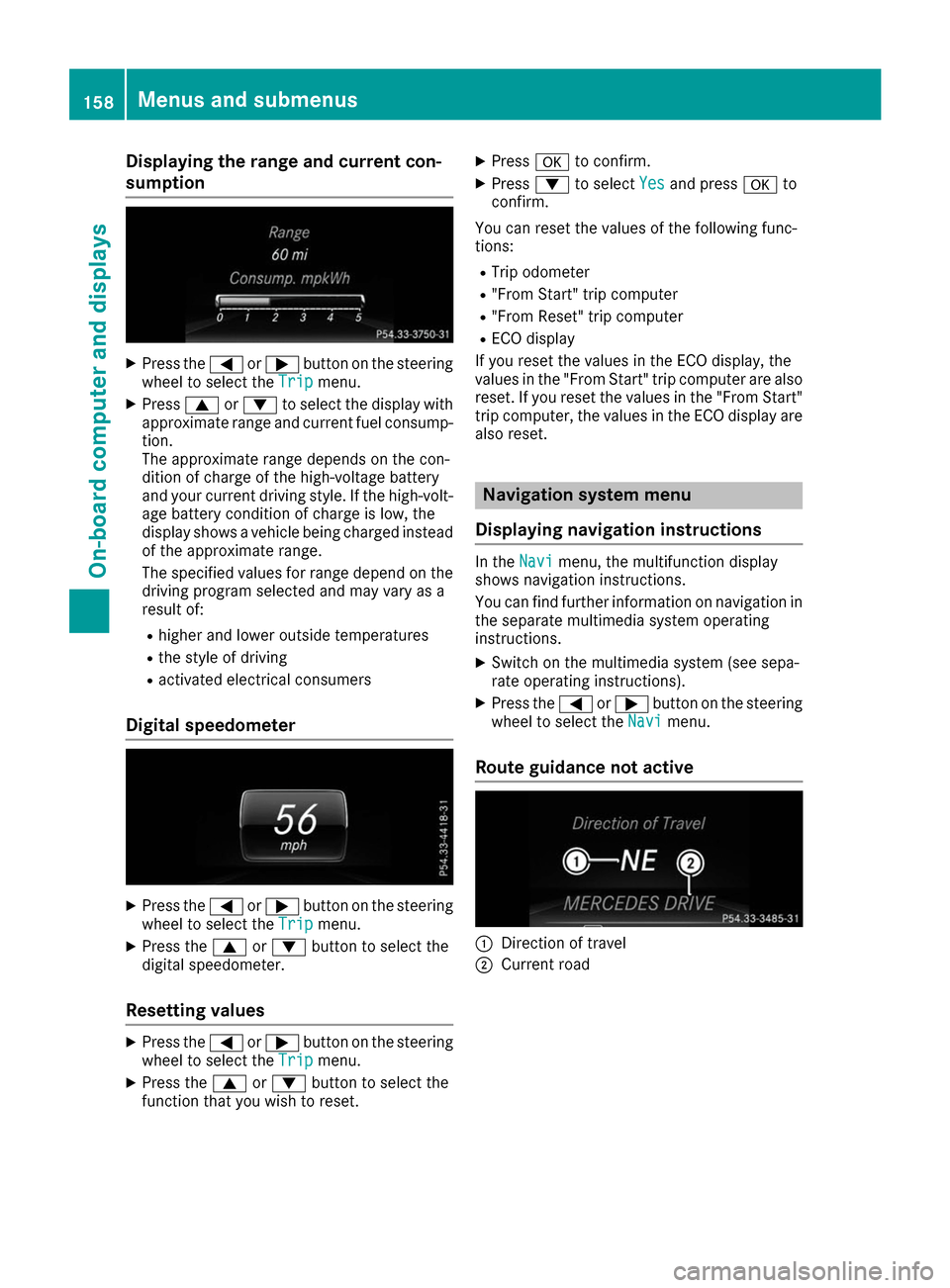
Displaying the range and current con-
sumption X
Press the 0059or0065 button on the steering
wheel to select the Trip
Tripmenu.
X Press 0063or0064 to select the display with
approximate range and current fuel consump-
tion.
The approximate range depends on the con-
dition of charge of the high-voltage battery
and your current driving style. If the high-volt-
age battery condition of charge is low, the
display shows a vehicle being charged instead
of the approximate range.
The specified values for range depend on the
driving program selected and may vary as a
result of:
R higher and lower outside temperatures
R the style of driving
R activated electrical consumers
Digital speedometer X
Press the 0059or0065 button on the steering
wheel to select the Trip Tripmenu.
X Press the 0063or0064 button to select the
digital speedometer.
Resetting values X
Press the 0059or0065 button on the steering
wheel to select the Trip
Tripmenu.
X Press the 0063or0064 button to select the
function that you wish to reset. X
Press 0076to confirm.
X Press 0064to select Yes Yesand press 0076to
confirm.
You can reset the values of the following func-
tions: R Trip odometer
R "From Start" trip computer
R "From Reset" trip computer
R ECO display
If you reset the values in the ECO display, the
values in the "From Start" trip computer are also
reset. If you reset the values in the "From Start" trip computer, the values in the ECO display arealso reset. Navigation system menu
Displaying navigation instructions In the
Navi Navimenu, the multifunction display
shows navigation instructions.
You can find further information on navigation in
the separate multimedia system operating
instructions.
X Switch on the multimedia system (see sepa-
rate operating instructions).
X Press the 0059or0065 button on the steering
wheel to select the Navi
Navi menu.
Route guidance not active 0043
Direction of travel
0044 Current road 158
Menus and submenusOn-boa
rdcompu ter and displays
Page 162 of 290
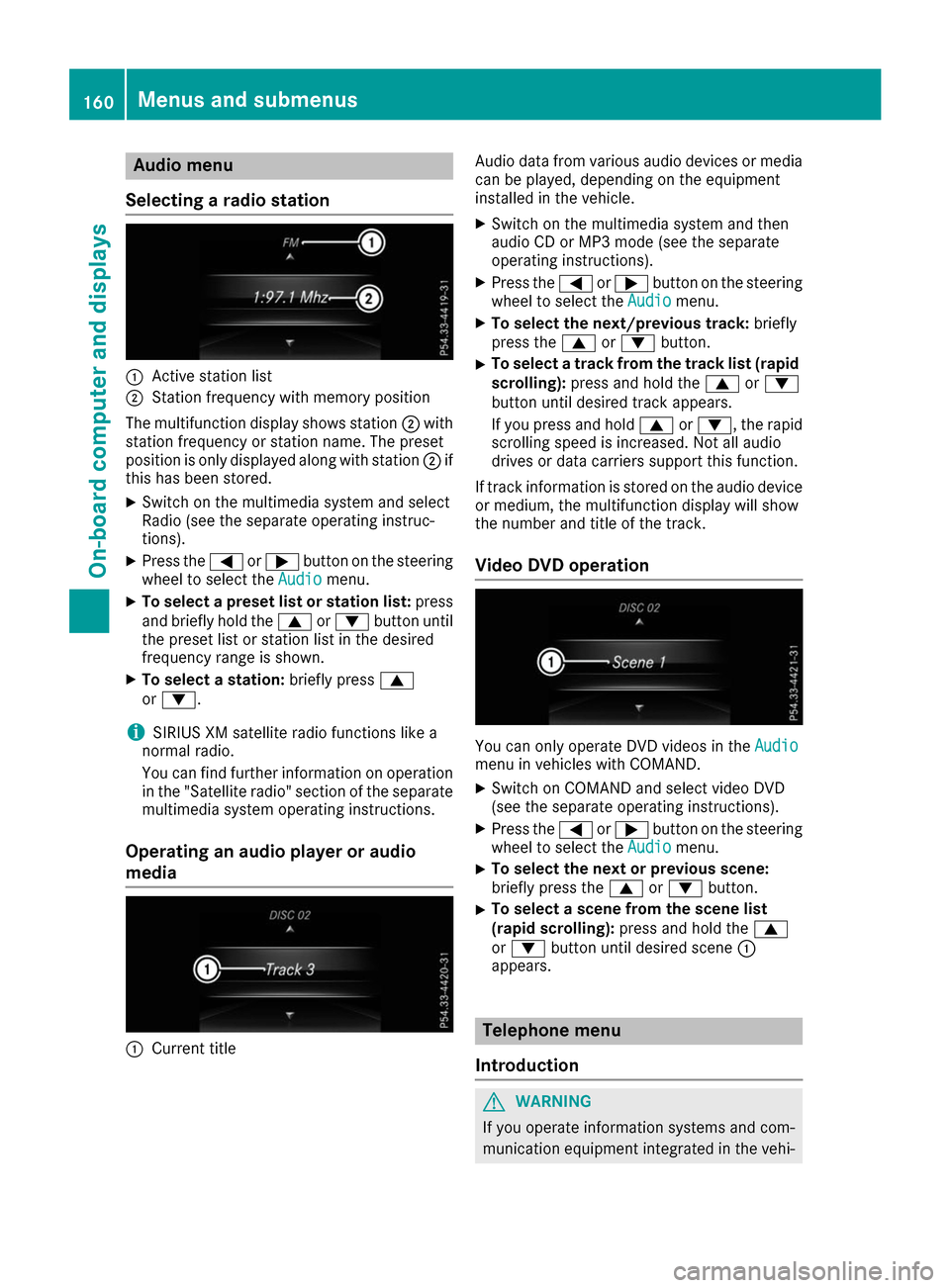
Audio menu
Selecting a radio station 0043
Active station list
0044 Station frequency with memory position
The multifunction display shows station 0044with
station frequency or station name. The preset
position is only displayed along with station 0044if
this has been stored.
X Switch on the multimedia system and select
Radio (see the separate operating instruc-
tions).
X Press the 0059or0065 button on the steering
wheel to select the Audio
Audio menu.
X To select a preset list or station list: press
and briefly hold the 0063or0064 button until
the preset list or station list in the desired
frequency range is shown.
X To select a station: briefly press0063
or 0064.
i SIRIUS XM satellite radio functions like a
normal radio.
You can find further information on operation in the "Satellite radio" section of the separate
multimedia system operating instructions.
Operating an audio player or audio
media 0043
Current title Audio data from various audio devices or media
can be played, depending on the equipment
installed in the vehicle.
X Switch on the multimedia system and then
audio CD or MP3 mode (see the separate
operating instructions).
X Press the 0059or0065 button on the steering
wheel to select the Audio Audiomenu.
X To select the next/previous track: briefly
press the 0063or0064 button.
X To select a track from the track list (rapid
scrolling): press and hold the 0063or0064
button until desired track appears.
If you press and hold 0063or0064, the rapid
scrolling speed is increased. Not all audio
drives or data carriers support this function.
If track information is stored on the audio device or medium, the multifunction display will show
the number and title of the track.
Video DVD operation You can only operate DVD videos in the
Audio Audio
menu in vehicles with COMAND.
X Switch on COMAND and select video DVD
(see the separate operating instructions).
X Press the 0059or0065 button on the steering
wheel to select the Audio
Audiomenu.
X To select the next or previous scene:
briefly press the
0063or0064 button.
X To select a scene from the scene list
(rapid scrolling): press and hold the 0063
or 0064 button until desired scene 0043
appears. Telephone menu
Introduction G
WARNING
If you operate information systems and com-
munication equipment integrated in the vehi- 160
Menus and sub
menusOn-board computer and displays
Page 163 of 290
cle while driving, you will be distracted from
traffic conditions. You could also lose control of the vehicle. There is a risk of an accident.
Only operate the equipment when the traffic
situation permits. If you are not sure that this is possible, park the vehicle paying attention
to traffic conditions and operate the equip-
ment when the vehicle is stationary.
When telephoning, you must observe the legal
requirements for the country in which you are
currently driving. X Switch on the mobile phone (see the manu-
facturer’s operating instructions).
X Switch on the multimedia system (see sepa-
rate operating instructions).
X Establish a Bluetooth ®
connection to the mul-
timedia system; see the separate operating
instructions.
X Press the 0059or0065 button on the steering
wheel to select the Tel
Tel menu.
You will see one of the following display mes-
sages in the multifunction display:
R Telephone READY Telephone READY or the name of the net-
work provider: the mobile phone has found a network and is ready to receive.
R Telephone
Telephone No
Noservice
service : there is no network
available or the mobile phone is searching for
a network.
Accepting a call If someone calls you when you are in the
Tel
Tel
menu, a display message appears in the multi-
function display.
You can accept a call at any time, even if you are
not in the Tel Telmenu.
X Press the 0061button on the steering wheel
to accept an incoming call.
Rejecting or ending a call You can end or reject a call anytime, even if you
are not in the Tel
Telmenu.
X Press the 0076button on the steering wheel
to reject or end a call. Selecting an entry in the phone book X
Press the 0059or0065 button on the steering
wheel to select the Tel
Telmenu.
X Press the 0063,0064or0076 button to
switch to the phone book.
X Authorize access to the phone book on the
phone.
X Press the 0063or0064 button to select the
desired name.
or
X To begin rapid scrolling: press and hold the
0063 or0064 button for longer than one sec-
ond.
Rapid scrolling stops when you release the
button or reach the end of the list.
X If only one telephone number is stored for
a name: press the 0061or0076 button to
start dialing.
or
X If there is more than one number for a
particular name:
press the0061or0076
button to display the numbers.
X Press the 0063or0064 button to select the
number you want to dial.
X Press the 0061or0076 button to start dialing.
or
X If you do not want to make a call: press the
0076 or0038 button.
Redialing The on-board computer saves the last names or
numbers dialed in the redial memory.
X Press the 0059or0065 button on the steering
wheel to select the Tel
Tel menu.
X Press the 0061button to switch to the redial
memory.
X Press the 0063or0064 button to select the
desired name or number.
X Press the 0061or0076 button to start dialing.
or
X If you do not want to make the call: press
the 0076 or0038 button. Menus and submenus
161On-board computer and displays Z