parking brake MERCEDES-BENZ B-Class 2017 W246 User Guide
[x] Cancel search | Manufacturer: MERCEDES-BENZ, Model Year: 2017, Model line: B-Class, Model: MERCEDES-BENZ B-Class 2017 W246Pages: 290, PDF Size: 19.81 MB
Page 59 of 290
Forward-facing child restraint system
If it is absolutely necessary to install a forward-
facing child restraint system on the front-
passenger seat, always move the front-
passenger seat as far back as possible. Fully
retract the seat cushion length. The entire base of the child restraint system must always rest on
the seat cushion of the front-passenger seat.
The backrest of the child restraint system must lie as flat as possible against the backrest of the
front-passenger seat. The child restraint system must not touch the roof or be subjected to a loadby the head restraint. Adjust the angle of the
seat backrest and the head restraint position
accordingly. Always make sure that the shoul-
der belt strap is correctly routed from the vehi-
cle belt outlet to the shoulder belt guide on the
child restraint system. The shoulder belt strap
must be routed forwards and downwards from
the vehicle belt outlet. If necessary, adjust the
vehicle belt outlet and the front-passenger seat
accordingly.
Always observe the child restraint system man- ufacturer's installation and operating instruc-
tions. Child-proof locks
Important safety notes G
WARNING
If children are traveling in the vehicle, they
could:
R open doors, thus endangering other people
or road users
R exit the vehicle and be caught by oncoming
traffic
R operate vehicle equipment and become
trapped
There is a risk of an accident and injury.
Always activate the child-proof locks and
override feature if children are traveling in the vehicle. When leaving the vehicle, always take
the key with you and lock the vehicle. Never
leave children unattended in the vehicle.
Override feature for:
R the rear doors (Y page 58)
R the rear side windows (Y page 58) G
WARNING
If you leave children unsupervised in the vehi- cle, they could set it in motion by, for example:
R release the parking brake.
R shift the transmission out of park position
P.
R start the vehicle's drive system.
They could also operate the vehicle's equip-
ment. There is a risk of an accident and injury.
When leaving the vehicle, always take the
SmartKey with you and lock the vehicle. Never leave children unsupervised in the vehicle. G
WARNING
If persons, particularly children are subjected to prolonged exposure to extreme heat or
cold, there is a risk of injury, possibly even
fatal. Never leave children unattended in the
vehicle. G
WARNING
If the child restraint system is subjected to
direct sunlight, parts may get very hot. Chil-
dren may burn themselves on these parts,
particularly on the metal parts of the child
restraint system. There is a risk of injury.
If you leave the vehicle, taking the child with
you, always ensure that the child restraint
system is not exposed to direct sunlight. Pro- tect it with a blanket, for example. If the child
restraint system has been exposed to direct
sunlight, let it cool down before securing the
child in it. Never leave children unattended in the vehicle. Children in the vehicle
57Safety Z
Page 62 of 290
Active Brake Assist
General information i
Observe the "Important safety notes" sec-
tion (Y page 58).
Active Brake Assist consists of a distance warn-
ing function with an autonomous braking func-
tion and braking assistance appropriate to the
situation.
Active Brake Assist can help you to minimize the risk of a collision with the vehicle traveling in
front or reduce the effects of such a collision.
If Active Brake Assist detects that there is a risk
of collision, you will be warned visually and
acoustically. If you do not react to the visual and audible collision warning, autonomous braking
can be initiated in critical situations. If you apply
the brake yourself in a critical situation, Adap-
tive Brake Assist supports you with braking
assistance appropriate to the situation.
Important safety notes Detection of hazardous situations can be par-
ticularly impaired by:
R there is dirt on the sensors or anything else
covering the sensors
R there is snow or heavy rain
R there is interference by other radar sources
R there are strong radar reflections, for exam-
ple in parking garages
R a narrow vehicle is traveling in front, e.g. a
motorbike
R a vehicle is traveling in front on a different line
R new vehicles or after servicing is carried out
on the Active Brake Assist system
Observe the important safety notes in the
"Breaking-in notes" section (Y page 108).
Following damage to the front end of the vehicle, have the configuration and operation of the
radar sensor checked at a qualified specialist
workshop. This also applies to collisions at low
speeds where no visible damage to the front of
the vehicle is apparent.
Activating/deactivating Active Brake Assist is active after every ignition
cycle.
You can activate or deactivate Active Brake
Assist (Y page 162) in the on-board computer. When deactivated, the distance warning func-
tion and the autonomous braking function are
also deactivated.
If Active Brake Assist is deactivated, the 00D4
symbol appears in the assistance graphic dis-
play.
Distance warning function General information
The distance warning function can help you to
minimize the risk of a front-end collision with a
vehicle ahead or reduce the effects of such a
collision. If the distance warning function
detects that there is a risk of a collision, you will
be warned visually and acoustically.
Important safety notesi Observe the "Important safety notes" sec-
tion for driving safety systems (Y page 58). G
WARNING
The distance warning function does not react:
R to people or animals
R to oncoming vehicles
R to crossing traffic
R when cornering
Thus, the distance warning function cannot
provide a warning in all critical situations.
There is a risk of an accident.
Always pay careful attention to the traffic sit-
uation and be ready to brake. G
WARNING
The distance warning function cannot always
clearly identify objects and complex traffic
situations.
In such cases, the distance warning function
may:
R give an unnecessary warning
R not give a warning
There is a risk of an accident.
Always pay careful attention to the traffic sit-
uation and do not rely solely on the distance
warning function. 60
Driving safety systemsSafety
Page 68 of 290
SmartKey
Important safety notes
G
WARNING
If children are left unsupervised in the vehicle, they could:
R open the doors, thus endangering other
people or road users.
R get out and disrupt traffic.
R operate the vehicle's equipment.
Additionally, children could set the vehicle in
motion if, for example, they:
R release the parking brake.
R shift the transmission out of park position P
R start the vehicle's drive system.
There is a risk of an accident and injury.
When leaving the vehicle, always take the
SmartKey with you and lock the vehicle. Never leave children or animals unattended in the
vehicle. Always keep the SmartKey out of
reach of children. G
WARNING
If you attach heavy or large objects to the
SmartKey, the SmartKey could be uninten-
tionally turned in the ignition lock. This could
cause the engine to be switched off. There is a risk of an accident.
Do not attach any heavy or large objects to the
SmartKey. Remove any bulky key rings before
inserting the SmartKey into the ignition lock.
! Keep the SmartKey away from strong mag-
netic fields. Otherwise, the remote control
function could be affected.
Strong magnetic fields can occur in the vicin- ity of powerful electrical installations.
Do not keep the SmartKey: R with electronic devices, e.g. a mobile phone
or another SmartKey.
R with metallic objects, e.g. coins or metal foil.
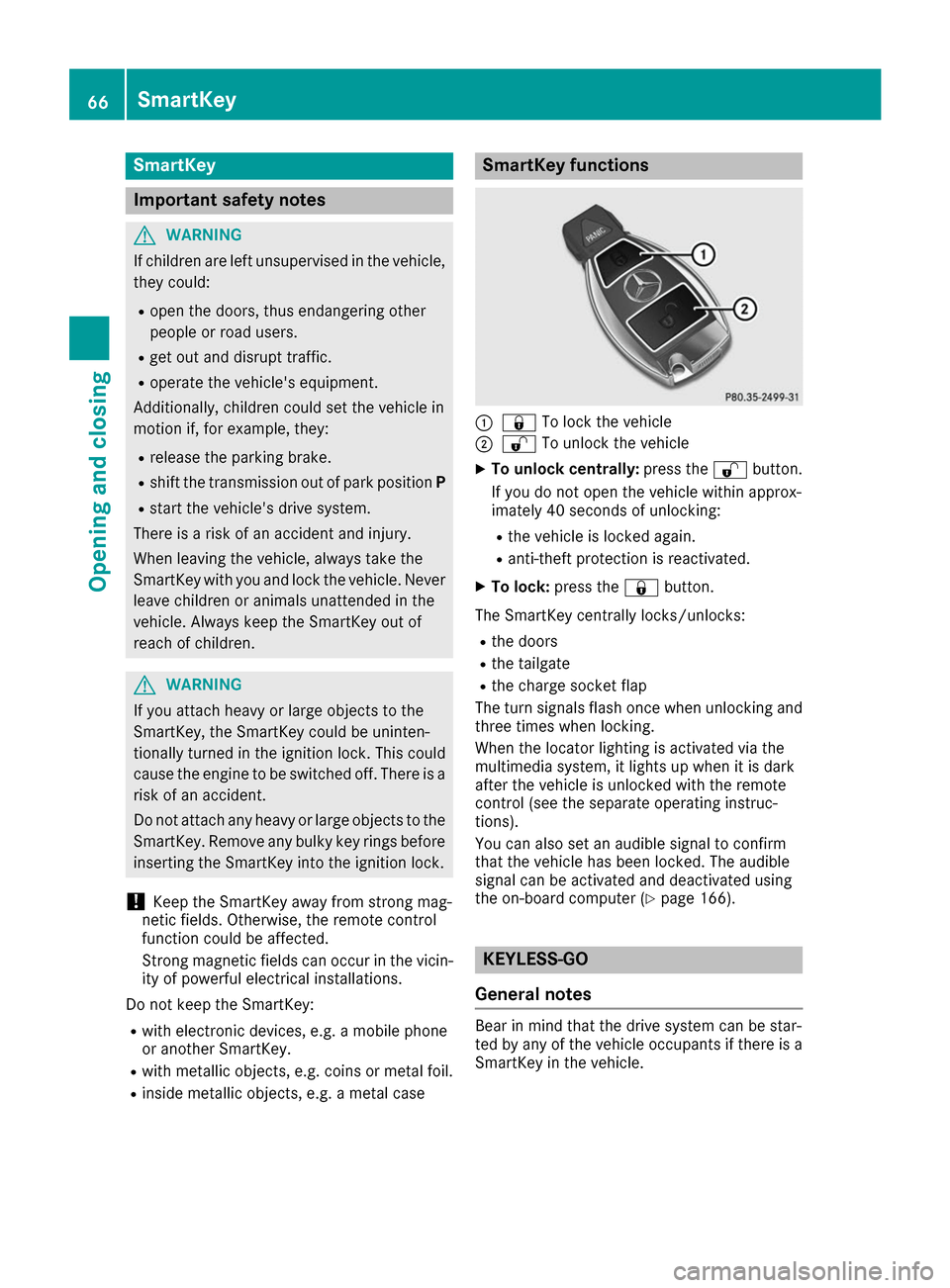
R inside metallic objects, e.g. a metal case SmartKey functions
0043
0037 To lock the vehicle
0044 0036 To unlock the vehicle
X To unlock centrally: press the0036button.
If you do not open the vehicle within approx-
imately 40 seconds of unlocking:
R the vehicle is locked again.
R anti-theft protection is reactivated.
X To lock: press the 0037button.
The SmartKey centrally locks/unlocks: R the doors
R the tailgate
R the charge socket flap
The turn signals flash once when unlocking and
three times when locking.
When the locator lighting is activated via the
multimedia system, it lights up when it is dark
after the vehicle is unlocked with the remote
control (see the separate operating instruc-
tions).
You can also set an audible signal to confirm
that the vehicle has been locked. The audible
signal can be activated and deactivated using
the on-board computer (Y page 166). KEYLESS-GO
General notes Bear in mind that the drive system can be star-
ted by any of the vehicle occupants if there is a
SmartKey in the vehicle. 66
SmartKeyOpening and closing
Page 74 of 290
Doors
Important safety notes
G
WARNING
If children are left unsupervised in the vehicle, they could:
R open the doors, thus endangering other
people or road users.
R get out and disrupt traffic.
R operate the vehicle's equipment.
Additionally, children could set the vehicle in
motion if, for example, they:
R release the parking brake.
R shift the transmission out of park position P
R start the vehicle's drive system.
There is a risk of an accident and injury.
When leaving the vehicle, always take the
SmartKey with you and lock the vehicle. Never leave children or animals unattended in the
vehicle. Always keep the SmartKey out of
reach of children.
You should preferably place luggage or loads in
the cargo compartment. Observe the loading
guidelines (Y page 207). Unlocking and opening doors from
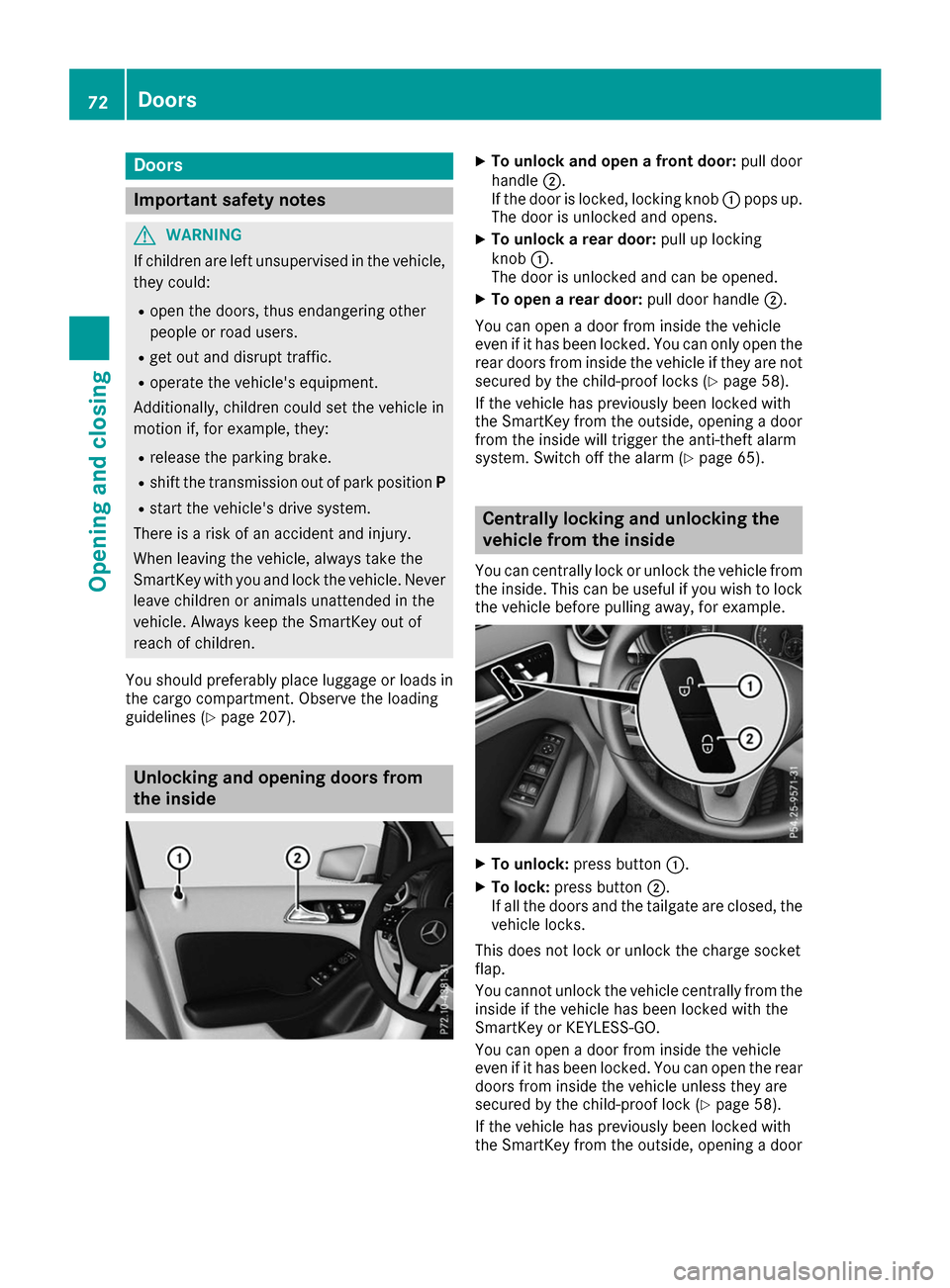
the inside X
To unlock and open a front door: pull door
handle 0044.
If the door is locked, locking knob 0043pops up.
The door is unlocked and opens.
X To unlock a rear door: pull up locking
knob 0043.
The door is unlocked and can be opened.
X To open a rear door: pull door handle0044.
You can open a door from inside the vehicle
even if it has been locked. You can only open the rear doors from inside the vehicle if they are not
secured by the child-proof locks (Y page 58).
If the vehicle has previously been locked with
the SmartKey from the outside, opening a door
from the inside will trigger the anti-theft alarm
system. Switch off the alarm (Y page 65). Centrally locking and unlocking the
vehicle from the inside
You can centrally lock or unlock the vehicle from
the inside. This can be useful if you wish to lock the vehicle before pulling away, for example. X
To unlock: press button 0043.
X To lock: press button 0044.
If all the doors and the tailgate are closed, the
vehicle locks.
This does not lock or unlock the charge socket
flap.
You cannot unlock the vehicle centrally from the
inside if the vehicle has been locked with the
SmartKey or KEYLESS-GO.
You can open a door from inside the vehicle
even if it has been locked. You can open the rear
doors from inside the vehicle unless they are
secured by the child-proof lock (Y page 58).
If the vehicle has previously been locked with
the SmartKey from the outside, opening a door 72
DoorsOpening and closing
Page 110 of 290
Notes on breaking-in a new vehicle
The sensor system of some driving and driving
safety systems adjusts automatically while a
certain distance is being driven after the vehicle
has been delivered or after repairs. Full system
effectiveness is not reached until the end of this teach-in procedure.
New and replaced brake pads and discs only
reach their optimum braking effect after several
hundred kilometers of driving. Compensate for
this by applying greater force to the brake pedal. Driving
Important safety notes
G
WARNING
Objects in the driver's footwell can restrict the pedal travel or obstruct a depressed pedal.
The operating and road safety of the vehicle is
jeopardized. There is a risk of an accident.
Make sure that all objects in the vehicle are
stowed correctly, and that they cannot enter
the driver's footwell. Install the floormats
securely and as specified in order to ensure
sufficient clearance for the pedals. Do not use loose floormats and do not place floormats on
top of one another. G
WARNING
Unsuitable footwear can hinder correct usage of the pedals, e.g.:
R shoes with thick soles
R shoes with high heels
R slippers
There is a risk of an accident.
Wear suitable footwear to ensure correct
usage of the pedals. G
WARNING
If you switch off the ignition while driving,
safety-relevant functions are only available
with limitations, or not at all. This could affect, for example, the power steering and the brake
boosting effect. You will require considerably more effort to steer and brake. There is a risk
of an accident.
Do not switch off the ignition while driving. G
WARNING
If the parking brake has not been fully
released when driving, the parking brake can:
R overheat and cause a fire
R lose its hold function.
There is a risk of fire and an accident. Release
the parking brake fully before driving off.
! Before driving away, you must ensure that,
for your own safety and to avoid damage, the charging cable has been removed from the
vehicle socket. Otherwise, you cannot shift
the transmission out of position P.
The braking performance of the electric motor
using recuperative braking is, in some operating modes, either reduced or not effective:
R when the condition of charge of the high-volt-
age battery increases
R if the high-voltage battery is not yet at a nor-
mal operating temperature
R when driving close to the maximum speed
R when the vehicle is almost stationary
R in transmission position N
R during and after ESP stability control
If you do not make an additional effort to apply
the brake yourself, the braking effect may not be sufficient. If necessary, counteract the reduced
regenerative braking effect by applying the
brake yourself.
Before commencing your journey, ensure that
the charging cable required for charging the
high-voltage battery is in the vehicle. 108
DrivingDriving an
d parking
Page 111 of 290
SmartKey positions
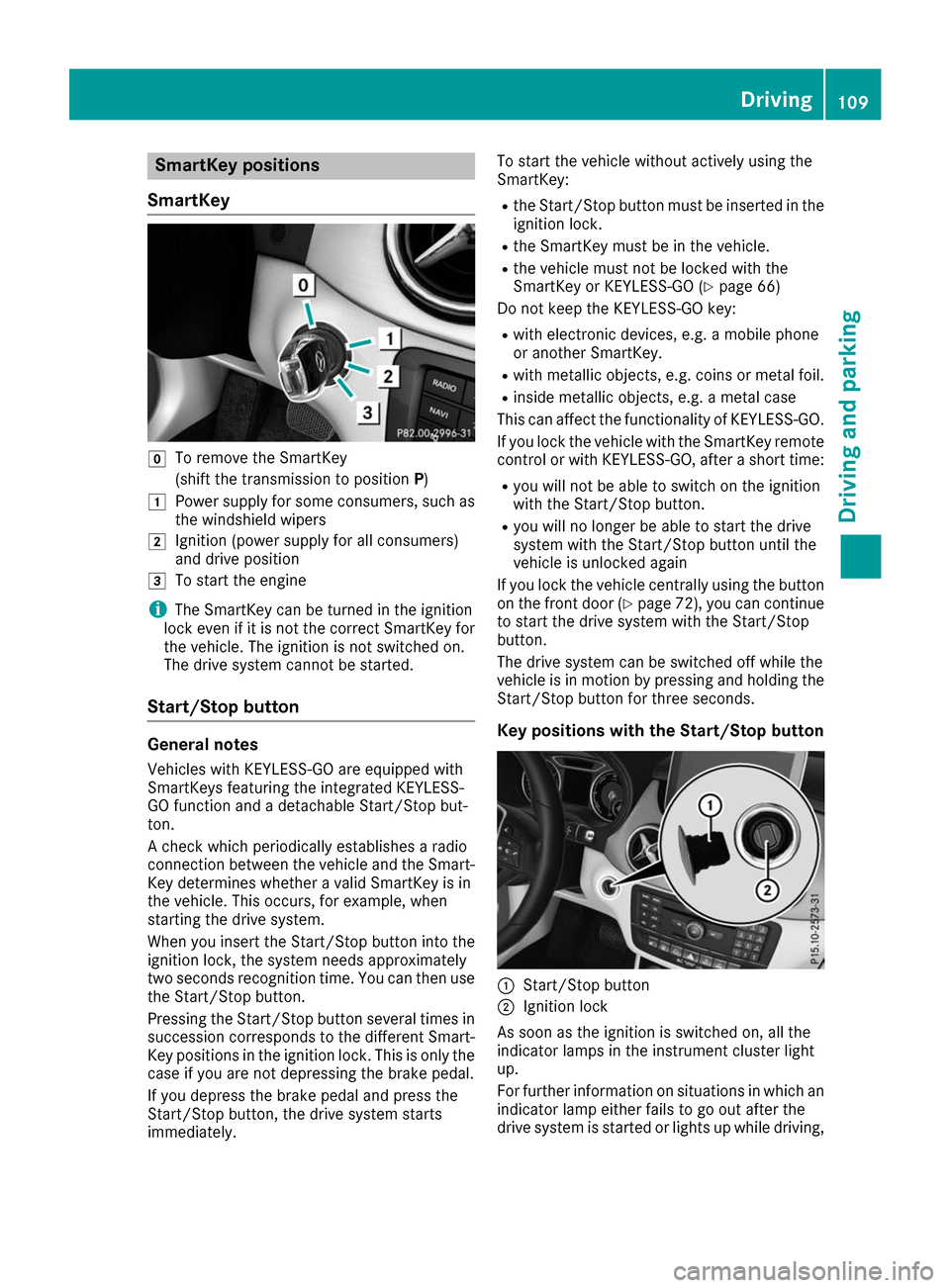
SmartKey 005A
To remove the SmartKey
(shift the transmission to position P)
0047 Power supply for some consumers, such as
the windshield wipers
0048 Ignition (power supply for all consumers)
and drive position
0049 To start the engine
i The SmartKey can be turned in the ignition
lock even if it is not the correct SmartKey for
the vehicle. The ignition is not switched on.
The drive system cannot be started.
Start/Stop button General notes
Vehicles with KEYLESS-GO are equipped with
SmartKeys featuring the integrated KEYLESS-
GO function and a detachable Start/Stop but-
ton.
A check which periodically establishes a radio
connection between the vehicle and the Smart-
Key determines whether a valid SmartKey is in
the vehicle. This occurs, for example, when
starting the drive system.
When you insert the Start/Stop button into the
ignition lock, the system needs approximately
two seconds recognition time. You can then use the Start/Stop button.
Pressing the Start/Stop button several times in
succession corresponds to the different Smart- Key positions in the ignition lock. This is only the
case if you are not depressing the brake pedal.
If you depress the brake pedal and press the
Start/Stop button, the drive system starts
immediately. To start the vehicle without actively using the
SmartKey:
R
the Start/Stop button must be inserted in the
ignition lock.
R the SmartKey must be in the vehicle.
R the vehicle must not be locked with the
SmartKey or KEYLESS-GO (Y page 66)
Do not keep the KEYLESS-GO key:
R with electronic devices, e.g. a mobile phone
or another SmartKey.
R with metallic objects, e.g. coins or metal foil.
R inside metallic objects, e.g. a metal case
This can affect the functionality of KEYLESS-GO.
If you lock the vehicle with the SmartKey remote
control or with KEYLESS-GO, after a short time:
R you will not be able to switch on the ignition
with the Start/Stop button.
R you will no longer be able to start the drive
system with the Start/Stop button until the
vehicle is unlocked again
If you lock the vehicle centrally using the button
on the front door (Y page 72), you can continue
to start the drive system with the Start/Stop
button.
The drive system can be switched off while the
vehicle is in motion by pressing and holding the Start/Stop button for three seconds.
Key positions with the Start/Stop button 0043
Start/Stop button
0044 Ignition lock
As soon as the ignition is switched on, all the
indicator lamps in the instrument cluster light
up.
For further information on situations in which an indicator lamp either fails to go out after the
drive system is started or lights up while driving, Driving
109Driving and parking Z
Page 112 of 290
please refer to "Warning and indicator lamps in
the instrument cluster" (Y page 192).
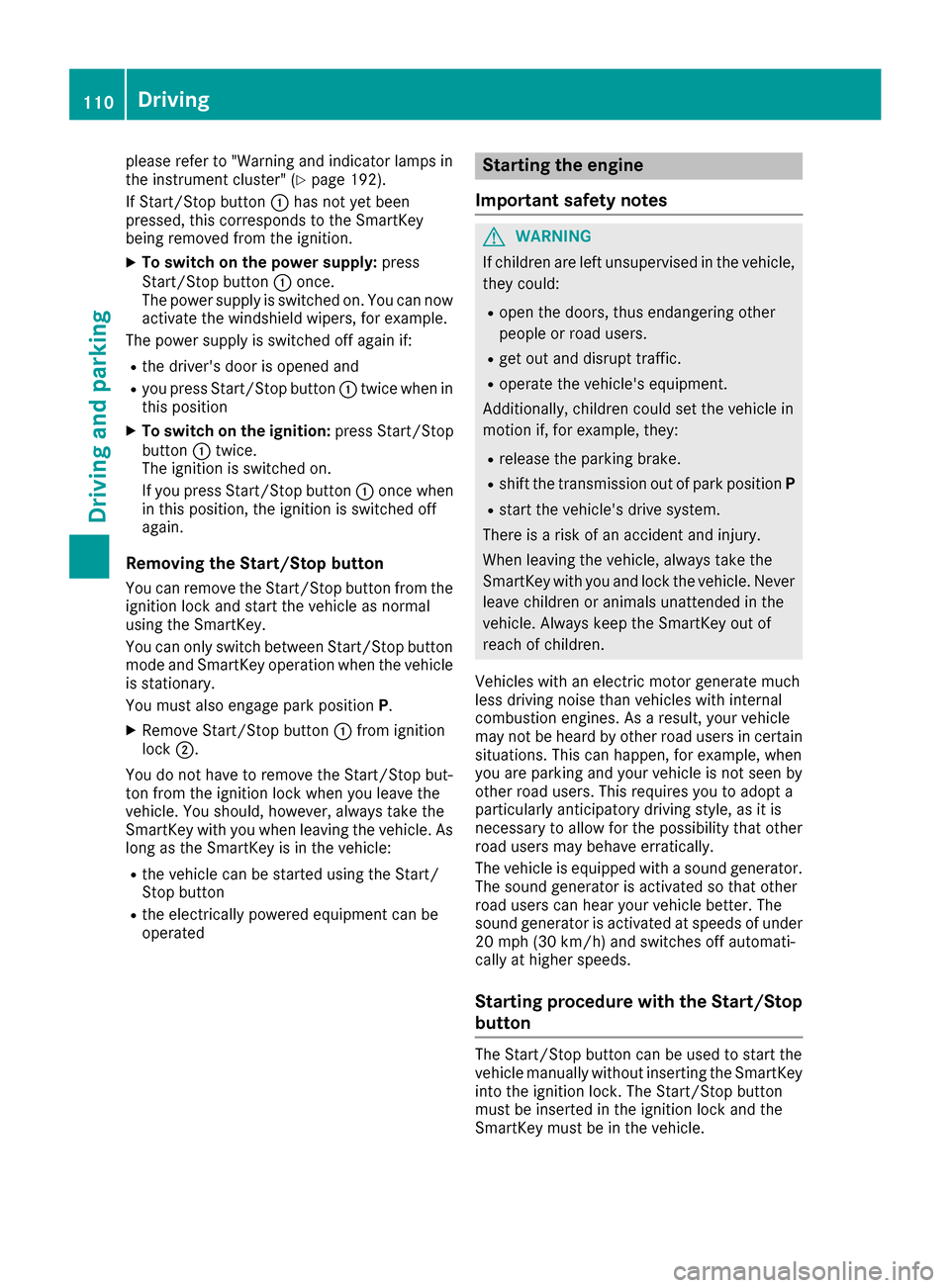
If Start/Stop button 0043has not yet been
pressed, this corresponds to the SmartKey
being removed from the ignition.
X To switch on the power supply: press
Start/Stop button 0043once.
The power supply is switched on. You can now
activate the windshield wipers, for example.
The power supply is switched off again if:
R the driver's door is opened and
R you press Start/Stop button 0043twice when in
this position
X To switch on the ignition: press Start/Stop
button 0043twice.
The ignition is switched on.
If you press Start/Stop button 0043once when
in this position, the ignition is switched off
again.
Removing the Start/Stop button
You can remove the Start/Stop button from the
ignition lock and start the vehicle as normal
using the SmartKey.
You can only switch between Start/Stop button
mode and SmartKey operation when the vehicle is stationary.
You must also engage park position P.
X Remove Start/Stop button 0043from ignition
lock 0044.
You do not have to remove the Start/Stop but-
ton from the ignition lock when you leave the
vehicle. You should, however, always take the
SmartKey with you when leaving the vehicle. As
long as the SmartKey is in the vehicle:
R the vehicle can be started using the Start/
Stop button
R the electrically powered equipment can be
operated Starting the engine
Important safety notes G
WARNING
If children are left unsupervised in the vehicle, they could:
R open the doors, thus endangering other
people or road users.
R get out and disrupt traffic.
R operate the vehicle's equipment.
Additionally, children could set the vehicle in
motion if, for example, they:
R release the parking brake.
R shift the transmission out of park position P
R start the vehicle's drive system.
There is a risk of an accident and injury.
When leaving the vehicle, always take the
SmartKey with you and lock the vehicle. Never leave children or animals unattended in the
vehicle. Always keep the SmartKey out of
reach of children.
Vehicles with an electric motor generate much
less driving noise than vehicles with internal
combustion engines. As a result, your vehicle
may not be heard by other road users in certain
situations. This can happen, for example, when
you are parking and your vehicle is not seen by
other road users. This requires you to adopt a
particularly anticipatory driving style, as it is
necessary to allow for the possibility that other
road users may behave erratically.
The vehicle is equipped with a sound generator.
The sound generator is activated so that other
road users can hear your vehicle better. The
sound generator is activated at speeds of under
20 mph (30 km/h) and switches off automati-
cally at higher speeds.
Starting procedure with the Start/Stop
button The Start/Stop button can be used to start the
vehicle manually without inserting the SmartKey
into the ignition lock. The Start/Stop button
must be inserted in the ignition lock and the
SmartKey must be in the vehicle. 110
DrivingDriving and parking
Page 113 of 290
You can start the drive system if a valid key is in
the vehicle. Switch off the drive system and
always take the key with you when leaving the
vehicle, even if you only leave it for a short time. Pay attention to the important safety notes.
X Depress the brake pedal and keep it
depressed.
X Press the Start/Stop button once
(Y page 109).
The drive system is started. Once the vehicle
is ready to be driven, the Ready
Ready display
(Y page 152) appears in the lower part of the
multifunction display.
Starting procedure with the SmartKey To start the drive system using the key instead
of the Start/Stop button, pull the Start/Stop
button out of the ignition lock.
X Turn the SmartKey to position 3(Y page 109)
in the ignition lock and release it.
The drive system is started. Once the vehicle
is ready to be driven, the Ready Readydisplay
(Y page 152) appears in the lower part of the
multifunction display. Pulling away
The vehicle is equipped with a sound generator.
At low speeds, an electric vehicle makes less
noise than a vehicle with a combustion engine.
The sound generator is activated so that other
road users can hear your vehicle better. The
sound generator is activated at speeds of under
20 mph (30 km/h) and switches off automati-
cally at higher speeds.
X Depress the brake pedal and keep it
depressed.
X Move the DIRECT SELECT lever to position D
or R.
X Release the brake pedal.
X Carefully depress the accelerator pedal.
The electric parking brake is automatically
released (Y page 131).
The red 0049(USA only) or 0024(Canada
only) indicator lamp in the instrument cluster goes out.
The vehicle locks centrally once you have pulled
away. The locking knobs in the doors drop down. You can open the doors from the inside at any
time. It is only possible to move the DIRECT SELECT
selector lever from position
Pto the desired
selector lever position if you depress the brake
pedal. The parking lock is then deactivated and
the electrical parking brake is released auto-
matically. If the brake pedal is not depressed,
the DIRECT SELECT lever can still be moved but
the parking lock remains engaged.
Make sure that no charging cable is plugged in. The parking lock cannot be released if a charg-
ing cable is plugged in. Hill start assist
Hill start assist will aid you when pulling away on
a hill. It holds the vehicle for a short time after
you have removed your foot from the brake
pedal. This gives you enough time to move your foot from the brake pedal to the accelerator
pedal and depress it before the vehicle begins to
roll. G
WARNING
After a short time, hill start assist will no lon-
ger brake your vehicle and it could roll away.
There is a risk of an accident and injury.
Therefore, quickly move your foot from the
brake pedal to the accelerator pedal. Never
leave the vehicle when it is held by hill start
assist.
Hill start assist is not active if:
R you are pulling away on a level road or on a
downhill gradient.
R the DIRECT SELECT lever is in position N.
R the electric parking brake is applied.
R ESP ®
is malfunctioning.
Further information on holding the vehicle sta-
tionary on uphill gradients (Y page 114). Transmission
Important safety notes
Shift the DIRECT SELECT lever to position P
when the drive system is switched off and the
vehicle is stationary. Park position Pis engaged
and the electric parking brake is applied auto-
matically: Transmission
111Driving and parking Z
Page 114 of 290
If the DIRECT SELECT lever cannot be engaged
in park position P, the parking brake is engaged
automatically.
Observe the important safety notes on switch-
ing ESP ®
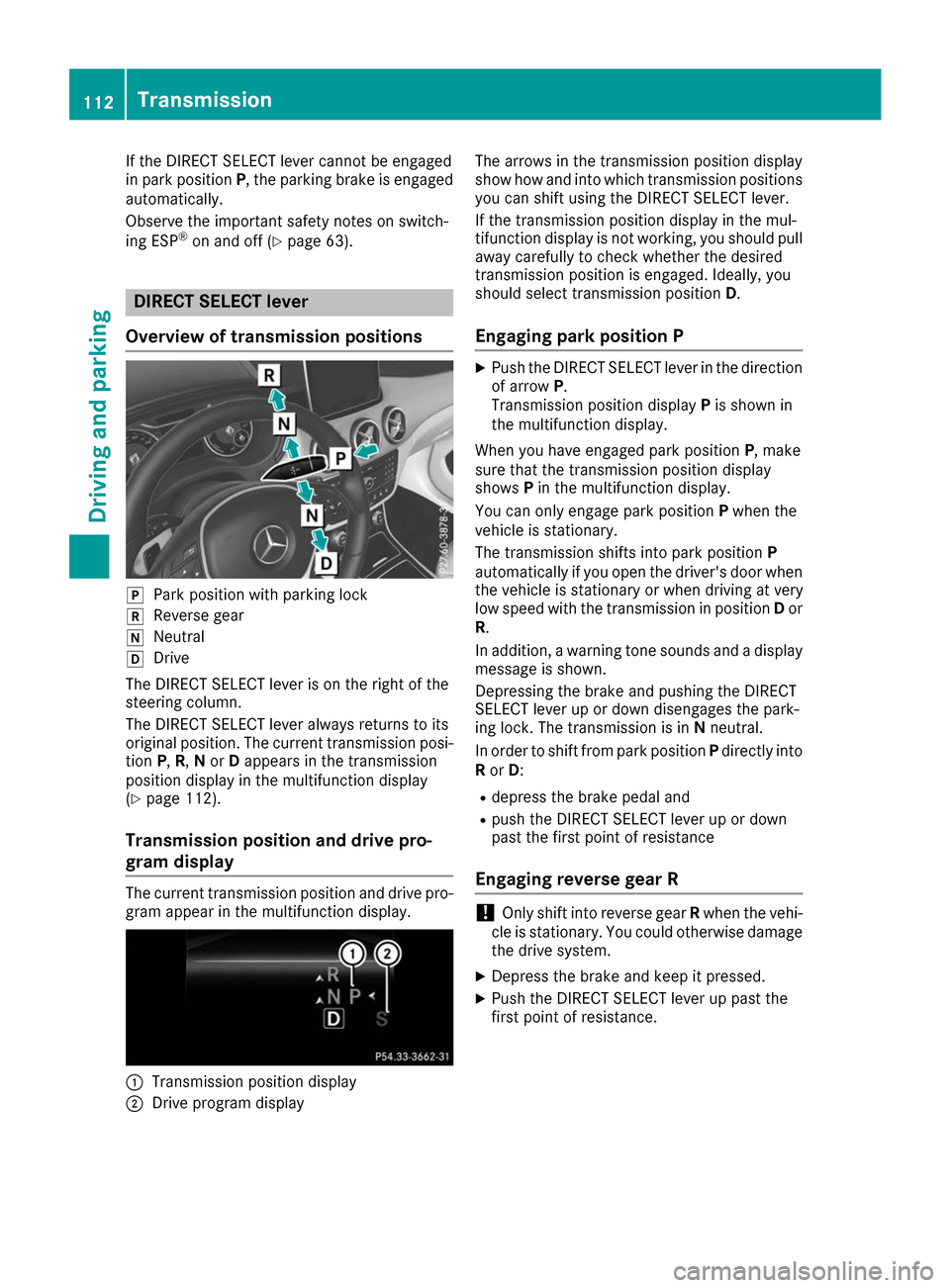
on and off (Y page 63). DIRECT SELECT lever
Overview of transmission positions 005D
Park position with parking lock
005E Reverse gear
005C Neutral
005B Drive
The DIRECT SELECT lever is on the right of the
steering column.
The DIRECT SELECT lever always returns to its
original position. The current transmission posi- tion P,R, Nor Dappears in the transmission
position display in the multifunction display
(Y page 112).
Transmission position and drive pro-
gram display The current transmission position and drive pro-
gram appear in the multifunction display. 0043
Transmission position display
0044 Drive program display The arrows in the transmission position display
show how and into which transmission positions
you can shift using the DIRECT SELECT lever.
If the transmission position display in the mul-
tifunction display is not working, you should pull
away carefully to check whether the desired
transmission position is engaged. Ideally, you
should select transmission position D.
Engaging park position P X
Push the DIRECT SELECT lever in the direction
of arrow P.
Transmission position display Pis shown in
the multifunction display.
When you have engaged park position P, make
sure that the transmission position display
shows Pin the multifunction display.
You can only engage park position Pwhen the
vehicle is stationary.
The transmission shifts into park position P
automatically if you open the driver's door when
the vehicle is stationary or when driving at very
low speed with the transmission in position Dor
R.
In addition, a warning tone sounds and a display
message is shown.
Depressing the brake and pushing the DIRECT
SELECT lever up or down disengages the park-
ing lock. The transmission is in Nneutral.
In order to shift from park position Pdirectly into
R or D:
R depress the brake pedal and
R push the DIRECT SELECT lever up or down
past the first point of resistance
Engaging reverse gear R !
Only shift into reverse gear
Rwhen the vehi-
cle is stationary. You could otherwise damage the drive system.
X Depress the brake and keep it pressed.
X Push the DIRECT SELECT lever up past the
first point of resistance. 112
TransmissionDriving and parking
Page 115 of 290
Shifting to neutral N
G
WARNING
If children are left unsupervised in the vehicle, they could:
R open the doors, thus endangering other
people or road users.
R get out and disrupt traffic.
R operate the vehicle's equipment.
Additionally, children could set the vehicle in
motion if, for example, they:
R release the parking brake.
R shift the transmission out of park position P
R start the vehicle's drive system.
There is a risk of an accident and injury.
When leaving the vehicle, always take the
SmartKey with you and lock the vehicle. Never leave children or animals unattended in the
vehicle. Always keep the SmartKey out of
reach of children.
X If the transmission is in position Dor R: push
the DIRECT SELECT lever up or down to the
first point of resistance.
X If the transmission is in position P: depress
the brake pedal and push the DIRECT SELECT
lever up or down to the first point of resist-
ance.
When the drive system is switched off, the trans-
mission shifts to Nautomatically.
With the SmartKey: if you then open the driv-
er's door or the front-passenger door or remove
the SmartKey from the ignition, the transmis-
sion automatically shifts to P.
With the Start/Stop button: if you then open
the driver's door or the front-passenger door,
the transmission automatically shifts to P.
If you want the transmission to remain in neutral N, e.g. when having the vehicle cleaned in an
automatic car wash with a towing system:
X Vehicles with the Start-Stop button:
remove the Start-Stop button from the igni-
tion lock.
X Insert the SmartKey into the ignition lock.
X All vehicles: switch the ignition on.
X Depress the brake pedal and keep it
depressed. X
Shift to neutral N.
X Release the brake pedal.
X Release the electric parking brake.
X Switch off the ignition and leave the SmartKey
in the ignition lock.
Engaging drive position D X
If the transmission is in position Ror N: push
the DIRECT SELECT lever down past the first
point of resistance.
X If the transmission is in position P: depress
the brake pedal and push the DIRECT SELECT lever down past the first point of resistance. Transmission positions
0045 Park position
This prevents the vehicle from rolling
away when stopped. Only move the
DIRECT SELECT lever to Pwhen the
vehicle is stationary.
The SmartKey can only be removed
when the DIRECT SELECT lever is in
position P. When there is no Smart-
Key in the ignition lock, the DIRECT
SELECT lever is locked in position P. 0046 Reverse gear
Only move the DIRECT SELECT lever
to Rwhen the vehicle is stationary. 0044 Neutral
No power is transmitted from the
drive system to the drive wheels.
Releasing the brakes will allow you to
move the vehicle freely.
If ESP ®
is faulty: only move the
DIRECT SELECT lever to Nif the vehi-
cle is in danger of skidding, e.g. on icy
roads. 003A Drive
For driving forwards Transmission
113Driving and parking Z