reset MERCEDES-BENZ B-Class 2017 W246 User Guide
[x] Cancel search | Manufacturer: MERCEDES-BENZ, Model Year: 2017, Model line: B-Class, Model: MERCEDES-BENZ B-Class 2017 W246Pages: 290, PDF Size: 19.81 MB
Page 151 of 290
(200 km/h) range. If ATTENTION ASSIST
detects typical indicators of fatigue or increas-
ing lapses in concentration on the part of the
driver, it suggests taking a break.
Important safety notes ATTENTION ASSIST is only an aid to the driver. It
might not always recognize fatigue or increasing inattentiveness in time or fail to recognize them
at all. The system is not a substitute for a well-
rested and attentive driver.
The functionality of ATTENTION ASSIST is
restricted and warnings may be delayed or not
occur at all:
R if the length of the journey is less than approx-
imately 30 minutes
R if the road condition is poor, e.g. if the surface
is uneven or if there are potholes
R if there is a strong side wind
R if you have adopted a sporty driving style with
high cornering speeds or high rates of accel-
eration
R if you are predominantly driving slower than
37 mph (60 km/h) or faster than 125 mph
(200 km/ h)
R if the time has been set incorrectly
R in active driving situations, such as when you
change lanes or change your speed
ATTENTION ASSIST is reset when you continue
your journey and starts assessing your tiredness
again if:
R you switch off the engine
R you take off your seat belt and open the driv-
er's door, e.g. for a change of drivers or to
take a break
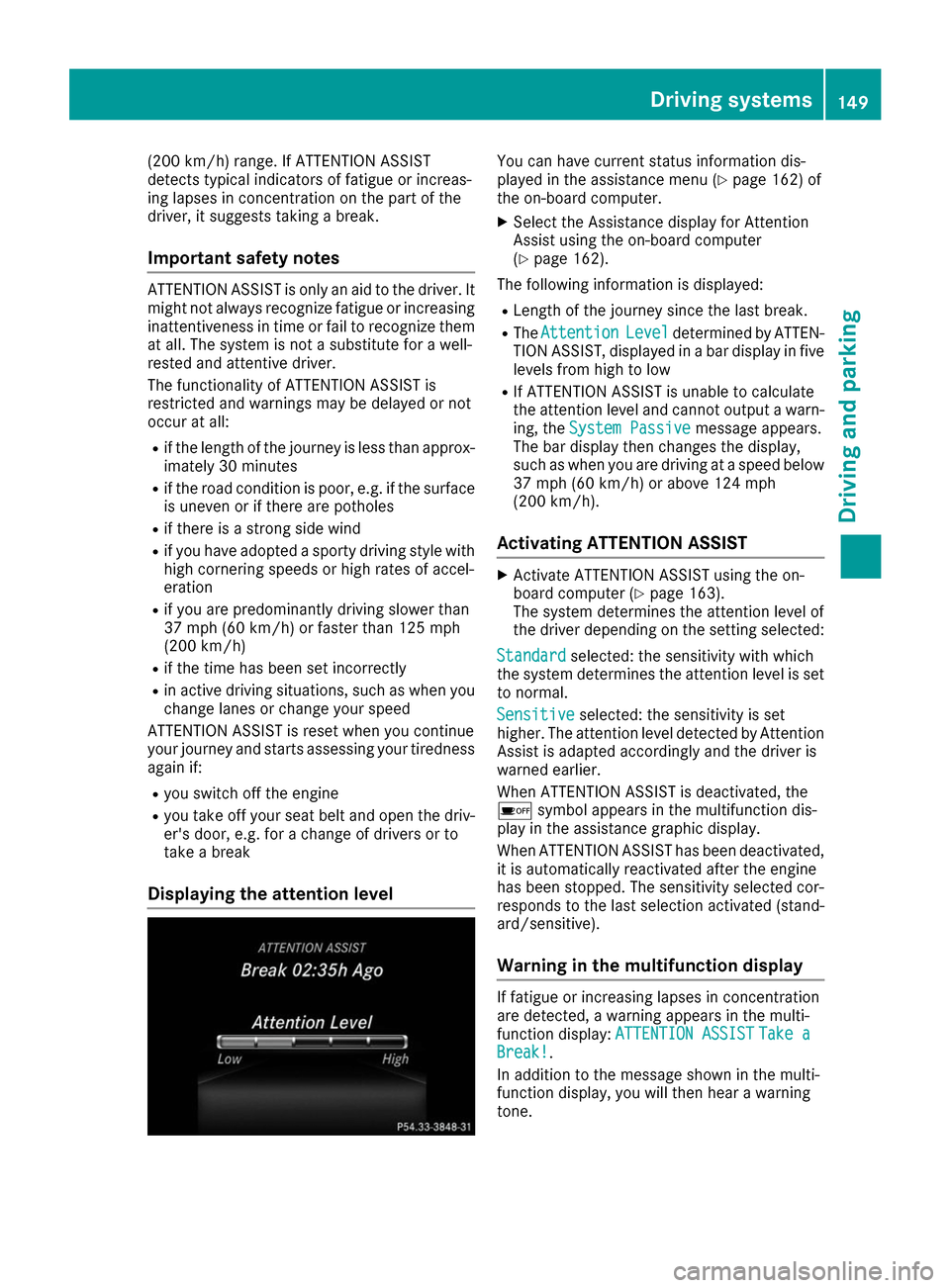
Displaying the attention level You can have current status information dis-
played in the assistance menu (Y
page 162) of
the on-board computer.
X Select the Assistance display for Attention
Assist using the on-board computer
(Y page 162).
The following information is displayed: R Length of the journey since the last break.
R The Attention Attention Level
Leveldetermined by ATTEN-
TION ASSIST, displayed in a bar display in five levels from high to low
R If ATTENTION ASSIST is unable to calculate
the attention level and cannot output a warn-
ing, the System Passive System Passive message appears.
The bar display then changes the display,
such as when you are driving at a speed below 37 mph (60 km/h) or above 124 mph
(200 km/h).
Activating ATTENTION ASSIST X
Activate ATTENTION ASSIST using the on-
board computer (Y page 163).
The system determines the attention level of
the driver depending on the setting selected:
Standard Standard selected: the sensitivity with which
the system determines the attention level is set to normal.
Sensitive
Sensitive selected: the sensitivity is set
higher. The attention level detected by Attention
Assist is adapted accordingly and the driver is
warned earlier.
When ATTENTION ASSIST is deactivated, the
00D7 symbol appears in the multifunction dis-
play in the assistance graphic display.
When ATTENTION ASSIST has been deactivated,
it is automatically reactivated after the engine
has been stopped. The sensitivity selected cor-
responds to the last selection activated (stand-
ard/sensitive).
Warning in the multifunction display If fatigue or increasing lapses in concentration
are detected, a warning appears in the multi-
function display:
ATTENTION ASSIST ATTENTION ASSIST Take a
Take a
Break!
Break!.
In addition to the message shown in the multi-
function display, you will then hear a warning
tone. Driving systems
149Driving and parking Z
Page 157 of 290
Left control panel
0059
0065 R
Calls up the menu and menu bar 0063
0064 Press briefly:
R Scrolls in lists
R Selects a submenu or function
R In the Audio Audio menu: selects the
previous or next station, when the
preset list or station list is active,
or an audio track or video scene
R In the Tel
Tel(Telephone) menu:
switches to the phone book and
selects a name or telephone num-
ber 0063
0064 Press and hold:
R
In the Audio Audio menu: selects a pre-
set list or a station list in the
desired frequency range or an
audio track or video scene using
rapid scrolling
R In the Tel
Tel (Telephone) menu:
starts rapid scrolling if the phone
book is open 0076 R
Confirms the selection or display
message
R In the Tel
Tel (Telephone) menu:
switches to the telephone book
and starts dialing the selected
number Right control panel
0063 R
Mute 0081
0082 R
Adjusts the volume 0076 R
Rejects or ends a call
R Exits the telephone book/redial
memory 0061 R
Makes or accepts a call
R Switches to the redial memory Back button
0038 Press briefly:
R Back
R Vehicles with Audio 20:
Switches off voice-operated con-
trol for navigation (see manufac-
turer's operating instructions)
R Vehicles with COMAND:
Switches off the Voice Control
System (see the separate operat-
ing instructions)
R Hides display messages or calls up
the last Trip
Trip menu function used
R Exits the telephone book/redial
memory 0038 Press and hold:
R
Calls up the standard display in the
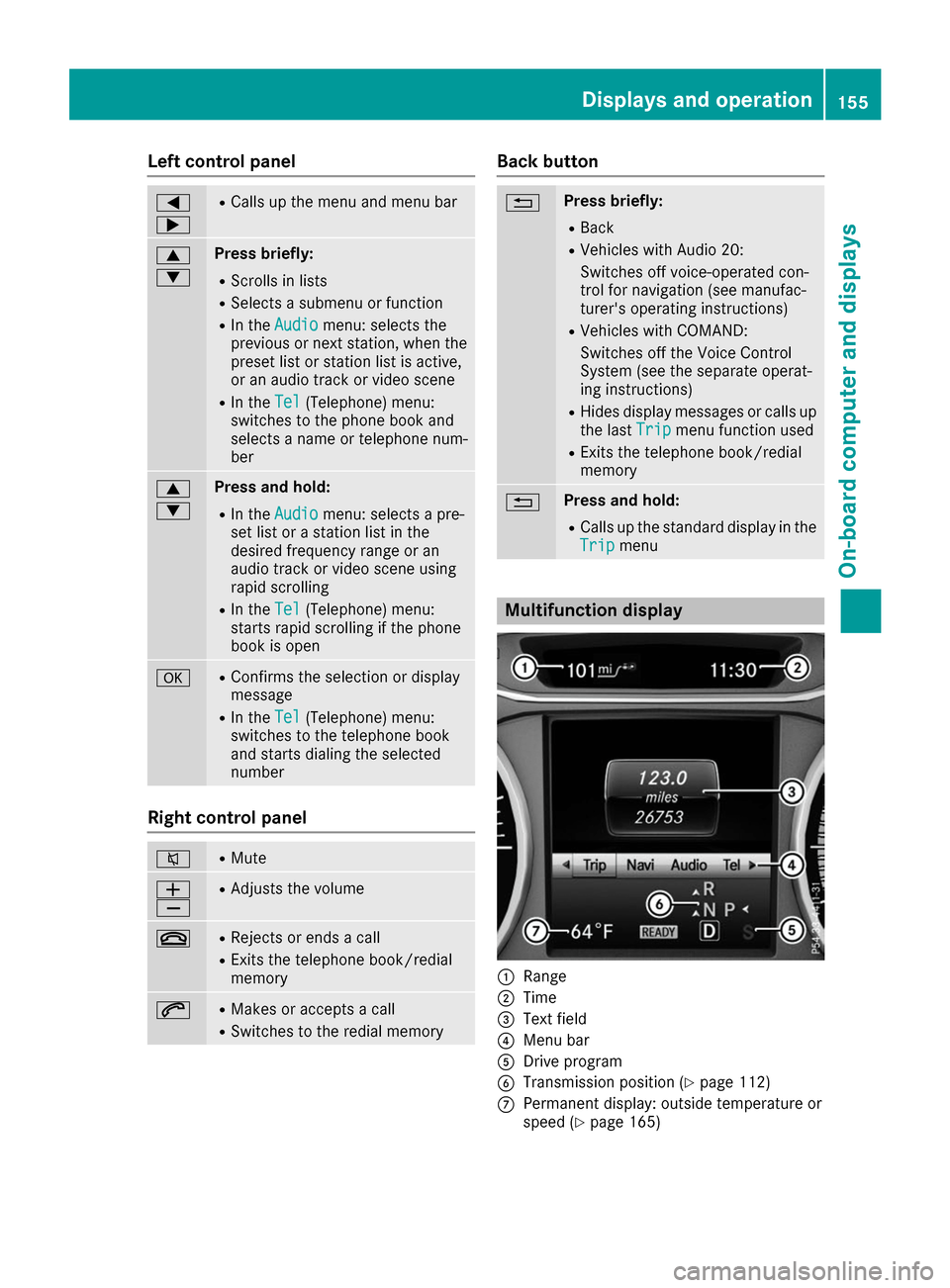
Trip Trip menu Multifunction display
0043
Range
0044 Time
0087 Text field
0085 Menu bar
0083 Drive program
0084 Transmission position (Y page 112)
006B Permanent display: outside temperature or
speed (Y page 165) Displays and operation
155On-board computer and displays Z
Page 158 of 290
X
To display menu bar 0085: press the0059
or 0065 button on the steering wheel.
If you do not press the buttons any longer,
menu bar 0085is faded out after a few seconds.
Text field 0087shows the selected menu or sub-
menu as well as display messages.
i Set the time using the multimedia system;
see the separate operating instructions.
The following messages may appear in the
multifunction display:
R 005D Parking Pilot (Y page 142)
R CRUISE
CRUISE Cruise control (Y page 136)
R 00D9 HOLD function (Y page 138) Menus and submenus
Menu overview
Using the 0059or0065 button on the steering
wheel, open the menu bar.
Operating the on-board computer (Y page 154).
Depending on the equipment installed in the
vehicle, you can call up the following menus:
R Trip
Trip menu (Y page 156)
R Navi Navi menu (navigation instructions)
(Y page 158)
R Audio
Audio menu (Y page 160)
R Tel
Tel menu (telephone) (Y page 160)
R DriveAssist
DriveAssist menu (assistance)
(Y page 162)
R Serv.
Serv. menu (Y page 163)
R Sett.
Sett. menu (settings) (Y page 163)
The displays for the Audio
Audio,Navi
NaviandTel
Tel menus
may differ slightly to those in your vehicle.
The examples given in this Operator's Manual
apply to vehicles equipped with COMAND. Trip menu
Standard display X
Press and hold the 0038button on the steer-
ing wheel until the Trip Tripmenu with trip odom-
eter 0043and odometer 0044appears.
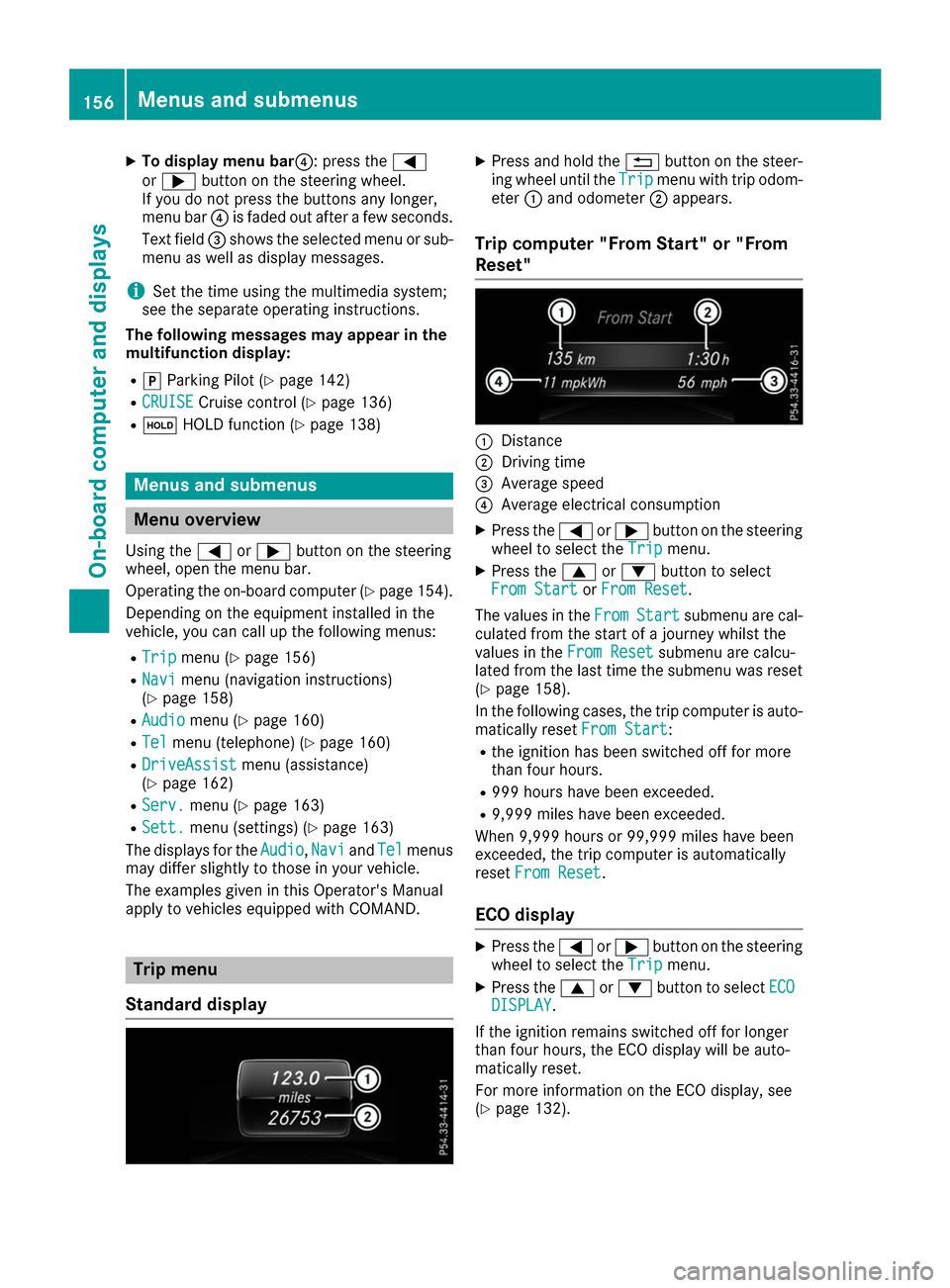
Trip computer "From Start" or "From
Reset" 0043
Distance
0044 Driving time
0087 Average speed
0085 Average electrical consumption
X Press the 0059or0065 button on the steering
wheel to select the Trip Tripmenu.
X Press the 0063or0064 button to select
From Start
From Start orFrom Reset
From Reset.
The values in the From
FromStart
Start submenu are cal-
culated from the start of a journey whilst the
values in the From Reset From Resetsubmenu are calcu-
lated from the last time the submenu was reset
(Y page 158).
In the following cases, the trip computer is auto-
matically reset From Start
From Start:
R the ignition has been switched off for more
than four hours.
R 999 hours have been exceeded.
R 9,999 miles have been exceeded.
When 9,999 hours or 99,999 miles have been
exceeded, the trip computer is automatically
reset From Reset From Reset.
ECO display X
Press the 0059or0065 button on the steering
wheel to select the Trip Tripmenu.
X Press the 0063or0064 button to select ECO ECO
DISPLAY
DISPLAY.
If the ignition remains switched off for longer
than four hours, the ECO display will be auto-
matically reset.
For more information on the ECO display, see
(Y page 132). 156
Menus and submenusOn-board computer and displays
Page 160 of 290
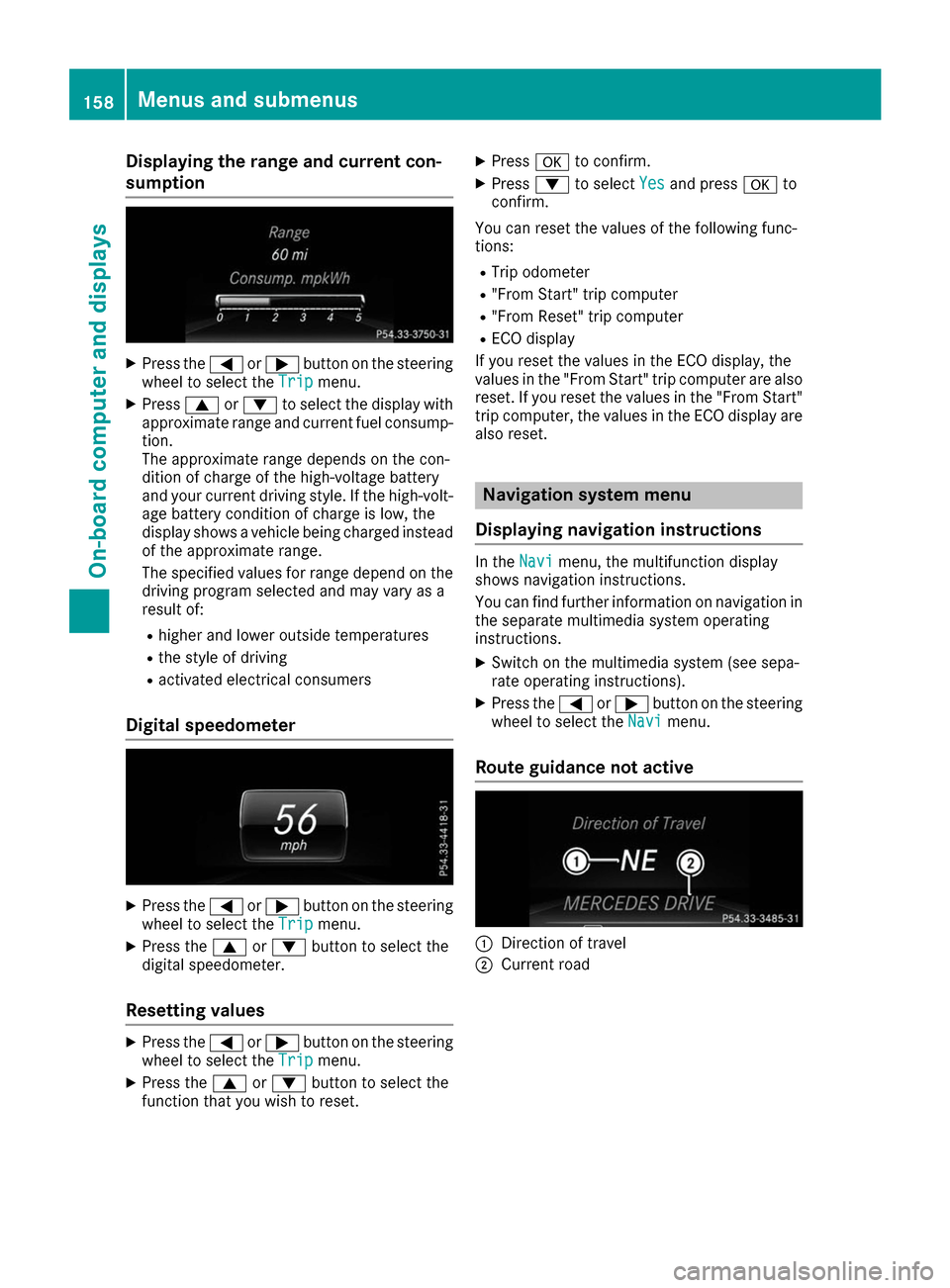
Displaying the range and current con-
sumption X
Press the 0059or0065 button on the steering
wheel to select the Trip
Tripmenu.
X Press 0063or0064 to select the display with
approximate range and current fuel consump-
tion.
The approximate range depends on the con-
dition of charge of the high-voltage battery
and your current driving style. If the high-volt-
age battery condition of charge is low, the
display shows a vehicle being charged instead
of the approximate range.
The specified values for range depend on the
driving program selected and may vary as a
result of:
R higher and lower outside temperatures
R the style of driving
R activated electrical consumers
Digital speedometer X
Press the 0059or0065 button on the steering
wheel to select the Trip Tripmenu.
X Press the 0063or0064 button to select the
digital speedometer.
Resetting values X
Press the 0059or0065 button on the steering
wheel to select the Trip
Tripmenu.
X Press the 0063or0064 button to select the
function that you wish to reset. X
Press 0076to confirm.
X Press 0064to select Yes Yesand press 0076to
confirm.
You can reset the values of the following func-
tions: R Trip odometer
R "From Start" trip computer
R "From Reset" trip computer
R ECO display
If you reset the values in the ECO display, the
values in the "From Start" trip computer are also
reset. If you reset the values in the "From Start" trip computer, the values in the ECO display arealso reset. Navigation system menu
Displaying navigation instructions In the
Navi Navimenu, the multifunction display
shows navigation instructions.
You can find further information on navigation in
the separate multimedia system operating
instructions.
X Switch on the multimedia system (see sepa-
rate operating instructions).
X Press the 0059or0065 button on the steering
wheel to select the Navi
Navi menu.
Route guidance not active 0043
Direction of travel
0044 Current road 158
Menus and submenusOn-boa
rdcompu ter and displays
Page 162 of 290
Audio menu
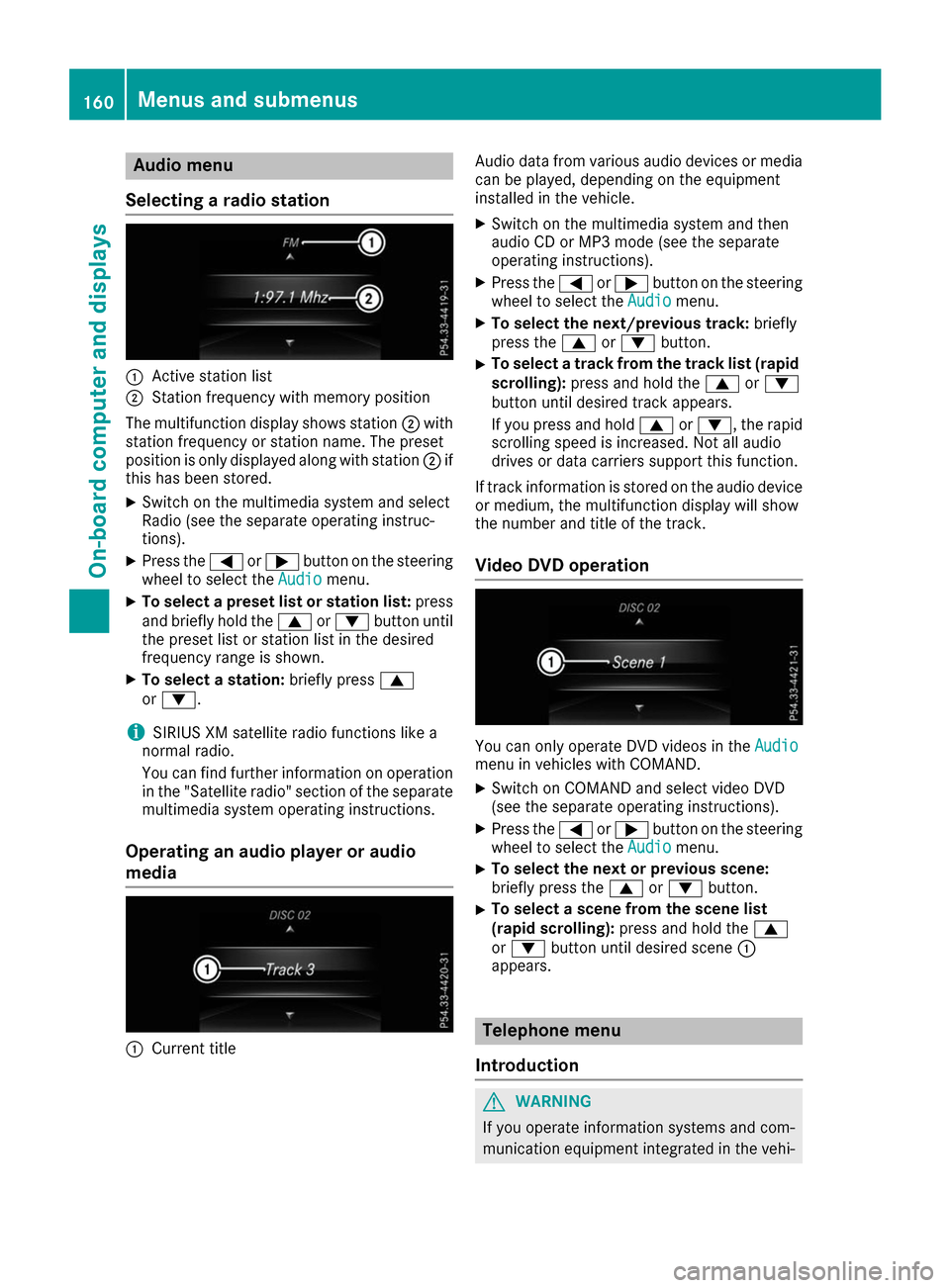
Selecting a radio station 0043
Active station list
0044 Station frequency with memory position
The multifunction display shows station 0044with
station frequency or station name. The preset
position is only displayed along with station 0044if
this has been stored.
X Switch on the multimedia system and select
Radio (see the separate operating instruc-
tions).
X Press the 0059or0065 button on the steering
wheel to select the Audio
Audio menu.
X To select a preset list or station list: press
and briefly hold the 0063or0064 button until
the preset list or station list in the desired
frequency range is shown.
X To select a station: briefly press0063
or 0064.
i SIRIUS XM satellite radio functions like a
normal radio.
You can find further information on operation in the "Satellite radio" section of the separate
multimedia system operating instructions.
Operating an audio player or audio
media 0043
Current title Audio data from various audio devices or media
can be played, depending on the equipment
installed in the vehicle.
X Switch on the multimedia system and then
audio CD or MP3 mode (see the separate
operating instructions).
X Press the 0059or0065 button on the steering
wheel to select the Audio Audiomenu.
X To select the next/previous track: briefly
press the 0063or0064 button.
X To select a track from the track list (rapid
scrolling): press and hold the 0063or0064
button until desired track appears.
If you press and hold 0063or0064, the rapid
scrolling speed is increased. Not all audio
drives or data carriers support this function.
If track information is stored on the audio device or medium, the multifunction display will show
the number and title of the track.
Video DVD operation You can only operate DVD videos in the
Audio Audio
menu in vehicles with COMAND.
X Switch on COMAND and select video DVD
(see the separate operating instructions).
X Press the 0059or0065 button on the steering
wheel to select the Audio
Audiomenu.
X To select the next or previous scene:
briefly press the
0063or0064 button.
X To select a scene from the scene list
(rapid scrolling): press and hold the 0063
or 0064 button until desired scene 0043
appears. Telephone menu
Introduction G
WARNING
If you operate information systems and com-
munication equipment integrated in the vehi- 160
Menus and sub
menusOn-board computer and displays
Page 168 of 290
X
Press the 0059or0065 button on the steering
wheel to select the Sett.
Sett. menu.
X Press the 0064or0063 button to select the
Instrument Cluster
Instrument Cluster submenu.
X Press 0076to confirm.
X Press the 0064or0063 button to select the
Permanent Display:
Permanent Display: function.
The current setting Outside Temperature
Outside Temperature
or Speedometer [km/h]
Speedometer [km/h]/Speedometer Speedometer
[mph]
[mph] appears.
X Press the 0076button to save the setting.
Lights Switching the daytime running lamps on/
off
X Press the 0059or0065 button on the steering
wheel to select the Sett.
Sett. menu.
X Press the 0064or0063 button to select the
Light
Light submenu.
X Press 0076to confirm.
X Press the 0064or0063 button to select the
Daytime Running Lights
Daytime Running Lights function.
If the Daytime
Daytime Running
RunningLights
Lightsfunction has
been switched on, the multifunction display
shows the cone of light and the 0086symbol
in orange.
X Press the 0076button to save the setting.
Further information on daytime running lamps
(Y page 87).
Vehicle Activating/deactivating the automatic
door locking mechanism
X Press the 0059or0065 button on the steering
wheel to select the Sett.
Sett. menu.
X Press the 0064or0063 button to select the
Vehicle Vehicle submenu.
X Press 0076to confirm.
X Press the 0064or0063 button to select the
Automatic Door Lock
Automatic Door Lock function.
If the Automatic Door Lock
Automatic Door Lock function is
switched on, the multifunction display shows the doors in orange.
X Press the 0076button to save the setting. If you activate the
Automatic door locks
Automatic door locks
function, the vehicle is centrally locked above a
speed of around 9 mph (15 km/h).
For further information on the automatic locking feature, see (Y page 73).
Activating/deactivating the acoustic
locking verification signal If you switch on the Acoustic AcousticLock
Lockfunction, an
acoustic signal sounds when you lock the vehi-
cle.
X Press the 0059or0065 button on the steering
wheel to select the Sett. Sett.menu.
X Press the 0064or0063 button to select the
Vehicle
Vehicle submenu.
X Press 0076to confirm.
X Press the 0064or0063 button to select the
Acoustic Lock
Acoustic Lock function.
If the Acoustic Lock
Acoustic Lock function is activated,
the multifunction display shows the 0037
symbol in orange.
X Press the 0076button to save the setting.
Restoring the factory settings X
Press the 0059or0065 button on the steering
wheel to select the Sett.
Sett.menu.
X Press the 0064or0063 button to select the
Factory Setting
Factory Setting submenu.
X Press 0076to confirm.
The Reset All Settings?
Reset All Settings? function
appears.
X Press the 0064or0063 button to select No
Noor
Yes
Yes.
X Press the 0076button to confirm the selec-
tion.
If you have selected Yes Yes, the multifunction
display shows a confirmation message.
For safety reasons, not all functions are reset.
For safety reasons, the Daytime Running Daytime Running
Lights
Lights function in the Light
Lightsubmenu is only
reset if the vehicle is stationary. 166
Menus and submenusOn-board computer and displays
Page 236 of 290
Information about Service
Resetting the ASSYST PLUS service
interval display !
If the ASSYST PLUS service interval display
has been inadvertently reset, this setting can
be corrected at a qualified specialist work-
shop.
Have service work carried out as described in the Maintenance Booklet. This may otherwise
lead to increased wear and damage to the
major assemblies or the vehicle.
A qualified specialist workshop, e.g. an author-
ized Mercedes-Benz Center, will reset the
ASSYST PLUS service interval display after the
service work has been carried out. You can also obtain further information on maintenance
work, for example.
Special service requirements The specified maintenance interval takes only
the normal operation of the vehicle into
account. Service work will need to be performed
more often if the vehicle is operated under ardu-
ous conditions or increased loads. This can be
the case, for example, when driving frequently in mountainous areas or on poor road surfaces.
In these or similar operating conditions have the interior filter, for example, changed more fre-
quently. Under arduous operating conditions,
the tires must be checked more often. Further
information can be obtained at a qualified spe-
cialist workshop, e.g. an authorized Mercedes-
Benz Center.
Driving abroad An extensive Mercedes-Benz Service network is
also available in other countries. You can obtain further information from any authorized
Mercedes-Benz Center. Care
General notes
H
Environmental note
Dispose of empty packaging and cleaning
cloths in an environmentally responsible man- ner. !
For cleaning your vehicle, do not use any of
the following:
R dry, rough or hard cloths
R abrasive cleaning agents
R solvents
R cleaning agents containing solvents
Do not scrub.
Do not touch the surfaces or protective films
with hard objects, e.g. a ring or ice scraper.
You could otherwise scratch or damage the
surfaces and protective film.
! Do not park your vehicle for a long period of
time directly after cleaning, particularly after
cleaning the wheel rim with wheel cleaner.
Wheel cleaner can lead to the increased cor-
rosion of the brake discs and pads. Therefore,
drive for a few minutes after cleaning. By
heating up the brakes, the brake discs and
pads dry. The vehicle can then be parked for a long period of time.
Regular care of your vehicle is a condition for
retaining the quality in the long term.
Use care products and cleaning agents recom-
mended and approved by Mercedes-Benz. Washing the vehicle and cleaning the
paintwork
Automatic car wash G
WARNING
Braking efficiency is reduced after washing
the vehicle. There is a risk of an accident.
After the vehicle has been washed, brake
carefully while paying attention to the traffic
conditions until full braking power is restored.
! If the HOLD function is activated, the vehicle
brakes automatically in certain situations.
To prevent damage to the vehicle, deactivate the HOLD function in the following or other
similar situations:
R when towing the vehicle
R in the car wash
! Never clean your vehicle in a Touchless
Automatic Car Wash as these use special
cleaning agents. These cleaning agents can
damage the paintwork or plastic parts. 234
CareMaintenance and care
Page 249 of 290
R
It is particularly important to observe the
described order when connecting and dis-
connecting the jumper cables.
R Never connect or disconnect the battery
terminals while the engine is running. G
WARNING
Battery acid is caustic. There is a risk of injury. Avoid contact with skin, eyes or clothing. Do
not inhale any battery gases. Do not lean over
the battery. Keep children away from batter-
ies. Wash away battery acid immediately with
plenty of clean water and seek medical atten- tion. H
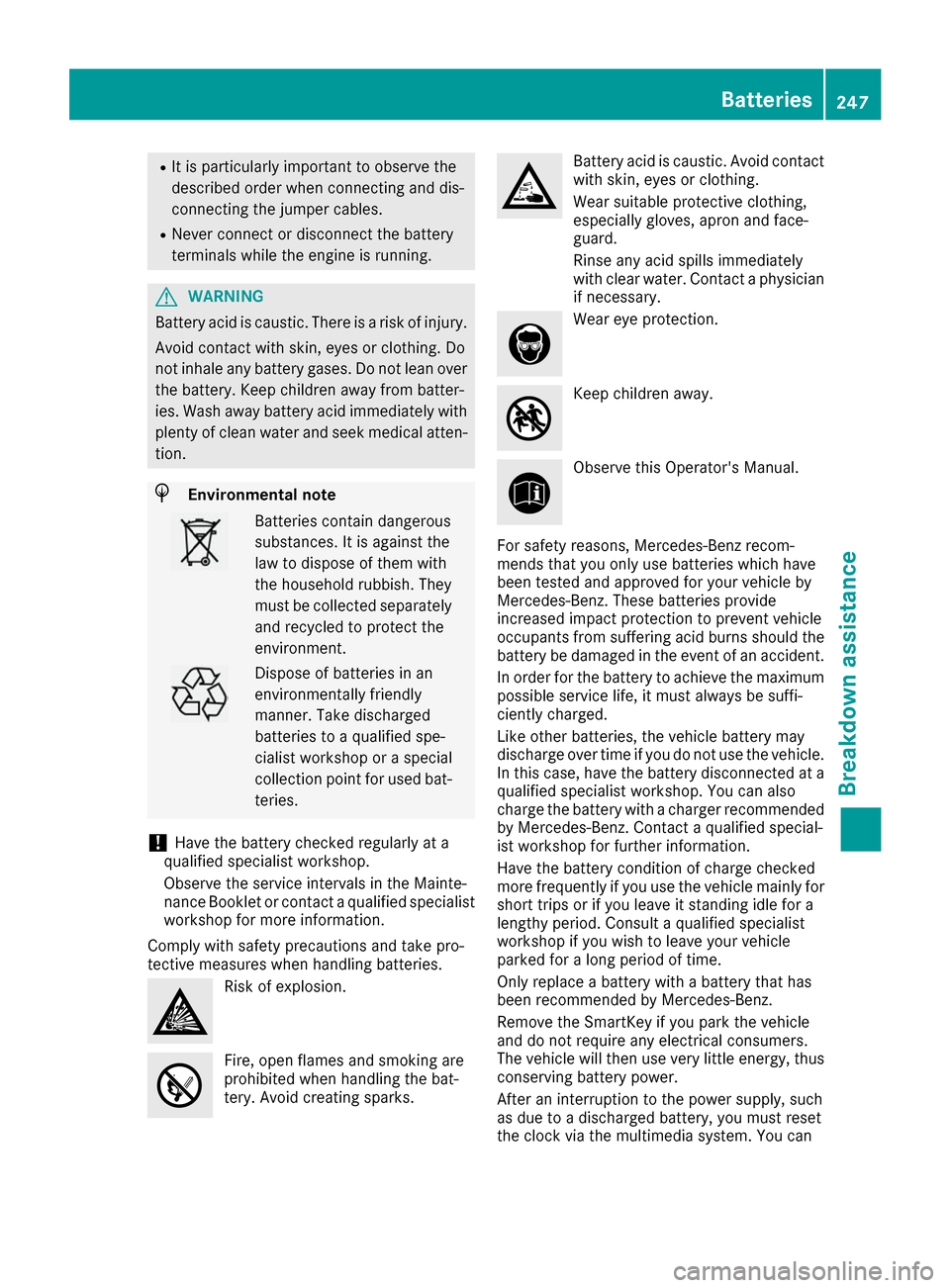
Environmental note Batteries contain dangerous
substances. It is against the
law to dispose of them with
the household rubbish. They
must be collected separately
and recycled to protect the
environment. Dispose of batteries in an
environmentally friendly
manner. Take discharged
batteries to a qualified spe-
cialist workshop or a special
collection point for used bat-
teries.
! Have the battery checked regularly at a
qualified specialist workshop.
Observe the service intervals in the Mainte-
nance Booklet or contact a qualified specialist workshop for more information.
Comply with safety precautions and take pro-
tective measures when handling batteries. Risk of explosion.
Fire, open flames and smoking are
prohibited when handling the bat-
tery. Avoid creating sparks. Battery acid is caustic. Avoid contact
with skin, eyes or clothing.
Wear suitable protective clothing,
especially gloves, apron and face-
guard.
Rinse any acid spills immediately
with clear water. Contact a physician if necessary. Wear eye protection.
Keep children away.
Observe this Operator's Manual.
For safety reasons, Mercedes-Benz recom-
mends that you only use batteries which have
been tested and approved for your vehicle by
Mercedes-Benz. These batteries provide
increased impact protection to prevent vehicle
occupants from suffering acid burns should the battery be damaged in the event of an accident.
In order for the battery to achieve the maximum possible service life, it must always be suffi-
ciently charged.
Like other batteries, the vehicle battery may
discharge over time if you do not use the vehicle.In this case, have the battery disconnected at a
qualified specialist workshop. You can also
charge the battery with a charger recommended by Mercedes-Benz. Contact a qualified special-
ist workshop for further information.
Have the battery condition of charge checked
more frequently if you use the vehicle mainly for
short trips or if you leave it standing idle for a
lengthy period. Consult a qualified specialist
workshop if you wish to leave your vehicle
parked for a long period of time.
Only replace a battery with a battery that has
been recommended by Mercedes-Benz.
Remove the SmartKey if you park the vehicle
and do not require any electrical consumers.
The vehicle will then use very little energy, thus conserving battery power.
After an interruption to the power supply, such
as due to a discharged battery, you must reset
the clock via the multimedia system. You can Batteries
247Breakdown assistance Z
Page 255 of 290
Installing/removing the towing eye
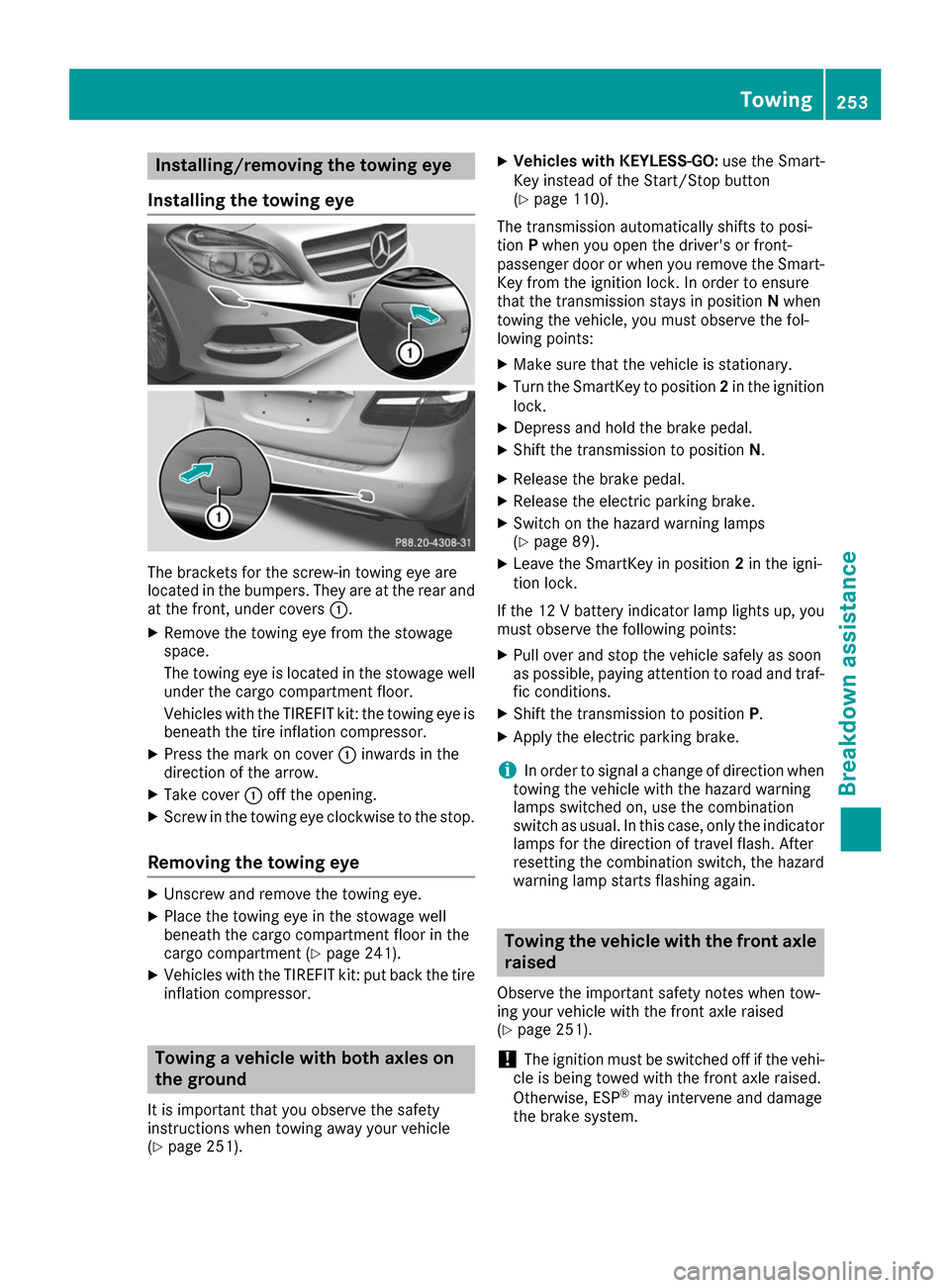
Installing the towing eye The brackets for the screw-in towing eye are
located in the bumpers. They are at the rear and
at the front, under covers 0043.
X Remove the towing eye from the stowage
space.
The towing eye is located in the stowage well
under the cargo compartment floor.
Vehicles with the TIREFIT kit: the towing eye is
beneath the tire inflation compressor.
X Press the mark on cover 0043inwards in the
direction of the arrow.
X Take cover 0043off the opening.
X Screw in the towing eye clockwise to the stop.
Removing the towing eye X
Unscrew and remove the towing eye.
X Place the towing eye in the stowage well
beneath the cargo compartment floor in the
cargo compartment (Y page 241).
X Vehicles with the TIREFIT kit: put back the tire
inflation compressor. Towing a vehicle with both axles on
the ground
It is important that you observe the safety
instructions when towing away your vehicle
(Y page 251). X
Vehicles with KEYLESS-GO: use the Smart-
Key instead of the Start/Stop button
(Y page 110).
The transmission automatically shifts to posi-
tion Pwhen you open the driver's or front-
passenger door or when you remove the Smart-
Key from the ignition lock. In order to ensure
that the transmission stays in position Nwhen
towing the vehicle, you must observe the fol-
lowing points:
X Make sure that the vehicle is stationary.
X Turn the SmartKey to position 2in the ignition
lock.
X Depress and hold the brake pedal.
X Shift the transmission to position N.
X Release the brake pedal.
X Release the electric parking brake.
X Switch on the hazard warning lamps
(Y page 89).
X Leave the SmartKey in position 2in the igni-
tion lock.
If the 12 V battery indicator lamp lights up, you must observe the following points:
X Pull over and stop the vehicle safely as soon
as possible, paying attention to road and traf-
fic conditions.
X Shift the transmission to position P.
X Apply the electric parking brake.
i In order to signal a change of direction when
towing the vehicle with the hazard warning
lamps switched on, use the combination
switch as usual. In this case, only the indicator lamps for the direction of travel flash. After
resetting the combination switch, the hazard
warning lamp starts flashing again. Towing the vehicle with the front axle
raised
Observe the important safety notes when tow-
ing your vehicle with the front axle raised
(Y page 251).
! The ignition must be switched off if the vehi-
cle is being towed with the front axle raised.
Otherwise, ESP ®
may intervene and damage
the brake system. Towing
253Breakdown assistance Z
Page 263 of 290
Tire and Loading Information placard
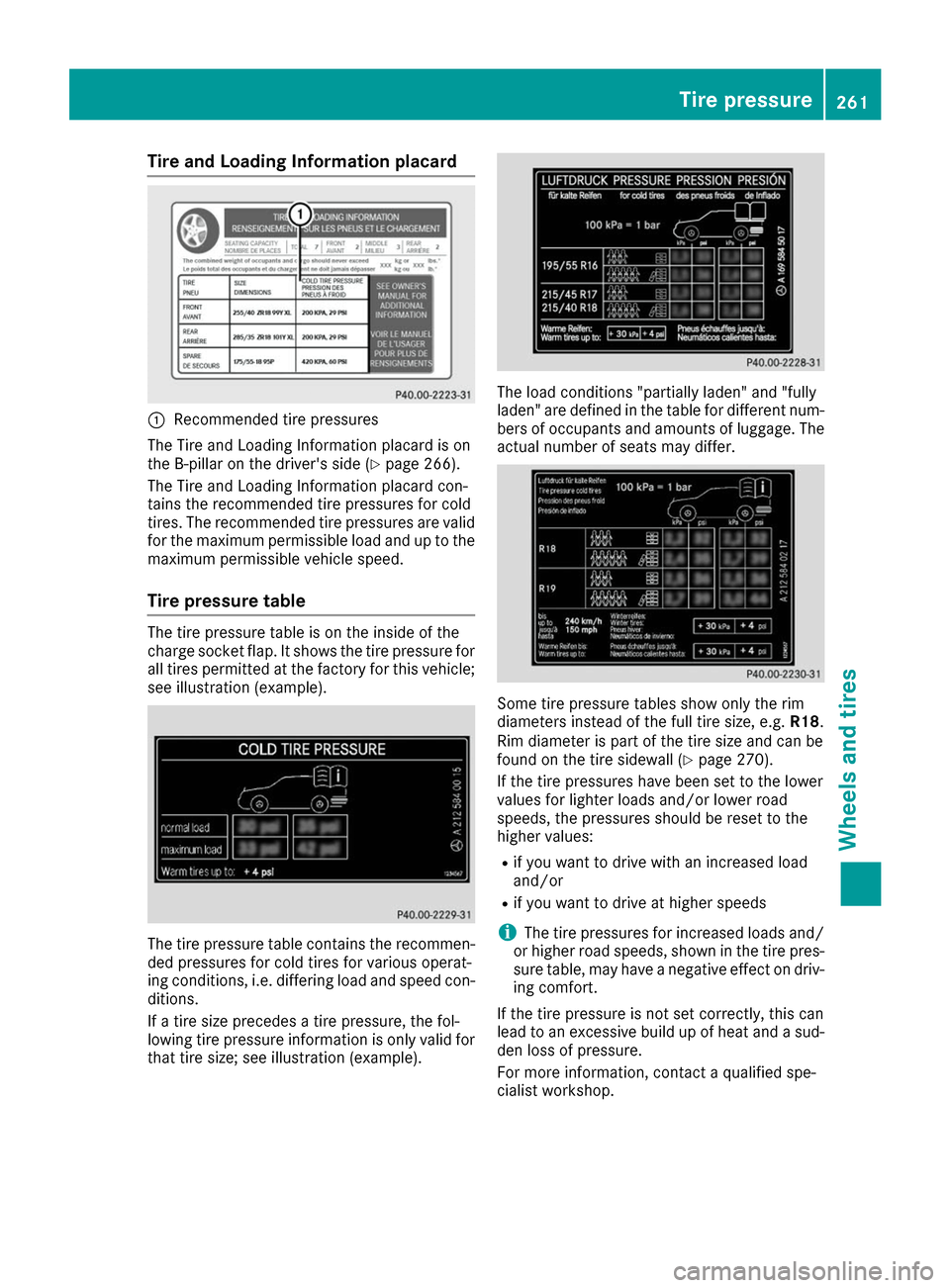
0043
Recommended tire pressures
The Tire and Loading Information placard is on
the B-pillar on the driver's side (Y page 266).
The Tire and Loading Information placard con-
tains the recommended tire pressures for cold
tires. The recommended tire pressures are valid for the maximum permissible load and up to the
maximum permissible vehicle speed.
Tire pressure table The tire pressure table is on the inside of the
charge socket flap. It shows the tire pressure for
all tires permitted at the factory for this vehicle;see illustration (example). The tire pressure table contains the recommen-
ded pressures for cold tires for various operat-
ing conditions, i.e. differing load and speed con-
ditions.
If a tire size precedes a tire pressure, the fol-
lowing tire pressure information is only valid for that tire size; see illustration (example). The load conditions "partially laden" and "fully
laden" are defined in the table for different num- bers of occupants and amounts of luggage. The
actual number of seats may differ. Some tire pressure tables show only the rim
diameters instead of the full tire size, e.g.
R18.
Rim diameter is part of the tire size and can be
found on the tire sidewall (Y page 270).
If the tire pressures have been set to the lower
values for lighter loads and/or lower road
speeds, the pressures should be reset to the
higher values:
R if you want to drive with an increased load
and/or
R if you want to drive at higher speeds
i The tire pressures for increased loads and/
or higher road speeds, shown in the tire pres-
sure table, may have a negative effect on driv-
ing comfort.
If the tire pressure is not set correctly, this can
lead to an excessive build up of heat and a sud- den loss of pressure.
For more information, contact a qualified spe-
cialist workshop. Tire pressure
261Wheels and tires Z