time setting MERCEDES-BENZ B-Class 2017 W246 User Guide
[x] Cancel search | Manufacturer: MERCEDES-BENZ, Model Year: 2017, Model line: B-Class, Model: MERCEDES-BENZ B-Class 2017 W246Pages: 290, PDF Size: 19.81 MB
Page 92 of 290
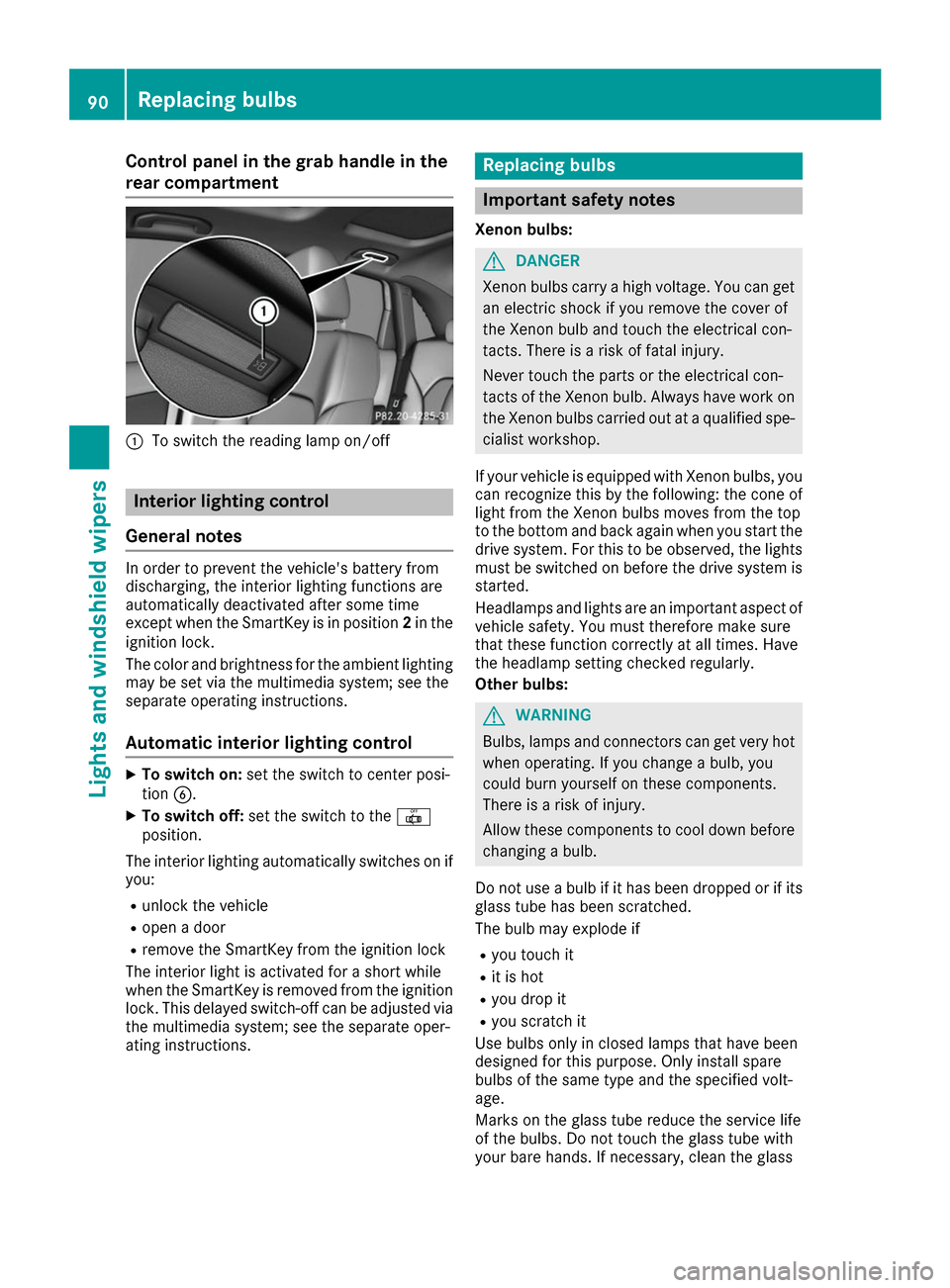
Control panel in the grab handle in the
rear compartment 0043
To switch the reading lamp on/off Interior lighting control
General notes In order to prevent the vehicle's battery from
discharging, the interior lighting functions are
automatically deactivated after some time
except when the SmartKey is in position 2in the
ignition lock.
The color and brightness for the ambient lighting
may be set via the multimedia system; see the
separate operating instructions.
Automatic interior lighting control X
To switch on: set the switch to center posi-
tion 0084.
X To switch off: set the switch to the 0033
position.
The interior lighting automatically switches on if you:
R unlock the vehicle
R open a door
R remove the SmartKey from the ignition lock
The interior light is activated for a short while
when the SmartKey is removed from the ignition
lock. This delayed switch-off can be adjusted via
the multimedia system; see the separate oper-
ating instructions. Replacing bulbs
Important safety notes
Xenon bulbs: G
DANGER
Xenon bulbs carry a high voltage. You can get an electric shock if you remove the cover of
the Xenon bulb and touch the electrical con-
tacts. There is a risk of fatal injury.
Never touch the parts or the electrical con-
tacts of the Xenon bulb. Always have work on
the Xenon bulbs carried out at a qualified spe-
cialist workshop.
If your vehicle is equipped with Xenon bulbs, you
can recognize this by the following: the cone of light from the Xenon bulbs moves from the top
to the bottom and back again when you start the
drive system. For this to be observed, the lights must be switched on before the drive system is
started.
Headlamps and lights are an important aspect of
vehicle safety. You must therefore make sure
that these function correctly at all times. Have
the headlamp setting checked regularly.
Other bulbs: G
WARNING
Bulbs, lamps and connectors can get very hot when operating. If you change a bulb, you
could burn yourself on these components.
There is a risk of injury.
Allow these components to cool down before changing a bulb.
Do not use a bulb if it has been dropped or if its glass tube has been scratched.
The bulb may explode if
R you touch it
R it is hot
R you drop it
R you scratch it
Use bulbs only in closed lamps that have been
designed for this purpose. Only install spare
bulbs of the same type and the specified volt-
age.
Marks on the glass tube reduce the service life
of the bulbs. Do not touch the glass tube with
your bare hands. If necessary, clean the glass 90
Replacing bulbsLights and windshield wipers
Page 93 of 290
tube when cold with alcohol or spirit and rub it
off with a lint-free cloth.
Protect bulbs from moisture during operation.
Do not allow bulbs to come into contact with
liquids.
Besides the Xenon bulbs, there are other bulbs
that you cannot replace yourself. Replace only
the bulbs listed (Y page 91). Have the bulbs
that you cannot change yourself replaced at a
qualified specialist workshop.
If you require assistance replacing bulbs, con-
sult a qualified specialist workshop.
If the new bulb still does not light up, consult a
qualified specialist workshop.
Headlamps and lights are an important aspect of
vehicle safety. You must therefore make sure
that these function correctly at all times. Have
the headlamp setting checked regularly. Overview of bulb types
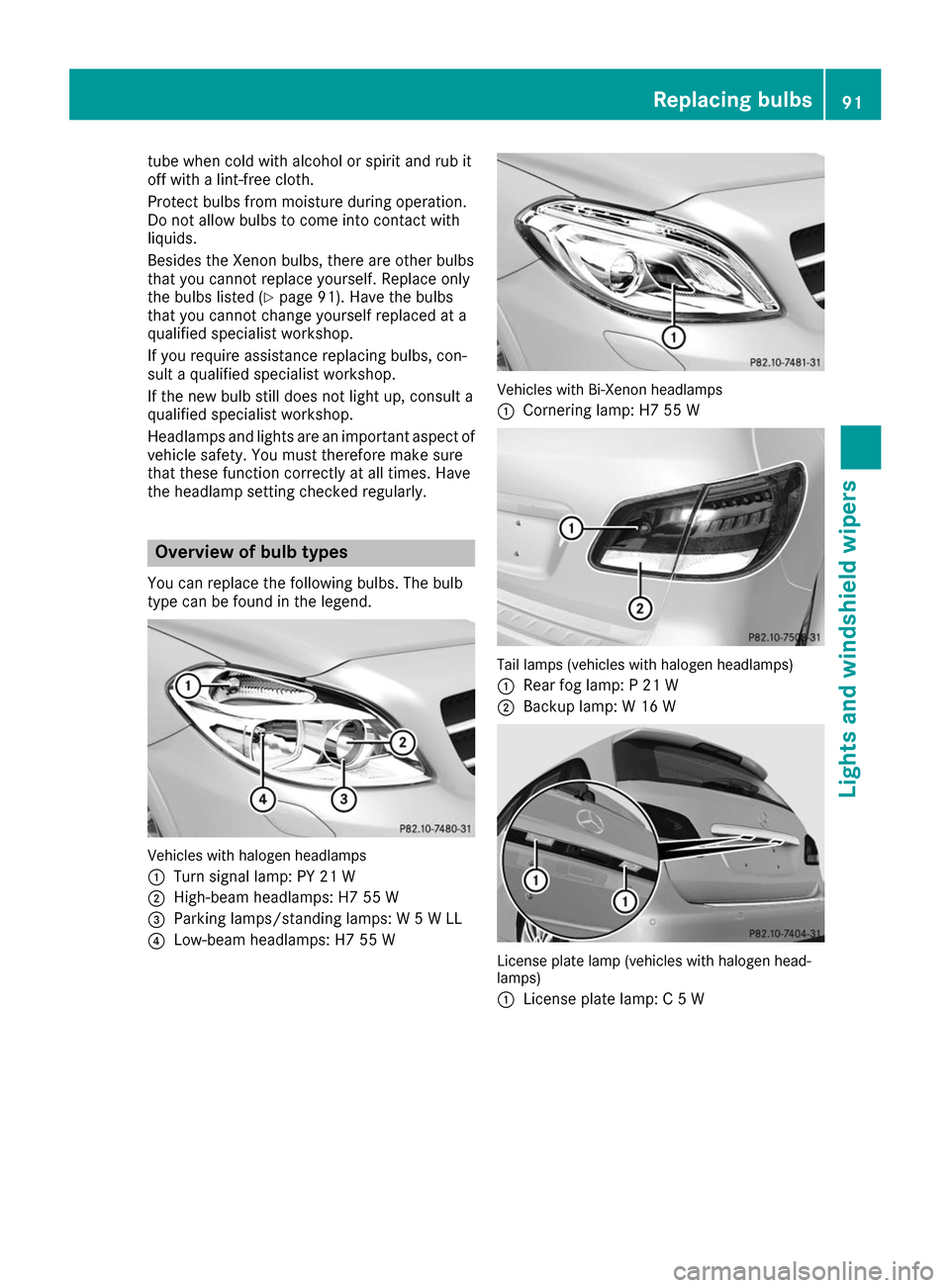
You can replace the following bulbs. The bulb
type can be found in the legend. Vehicles with halogen headlamps
0043
Turn signal lamp: PY 21 W
0044 High-beam headlamps: H7 55 W
0087 Parking lamps/standing lamps: W 5 W LL
0085 Low-beam headlamps: H7 55 W Vehicles with Bi-Xenon headlamps
0043
Cornering lamp: H7 55 W Tail lamps (vehicles with halogen headlamps)
0043 Rear fog lamp: P 21 W
0044 Backup lamp: W 16 W License plate lamp (vehicles with halogen head-
lamps)
0043
License plate lamp: C 5 W Replacing bulbs
91Lights andwindshield wipers Z
Page 102 of 290
0084
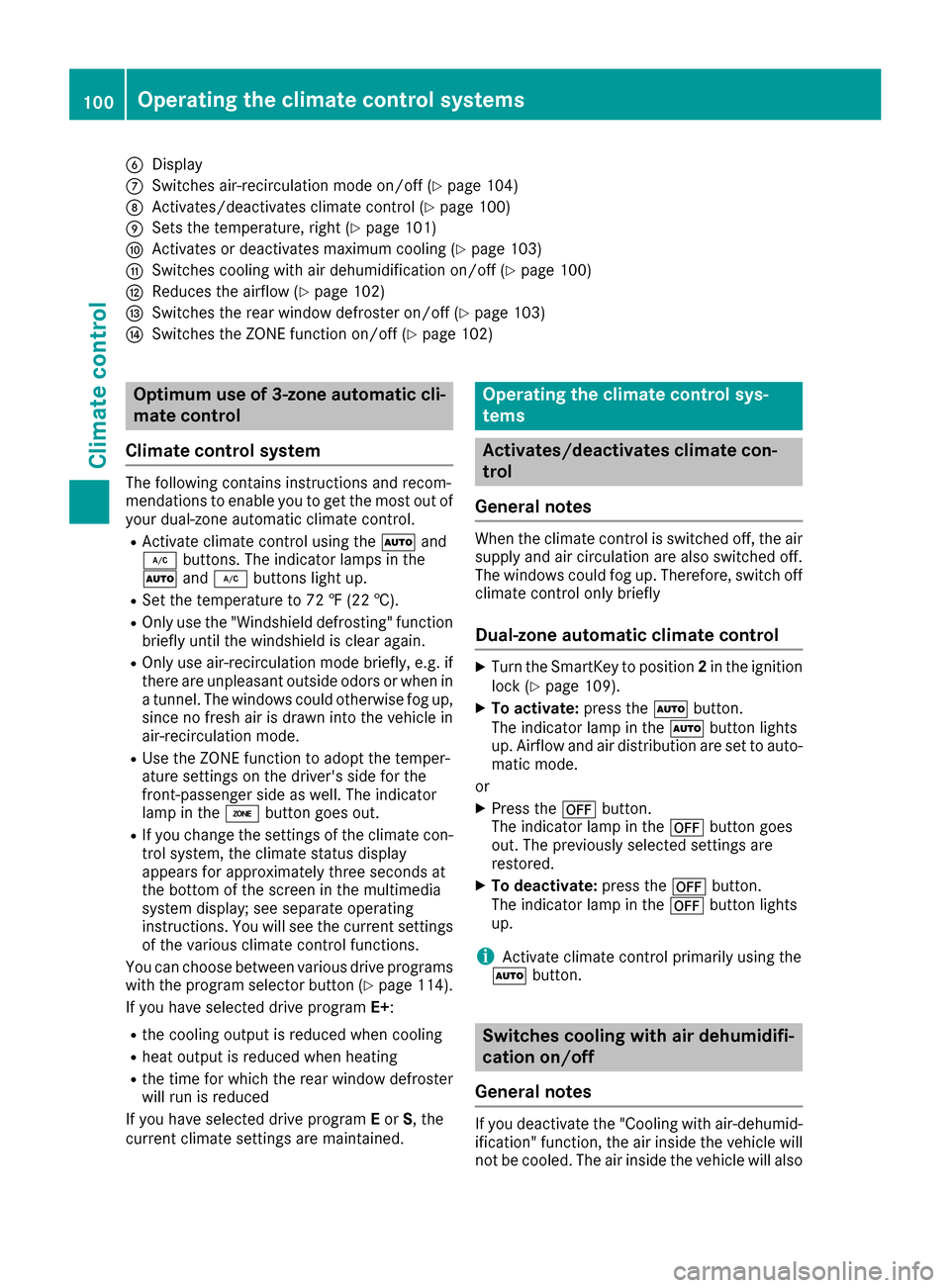
Display
006B Switches air-recirculation mode on/off (Y page 104)
006C Activates/deactivates climate control (Y page 100)
006D Sets the temperature, right (Y page 101)
006E Activates or deactivates maximum cooling (Y page 103)
006F Switches cooling with air dehumidification on/off (Y page 100)
0070 Reduces the airflow (Y page 102)
0071 Switches the rear window defroster on/off (Y page 103)
0072 Switches the ZONE function on/off (Y page 102)Optimum use of 3-zone automatic cli-
mate control
Climate control system The following contains instructions and recom-
mendations to enable you to get the most out of
your dual-zone automatic climate control.
R Activate climate control using the 0058and
005A buttons. The indicator lamps in the
0058 and005A buttons light up.
R Set the temperature to 72 ‡ (22 †).
R Only use the "Windshield defrosting" function
briefly until the windshield is clear again.
R Only use air-recirculation mode briefly, e.g. if
there are unpleasant outside odors or when in a tunnel. The windows could otherwise fog up,
since no fresh air is drawn into the vehicle in
air-recirculation mode.
R Use the ZONE function to adopt the temper-
ature settings on the driver's side for the
front-passenger side as well. The indicator
lamp in the 00D6button goes out.
R If you change the settings of the climate con-
trol system, the climate status display
appears for approximately three seconds at
the bottom of the screen in the multimedia
system display; see separate operating
instructions. You will see the current settings
of the various climate control functions.
You can choose between various drive programs
with the program selector button (Y page 114).
If you have selected drive program E+:
R the cooling output is reduced when cooling
R heat output is reduced when heating
R the time for which the rear window defroster
will run is reduced
If you have selected drive program Eor S, the
current climate settings are maintained. Operating the climate control sys-
tems
Activates/deactivates climate con-
trol
General notes When the climate control is switched off, the air
supply and air circulation are also switched off.
The windows could fog up. Therefore, switch off
climate control only briefly
Dual-zone automatic climate control X
Turn the SmartKey to position 2in the ignition
lock (Y page 109).
X To activate: press the0058button.
The indicator lamp in the 0058button lights
up. Airflow and air distribution are set to auto- matic mode.
or X Press the 0078button.
The indicator lamp in the 0078button goes
out. The previously selected settings are
restored.
X To deactivate: press the0078button.
The indicator lamp in the 0078button lights
up.
i Activate climate control primarily using the
0058 button. Switches cooling with air dehumidifi-
cation on/off
General notes If you deactivate the "Cooling with air-dehumid-
ification" function, the air inside the vehicle will
not be cooled. The air inside the vehicle will also 100
Operating the climate control systemsClimate control
Page 103 of 290
not be dehumidified. The windows can fog up
more quickly. Therefore, only deactivate the
"Cooling with air-dehumidification" function
briefly.
The "Cooling with air-dehumidification" function is operational when the vehicle is ready to drive.
The air inside the vehicle is cooled and dehu-
midified according to the temperature selected.
Condensation may drip from the underside of
the vehicle when it is in cooling mode. This is
normal and not a sign that there is a malfunc-
tion. Activating/deactivating X
Press the 005Abutton.
The indicator lamp in the 005Abutton lights
up or goes out.
The indicator lamp in the button indicates that the respective function is activated. The
"Cooling with air dehumidification" function
has a delayed switch-off feature.
Problems with the "Cooling with air dehumidification" function Problem
Possible causes/consequences and
0050 0050Solutions The indicator lamp in the
005A button flashes
three times or remains
off. The "Cooling with air
dehumidification" func-
tion cannot be switched
on. Cooling with air dehumidification has been deactivated due to a mal-
function.
X Visit a qualified specialist workshop. Setting climate control to automatic
General notes In automatic mode, the set temperature is main-
tained automatically at a constant level. The
system automatically regulates the temperature of the dispensed air, the airflow and the air dis- tribution.
The "Cooling with air dehumidification" function
is activated automatically in automatic mode.
Setting climate control to automatic X
Turn the SmartKey to position 2in the ignition
lock (Y page 109).
X Set the desired temperature.
X To activate: press the0058button.
The indicator lamp in the 0058button lights
up. Automatic air distribution and airflow are
activated. X
To switch to manual mode:press the 004F
or 004A button.
or
X Press the 0097or0095 button.
The indicator lamp in the 0058button goes
out. Automatic air distribution and airflow are deactivated. Setting the temperature
Different temperatures can be set for the driv-
er's and front-passenger sides. The set temper-
ature is automatically maintained at a constant
level.
X Turn the SmartKey to position 2in the ignition
lock (Y page 109).
X To increase or decrease: turn control0043or
006D counter-clockwise or clockwise. Only
change the temperature setting in small
increments. Start at 72 ‡ (22 †). Operating the climate control systems
101Climate control
Page 108 of 290
R
Seat heating
R Windshield heating
R Rear window defroster
"Immediate pre-entry climate control" is auto-
matically switched off when operational readi-
ness mode is requested.
Setting the departure time You can set a departure time for the "Pre-entry
climate control at departure time". Your vehicle
will then be cooled or heated until the desired
temperature is reached in time for the set depar-
ture time. "Pre-entry climate control at depar-
ture time" will be activated a maximum of
35 minutes before departure. If the departure is delayed, the vehicle will be heated or cooled fora further five minutes.
You can set the desired departure time in the E-
E-
CELL
CELL submenu on the on-board computer
(Y page 163).
Activating immediate pre-entry climate
control You can activate "Immediate pre-entry climate
control" even if the vehicle interior is already at
the desired temperature. This means that the
vehicle interior continues to be cooled or
heated, e.g. if the journey is interrupted for up to
50 minutes, and the interior temperature is kept constant. You can only set the desired temper-
ature using the climate control unit. If you do not
pre-select a temperature, the last temperature
set will be automatically adopted. To activate/deactivate "Immediate pre-
entry climate control"
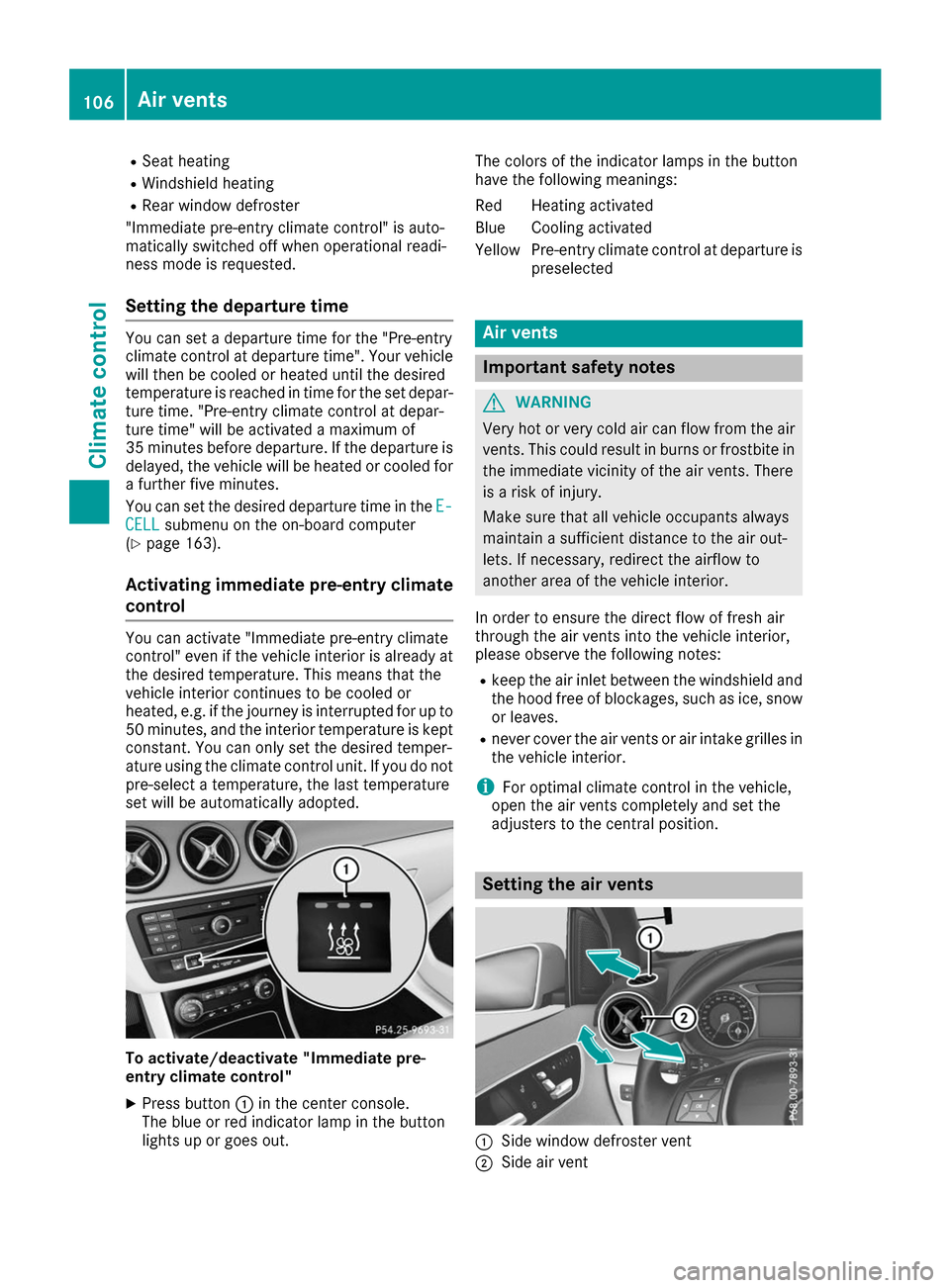
X Press button 0043in the center console.
The blue or red indicator lamp in the button
lights up or goes out. The colors of the indicator lamps in the button
have the following meanings:
Re
dH eating activated
Blue Cooling activated
Yellow Pre-entry climate control at departure is preselected Air vents
Important safety notes
G
WARNING
Very hot or very cold air can flow from the air vents. This could result in burns or frostbite in the immediate vicinity of the air vents. There
is a risk of injury.
Make sure that all vehicle occupants always
maintain a sufficient distance to the air out-
lets. If necessary, redirect the airflow to
another area of the vehicle interior.
In order to ensure the direct flow of fresh air
through the air vents into the vehicle interior,
please observe the following notes:
R keep the air inlet between the windshield and
the hood free of blockages, such as ice, snow or leaves.
R never cover the air vents or air intake grilles in
the vehicle interior.
i For optimal climate control in the vehicle,
open the air vents completely and set the
adjusters to the central position. Setting the air vents
0043
Side window defroster vent
0044 Side air vent 106
Air ventsClimate control
Page 117 of 290
E+ Economy Plus
Drive program
E+is characterized by the fol-
lowing:
R reduced torque and significantly reduced
power. This supports an especially efficient
and even driving style and results in a reduc-
tion in speed to approximately 70 mph
(110 km/h).
R the vehicle pulling away more gently in
forward gear unless the accelerator pedal is
depressed fully.
R the wheels are less likely to spin.
R particularly efficient overrun.
R full power output by using kickdown.
R the performance of air-conditioning system
and heating are reduced. Steering wheel paddle shifters
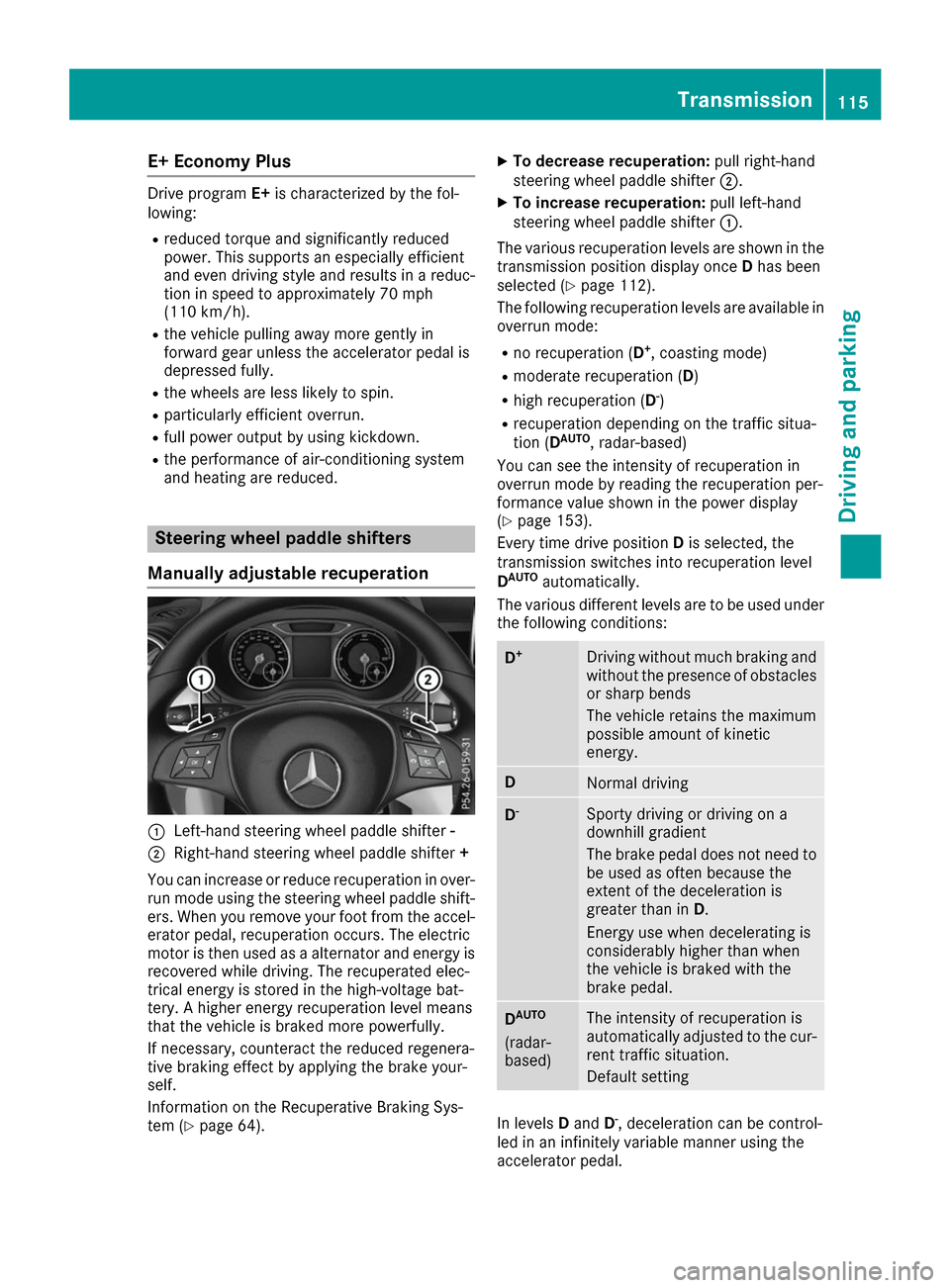
Manually adjustable recuperation 0043
Left-hand steering wheel paddle shifter -
0044 Right-hand steering wheel paddle shifter +
You can increase or reduce recuperation in over- run mode using the steering wheel paddle shift-
ers. When you remove your foot from the accel-
erator pedal, recuperation occurs. The electric
motor is then used as a alternator and energy is recovered while driving. The recuperated elec-
trical energy is stored in the high-voltage bat-
tery. A higher energy recuperation level means
that the vehicle is braked more powerfully.
If necessary, counteract the reduced regenera-
tive braking effect by applying the brake your-
self.
Information on the Recuperative Braking Sys-
tem (Y page 64). X
To decrease recuperation: pull right-hand
steering wheel paddle shifter 0044.
X To increase recuperation: pull left-hand
steering wheel paddle shifter 0043.
The various recuperation levels are shown in the
transmission position display once Dhas been
selected (Y page 112).
The following recuperation levels are available in
overrun mode:
R no recuperation (D +
, coasting mode)
R moderate recuperation ( D)
R high recuperation ( D-
)
R recuperation depending on the traffic situa-
tion (D AUTO
, radar-based)
You can see the intensity of recuperation in
overrun mode by reading the recuperation per-
formance value shown in the power display
(Y page 153).
Every time drive position Dis selected, the
transmission switches into recuperation level
D AUTO
automatically.
The various different levels are to be used under the following conditions: D
+ Driving without much braking and
without the presence of obstacles
or sharp bends
The vehicle retains the maximum
possible amount of kinetic
energy. D
Normal driving
D
- Sporty driving or driving on a
downhill gradient
The brake pedal does not need to
be used as often because the
extent of the deceleration is
greater than in D.
Energy use when decelerating is
considerably higher than when
the vehicle is braked with the
brake pedal. D
AUTO
(radar-
based) The intensity of recuperation is
automatically adjusted to the cur-
rent traffic situation.
Default setting In levels
Dand D-
, deceleration can be control-
led in an infinitely variable manner using the
accelerator pedal. Transmission
115Driving and parking Z
Page 123 of 290
Energy consumption indicator
0043may differ
from the indicator in the From Start
From Start
(Y page 156) trip computer in the Trip
Tripmenu.
Displaying energy consumption and recu-
perated electric energy:
X Switch on the multimedia system (see sepa-
rate operating instructions).
X To select Vehicle Vehiclefrom the main function bar:
turn and press the controller.
The vehicle menu is displayed.
X To select Consumption
Consumption: turn and press the
controller.
Energy consumption 0043and recuperated
electric energy 0044for the last 15 minute s of
the journey are shown.
Exiting the vehicle settings: X Press the 0038button on the controller.
or X To select 0038: slide 6and press the con-
troller.
To reset values: the values are reset along with
the From Start
From Start trip computer (Y page 158).
Displaying the range on the multimedia
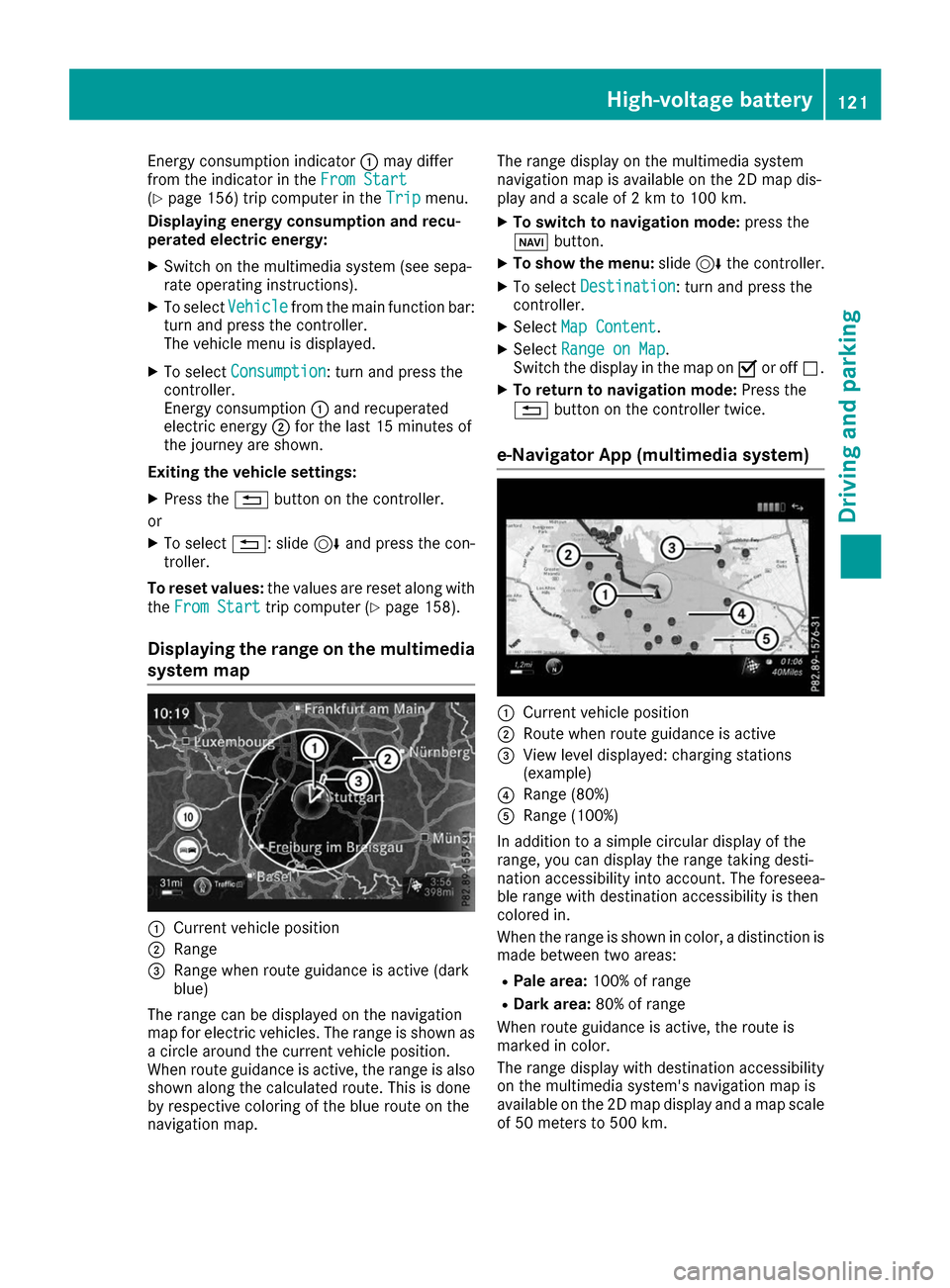
system map 0043
Current vehicle position
0044 Range
0087 Range when route guidance is active (dark
blue)
The range can be displayed on the navigation
map for electric vehicles. The range is shown as
a circle around the current vehicle position.
When route guidance is active, the range is also
shown along the calculated route. This is done
by respective coloring of the blue route on the
navigation map. The range display on the multimedia system
navigation map is available on the 2D map dis-
play and a scale of 2 km to 100 km.
X To switch to navigation mode: press the
00CB button.
X To show the menu: slide6the controller.
X To select Destination
Destination: turn and press the
controller.
X Select Map Content
Map Content.
X Select Range on Map Range on Map .
Switch the display in the map on 0073or off 0053.
X To return to navigation mode: Press the
0038 button on the controller twice.
e-Navigator App (multimedia system) 0043
Current vehicle position
0044 Route when route guidance is active
0087 View level displayed: charging stations
(example)
0085 Range (80%)
0083 Range (100%)
In addition to a simple circular display of the
range, you can display the range taking desti-
nation accessibility into account. The foreseea-
ble range with destination accessibility is then
colored in.
When the range is shown in color, a distinction is made between two areas:
R Pale area: 100% of range
R Dark area: 80% of range
When route guidance is active, the route is
marked in color.
The range display with destination accessibility
on the multimedia system's navigation map is
available on the 2D map display and a map scale of 50 meters to 500 km. High-voltage battery
121Driving and parking Z
Page 126 of 290
relevant power socket checked by an electri-
cian.
X To adjust the setting: press button0085
repeatedly until the desired setting is selec-
ted in display 0087.
R Two LEDs are flashing: minimum setting
R All LEDs are flashing: maximum setting
Information about the charging time
(Y page 286)
If, after the charging process, the charging cable
is:
R left connected to the mains socket, the set
value will be used for the next charging proc-
ess.
R removed from the power socket, the values
will be reset to the minimum setting for the
next charging process. You may then need to
reset the values of the maximum charge cur-
rent.
If the charge current values that have been set
on the charging cable and the on-board com-
puter are different, the high-voltage battery is
charged using the lower value.
If the vehicle requires more time than usual to
charge the high-voltage battery, check:
R the settings of the maximum charge current
on the controls of the charging cable
R the settings of the maximum charge current in
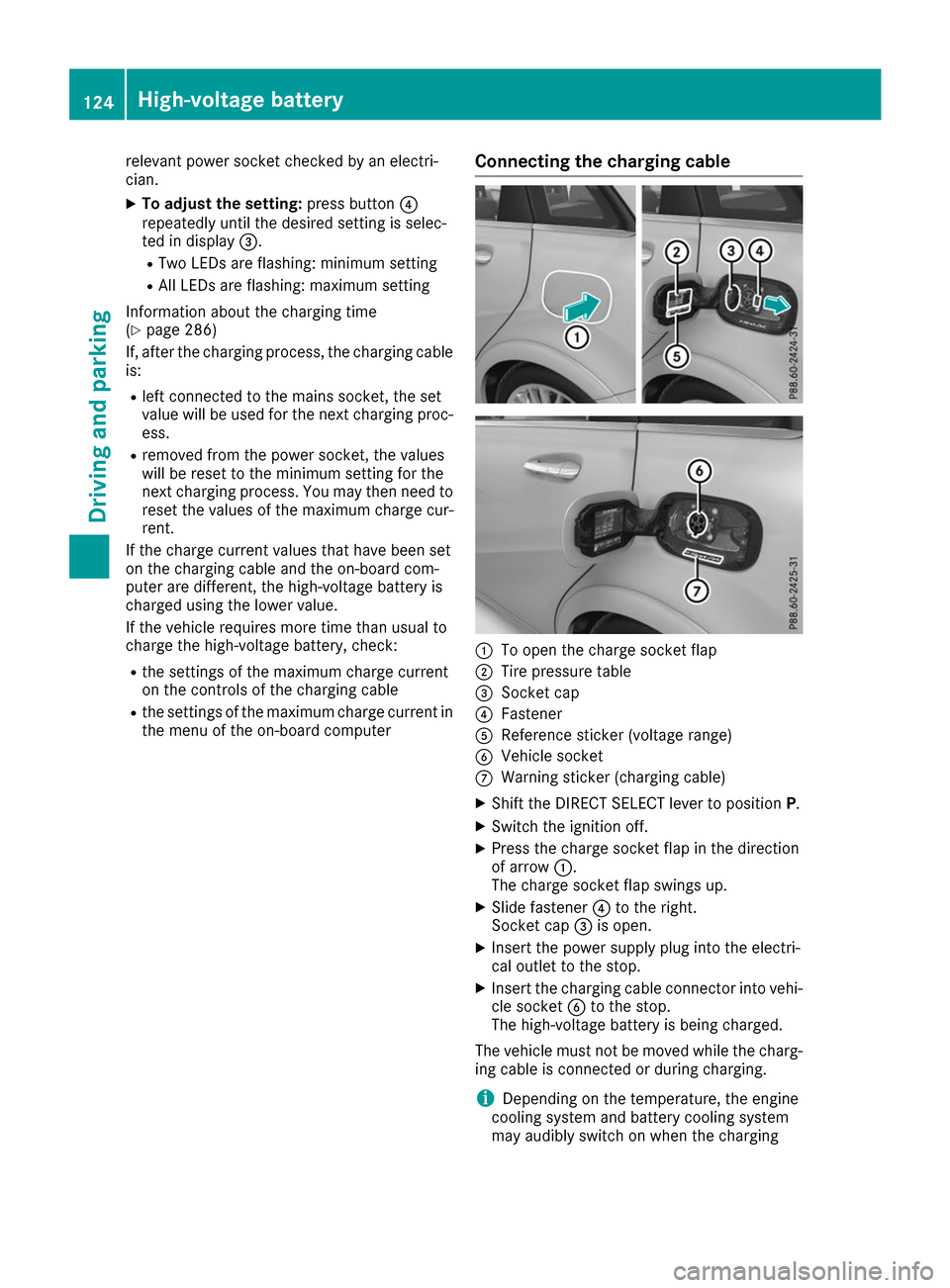
the menu of the on-board computer Connecting the charging cable 0043
To open the charge socket flap
0044 Tire pressure table
0087 Socket cap
0085 Fastener
0083 Reference sticker (voltage range)
0084 Vehicle socket
006B Warning sticker (charging cable)
X Shift the DIRECT SELECT lever to position P.
X Switch the ignition off.
X Press the charge socket flap in the direction
of arrow 0043.
The charge socket flap swings up.
X Slide fastener 0085to the right.
Socket cap 0087is open.
X Insert the power supply plug into the electri-
cal outlet to the stop.
X Insert the charging cable connector into vehi-
cle socket 0084to the stop.
The high-voltage battery is being charged.
The vehicle must not be moved while the charg-
ing cable is connected or during charging.
i Depending on the temperature, the engine
cooling system and battery cooling system
may audibly switch on when the charging 124
High-voltage batteryDriving and parking
Page 130 of 290
must destroy documents containing the vehi-
cle verification code (VVC).
R If you have bought a used vehicle, it is possi-
ble that the previous owner still has access to
the "Vehicle Homepage". If in doubt, have a
new vehicle verification code (VVC) issued by
the Mercedes-Benz Center after purchase.
With the code you can set up access to your
vehicle, as described in the section "Setting
up a personal area" on the Vehicle Home-
page". There, you may also deactivate the
existing access of the previous owner.
Calling up functions in the "My
Mercedes Electric - Vehicle Homepage" The "My Mercedes Electric - Vehicle Homepage"
allows you access to information about your
vehicle and its functions using remote query and
remote configuration. For example, climate con- trol can be activated using remote configuration
which means that it need not be set in the vehi- cle. Power for the climate control is primarily
supplied via the charging cable connected to the mains supply. In most cases, this does not
reduce the range. If climate control is activated,the condition of charge and thus the range may
be reduced. The "Vehicle Homepage" provides
you with information all about how to use your
vehicle.
If the vehicle is entered in your personal area of
the "Vehicle Homepage", you can also access
the following functions:
R request the current condition of charge of the
high-voltage battery
R program the departure time (Y page 163)
R order and activate the "Pre-entry climate con-
trol at departure time" function
If the vehicle is charging, the predicted charging
time and the predicted range will also be shown.
This data is estimated and may be influenced by
the following factors:
R outside temperature
R switched on consumers, e.g. climate control
and seat heating
R personal driving style
R road and traffic conditions
R route characteristics
Therefore, allow for a sufficient reserve. i
Information on additional functions and
operating instructions can be found on the
"Vehicle Homepage".
Connecting the vehicle to the Internet Via a radio module
This function is not available in all countries and requires an activated mbrace access.
You can use the "Vehicle Homepage" if the vehi-
cle has a connection to the Internet via a mobile phone. The radio module uses a mobile phone
connection and transmits the necessary data by
radio. The vehicle automatically recognizes
whether a connection to the Internet via the
radio module is possible or not. No presets are
necessary.
To enable the transfer of data via the mobile
communications module, you do not need a SIM
card.
i Restrictions in reception are possible if the
vehicle is in an underground car park, for
example. Restrictions may also occur in areas with poor mobile network coverage. Parking
Important safety notes
G
WARNING
If you release the parking brake on uphill or
downhill gradients, the vehicle can begin to
move when in park position P. There is a risk
of an accident.
To avoid hazardous situations:
R prevent the parked vehicle from rolling on
uphill or downhill gradients by always
applying the parking brake.
R do not park the vehicle on uphill or downhill
gradients if the parking brake is malfunc-
tioning. 128
ParkingDriving and parking
Page 135 of 290
are completely filled at the same time, the driver
has adopted the most economical driving style
for the selected settings and prevailing condi-
tions. The ECO display border lights up.
The ECO display does not indicate the actual fuel
consumption. The additionally achieved range
displayed under Bonus fr. Start
Bonus fr. Start does not
indicate a fixed consumption reduction.
In addition to driving style, the actual consump- tion is affected by other factors, such as:
R Load
R Tire pressure
R Cold start
R Choice of route
R Active electrical consumers
These factors are not included in the ECO dis-
play.
An economical driving style specially requires
driving at moderate engine speeds.
To achieve a higher value in the categories
"Acceleration" and "Constant", drive the vehicle
in drive program E+orE.
On long journeys at a constant speed, e.g. on the highway, only the outer area for "constant" will
change.
The ECO display summarizes the driving style
from the start of the journey to its completion.
Therefore, there are more marked changes in
the outer areas at the start of a journey. On lon-
ger journeys, there are fewer changes. For more
marked changes, perform a manual rest
(Y page 158).
For more information on the ECO display, see
(Y page 156). Braking
Important safety notes G
WARNING
If you increase the recuperation level on slip- pery road surfaces, the drive wheels may lose
their traction. There is an increased danger of skidding and accidents.
Do not increase the recuperation level on slip-
pery road surfaces. The braking performance of the electric motor
using recuperative braking is, in some operating
modes, either reduced or not effective:
R when the condition of charge of the high-volt-
age battery increases
R if the high-voltage battery is not yet at a nor-
mal operating temperature
R when driving close to the maximum speed
R when the vehicle is almost stationary
R in transmission position N
R during and after ESP stability control
If you do not make an additional effort to apply
the brake yourself, the braking effect may not be
sufficient. If necessary, counteract the reduced regenerative braking effect by applying the
brake yourself.
Downhill gradients On long, steep gradients, you must reduce the
load on the brakes by selecting maximum recu-
peration. This helps you to avoid overheating the
brakes and wearing them out excessively.
Recuperation allows the vehicle to be deceler-
ated without placing a load on the braking sys-
tem.
Do not depress the brake pedal continuously
while the vehicle is in motion, e.g. causing the
brakes to rub by constantly applying light pres-
sure to the pedal. This results in excessive and
premature wear to the brake pads.
Heavy and light loads G
WARNING
If you rest your foot on the brake pedal while
driving, the braking system can overheat. This increases the stopping distance and can even
cause the braking system to fail. There is a
risk of an accident.
Never use the brake pedal as a footrest. Never
depress the brake pedal and the accelerator
pedal at the same time.
! Depressing the brake pedal constantly
results in excessive and premature wear to
the brake pads.
If the brakes have been subjected to a heavy
load, do not stop the vehicle immediately. Drive on for a short while. This allows the airflow to
cool the brakes more quickly. Driving tips
133Driving and parking Z