ignition MERCEDES-BENZ B-Class 2017 W246 Workshop Manual
[x] Cancel search | Manufacturer: MERCEDES-BENZ, Model Year: 2017, Model line: B-Class, Model: MERCEDES-BENZ B-Class 2017 W246Pages: 290, PDF Size: 19.81 MB
Page 156 of 290
i
The
Energy Flow
Energy Flow menu can also be dis-
played in the COMAND/Audio display.
The condition of charge of the high-voltage bat- tery has dropped into the reserve range if the
drive system is running and:
R the Drive Battery Reserve Level
Drive Battery Reserve Level mes-
sage appears in the display
R the indicator lamp in the instrument cluster
lights up
Charge the high-voltage battery from a condi-
tion of charge of less than 20% at:
R an electrical outlet
R a charging station
The braking performance of the electric motor
using recuperative braking is, in some operating
modes, either reduced or not effective:
R when the condition of charge of the high-volt-
age battery increases
R if the high-voltage battery is not yet at a nor-
mal operating temperature
R when the vehicle is almost stationary
R in transmission position N
R during and after ESP stability control
If you do not make an additional effort to apply
the brake yourself, the braking effect may not be
sufficient. If necessary, counteract the reduced regenerative braking effect by applying the
brake yourself. Operating the on-board computer
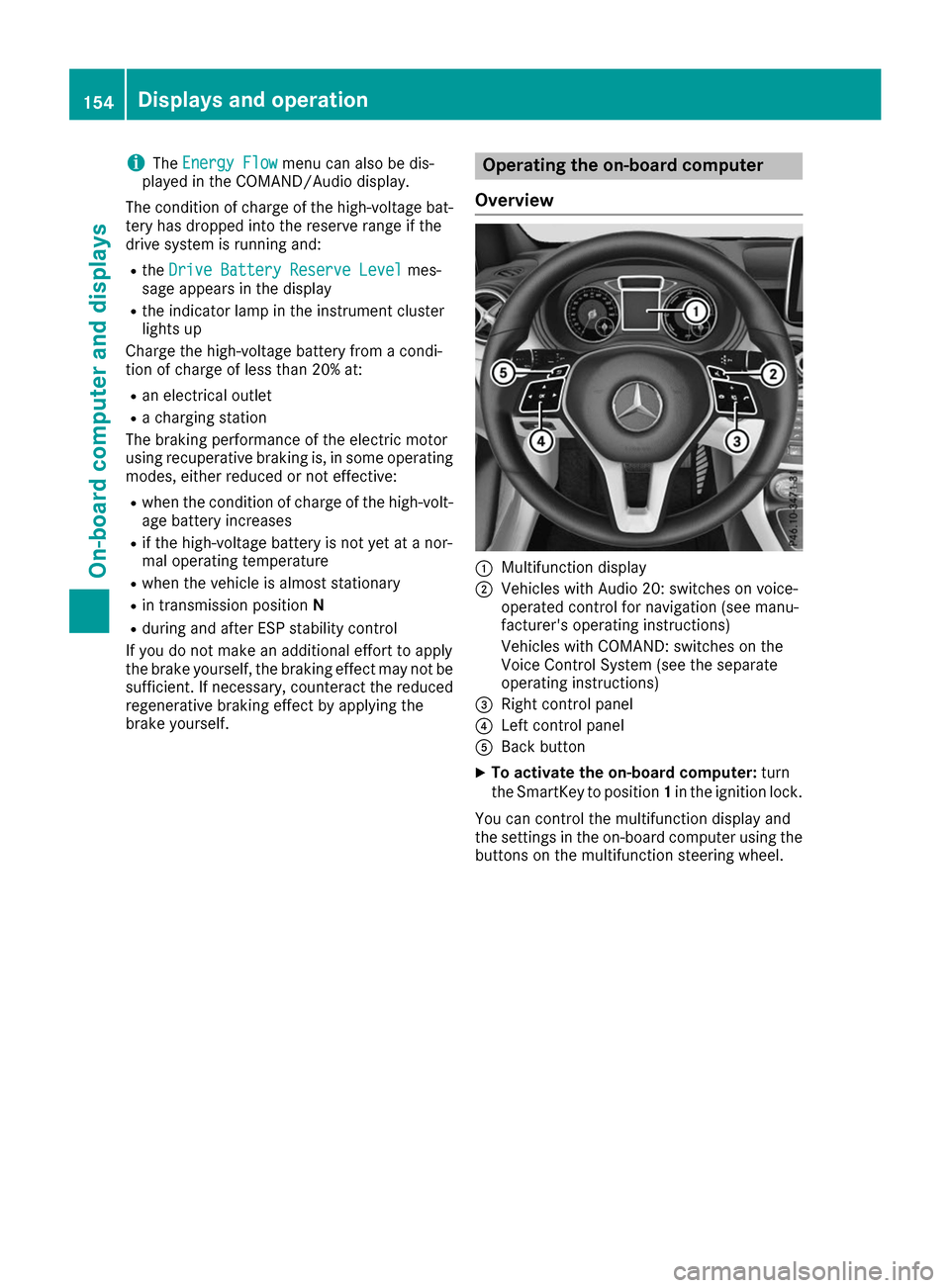
Overview 0043
Multifunction display
0044 Vehicles with Audio 20: switches on voice-
operated control for navigation (see manu-
facturer's operating instructions)
Vehicles with COMAND: switches on the
Voice Control System (see the separate
operating instructions)
0087 Right control panel
0085 Left control panel
0083 Back button
X To activate the on-board computer: turn
the SmartKey to position 1in the ignition lock.
You can control the multifunction display and
the settings in the on-board computer using the buttons on the multifunction steering wheel. 154
Displays and operationOn-board computer and displays
Page 158 of 290
X
To display menu bar 0085: press the0059
or 0065 button on the steering wheel.
If you do not press the buttons any longer,
menu bar 0085is faded out after a few seconds.
Text field 0087shows the selected menu or sub-
menu as well as display messages.
i Set the time using the multimedia system;
see the separate operating instructions.
The following messages may appear in the
multifunction display:
R 005D Parking Pilot (Y page 142)
R CRUISE
CRUISE Cruise control (Y page 136)
R 00D9 HOLD function (Y page 138) Menus and submenus
Menu overview
Using the 0059or0065 button on the steering
wheel, open the menu bar.
Operating the on-board computer (Y page 154).
Depending on the equipment installed in the
vehicle, you can call up the following menus:
R Trip
Trip menu (Y page 156)
R Navi Navi menu (navigation instructions)
(Y page 158)
R Audio
Audio menu (Y page 160)
R Tel
Tel menu (telephone) (Y page 160)
R DriveAssist
DriveAssist menu (assistance)
(Y page 162)
R Serv.
Serv. menu (Y page 163)
R Sett.
Sett. menu (settings) (Y page 163)
The displays for the Audio
Audio,Navi
NaviandTel
Tel menus
may differ slightly to those in your vehicle.
The examples given in this Operator's Manual
apply to vehicles equipped with COMAND. Trip menu
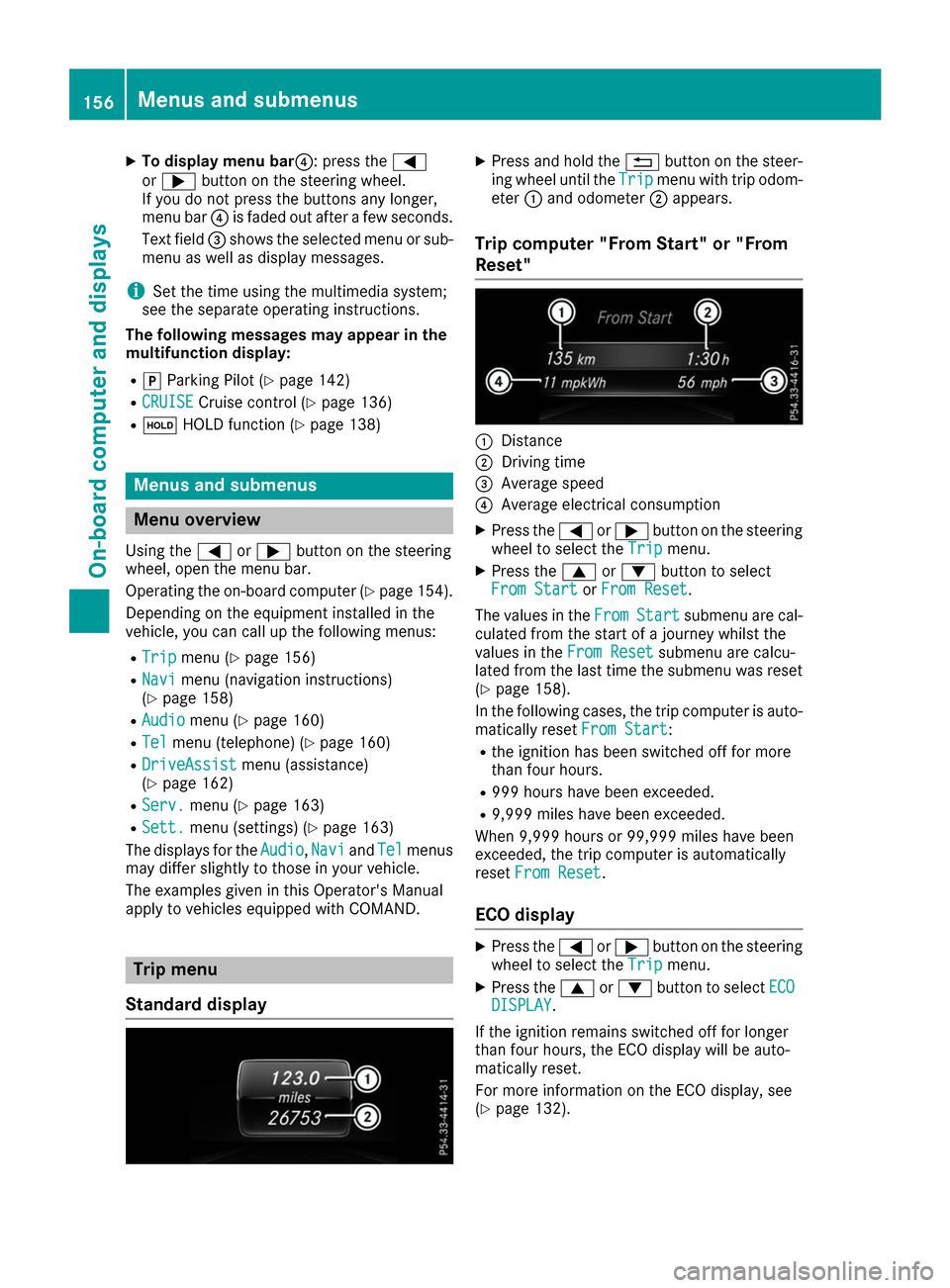
Standard display X
Press and hold the 0038button on the steer-
ing wheel until the Trip Tripmenu with trip odom-
eter 0043and odometer 0044appears.
Trip computer "From Start" or "From
Reset" 0043
Distance
0044 Driving time
0087 Average speed
0085 Average electrical consumption
X Press the 0059or0065 button on the steering
wheel to select the Trip Tripmenu.
X Press the 0063or0064 button to select
From Start
From Start orFrom Reset
From Reset.
The values in the From
FromStart
Start submenu are cal-
culated from the start of a journey whilst the
values in the From Reset From Resetsubmenu are calcu-
lated from the last time the submenu was reset
(Y page 158).
In the following cases, the trip computer is auto-
matically reset From Start
From Start:
R the ignition has been switched off for more
than four hours.
R 999 hours have been exceeded.
R 9,999 miles have been exceeded.
When 9,999 hours or 99,999 miles have been
exceeded, the trip computer is automatically
reset From Reset From Reset.
ECO display X
Press the 0059or0065 button on the steering
wheel to select the Trip Tripmenu.
X Press the 0063or0064 button to select ECO ECO
DISPLAY
DISPLAY.
If the ignition remains switched off for longer
than four hours, the ECO display will be auto-
matically reset.
For more information on the ECO display, see
(Y page 132). 156
Menus and submenusOn-board computer and displays
Page 169 of 290
Display messages
Introduction
General notes Display messages appear in the multifunction display.
Display messages with graphic displays may be shown in simplified form in the Operator's Manual
and may therefore differ from the multifunction display.
Please respond in accordance with the display messages and follow the additional notes in this
Operator's Manual.
Certain display messages are accompanied by an audible warning tone or a continuous tone.
When the ignition is switched off, all display messages are deleted, apart from some high-priority
display messages. Once the causes of the high-priority display messages have been rectified, the
corresponding display messages are also deleted.
When you stop and park the vehicle, please observe the notes on:
R HOLD function (Y page 138)
R Parking (Y page 128)
Hiding display messages X
Press the 0076or0038 button on the steering wheel.
The multifunction display hides the display message.
The multifunction display shows high-priority display messages in red. Some high-priority display
messages cannot be hidden.
The multifunction display shows these messages continuously until the causes for the messages
have been remedied.
Message memory The on-board computer saves certain display messages in the
message memory. You can call up
the display messages:
X Press the 0059or0065 button on the steering wheel to select the Serv.
Serv. menu.
If there are display messages, the multifunction display shows 2 Messages
2 Messages, for example.
X Press the 0063or0064 button to select the entry, e.g. 2 Messages
2 Messages.
X Press 0076to confirm.
X Press the 0063or0064 button to scroll through the display messages. Display
messages
167On-board computer and displays Z
Page 173 of 290
Display messages
Possible causes/consequences and
0050
0050Solutions 0049(USA
only)0024(Canada only)
Turn On the Igni‐ Turn On the Igni‐
tion tion to
toRelease
Release the
the
Parking Brake
Parking Brake The red
0049(USA only) or 0024(Canada only) indicator lamp lights
up.
You attempted to release the electric parking brake while the ignition
was switched off.
X SmartKey: turn the SmartKey to position 1in the ignition lock.
X KEYLESS-GO: switch on the ignition. 0049(USA
only)0024(Canada only)
Please Please Release
Release Park‐
Park‐
ing Brake
ing Brake The red
0049(USA only) or 0024(Canada only) indicator lamp flashes
and a warning tone sounds. A condition for automatic release of the
electric parking brake is not fulfilled (Y page 130).
You are driving with the electric parking brake applied.
X Release the electric parking brake manually. The red
0049(USA only) or 0024(Canada only) indicator lamp flashes
and a warning tone sounds.
You are using the electric parking brake for emergency braking
(Y page 130). 0049(USA
only)0024(Canada only)
Parking Brake See Parking Brake See
Operator's Manual Operator's Manual The yellow
0024warning lamp lights up.
The electric parking brake is malfunctioning.
To apply:
X Switch the ignition off.
X Press the electric parking brake handle for at least ten seconds.
X Shift the transmission to position P.
X Consult a qualified specialist workshop. The yellow
0024warning lamp and the red 0049(USA only) or 0024
(Canada only) indicator lamp light up.
The electric parking brake is malfunctioning.
To release:
X Switch off the ignition and turn it back on.
X Release the electric parking brake manually.
or X Release the electric parking brake automatically (Y page 130).
If the electric parking brake still cannot be released:
X Do not drive on.
X Consult a qualified specialist workshop. Display
messages
171On-board computer and displays Z
Page 174 of 290
Display messages
Possible causes/consequences and
0050
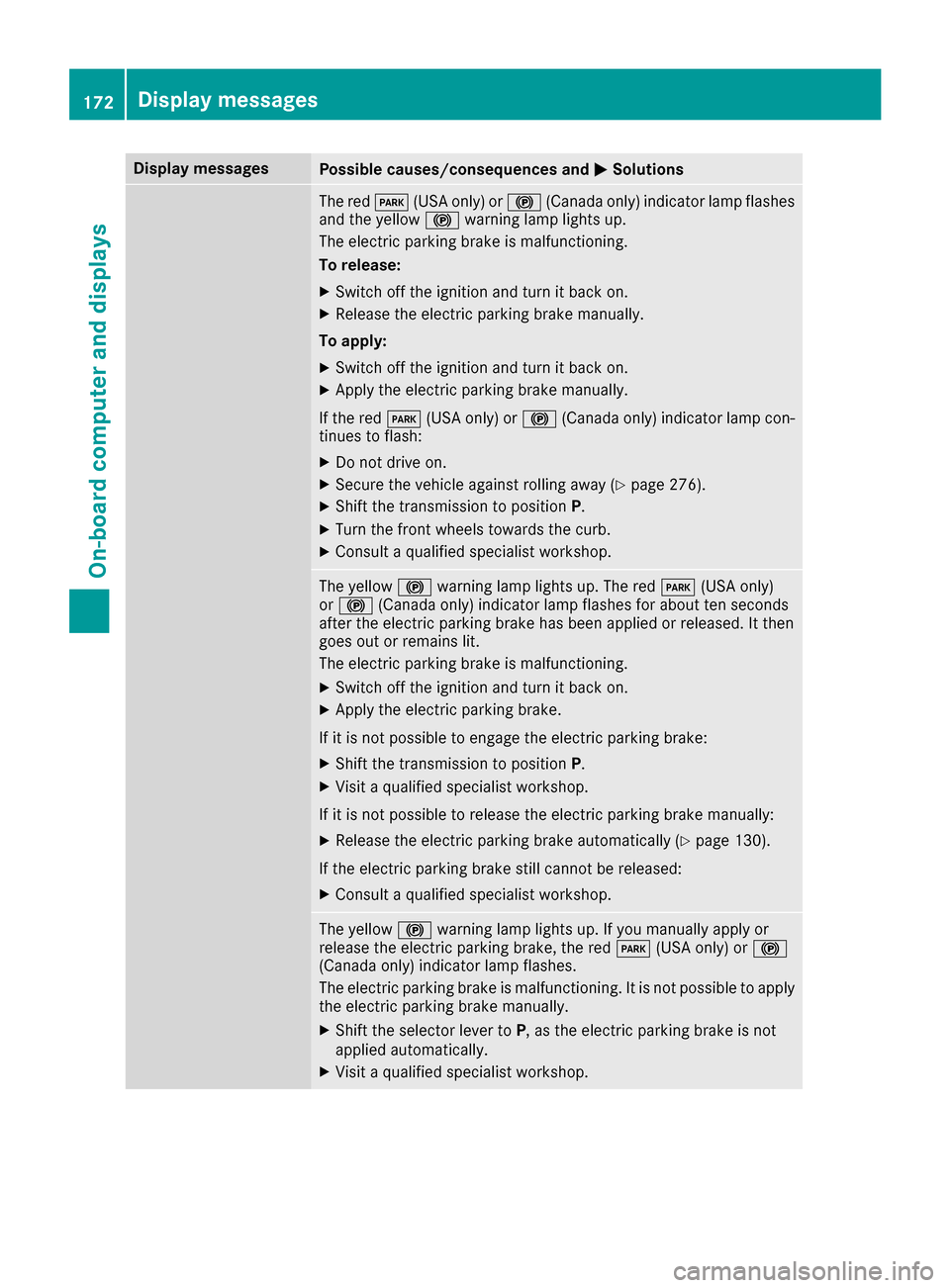
0050Solutions The red
0049(USA only) or 0024(Canada only) indicator lamp flashes
and the yellow 0024warning lamp lights up.
The electric parking brake is malfunctioning.
To release:
X Switch off the ignition and turn it back on.
X Release the electric parking brake manually.
To apply: X Switch off the ignition and turn it back on.
X Apply the electric parking brake manually.
If the red 0049(USA only) or 0024(Canada only) indicator lamp con-
tinues to flash:
X Do not drive on.
X Secure the vehicle against rolling away (Y page 276).
X Shift the transmission to position P.
X Turn the front wheels towards the curb.
X Consult a qualified specialist workshop. The yellow
0024warning lamp lights up. The red 0049(USA only)
or 0024 (Canada only) indicator lamp flashes for about ten seconds
after the electric parking brake has been applied or released. It then
goes out or remains lit.
The electric parking brake is malfunctioning.
X Switch off the ignition and turn it back on.
X Apply the electric parking brake.
If it is not possible to engage the electric parking brake:
X Shift the transmission to position P.
X Visit a qualified specialist workshop.
If it is not possible to release the electric parking brake manually: X Release the electric parking brake automatically (Y page 130).
If the electric parking brake still cannot be released:
X Consult a qualified specialist workshop. The yellow
0024warning lamp lights up. If you manually apply or
release the electric parking brake, the red 0049(USA only) or 0024
(Canada only) indicator lamp flashes.
The electric parking brake is malfunctioning. It is not possible to apply
the electric parking brake manually.
X Shift the selector lever to P, as the electric parking brake is not
applied automatically.
X Visit a qualified specialist workshop. 172
Display
messagesOn-board computer and displays
Page 175 of 290
Display messages
Possible causes/consequences and
0050
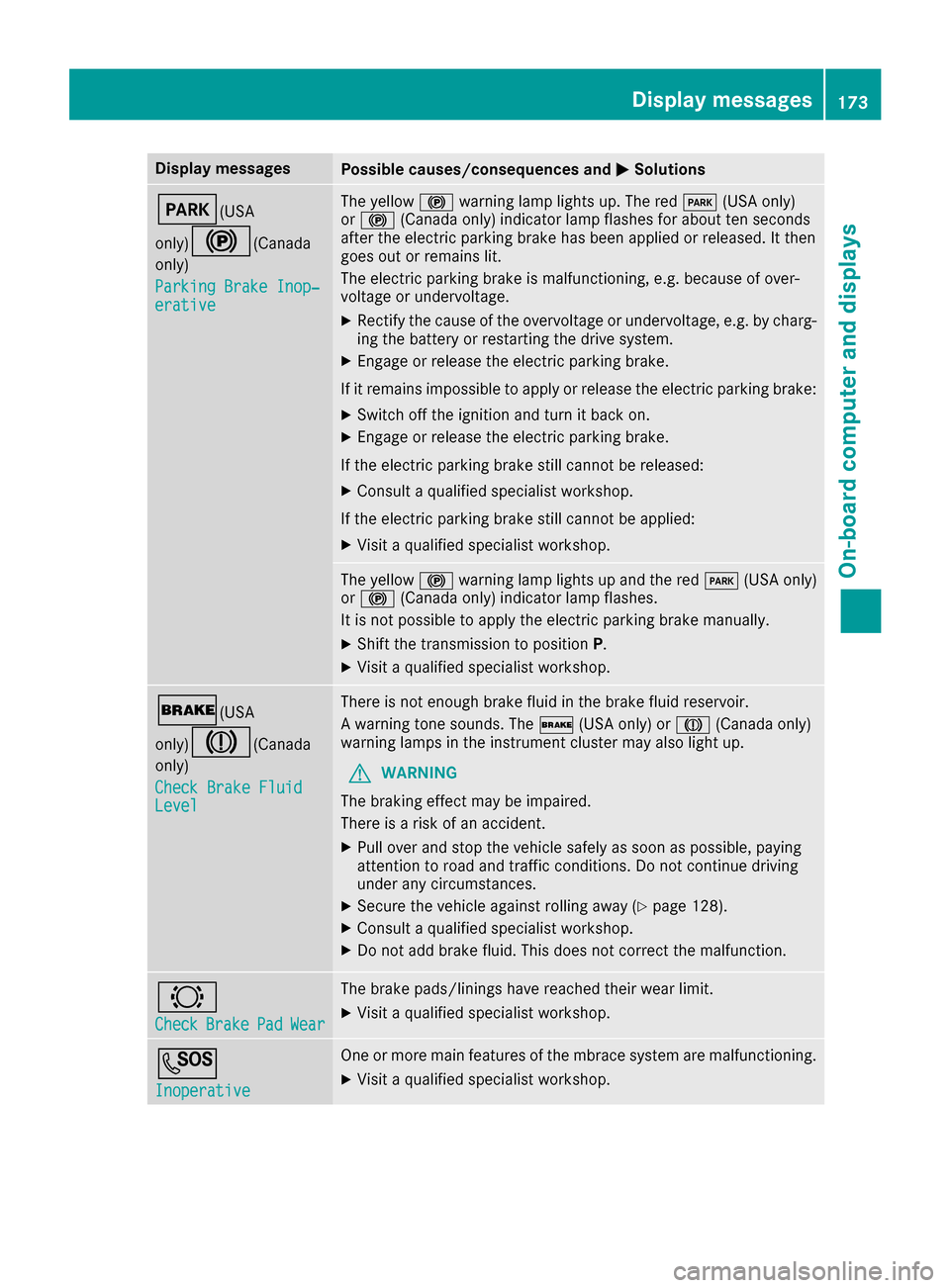
0050Solutions 0049(USA
only)0024(Canada only)
Parking Brake Inop‐ Parking Brake Inop‐
erative erative The yellow
0024warning lamp lights up. The red 0049(USA only)
or 0024 (Canada only) indicator lamp flashes for about ten seconds
after the electric parking brake has been applied or released. It then
goes out or remains lit.
The electric parking brake is malfunctioning, e.g. because of over-
voltage or undervoltage.
X Rectify the cause of the overvoltage or undervoltage, e.g. by charg-
ing the battery or restarting the drive system.
X Engage or release the electric parking brake.
If it remains impossible to apply or release the electric parking brake:
X Switch off the ignition and turn it back on.
X Engage or release the electric parking brake.
If the electric parking brake still cannot be released:
X Consult a qualified specialist workshop.
If the electric parking brake still cannot be applied: X Visit a qualified specialist workshop. The yellow
0024warning lamp lights up and the red 0049(USA only)
or 0024 (Canada only) indicator lamp flashes.
It is not possible to apply the electric parking brake manually.
X Shift the transmission to position P.
X Visit a qualified specialist workshop. 0027(USA
only)004D(Canada only)
Check Brake Fluid Check Brake Fluid
Level Level There is not enough brake fluid in the brake fluid reservoir.
A warning tone sounds. The
0027(USA only) or 004D(Canada only)
warning lamps in the instrument cluster may also light up.
G WARNING
The braking effect may be impaired.
There is a risk of an accident.
X Pull over and stop the vehicle safely as soon as possible, paying
attention to road and traffic conditions. Do not continue driving
under any circumstances.
X Secure the vehicle against rolling away (Y page 128).
X Consult a qualified specialist workshop.
X Do not add brake fluid. This does not correct the malfunction. 0026
Check Check
Brake
BrakePad
PadWear
Wear The brake pads/linings have reached their wear limit.
X Visit a qualified specialist workshop. 0053
Inoperative Inoperative One or more main features of the mbrace system are malfunctioning.
X Visit a qualified specialist workshop. Display
messages
173On-board computer and displays Z
Page 178 of 290
Display messages
Possible causes/consequences and
0050
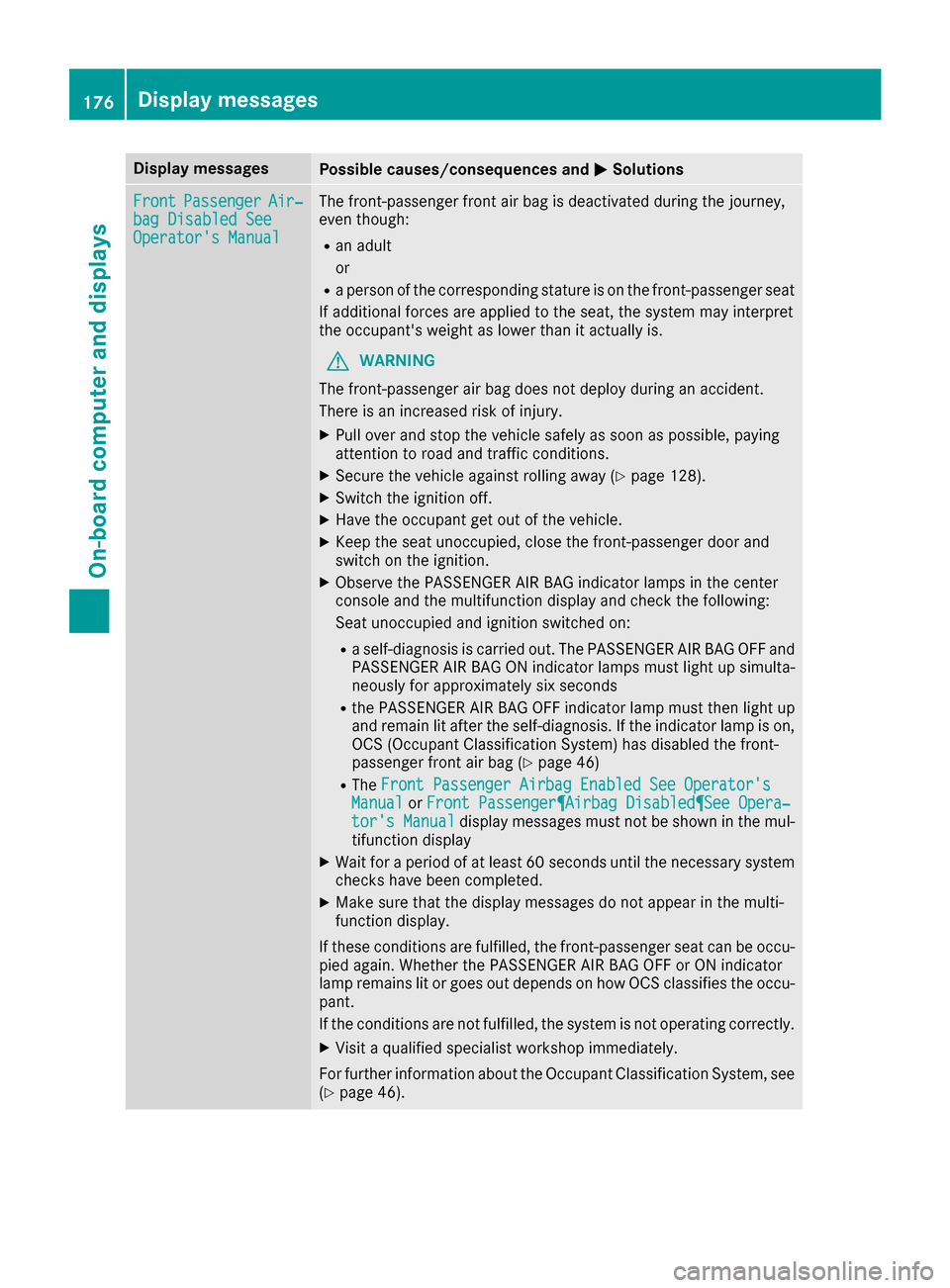
0050Solutions Front
Front
Passenger
Passenger Air‐
Air‐
bag Disabled See
bag Disabled See
Operator's Manual Operator's Manual The front-passenger front air bag is deactivated during the journey,
even though:
R an adult
or
R a person of the corresponding stature is on the front-passenger seat
If additional forces are applied to the seat, the system may interpret
the occupant's weight as lower than it actually is.
G WARNING
The front-passenger air bag does not deploy during an accident.
There is an increased risk of injury. X Pull over and stop the vehicle safely as soon as possible, paying
attention to road and traffic conditions.
X Secure the vehicle against rolling away (Y page 128).
X Switch the ignition off.
X Have the occupant get out of the vehicle.
X Keep the seat unoccupied, close the front-passenger door and
switch on the ignition.
X Observe the PASSENGER AIR BAG indicator lamps in the center
console and the multifunction display and check the following:
Seat unoccupied and ignition switched on:
R a self-diagnosis is carried out. The PASSENGER AIR BAG OFF and
PASSENGER AIR BAG ON indicator lamps must light up simulta-
neously for approximately six seconds
R the PASSENGER AIR BAG OFF indicator lamp must then light up
and remain lit after the self-diagnosis. If the indicator lamp is on, OCS (Occupant Classification System) has disabled the front-
passenger front air bag (Y page 46)
R The Front Passenger Airbag Enabled See Operator's
Front Passenger Airbag Enabled See Operator's
Manual Manual orFront Passenger¶Airbag Disabled¶See Opera‐
Front Passenger¶Airbag Disabled¶See Opera‐
tor's Manual
tor's Manual display messages must not be shown in the mul-
tifunction display
X Wait for a period of at least 60 seconds until the necessary system
checks have been completed.
X Make sure that the display messages do not appear in the multi-
function display.
If these conditions are fulfilled, the front-passenger seat can be occu-
pied again. Whether the PASSENGER AIR BAG OFF or ON indicator
lamp remains lit or goes out depends on how OCS classifies the occu-
pant.
If the conditions are not fulfilled, the system is not operating correctly.
X Visit a qualified specialist workshop immediately.
For further information about the Occupant Classification System, see (Y page 46). 176
Display
messagesOn-board computer and displays
Page 179 of 290
Display messages
Possible causes/consequences and
0050
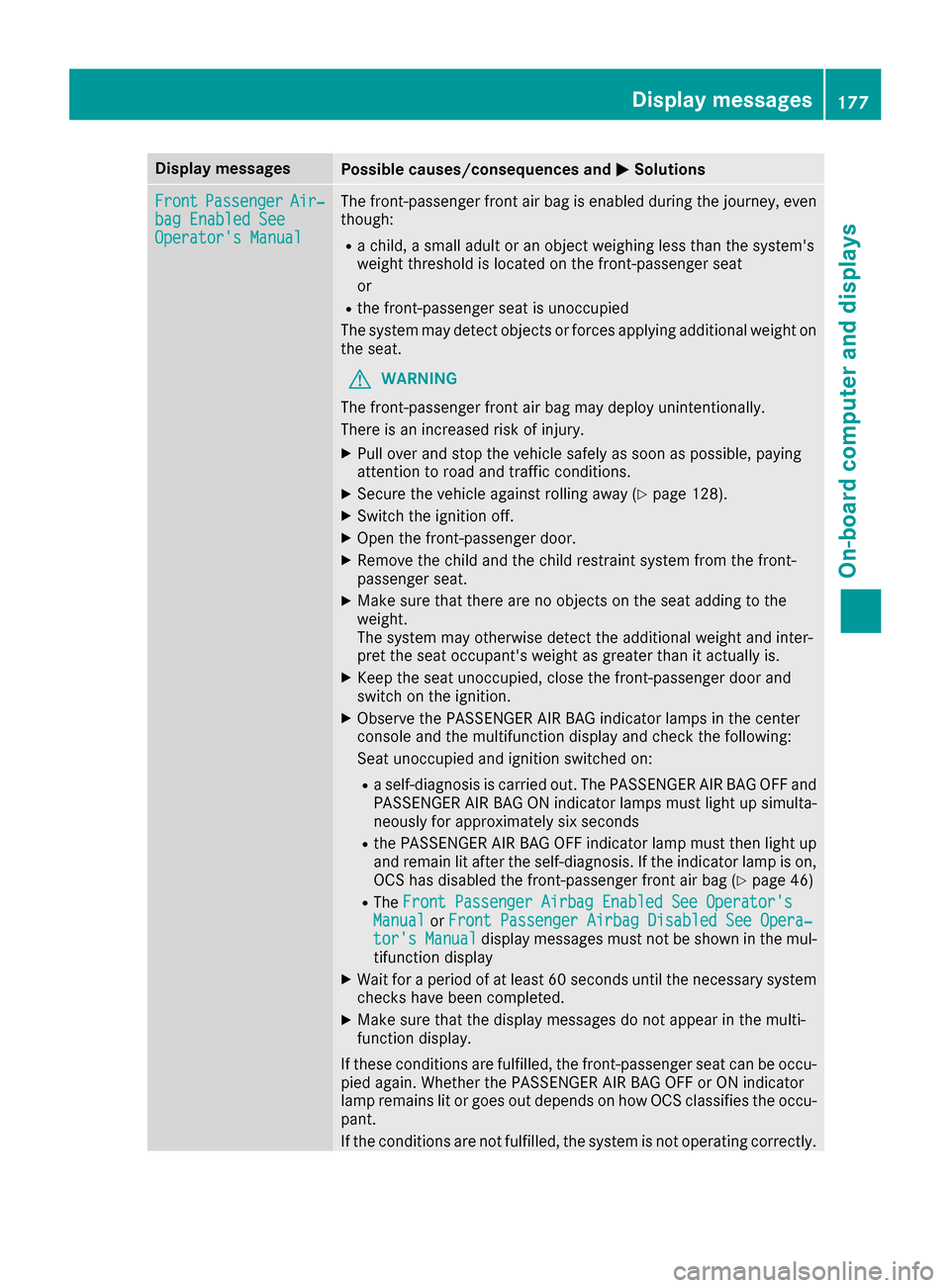
0050Solutions Front
Front
Passenger
Passenger Air‐
Air‐
bag Enabled See
bag Enabled See
Operator's Manual Operator's Manual The front-passenger front air bag is enabled during the journey, even
though:
R a child, a small adult or an object weighing less than the system's
weight threshold is located on the front-passenger seat
or
R the front-passenger seat is unoccupied
The system may detect objects or forces applying additional weight on
the seat.
G WARNING
The front-passenger front air bag may deploy unintentionally.
There is an increased risk of injury.
X Pull over and stop the vehicle safely as soon as possible, paying
attention to road and traffic conditions.
X Secure the vehicle against rolling away (Y page 128).
X Switch the ignition off.
X Open the front-passenger door.
X Remove the child and the child restraint system from the front-
passenger seat.
X Make sure that there are no objects on the seat adding to the
weight.
The system may otherwise detect the additional weight and inter-
pret the seat occupant's weight as greater than it actually is.
X Keep the seat unoccupied, close the front-passenger door and
switch on the ignition.
X Observe the PASSENGER AIR BAG indicator lamps in the center
console and the multifunction display and check the following:
Seat unoccupied and ignition switched on:
R a self-diagnosis is carried out. The PASSENGER AIR BAG OFF and
PASSENGER AIR BAG ON indicator lamps must light up simulta-
neously for approximately six seconds
R the PASSENGER AIR BAG OFF indicator lamp must then light up
and remain lit after the self-diagnosis. If the indicator lamp is on, OCS has disabled the front-passenger front air bag (Y page 46)
R The Front Passenger Airbag Enabled See Operator's
Front Passenger Airbag Enabled See Operator's
Manual
Manual orFront Passenger Airbag Disabled See Opera‐ Front Passenger Airbag Disabled See Opera‐
tor's Manual
tor's Manual display messages must not be shown in the mul-
tifunction display
X Wait for a period of at least 60 seconds until the necessary system
checks have been completed.
X Make sure that the display messages do not appear in the multi-
function display.
If these conditions are fulfilled, the front-passenger seat can be occu-
pied again. Whether the PASSENGER AIR BAG OFF or ON indicator
lamp remains lit or goes out depends on how OCS classifies the occu-
pant.
If the conditions are not fulfilled, the system is not operating correctly. Display
messages
177On-board computer and displays Z
Page 191 of 290
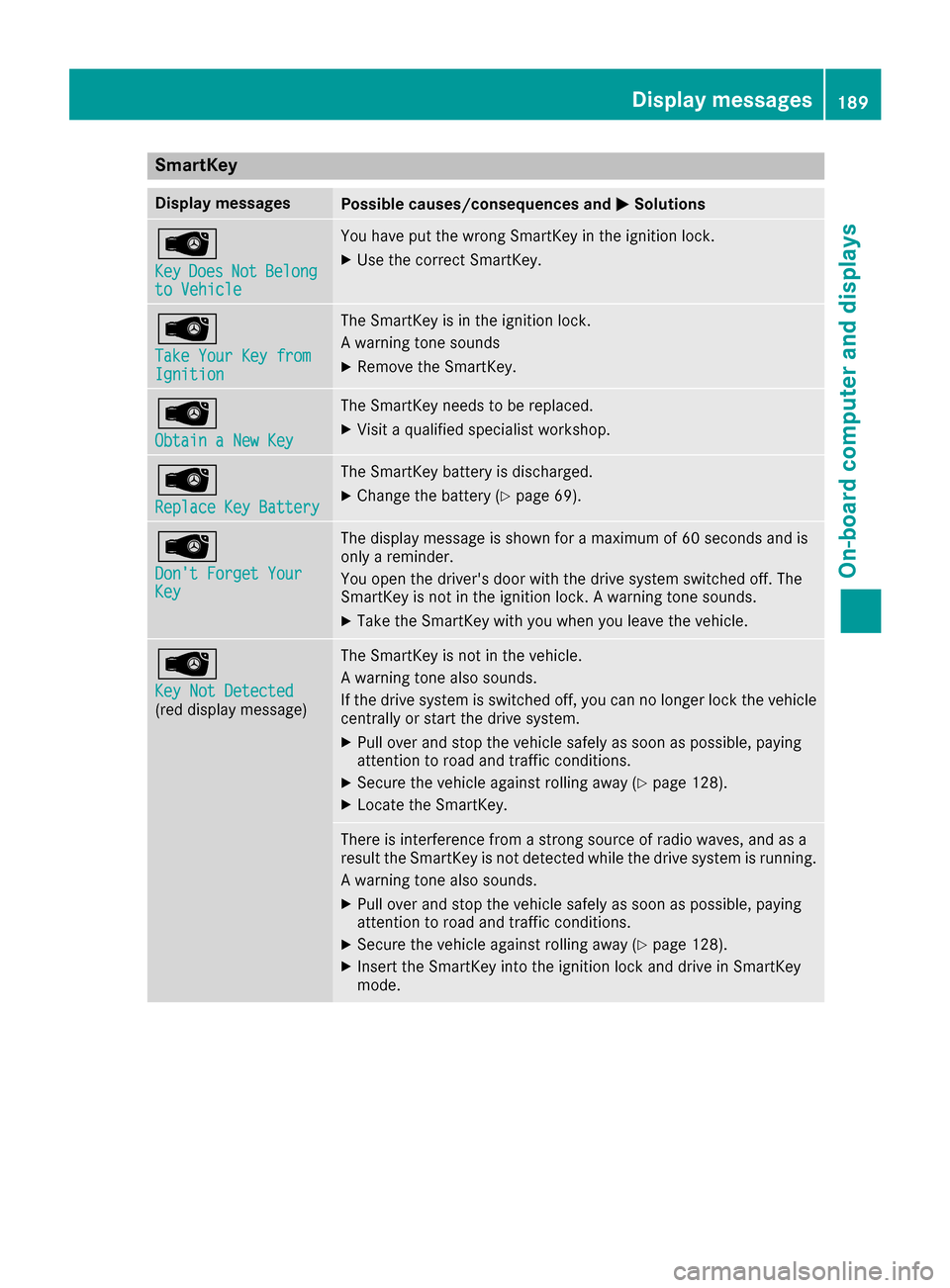
SmartKey
Display messages
Possible causes/consequences and
0050
0050Solutions 00AF
Key Key
Does
Does Not
NotBelong
Belong
to Vehicle
to Vehicle You have put the wrong SmartKey in the ignition lock.
X Use the correct SmartKey. 00AF
Take Your Key from Take Your Key from
Ignition Ignition The SmartKey is in the ignition lock.
A warning tone sounds
X
Remove the SmartKey. 00AF
Obtain a New Key Obtain a New Key The SmartKey needs to be replaced.
X Visit a qualified specialist workshop. 00AF
Replace Key Battery Replace Key Battery The SmartKey battery is discharged.
X Change the battery (Y page 69).00AF
Don't Forget Your Don't Forget Your
Key Key The display message is shown for a maximum of 60 seconds and is
only a reminder.
You open the driver's door with the drive system switched off. The
SmartKey is not in the ignition lock. A warning tone sounds.
X Take the SmartKey with you when you leave the vehicle. 00AF
Key Not Detected Key Not Detected
(red display message) The SmartKey is not in the vehicle.
A warning tone also sounds.
If the drive system is switched off, you can no longer lock the vehicle
centrally or start the drive system.
X Pull over and stop the vehicle safely as soon as possible, paying
attention to road and traffic conditions.
X Secure the vehicle against rolling away (Y page 128).
X Locate the SmartKey. There is interference from a strong source of radio waves, and as a
result the SmartKey is not detected while the drive system is running.
A warning tone also sounds.
X Pull over and stop the vehicle safely as soon as possible, paying
attention to road and traffic conditions.
X Secure the vehicle against rolling away (Y page 128).
X Insert the SmartKey into the ignition lock and drive in SmartKey
mode. Display messages
189On-board computer and displays Z
Page 192 of 290
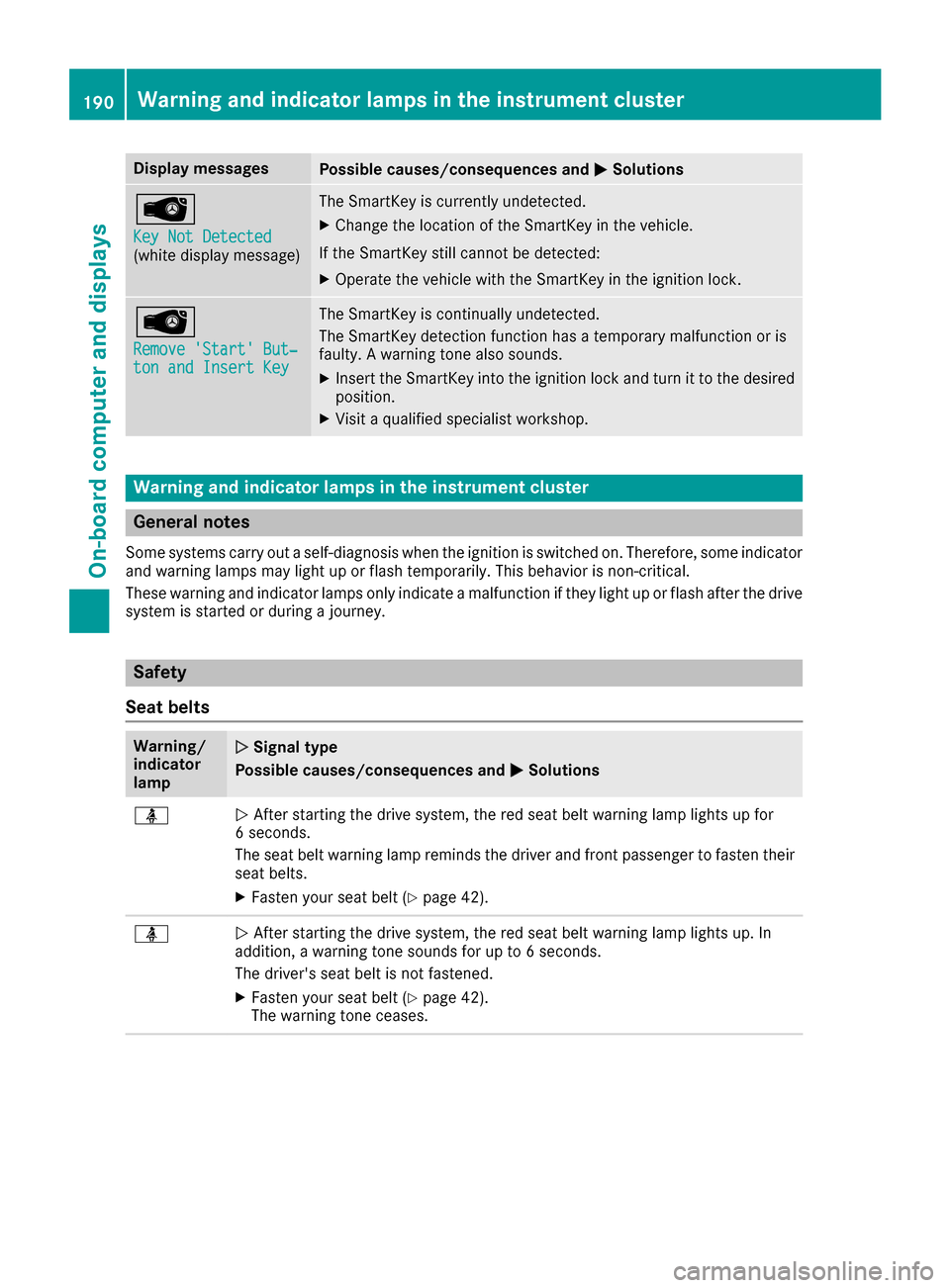
Display messages
Possible causes/consequences and
0050
0050Solutions 00AF
Key Not Detected Key Not Detected
(white display message) The SmartKey is currently undetected.
X Change the location of the SmartKey in the vehicle.
If the SmartKey still cannot be detected:
X Operate the vehicle with the SmartKey in the ignition lock. 00AF
Remove 'Start' But‐ Remove 'Start' But‐
ton and Insert Key ton and Insert Key The SmartKey is continually undetected.
The SmartKey detection function has a temporary malfunction or is
faulty. A warning tone also sounds.
X Insert the SmartKey into the ignition lock and turn it to the desired
position.
X Visit a qualified specialist workshop. Warning and indicator lamps in the instrument cluster
General notes
Some systems carry out a self-diagnosis when the ignition is switched on. Therefore, some indicator and warning lamps may light up or flash temporarily. This behavior is non-critical.
These warning and indicator lamps only indicate a malfunction if they light up or flash after the drive
system is started or during a journey. Safety
Seat belts Warning/
indicator
lamp
0051 0051
Signal type
Possible causes/consequences and 0050
0050Solutions 00E9
0051
After starting the drive system, the red seat belt warning lamp lights up for
6 seconds.
The seat belt warning lamp reminds the driver and front passenger to fasten their
seat belts.
X Fasten your seat belt (Y page 42).00E9
0051
After starting the drive system, the red seat belt warning lamp lights up. In
addition, a warning tone sounds for up to 6 seconds.
The driver's seat belt is not fastened.
X Fasten your seat belt (Y page 42).
The warning tone ceases. 190
Wa
rning and indi cator lamps in the instrument clusterOn-board computer and displays