ignition MERCEDES-BENZ B-Class 2017 W246 User Guide
[x] Cancel search | Manufacturer: MERCEDES-BENZ, Model Year: 2017, Model line: B-Class, Model: MERCEDES-BENZ B-Class 2017 W246Pages: 290, PDF Size: 19.81 MB
Page 66 of 290
the brake system checked at a qualified spe-
cialist workshop.
Observe information regarding indicator and
warning lamps (Y page 193) as well as display
messages (Y page 170). ADAPTIVE BRAKE
ADAPTIVE BRAKE enhances braking safety and
offers increased braking comfort. In addition to
the braking function, ADAPTIVE BRAKE also has
the HOLD function (Y page 138) and hill start
assist (Y page 111). STEER CONTROL
General information STEER CONTROL helps you by transmitting a
noticeable steering force to the steering wheel
in the direction required for vehicle stabilization.
This steering assistance is provided in particular if:
R both right wheels or both left wheels are on a
wet or slippery road surface when you brake
R the vehicle begins to skid
Important safety notes i
Observe the "Important safety notes" sec-
tion (Y page 58).
No steering assistance is provided from STEER
CONTROL, if:
R ESP ®
is malfunctioning
R the steering is malfunctioning
If ESP ®
is malfunctioning, you will be assisted
further by the electrical power steering. Recuperative Brake System
G
WARNING
In the event of malfunctions in the Recupera- tive Brake System, the following may occur: R
the braking performance of the electric
motor may be either reduced or not effec-
tive
R brake pedal resistance may be lower than
usual
R pedal travel may be longer than usual
If you do not make an additional effort to apply the brake yourself, the braking effect may not
be sufficient. There is a risk of an accident.
In the event of this malfunction, continue to
depress the brake pedal. The brake system is
still fully functional.
Observe the important safety notes on driving
safety systems (Y page 58).
The Recuperative Brake System converts the
kinetic energy when braking into electrical
energy. The electric motor is used as an alter-
nator during braking. This electrical energy is
then stored in the high-voltage battery.
You can find information about manually adjust- able recuperation under "Steering wheel paddle
shifters" (Y page 115).
If the warning light in the instrument cluster is lit
up, there is a motor malfunction or a brake mal- function.
Observe information regarding indicator and
warning lamps (Y page 192) as well as display
messages (Y page 168). Protection against theft
Immobilizer
The immobilizer prevents your vehicle from
being started without the correct SmartKey.
X To activate with the SmartKey: remove the
SmartKey from the ignition lock.
X To activate with KEYLESS-GO start-func-
tion or KEYLESS-GO: switch the ignition off
and open the driver's door.
X To deactivate: switch on the ignition.
When leaving the vehicle, always take the
SmartKey with you and lock the vehicle. Anyone
can start the drive system if a valid SmartKey
has been left inside the vehicle.
i The immobilizer is always deactivated when
you start the drive system. 64
Protection against theftSafety
Page 67 of 290
In the event that the engine cannot be started
(yet the vehicle's battery is charged), the sys-
tem is not operational. The READY display in
the multifunction display does not appear.
Contact an authorized Mercedes-Benz Center or call 1-800-FOR-MERCedes (in the USA) or
1-800-387-0100 (in Canada). ATA (anti-theft alarm system)
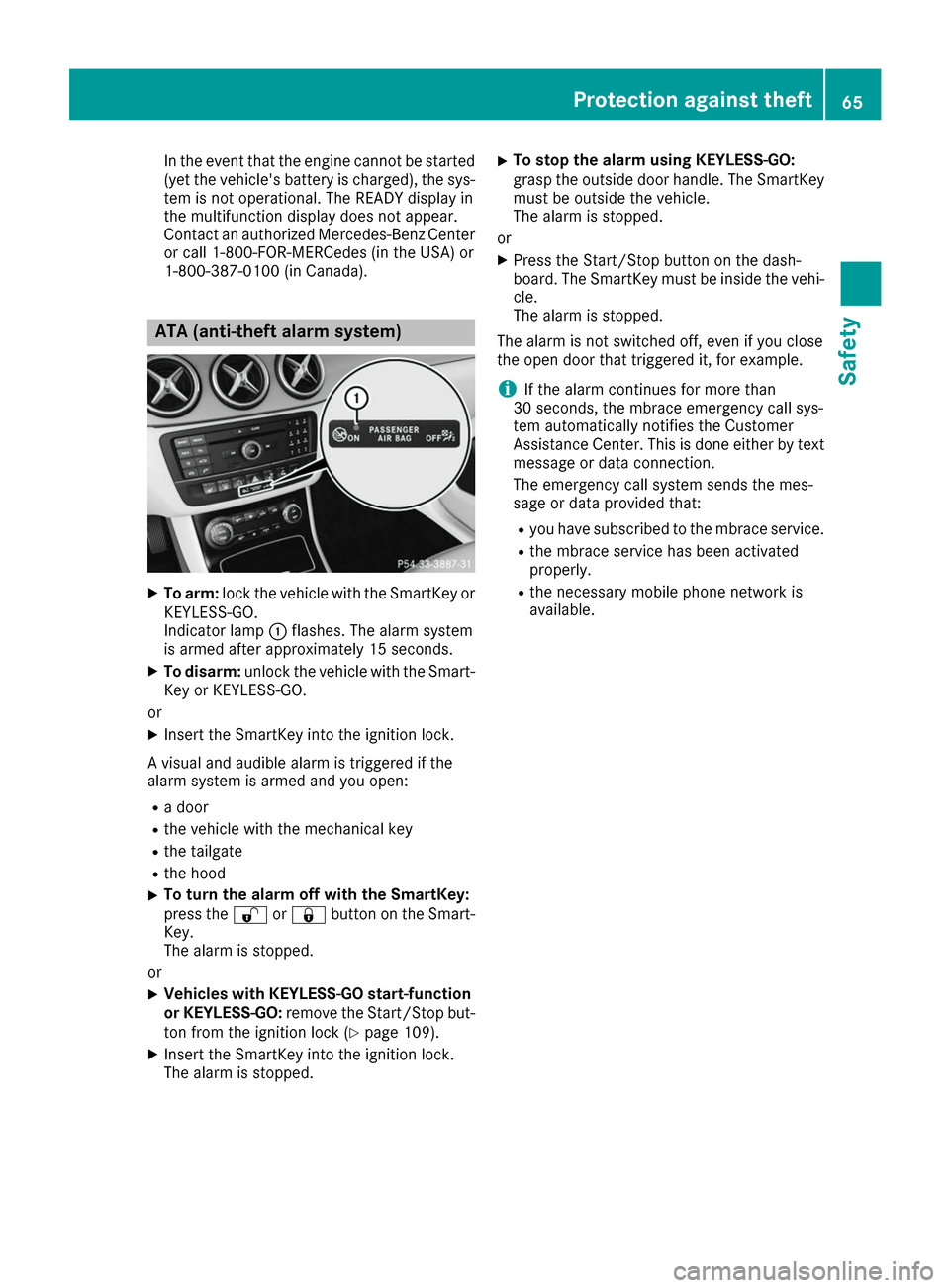
X
To arm: lock the vehicle with the SmartKey or
KEYLESS-GO.
Indicator lamp 0043flashes. The alarm system
is armed after approximately 15 seconds.
X To disarm: unlock the vehicle with the Smart-
Key or KEYLESS-GO.
or X Insert the SmartKey into the ignition lock.
A visual and audible alarm is triggered if the
alarm system is armed and you open:
R a door
R the vehicle with the mechanical key
R the tailgate
R the hood
X To turn the alarm off with the SmartKey:
press the
0036or0037 button on the Smart-
Key.
The alarm is stopped.
or X Vehicles with KEYLESS-GO start-function
or KEYLESS-GO: remove the Start/Stop but-
ton from the ignition lock (Y page 109).
X Insert the SmartKey into the ignition lock.
The alarm is stopped. X
To stop the alarm using KEYLESS-GO:
grasp the outside door handle. The SmartKey
must be outside the vehicle.
The alarm is stopped.
or X Press the Start/Stop button on the dash-
board. The SmartKey must be inside the vehi-
cle.
The alarm is stopped.
The alarm is not switched off, even if you close
the open door that triggered it, for example.
i If the alarm continues for more than
30 seconds, the mbrace emergency call sys-
tem automatically notifies the Customer
Assistance Center. This is done either by text
message or data connection.
The emergency call system sends the mes-
sage or data provided that:
R you have subscribed to the mbrace service.
R the mbrace service has been activated
properly.
R the necessary mobile phone network is
available. Protection against theft
65Safety Z
Page 68 of 290
SmartKey
Important safety notes
G
WARNING
If children are left unsupervised in the vehicle, they could:
R open the doors, thus endangering other
people or road users.
R get out and disrupt traffic.
R operate the vehicle's equipment.
Additionally, children could set the vehicle in
motion if, for example, they:
R release the parking brake.
R shift the transmission out of park position P
R start the vehicle's drive system.
There is a risk of an accident and injury.
When leaving the vehicle, always take the
SmartKey with you and lock the vehicle. Never leave children or animals unattended in the
vehicle. Always keep the SmartKey out of
reach of children. G
WARNING
If you attach heavy or large objects to the
SmartKey, the SmartKey could be uninten-
tionally turned in the ignition lock. This could
cause the engine to be switched off. There is a risk of an accident.
Do not attach any heavy or large objects to the
SmartKey. Remove any bulky key rings before
inserting the SmartKey into the ignition lock.
! Keep the SmartKey away from strong mag-
netic fields. Otherwise, the remote control
function could be affected.
Strong magnetic fields can occur in the vicin- ity of powerful electrical installations.
Do not keep the SmartKey: R with electronic devices, e.g. a mobile phone
or another SmartKey.
R with metallic objects, e.g. coins or metal foil.
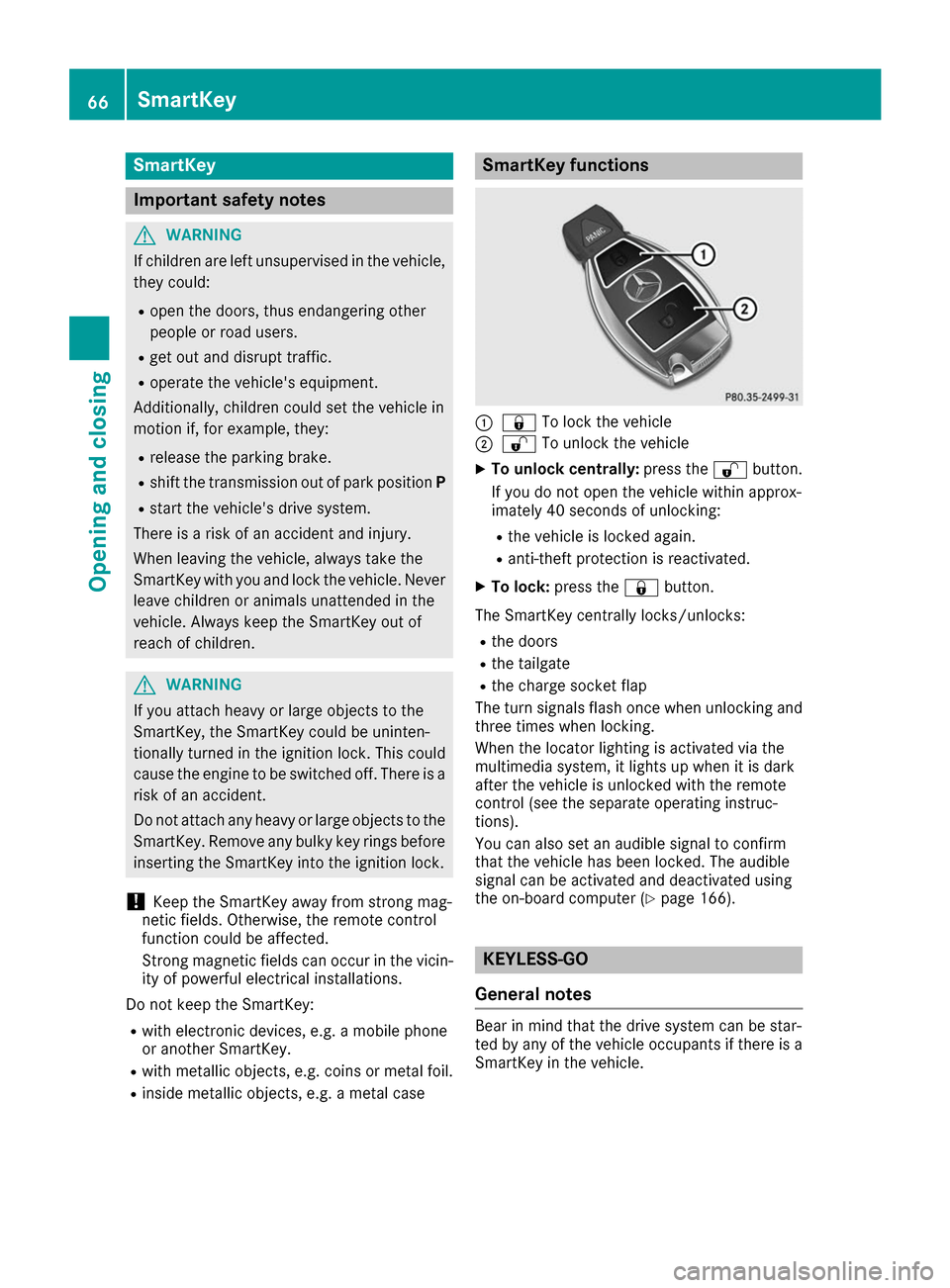
R inside metallic objects, e.g. a metal case SmartKey functions
0043
0037 To lock the vehicle
0044 0036 To unlock the vehicle
X To unlock centrally: press the0036button.
If you do not open the vehicle within approx-
imately 40 seconds of unlocking:
R the vehicle is locked again.
R anti-theft protection is reactivated.
X To lock: press the 0037button.
The SmartKey centrally locks/unlocks: R the doors
R the tailgate
R the charge socket flap
The turn signals flash once when unlocking and
three times when locking.
When the locator lighting is activated via the
multimedia system, it lights up when it is dark
after the vehicle is unlocked with the remote
control (see the separate operating instruc-
tions).
You can also set an audible signal to confirm
that the vehicle has been locked. The audible
signal can be activated and deactivated using
the on-board computer (Y page 166). KEYLESS-GO
General notes Bear in mind that the drive system can be star-
ted by any of the vehicle occupants if there is a
SmartKey in the vehicle. 66
SmartKeyOpening and closing
Page 69 of 290
Locking and unlocking
You can start, lock or unlock the vehicle using
KEYLESS-GO. To do this, you only need carry the
SmartKey with you. You can combine the func-
tions of KEYLESS-GO with those of a conven-
tional SmartKey. Unlock the vehicle by using
KEYLESS-GO, for instance, and lock it using the 0037 button on the SmartKey.
The driver's door and the door at which the han-
dle is used, must both be closed. The SmartKey
must be outside the vehicle. When locking or
unlocking with KEYLESS-GO, the distance
between the SmartKey and the corresponding
door handle must not be greater than 3 ft (1 m).
A check which periodically establishes a radio
connection between the vehicle and the Smart-
Key determines whether a valid SmartKey is in
the vehicle. This occurs, for example:
R when starting the drive system
R while driving
R when the external door handles are touched
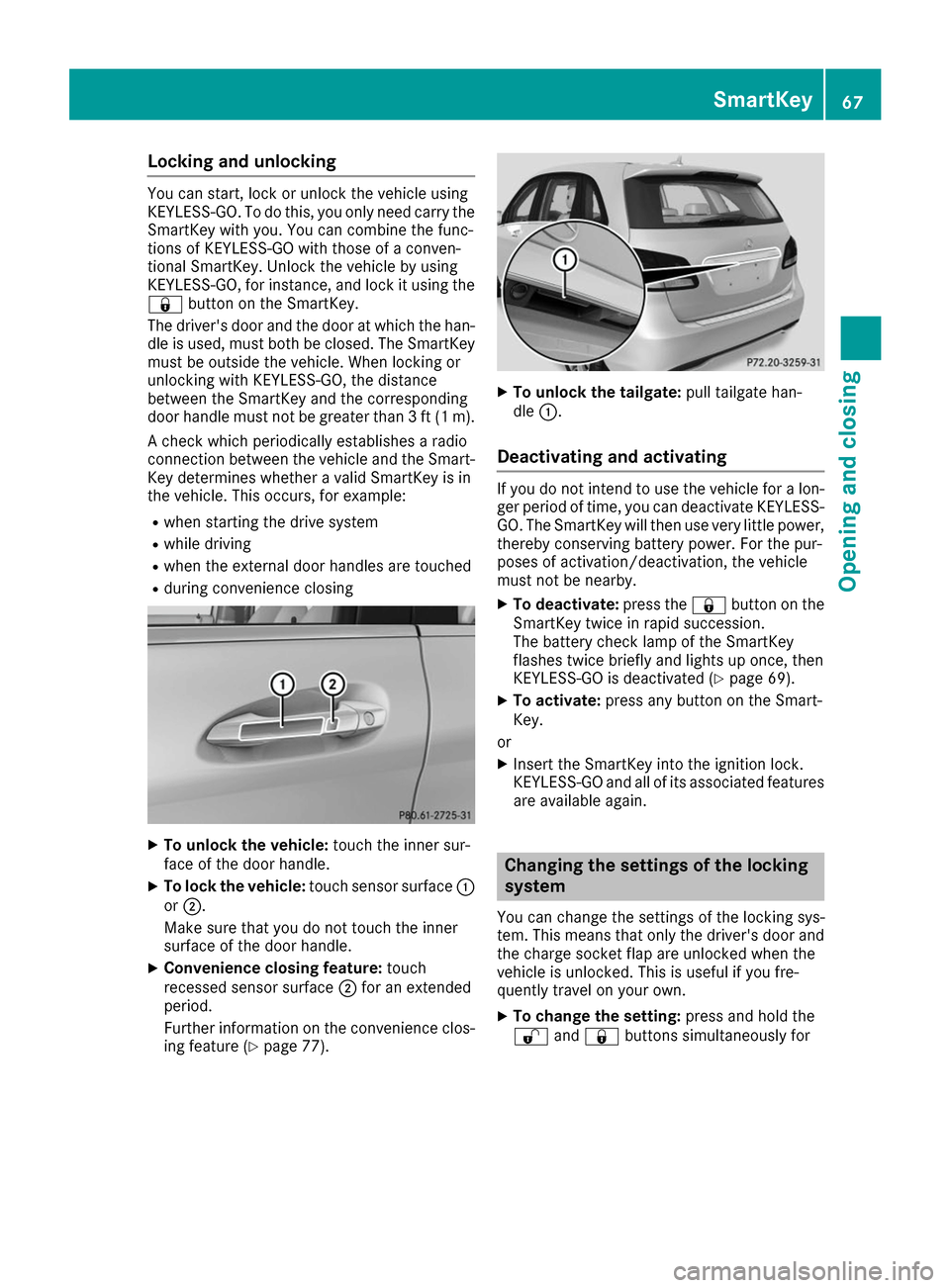
R during convenience closing X
To unlock the vehicle: touch the inner sur-
face of the door handle.
X To lock the vehicle: touch sensor surface 0043
or 0044.
Make sure that you do not touch the inner
surface of the door handle.
X Convenience closing feature: touch
recessed sensor surface 0044for an extended
period.
Further information on the convenience clos-
ing feature (Y page 77). X
To unlock the tailgate: pull tailgate han-
dle 0043.
Deactivating and activating If you do not intend to use the vehicle for a lon-
ger period of time, you can deactivate KEYLESS-
GO. The SmartKey will then use very little power, thereby conserving battery power. For the pur-
poses of activation/deactivation, the vehicle
must not be nearby.
X To deactivate: press the0037button on the
SmartKey twice in rapid succession.
The battery check lamp of the SmartKey
flashes twice briefly and lights up once, then
KEYLESS-GO is deactivated (Y page 69).
X To activate: press any button on the Smart-
Key.
or X Insert the SmartKey into the ignition lock.
KEYLESS-GO and all of its associated features
are available again. Changing the settings of the locking
system
You can change the settings of the locking sys-
tem. This means that only the driver's door and
the charge socket flap are unlocked when the
vehicle is unlocked. This is useful if you fre-
quently travel on your own.
X To change the setting: press and hold the
0036 and0037 buttons simultaneously for SmartKey
67Opening and closing Z
Page 70 of 290
approximately six seconds until the battery
check lamp flashes twice (Y page 69).
If the setting of the locking system is changed
within the signal range of the vehicle, pressing
the 0037 or0036 button:
R locks or
R unlocks the vehicle
The SmartKey now functions as follows:
X To unlock: press the0036button once.
X To unlock centrally: press the0036button
twice.
X To lock centrally: press the0037button.
The KEYLESS-GO function is changed as fol-
lows: X To unlock the driver's door: touch the inner
surface of the door handle on the driver's
door.
X To unlock centrally: touch the inner surface
of the door handle on the front-passenger
door or the rear door.
X To lock centrally: touch the outer sensor
surface on one of the door handles.
X To restore the factory settings: press and
hold the 0036and0037 buttons simultane-
ously for approximately six seconds until the
battery check lamp flashes twice
(Y page 69). Mechanical key
General notes If the vehicle can no longer be locked or
unlocked with the SmartKey or KEYLESS-GO,
use the mechanical key.
If you use the mechanical key to unlock and
open the driver's door or the trunk lid, the anti-
theft alarm system will be triggered (Y page 65).
There are several ways to turn off the alarm:
X To deactivate the alarm with the key: press
the 0036 or0037 button on the key.
or X Insert the SmartKey into the ignition lock.
or X To deactivate the alarm with KEYLESS-GO:
press the Start/Stop button in the ignition
lock. The SmartKey must be in the vehicle. or
X Lock or unlock the vehicle using KEYLESS-
GO. The SmartKey must be outside the vehi-
cle.
If you unlock the vehicle using the mechanical
key, the charge socket flap will not be unlocked automatically.
X To unlock the charge socket flap: insert the
SmartKey into the ignition lock.
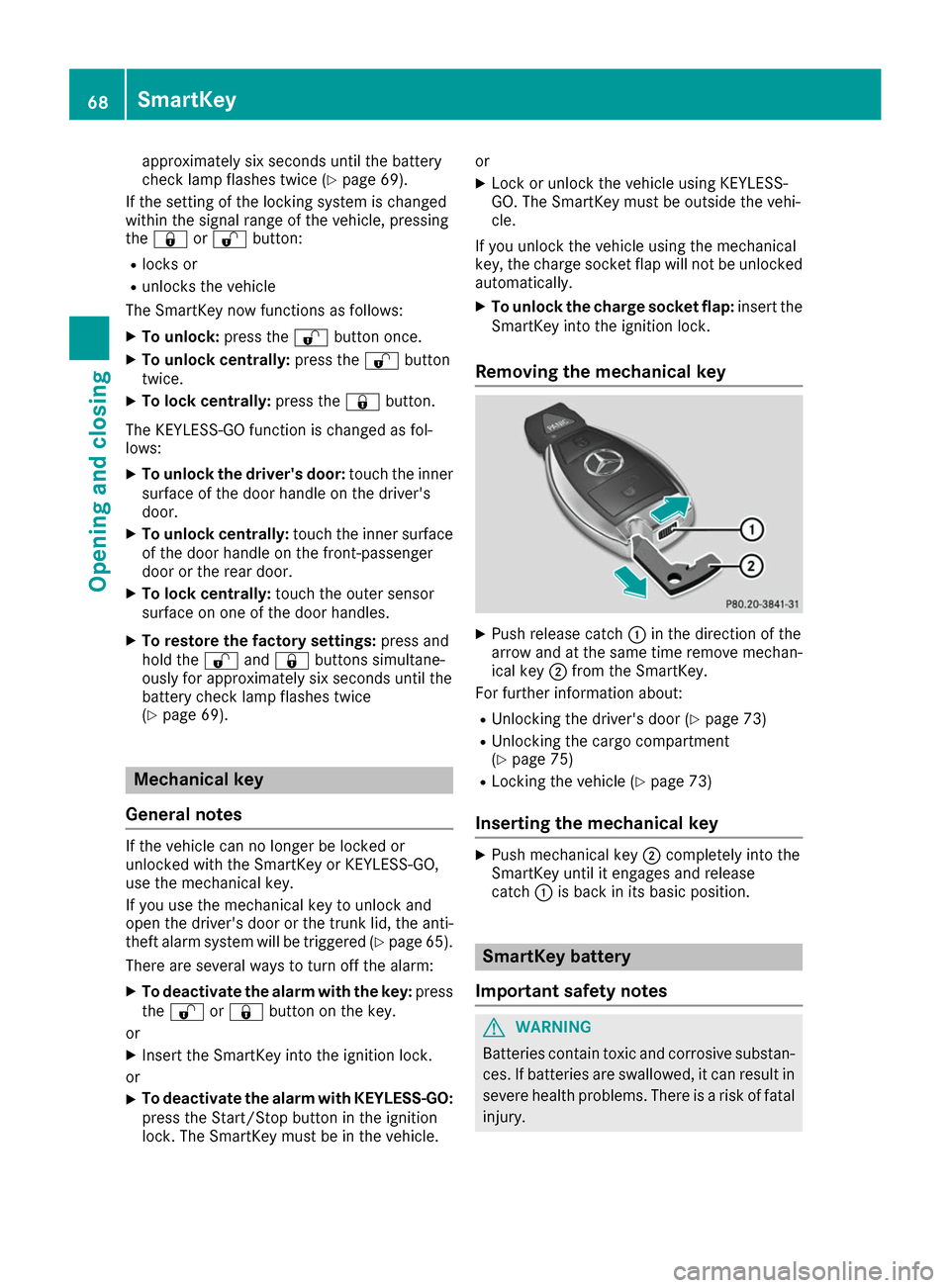
Removing the mechanical key X
Push release catch 0043in the direction of the
arrow and at the same time remove mechan- ical key 0044from the SmartKey.
For further information about:
R Unlocking the driver's door (Y page 73)
R Unlocking the cargo compartment
(Y page 75)
R Locking the vehicle (Y page 73)
Inserting the mechanical key X
Push mechanical key 0044completely into the
SmartKey until it engages and release
catch 0043is back in its basic position. SmartKey battery
Important safety notes G
WARNING
Batteries contain toxic and corrosive substan- ces. If batteries are swallowed, it can result in
severe health problems. There is a risk of fatal injury. 68
SmartKeyOpening and closing
Page 73 of 290
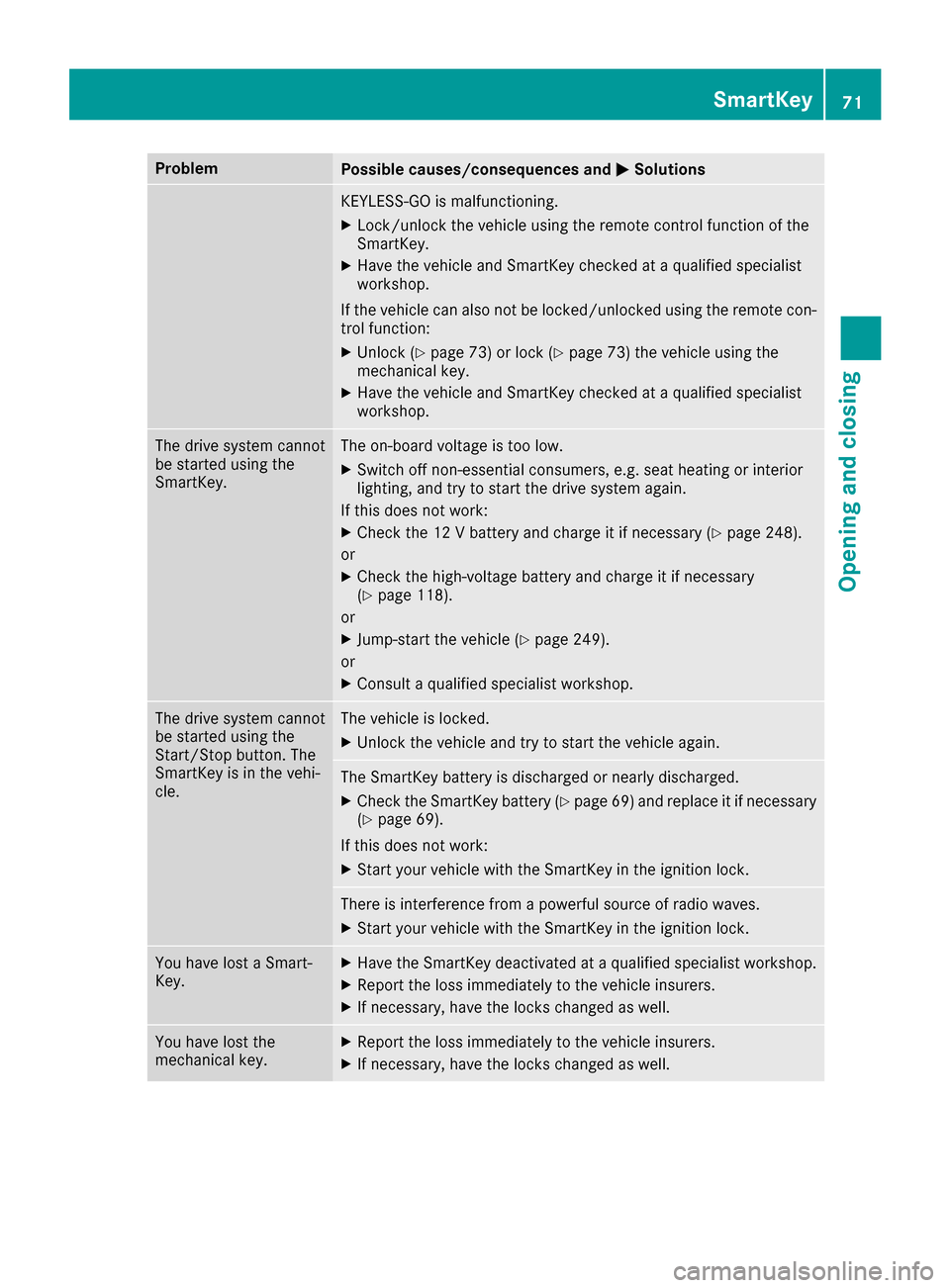
Problem
Possible causes/consequences and
0050
0050Solutions KEYLESS-GO is malfunctioning.
X Lock/unlock the vehicle using the remote control function of the
SmartKey.
X Have the vehicle and SmartKey checked at a qualified specialist
workshop.
If the vehicle can also not be locked/unlocked using the remote con-
trol function:
X Unlock (Y page 73) or lock (Y page 73) the vehicle using the
mechanical key.
X Have the vehicle and SmartKey checked at a qualified specialist
workshop. The drive system cannot
be started using the
SmartKey. The on-board voltage is too low.
X Switch off non-essential consumers, e.g. seat heating or interior
lighting, and try to start the drive system again.
If this does not work:
X Check the 12 V battery and charge it if necessary (Y page 248).
or
X Check the high-voltage battery and charge it if necessary
(Y page 118).
or
X Jump-start the vehicle (Y page 249).
or
X Consult a qualified specialist workshop. The drive system cannot
be started using the
Start/Stop button. The
SmartKey is in the vehi-
cle. The vehicle is locked.
X Unlock the vehicle and try to start the vehicle again. The SmartKey battery is discharged or nearly discharged.
X Check the SmartKey battery (Y page 69) and replace it if necessary
(Y page 69).
If this does not work: X Start your vehicle with the SmartKey in the ignition lock. There is interference from a powerful source of radio waves.
X Start your vehicle with the SmartKey in the ignition lock. You have lost a Smart-
Key. X
Have the SmartKey deactivated at a qualified specialist workshop.
X Report the loss immediately to the vehicle insurers.
X If necessary, have the locks changed as well. You have lost the
mechanical key. X
Report the loss immediately to the vehicle insurers.
X If necessary, have the locks changed as well. SmartKey
71Opening and closing Z
Page 75 of 290
from the inside will trigger the anti-theft alarm
system. Switch off the alarm (Y page 65).
If a locked door is opened from the inside, the
previous unlock status of the vehicle will be
taken into consideration if:
R the vehicle was locked using the locking but-
ton for the central locking, or
R if the vehicle was locked automatically
The vehicle will be fully unlocked if it had previ-
ously been fully unlocked. If only the driver's
door had been previously unlocked, only the
door which has been opened from the inside is
unlocked. Automatic locking feature
X
To deactivate: press and hold button 0043for
approximately five seconds until a tone
sounds.
X To activate: press and hold button 0044for
approximately five seconds until a tone
sounds.
If you press one of the two buttons and do not
hear a tone, the relevant setting has already
been selected.
The vehicle is locked automatically when the
ignition is switched on and the wheels are turn-
ing.
You could therefore lock yourself out if:
R the vehicle is being pushed.
R the vehicle is being towed.
R the vehicle is on a roller dynamometer.
You can also switch the automatic locking func-
tion on and off using the on-board computer
(Y page 166). Unlocking the driver's door (mechan-
ical key)
If the vehicle can no longer be locked or
unlocked with the SmartKey or KEYLESS-GO,
use the mechanical key.
If you use the mechanical key to unlock and
open the driver's door, the anti-theft alarm sys- tem will be triggered (Y page 65).
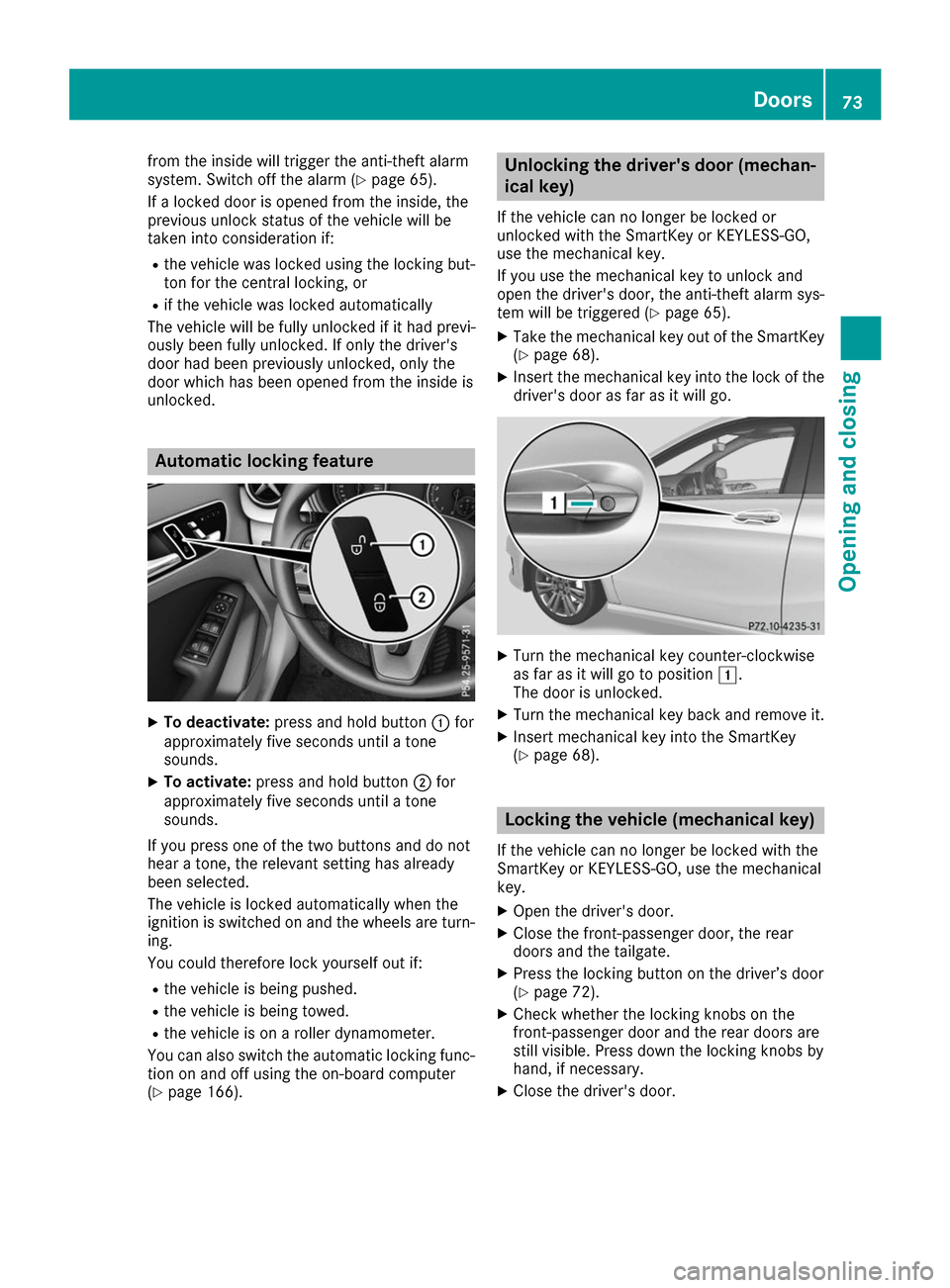
X Take the mechanical key out of the SmartKey
(Y page 68).
X Insert the mechanical key into the lock of the
driver's door as far as it will go. X
Turn the mechanical key counter-clockwise
as far as it will go to position 0047.
The door is unlocked.
X Turn the mechanical key back and remove it.
X Insert mechanical key into the SmartKey
(Y page 68). Locking the vehicle (mechanical key)
If the vehicle can no longer be locked with the
SmartKey or KEYLESS-GO, use the mechanical
key.
X Open the driver's door.
X Close the front-passenger door, the rear
doors and the tailgate.
X Press the locking button on the driver’s door
(Y page 72).
X Check whether the locking knobs on the
front-passenger door and the rear doors are
still visible. Press down the locking knobs by
hand, if necessary.
X Close the driver's door. Doors
73Opening and closing Z
Page 78 of 290
G
WARNING
The reversing feature does not react:
R to soft, light and thin objects, e.g. small fin-
gers
R while resetting
This means that the reversing feature cannot
prevent someone being trapped in these sit-
uations. There is a risk of injury.
Make sure that no body parts are in close
proximity during the closing procedure. If
someone becomes trapped, press the switch
to open the side window again. Opening and closing the side win-
dows
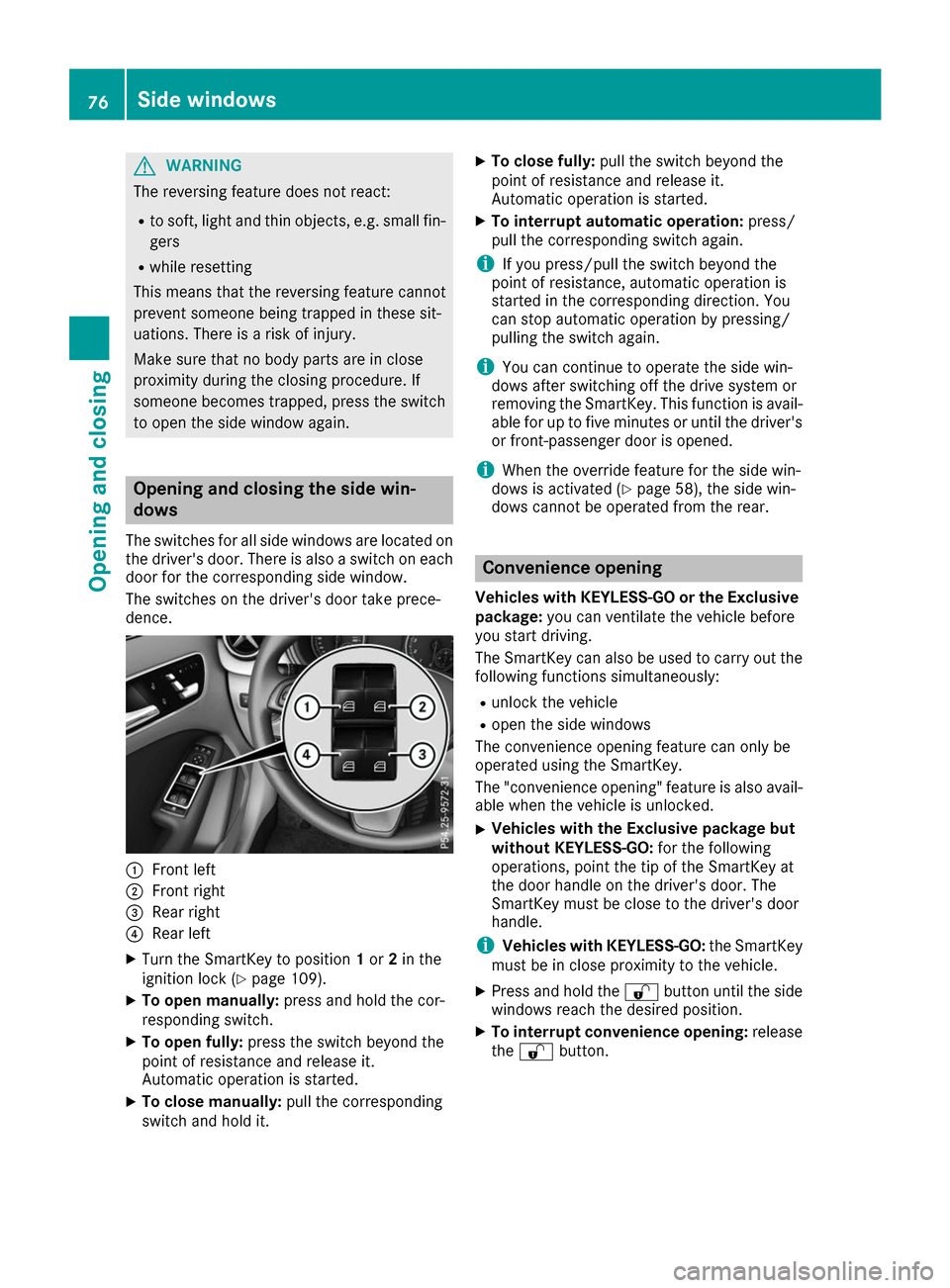
The switches for all side windows are located on the driver's door. There is also a switch on each
door for the corresponding side window.
The switches on the driver's door take prece-
dence. 0043
Front left
0044 Front right
0087 Rear right
0085 Rear left
X Turn the SmartKey to position 1or 2in the
ignition lock (Y page 109).
X To open manually: press and hold the cor-
responding switch.
X To open fully: press the switch beyond the
point of resistance and release it.
Automatic operation is started.
X To close manually: pull the corresponding
switch and hold it. X
To close fully: pull the switch beyond the
point of resistance and release it.
Automatic operation is started.
X To interrupt automatic operation: press/
pull the corresponding switch again.
i If you press/pull the switch beyond the
point of resistance, automatic operation is
started in the corresponding direction. You
can stop automatic operation by pressing/
pulling the switch again.
i You can continue to operate the side win-
dows after switching off the drive system or
removing the SmartKey. This function is avail- able for up to five minutes or until the driver's
or front-passenger door is opened.
i When the override feature for the side win-
dows is activated (Y page 58), the side win-
dows cannot be operated from the rear. Convenience opening
Vehicles with KEYLESS-GO or the Exclusive package: you can ventilate the vehicle before
you start driving.
The SmartKey can also be used to carry out the following functions simultaneously:
R unlock the vehicle
R open the side windows
The convenience opening feature can only be
operated using the SmartKey.
The "convenience opening" feature is also avail-
able when the vehicle is unlocked.
X Vehicles with the Exclusive package but
without KEYLESS-GO:
for the following
operations, point the tip of the SmartKey at
the door handle on the driver's door. The
SmartKey must be close to the driver's door
handle.
i Vehicles with KEYLESS-GO:
the SmartKey
must be in close proximity to the vehicle.
X Press and hold the 0036button until the side
windows reach the desired position.
X To interrupt convenience opening: release
the 0036 button. 76
Side windowsOpening and closing
Page 79 of 290
Convenience closing feature
Important safety notes G
WARNING
When using the convenience closing feature,
parts of the body could be trapped in the clos- ing area when a side window is being closed. There is a risk of injury.
Observe the complete closing procedure
when the convenience closing feature is oper-
ating. Make sure that no body parts are in
close proximity during the closing procedure.
Vehicles with KEYLESS-GO or the Exclusive package: when you lock the vehicle, you can
close the side windows at the same time.
i Notes on the automatic reversing feature for
the side windows (Y page 75).
Using the SmartKey X
Vehicles with the Exclusive package but
without KEYLESS-GO: for the following
operations, point the tip of the SmartKey at
the door handle on the driver's door. The
SmartKey must be close to the driver's door
handle.
i Vehicles with KEYLESS-GO:
the SmartKey
must be in close proximity to the vehicle.
X Press and hold the 0037button until the side
windows are fully closed.
X To interrupt convenience closing: release
the 0037 button.
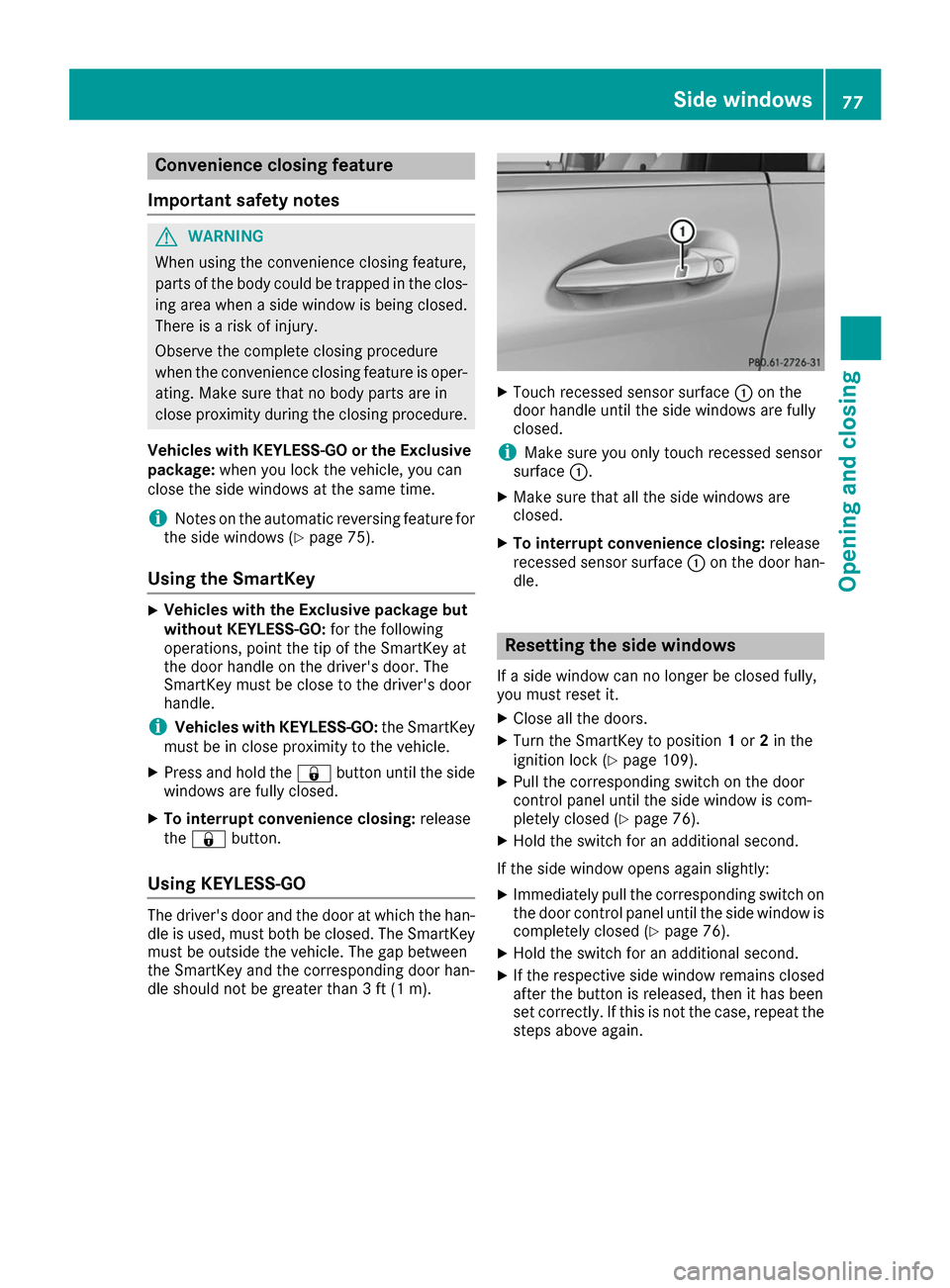
Using KEYLESS-GO The driver's door and the door at which the han-
dle is used, must both be closed. The SmartKey
must be outside the vehicle. The gap between
the SmartKey and the corresponding door han-
dle should not be greater than 3 ft (1 m). X
Touch recessed sensor surface 0043on the
door handle until the side windows are fully
closed.
i Make sure you only touch recessed sensor
surface 0043.
X Make sure that all the side windows are
closed.
X To interrupt convenience closing: release
recessed sensor surface 0043on the door han-
dle. Resetting the side windows
If a side window can no longer be closed fully,
you must reset it.
X Close all the doors.
X Turn the SmartKey to position 1or 2in the
ignition lock (Y page 109).
X Pull the corresponding switch on the door
control panel until the side window is com-
pletely closed (Y page 76).
X Hold the switch for an additional second.
If the side window opens again slightly: X Immediately pull the corresponding switch on
the door control panel until the side window is completely closed (Y page 76).
X Hold the switch for an additional second.
X If the respective side window remains closed
after the button is released, then it has been
set correctly. If this is not the case, repeat the
steps above again. Side windows
77Opening and closing Z
Page 81 of 290
Correct driver's seat position
G
WARNING
You could lose control of your vehicle if you do the following while driving:
R adjust the driver's seat, head restraint,
steering wheel or mirrors
R fasten the seat belt
There is a risk of an accident.
Adjust the driver's seat, head restraint, steer-
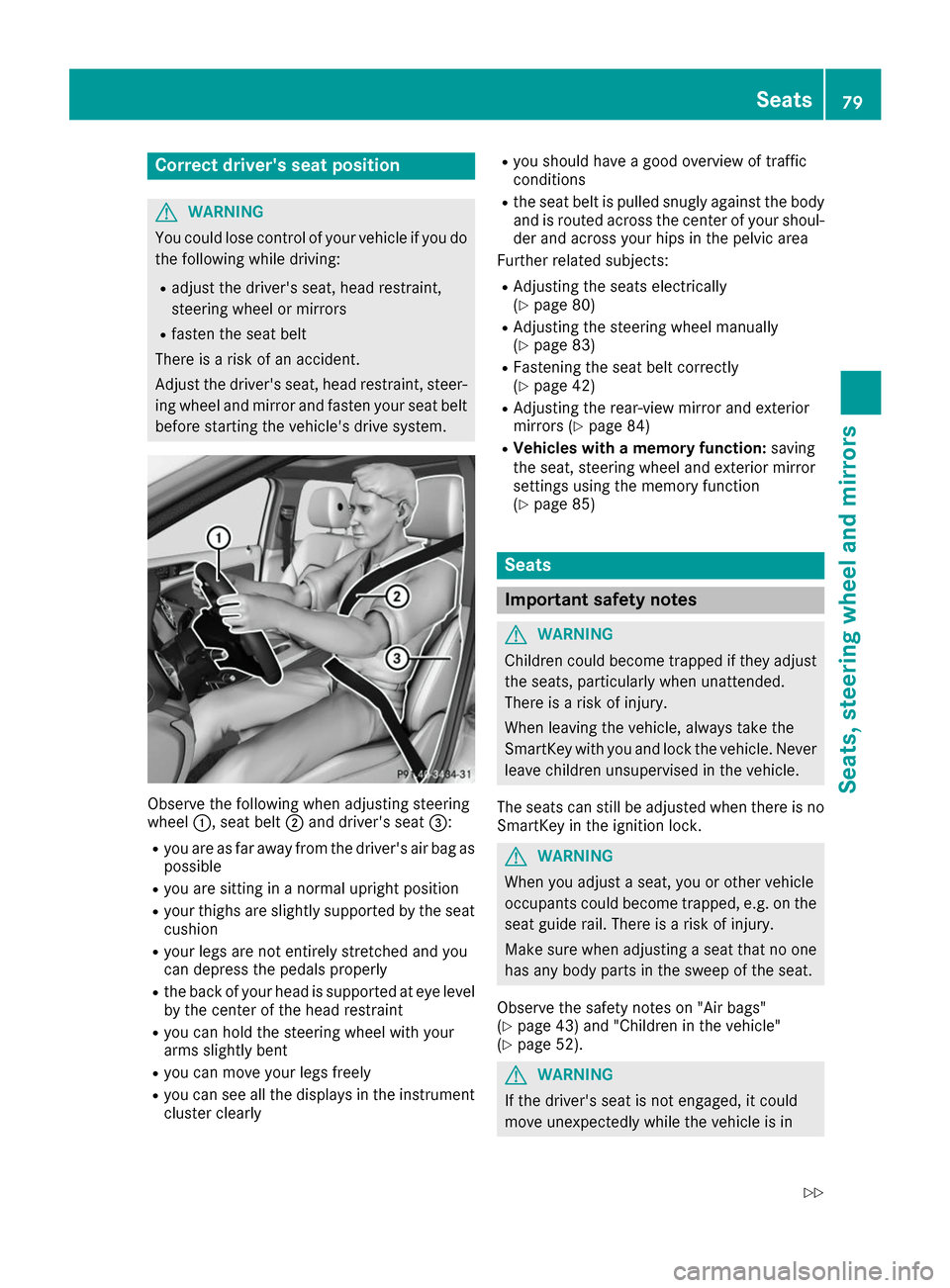
ing wheel and mirror and fasten your seat belt before starting the vehicle's drive system. Observe the following when adjusting steering
wheel
0043, seat belt 0044and driver's seat 0087:
R you are as far away from the driver's air bag as
possible
R you are sitting in a normal upright position
R your thighs are slightly supported by the seat
cushion
R your legs are not entirely stretched and you
can depress the pedals properly
R the back of your head is supported at eye level
by the center of the head restraint
R you can hold the steering wheel with your
arms slightly bent
R you can move your legs freely
R you can see all the displays in the instrument
cluster clearly R
you should have a good overview of traffic
conditions
R the seat belt is pulled snugly against the body
and is routed across the center of your shoul-
der and across your hips in the pelvic area
Further related subjects:
R Adjusting the seats electrically
(Y page 80)
R Adjusting the steering wheel manually
(Y page 83)
R Fastening the seat belt correctly
(Y page 42)
R Adjusting the rear-view mirror and exterior
mirrors (Y page 84)
R Vehicles with a memory function: saving
the seat, steering wheel and exterior mirror
settings using the memory function
(Y page 85) Seats
Important safety notes
G
WARNING
Children could become trapped if they adjust the seats, particularly when unattended.
There is a risk of injury.
When leaving the vehicle, always take the
SmartKey with you and lock the vehicle. Neverleave children unsupervised in the vehicle.
The seats can still be adjusted when there is no
SmartKey in the ignition lock. G
WARNING
When you adjust a seat, you or other vehicle
occupants could become trapped, e.g. on the seat guide rail. There is a risk of injury.
Make sure when adjusting a seat that no one
has any body parts in the sweep of the seat.
Observe the safety notes on "Air bags"
(Y page 43) and "Children in the vehicle"
(Y page 52). G
WARNING
If the driver's seat is not engaged, it could
move unexpectedly while the vehicle is in Seats
79Seats, steering wheel and mirrors
Z