lights MERCEDES-BENZ B-Class 2017 W246 Workshop Manual
[x] Cancel search | Manufacturer: MERCEDES-BENZ, Model Year: 2017, Model line: B-Class, Model: MERCEDES-BENZ B-Class 2017 W246Pages: 290, PDF Size: 19.81 MB
Page 153 of 290
case if the vehicles are driving on the inner side
of their lane.
Due to the nature of the system:
R warnings may be issued in error when driving
close to crash barriers or similar solid lane
borders.
R warnings may be interrupted when driving
alongside particularly long vehicles, e.g.
trucks, for a prolonged time.
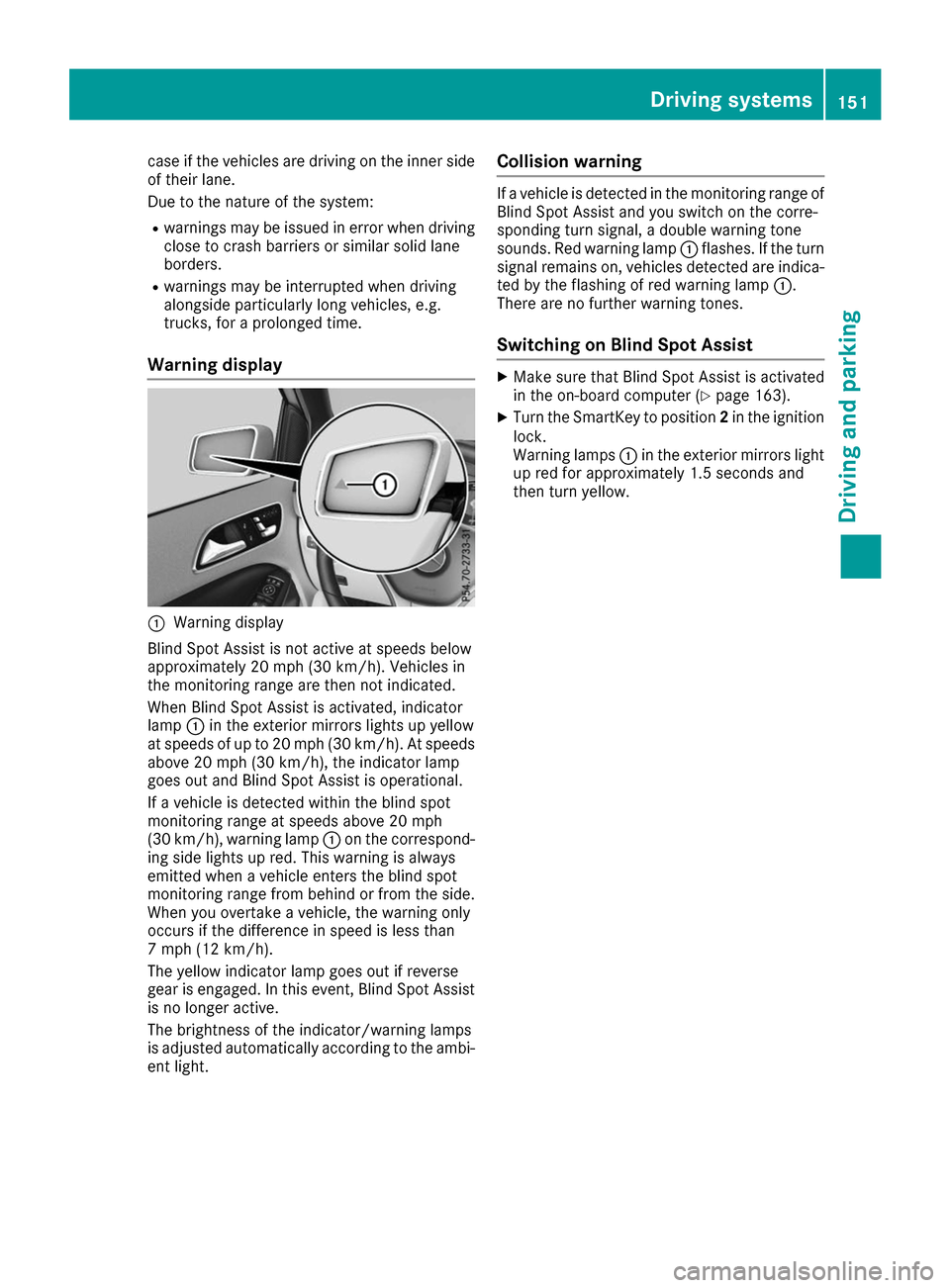
Warning display 0043
Warning display
Blind Spot Assist is not active at speeds below
approximately 20 mph (30 km/h). Vehicles in
the monitoring range are then not indicated.
When Blind Spot Assist is activated, indicator
lamp 0043in the exterior mirrors lights up yellow
at speeds of up to 20 mph (30 km/h). At speeds
above 20 mph (30 km/h), the indicator lamp
goes out and Blind Spot Assist is operational.
If a vehicle is detected within the blind spot
monitoring range at speeds above 20 mph
(30 km/h), warning lamp 0043on the correspond-
ing side lights up red. This warning is always
emitted when a vehicle enters the blind spot
monitoring range from behind or from the side.
When you overtake a vehicle, the warning only
occurs if the difference in speed is less than
7 mph (12 km/h).
The yellow indicator lamp goes out if reverse
gear is engaged. In this event, Blind Spot Assist is no longer active.
The brightness of the indicator/warning lamps
is adjusted automatically according to the ambi-
ent light. Collision warning If a vehicle is detected in the monitoring range of
Blind Spot Assist and you switch on the corre-
sponding turn signal, a double warning tone
sounds. Red warning lamp 0043flashes. If the turn
signal remains on, vehicles detected are indica-
ted by the flashing of red warning lamp 0043.
There are no further warning tones.
Switching on Blind Spot Assist X
Make sure that Blind Spot Assist is activated
in the on-board computer (Y page 163).
X Turn the SmartKey to position 2in the ignition
lock.
Warning lamps 0043in the exterior mirrors light
up red for approximately 1.5 seconds and
then turn yellow. Driving systems
151Driving and parking Z
Page 156 of 290
i
The
Energy Flow
Energy Flow menu can also be dis-
played in the COMAND/Audio display.
The condition of charge of the high-voltage bat- tery has dropped into the reserve range if the
drive system is running and:
R the Drive Battery Reserve Level
Drive Battery Reserve Level mes-
sage appears in the display
R the indicator lamp in the instrument cluster
lights up
Charge the high-voltage battery from a condi-
tion of charge of less than 20% at:
R an electrical outlet
R a charging station
The braking performance of the electric motor
using recuperative braking is, in some operating
modes, either reduced or not effective:
R when the condition of charge of the high-volt-
age battery increases
R if the high-voltage battery is not yet at a nor-
mal operating temperature
R when the vehicle is almost stationary
R in transmission position N
R during and after ESP stability control
If you do not make an additional effort to apply
the brake yourself, the braking effect may not be
sufficient. If necessary, counteract the reduced regenerative braking effect by applying the
brake yourself. Operating the on-board computer
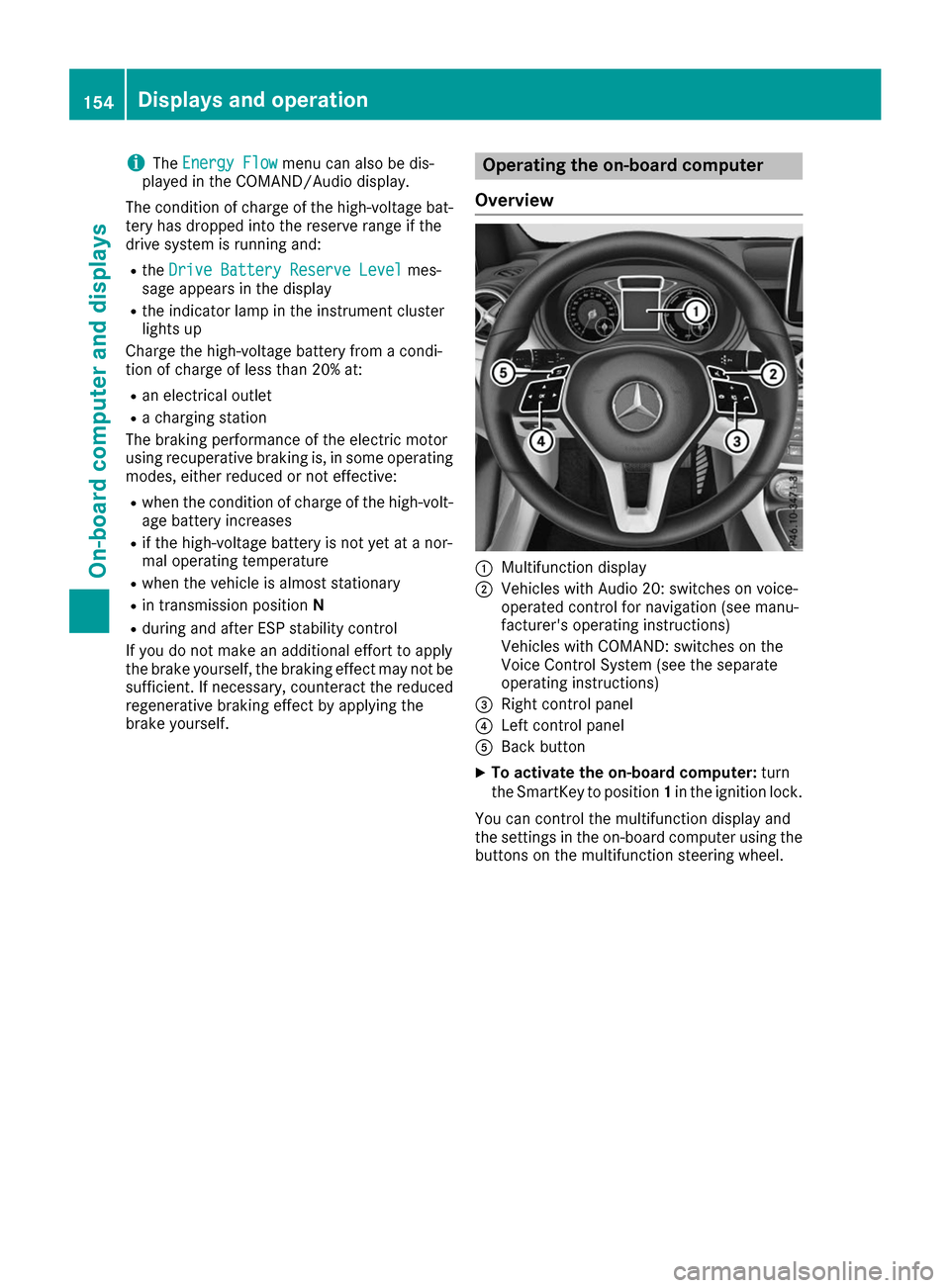
Overview 0043
Multifunction display
0044 Vehicles with Audio 20: switches on voice-
operated control for navigation (see manu-
facturer's operating instructions)
Vehicles with COMAND: switches on the
Voice Control System (see the separate
operating instructions)
0087 Right control panel
0085 Left control panel
0083 Back button
X To activate the on-board computer: turn
the SmartKey to position 1in the ignition lock.
You can control the multifunction display and
the settings in the on-board computer using the buttons on the multifunction steering wheel. 154
Displays and operationOn-board computer and displays
Page 164 of 290
Assistance menu
Introduction Depending on the equipment installed in the
vehicle, you have the following options in the
DriveAssist
DriveAssist menu:
R Displaying the assistance graphic
(Y page 162)
R Deactivating/activating ESP ®
(Y page 162)
R Activating/deactivating Active Brake Assist
(Y page 162)
R Activating/deactivating ATTENTION ASSIST
(Y page 163)
R Activating/deactivating Blind Spot Assist
(Y page 163)
Displaying the assistance graphic X
Press the 0059or0065 button on the steering
wheel to select the DriveAssist
DriveAssist menu.
X Press 0063or0064 to select Assistance Assistance
Graphic
Graphic.
X Press 0076to confirm.
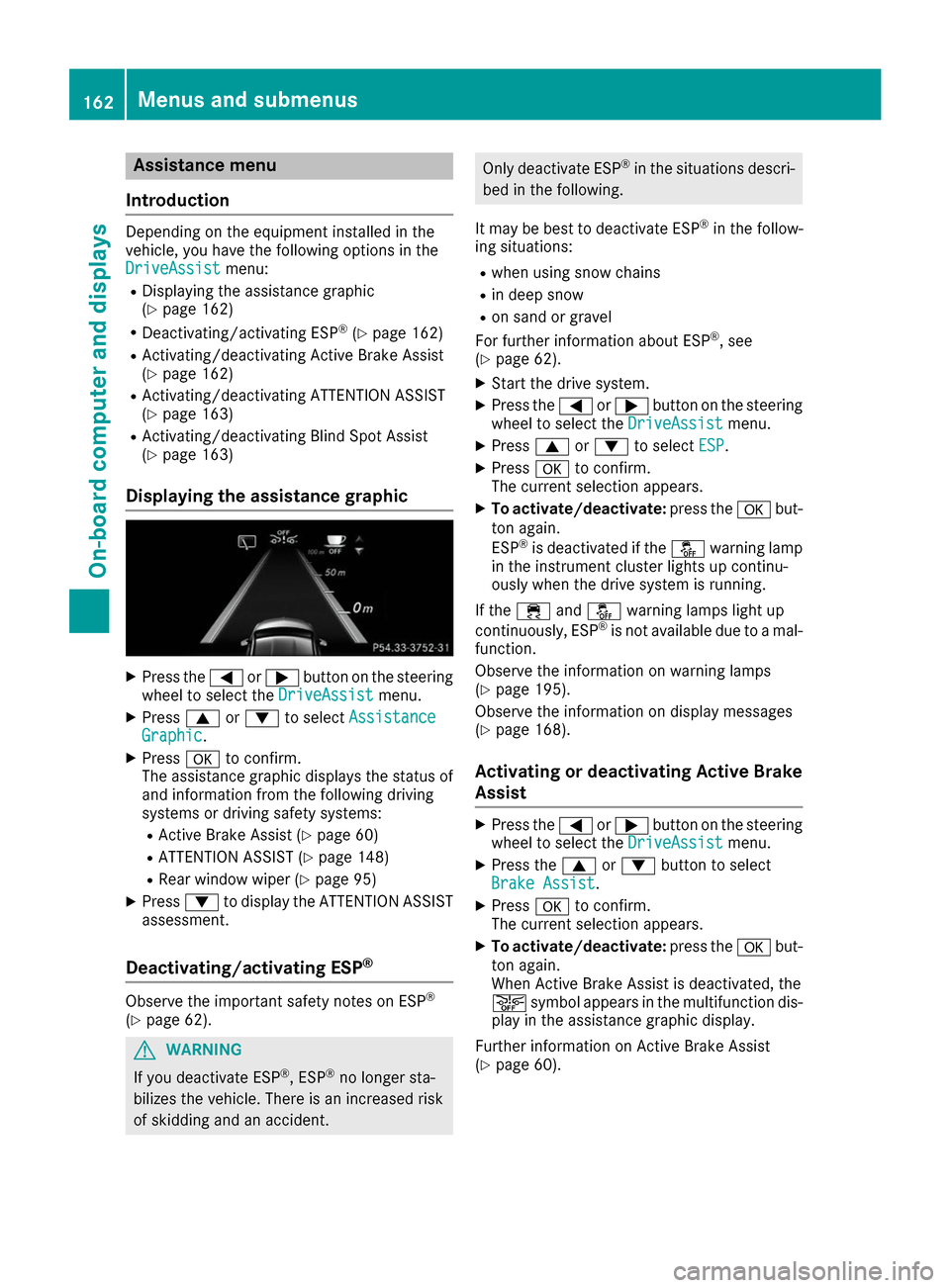
The assistance graphic displays the status of
and information from the following driving
systems or driving safety systems:
R Active Brake Assist (Y page 60)
R ATTENTION ASSIST (Y page 148)
R Rear window wiper (Y page 95)
X Press 0064to display the ATTENTION ASSIST
assessment.
Deactivating/activating ESP ®Observe the important safety notes on ESP
®
(Y page 62). G
WARNING
If you deactivate ESP ®
, ESP ®
no longer sta-
bilizes the vehicle. There is an increased risk
of skidding and an accident. Only deactivate ESP
®
in the situations descri-
bed in the following.
It may be best to deactivate ESP ®
in the follow-
ing situations:
R when using snow chains
R in deep snow
R on sand or gravel
For further information about ESP ®
, see
(Y page 62).
X Start the drive system.
X Press the 0059or0065 button on the steering
wheel to select the DriveAssist DriveAssistmenu.
X Press 0063or0064 to select ESP
ESP .
X Press 0076to confirm.
The current selection appears.
X To activate/deactivate: press the0076but-
ton again.
ESP ®
is deactivated if the 00BBwarning lamp
in the instrument cluster lights up continu-
ously when the drive system is running.
If the 00E5 and00BB warning lamps light up
continuously, ESP ®
is not available due to a mal-
function.
Observe the information on warning lamps
(Y page 195).
Observe the information on display messages
(Y page 168).
Activating or deactivating Active Brake
Assist X
Press the 0059or0065 button on the steering
wheel to select the DriveAssist DriveAssistmenu.
X Press the 0063or0064 button to select
Brake Assist Brake Assist .
X Press 0076to confirm.
The current selection appears.
X To activate/deactivate: press the0076but-
ton again.
When Active Brake Assist is deactivated, the
00D4 symbol appears in the multifunction dis-
play in the assistance graphic display.
Further information on Active Brake Assist
(Y page 60). 162
Menus and sub
menusOn-board computer and displays
Page 166 of 290
Selecting the departure time
X Press the 0059or0065 button on the steering
wheel to select the Settings
Settings menu.
X Press 0063or0064 on the steering wheel to
select the E‑CELL
E‑CELLmenu.
X Press 0063or0064 to select Depart.
Depart. Time
Time.
X Press 0076to confirm.
X Press the 0064or0063 button to select one
of the three departure times or Timer
TimerOff
Off(no
timer active).
X Press 0076to confirm.
Charging with RANGE PLUS
If you have engaged Pand the charging cable is
connected, the on-board computer displays:
R the expected charge time of the high-voltage
battery or
R the RANGE PLUS condition of charge for the
departure time set
RANGE PLUS charges when:
R you have activated RANGE PLUS via the cen-
ter console prior to charging and
R the high-voltage battery is fully charged
If charging is not complete by departure time,
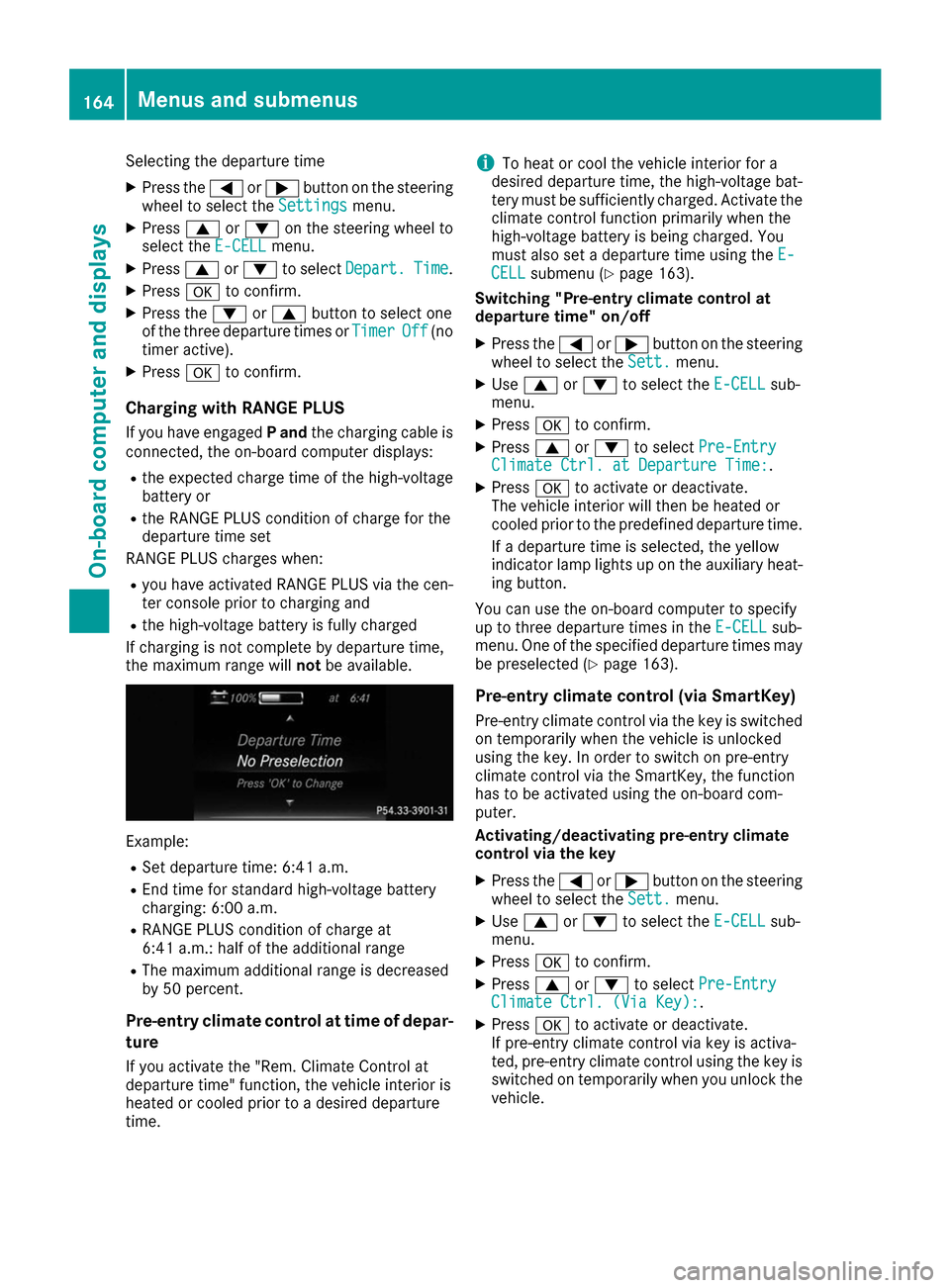
the maximum range will notbe available. Example:
R Set departure time: 6:41 a.m.
R End time for standard high-voltage battery
charging: 6:00 a.m.
R RANGE PLUS condition of charge at
6:41 a.m.: half of the additional range
R The maximum additional range is decreased
by 50 percent.
Pre-entry climate control at time of depar- ture
If you activate the "Rem. Climate Control at
departure time" function, the vehicle interior is
heated or cooled prior to a desired departure
time. i
To heat or cool the vehicle interior for a
desired departure time, the high-voltage bat-
tery must be sufficiently charged. Activate the
climate control function primarily when the
high-voltage battery is being charged. You
must also set a departure time using the E-
E-
CELL
CELL submenu (Y page 163).
Switching "Pre-entry climate control at
departure time" on/off
X Press the 0059or0065 button on the steering
wheel to select the Sett. Sett.menu.
X Use 0063 or0064 to select the E-CELL
E-CELLsub-
menu.
X Press 0076to confirm.
X Press 0063or0064 to select Pre-Entry
Pre-Entry
Climate Ctrl. at Departure Time:
Climate Ctrl. at Departure Time:.
X Press 0076to activate or deactivate.
The vehicle interior will then be heated or
cooled prior to the predefined departure time.
If a departure time is selected, the yellow
indicator lamp lights up on the auxiliary heat-
ing button.
You can use the on-board computer to specify
up to three departure times in the E-CELL E-CELLsub-
menu. One of the specified departure times may
be preselected (Y page 163).
Pre-entry climate control (via SmartKey)
Pre-entry climate control via the key is switched on temporarily when the vehicle is unlocked
using the key. In order to switch on pre-entry
climate control via the SmartKey, the function
has to be activated using the on-board com-
puter.
Activating/deactivating pre-entry climate
control via the key
X Press the 0059or0065 button on the steering
wheel to select the Sett. Sett.menu.
X Use 0063 or0064 to select the E-CELL
E-CELL sub-
menu.
X Press 0076to confirm.
X Press 0063or0064 to select Pre-Entry
Pre-Entry
Climate Ctrl. (Via Key):
Climate Ctrl. (Via Key):.
X Press 0076to activate or deactivate.
If pre-entry climate control via key is activa-
ted, pre-entry climate control using the key is switched on temporarily when you unlock thevehicle. 164
Menus and submenusOn-board computer and displays
Page 168 of 290
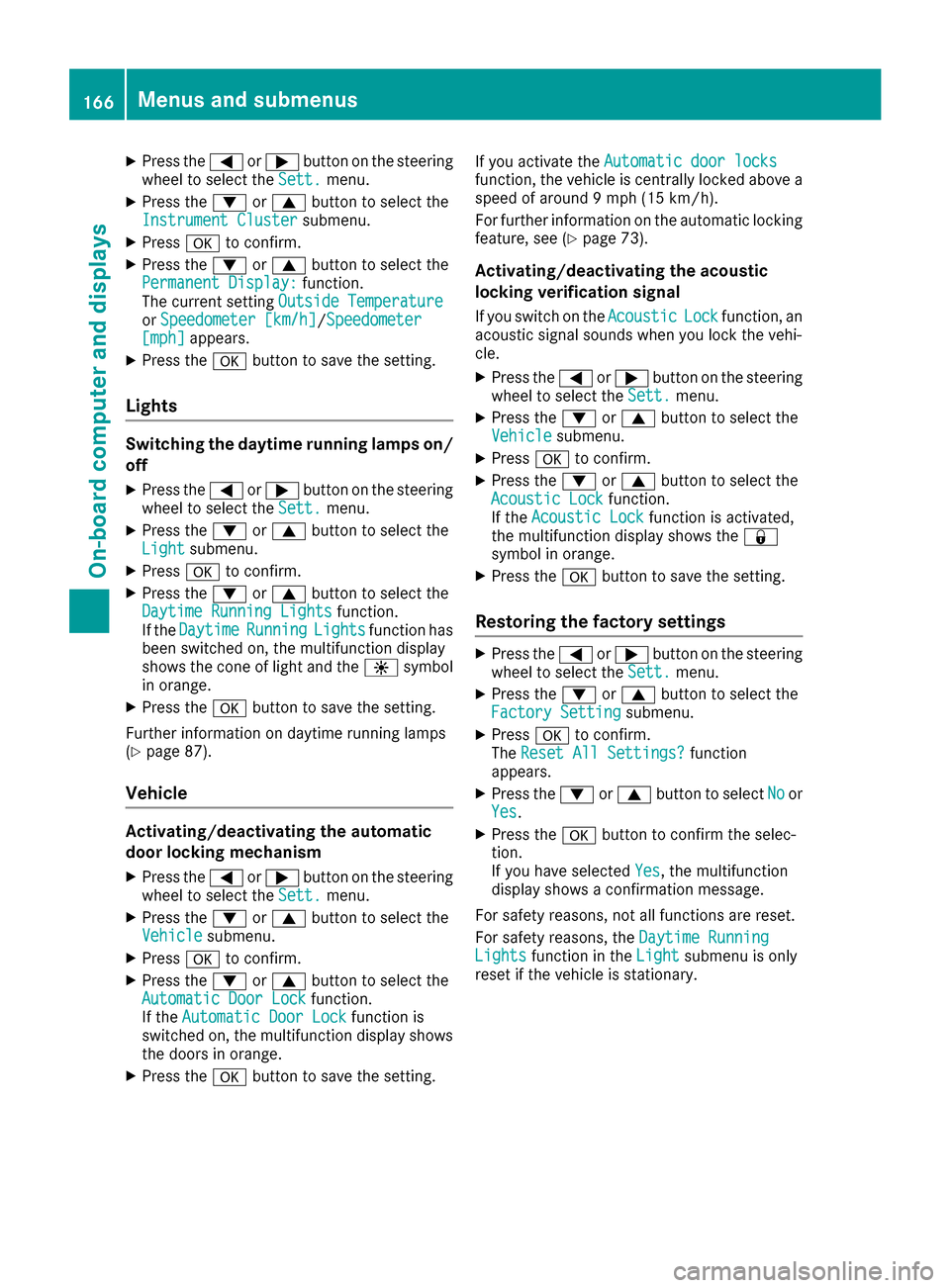
X
Press the 0059or0065 button on the steering
wheel to select the Sett.
Sett. menu.
X Press the 0064or0063 button to select the
Instrument Cluster
Instrument Cluster submenu.
X Press 0076to confirm.
X Press the 0064or0063 button to select the
Permanent Display:
Permanent Display: function.
The current setting Outside Temperature
Outside Temperature
or Speedometer [km/h]
Speedometer [km/h]/Speedometer Speedometer
[mph]
[mph] appears.
X Press the 0076button to save the setting.
Lights Switching the daytime running lamps on/
off
X Press the 0059or0065 button on the steering
wheel to select the Sett.
Sett. menu.
X Press the 0064or0063 button to select the
Light
Light submenu.
X Press 0076to confirm.
X Press the 0064or0063 button to select the
Daytime Running Lights
Daytime Running Lights function.
If the Daytime
Daytime Running
RunningLights
Lightsfunction has
been switched on, the multifunction display
shows the cone of light and the 0086symbol
in orange.
X Press the 0076button to save the setting.
Further information on daytime running lamps
(Y page 87).
Vehicle Activating/deactivating the automatic
door locking mechanism
X Press the 0059or0065 button on the steering
wheel to select the Sett.
Sett. menu.
X Press the 0064or0063 button to select the
Vehicle Vehicle submenu.
X Press 0076to confirm.
X Press the 0064or0063 button to select the
Automatic Door Lock
Automatic Door Lock function.
If the Automatic Door Lock
Automatic Door Lock function is
switched on, the multifunction display shows the doors in orange.
X Press the 0076button to save the setting. If you activate the
Automatic door locks
Automatic door locks
function, the vehicle is centrally locked above a
speed of around 9 mph (15 km/h).
For further information on the automatic locking feature, see (Y page 73).
Activating/deactivating the acoustic
locking verification signal If you switch on the Acoustic AcousticLock
Lockfunction, an
acoustic signal sounds when you lock the vehi-
cle.
X Press the 0059or0065 button on the steering
wheel to select the Sett. Sett.menu.
X Press the 0064or0063 button to select the
Vehicle
Vehicle submenu.
X Press 0076to confirm.
X Press the 0064or0063 button to select the
Acoustic Lock
Acoustic Lock function.
If the Acoustic Lock
Acoustic Lock function is activated,
the multifunction display shows the 0037
symbol in orange.
X Press the 0076button to save the setting.
Restoring the factory settings X
Press the 0059or0065 button on the steering
wheel to select the Sett.
Sett.menu.
X Press the 0064or0063 button to select the
Factory Setting
Factory Setting submenu.
X Press 0076to confirm.
The Reset All Settings?
Reset All Settings? function
appears.
X Press the 0064or0063 button to select No
Noor
Yes
Yes.
X Press the 0076button to confirm the selec-
tion.
If you have selected Yes Yes, the multifunction
display shows a confirmation message.
For safety reasons, not all functions are reset.
For safety reasons, the Daytime Running Daytime Running
Lights
Lights function in the Light
Lightsubmenu is only
reset if the vehicle is stationary. 166
Menus and submenusOn-board computer and displays
Page 173 of 290
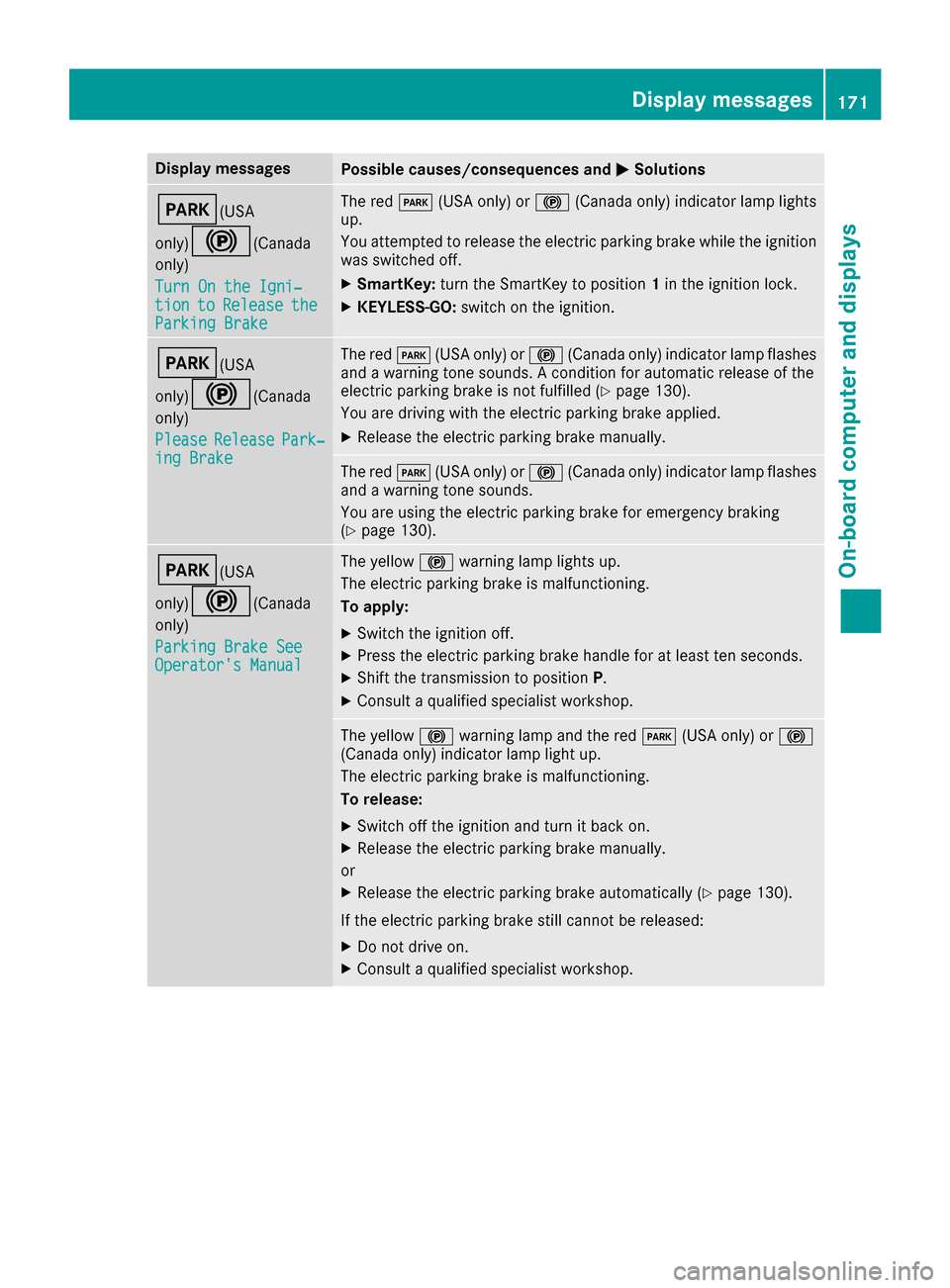
Display messages
Possible causes/consequences and
0050
0050Solutions 0049(USA
only)0024(Canada only)
Turn On the Igni‐ Turn On the Igni‐
tion tion to
toRelease
Release the
the
Parking Brake
Parking Brake The red
0049(USA only) or 0024(Canada only) indicator lamp lights
up.
You attempted to release the electric parking brake while the ignition
was switched off.
X SmartKey: turn the SmartKey to position 1in the ignition lock.
X KEYLESS-GO: switch on the ignition. 0049(USA
only)0024(Canada only)
Please Please Release
Release Park‐
Park‐
ing Brake
ing Brake The red
0049(USA only) or 0024(Canada only) indicator lamp flashes
and a warning tone sounds. A condition for automatic release of the
electric parking brake is not fulfilled (Y page 130).
You are driving with the electric parking brake applied.
X Release the electric parking brake manually. The red
0049(USA only) or 0024(Canada only) indicator lamp flashes
and a warning tone sounds.
You are using the electric parking brake for emergency braking
(Y page 130). 0049(USA
only)0024(Canada only)
Parking Brake See Parking Brake See
Operator's Manual Operator's Manual The yellow
0024warning lamp lights up.
The electric parking brake is malfunctioning.
To apply:
X Switch the ignition off.
X Press the electric parking brake handle for at least ten seconds.
X Shift the transmission to position P.
X Consult a qualified specialist workshop. The yellow
0024warning lamp and the red 0049(USA only) or 0024
(Canada only) indicator lamp light up.
The electric parking brake is malfunctioning.
To release:
X Switch off the ignition and turn it back on.
X Release the electric parking brake manually.
or X Release the electric parking brake automatically (Y page 130).
If the electric parking brake still cannot be released:
X Do not drive on.
X Consult a qualified specialist workshop. Display
messages
171On-board computer and displays Z
Page 174 of 290
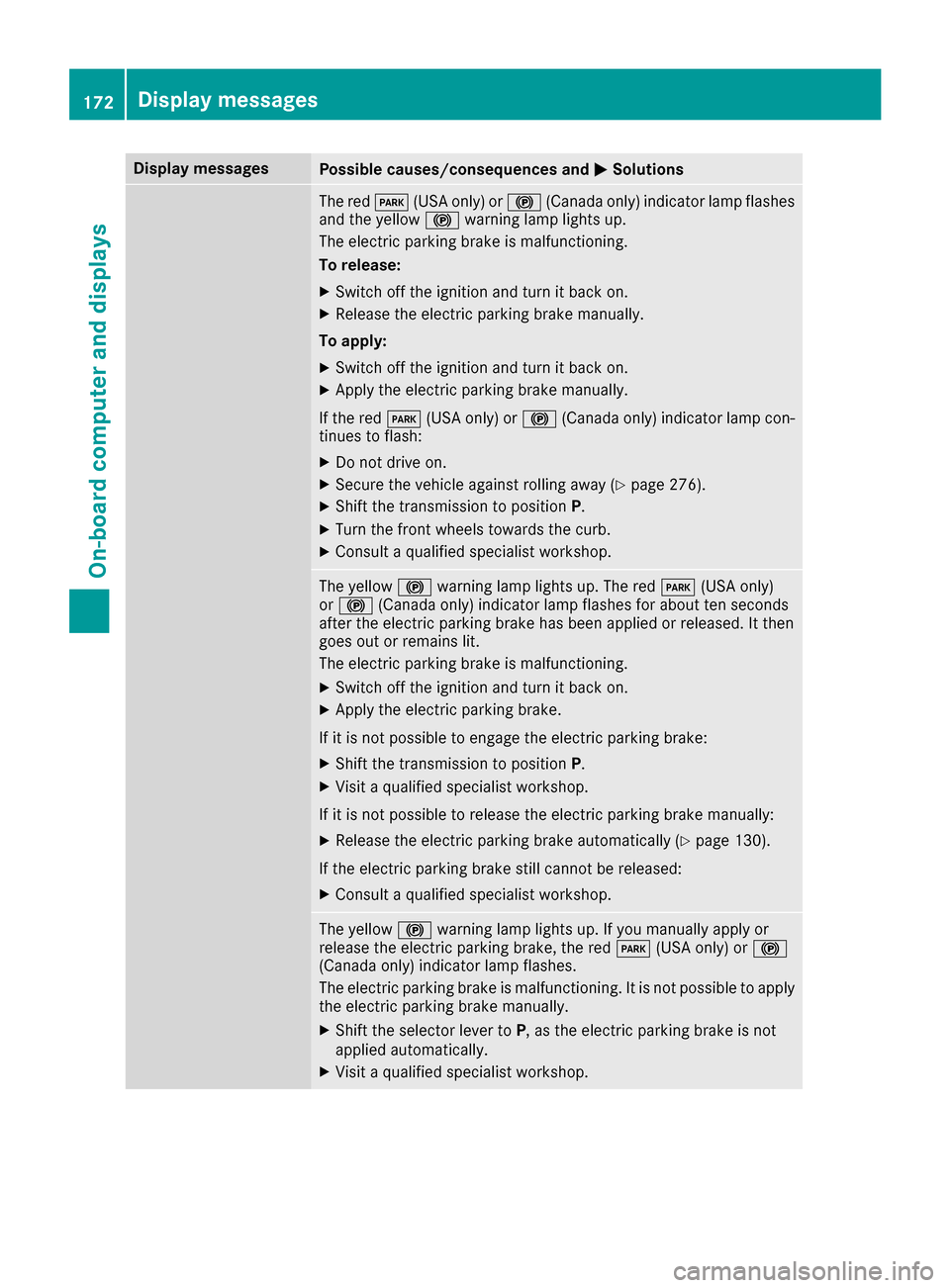
Display messages
Possible causes/consequences and
0050
0050Solutions The red
0049(USA only) or 0024(Canada only) indicator lamp flashes
and the yellow 0024warning lamp lights up.
The electric parking brake is malfunctioning.
To release:
X Switch off the ignition and turn it back on.
X Release the electric parking brake manually.
To apply: X Switch off the ignition and turn it back on.
X Apply the electric parking brake manually.
If the red 0049(USA only) or 0024(Canada only) indicator lamp con-
tinues to flash:
X Do not drive on.
X Secure the vehicle against rolling away (Y page 276).
X Shift the transmission to position P.
X Turn the front wheels towards the curb.
X Consult a qualified specialist workshop. The yellow
0024warning lamp lights up. The red 0049(USA only)
or 0024 (Canada only) indicator lamp flashes for about ten seconds
after the electric parking brake has been applied or released. It then
goes out or remains lit.
The electric parking brake is malfunctioning.
X Switch off the ignition and turn it back on.
X Apply the electric parking brake.
If it is not possible to engage the electric parking brake:
X Shift the transmission to position P.
X Visit a qualified specialist workshop.
If it is not possible to release the electric parking brake manually: X Release the electric parking brake automatically (Y page 130).
If the electric parking brake still cannot be released:
X Consult a qualified specialist workshop. The yellow
0024warning lamp lights up. If you manually apply or
release the electric parking brake, the red 0049(USA only) or 0024
(Canada only) indicator lamp flashes.
The electric parking brake is malfunctioning. It is not possible to apply
the electric parking brake manually.
X Shift the selector lever to P, as the electric parking brake is not
applied automatically.
X Visit a qualified specialist workshop. 172
Display
messagesOn-board computer and displays
Page 175 of 290
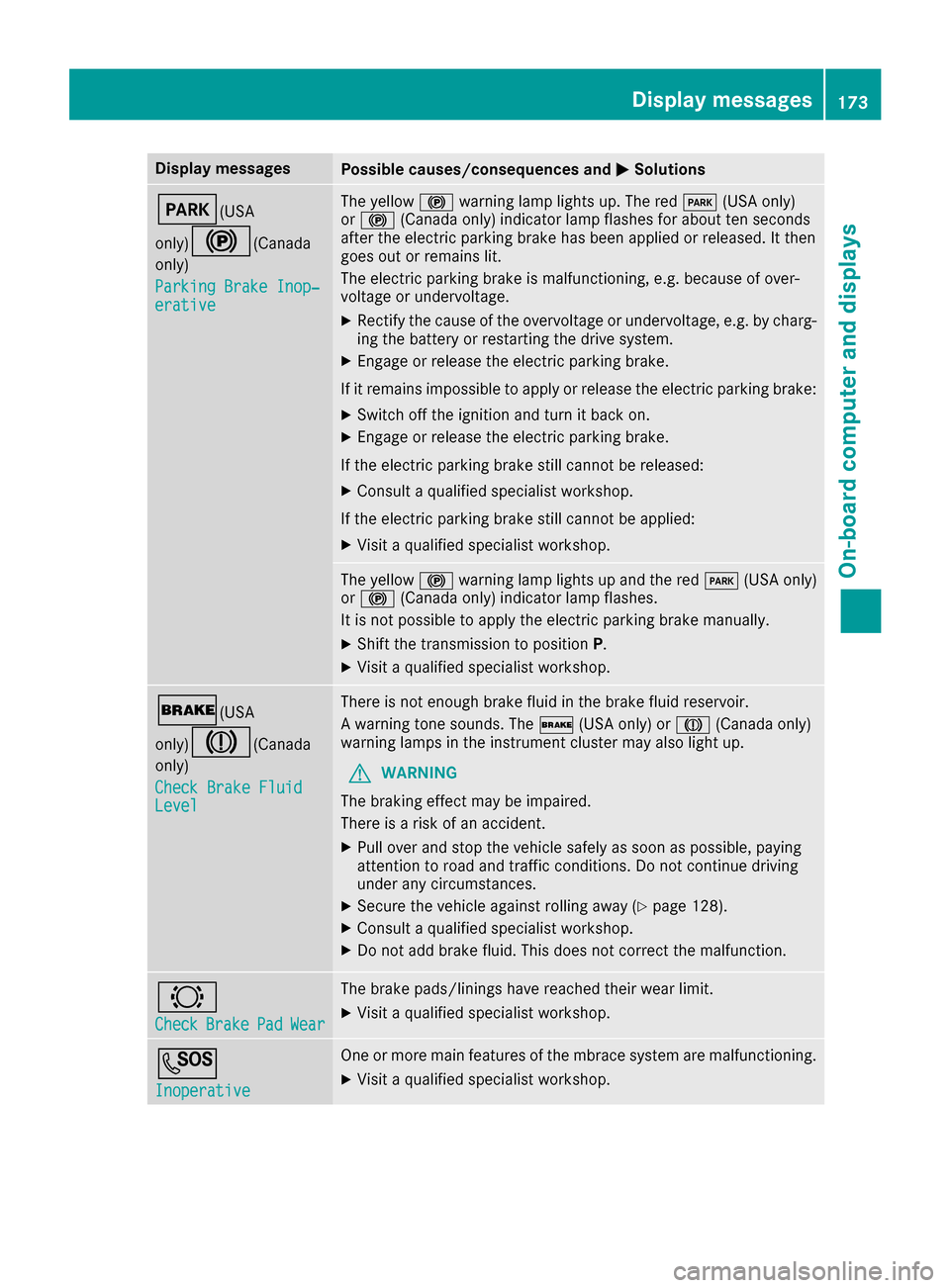
Display messages
Possible causes/consequences and
0050
0050Solutions 0049(USA
only)0024(Canada only)
Parking Brake Inop‐ Parking Brake Inop‐
erative erative The yellow
0024warning lamp lights up. The red 0049(USA only)
or 0024 (Canada only) indicator lamp flashes for about ten seconds
after the electric parking brake has been applied or released. It then
goes out or remains lit.
The electric parking brake is malfunctioning, e.g. because of over-
voltage or undervoltage.
X Rectify the cause of the overvoltage or undervoltage, e.g. by charg-
ing the battery or restarting the drive system.
X Engage or release the electric parking brake.
If it remains impossible to apply or release the electric parking brake:
X Switch off the ignition and turn it back on.
X Engage or release the electric parking brake.
If the electric parking brake still cannot be released:
X Consult a qualified specialist workshop.
If the electric parking brake still cannot be applied: X Visit a qualified specialist workshop. The yellow
0024warning lamp lights up and the red 0049(USA only)
or 0024 (Canada only) indicator lamp flashes.
It is not possible to apply the electric parking brake manually.
X Shift the transmission to position P.
X Visit a qualified specialist workshop. 0027(USA
only)004D(Canada only)
Check Brake Fluid Check Brake Fluid
Level Level There is not enough brake fluid in the brake fluid reservoir.
A warning tone sounds. The
0027(USA only) or 004D(Canada only)
warning lamps in the instrument cluster may also light up.
G WARNING
The braking effect may be impaired.
There is a risk of an accident.
X Pull over and stop the vehicle safely as soon as possible, paying
attention to road and traffic conditions. Do not continue driving
under any circumstances.
X Secure the vehicle against rolling away (Y page 128).
X Consult a qualified specialist workshop.
X Do not add brake fluid. This does not correct the malfunction. 0026
Check Check
Brake
BrakePad
PadWear
Wear The brake pads/linings have reached their wear limit.
X Visit a qualified specialist workshop. 0053
Inoperative Inoperative One or more main features of the mbrace system are malfunctioning.
X Visit a qualified specialist workshop. Display
messages
173On-board computer and displays Z
Page 177 of 290
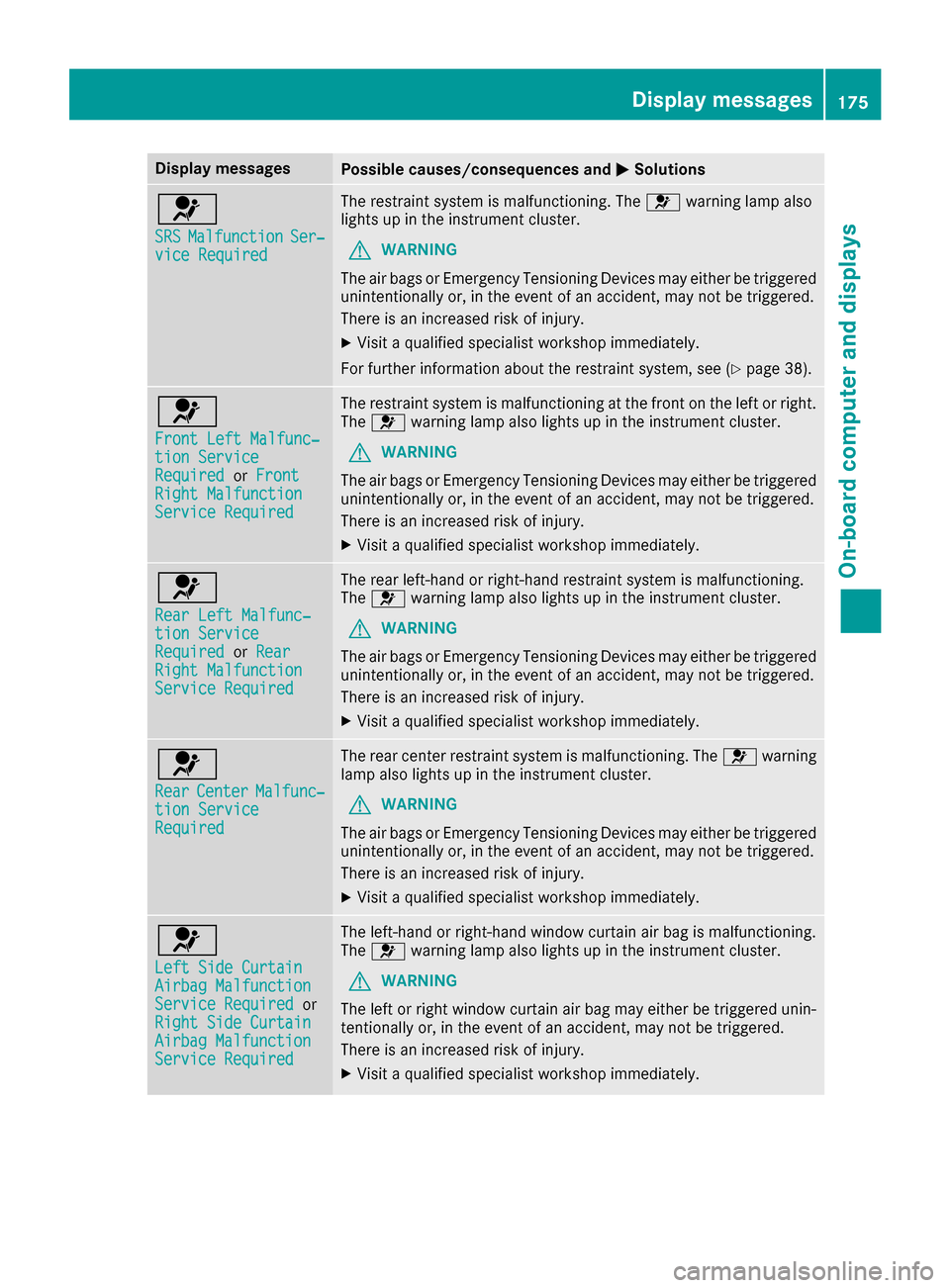
Display messages
Possible causes/consequences and
0050
0050Solutions 0075
SRS SRS
Malfunction
Malfunction Ser‐
Ser‐
vice Required
vice Required The restraint system is malfunctioning. The
0075warning lamp also
lights up in the instrument cluster.
G WARNING
The air bags or Emergency Tensioning Devices may either be triggered unintentionally or, in the event of an accident, may not be triggered.
There is an increased risk of injury.
X Visit a qualified specialist workshop immediately.
For further information about the restraint system, see (Y page 38).0075
Front Left Malfunc‐ Front Left Malfunc‐
tion Service tion Service
Required Required
orFront
Front
Right Malfunction
Right Malfunction
Service Required Service Required The restraint system is malfunctioning at the front on the left or right.
The 0075 warning lamp also lights up in the instrument cluster.
G WARNING
The air bags or Emergency Tensioning Devices may either be triggered unintentionally or, in the event of an accident, may not be triggered.
There is an increased risk of injury.
X Visit a qualified specialist workshop immediately. 0075
Rear Left Malfunc‐ Rear Left Malfunc‐
tion Service tion Service
Required Required
orRear
Rear
Right Malfunction
Right Malfunction
Service Required Service Required The rear left-hand or right-hand restraint system is malfunctioning.
The 0075 warning lamp also lights up in the instrument cluster.
G WARNING
The air bags or Emergency Tensioning Devices may either be triggered unintentionally or, in the event of an accident, may not be triggered.
There is an increased risk of injury.
X Visit a qualified specialist workshop immediately. 0075
Rear Rear
Center
Center Malfunc‐
Malfunc‐
tion Service
tion Service
Required Required The rear center restraint system is malfunctioning. The
0075warning
lamp also lights up in the instrument cluster.
G WARNING
The air bags or Emergency Tensioning Devices may either be triggered unintentionally or, in the event of an accident, may not be triggered.
There is an increased risk of injury.
X Visit a qualified specialist workshop immediately. 0075
Left Side Curtain Left Side Curtain
Airbag Malfunction Airbag Malfunction
Service Required Service Required
or
Right Side Curtain
Right Side Curtain
Airbag Malfunction Airbag Malfunction
Service Required Service Required The left-hand or right-hand window curtain air bag is malfunctioning.
The 0075 warning lamp also lights up in the instrument cluster.
G WARNING
The left or right window curtain air bag may either be triggered unin-
tentionally or, in the event of an accident, may not be triggered.
There is an increased risk of injury.
X Visit a qualified specialist workshop immediately. Display
messages
175On-board computer and displays Z
Page 180 of 290
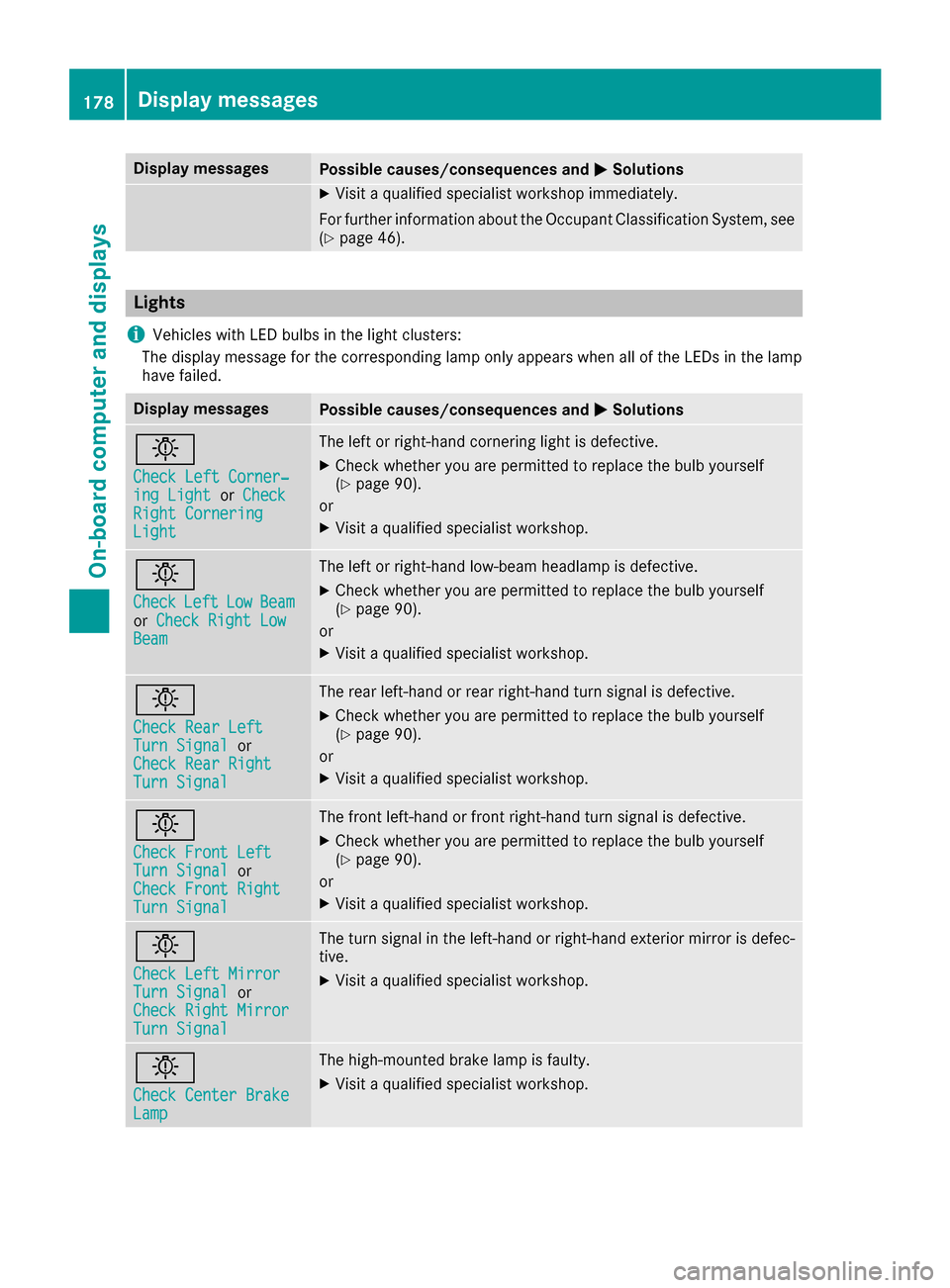
Display messages
Possible causes/consequences and
0050
0050Solutions X
Visit a qualified specialist workshop immediately.
For further information about the Occupant Classification System, see (Y page 46). Lights
i Vehicles with LED bulbs in the light clusters:
The display message for the corresponding lamp only appears when all of the LEDs in the lamp
have failed. Display messages
Possible causes/consequences and
0050 0050Solutions 0049
Check Left Corner‐ Check Left Corner‐
ing Light ing Light
orCheck
Check
Right Cornering
Right Cornering
Light Light The left or right-hand cornering light is defective.
X Check whether you are permitted to replace the bulb yourself
(Y page 90).
or X Visit a qualified specialist workshop. 0049
Check Check
Left
Left Low
LowBeam
Beam
or Check Right Low
Check Right Low
Beam
Beam The left or right-hand low-beam headlamp is defective.
X Check whether you are permitted to replace the bulb yourself
(Y page 90).
or X Visit a qualified specialist workshop. 0049
Check Rear Left Check Rear Left
Turn Signal Turn Signal
or
Check Rear Right
Check Rear Right
Turn Signal Turn Signal The rear left-hand or rear right-hand turn signal is defective.
X
Check whether you are permitted to replace the bulb yourself
(Y page 90).
or
X Visit a qualified specialist workshop. 0049
Check Front Left Check Front Left
Turn Signal Turn Signal
or
Check Front Right
Check Front Right
Turn Signal Turn Signal The front left-hand or front right-hand turn signal is defective.
X
Check whether you are permitted to replace the bulb yourself
(Y page 90).
or
X Visit a qualified specialist workshop. 0049
Check Left Mirror Check Left Mirror
Turn Signal Turn Signal
or
Check Right Mirror
Check Right Mirror
Turn Signal Turn Signal The turn signal in the left-hand or right-hand exterior mirror is defec-
tive.
X Visit a qualified specialist workshop. 0049
Check Center Brake Check Center Brake
Lamp Lamp The high-mounted brake lamp is faulty.
X
Visit a qualified specialist workshop. 178
Display
messagesOn-board computer and displays