light MERCEDES-BENZ B-Class 2017 W246 Manual Online
[x] Cancel search | Manufacturer: MERCEDES-BENZ, Model Year: 2017, Model line: B-Class, Model: MERCEDES-BENZ B-Class 2017 W246Pages: 290, PDF Size: 19.81 MB
Page 164 of 290
Assistance menu
Introduction Depending on the equipment installed in the
vehicle, you have the following options in the
DriveAssist
DriveAssist menu:
R Displaying the assistance graphic
(Y page 162)
R Deactivating/activating ESP ®
(Y page 162)
R Activating/deactivating Active Brake Assist
(Y page 162)
R Activating/deactivating ATTENTION ASSIST
(Y page 163)
R Activating/deactivating Blind Spot Assist
(Y page 163)
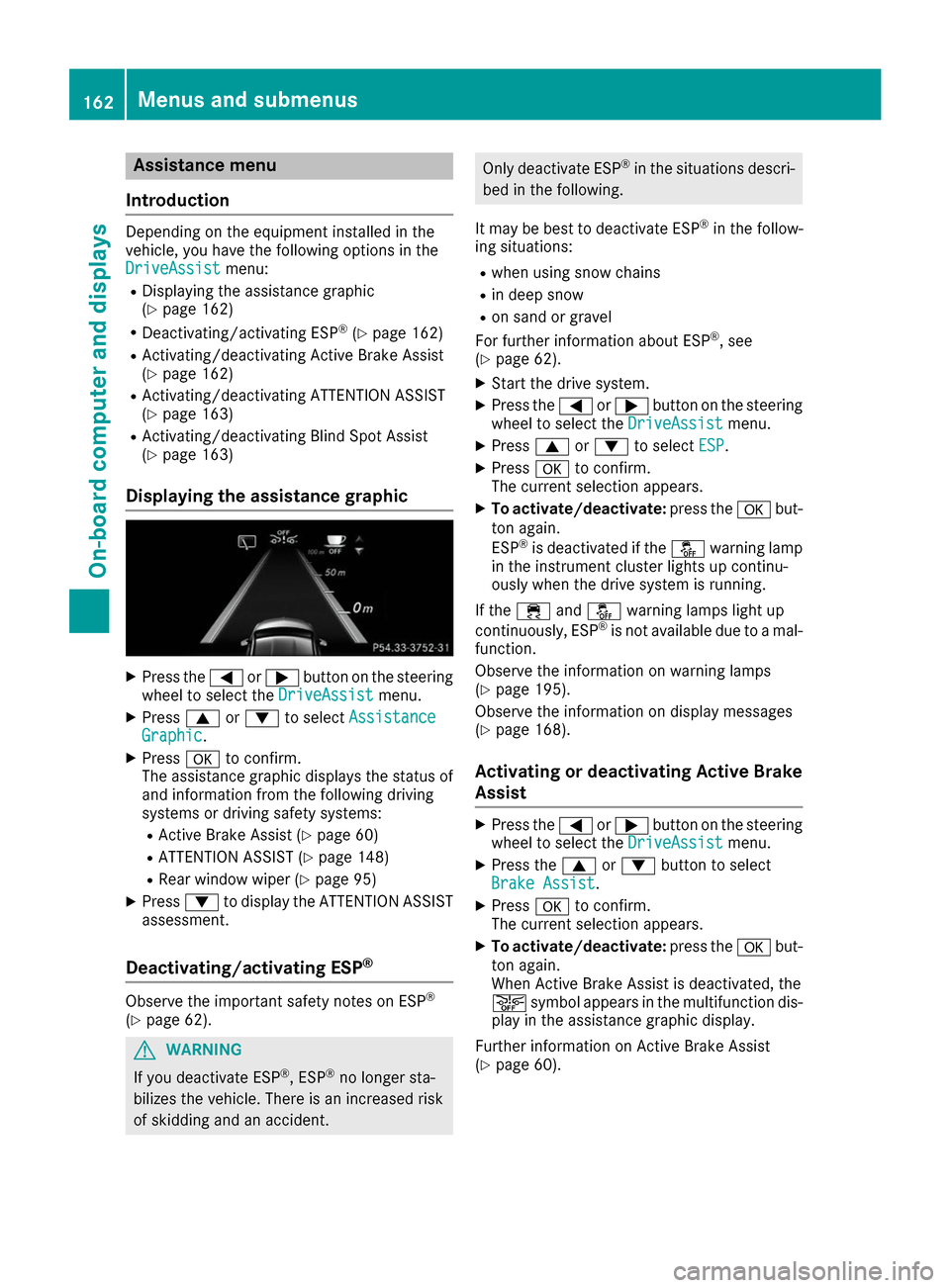
Displaying the assistance graphic X
Press the 0059or0065 button on the steering
wheel to select the DriveAssist
DriveAssist menu.
X Press 0063or0064 to select Assistance Assistance
Graphic
Graphic.
X Press 0076to confirm.
The assistance graphic displays the status of
and information from the following driving
systems or driving safety systems:
R Active Brake Assist (Y page 60)
R ATTENTION ASSIST (Y page 148)
R Rear window wiper (Y page 95)
X Press 0064to display the ATTENTION ASSIST
assessment.
Deactivating/activating ESP ®Observe the important safety notes on ESP
®
(Y page 62). G
WARNING
If you deactivate ESP ®
, ESP ®
no longer sta-
bilizes the vehicle. There is an increased risk
of skidding and an accident. Only deactivate ESP
®
in the situations descri-
bed in the following.
It may be best to deactivate ESP ®
in the follow-
ing situations:
R when using snow chains
R in deep snow
R on sand or gravel
For further information about ESP ®
, see
(Y page 62).
X Start the drive system.
X Press the 0059or0065 button on the steering
wheel to select the DriveAssist DriveAssistmenu.
X Press 0063or0064 to select ESP
ESP .
X Press 0076to confirm.
The current selection appears.
X To activate/deactivate: press the0076but-
ton again.
ESP ®
is deactivated if the 00BBwarning lamp
in the instrument cluster lights up continu-
ously when the drive system is running.
If the 00E5 and00BB warning lamps light up
continuously, ESP ®
is not available due to a mal-
function.
Observe the information on warning lamps
(Y page 195).
Observe the information on display messages
(Y page 168).
Activating or deactivating Active Brake
Assist X
Press the 0059or0065 button on the steering
wheel to select the DriveAssist DriveAssistmenu.
X Press the 0063or0064 button to select
Brake Assist Brake Assist .
X Press 0076to confirm.
The current selection appears.
X To activate/deactivate: press the0076but-
ton again.
When Active Brake Assist is deactivated, the
00D4 symbol appears in the multifunction dis-
play in the assistance graphic display.
Further information on Active Brake Assist
(Y page 60). 162
Menus and sub
menusOn-board computer and displays
Page 165 of 290
Activating/deactivating ATTENTION
ASSIST X
Press the 0059or0065 button on the steering
wheel to select the DriveAssist
DriveAssist menu.
X Press the 0063or0064 button to select
Attention Assist
Attention Assist .
X Press 0076to confirm.
The current selection appears.
X Press 0076to confirm.
X Press the 0064or0063 button to set Off
Off ,
Standard
Standard orSensitive
Sensitive .
X Press the 0076button to save the setting.
When ATTENTION ASSIST is deactivated, the
00D7 symbol appears in the multifunction dis-
play in the assistance graphics display.
For further information about ATTENTION
ASSIST, see (Y page 148).
Activating/deactivating Blind Spot
Assist X
Press the 0059or0065 button on the steering
wheel to select the DriveAssist DriveAssistmenu.
X Press the 0063or0064 button to select
Blind Spot Assist
Blind Spot Assist .
X Press 0076to confirm.
The current selection appears.
X To activate/deactivate: press the0076but-
ton again.
For further information about Blind Spot Assist, see (Y page 150). Service menu
Depending on the equipment installed in the
vehicle, you have the following options in the
Serv. Serv. menu:
R Calling up display messages in message
memory (Y page 167)
R Checking the tire pressure electronically
(Y page 263)
R Calling up the service due date
(Y page 233) Settings menu
Introduction Depending on the equipment installed in the
vehicle, you have the following options in the
Sett. Sett.
menu:
R Changing the E-CELL settings
R Changing the instrument cluster settings
R Changing the light settings
R Changing the vehicle settings
R Restoring the factory settings
E ‑CELL menu Departure time
In the E-CELL
E-CELL menu you can choose to cool
down or heat the vehicle interior for a prede-
fined departure time.
If you have engaged Pand the charging cable is
connected, the on-board computer displays:
R the expected charge time of the high-voltage
battery or
R the RANGE PLUS condition of charge for the
departure time set.
Changing the departure time
X Press the 0059or0065 button on the steering
wheel to select the Settings
Settings menu.
X Press 0063or0064 on the steering wheel to
select the E‑CELL E‑CELLmenu.
X Press 0063or0064 to select Depart.
Depart. Time
Time.
X Press 0076to confirm.
You will see the selected setting.
X Press the 0064or0063 button to select A
A, B
B
or Change C
Change C.
X Press 0076to confirm.
X Press 0059or0065 to select Depart.
Depart. Time
Time
Hours
Hours.
X Press the 0063or0064 button to set the
hour.
X Press 0059or0065 to select Depart.
Depart. Time
Time
Minutes
Minutes.
X Press 0063or0064 to set the minutes.
X Press 0076to confirm.
After changing from one menu to another, the departure time setting is stored. Menus and submenus
163On-board computer and displays Z
Page 166 of 290
Selecting the departure time
X Press the 0059or0065 button on the steering
wheel to select the Settings
Settings menu.
X Press 0063or0064 on the steering wheel to
select the E‑CELL
E‑CELLmenu.
X Press 0063or0064 to select Depart.
Depart. Time
Time.
X Press 0076to confirm.
X Press the 0064or0063 button to select one
of the three departure times or Timer
TimerOff
Off(no
timer active).
X Press 0076to confirm.
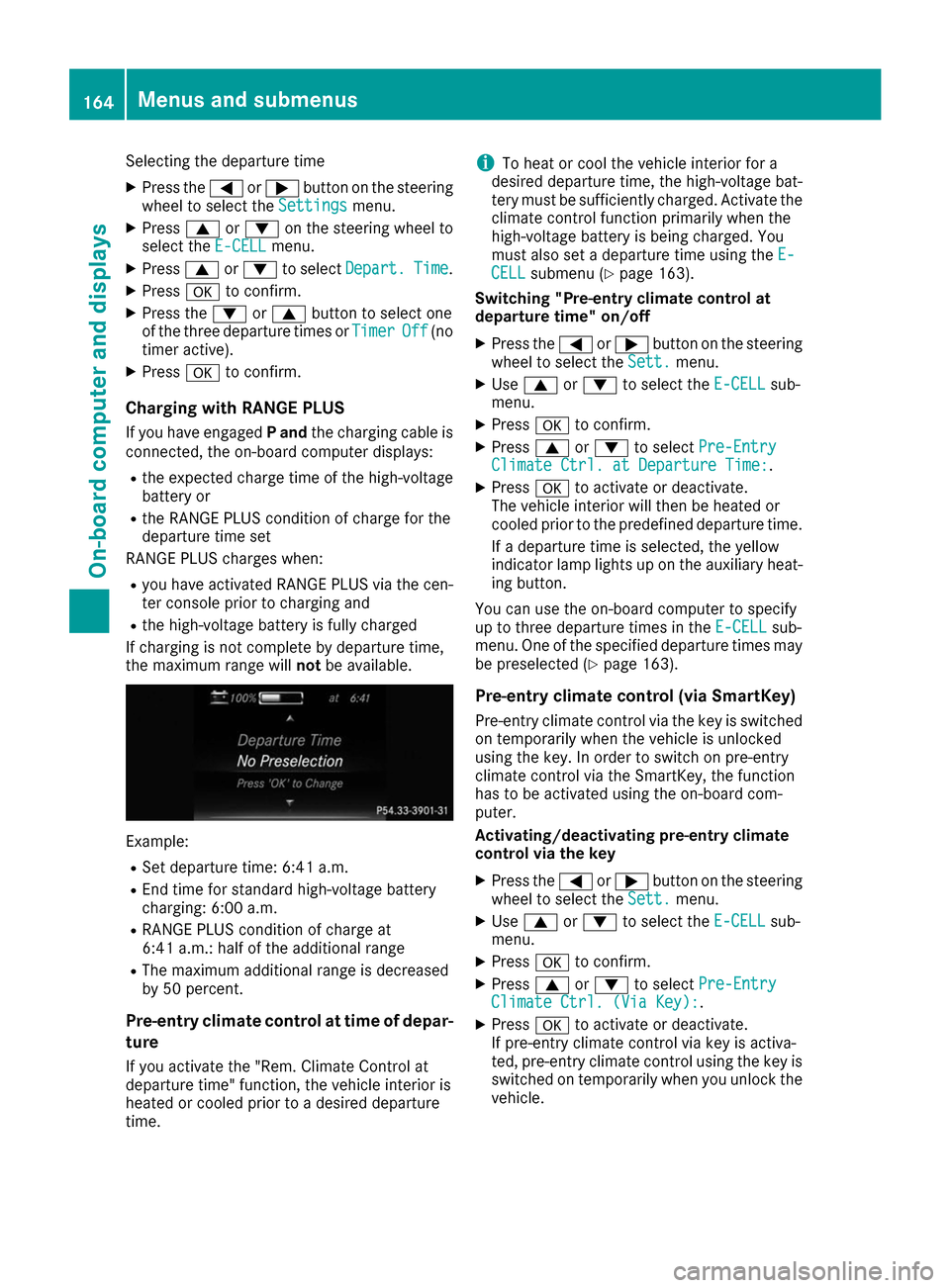
Charging with RANGE PLUS
If you have engaged Pand the charging cable is
connected, the on-board computer displays:
R the expected charge time of the high-voltage
battery or
R the RANGE PLUS condition of charge for the
departure time set
RANGE PLUS charges when:
R you have activated RANGE PLUS via the cen-
ter console prior to charging and
R the high-voltage battery is fully charged
If charging is not complete by departure time,
the maximum range will notbe available. Example:
R Set departure time: 6:41 a.m.
R End time for standard high-voltage battery
charging: 6:00 a.m.
R RANGE PLUS condition of charge at
6:41 a.m.: half of the additional range
R The maximum additional range is decreased
by 50 percent.
Pre-entry climate control at time of depar- ture
If you activate the "Rem. Climate Control at
departure time" function, the vehicle interior is
heated or cooled prior to a desired departure
time. i
To heat or cool the vehicle interior for a
desired departure time, the high-voltage bat-
tery must be sufficiently charged. Activate the
climate control function primarily when the
high-voltage battery is being charged. You
must also set a departure time using the E-
E-
CELL
CELL submenu (Y page 163).
Switching "Pre-entry climate control at
departure time" on/off
X Press the 0059or0065 button on the steering
wheel to select the Sett. Sett.menu.
X Use 0063 or0064 to select the E-CELL
E-CELLsub-
menu.
X Press 0076to confirm.
X Press 0063or0064 to select Pre-Entry
Pre-Entry
Climate Ctrl. at Departure Time:
Climate Ctrl. at Departure Time:.
X Press 0076to activate or deactivate.
The vehicle interior will then be heated or
cooled prior to the predefined departure time.
If a departure time is selected, the yellow
indicator lamp lights up on the auxiliary heat-
ing button.
You can use the on-board computer to specify
up to three departure times in the E-CELL E-CELLsub-
menu. One of the specified departure times may
be preselected (Y page 163).
Pre-entry climate control (via SmartKey)
Pre-entry climate control via the key is switched on temporarily when the vehicle is unlocked
using the key. In order to switch on pre-entry
climate control via the SmartKey, the function
has to be activated using the on-board com-
puter.
Activating/deactivating pre-entry climate
control via the key
X Press the 0059or0065 button on the steering
wheel to select the Sett. Sett.menu.
X Use 0063 or0064 to select the E-CELL
E-CELL sub-
menu.
X Press 0076to confirm.
X Press 0063or0064 to select Pre-Entry
Pre-Entry
Climate Ctrl. (Via Key):
Climate Ctrl. (Via Key):.
X Press 0076to activate or deactivate.
If pre-entry climate control via key is activa-
ted, pre-entry climate control using the key is switched on temporarily when you unlock thevehicle. 164
Menus and submenusOn-board computer and displays
Page 168 of 290
X
Press the 0059or0065 button on the steering
wheel to select the Sett.
Sett. menu.
X Press the 0064or0063 button to select the
Instrument Cluster
Instrument Cluster submenu.
X Press 0076to confirm.
X Press the 0064or0063 button to select the
Permanent Display:
Permanent Display: function.
The current setting Outside Temperature
Outside Temperature
or Speedometer [km/h]
Speedometer [km/h]/Speedometer Speedometer
[mph]
[mph] appears.
X Press the 0076button to save the setting.
Lights Switching the daytime running lamps on/
off
X Press the 0059or0065 button on the steering
wheel to select the Sett.
Sett. menu.
X Press the 0064or0063 button to select the
Light
Light submenu.
X Press 0076to confirm.
X Press the 0064or0063 button to select the
Daytime Running Lights
Daytime Running Lights function.
If the Daytime
Daytime Running
RunningLights
Lightsfunction has
been switched on, the multifunction display
shows the cone of light and the 0086symbol
in orange.
X Press the 0076button to save the setting.
Further information on daytime running lamps
(Y page 87).
Vehicle Activating/deactivating the automatic
door locking mechanism
X Press the 0059or0065 button on the steering
wheel to select the Sett.
Sett. menu.
X Press the 0064or0063 button to select the
Vehicle Vehicle submenu.
X Press 0076to confirm.
X Press the 0064or0063 button to select the
Automatic Door Lock
Automatic Door Lock function.
If the Automatic Door Lock
Automatic Door Lock function is
switched on, the multifunction display shows the doors in orange.
X Press the 0076button to save the setting. If you activate the
Automatic door locks
Automatic door locks
function, the vehicle is centrally locked above a
speed of around 9 mph (15 km/h).
For further information on the automatic locking feature, see (Y page 73).
Activating/deactivating the acoustic
locking verification signal If you switch on the Acoustic AcousticLock
Lockfunction, an
acoustic signal sounds when you lock the vehi-
cle.
X Press the 0059or0065 button on the steering
wheel to select the Sett. Sett.menu.
X Press the 0064or0063 button to select the
Vehicle
Vehicle submenu.
X Press 0076to confirm.
X Press the 0064or0063 button to select the
Acoustic Lock
Acoustic Lock function.
If the Acoustic Lock
Acoustic Lock function is activated,
the multifunction display shows the 0037
symbol in orange.
X Press the 0076button to save the setting.
Restoring the factory settings X
Press the 0059or0065 button on the steering
wheel to select the Sett.
Sett.menu.
X Press the 0064or0063 button to select the
Factory Setting
Factory Setting submenu.
X Press 0076to confirm.
The Reset All Settings?
Reset All Settings? function
appears.
X Press the 0064or0063 button to select No
Noor
Yes
Yes.
X Press the 0076button to confirm the selec-
tion.
If you have selected Yes Yes, the multifunction
display shows a confirmation message.
For safety reasons, not all functions are reset.
For safety reasons, the Daytime Running Daytime Running
Lights
Lights function in the Light
Lightsubmenu is only
reset if the vehicle is stationary. 166
Menus and submenusOn-board computer and displays
Page 170 of 290
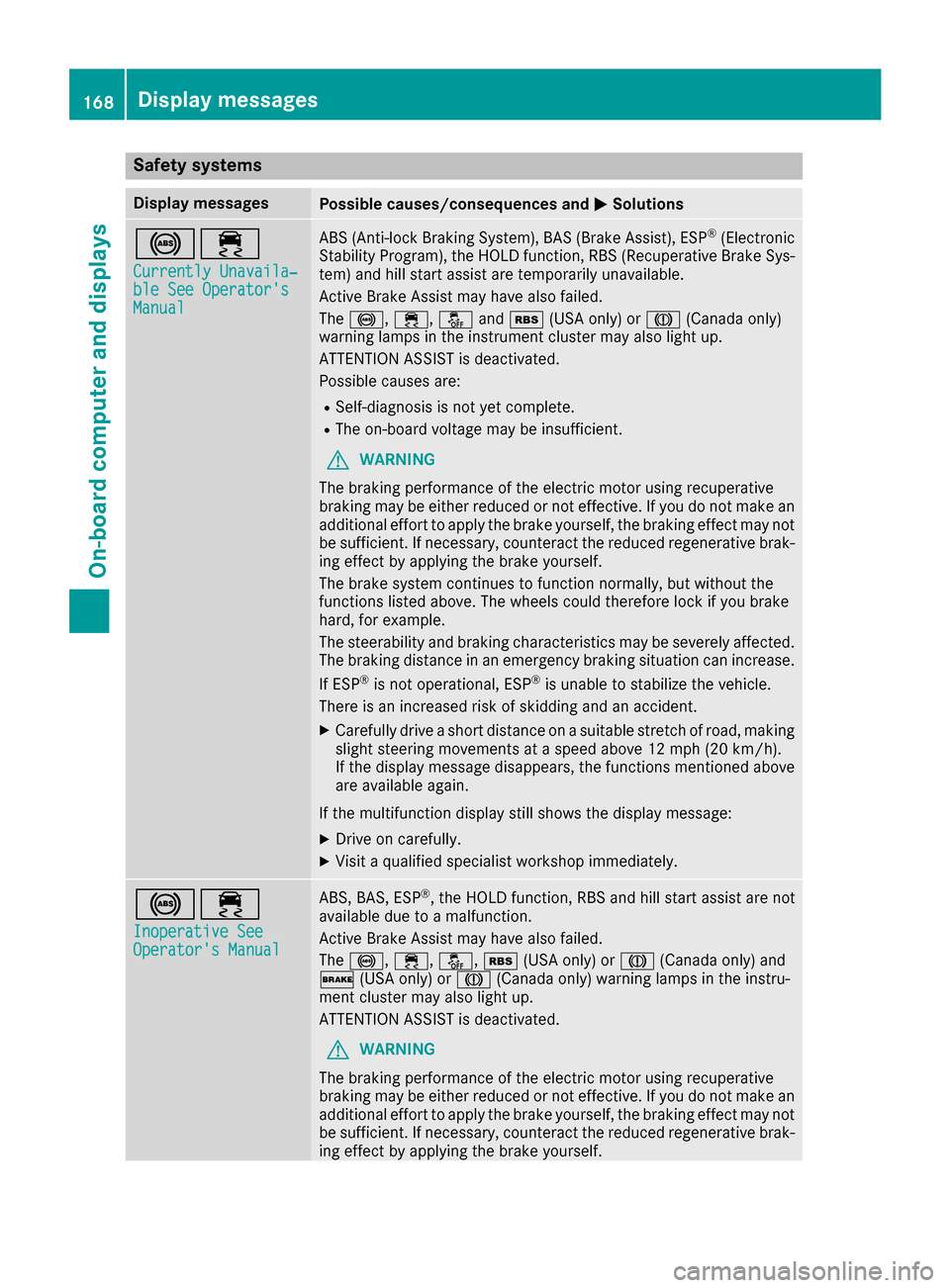
Safety systems
Display messages
Possible causes/consequences and
0050
0050Solutions 002500E5
Currently Unavaila‐
Currently Unavaila‐
ble See Operator's ble See Operator's
Manual Manual ABS (Anti-lock Braking System), BAS (Brake Assist), ESP
®
(Electronic
Stability Program), the HOLD function, RBS (Recuperative Brake Sys- tem) and hill start assist are temporarily unavailable.
Active Brake Assist may have also failed.
The 0025, 00E5,00BBand00C6 (USA only) or 004D(Canada only)
warning lamps in the instrument cluster may also light up.
ATTENTION ASSIST is deactivated.
Possible causes are:
R Self-diagnosis is not yet complete.
R The on-board voltage may be insufficient.
G WARNING
The braking performance of the electric motor using recuperative
braking may be either reduced or not effective. If you do not make an
additional effort to apply the brake yourself, the braking effect may not be sufficient. If necessary, counteract the reduced regenerative brak-
ing effect by applying the brake yourself.
The brake system continues to function normally, but without the
functions listed above. The wheels could therefore lock if you brake
hard, for example.
The steerability and braking characteristics may be severely affected. The braking distance in an emergency braking situation can increase.
If ESP ®
is not operational, ESP ®
is unable to stabilize the vehicle.
There is an increased risk of skidding and an accident.
X Carefully drive a short distance on a suitable stretch of road, making
slight steering movements at a speed above 12 mph (20 km/h).
If the display message disappears, the functions mentioned above are available again.
If the multifunction display still shows the display message:
X Drive on carefully.
X Visit a qualified specialist workshop immediately. 002500E5
Inoperative See Inoperative See
Operator's Manual Operator's Manual ABS, BAS, ESP
®
, the HOLD function, RBS and hill start assist are not
available due to a malfunction.
Active Brake Assist may have also failed.
The 0025, 00E5,00BB,00C6(USA only) or 004D(Canada only) and
0027 (USA only) or 004D(Canada only) warning lamps in the instru-
ment cluster may also light up.
ATTENTION ASSIST is deactivated.
G WARNING
The braking performance of the electric motor using recuperative
braking may be either reduced or not effective. If you do not make an
additional effort to apply the brake yourself, the braking effect may not be sufficient. If necessary, counteract the reduced regenerative brak-
ing effect by applying the brake yourself. 168
Display messagesOn-board computer and displays
Page 171 of 290
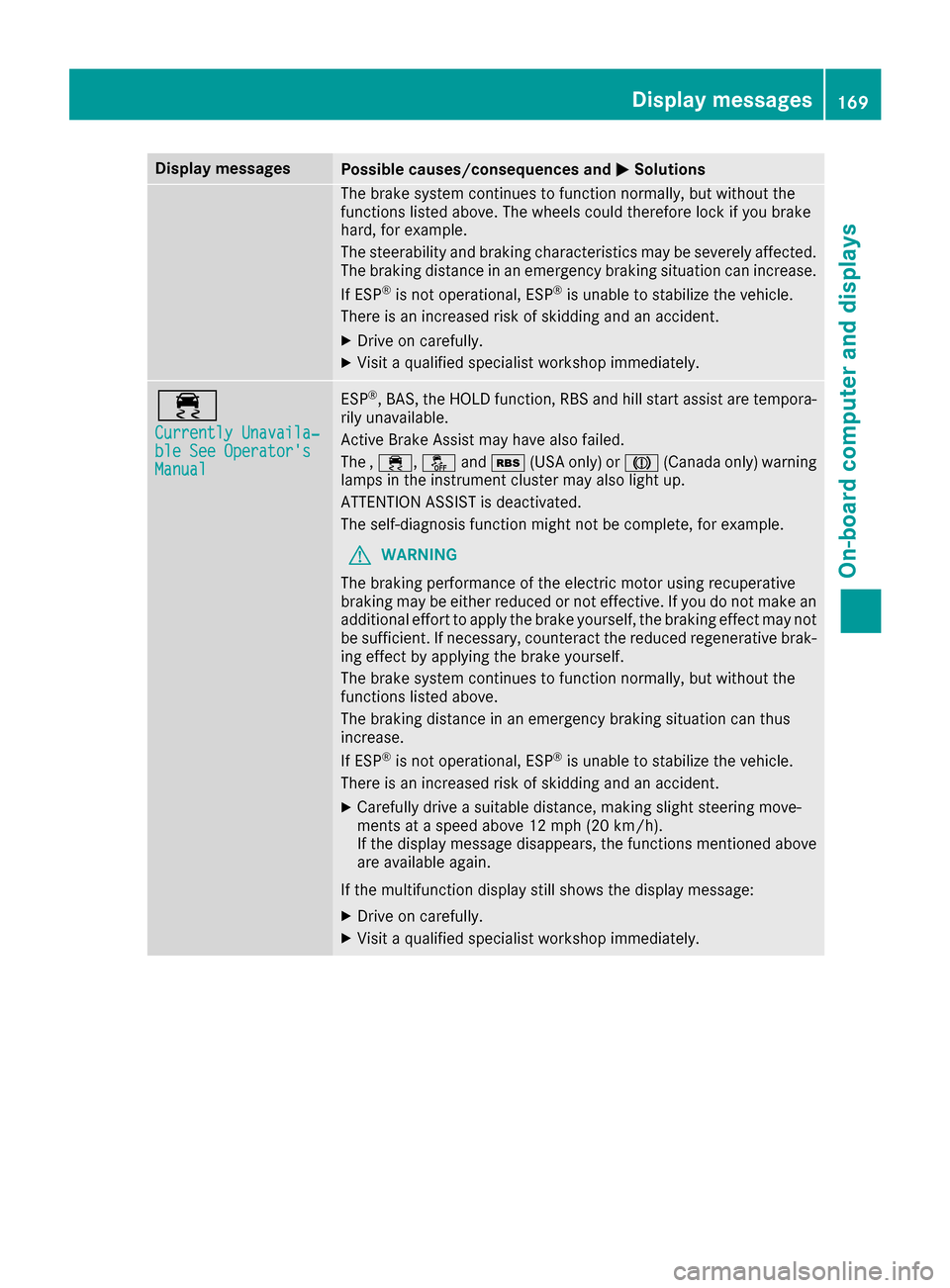
Display messages
Possible causes/consequences and
0050
0050Solutions The brake system continues to function normally, but without the
functions listed above. The wheels could therefore lock if you brake
hard, for example.
The steerability and braking characteristics may be severely affected. The braking distance in an emergency braking situation can increase.
If ESP ®
is not operational, ESP ®
is unable to stabilize the vehicle.
There is an increased risk of skidding and an accident.
X Drive on carefully.
X Visit a qualified specialist workshop immediately. 00E5
Currently Unavaila‐ Currently Unavaila‐
ble See Operator's ble See Operator's
Manual Manual ESP
®
, BAS, the HOLD function, RBS and hill start assist are tempora-
rily unavailable.
Active Brake Assist may have also failed.
The , 00E5, 00BBand00C6 (USA only) or 004D(Canada only) warning
lamps in the instrument cluster may also light up.
ATTENTION ASSIST is deactivated.
The self-diagnosis function might not be complete, for example.
G WARNING
The braking performance of the electric motor using recuperative
braking may be either reduced or not effective. If you do not make an
additional effort to apply the brake yourself, the braking effect may not be sufficient. If necessary, counteract the reduced regenerative brak-
ing effect by applying the brake yourself.
The brake system continues to function normally, but without the
functions listed above.
The braking distance in an emergency braking situation can thus
increase.
If ESP ®
is not operational, ESP ®
is unable to stabilize the vehicle.
There is an increased risk of skidding and an accident.
X Carefully drive a suitable distance, making slight steering move-
ments at a speed above 12 mph (20 km/h).
If the display message disappears, the functions mentioned above
are available again.
If the multifunction display still shows the display message: X Drive on carefully.
X Visit a qualified specialist workshop immediately. Display messages
169On-board computer and displays Z
Page 172 of 290
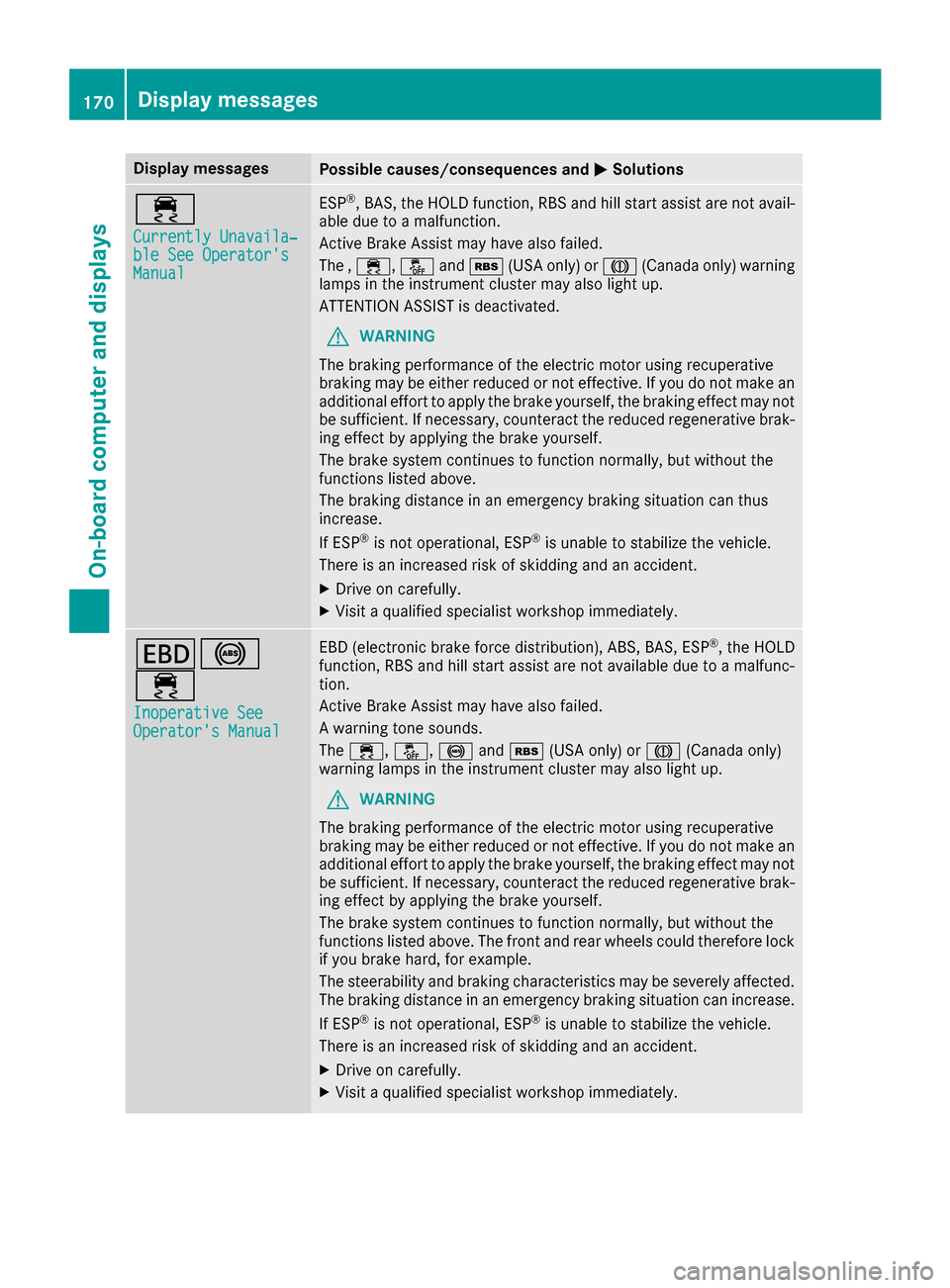
Display messages
Possible causes/consequences and
0050
0050Solutions 00E5
Currently Unavaila‐ Currently Unavaila‐
ble See Operator's ble See Operator's
Manual Manual ESP
®
, BAS, the HOLD function, RBS and hill start assist are not avail-
able due to a malfunction.
Active Brake Assist may have also failed.
The , 00E5, 00BBand00C6 (USA only) or 004D(Canada only) warning
lamps in the instrument cluster may also light up.
ATTENTION ASSIST is deactivated.
G WARNING
The braking performance of the electric motor using recuperative
braking may be either reduced or not effective. If you do not make an
additional effort to apply the brake yourself, the braking effect may not be sufficient. If necessary, counteract the reduced regenerative brak-
ing effect by applying the brake yourself.
The brake system continues to function normally, but without the
functions listed above.
The braking distance in an emergency braking situation can thus
increase.
If ESP ®
is not operational, ESP ®
is unable to stabilize the vehicle.
There is an increased risk of skidding and an accident.
X Drive on carefully.
X Visit a qualified specialist workshop immediately. 007A0025
00E5
Inoperative See Inoperative See
Operator's Manual Operator's Manual EBD (electronic brake force distribution), ABS, BAS, ESP
®
, the HOLD
function, RBS and hill start assist are not available due to a malfunc-
tion.
Active Brake Assist may have also failed.
A warning tone sounds.
The 00E5, 00BB, 0025and00C6 (USA only) or 004D(Canada only)
warning lamps in the instrument cluster may also light up.
G WARNING
The braking performance of the electric motor using recuperative
braking may be either reduced or not effective. If you do not make an
additional effort to apply the brake yourself, the braking effect may not be sufficient. If necessary, counteract the reduced regenerative brak-
ing effect by applying the brake yourself.
The brake system continues to function normally, but without the
functions listed above. The front and rear wheels could therefore lock
if you brake hard, for example.
The steerability and braking characteristics may be severely affected. The braking distance in an emergency braking situation can increase.
If ESP ®
is not operational, ESP ®
is unable to stabilize the vehicle.
There is an increased risk of skidding and an accident.
X Drive on carefully.
X Visit a qualified specialist workshop immediately. 170
Display
messagesOn-board computer and displays
Page 173 of 290
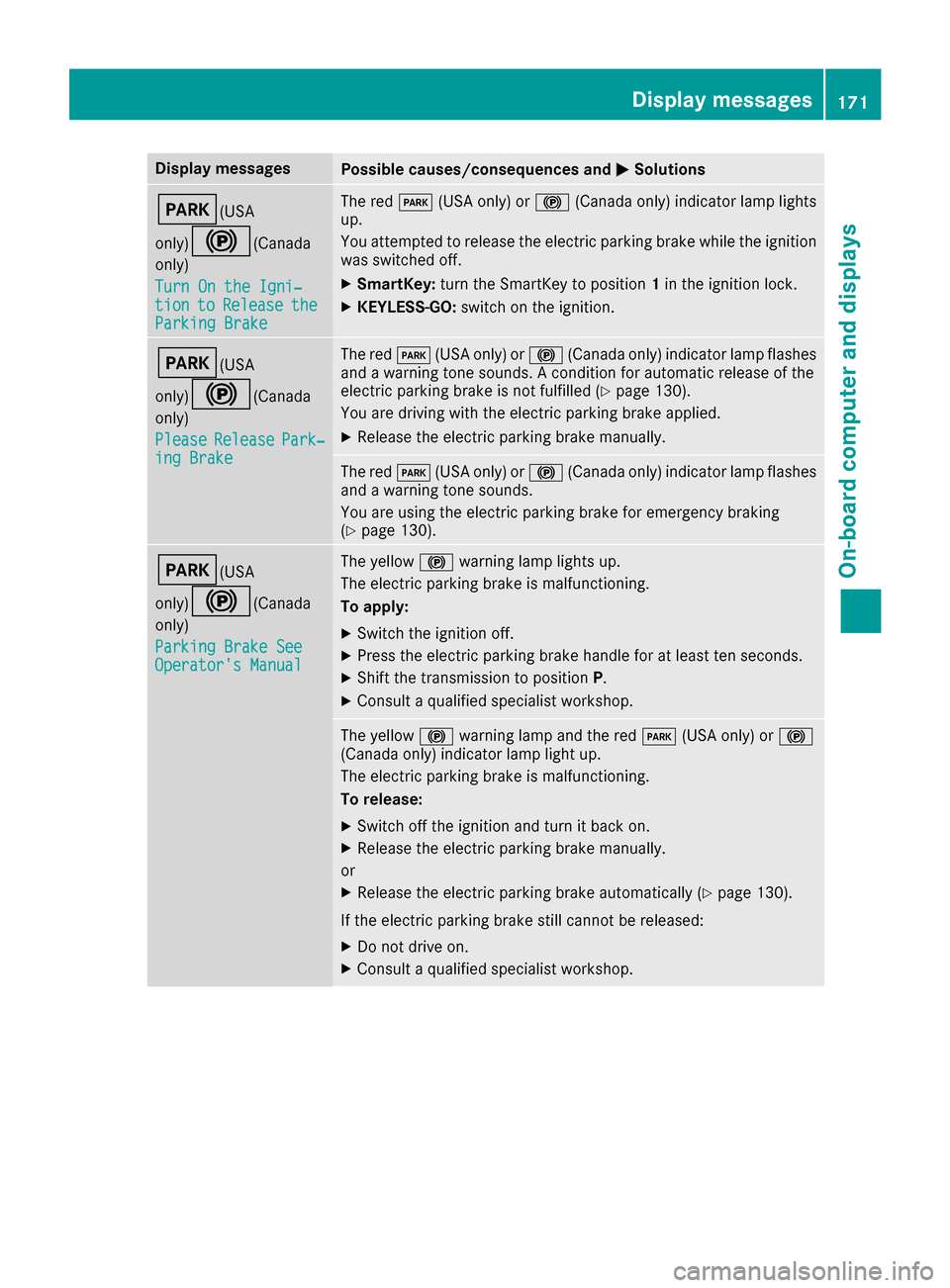
Display messages
Possible causes/consequences and
0050
0050Solutions 0049(USA
only)0024(Canada only)
Turn On the Igni‐ Turn On the Igni‐
tion tion to
toRelease
Release the
the
Parking Brake
Parking Brake The red
0049(USA only) or 0024(Canada only) indicator lamp lights
up.
You attempted to release the electric parking brake while the ignition
was switched off.
X SmartKey: turn the SmartKey to position 1in the ignition lock.
X KEYLESS-GO: switch on the ignition. 0049(USA
only)0024(Canada only)
Please Please Release
Release Park‐
Park‐
ing Brake
ing Brake The red
0049(USA only) or 0024(Canada only) indicator lamp flashes
and a warning tone sounds. A condition for automatic release of the
electric parking brake is not fulfilled (Y page 130).
You are driving with the electric parking brake applied.
X Release the electric parking brake manually. The red
0049(USA only) or 0024(Canada only) indicator lamp flashes
and a warning tone sounds.
You are using the electric parking brake for emergency braking
(Y page 130). 0049(USA
only)0024(Canada only)
Parking Brake See Parking Brake See
Operator's Manual Operator's Manual The yellow
0024warning lamp lights up.
The electric parking brake is malfunctioning.
To apply:
X Switch the ignition off.
X Press the electric parking brake handle for at least ten seconds.
X Shift the transmission to position P.
X Consult a qualified specialist workshop. The yellow
0024warning lamp and the red 0049(USA only) or 0024
(Canada only) indicator lamp light up.
The electric parking brake is malfunctioning.
To release:
X Switch off the ignition and turn it back on.
X Release the electric parking brake manually.
or X Release the electric parking brake automatically (Y page 130).
If the electric parking brake still cannot be released:
X Do not drive on.
X Consult a qualified specialist workshop. Display
messages
171On-board computer and displays Z
Page 174 of 290
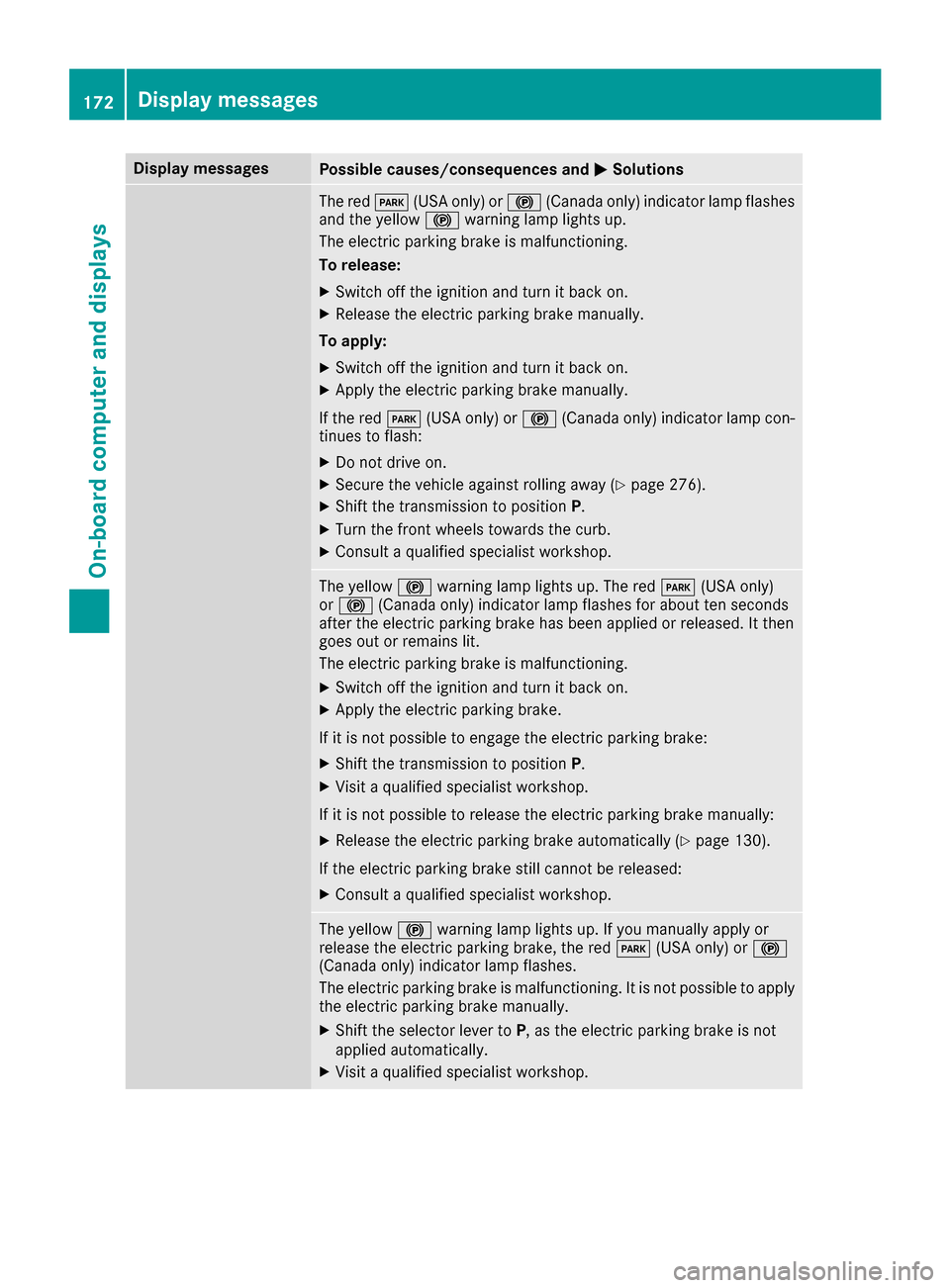
Display messages
Possible causes/consequences and
0050
0050Solutions The red
0049(USA only) or 0024(Canada only) indicator lamp flashes
and the yellow 0024warning lamp lights up.
The electric parking brake is malfunctioning.
To release:
X Switch off the ignition and turn it back on.
X Release the electric parking brake manually.
To apply: X Switch off the ignition and turn it back on.
X Apply the electric parking brake manually.
If the red 0049(USA only) or 0024(Canada only) indicator lamp con-
tinues to flash:
X Do not drive on.
X Secure the vehicle against rolling away (Y page 276).
X Shift the transmission to position P.
X Turn the front wheels towards the curb.
X Consult a qualified specialist workshop. The yellow
0024warning lamp lights up. The red 0049(USA only)
or 0024 (Canada only) indicator lamp flashes for about ten seconds
after the electric parking brake has been applied or released. It then
goes out or remains lit.
The electric parking brake is malfunctioning.
X Switch off the ignition and turn it back on.
X Apply the electric parking brake.
If it is not possible to engage the electric parking brake:
X Shift the transmission to position P.
X Visit a qualified specialist workshop.
If it is not possible to release the electric parking brake manually: X Release the electric parking brake automatically (Y page 130).
If the electric parking brake still cannot be released:
X Consult a qualified specialist workshop. The yellow
0024warning lamp lights up. If you manually apply or
release the electric parking brake, the red 0049(USA only) or 0024
(Canada only) indicator lamp flashes.
The electric parking brake is malfunctioning. It is not possible to apply
the electric parking brake manually.
X Shift the selector lever to P, as the electric parking brake is not
applied automatically.
X Visit a qualified specialist workshop. 172
Display
messagesOn-board computer and displays
Page 175 of 290
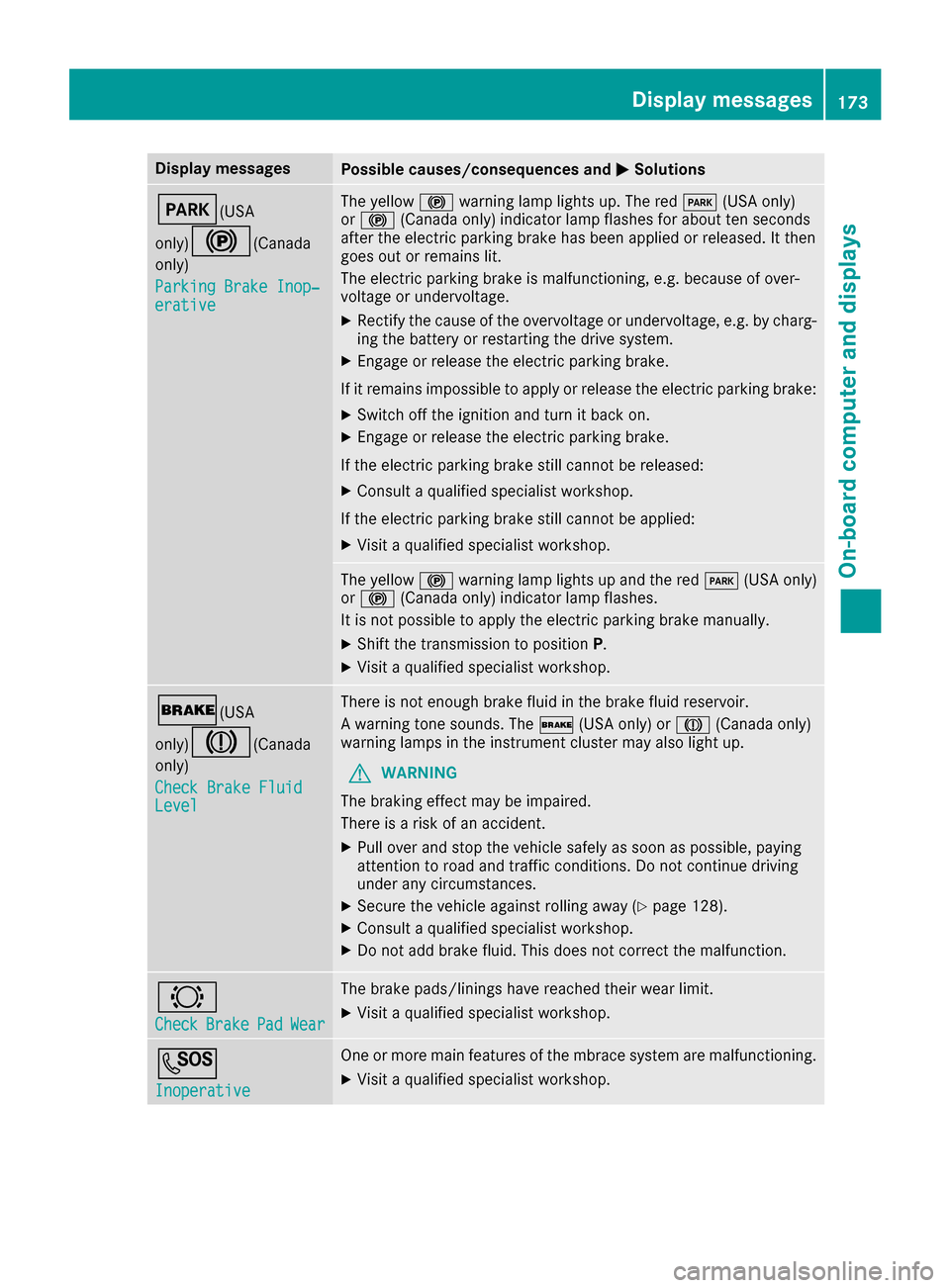
Display messages
Possible causes/consequences and
0050
0050Solutions 0049(USA
only)0024(Canada only)
Parking Brake Inop‐ Parking Brake Inop‐
erative erative The yellow
0024warning lamp lights up. The red 0049(USA only)
or 0024 (Canada only) indicator lamp flashes for about ten seconds
after the electric parking brake has been applied or released. It then
goes out or remains lit.
The electric parking brake is malfunctioning, e.g. because of over-
voltage or undervoltage.
X Rectify the cause of the overvoltage or undervoltage, e.g. by charg-
ing the battery or restarting the drive system.
X Engage or release the electric parking brake.
If it remains impossible to apply or release the electric parking brake:
X Switch off the ignition and turn it back on.
X Engage or release the electric parking brake.
If the electric parking brake still cannot be released:
X Consult a qualified specialist workshop.
If the electric parking brake still cannot be applied: X Visit a qualified specialist workshop. The yellow
0024warning lamp lights up and the red 0049(USA only)
or 0024 (Canada only) indicator lamp flashes.
It is not possible to apply the electric parking brake manually.
X Shift the transmission to position P.
X Visit a qualified specialist workshop. 0027(USA
only)004D(Canada only)
Check Brake Fluid Check Brake Fluid
Level Level There is not enough brake fluid in the brake fluid reservoir.
A warning tone sounds. The
0027(USA only) or 004D(Canada only)
warning lamps in the instrument cluster may also light up.
G WARNING
The braking effect may be impaired.
There is a risk of an accident.
X Pull over and stop the vehicle safely as soon as possible, paying
attention to road and traffic conditions. Do not continue driving
under any circumstances.
X Secure the vehicle against rolling away (Y page 128).
X Consult a qualified specialist workshop.
X Do not add brake fluid. This does not correct the malfunction. 0026
Check Check
Brake
BrakePad
PadWear
Wear The brake pads/linings have reached their wear limit.
X Visit a qualified specialist workshop. 0053
Inoperative Inoperative One or more main features of the mbrace system are malfunctioning.
X Visit a qualified specialist workshop. Display
messages
173On-board computer and displays Z