tire pressure MERCEDES-BENZ B-Class ELECTRIC 2016 W246 Owner's Manual
[x] Cancel search | Manufacturer: MERCEDES-BENZ, Model Year: 2016, Model line: B-Class ELECTRIC, Model: MERCEDES-BENZ B-Class ELECTRIC 2016 W246Pages: 342, PDF Size: 7.53 MB
Page 18 of 342
Vehicle data ................................... 338
Telephone
Accepting a call (multifunction
steering wheel) .............................. 192
Display message ............................ 227
Introduction ................................... 192
Menu (on-board computer) ............ 192
Number from the phone book ........ 192
Redialing ........................................ 193
Rejecting/ending a call ................ .192
Temperature
Outside temperature ..................... .183
Setting (climate control) ................ 120
Through-loading feature ................... 245
Tire pressure
Calling up (on-board computer) ..... 309
Checking manually ........................ 309
Display message ............................ 223
Maximum ....................................... 308
Not reached (TIREFIT) .................... 286
Notes ............................................. 307
Reached (TIREFIT) .......................... 286
Recommended ............................... 305
Tire pressure monitor
Checking the tire pressure elec-
tronically ........................................ 311
Function/notes ............................ .309
General notes ................................ 309
Important safety notes .................. 309
Radio type approval for the tire
pressure monitor ........................... 312
Restarting ...................................... 311
Warning lamp ................................. 240
Warning message .......................... 311
TIREFIT kit .......................................... 284
Tire pressure not reached .............. 286
Tire pressure reached .................... 286
Tires
Aspect ratio (definition) ................. 322
Average weight of the vehicle
occupants (definition) .................... 321
Bar (definition) ............................... 320
Changing a wheel .......................... 323
Characteristics .............................. 320
Checking ........................................ 303
Curb weight (definition) ................. 322
Definition of terms ......................... 320
Direction of rotation ...................... 323 Display message ............................ 223
Distribution of the vehicle occu-
pants (definition) ............................ 323
DOT (Department of Transporta-
tion) (definition) ............................. 321
DOT, Tire Identification Number
(TIN) ............................................... 320
GAWR (Gross Axle Weight Rating)
(definition) ..................................... 321
General notes ................................ 327
GVW (Gross Vehicle Weight) (def-
inition) ........................................... 321
GVWR (Gross Vehicle Weight Rat-
ing) (definition) .............................. 321
Important safety notes .................. 302
Increased vehicle weight due to
optional equipment (definition) ...... 321
Information on driving .................... 302
Kilopascal (kPa) (definition) ........... 321
Labeling (overview) ........................ 317
Load bearing index (definition) ...... 322
Load index ..................................... 319
Load index (definition) ................... 321
M+S tires ....................................... 304
Maximum load on a tire (defini-
tion) ............................................... 322
Maximum loaded vehicle weight
(definition) ..................................... 321
Maximum permissible tire pres-
sure (definition) ............................. 322
Maximum tire load ......................... 319
Maximum tire load (definition) ....... 322
MOExtended tires .......................... 304
Optional equipment weight (defi-
nition) ............................................ 322
PSI (pounds per square inch) (def-
inition) ........................................... 322
Replacing ....................................... 323
Service life ..................................... 304
Sidewall (definition) ....................... 322
Speed rating (definition) ................ 321
Storing ........................................... 323
Structure and characteristics
(definition) ..................................... 320
Summer tires ................................. 304
Temperature .................................. 316
TIN (Tire Identification Number)
(definition) ..................................... 322
16Index
Page 19 of 342
Tire bead (definition) ...................... 322
Tire pressure (definition) ................ 322
Tire pressures (recommended) ...... 321
Tire size (data) ............................... 327
Tire size designation, load-bearing
capacity, speed rating .................... 317
Tire tread ....................................... 303
Tire tread (definition) ..................... 322
Total load limit (definition) ............. 323
Traction ......................................... 316
Traction (definition) ....................... 322
Tread wear ..................................... 316
Uniform Tire Quality Grading
Standards ...................................... 315
Uniform Tire Quality Grading
Standards (definition) .................... 321
Wear indicator (definition) ............. 322
Wheel and tire combination ........... 329
Wheel rim (definition) .................... 321
see Flat tire
Top Tether ............................................ 59
Towing away
Important safety guidelines ........... 294
Installing the towing eye ................ 296
Removing the towing eye ............... 296
Transporting the vehicle ................ 297
With both axles on the ground ....... 296
With front axle raised ..................... 297
With the rear axle raised ................ 297
Towing eye ......................................... 282
Trailer hitch ......................................... 25
Trailer tow hitch .................................. 25
Transmission
DIRECT SELECT lever ..................... 134
Drive program ................................ 137
Driving tips .................................... 137
Engaging the drive position ............ 136
Engaging the park position ............ 135
Holding the vehicle stationary on
uphill gradients .............................. 137
Kickdown ....................................... 137
Overview ........................................ 134
Program selector button ................ 137
Shifting to neutral .......................... 135
Transmission position display ......... 134
Transmission position display
(DIRECT SELECT lever) ...................... 134Transmission positions
....................136
Transporting the vehicle .................. 297
Trim pieces (cleaning instruc-
tions) .................................................. 278
Trip computer (on-board com-
puter) .................................................. 187
Trip odometer
Calling up ....................................... 187
Resetting (on-board computer) ...... 189
Trunk lid
see Tailgate
Trunk load (maximum) ...................... 338
Turn signals
Changing bulbs (front) ................... 107
Display message ............................ 215
Switching on/off ........................... 102
Two-way radio
Frequencies ................................... 332
Installation ..................................... 332
Transmission output (maximum) .... 332
Type identification plate
see Vehicle identification plate
U
UnlockingEmergency unlocking ....................... 80
From inside the vehicle (central
unlocking button) ............................. 80
V
Vanity mirror (in the sun visor) ........ 253
Vehicle
Correct use ...................................... 26
Data acquisition ............................... 27
Display message ............................ 225
Equipment ....................................... 21
Individual settings .......................... 195
Limited Warranty ............................. 27
Loading .......................................... 312
Locking (in an emergency) ............... 81
Locking (SmartKey) .......................... 72
Lowering ........................................ 326
Maintenance .................................... 22
Parking for a long period ................ 156
Raising ........................................... 324
Reporting problems ......................... 26
Index17
Page 20 of 342
Securing from rolling away ............ 324
Starting .......................................... 132
Transporting .................................. 297
Unlocking (in an emergency) ........... 80
Unlocking (SmartKey) ...................... 72
Vehicle data ................................... 338
Vehicle data
Roof load (maximum) ..................... 338
Trunk load (maximum) ................... 338
Vehicle dimensions ........................... 338
Vehicle emergency locking ................ 81
Vehicle Homepage
Data protection .............................. 152
Functions ....................................... 153
General information ....................... 152
Internet connection ....................... 153
Vehicle identification number
see VIN
Vehicle identification plate .............. 334
Vehicle tool kit .................................. 282
Ventilation
Setting the vents ........................... 126
Video
Operating the DVD ......................... 191
VIN
Seat ............................................... 334
Type plate ...................................... 334
W
Warning and indicator lampsABS ................................................ 232
Brakes ........................................... 231
Distance warning ........................... 239
ESP
®.............................................. 235
ESP®OFF ....................................... 236
Overview .......................................... 32
PASSENGER AIR BAG ...................... 41
RBS (Recuperative Brake Sys-
tem) ............................................... 231
Restraint system ............................ 238
Seat belt ........................................ 229
Tire pressure monitor .................... 240
Warranty .............................................. 21
Washer fluid
Display message ............................ 227
Wheel and tire combinations
Tires ............................................... 329 Wheel bolt tightening torque
........... 326
Wheel chock ...................................... 324
Wheels
Changing a wheel .......................... 323
Checking ........................................ 303
Cleaning ......................................... 276
General notes ................................ 327
Important safety notes .................. 302
Information on driving .................... 302
Interchanging/changing ................ 323
Mounting a new wheel ................... 326
Removing a wheel .......................... 326
Storing ........................................... 323
Tightening torque ........................... 326
Wheel size/tire size ....................... 327
Window curtain air bag
Display message ............................ 211
Operation ......................................... 49
Windows
see Side windows
Windshield
Defrosting ...................................... 121
Windshield washer system
Adding washer fluid ....................... 272
Important safety notes .................. 336
Windshield wipers
Display message ............................ 227
Problem (malfunction) ................... 114
Rear window wiper ........................ 110
Replacing the wiper blades ............ 110
Switching on/off ........................... 109
Winter driving
Slippery road surfaces ................... 161
Snow chains .................................. 305
Winter operation
General notes ................................ 304
Winter tires
M+S tires ....................................... 304
Wiper blades
Cleaning ......................................... 277
Important safety notes .................. 110
Replacing (rear window) ................ 112
Replacing (windshield) ................... 111
Woode n trim (cleaning instruc-
tions) .................................................. 278
Workshop
see Qualified specialist workshop
18Index
Page 22 of 342
Protection of the environment
General notes
HEnvironmental note
Daimler's declared policy is one of compre-
hensive environmental protection.
Our objectives are to use the natural resour-
ces which form the basis of our existence on
this planet sparingly and in a manner which
takes the requirements of both nature and
humanity into consideration.
You too can help to protect the environment
by operating your vehicle in an environmen-
tally-responsible manner.
Energy consumption and the rate of engine,
transmission, brake and tire wear depend on
the following factors:
Roperating conditions of your vehicle
Ryour personal driving style
You can influence both factors. Therefore,
please bear the following in mind:
Operating conditions:
Robserve the correct tire pressure.
Ravoid carrying unnecessary weight.
Rremove the roof rack once you no longer
need it.
Ra regularly serviced vehicle will contribute
to environmental protection. You should
therefore adhere to the service intervals.
Rall maintenance work should be carried out
at a qualified specialist workshop.
Personal driving style:
Rdrive carefully and maintain a safe distance
from the vehicle in front.
Ravoid frequent, sudden acceleration and
braking.
Rmonitor the vehicle's energy consumption.
HEnvironmental note
Have a defective high-voltage battery dis-
posed of in an environmentally-responsible
manner. Contact a qualified specialist work-
shop which has the necessary specialist
knowledge and tools to carry out the work
required. Mercedes-Benz recommends that
you use an authorized Mercedes-Benz Center
for this purpose.
Environmental concerns and recom-
mendations
Wherever the operating instructions require
you to dispose of materials, first try to regen-
erate or re-use them. Observe the relevant
environmental rules and regulations when
disposing of materials. In this way you will
help to protect the environment.
Genuine Mercedes-Benz parts
HEnvironmental note
Daimler AG also supplies reconditioned major
assemblies and parts which are of the same
quality as new parts. They are covered by the
same Limited Warranty entitlements as new
parts.
!Air bags and Emergency Tensioning Devi-
ces, as well as control units and sensors for these restraint systems, may be installed in
the following areas of your vehicle:
Rdoors
Rdoor pillars
Rdoor sills
Rseats
Rcockpit
Rinstrument cluster
Rcenter console
Do not install accessories such as audio
systems in these areas. Do not carry out
repairs or welding. You could impair the
operating efficiency of the restraint sys-
tems.
Have aftermarket accessories installed at a
qualified specialist workshop.
20Introduction
Page 34 of 342
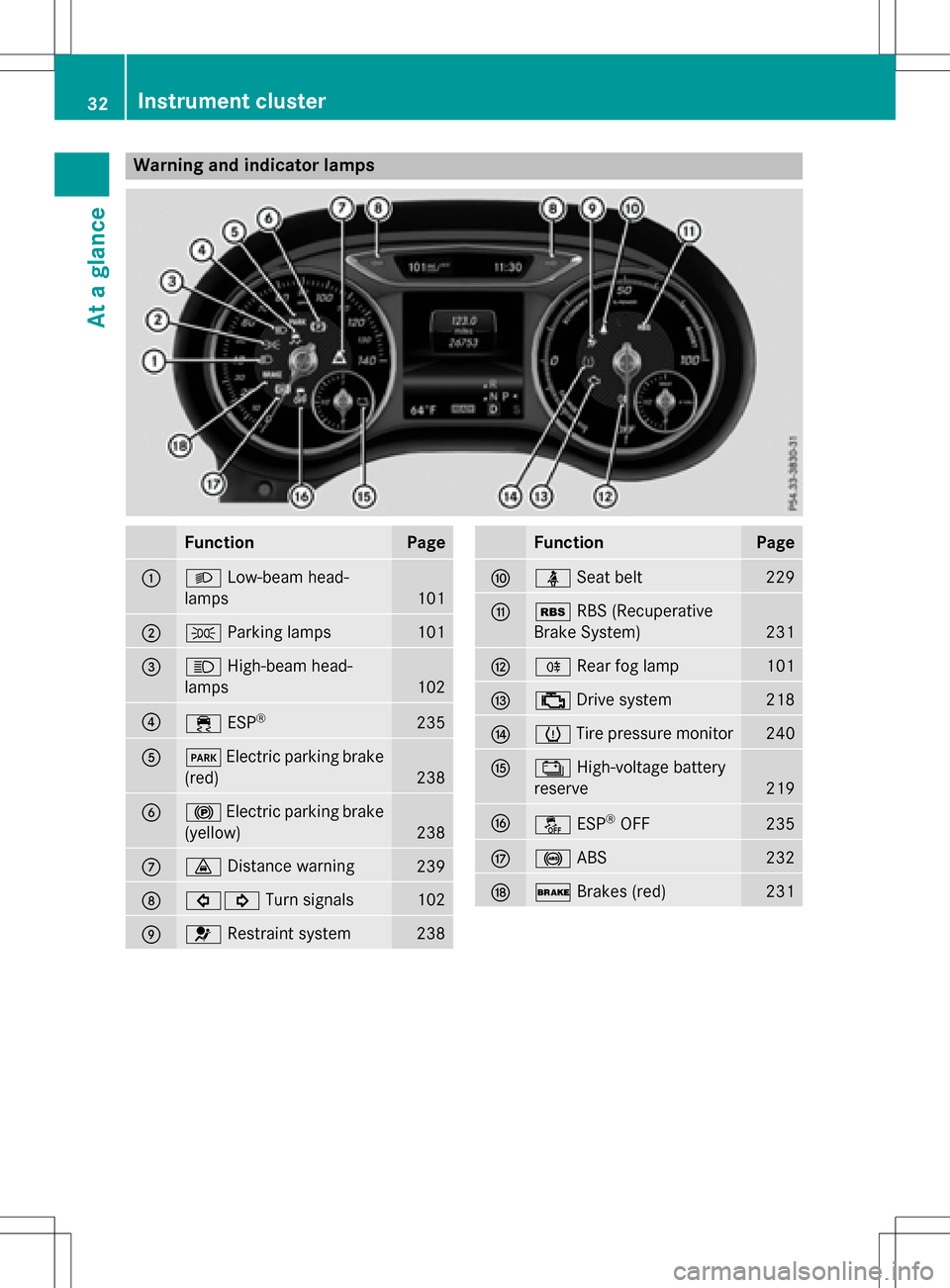
Warning and indicator lamps
FunctionPage
:LLow-beam head-
lamps
101
;T Parking lamps101
=KHigh-beam head-
lamps
102
?÷ ESP®235
AFElectric parking brake
(red)
238
B! Electric parking brake
(yellow)
238
C· Distance warning239
D#! Turn signals102
E6Restraint system238
FunctionPage
FüSeat belt229
GéRBS (Recuperative
Brake System)
231
HR Rear fog lamp101
I;Drive system218
Jh Tire pressure monitor240
KÝ High-voltage battery
reserve
219
Lå ESP®OFF235
M!ABS232
N$Brakes (red)231
32Instrument cluster
At a glance
Page 150 of 342
charge current. If necessary, lower the set
charge current or use another power
socket.
You can set a limit for the values of the charge
current used in charging the high-voltage bat-
tery. This acts as a means of preventing the
power supply from overloading. You can set
this limit by using the controls on the charging
cable or in the on-board computer's menu.
Only set the maximum charge current in the
on-board computer menu if there are no
charge current settings on the charging
cable.
The default standard value is the minimum
charge current setting. This corresponds to
the minimum available charge current from
the power supply.
iThe value of the maximum setting and the
relevant adjustment values may vary
depending on the country.
Before charging the high-voltage battery,
have the maximum permissible charge cur-
rent for the relevant power socket checked by
an electrician.
XTo adjust the setting: press button?
repeatedly until the desired setting is selec-
ted in display =.
RTwo LEDs are flashing: minimum setting
RAll LEDs are flashing: maximum setting
Information about the charging time
(
Ypage 338)
If, after the charging process, the charging
cable is:
Rleft connected to the power socket, the
currently selected values will be used for
the next charging process.
Rremoved from the power socket, the values
will be reset to the minimum setting for the
next charging process. You may then need
to reset the values of the maximum charge
current.
If the charge current values that have been
set on the charging cable and the on-board computer are different, the high-voltage bat-
tery is charged using the lower value.
If the vehicle requires more time than usual to
charge the high-voltage battery, check:
Rthe settings of the maximum charge cur-
rent on the controls of the charging cable
Rthe settings of the maximum charge cur-
rent in the menu of the on-board computer
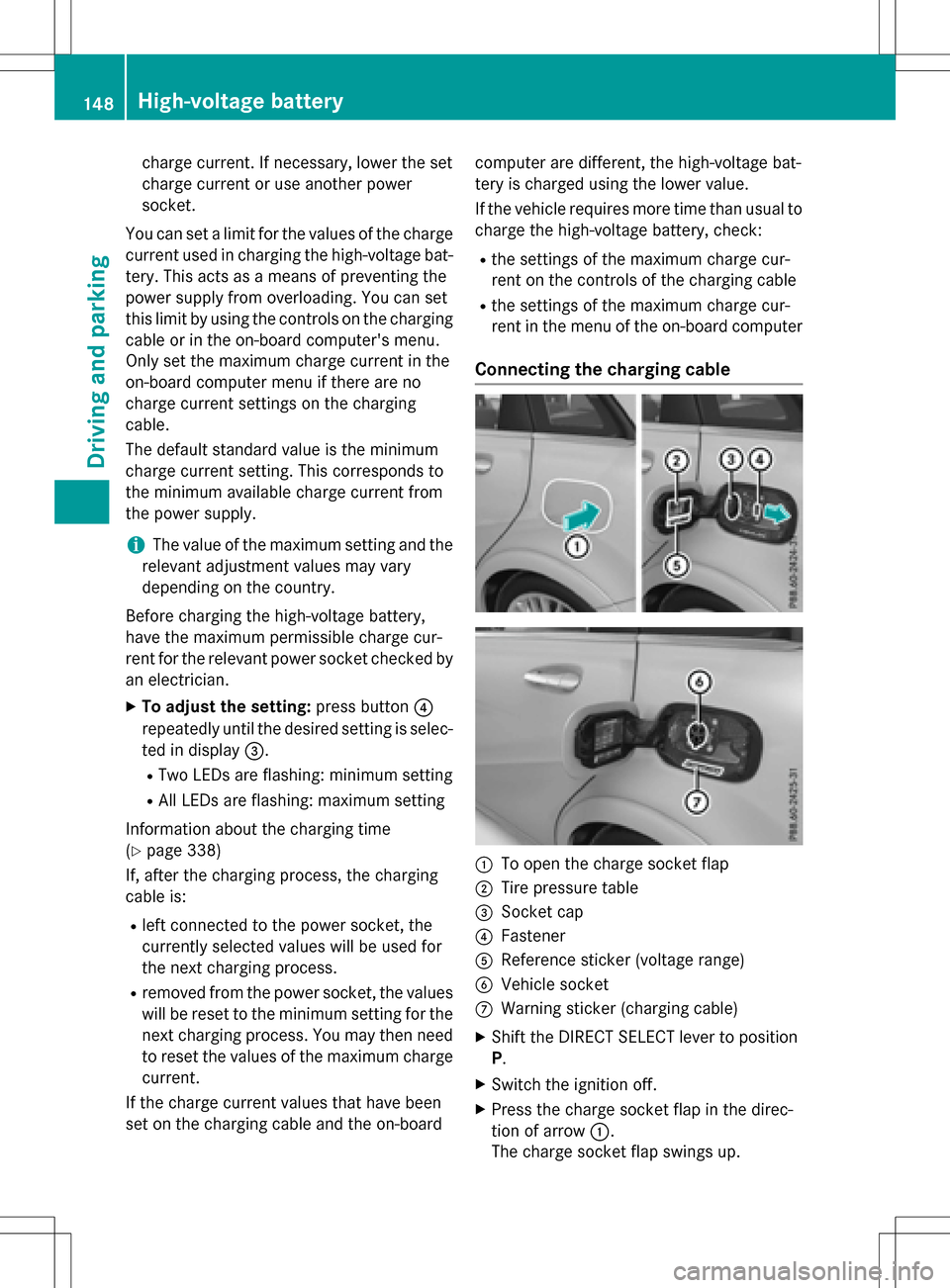
Connecting the charging cable
:To open the charge socket flap
;Tire pressure table
=Socket cap
?Fastener
AReference sticker (voltage range)
BVehicle socket
CWarning sticker (charging cable)
XShift the DIRECT SELECT lever to position
P.
XSwitch the ignition off.
XPress the charge socket flap in the direc-
tion of arrow
:.
The charge socket flap swings up.
148High-voltage battery
Driving and parking
Page 152 of 342
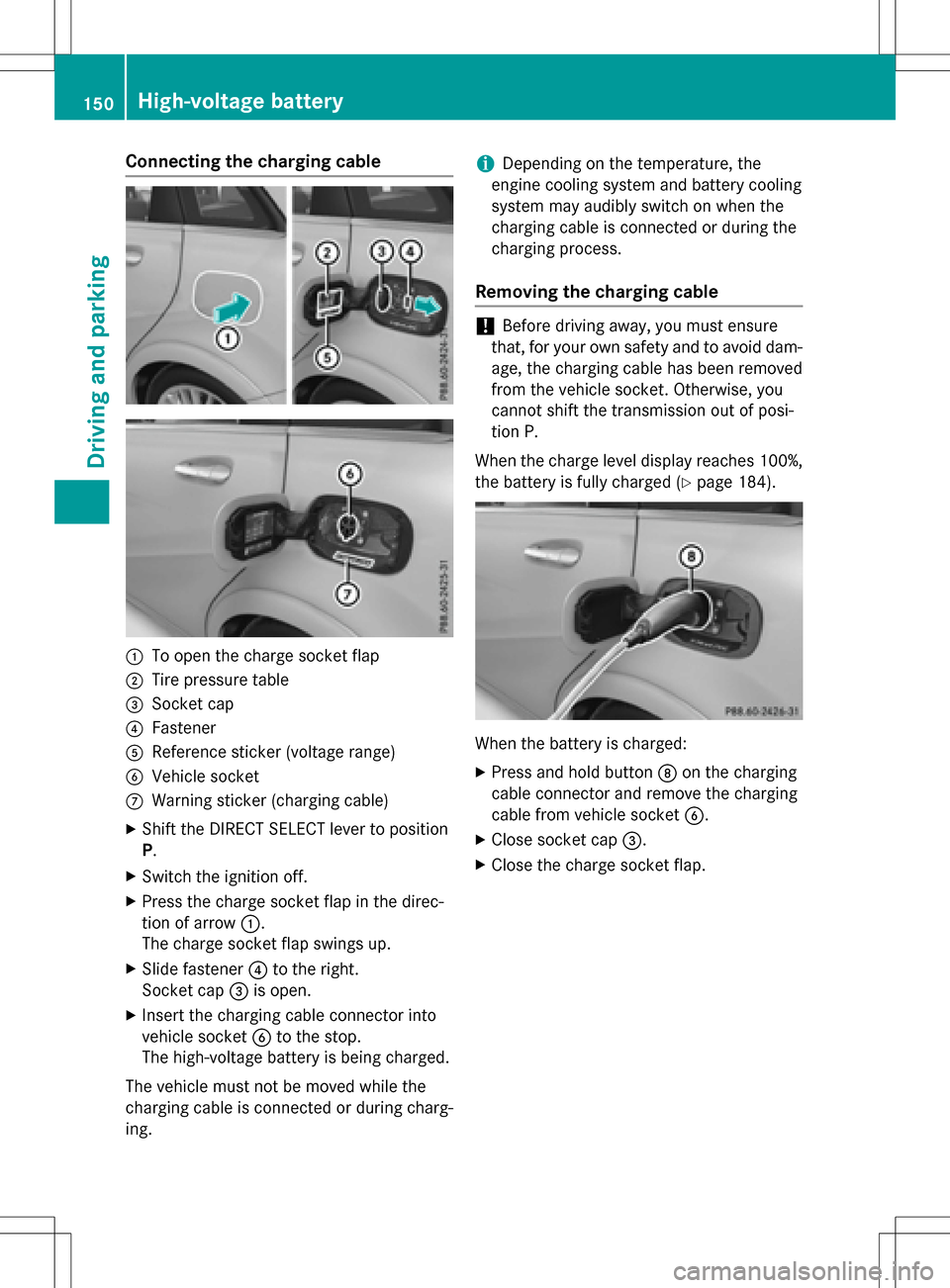
Connecting the charging cable
:To open the charge socket flap
;Tire pressure table
=Socket cap
?Fastener
AReference sticker (voltage range)
BVehicle socket
CWarning sticker (charging cable)
XShift the DIRECT SELECT lever to position
P.
XSwitch the ignition off.
XPress the charge socket flap in the direc-
tion of arrow:.
The charge socket flap swings up.
XSlide fastener ?to the right.
Socket cap =is open.
XInsert the charging cable connector into
vehicle socket Bto the stop.
The high-voltage battery is being charged.
The vehicle must not be moved while the
charging cable is connected or during charg-
ing.
iDepending on the temperature, the
engine cooling system and battery cooling
system may audibly switch on when the
charging cable is connected or during the
charging process.
Removing the charging cable
!Before driving away, you must ensure
that, for your own safety and to avoid dam-
age, the charging cable has been removed
from the vehicle socket. Otherwise, you
cannot shift the transmission out of posi-
tion P.
When the charge level display reaches 100%,
the battery is fully charged (
Ypage 184).
When the battery is charged:
XPress and hold button Don the charging
cable connector and remove the charging
cable from vehicle socket B.
XClose socket cap=.
XClose the charge socket flap.
150High-voltage battery
Driving and parking
Page 159 of 342
Drivingtips
General notes
Important safety notes
GWARNING
If you switch off the ignition while driving,
safety-relevant functions are only available
with limitations, or not at all. This could affect, fo r example, the power steering and thebrake
boosting effect. You will require considerably
more effort to steer and brake. There is a risk
of an accident.
Do no t switch off the ignition while driving.
GWARNING
If you operate mobile communication equip-
ment while driving, you will be distracted from traffic conditions. You could also lose control
of the vehicle. There is a risk of an accident.
Only operate this equipment when the vehicle
is stationary.
Observe the legal requirements fo rth ecoun-
tr y in which you are driving. Some jurisdic-
tion s prohibit the driver from usingamobile
phone while drivin gavehicle.
If you makeacall while driving, always use
hands-free mode. Only operate the telephone
when the traffic situation permits. If you are
unsure, pull over to a safe location and stop
before operating the telephone.
Bear in mind that at a speed of only 30 mph
(approximately 50 km/h), the vehicle covers
a distance of 44 ft (approximately 14 m) per
second.
Drive sensibly – save energy
Observe the following tips to save energy:
RThe tires should always be inflated to the
recommended tire pressure.
RRemove unnecessary loads.
RRemove roof racks when they are not nee-
ded.
RAvoid frequent acceleration or braking. Energ
y consumption also increases when
driving in low or high outside temperatures, in
stop-start traffic, on short journeys and in
hilly terrain .
Drinking and driving
GWARNING
Drinking and drivin gand/o rtaking drugs and
driving are very dangerous combinations.
Even a small amount of alcohol or drugs can
affect your reflexes, perceptions and judg-
ment.
The possibility of a serious or even fatal acci-
dent is greatly increased when you drink or
take drugs and drive.
Do no t drink or take drugs and drive or allow
anyone to drive who has been drinkingor tak-
ing drugs.
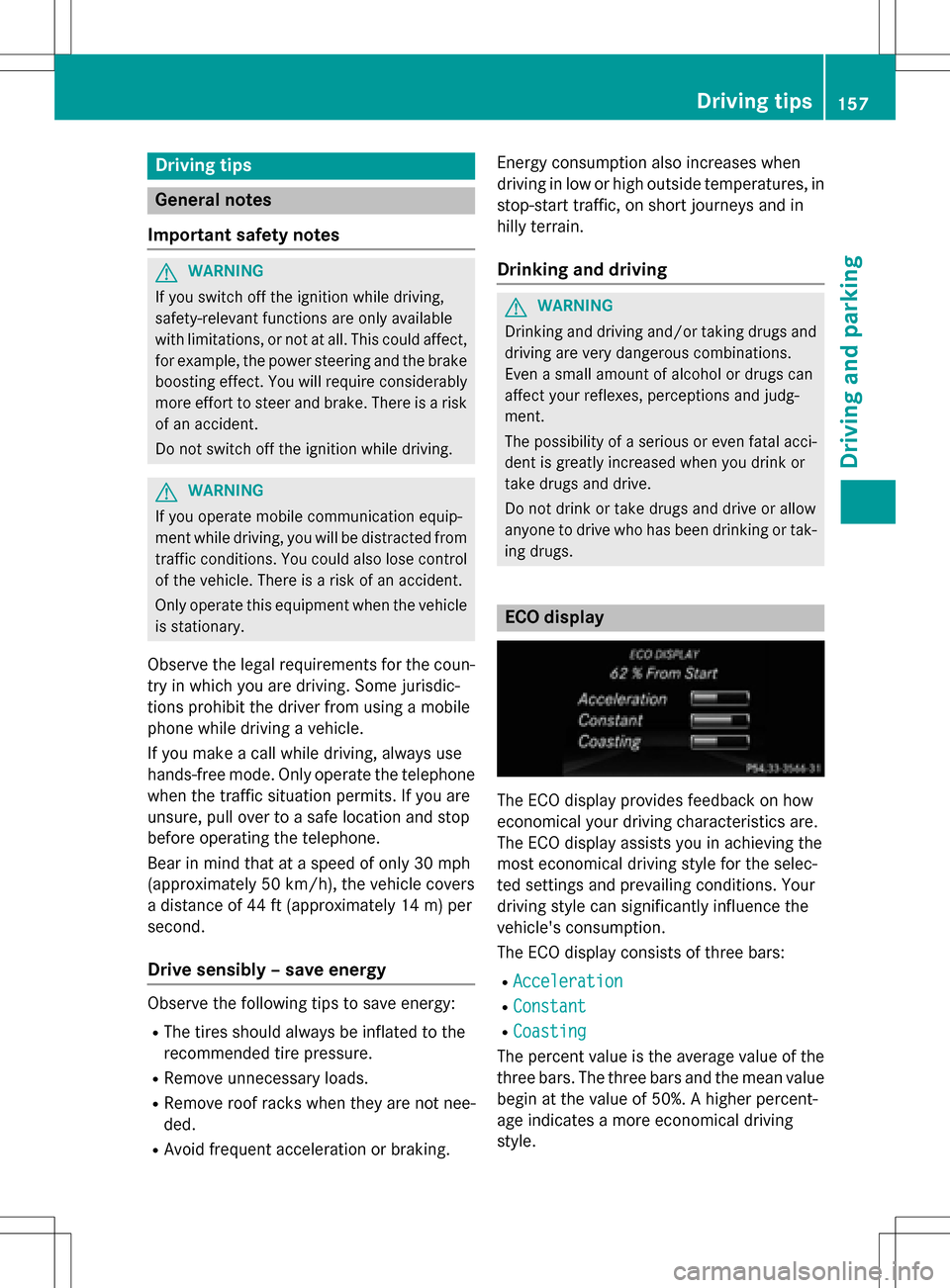
ECO display
The ECO display provides feedback on how
economical your driving characteristics are.
The ECO display assists you in achieving the
most economical driving style for the selec-
te d settings and prevailing conditions. Your
driving style can significantly influence the
vehicle's consumption .
The ECO display consists of three bars:
RAcceleration
RConstant
RCoasting
The percent value is the average value of the
three bars. The three bars and the mean value
begin at the value of 50%. A higher percent-
age indicates a more economical driving
style.
Driving tips157
Driving and parking
Z
Page 160 of 342
The ECO display does not indicate the actual
fuel consumption. A fixed percentage count
in the ECO display does not indicate a fixed
consumption.
Apart from driving style, consumption is
dependent on many factors such as, e.g.:
Rload
RTire pressure
Rcold start
Rchoice of route
Relectrical consumers switched on
These factors are not included in the ECO dis-
play.
The evaluation of your driving style is carried out using the following three categories:
RAcceleration(evaluation of all accelera-
tion processes):
-The bar fills up: moderate acceleration,
especially at higher speeds
-The bar empties: sporty acceleration
RConstant(assessment of driving behavior
at all times)
-The bar fills up: constant speed and
avoidance of unnecessary acceleration
and deceleration
-The bar empties: fluctuations in speed
RCoasting(assessment of all deceleration
processes)
-The bar fills up: anticipatory driving,
keeping your distance and early release
of the accelerator. The vehicle can coast
without use of the brakes.
-The bar empties: frequent braking
To achieve a higher value in the categories
Acceleration
and Constant, drive the vehi-
cle in drive program E+orE.
On long journeys at a constant speed, e.g. on
the highway, only the bar for Constant
will
change.
The ECO display summarizes the driving char-
acteristics from the start of the journey to its
completion. For this reason, the bars change
dynamically at the beginning of the journey.
On longer journeys, there are fewer changes. For more dynamic changes, carry out a man-
ual reset.
For further information on the ECO display,
see (
Ypage 187).
Braking
Important safety notes
GWARNING
If you increase the recuperation level on slip-
pery road surfaces, the drive wheels may lose
their traction. There is an increased danger of
skidding and accidents.
Do not increase the recuperation level on slip-
pery road surfaces.
The braking performance of the electric
motor using recuperative braking is, in some
operating modes, either reduced or not effec- tive:
Rwhen the condition of charge of the high-
voltage battery increases
Rif the high-voltage battery is not yet at a
normal operating temperature
Rwhen driving close to the maximum speed
Rwhen the vehicle is almost stationary
Rin transmission position N
Rduring and after ESP stability control
If you do not make an additional effort to
apply the brake yourself, the braking effect
may not be sufficient. If necessary, counter-
act the reduced regenerative braking effect
by applying the brake yourself.
Downhill gradients
On long, steep gradients, you must reduce the
load on the brakes by selecting maximum
recuperation. This helps you to avoid over-
heating the brakes and wearing them out
excessively.
Recuperation allows the vehicle to be decel-
erated without placing a load on the braking
system.
158Driving tips
Driving and parking
Page 171 of 342
Parking tips:
ROn narrow roads, drive as close to the park-
ing space as possible.
RParking spaces that are littered or over-
grown might be identified or measured
incorrectly.
RParking spaces that are partially occupied
by trailer drawbars might not be identified
as such or be measured incorrectly.
RSnowfall or heavy rain may lead to a parking
space being measured inaccurately.
RPay attention to the PARKTRONIC
(
Ypage 166) warning messages during the
parking procedure.
RYou can intervene in the steering procedure
to correct it at any time. Active Parking
Assist will then be canceled.
RWhen transporting a load which protrudes
from your vehicle, you should not use
Active Parking Assist.
RNever use Active Parking Assist when snow
chains are installed.
RMake sure that the tire pressures are
always correct. This has a direct influence
on the parking characteristics of the vehi-
cle.
Use Active Parking Assist for parking spaces:
Rthat are parallel to the direction of travel
Rthat are on straight roads, not bends
Rthat are on the same level as the road, e.g.
not on the pavement
Detecting parking spaces
Objects located above the height range of
Active Parking Assist will not be detected
when the parking space is measured. These
are not taken into account when the parking
procedure is calculated, e.g. overhanging
loads, tail sections or loading ramps of goods
vehicles.
GWARNING
If there are objects above the detection range:
RActive Park Assist may steer too early
Rthe vehicle may not stop in front of these
objects
You may cause a collision as a result. There is
a risk of an accident.
If objects are located above the detection
range, stop and deactivate Active Parking
Assist.
For further information on the detection
range (
Ypage 165).
Active Parking Assist does not support you
parking in spaces that are parallel to the
direction of travel if:
Rthe parking space is on a curb
Rthe parking space is apparently blocked,
for example by foliage or grass paving
blocks
Rthe range of movement is too small
Rthe parking space is bordered by an obsta-
cle which is not clearly defined such as a
tree or a trailer
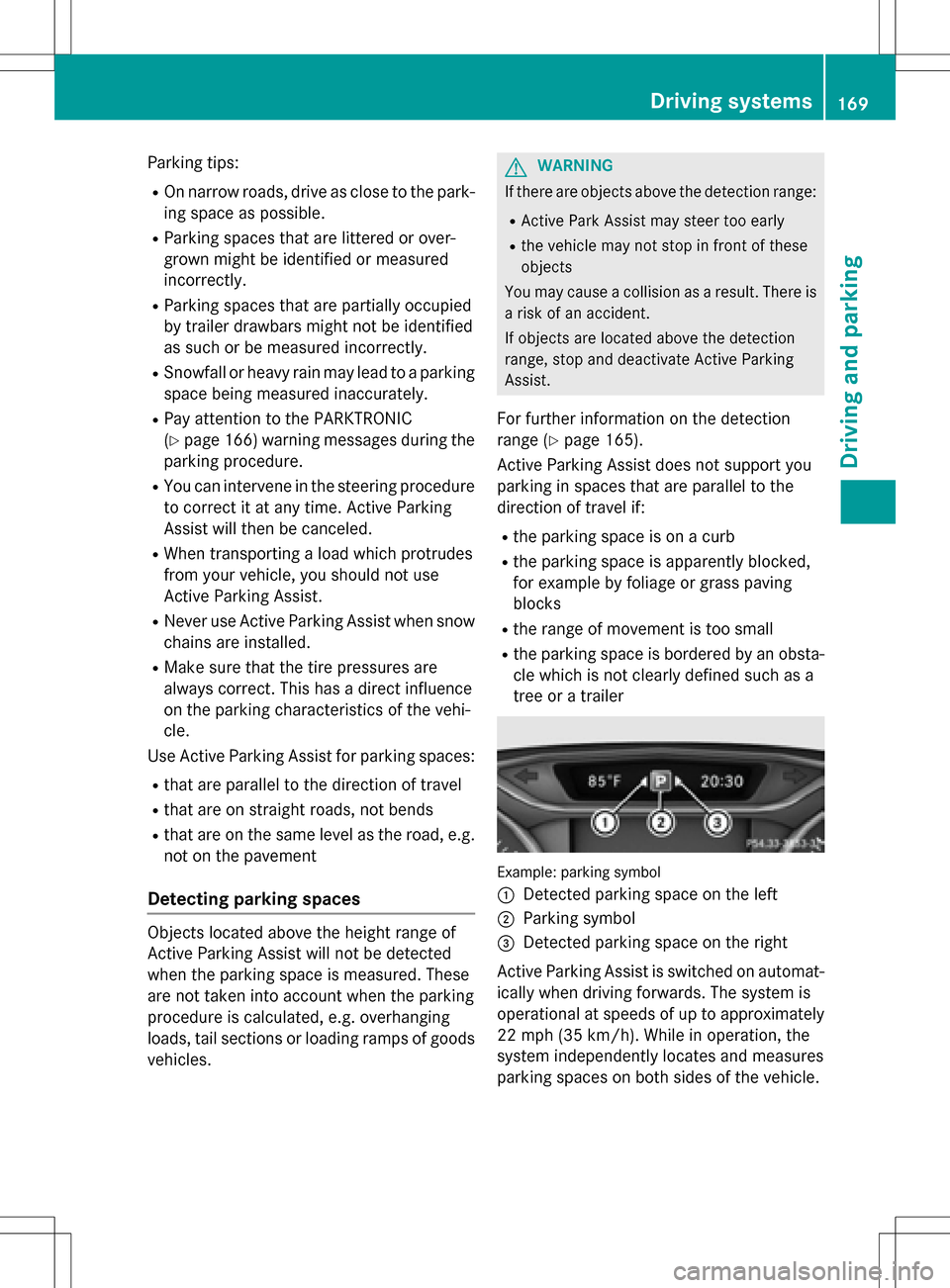
Example: parking symbol
:
Detected parking space on the left
;Parking symbol
=Detected parking space on the right
Active Parking Assist is switched on automat-
ically when driving forwards. The system is
operational at speeds of up to approximately
22 mph (35 km/h). While in operation, the
system independently locates and measures
parking spaces on both sides of the vehicle.
Driving systems169
Driving and parking
Z