buttons MERCEDES-BENZ B-CLASS HATCHBACK 2008 User Guide
[x] Cancel search | Manufacturer: MERCEDES-BENZ, Model Year: 2008, Model line: B-CLASS HATCHBACK, Model: MERCEDES-BENZ B-CLASS HATCHBACK 2008Pages: 305, PDF Size: 5.1 MB
Page 115 of 305
On-board computer
112
Resetting X
Using èor·, select From start.
X Press the jork button to select the
function that you wish to reset.
X Press and hold the reset button on the left
of the instrument cluster until the values
have reverted to "0".
Calling up the range X
Using èor·, select From start.
X Press the jork button to select
Range:.
The multi-function display shows the esti-
mated range of the vehicle, based on the
current driving style and the fuel level. If
there is only a small amount of fuel remain-
ing in the fuel tank, a vehicle refuelling
¿ appears instead of the range. Telephone menu*
Functions and displays depend on the
optional equipment installed in your vehicle.
You can place your mobile phone in the
mobile phone bracket* (Y page 163), or set
up a Bluetooth connection to the audio sys-
tem* or COMAND APS* (see separate oper-
ating instructions). G
Risk of accident
Observe the legal requirements of the
country in which you are currently driving
regarding the use of mobile phones in the
vehicle.
If it is permitted to use mobile phones while
the vehicle is in motion, you should only use
them when the road and traffic conditions
allow. Otherwise, you may be distracted
from the traffic conditions, cause an acci-
dent and injure yourself and others.
i Please refer to the menu overview
(Y page 100).
Use the buttons on the multi-function steer-
ing wheel. X
Switch on the mobile phone and audio
equipment* or COMAND APS* (see sepa-
rate operating instructions).
X Press the èor· button to select the
Telephone menu.
Mobile phone on PIN code not yet entered
Once you have inserted the mobile phone into
the mobile phone bracket*, the multi-func-
tion display shows the
PINdisplay message.
X Enter the PIN using the mobile phone, Lin-
guatronic*, the audio system* or COMAND
APS*.
The mobile phone will search for a network.
Mobile phone operational
You will see Readyor the name of the mobile
phone network provider in the multi-function
display. If the operational readiness symbol
of the mobile phone goes out, your vehicle is
outside the transmission and reception
range. In this case you will see No Service
in the multi-function display. Controls
* optional
245_AKB; 2; 7, en-GB
wdomann
,V ersion: 2.11.4
2008-10-17T11:22:31+02:00 - Seite 112 Dateiname: 6515_1640_02_buchblock.pdf; preflight
Page 137 of 305
Air conditioning
134 Function
c
Display
d
%
Reduces the temperature, left e
Ä
Activates/deactivates air-
recirculation mode i
Notes and recommendations on optimum
air conditioning:
R Activate the air conditioning using
the U andœ buttons. The indica-
tor lamps on the Uandœ buttons
light up.
R Set the temperature to 22 †.
R Only use the "demisting" function until
the windscreen is clear again.
R Only use the "air-recirculation mode"
briefly, e.g. when there are unpleasant
outside odours or when in a tunnel. Oth-
erwise, the windows could mist up due
to a lack of fresh air in air-recirculation
mode.
R You can use the residual heat to heat or
ventilate the vehicle interior after you
have switched off the ignition. Switching the air conditioning on/off
i When the air conditioning is switched off,
the air supply and air circulation are also
switched off. Only select this setting briefly,
otherwise the windows may mist up.
i Activate the air conditioning primarily
using the Ubutton.
Heatmatic/air-conditioning system* X
Turn the key to position 2in the ignition
lock.
X To activate: turn thumbwheel 3clock-
wise to the desired position (apart from the
0 position) (Y page 130), (Ypage 131).
X To deactivate: turn thumbwheel 3anti-
clockwise to position 0(Y page 130),
(Y page 131). Thermotronic* X
Turn the key to position 2in the ignition
lock.
X To activate: press the´button.
The indicator lamp in the ´button goes
out. The previously selected settings come
into effect again.
or
X Press the Ubutton.
The indicator lamp in the Ubutton
comes on. Airflow and air distribution are
set to automatic mode.
X To deactivate: press the´button.
The indicator lamp in the ´button
comes on. Cont
rols
* optional
245_AKB; 2; 7, en-GB
wdomann,
Version: 2.11.4 2008-10-17T11:22:31+02:00 - Seite 134Dateiname: 6515_1640_02_buchblock.pdf; preflight
Page 142 of 305
Air conditioning
139
X
Press the Ubutton.
The indicator lamp in the |button goes
out. Airflow and air distribution are set to
automatic mode.
or
X Press one of the $or% temperature
buttons.
The indicator lamp in the |button goes
out. The air distribution is directed towards
the windscreen. The air conditioning
switches to manual mode.
or
X Turn thumbwheel 1clockwise or anti-
clockwise (Y page 133).
The indicator lamp in the |button goes
out. The air distribution is directed towards
the windscreen. The air conditioning
switches to manual mode. Demisting the windows
Windows misted up on the inside X
Activate the "cooling with air dehumidifica-
tion" function 19
.
X Activate the automatic air conditioning. 20
X If the windows continue to mist up, activate
the "demisting" function.
Windows misted up on the outside X
Activate the windscreen wipers.
X Turn the air distribution thumbwheel to the
Y ora symbol.
i You should only select this setting until
the windscreen is clear again. Switching the rear window heating
on/off
G
Risk of accident
Clear all windows of ice or snow before set-
ting off. Otherwise, impaired visibility could
endanger you and others.
i The rear window heating has a high cur-
rent draw. You should therefore switch it
off as soon as the window is clear, as it only
switches off automatically after several
minutes.
i If the battery voltage is too low, the rear
window heating may switch off.
X Turn the key to position 2in the ignition
lock.
X To activate, press the 121
/F 22
but-
ton.
The indicator lamp in the 1/Fbut-
ton lights up or goes out.
19 Vehicles with air conditioning*/Thermotronic*.
20 Vehicles with Thermotronic*.
21 Vehicles with an air-conditioning system*/Thermotronic*.
22 Vehicles with Heatmatic. Cont
rols
* optional
245_AKB; 2; 7, en-GB
wdomann, Version: 2.11.4
2008-10-17T11:22:31+02:00 - Seite 139 ZDateiname: 6515_1640_02_buchblock.pdf; preflight
Page 167 of 305
Features
164 relating to the possible health risk posed by
electromagnetic fields.
To ensure optimum reception quality for
mobile phones in the vehicle, and to minimise
mutual influences between the vehicle elec-
tronics and mobile phones, Mercedes-Benz
recommends the use of an approved exterior
aerial. An exterior aerial conducts the elec-
tromagnetic fields generated by a wireless
device to the exterior of the vehicle; the field
strength within the vehicle interior is lower
than in a vehicle that does not have an exte-
rior aerial.
i There are various mobile phone brackets
that may be fitted to your vehicle; in some
cases, these are country-specific. You can
obtain these mobile phone brackets from a
qualified specialist workshop, e.g. a
Mercedes-Benz Service Centre.
The functions and services available when
you use the phone depend on your mobile
phone model and service provider.
Inserting the mobile phone
X Open the telephone compartment
(Y page 159).
X Place the mobile phone bracket into the
pre-installed fitting; see the separate mobile phone bracket installation instruc-
tions.
X Insert the mobile phone into the mobile
phone bracket; see the separate mobile
phone bracket installation instructions.
If the mobile phone is inserted in the mobile
phone bracket, you can speak to the person
you are calling using the hands-free system.
You can operate the telephone using the
s andt buttons on the multi-function
steering wheel. You can operate other mobile
phone functions via the on-board computer
(Y page 112).
When you take the key out of the ignition lock,
the mobile phone stays on but you can no
longer use the hands-free system.
If you are making a call and you would like to
take the key out of the ignition lock, first
remove the mobile phone from the bracket.
Otherwise, the call will be terminated. Floormat on the driver's side
G
Risk of accident
Make sure that there is sufficient clearance
around the pedals when floormats are
used, and that the floormats are properly
secured.
The floormats must be secured at all times
using retainers and studs.
Before you drive off, make sure that the
floormats are secure and rectify if neces-
sary. A floormat which is not properly
secured can slip and thereby interfere with
the movement of the pedals.
Do not place floormats on top of one
another. Cont
rols
245_AKB; 2; 7, en-GB
wdomann,
Version: 2.11.4
2008-10-17T11:22:31+02:00 - Seite 164 Dateiname: 6515_1640_02_buchblock.pdf; preflight
Page 195 of 305
Care
192
time during which the battery is disconnec-
ted.
Maintaining the time-dependent service
schedule:
X Note down the service due date displayed
before disconnecting the battery.
or
X Subtract the battery disconnection periods
from the service date shown on the display
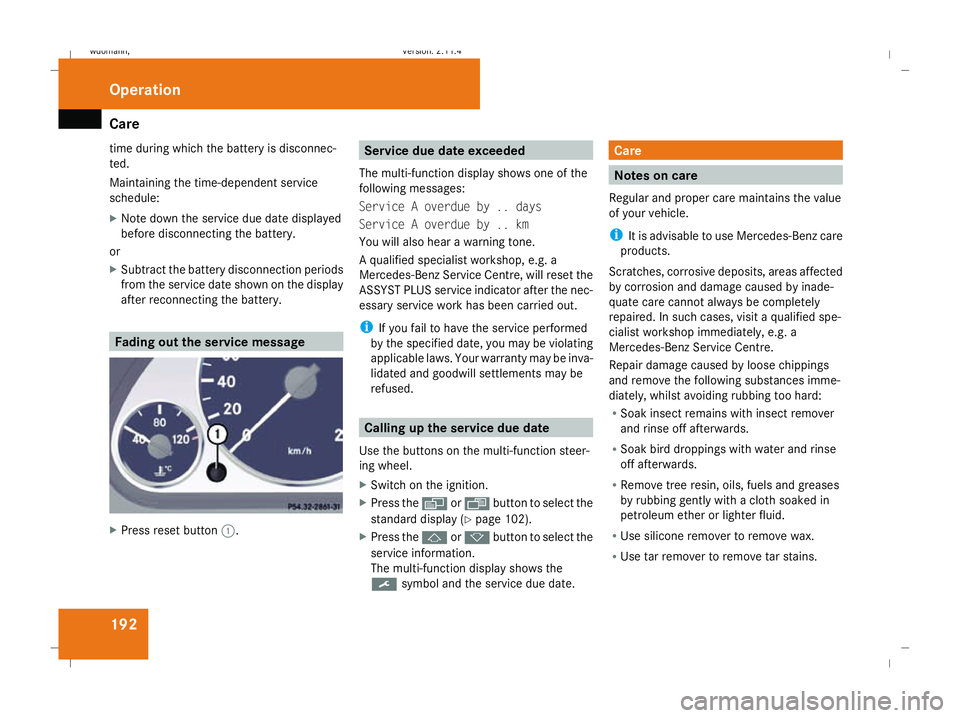
after reconnecting the battery. Fading out the service message
X
Press reset button 1. Service due date exceeded
The multi-function display shows one of the
following messages:
Service A overdue by .. days
Service A overdue by .. km
You will also hear a warning tone.
A qualified specialist workshop, e.g. a
Mercedes-Benz Service Centre, will reset the
ASSYST PLUS service indicator after the nec-
essary service work has been carried out.
i If you fail to have the service performed
by the specified date, you may be violating
applicable laws. Your warranty may be inva-
lidated and goodwill settlements may be
refused. Calling up the service due date
Use the buttons on the multi-function steer-
ing wheel.
X Switch on the ignition.
X Press the èorÿ button to select the
standard display (Y page 102).
X Press the jork button to select the
service information.
The multi-function display shows the
9 symbol and the service due date. Care
Notes on care
Regular and proper care maintains the value
of your vehicle.
i It is advisable to use Mercedes-Benz care
products.
Scratches, corrosive deposits, areas affected
by corrosion and damage caused by inade-
quate care cannot always be completely
repaired. In such cases, visit a qualified spe-
cialist workshop immediately, e.g. a
Mercedes-Benz Service Centre.
Repair damage caused by loose chippings
and remove the following substances imme-
diately, whilst avoiding rubbing too hard:
R Soak insect remains with insect remover
and rinse off afterwards.
R Soak bird droppings with water and rinse
off afterwards.
R Remove tree resin, oils, fuels and greases
by rubbing gently with a cloth soaked in
petroleum ether or lighter fluid.
R Use silicone remover to remove wax.
R Use tar remover to remove tar stains. Operation
245_AKB; 2; 7, en-GB
wdomann,
Version: 2.11.4 2008-10-17T11:22:31+02:00 - Seite 192Dateiname: 6515_1640_02_buchblock.pdf; preflight
Page 206 of 305
Display
messages 203work required. Mercedes-Benz recom-
mends that you use a Mercedes-Benz
Service Centre for this purpose. In particu-
lar, work relevant to safety or on safety-
related systems must be carried out at a
qualified specialist workshop.
The following tables contain all the display
messages. Hiding display messages After a few seconds, the on-board computer
automatically hides some low priority display
messages. Other messages remain visible in
the multi-function display until you hide them
yourself.
Some high priority display messages cannot
be hidden. The multi-function display shows these messages continuously until the cau-
ses of the messages have been remedied.
Use the buttons on the multi-function steer-
ing wheel.
X Use the è,·,jork button
to select another display.
The on-board computer saves certain dis-
play messages in the message memory
(Y page 105). Text messages
G
Risk of accident and injury
The operating safety of your vehicle could be compromised if service work is carried out improperly. You could lose control of the vehicle,
thereby causing an accident. Safety systems may also not be able to protect you or others as intended.
Always have maintenance work carried out at a qualified specialist workshop which has the necessary specialist knowledge and tools to
carry out the work required.
Mercedes-Benz recommends that you use a Mercedes-Benz Service Centre for this purpose.
In particular, work relevant to safety or on safety-related systems must be carried out at a qualified specialist workshop. Practical advi
ce
245_AKB; 2; 7, en-GB
wdomann,
Version: 2.11.4
2008-10-17T11:22:31+02:00 - Seite 203 ZDateiname: 6515_1640_02_buchblock.pdf; preflight
Page 225 of 305
Troubleshooting
222 Troubleshooting
Points to remember
G
Risk of accident and injury
The operating safety of your vehicle could be compromised if service work is carried out improperly. You could lose control of the vehicle,
thereby causing an accident. Safety systems may also not be able to protect you or others as intended.
Always have maintenance work carried out at a qualified specialist workshop which has the necessary specialist knowledge and tools to
carry out the work required.
Mercedes-Benz recommends that you use a Mercedes-Benz Service Centre for this purpose.
In particular, work relevant to safety or on safety-related systems must be carried out at a qualified specialist workshop. Warning and indicator lamps in switches and buttons
Problem Possible cause/consequence Suggested solutions
One or all of the indicator lamps
in the seat heating* button are
flashing. The seat heating* has
switched itself off automatically. The on-board voltage is too low,
because too many consumers are
switched on. X
Switch off consumers that are not required, e. g. reading lamp or
interior lighting.
Once the battery is sufficiently charged, the seat ventilation* will
switch back on automatically. The indicator lamp in the
2
button on the air-conditioning */
Ther motronic* control panel
lights up. The cooling system can-
not be switched on. Cooling has been deactivated
due to a malfunction. X
Visit a qualified specialist workshop. Practical advice
* optional
245_AKB; 2; 7, en-GB
wdomann,
Version: 2.11.4 2008-10-17T11:22:31+02:00 - Seite 222Dateiname: 6515_1640_02_buchblock.pdf; preflight
Page 247 of 305
Changing bulbs
244 Key
Checking the batteries X
Press the jork button.
The batteries are in order if the battery
charge indicator lamp lights up briefly.
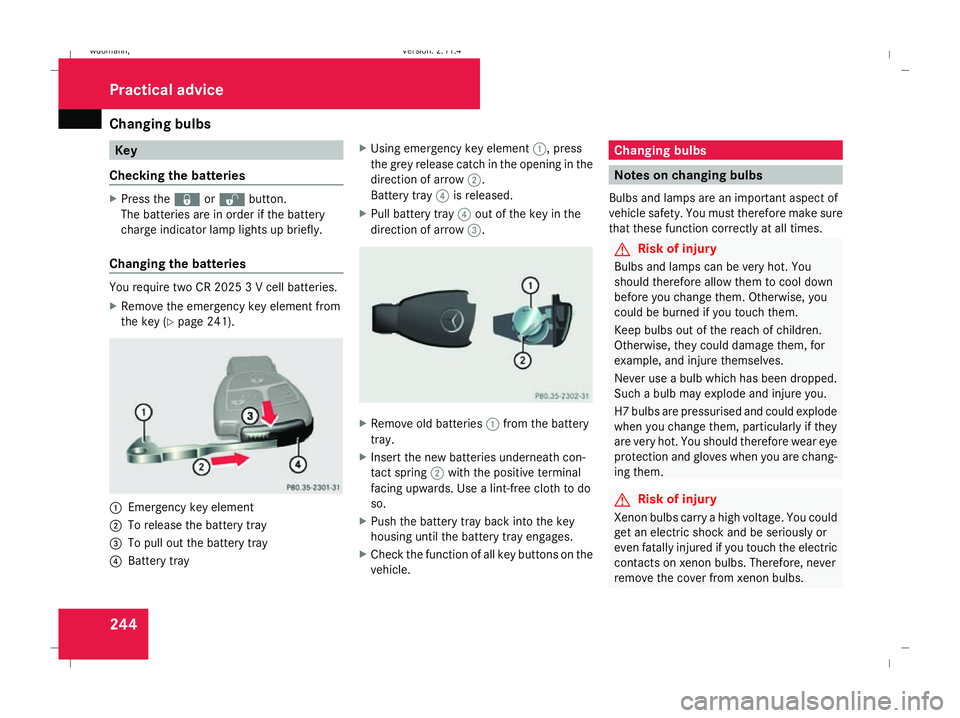
Changing the batteries You require two CR 2025 3 V cell batteries.
X Remove the emergency key element from
the key (Y page 241). 1
Emergency key element
2 To release the battery tray
3 To pull out the battery tray
4 Battery tray X
Using emergency key element 1, press
the grey release catch in the opening in the
direction of arrow 2.
Battery tray 4is released.
X Pull battery tray 4out of the key in the
direction of arrow 3. X
Remove old batteries 1from the battery
tray.
X Insert the new batteries underneath con-
tact spring 2with the positive terminal
facing upwards. Use a lint-free cloth to do
so.
X Push the battery tray back into the key
housing until the battery tray engages.
X Check the function of all key buttons on the
vehicle. Changing bulbs
Notes on changing bulbs
Bulbs and lamps are an important aspect of
vehicle safety. You must therefore make sure
that these function correctly at all times. G
Risk of injury
Bulbs and lamps can be very hot. You
should therefore allow them to cool down
before you change them. Otherwise, you
could be burned if you touch them.
Keep bulbs out of the reach of children.
Otherwise, they could damage them, for
example, and injure themselves.
Never use a bulb which has been dropped.
Such a bulb may explode and injure you.
H7 bulbs are pressurised and could explode
when you change them, particularly if they
are very hot. You should therefore wear eye
protection and gloves when you are chang-
ing them. G
Risk of injury
Xenon bulbs carry a high voltage. You could
get an electric shock and be seriously or
even fatally injured if you touch the electric
contacts on xenon bulbs. Therefore, never
remove the cover from xenon bulbs. Practical advice
245_AKB; 2; 7, en-GB
wdomann
,V ersion: 2.11.4
2008-10-17T11:22:31+02:00 - Seite 244 Dateiname: 6515_1640_02_buchblock.pdf; preflight