service MERCEDES-BENZ B-CLASS HATCHBACK 2008 Service Manual
[x] Cancel search | Manufacturer: MERCEDES-BENZ, Model Year: 2008, Model line: B-CLASS HATCHBACK, Model: MERCEDES-BENZ B-CLASS HATCHBACK 2008Pages: 305, PDF Size: 5.1 MB
Page 194 of 305
Service
191
specialist workshop, e.g. a Mercedes-Benz
Service Centre.
X To switch the switched power supply on
or off: turn the key in the ignition lock to
position 2or 0, respectively. Trailer with 7-pin connector
If your trailer has a 7-pin connector, you can
connect it to the 13-pin socket on the ball
coupling using an adapter or, if necessary, an
adapter cable. Both of these can be obtained
at a qualified specialist workshop, e.g. at a
Mercedes-Benz Service Centre.
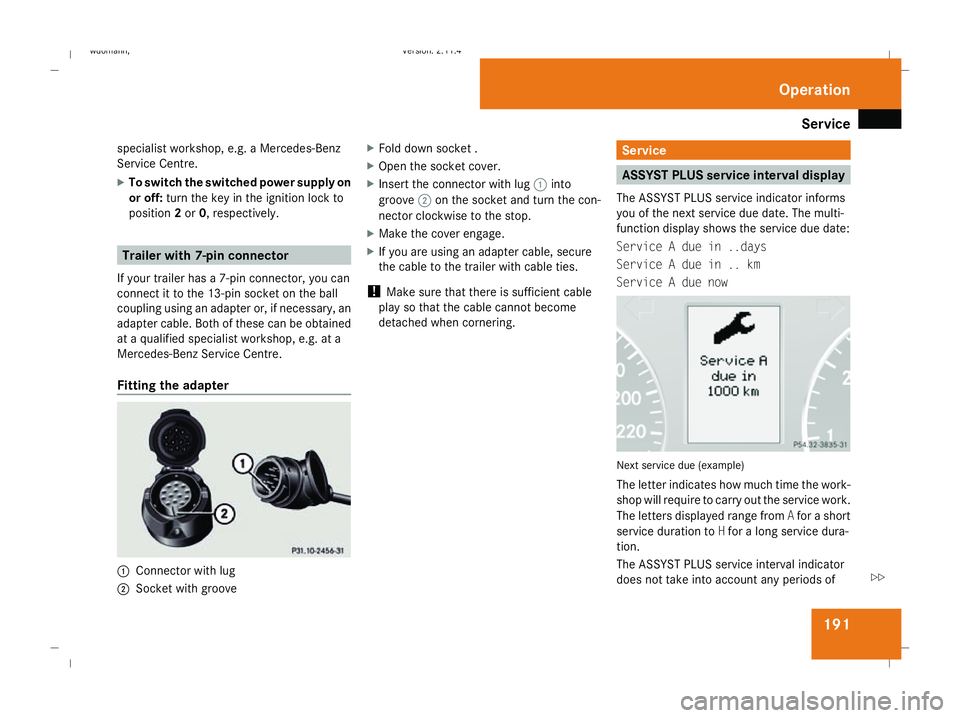
Fitting the adapter 1
Connector with lug
2 Socket with groove X
Fold down socket .
X Open the socket cover.
X Insert the connector with lug 1into
groove 2on the socket and turn the con-
nector clockwise to the stop.
X Make the cover engage.
X If you are using an adapter cable, secure
the cable to the trailer with cable ties.
! Make sure that there is sufficient cable
play so that the cable cannot become
detached when cornering. Service
ASSYST PLUS service interval display
The ASSYST PLUS service indicator informs
you of the next service due date. The multi-
function display shows the service due date:
Service A due in ..days
Service A due in .. km
Service A due now Next service due (example)
The letter indicates how much time the work-
shop will require to carry out the service work.
The letters displayed range from
Afor a short
service duration to Hfor a long service dura-
tion.
The ASSYST PLUS service interval indicator
does not take into account any periods of Operation
245_AKB; 2; 7, en-GB
wdomann,
Version: 2.11.4
2008-10-17T11:22:31+02:00 - Seite 191 ZDateiname: 6515_1640_02_buchblock.pdf; preflight
Page 195 of 305
Care
192
time during which the battery is disconnec-
ted.
Maintaining the time-dependent service
schedule:
X Note down the service due date displayed
before disconnecting the battery.
or
X Subtract the battery disconnection periods
from the service date shown on the display
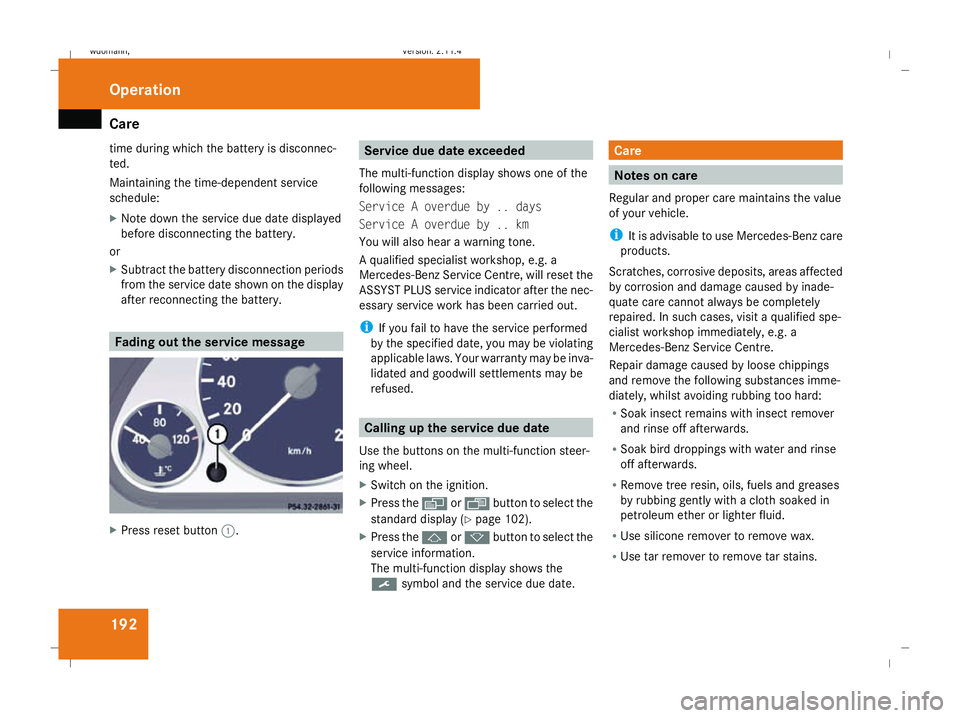
after reconnecting the battery. Fading out the service message
X
Press reset button 1. Service due date exceeded
The multi-function display shows one of the
following messages:
Service A overdue by .. days
Service A overdue by .. km
You will also hear a warning tone.
A qualified specialist workshop, e.g. a
Mercedes-Benz Service Centre, will reset the
ASSYST PLUS service indicator after the nec-
essary service work has been carried out.
i If you fail to have the service performed
by the specified date, you may be violating
applicable laws. Your warranty may be inva-
lidated and goodwill settlements may be
refused. Calling up the service due date
Use the buttons on the multi-function steer-
ing wheel.
X Switch on the ignition.
X Press the èorÿ button to select the
standard display (Y page 102).
X Press the jork button to select the
service information.
The multi-function display shows the
9 symbol and the service due date. Care
Notes on care
Regular and proper care maintains the value
of your vehicle.
i It is advisable to use Mercedes-Benz care
products.
Scratches, corrosive deposits, areas affected
by corrosion and damage caused by inade-
quate care cannot always be completely
repaired. In such cases, visit a qualified spe-
cialist workshop immediately, e.g. a
Mercedes-Benz Service Centre.
Repair damage caused by loose chippings
and remove the following substances imme-
diately, whilst avoiding rubbing too hard:
R Soak insect remains with insect remover
and rinse off afterwards.
R Soak bird droppings with water and rinse
off afterwards.
R Remove tree resin, oils, fuels and greases
by rubbing gently with a cloth soaked in
petroleum ether or lighter fluid.
R Use silicone remover to remove wax.
R Use tar remover to remove tar stains. Operation
245_AKB; 2; 7, en-GB
wdomann,
Version: 2.11.4 2008-10-17T11:22:31+02:00 - Seite 192Dateiname: 6515_1640_02_buchblock.pdf; preflight
Page 197 of 305
Care
194nozzle of the high-pressure cleaner and the
vehicle (at least 30 cm).
Move the high-pressure cleaner nozzle
around when cleaning your vehicle.
Do not aim directly at any of the following:
R tyres
R door joint
R electrical components
R battery
R connectors
R lights
R seals
R trim elements
Damaged seals or electrical components
can lead to failures or leaks.
Cleaning the wiper blades and the out-
side of the windscreen G
Risk of injury
Before cleaning the windscreen or wiper
blades, turn the key in the ignition to 0.
Otherwise, the windscreen wipers may
move and injure you. X
Turn the key to position 1(Y page 62) in
the ignition lock.
X Set the windscreen wipers to position
I(Y page 82) on the combination switch.
X Turn the key to position 0(Y page 62) or
remove it when the wiper arms are vertical.
! Only fold the windscreen wipers away
from the windscreen when vertical. Other-
wise, you will damage the bonnet.
X Fold the wiper arms away from the wind-
screen.
X Wipe the windscreen and wiper blades with
a damp, lint-free cloth (e.g. a microfibre
cloth) and cleaning agent.
X Fold the wiper arms back on to the wind-
screen before the ignition is switched on.
! Do not clean the wiper blades too often
as this will result in damage to the surface
coating, leading to wiper noise.
Cleaning the windows !
Do not use dry cloths, abrasive products,
solvents or cleaning agents containing sol-
vents to clean the inside of the windows.
Clean the insides of the windows with a
damp cloth or commercially-available glass cleaner. Avoid touching the inside of the
rear windscreen and the side windows with
hard objects, e.g. ice scrapers or rings. You
could otherwise cause damage to the win-
dows, rear window heating or aerial on the
rear window.
i Anti-glare film retrofitted to the insides of
the windows could interfere with radio or
mobile phone reception, especially if it is
conductive or metal-coated film. Informa-
tion about anti-glare film can be obtained
from any Mercedes-Benz Service Centre.
Cleaning the headlamps X
Clean the plastic lenses of the headlamps
with a damp sponge.
! Only use washer fluid which is suitable
for plastic lenses. Unsuitable washer fluid
could damage the plastic lenses of the
headlamps.
Do not use the following:
R dry cloths
R abrasive cleaning agents
R solvents
R cleaning agents containing solvent Operation
245_AKB; 2; 7, en-GB
wdomann
,V ersion: 2.11.4
2008-10-17T11:22:31+02:00 - Seite 194 Dateiname: 6515_1640_02_buchblock.pdf; preflight
Page 198 of 305
Care
195
Otherwise, you could scratch or damage
the surface of the lenses.
Cleaning the plastic trim !
Do not use dry, coarse or hard cloths and
do not scrub. Doing so will scratch or dam-
age the surfaces.
! Ensure that cosmetics and suntan lotion
do not come into contact with the vehicle's
trim. This will protect the vehicle's high-
quality trim and help retain its overall
appearance.
X Wipe plastic parts with a damp, lint-free
cloth (e.g. a microfibre cloth).
X Light soiling: use a low-foaming soap (e.g.
a light liquid hand soap) diluted in water.
X Heavy soiling: use a cleaning agent that is
solvent-free and non-corrosive. Mercedes-
Benz recommends that you use a
Mercedes-Benz cleaning product for this
purpose. Cleaning the steering wheel boss and
dashboard X
Moisten a clean lint-free cloth with water.
X Clean the plastic parts and the dashboard.
X If particularly dirty, use a mild detergent. G
Risk of injury
Do not use cleaners and cockpit care
sprays containing solvents to clean the
cockpit and steering wheel boss. Cleaners
containing solvents cause the surface to
become porous and in the event of an air-
bag being triggered, plastic parts that have
become loose could cause considerable
injuries.
Cleaning the leather upholstery* !
Cleaning
R Clean genuine leather covers using a
damp cloth, then wipe the covers down
using a dry cloth. Make sure that the
leather does not become soaked. For
leather care, use leather care foam A 001
986 59 71 10. You can purchase this
from any Mercedes-Benz Service Centre.
R Clean artificial leather covers with a cloth
moistened with a solution containing 1%
detergent (e. g. washing-up liquid). R
Clean fabric covers with a microfibre
cloth moistened with a solution contain-
ing 1% detergent (e. g. washing-up liquid).
When cleaning, take care not to rub too
vigorously and always wipe entire seat
sections to avoid leaving visible lines.
Leave the seat to dry afterwards. Clean-
ing results depend on the type of dirt and
how long it has been there.
R Clean Alcantara covers with a damp
cloth. Make sure you wipe entire seat
sections to avoid leaving visible lines.
i Note that leather covers are a natural
product and as such are subject to a natural
ageing process and may react differently
(e.g. increased wrinkling) to certain envi-
ronmental influences (such as high humid-
ity, intense heat).
Note that regular care is essential to ensure
that the quality (both appearance and com-
fort) of the covers is retained over time.
Cleaning the padded table* The plastic parts of the padded table can be
cleaned using a detergent solution.
The fabric cover can be cleaned using a deter-
gent solution or an upholstery cleaner. Operation
* optional
245_AKB; 2; 7, en-GB
wdomann
,V ersion: 2.11.4
2008-10-17T11:22:31+02:00 - Seite 195 ZDateiname: 6515_1640_02_buchblock.pdf; preflight
Page 199 of 305
Care
196
i
The cover cannot be removed.
Cleaning the exhaust tail pipes Dirt combined with the effects of road grit and
corrosive environmental factors may cause
flash rust to form on the surface.
Regular care of the exhaust tail pipes will
ensure that their original shine is restored.
! Do not clean the exhaust tail pipes with
alkaline-based cleaning agents such as
wheel cleaner.
Use the chrome-cleaning agent recommen-
ded by Mercedes-Benz for cleaning. Infor-
mation about chrome-cleaning agents can
be obtained from any Mercedes-Benz
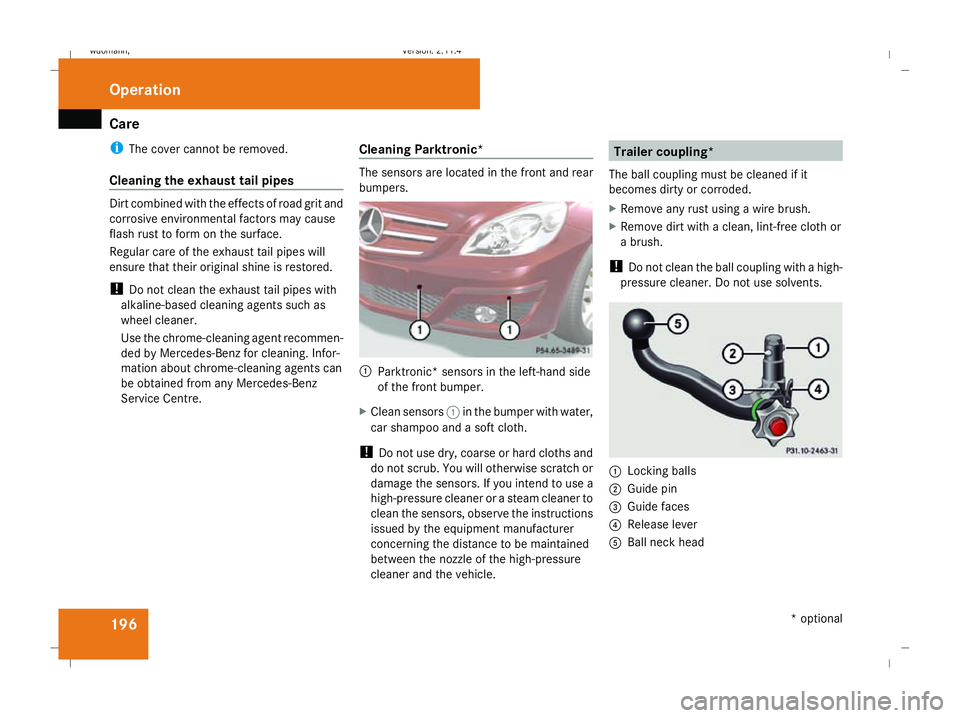
Service Centre. Cleaning Parktronic* The sensors are located in the front and rear
bumpers.
1
Parktronic* sensors in the left-hand side
of the front bumper.
X Clean sensors 1in the bumper with water,
car shampoo and a soft cloth.
! Do not use dry, coarse or hard cloths and
do not scrub. You will otherwise scratch or
damage the sensors. If you intend to use a
high-pressure cleaner or a steam cleaner to
clean the sensors, observe the instructions
issued by the equipment manufacturer
concerning the distance to be maintained
between the nozzle of the high-pressure
cleaner and the vehicle. Trailer coupling*
The ball coupling must be cleaned if it
becomes dirty or corroded.
X Remove any rust using a wire brush.
X Remove dirt with a clean, lint-free cloth or
a brush.
! Do not clean the ball coupling with a high-
pressure cleaner. Do not use solvents. 1
Locking balls
2 Guide pin
3 Guide faces
4 Release lever
5 Ball neck head Operation
* optional
245_AKB; 2; 7, en-GB
wdomann
,V ersion: 2.11.4
2008-10-17T11:22:31+02:00 - Seite 196 Dateiname: 6515_1640_02_buchblock.pdf; preflight
Page 200 of 305
Care
197
X
Lightly oil or grease positions 1to5 and
the ball coupling recess of the vehicle after
cleaning.
X Treat the lock with an oil that is acid and
resin-free.
X Check that the vehicle's trailer coupling is
working properly.
! Observe the note on care provided by the
trailer manufacturer.
i Maintenance of the ball coupling and
trailer coupling can also be performed by
any Mercedes-Benz Service Centre. H
Environmental note
Dispose of oily and greasy cloths in an envi-
ronmentally-responsible manner. Operation
245_AKB; 2; 7, en-GB
wdomann
,V ersion: 2.11.4
2008-10-17T11:22:31+02:00 - Seite 197 ZDateiname: 6515_1640_02_buchblock.pdf; preflight
Page 206 of 305
Display
messages 203work required. Mercedes-Benz recom-
mends that you use a Mercedes-Benz
Service Centre for this purpose. In particu-
lar, work relevant to safety or on safety-
related systems must be carried out at a
qualified specialist workshop.
The following tables contain all the display
messages. Hiding display messages After a few seconds, the on-board computer
automatically hides some low priority display
messages. Other messages remain visible in
the multi-function display until you hide them
yourself.
Some high priority display messages cannot
be hidden. The multi-function display shows these messages continuously until the cau-
ses of the messages have been remedied.
Use the buttons on the multi-function steer-
ing wheel.
X Use the è,·,jork button
to select another display.
The on-board computer saves certain dis-
play messages in the message memory
(Y page 105). Text messages
G
Risk of accident and injury
The operating safety of your vehicle could be compromised if service work is carried out improperly. You could lose control of the vehicle,
thereby causing an accident. Safety systems may also not be able to protect you or others as intended.
Always have maintenance work carried out at a qualified specialist workshop which has the necessary specialist knowledge and tools to
carry out the work required.
Mercedes-Benz recommends that you use a Mercedes-Benz Service Centre for this purpose.
In particular, work relevant to safety or on safety-related systems must be carried out at a qualified specialist workshop. Practical advi
ce
245_AKB; 2; 7, en-GB
wdomann,
Version: 2.11.4
2008-10-17T11:22:31+02:00 - Seite 203 ZDateiname: 6515_1640_02_buchblock.pdf; preflight
Page 213 of 305
Display
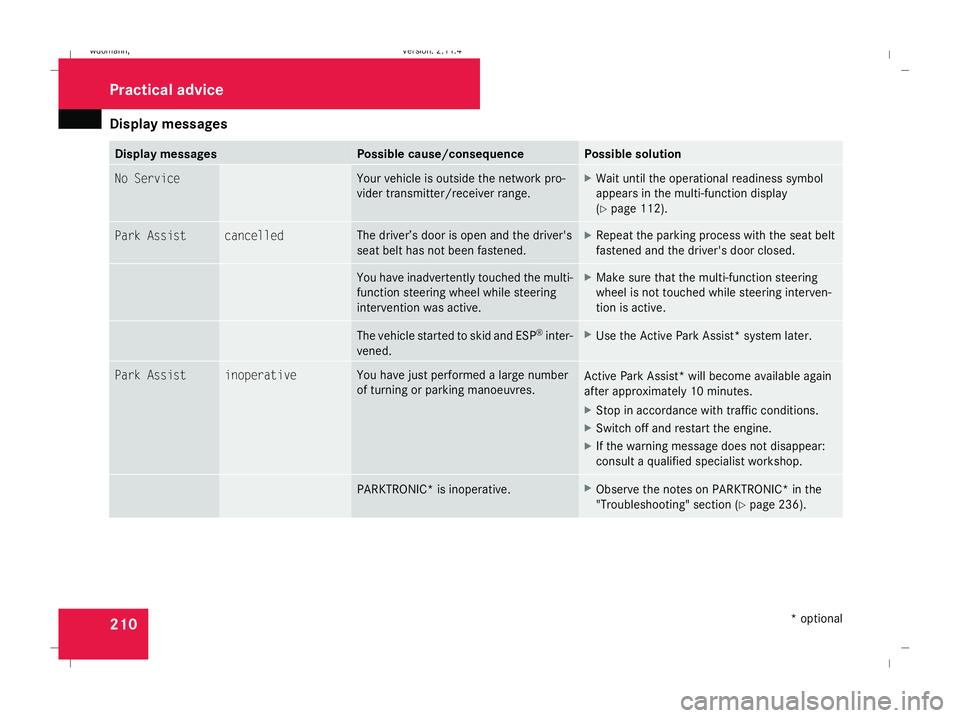
messages 210 Display messages Possible cause/consequence Possible solution
No Service Your vehicle is outside the network pro-
vider transmitter/receiver range. X
Wait until the operational readiness symbol
appears in the multi-function display
(Y page 112). Park Assist cancelled The driver’s door is open and the driver's
seat belt has not been fastened. X
Repeat the parking process with the seat belt
fastened and the driver's door closed. You have inadvertently touched the multi-
function steering wheel while steering
intervention was active. X
Make sure that the multi-function steering
wheel is not touched while steering interven-
tion is active. The vehicle started to skid and ESP
®
inter-
vened. X
Use the Active Park Assist* system later. Park Assist inoperative You have just performed a large number
of turning or parking manoeuvres.
Active Park Assist* will become available again
after approximately 10 minutes.
X
Stop in accordance with traffic conditions.
X Switch off and restart the engine.
X If the warning message does not disappear:
consult a qualified specialist workshop. PARKTRONIC* is inoperative. X
Observe the notes on PARKTRONIC* in the
"Troubleshooting" section (Y page 236).Practical advi
ce
* optional
245_AKB; 2; 7, en-GB
wdomann,
Version: 2.11.4 2008-10-17T11:22:31+02:00 - Seite 210Dateiname: 6515_1640_02_buchblock.pdf; preflight
Page 215 of 305
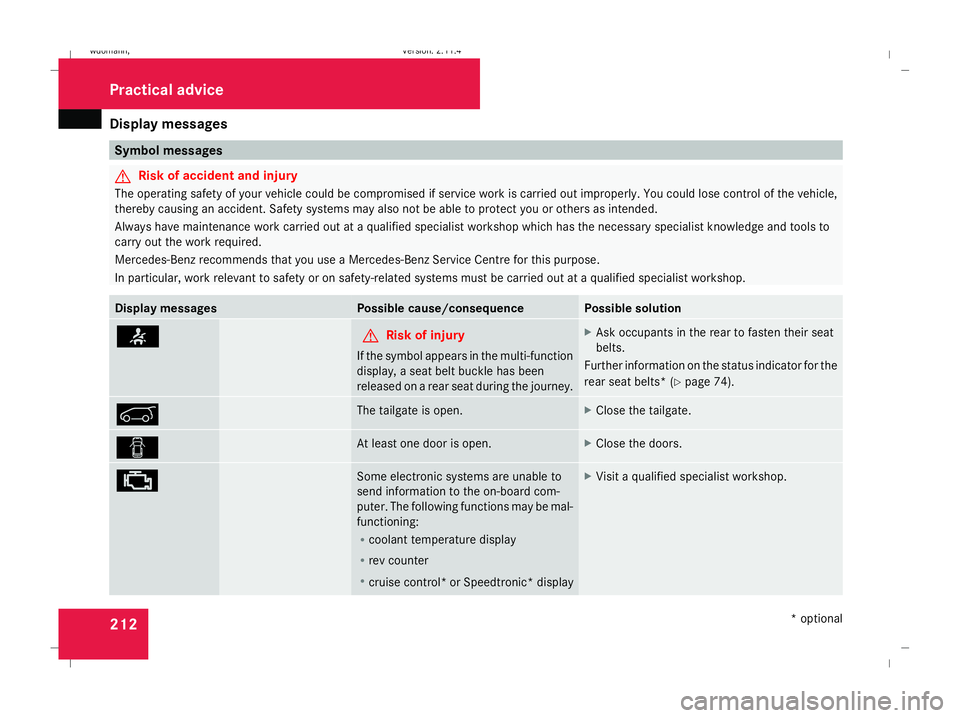
Display
messages 212 Symbol messages
G
Risk of accident and injury
The operating safety of your vehicle could be compromised if service work is carried out improperly. You could lose control of the vehicle,
thereby causing an accident. Safety systems may also not be able to protect you or others as intended.
Always have maintenance work carried out at a qualified specialist workshop which has the necessary specialist knowledge and tools to
carry out the work required.
Mercedes-Benz recommends that you use a Mercedes-Benz Service Centre for this purpose.
In particular, work relevant to safety or on safety-related systems must be carried out at a qualified specialist workshop. Display messages Possible cause/consequence Possible solution
< G
Risk of injury
If the symbol appears in the multi-function
display, a seat belt buckle has been
released on a rear seat during the journey. X
Ask occupants in the rear to fasten their seat
belts.
Further information on the status indicator for the
rear seat belts* (Y page 74). 1 The tailgate is open. X
Close the tailgate. 2 At least one door is open. X
Close the doors. ± Some electronic systems are unable to
send information to the on-board com-
puter. The following functions may be mal-
functioning:
R coolant temperature display
R rev counter
R cruise control *or Speedtronic* display X
Visit a qualified specialist workshop. Practical advice
* optional
245_AKB; 2; 7, en-GB
wdomann,
Version: 2.11.4 2008-10-17T11:22:31+02:00 - Seite 212Dateiname: 6515_1640_02_buchblock.pdf; preflight
Page 225 of 305
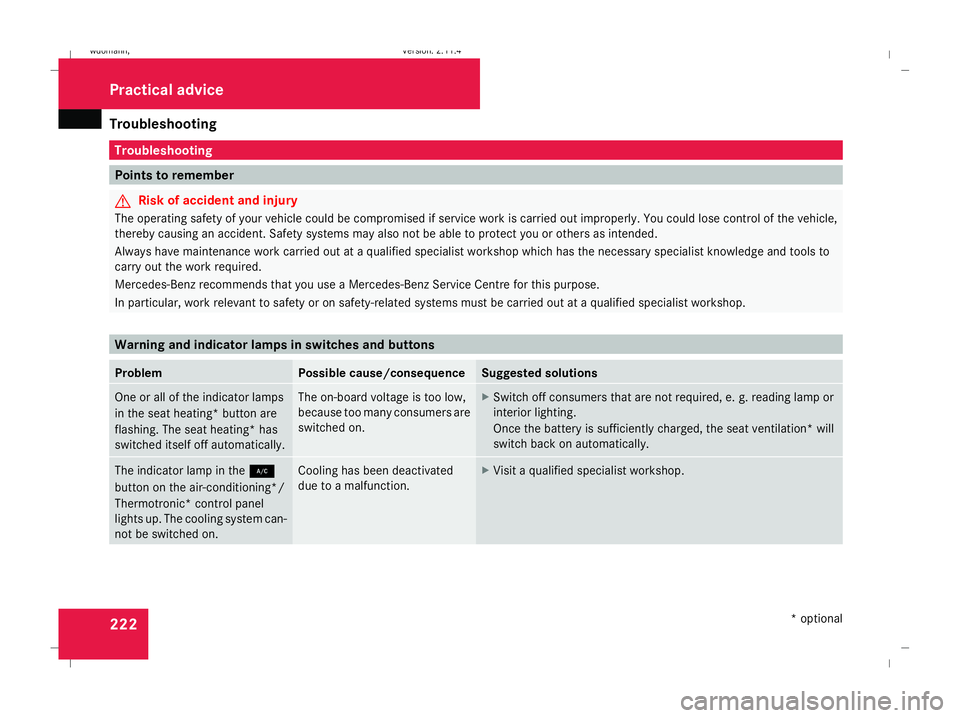
Troubleshooting
222 Troubleshooting
Points to remember
G
Risk of accident and injury
The operating safety of your vehicle could be compromised if service work is carried out improperly. You could lose control of the vehicle,
thereby causing an accident. Safety systems may also not be able to protect you or others as intended.
Always have maintenance work carried out at a qualified specialist workshop which has the necessary specialist knowledge and tools to
carry out the work required.
Mercedes-Benz recommends that you use a Mercedes-Benz Service Centre for this purpose.
In particular, work relevant to safety or on safety-related systems must be carried out at a qualified specialist workshop. Warning and indicator lamps in switches and buttons
Problem Possible cause/consequence Suggested solutions
One or all of the indicator lamps
in the seat heating* button are
flashing. The seat heating* has
switched itself off automatically. The on-board voltage is too low,
because too many consumers are
switched on. X
Switch off consumers that are not required, e. g. reading lamp or
interior lighting.
Once the battery is sufficiently charged, the seat ventilation* will
switch back on automatically. The indicator lamp in the
2
button on the air-conditioning */
Ther motronic* control panel
lights up. The cooling system can-
not be switched on. Cooling has been deactivated
due to a malfunction. X
Visit a qualified specialist workshop. Practical advice
* optional
245_AKB; 2; 7, en-GB
wdomann,
Version: 2.11.4 2008-10-17T11:22:31+02:00 - Seite 222Dateiname: 6515_1640_02_buchblock.pdf; preflight