service MERCEDES-BENZ B-CLASS HATCHBACK 2008 Owner's Manual
[x] Cancel search | Manufacturer: MERCEDES-BENZ, Model Year: 2008, Model line: B-CLASS HATCHBACK, Model: MERCEDES-BENZ B-CLASS HATCHBACK 2008Pages: 305, PDF Size: 5.1 MB
Page 104 of 305
On-board computer
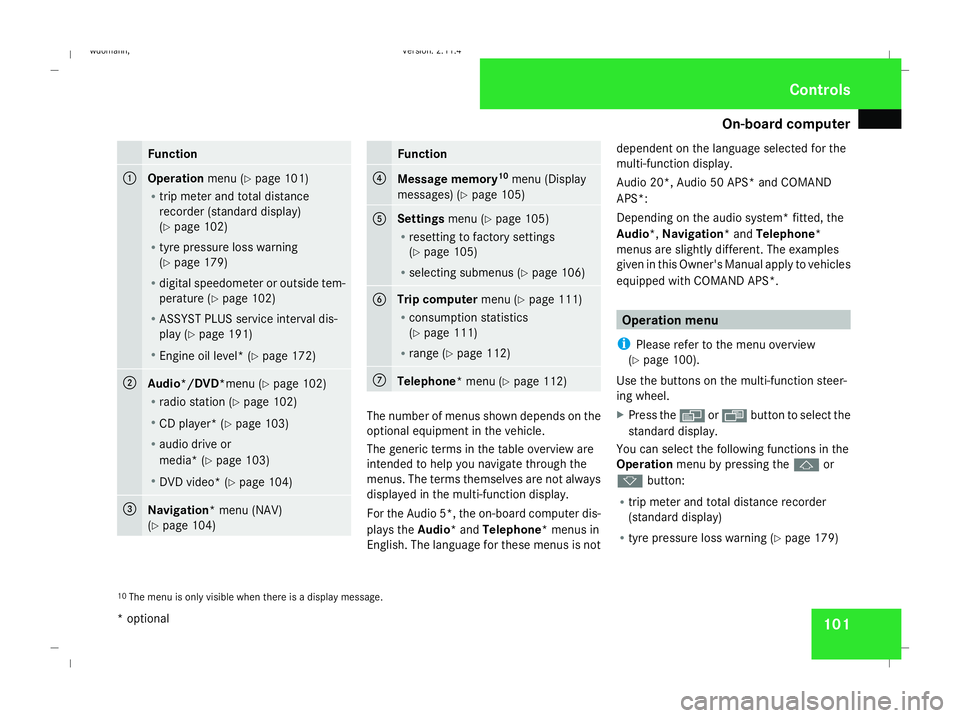
101Function
1
Operation
menu (Ypage 101)
R trip meter and total distance
recorder (standard display)
(Y page 102)
R tyre pressure loss warning
(Y page 179)
R digital speedometer or outside tem-
perature (Y page 102)
R ASSYST PLUS service interval dis-
play (Y page 191)
R Engine oil level* (Y page 172) 2
Audio*/DVD*
menu (Ypage 102)
R radio station (Y page 102)
R CD player* (Y page 103)
R audio drive or
media* ( Ypage 103)
R DVD video* (Y page 104) 3
Navigation* menu (NAV)
(Y
page 104) Function
4
Message memory
10
menu (Display
messages) ( Ypage 105) 5
Settings
menu (Ypage 105)
R resetting to factory settings
(Y page 105)
R selecting submenus (Y page 106) 6
Trip computer
menu (Ypage 111)
R consumption statistics
(Y page 111)
R range (Y page 112) 7
Telephone
* menu (Ypage 112) The number of menus shown depends on the
optional equipment in the vehicle.
The generic terms in the table overview are
intended to help you navigate through the
menus. The terms themselves are not always
displayed in the multi-function display.
For the Audio 5*, the on-board computer dis-
plays the Audio* and Telephone* menus in
English. The language for these menus is not dependent on the language selected for the
multi-function display.
Audio 20*, Audio 50 APS* and COMAND
APS*:
Depending on the audio system* fitted, the
Audio*,
Navigation* and Telephone*
menus are slightly different. The examples
given in this Owner's Manual apply to vehicles
equipped with COMAND APS*. Operation menu
i Please refer to the menu overview
(Y page 100).
Use the buttons on the multi-function steer-
ing wheel.
X Press the èor· button to select the
standard display.
You can select the following functions in the
Operation menu by pressing the jor
k button:
R trip meter and total distance recorder
(standard display)
R tyre pressure loss warning (Y page 179)
10 The menu is only visible when there is a display message. Controls
* optional
245_AKB; 2; 7, en-GB
wdomann
,V ersion: 2.11.4
2008-10-17T11:22:31+02:00 - Seite 101 ZDateiname: 6515_1640_02_buchblock.pdf; preflight
Page 105 of 305
On-board computer
102
R
digital speedometer or outside tempera-
ture
R ASSYST PLUS service interval display
(Y page 191)
R engine oil level* (Y page 172)
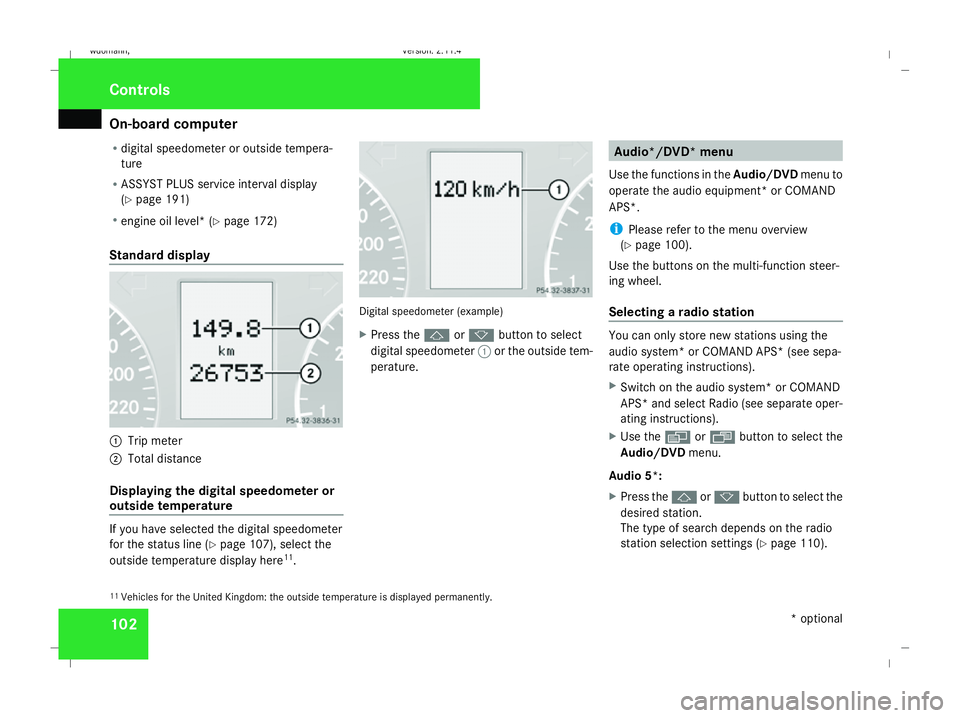
Standard display 1
Trip meter
2 Total distance
Displaying the digital speedometer or
outside temperature If you have selected the digital speedometer
for the status line (Y
page 107), select the
outside temperature display here 11
. Digital speedometer (example)
X
Press the jork button to select
digital speedometer 1or the outside tem-
perature. Audio*/DVD* menu
Use the functions in the Audio/DVDmenu to
operate the audio equipment *or COMAND
APS*.
i Please refer to the menu overview
(Y page 100).
Use the buttons on the multi-function steer-
ing wheel.
Selecting a radio station You can only store new stations using the
audio system* or COMAND APS* (see sepa-
rate operating instructions).
X Switch on the audio system* or COMAND
APS* and select Radio (see separate oper-
ating instructions).
X Use the èor· button to select the
Audio/DVD menu.
Audio 5*:
X Press the jork button to select the
desired station.
The type of search depends on the radio
station selection settings (Y page 110).
11 Vehicles for the United Kingdom: the outside temperature is displayed permanently. Controls
* optional
245_AKB; 2; 7, en-GB
wdomann,
Version: 2.11.4 2008-10-17T11:22:31+02:00 - Seite 102Dateiname: 6515_1640_02_buchblock.pdf; preflight
Page 115 of 305
On-board computer
112
Resetting X
Using èor·, select From start.
X Press the jork button to select the
function that you wish to reset.
X Press and hold the reset button on the left
of the instrument cluster until the values
have reverted to "0".
Calling up the range X
Using èor·, select From start.
X Press the jork button to select
Range:.
The multi-function display shows the esti-
mated range of the vehicle, based on the
current driving style and the fuel level. If
there is only a small amount of fuel remain-
ing in the fuel tank, a vehicle refuelling
¿ appears instead of the range. Telephone menu*
Functions and displays depend on the
optional equipment installed in your vehicle.
You can place your mobile phone in the
mobile phone bracket* (Y page 163), or set
up a Bluetooth connection to the audio sys-
tem* or COMAND APS* (see separate oper-
ating instructions). G
Risk of accident
Observe the legal requirements of the
country in which you are currently driving
regarding the use of mobile phones in the
vehicle.
If it is permitted to use mobile phones while
the vehicle is in motion, you should only use
them when the road and traffic conditions
allow. Otherwise, you may be distracted
from the traffic conditions, cause an acci-
dent and injure yourself and others.
i Please refer to the menu overview
(Y page 100).
Use the buttons on the multi-function steer-
ing wheel. X
Switch on the mobile phone and audio
equipment* or COMAND APS* (see sepa-
rate operating instructions).
X Press the èor· button to select the
Telephone menu.
Mobile phone on PIN code not yet entered
Once you have inserted the mobile phone into
the mobile phone bracket*, the multi-func-
tion display shows the
PINdisplay message.
X Enter the PIN using the mobile phone, Lin-
guatronic*, the audio system* or COMAND
APS*.
The mobile phone will search for a network.
Mobile phone operational
You will see Readyor the name of the mobile
phone network provider in the multi-function
display. If the operational readiness symbol
of the mobile phone goes out, your vehicle is
outside the transmission and reception
range. In this case you will see No Service
in the multi-function display. Controls
* optional
245_AKB; 2; 7, en-GB
wdomann
,V ersion: 2.11.4
2008-10-17T11:22:31+02:00 - Seite 112 Dateiname: 6515_1640_02_buchblock.pdf; preflight
Page 132 of 305
Air conditioning
129General notes
The air-conditioning system*/
Thermotronic* controls the temperature and
the humidity of the vehicle interior and filters
out undesirable substances from the air.
Heatmatic/the air-conditioning system*/
Thermotronic* is only operational when the
engine is running. Optimum operation is ach-
ieved only when you drive with the side win-
dows and panorama louvred sliding sun-
roof* closed. i
Ventilate the vehicle for a brief period
during warm weather, e.g. using the con-
venience opening feature (Y page 84). This
will speed up the cooling process and the
desired vehicle interior temperature will be
reached more quickly.
i The integrated filter filters out most par-
ticles of dust and completely filters out pol-
len. A clogged filter reduces the amount of
air supplied to the vehicle interior. For this
reason, you should always observe the interval for replacing the filter, which is
specified in the Service Booklet. As it
depends on environmental conditions, e.g.
heavy air pollution, the interval may be
shorter than stated in the Service Booklet. G
Risk of accident
Observe the settings recommended on the
following pages. Otherwise, the windows
could mist up. This may obstruct your view
of the traffic situation and, as a result, you
may cause an accident. Cont
rols
* optional
245_AKB; 2; 7, en-GB
wdomann, Version: 2.11.4
2008-10-17T11:22:31+02:00 - Seite 129 ZDateiname: 6515_1640_02_buchblock.pdf; preflight
Page 148 of 305
Loading and stowing
145
R
Always place the load against the rear seat
backrests or the seat cushions if these
have been folded forwards.
R The maximum load capacity of the stowage
well under the luggage compartment floor
is 25 kg.
R Always place the load behind unoccupied
seats if possible.
R Secure the load with sufficiently strong and
wear-resistant load restraints. Pad sharp
edges for protection.
i Load restraints are available at any quali-
fied specialist workshop, e.g. a Mercedes-
Benz Service Centre. R
If the rear seats are not occupied, insert the
belt tongue on the outer seat belts into the
buckle of the opposite seat belt. This
increases the restraining effect of the rear
seat backrests.
! Do not position the load on one part of the
folding luggage compartment floor only.
The maximum load capacity of the folding
luggage compartment floor is 100 kg.
Spread the weight evenly to avoid damag-
ing the luggage compartment floor. If nec-
essary, place a solid board under the load.
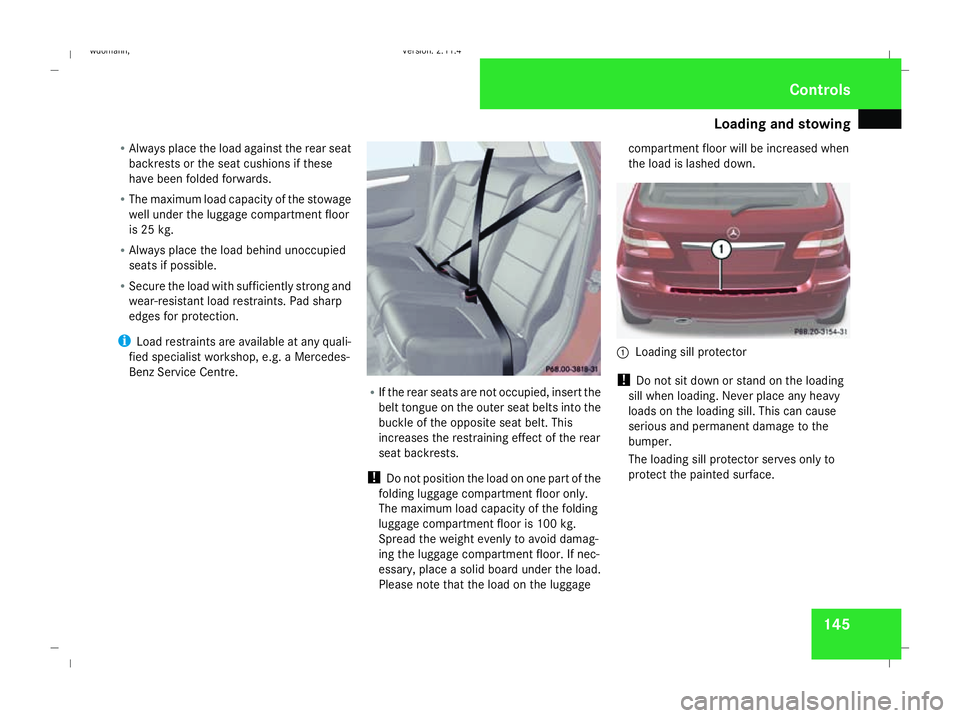
Please note that the load on the luggage compartment floor will be increased when
the load is lashed down.
1
Loading sill protector
! Do not sit down or stand on the loading
sill when loading. Never place any heavy
loads on the loading sill. This can cause
serious and permanent damage to the
bumper.
The loading sill protector serves only to
protect the painted surface. Controls
245_AKB; 2; 7, en-GB
wdomann
,V ersion: 2.11.4
2008-10-17T11:22:31+02:00 - Seite 145 ZDateiname: 6515_1640_02_buchblock.pdf; preflight
Page 162 of 305
Loading and stowing
159
i
In the glove compartment there are stow-
age spaces for the following:
R coins
R pens
R credit cards and service cards
i Depending on the vehicle's equipment,
you will find installed in the glove compart-
ment either a CD holder*, an AUX-IN con-
nection* or a Media Interface*, which is a
universal interface for portable audio
equipment, e.g. for an iPod or USB device.
i Glove compartment ventilation*:
the glove compartment is ventilated by an
adjustable vent (Y page 136).
Stowage compartment in the front
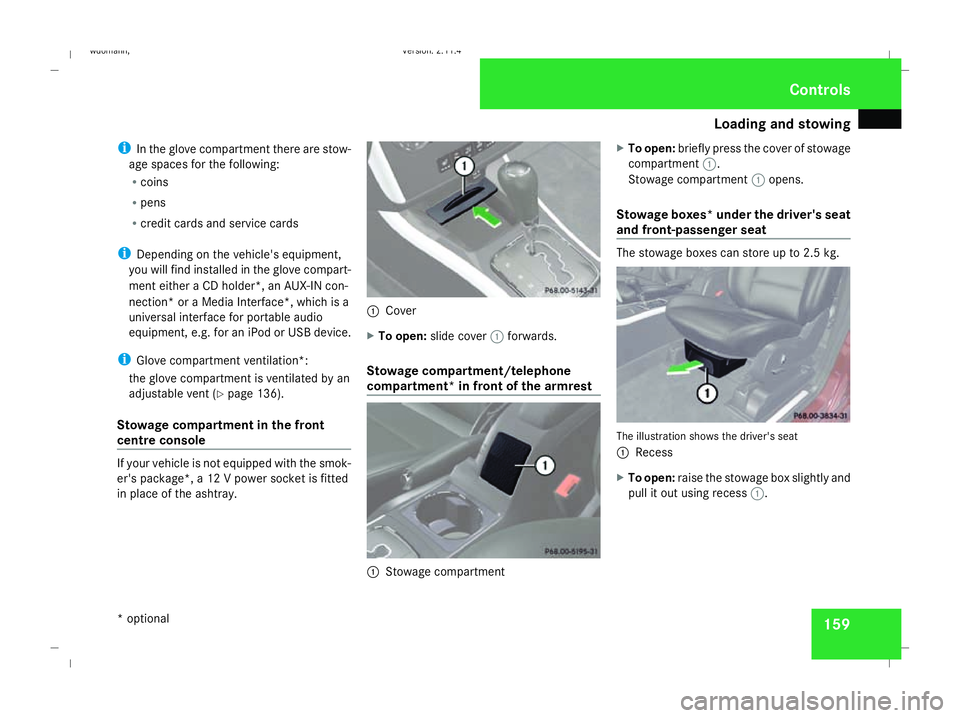
centre console If your vehicle is not equipped with the smok-
er's package*, a 12 V power socket is fitted
in place of the ashtray. 1
Cover
X To open: slide cover 1forwards.
Stowage compartment/telephone
compartment* in front of the armrest 1
Stowage compartment X
To open: briefly press the cover of stowage
compartment 1.
Stowage compartment 1opens.
Stowage boxes* under the driver's seat
and front-passenger seat The stowage boxes can store up to 2.5 kg.
The illustration shows the driver's seat
1
Recess
X To open: raise the stowage box slightly and
pull it out using recess 1. Controls
* optional
245_AKB; 2; 7, en-GB
wdomann
,V ersion: 2.11.4
2008-10-17T11:22:31+02:00 - Seite 159 ZDateiname: 6515_1640_02_buchblock.pdf; preflight
Page 167 of 305
Features
164 relating to the possible health risk posed by
electromagnetic fields.
To ensure optimum reception quality for
mobile phones in the vehicle, and to minimise
mutual influences between the vehicle elec-
tronics and mobile phones, Mercedes-Benz
recommends the use of an approved exterior
aerial. An exterior aerial conducts the elec-
tromagnetic fields generated by a wireless
device to the exterior of the vehicle; the field
strength within the vehicle interior is lower
than in a vehicle that does not have an exte-
rior aerial.
i There are various mobile phone brackets
that may be fitted to your vehicle; in some
cases, these are country-specific. You can
obtain these mobile phone brackets from a
qualified specialist workshop, e.g. a
Mercedes-Benz Service Centre.
The functions and services available when
you use the phone depend on your mobile
phone model and service provider.
Inserting the mobile phone
X Open the telephone compartment
(Y page 159).
X Place the mobile phone bracket into the
pre-installed fitting; see the separate mobile phone bracket installation instruc-
tions.
X Insert the mobile phone into the mobile
phone bracket; see the separate mobile
phone bracket installation instructions.
If the mobile phone is inserted in the mobile
phone bracket, you can speak to the person
you are calling using the hands-free system.
You can operate the telephone using the
s andt buttons on the multi-function
steering wheel. You can operate other mobile
phone functions via the on-board computer
(Y page 112).
When you take the key out of the ignition lock,
the mobile phone stays on but you can no
longer use the hands-free system.
If you are making a call and you would like to
take the key out of the ignition lock, first
remove the mobile phone from the bracket.
Otherwise, the call will be terminated. Floormat on the driver's side
G
Risk of accident
Make sure that there is sufficient clearance
around the pedals when floormats are
used, and that the floormats are properly
secured.
The floormats must be secured at all times
using retainers and studs.
Before you drive off, make sure that the
floormats are secure and rectify if neces-
sary. A floormat which is not properly
secured can slip and thereby interfere with
the movement of the pedals.
Do not place floormats on top of one
another. Cont
rols
245_AKB; 2; 7, en-GB
wdomann,
Version: 2.11.4
2008-10-17T11:22:31+02:00 - Seite 164 Dateiname: 6515_1640_02_buchblock.pdf; preflight
Page 170 of 305
167
Running-in notes
............................... 168
Refuelling ........................................... 168
Engine compartment ........................171
Tyres and wheels .............................. 176
Winter driving ................................... 181
Driving tips ........................................ 183
Driving abroad ................................... 185
Trailer towing* .................................. 186
Service ............................................... 191
Care .................................................... 192 Operation
245_AKB; 2; 7, en-GB
wdomann
, Version: 2.11.4 2008-10-17T11:22:31+02:00 - Seite 167Dateiname: 6515_1640_02_buchblock.pdf; preflight
Page 172 of 305
Refuelling
169
3
Tyre pressure table
4 Fuel type
X To open: press the fuel filler flap in the
direction of arrow 1.
X Turn the fuel filler cap to the left and
remove it.
X Insert the fuel filler cap into the holder
bracket on the inside of filler flap 2.
X Only fill the tank until the pump nozzle
switches off.
! Overfilling the fuel tank could damage the
fuel system.
X To close: replace the fuel filler cap and turn
it clockwise. The fuel filler cap audibly
engages.
X Close the fuel filler flap.
i Vehicles with a diesel engine:
if the fuel tank has been run completely dry,
it will be necessary to bleed the fuel system
(Y page 232). Petrol (EN 228)
! Refuel using only unleaded premium
grade petrol with a minimum octane num-
ber of 95 RON/85 MON conforming to
European standard EN 228.
You could otherwise impair engine output
or damage the engine.
i As a temporary measure, only when the
recommended fuel is not available, you
may also use regular unleaded petrol,
91 RON/82.5 MON. This may reduce
engine performance and increase fuel con-
sumption. Avoid driving at full throttle.
In some countries, the available petrol qual-
ity may not be adequate and could cause
coking around the inlet valve. In such
cases, and in consultation with a
Mercedes-Benz Service Centre, the petrol
may be mixed with the additive recommen-
ded by Mercedes-Benz (part no.
A000989254510). You must observe the
notes and mixing ratios specified on the
container.
For further information on "Fuel" see
(Y page 291). Turbo engines !
Refuel using only unleaded Super Plus
with a minimum octane number of
98 RON/88 MON conforming to European
standard EN 228.
You could otherwise impair engine output
or damage the engine.
i If the recommended fuel is not available
and only as a temporary measure, you may
also use premium unleaded petrol,
95 RON/85 MON. This may reduce engine
performance and increase fuel consump-
tion. You must avoid driving at full throttle. Diesel (EN 590)
! Only use diesel that complies with the
EN 590 European standard.
You could otherwise impair engine output
or damage the engine.
You will find further information about die-
sel under "Fuel" in the index.
! When refuelling vehicles with a diesel par-
ticle filter in countries outside the EU, only
low-sulphur Euro diesel with less than
0.005 percent sulphur content by weight
should be used. In countries in which diesel Operation
245_AKB; 2; 7, en-GB
wdomann,
Version: 2.11.4
2008-10-17T11:22:31+02:00 - Seite 169 ZDateiname: 6515_1640_02_buchblock.pdf; preflight
Page 173 of 305
Refuelling
170with a higher sulphur content is available
(e.g. 0.035 percent by weight), the engine
oil should be renewed at more frequent
intervals. More information about intervals
for changing the engine oil can be obtained
from any Mercedes-Benz Service Centre.
! Using fuel that does not comply with
EN 590 can increase wear and damage the
engine and the exhaust system.
Do not use the following:
R marine diesel
R heating oil
R bio-diesel
R vegetable oil
R petrol
R paraffin
R kerosene
Do not add such fuels to diesel fuel and do
not use any special additives (exception:
flow improvers – see "Low outside temper-
atures").
Damage caused by the use of unapproved
fuels or additives is not covered by the war-
ranty. For further information on "Fuel" see
(Y
page 291).
Low outside temperatures The flow properties of diesel may be inade-
quate at low ambient temperatures.
To prevent operating problems, diesel fuel
with improved cold flow qualities is available
during the winter months. Your vehicle must
be refuelled with this winter diesel at temper-
atures of -5 °C or below.
You can use this winter diesel at tempera-
tures down to about -20 °C without problems.
If only summer diesel fuel or less cold-resist-
ant winter diesel fuel (e.g. in Mediterranean
regions) is available, you should add an
amount of flow improver to the fuel corre-
sponding to the outside temperature.
Mix the additive with the diesel in good time,
before the flow properties of the diesel
become inadequate. Otherwise, malfunctions
can only be rectified by heating the entire fuel
system, e.g. by parking the vehicle in a heated
garage. G
Risk of fire
Do not use petrol to refuel vehicles with a
diesel engine. Never mix diesel with petrol. This would damage the fuel system and
engine and could result in a vehicle fire.
Flow improver
The effectiveness of a flow improver is not
guaranteed with every fuel. Observe the infor-
mation provided by the manufacturer when
using a flow improver. Only use flow improv-
ers that have been tested and approved by
Mercedes-Benz. Information about flow
improvers that have been tested and
approved by Mercedes-Benz can be obtained
from any Mercedes-Benz Service Centre. Operation
245_AKB; 2; 7, en-GB
wdomann,
Version: 2.11.4 2008-10-17T11:22:31+02:00 - Seite 170Dateiname: 6515_1640_02_buchblock.pdf; preflight