wheel MERCEDES-BENZ B-CLASS HATCHBACK 2008 Service Manual
[x] Cancel search | Manufacturer: MERCEDES-BENZ, Model Year: 2008, Model line: B-CLASS HATCHBACK, Model: MERCEDES-BENZ B-CLASS HATCHBACK 2008Pages: 305, PDF Size: 5.1 MB
Page 127 of 305
Driving sys
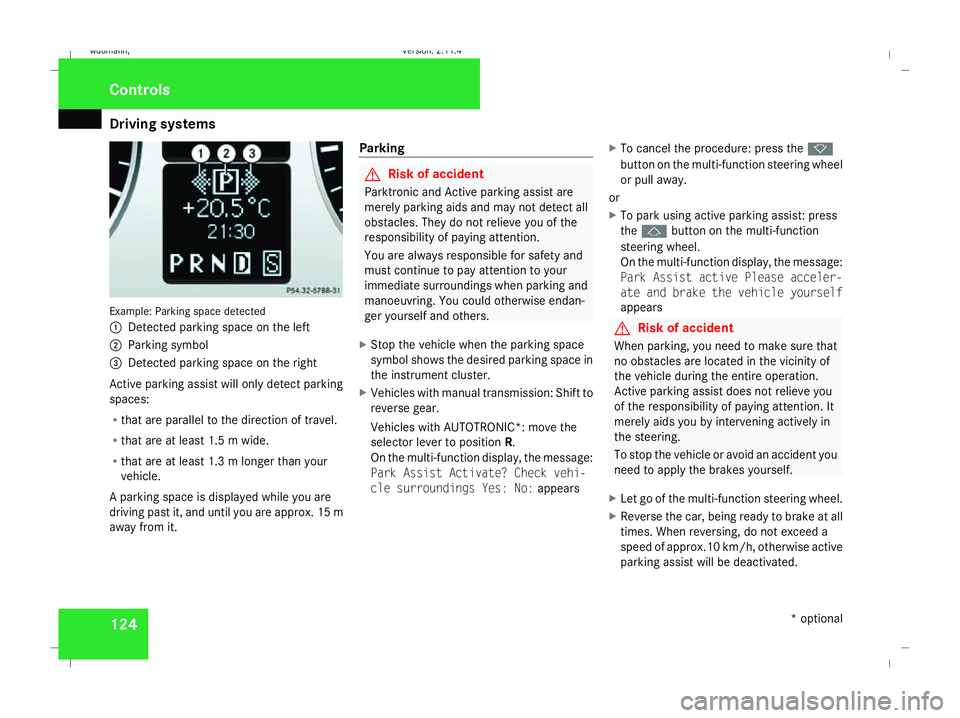
tems 124Example: Parking space detected
1
Detected parking space on the left
2 Parking symbol
3 Detected parking space on the right
Active parking assist will only detect parking
spaces:
R that are parallel to the direction of travel.
R that are at least 1.5 m wide.
R that are at least 1.3 m longer than your
vehicle.
A parking space is displayed while you are
driving past it, and until you are approx. 15 m
away from it. Parking G
Risk of accident
Parktronic and Active parking assist are
merely parking aids and may not detect all
obstacles. They do not relieve you of the
responsibility of paying attention.
You are always responsible for safety and
must continue to pay attention to your
immediate surroundings when parking and
manoeuvring. You could otherwise endan-
ger yourself and others.
X Stop the vehicle when the parking space
symbol shows the desired parking space in
the instrument cluster.
X Vehicles with manual transmission: Shift to
reverse gear.
Vehicles with AUTOTRONIC*: move the
selector lever to position R.
On the multi-function display, the message:
Park Assist Activate? Check vehi-
cle surroundings Yes: No: appearsX
To cancel the procedure: press the k
button on the multi-function steering wheel
or pull away.
or
X To park using active parking assist: press
the j button on the multi-function
steering wheel.
On the multi-function display, the message:
Park Assist active Please acceler-
ate and brake the vehicle yourself
appears G
Risk of accident
When parking, you need to make sure that
no obstacles are located in the vicinity of
the vehicle during the entire operation.
Active parking assist does not relieve you
of the responsibility of paying attention. It
merely aids you by intervening actively in
the steering.
To stop the vehicle or avoid an accident you
need to apply the brakes yourself.
X Let go of the multi-function steering wheel.
X Reverse the car, being ready to brake at all
times. When reversing, do not exceed a
speed of approx.10 km/h, otherwise active
parking assist will be deactivated. Controls
* optional
245_AKB; 2; 7, en-GB
wdomann,
Version: 2.11.4
2008-10-17T11:22:31+02:00 - Seite 124 Dateiname: 6515_1640_02_buchblock.pdf; preflight
Page 128 of 305
Driving sys
tems 125
i
In tight parking spaces, you will achieve
the best parking results by reversing as far
as possible. When doing so, also observe
the Parktronic messages.
X Stop as soon as Parktronic sounds the con-
tinuous warning tone, if not before.
Manoeuvring may be required in tight park-
ing spaces.
Vehicles with manual transmission: the mes-
sage Park Assist active Please shift
to a forward gear appears in the multi-
function display.
Vehicles with AUTOTRONIC*: the message
Park Assist active Please shift to
D appears in the multi-function display.
X Vehicles with manual transmission: When
the car is stationary, shift to first gear.
Vehicles with AUTOTRONIC*: When the car
is stationary, set the selector lever to posi-
tion R.
Active parking assist immediately steers in
the other direction.
On the multi-function display, the message:
Park Assist active Please acceler- ate and brake the vehicle yourself
appears.
i You will achieve the best parking results
by waiting for the steering procedure to
complete before moving forwards.
X Drive forwards and be ready to brake at all
times.
X Stop as soon as Parktronic sounds the con-
tinuous warning tone, if not before.
Vehicles with manual transmission: the mes-
sage Park Assist active Please shift
into reverse gear appears in the multi-
function display.
Vehicles with AUTOTRONIC*, the message
Park Assist active Please shift to
R appears in the multi-function display.
X Further gear changes* may be necessary.
As soon as the parking procedure is com-
plete, the message Parking assistance
finished Please take over appears.
Active parking assist is now deactivated.
Parktronic is still available.
X Manoeuvre if necessary.
X Always observe the warning messages dis-
played by Parktronic (Y page 120).Cancelling active parking assist You can cancel active parking assist at any
time.
X
Stop the movement of the multi-function
steering wheel or steer yourself.
Active parking assist will be cancelled at
once. The multi-function display shows the
message: Park Assist cancelled .
or
X Press the Parktronic button on the centre
console (Y page 121).
Parktronic is switched off and active park-
ing assist is immediately cancelled. The
multi-function display shows the message:
Park Assist cancelled .
Active parking assist is cancelled automati-
cally if:
R a gear is changed* too early
R parking using active parking assist is no
longer possible
R you are driving faster than 10 km/h
R a wheel spins, ESP ®
is activated or fails. In
such cases the vwarning lamp lights
up in the instrument cluster. Controls
* optional
245_AKB; 2; 7, en-GB
wdomann,
Version: 2.11.4
2008-10-17T11:22:31+02:00 - Seite 125 ZDateiname: 6515_1640_02_buchblock.pdf; preflight
Page 137 of 305
Air conditioning
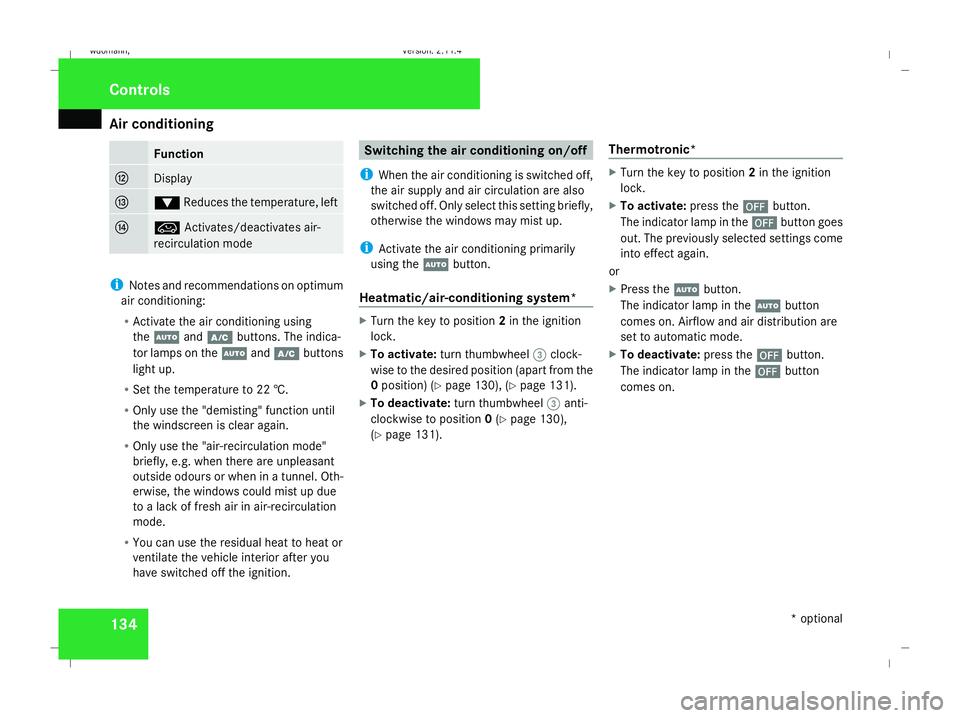
134 Function
c
Display
d
%
Reduces the temperature, left e
Ä
Activates/deactivates air-
recirculation mode i
Notes and recommendations on optimum
air conditioning:
R Activate the air conditioning using
the U andœ buttons. The indica-
tor lamps on the Uandœ buttons
light up.
R Set the temperature to 22 †.
R Only use the "demisting" function until
the windscreen is clear again.
R Only use the "air-recirculation mode"
briefly, e.g. when there are unpleasant
outside odours or when in a tunnel. Oth-
erwise, the windows could mist up due
to a lack of fresh air in air-recirculation
mode.
R You can use the residual heat to heat or
ventilate the vehicle interior after you
have switched off the ignition. Switching the air conditioning on/off
i When the air conditioning is switched off,
the air supply and air circulation are also
switched off. Only select this setting briefly,
otherwise the windows may mist up.
i Activate the air conditioning primarily
using the Ubutton.
Heatmatic/air-conditioning system* X
Turn the key to position 2in the ignition
lock.
X To activate: turn thumbwheel 3clock-
wise to the desired position (apart from the
0 position) (Y page 130), (Ypage 131).
X To deactivate: turn thumbwheel 3anti-
clockwise to position 0(Y page 130),
(Y page 131). Thermotronic* X
Turn the key to position 2in the ignition
lock.
X To activate: press the´button.
The indicator lamp in the ´button goes
out. The previously selected settings come
into effect again.
or
X Press the Ubutton.
The indicator lamp in the Ubutton
comes on. Airflow and air distribution are
set to automatic mode.
X To deactivate: press the´button.
The indicator lamp in the ´button
comes on. Cont
rols
* optional
245_AKB; 2; 7, en-GB
wdomann,
Version: 2.11.4 2008-10-17T11:22:31+02:00 - Seite 134Dateiname: 6515_1640_02_buchblock.pdf; preflight
Page 138 of 305
Air conditioning
135Switching cooling with air dehumidi-
fication on/off
The "cooling with dehumidification" function
is only available when the engine is running.
The air inside the vehicle is cooled and dehu-
midified according to the temperature selec-
ted. This prevents the windows from misting
up. G
Risk of accident
If the "cooling with air dehumidification"
function is deactivated, the air inside the
vehicle will not be cooled (during warm
weather) or dehumidified. The windows
could mist up more quickly. This may pre-
vent you from observing the traffic condi-
tions, thereby causing an accident. H
Environmental note
The cooling system uses the refrigerant
R134A. This refrigerant does not damage
the earth's ozone layer.
Condensation may drip from the underside of
the vehicle when Thermatic is in cooling
mode.
The "cooling with air dehumidification" func-
tion is only available with air conditioning* or
Thermotronic*. X
To switch on: press theœbutton.
The indicator lamp in the œbutton lights
up.
X To deactivate: press theœbutton.
The indicator lamp in the œbutton goes
out. The cooling with air dehumidification
function has a delayed switch-off feature. Controlling the air conditioning auto-
matically
Only Thermotronic* features the "control air
conditioning automatically" function.
In automatic mode, the set temperature is
maintained automatically at a constant level.
The system automatically regulates the tem-
perature of the dispensed air, the airflow and
the air distribution.
The automatic air conditioning will achieve
optimal operation if "cooling with air dehu-
midification" is also activated. If necessary,
cooling with air dehumidification can be deac-
tivated. X
Turn the key to position 2in the ignition
lock.
X Set the desired temperature.
X To activate: press theUbutton.
The indicator lamp in the Ubutton
comes on. Automatic air distribution and
airflow are activated.
X To deactivate: press theUbutton.
The indicator lamp in the Ubutton goes
out. The airflow is regulated to the level set.
The air distribution is set to the bposi-
tion. Setting the temperature
Heatmatic/air-conditioning system* You can set the temperature for the entire
vehicle.
X
Turn the key to position 2in the ignition
lock.
X To increase/reduce: turn thumb-
wheel 1clockwise or anti-clockwise
(Y page 130), (Y page 131). Only adjust the
temperature in small increments. Start at
22 †. 17 Cont
rols
* optional
245_AKB; 2; 7, en-GB
wdomann, Version: 2.11.4
2008-10-17T11:22:31+02:00 - Seite 135 ZDateiname: 6515_1640_02_buchblock.pdf; preflight
Page 139 of 305
Air conditioning
136
Thermotronic* Different temperatures can be set for the
driver's and front-passenger sides.
X Turn the key to position 2in the ignition
lock.
X To increase/reduce: press the$or
% button. Only change the temperature
setting in small increments. Start at 22 †.
The temperature is shown in the display. Adjusting the air vents
G
Risk of injury
Very hot or very cold air can flow from the
air vents. This could cause burns or frost-
bite to bare skin in the immediate vicinity
of the vents. Keep bare skin away from
these air outlets. If necessary, direct the
airflow away to a different area of the vehi-
cle interior.
Please observe the following notes to ensure
that the air can flow freely through the air
vents:
R keep the air inlet between the windscreen
and the bonnet free of deposits, such as ice, snow and foliage, to guarantee the sup-
ply of fresh air into the vehicle interior.
R never cover the vents or air inlet and outlet
grilles in the vehicle interior.
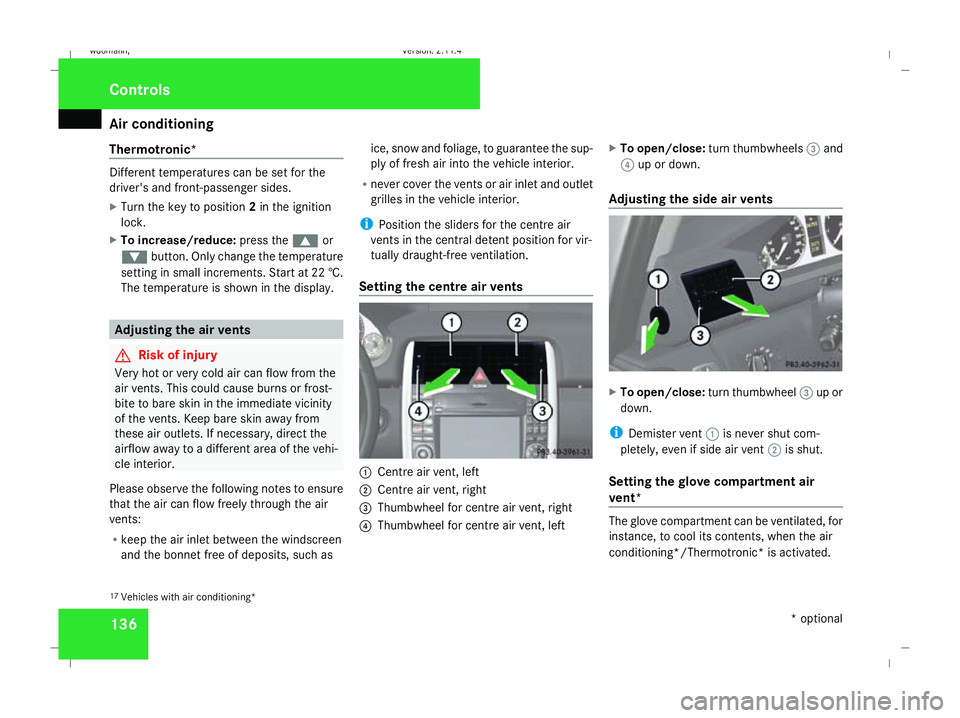
i Position the sliders for the centre air
vents in the central detent position for vir-
tually draught-free ventilation.
Setting the centre air vents 1
Centre air vent, left
2 Centre air vent, right
3 Thumbwheel for centre air vent, right
4 Thumbwheel for centre air vent, left X
To open/close: turn thumbwheels 3and
4 up or down.
Adjusting the side air vents X
To open/close: turn thumbwheel 3up or
down.
i Demister vent 1is never shut com-
pletely, even if side air vent 2is shut.
Setting the glove compartment air
vent* The glove compartment can be ventilated, for
instance, to cool its contents, when the air
conditioning*/Thermotronic* is activated.
17 Vehicles with air conditioning* Cont
rols
* optional
245_AKB; 2; 7, en-GB
wdomann,
Version: 2.11.4 2008-10-17T11:22:31+02:00 - Seite 136Dateiname: 6515_1640_02_buchblock.pdf; preflight
Page 140 of 305
Air conditioning
137
The level of airflow depends on the airflow and
air distribution settings.
!
Close the glove compartment air vent
when heating mode is activated. At high
outside temperatures, open the air vent
and activate the "cooling with air dehumid-
ification" function. Otherwise, tempera-
ture-sensitive items stored in the glove
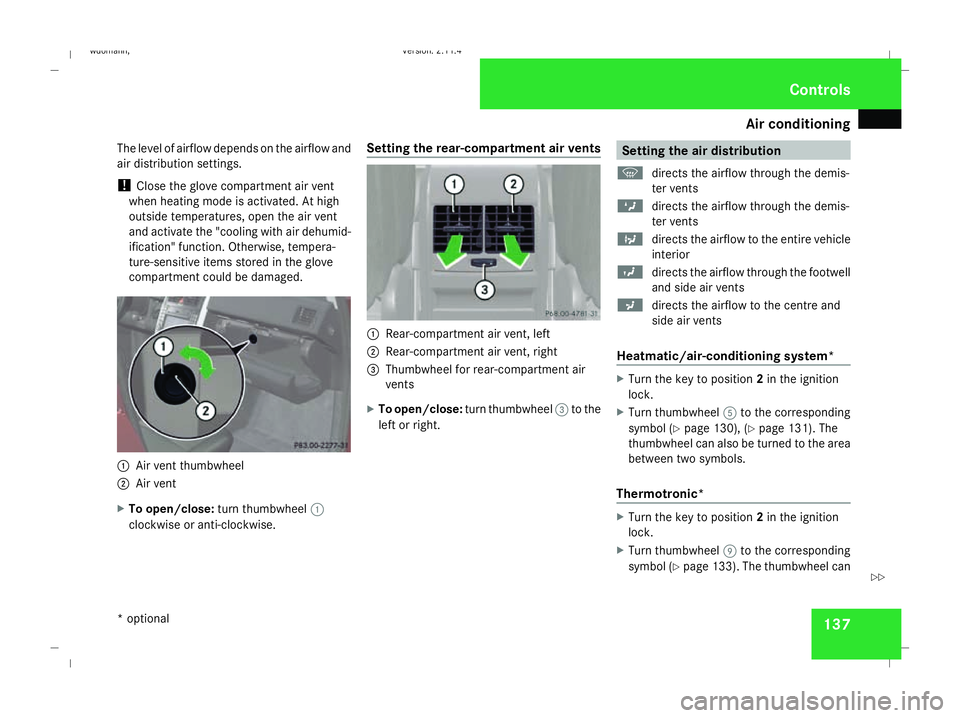
compartment could be damaged. 1
Air vent thumbwheel
2 Air vent
X To open/close: turn thumbwheel 1
clockwise or anti-clockwise. Setting the rear-compartment air vents 1
Rear-compartment air vent, left
2 Rear-compartment air vent, right
3 Thumbwheel for rear-compartment air
vents
X To open/close: turn thumbwheel 3to the
left or right. Setting the air distribution
P directs the airflow through the demis-
ter vents
Z directs the airflow through the demis-
ter vents
b directs the airflow to the entire vehicle
interior
Y directs the airflow through the footwell
and side air vents
a directs the airflow to the centre and
side air vents
Heatmatic/air-conditioning system* X
Turn the key to position 2in the ignition
lock.
X Turn thumbwheel 5to the corresponding
symbol ( Ypage 130), ( Ypage 131). The
thumbwheel can also be turned to the area
between two symbols.
Thermotronic* X
Turn the key to position 2in the ignition
lock.
X Turn thumbwheel 9to the corresponding
symbol ( Ypage 133). The thumbwheel can Controls
* optional
245_AKB; 2; 7, en-GB
wdomann , Version: 2.11.4 2008-10-17T11:22:31+02:00 - Seite 137 ZDateiname: 6515_1640_02_buchblock.pdf; preflight
Page 141 of 305
Air conditioning
138also be turned to the area between two
symbols. Setting the airflow
Heatmatic/air-conditioning system* X
Turn the key to position 2in the ignition
lock.
X To increase/reduce: turn thumbwheel
3 clockwise or anti-clockwise
(Y page 130), ( Ypage 131).
Thermotronic* X
Turn the key to position 2in the ignition
lock.
X To increase/reduce: turn thumbwheel
1 clockwise or anti-clockwise
(Y page 133). Demisting the windscreen
i You should only select the "demisting"
function until the windscreen is clear again.
Heatmatic/air-conditioning system* X
Turn the key to position 2in the ignition
lock.
X To activate: switch on the cooling with air
dehumidification. 18
X Deactivate air-recirculation mode.
X Turn thumbwheel 1clockwise to
P (Ypage 130), ( Ypage 131).
X Turn thumbwheel 3clockwise to
P (Ypage 130), ( Ypage 131).
X Turn thumbwheel 5clockwise or anti-
clockwise to P(Ypage 130),
(Y page 131).
X To deactivate: turn thumbwheels 1,3
and 5to the desired position (apart from
the P position) (Y page 130),
(Y page 131). Thermotronic* X
Turn the key to position 2in the ignition
lock.
X To activate: press the|button.
The indicator lamp in the |button
comes on.
The system automatically switches to the
following functions:
R cooling with air dehumidification on
R high airflow
R high temperature
R air distribution to the windscreen and
front side windows
R air-recirculation mode off
X To switch off: press the|button.
The indicator lamp in the |button goes
out. The previously selected settings come
into effect again. The cooling with air dehu-
midification function remains on. Air-recir-
culation mode remains deactivated.
or
18 Only vehicles with an air-conditioning system* Cont
rols
* optional
245_AKB; 2; 7, en-GB
wdomann,
Version: 2.11.4 2008-10-17T11:22:31+02:00 - Seite 138Dateiname: 6515_1640_02_buchblock.pdf; preflight
Page 142 of 305
Air conditioning
139
X
Press the Ubutton.
The indicator lamp in the |button goes
out. Airflow and air distribution are set to
automatic mode.
or
X Press one of the $or% temperature
buttons.
The indicator lamp in the |button goes
out. The air distribution is directed towards
the windscreen. The air conditioning
switches to manual mode.
or
X Turn thumbwheel 1clockwise or anti-
clockwise (Y page 133).
The indicator lamp in the |button goes
out. The air distribution is directed towards
the windscreen. The air conditioning
switches to manual mode. Demisting the windows
Windows misted up on the inside X
Activate the "cooling with air dehumidifica-
tion" function 19
.
X Activate the automatic air conditioning. 20
X If the windows continue to mist up, activate
the "demisting" function.
Windows misted up on the outside X
Activate the windscreen wipers.
X Turn the air distribution thumbwheel to the
Y ora symbol.
i You should only select this setting until
the windscreen is clear again. Switching the rear window heating
on/off
G
Risk of accident
Clear all windows of ice or snow before set-
ting off. Otherwise, impaired visibility could
endanger you and others.
i The rear window heating has a high cur-
rent draw. You should therefore switch it
off as soon as the window is clear, as it only
switches off automatically after several
minutes.
i If the battery voltage is too low, the rear
window heating may switch off.
X Turn the key to position 2in the ignition
lock.
X To activate, press the 121
/F 22
but-
ton.
The indicator lamp in the 1/Fbut-
ton lights up or goes out.
19 Vehicles with air conditioning*/Thermotronic*.
20 Vehicles with Thermotronic*.
21 Vehicles with an air-conditioning system*/Thermotronic*.
22 Vehicles with Heatmatic. Cont
rols
* optional
245_AKB; 2; 7, en-GB
wdomann, Version: 2.11.4
2008-10-17T11:22:31+02:00 - Seite 139 ZDateiname: 6515_1640_02_buchblock.pdf; preflight
Page 154 of 305
Loading and stowing
151
X
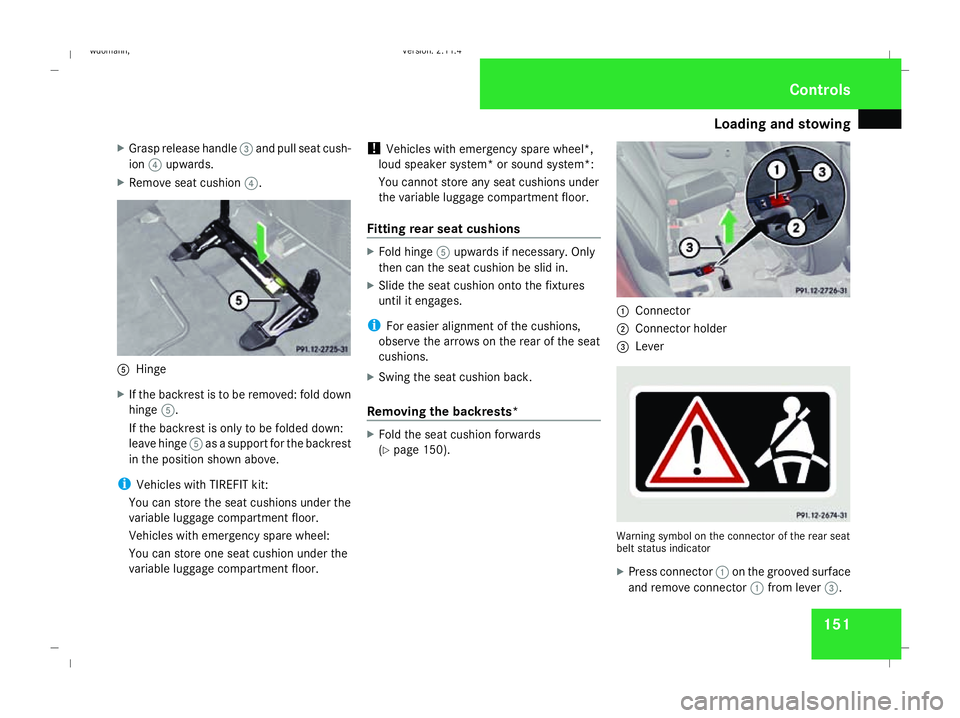
Grasp release handle 3and pull seat cush-
ion 4upwards.
X Remove seat cushion 4. 5
Hinge
X If the backrest is to be removed: fold down
hinge 5.
If the backrest is only to be folded down:
leave hinge 5as a support for the backrest
in the position shown above.
i Vehicles with TIREFIT kit:
You can store the seat cushions under the
variable luggage compartment floor.
Vehicles with emergency spare wheel:
You can store one seat cushion under the
variable luggage compartment floor. !
Vehicles with emergency spare wheel*,
loud speaker system* or sound system*:
You cannot store any seat cushions under
the variable luggage compartment floor.
Fitting rear seat cushions X
Fold hinge 5upwards if necessary. Only
then can the seat cushion be slid in.
X Slide the seat cushion onto the fixtures
until it engages.
i For easier alignment of the cushions,
observe the arrows on the rear of the seat
cushions.
X Swing the seat cushion back.
Removing the backrests* X
Fold the seat cushion forwards
(Y page 150). 1
Connector
2 Connector holder
3 Lever Warning symbol on the connector of the rear seat
belt status indicator
X
Press connector 1on the grooved surface
and remove connector 1from lever 3. Controls
245_AKB; 2; 7, en-GB
wdomann,
Version: 2.11.4 2008-10-17T11:22:31+02:00 - Seite 151 ZDateiname: 6515_1640_02_buchblock.pdf; preflight
Page 164 of 305
Features
161
Stowage compartment behind the
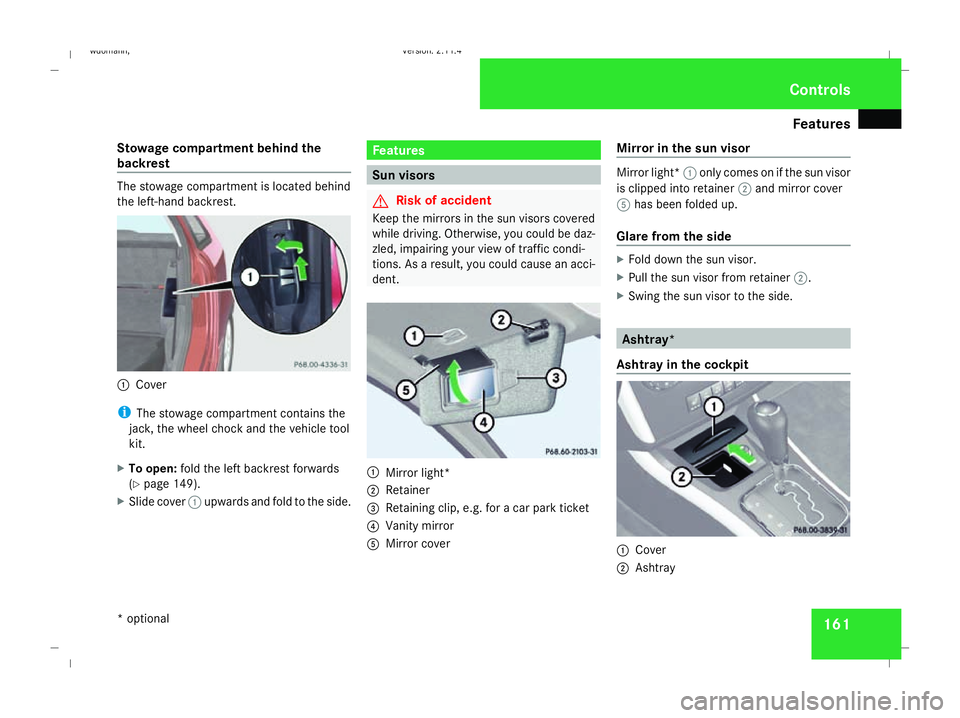
backrest The stowage compartment is located behind
the left-hand backrest.
1
Cover
i The stowage compartment contains the
jack, the wheel chock and the vehicle tool
kit.
X To open: fold the left backrest forwards
(Y page 149).
X Slide cover 1upwards and fold to the side. Features
Sun visors
G
Risk of accident
Keep the mirrors in the sun visors covered
while driving. Otherwise, you could be daz-
zled, impairing your view of traffic condi-
tions. As a result, you could cause an acci-
dent. 1
Mirror light*
2 Retainer
3 Retaining clip, e.g. for a car park ticket
4 Vanity mirror
5 Mirror cover Mirror in the sun visor Mirror light*
1only comes on if the sun visor
is clipped into retainer 2and mirror cover
5 has been folded up.
Glare from the side X
Fold down the sun visor.
X Pull the sun visor from retainer 2.
X Swing the sun visor to the side. Ashtray*
Ashtray in the cockpit 1
Cover
2 Ashtray Cont
rols
* optional
245_AKB; 2; 7, en-GB
wdomann,
Version: 2.11.4 2008-10-17T11:22:31+02:00 - Seite 161 ZDateiname: 6515_1640_02_buchblock.pdf; preflight