wheel MERCEDES-BENZ B-CLASS HATCHBACK 2011 Owner's Manual
[x] Cancel search | Manufacturer: MERCEDES-BENZ, Model Year: 2011, Model line: B-CLASS HATCHBACK, Model: MERCEDES-BENZ B-CLASS HATCHBACK 2011Pages: 329, PDF Size: 7.91 MB
Page 68 of 329
the rada
rsensor checked at a qualified spe-
cialist workshop. This also applies to colli-
sions at slow speeds where there is no visible
damage to the fron tofthe vehicle.
i Observe the "Important safety notes" sec-
tion (Y page 62).
BAS PLUS (Brake Assist System Plus) G
WARNING
BAS PLUS cannot always clearly identify
objects and complex traffic situations. BAS
PLUS cannot intervene in these cases.
There is a risk of an accident. Always pay
careful attention to the traffic situation and be
ready to brake. G
WARNING
BAS PLUS does not react:
R to people or animals
R to oncoming vehicles
R to crossing traffic
R to stationary obstacles
R when cornering
As a result, BAS PLUS may not intervene in
critical situations. There is a risk of an acci-
dent. Always pay careful attention to the traf-
fic situation and be ready to brake.
BAS PLUS assists you in braking during haz-
ardous situations at speeds above 30 km/h
and uses the radar sensor system to evaluate
the traffic situation.
With the help of the radar sensor system, BAS
PLUS can detect obstacles that are in the
path of your vehicle for an extended period of
time.
Should you approach an obstacle and BAS
PLUS has detected a risk of collision, BAS
PLUS calculates the braking force necessary
to avoid a rear-end collision. Should you apply
the brakes forcefully, BAS PLUS will automat-
ically increase the braking force to a level
suitable for the traffic conditions. X
Keep the brake pedal depressed until the
emergency braking situation is over.
ABS prevents the wheels from locking.
The brakes will work normally again if:
R you release the brake pedal.
R there is no longer any danger of a rear-end
collision.
R no obstacle is detected in front of your
vehicle.
BAS PLUS is then deactivated.
Vehicles with PRE-SAFE ®
:if BAS PLUS
requires particularly high brake pressure, pre-
ventative passenger protection measures
(PRE-SAFE ®
) are deployed simultaneously.
Up to vehicle speeds of around 250 km/h,
BAS PLUS is capable of reacting to moving
objects that have already been recognised as
such at least once over the period of obser-
vation. BAS PLUS does not react to stationary
obstacles.
If BAS PLUS is not available due to a malfunc-
tion in the radar sensor system, the brake
system remains available with full brake
boosting effect and BAS.
In particular, the detection of obstacles can
be impaired if there is:
R dirt on the sensors or anything else cover-
ing the sensors
R snow or heavy rain
R interference by other radar sources
R the possibility of strong radar reflections,
for example, in multi-storey car parks
R a narrow vehicle travelling in front, e.g. a
motorbike
R a vehicle travelling in front on a different
line
Following damage to the front end of the vehi-
cle, have the configuration and operation of
the radar sensor checked at a qualified spe-
cialist workshop. This also applies to colli-
sions at slow speeds where there is no visible
damage to the front of the vehicle.
i Observe the "Important safety notes" sec-
tion (Y page 62). Driving safety systems
65Safety Z
Page 69 of 329
Adaptive brake lamps
If you brake sharply from a speed of more
than 50 km/h or if braking is assisted by BAS
or BA SPLUS, the brake lamps flash rapidly.
In this way, traffic travelling behind you is
warned in an even more noticeable manner.
If you brake sharply from a speed of more
than 70 km/h to a standstill, the hazard warn-
ing lamps are activated automatically. If the
brakes are applied again, the brake lamps
lightu p continuously. The hazard warning
lamps switch off automatically if you travel
faster than 10 km/ h.You can also switch off
the hazard warning lamps using the hazard
warning switch button (Y page 99).
i Adaptive brake lamps are only available in
certain countries. ESP
®
(Electronic Stability Program)
Important safety notes G
WARNING
If the ÷ warning lamp in the instrument
cluster flashes, proceed as follows:
R do not deactivate ESP ®
under any circum-
stances.
R only depress the accelerator pedal as far as
necessary when pulling away.
R adapt your driving style to suit the prevail-
ing road and weathe rconditions.
Otherwise, the vehicle could go into a skid.
ESP ®
cannot reduce the risk of an accident if
you drive too fast. ESP ®
cannot override the
laws of physics.
! Switch the ignition off when:
R the electric parking brake is being tested
using a brake dynamometer.
R the vehicle is being towed with the front/
rear axle raised.
Application of the brakes by ESP ®
may oth-
erwise destroy the brake system. If ESP
®
detects that the vehicle is deviating
from the direction desired by the driver, one
or more wheels are braked to stabilise the
vehicle. If necessary, the engine output is also
modified to keep the vehicle on the desired
course within physical limits. ESP ®
assists
the driver when pulling away on wet or slip-
pery roads. ESP ®
can also stabilise the vehi-
cle during braking.
If ESP ®
intervenes, the ÷ESP®
warning
lamp flashes in the instrument cluster.
i Observe the "Important safety notes" sec-
tion (Y page 62).
i Only use wheels with the recommended
tyre sizes. Only then will ESP ®
function
properly.
Traction control Traction control is part of ESP
®
.
Traction control brakes the drive wheels indi-
vidually if they spin. This enables you to pull
away and accelerate on slippery surfaces, for
example if the road surface is slippery on one
side.
Traction control remains active if you deacti-
vate ESP ®
.
i Observe the "Important safety notes" sec-
tion (Y page 62).
Deactivating/activating ESP ® G
WARNING
ESP ®
is deactivated if the åwarning lamp
in the instrument cluster lights up continu-
ously when the engine is running.
If the ÷ warning lamp and åwarning
lamp are lit continuously, ESP ®
is not availa-
ble due to a malfunction.
There is an increased risk of your vehicle skid-
ding in certain situations.
You should always adapt your driving style to
suit the prevailing road and weather condi-
tions. 66
Driving safety systemsSafety
Page 70 of 329
ESP
®
is activated automaticall ywhen the
engine is started.
If ESP ®
is deactivated and one or more wheels
start to spin, the ÷ESP®
warning lamp in
the instrumentc luster flashes.Insuch situa-
tions, ESP ®
will no tstabilise the vehicle.
X To deactivate:( Ypage 198).
The å ESP®
OFF warning lamp in the
instrument cluste rlights up.
X To activate:(Y page 198).
The å ESP®
OFF warning lamp in the
instrumen tcluster goes out.
It may be best to deactivate ESP ®
in the fol-
lowing situations:
R when using snow chains
R in deep snow
R on sand or gravel G
WARNING
Activate ESP ®
as soon as the situations
described above no longer apply. ESP ®
will
otherwise not be able to stabilise the vehicle
if the vehicle starts to skid or a wheel starts
to spin.
If you deactivate ESP ®
:
R ESP ®
no longer improves driving stability.
R the engine's torque is no longer limited, and
the drive wheels can spin .The spinning of
the wheels results in a cutting action, which
provides better grip.
R traction control is still activated.
R ESP ®
still provides support when you
brake.
i Vehicles with ECO start/stop function:
the ECO start/stop function switches the
engine off automatically when the vehicle
comes to a stop. When pulling away again,
the engine starts automatically .ESP ®
remains in its previously selected status.
Example: if ESP ®
was deactivated before
the engine was switched off, ESP ®
remains deactivated when the engine is switched on
again.
i Observe the "Important safety notes" sec-
tion (Y page 62).
ESP ®
trailer stabilisation G
WARNING
If road and weather conditions are poor,
traile rstabilisation will not be able to prevent
the trailer fro mswerving and will thus be
unable to reduce the risk of an accident. Trail-
ers with a high centre of gravity can tip over
before ESP ®
can detect this.
If your vehicle/trailer combination begins to
lurch, you can only stabilise the vehicle/
trailer combination by depressing the brake
firmly.
In this situation, ESP ®
assists you and can
detect if the vehicle/trailer combination
begins to lurch. ESP ®
slows the vehicle down
by braking and limiting the engine output until
the vehicle/trailer combination has stabi-
lised.
Trailer stabilisation is active above speeds of
about 65 km/h.
Trailer stabilisation does not work if ESP ®
is
deactivated or disabled because of a mal-
function. EBD (electronic brake force distribu-
tion)
G
WARNING
If EB Dhas malfunctioned, the braking system
remains available with full brake boosting
effect .However, the rear wheels can still lock,
e.g. under full braking. This could cause you
to lose control of your vehicle and cause an
accident .You should therefore adapt your
driving style to the different handling charac-
teristics. Driving safety systems
67Safety Z
Page 71 of 329
EBD monitors and controls the brake pres-
sure on the rea rwheels to improve driving
stability while braking.
i Observe the "Important safety notes" sec-
tion (Y page 62). ADAPTIVE BRAKE
ADAPTIVE BRAKE enhances braking safety
and offers increased braking comfort.Ina ddi-
tion to the brakin gfunction ,ADAPTIVE BRAKE
also has the HOLD functio n(Ypage 162 )and
hill start assist (Y page 129). For further
information, see Driving tips (Y page 146).STEER CONTROL
G
WARNING
If there is an ESP ®
malfunction, you will not
receive any steering assistance from the
STEER CONTROL. The steering continues to
functio nwith power assistance.
STEER CONTROL helps you by transmitting a
noticeable steering force to the steering
wheel in the direction required for vehicle
stabilisation.
This steering assistance is provided in partic-
ular if:
R both right wheels or both left wheels are on
a wet or slippery road surface when you
brake.
R the vehicle starts to skid.
You have control over the steering at all
times. Anti-theft systems
Immobiliser
X To activate: remove the key fro mthe igni-
tion lock.
X To deactivate: switch on the ignition. The immobiliser prevents your vehicle from
being started without the correct key.
i
The immobiliser is always deactivated
when you start the engine. ATA (Anti-Theft Alarm system)
X
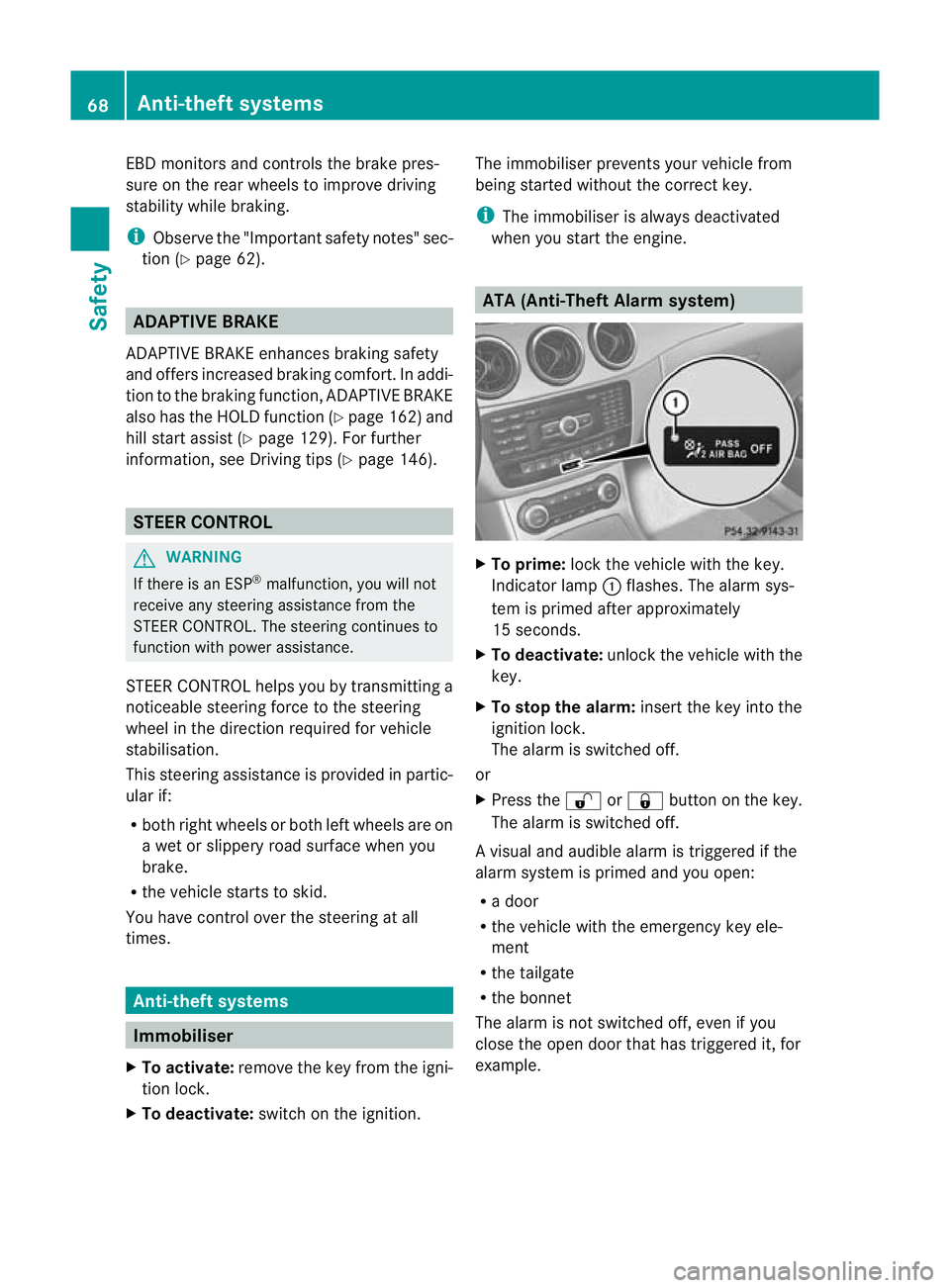
To prime: lock the vehicle with the key.
Indicator lamp :flashes. The alarm sys-
tem is primed after approximately
15 seconds.
X To deactivate: unlock the vehicle with the
key.
X To stop the alarm: insert the key into the
ignition lock.
The alarm is switched off.
or
X Press the %or& button on the key.
The alarm is switched off.
Av isual and audible alarm is triggered if the
alarm system is primed and you open:
R a door
R the vehicle with the emergency key ele-
ment
R the tailgate
R the bonnet
The alarm is not switched off, even if you
close the open door that has triggered it, for
example. 68
Anti-theft systemsSafety
Page 75 of 329
Useful information
i This Owner's Manual describes all models
and all standard and optional equipment
available to your vehicle at the time of pub-
lication of the Owner's Manual. Country-
specific deviations are possible. Please
note that your vehicle may not be equipped
with all features described. This also
applies to safety-relevan tsystems and
functions.
i Please read the information on qualified
specialist workshops (Y page 22).Key
Important safety notes
G
WARNING
If children are lef tunsupervised in the vehicle,
they could:
R open a door from inside the vehicle at any
time, eve nifithas been locked
R start the vehicle using akey which has been
left in the vehicle
R release the parking brake
They could thereby endanger themselves and
others. Never leave children unsupervised in
the vehicle. Always take the key with you
when leaving the vehicle, even if you are only
leaving it for a short time. G
WARNING
Do not attach any heavy or large key rings to
the key that is inserted in the ignition .Ifakey
ring is too heavy or too large, the weight acting
on the key could cause it to tur ninthe ignition
lock or catch on the steering wheel. This could
cause the engine to be switched off suddenly.
You could lose control of the vehicle and
cause an accident.
Do not use the key in the vicinity of strong
magnetic fields. Otherwise, the remote con-
trol function could be affected. Do not keep the key together with:
R
electronic devices, e.g. a mobile phone or
another key
R metallic objects, e.g. coins or metal foil Key functions
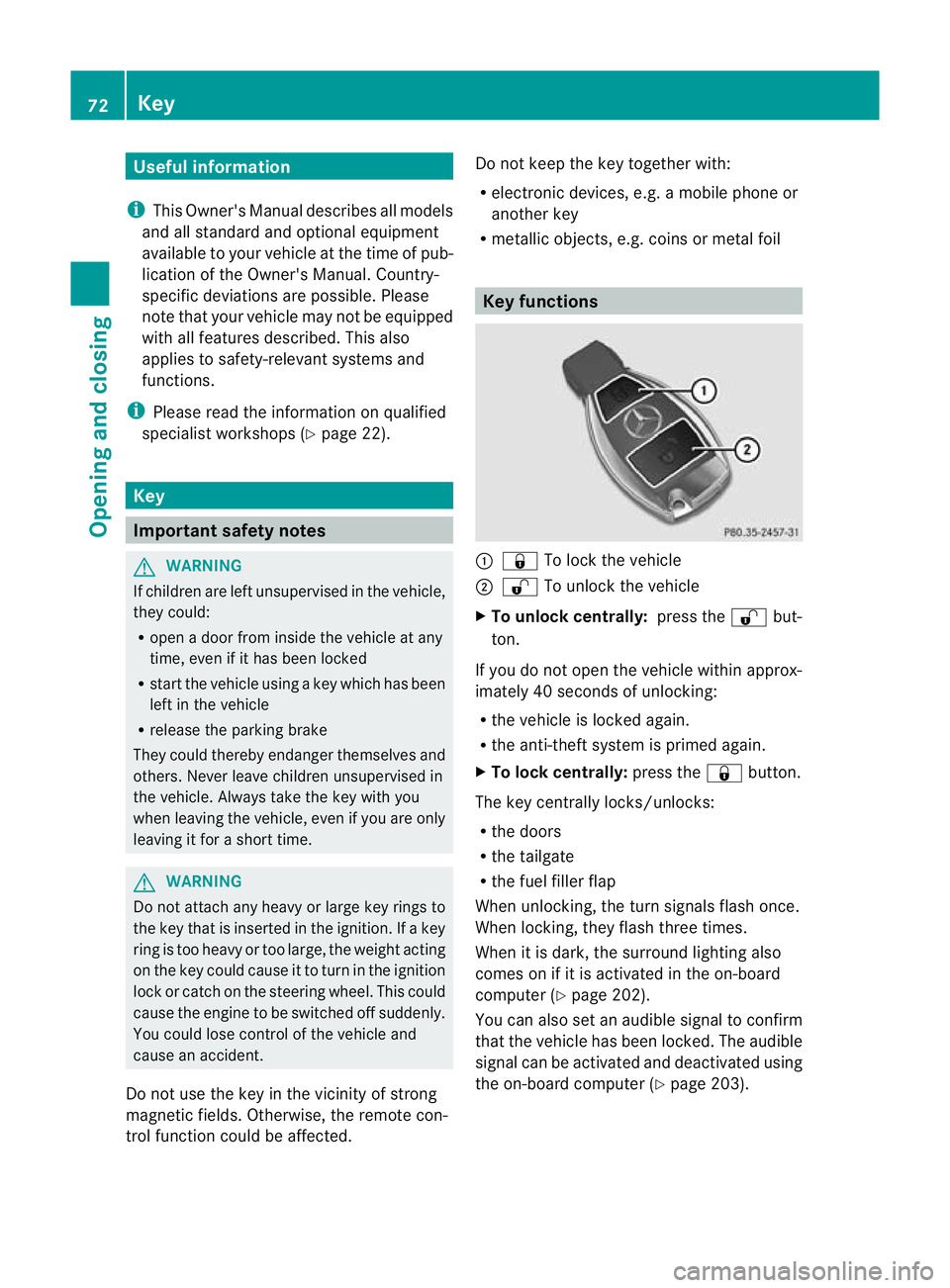
:
& To lock the vehicle
; % To unlock the vehicle
X To unlock centrally: press the%but-
ton.
If you do not open the vehicle within approx-
imately 40 seconds of unlocking:
R the vehicle is locked again.
R the anti-theft system is primed again.
X To lock centrally: press the&button.
The key centrally locks/unlocks:
R the doors
R the tailgate
R the fuel filler flap
When unlocking, the turn signals flash once.
When locking, they flash three times.
When it is dark, the surround lighting also
comes on if it is activated in the on-board
computer (Y page 202).
You can also set an audible signal to confirm
that the vehicle has been locked. The audible
signal can be activated and deactivated using
the on-board computer (Y page 203).72
KeyOpening and closing
Page 78 of 329
Problems with the key
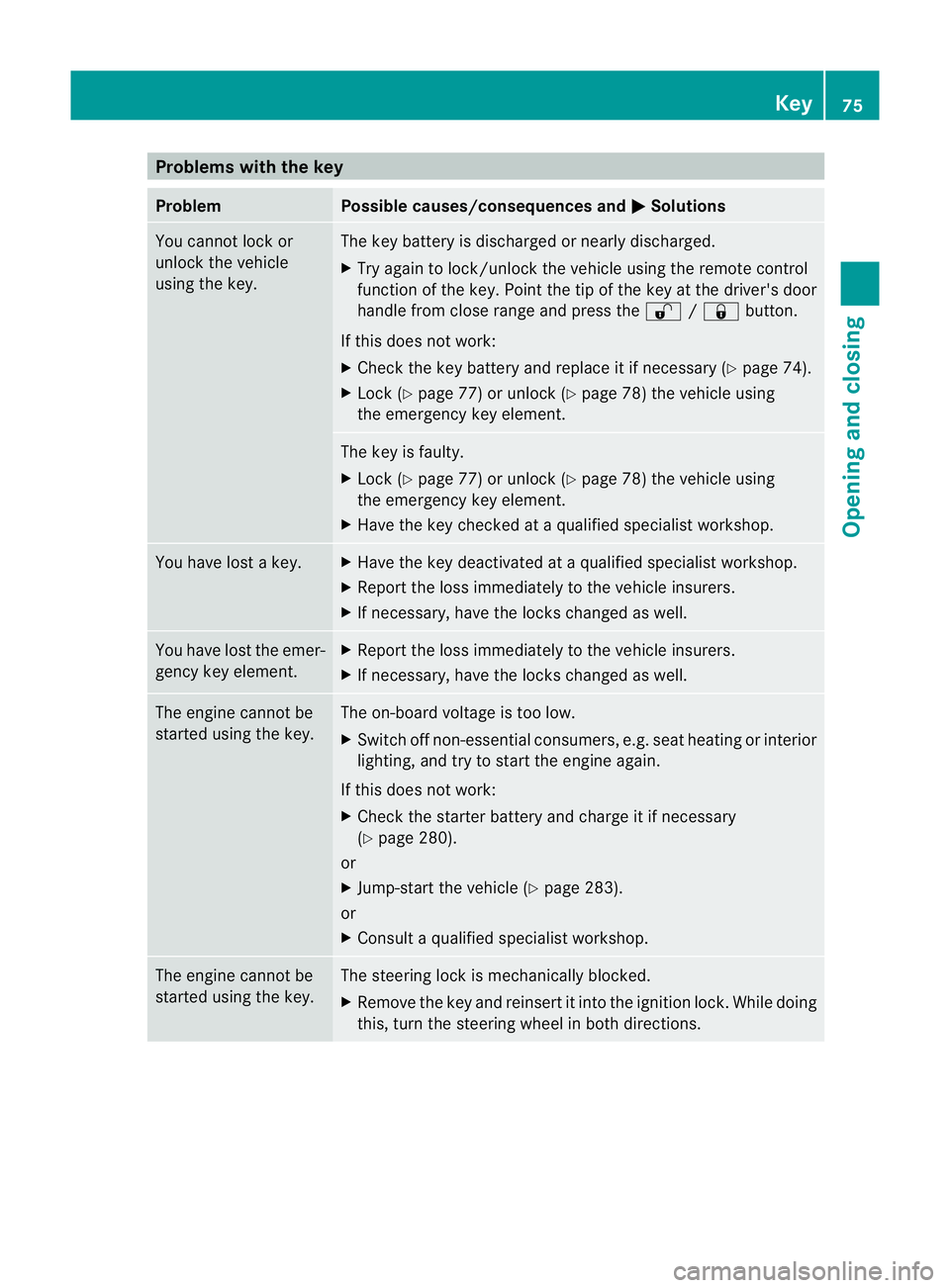
Problem Possible causes/consequences and
M Solutions
You cannot lock or
unlock the vehicle
using the key. The key battery is discharged or nearly discharged.
X
Try again to lock/unlock the vehicle using the remote control
function of the key. Point the tip of the key at the driver's door
handle from close range and press the %/& button.
If this does not work:
X Check the key battery and replace it if necessary (Y page 74).
X Lock (Y page 77) or unlock (Y page 78) the vehicle using
the emergency key element. The key is faulty.
X
Lock (Y page 77) or unlock (Y page 78) the vehicle using
the emergency key element.
X Have the key checked at a qualified specialist workshop. You have lost a key. X
Have the key deactivated at a qualified specialist workshop.
X Report the loss immediately to the vehicle insurers.
X If necessary, have the locks changed as well. You have lost the emer-
gency key element. X
Report the loss immediately to the vehicle insurers.
X If necessary, have the locks changed as well. The engine cannot be
started using the key. The on-board voltage is too low.
X
Switch off non-essential consumers, e.g. seat heating or interior
lighting, and try to start the engine again.
If this does not work:
X Check the starter battery and charge it if necessary
(Y page 280).
or
X Jump-start the vehicle (Y page 283).
or
X Consult a qualified specialist workshop. The engine cannot be
started using the key. The steering lock is mechanically blocked.
X
Remove the key and reinsert it into the ignition lock. While doing
this, turn the steering wheel in both directions. Key
75Opening and closing Z
Page 80 of 329
Centrally locking and unlocking the
vehicle from the inside
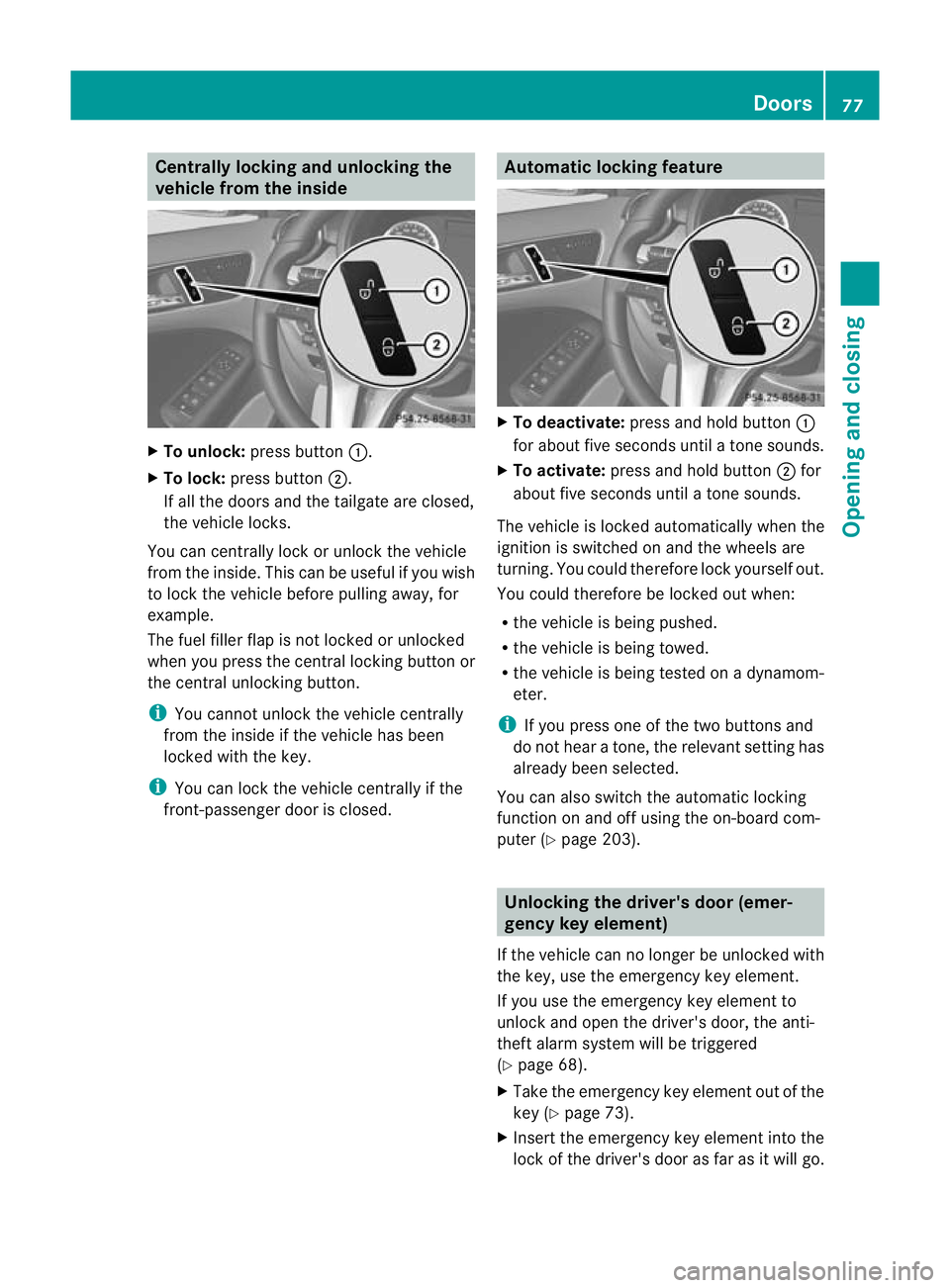
X
To unlock: press button :.
X To lock: press button ;.
If all the doors and th etailgate are closed,
the vehicle locks.
You can centrally lock or unlock the vehicle
from the inside. This can be useful if you wish
to loc kthe vehicle before pulling away, for
example.
The fuel filler flap is not locked or unlocked
when you press the central locking button or
the central unlocking button.
i You cannot unlock the vehicle centrally
from the inside if the vehicle has been
locked with the key.
i You can lock the vehicle centrally if the
front-passenger door is closed. Automatic locking feature
X
To deactivate: press and hold button :
for about five seconds until a tone sounds.
X To activate: press and hold button ;for
about five seconds until a tone sounds.
The vehicle is locked automatically when the
ignition is switched on and the wheels are
turning. You could therefore lock yourself out.
You could therefore be locked out when:
R the vehicle is being pushed.
R the vehicle is being towed.
R the vehicle is being tested on a dynamom-
eter.
i If you press one of the two buttons and
do not hear a tone, the relevant setting has
already been selected.
You can also switch the automatic locking
function on and off using the on-board com-
puter (Y page 203). Unlocking the driver's door (emer-
gency key element)
If the vehicle can no longer be unlocked with
the key, use the emergency key element.
If you use the emergency key element to
unlock and open the driver's door, the anti-
theft alarm system will be triggered
(Y page 68).
X Take the emergency key element out of the
key (Y page 73).
X Insert the emergency key element into the
lock of the driver's door as far as it will go. Doors
77Opening and closing Z
Page 88 of 329
Useful information
..............................86
Correct driver's seat position ............86
Seats .................................................... 87
Steering wheel .................................... 91
Mirrors ................................................. 91
Memor yfunctions ............................... 94 85Seats, steering wheel and mirrors
Page 89 of 329
Useful information
i This Owner's Manual describes all models
and all standard and optional equipment
available to your vehicle at the time of pub-
lication of the Owner's Manual. Country-
specific deviations are possible. Please
note that your vehicle may not be equipped
with all features described. This also
applies to safety-relevan tsystems and
functions.
i Please read the information on qualified
specialist workshops (Y page 22).Correct driver's sea
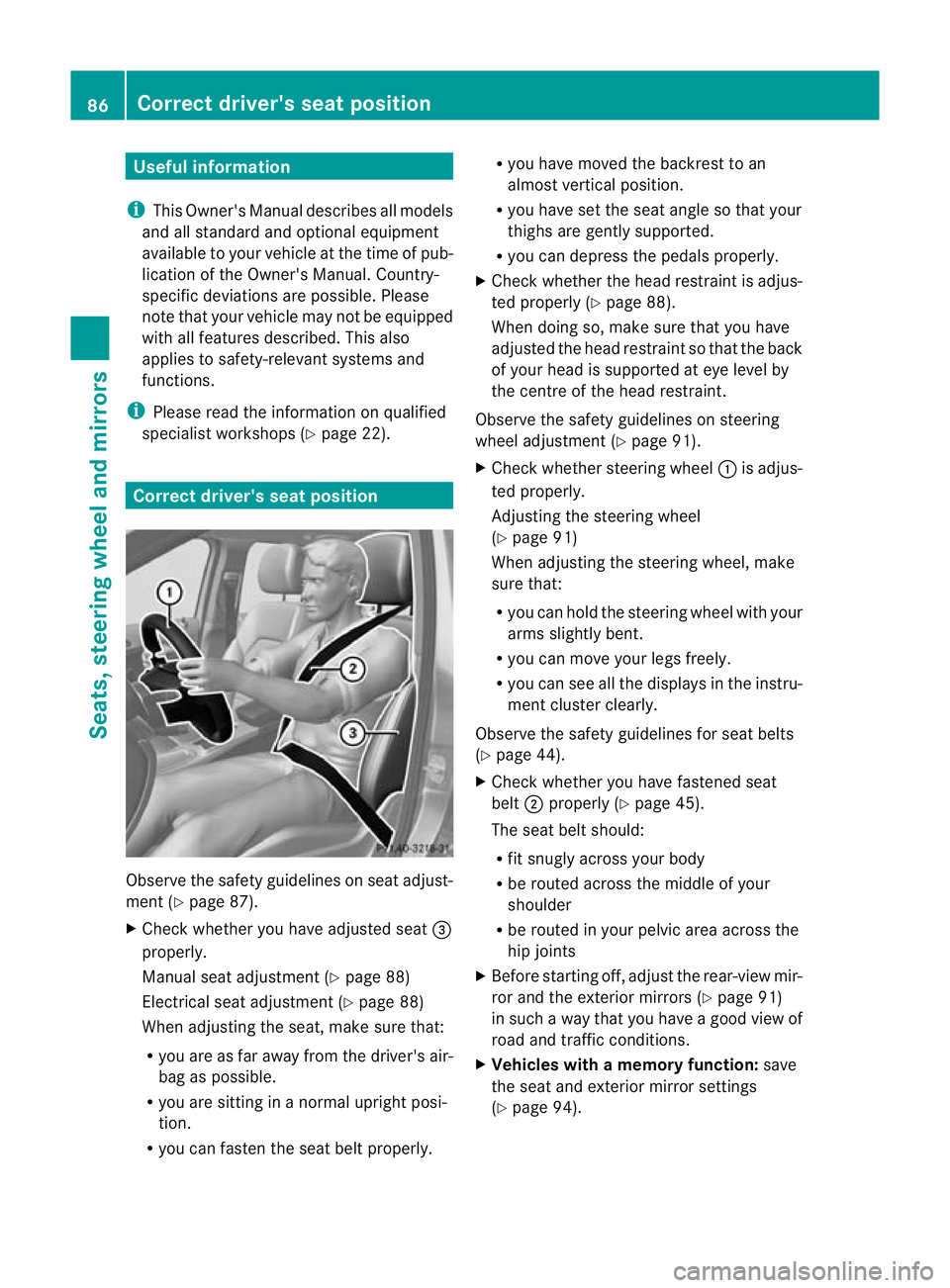
tposition Observe the safety guidelines on seat adjust-
ment (Y
page 87).
X Chec kwhether you have adjusted seat =
properly.
Manual seat adjustment (Y page 88)
Electrical seat adjustment (Y page 88)
When adjusting the seat, make sure that:
R you are as far away from the driver's air-
bag as possible.
R you are sitting in a normal upright posi-
tion.
R you can fasten the seat belt properly. R
you have moved the backrest to an
almost vertical position.
R you have set the seat angle so that your
thighs are gently supported.
R you can depress the pedals properly.
X Check whether the head restraint is adjus-
ted properly (Y page 88).
When doing so, make sure that you have
adjusted the head restraint so that the back
of your head is supported at eye level by
the centre of the head restraint.
Observe the safety guidelines on steering
wheel adjustment (Y page 91).
X Check whether steering wheel :is adjus-
ted properly.
Adjusting the steering wheel
(Y page 91)
When adjusting the steering wheel, make
sure that:
R you can hold the steering wheel with your
arms slightly bent.
R you can move your legs freely.
R you can see all the displays in the instru-
ment cluster clearly.
Observe the safety guidelines for seat belts
(Y page 44).
X Check whether you have fastened seat
belt ;properly (Y page 45).
The seat belt should:
R fit snugly across your body
R be routed across the middle of your
shoulder
R be routed in your pelvic area across the
hip joints
X Before starting off, adjust the rear-view mir-
ror and the exterior mirrors (Y page 91)
in such a way that you have a good view of
road and traffic conditions.
X Vehicles with a memory function: save
the seat and exterior mirror settings
(Y page 94). 86
Correct driver's seat positionSeats, steering wheel and mirrors
Page 90 of 329
Seats
Important safety notes
G
WARNING
The seats can still be adjusted when there is
no key in the ignition lock. For this reason,
children should never be left unsupervised in
the vehicle. They could adjust the seats and
become trapped. G
WARNING
Only adjust the driver's seat when the vehicle
is stationary. You will otherwise be distracted
from the road and traffic conditions and you
could lose control of the vehicle as a result of
the seat moving. This could cause an acci-
dent. G
WARNING
If you adjust the seat height carelessly, you or
others could be trapped and thereby injured.
Children in particular could unintentionally
press the buttons to electrically adjust the
seats and become trapped.
Take care that:
R while moving the seats, your hands do not
get under the lever assembly of the seat
adjustment system.
R children in the vehicle do not slide their
hands under the levers. G
WARNING
Make sure that nobody can become trapped
when adjusting the seats.
Observe the notes on airbags.
Secure children as recommended; see the
"Children in the vehicle" section. G
WARNING
As eat belt can only offer its intended degree
of protection when the backrest is almost ver-
tical and the occupant is sitting upright. Avoid
seat positions that do not allow the seat belt
to be routed correctly. Adjust the backrest so
that it is as upright as possible. Never travel with the backrest reclined too far backwards.
You could otherwise be seriously or even
fatally injured in the event of an accident or
sudden braking.
G
WARNING
Make sure that the back of your head is sup-
ported at eye level by the central area of the
head restraint. If your head is not supported
correctly by the head restraint, you could suf-
fer a severe neck injury in the event of an
accident. Never drive if the head restraints are
not engaged and set correctly.
! To avoid damage to the seats and the seat
heating, observe the following information:
R do not spill any liquids on the seats. If
liquid is spilled on the seats, dry them as
soon as possible.
R if the seat covers are damp or wet, do not
switch on the seat heating. The seat
heating should also not be used to dry
the seats.
R clean the seat covers as recommended;
see the "Interior care" section.
R do not transport heavy loads on the
seats. Do not place sharp objects on the
seat cushions, e.g. knives, nails or tools.
The seats should only be occupied by
passengers, if possible.
R when the seat heating is in operation, do
not cover the seats with insulating mate-
rials, e.g. blankets, coats, bags, seat cov-
ers, child seats or booster seats.
! Make sure that there are no objects in the
footwell or behind the seats when moving
the seat back. There is a risk that the seats
and/or the objects could be damaged.
i The head restraints in the fron tand rear
seats can be removed.
For more information, contact a qualified
specialist workshop. Seats
87Seats, steering wheel and mirrors Z