wheel MERCEDES-BENZ B-CLASS HATCHBACK 2011 Workshop Manual
[x] Cancel search | Manufacturer: MERCEDES-BENZ, Model Year: 2011, Model line: B-CLASS HATCHBACK, Model: MERCEDES-BENZ B-CLASS HATCHBACK 2011Pages: 329, PDF Size: 7.91 MB
Page 152 of 329
Have your vehicle winterproofed at a qualified
specialist workshop at the onset of winter.
Observe the notes in the "Winter operation"
sectio n(Ypage 294).
Driving with summer tyres Observe the notes in the "Winter operation"
section (Y page 294).
Slippery road surfaces G
WARNING
Do not shift down for additional engine brak-
ing on a slippery road surface. This could
cause the drive wheels to lose their grip and
the vehicle could skid.
If the vehicle threatens to skid or cannot be
stopped when moving at low speed:
X Vehicles with manual transmission:
shift to neutral.
X Vehicles with automatic transmission:
shift the transmission to position N.
X Try to bring the vehicle under control by
using corrective steering.
You should drive particularly carefully on slip-
pery road surfaces .Avoid sudden accelera-
tion, steering and braking manoeuvres.
i For more information on driving with
snow chains, see (Y page 295). Driving systems
Cruise control
General notes Cruise control maintains a constant road
speed for you.Itb
rakes automatically in order
to avoid exceeding the set speed. You must
select a lower gearing ood time on long and
steep downhill gradients, especially if the
vehicle is laden or towing a trailer. For vehi-
cles with automatic transmission, you need
to have selected manual drive program
M(Y page 147). By doing so, you will make use of the braking effect of the engine. This
relieves the load on the brake system and
prevents the brakes from overheating and
wearing too quickly.
Use cruise control only if road and traffic con-
ditions make it appropriate to maintain a
steady speed for a prolonged period. You can
store any road speed above 30 km/h.
Important safety notes
G
WARNING
Do not change down for additional engine
braking on a slippery road surface. This could
cause the drive wheels to lose their grip and
the vehicle could skid. G
WARNING
Cruise control cannot take account of road
and traffic conditions.
Always pay attention to traffic conditions
even when cruise control is activated.
Cruise control is only an aid designed to assist
driving. You are responsible for the vehicle's
speed and for braking in good time. G
WARNING
Do not use cruise control
R in traffic conditions that do not allow you to
drive at a constant speed (e.g. heavy traffic
or winding roads). You may otherwise
cause an accident.
R on slippery roads. The drive wheels may
lose their grip when braking or accelerating
and the vehicle may skid.
R when there is low visibility, e.g. due to fog,
heavy rain or snow.
Cruise control lever You can operate cruise control and variable
SPEEDTRONIC with the cruise control lever. Driving systems
149Driving and parking Z
Page 155 of 329
to have selected manual drive program
M(Y
page 147) .By doing so, you will make
use of the braking effec tofthe engine. This
relieves the load on the brake system and
prevents the brakes from overheating and
wearing too quickly. If you need additional
braking, depress the brake pedal repeatedly
rather than continuously.
You can set a variable or permanent limit
speed:
R variable for speed limits, e.g. in built-up
areas
R permanent for long-term speed restric-
tions, e.g. when driving with winter tyres
fitted (Y page 154)
i The speed indicated in the speedometer
may differ slightly from the limit speed
stored.
Important safety notes G
WARNING
Never depress the brake pedal continuously
while the vehicle is in motion, e.g. never cause
the brakes to rub by applying constant slight
pedal pressure. This causes the brake system
to overheat, increases the braking distance
and can lead to the brakes failing completely. G
WARNING
Do not change down for additional engine
braking on a slippery road surface. This could
cause the drive wheels to lose their grip and
the vehicle could skid. G
WARNING
SPEEDTRONIC is only an aid designed to
assist driving. You are responsible for the
vehicle's speed and for braking in good time.
Variable SPEEDTRONIC General notes
With the cruise control lever, you can operate
cruise control or DISTRONIC PLUS and vari-
able SPEEDTRONIC. The LIM indicator lamp on the cruise control
lever indicates which system you have selec-
ted:
R LIM indicator lamp off: cruise control or
DISTRONIC PLUS is selected.
R LIM indicator lamp on: variable SPEED-
TRONIC is selected.
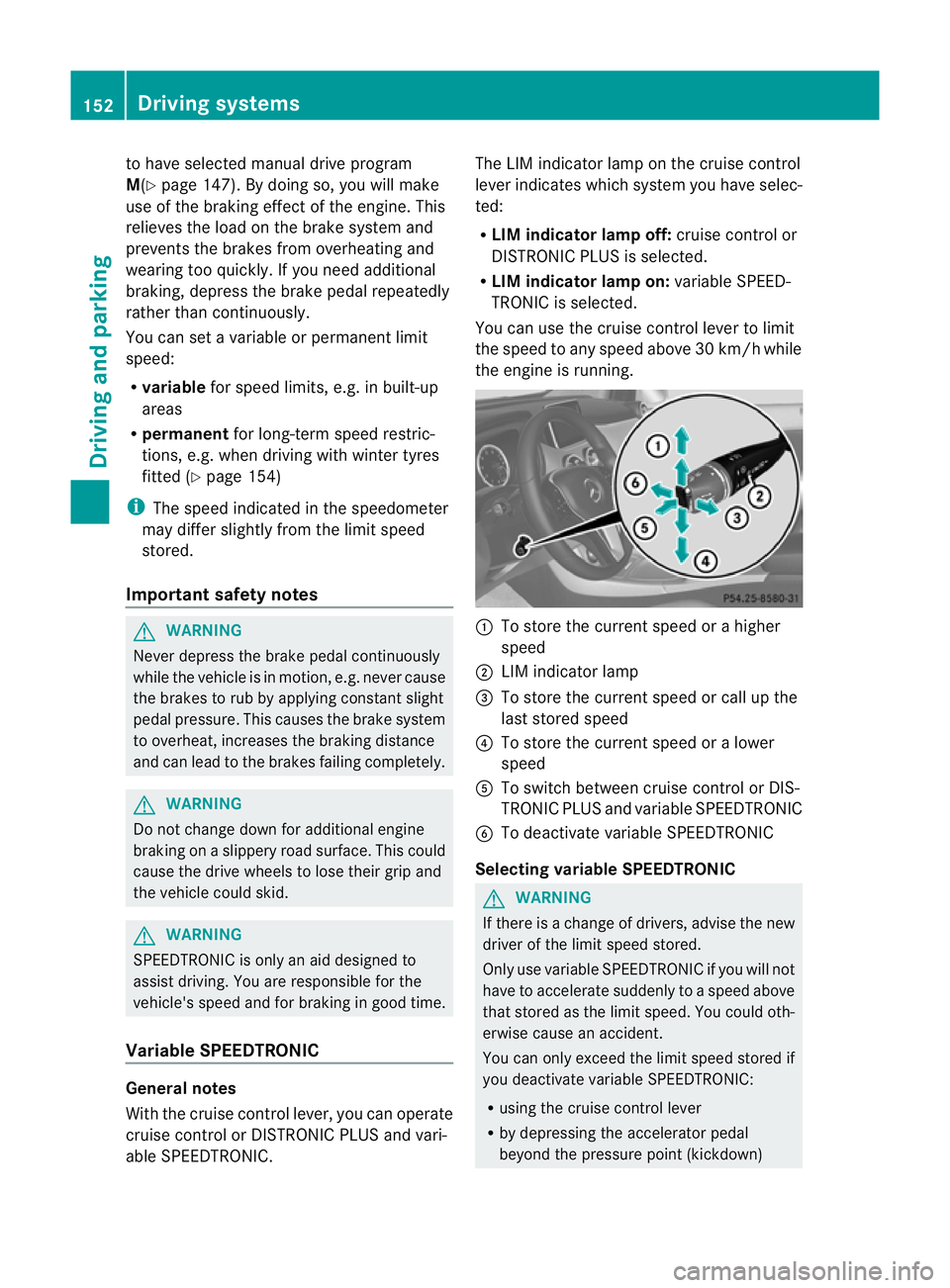
You can use the cruise control lever to limit
the speed to any speed above 30 km/h while
the engine is running. :
To store the current speed or a higher
speed
; LIM indicator lamp
= To store the current speed or call up the
last stored speed
? To store the current speed or a lower
speed
A To switch between cruise control or DIS-
TRONIC PLUS and variable SPEEDTRONIC
B To deactivate variable SPEEDTRONIC
Selecting variable SPEEDTRONIC G
WARNING
If there is a change of drivers, advise the new
driver of the limit speed stored.
Only use variable SPEEDTRONIC if you will not
have to accelerate suddenly to a speed above
that stored as the limit speed. You could oth-
erwise cause an accident.
You can only exceed the limit speed stored if
you deactivate variable SPEEDTRONIC:
R using the cruise control lever
R by depressing the accelerator pedal
beyond the pressure point (kickdown) 152
Driving systemsDriving and parking
Page 157 of 329

Permanent SPEEDTRONIC
You can use the on-board computer to limit
the speed permanently to avalue between
160 km/h(e.g. for driving on winter tyres) and
the maximum speed ( Ypage 203).
Shortly before the store dspeed is reached, it
appears in the multifunction display.
Permanent SPEEDTRONIC remains active,
even if variable SPEEDTRONIC is deactivated.
You cannot exceed the stored limit speed,
even if you depress the accelerator pedal
beyond the pressure point (kickdown). DISTRONIC PLUS
Important safety notes G
WARNING
Do not change down for additional engine
braking on a slippery road surface. This could
cause the drive wheels to lose their grip and
the vehicle could skid. G
WARNING
DISTRONIC PLUS is only an aid designed to
assist driving. The driver remains fully respon-
sible for the vehicle's distance from other
vehicles, the vehicle's speed and for braking
in good time.
DISTRONIC PLUS does not react in particular
to:
R pedestrians
R stationary obstacles on the road, e.g. stop-
ped or parked vehicles
R oncoming and crossing traffic
DISTRONIC PLUS may not detect narro wvehi-
cles driving in front, e.g. motorcycles, or vehi-
cles driving on a differen tline. Therefore,
always pay attention to traffic conditions even
when DISTRONIC PLUS is activated. Other-
wise, you may fail to recognise dangers in
time, cause an accident and injure yourself
and others. G
WARNING
DISTRONIC PLUS cannot tak eaccount of road
and traffic conditions. If DISTRONIC doe snot
recognise or no longer recognises the vehicle
in front, do not activate DISTRONIC or, if it is
already active, deactivate it. This is especially
the case:
R before corners
R on filter lanes
R when changing to a lane with faster moving
traffic
R in complex driving situations or where lanes
are diverted, e.g. at roadworks on a motor-
way
DISTRONIC PLUS otherwise maintains the
current speed set by you or accelerates up to
the set speed.
DISTRONIC PLUS cannot take account of
weather conditions. Deactivate, or do not
activate, DISTRONIC PLUS:
R if the roads are slippery, snow-covered or
icy. The wheels could lose their grip when
braking or accelerating. The vehicle could
start to skid.
R if the sensors are dirty or there is poor vis-
ibility, e.g. due to snow, rain or fog. Dis-
tance control may be impaired.
Always pay attention to traffic conditions
even when DISTRONIC PLUS is activated.
Otherwise, you may fail to recognise dangers
in time, cause an accident and injure yourself
and others. G
WARNING
DISTRONIC PLUS brakes your vehicle up to a
maximum of 4 m/s 2
depending on its speed.
This corresponds to approximately 40% of
your vehicle's maximum braking power. You
must also apply the brakes yourself if this
braking power is not sufficient.
If DISTRONIC PLUS detects a risk of collision
with avehicle in front, an intermittent warning
tone sounds. In addition, the ·distance
warning lamp in the instrument cluster lights
up. Brake to avoid a collision. 154
Driving systemsDriving and parking
Page 170 of 329
You are always responsible for safety and
must continue to pay attention to your imme-
diate surroundings when parking and
manoeuvring. G
WARNING
Objects located above the height range of
Active Parking Assist will not be detected
when the parking space is measured .These
are not taken into account when the parking
procedure is calculated, e. g. overhanging
loads, tail sections or loading ramps of goods
vehicles. In some circumstances, Active Park-
ing Assist may therefore guide you into the
parking space too early. This may lead to a
collision. For this reason, you should avoid
using Active Parking Assist in such situations. G
WARNING
The front of the vehicle will veer out in the
direction of the oncoming traffic during the
parking operation. In some cases the vehicle
will also take you onto sections of the oncom-
ing lane during the parking procedure.
You are responsible for safety at all times and
must pay attention to any road users
approaching or passing. Stop the vehicle if
necessary or cancel the Active Parking Assist
parking procedure. G
WARNING
Make sure that no persons or animals are in
the manoeuvring range. Otherwise, they
could be injured.
! If unavoidable, you should drive over
obstacles such as kerbs slowly and not at
a sharp angle. Otherwise, you may damage
the wheels or tyres.
Parking tips:
R on narrow roads, drive as closely as possi-
ble past the parking space.
R parking spaces that are littered, overgrown
or partially occupied by trailer drawbars
might be identified incorrectly or not at all. R
snowfall or heavy rain may lead to a parking
space being measured inaccurately.
R pay attention to the PARKTRONIC
(Y page 164) warning messages during the
parking procedure.
R at any time, you can intervene in the steer-
ing procedure to correct it. Active Parking
Assist will then be cancelled.
R when transporting a load which protrudes
from your vehicle, you should not use
Active Parking Assist.
R never use Active Parking Assist when snow
chains are fitted.
R make sure that the tyre pressures are
always correct.T his hasadirec tinfluence
on the parking characteristics of the vehi-
cle.
R the way your vehicle is positioned in the
parking space after parking is dependent
on various factors .These include the posi-
tion and shape of the vehicles parked in
front and behind it and the conditions of the
location. In some cases, Active Parking
Assist may guide you too far into a parking
space, or not far enough into it. In some
cases, it may also lead you across or onto
the kerb. If necessary, you should cancel
the parking procedure with Active Parking
Assist.
R you can also engage forward gear prema-
turely. The vehicle redirects and does not
drive as far into the parking space. Should
a gear be changed too early to achieve a
sensible parking position, the parking pro-
cedure will be cancelled.
Detecting parking spaces Active Parking Assist is switched on automat-
ically when driving forwards. The system is
operational at speeds of up to approximately
35 km/h. While in operation, the system inde-
pendently locates and measures parking
spaces on both sides of the vehicle. When
driving at speeds below 30 km/h, you will see
the parking symbol as a status indicator in the
instrumentc luster. Active Parking Assist only Driving systems
167Driving and parking Z
Page 171 of 329
displays parking spaces on the front-
passenger side as standard. Parking spaces
on the driver's side are displayed as soon as
the turn signal on the driver's side is activa-
ted. To park on the driver's side, you must
leave the driver's side turn signal switched
on. This must remain switched on until you
acknowledge the use of Active Parking Assist
by pressing the abutton on the multi-
function steering wheel.
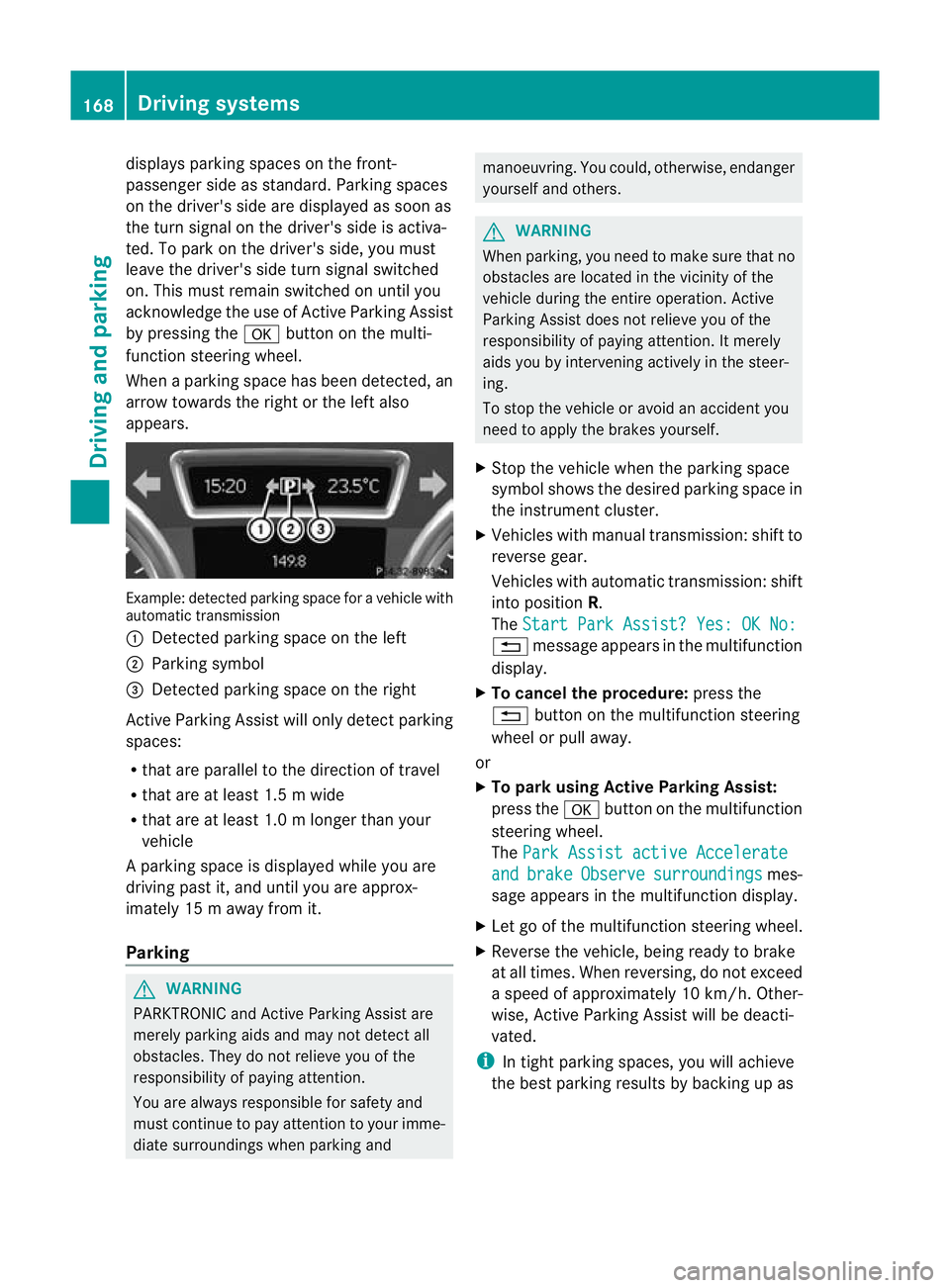
When a parking space has been detected, an
arrow towards the right or the left also
appears. Example: detected parkin
gspace for a vehicle with
automatic transmission
: Detected parking space on the left
; Parking symbol
= Detected parking space on the right
Active Parking Assist will only detec tparking
spaces:
R that are parallel to the direction of travel
R that are at least 1.5 m wide
R that are at least 1.0 m longer than your
vehicle
Ap arking space is displayed while you are
driving past it, and until you are approx-
imately 15 m away from it.
Parking G
WARNING
PARKTRONIC and Active Parking Assist are
merely parking aids and may no tdetec tall
obstacles. They do not relieve you of the
responsibility of paying attention.
You are always responsible for safety and
must continue to pay attention to your imme-
diate surroundings when parking and manoeuvring. You could, otherwise, endanger
yourself and others.
G
WARNING
When parking, you need to make sure that no
obstacles are located in the vicinity of the
vehicle during the entire operation. Active
Parking Assist does not relieve you of the
responsibility of paying attention. It merely
aids you by intervening actively in the steer-
ing.
To stop the vehicle or avoid an accident you
need to apply the brakes yourself.
X Stop the vehicle when the parking space
symbol shows the desired parking space in
the instrument cluster.
X Vehicles with manual transmission :shift to
reverse gear.
Vehicles with automatic transmission: shift
into position R.
The Start Park Assist? Yes: OK No: %
message appears in the multifunction
display.
X To cancel the procedure: press the
% button on the multifunction steering
wheel or pull away.
or
X To parku sing Active Parking Assist:
press the abutton on the multifunction
steering wheel.
The Park Assist active Accelerate and brake Observe surroundings mes-
sage appears in the multifunction display.
X Let go of the multifunction steering wheel.
X Reverse the vehicle, being ready to brake
at all times. When reversing, do not exceed
a speed of approximately 10 km/h. Other-
wise, Active Parking Assist will be deacti-
vated.
i In tight parking spaces, you will achieve
the best parking results by backing up as 168
Driving systemsDriving and parking
Page 172 of 329
far as possible
.When doing so, also
observe the PARKTRONIC messages.
X Stop as soon as PARKTRONIC sounds the
continuous warning tone, if not before.
Manoeuvring may be required in tight park-
ing spaces.
Vehicles with manual transmission: the ParkAssist active Engage forward gear
Observe surroundings message appears in
the multifunction display.
Vehicles with automatic transmission: the
Park Assist active Select D Observe
surroundings message appears in the mul-
tifunction display.
X Vehicles with manual transmission: while
the vehicle is stationary, shift to first gear.
Vehicles with automatic transmission:
select transmission position Dwhile the
vehicle is stationary.
Active Parking Assist immediately steers in
the other direction.
The Park Assist active Accelerate and brake Observe surroundings mes-
sage appears in the multifunction display.
i You will achieve the best results by wait-
ing for the steering procedure to complete
before pulling away.
X Drive forwards and be ready to brake at all
times.
X Stop as soon as PARKTRONIC sounds the
continuous warning tone, if not before.
Vehicles with manual transmission: the ParkAssist active Engage reverse gear
Observe surroundings message appears in
the multifunction display.
Vehicles with automatic transmission: the
Park Assist active Select R Observe
surroundings message appears in the mul-
tifunction display.
X Further transmission shifts may be neces-
sary.
As soon as the parking procedure is com-
plete, the Park Assist switched off message appears in the multifunction dis- play.A
ctive Parking Assist is now deacti-
vated. PARKTRONIC is still available.
X Manoeuvre if necessary.
X Always observe the warning messages dis-
played by PARKTRONIC (Y page 164).
Cancelling Active Parking Assist You can cancel Active Parking Assist at any
time.
X
Stop the movement of the multifunction
steering wheel or stee ryourself.
Active Parking Assist will be cancelled at
once. The Park Assist cancelled mes-
sage appears in the multifunction display.
or
X Press the PARKTRONIC button on the
centre console (Y page 165).
PARKTRONIC is switched off and Active
Parking Assist is immediately cancelled.
The Park Assist cancelled message
appears in the multifunction display.
Active Parking Assist is cancelled automati-
cally if:
R a gear is changed/the transmission is shif-
ted too early.
R parking using Active Parking Assist is no
longer possible.
R you are driving faster than 10 km/h.
R a wheel spins and ESP ®
intervenes or fails.
The ÷ warning lamp lights up in the
instrument cluster.
Aw arning tone sounds. The parking space
symbol disappears and the multifunction dis-
play shows the Park Assist cancelled message.
When Active Parking Assist is cancelled, you
must steer again yourself.
Towing
atrailer For vehicles with a trailer tow hitch, the min-
imum required length for parking spaces is
slightly increased. Driving systems
169Driving and parking Z
Page 174 of 329
ating instructions for the audio system/
COMAND Online.
X Engage reverse gear.
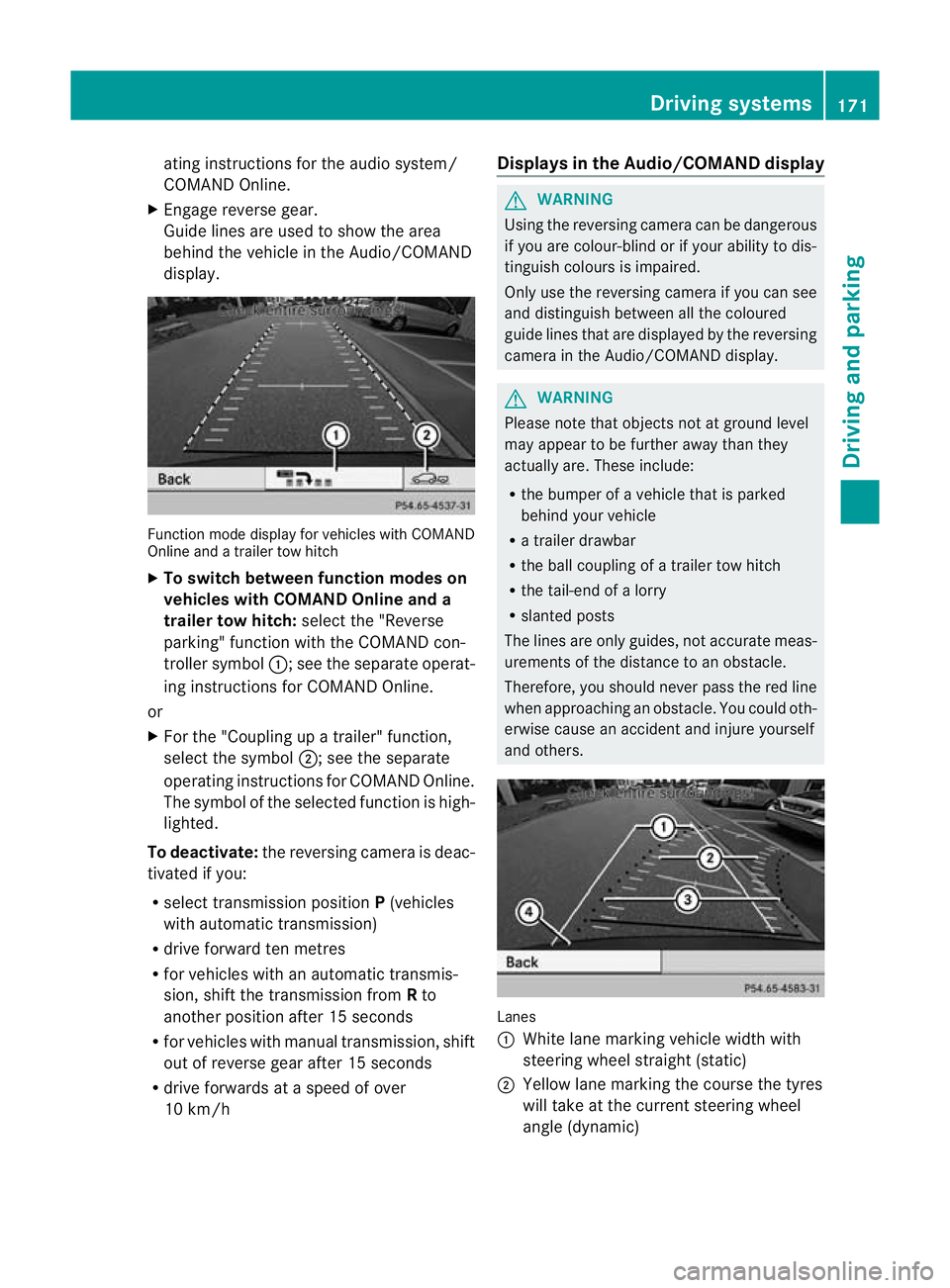
Guide lines are used to show the area
behind the vehicle in the Audio/COMAND
display. Function mode display for vehicles with COMAND
Online and a trailer tow hitch
X
To switch between function modes on
vehicles with COMAND Online and a
trailer tow hitch: selectthe "Reverse
parking" function with the COMAND con-
troller symbol :; see the separate operat-
ing instructions for COMAND Online.
or
X For the "Coupling up a trailer" function,
select the symbol ;; see the separate
operating instructions for COMAND Online.
The symbol of the selected function is high-
lighted.
To deactivate: the reversing camera is deac-
tivated if you:
R select transmission position P(vehicles
with automatic transmission)
R drive forward ten metres
R for vehicles with an automatic transmis-
sion, shift the transmission from Rto
another position after 15 seconds
R for vehicles with manual transmission, shift
out of reverse gear after 15 seconds
R drive forwards at a speed of over
10 km/h Displays in the Audio/COMAND display G
WARNING
Using the reversing camera can be dangerous
if you are colour-blind or if your ability to dis-
tinguish colours is impaired.
Only use the reversing camera if you can see
and distinguish between all the coloured
guide lines that are displayed by the reversing
camera in the Audio/COMAND display. G
WARNING
Please note that objects not at ground level
may appear to be further away than they
actually are. These include:
R the bumper of a vehicle that is parked
behind your vehicle
R a trailer drawbar
R the ball coupling of a trailer tow hitch
R the tail-end of a lorry
R slanted posts
The lines are only guides, not accurate meas-
urements of the distance to an obstacle.
Therefore, you should never pass the red line
when approaching an obstacle. You could oth-
erwise cause an accident and injure yourself
and others. Lanes
:
White lane marking vehicle width with
steering wheel straight (static)
; Yellow lane marking the course the tyres
will take at the current steering wheel
angle (dynamic) Driving systems
171Driving and parking Z
Page 175 of 329
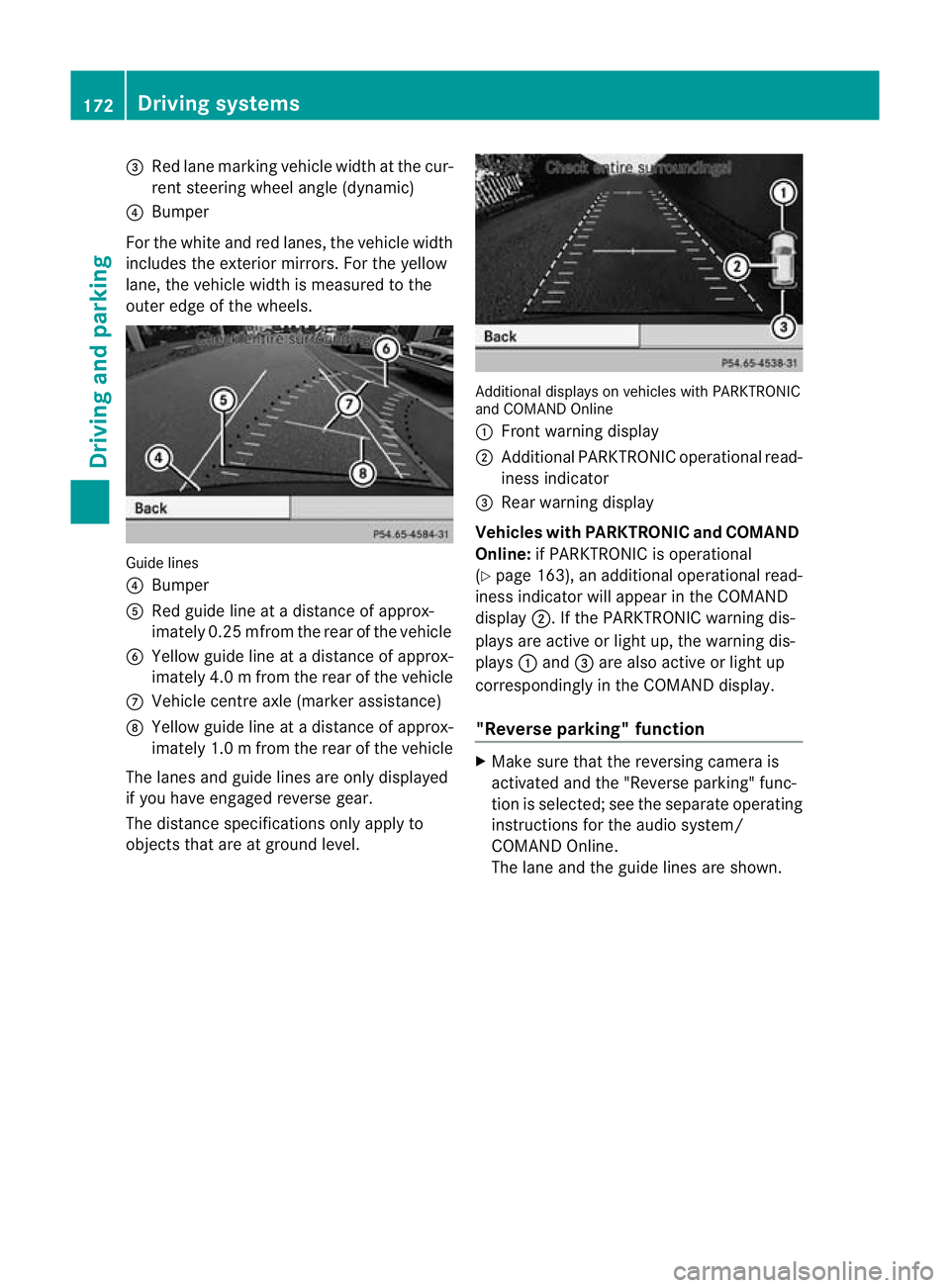
=
Red lane marking vehicle width at the cur-
ren tsteering wheel angle (dynamic)
? Bumper
For the white and red lanes, the vehicle width
includes the exterior mirrors. For the yellow
lane, the vehicle width is measured to the
outer edge of the wheels. Guide lines
? Bumper
A Red guide line at a distance of approx-
imately 0.25 mfrom the rear of the vehicle
B Yellow guide line at a distance of approx-
imately 4.0 mfrom the rear of the vehicle
C Vehicle centre axle (marker assistance)
D Yellow guide line at a distance of approx-
imately 1.0 mfrom the rear of the vehicle
The lanes and guide lines are only displayed
if you have engaged reverse gear.
The distance specifications only apply to
objects that are at ground level. Additional displays on vehicles with PARKTRONIC
and COMAND Online
:
Front warning display
; Additional PARKTRONIC operational read-
iness indicator
= Rearw arning display
Vehicles with PARKTRONIC and COMAND
Online: if PARKTRONIC is operational
(Y page 163), an additional operational read-
iness indicator will appear in the COMAND
display ;. If the PARKTRONIC warning dis-
plays are active or light up, the warning dis-
plays :and =are also active or light up
correspondingly in the COMAND display.
"Reverse parking" function X
Make sure that the reversing camera is
activated and the "Reverse parking" func-
tio nis selected; see the separate operating
instructions for the audio system/
COMAND Online.
The lane and the guide lines are shown. 172
Driving systemsDriving and parking
Page 176 of 329
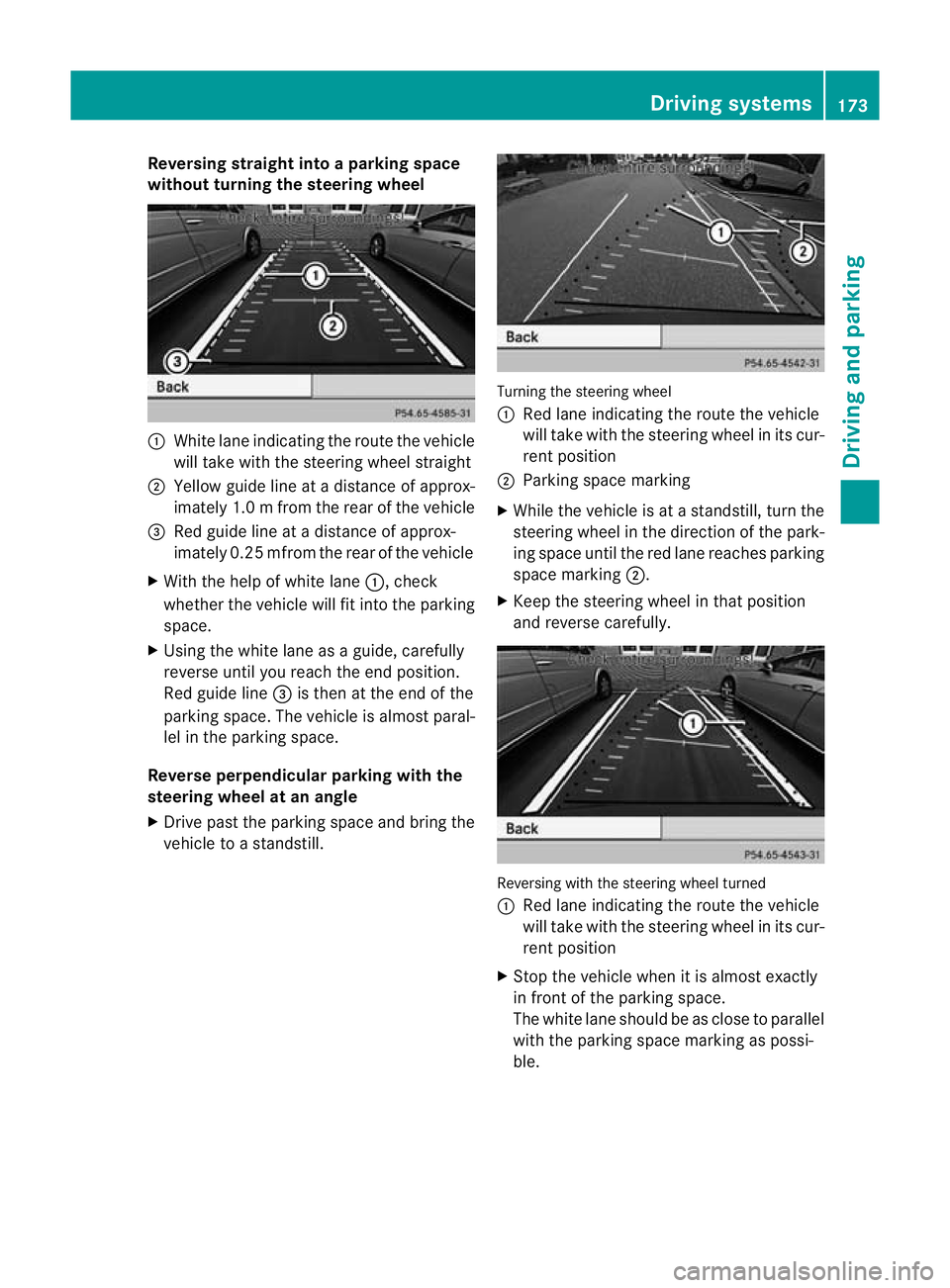
Reversing straight into a parking space
without turning the steering wheel :
White lane indicating the route the vehicle
will take with the steering wheel straight
; Yellow guide line at a distance of approx-
imately 1.0 mfrom the rear of the vehicle
= Red guide line at a distance of approx-
imately 0.25 mfrom the rear of the vehicle
X With the help of white lane :, check
whethe rthe vehicle will fit into the parking
space.
X Using the white lane as a guide, carefully
reverse until you reach the end position.
Red guide line =is then at the end of the
parking space. The vehicle is almost paral-
lel in the parking space.
Reverse perpendicular parking with the
steering wheel at an angle
X Drive past the parking space and bring the
vehicle to a standstill. Turning the steering wheel
:
Red lane indicating the route the vehicle
will take with the steering wheel in its cur-
rent position
; Parking space marking
X While the vehicle is at a standstill, turn the
steering wheel in the direction of the park-
ing space until the red lane reaches parking
space marking ;.
X Keep the steering wheel in that position
and reverse carefully. Reversing with the steering wheel turned
:
Red lane indicating the route the vehicle
will take with the steering wheel in its cur-
rent position
X Stop the vehicle when it is almost exactly
in front of the parking space.
The white lane should be as close to parallel
with the parking space marking as possi-
ble. Driving systems
173Driving and parking Z
Page 177 of 329
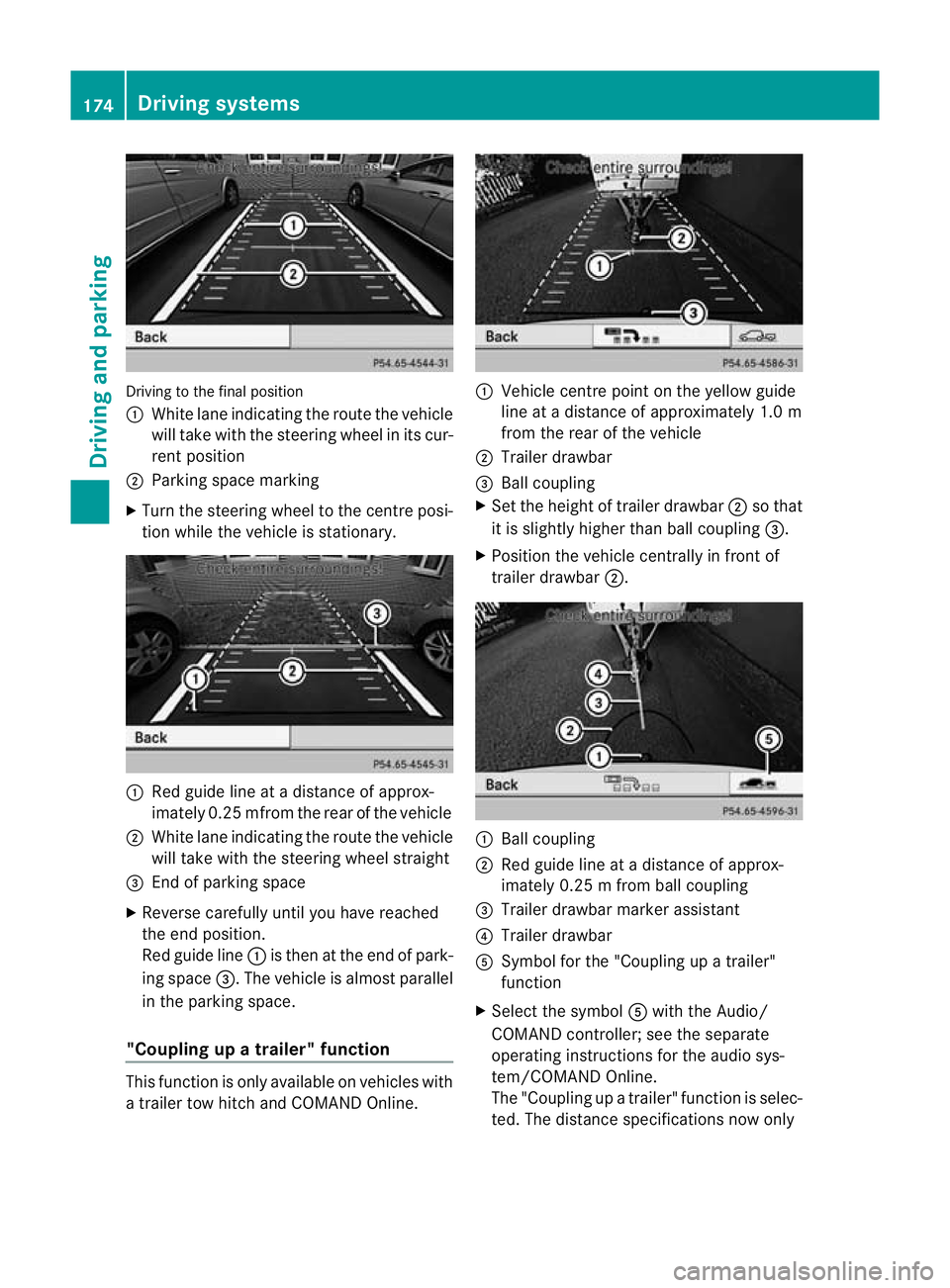
Driving to the final position
:
White lane indicating the route the vehicle
will take with the steering wheel in its cur-
rent position
; Parking space marking
X Turn the steering wheel to the centre posi-
tio nw hile the vehicle is stationary. :
Red guide line at a distance of approx-
imately 0.25 mfrom the rear of the vehicle
; White lane indicating the route the vehicle
will take with the steering wheel straight
= End of parking space
X Reverse carefully until you have reached
the end position.
Red guide line :is then at the end of park-
ing space =.The vehicle is almost parallel
in the parking space.
"Coupling up a trailer" function This function is only available on vehicles with
a trailer tow hitch and COMAND Online. :
Vehicle centre point on the yellow guide
line at a distance of approximately 1.0 m
from the rear of the vehicle
; Trailer drawbar
= Ball coupling
X Set the height of trailer drawbar ;so that
it is slightly higher than ball coupling =.
X Position the vehicle centrally in front of
trailer drawbar ;. :
Ball coupling
; Red guide line at a distance of approx-
imately 0.25 m from ball coupling
= Trailer drawbarm arker assistant
? Trailer drawbar
A Symbol for the "Coupling up a trailer"
function
X Select the symbol Awith the Audio/
COMAND controller; see th eseparate
operating instructions for the audio sys-
tem/COMAND Online.
The "Coupling up a trailer" function is selec-
ted. The distance specifications now only 174
Driving systemsDriving and parking