key battery MERCEDES-BENZ B-CLASS HATCHBACK 2015 Owner's Manual
[x] Cancel search | Manufacturer: MERCEDES-BENZ, Model Year: 2015, Model line: B-CLASS HATCHBACK, Model: MERCEDES-BENZ B-CLASS HATCHBACK 2015Pages: 293, PDF Size: 10.83 MB
Page 126 of 293
Switching on/off
X
Turn the key to position 0in the ignition lock
or remove it (Y page 126).
X To activate: press theÌbutton.
The indicator lamp in the Ìbutton lights
up.
X To deactivate: press theÌbutton.
The indicator lamp in the Ìbutton goes
out.
i Residual heat is deactivated automatically:
R after approximately 30 minutes
R when the ignition is switched on
R if the battery voltage drops Air vents
Important safety notes
G
WARNING
Very hot or very cold air can flow from the air vents. This could result in burns or frostbite in the immediate vicinity of the air vents. There
is a risk of injury.
Make sure that all vehicle occupants always
maintain a sufficient distance to the air out-
lets. If necessary, redirect the airflow to
another area of the vehicle interior.
In order to ensure the direct flow of fresh air
through the air vents into the vehicle interior,
please observe the following notes:
R keep the air inlet between the windscreen and
the bonnet free of blockages, such as ice,
snow or leaves
R never cover the vents or ventilation grilles in
the vehicle interior
i Optimal climate control function is achieved
by opening the air vents fully and setting the
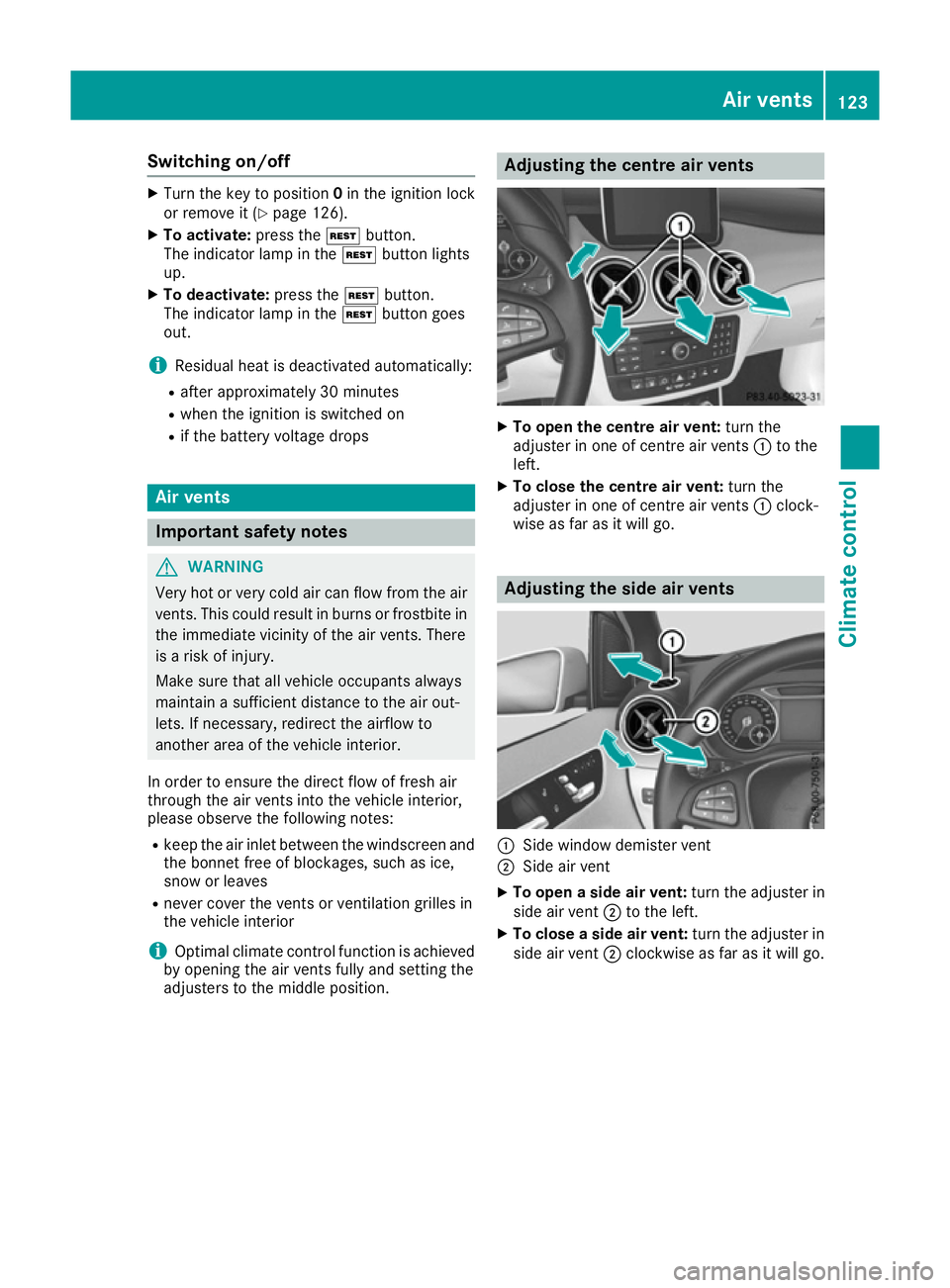
adjusters to the middle position. Adjusting the centre air vents
X
To open the centre air vent: turn the
adjuster in one of centre air vents :to the
left.
X To close the centre air vent: turn the
adjuster in one of centre air vents :clock-
wise as far as it will go. Adjusting the side air vents
:
Side window demister vent
; Side air vent
X To open a side air vent: turn the adjuster in
side air vent ;to the left.
X To close a side air vent: turn the adjuster in
side air vent ;clockwise as far as it will go. Air vents
123Climate control Z
Page 129 of 293
sufficient. If necessary, counteract the reduced
regenerative braking effect by applying the
brake yourself.
Before commencing your journey, ensure that
the charging cable required for charging the
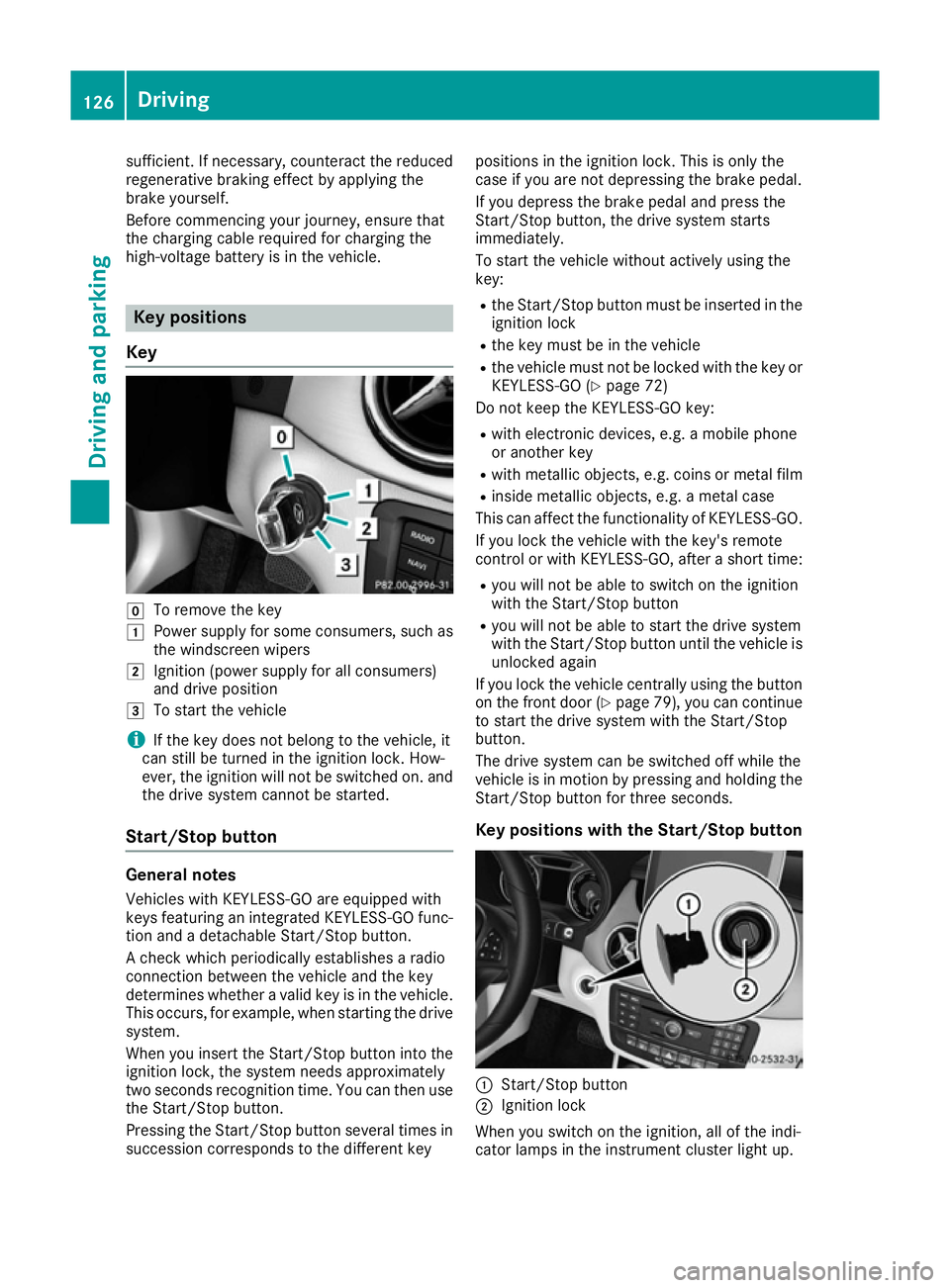
high-voltage battery is in the vehicle. Key positions
Key g
To remove the key
1 Power supply for some consumers, such as
the windscreen wipers
2 Ignition (power supply for all consumers)
and drive position
3 To start the vehicle
i If the key does not belong to the vehicle, it
can still be turned in the ignition lock. How-
ever, the ignition will not be switched on. and
the drive system cannot be started.
Start/Stop button General notes
Vehicles with KEYLESS-GO are equipped with
keys featuring an integrated KEYLESS-GO func- tion and a detachable Start/Stop button.
A check which periodically establishes a radio
connection between the vehicle and the key
determines whether a valid key is in the vehicle. This occurs, for example, when starting the drivesystem.
When you insert the Start/Stop button into the
ignition lock, the system needs approximately
two seconds recognition time. You can then use the Start/Stop button.
Pressing the Start/Stop button several times in
succession corresponds to the different key positions in the ignition lock. This is only the
case if you are not depressing the brake pedal.
If you depress the brake pedal and press the
Start/Stop button, the drive system starts
immediately.
To start the vehicle without actively using the
key:
R the Start/Stop button must be inserted in the
ignition lock
R the key must be in the vehicle
R the vehicle must not be locked with the key or
KEYLESS-GO (Y page 72)
Do not keep the KEYLESS-GO key:
R with electronic devices, e.g. a mobile phone
or another key
R with metallic objects, e.g. coins or metal film
R inside metallic objects, e.g. a metal case
This can affect the functionality of KEYLESS-GO.
If you lock the vehicle with the key's remote
control or with KEYLESS-GO, after a short time:
R you will not be able to switch on the ignition
with the Start/Stop button
R you will not be able to start the drive system
with the Start/Stop button until the vehicle is
unlocked again
If you lock the vehicle centrally using the button
on the front door (Y page 79), you can continue
to start the drive system with the Start/Stop
button.
The drive system can be switched off while the
vehicle is in motion by pressing and holding the
Start/Stop button for three seconds.
Key positions with the Start/Stop button :
Start/Stop button
; Ignition lock
When you switch on the ignition, all of the indi-
cator lamps in the instrument cluster light up. 126
DrivingDriving and parking
Page 147 of 293
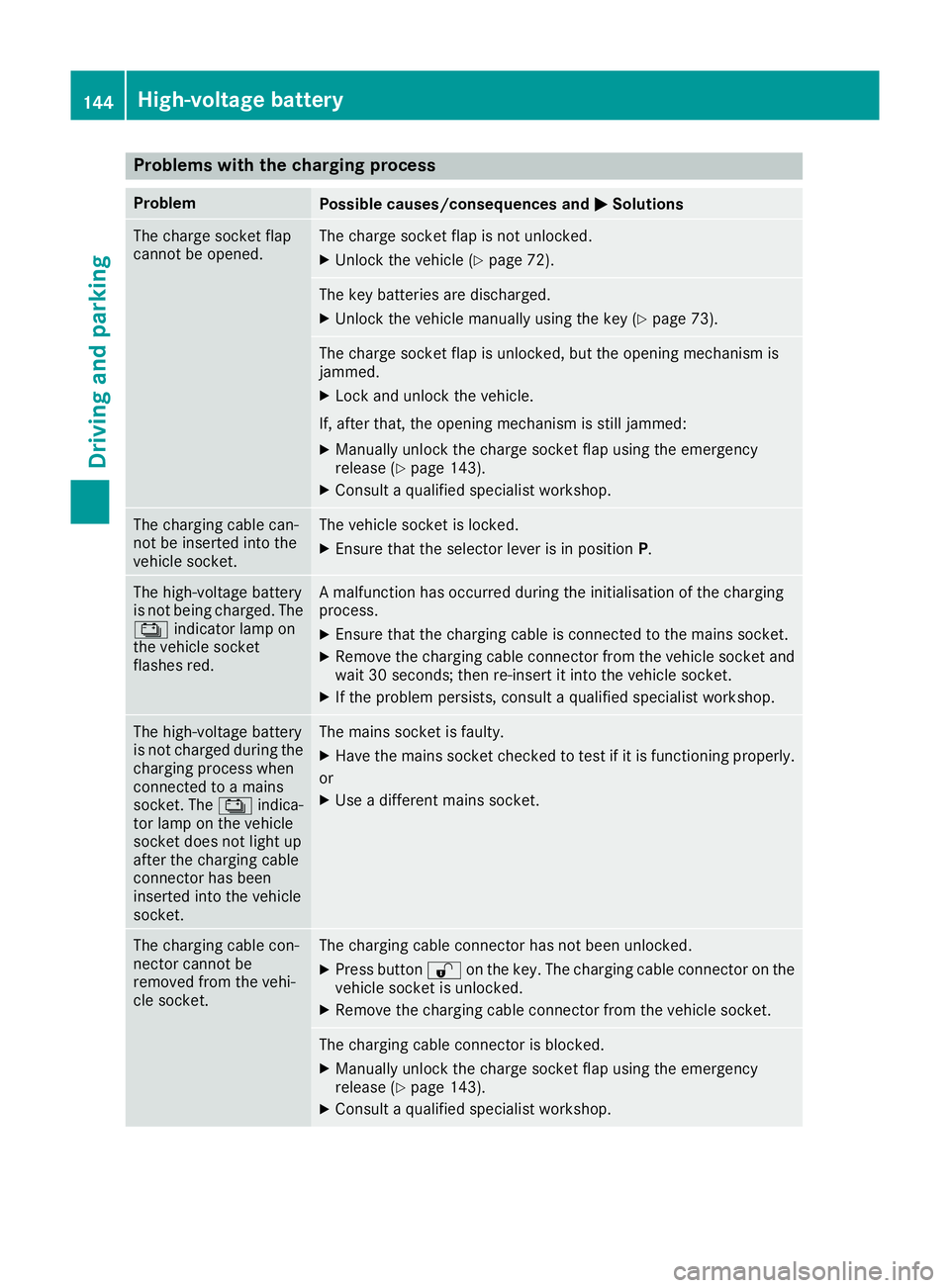
Problems with the charging process
Problem
Possible causes/consequences and
M
MSolutions The charge socket flap
cannot be opened. The charge socket flap is not unlocked.
X Unlock the vehicle (Y page 72). The key batteries are discharged.
X Unlock the vehicle manually using the key (Y page 73). The charge socket flap is unlocked, but the opening mechanism is
jammed.
X Lock and unlock the vehicle.
If, after that, the opening mechanism is still jammed:
X Manually unlock the charge socket flap using the emergency
release (Y page 143).
X Consult a qualified specialist workshop. The charging cable can-
not be inserted into the
vehicle socket. The vehicle socket is locked.
X
Ensure that the selector lever is in position P.The high-voltage battery
is not being charged. The
Ý indicator lamp on
the vehicle socket
flashes red. A malfunction has occurred during the initialisation of the charging
process.
X Ensure that the charging cable is connected to the mains socket.
X Remove the charging cable connector from the vehicle socket and
wait 30 seconds; then re-insert it into the vehicle socket.
X If the problem persists, consult a qualified specialist workshop. The high-voltage battery
is not charged during the
charging process when
connected to a mains
socket. The Ýindica-
tor lamp on the vehicle
socket does not light up
after the charging cable
connector has been
inserted into the vehicle
socket. The mains socket is faulty.
X Have the mains socket checked to test if it is functioning properly.
or X Use a different mains socket. The charging cable con-
nector cannot be
removed from the vehi-
cle socket. The charging cable connector has not been unlocked.
X Press button %on the key. The charging cable connector on the
vehicle socket is unlocked.
X Remove the charging cable connector from the vehicle socket. The charging cable connector is blocked.
X Manually unlock the charge socket flap using the emergency
release (Y page 143).
X Consult a qualified specialist workshop. 144
High-voltage batteryDriving and parking
Page 177 of 293
If necessary, counteract the reduced regenera-
tive braking effect by applying the brake your-
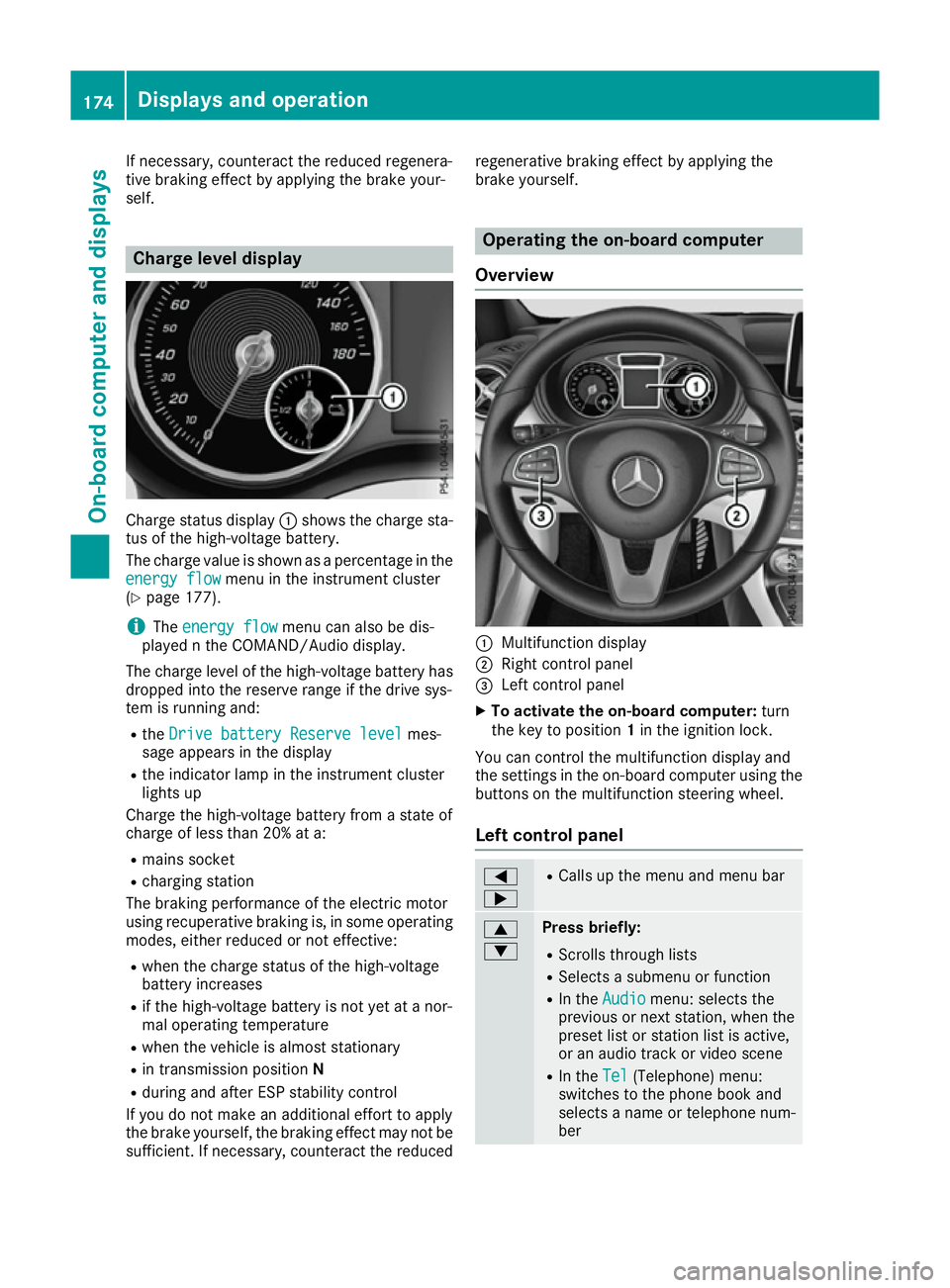
self. Charge level display
Charge status display
:shows the charge sta-
tus of the high-voltage battery.
The charge value is shown as a percentage in the
energy flow
energy flow menu in the instrument cluster
(Y page 177).
i The
energy flow
energy flow menu can also be dis-
played n the COMAND/Audio display.
The charge level of the high-voltage battery has dropped into the reserve range if the drive sys-
tem is running and:
R the Drive battery Reserve level Drive battery Reserve level mes-
sage appears in the display
R the indicator lamp in the instrument cluster
lights up
Charge the high-voltage battery from a state of
charge of less than 20% at a:
R mains socket
R charging station
The braking performance of the electric motor
using recuperative braking is, in some operating
modes, either reduced or not effective:
R when the charge status of the high-voltage
battery increases
R if the high-voltage battery is not yet at a nor-
mal operating temperature
R when the vehicle is almost stationary
R in transmission position N
R during and after ESP stability control
If you do not make an additional effort to apply
the brake yourself, the braking effect may not be sufficient. If necessary, counteract the reduced regenerative braking effect by applying the
brake yourself. Operating the on-board computer
Overview :
Multifunction display
; Right control panel
= Left control panel
X To activate the on-board computer: turn
the key to position 1in the ignition lock.
You can control the multifunction display and
the settings in the on-board computer using the buttons on the multifunction steering wheel.
Left control panel =
; R
Calls up the menu and menu bar 9
: Press briefly:
R Scrolls through lists
R Selects a submenu or function
R In the Audio Audio menu: selects the
previous or next station, when the preset list or station list is active,
or an audio track or video scene
R In the Tel Tel(Telephone) menu:
switches to the phone book and
selects a name or telephone num-
ber 174
Displays and operationOn-board computer and displays
Page 188 of 293
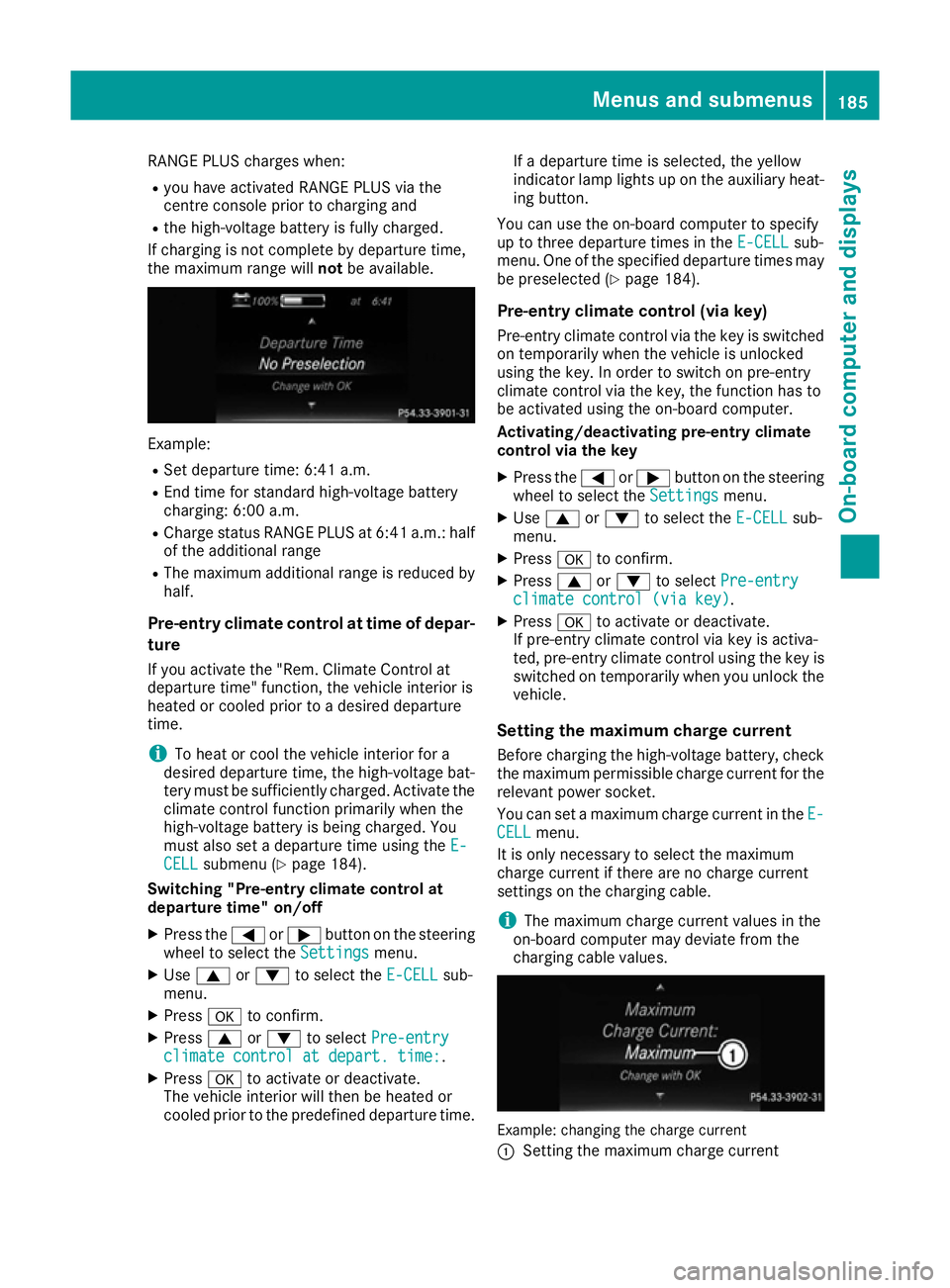
RANGE PLUS charges when:
R you have activated RANGE PLUS via the
centre console prior to charging and
R the high-voltage battery is fully charged.
If charging is not complete by departure time,
the maximum range will notbe available. Example:
R Set departure time: 6:41 a.m.
R End time for standard high-voltage battery
charging: 6:00 a.m.
R Charge status RANGE PLUS at 6:41 a.m.: half
of the additional range
R The maximum additional range is reduced by
half.
Pre-entry climate control at time of depar-
ture
If you activate the "Rem. Climate Control at
departure time" function, the vehicle interior is
heated or cooled prior to a desired departure
time.
i To heat or cool the vehicle interior for a
desired departure time, the high-voltage bat-
tery must be sufficiently charged. Activate the climate control function primarily when the
high-voltage battery is being charged. You
must also set a departure time using the E-
E-
CELL CELL submenu (Y page 184).
Switching "Pre-entry climate control at
departure time" on/off
X Press the =or; button on the steering
wheel to select the Settings
Settingsmenu.
X Use 9 or: to select the E-CELL
E-CELL sub-
menu.
X Press ato confirm.
X Press 9or: to select Pre-entry
Pre-entry
climate control at depart. time:
climate control at depart. time:.
X Press ato activate or deactivate.
The vehicle interior will then be heated or
cooled prior to the predefined departure time. If a departure time is selected, the yellow
indicator lamp lights up on the auxiliary heat-
ing button.
You can use the on-board computer to specify
up to three departure times in the E-CELL E-CELLsub-
menu. One of the specified departure times may
be preselected (Y page 184).
Pre-entry climate control (via key)
Pre-entry climate control via the key is switched on temporarily when the vehicle is unlocked
using the key. In order to switch on pre-entry
climate control via the key, the function has to
be activated using the on-board computer.
Activating/deactivating pre-entry climate
control via the key
X Press the =or; button on the steering
wheel to select the Settings Settingsmenu.
X Use 9 or: to select the E-CELL
E-CELLsub-
menu.
X Press ato confirm.
X Press 9or: to select Pre-entry
Pre-entry
climate control (via key)
climate control (via key).
X Press ato activate or deactivate.
If pre-entry climate control via key is activa-
ted, pre-entry climate control using the key is switched on temporarily when you unlock thevehicle.
Setting the maximum charge current Before charging the high-voltage battery, check
the maximum permissible charge current for the relevant power socket.
You can set a maximum charge current in the E- E-
CELL
CELL menu.
It is only necessary to select the maximum
charge current if there are no charge current
settings on the charging cable.
i The maximum charge current values in the
on-board computer may deviate from the
charging cable values. Example: changing the charge current
:
Setting the maximum charge current Menus and submenus
185On-board computer and displays Z
Page 216 of 293
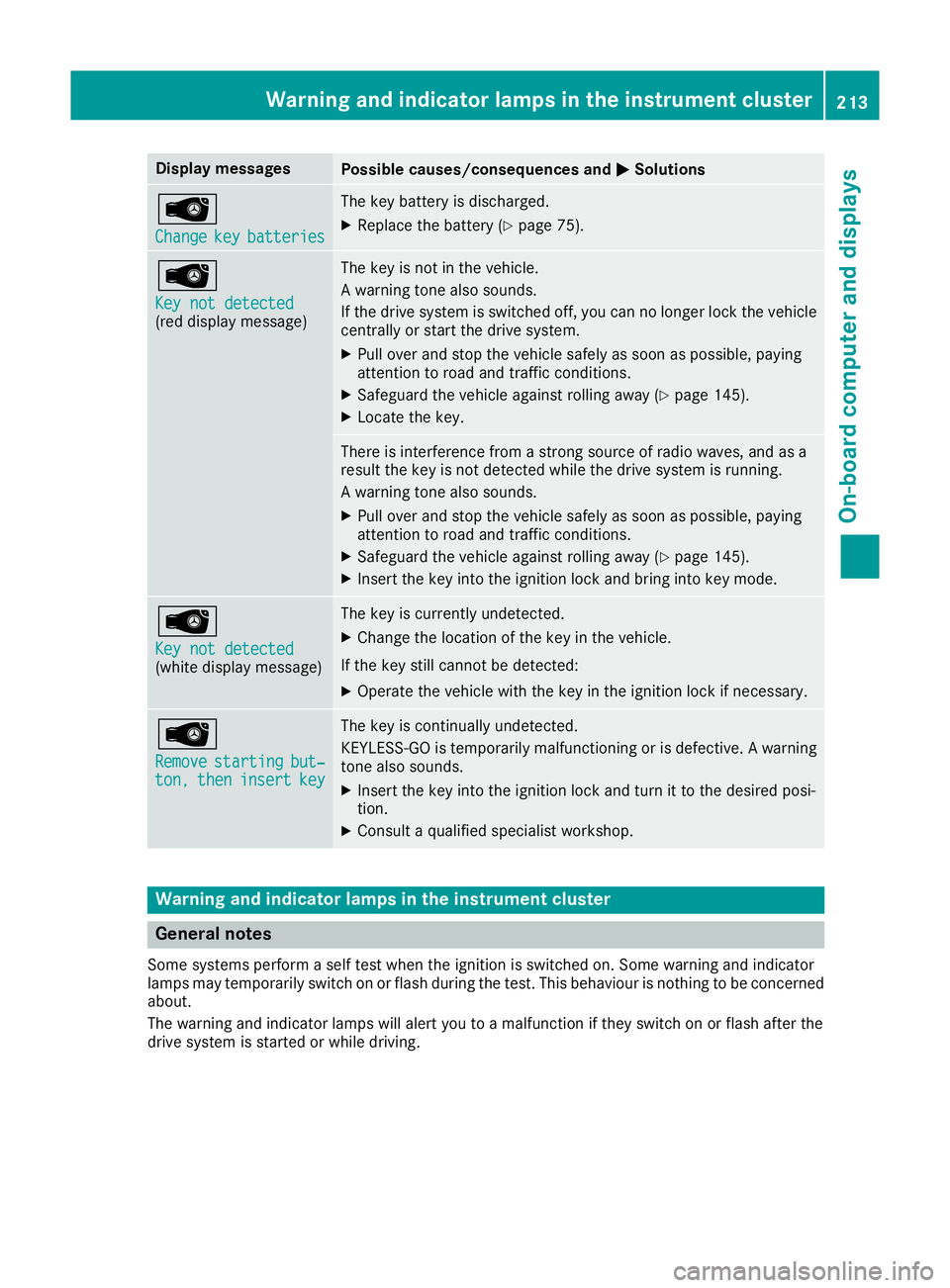
Display messages
Possible causes/consequences and
M
MSolutions Â
Change Change
key
keybatteries
batteries The key battery is discharged.
X Replace the battery (Y page 75).Â
Key not detected Key not detected
(red display message) The key is not in the vehicle.
A warning tone also sounds.
If the drive system is switched off, you can no longer lock the vehicle
centrally or start the drive system.
X Pull over and stop the vehicle safely as soon as possible, paying
attention to road and traffic conditions.
X Safeguard the vehicle against rolling away (Y page 145).
X Locate the key. There is interference from a strong source of radio waves, and as a
result the key is not detected while the drive system is running.
A warning tone also sounds.
X Pull over and stop the vehicle safely as soon as possible, paying
attention to road and traffic conditions.
X Safeguard the vehicle against rolling away (Y page 145).
X Insert the key into the ignition lock and bring into key mode. Â
Key not detected Key not detected
(white display message) The key is currently undetected.
X Change the location of the key in the vehicle.
If the key still cannot be detected:
X Operate the vehicle with the key in the ignition lock if necessary. Â
Remove Remove
starting
starting but‐
but‐
ton,
ton, then
theninsert
insert key
key The key is continually undetected.
KEYLESS-GO is temporarily malfunctioning or is defective. A warning
tone also sounds.
X Insert the key into the ignition lock and turn it to the desired posi-
tion.
X Consult a qualified specialist workshop. Warning and indicator lamps in the instrument cluster
General notes
Some systems perform a self test when the ignition is switched on. Some warning and indicator
lamps may temporarily switch on or flash during the test. This behaviour is nothing to be concerned about.
The warning and indicator lamps will alert you to a malfunction if they switch on or flash after the
drive system is started or while driving. Wa
rning and indi cator lamps in the instrument cluster
213On-board computer and displays Z
Page 238 of 293
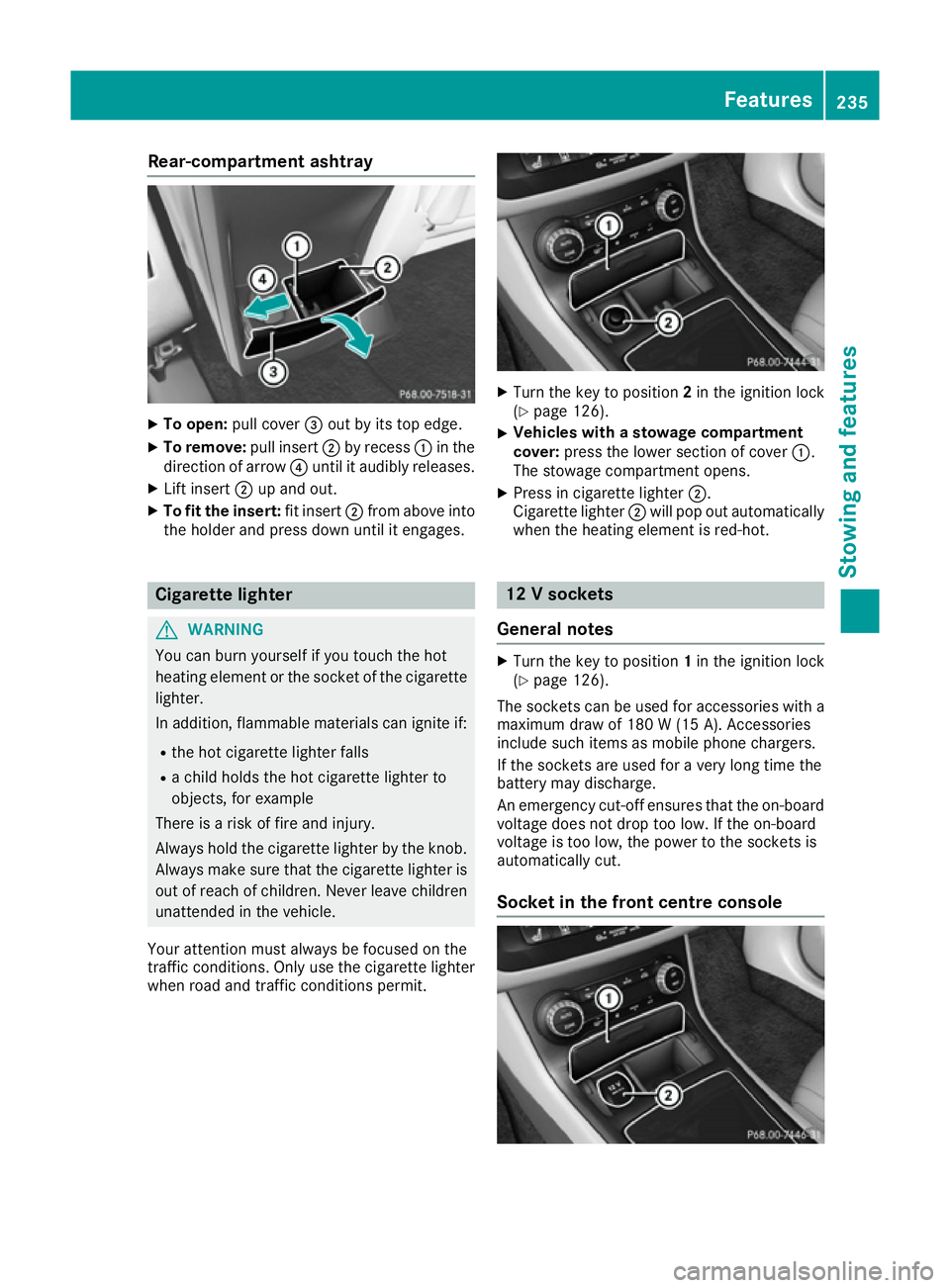
Rear-compartment ashtray
X
To open: pull cover =out by its top edge.
X To remove: pull insert;by recess :in the
direction of arrow ?until it audibly releases.
X Lift insert ;up and out.
X To fit the insert: fit insert;from above into
the holder and press down until it engages. Cigarette lighter
G
WARNING
You can burn yourself if you touch the hot
heating element or the socket of the cigarette lighter.
In addition, flammable materials can ignite if:
R the hot cigarette lighter falls
R a child holds the hot cigarette lighter to
objects, for example
There is a risk of fire and injury.
Always hold the cigarette lighter by the knob.
Always make sure that the cigarette lighter is
out of reach of children. Never leave children unattended in the vehicle.
Your attention must always be focused on the
traffic conditions. Only use the cigarette lighter when road and traffic conditions permit. X
Turn the key to position 2in the ignition lock
(Y page 126).
X Vehicles with a stowage compartment
cover:
press the lower section of cover :.
The stowage compartment opens.
X Press in cigarette lighter ;.
Cigarette lighter ;will pop out automatically
when the heating element is red-hot. 12 V sockets
General notes X
Turn the key to position 1in the ignition lock
(Y page 126).
The sockets can be used for accessories with a
maximum draw of 180 W(15 A). Accessories
include such items as mobile phone chargers.
If the sockets are used for a very long time the
battery may discharge.
An emergency cut-off ensures that the on-board voltage does not drop too low. If the on-board
voltage is too low, the power to the sockets is
automatically cut.
Socket in the front centre console Features
235Stowing and fea tures Z
Page 258 of 293
G
WARNING
Battery acid is caustic. There is a risk of injury. Avoid contact with the skin, eyes or clothing.
Do not breathe in any battery gases. Do not
lean over the battery. Keep the batteries out
of the reach of children. Immediately rinse off
battery acid thoroughly with plenty of clean
water and seek medical attention at once. H
Environmental note Batteries contain pollutants.
It is illegal to dispose of them with the household rubbish.
They must be collected sep-
arately and disposed of in anenvironmentally responsible
recycling system. Dispose of batteries in an
environmentally responsible
manner. Take discharged
batteries to a qualified spe-
cialist workshop or to a col-
lection point for used batter-
ies.
! Have the battery checked regularly at a
qualified specialist workshop.
Observe the service intervals in the Service
Booklet or contact a qualified specialist work- shop for more information.
Comply with safety precautions and take pro-
tective measures when handling batteries. Risk of explosion
Fire, naked flames and smoking are
prohibited when handling the bat-
tery. Avoid creating sparks.
Battery acid is caustic. Avoid contact
with the skin, eyes or clothing.
Wear suitable protective clothing, in
particular gloves, an apron and a
face mask.
Immediately rinse acid splashes off
with clean water. Consult a doctor if
necessary. Wear eye protection.
Keep children away.
Observe this Owner's Manual.
For safety reasons, Mercedes-Benz recom-
mends that you only use batteries which have
been tested and approved for your vehicle by
Mercedes-Benz. These batteries provide
increased impact protection to prevent vehicle
occupants from suffering acid burns should the battery be damaged in the event of an accident.
In order for the battery to achieve the maximum possible service life, it must always be suffi-
ciently charged.
Like other batteries, the vehicle battery may
discharge over time if you do not use the vehicle.In such cases, have the battery disconnected ata qualified specialist workshop. You can also
charge the battery with a charger recommended
by Mercedes-Benz. For more information,
please contact a qualified specialist workshop.
Have the battery charge checked more fre-
quently if you use the vehicle mainly for short
trips or if you leave it standing idle for a lengthy period. Consult a qualified specialist workshop
if you wish to leave your vehicle parked up for a
long period of time.
When you park the vehicle, remove the key if you do not require any electrical consumers. The
vehicle will then use very little energy, thus con- serving battery power.
If the power supply has been interrupted, e.g. if the battery was discharged, you will have to:
R set the clock via Audio 20 or COMAND Online
(see separate operating instructions)
R reset the function for folding the exterior mir-
rors in/out automatically, by folding the mir-
rors out once (Y page 94). Batteries
255Breakdown assistance Z
Page 264 of 293
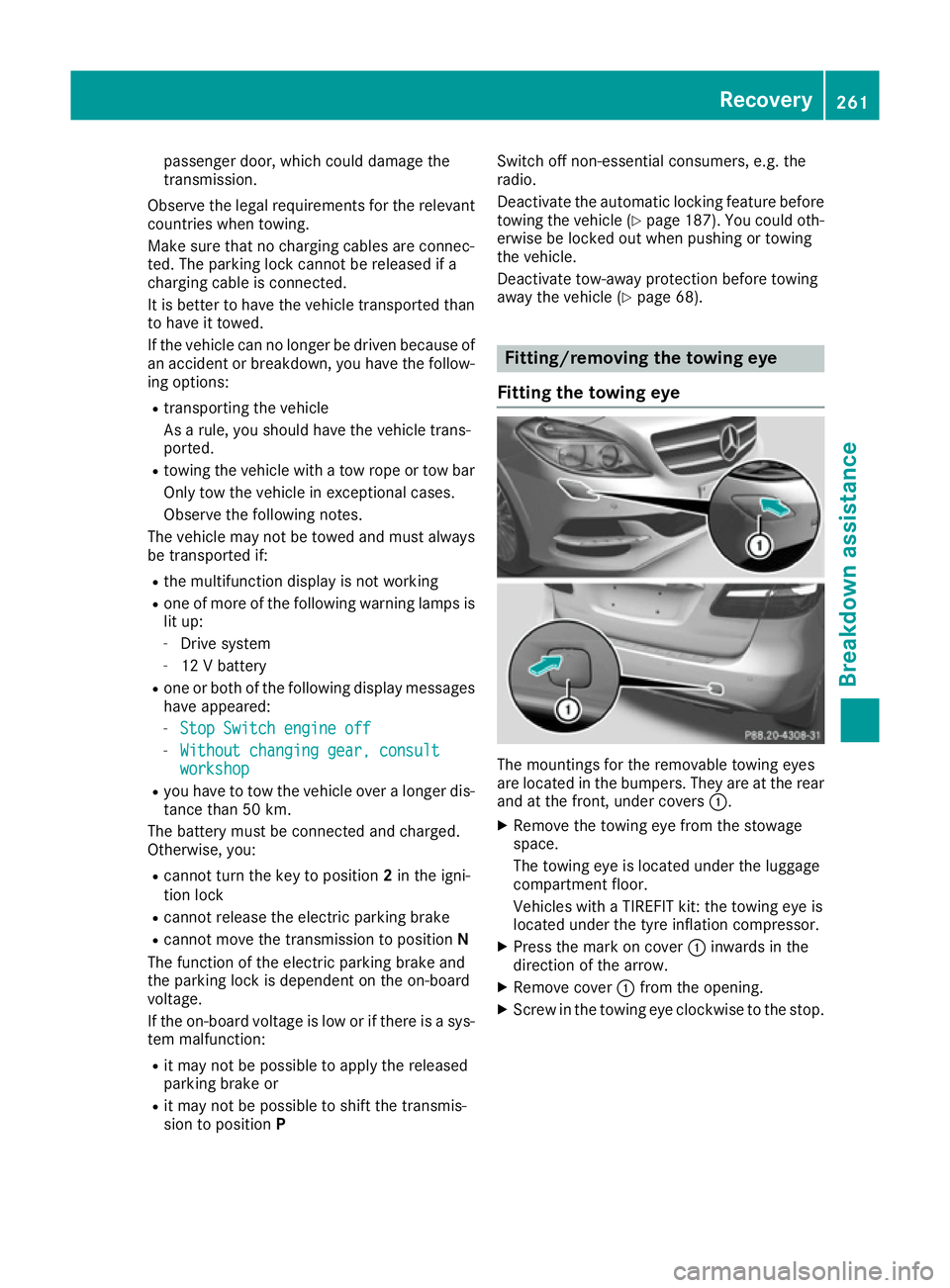
passenger door, which could damage the
transmission.
Observe the legal requirements for the relevant countries when towing.
Make sure that no charging cables are connec-
ted. The parking lock cannot be released if a
charging cable is connected.
It is better to have the vehicle transported than
to have it towed.
If the vehicle can no longer be driven because of
an accident or breakdown, you have the follow- ing options:
R transporting the vehicle
As a rule, you should have the vehicle trans-
ported.
R towing the vehicle with a tow rope or tow bar
Only tow the vehicle in exceptional cases.
Observe the following notes.
The vehicle may not be towed and must always be transported if:
R the multifunction display is not working
R one of more of the following warning lamps is
lit up:
- Drive system
- 12 V battery
R one or both of the following display messages
have appeared:
- Stop Switch engine off
Stop Switch engine off
- Without changing gear, consult Without changing gear, consult
workshop
workshop
R you have to tow the vehicle over a longer dis-
tance than 50 km.
The battery must be connected and charged.
Otherwise, you:
R cannot turn the key to position 2in the igni-
tion lock
R cannot release the electric parking brake
R cannot move the transmission to position N
The function of the electric parking brake and
the parking lock is dependent on the on-board
voltage.
If the on-board voltage is low or if there is a sys- tem malfunction:
R it may not be possible to apply the released
parking brake or
R it may not be possible to shift the transmis-
sion to position P Switch off non-essential consumers, e.g. the
radio.
Deactivate the automatic locking feature before
towing the vehicle (Y page 187). You could oth-
erwise be locked out when pushing or towing
the vehicle.
Deactivate tow-away protection before towing
away the vehicle (Y page 68). Fitting/removing the towing eye
Fitting the towing eye The mountings for the removable towing eyes
are located in the bumpers. They are at the rear
and at the front, under covers :.
X Remove the towing eye from the stowage
space.
The towing eye is located under the luggage
compartment floor.
Vehicles with a TIREFIT kit: the towing eye is
located under the tyre inflation compressor.
X Press the mark on cover :inwards in the
direction of the arrow.
X Remove cover :from the opening.
X Screw in the towing eye clockwise to the stop. Recovery
261Breakdown assistance Z
Page 265 of 293
Removing the towing eye
X
Loosen the towing eye and unscrew it.
X Place the towing eye in the stowage well
under the luggage compartment floor
(Y page 249).
X Vehicles with a TIREFIT kit: replace the tyre
inflation compressor. Towing the vehicle with both axles on
the ground
It is important that you observe the safety
instructions when towing away your vehicle
(Y page 260).
X On vehicles with KEYLESS-GO or the KEY-
LESS-GO start function: you must use the
key instead of the Start/Stop button
(Y page 127).
The transmission automatically shifts to posi-
tion Pwhen you open the driver's or front-
passenger door or when you remove the key
from the ignition lock. In order to ensure that the transmission stays in position Nwhen towing
the vehicle, you must observe the following
points:
X Make sure that the vehicle is stationary.
X Turn the key to position 2in the ignition lock.
X Depress the brake pedal and keep it
depressed.
X Shift the transmission to position N.
X Release the brake pedal.
X Release the electric parking brake.
X Switch on the hazard warning lamps
(Y page 100).
X Leave the key in position 2in the ignition lock.
If the 12 V battery indicator lamp lights up, you
must observe the following points:
X Pull over and safely stop the vehicle as soon
as possible, paying attention to road and traf-
fic conditions.
X Shift the transmission to position P.
X Apply the electric parking brake.
i In order to signal a change of direction when
towing the vehicle with the hazard warning
lamps switched on, use the combination
switch as usual. In this case, only the turn
signals for the desired direction flash. When you reset the combination switch, the hazard
warning lamps start flashing again. Towing the vehicle with the front axle
raised
When towing your vehicle with the front axle
raised, it is important that you observe the
safety instructions (Y page 260).
! The ignition must be switched off if you are
towing the vehicle with the front axle raised.
Intervention by ESP ®
could otherwise dam-
age the brake system.
X On vehicles with KEYLESS-GO or the KEY-
LESS-GO start function: you must use the
key instead of the Start/Stop button
(Y page 127).
X Make sure that the vehicle is stationary.
X Turn the key to position 2in the ignition lock.
X When the vehicle is stationary, depress the
brake pedal and keep it depressed.
X Shift the transmission to position P.
X Release the brake pedal.
X Release the electric parking brake.
X Deactivate tow-away protection (Y page 68).
X Deactivate automatic locking (Y page 187).
X Switch on the hazard warning lamps
(Y page 100).
X Turn the key in the ignition lock to position 0
and leave the key in the ignition lock. Towing the vehicle away with the rear
axle raised
When towing your vehicle away with the rear
axle raised, it is important that you observe the safety instructions (Y page 260).
! The ignition must be switched off if you are
towing the vehicle with the rear axle raised.
Intervention by ESP ®
could otherwise dam-
age the brake system. 262
RecoveryBreakdown assistance