battery MERCEDES-BENZ B-CLASS HATCHBACK 2015 Workshop Manual
[x] Cancel search | Manufacturer: MERCEDES-BENZ, Model Year: 2015, Model line: B-CLASS HATCHBACK, Model: MERCEDES-BENZ B-CLASS HATCHBACK 2015Pages: 293, PDF Size: 10.83 MB
Page 188 of 293
RANGE PLUS charges when:
R you have activated RANGE PLUS via the
centre console prior to charging and
R the high-voltage battery is fully charged.
If charging is not complete by departure time,
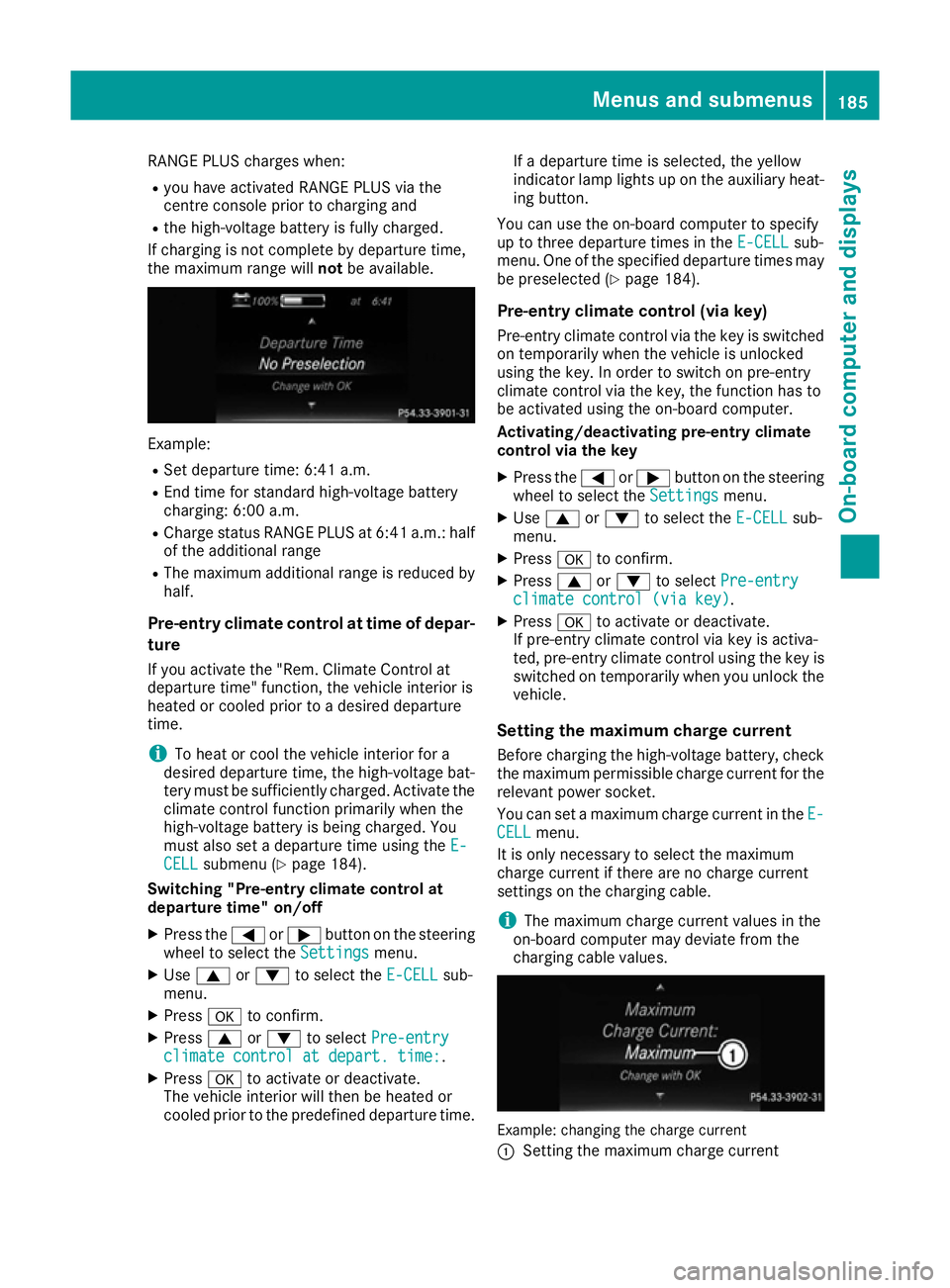
the maximum range will notbe available. Example:
R Set departure time: 6:41 a.m.
R End time for standard high-voltage battery
charging: 6:00 a.m.
R Charge status RANGE PLUS at 6:41 a.m.: half
of the additional range
R The maximum additional range is reduced by
half.
Pre-entry climate control at time of depar-
ture
If you activate the "Rem. Climate Control at
departure time" function, the vehicle interior is
heated or cooled prior to a desired departure
time.
i To heat or cool the vehicle interior for a
desired departure time, the high-voltage bat-
tery must be sufficiently charged. Activate the climate control function primarily when the
high-voltage battery is being charged. You
must also set a departure time using the E-
E-
CELL CELL submenu (Y page 184).
Switching "Pre-entry climate control at
departure time" on/off
X Press the =or; button on the steering
wheel to select the Settings
Settingsmenu.
X Use 9 or: to select the E-CELL
E-CELL sub-
menu.
X Press ato confirm.
X Press 9or: to select Pre-entry
Pre-entry
climate control at depart. time:
climate control at depart. time:.
X Press ato activate or deactivate.
The vehicle interior will then be heated or
cooled prior to the predefined departure time. If a departure time is selected, the yellow
indicator lamp lights up on the auxiliary heat-
ing button.
You can use the on-board computer to specify
up to three departure times in the E-CELL E-CELLsub-
menu. One of the specified departure times may
be preselected (Y page 184).
Pre-entry climate control (via key)
Pre-entry climate control via the key is switched on temporarily when the vehicle is unlocked
using the key. In order to switch on pre-entry
climate control via the key, the function has to
be activated using the on-board computer.
Activating/deactivating pre-entry climate
control via the key
X Press the =or; button on the steering
wheel to select the Settings Settingsmenu.
X Use 9 or: to select the E-CELL
E-CELLsub-
menu.
X Press ato confirm.
X Press 9or: to select Pre-entry
Pre-entry
climate control (via key)
climate control (via key).
X Press ato activate or deactivate.
If pre-entry climate control via key is activa-
ted, pre-entry climate control using the key is switched on temporarily when you unlock thevehicle.
Setting the maximum charge current Before charging the high-voltage battery, check
the maximum permissible charge current for the relevant power socket.
You can set a maximum charge current in the E- E-
CELL
CELL menu.
It is only necessary to select the maximum
charge current if there are no charge current
settings on the charging cable.
i The maximum charge current values in the
on-board computer may deviate from the
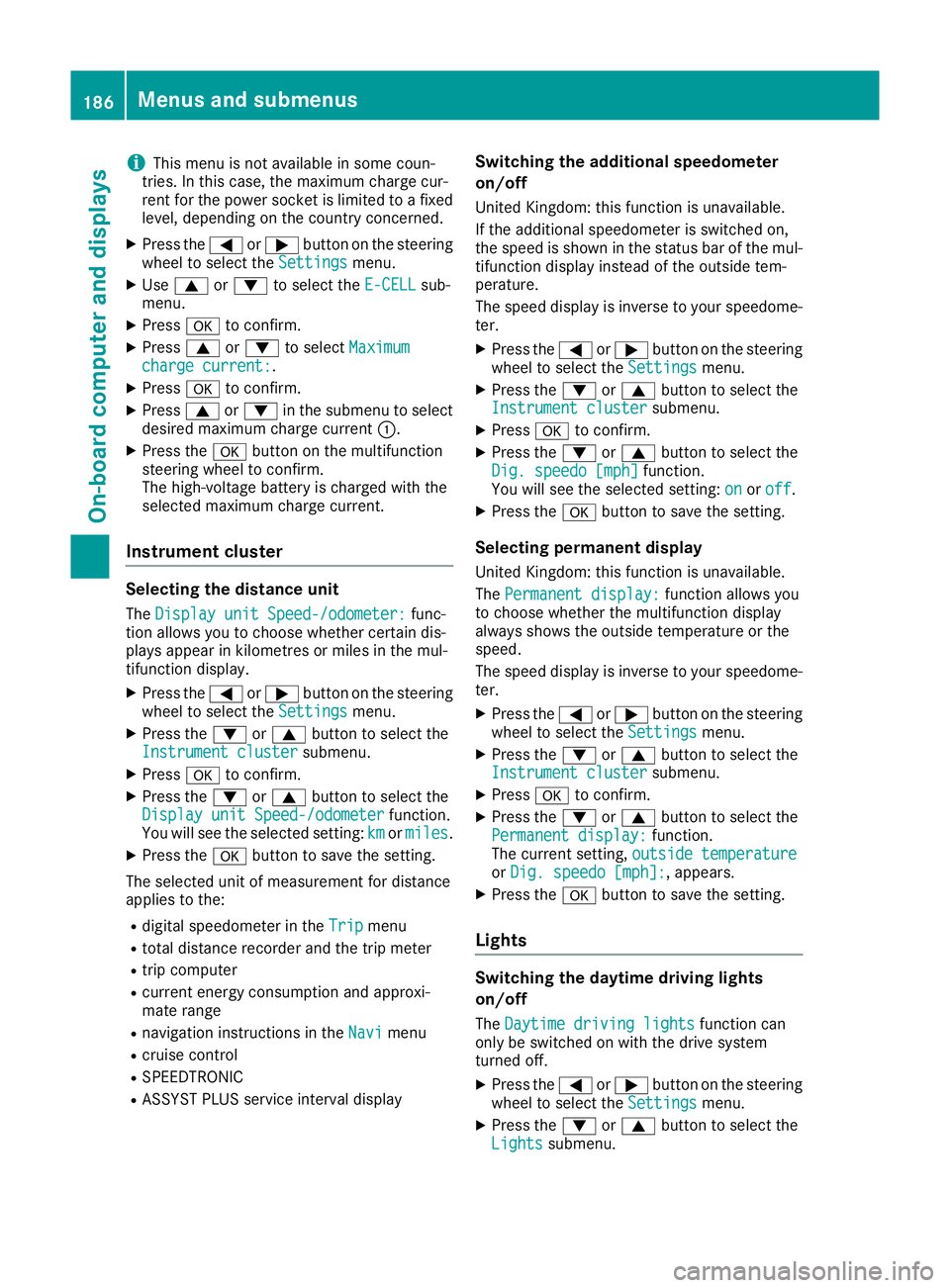
charging cable values. Example: changing the charge current
:
Setting the maximum charge current Menus and submenus
185On-board computer and displays Z
Page 189 of 293
i
This menu is not available in some coun-
tries. In this case, the maximum charge cur-
rent for the power socket is limited to a fixed
level, depending on the country concerned.
X Press the =or; button on the steering
wheel to select the Settings
Settings menu.
X Use 9 or: to select the E-CELL E-CELLsub-
menu.
X Press ato confirm.
X Press 9or: to select Maximum
Maximum
charge current:
charge current:.
X Press ato confirm.
X Press 9or: in the submenu to select
desired maximum charge current :.
X Press the abutton on the multifunction
steering wheel to confirm.
The high-voltage battery is charged with the
selected maximum charge current.
Instrument cluster Selecting the distance unit
The Display unit Speed-/odometer:
Display unit Speed-/odometer: func-
tion allows you to choose whether certain dis-
plays appear in kilometres or miles in the mul-
tifunction display.
X Press the =or; button on the steering
wheel to select the Settings
Settings menu.
X Press the :or9 button to select the
Instrument cluster Instrument cluster submenu.
X Press ato confirm.
X Press the :or9 button to select the
Display unit Speed-/odometer
Display unit Speed-/odometer function.
You will see the selected setting: km
kmormiles
miles.
X Press the abutton to save the setting.
The selected unit of measurement for distance
applies to the:
R digital speedometer in the Trip
Tripmenu
R total distance recorder and the trip meter
R trip computer
R current energy consumption and approxi-
mate range
R navigation instructions in the Navi Navimenu
R cruise control
R SPEEDTRONIC
R ASSYST PLUS service interval display Switching the additional speedometer
on/off
United Kingdom: this function is unavailable.
If the additional speedometer is switched on,
the speed is shown in the status bar of the mul-
tifunction display instead of the outside tem-
perature.
The speed display is inverse to your speedome- ter.
X Press the =or; button on the steering
wheel to select the Settings Settingsmenu.
X Press the :or9 button to select the
Instrument cluster
Instrument cluster submenu.
X Press ato confirm.
X Press the :or9 button to select the
Dig. speedo [mph]
Dig. speedo [mph] function.
You will see the selected setting: on
onoroff
off.
X Press the abutton to save the setting.
Selecting permanent display
United Kingdom: this function is unavailable.
The Permanent display: Permanent display: function allows you
to choose whether the multifunction display
always shows the outside temperature or the
speed.
The speed display is inverse to your speedome- ter.
X Press the =or; button on the steering
wheel to select the Settings Settingsmenu.
X Press the :or9 button to select the
Instrument cluster
Instrument cluster submenu.
X Press ato confirm.
X Press the :or9 button to select the
Permanent display:
Permanent display: function.
The current setting, outside temperature
outside temperature
or Dig. speedo [mph]:
Dig. speedo [mph]:, appears.
X Press the abutton to save the setting.
Lights Switching the daytime driving lights
on/off
The Daytime driving lights Daytime driving lights function can
only be switched on with the drive system
turned off.
X Press the =or; button on the steering
wheel to select the Settings Settingsmenu.
X Press the :or9 button to select the
Lights
Lights submenu. 186
Menus and submenusOn-board computer and displays
Page 198 of 293
Display messages
Possible causes/consequences and
M
MSolutions !
Parking brake inop‐ Parking brake inop‐
erative erative The yellow
!warning lamp lights up. The red !indicator lamp
flashes for about ten seconds after the electric parking brake has been applied or released. It then goes out or remains lit.
The electric parking brake is malfunctioning, e.g. because of over-
voltage or undervoltage.
X Rectify the cause of the overvoltage or undervoltage, e.g. by charg-
ing the battery or restarting the drive system.
X Apply or release the electric parking brake.
If the electric parking brake still cannot be applied or released:
X Switch off the ignition and turn it back on.
X Apply or release the electric parking brake.
If the electric parking brake still cannot be released:
X Consult a qualified specialist workshop.
If it is still not possible to apply the electric parking brake: X Consult a qualified specialist workshop. The red
!indicator lamp flashes and the yellow !warning lamp
is lit.
It is not possible to apply the electric parking brake manually.
X Shift the transmission to position P.
X Consult a qualified specialist workshop. J
Brake immediately Brake immediately A malfunction has occurred while the HOLD function is active.
A tone may also sound at regular intervals. If you attempt to lock the
vehicle, the tone becomes louder.
You cannot start the drive system.
X Paying attention to the traffic situation, immediately depress the
brake pedal firmly and hold until the display message disappears.
X Safeguard the vehicle against rolling away (Y page 145).
You can start the drive system again. J
Check brake fluid Check brake fluid
level level There is insufficient brake fluid in the brake fluid reservoir.
In addition, the red Jwarning lamp lights up in the instrument
cluster and a warning tone sounds.
G WARNING
Braking efficiency may be impaired.
There is a risk of an accident.
X Pull over and stop the vehicle safely as soon as possible, paying
attention to road and traffic conditions. Do not continue driving
under any circumstances.
X Safeguard the vehicle against rolling away (Y page 145).
X Consult a qualified specialist workshop.
X Do not top up the brake fluid. This does not correct the fault. Display
messages
195On-board computer and displays Z
Page 207 of 293

Drive system
Display messages
Possible causes/consequences and
M
MSolutions +
Top up coolant See Top up coolant See
Owner's Manual Owner's Manual The coolant level is too low.
! Avoid making long journeys with too little coolant in the cooling
system. The drive system will otherwise be damaged.
X If the coolant needs topping up more often than usual, have the
cooling system checked at a qualified specialist workshop. #
See Owner's Manual See Owner's Manual The 12 V battery is no longer being charged.
X Stop the vehicle immediately, paying attention to road and traffic
conditions, and switch off the drive system.
X Secure the vehicle against rolling away (Y page 145).
X Do not drive on.
X Do not tow the vehicle.
X Consult a qualified specialist workshop. #
Stop vehicle See Stop vehicle See
Owner's Manual Owner's Manual The 12 V battery is no longer being charged and the battery charge
level is too low.
A warning tone also sounds.
X Stop the vehicle immediately, paying attention to road and traffic
conditions, and switch off the drive system.
X Secure the vehicle against rolling away (Y page 145).
X Do not drive on.
X Do not tow the vehicle.
X Consult a qualified specialist workshop. High-voltage battery
Display messages
Possible causes/consequences and
M MSolutions Ý
Battery reserve Battery reserve
level level The charge level of the high-voltage battery has dropped into the
reserve range.
When the remaining range is 0 km, the message appears again. The
power available is then continuously reduced. The reduction in power
is represented in the E-CELL display (Y page 173).
X Charge the high-voltage battery. Û
Battery capacity Battery capacity
too too
low
lowStop
Stop Charge
Charge
immediately
immediately A warning tone also sounds. The E
‑CELL display (Ypage 173) and the
charge level display (Y page 174) go down to 0. The charge level of the
high-voltage battery is so low that operation is no longer possible. The drive system cannot be restarted.
If you then try to restart the drive system, the Battery capacity
Battery capacity
too low Stop Charge immediately too low Stop Charge immediately message appears.
X Park the vehicle and charge the high-voltage battery. 204
Display
messagesOn-board computer and displays
Page 216 of 293
Display messages
Possible causes/consequences and
M
MSolutions Â
Change Change
key
keybatteries
batteries The key battery is discharged.
X Replace the battery (Y page 75).Â
Key not detected Key not detected
(red display message) The key is not in the vehicle.
A warning tone also sounds.
If the drive system is switched off, you can no longer lock the vehicle
centrally or start the drive system.
X Pull over and stop the vehicle safely as soon as possible, paying
attention to road and traffic conditions.
X Safeguard the vehicle against rolling away (Y page 145).
X Locate the key. There is interference from a strong source of radio waves, and as a
result the key is not detected while the drive system is running.
A warning tone also sounds.
X Pull over and stop the vehicle safely as soon as possible, paying
attention to road and traffic conditions.
X Safeguard the vehicle against rolling away (Y page 145).
X Insert the key into the ignition lock and bring into key mode. Â
Key not detected Key not detected
(white display message) The key is currently undetected.
X Change the location of the key in the vehicle.
If the key still cannot be detected:
X Operate the vehicle with the key in the ignition lock if necessary. Â
Remove Remove
starting
starting but‐
but‐
ton,
ton, then
theninsert
insert key
key The key is continually undetected.
KEYLESS-GO is temporarily malfunctioning or is defective. A warning
tone also sounds.
X Insert the key into the ignition lock and turn it to the desired posi-
tion.
X Consult a qualified specialist workshop. Warning and indicator lamps in the instrument cluster
General notes
Some systems perform a self test when the ignition is switched on. Some warning and indicator
lamps may temporarily switch on or flash during the test. This behaviour is nothing to be concerned about.
The warning and indicator lamps will alert you to a malfunction if they switch on or flash after the
drive system is started or while driving. Wa
rning and indi cator lamps in the instrument cluster
213On-board computer and displays Z
Page 225 of 293
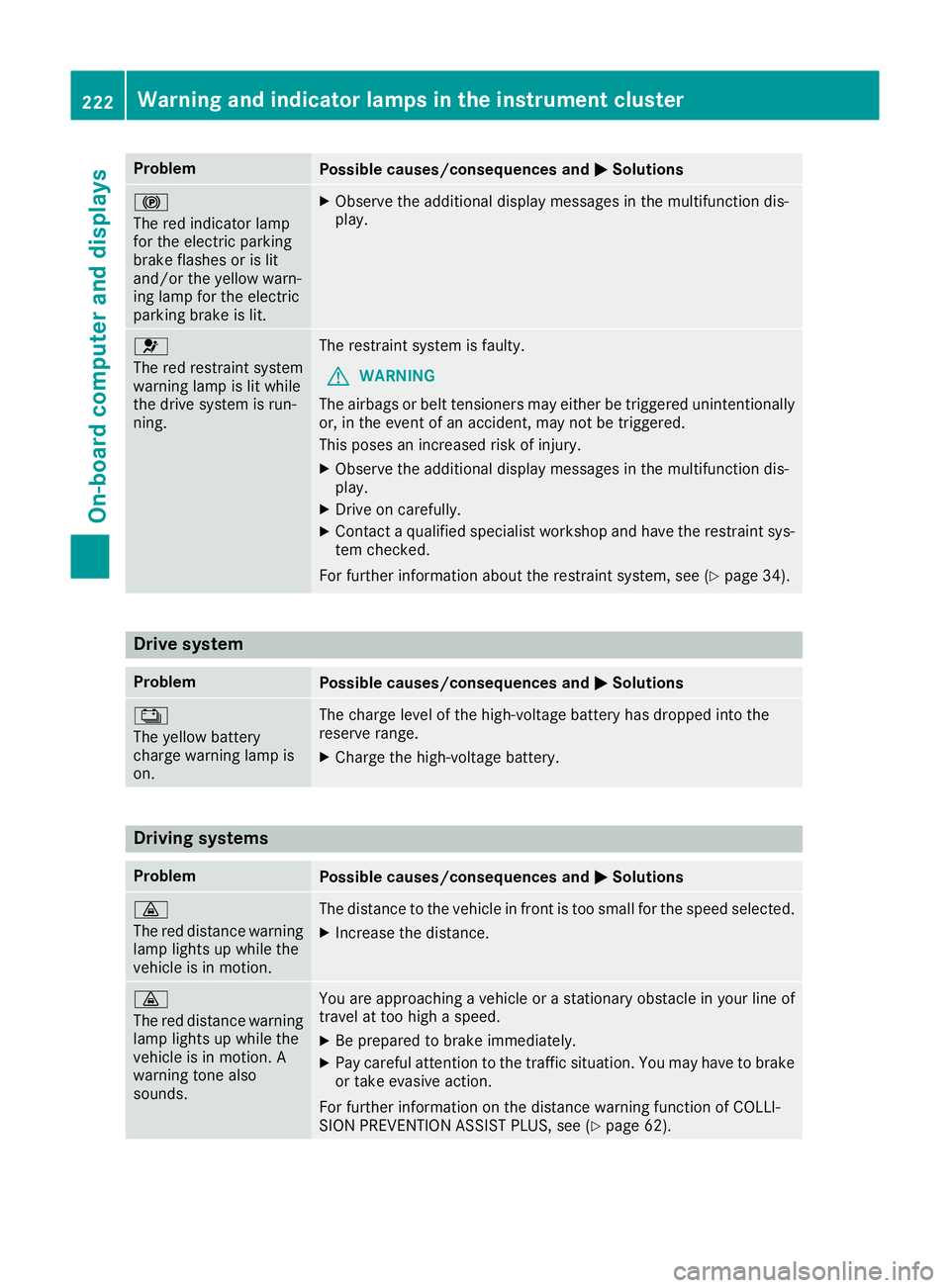
Problem
Possible causes/consequences and
M
MSolutions !
The red indicator lamp
for the electric parking
brake flashes or is lit
and/or the yellow warn-
ing lamp for the electric
parking brake is lit. X
Observe the additional display messages in the multifunction dis-
play. 6
The red restraint system
warning lamp is lit while
the drive system is run-
ning.
The restraint system is faulty.
G WARNING
The airbags or belt tensioners may either be triggered unintentionally or, in the event of an accident, may not be triggered.
This poses an increased risk of injury.
X Observe the additional display messages in the multifunction dis-
play.
X Drive on carefully.
X Contact a qualified specialist workshop and have the restraint sys-
tem checked.
For further information about the restraint system, see (Y page 34).Drive system
Problem
Possible causes/consequences and
M MSolutions Ý
The yellow battery
charge warning lamp is
on.
The charge level of the high-voltage battery has dropped into the
reserve range.
X
Charge the high-voltage battery. Driving systems
Problem
Possible causes/consequences and
M MSolutions ·
The red distance warning
lamp lights up while the
vehicle is in motion. The distance to the vehicle in front is too small for the speed selected.
X Increase the distance. ·
The red distance warning
lamp lights up while the
vehicle is in motion. A
warning tone also
sounds. You are approaching a vehicle or a stationary obstacle in your line of
travel at too high a speed.
X Be prepared to brake immediately.
X Pay careful attention to the traffic situation. You may have to brake
or take evasive action.
For further information on the distance warning function of COLLI-
SION PREVENTION ASSIST PLUS, see (Y page 62).222
Warning and indicator lamps in the instrument clusterOn-board computer and displays
Page 238 of 293
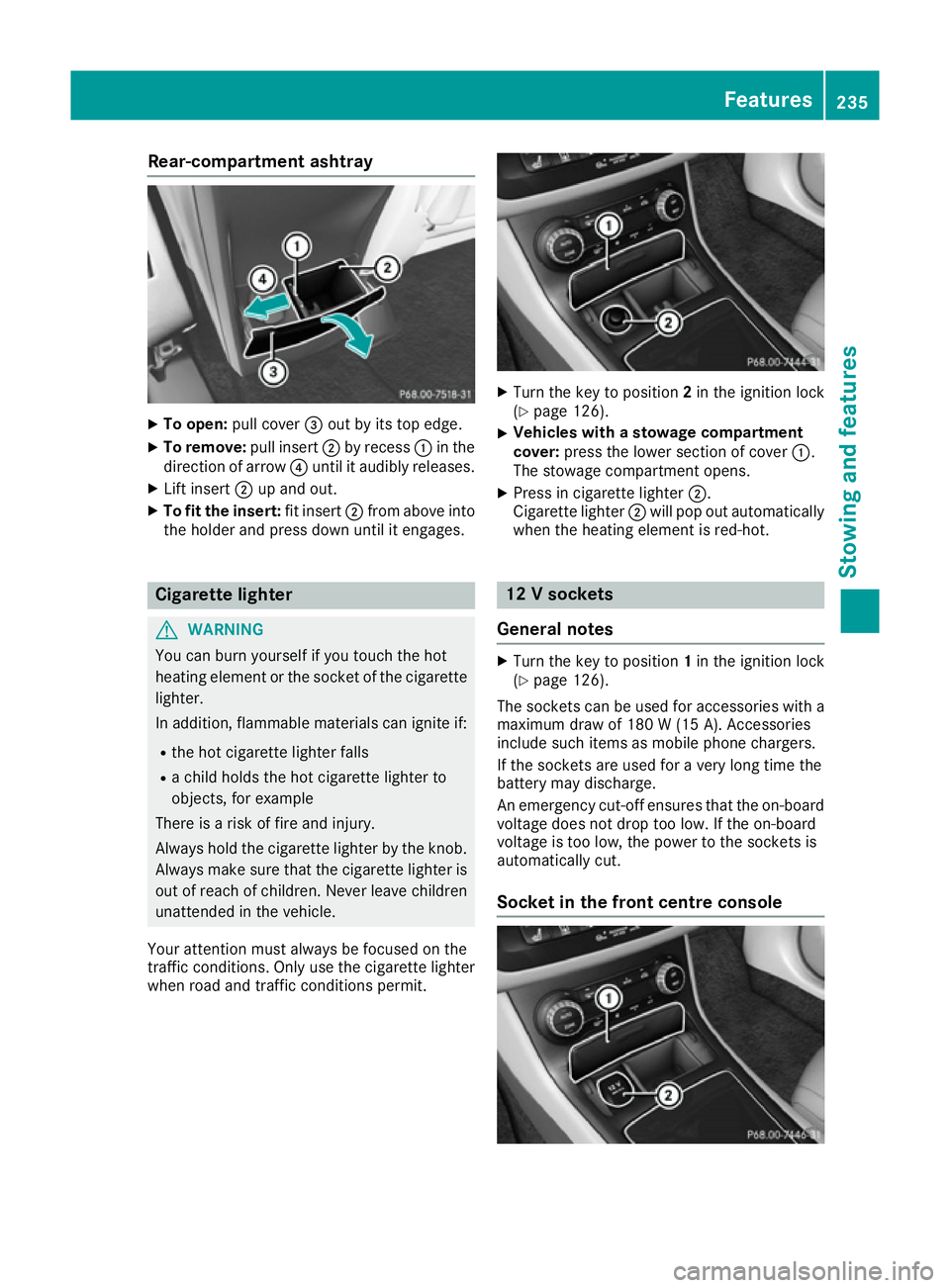
Rear-compartment ashtray
X
To open: pull cover =out by its top edge.
X To remove: pull insert;by recess :in the
direction of arrow ?until it audibly releases.
X Lift insert ;up and out.
X To fit the insert: fit insert;from above into
the holder and press down until it engages. Cigarette lighter
G
WARNING
You can burn yourself if you touch the hot
heating element or the socket of the cigarette lighter.
In addition, flammable materials can ignite if:
R the hot cigarette lighter falls
R a child holds the hot cigarette lighter to
objects, for example
There is a risk of fire and injury.
Always hold the cigarette lighter by the knob.
Always make sure that the cigarette lighter is
out of reach of children. Never leave children unattended in the vehicle.
Your attention must always be focused on the
traffic conditions. Only use the cigarette lighter when road and traffic conditions permit. X
Turn the key to position 2in the ignition lock
(Y page 126).
X Vehicles with a stowage compartment
cover:
press the lower section of cover :.
The stowage compartment opens.
X Press in cigarette lighter ;.
Cigarette lighter ;will pop out automatically
when the heating element is red-hot. 12 V sockets
General notes X
Turn the key to position 1in the ignition lock
(Y page 126).
The sockets can be used for accessories with a
maximum draw of 180 W(15 A). Accessories
include such items as mobile phone chargers.
If the sockets are used for a very long time the
battery may discharge.
An emergency cut-off ensures that the on-board voltage does not drop too low. If the on-board
voltage is too low, the power to the sockets is
automatically cut.
Socket in the front centre console Features
235Stowing and fea tures Z
Page 244 of 293
X
If necessary, top up with coolant that has
been tested and approved by Mercedes-Benz.
X Replace cap :and turn it clockwise as far as
it will go.
For further information on coolant, see
(Y page 283).
Topping up the windscreen washer sys-
tem/headlamp cleaning system G
WARNING
Certain components in the engine compart-
ment may be very hot, e.g. the drive system
and radiator. When carrying out work in the
engine compartment there is a risk of injury.
If possible, let the drive system cool down and only touch the components described in the
following. G
WARNING
Windscreen washer concentrate is highly
flammable. If it comes into contact with hot
components in the front compartment, it may ignite. There is a risk of fire and injury.
Make sure that windscreen washer concen-
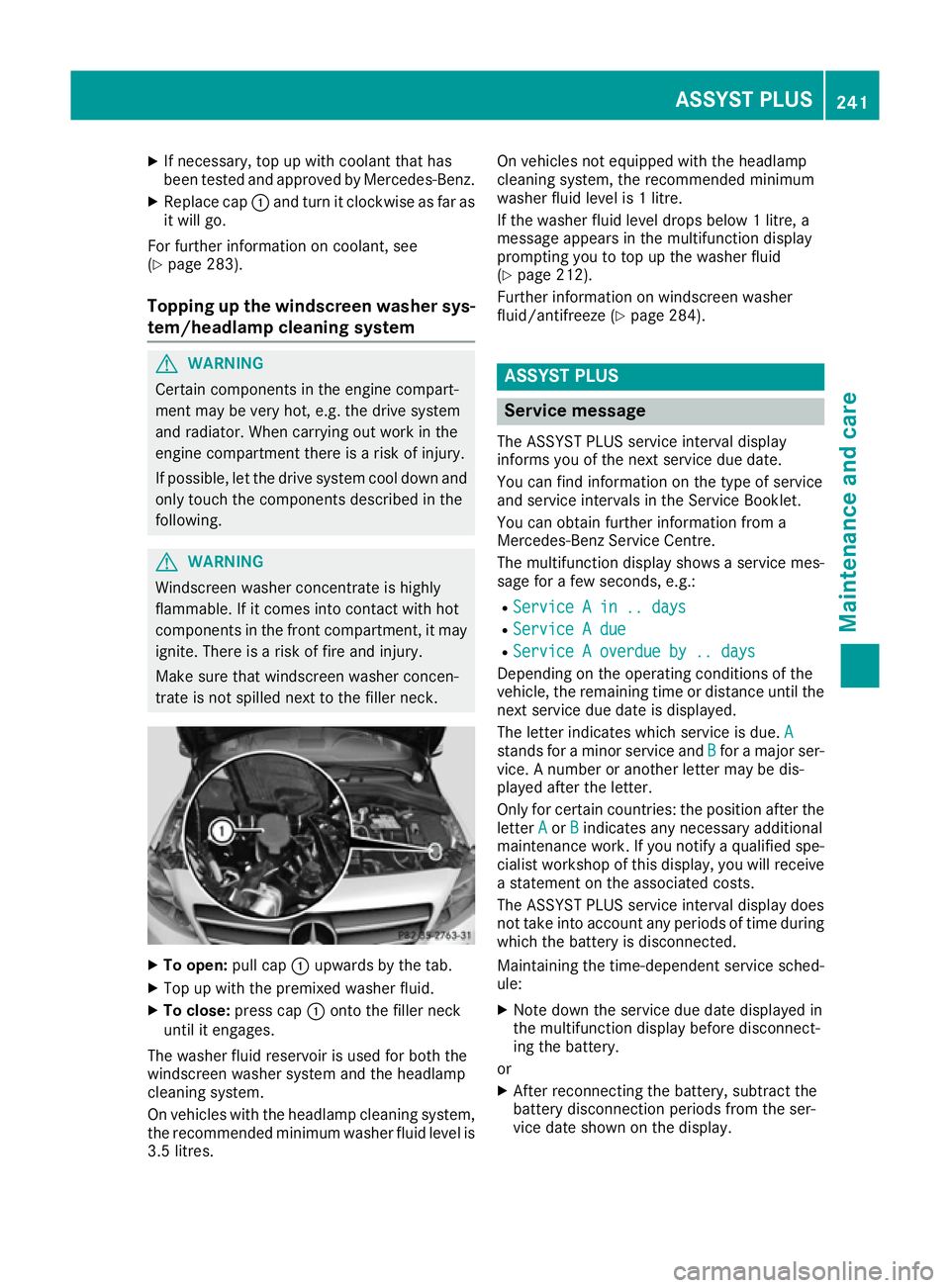
trate is not spilled next to the filler neck. X
To open: pull cap:upwards by the tab.
X Top up with the premixed washer fluid.
X To close: press cap :onto the filler neck
until it engages.
The washer fluid reservoir is used for both the
windscreen washer system and the headlamp
cleaning system.
On vehicles with the headlamp cleaning system,
the recommended minimum washer fluid level is 3.5 litres. On vehicles not equipped with the headlamp
cleaning system, the recommended minimum
washer fluid level is 1 litre.
If the washer fluid level drops below 1 litre, a
message appears in the multifunction display
prompting you to top up the washer fluid
(Y page 212).
Further information on windscreen washer
fluid/antifreeze (Y page 284). ASSYST PLUS
Service message
The ASSYST PLUS service interval display
informs you of the next service due date.
You can find information on the type of service
and service intervals in the Service Booklet.
You can obtain further information from a
Mercedes-Benz Service Centre.
The multifunction display shows a service mes-
sage for a few seconds, e.g.:
R Service A in .. days
Service A in .. days
R Service A due Service A due
R Service A overdue by .. days
Service A overdue by .. days
Depending on the operating conditions of the
vehicle, the remaining time or distance until the
next service due date is displayed.
The letter indicates which service is due. A A
stands for a minor service and B
Bfor a major ser-
vice. A number or another letter may be dis-
played after the letter.
Only for certain countries: the position after the
letter A
A or B Bindicates any necessary additional
maintenance work. If you notify a qualified spe-
cialist workshop of this display, you will receive
a statement on the associated costs.
The ASSYST PLUS service interval display does
not take into account any periods of time during which the battery is disconnected.
Maintaining the time-dependent service sched-
ule:
X Note down the service due date displayed in
the multifunction display before disconnect-
ing the battery.
or
X After reconnecting the battery, subtract the
battery disconnection periods from the ser-
vice date shown on the display. ASSYST PLUS
241Maintenance and care Z
Page 246 of 293
Washing the vehicle and cleaning the
paintwork
Automatic car wash G
WARNING
Braking efficiency is reduced after the vehicle has been washed. There is a risk of an acci-
dent.
After washing the vehicle, brake carefully
while paying attention to the traffic conditions in order to restore full braking efficiency.
! When the HOLD function is activated, the
vehicle brakes automatically in certain situa-
tions.
To avoid damage to the vehicle, deactivate
the HOLD function in the following or similar
situations:
R when towing away
R in a car wash
! When washing your vehicle in a tow-through
car wash, make sure that the selector lever is in position N, otherwise the vehicle could be
damaged.
! Make sure:
R the side windows are closed completely.
R the blower for the ventilation/heating is
switched off (OFF button is depressed/
airflow control is turned to position 0).
R the windscreen wiper switch is at position
0.
The vehicle could otherwise be damaged.
You can wash the vehicle in an automatic car
wash from the very start.
Wash off excess dirt before cleaning the vehicle
in an automatic car wash.
After using an automatic car wash, wipe off wax
from the windscreen and the wiper blades. This
will prevent smears and reduce wiping noises
caused by residue on the windscreen.
Washing by hand In some countries, washing by hand is only
allowed at specially equipped washing bays.
Observe the legal requirements for each indi-
vidual country. X
Do not use hot water and do not wash the
vehicle in direct sunlight.
X Use a soft sponge to clean.
X Use a mild cleaning agent, such as a car
shampoo approved by Mercedes-Benz.
X Thoroughly hose down the vehicle with a gen-
tle jet of water.
X Do not point the water jet directly towards the
air inlet.
X Use plenty of water and rinse out the sponge
frequently.
X Rinse the vehicle with clean water and dry
thoroughly with a chamois.
X Do not let the cleaning agent dry on the paint-
work.
When using the vehicle in winter, remove all
traces of road salt deposits carefully and as
soon as possible.
High-pressure cleaning equipment G
WARNING
The water jet of circular-jet nozzles (dirt grind- ers) can cause damage not visible from the
outside to tyres or chassis components. Com-
ponents damaged in this way can unexpect-
edly fail. There is a risk of an accident.
Do not use high-pressure cleaners with circu-
lar-jet nozzles to clean the vehicle. Have dam- aged tyres or chassis components replaced
immediately.
! Always maintain a distance of at least 30 cm
between the vehicle and the high-pressure
cleaner nozzle. Information about the correct
distance is available from the equipment
manufacturer.
Move the high-pressure cleaner nozzle
around when cleaning your vehicle.
Do not aim directly at any of the following:
R tyres
R door gaps, roof gaps, joints etc.
R electrical components
R battery
R connectors
R lights
R seals
R trim elements
R ventilation slots Care
243Maintenance and care Z
Page 257 of 293
X
Drive to the nearest qualified specialist work-
shop and have the tyre changed there.
X Have the tyre sealant bottle and the filler hose
replaced as soon as possible at a qualified
specialist workshop.
X Have the tyre sealant bottle replaced every
four years at a qualified specialist workshop. Batteries
12 V battery - important safety notes
Work on the batteries, e.g. removing or fitting,
requires specialist knowledge and the use of
special tools. For this reason, always have work on the batteries carried out at a qualified spe-
cialist workshop. G
WARNING
The battery terminal clamps can remain under voltage even after being disconnected. If work
on the battery is carried out incorrectly, a
short-circuit may result. There is a risk of fire.
Always have work on the batteries carried out
at a qualified specialist workshop. Never dis-
connect a battery yourself. G
WARNING
Work carried out incorrectly on the battery
can lead, for example, to a short circuit and
thus damage the vehicle electronics. This can lead to function restrictions applying to
safety-relevant systems, e.g the lighting sys-
tem, the ABS (anti-lock braking system) or the
ESP ®
(Electronic Stability Program). The oper-
ating safety of your vehicle may be restricted.
You could lose control of the vehicle, for
example:
R when braking
R in the event of abrupt steering manoeuvres
and/or when the vehicle's speed is not
adapted to the road conditions
There is a risk of an accident.
In the event of a short circuit or a similar inci- dent, contact a qualified specialist workshop
immediately. Do not drive any further. Always have work on the battery carried out at a
qualified specialist workshop.
Further information about ABS (Y page 61) and
ESP ®
(Y page 65). G
WARNING
Electrostatic build-up can lead to the creation of sparks, which could ignite the highly explo-
sive gases of a battery. There is a risk of an
explosion.
Before handling the battery, touch the vehicle body to remove any existing electrostatic
build-up.
The highly flammable gas mixture is created
while the battery is charging and when jump-
starting.
Always make sure that neither you nor the bat-
tery is electrostatically charged. Electrostatic
charge is created, for example: R by wearing synthetic fibre clothing
R by friction between clothing and the seat
R when you pull or push the battery across car-
pet or other synthetic materials
R when you rub the battery with a cloth G
WARNING
During the charging process, a battery produ- ces hydrogen gas. If a short circuit occurs or
sparks are created, the hydrogen gas can
ignite. There is a risk of an explosion.
R Make sure that the positive terminal of a
connected battery does not come into con-
tact with vehicle parts.
R Never place metal objects or tools on a bat-
tery.
R It is important that you observe the descri-
bed order of the battery terminals when
connecting and disconnecting a battery.
R When jump-starting, make sure that the
battery poles with identical polarity are
connected.
R It is particularly important to observe the
described order when connecting and dis-
connecting the jump leads.
R Never connect or disconnect the battery
terminals while the engine is running. 254
BatteriesBreakdown assistance