key MERCEDES-BENZ B-CLASS HATCHBACK 2015 Repair Manual
[x] Cancel search | Manufacturer: MERCEDES-BENZ, Model Year: 2015, Model line: B-CLASS HATCHBACK, Model: MERCEDES-BENZ B-CLASS HATCHBACK 2015Pages: 293, PDF Size: 10.83 MB
Page 134 of 293
Transmission positions
B Parking lock
This prevents the vehicle from rolling
away when stopped. Only move the
DIRECT SELECT lever to Pwhen the
vehicle is stationary.
The key can only be removed when
the DIRECT SELECT lever is in posi-
tion P. When there is no key in the
ignition lock, the DIRECT SELECT
lever is locked in position P.C Reverse gear
Only move the DIRECT SELECT lever
to
Rwhen the vehicle is stationary. A Neutral
No power is transmitted from the
drive system to the drive wheels.
Releasing the brakes will allow you to
move the vehicle freely.
If ESP ®
is faulty: only move the
DIRECT SELECT lever to Nif the vehi-
cle is in danger of skidding, e.g. on icy
roads. 7 Drive
For driving forwards
Driving tips
Holding the vehicle stationary on uphill
gradients Do not hold the vehicle stationary on uphill gra-
dients by depressing the accelerator pedal.
Instead, only ever hold the vehicle stationary on
uphill gradients by:
R depressing the brake pedal
R engaging the electric parking brake
Kickdown Use kickdown for maximum acceleration:
X Depress the accelerator pedal beyond the
pressure point.
The needle in the power display points to the
boost area (Y page 173).
X Ease off the accelerator pedal once the
desired speed is reached. i
Maximum acceleration is available for a limi-
ted time. Program selector button
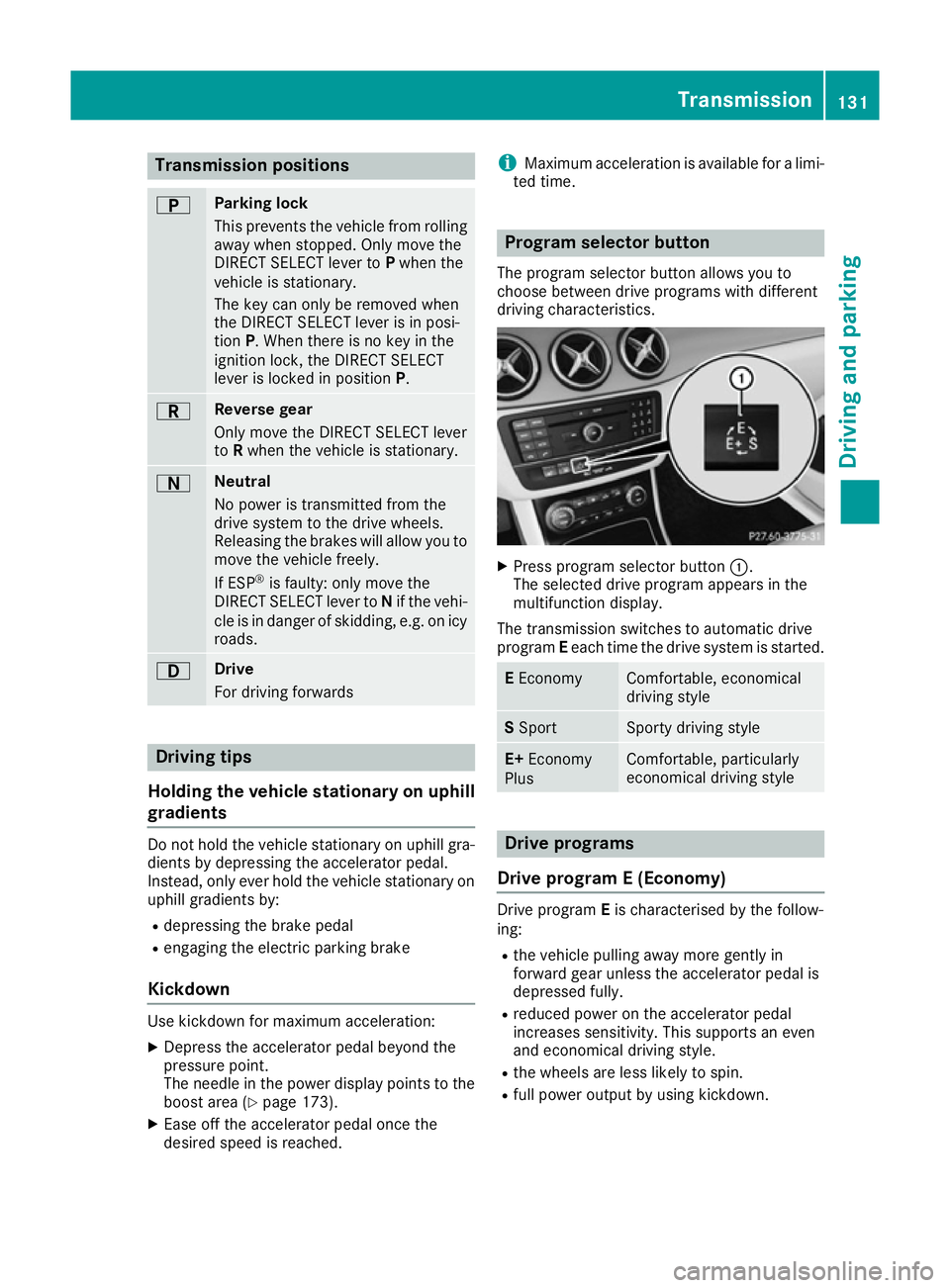
The program selector button allows you to
choose between drive programs with different
driving characteristics. X
Press program selector button :.
The selected drive program appears in the
multifunction display.
The transmission switches to automatic drive
program Eeach time the drive system is started. E
Economy Comfortable, economical
driving style
S
Sport Sporty driving style
E+
Economy
Plus Comfortable, particularly
economical driving style
Drive programs
Drive program E (Economy) Drive program
Eis characterised by the follow-
ing:
R the vehicle pulling away more gently in
forward gear unless the accelerator pedal is
depressed fully.
R reduced power on the accelerator pedal
increases sensitivity. This supports an even
and economical driving style.
R the wheels are less likely to spin.
R full power output by using kickdown. Transmission
131Driving and parking Z
Page 147 of 293
Problems with the charging process
Problem
Possible causes/consequences and
M
MSolutions The charge socket flap
cannot be opened. The charge socket flap is not unlocked.
X Unlock the vehicle (Y page 72). The key batteries are discharged.
X Unlock the vehicle manually using the key (Y page 73). The charge socket flap is unlocked, but the opening mechanism is
jammed.
X Lock and unlock the vehicle.
If, after that, the opening mechanism is still jammed:
X Manually unlock the charge socket flap using the emergency
release (Y page 143).
X Consult a qualified specialist workshop. The charging cable can-
not be inserted into the
vehicle socket. The vehicle socket is locked.
X
Ensure that the selector lever is in position P.The high-voltage battery
is not being charged. The
Ý indicator lamp on
the vehicle socket
flashes red. A malfunction has occurred during the initialisation of the charging
process.
X Ensure that the charging cable is connected to the mains socket.
X Remove the charging cable connector from the vehicle socket and
wait 30 seconds; then re-insert it into the vehicle socket.
X If the problem persists, consult a qualified specialist workshop. The high-voltage battery
is not charged during the
charging process when
connected to a mains
socket. The Ýindica-
tor lamp on the vehicle
socket does not light up
after the charging cable
connector has been
inserted into the vehicle
socket. The mains socket is faulty.
X Have the mains socket checked to test if it is functioning properly.
or X Use a different mains socket. The charging cable con-
nector cannot be
removed from the vehi-
cle socket. The charging cable connector has not been unlocked.
X Press button %on the key. The charging cable connector on the
vehicle socket is unlocked.
X Remove the charging cable connector from the vehicle socket. The charging cable connector is blocked.
X Manually unlock the charge socket flap using the emergency
release (Y page 143).
X Consult a qualified specialist workshop. 144
High-voltage batteryDriving and parking
Page 148 of 293
Parking
Important safety notes
G
WARNING
If you release the parking brake on uphill or
downhill gradients, the vehicle can begin to
move when in park position P. There is a risk
of an accident.
To avoid hazardous situations:
R prevent the parked vehicle from rolling on
uphill or downhill gradients by always
applying the parking brake.
R do not park the vehicle on uphill or downhill
gradients if the parking brake is malfunc-
tioning. G
WARNING
If you leave children unattended in the vehi-
cle, they may be able to set the vehicle in
motion, for example, if they:
R release the parking brake
R shift the transmission out of park position P
R start the vehicle's drive system
In addition, they may operate vehicle equip-
ment. There is a risk of an accident and injury.
When leaving the vehicle, always take the key
with you and lock the vehicle. Never leave
children unattended in the vehicle.
! while the vehicle is rolling, do not shift the
transmission directly from Dto R, from Rto D
or directly to P.
Do not open the driver's door while the vehi-
cle is in motion. Otherwise, at low speeds in
transmission position Dor R, park position P
is engaged automatically and the electrical
parking brake is applied.
The transmission could be damaged.
! Always secure the vehicle correctly against
rolling away. Otherwise, the vehicle or its driv-
etrain could be damaged.
To ensure that the vehicle is safeguarded
against rolling away unintentionally: R the electric parking brake must be applied.
R the transmission must be in position P.R
the key must be turned to position 0in the
ignition lock and then removed from the igni-
tion lock or the Start/Stop button must be
pressed
R on uphill or downhill gradients, turn the front
wheels towards the kerb. Switching off the drive system
G
WARNING
If you switch off the ignition while the vehicle
is in motion, safety-relevant functions are
restricted or not available. This can affect the power steering function and the brake boost-
ing effect, for example. You will then require
considerably more force to steer and brake.
There is a risk of an accident.
Do not switch off the ignition while the vehicle is in motion.
X Shift the DIRECT SELECT lever to position P.
X With the key: turn the key to position 0in the
ignition lock and remove it.
The immobiliser is activated.
X With the Start/Stop button: press the
Start/Stop button (Y page 126).
The drive system and all the indicator lamps in
the instrument cluster go out.
When the driver's door is closed, this corre-
sponds to key position 1. When the driver's
door is open, this corresponds to key position
0: "key removed".
If you switch the drive system off with the trans- mission in position Ror D, the transmission
automatically shifts to N.
With the key: if you then open the driver's door
or the front-passenger door or remove the key
from the ignition, the transmission automati-
cally shifts to P.
With the Start/Stop button: if you then open
the driver's door or the front-passenger door,
the transmission automatically shifts to P.
If you want the transmission to remain in neutral
N, e.g. when having the vehicle cleaned in an
automatic car wash with a towing system: Parking
145Driving and parking Z
Page 149 of 293
With the key:
X Switch the ignition on.
X Depress the brake pedal and keep it
depressed.
X Shift to neutral N.
X Release the brake pedal.
X Release the electric parking brake.
X Switch off the ignition and leave the key in the
ignition lock.
With the Start/Stop button:
X Remove the Start/Stop button from the igni-
tion lock.
X Insert the key into the ignition lock.
X Switch the ignition on.
X Depress the brake pedal and keep it
depressed.
X Shift to neutral N.
X Release the brake pedal.
X Release the electric parking brake.
X Switch off the ignition and leave the key in the
ignition lock. Electric parking brake
General notes G
WARNING
If you leave children unattended in the vehi-
cle, they may be able to set the vehicle in
motion, for example, if they:
R release the parking brake
R shift the transmission out of park position P
R start the vehicle's drive system
In addition, they may operate vehicle equip-
ment. There is a risk of an accident and injury.
When leaving the vehicle, always take the key
with you and lock the vehicle. Never leave
children unattended in the vehicle. The function of the electric parking brake and
the parking lock is dependent on the on-board
voltage. If the on-board voltage is low or if there
is a malfunction in the system, it may not be
possible to apply the released parking brake or
to shift the transmission to the Pposition.
X If this is the case, only park the vehicle on
level ground and secure it to prevent it from
rolling away.
X Shift the transmission to position P.
It may not be possible to release an applied
parking brake if the on-board voltage is low or if
there is a malfunction in the system. Contact a
qualified specialist workshop.
The electric parking brake carries out a function check at regular intervals when the drive system
is switched off. Noises that occur are normal.
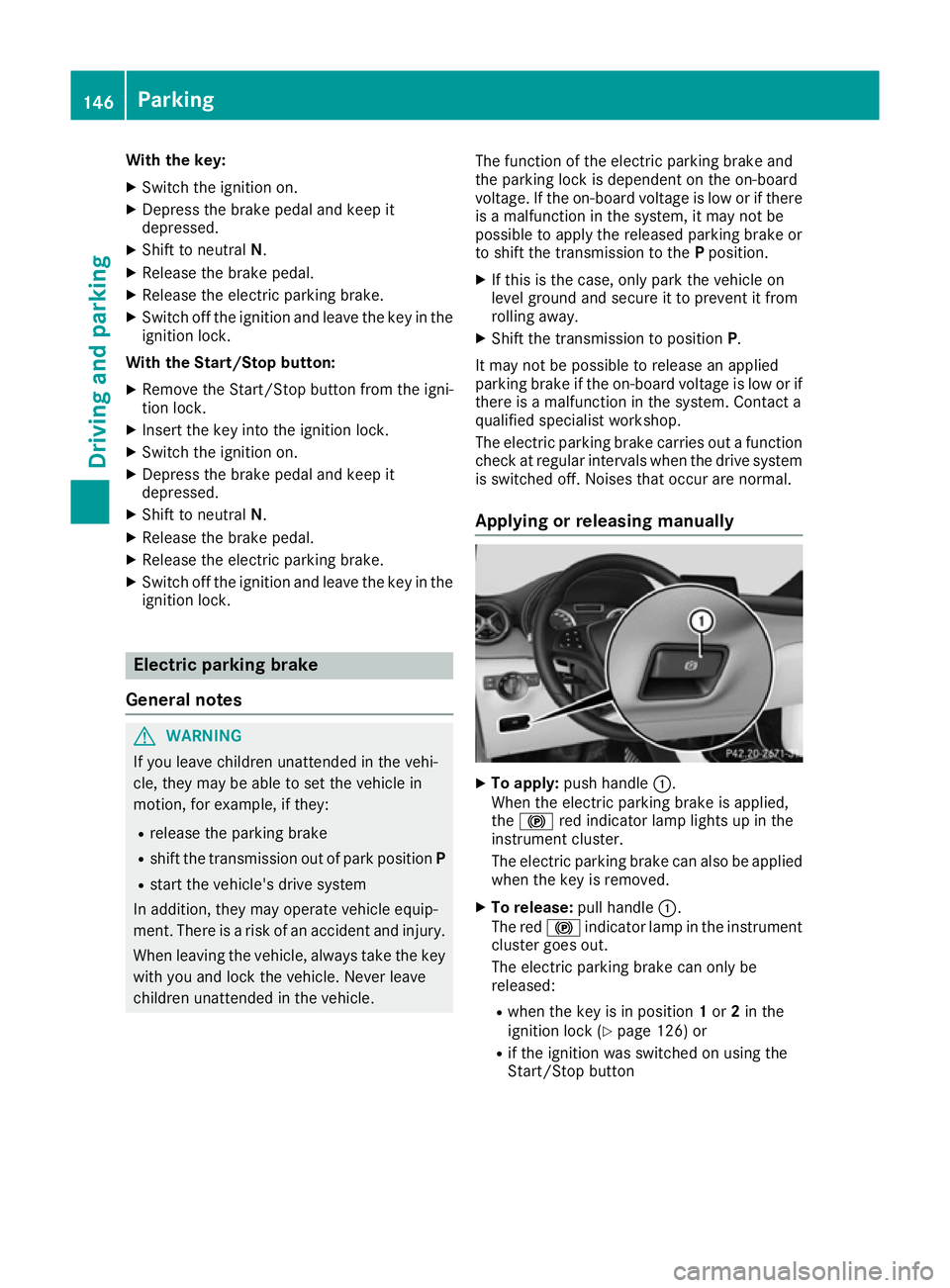
Applying or releasing manually X
To apply: push handle :.
When the electric parking brake is applied,
the ! red indicator lamp lights up in the
instrument cluster.
The electric parking brake can also be applied
when the key is removed.
X To release: pull handle:.
The red !indicator lamp in the instrument
cluster goes out.
The electric parking brake can only be
released:
R when the key is in position 1or 2in the
ignition lock (Y page 126) or
R if the ignition was switched on using the
Start/Stop button 146
ParkingDriving and parking
Page 160 of 293
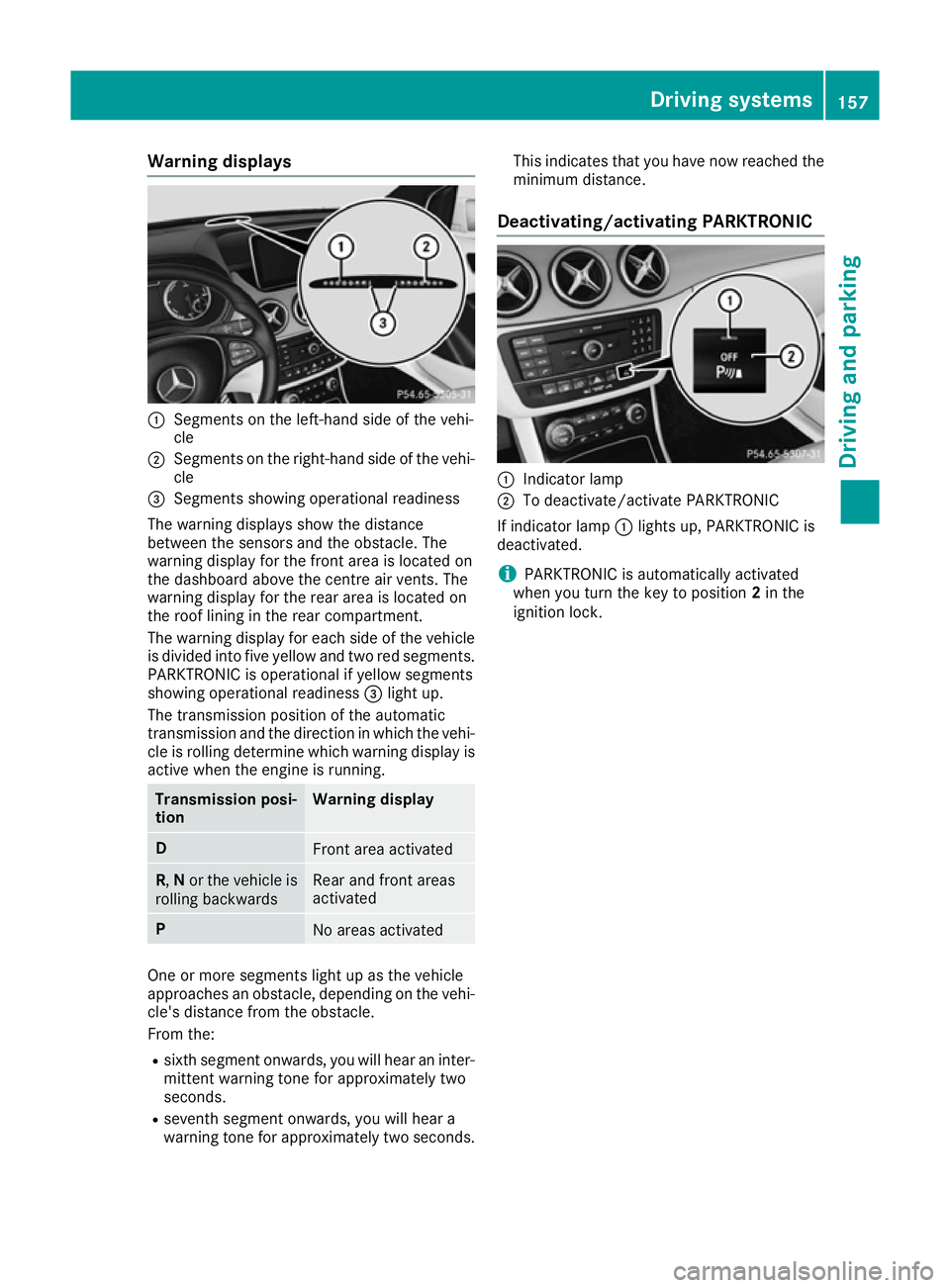
Warning displays
:
Segments on the left-hand side of the vehi-
cle
; Segments on the right-hand side of the vehi-
cle
= Segments showing operational readiness
The warning displays show the distance
between the sensors and the obstacle. The
warning display for the front area is located on
the dashboard above the centre air vents. The
warning display for the rear area is located on
the roof lining in the rear compartment.
The warning display for each side of the vehicle
is divided into five yellow and two red segments.
PARKTRONIC is operational if yellow segments
showing operational readiness =light up.
The transmission position of the automatic
transmission and the direction in which the vehi-
cle is rolling determine which warning display is active when the engine is running. Transmission posi-
tion Warning display
D
Front area activated
R,
Nor the vehicle is
rolling backwards Rear and front areas
activated
P
No areas activated
One or more segments light up as the vehicle
approaches an obstacle, depending on the vehi-
cle's distance from the obstacle.
From the:
R sixth segment onwards, you will hear an inter-
mittent warning tone for approximately two
seconds.
R seventh segment onwards, you will hear a
warning tone for approximately two seconds. This indicates that you have now reached the
minimum distance.
Deactivating/activating PARKTRONIC :
Indicator lamp
; To deactivate/activate PARKTRONIC
If indicator lamp :lights up, PARKTRONIC is
deactivated.
i PARKTRONIC is automatically activated
when you turn the key to position 2in the
ignition lock. Driving systems
157Driving and parking Z
Page 165 of 293
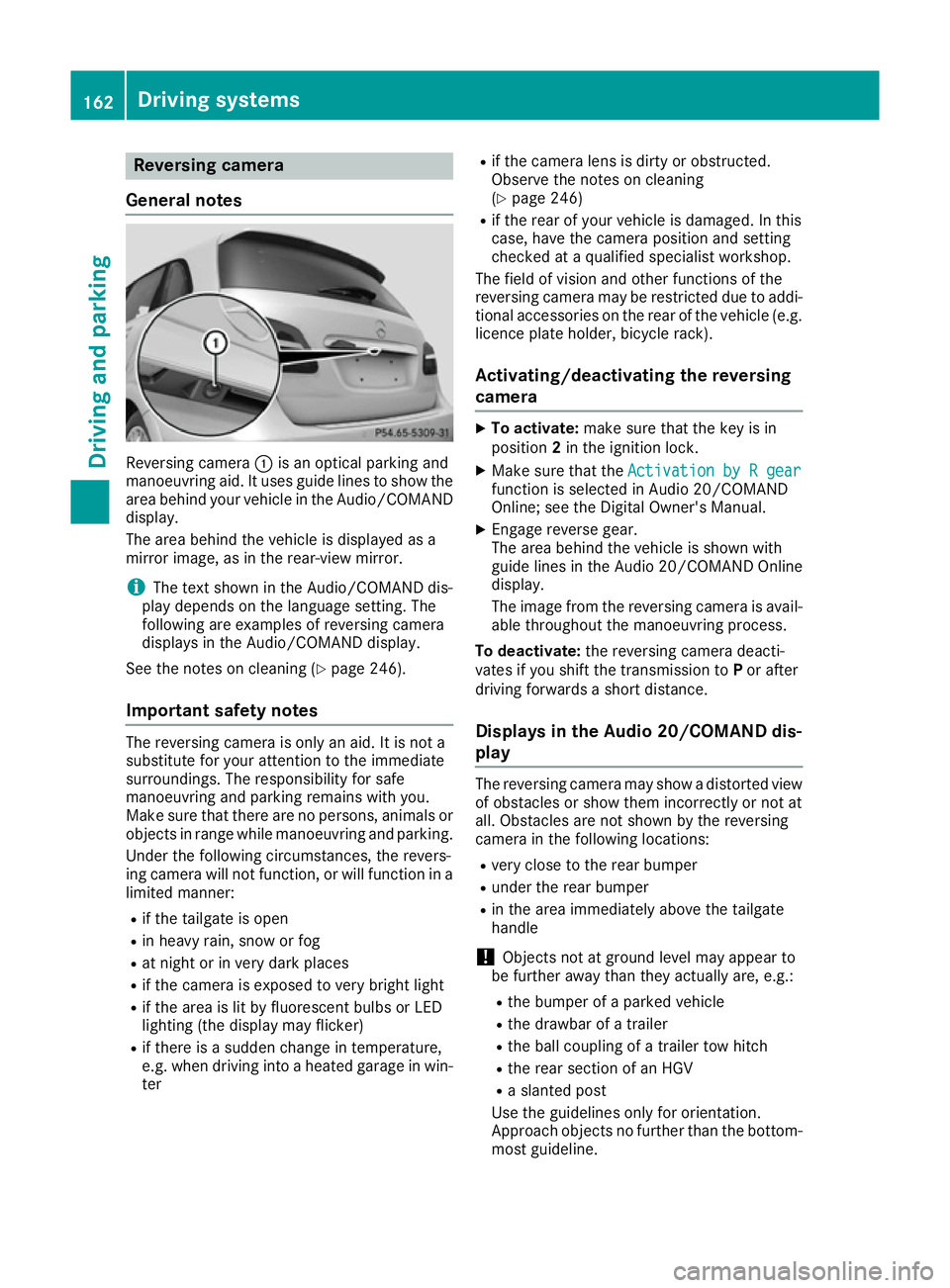
Reversing camera
General notes Reversing camera
:is an optical parking and
manoeuvring aid. It uses guide lines to show the
area behind your vehicle in the Audio/COMAND
display.
The area behind the vehicle is displayed as a
mirror image, as in the rear-view mirror.
i The text shown in the Audio/COMAND dis-
play depends on the language setting. The
following are examples of reversing camera
displays in the Audio/COMAND display.
See the notes on cleaning (Y page 246).
Important safety notes The reversing camera is only an aid. It is not a
substitute for your attention to the immediate
surroundings. The responsibility for safe
manoeuvring and parking remains with you.
Make sure that there are no persons, animals or
objects in range while manoeuvring and parking.
Under the following circumstances, the revers-
ing camera will not function, or will function in a limited manner:
R if the tailgate is open
R in heavy rain, snow or fog
R at night or in very dark places
R if the camera is exposed to very bright light
R if the area is lit by fluorescent bulbs or LED
lighting (the display may flicker)
R if there is a sudden change in temperature,
e.g. when driving into a heated garage in win-
ter R
if the camera lens is dirty or obstructed.
Observe the notes on cleaning
(Y page 246)
R if the rear of your vehicle is damaged. In this
case, have the camera position and setting
checked at a qualified specialist workshop.
The field of vision and other functions of the
reversing camera may be restricted due to addi-
tional accessories on the rear of the vehicle (e.g. licence plate holder, bicycle rack).
Activating/deactivating the reversing
camera X
To activate: make sure that the key is in
position 2in the ignition lock.
X Make sure that the Activation by R gear Activation by R gear
function is selected in Audio 20/COMAND
Online; see the Digital Owner's Manual.
X Engage reverse gear.
The area behind the vehicle is shown with
guide lines in the Audio 20/COMAND Online
display.
The image from the reversing camera is avail-
able throughout the manoeuvring process.
To deactivate: the reversing camera deacti-
vates if you shift the transmission to Por after
driving forwards a short distance.
Displays in the Audio 20/COMAND dis-
play The reversing camera may show a distorted view
of obstacles or show them incorrectly or not at
all. Obstacles are not shown by the reversing
camera in the following locations:
R very close to the rear bumper
R under the rear bumper
R in the area immediately above the tailgate
handle
! Objects not at ground level may appear to
be further away than they actually are, e.g.:
R the bumper of a parked vehicle
R the drawbar of a trailer
R the ball coupling of a trailer tow hitch
R the rear section of an HGV
R a slanted post
Use the guidelines only for orientation.
Approach objects no further than the bottom- most guideline. 162
Driving systemsDriving and parking
Page 173 of 293
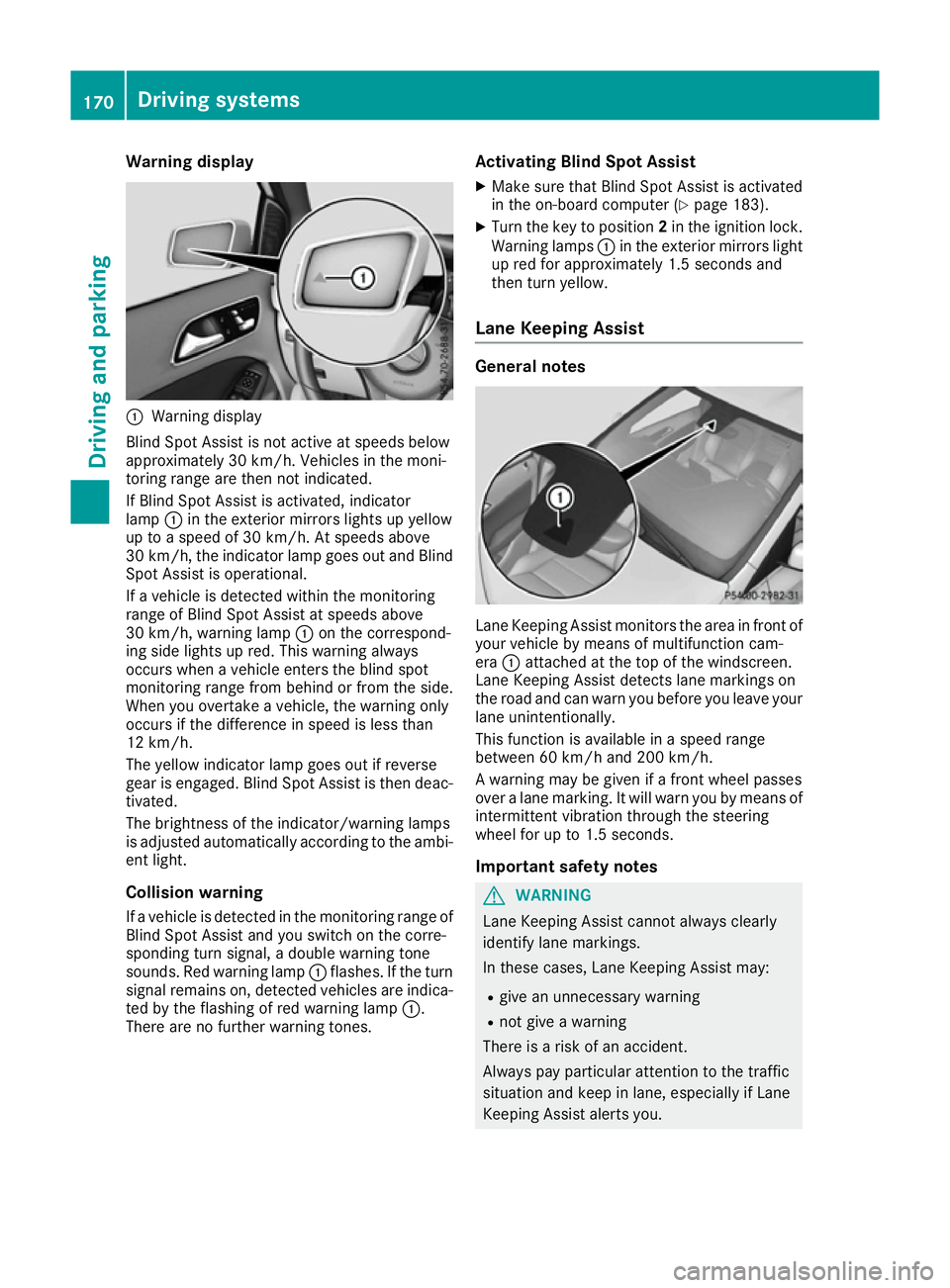
Warning display
:
Warning display
Blind Spot Assist is not active at speeds below
approximately 30 km/h. Vehicles in the moni-
toring range are then not indicated.
If Blind Spot Assist is activated, indicator
lamp :in the exterior mirrors lights up yellow
up to a speed of 30 km/h. At speeds above
30 km/h, the indicator lamp goes out and Blind
Spot Assist is operational.
If a vehicle is detected within the monitoring
range of Blind Spot Assist at speeds above
30 km/h, warning lamp :on the correspond-
ing side lights up red. This warning always
occurs when a vehicle enters the blind spot
monitoring range from behind or from the side.
When you overtake a vehicle, the warning only
occurs if the difference in speed is less than
12 km/h.
The yellow indicator lamp goes out if reverse
gear is engaged. Blind Spot Assist is then deac- tivated.
The brightness of the indicator/warning lamps
is adjusted automatically according to the ambi-
ent light.
Collision warning
If a vehicle is detected in the monitoring range of
Blind Spot Assist and you switch on the corre-
sponding turn signal, a double warning tone
sounds. Red warning lamp :flashes. If the turn
signal remains on, detected vehicles are indica-
ted by the flashing of red warning lamp :.
There are no further warning tones. Activating Blind Spot Assist
X Make sure that Blind Spot Assist is activated
in the on-board computer (Y page 183).
X Turn the key to position 2in the ignition lock.
Warning lamps :in the exterior mirrors light
up red for approximately 1.5 seconds and
then turn yellow.
Lane Keeping Assist General notes
Lane Keeping Assist monitors the area in front of
your vehicle by means of multifunction cam-
era :attached at the top of the windscreen.
Lane Keeping Assist detects lane markings on
the road and can warn you before you leave your lane unintentionally.
This function is available in a speed range
between 60 km/h and 200 km/h.
A warning may be given if a front wheel passes
over a lane marking. It will warn you by means of intermittent vibration through the steering
wheel for up to 1.5 seconds.
Important safety notes G
WARNING
Lane Keeping Assist cannot always clearly
identify lane markings.
In these cases, Lane Keeping Assist may:
R give an unnecessary warning
R not give a warning
There is a risk of an accident.
Always pay particular attention to the traffic
situation and keep in lane, especially if Lane
Keeping Assist alerts you. 170
Driving systemsDriving and parking
Page 177 of 293
If necessary, counteract the reduced regenera-
tive braking effect by applying the brake your-
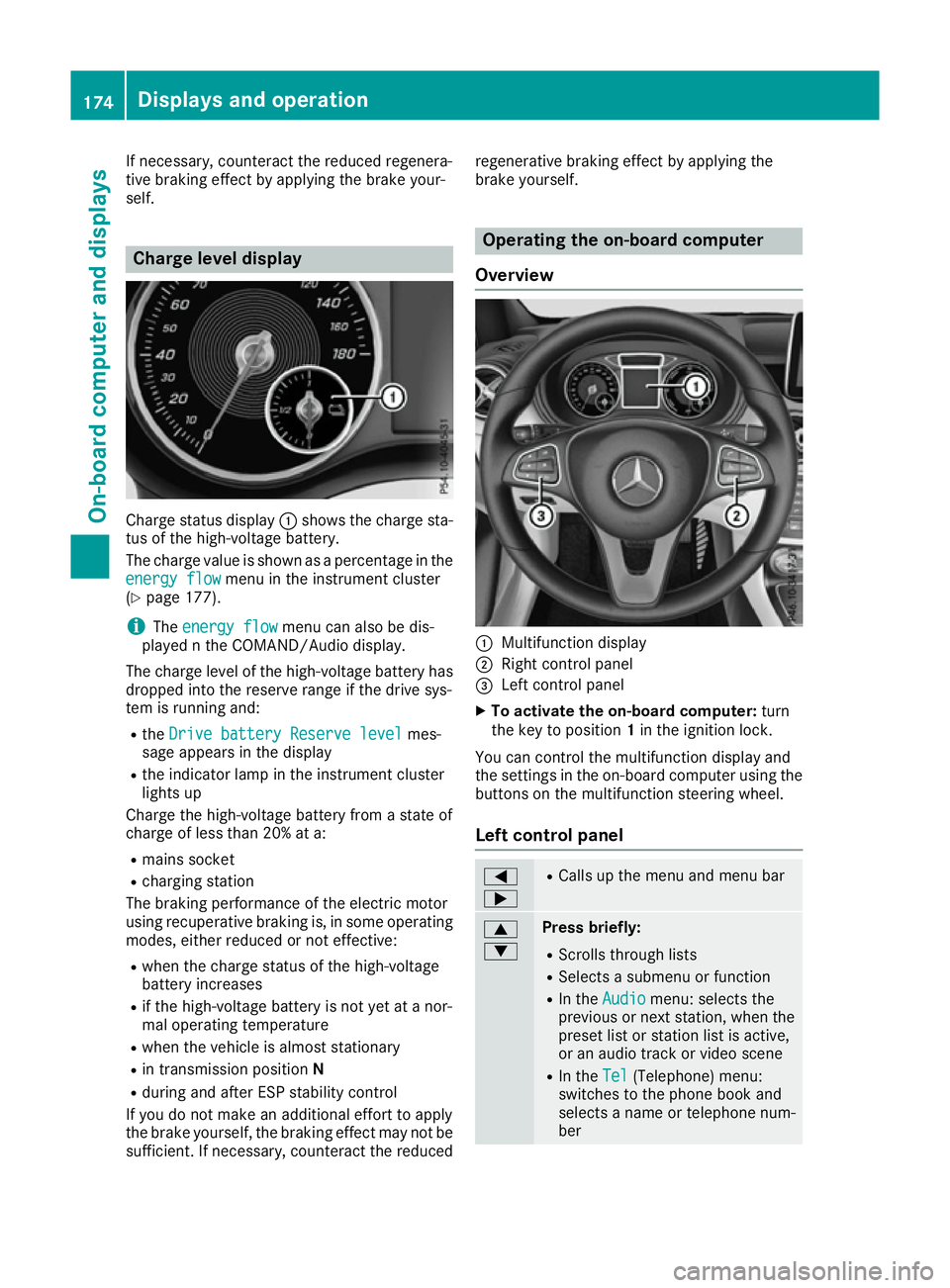
self. Charge level display
Charge status display
:shows the charge sta-
tus of the high-voltage battery.
The charge value is shown as a percentage in the
energy flow
energy flow menu in the instrument cluster
(Y page 177).
i The
energy flow
energy flow menu can also be dis-
played n the COMAND/Audio display.
The charge level of the high-voltage battery has dropped into the reserve range if the drive sys-
tem is running and:
R the Drive battery Reserve level Drive battery Reserve level mes-
sage appears in the display
R the indicator lamp in the instrument cluster
lights up
Charge the high-voltage battery from a state of
charge of less than 20% at a:
R mains socket
R charging station
The braking performance of the electric motor
using recuperative braking is, in some operating
modes, either reduced or not effective:
R when the charge status of the high-voltage
battery increases
R if the high-voltage battery is not yet at a nor-
mal operating temperature
R when the vehicle is almost stationary
R in transmission position N
R during and after ESP stability control
If you do not make an additional effort to apply
the brake yourself, the braking effect may not be sufficient. If necessary, counteract the reduced regenerative braking effect by applying the
brake yourself. Operating the on-board computer
Overview :
Multifunction display
; Right control panel
= Left control panel
X To activate the on-board computer: turn
the key to position 1in the ignition lock.
You can control the multifunction display and
the settings in the on-board computer using the buttons on the multifunction steering wheel.
Left control panel =
; R
Calls up the menu and menu bar 9
: Press briefly:
R Scrolls through lists
R Selects a submenu or function
R In the Audio Audio menu: selects the
previous or next station, when the preset list or station list is active,
or an audio track or video scene
R In the Tel Tel(Telephone) menu:
switches to the phone book and
selects a name or telephone num-
ber 174
Displays and operationOn-board computer and displays
Page 188 of 293
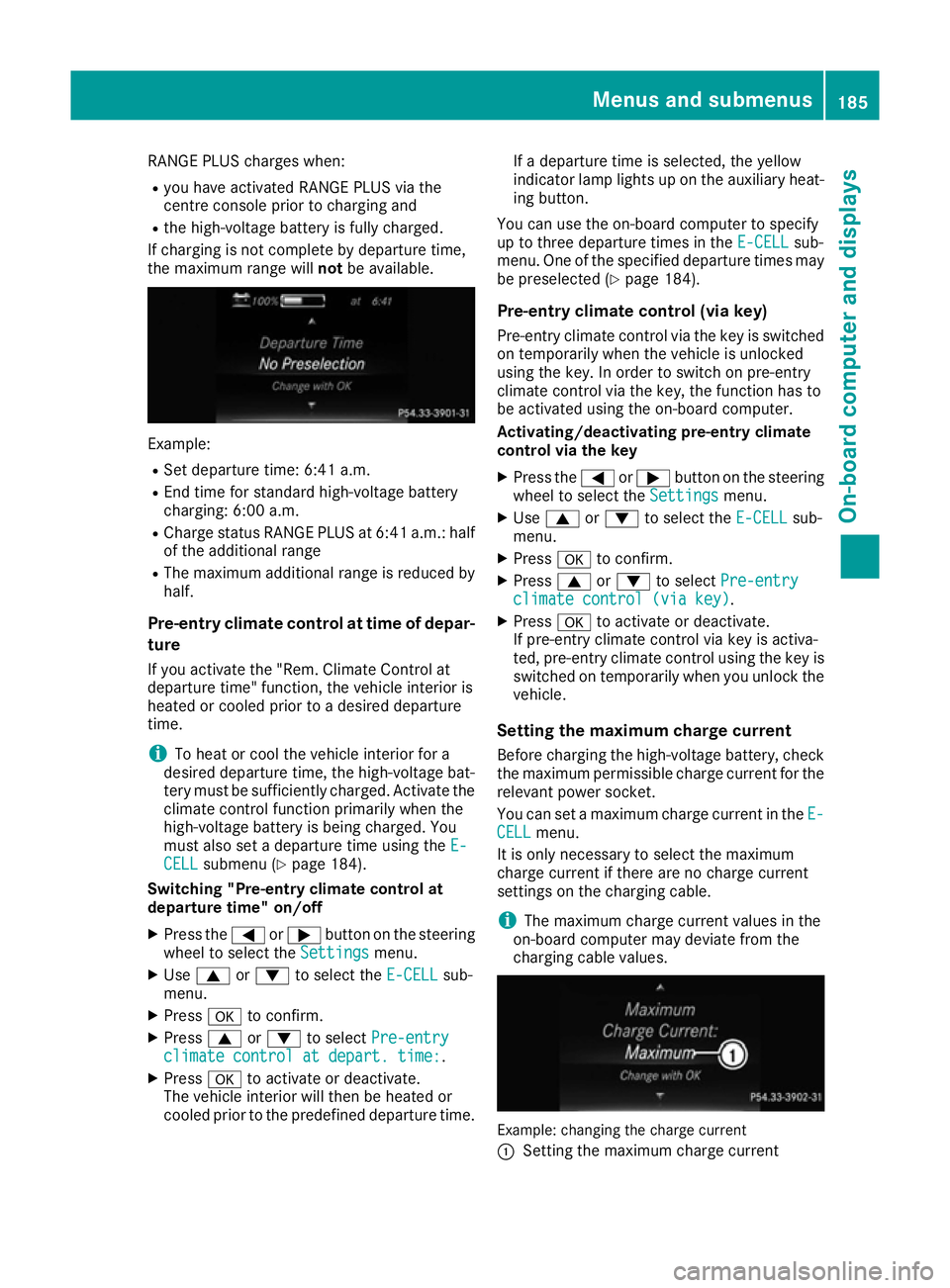
RANGE PLUS charges when:
R you have activated RANGE PLUS via the
centre console prior to charging and
R the high-voltage battery is fully charged.
If charging is not complete by departure time,
the maximum range will notbe available. Example:
R Set departure time: 6:41 a.m.
R End time for standard high-voltage battery
charging: 6:00 a.m.
R Charge status RANGE PLUS at 6:41 a.m.: half
of the additional range
R The maximum additional range is reduced by
half.
Pre-entry climate control at time of depar-
ture
If you activate the "Rem. Climate Control at
departure time" function, the vehicle interior is
heated or cooled prior to a desired departure
time.
i To heat or cool the vehicle interior for a
desired departure time, the high-voltage bat-
tery must be sufficiently charged. Activate the climate control function primarily when the
high-voltage battery is being charged. You
must also set a departure time using the E-
E-
CELL CELL submenu (Y page 184).
Switching "Pre-entry climate control at
departure time" on/off
X Press the =or; button on the steering
wheel to select the Settings
Settingsmenu.
X Use 9 or: to select the E-CELL
E-CELL sub-
menu.
X Press ato confirm.
X Press 9or: to select Pre-entry
Pre-entry
climate control at depart. time:
climate control at depart. time:.
X Press ato activate or deactivate.
The vehicle interior will then be heated or
cooled prior to the predefined departure time. If a departure time is selected, the yellow
indicator lamp lights up on the auxiliary heat-
ing button.
You can use the on-board computer to specify
up to three departure times in the E-CELL E-CELLsub-
menu. One of the specified departure times may
be preselected (Y page 184).
Pre-entry climate control (via key)
Pre-entry climate control via the key is switched on temporarily when the vehicle is unlocked
using the key. In order to switch on pre-entry
climate control via the key, the function has to
be activated using the on-board computer.
Activating/deactivating pre-entry climate
control via the key
X Press the =or; button on the steering
wheel to select the Settings Settingsmenu.
X Use 9 or: to select the E-CELL
E-CELLsub-
menu.
X Press ato confirm.
X Press 9or: to select Pre-entry
Pre-entry
climate control (via key)
climate control (via key).
X Press ato activate or deactivate.
If pre-entry climate control via key is activa-
ted, pre-entry climate control using the key is switched on temporarily when you unlock thevehicle.
Setting the maximum charge current Before charging the high-voltage battery, check
the maximum permissible charge current for the relevant power socket.
You can set a maximum charge current in the E- E-
CELL
CELL menu.
It is only necessary to select the maximum
charge current if there are no charge current
settings on the charging cable.
i The maximum charge current values in the
on-board computer may deviate from the
charging cable values. Example: changing the charge current
:
Setting the maximum charge current Menus and submenus
185On-board computer and displays Z
Page 196 of 293
Display messages
Possible causes/consequences and
M
MSolutions !
Turn on the igni‐ Turn on the igni‐
tion tion
to
torelease
release the
the
parking brake
parking brake The red
!indicator lamp lights up.
You attempted to release the electric parking brake while the ignition
was switched off.
X Key: turn the key to position 1in the ignition lock.
X KEYLESS-GO: switch on the ignition. !
Release parking Release parking
brake brake The red
!indicator lamp flashes and a warning tone sounds. A
condition for automatic release of the electric parking brake is not
fulfilled (Y page 146).
You are driving with the electric parking brake applied.
X Release the electric parking brake manually. The red
!indicator lamp flashes and a warning tone sounds.
You are making an emergency stop using the electric parking brake
(Y page 146). !
Parking brake See Parking brake See
Owner's Manual Owner's Manual The yellow
!warning lamp lights up.
The electric parking brake is malfunctioning.
To apply:
X Switch the ignition off.
X Press the electric parking brake lever for at least ten seconds.
X Shift the transmission to position P.
X Consult a qualified specialist workshop. The yellow
!warning lamp and the red !indicator lamp are lit.
The electric parking brake is malfunctioning.
To release:
X Switch off the ignition and turn it back on.
X Release the electric parking brake manually.
or X Release the electric parking brake automatically (Y page 146).
If the electric parking brake still cannot be released: X Do not drive on.
X Consult a qualified specialist workshop. Display
messages
193On-board computer and displays Z