charging MERCEDES-BENZ B-CLASS HATCHBACK 2015 Owners Manual
[x] Cancel search | Manufacturer: MERCEDES-BENZ, Model Year: 2015, Model line: B-CLASS HATCHBACK, Model: MERCEDES-BENZ B-CLASS HATCHBACK 2015Pages: 293, PDF Size: 10.83 MB
Page 7 of 293
Switching off the alarm .................... 68
ATTENTION ASSIST
Activating/deactivating ................. 183
Display message ............................ 205
Function/note s............................. 165
Audio menu (on-board computer) .... 180
Authorised workshop
see Qualified specialist workshop
AUTO lights
Display message ............................ 203
see Lights
Automatic front-passenger front
airbag deactivation
Display message ............................ 199
Automatic front-passenger front
airbag deactivation system
Operation ......................................... 42
Problems ......................................... 46
System self-test ............................... 45
Automatic headlamp mode ................ 98
Automatic transmission
Display message ............................ 210 B
Bag hook ............................................ 229
BAS (Brake Assist System) ................. 62
Battery (key)
Checking .......................................... 74
Important safety notes .................... 74
Replacing ......................................... 75
Battery (vehicle)
Charging ........................................ 256
Display message ............................ 204
Important safety notes .................. 254
Jump starting ................................. 258
Belt
see Seat belts
Belt tensioner
Activation ......................................... 46
Blind Spot Assist
Activating/deactivating (on-
board computer) ............................ 183
Display message ............................ 206
Notes/function .............................. 169
Bonnet
Closing ........................................... 240
Display message ............................ 211 Important safety notes .................. 239
Opening ......................................... 239
Boot lid
see Tailgate
Boot load (maximum) ........................ 284
Brake
EBD .................................................. 66
Brake Assist
see BAS (Brake Assist System)
Brake fluid
Display message ............................ 195
Notes ............................................. 283
Brake force distribution
see EBD (electronic brake force
distribution)
Brake lamps
Adaptive ........................................... 65
Display message ............................ 201
Brake system
Driving safety systems ..................... 67
Brakes
ABS .................................................. 61
Adaptive Brake Assist ...................... 64
BAS .................................................. 62
Brake fluid (notes) ......................... 283
Display message ............................ 190
Driving tips .................................... 148
Hill start assist ............................... 128
HOLD function ............................... 154
Important safety notes .................. 148
Parking brake ................................ 146
Warning lamp ................................. 215
Breakdown
Towing away .................................. 260
Where will I find...? ........................ 248
see Flat tyre
Brightness control (instrument
cluster lighting) ................................... 27
Buttons on the steering column ...... 174 C
Calling up a fault see Display messages
Car
see Vehicle
Car wash (care) ................................. 2434
Index
Page 8 of 293
Care
Automatic car wash ...................... .243
Carpets .......................................... 247
Display .......................................... .246
Exterior lighting ............................ .245
Gear or selector lever .................... 247
High-pressure cleaner .................... 243
Interior .......................................... .246
Matt paintwork .............................. 244
Notes ............................................. 242
Paint .............................................. 244
Plastic trim ................................... .246
Reversing camera .......................... 246
Roof lining ...................................... 247
Seat belt ........................................ 247
Seat cover ..................................... 247
Sensors ......................................... 245
Steering wheel ............................... 247
Trim pieces ................................... .247
Washing by hand ........................... 243
Wheels .......................................... .244
Windows ........................................ 244
Wiper blades .................................. 245
Wooden trim .................................. 247
CD player (on-board computer) ........180
Central locking
Automatic locking (on-board com-
puter) ............................................. 187
Locking/unlocking (key ).................. 72
Centre console
Lower section .................................. 31
Upper section .................................. 30
Changing bulbs
Cornering light function ................. 106
Dipped-beam headlamp s............... 105
Licence plate lighting ..................... 108
Main-beam headlamp s................... 105
Parking lamps (front) ..................... 106
Rear foglamp ................................. 107
Reversing lamps ............................ 107
Standing lamps .............................. 106
Turn signals (front) ......................... 106
Turn signals (rear) .......................... 107
Charge level display .......................... 174
Charge socket flap
Emergency release ........................ 143
Charging
with RANGE PLUS .......................... 184 see Charging the high-voltage battery
Charging cable
Connection .................................... 141
Control panel ................................. 140
Disconnecting ................................ 142
Heating up ..................................... 135
Important safety notes .................. 139
Indicator lamps .............................. 141
Storing ........................................... 140
Charging the high-voltage battery
(important safety notes) ................... 134
Child
Restraint system .............................. 49
Child seat
Forward-facing restraint system ...... 54
ISOFIX .............................................. 50
On the front-passenger sea t............ 52
Rearward-facing restraint system .... 53
Recommendations ........................... 58
Suitable positions ............................ 54
Top Tether ....................................... 51
Child-proof locks
Important safety notes .................... 60
Rear doors ....................................... 60
Cigarette lighter ................................ 235
Cleaning
Mirror turn signal ........................... 245
Climate control
Auxiliary climate control (on-
board computer) ............................ 185
Controlling automaticall y............... 117
Convenience opening/closing
(air-recirculation mode) ................. 120
Cooling with air dehumidification .. 116
Demisting the windows .................. 118
Demisting the windscreen ............. 118
Immediate pre-entry climate con-
trol ................................................. 121
Indicator lamp ................................ 117
Information on using
THERMOTRONIC automatic cli-
mate control .................................. 115
Overview of systems ...................... 114
Pre-entry climate control at
departure time ............................... 121
Pre-entry climate control at time
of departure (on-board computer) .. 185 Pre-entry climate control via key ... 121 Index
5
Page 11 of 293
DVD video
Operating (on-board computer) .... .180 E
E‑CELL display ................................... 173
EBD (electronic brake force distri-
bution)
Display message ............................ 192
Function/notes ................................ 66
ECO display
Function/notes ............................ .148
On-board computer ....................... 176
Electric motor number ......................282
Electromagnetic compatibility
Declaration of conformity ................ 22
Electronic Stability Program
see ESP ®
(Electronic Stability Program)
Emergency
Automatic measures after an acci-
dent ................................................. 48
Emergency key
Unlocking the driver's door .............. 80
Emergency key element
Function/notes ................................ 73
Inserting .......................................... 74
Locking vehicle ................................ 80
Removing ......................................... 74
Emergency release
Charge socket flap ......................... 143
Driver's door ................................... .80
Emergency unlocking
Tailgat e............................................ 81
Vehicle ............................................. 80
Energy
Driving tips .................................... 148
Energy flow display ........................... 177
Engine electronics
Notes ............................................. 280
Environmental protection
Returning an end-of-life vehicle ....... 19
ESP ®
(Electronic Stability Pro-
gram)
Activating/deactivating (on-
board computer) ............................ 182
Characteristics ................................. 66
Deactivating/activating (notes) ....... 66
Display message ............................ 190 Function/note
s................................ 65
General notes .................................. 65
Important safety guidelines ............. 65
Warning lamp ................................. 218
ETS/4ETS (Electronic Traction Sys-
tem) ...................................................... 65
Exhaustive discharging (high-volt-
age battery) ....................................... 256
Exterior lighting
Cleaning ......................................... 245
see Lights
Exterior mirrors
Adjusting ......................................... 93
Anti-dazzle mode (automatic) .......... 94
Folding in when locking (on-boardcomputer) ...................................... 188
Folding in/out (automatically )......... 94
Folding in/out (electrically) ............. 94
Out of position (troubleshooting) ..... 94
Parking position ............................... 95
Resetting ......................................... 94
Storing settings (memory func-
tion) ................................................. 96 F
Fault message see Display messages
Fire extinguisher ............................... 249
First-aid kit ......................................... 248
Fitting a wheel
Fitting a wheel ............................... 276
Lowering the vehicle ...................... 276
Preparing the vehicle ..................... 274
Raising the vehicle ......................... 274
Removing a wheel .......................... 276
Securing the vehicle against roll-
ing away ........................................ 274
Flat tyre
Changing a wheel/fitting the
spare wheel ................................... 273
MOExtended tyre s......................... 250
Preparing the vehicle ..................... 249
TIREFIT kit ...................................... 251
Floormat ............................................. 238
Foglamps (extended range) .............. 101
Folding table ...................................... 2268
Index
Page 12 of 293
Frequencies
Mobile phon e ................................. 280
Two- way radio ................................ 280
Front-passenger front airbag deac-
tivation
Display message ............................ 199
Front-passenger front airbag deac-
tivation system
Operation ........................................ .42
Problems ......................................... 46
System self-test ...............................45
Front-passenger seat
Folding the backrest forward/
back .............................................. .227
Fuses
Allocation chart ............................ .264
Before changing ............................ .263
Fuse box in the engine compart-
ment .............................................. 264
Fuse box in the front-passenger
footwell .......................................... 264
Important safety notes .................. 263 G
Generated electrical energy (Audio 20) ...................................................... 137
Generated electricity (COMAND) ..... 137
Genuine Mercedes-Benz parts ........... 19
Glove compartment .......................... 225H
Hazard warning lamps Display message ............................ 212
Switching on/off ........................... 100
Head restraints
Adjusting ......................................... 89
Adjusting (manually) ........................ 89
Adjusting (rear) ................................ 89
Fitting/removing (rear) .................... 90
Headlamp
Cleaning system (function) ............ 100
Cleaning system (notes) ................ 284
Headlamp flasher .............................. 100
Headlamps
Misting up ...................................... 102
Topping up the cleaning system .... 241 see Automatic headlamp mode
Heating
see Climate control
High voltage
see Safety notes
High voltage battery
Displaying energy consumption
(on-board computer) ...................... 178
Displaying the range (on-board
computer) ...................................... 178
High-pressure cleaners .................... 243
High-voltage battery
Battery care ................................... 136
Charging (charging station) ............ 142
Charging (mains socket) ................ 139
Charging (wallbox) ......................... 142
Charging cable heating up ............. 135
Discharged battery ........................ 136
Display message ............................ 204
Energy consumption ...................... 137
General notes ................................ 135
Method of operation ...................... 136
Outside temperatures .................... 136
Problems during charging .............. 144
Protective device ........................... 135
Range ............................................ 137
Reserve, warning lamp ................... 222
Terms of use .................................. 136
High-voltage disconnect device ......... 22
Hill start assist .................................. 128
HOLD function
Activating ....................................... 155
Deactivating ................................... 155
Display message ............................ 205
Function/note s............................. 154
Horn ...................................................... 25 I
Ignition lock see Key positions
Immobiliser .......................................... 67
Indicator and warning lamp
Restraint system ............................ 222
Indicator and warning lamps
COLLISION PREVENTION ASSIST
PLUS .............................................. 222 Index
9
Page 14 of 293
Motorway mode ............................. 101
Parking lamps ..................................98
Rear foglamp .................................. .98
Setting exterior lighting ................... 97
Side lamps ....................................... 98
Switching the daytime driving
lights on/off (on-board com-
puter) ............................................. 186
Turn signals ..................................... 99
LIM indicator lamp
Cruise control ................................ 151
Variable SPEEDTRONIC ................. 153
Limiting the speed
see SPEEDTRONIC
Loading guidelines ............................ 224
Locking
see Central locking
Locking (doors)
Automatic ........................................ 79
Emergency locking ........................... 80
From inside (central locking but-
ton) .................................................. 79
Locking centrally
see Central locking
Locking verification signal (on-
board computer) ............................... 187
Luggage compartment cover
Fitting/removing ........................... 230
Important safety notes .................. 229
Notes/function .............................. 229
Luggage compartment enlarge-
ment ................................................... 228
Luggage compartment floor
Adjusting the height ....................... 232
Important safety notes .................. 231
opening/closing ............................ 231
stowage well, under ....................... 231
Lumbar support
Adjusting the 4-way lumbar sup-
port .................................................. 90 M
M+S tyres ........................................... 268
Main-beam headlamps
Adaptive Highbeam Assist ............. 101
Changing bulb s.............................. 105
Display message ............................ 202 Switching on/of
f.............................. 99
Map (Navigation)
Switching the range on the map
on/off ............................................ 138
Matt finish (cleaning instructions) .. 244
Maximum charge current
Setting (charging cable) ................. 140
Memory card (audio) ......................... 180
Memory function ................................. 96
Mercedes-Benz emergency call
system
Switch in the overhead control
panel .............................................. 236
Mercedes-Benz Intelligent Drive
Traffic Sign Assist .......................... 166
Mercedes-Benz Service Centre
see Qualified specialist workshop
Message memory (on-board com-
puter) .................................................. 189
Messages
see Display messages
Mirror turn signal
Cleaning ......................................... 245
Mirrors
see Exterior mirrors
see Rear-view mirror
see Vanity mirror (in sun visor)
Mobile phone
Frequencies ................................... 280
Installation ..................................... 280
Menu (on-board computer) ............ 181
Notes/placing in the bracket ......... 236
Transmission output (maximum) .... 280
Mobile telephone
Pre-installed bracket ...................... 238
Modifying the programming (key) ..... 73
MOExtended tyres ............................. 250
Motorway mode ................................ 101
MP3
Operating ....................................... 180
Multifunction display
Function/note s............................. 175
Permanent display ......................... 186
Multifunction steering wheel
Operating the on-board compute r..1 74
Overview .......................................... 29 Index
11
Page 24 of 293

In situations like this, the body, the under-
body, chassis parts, wheels or tyres could be
damaged without the damage being visible.
Components damaged in this way can unex-
pectedly fail or, in the case of an accident, no longer withstand the strain they are designed
for.
In such situations, have the vehicle checked
and repaired immediately at a qualified spe-
cialist workshop. If, upon continuing your
journey, you notice that driving safety is
impaired, pull over and stop the vehicle imme- diately, paying attention to road and traffic
conditions. In such cases, consult a qualified
specialist workshop.
If you make changes to electronic components,
their software or wiring, the general operating
permit for your vehicle may be rendered invalid.
Danger of electric shock G
DANGER
The vehicle's high voltage electrical system is under high voltage. If you modify components
in the vehicle's high-voltage electrical system or touch damaged components, you may be
electrocuted. The components in the vehi-
cle's high-voltage electrical system may be
damaged in an accident, although the damage
is not visible. There is a risk of fatal injury.
Do not touch any high-voltage components
after an accident and never modify the vehi-
cle's high-voltage electrical system. Have the vehicle towed away after an accident and the vehicle's high-voltage electrical system
checked by a qualified specialist workshop. All of the vehicle's high-voltage electrical sys-
tem components are marked with yellow warn- ing stickers which warn you about high voltages.
The cables of the vehicle's high-voltage electri-
cal system are orange.
When towing a vehicle after an accident, be sure to observe the following sections:
R Transporting the vehicle (Y page 263)
R Towing the vehicle with the front axle raised
(Y page 262)
R Towing the vehicle with both axles on the
ground (Y page 262)
Read the important safety instructions on tow-
ing away (Y page 260).
The ignition must be switched off when carrying out general tasks, such as changing bulbs or
checking the coolant level.
Automatic switching off of the vehicle's high-voltage electrical system If the restraint systems are activated during an
accident, the vehicle's high-voltage electrical
system is automatically deactivated.
This is to ensure that you do not come into con-
tact with high voltage.
Automatic protection from switching
on of the vehicle's high-voltage electri-
cal system The vehicle's high-voltage electrical system is
not activated when the vehicle is started if:
R a serious electrical insulation fault is detected
in the vehicle's high-voltage electrical system
R an electrical connection in the vehicle's high-
voltage electrical system is disconnected
Automatic switching off of the charging
process The charging process is deactivated automati-
cally if:
R the high-voltage battery is fully charged.
The charging process is interrupted automati-
cally if:
R a serious electrical insulation fault is detected
in the vehicle's high-voltage electrical system
R an electrical connection in the vehicle's high-
voltage electrical system is disconnected Introduction
21 Z
Page 106 of 293
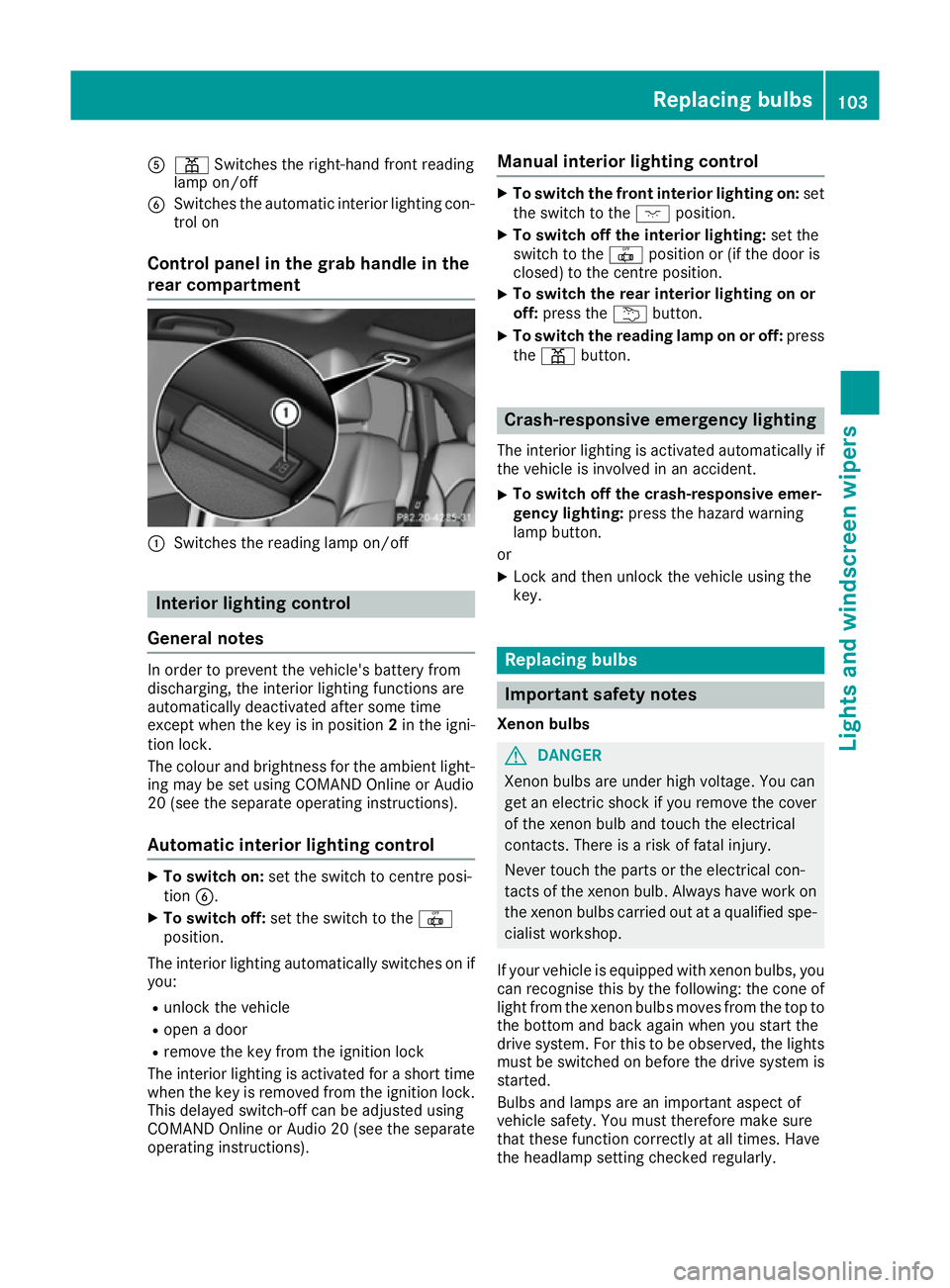
A
p Switches the right-hand front reading
lamp on/off
B Switches the automatic interior lighting con-
trol on
Control panel in the grab handle in the
rear compartment :
Switches the reading lamp on/off Interior lighting control
General notes In order to prevent the vehicle's battery from
discharging, the interior lighting functions are
automatically deactivated after some time
except when the key is in position 2in the igni-
tion lock.
The colour and brightness for the ambient light- ing may be set using COMAND Online or Audio
20 (see the separate operating instructions).
Automatic interior lighting control X
To switch on: set the switch to centre posi-
tion B.
X To switch off: set the switch to the |
position.
The interior lighting automatically switches on if you:
R unlock the vehicle
R open a door
R remove the key from the ignition lock
The interior lighting is activated for a short time
when the key is removed from the ignition lock.
This delayed switch-off can be adjusted using
COMAND Online or Audio 20 (see the separate
operating instructions). Manual interior lighting control X
To switch the front interior lighting on: set
the switch to the cposition.
X To switch off the interior lighting: set the
switch to the |position or (if the door is
closed) to the centre position.
X To switch the rear interior lighting on or
off:
press the ubutton.
X To switch the reading lamp on or off: press
the p button. Crash-responsive emergency lighting
The interior lighting is activated automatically if
the vehicle is involved in an accident.
X To switch off the crash-responsive emer-
gency lighting: press the hazard warning
lamp button.
or X Lock and then unlock the vehicle using the
key. Replacing bulbs
Important safety notes
Xenon bulbs G
DANGER
Xenon bulbs are under high voltage. You can
get an electric shock if you remove the cover
of the xenon bulb and touch the electrical
contacts. There is a risk of fatal injury.
Never touch the parts or the electrical con-
tacts of the xenon bulb. Always have work on the xenon bulbs carried out at a qualified spe- cialist workshop.
If your vehicle is equipped with xenon bulbs, you can recognise this by the following: the cone of
light from the xenon bulbs moves from the top to the bottom and back again when you start the
drive system. For this to be observed, the lights
must be switched on before the drive system is started.
Bulbs and lamps are an important aspect of
vehicle safety. You must therefore make sure
that these function correctly at all times. Have
the headlamp setting checked regularly. Replacing bulbs
103Lights and windscreen wipers Z
Page 128 of 293
Useful information
i This Owner's Manual describes all models,
series and optional equipment for your vehi-
cle that were available at the time of going to
press. National variations are possible. Note
that your vehicle may not be equipped with all
of the functions described. This is also the
case for systems and functions relevant to
safety.
i Read the information on qualified specialist
workshops: (Y page 23). Running-in notes
In certain driving and driving safety systems, the sensors adjust automatically while a certain dis-
tance is being driven after the vehicle has been delivered or after repairs. Full system effective- ness is not reached until the end of this teach-in
process.
Brake pads/linings and discs that are either new or have been replaced only achieve optimum
braking effect after several hundred kilometres
of driving. Compensate for the reduced braking
effect by applying greater force to the brake
pedal. Driving
Important safety notes
G
WARNING
Objects in the driver's footwell may restrict
the clearance around the pedals or block a
depressed pedal. This jeopardises the oper-
ating and road safety of the vehicle. There is a risk of an accident.
Stow all objects securely in the vehicle so that
they do not get into the driver's footwell.
Always fit the floormats securely and as pre-
scribed in order to ensure that there is always sufficient room for the pedals. Do not use
loose floormats and do not place several floor- mats on top of one another. G
WARNING
Unsuitable footwear can hinder correct usage of the pedals, e.g.:
R shoes with thick soles
R shoes with high heels
R slippers
There is a risk of an accident.
Wear suitable footwear to ensure correct
usage of the pedals. G
WARNING
If you switch off the ignition while driving,
safety-relevant functions are only available
with limitations, or not at all. This could affect, for example, the power steering and the brake
boosting effect. You will require considerably
more effort to steer and brake. There is a risk of an accident.
Do not switch off the ignition while driving. G
WARNING
If the parking brake has not been fully
released when driving, the parking brake can:
R overheat and cause a fire
R lose its hold function.
There is a risk of fire and an accident. Release
the parking brake fully before driving off.
! Before driving away, you must ensure that,
for your own safety and to avoid damage, the charging cable has been removed from the
vehicle socket. Otherwise, you cannot shift
the transmission out of position P.
The braking performance of the electric motor
using recuperative braking is, in some operating modes, either reduced or not effective:
R when the charge status of the high-voltage
battery increases
R if the high-voltage battery is not yet at a nor-
mal operating temperature
R when driving close to the maximum speed
R when the vehicle is almost stationary
R in transmission position N
R during and after ESP stability control
If you do not make an additional effort to apply
the brake yourself, the braking effect may not be Driving
125Driving and parking Z
Page 129 of 293
sufficient. If necessary, counteract the reduced
regenerative braking effect by applying the
brake yourself.
Before commencing your journey, ensure that
the charging cable required for charging the
high-voltage battery is in the vehicle. Key positions
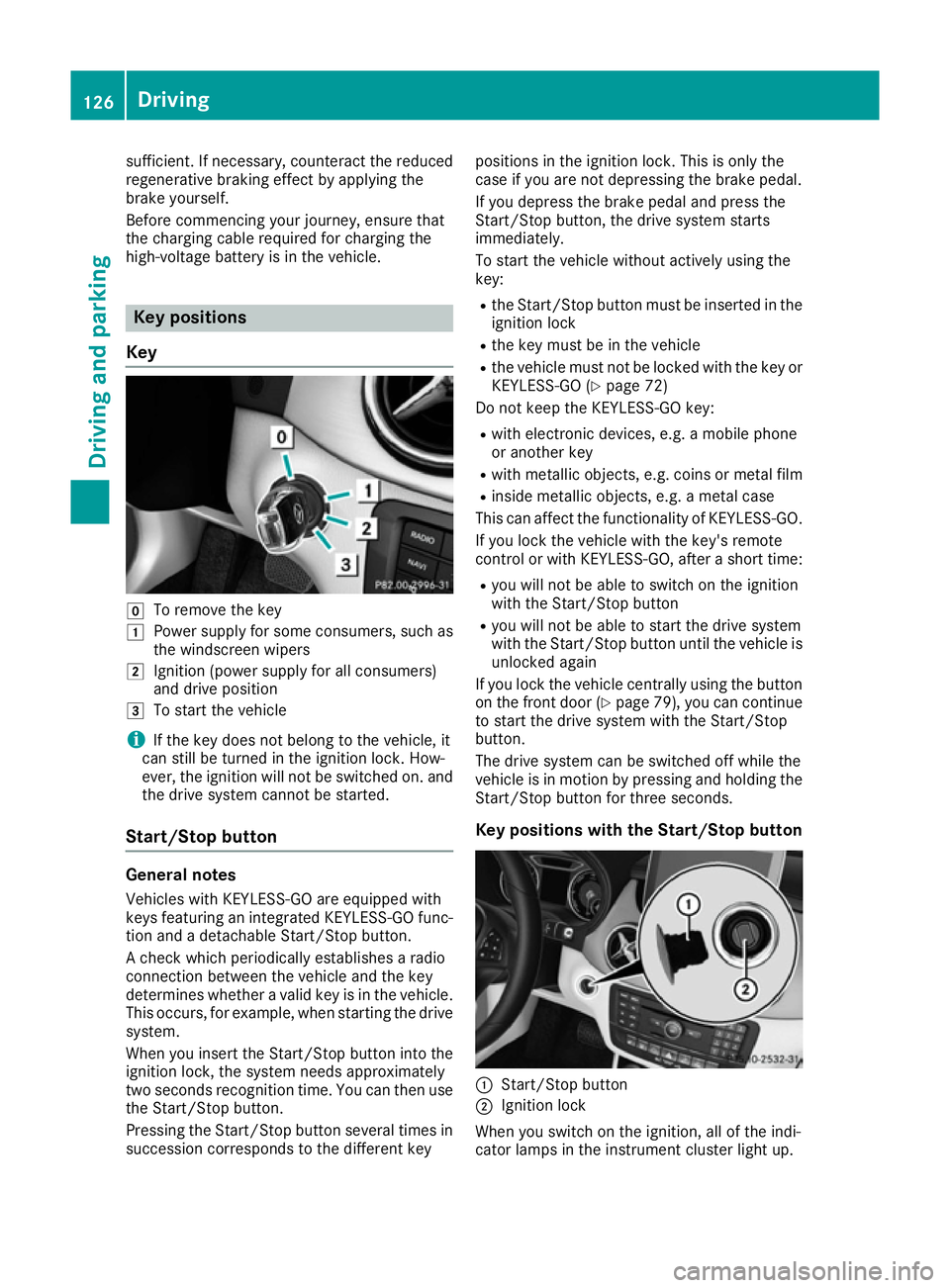
Key g
To remove the key
1 Power supply for some consumers, such as
the windscreen wipers
2 Ignition (power supply for all consumers)
and drive position
3 To start the vehicle
i If the key does not belong to the vehicle, it
can still be turned in the ignition lock. How-
ever, the ignition will not be switched on. and
the drive system cannot be started.
Start/Stop button General notes
Vehicles with KEYLESS-GO are equipped with
keys featuring an integrated KEYLESS-GO func- tion and a detachable Start/Stop button.
A check which periodically establishes a radio
connection between the vehicle and the key
determines whether a valid key is in the vehicle. This occurs, for example, when starting the drivesystem.
When you insert the Start/Stop button into the
ignition lock, the system needs approximately
two seconds recognition time. You can then use the Start/Stop button.
Pressing the Start/Stop button several times in
succession corresponds to the different key positions in the ignition lock. This is only the
case if you are not depressing the brake pedal.
If you depress the brake pedal and press the
Start/Stop button, the drive system starts
immediately.
To start the vehicle without actively using the
key:
R the Start/Stop button must be inserted in the
ignition lock
R the key must be in the vehicle
R the vehicle must not be locked with the key or
KEYLESS-GO (Y page 72)
Do not keep the KEYLESS-GO key:
R with electronic devices, e.g. a mobile phone
or another key
R with metallic objects, e.g. coins or metal film
R inside metallic objects, e.g. a metal case
This can affect the functionality of KEYLESS-GO.
If you lock the vehicle with the key's remote
control or with KEYLESS-GO, after a short time:
R you will not be able to switch on the ignition
with the Start/Stop button
R you will not be able to start the drive system
with the Start/Stop button until the vehicle is
unlocked again
If you lock the vehicle centrally using the button
on the front door (Y page 79), you can continue
to start the drive system with the Start/Stop
button.
The drive system can be switched off while the
vehicle is in motion by pressing and holding the
Start/Stop button for three seconds.
Key positions with the Start/Stop button :
Start/Stop button
; Ignition lock
When you switch on the ignition, all of the indi-
cator lamps in the instrument cluster light up. 126
DrivingDriving and parking
Page 131 of 293
You can start the drive system if a valid key is in
the vehicle. Switch off the drive system and
always take the key with you when leaving the
vehicle, even if you only leave it for a short time. Pay attention to the important safety notes.
X Depress the brake pedal and keep it
depressed.
X Press the Start/Stop button once
(Y page 126).
The drive system is started. Once the vehicle
is ready to be driven, the Ready
Ready display
(Y page 172) appears in the lower part of the
multifunction display.
Starting procedure with the key To start the drive system using the key instead
of the Start/Stop button, pull the Start/Stop
button out of the ignition lock.
X Turn the key to position 3(Y page 126) in the
ignition lock and release it.
The drive system is started. Once the vehicle
is ready to be driven, the Ready Readydisplay
(Y page 172) appears in the lower part of the
multifunction display. Pulling away
The vehicle can be equipped with a sound gen-
erator. At low speeds, an electric vehicle makes
less noise than a vehicle with a combustion
engine. The sound generator is activated so that
other road users can hear your vehicle better.
The sound generator is activated at speeds
under 30 km/h and switches off automatically
at higher speeds.
X Depress the brake pedal and keep it
depressed.
X Move the DIRECT SELECT lever to position D
or R.
X Release the brake pedal.
X Carefully depress the accelerator pedal.
The electric parking brake is automatically
released (Y page 146).
The red !indicator lamp in the instrument
cluster goes out.
The vehicle locks centrally once you have pulled
away. The locking knobs in the doors drop down. You can open the doors from the inside at any
time. It is only possible to move the DIRECT SELECT
selector lever from position
Pto the desired
selector lever position if you depress the brake
pedal. The parking lock is then deactivated and
the electrical parking brake is released auto-
matically. If the brake pedal is not depressed,
the DIRECT SELECT lever can still be moved but
the parking lock remains engaged.
Make sure that no charging cables are connec-
ted. The parking lock cannot be released if a
charging cable is connected. Hill start assist
Hill start assist will aid you when pulling away on
a hill. It holds the vehicle for a short time after
you have removed your foot from the brake
pedal. This gives you enough time to move your foot from the brake pedal to the accelerator
pedal and depress it before the vehicle begins to
roll away. G
WARNING
After a while, hill start assist no longer holds
the vehicle and it may roll away. There is a risk of an accident and injury.
Therefore, quickly move your foot from the
brake pedal to the accelerator pedal. Never
leave the vehicle when it is held by hill start
assist.
Hill start assist is not active if:
R you are pulling away on a level road or a
downhill gradient
R the DIRECT SELECT lever is in position N
R the electric parking brake is applied
R ESP ®
is malfunctioning
Further information on holding the vehicle sta-
tionary on uphill gradients (Y page 131). Transmission
Important safety notes
Shift the DIRECT SELECT lever to position P
when the drive system is switched off and the
vehicle is stationary. Park position Pis engaged
and the electric parking brake is applied auto-
matically. 128
TransmissionDriving and parking