cooling MERCEDES-BENZ B-CLASS HATCHBACK 2015 Owners Manual
[x] Cancel search | Manufacturer: MERCEDES-BENZ, Model Year: 2015, Model line: B-CLASS HATCHBACK, Model: MERCEDES-BENZ B-CLASS HATCHBACK 2015Pages: 293, PDF Size: 10.83 MB
Page 6 of 293
1, 2, 3 ...
12 V socket see Sockets A
ABS (Anti-lock Braking System) Display message ............................ 190
Function/notes ................................ 61
Important safety notes .................... 62
Warning lamp .................................2 16
Accident
Automatic measures after an acci-
dent ................................................. 48
Activating/deactivating air-recir-
culation mode ................................... .120
Activating/deactivating cooling
with air dehumidification ................. 116
Active light function ......................... 100
Active Parking Assist
Detecting parking spaces .............. 159
Display message ............................ 206
Exiting a parking space .................. 160
Function/notes ............................ .158
Important safety notes .................. 158
Parking .......................................... 159
ADAPTIVE BRAKE ................................. 67
Adaptive Brake Assist
Function/notes ................................ 64
Adaptive brake lights .......................... 65
Adaptive Highbeam Assist
Display message ............................ 203
Function/notes ............................ .101
Switching on/off ........................... 102
Additional speedometer ................... 186
Adjusting the headlamp range ........... 99
Aerial .................................................... 22
Air conditioning
General notes ................................ 114
Air pressure
see Tyre pressure
Air vents
Important safety notes .................. 123
Rear ............................................... 124
Setting the centre air vents ........... 123
Setting the side air vents .............. .123 Air-conditioning system
see Climate control
Airbag
Automatic front-passenger front
airbag deactivatio n .......................... 42
Introduction ..................................... 39
PASSENGER AIR BAG indicator
lamps ............................................... 35
Airbags
Display message ............................ 199
Front airbag (driver, front
passenger) ....................................... 40
Important safety guidelines ............. 39
Kneebag .......................................... .41
Sidebag ............................................ 41
Triggering ......................................... 46
Windowbag ...................................... 42
Alarm
ATA (Anti-Theft Alarm system) ......... 68
Switching off (ATA) .......................... 68
Switching the function on/off
(ATA) ................................................ 68
Alarm system
see ATA (Anti-Theft Alarm system)
Anti-glare film .................................... 238
Anti-lock braking system
see ABS (Anti-lock Braking System)
Anti-Theft Alarm system
see ATA (Anti-Theft Alarm system)
Aquaplaning ....................................... 150
Ashtray ............................................... 234
Assistance display (on-board com-
puter) .................................................. 182
Assistance menu (on-board com-
puter) .................................................. 182
ASSYST PLUS
Displaying a service message ........ 242
Driving abroad ............................... 242
Hiding a service message .............. 242
Information about Service ............. 242
Resetting the service interval dis-
play ................................................ 242
Service message ............................ 241
Special service requirements ......... 242
ATA (Anti-Theft Alarm system)
Activating/deactivating ................... 68
Function ........................................... 68 Index
3
Page 8 of 293
Care
Automatic car wash ...................... .243
Carpets .......................................... 247
Display .......................................... .246
Exterior lighting ............................ .245
Gear or selector lever .................... 247
High-pressure cleaner .................... 243
Interior .......................................... .246
Matt paintwork .............................. 244
Notes ............................................. 242
Paint .............................................. 244
Plastic trim ................................... .246
Reversing camera .......................... 246
Roof lining ...................................... 247
Seat belt ........................................ 247
Seat cover ..................................... 247
Sensors ......................................... 245
Steering wheel ............................... 247
Trim pieces ................................... .247
Washing by hand ........................... 243
Wheels .......................................... .244
Windows ........................................ 244
Wiper blades .................................. 245
Wooden trim .................................. 247
CD player (on-board computer) ........180
Central locking
Automatic locking (on-board com-
puter) ............................................. 187
Locking/unlocking (key ).................. 72
Centre console
Lower section .................................. 31
Upper section .................................. 30
Changing bulbs
Cornering light function ................. 106
Dipped-beam headlamp s............... 105
Licence plate lighting ..................... 108
Main-beam headlamp s................... 105
Parking lamps (front) ..................... 106
Rear foglamp ................................. 107
Reversing lamps ............................ 107
Standing lamps .............................. 106
Turn signals (front) ......................... 106
Turn signals (rear) .......................... 107
Charge level display .......................... 174
Charge socket flap
Emergency release ........................ 143
Charging
with RANGE PLUS .......................... 184 see Charging the high-voltage battery
Charging cable
Connection .................................... 141
Control panel ................................. 140
Disconnecting ................................ 142
Heating up ..................................... 135
Important safety notes .................. 139
Indicator lamps .............................. 141
Storing ........................................... 140
Charging the high-voltage battery
(important safety notes) ................... 134
Child
Restraint system .............................. 49
Child seat
Forward-facing restraint system ...... 54
ISOFIX .............................................. 50
On the front-passenger sea t............ 52
Rearward-facing restraint system .... 53
Recommendations ........................... 58
Suitable positions ............................ 54
Top Tether ....................................... 51
Child-proof locks
Important safety notes .................... 60
Rear doors ....................................... 60
Cigarette lighter ................................ 235
Cleaning
Mirror turn signal ........................... 245
Climate control
Auxiliary climate control (on-
board computer) ............................ 185
Controlling automaticall y............... 117
Convenience opening/closing
(air-recirculation mode) ................. 120
Cooling with air dehumidification .. 116
Demisting the windows .................. 118
Demisting the windscreen ............. 118
Immediate pre-entry climate con-
trol ................................................. 121
Indicator lamp ................................ 117
Information on using
THERMOTRONIC automatic cli-
mate control .................................. 115
Overview of systems ...................... 114
Pre-entry climate control at
departure time ............................... 121
Pre-entry climate control at time
of departure (on-board computer) .. 185 Pre-entry climate control via key ... 121 Index
5
Page 9 of 293
Pre-entry climate control via key
(on-board computer) ......................1
85
Problem with the rear window
heating .......................................... 120
Problems with cooling with air
dehumidification ............................ 117
Setting the air distribution ............. 117
Setting the air vents ..................... .123
Setting the airflow ......................... 118
Setting the temperature ................ 117
Switching air-recirculation mode
on/off ............................................ 120
Switching on/off ........................... 116
Switching residual heat on/off ...... 122
Switching the rear window heat-
ing on/off ...................................... 119
Switching the ZONE function on/
off ................................................. .118
THERMOTRONIC (2-zone) auto-
matic climate control ..................... 115
Cockpit
Overview .......................................... 25
COLLISION PREVENTION ASSIST
PLUS
Activating/deactivating ................. 183
Display message ............................ 196
Operation/notes .............................. 62
COMAND
Generated electricity ..................... 137
COMAND display
Cleaning ......................................... 246
Combination switch ............................ 99
Consumption statistics (on-board
computer) .......................................... 176
Convenience closing feature .............. 83
Convenience opening feature ............ 83
Convenience opening/closing (air-
recirculation mode) ........................... 120
Coolant (engine)
Checking the level ......................... 240
Important safety notes .................. 283
Cooling
see Climate control
Copyright ............................................. 24
Cornering lamps
Changing bulbs .............................. 106 Cornering light function
Display message ............................ 201
Function/notes ............................ .100
Crash-responsive emergency light-
ing ....................................................... 103
Cruise control
Activation conditions ..................... 151
Cruise control lever ....................... 151
Deactivating ................................... 152
Display message ............................ 207
Driving system ............................... 150
Important safety notes .................. 151
LIM indicator lamp ......................... 151
Selecting ........................................ 151
Setting a speed .............................. 152
Storing and maintaining current
speed ............................................. 151
Cup holder
Centre console .............................. 233
Important safety notes .................. 233
Rear compartment ......................... 234 D
Data see Technical data
Daytime driving lights
Display message ............................ 202
Function/notes ................................ 98
Switching on/off (on-board com-
puter) ............................................. 186
Dealership
see Qualified specialist workshop
Declarations of conformity ................. 22
Departure time
Setting (on-board computer) .......... 184
Diagnostics connection ......................22
Digital speedometer .........................178
Dipped-beam headlamps
Changing bulbs .............................. 105
Display message ............................ 201
Setting for driving abroad (sym-
metrical) .......................................... 97
Setting for driving on the right/
left ................................................. 187
Switching on/off .............................. 98
DIRECT SELECT lever
Transmission ................................. 129 6
Index
Page 117 of 293
Useful information
i This Owner's Manual describes all models,
series and optional equipment for your vehi-
cle that were available at the time of going to
press. National variations are possible. Note
that your vehicle may not be equipped with all
of the functions described. This is also the
case for systems and functions relevant to
safety.
i Read the information on qualified specialist
workshops: (Y page 23). Overview of climate control systems
General notes
Observe the settings recommended on the fol-
lowing pages. The windows could otherwise
mist up.
To prevent the windows from misting up:
R switch off climate control only briefly
R activate air-recirculation mode only briefly
R activate the "Cooling with air dehumidifica-
tion" function
R activate the windscreen demisting function
briefly, if required
THERMOTRONIC automatic climate control reg-
ulates the temperature and the humidity in the
vehicle interior and filters undesirable substan-
ces out of the air.
THERMOTRONIC automatic climate control is
only operational when the vehicle is ready to
drive. Optimum operation is only achieved with
the side windows closed.
The residual heat function can only be activated or deactivated with the ignition switched off
(Y page 122).
Always keep the ventilation flaps behind the
side panelling clear (Y page 106). Otherwise the
vehicle will not be ventilated correctly.
i Ventilate the vehicle for a brief period during
warm weather, e.g. using the convenience
opening feature (Y page 83). This will speed
up the cooling process and the desired inte-
rior temperature will be reached more
quickly.
i The integrated filter filters out most parti-
cles of dust and soot and completely filters
out pollen. It also reduces gaseous pollutants and odours. A clogged filter reduces the
amount of air supplied to the vehicle interior.
For this reason, you should always observe
the interval for replacing the filter, which is
specified in the Service Booklet. As this
depends on environmental conditions, e.g.
heavy air pollution, the interval may be
shorter than stated in the Service Booklet.
i Vehicles with auxiliary heating:
under
certain environmental conditions, the resid-
ual heat function may be activated automati-
cally an hour after the key has been removed
in order to dry the automatic climate control.
When the automatic climate control drying
function is active, the blue LED lamp is lit in
the rocker switch in the centre console. The
vehicle is then ventilated for 30 minutes.
Vehicles without auxiliary heating: under
certain environmental conditions, the resid-
ual heat function may be activated automati-
cally an hour after the key has been removed in order to dry the automatic climate control.
The vehicle is then ventilated for 30 minutes. 114
Overview of climate control systemsClimate control
Page 118 of 293
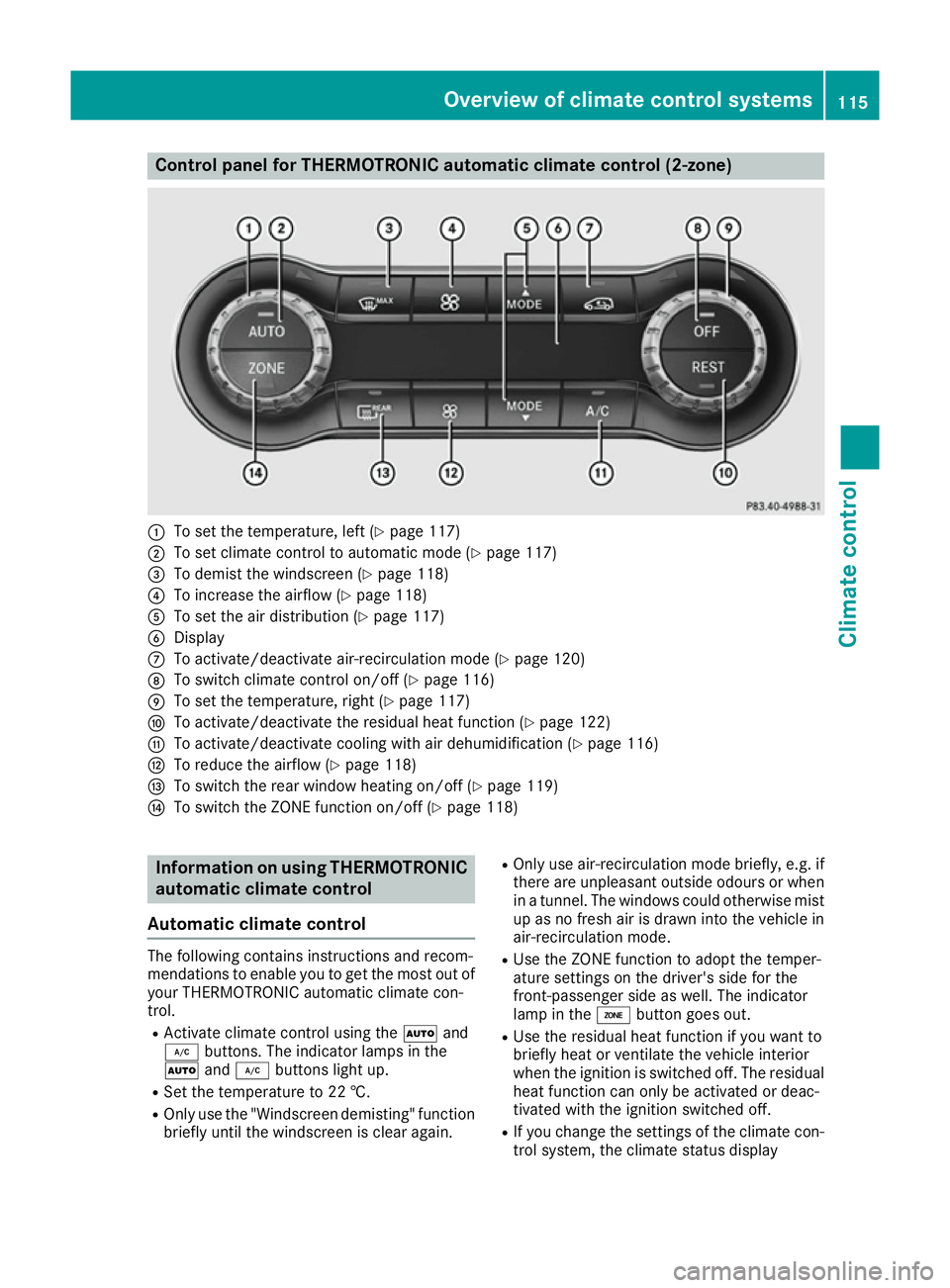
Control panel for THERMOTRONIC automatic climate control (2-zone)
:
To set the temperature, left (Y page 117)
; To set climate control to automatic mode (Y page 117)
= To demist the windscreen (Y page 118)
? To increase the airflow (Y page 118)
A To set the air distribution (Y page 117)
B Display
C To activate/deactivate air-recirculation mode (Y page 120)
D To switch climate control on/off (Y page 116)
E To set the temperature, right (Y page 117)
F To activate/deactivate the residual heat function (Y page 122)
G To activate/deactivate cooling with air dehumidification (Y page 116)
H To reduce the airflow (Y page 118)
I To switch the rear window heating on/off (Y page 119)
J To switch the ZONE function on/off (Y page 118)Information on using THERMOTRONIC
automatic climate control
Automatic climate control The following contains instructions and recom-
mendations to enable you to get the most out of
your THERMOTRONIC automatic climate con-
trol.
R Activate climate control using the Ãand
¿ buttons. The indicator lamps in the
à and¿ buttons light up.
R Set the temperature to 22 †.
R Only use the "Windscreen demisting" function
briefly until the windscreen is clear again. R
Only use air-recirculation mode briefly, e.g. if
there are unpleasant outside odours or when
in a tunnel. The windows could otherwise mist up as no fresh air is drawn into the vehicle inair-recirculation mode.
R Use the ZONE function to adopt the temper-
ature settings on the driver's side for the
front-passenger side as well. The indicator
lamp in the ábutton goes out.
R Use the residual heat function if you want to
briefly heat or ventilate the vehicle interior
when the ignition is switched off. The residual heat function can only be activated or deac-
tivated with the ignition switched off.
R If you change the settings of the climate con-
trol system, the climate status display Overview of climate control systems
115Climate control
Page 119 of 293
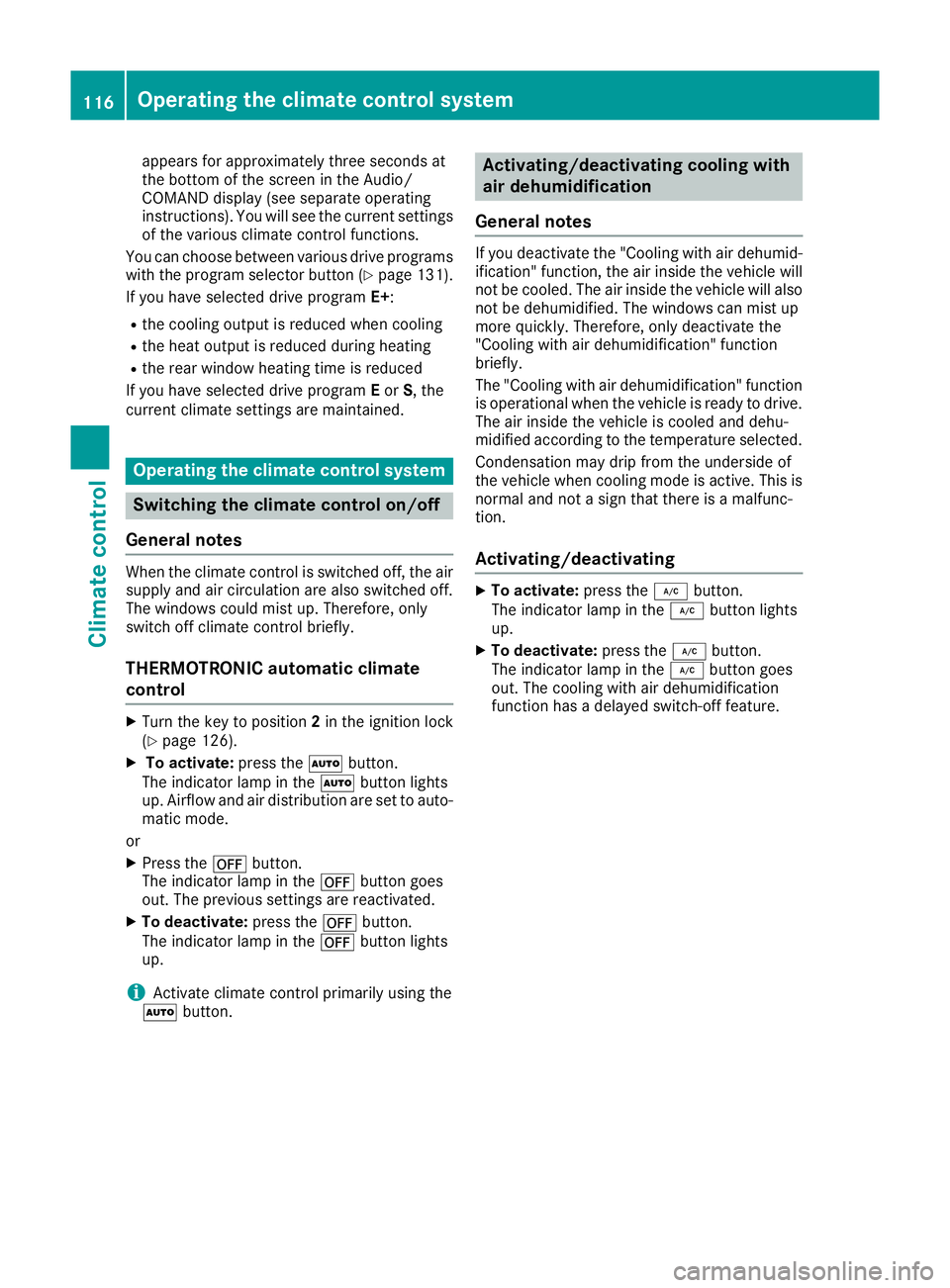
appears for approximately three seconds at
the bottom of the screen in the Audio/
COMAND display (see separate operating
instructions). You will see the current settings
of the various climate control functions.
You can choose between various drive programs
with the program selector button (Y page 131).
If you have selected drive program E+:
R the cooling output is reduced when cooling
R the heat output is reduced during heating
R the rear window heating time is reduced
If you have selected drive program Eor S, the
current climate settings are maintained. Operating the climate control system
Switching the climate control on/off
General notes When the climate control is switched off, the air
supply and air circulation are also switched off.
The windows could mist up. Therefore, only
switch off climate control briefly.
THERMOTRONIC automatic climate
control X
Turn the key to position 2in the ignition lock
(Y page 126).
X To activate: press theÃbutton.
The indicator lamp in the Ãbutton lights
up. Airflow and air distribution are set to auto-
matic mode.
or X Press the ^button.
The indicator lamp in the ^button goes
out. The previous settings are reactivated.
X To deactivate: press the^button.
The indicator lamp in the ^button lights
up.
i Activate climate control primarily using the
à button. Activating/deactivating cooling with
air dehumidification
General notes If you deactivate the "Cooling with air dehumid-
ification" function, the air inside the vehicle will
not be cooled. The air inside the vehicle will also
not be dehumidified. The windows can mist up
more quickly. Therefore, only deactivate the
"Cooling with air dehumidification" function
briefly.
The "Cooling with air dehumidification" function
is operational when the vehicle is ready to drive. The air inside the vehicle is cooled and dehu-
midified according to the temperature selected.
Condensation may drip from the underside of
the vehicle when cooling mode is active. This is
normal and not a sign that there is a malfunc-
tion.
Activating/deactivating X
To activate: press the¿button.
The indicator lamp in the ¿button lights
up.
X To deactivate: press the¿button.
The indicator lamp in the ¿button goes
out. The cooling with air dehumidification
function has a delayed switch-off feature. 116
Operating the climate control systemClimate control
Page 120 of 293

Problems with the "Cooling with air dehumidification" function
Problem
Possible causes/consequences and
M
MSolutions The indicator lamp in the
¿ button flashes
three times or remains
off. The cooling with air
dehumidification func-
tion cannot be activated. The cooling with air dehumidification function has been deactivated
due to a malfunction.
X Visit a qualified specialist workshop. Setting climate control to automatic
mode
General notes In automatic mode, the set temperature is main-
tained automatically at a constant level. The
system automatically regulates the temperature of the dispensed air, the airflow and the air dis- tribution.
The automatic mode functions optimally when
the "Cooling with air dehumidification" function is activated. If desired, cooling with air dehu-
midification can be deactivated.
If you deactivate the "Cooling with air-dehumid-
ification" function, the air inside the vehicle will
not be cooled. The air inside the vehicle will also
not be dehumidified. The windows can mist up
more quickly. Therefore, only deactivate the
"Cooling with air-dehumidification" function
briefly.
Setting climate control to automatic
mode X
Turn the key to position 2in the ignition lock
(Y page 126).
X Set the desired temperature.
X To activate: press theÃbutton.
The indicator lamp in the Ãbutton lights
up. Automatic air distribution and airflow are
activated.
X To switch to manual mode: press theÉ
or Ë button.
or X Press the KorI button.
The indicator lamp in the Ãbutton goes
out. Automatic air distribution and airflow are deactivated. Setting the temperature
Different temperatures can be set for the driv-
er's and front-passenger sides. The set temper-
ature is automatically maintained at a constant
level.
X Turn the key to position 2in the ignition lock
(Y page 126).
X To increase/reduce: turn control:orE
anti-clockwise or clockwise. Only change the
temperature setting in small increments.
Start at 22 †. Setting the air distribution
Air distribution settings ¯
Directs the airflow through the demister
vents
P Directs the airflow through the centre
and side air vents
O Directs the airflow through the footwell
air vents
S Directs the airflow through the centre
and side air vents as well as the footwell
air vents
b Directs the airflow through the centre
and side air vents as well as the demister
vents
a Directs the airflow through the footwell
and demister vents
_ Directs the airflow through the demister
vents, the centre and side air vents as
well as the footwell air vents
i Regardless of the air distribution setting,
airflow is always directed through the side air
vents. The side air vents can only be closed if the adjusters are turned clockwise until they
engage. Operating the climate control system
117Climate control
Page 121 of 293
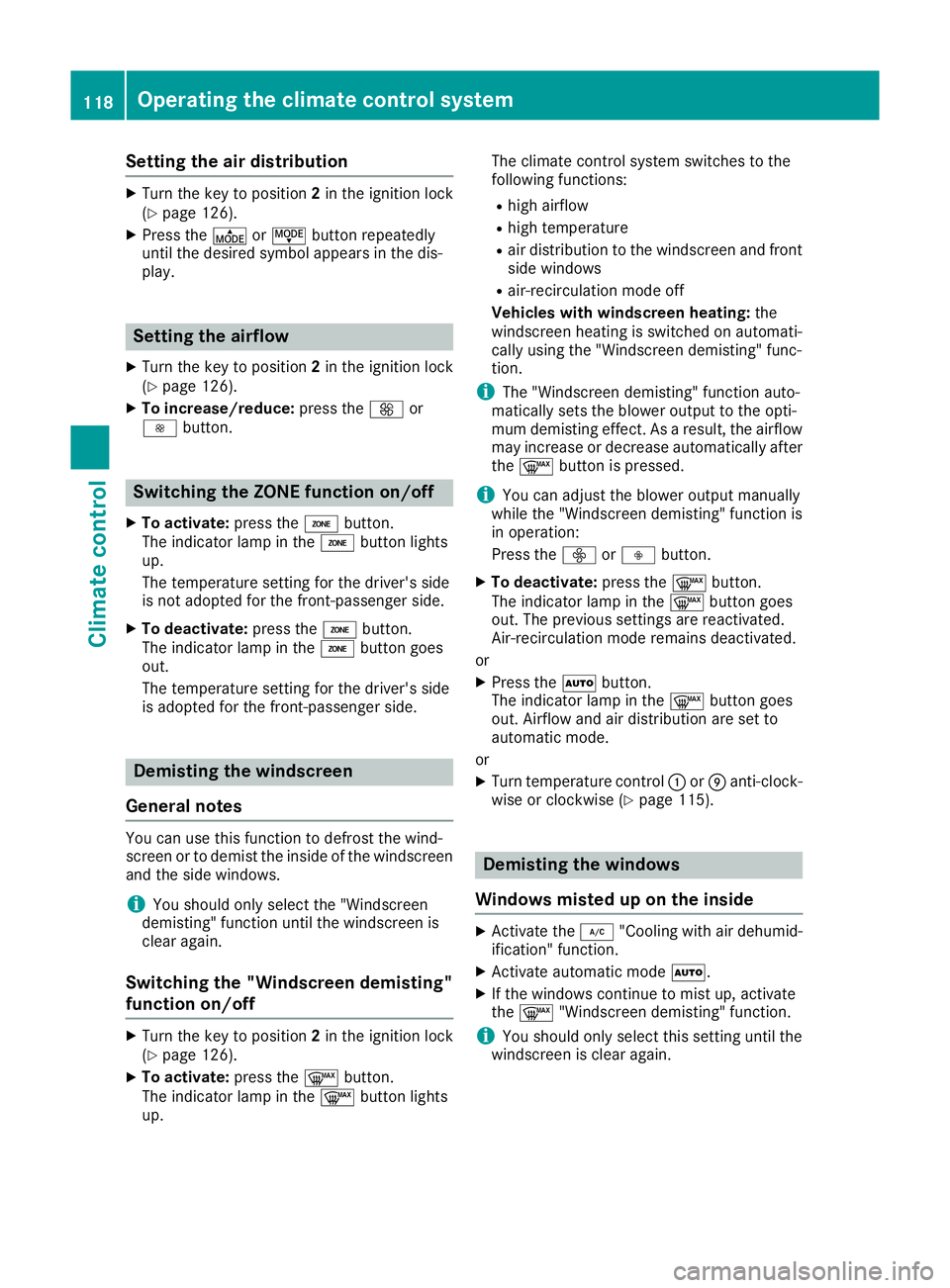
Setting the air distribution
X
Turn the key to position 2in the ignition lock
(Y page 126).
X Press the ÉorË button repeatedly
until the desired symbol appears in the dis-
play. Setting the airflow
X Turn the key to position 2in the ignition lock
(Y page 126).
X To increase/reduce: press theKor
I button. Switching the ZONE function on/off
X To activate: press theábutton.
The indicator lamp in the ábutton lights
up.
The temperature setting for the driver's side
is not adopted for the front-passenger side.
X To deactivate: press theábutton.
The indicator lamp in the ábutton goes
out.
The temperature setting for the driver's side
is adopted for the front-passenger side. Demisting the windscreen
General notes You can use this function to defrost the wind-
screen or to demist the inside of the windscreen
and the side windows.
i You should only select the "Windscreen
demisting" function until the windscreen is
clear again.
Switching the "Windscreen demisting"
function on/off X
Turn the key to position 2in the ignition lock
(Y page 126).
X To activate: press the¬button.
The indicator lamp in the ¬button lights
up. The climate control system switches to the
following functions:
R high airflow
R high temperature
R air distribution to the windscreen and front
side windows
R air-recirculation mode off
Vehicles with windscreen heating: the
windscreen heating is switched on automati-
cally using the "Windscreen demisting" func-
tion.
i The "Windscreen demisting" function auto-
matically sets the blower output to the opti-
mum demisting effect. As a result, the airflow may increase or decrease automatically after
the ¬ button is pressed.
i You can adjust the blower output manually
while the "Windscreen demisting" function is
in operation:
Press the óorô button.
X To deactivate: press the¬button.
The indicator lamp in the ¬button goes
out. The previous settings are reactivated.
Air-recirculation mode remains deactivated.
or
X Press the Ãbutton.
The indicator lamp in the ¬button goes
out. Airflow and air distribution are set to
automatic mode.
or X Turn temperature control :orE anti-clock-
wise or clockwise (Y page 115). Demisting the windows
Windows misted up on the inside X
Activate the ¿"Cooling with air dehumid-
ification" function.
X Activate automatic mode Ã.
X If the windows continue to mist up, activate
the ¬ "Windscreen demisting" function.
i You should only select this setting until the
windscreen is clear again. 118
Operating the climate control systemClimate control
Page 123 of 293
Problems with the rear window heating
Problem
Possible causes/consequences and
M
MSolutions The rear window heating
has switched off prema-
turely or cannot be acti-
vated. The battery has not been sufficiently charged.
X Switch off any consumers that are not required, e.g. reading lamps,
interior lighting or the seat heating.
When the battery is sufficiently charged, the rear window heating
can be activated again. Switching air-recirculation mode
on/off
General notes You can deactivate the flow of fresh air if
unpleasant odours are entering the vehicle from
outside. The air already inside the vehicle will
then be recirculated.
If you activate air-recirculation mode, the win-
dows can mist up more quickly, in particular at
low temperatures. Only use air-recirculation
mode briefly to prevent the windows misting up.
Switching on/off X
Turn the key to position 2in the ignition lock
(Y page 126).
X To activate: press theebutton.
The indicator lamp in the ebutton lights
up.
Air-recirculation mode is activated automati-
cally:
R at high outside temperatures
R at high levels of pollution
When air-recirculation mode is activated auto-
matically, the indicator lamp in the ebutton
is not lit. Outside air is added after about
30 minutes.
X To deactivate: press theebutton.
The indicator lamp in the ebutton goes
out. i
Air-recirculation mode is deactivated auto-
matically:
R after approximately five minutes at outside
temperatures below approximately 7 †
R after approximately five minutes if the
"Cooling with air dehumidification" func-
tion is deactivated
R after approximately 30 minutes at outside
temperatures above approximately 7 † if
the cooling with air dehumidification func-
tion is activated Convenience opening or closing using
the air-recirculation button G
WARNING
When using convenience closing, you could
become trapped within the sweep of the clos- ing window. There is a risk of injury.
Monitor the entire closing procedure when
using convenience closing. When closing,
make sure that no one has any parts of the
body within the closing area. G
WARNING
During convenience opening parts of the body could be drawn in or become trapped
between the side window and window frame.
There is a risk of injury.
When opening, make sure that nobody is
touching the side window. If someone
becomes trapped, immediately press
the W switch in the door to stop the move-
ment of the side windows. To continue closing
the side window, pull on the Wswitch. 120
Operating the climate control systemClimate control
Page 124 of 293
X
Convenience closing feature: press and
hold the ebutton until the side windows
are closed.
The indicator lamp in the ebutton lights
up. Air-recirculation mode is activated.
If parts of the body are in the closing area during convenience closing, proceed as follows:
X Press the Wbutton for opening/closing
the side windows.
The side windows stop.
X To then open the side windows, press the
W button again.
or
X Press the ebutton for longer than two
seconds.
The side windows move in the opposite direc- tion.
X Convenience opening feature: press and
hold the ebutton until the side windows
are opened. The side windows move back to
their original positions.
The indicator lamp in the ebutton goes
out. Air-recirculation mode is deactivated.
Notes on the reversing feature for the side win-
dows (Y page 82).
If you open the side windows manually after
closing them using the convenience closing fea- ture, they will remain in this position when
opened using the convenience opening feature. Pre-entry climate control via key
Before getting in, the vehicle interior can be
briefly warmed or ventilated in advance. In addi- tion, the air from the air vent can be pre-cooled.
The high-voltage battery must be sufficiently
charged before the "Pre-entry climate control
via key" function can be activated.
Activating/deactivating the pre-entry cli-
mate control (via key)
When the vehicle is unlocked using the key or
KEYLESS-GO, the climate control functions are
activated.
The pre-cooling and pre-heating climate control functions last up to 5 minutes.
When the vehicle is pre-cooled, the following
functions are activated as necessary:
R Automatic climate control
R Cooling with air dehumidification
R Blower When the vehicle is pre-heated, the following
functions are activated as necessary:
R Automatic climate control
R Blower
R Seat heating
R Windscreen heating
R Rear window heating
Pre-entry climate control is automatically
switched off when operational readiness mode
is requested.
Activating/deactivating pre-entry climate
control (via key)
You can activate and deactivate the pre-entry
climate control (via key) function using the on-
board computer in the E-CELL
E-CELL submenu
(Y page 185).
i If the charge status of the high-voltage bat-
tery is below the specified minimum charge
status, pre-entry climate control will not be
activated even if it has been set. Pre-entry climate control at departure
time and immediate pre-entry climate control
Important safety notes G
WARNING
If persons (particularly children) are exposed
to heat or cold for a prolonged period, there is a risk of serious or even fatal injuries. Never
leave persons (particularly children) unatten-
ded in the vehicle.
General notes Using the "Pre-entry climate control at depar-
ture time" function, you can cool or heat the
vehicle interior prior to the desired departure
time.
When using the "Pre-entry climate control at
departure time" function, the charge status of
the high-voltage battery must be higher than the
specified minimum charge status.
The running time of the climate control may be
reduced if:
R the vehicle is not connected to an electric
power supply
R the high-voltage battery is not fully charged Operating the climate control system
121Climate control Z