sensor MERCEDES-BENZ B-CLASS SPORTS 2014 User Guide
[x] Cancel search | Manufacturer: MERCEDES-BENZ, Model Year: 2014, Model line: B-CLASS SPORTS, Model: MERCEDES-BENZ B-CLASS SPORTS 2014Pages: 360, PDF Size: 39.45 MB
Page 52 of 360
To be classified correctly, the frontp
assenger
must sit:
R wit hthe seat belt fastened correctly
R in ap ositio nthat is as upright as possible
with their back against the seat backrest
R with their feet on the floor
The OCS weight sensor reading is affected if
the occupant's weight is transferred, e.g. by
leaning on the armrest.
If the front-passenger seat, the seat cover or
the seat cushion are damaged, have the
necessary repair work carried out at a
qualified specialist workshop.
For safety reasons, Mercedes-Benz
recommends that you only use seat
accessories that have been approved by
Mercedes-Benz.
Both the driver and the front passenger
should always observe the PASSENGER AIR
BAG OFF indicator lamp as an indication of
whether or not the front passenger is
positioned correctly. Observe also the air bag
displaym essages that can be displayed in the
instrumentc luster (Ypage 219).
If the driver's air bag deploys, this does not
mean that the front-passenger front air bag
will also deploy.
The OCS may have detected that the seat:
R is empty or occupied by the weight of a
typical child up to twelve months old,
seated in achild restraint system.
R is occupied by asmall individual, such as a
young teenager or asmall adult.
R is occupied by achild in achild restraint
system whose weight is greater than that
of at ypical twelve montho ld child.
These are examples of when the OCS
deactivates the front-passenger front air bag.
Deactivation takes place although the
collision fulfills the criteria for deploying the
driver's air bag.
For further information ,see "Air bag display
messages" (Y page 219). System self-test G
WARNING
If the 000E0013indicator lamp does not
illuminate, the system is not functioning. You
must contac tanauthorized Mercedes-Benz
Center befor eseatin gany child on the front
passenger seat. G
WARNING
Never place anything betwee nseat cushion
and child seat (e.g. apillow), since it reduces
the effectiveness of the OCS. The underside
and rear side child restraint system must be
placed entirely on the seat cushion and the
backrest of the front-passenger seat
backrest.
If necessary, adjust the tilt of the passenger
seat backrest.
An incorrectly mounted child seat could cause
injuries to the child in case of an accident,
instead of increasing protection for the child.
Follow the manufacturer's instructions for
installation of child restraint systems.
The PASSENGER AIR BAG OFF indicator lamp
lights up:
R if you turn the SmartKey in the ignition lock
to position 1or 2
R if an adult is seated properly on the front-
passenger seat and the OCS classifies the
occupant as an adult
The PASSENGER AIR BAG OFF indicator
lamp goes out again after approximately six
seconds.
If the seat is not occupied and the OCS
detects that the front-passenger seat is
empty, the PASSENGER AIR BAG OFF
indicator lamp will continue to light up. The
PASSENGER AIR BAG OFF indicator lamp
will not go out.
For further information ,see "Problems with
the Occupant Classification System"
(Y page 51). 50
Occupant safetySafety
Page 67 of 360
G
WARNING
The distance warning function cannot always
clearly identify objects and comple xtraffic
situations.
In such cases, the distance warning function
may:
R give an unnecessary warning
R not give awarning
There is arisk of an accident.
Always pay carefu lattention to the traffic
situation and do not rely solely on the distance
warning function.
Function
X To activate/deactivate: activate or
deactivate the distance warning function in
the on-board computer (Y page200).
Vehicles with amonochrome
multifunction display: when thedistance
warning function is activated, the 000E
symbo lappears in th estatus overview in the
multifunction display.
Vehicles with acolor multifunction
display:w hen the distance warning function
is deactivated, the 0002symbol appears in
the assistance graphic in the multifunction
display.
The distance warning function can help you
to minimize the risk of afront-end collision
with avehicle ahead or reduce the effectsof
such acollision. If the distance warning
function detectst hat there isarisk of a
collision, you will be warned visuallya nd
acoustically .Without your intervention, the
distanc ewarnin gfunction cannot prevent a
collision.
Starting at aspeed of aroun d4mph
(7 km/h), the distanc ewarnin gfunction
warns you if you rapidly approac havehicle in
front .Ani ntermitten twarnin gtonew ill then
sound, and the 0008distanc ewarnin glamp
will light up in the instrumen tcluster. X
Brake immediately in order to increase the
distanc efromt he vehicle in front.
or
X Take evasiv eaction provided it is safe to do
so.
Due to the nature of the system, particularly
complicated but non-critical driving
conditions may also cause the system to
display awarning.
With the help of the radar sensor system, the
distanc ewarnin gfunction can detect
obstacles that are in the path of your vehicle
for an extende dperiod of time.
Fro mas peed of aroun d40mph (70 km/h),
the distance warning function can also react
to stationary obstacles, such as stoppe dor
parked vehicles.
If you approach an obstacle and the distance
warning function detects arisk of acollision,
the system will initially alert you both visually
and acoustically.
In particular, the detectio nofobstacles can
be impaired if:
R dirt on the sensors or anythin gelse
covering the sensors
R snow or heavy rain
R interferenc ebyother radar sources
R ther eare strong radar reflections, for
example in parkin ggarages
R an arro wvehicle traveling in front, e.g. a
motorbike
R av ehicle traveling in fron tonadifferent line
relative to the center of your vehicle
Following damage to the fron tend of the
vehicle, have the configuratio nand operation
of the rada rsensor checked at aqualified
specialist workshop. This also applies to
collisions at low speeds where ther eisno
visible damage to the fron tofthe vehicle.
Adaptive Brake Assist i
Observe the "Important safety notes"
section for driving safety systems
(Y page 63). Driving safety systems
65Safety Z
Page 68 of 360
G
WARNING
Adaptive Brake Assist cannot alwaysc learly
identify objects and comple xtraffic
situations. In these cases, Adaptive Brake
Assist may not intervene. There is arisk of an
accident.
Always pay carefu lattention to the traffic
situation and be read ytobrake. G
WARNING
Adaptive Brake Assist does not react:
R to people or animals
R to oncoming vehicles
R to crossing traffic
R to stationary obstacles
R when cornering
As aresult, Adaptive Brake Assist may not
intervene in all critical conditions. There is a
risk of an accident.
Always pay carefu lattention to the traffic
situation and be read ytobrake.
Due to the nature of the system, particularly
complicated but non-critical driving
conditions may alsoc auseBrake Assist to
intervene.
Adaptive Brake Assist aidsy ou in braking
during hazardous situations at speeds above
4m ph (7 km/h) and uses the radar sensor
system to evaluate the traffic situation.
With the help of asenso rsystem, adaptive
Brake Assis tcan detect obstacle sthata re in
th ep athofy our vehicle for an extended
period of time.
Should you approach an obstacle and
Adaptive Brake Assist has detected ariskof
collision, Adaptiv eBrake Assist calculate sthe
braking force necessary to avoid arear-end
collision. Should yo uapply the brakes
vigorously ,Adaptiv eBrake Assist will
automaticall yincreas ethe braking force to a
level suitabl efor the traffic conditions.
X Kee pthe brake pedal depressed unti lthe
emergency braking situation is over.
ABS prevents the wheel sfrom locking. The brakes will work normall
yagain if:
R yo ur elease the brake pedal
R there is no longe rany dange rofarear-end
collision.
R no obstacl eisdetected in front of your
vehicle
Adaptive Brake Assist is then deactivated.
Up to vehicl espeeds of around 155 mph
(250 km/h) ,adaptive Brake Assist is capable
of reacting to moving objects that have
already been recognized as such at least once
over the period of observation. Adaptive
Brake Assist does not react to stationary
obstacles.
If Adaptive Brake Assist is not available due
to am alfunction in the rada rsensor system,
the brake system remains available with full
brake boosting effect and BAS.
In particular, the detection of obstacles can
be impaired if there is:
R dirt on the sensors or anything else
covering the sensors
R snow or heavy rain
R interference by other rada rsources
R there are strongr adar reflections, for
example in parking garages
R an arrow vehicle traveling in front,e .g. a
motorbike
R av ehicle traveling in front on adifferent line
relative to the center of your vehicle
Following damage to the front end of the
vehicle, have the configuration and operation
of the radar sensor checked at aqualified
specialist workshop. This also applies to
collisions at low speeds where there is no
visible damage to the front of the vehicle.
COLLISION PREVENTION ASSIST PLUS General information
COLLISION PREVENTION ASSIST PLUS is
only available on vehicles with DISTRONIC.
COLLISION PREVENTION ASSIST PLUS
extends the functionality of COLLISION
PREVENTION ASSIST with an automatic66
Driving safety systemsSafety
Page 69 of 360
brakin
gfunction .COLLISION PREVENTION
ASSIS TPLUS can help you to minimiz ethe
risk of afront-end collision with avehicle
ahead or reduce the effects of such a
collision. If COLLISION PREVENTION ASSIST
PLUS detects that ther eisarisk ofacollision,
you will be warned visually and acoustically.
In critical situations COLLISION PREVENTION
ASSIST PLUS also initiates automatic
braking.
Function
X To activate/deactivate: activate or
deactivate COLLISION PREVENTION
ASSIST PLUS in the on-board computer
(Y page 201).
If COLLISION PREVENTION ASSIST PLUS is
deactivated, the 0002symbol appears in the
assistance graphics display.
If the driver's seat belt is fastened,
COLLISION PREVENTION ASSIST PLUS can
brake automaticallyw ithinaspeed range of
between 4mph (7 km/h) and 124 mph
(200 km/h).
COLLISION PREVENTION ASSIS TPLUS can
also react to stationary obstacle swith
automatic braking within aspeed range of
betwee n4mph (7 km/h) and 19 mph
(30 km/h).
In particular, the detection of obstacle scan
be impaired if:
R dirt on the sensors or anything else
covering the sensors
R snow or heavy rain
R interference by other radars ources
R there are strongr adar reflections, for
example in parking garages
R an arrow vehicle traveling in front,e .g. a
motorbike
R av ehicle traveling in front on adifferent line
relative to the center of your vehicle
Following damage to the front end of the
vehicle, have the configuration and operation
of the radar sensor checked at aqualified
specialist workshop. This also applies to collisions at low speeds where there is no
visible damage to the front of the vehicle. Adaptive brake lights
Adaptive Brake Assist warns following traffic
in an emergenc ybraking situation:
R by means of flashing brake lamps
R by activatin gthe hazard warning lamps
If you brake sharply from aspeed of more
than 70 km/ht oastandstill, the hazard
warning lamps are activated automatically. If
the brakes are applied again, the brake lamps
light up continuously. The hazard warning
lamps switch off automatically if you travel
faster than 10 km/h. You can also switchoff
the hazar dwarnin glamps using the hazard
warnin gbutton (Y page 107). ESP
®
(Electronic Stability Program)
General notes i
Observe the "Importan tsafet ynotes"
sectio n(Ypage 63).
ESP ®
monitors drivin gstability and traction,
i.e. power transmission between the tires and
the road surface.
If ESP ®
detects that the vehicle is deviating
from the direction desired by the driver, one
or more wheels are braked to stabilize the
vehicle. The engin eoutput is also modified to
keep the vehicle on the desired course within
physical limits. ESP ®
assists the driver when
pulling away on wet or slippery roads. ESP ®
can also stabilize the vehicle during braking.
ETS (Electronic Traction System) i
Observ ethe "Important safety notes"
section (Y page 63).
ETS traction contro lispart of ESP ®
.
ETS brakes the drive wheels individually if
they spin. This enables you to pull away and
accelerate on slippery surfaces ,for example Driving safet
ysystems
67Safety Z
Page 102 of 360
i
Make sure that the exterior mirrors are
always folded out fully while driving. They
could otherwise vibrate.
i If you are driving faster than 30 mph
(47 km/h), you can no longer fold in the
exterior mirrors.
Setting the exterior mirrors If the battery has been disconnected or
completely discharged, the exterior mirrors
must be reset. The exterior mirrors will
otherwise not fold in when you select the
"Fold in mirrors when locking" function in the
on-board computer (Y page 206).
X Turn the SmartKey to position 1in the
ignition lock (Y page 137).
X Briefly press button 001A.
Folding the exterior mirrors in or out
automatically If the "Fold in mirrors when locking" function
is activated in the on-board computer
(Y page 206):
R the exterior mirrors fold in automatically as
soon as you lock the vehicle from the
outside.
R the exterior mirrors fold out again
automatically as soon as you unlock the
vehicle and then open the driver's or front-
passenger door.
i If the exterior mirrors have been folded in
manually,t hey do not fold out.
Exterior mirror pushed out of position If an exterior mirror has been pushed out of
position, proceed as follows:
X Vehicles without electrically folding
exterior mirrors: move the exterior mirror
into the correct position manually.
X Vehicles with electrically folding
exterior mirrors: press and hold mirror-
folding button (Y page 99) until you hear a click and then the mirrors engage in
position.
The mirror housing is engaged again and
you can adjust the exterior mirrors as usual
(Y
page 99). Automatic anti-glarem
irrors
The "Automatic anti-glare mirrors" function is
only available if the vehicle is equipped with
the "Mirrors package".
The rear-view mirror and the exterior mirror
on the driver's side automatically go into anti-
glare mode if:
R the ignition is switched on and
R incident light from headlamps strikes the
sensor in the rear-view mirror.
The mirrors do not go into anti-glare mode if
reverse gear is engaged or the interior lighting
is switched on. Parking position for the exterior
mirror on the front-passenger side
General notes The "Parking position of the exterior mirror on
the front-passenger side" function is only
available if the vehicle is equipped with the
"Mirrors package".
Setting and storing the parking position
Using reverse gear
You can position the front-passenger side
exterior mirror in such
away that you can see
the rear wheel on that side as soon as you
engage reverse gear. You can store this
position. 100
MirrorsSeats, steering wheela
nd mirrors
Page 106 of 360
Useful information
i This Operator's Manual describes all
models and all standard and optional
equipment of your vehicle available at the
time of publication of the Operator's
Manual. Country-specific differences are
possible. Please not ethat your vehicle may
not be equipped with all features
described. This also applies to safety-
related system sand functions.
i Read the information on qualified
specialist workshops: (Y page 25).Exterior lighting
Genera
lnotes
For reason sofsafety, Mercedes-Benz
recommends that you drive with the lights
switched on even during the daytime. In some
countries, operation of the headlamps varies
due to legal requirements and self-imposed
obligations. Driving abroad
Conversion to symmetrical low beam Switc
hthe headlamps to symmetrical low
beam in countries in which traffic drives on
the opposite side of the road from the country
where the vehicle is registered. This prevents
glare to oncoming traffic. When using
symmetrical lights, the edge of the road is not
lit as widely and as far ahead as normal.
Have the headlamps converted at aqualified
specialist workshop as close to the border as
possible before drivin ginthesecountries.
Conversion to asymmetrical low beam
after returning Have the headlamps converted back to
asymmetrical low-beam headlamps at a
qualified specialist workshop as soon as
possible after crossing the border again. Setting the exterior lighting
Setting options Exterior lightin
gcan be set using:
R the light switch
R the combination switc h(Ypage 106)
R the on-board computer (Y page 203)
Light switch Operation
000C0007
Left-handstanding lamps
00010009 Right-hand standing lamps
0002000F Parkinglamps, licens eplate and
instrumen tcluste rlighting
001F000C Automatic headlamp mode,
controlled by the light sensor
00110005 Low-beam/high-beam headlamps
00240006 Rear fog lamp
00070019 Fog lamp (only vehicles with front fog
lamps)
If you hear awarnin gton ew hen you leave the
vehicle, the light smay still be switched on.
X Turn the light switc hto000C.
The exterior lighting (except the parking/
standin glamps) switches off automatically if
you:
R remove the SmartKey fro mthe ignition lock
R open the driver's door with the SmartKey
in position 0. 104
Exterior lightingLights and windshield wipers
Page 107 of 360
Automatic headlamp mode
G
WARNING
When th eligh tswitc hiss et to 000C,t helow-
beam headlamp smay not be switche don
automatically if there is fog, snow or other
causes of poor visibility due to th eweather
conditions such as spray. Ther eisarisk of an
accident.
In such situations, tur nthe light switch to
0005.
The automatic headlamp feature is only an
aid. The driver is responsible for the vehicle's
lighting at all times.
000C is the favored light switch setting. The
light settingisa utomatically selected
according to the brightness of the ambient
light (exception: poor visibility due to weather
conditionss uch as fog, snow or spray):
R SmartKey in position 1in the ignition lock:
the parking lamps are switched on or off
automatically depending on the brightness
of the ambient light.
R With the engine running: if you have
activated the daytime running lamps
function via the on-board computer, the
daytime running lamps or the low-beam
headlamps and parking lamps are switched
on or off automatically depending on the
brightness of the ambient light.
X To switch on automatic headlamp
mode: turn the light switch to 000C.
The daytime running lamps improve the
visibility of your vehicle during the day. The
daytime running lamps function is required by
law in Canada.
When the engine is running and the vehicle is
stationary: if you move the selector lever from
ad rive position to P,the daytime running
lamps/low-beam headlamps go out after
three minutes.
When the engine is running, the vehicle is
stationary and in bright ambient light: if you
turn the light switch to 000F,the daytime
running lamps and parking lamps switch on. If the engine is running and you turn the light
switch to
0005,the manual settings take
precedence over the daytime running lamps.
Low-beam headlamps
Even if the light sensor does not detect that
it is dark, the parking lamps and low-beam
headlamps switch on when the ignition is
switched on and the light switch is set to the
0005 position. This is aparticularly useful
function in the event of rain and fog.
X To switch on the low-beam headlamps:
turn the SmartKey in the ignition lock to
position 2or start the engine.
X Turn the light switch to 0005.
The green 0005indicator lamp in the
instrumentc luster lightsup.
Front fog lamps
In conditions where visibilit yispoor due to
fog, sno worrain, the fog lamps improve
visibilit yaswell as making it easier for other
road users to see you. They can be operated
together with the parking lamps or together
with the parking lamps and low-beam
headlamps.
X To switch on th efront fog lamps: turn
the SmartKey in the ignition lock to position
2 or start the engine.
X Turn the light switc hto0005or000C.
X Press the 0019button.
The green 0019indicator lamp in the
instrumen tcluster light sup.
X To switch off th efront fog lamps: press
the 0019 button.
The green 0019indicator lamp in the
instrumen tcluster goes out.
Only vehicles with front fog lamps are
equipped with the "fog lamp" function;
information on the fog lamp function for
vehicles with Intelligent Light System
(Y page 108). Exterior lighting
105Lightsand windshield wipers Z
Page 110 of 360
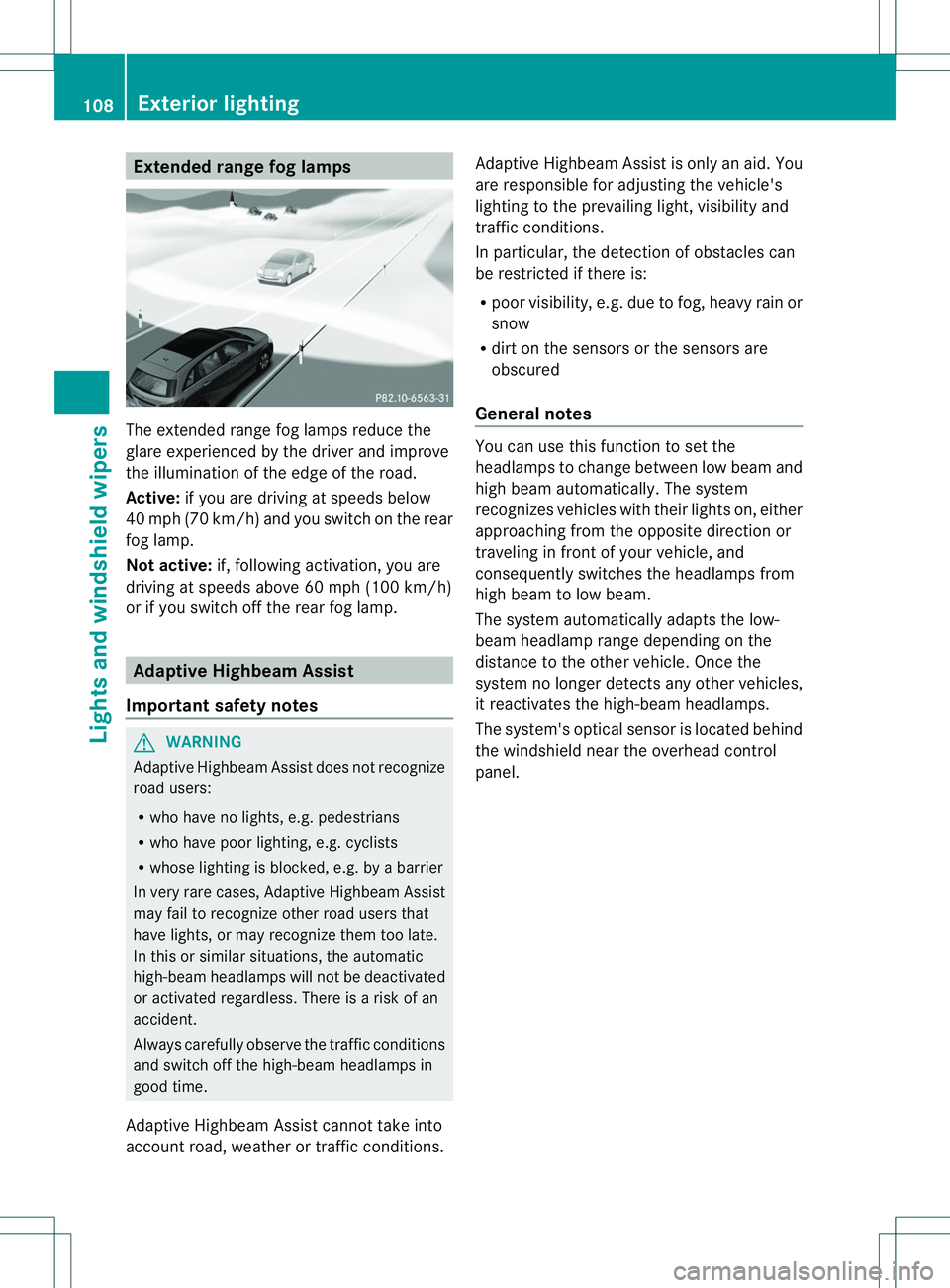
Extende
drange fog lamps The extended range fog lamps reduc
ethe
glare experienced by th edriver and improve
th ei lluminatio nofthe edge of the road.
Active: if you are driving at speeds below
40 mph (70 km/h) and you switch on the rear
fog lamp.
Not active: if, following activation, you are
driving at speeds above 60 mph (100 km/h)
or if you switch off the rear fog lamp. Adaptive Highbeam Assist
Important safety notes G
WARNING
Adaptive Highbeam Assist does not recognize
road users:
R who have no lights, e.g. pedestrians
R who have poor lighting, e.g. cyclists
R whose lighting is blocked, e.g. by abarrier
In very rare cases, Adaptive Highbeam Assist
may fail to recognize other road users that
have lights, or may recognizet hem too late.
In this or similar situations, the automatic
high-beam headlamps will not be deactivated
or activated regardless. There is arisk of an
accident.
Always carefully observe the traffic conditions
and switch off the high-beam headlamps in
good time.
Adaptive Highbeam Assist cannot take into
account road, weather or traffic conditions. Adaptive Highbeam Assist is only an aid. You
are responsible for adjusting the vehicle's
lighting to the prevailing light, visibility and
traffic conditions.
In particular, the detection of obstacles can
be restricted if there is:
R
poor visibility, e.g. due to fog, heavy rain or
snow
R dirt on the sensors or the sensors are
obscured
General notes You can use this function to set the
headlamps to change between low beam and
high beam automatically
.The system
recognizes vehicles with their lights on, either
approaching from the opposite direction or
traveling in front of your vehicle, and
consequently switches the headlamps from
high beam to low beam.
The system automatically adapts the low-
beam headlamp range depending on the
distance to the other vehicle. Once the
system no longer detectsa ny other vehicles,
it reactivates the high-beam headlamps.
The system's optical sensor is located behind
the windshield near the overhead control
panel. 108
Exterior lightingLights and windshield wipers
Page 111 of 360
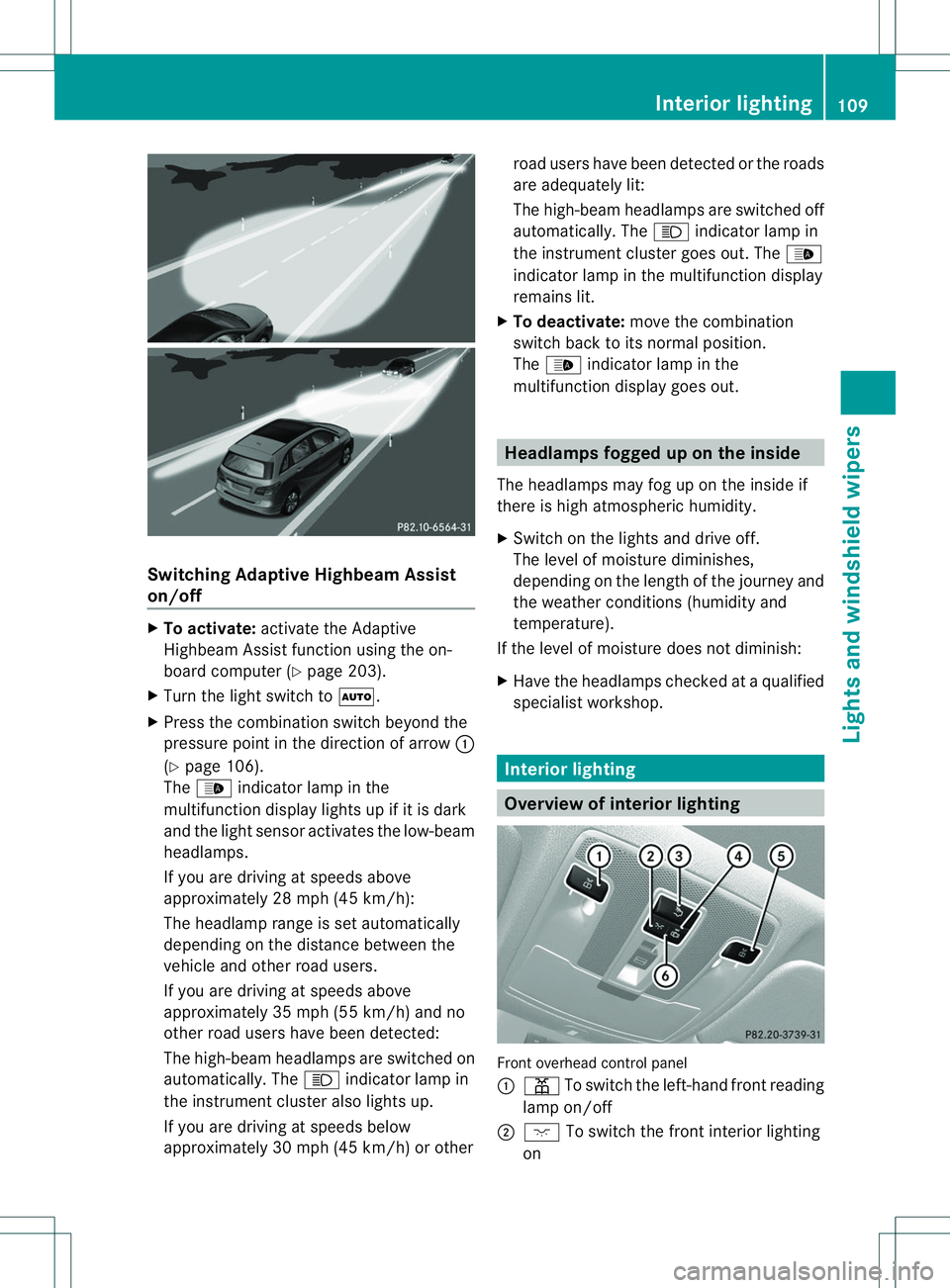
Switching Adaptive Highbeam Assist
on/off X
To activate: activate the Adaptive
Highbeam Assist function using the on-
board computer (Y page 203).
X Turn the light switch to 000C.
X Press the combination switch beyond the
pressure point in the direction of arrow 001A
(Y page 106).
The 000C indicator lamp in the
multifunction display lights up if it is dark
and the light sensor activates the low-beam
headlamps.
If you are driving at speeds above
approximately 28 mph (45 km/h):
The headlamp range is set automatically
depending on the distance between the
vehicle and other road users.
If you are driving at speeds above
approximately 35 mph (55 km/h) and no
other road users have been detected:
The high-beam headlamps are switched on
automatically. The 0011indicator lamp in
the instrumen tcluster also light sup.
If you are drivin gatspeeds below
approximately 30 mph (45 km/h) or other road users have been detected or the roads
are adequately lit:
The high-beam headlamps are switched off
automatically. The
0011indicator lamp in
the instrumen tcluster goes out. The 000C
indicator lamp in the multifunction display
remain slit.
X To deactivate: movethe combination
switc hback to its normal position.
The 000C indicator lamp in the
multifunction display goes out. Headlamps fogged up on th
einside
The headlamps may fog up on the insid eif
there is high atmospheric humidity.
X Switch on the light sand drive off.
The level of moisture diminishes,
depending on the length of the journey and
the weathe rcondition s(humidity and
temperature).
If the level of moisture does not diminish:
X Have the headlamps checked at aqualified
specialist workshop. Interior lighting
Overview of interior lighting
Fronto
verhead control panel
001A 001D To switch the left-hand front reading
lamp on/off
0010 0001 To switch the front interior lighting
on Interior lighting
109Lights and windshiel dwipers Z
Page 119 of 360
X
Position trim 0024and engage it in place by
tapping it with your hand, starting from the
outside.
X Clip in the lower section of handle 001Aagain.
X Inser tand engag ethe uppe rsection of
handle 0023intol ower section 001A.
License plat elamp X
Switc hoff the lights.
X Open the tailgate.
X Position ascrewdriver on lamp lens 001A
from the outside.
X Lever out lamp lens 001Aand remove it.
X Replace the bulb.
X Inser tlamp lens 001Aintot he licens eplate
lamp and pres sitinuntil it engages. Windshield wipers
Switching th
ewindshield wiper son/
off
! Do no toperate the windshield wipers
when the windshield is dry, as this could
damage the wiper blades. Moreover ,dust
that has collected on the windshield can
scratch the glass if wiping takes place when
the windshield is dry.
If it is necessary to switc honthe windshield
wipers in dry weather conditions, always
use washer fluid when operatin gthe
windshield wipers. !
If the windshield wipers leave smears on
the windshield after the vehicle has been
washed in an automatic car wash, wax or
other residues may be the reason for this.
Cleant he windshield using washer fluid
after washing the vehicle in an automatic
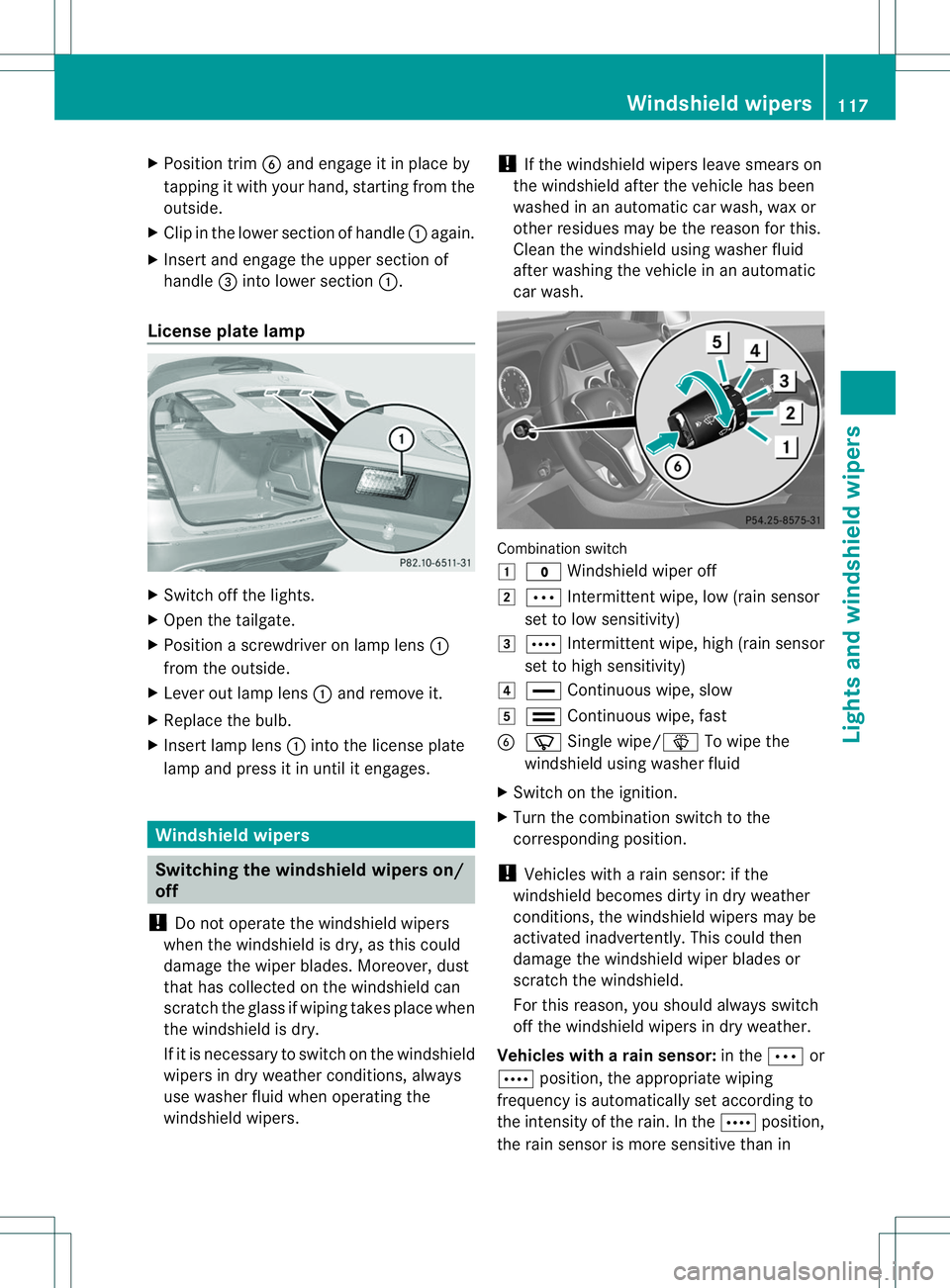
car wash. Combination switch
000C
0003 Windshield wiper off
0001 0002 Intermittent wipe, low (rain sensor
set to low sensitivity)
0002 0001 Intermittent wipe, high (rain sensor
set to high sensitivity)
001F 000B Continuous wipe, slow
0011 0008 Continuous wipe, fast
0024 0002 Single wipe/0003 To wipe the
windshield using washer fluid
X Switch on the ignition.
X Turn the combination switch to the
corresponding position.
! Vehicles with arain sensor: if the
windshield becomes dirty in dry weather
conditions, the windshield wipers may be
activated inadvertently. This could then
damage the windshield wiper blades or
scratcht he windshield.
For this reason, you should always switch
off the windshield wipers in dry weather.
Vehicles with arain sensor: in the0002or
0001 position, the appropriate wiping
frequency is automatically set according to
the intensity of the rain. In the 0001position,
the rai nsensor is more sensitive than in Windshield wipers
117Lights and windshield wipers Z