sensor MERCEDES-BENZ B-CLASS SPORTS 2014 Owner's Manual
[x] Cancel search | Manufacturer: MERCEDES-BENZ, Model Year: 2014, Model line: B-CLASS SPORTS, Model: MERCEDES-BENZ B-CLASS SPORTS 2014Pages: 360, PDF Size: 39.45 MB
Page 164 of 360
If you do not know the stored speed,s
tore the
desire dspeed again.
X Briefly pullt he cruise control lever towards
you 0021.
X Remove yourf oot from the accelerator
pedal.
The first time cruise control is activated, it
stores the current speed or regulates the
speed of the vehicle to the previously
stored speed.
Setting aspeed Kee
pinm ind tha titmay tak eabriefm oment
until the vehicle has accelerated or braked to
the speed set.
X Press the cruise control lever up 001Afor a
higher speed or down 0010for alower speed.
X To adjust the set speed in 1mph
increments (1 km/h increments): briefly
press the cruise control lever up 001Aor
down 0010to the pressure point.
Every time the cruise control lever is
pressed up 001Aor down 0010the last speed
stored is increased or reduced.
X To adjust the set speed in 5mph
increments (10 km/h increments):
briefly press the cruise control lever
up 001A or down 0010to the pressure point.
Every time the cruise control lever is
pressed up 001Aor down 0010the last speed
stored is increased or reduced.
i Cruise control is not deactivated if you
depress the accelerator pedal. For
example, if you accelerate briefly to
overtake, cruise control adjusts the
vehicle's speed to the last speed stored
after you have finished overtaking. Deactivating cruise control There are several ways to deactivate cruise
control:
X
Briefly press the cruise control lever
forwards 0023.
or
X Brake.
Cruise control is automatically deactivated if:
R the vehicle is secured with the electric
parking brake
R you are driving at less than 20 mph
(30 km/h)
R ESP ®
intervenes or you deactivate ESP ®
R you shift the transmission to position N
while driving
If cruise control is deactivated, you will hear
aw arning tone. You will see the Cruise Control Off message in the multifunction
display for approximately five seconds.
i When you switch off the engine, the last
speed stored is cleared. DISTRONIC PLUS
General notes DISTRONIC PLUS regulates the speed and
automatically helps you maintain the
distance to the vehicle detected in front.
Vehicles are detected with the aid of the radar
sensor system. DISTRONIC PLUS brakes
automatically so that the set speed is not
exceeded.
Change into
alower gear in good time on long
and steep downhill gradients. This is
especially important if the vehicle is laden. By
doing so, you will make use of the braking
effect of the engine. This relieves the load on
the brake system and prevent sthe brakes
from overheating and wearing too quickly.
If DISTRONIC PLUS detect sthat there is arisk
of ac ollision, you will be warned visually and
acoustically. DISTRONIC PLUS cannot
prevent acollision without your intervention. 162
Driving systemsDriving and parking
Page 165 of 360
An intermittent warning tone will then sound
and the distance warning lamp will light up in
the instrument cluster .Brake immediatel yin
order to increase the distance to the vehicle
in front or take evasive action provided it is
safe to do so.
For DISTRONI CPLUStoa ssist you, the radar
sensor system must be operational.
DISTRONIC PLUS is automatically
deactivated if:
R you are driving slower than 15 mph
(25 km/h) and there is no longer avehicle
in front or
R the vehicle in front is no longer detected
If there is no vehicle in front,D ISTRONIC
PLUS operates in the same way as cruise
control in the speed range between 20 mph
(30 km/h) and 120 mph (200 km/h) .Ifa
vehicle is driving in front of you, it operates in
the speed range between 0mph (0 km/h) and
120 mph (200 km/h).
Do not use DISTRONIC PLUS while driving on
roads with steep gradients.
As DISTRONIC PLUS transmits radar waves,
it can resemble the radar detector softhe
responsible authorities. You can refer to the
relevant chapter in the Operator's Manual if
question sare asked about this.
i This device complies with RSS-210 of
Industry Canada. Operation is subjec tto
the following two conditions:
1. This device ma ynot cause harmful
interference, and
2. thi sdevic emusta ccep tany interference
received, including interference tha tmay
caus eundesired operatio nofthe device.
Removal, tampering, or altering of the
device will void any warranties, and is not
permitted. Do not tamper with, alter, or use
in any non-approved way.
Any unauthorized modification to this
device could void the user's authority to
operate the equipment. Important safety notes G
WARNING
DISTRONIC PLUS does not react to:
R people or animals
R stationary obstacles on the road, e.g.
stopped or parked vehicles
R oncominga nd crossing traffic
As aresult, DISTRONIC PLUS may neither give
warnings nor interveneins uch situations.
There is arisk of an accident.
Always pay careful attention to the traffic
situation and be ready to brake. G
WARNING
DISTRONIC PLUS cannot always clearly
identify other road users and complex traffic
situations.
In such cases, DISTRONIC PLUS may:
R give an unnecessary warning and then
brake the vehicle
R neither give awarning nor intervene
R accelerate unexpectedly
There is arisk of an accident.
Continue to drive carefully and be ready to
brake, in particular when warned to do so by
DISTRONIC PLUS. G
WARNING
DISTRONIC PLUS brakes your vehicle with up
to 40% of the maximum braking force. If this
braking force is insufficient, DISTRONIC PLUS
warns you visuallya nd audibly. There is arisk
of an accident.
In such cases, apply the brakes yourself and
try to take evasive action. Driving systems
163Driving and parking Z
Page 166 of 360
!
If DISTRONIC PLUS or the HOLD function
is activated, the vehicle brakes
automaticallyinc ertain situations. To
prevent damage to the vehicle, deactivate
DISTRONIC PLUS and the HOLD function in
the following or other similars ituations:
R when towin gthe vehicle
R in the car wash
If you fail to adapt your drivin gstyle,
DISTRONIC PLUS can neither reduc ethe risk
of accident nor override the laws of physics.
DISTRONIC PLUS cannot tak einto account
the road, traffic and weather conditions.
DISTRONI CPLUSiso nlyana id.Y ou are
responsibl efor the distance to the vehicl ein
front, for vehicl espeed ,for braking in good
time and for staying in your lane.
Do not use DISTRONIC PLUS:
R in road and traffic conditions which do not
allow you to maintain aconstant speed e.g.
in heavy traffic or on winding roads
R on slippery road surfaces. Brakin gor
accelerating could cause the drive wheels
to lose traction and the vehicle could then
skid
R when there is poor visibility, e.g. due to fog,
heavy rain or snow
DISTRONIC PLUS may not detect narrow
vehicles driving in front,e .g. motorcycles, or
vehicles driving on adifferent line.
In particular, the detection of obstacles can
be impaired if:
R dirt on the sensors or anything else
coverin gthe sensors
R snow or heavy rain
R interferenc ebyother radar sources
R strongr adar reflections, for example, in
parking garages
If DISTRONIC PLUS no longer detect sa
vehicle in front,D ISTRONIC PLUS may
unexpectedly accelerate the vehicle to the
stored speed. This speed may:
R
be too high if you are driving in afilter lane
or an exit lane
R be so high when driving in the right-hand
lane that you overtak evehicles in the left-
hand lane
R be so high when driving in the left-hand lane
that you overtak evehicles in the right-hand
lane
If there is achange of drivers, advise the new
driver of the speed stored.
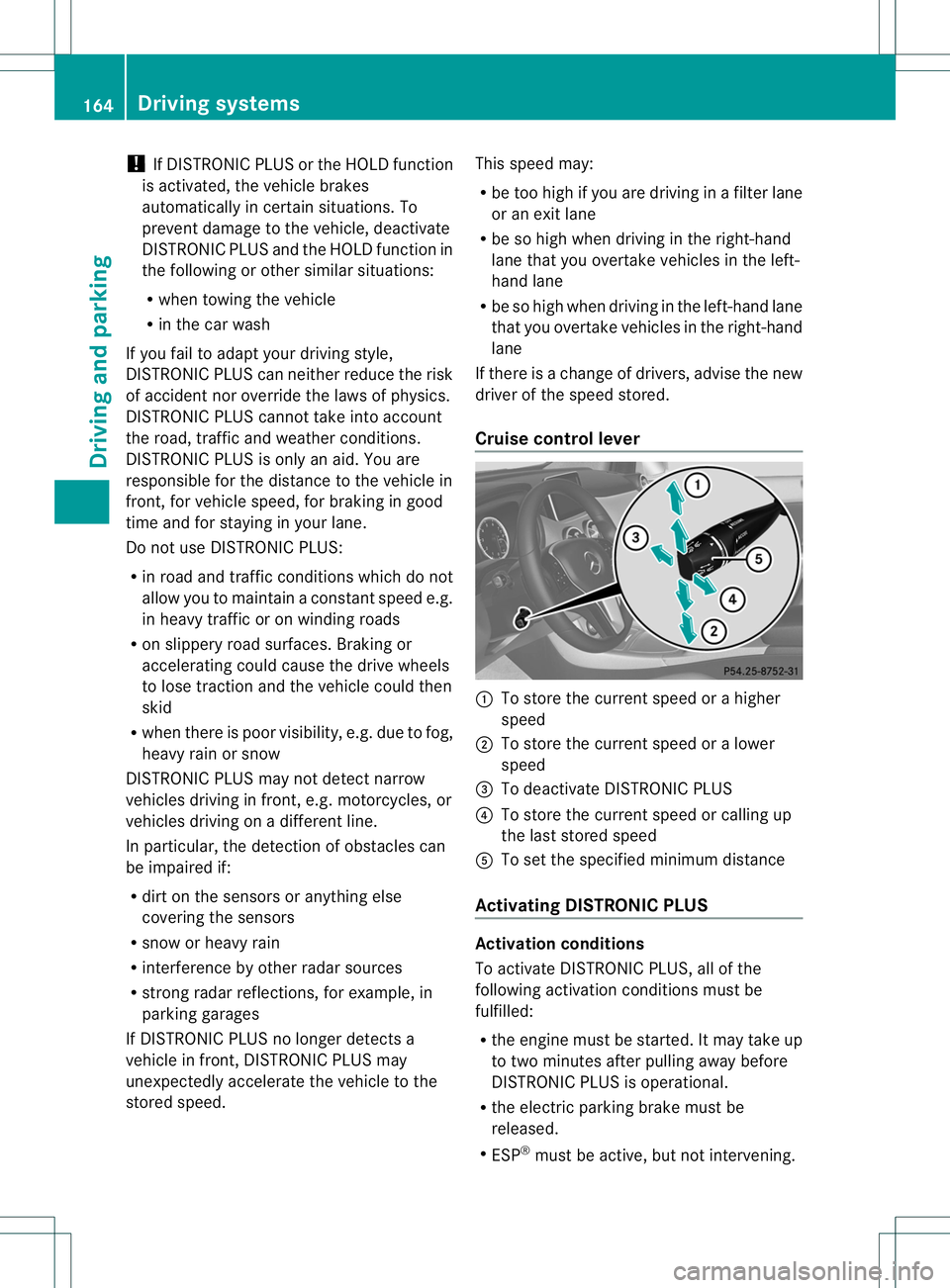
Cruise control lever 001A
To store the current speed or ahigher
speed
0010 To store the current speed or alower
speed
0023 To deactivate DISTRONIC PLUS
0021 To store the current speed or calling up
the last stored speed
001E To set the specified minimum distance
Activating DISTRONIC PLUS Activation conditions
To activate DISTRONIC PLUS, all of the
following activation conditions must be
fulfilled:
R
the engine must be started. It may take up
to two minutes after pullinga way before
DISTRONIC PLUS is operational.
R the electric parking brake must be
released.
R ESP ®
must be active, but not intervening. 164
Driving systemsDriving and parking
Page 174 of 360
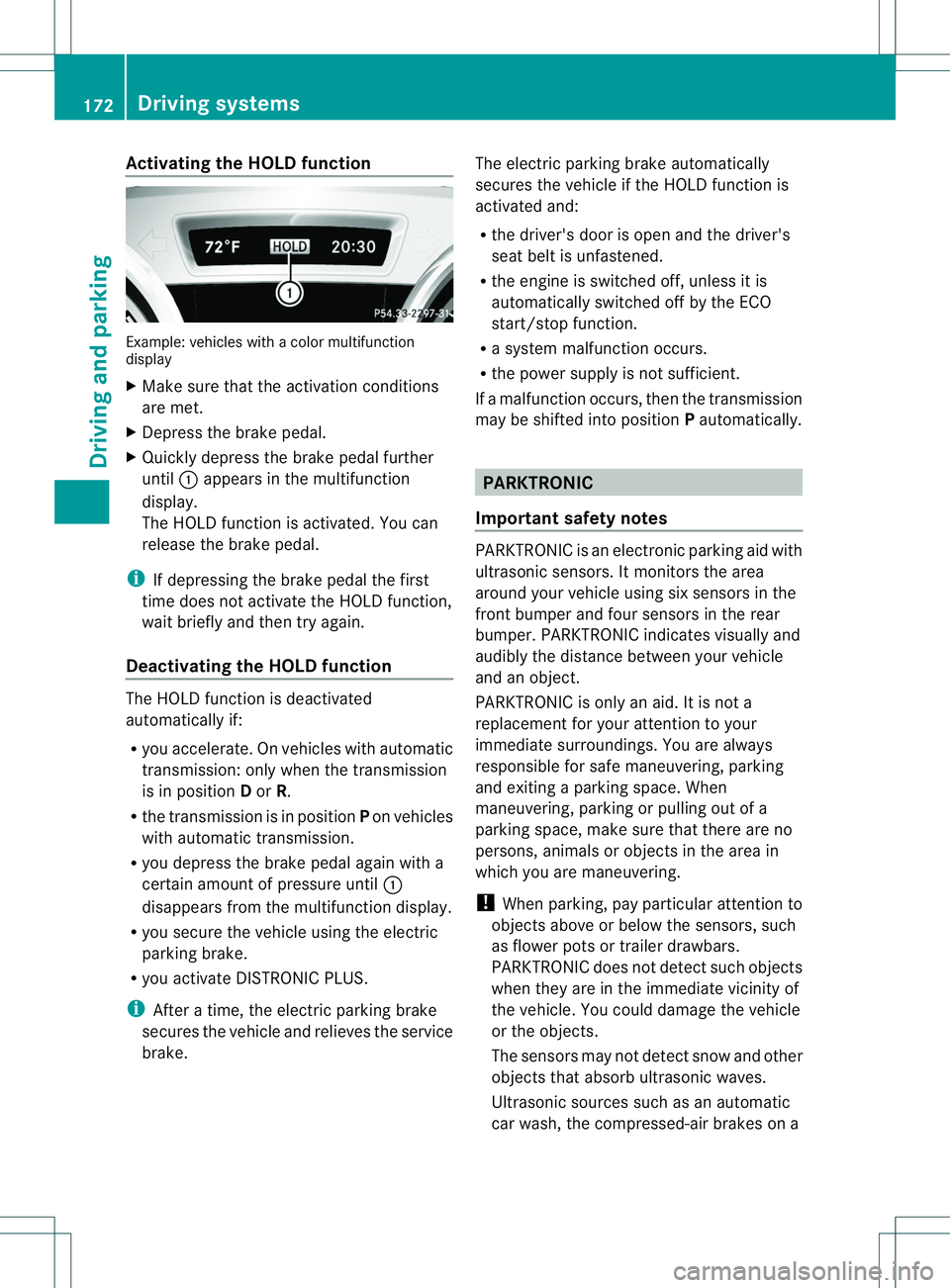
Activating th
eHOLD function Example: vehicles wit
hacolor multifunction
display
X Mak esuret hatthe activation conditions
are met.
X Depress th ebrak epedal.
X Quickl ydepress th ebrak epedal further
until 001Aappear sinthemultifunction
display.
The HOLD function is activated. You can
release th ebrak epedal.
i If depressing th ebrak epedal th efirst
time does no tactivat ethe HOLD function,
wait briefly and then tr yagain.
Deactivating th eHOLD function The HOLD function is deactivated
automatically if:
R
you accelerate .Onvehicles with automatic
transmission :only when the transmission
is in position Dor R.
R the transmission is in position Pon vehicles
with automatic transmission.
R yo ud epress the brake peda lagain with a
ce rtain amoun tofpressure until 001A
disappears from the multifunction display.
R you secure the vehicl eusing the electric
parking brake.
R you activate DISTRONIC PLUS.
i After atime, the electric parking brake
secure sthe vehicl eand relieves the service
brake. The electric parking brake automatically
secure
sthe vehicl eifthe HOLD function is
activated and:
R the driver's door is open and the driver's
seat beltisu nfastened.
R the engine is switched off, unless it is
automaticallys witched off by the ECO
start/stop function.
R as ystem malfunction occurs.
R the power supplyisn ot sufficient.
If am alfunction occurs, then the transmission
may be shifted into position Pautomatically. PARKTRONIC
Important safety notes PARKTRONIC is an electronic parking aid with
ultrasonic sensors. It monitors the area
around your vehicle using six sensors in the
front bumper and four sensors in the rear
bumper. PARKTRONIC indicates visually and
audibly the distance between your vehicle
and an object.
PARKTRONIC is only an aid. It is not a
replacement for your attention to your
immediate surroundings. You are always
responsible for safe maneuvering, parking
and exiting
aparking space. When
maneuvering, parking or pulling out of a
parking space, make sure that there are no
persons, animals or objects in the area in
which you are maneuvering.
! When parking, pay particular attention to
objects above or below the sensors, such
as flower pots or trailer drawbars.
PARKTRONIC does not detect such objects
when they are in the immediate vicinity of
the vehicle. You could damage the vehicle
or the objects.
The sensors may not detect snow and other
objects that absorb ultrasonic waves.
Ultrasonic sources such as an automatic
car wash, the compressed-air brakes on a 172
Driving systemsDriving and parking
Page 175 of 360
truck or
apneumati cdrill coul dcause
PARKTRONIC to malfunction.
PARKTRONIC may not function correctly on
uneven terrain.
PARKTRONIC is activated automatically when
you:
R switch on the ignition
R shift the transmission to position D,Ror N
R release the electric parking brake
PARKTRONIC is deactivated at speeds above
11 mph (18 km/h) .Itisreactivated at lower
speeds.
Range of the sensors General notes
PARKTRONIC does not take objects into
consideration that are:
R below the detection range, e.g. people,
animals or objects
R above the detection range, e.g.
overhanging loads, truck overhangs or
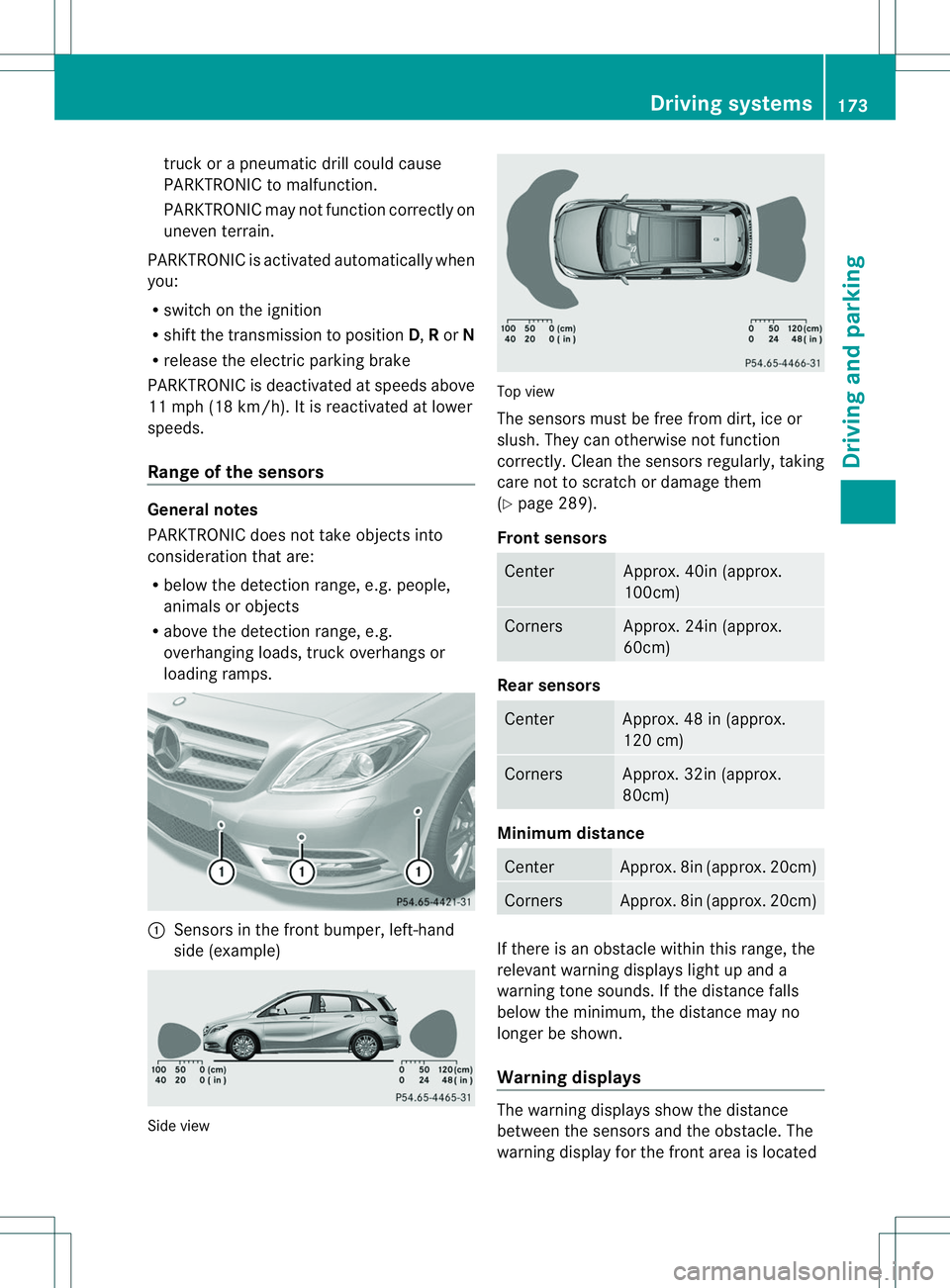
loading ramps. 001A
Sensors in the front bumper, left-hand
side (example) Side view Top view
The sensors must be free from dirt, ice or
slush. They can otherwise not function
correctly. Clean the sensors regularly, taking
care not to scratch or damage them
(Y
page2 89).
Fron tsensors Center Approx
.40in (approx.
100cm) Corners Approx. 24in (approx.
60cm)
Rea
rsensors Center Approx
.48in( approx.
12 0c m) Corners Approx
.32in (approx.
80 cm) Minimum distance
Center Approx. 8in (approx. 20cm)
Corners Approx. 8in (approx. 20cm)
If there is an obstacl
ewithin this range, the
relevant warning display slight up and a
warning tone sounds. If the distance falls
below the minimum ,the distance may no
longer be shown.
Warning displays The warning display
sshowt he distance
between the sensors and the obstacle. The
warning display for the front are aislocated Drivin
gsystems
173Drivingand parking Z
Page 177 of 360
Problems with PARKTRONIC
Problem Possible causes/consequences and
000B Solutions
Only the red segments
in the PARKTRONIC
warning displaysa
re lit.
You also hear awarning
tone for approximately
two seconds.
PARKTRONIC is
deactivated after
approximately
20 seconds, and the
indicator lamp in the
PARKTRONIC button
lights up. PARKTRONIC has malfunctioned and has switched off.
X
If problems persist, have PARKTRONIC checked at aqualified
specialist workshop. Only the red segments
in the PARKTRONIC
warning displaysa
re lit.
PARKTRONIC is
deactivated after
approximately
20seconds. The PARKTRONIC sensors are dirty or there is interference.
X
Cleant he PARKTRONIC sensors (Y page 289).
X Switch the ignition back on. The problem may be caused by an external source of radio or
ultrasound waves.
X
See if PARKTRONIC functions in adifferent location. Active Parking Assist
General notes Active Parking Assist is an electronic parking
aid with ultrasound. It measures the road on
both sides of the vehicle. Aparking symbol
indicates asuitable parking space. Active
steering interventio ncan assis tyou during
maneuvering and parking. You may also use
PARKTRONIC (Y page 172).
Important safety notes Active Parking Assist is merely an aid. It is not
ar eplacement for your attention to your
immediate surroundings. You are always
responsible for safe maneuvering, parking
and exitin gaparking space. Make sure that
no persons, animals or object sare in the
maneuvering range. When PARKTRONIC is switched off, Active
Parking Assist is also unavailable. G
WARNING
The vehicle swings out when parking and in
doing so could cross into the opposite lane.
This could result in acollision with another
road user. There is arisk of an accident.
Pay attention to other road users when
parking. Stop the vehicle if necessary or
cancel the Active Parking Assist parking
procedure.
! If unavoidable, you should drive over
obstacles such as curbs slowly and not at
as harp angle. Otherwise, you may damage
the wheels or tires. Driving systems
175Driving and parking Z
Page 186 of 360
Warning and display messages in the
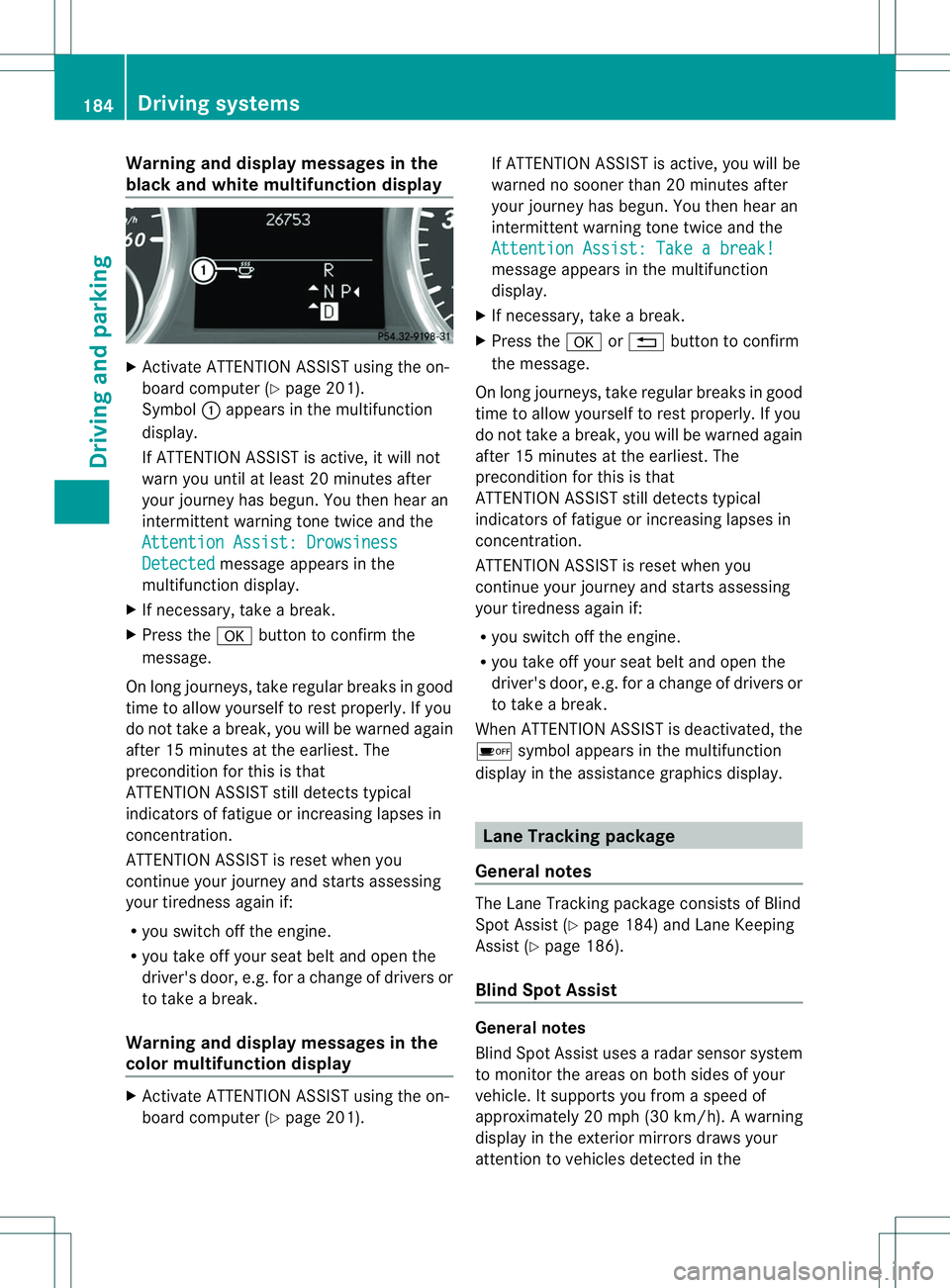
blac kand white multifunction display X
Activate ATTENTION ASSIST using the on-
board computer (Y page201).
Symbol 001Aappears in the multifunction
display.
If ATTENTION ASSIST is active, it wil lnot
warn you until at least 20 minutes after
you rjourney has begun. You then hear an
intermittent warning tonet wice and the
Attention Assist :Drowsiness Detected message appears in the
multifunction display.
X If necessary, tak eabreak.
X Pres sthe 000C button to confir mthe
message.
On lon gjou rneys, tak eregular break singood
tim etoa llow yourself to rest properly. If you
do not tak eabreak,you will be warned again
after 15 minutes at th eearliest. The
preconditio nfor this is that
ATTENTION ASSIST still detect stypical
indicators of fatigue or increasing lapses in
concentration.
ATTENTION ASSIST is reset when you
continue your journey and startsa ssessing
your tiredness again if:
R you switch off the engine.
R you take off your seat belt and open the
driver's door, e.g. for achange of drivers or
to take abreak.
Warning and display messages in the
colorm ultifunction display X
Activate ATTENTION ASSIST using the on-
board computer (Y page201). If ATTENTION ASSIST is active, you wil
lbe
warned no sooner than 20 minutes after
you rjourney has begun. You then hear an
intermittentw arning tonetwice and the
Attention Assist :Takeab reak! message appears in th
emultifunction
display.
X If necessary, tak eabreak.
X Pres sthe 000C or0002 button to confirm
th em essage.
On lon gjou rneys, tak eregular break singood
tim etoa llow yourself to rest properly. If you
do not tak eabreak,you will be warned again
after 15 minutes at th eearliest. The
preconditio nfor this is that
ATTENTION ASSIST still detect stypical
indicators of fatigue or increasing lapses in
concentration.
ATTENTION ASSIST is reset when you
continue your journey and startsa ssessing
your tiredness again if:
R you switch off the engine.
R you take off your seat belt and open the
driver's door, e.g. for achange of drivers or
to take abreak.
When ATTENTION ASSIST is deactivated, the
0001 symbol appears in the multifunction
display in the assistance graphics display. Lane Tracking package
General notes The Lane Trackin
gpackage consist sofBlind
Spot Assist (Y page 184) and Lane Keeping
Assist (Y page 186).
Blind Spot Assist General notes
Blind Spot Assist uses
aradar sensor system
to monitor the areas on both sides of your
vehicle. It supports you from aspeed of
approximately 20 mph (30k m/h). Awarning
displa yinthe exterio rmirrors draws your
attention to vehicles detected in the 184
Driving systemsDriving and parking
Page 187 of 360
monitored area
.Ifyou then switch on the
corresponding turn signa ltochange lanes,
you willa lsor eceive avisual and audible
collision warning. For this purpose, Blind Spot
Assist uses sensors in the rear bumper.
Important safety notes G
WARNING
Blind Spot Assist does not react to:
R vehicles overtaken too closel yonthe side,
placing them in the blind spot area
R vehicles which approach with alarg espeed
differential and overtake yourv ehicle
As aresult, Blind Spot Assist may not give
warnings in such situations. There is arisk of
an accident.
Always observe the traffic conditions
carefully, and maintain asafe lateral distance.
Blind Spot Assist is only an aid. It may fail to
detec tsome vehicles and is no substitute for
attentive driving.
i USA only:
This device has been approved by the FCC
as a"Vehicular RadarS ystem". The radar
sensor is intended fo ruse in an automotive
radar system only. Removing, tampering
with, or altering the device will void any
warranties, and is not permitted by the
FCC. Do not tamper with, alter, or use in
any non-approved way.
Any unauthorized modification to this
device could void the user’s authority to
operate the equipment.
Monitoring range of the sensors
In particular, the detection of obstacles can
be impaired if:
R dirt on the sensors or anything else
covering the sensors
R there is poor visibility, e.g. due to fog, heavy
rain or snow
R an arrow vehicle traveling in front,e .g. a
motorbike or bicycle
R the road has very wide lanes R
the road has narrow lanes
R you are not driving in the middle of the lane
R there are barriers or similarl ane borders
Vehicle sinthemonitorin grang eare then not
indicated. Blin
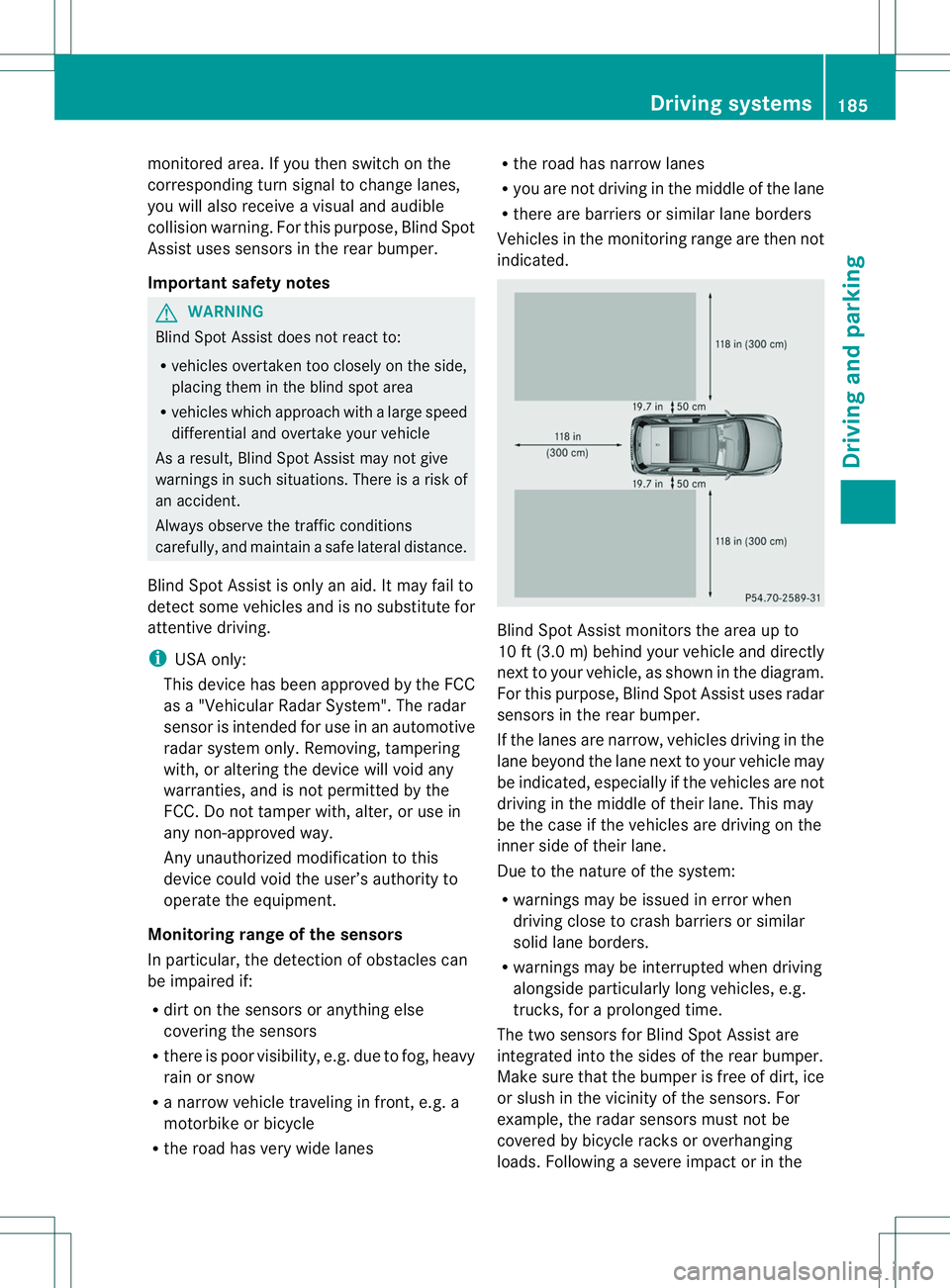
dSpotA ssist monitors the area up to
10 ft (3.0 m) behind your vehicle and directly
nex ttoy our vehicle, as shown in the diagram.
For this purpose, Blind Spot Assist uses radar
sensors in the rear bumper.
If the lanes are narrow, vehicles driving in the
lane beyond the lane next to your vehicle may
be indicated, especially if the vehicles are not
driving in the middle of their lane. This may
be the case if the vehicles are driving on the
inner side of their lane.
Due to the nature of the system:
R warnings may be issued in error when
driving close to crash barriers or similar
solid lane borders.
R warnings may be interrupted when driving
alongside particularly long vehicles, e.g.
trucks, for aprolonged time.
The two sensors for Blind Spot Assist are
integrated into the sides of the rear bumper.
Make sure that the bumper is free of dirt, ice
or slush in the vicinit yofthe sensors. For
example, the radar sensors must not be
covered by bicycle racks or overhanging
loads. Following asevere impact or in the Driving systems
185Driving and parking Z
Page 188 of 360
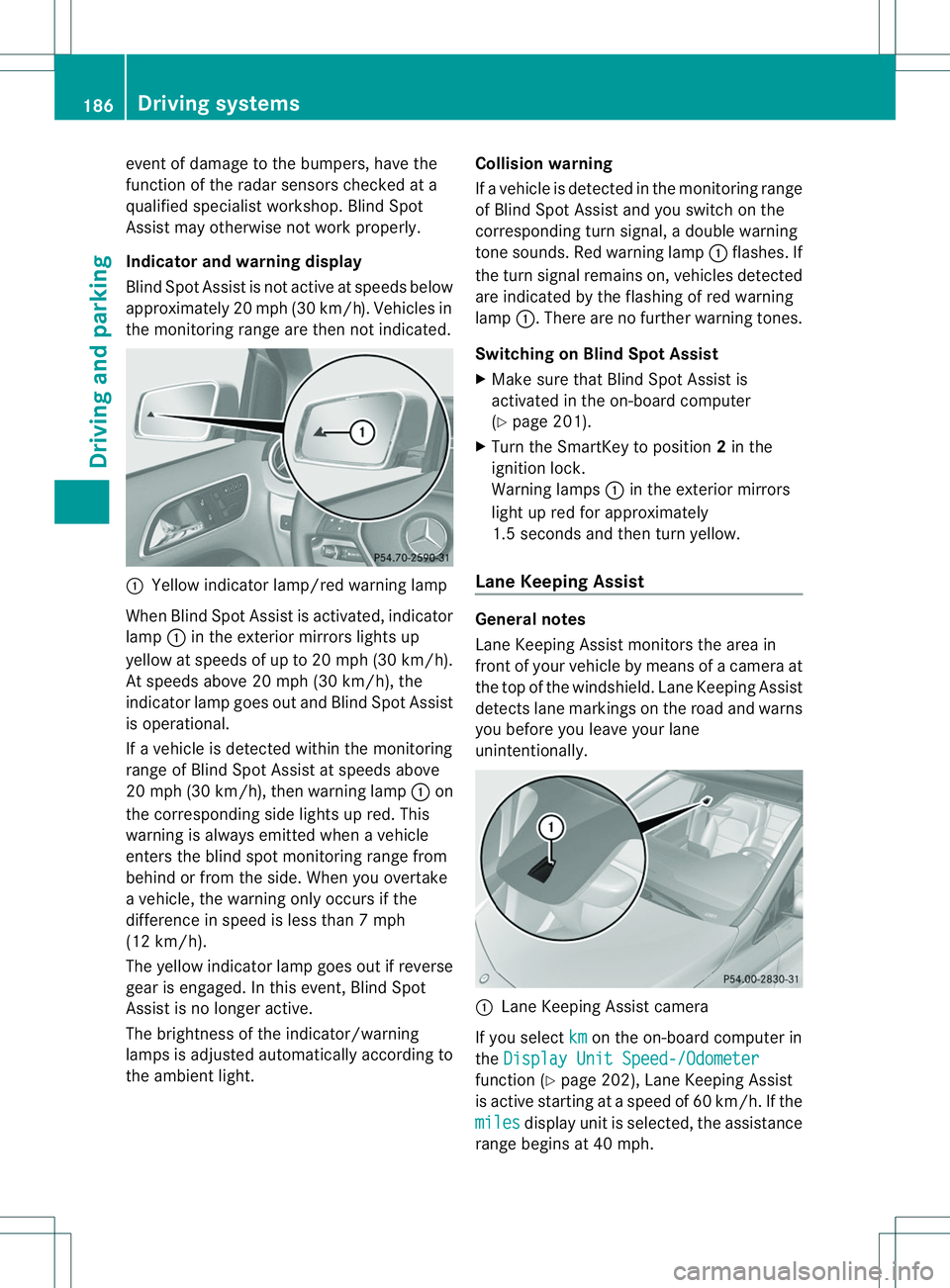
event of damage to the bumpers, have the
function of the radar sensor schecked at a
qualified specialist workshop. Blind Spot
Assist may otherwise not work properly.
Indicator and warning display
Blind Spot Assist is not active at speeds below
approximately 20 mph (30 km/h) .Vehicles in
the monitoring range are then not indicated. 001A
Yellow indicator lamp/red warning lamp
When Blind Spot Assist is activated, indicator
lamp 001Ain the exterior mirror slights up
yellow at speeds of up to 20 mph (30k m/h).
At speeds above 20 mph (30 km/h), the
indicator lamp goes out and Blind Spot Assist
is operational.
If av ehicl eisd etected withi nthe monitoring
range of Blind Spot Assist at speeds above
20 mph (30k m/h), then warning lamp 001Aon
the corresponding sid elights up red. This
warning is always emitted whe navehicle
enters the blind spot monitoring range from
behind or from the side .When you overtake
av ehicle, the warning only occurs if the
difference in speed is less than 7mph
(12 km/h).
The yellow indicator lamp goes out if reverse
gear is engaged. In this event ,Blind Spot
Assist is no longer active.
The brightness of the indicator/warning
lamps is adjusted automatically according to
the ambient light. Collision warning
If
av ehicle is detected in the monitoring range
of Blind Spot Assist and you switc honthe
correspondin gturn signal, adouble warning
ton esounds. Red warning lamp 001Aflashes. If
the turn signal remains on, vehicles detected
are indicated by the flashing of red warning
lamp 001A.There are no further warning tones.
Switching on Blind Spot Assist
X Make sure that Blind Spot Assist is
activated in the on-board computer
(Y page 201).
X Turn the SmartKey to position 2in the
ignition lock.
Warning lamps 001Ain the exterior mirrors
light up red for approximately
1.5 seconds and then turn yellow.
Lane Keeping Assist General notes
Lane Keeping Assist monitors the area in
front of your vehicle by means of
acamera at
the top of the windshield. Lane Keeping Assist
detectsl ane markings on the road and warns
you before you leave your lane
unintentionally. 001A
Lane Keeping Assist camera
If you select km on the on-board computer in
the Display Unit Speed-/Odometer function (Y
page 202), Lane Keeping Assist
is active startingatas peed of 60 km/h. If the
miles display unit is selected, the assistance
range begins at 40 mph. 186
Driving systemsDriving and parking
Page 192 of 360
Useful information
i This Operator's Manual describes all
models and all standard and optional
equipment of your vehicle available at the
time of publication of the Operator's
Manual. Country-specific differences are
possible. Please not ethat your vehicle may
not be equipped with all features
described. This also applies to safety-
related system sand functions.
i Read the information on qualified
specialist workshops: (Y page 25).Important safet
ynotes G
WARNING
If you operate information system sand
communication equipment integrated in the
vehicle while driving, you will be distracted
from traffic conditions. You could also lose
contro lofthe vehicle. There is arisk of an
accident.
Only operate the equipment when the traffic
situatio npermits .Ifyou are not sure that this
is possible, park the vehicle paying attention
to traffic conditions and operate the
equipment when the vehicle is stationary. G
WARNING
If the instrument cluster has failed or
malfunctioned, you may not recognize
function restrictions in systems relevant to
safety. The operating safety of your vehicle
may be impaired. There is arisk of an
accident.
Drive on carefully. Have the vehicle checked
at aq ualified specialist workshop
immediately.
You must observe the legal requirements for
the country in which you are currently driving
when operating the on-board computer.
The on-board computer only shows messages
or warnings from certain systems in the multifunction display
.You should therefore
make sure your vehicle is operating safely at
all times. Otherwise, avehicle that is not
operating safely may cause an accident.
For an overview, see the instrument panel
illustration (Y page 31). Displays and operation
Instrument cluster lighting
The lighting in the instrument cluster, in the
display sand the controls in the vehicle
interior can be adjusted using the brightness
control knob.
The brightness control knob is located on the
bottom left of the instrument cluster
(Y page 31).
X Turn the brightness control knob clockwise
or counter-clockwise.
If the light switch is set to 000C,000For
0005,t he brightness is dependent upon
the brightness of the ambient light.
i The light sensor in the instrument cluster
automatically controls the brightness of
the multifunction display.
In daylight, the display sinthe instrument
cluster are not illuminated. Coolant temperature display
G
WARNING
Opening the hood when the engine is
overheated or when there is afire in the
engine compartment could expose you to hot
gases or other service products. There is a
risk of injury.
Let an overheated engine cool down before
opening the hood. If there is afire in the
engine compartment, keep the hood closed
and contact the fire department.
! Adisplay message is shown if the coolant
temperature is too high. 190
Display
sand operationOn-board computer and displays