fuel MERCEDES-BENZ C-CLASS 2002 User Guide
[x] Cancel search | Manufacturer: MERCEDES-BENZ, Model Year: 2002, Model line: C-CLASS, Model: MERCEDES-BENZ C-CLASS 2002Pages: 399, PDF Size: 16.95 MB
Page 43 of 399

40
Central locking system
Te ch n i c a l
data
Instruments
and controls Operation
DrivingInstrument
cluster display Practical hints Car care Index
Automatic central locking
With the automatic central locking system activated, the
doors and trunk are locked at vehicle speeds of
approximately 9 mph (15 km / h) or more. The fuel filler
flap remains unlocked.
The automatic central locking function can be switched
on or off in the individual setting menu “VEHICLE” –
“AUTOMATIC DOOR LOCK”, see page 121.
Notes:
If doors are unlocked with the central locking switch
after activating the automatic central locking, and
neither door is opened, then the doors remain unlocked
even at vehicle speeds of approximately 9 mph
(15 km / h) or more.
If a door is opened from the inside at speeds of
approximately 9 mph (15 km / h) or less with the
automatic central locking activated, the door will again
be automatically locked at speeds of approximately
9 mph (15 km / h) or more. If a door is opened from the inside, the complete vehicle
is unlocked, if the vehicle was previously centrally
unlocked using the remote control.
Important!
When towing the vehicle, or with the vehicle on a
dynamometer test stand, please, note the following:
With the automatic central locking activated and the
electronic key in starter switch position 2, the vehicle
doors will lock if the left front wheel as well as the right
rear wheel spin at vehicle speeds of approximately
9 mph (15 km / h) or more.
Emergency unlocking in case of accident
The doors unlock automatically a short time after an
accident in which an airbag or emergency tensioning
retractor deploys (this is intended to aid rescue and
exit).
ProCarManuals.com
Page 44 of 399
41
Central locking system
Te ch n i c a l
data
Instruments
and controls Operation
DrivingInstrument
cluster display Practical hints Car care Index
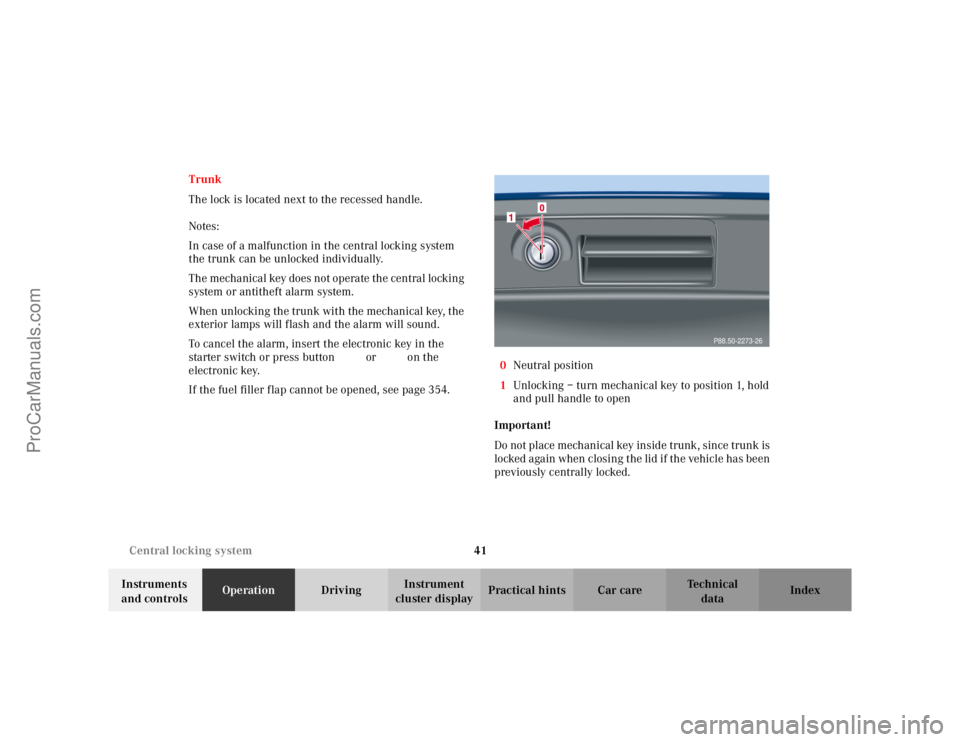
Trunk
The lock is located next to the recessed handle.
Notes:
In case of a malfunction in the central locking system
the trunk can be unlocked individually.
The mechanical key does not operate the central locking
system or antitheft alarm system.
When unlocking the trunk with the mechanical key, the
exterior lamps will flash and the alarm will sound.
To cancel the alarm, insert the electronic key in the
starter switch or press button
Œ or‹ on the
electronic key.
If the fuel filler flap cannot be opened, see page 354. 0
Neutral position
1 Unlocking – turn mechanical key to position 1, hold
and pull handle to open
Important!
Do not place mechanical key inside trunk, since trunk is
locked again when closing the lid if the vehicle has been
previously centrally locked.
P88.50-2273-26
ProCarManuals.com
Page 100 of 399
97
Instrument cluster
Te ch n i c a l
data
Instruments
and controls Operation
DrivingInstrument
cluster display Practical hints Car care Index
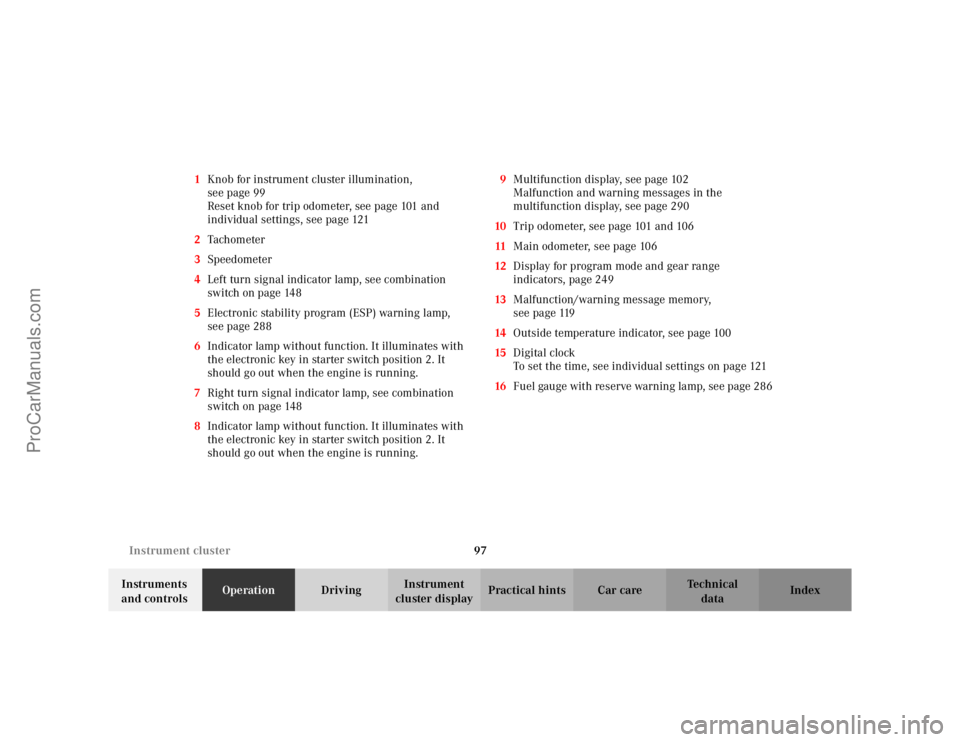
1
Knob for instrument cluster illumination,
seepage99
Reset knob for trip odometer, see page 101 and
individual settings, see page 121
2 Tachometer
3 Speedometer
4 Left turn signal indicator lamp, see combination
switch on page 148
5 Electronic stability program (ESP) warning lamp,
see page 288
6 Indicator lamp without function. It illuminates with
the electronic key in starter switch position 2. It
should go out when the engine is running.
7 Right turn signal indicator lamp, see combination
switch on page 148
8 Indicator lamp without function. It illuminates with
the electronic key in starter switch position 2. It
should go out when the engine is running. 9
Multifunction display, see page 102
Malfunction and warning messages in the
multifunction display, see page 290
10 Trip odometer, see page 101 and 106
11 Main odometer, see page 106
12 Display for program mode and gear range
indicators, page 249
13 Malfunction/warning message memory,
seepage119
14 Outside temperature indicator, see page 100
15 Digital clock
To set the time, see individual settings on page 121
16 Fuel gauge with reserve warning lamp, see page 286
ProCarManuals.com
Page 101 of 399

98
Instrument cluster
Te ch n i c a l
data
Instruments
and controls Operation
DrivingInstrument
cluster display Practical hints Car care Index
Indicator lamps in the instrument cluster High beam, see page 148
ABS malfunction, see page 287
Brake fluid low (except Canada).
Parking brake engaged, see page 284
ESP. Adjust driving to road condition,
see page 288
Fasten seat belts, see page 288
SRS malfunction, see page 285 Engine malfunction indicator lamp. If the
malfunction indicator lamp comes on when
the engine is running, it indicates a
malfunction of the fuel management system,
emission control system, systems which
impact emissions, or the fuel cap is not
closed tight. In all cases, we recommend that
you have the malfunction checked as soon as
possible, see page 283
ABS
ProCarManuals.com
Page 104 of 399
101
Instrument cluster
Te ch n i c a l
data
Instruments
and controls Operation
DrivingInstrument
cluster display Practical hints Car care Index
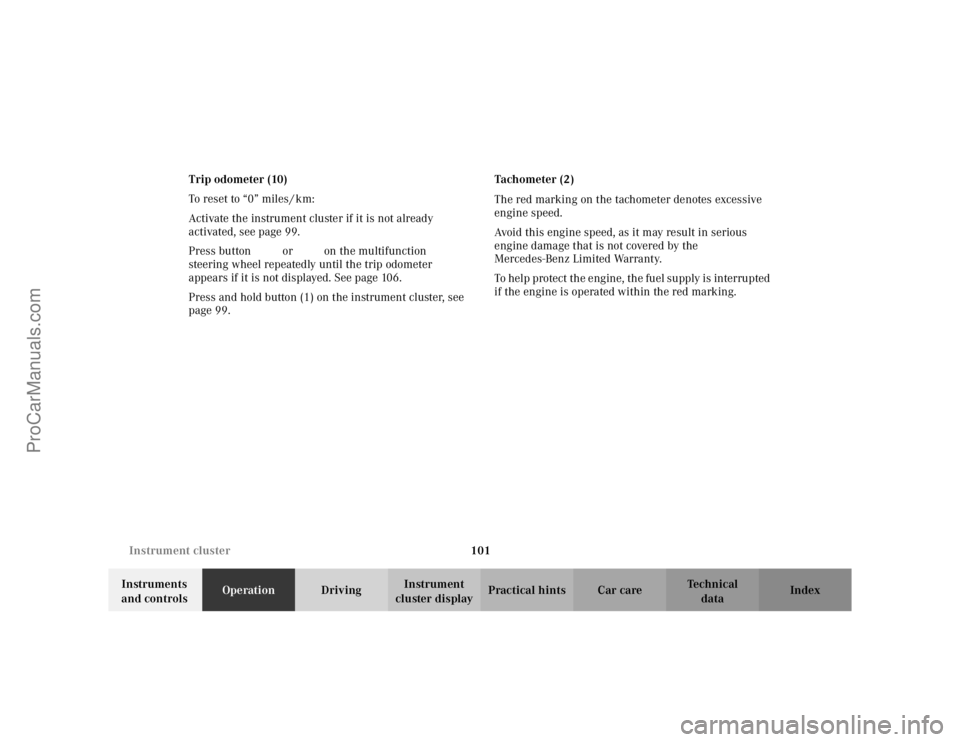
Trip odometer (10)
To reset to “0” miles / km:
Activate the instrument cluster if it is not already
activated, see page 99.
Press button
è or ÿ on the multifunction
steering wheel repeatedly until the trip odometer
appears if it is not displayed. See page 106.
Press and hold button (1) on the instrument cluster, see
page 99. Tachometer (2)
The red marking on the tachometer denotes excessive
engine speed.
Avoid this engine speed, as it may result in serious
engine damage that is not covered by the
Mercedes-Benz Limited Warranty.
To help protect the engine, the fuel supply is interrupted
if the engine is operated within the red marking.
ProCarManuals.com
Page 106 of 399
103
Multifunction steering wheel, multifunction display
Te ch n i c a l
data
Instruments
and controls Operation
DrivingInstrument
cluster display Practical hints Car care Index
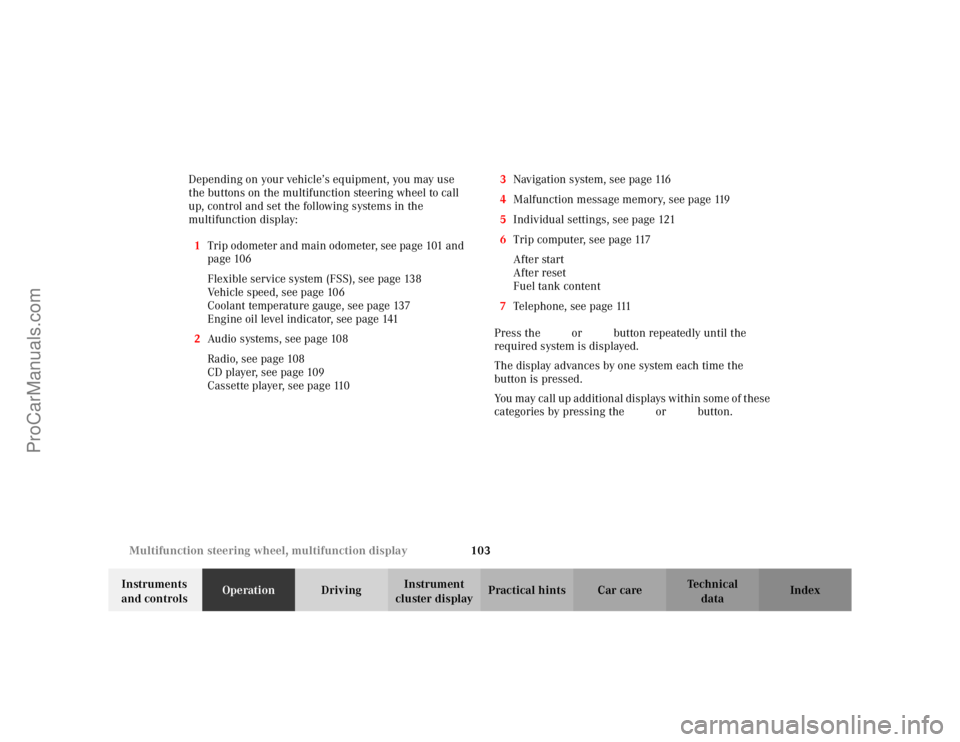
Depending on your vehicle’s equipment, you may use
the buttons on the multifunction steering wheel to call
up, control and set the following systems in the
multifunction display:
1 Trip odometer and main odometer, see page 101 and
page 106
Flexible service system (FSS), see page 138
Vehicle speed, see page 106
Coolant temperature gauge, see page 137
Engine oil level indicator, see page 141
2 Audio systems, see page 108
Radio, seepage108
CD player, see page 109
Cassette player, see page 110 3
Navigation system, see page 116
4 Malfunction message memory, see page 119
5 Individual settings, see page 121
6 Trip computer, see page 117
After start
After reset
Fuel tank content
7 Telephone, see page 111
Press the è or ÿ button repeatedly until the
required system is displayed.
The display advances by one system each time the
button is pressed.
You may call up additional displays within some of these
categories by pressing the j or k button.
ProCarManuals.com
Page 120 of 399
117
Multifunction steering wheel, multifunction display
Te ch n i c a l
data
Instruments
and controls Operation
DrivingInstrument
cluster display Practical hints Car care Index
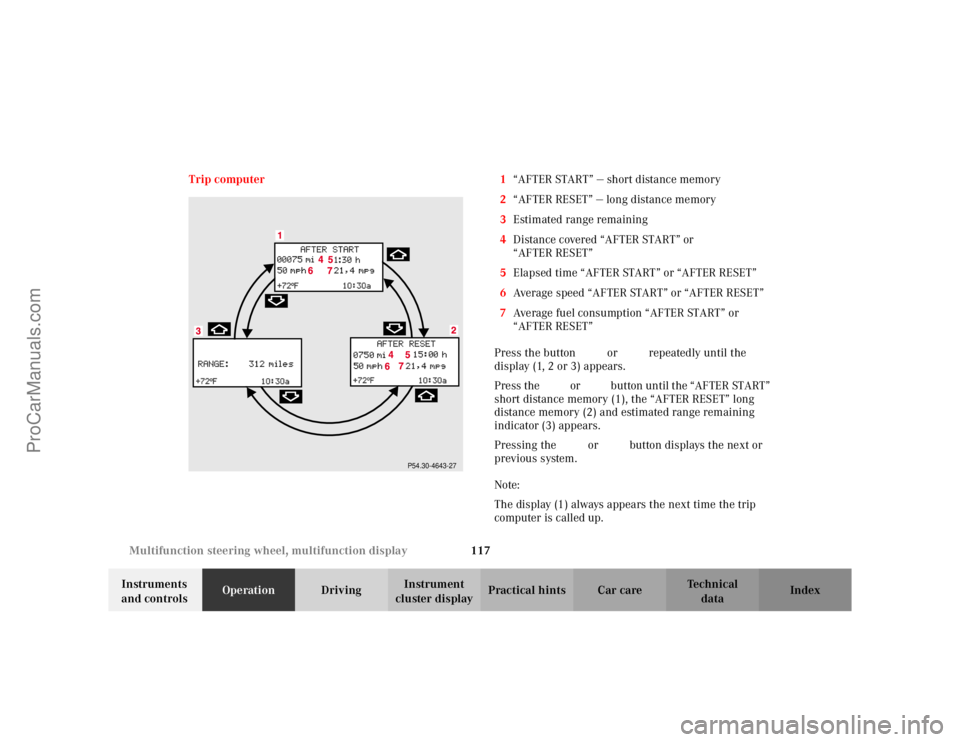
Trip computer 1
“AFTER START” — short distance memory
2 “AFTER RESET” — long distance memory
3 Estimated range remaining
4 Distance covered “AFTER START” or
“AFTER RESET”
5 Elapsed time “AFTER START” or “AFTER RESET”
6 Average speed “AFTER START” or “AFTER RESET”
7 Average fuel consumption “AFTER START” or
“AFTER RESET”
Press the button è or ÿ repeatedly until the
display (1, 2 or 3) appears.
Press the j or k button until the “AFTER START”
short distance memory (1), the “AFTER RESET” long
distance memory (2) and estimated range remaining
indicator (3) appears.
Pressing the è or ÿ button displays the next or
previous system.
Note:
The display (1) always appears the next time the trip
computer is called up.
P54.30-4643-27
ProCarManuals.com
Page 162 of 399

159
Climate control
Te ch n i c a l
data
Instruments
and controls Operation
DrivingInstrument
cluster display Practical hints Car care Index
Economy mode
The function of this setting corresponds to the
automatic mode. However, because the air conditioning
compressor will not engage (fuel savings), it is not
possible to air condition in this setting.
Press
S button to activate. The indicator lamp in the
button illuminates.
Press S button once again to return to the previous
setting. The indicator lamp in the button goes out.
Important!
In the S mode the windows could fog up on the
inside. Switch off S mode.
Climate control - OFF/ON
To switch the climate control off, set the air volume
control switch to position 0.
The fresh air supply to the vehicle interior is shut off.
While driving, use this setting only temporarily,
otherwise the windshield could fog up.
To switch the climate control on again, or set air volume
control switch to any speed. Residual engine heat utilization
With the engine switched off, it is possible to continue
to heat or ventilate the interior for a short while,
dependent of the temperature setting of the automatic
climate control. Air volume and distribution are
controlled automatically.
To s e l e c t :
Turn the electronic key in starter switch to position 1
or 0 or remove it altogether.
Press button
T. The indicator lamp in the button
illuminates.
This function selection will not activate if the battery
level is insufficient.
The function switches off automatically:
• if the electronic key in starter switch is turned to
position 2,
• after approximately 30 minutes,
• if the battery voltage drops.
ProCarManuals.com
Page 172 of 399

169
Automatic climate control
Te ch n i c a l
data
Instruments
and controls Operation
DrivingInstrument
cluster display Practical hints Car care Index
Economy mode
The function of this setting corresponds to the
automatic mode. However, because the air conditioning
compressor will not engage (fuel savings), it is not
possible to air condition in this setting.
Press
S button to activate. The indicator lamp in the
button illuminates.
Press S button once again to return to the previous
setting. The indicator lamp in the button goes out.
Important!
In the S mode the windows could fog up on the
inside. Switch off S mode.
Automatic climate control - OFF/ON
To switch the automatic climate control off, set the air
volume control switch to position 0.
The fresh air supply to the vehicle interior is shut off.
While driving, use this setting only temporarily,
otherwise the windshield could fog up. To switch the automatic climate control on again, press
the
U or P button, or set air volume control
switch to any speed.
Residual engine heat utilization
With the engine switched off, it is possible to continue
to heat or ventilate the interior for a short while,
dependent of the temperature set in the automatic
climate control. Air volume and distribution are
controlled automatically.
To s e l e c t :
Turn the electronic key in starter switch to position 1
or 0 or remove it altogether.
Press button T. The indicator lamp in the button
illuminates.
This function selection will not activate if the battery
level is insufficient.
The function switches off automatically:
• if the electronic key in starter switch is turned to
position 2,
• after approximately 30 minutes,
• if the battery voltage drops.
ProCarManuals.com
Page 228 of 399

225
Contents - Driving
Te ch n i c a l
data
Instruments
and controls Operation
DrivingInstrument
cluster display Practical hints Car care Index
DrivingControl and operation of
radio transmitters ..................... 226
The first 1 000 miles (1 500 km) ................................. 227
Maintenance ................................... 227
Tele Aid............................................ 228
Catalytic converter......................... 238
Emission control ............................ 239
Starter switch ................................. 240
Starting and turning off the engine .................................. 242
Manual transmission .................... 244
Automatic transmission................ 246 Parking brake ................................ 256
Driving instructions...................... 257
Drive sensibly – Save Fuel ....... 257
Drinking and driving ................ 257
Pedals .......................................... 257
Power assistance........................ 258
Brakes .......................................... 258
Driving off................................... 259
Parking ........................................ 260
Tires ............................................. 261
Snow chains................................ 263
Winter driving instructions ..... 264
Deep water .................................. 266
Passenger compartment ........... 267
Traveling abroad ........................ 267 Cruise control ................................. 268
Brake assist system (BAS) ............ 271
Antilock brake system (ABS) ....... 272
Electronic stability program
(ESP) ........................................... 274
What you should know at the gas station ....................... 278
Check regularly and before a long trip ................................... 280
ProCarManuals.com