lock MERCEDES-BENZ C-CLASS 2002 Owner's Manual
[x] Cancel search | Manufacturer: MERCEDES-BENZ, Model Year: 2002, Model line: C-CLASS, Model: MERCEDES-BENZ C-CLASS 2002Pages: 399, PDF Size: 16.95 MB
Page 45 of 399
42
Central locking system
Te ch n i c a l
data
Instruments
and controls Operation
DrivingInstrument
cluster display Practical hints Car care Index
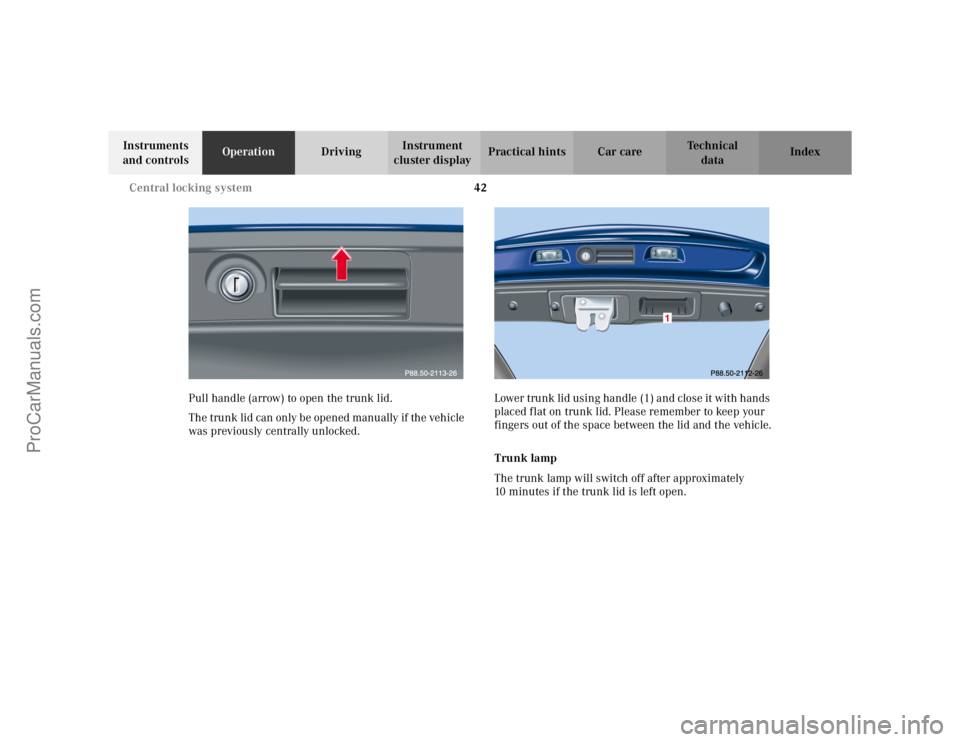
Pull handle (arrow) to open the trunk lid.
The trunk lid can only be opened manually if the vehicle
was previously centrally unlocked. Lower trunk lid using handle (1) and close it with hands
placed flat on trunk lid. Please remember to keep your
fingers out of the space between the lid and the vehicle.
Trunk lamp
The trunk lamp will switch off after approximately
10 minutes if the trunk lid is left open.
ProCarManuals.com
Page 46 of 399
43
Central locking system
Te ch n i c a l
data
Instruments
and controls Operation
DrivingInstrument
cluster display Practical hints Car care Index
Trunk lid emergency release
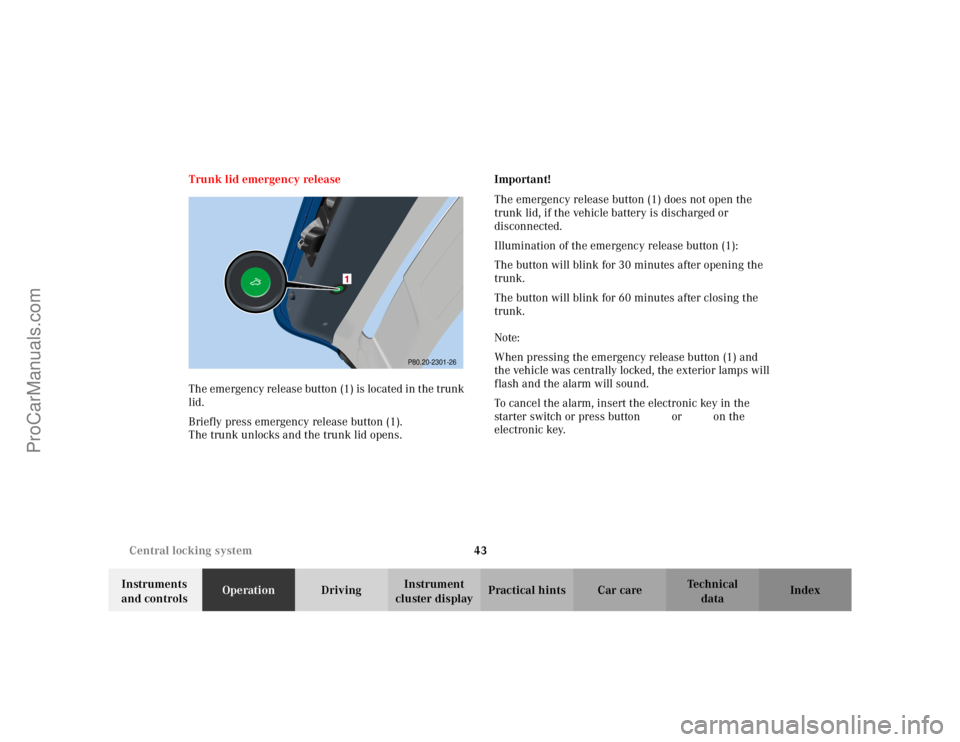
The emergency release button (1) is located in the trunk
lid.
Briefly press emergency release button (1).
The trunk unlocks and the trunk lid opens.
Important!
The emergency release button (1) does not open the
trunk lid, if the vehicle battery is discharged or
disconnected.
Illumination of the emergency release button (1):
The button will blink for 30 minutes after opening the
trunk.
The button will blink for 60 minutes after closing the
trunk.
Note:
When pressing the emergency release button (1) and
the vehicle was centrally locked, the exterior lamps will
flash and the alarm will sound.
To cancel the alarm, insert the electronic key in the
starter switch or press button
Œ or‹ on the
electronic key.
P80.20-2301-26
ProCarManuals.com
Page 47 of 399
44
Antitheft alarm system
Te ch n i c a l
data
Instruments
and controls Operation
DrivingInstrument
cluster display Practical hints Car care Index
Antitheft alarm system (optional for Canada )
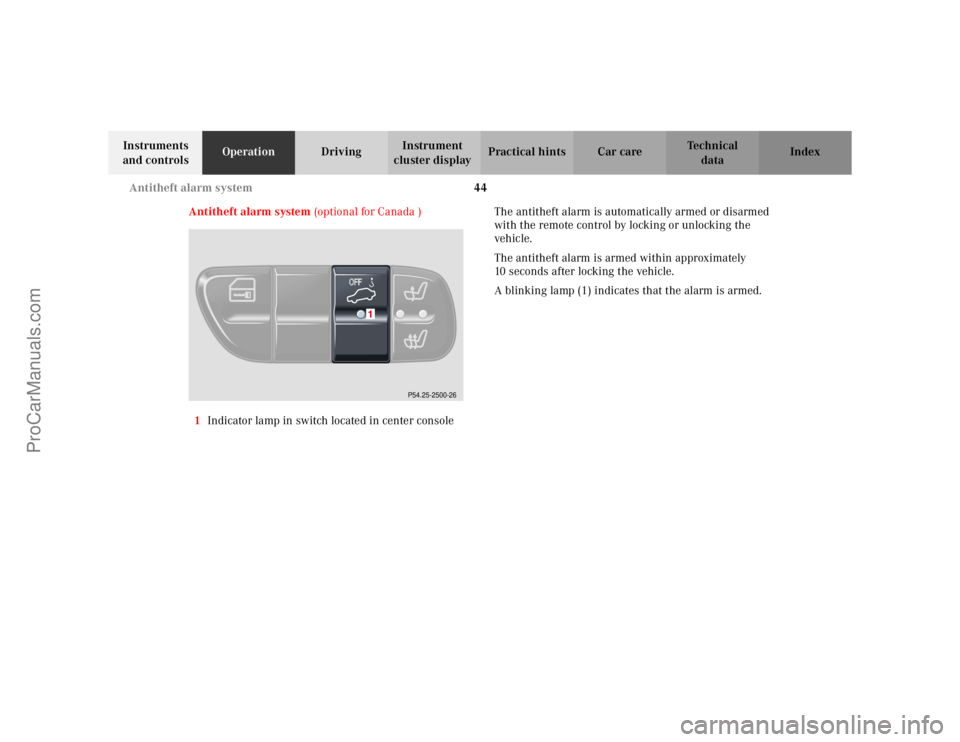
1 Indicator lamp in switch located in center console The antitheft alarm is automatically armed or disarmed
with the remote control by locking or unlocking the
vehicle.
The antitheft alarm is armed within approximately
10 seconds after locking the vehicle.
A blinking lamp (1) indicates that the alarm is armed.
P54.25-2500-26
ProCarManuals.com
Page 48 of 399

45
Antitheft alarm system
Te ch n i c a l
data
Instruments
and controls Operation
DrivingInstrument
cluster display Practical hints Car care Index
Operation:
Once the alarm system has been armed, the exterior
vehicle lamps will flash and an alarm will sound when
someone:
• opens a door,
• opens the trunk,
• opens the hood,
• attempts to raise the vehicle.
The alarm will last approximately 3 minutes in form of
flashing exterior lamps. At the same time an alarm will
sound for 30 seconds. The alarm will stay on even if the
activating element (a door, for example) is immediately
closed. If the alarm stays on for more than 20 seconds,
an emergency call is initiated automatically. See Tele
Aid on page 228. Notes:
When you unlock the driver’s door with the mechanical
key, the exterior lamps will flash and the alarm will
sound.
To cancel the alarm, insert the electronic key in the
starter switch or press button
Œ or‹ on the
electronic key.
ProCarManuals.com
Page 49 of 399
46
Tow-away alarm
Te ch n i c a l
data
Instruments
and controls Operation
DrivingInstrument
cluster display Practical hints Car care Index
Tow-away alarm (optional for Canada)
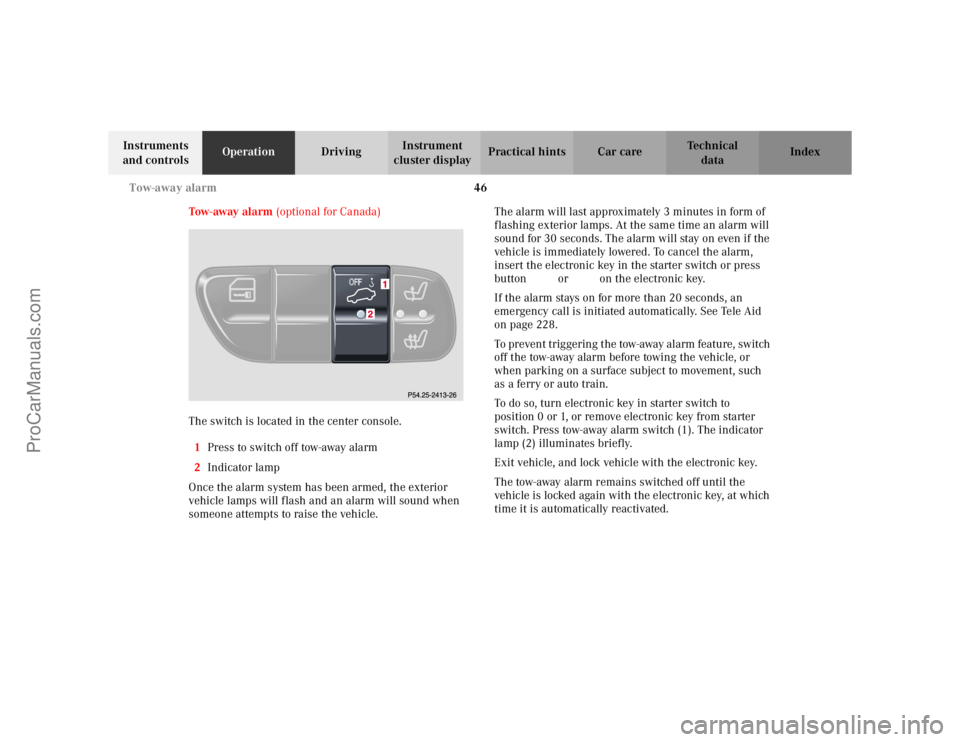
The switch is located in the center console. 1 Press to switch off tow-away alarm
2 Indicator lamp
Once the alarm system has been armed, the exterior
vehicle lamps will flash and an alarm will sound when
someone attempts to raise the vehicle. The alarm will last approximately 3 minutes in form of
flashing exterior lamps. At the same time an alarm will
sound for 30 seconds. The alarm will stay on even if the
vehicle is immediately lowered. To cancel the alarm,
insert the electronic key in the starter switch or press
button
Œ or‹ on the electronic key.
If the alarm stays on for more than 20 seconds, an
emergency call is initiated au tomatically. See Tele Aid
on page 228.
To pr even t tr igger in g t he tow-away alarm feature, switch
off the tow-away alarm before towing the vehicle, or
when parking on a surface subject to movement, such
as a ferry or auto train.
To do so, turn electronic key in starter switch to
position 0 or 1, or remove electronic key from starter
switch. Press tow-away alarm switch (1). The indicator
lamp (2) illuminates briefly.
Exit vehicle, and lock vehicle with the electronic key.
The tow-away alarm remains switched off until the
vehicle is locked again with the electronic key, at which
time it is automatically reactivated.
ProCarManuals.com
Page 50 of 399

47
Easy-entry/exit feature
Te ch n i c a l
data
Instruments
and controls Operation
DrivingInstrument
cluster display Practical hints Car care Index
Easy-entry / exit feature
(only vehicles with memory function)
With the easy-entry/exit feature activated the steering
wheel tilts upwards and the driver’s seat moves
rearwards, when removing the electronic key from the
starter switch or when opening the driver’s door and the
electronic key in starter switch position 0 or 1.
This allows easier entry into and exit from the vehicle
when the driver’s door is opened.
The easy-entry /exit feature can be switched on or off in
the individual setting menu “CONVENIENCE” –
“EASY-ENTRY FEATURE ACTIVATE”, see page 134.
When the electronic key is inserted in the starter switch
and the driver’s door is closed, the steering wheel and
the driver’s seat return to the last position set for it.
Wa r n i n g !
You must ensure that no one can become trapped
or injured by the moving steering wheel when the
easy-entry / exit feature is activated and the
driver’s door is being opened or the electronic key
removed from the starter switch. Do not leave
children unattended in the vehicle, or with access
to an unlocked vehicle. Unsupervised use of vehicle
equipment may cause serious personal injury.
ProCarManuals.com
Page 51 of 399

48
Seats
Te ch n i c a l
data
Instruments
and controls Operation
DrivingInstrument
cluster display Practical hints Car care Index
Front seat adjustment
To operate the front power seat adjustment switches,
turn the electronic key in starter switch to position 1
or 2 (with respective door open, the power seats can
also be operated with the electronic key removed or in
starter switch position 0).
Wa r n i n g !
Do not adjust the driver’s seat while driving.
Adjusting the seat while driving could cause the
driver to lose control of the vehicle.Never ride in a moving vehicle with the seat back
reclined. Sitting in an excessively reclined position
can be dangerous. You could slide under the seat
belt in a collision. If you slide under it, the belt
would apply force at the abdomen or neck. That
could cause serious or fatal injuries. The seat back
and seat belts provide the best restraint when the
wearer is in an upright position and belts are
properly positioned on the body.Never place hands under seat or near any moving
parts while a seat is being adjusted.
When leaving the vehicle always remove the
electronic key from the starter switch, and lock
your vehicle. The power seats can also be operated with the
driver’s or front passenger door open. Do not leave
children unattended in the vehicle, or with access
to an unlocked vehicle. Unsupervised use of vehicle
equipment may cause serious personal injury.
ProCarManuals.com
Page 59 of 399
56
Seats
Te ch n i c a l
data
Instruments
and controls Operation
DrivingInstrument
cluster display Practical hints Car care Index
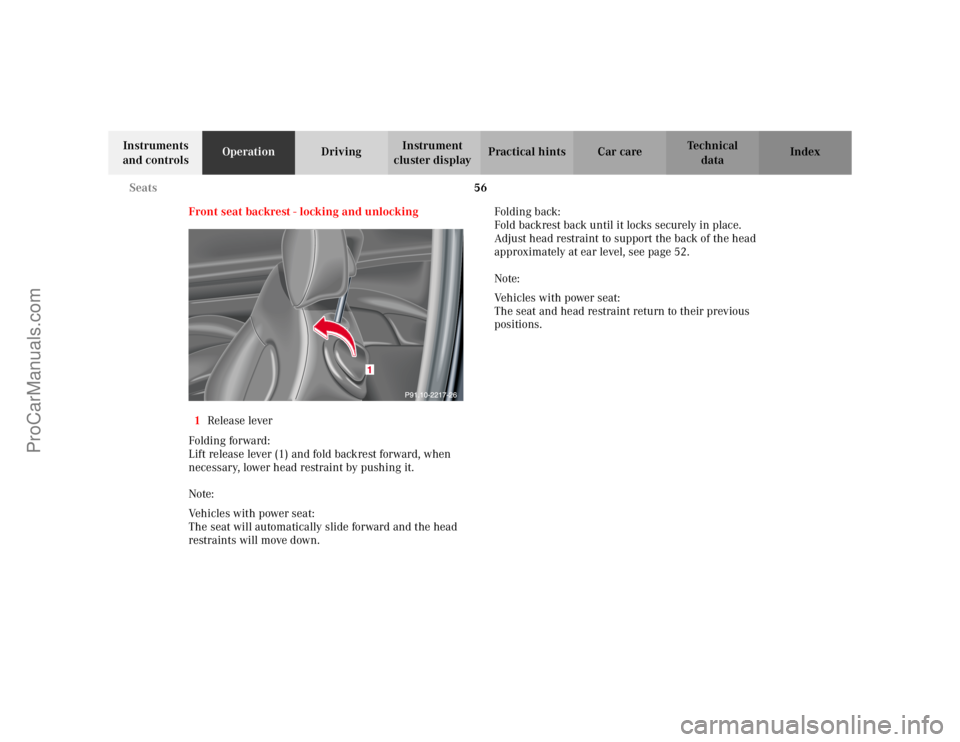
Front seat backrest - locking and unlocking
1 Release lever
Folding forward:
Lift release lever (1) and fold backrest forward, when
necessary, lower head restraint by pushing it.
Note:
Vehicles with power seat:
The seat will automatically slide forward and the head
restraints will move down. Folding back:
Fold backrest back until it locks securely in place.
Adjust head restraint to support the back of the head
approximately at ear level, see page 52.
Note:
Vehicles with power seat:
The seat and head restraint return to their previous
positions.
ProCarManuals.com
Page 60 of 399

57
Seats
Te ch n i c a l
data
Instruments
and controls Operation
DrivingInstrument
cluster display Practical hints Car care Index
Wa r n i n g !
When leaving the vehicle always remove the
electronic key from the steering lock, and lock your
vehicle.The power seats can also be operated with the
driver’s or passenger door open. Do not leave
children unattended in the vehicle or with access
to an unlocked vehicle. Unsupervised use of vehicle
equipment may cause serious personal injury.Never place hands under seat or near any moving
parts during a seat adjustment procedure.
Wa r n i n g !
When raising backrest, observe that backrest is not
pushed against an occupant or object.Vehicles with manual seat:
After folding backrest up, adjust head restraint to
support the back of the head approximately at ear
level.
ProCarManuals.com
Page 63 of 399
60
Seats
Te ch n i c a l
data
Instruments
and controls Operation
DrivingInstrument
cluster display Practical hints Car care Index
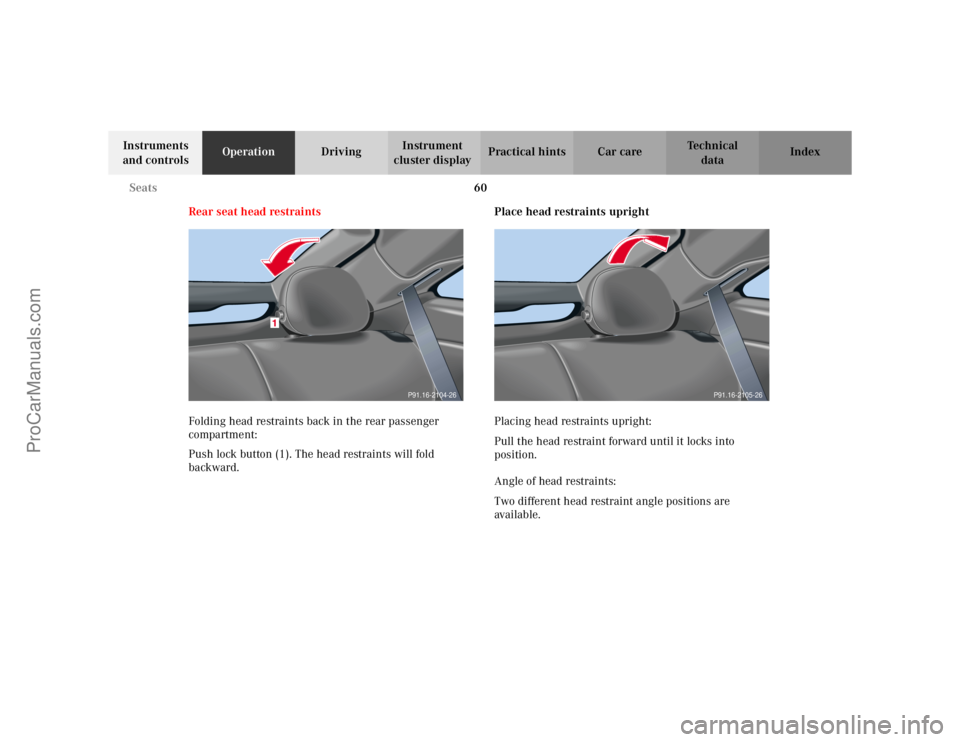
Rear seat head restraints
Folding head restraints back in the rear passenger
compartment:
Push lock button (1). The head restraints will fold
backward. Place head restraints upright
Placing head restraints upright:
Pull the head restraint forward until it locks into
position.
Angle of head restraints:
Two different head restraint angle positions are
ava i l ab le .
P91.16-2104-26
P91.16-2105-26
ProCarManuals.com