lock MERCEDES-BENZ C-CLASS 2002 Workshop Manual
[x] Cancel search | Manufacturer: MERCEDES-BENZ, Model Year: 2002, Model line: C-CLASS, Model: MERCEDES-BENZ C-CLASS 2002Pages: 399, PDF Size: 16.95 MB
Page 204 of 399

201
Interior equipment
Te ch n i c a l
data
Instruments
and controls Operation
DrivingInstrument
cluster display Practical hints Car care Index
Opening the panorama sliding / pop-up roof
automatically
Move the switch past resistance point in direction (1)
and release. The roof will not open completely. Press
switch again to open it completely.
Stopping the sliding / pop-up roof:
Move the switch in any direction.
If the movement of the panorama sliding / pop-up roof is
blocked during the closing procedure, the roof will stop
and reopen slightly.
The panorama sliding/pop-up
roof can also be opened
and closed using the summer opening / convenience
feature, see page 34.
Notes:
The panorama sliding/pop-up roof can be opened or
closed manually should an electrical malfunction occur,
see page 354.
Wa r n i n g !
When closing the panorama sliding / pop-up roof,
be sure that there is no danger of anyone being
harmed by the closing procedure.The closing procedure of the panorama sliding/
pop- up roof can be immediately reversed by either
pressing or pulling the switch, or pressing
button Œon the electronic key and holding it.When leaving the vehicle, always remove the
electronic key from starter switch, and lock your
vehicle. Do not leave children unattended in the
vehicle, or with access to an unlocked vehicle.
Unsupervised use of vehicle equipment can cause
serious personal injury.
ProCarManuals.com
Page 206 of 399
203
Interior equipment
Te ch n i c a l
data
Instruments
and controls Operation
DrivingInstrument
cluster display Practical hints Car care Index
Interior lighting
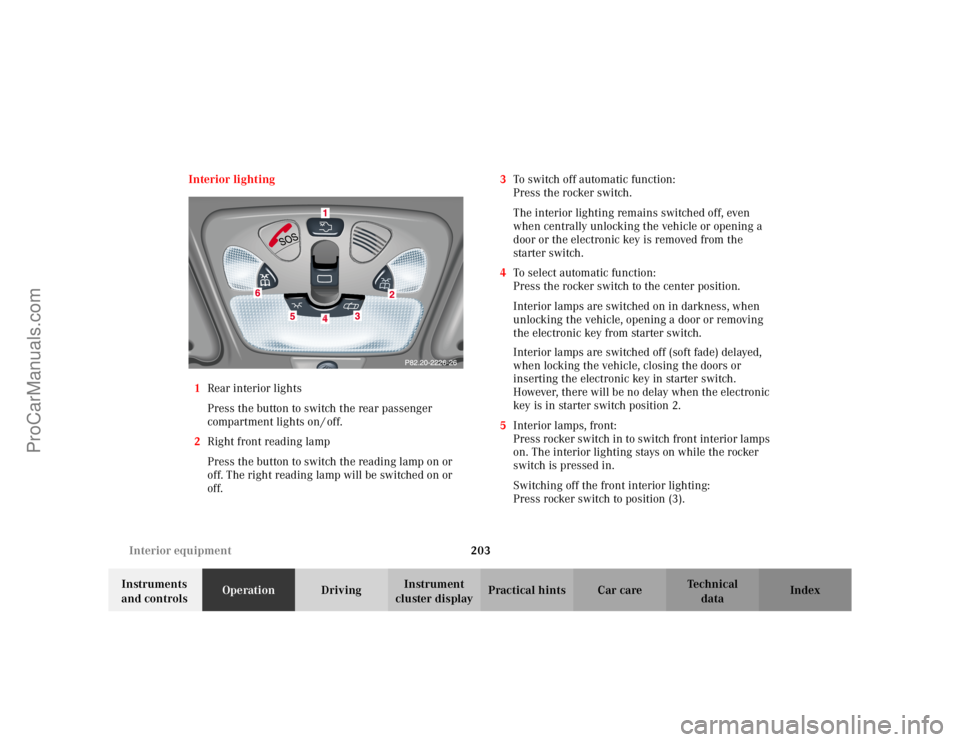
1 Rear interior lights
Press the button to switch the rear passenger
compartment lights on / off.
2 Right front reading lamp
Press the button to switch the reading lamp on or
off. The right reading lamp will be switched on or
off. 3
To switch off automatic function:
Press the rocker switch.
The interior lighting remains switched off, even
when centrally unlocking the vehicle or opening a
door or the electronic key is removed from the
starter switch.
4 To select automatic function:
Press the rocker switch to the center position.
Interior lamps are switched on in darkness, when
unlocking the vehicle, opening a door or removing
the electronic key from starter switch.
Interior lamps are switched off (soft fade) delayed,
when locking the vehicle, closing the doors or
inserting the electronic key in starter switch.
However, there will be no delay when the electronic
key is in starter switch position 2.
5 Interior lamps, front:
Press rocker switch in to switch front interior lamps
on. The interior lighting stays on while the rocker
switch is pressed in.
Switching off the front interior lighting:
Press rocker switch to position (3).
ProCarManuals.com
Page 210 of 399
207
Interior equipment
Te ch n i c a l
data
Instruments
and controls Operation
DrivingInstrument
cluster display Practical hints Car care Index
Glove box
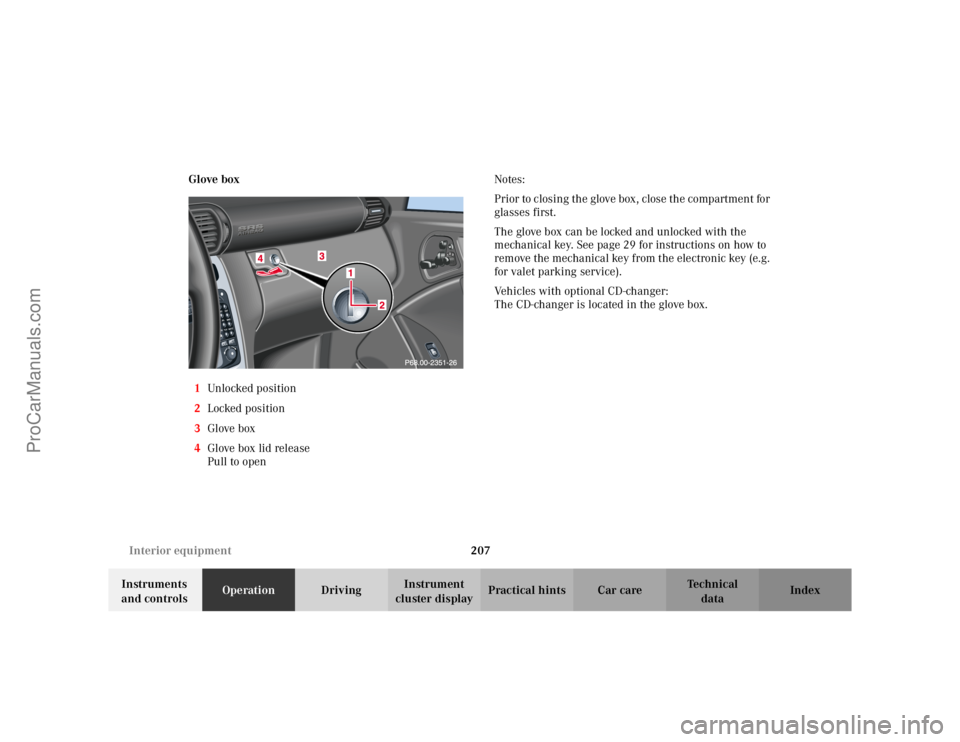
1 Unlocked positio n
2 Locked position
3 Glove box
4 Glove box lid release
Pull to open Notes:
Prior to closing the glove box, close the compartment for
glasses first.
The glove box can be locked and unlocked with the
mechanical key. See page 29 for instructions on how to
remove the mechanical key from the electronic key (e.g.
for valet parking service).
Vehicles with optional CD-changer:
The CD-changer is located in the glove box.
ProCarManuals.com
Page 212 of 399
209
Interior equipment
Te ch n i c a l
data
Instruments
and controls Operation
DrivingInstrument
cluster display Practical hints Car care Index
Storage compartment below the front armrest
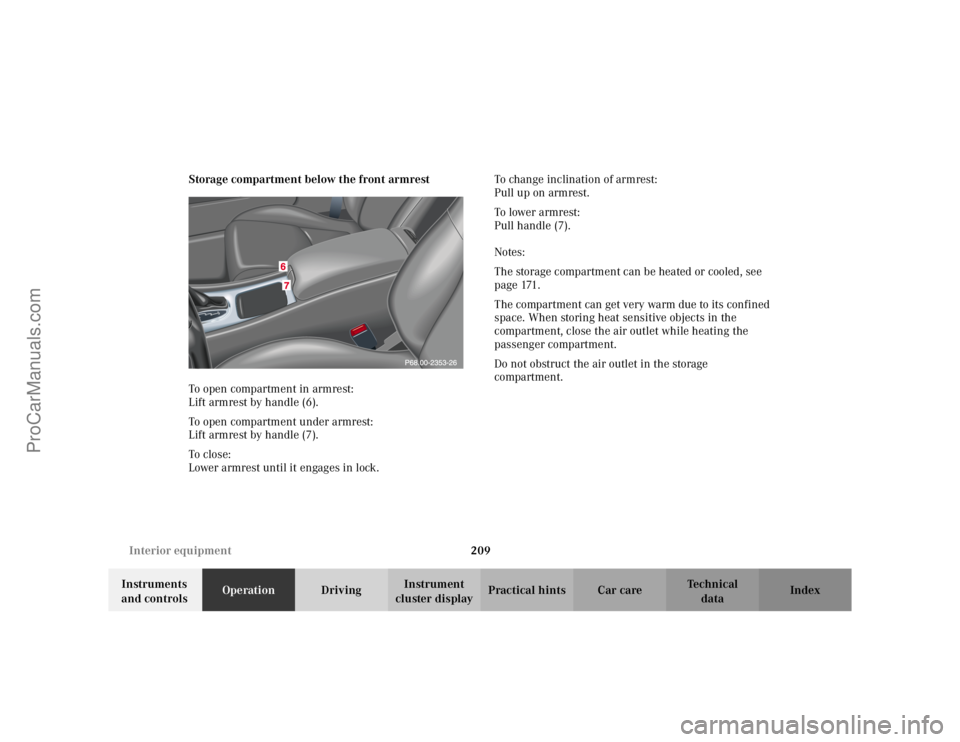
To open compartment in armrest:
Lift armrest by handle (6).
To open compartment under armrest:
Lift armrest by handle (7).
To c lo se:
Lower armrest until it engages in lock.
To change inclination of armrest:
Pull up on armrest.
To lower armrest:
Pull handle (7).
Notes:
The storage compartment can be heated or cooled, see
p a g e 171 .
The compartment can get very warm due to its confined
space. When storing heat sensitive objects in the
compartment, close the air outlet while heating the
passenger compartment.
Do not obstruct the air outlet in the storage
compartment.
ProCarManuals.com
Page 216 of 399
213
Interior equipment
Te ch n i c a l
data
Instruments
and controls Operation
DrivingInstrument
cluster display Practical hints Car care Index
Lighter
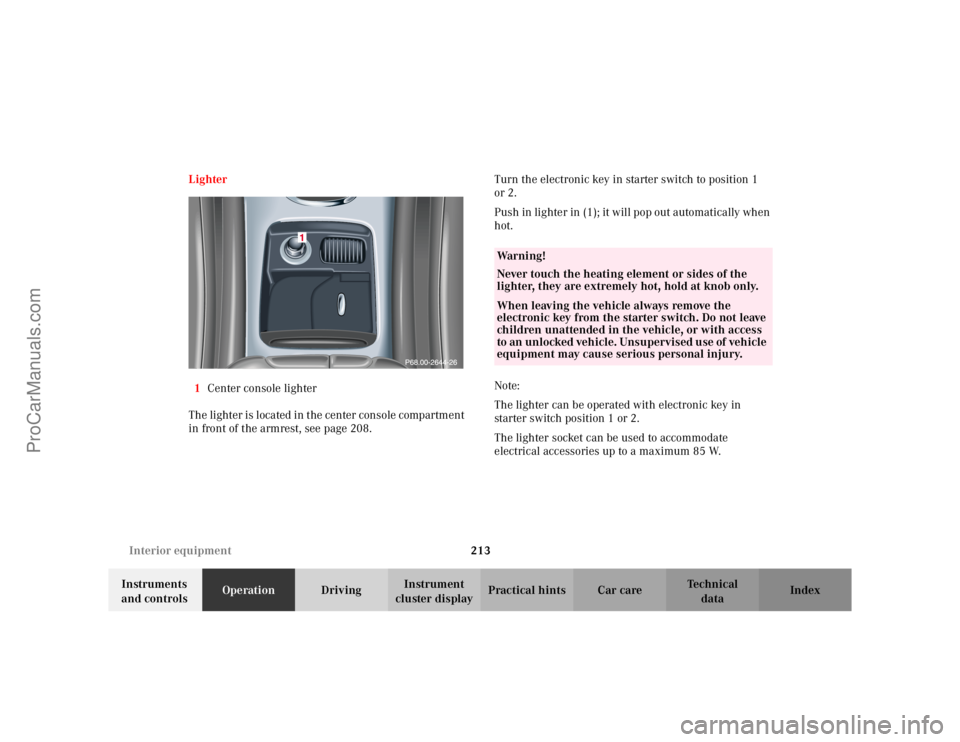
1 Center console lighter
The lighter is located in the center console compartment
in front of the armrest, see page 208. Turn the electronic key in starter switch to position 1
or 2.
Push in lighter in (1); it will pop out automatically when
hot.
Note:
The lighter can be operated with electronic key in
starter switch position 1 or 2.
The lighter socket can be used to accommodate
electrical accessories up to a maximum 85 W.
Wa r n i n g !
Never touch the heating element or sides of the
lighter, they are extremely hot, hold at knob only.When leaving the vehicle always remove the
electronic key from the starter switch. Do not leave
children unattended in the vehicle, or with access
to an unlocked vehicle. Unsupervised use of vehicle
equipment may cause serious personal injury.
ProCarManuals.com
Page 219 of 399
216
Interior equipment
Te ch n i c a l
data
Instruments
and controls Operation
DrivingInstrument
cluster display Practical hints Car care Index
Setting up rear seat bench
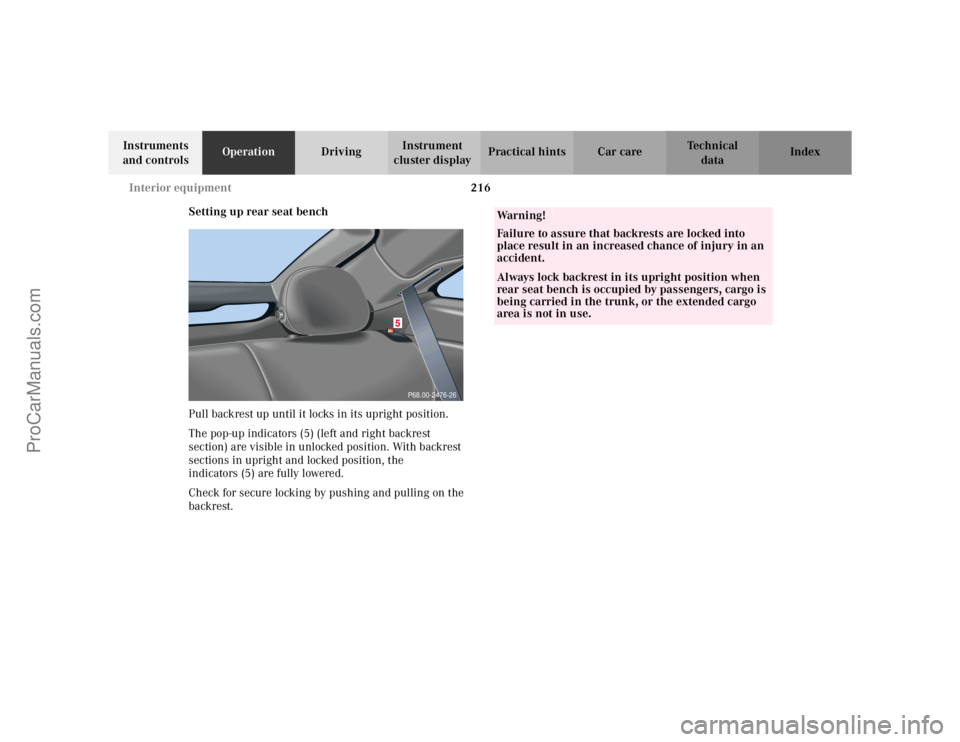
Pull backrest up until it locks in its upright position.
The pop-up indicators (5) (left and right backrest
section) are visible in unlocked position. With backrest
sections in upright and locked position, the
indicators (5) are fully lowered.
Check for secure locking by pushing and pulling on the
backrest.
P68.00-2476-26
5
Wa r n i n g !
Failure to assure that backrests are locked into
place result in an increased chance of injury in an
accident.Always lock backrest in its upright position when
rear seat bench is occupied by passengers, cargo is
being carried in the trunk, or the extended cargo
area is not in use.
ProCarManuals.com
Page 228 of 399

225
Contents - Driving
Te ch n i c a l
data
Instruments
and controls Operation
DrivingInstrument
cluster display Practical hints Car care Index
DrivingControl and operation of
radio transmitters ..................... 226
The first 1 000 miles (1 500 km) ................................. 227
Maintenance ................................... 227
Tele Aid............................................ 228
Catalytic converter......................... 238
Emission control ............................ 239
Starter switch ................................. 240
Starting and turning off the engine .................................. 242
Manual transmission .................... 244
Automatic transmission................ 246 Parking brake ................................ 256
Driving instructions...................... 257
Drive sensibly – Save Fuel ....... 257
Drinking and driving ................ 257
Pedals .......................................... 257
Power assistance........................ 258
Brakes .......................................... 258
Driving off................................... 259
Parking ........................................ 260
Tires ............................................. 261
Snow chains................................ 263
Winter driving instructions ..... 264
Deep water .................................. 266
Passenger compartment ........... 267
Traveling abroad ........................ 267 Cruise control ................................. 268
Brake assist system (BAS) ............ 271
Antilock brake system (ABS) ....... 272
Electronic stability program
(ESP) ........................................... 274
What you should know at the gas station ....................... 278
Check regularly and before a long trip ................................... 280
ProCarManuals.com
Page 231 of 399

228
Tele Aid
Te ch n i c a l
data
Instruments
and controls Operation
DrivingInstrument
cluster display Practical hints Car care Index
Tele Aid (optional)
Important!
The initial activation of the Tele Aid system may only be
performed by completing the subscriber agreement and
placing an acquaintance call using the “SOS” button.
Failure to complete either of these steps will result in a
system that is not activated. If the system is not
activated the indicator lamp in the “SOS” button stays
on after turning electronic key in starter switch to
position 2 and the message “TELE AID – NOT
ACTIVATED” will be shown in the multifunction display
for approx. 10 seconds.
If you have any questions regarding activation, please
call the Response Center at 1-800-756-9018 (in the USA)
or 1-888-923-8367 (in Canada).
( Te l e matic Alarm Identification on Demand)
The Tele Aid system consists of three types of response;
automatic and manual emergency, roadside assistance
and information.
The Tele Aid system is operational providing that the
vehicle’s battery is charged, properly connected, not
damaged and cellular and GPS coverage is available. The speaker volume of a Tele Aid call can be adjusted
when using the volume control on the multifunction
steering wheel, for raising press button
æand for
lowering press button ç.
To activate, press the “SOS” button, the Roadside
Assistance button or the Information button ¡,
depending on the type of response required.
Shortly after the completion of your Acquaintance Call,
you will receive a user ID and password via first call
mail. By visiting www.mbus a.com and selecting “Tele
Aid” (USA only), you will have access to account
information, remote door unlock, Info Services
* profile
and more.
* Optional (available only with COMAND)System self-check
Initially, after turning the electronic key in starter
switch to position 2, malfunctions are detected and
indicated (the indicator lamps in the “SOS” button, the
Roadside Assistance button and the Information
button ¡ stay on longer than 10 seconds or do not
come on). The message “TELE AID – VISIT
WORKSHOP” appears for approx. 10 seconds in the
multifunction display.
ProCarManuals.com
Page 239 of 399
236
Tele Aid
Te ch n i c a l
data
Instruments
and controls Operation
DrivingInstrument
cluster display Practical hints Car care Index
Remote door unlock
In the case you have your vehicle locked unintentionally
(e.g. key inside vehicle), and no other key is available,
contact the Mercedes-Benz Response Center at
1-800-756-9018 (in the USA) or 1-888-923-8367 (in
Canada). You will be asked to provide your password
which you provided when you completed the subscriber
agreement.
Then return to your vehicle and pull recessed handle in
trunk lid for minimum of 20 seconds until the “SOS”
button is flashing. The message “EMERGENCY CALL – CALL CONNECTED” appears in the multifunction
display.
As an alternative, you may unlock the vehicle via
Internet using the ID and password sent to you shortly
after the completion of your Acquaintance Call.
The Response Center will then unlock your vehicle with
the remote door unlocking feature. Notes:
The remote door unlock feature is available if the
relevant cellular phone network is available.
The SOS button will flash and the message
“EMERGENCY CALL – CALL CONNECTED” will appear
in the multifunction display to indicate receipt of the
door unlock command.
Once the vehicle is unlocked, a Response Center
specialist will attempt to establish voice contact with the
vehicle occupants.
If the recessed handle in trunk lid was pulled for more
than 20 seconds before door unlock authorization was
received by the Response Center, you must wait
15 minutes before pulling recessed handle again.
ProCarManuals.com
Page 243 of 399
240
Starter switch
Te ch n i c a l
data
Instruments
and controls Operation
DrivingInstrument
cluster display Practical hints Car care Index
Starter switch
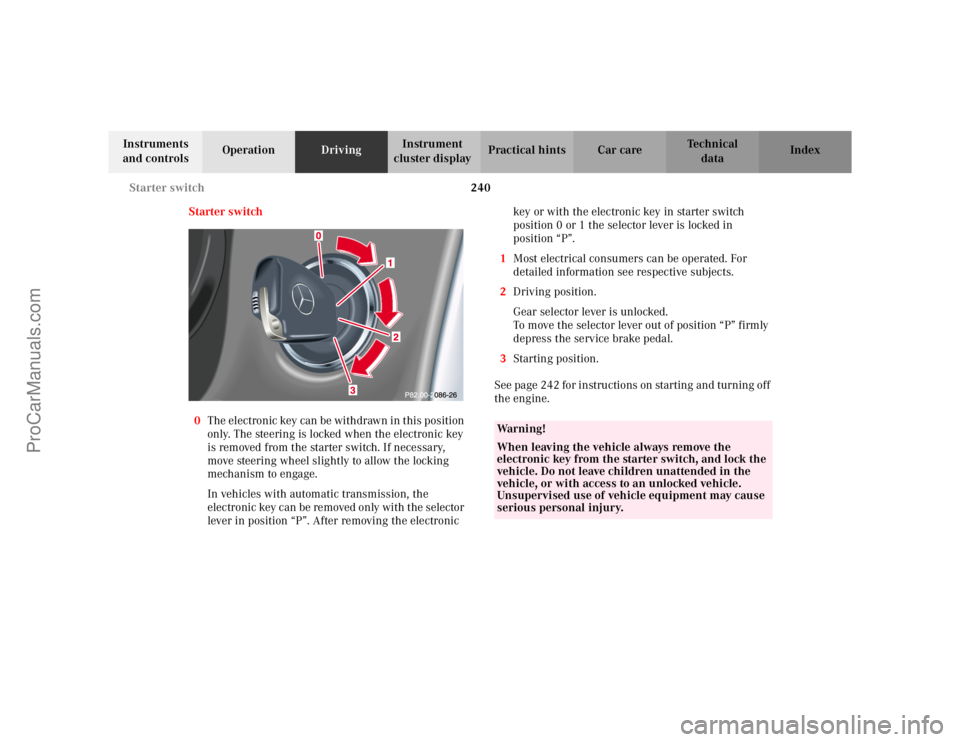
0 The electronic key can be withdrawn in this position
only. The steering is locked when the electronic key
is removed from the starter switch. If necessary,
move steering wheel slightly to allow the locking
mechanism to engage.
In vehicles with automatic transmission, the
electronic key can be removed only with the selector
lever in position “P”. After removing the electronic key or with the electronic key in starter switch
position 0 or 1 the selector lever is locked in
position “P”.
1 Most electrical consumers can be operated. For
detailed information see respective subjects.
2 Driving position.
Gear selector lever is unlocked.
To move the selector lever out of position “P” firmly
depress the service brake pedal.
3 Starting position.
See page 242 for instructions on starting and turning off
the engine.
Wa r n i n g !
When leaving the vehicle always remove the
electronic key from the starter switch, and lock the
vehicle. Do not leave children unattended in the
vehicle, or with access to an unlocked vehicle.
Unsupervised use of vehicle equipment may cause
serious personal injury.
ProCarManuals.com