ad blue MERCEDES-BENZ C-Class 2011 W204 Comand Manual
[x] Cancel search | Manufacturer: MERCEDES-BENZ, Model Year: 2011, Model line: C-Class, Model: MERCEDES-BENZ C-Class 2011 W204Pages: 190, PDF Size: 2.21 MB
Page 69 of 190

e.g.
roads closed tothr ough trafficand non-
resident s.
R roads thathave timerestrictions (e.g.
closed onSundays andpublic holidays) are
avoided forroute guidance. Changing
direction
Introd uction Changes
ofdirect ionhave three phases:
R Preparation phase
R An nounc ement phase
R Change-of -directionphase
Prep aration phase COMAND
preparesyouforthe upcoming
change ofdirect ion.Based onthe example
display below,thechange ofdirect ionis
announ cedwith thePrepare toturn
right message. Youseethefull-scr eenmap. Ex
ample display: preparation phase
: Next road
; Point atwhich thechange ofdirect ion
takes place(lightbluedot)
= Current vehicleposition (thetipofthe
trian gleindicat esthe vehicle’s direction
of travel)
? Current street
Display ?depends onthe settingselect ed
for "Infor mation inmap" (Ypage 86). Announcement
phase COMAND
announcestheimminen tchange of
direction. Basedonthe example display
below, thechange ofdirection isannounced
with thePlease turnright in900 ft.
and follow the
The announced distancetothe next change
of direction dependsonthe type ofroad and
its permissible speedlimit.
The displa yis now split intotwosectors. In
the left half, youseethenormal mapview.
The right sideshows anenlarged sectionof
the area around theintersec tion(Crossing
Zoom) ora3D image ofthe road's course with
the route indicating thenext maneuver. Example
display:annou nceme ntpha se
: Next road
; Pointatwh ich the change ofdirecti on
take spl ace (lig ht blue dot, showninboth
the left and right displ ays)
= Visualrep resenta tion ofthe dista nce to
the next change ofdirecti on
? Chang eof directi on(turnright her e)
A Dista ncetothe next change ofdirecti on
B Route (highl ighted inblue ,sho wninboth
the left and right displ ays)
i The filled-i ns ect ion ofvisual display for
distanc e= gets short er,the nearer you
get tothe announ cedchange ofdirect ion.
Change-of- direction phase COMAND
announcestheimminen tchange of
direction. Inthe example, theNow turn Route
guidance
67Navigation
ZACOMAND NTG4.0BR204USAEdition A2011; 1;3,en-US
d2irenkl Version:3.0.3.6
2010-
05-31T09:21 :57+02:00-Seite 67 Z
Page 70 of 190

right
announcement ismade 90ft.before
the change ofdirection. Thedispla yis split
into twohalves, asinthe announcement
phase. Example
display:change-of-direct ionphase
: Current vehicleposition, thetipofthe
triangle indicating thevehicle’s direction
of travel
; Visua lrepresentation ofthe distance to
the next change ofdirection
= Distance tothe next change ofdirection
Once thechange ofdirection iscompleted,
COMAND automaticall yswitches backtofull-
screen display. Example
ofad ispla ywithout changes
of dir ection :
Route (shown inblue)
; Curren tvehicle position
= Current street
? Map orient ationselect ed
A Map scale select ed Lane
recomm endations
Overview On
multilane roads,COMAND candisplay
lane recom mendat ionsforthe nextchange of
direction. Therelevant datamust beavaila ble
on the digital map.
COMAND displayslane recommen dations
B, based onthe next twochanges of
direction. Thenumber oflanes appliestothe
point atwhich thenext change ofdirection is
required. Example
display
: Point ofthe next change indirection (light
blue circle)
; Point ofthe change ofdirection afternext
= Next change ofdirection (inthis case, turn
off tothe right)
? Visual representat ionofthe distance to
the next change ofdirection
A Distanc eto the next change ofdirection
B Recommended lane(dark blue)
C Possible lane(light blue)
D Lane notrecommen ded(gray)
E Current vehicleposition: thetipofthe
triangle indicates thevehicle’s direction
of travel 68
Route
guidanceNavigat ion
ZACOMAND NTG4.0BR204USAEdition A2011; 1;3,en-US
d2irenkl Version:3.0.3.6
2010-
05-31T09:21 :57+02:00-Seite 68
Page 71 of 190
Disp
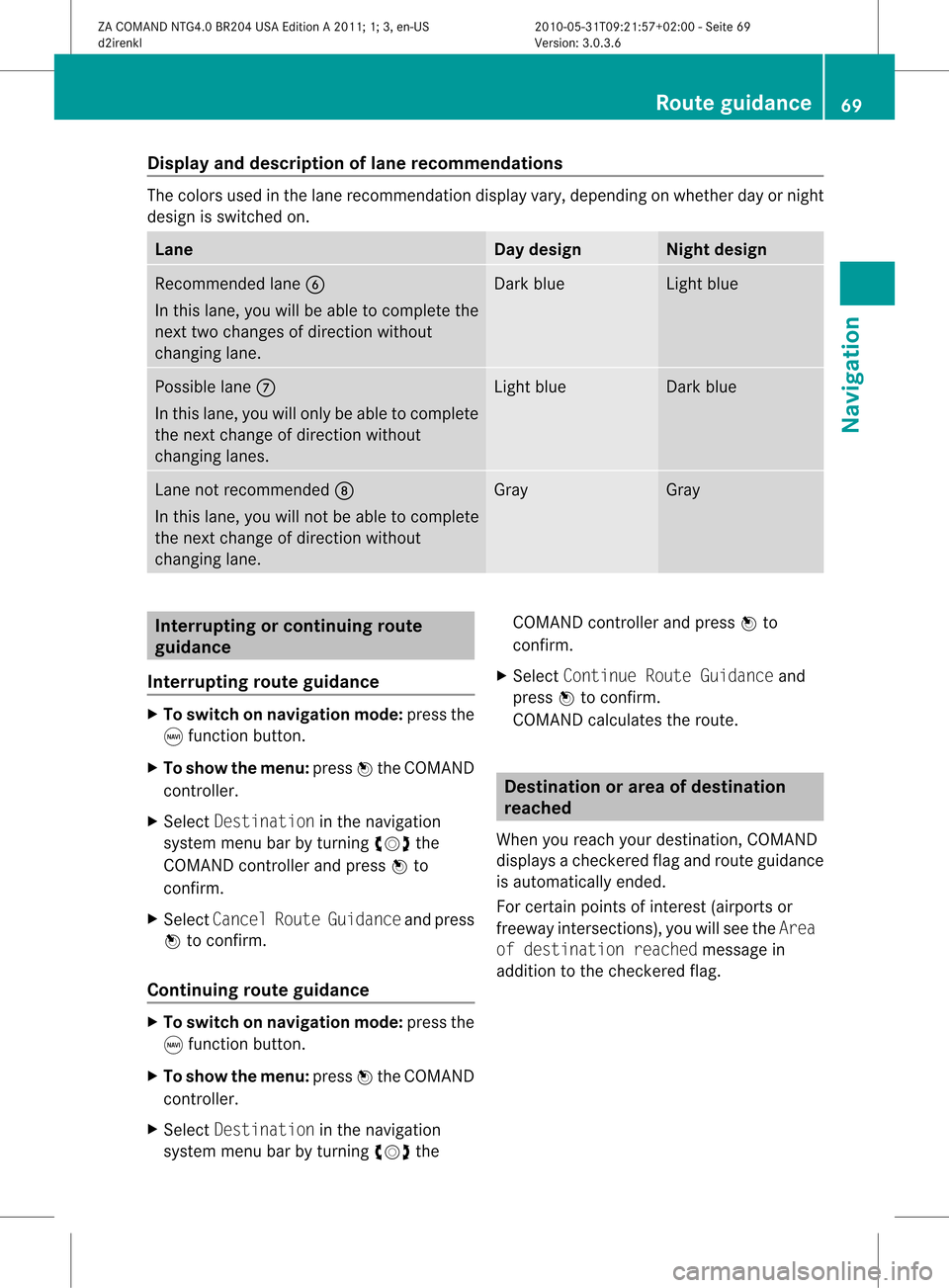
layandd escri ption oflane recom mendation s The
colors used inthelane recomm endatio ndisplay vary,depen dingonwhet herday ornigh t
design isswitc hedon. Lane Day
design Nigh
tdesign Recom
mendedlane B
In this lane, youwillbeable tocom pleteth e
nex ttwo chan gesofdirec tionw itho ut
chan ginglane. Dar
kblue Light
blue Possib
lelane C
In this lane, youwillonly beable tocom plete
the nextchange ofdirection without
changing lanes. Light
blue Dark
blue Lane
notrecommen dedD
In this lane, youwillnotbeable tocomplete
the next change ofdirection without
changing lane. Gray Gray
Interrup
tingorcontinuing route
guidance
Interrup tingroute guidance X
To switch onnavigation mode:pressthe
g funct ionbutton.
X To show themenu: pressWthe COMAND
cont roller.
X Select Destination inthe navigation
system menubarbyturning cVdthe
COMAND controller andpress Wto
confirm .
X Select Cancel RouteGuidance andpress
W toconfirm .
Continuing routeguidance X
To switch onnavigation mode:pressthe
g funct ionbutton.
X To show themenu: pressWthe COMAND
cont roller.
X Select Destination inthe navigation
system menubarbyturning cVdthe COMAND
controller andpress Wto
confirm .
X Select Continue RouteGuidance and
press Wtoconfirm .
COMAND calculates theroute. Destination
orarea ofdestination
reached
When youreach yourdestination, COMAND
displa ysacheck eredflagand route guidance
is automatically ended.
For certain pointsofinterest (airports or
freeway intersections),youwillsee theArea
of destination reachedmessage in
addition tothe check eredflag. Route
guidance
69Navigation
ZACOMAND NTG4.0BR204USAEdition A2011; 1;3,en-US
d2irenkl Version:3.0.3.6
2010-
05-31T09:21 :57+02:00-Seite 69 Z
Page 73 of 190

i
The length ofthe blockable routesection
is predetermin edbythe digital map.The
menu itemsareavailab leaccordin gly.
X To star trout ecalculation: selectStart
and press Wtoconf irm.
X To delete theblocked section: select
Delete whilethemessage isshown and
press Wtoconf irm.
COMAND calculates theroute without the
block. Selecting
analter native route
With the"Altern ativeroute" function,routes
other thantheoriginal onecanbecalculated.
X To switch onnavigation mode:pressthe
g funct ionbutton .
X To show themenu: pressWthe COMAND
cont roller.
X Select Routeinthe navigation system
menu barbyturnin gcVd theCOMAND
cont roller andpress Wtoconf irm.
X Select Alternativ eRoute andpress W
to conf irm.
You seetheselected route.Thedisplay now
shows asplit-sc reenview. Onthe left- hand
side, oneormore alternat iveroutes are
shown fromstarttodestinat ion.The
curren troute ishighlighted darkblue; other
alternative routesappear lightblue.
On the right- hand side,inform ationonthe
current lyselected alternative routeis
shown, e.g.length ofroute, estimated
driving timeandestimated timeofarrival.
X To select thenext orprevious
alterna tiveroute:select Nextor
Previous andpress Wtoconf irm.
The selected routeishighlighted darkblue.
X To select theoriginal route:select Back
a correspon dingnumber oftimes andpress
W toconf irm. X
To star trout eguidance usingthe
selected alternativeroute:select Start
and press Wtoconf irm.
COMAND calculates thealternative route. Displaying
destinationinforma tion
You have enteredadestination (Y page 51)
or apoint ofinteres t(Y page 61)and possibly
an intermediate stop(Ypage 59).
X To switch onnavigat ionmode: pressthe
g func tion button.
X To show themenu: pressWthe COMAND
con troller.
X Select Routeinthe navigat ionsystem
menu barbyturn ingcVd theCOMAND
con troller and press Wtocon firm.
X Select Destin ationInformationand
press Wtocon firm.
Dest ination information isdisplayed. Ex
ample display: destinationinformation
: Dist ance, estimatedtime ofarrival and
estim atedremainin gdrivin gtime to
int ermediate stop
; Intermediate stopP
= State and city
? Dest ination O
A Dist ance, estimatedtime ofarrival and
estim ateddrivin gtime todestin ation
X To close thedestina tioninform ation:
slide XVY theCOMAND controller orpress
the k backbutton. Rout
eguida nce
71Navigat ion
ZACOMAND NTG4.0BR204USAEditionA2011 ;1; 3,en- US
d2iren kl Version:3.0 .3.6
2010
-05-31T09: 21:57+0 2:00-Seite 71 Z
Page 74 of 190
Route
overvi ew
Yo ucan usethe routeove rvie wto move along
the routesecti onbysecti onand view
info rma tion anddeta ils ab ou teach sectiono f
the route.
Yo uha ve ente redade stinati on(Ypage 51)
or apo int ofinte rest(Y page 61)and possibly
an intermediate stop(Ypage 59)).
X To switch onnavigat ionmode: pressthe
g func tion button.
X To show themenu: pressWthe COMAND
con troller.
X Select Routeinthe navigat ionsystem
menu barbyturn ingcVd theCOMAND
con troller and press Wtocon firm.
X Select Route Browse rand press Wto
con firm.
At the top ofthe display, youwillsee
infor mation aboutthehighlighted route
sect ion,forexample thedistan cetobe driven
on the road androad designat ion.The
highlighted routesectionismark edinwhite
with ared border onthe map.
X To view thenext orprevious route
section: selectNextorPrevio usand
press Wtocon firm.
i Ifthe first orlast route sectionis
highlighted, youcann otselect Previo usor
Next.
X To zoom inor out ofthe map:select N
or M and press Wtocon firm.
X To close therout eoverview: select
Back andpress Wtocon firm. Off-
road andoff-m ap
Impor tantsafet yguidelines G
War
ning
The COMAND navigationsystem maydirect
you tooff- road routes thatyour vehicle may not
becapable oftrav ersing through without
damaging yourtires,wheels orvehicle. Itis
the driver’s solerespon sibility todeterm ine
the suitability ofthe route. Off-road routes
may beofvarying condition sand their
appropriaten essforuse may beaffect edby
various factorssuch astime ofday, time of
year andimmediate weathercondition sthat
cann otbe judged ortake ninto consi derati on
by the COMAND system .
Route guidanc eto ades tinatio nthat is
no ton adig itized road CO
MAND canguide yo uto destina tions
wh ich arewi thi nt he area covered bythe
digital map,butwhich arenot themselves
recorded onthe map.
These destinations areknown asoff-r oad
destinations, whichyoucan enter using the
map, forexample. Inthese cases, COMAND
guides youforaslong aspossible with
navigation announcemen tsand displa yson
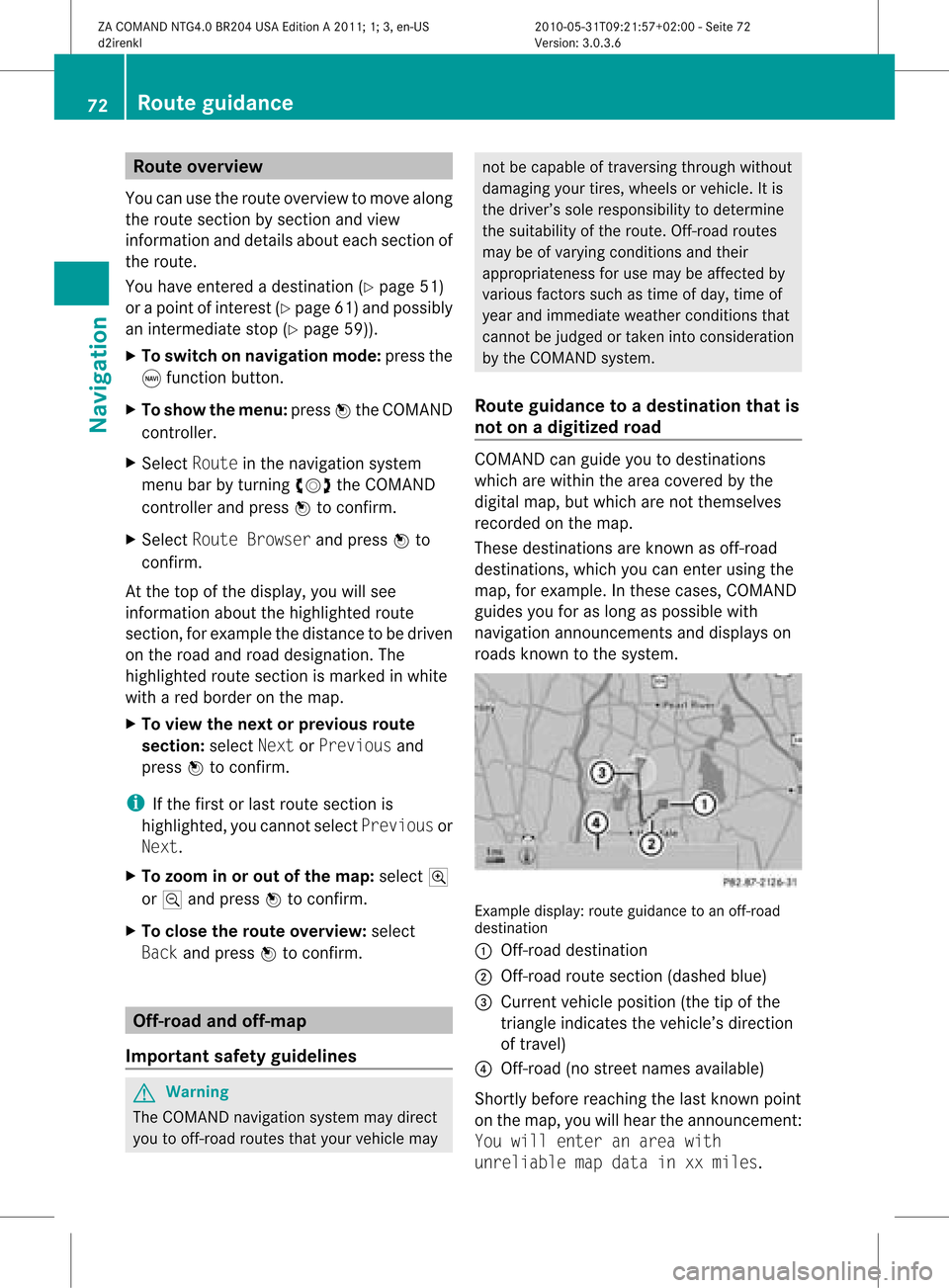
roads known tothe system. Example
display:route guidance toan off-r oad
destination
: Off- road destination
; Off- road route section (dashed blue)
= Current vehicleposition (thetipofthe
triangle indicates thevehicle’s direction
of travel)
? Off- road (nostreet names available)
Short lybefore reaching thelast known point
on the map, youwillhear theannounc ement:
You will enter anarea with
unreliable mapdata inxxmiles. 72
Rout
eguidanceNa vigation
ZACOMAND NTG4.0BR204USAEdition A2011; 1;3,en-US
d2irenkl Version:3.0.3.6
2010-
05-31T09: 21:57+02: 00-Seite 72
Page 75 of 190
If
the vehicle reaches anarea which isnot part
of the digitalmap, thedisp layapp ears asa
spli t-screen view.Onthe right-hand side,an
arrow appears which points tooff-road
destination :.Youwill hear the
announc ement:"Please followthearrow on
the display" .Asthe vehicle approachesthe
destination, theArea ofdestination
reached message appears.
Route guidance fromanoff-road
location toad esti nation If
th eveh icle posit ioniswith inthearea
cov ered bythedigit almap, butthemap does
no tcon tain anyinform ationabout that
locat ion,th eveh icle isin an off-road locat ion.
COMA NDisalso able toguide youtoa
dest inationeven from anoff-road locat ion.
At thest art oftherout eguidan ce,you willsee
th eOff Mapped Roadmes sage, anarro w
and thedist anceto thed estin ation. Thearrow
shows thecompass headingtothe actual
destin ation.
The route ishighlighted blue,startingfrom
the last recogn izedstreet the vehicle wason
before itleft themap.
As soon asthe vehicle isback onaroad
kn own tothe system, routeguidance
con tinues inthe usual way.
Rout eguida ncefrom anoff-m ap
location toad esti nation If
th eveh icle posit ionisouts idethearea
cov ered bythedigit almap, then theveh icle
is in an off-map locat ion.COMAND isalso
able toguide youtoadestination evenfrom
an off-map location.
At the start ofthe route guidance,youwillsee
the Off Mapped Roadmessage, anarrow
and thedistance tothe destination. Thearrow
shows thecompass headingtothe road left
last.
The route ishighlig htedbluefrom thenearest
road known tothe system. As
soon asthe vehicle isback onaroad
known tothe system, routeguidance
cont inues inthe usua lway .
Off-road duringrouteguidance Due
toroad const ruction work,forexample,
there maybedifferences betweenthedata
on the digital mapandtheactual course of
the road.
In such cases, thesystem willtemporarily be
unable tolocate thevehicle position onthe
digital mapandthus considers thevehicle to
be inan off-road position.
In the displa y,you willsee theOff Mapped
Road message, anarrow andthedistance to
the destination. Thearrow shows the
compass headingtothe actual destination.
As soon asthe system canassign thevehicle
position tothe map again,route guidance
cont inues inthe usua lway . Tra
ffic report s Condition
s
To receive real-time trafficreports via
satellite radio,yourequire:
R optionally available satellite radio
equi pment
R asubscription toSIRIUS XMSatellite Radio
Traffic Message Service
Further information onsatellite radiois
avail able inthe "Satellite radio"section
(Y page 123).
COMAND canreceive trafficreports via
satellite radioandtake these intoaccount for
route guidanceinthe navigation system.
Received trafficreports aredispla yedinthe
map either astext oras icons. Real-time
traffic report son the map
COMAND canshow certain trafficincidents
on the map. Traffic reports areshown onthe
map atscales of0.05 mito20 mi. Tr
affic report s
73Navigat ion
ZACOMAND NTG4.0BR204USAEdition A2011; 1;3,en-US
d2irenkl Version:3.0.3.6
2010-0
5-31T09: 21:57+02:00-Seite 73 Z
Page 99 of 190

Vehi
cle equi pmen t<0021002100210021002100210021002100210021002100210021002100210021
00210021002100210021002100210021002100210021002100210021V 98
General information<0021002100210021002100210021002100210021002100210021002100210021
002100210021002100210021002100210021002100210021V 98
Telephony viathe Bluet ooth®
inter-
face ........ .......... .................. .................. . 99
Reception andtransm ission volume 103
Using thetelephone <0021002100210021002100210021002100210021002100210021002100210021
002100210021002100210021002100210021V 103
Using thephone book<0021002100210021002100210021002100210021002100210021002100210021
002100210021002100210021V 106
Using calllists ........ .......... ................. 109
Using theaddress book <0021002100210021002100210021002100210021002100210021002100210021
002100210021V 112 97Telephone
ZA
COMAND NTG4.0BR204USAEditio nA 2011 ;1; 3,en-U S
d2iren kl Version:3.0 .3.6
2010
-05-31T09: 21:57+0 2:00-Seite 97
Page 100 of 190

Vehi
cle equi pmen t
i TheseOpe rating Instru ctionsdescri beall
sta nda rdand optio nal equipme ntava ilab le
for your veh icleat the time ofpurcha se.
Pl ea se note thatyour vehicle maynotbe
equipped withallfeatures described. General
information Introdu
ction
With aBluetooth ®
-capable mobilephone, you
can make callsusing thevehicle's
Bluetooth ®
telephony interface.
With asuitable mobilephone, youcan usethe
hands-fr eesystem viathe Bluetooth ®
inter face, import contacts from themobile
phone viaPBAP (Phone BookAccess Profile)
and receive vCards.
You canobtain moredetailed information
about suitable mobilephones andabout
conn ectin gBluetooth ®
-capable mobile
phones toCOMAND onthe Internet at
htt p://www.mbusa- mobile.com.Orcall
the Mercedes-B enzCustomer Assistance
Center at
1-8 00-FOR-ME RCedes (1-800-367-6372 )for
the USA orat1-800-387-0100 forCanada . Safety
notes G
Warning
A drive r'sattention tothe road must always
be his/he rprimary focuswhendriving.For
you rsafet yand thesafe tyof other s,we
rec omm endthat you pull overtoasafe
location andstop before placing ortaking a
telephone call.Ifyou choose touse themobile
phone whiledriving, pleaseusethehandsfree
device andonly usethemobile phonewhen
weather, road,andtraffic conditionspermit.
Some jurisdiction sprohibit thedriver from
using acellular mobilephonewhiledriving a
vehicle. Bear
inmind thatataspeed ofjust 30mph
(approximately 50km/ h),your vehicle is
coverin gadistance of44 feet (approximately
14 m)every second. G
War
ning!
Exc essive electrom agneticradiation may
const ituteahealth hazard toyourself and
others.
There isscient ificdiscussion surrounding the
possible healthrisksposed by
electrom agneticfields.You canreduce this
risk byusing anexter ioraerial.
Therefore, onlyusemobile communic ation
equipment ifit is conn ected tothe exter ior
aerial ofthe vehicle. Calls
disconnec tedwhile thevehicle
is in motion
Ac allmay bedisc onnected if:
R there isno te nou ghnetw orkcove rage in
certa inarea s.
R yo ucha nge from onetrans mitting/
rece iving station(cel l)to ano ther andit
doe snot have afree channel.
R yo uus eaSIM card which isnot comp atible
wi th the netwo rkava ilab le.
R wh en using amob ile pho newith
"T wi ncard ",the seco ndSIM card is
reg iste red onthe netwo rkatthe same time . Ope
rating options
You canoperate thetelepho neby:
R us ing the COMAND controller
turni ngcVd
sli ding XVY orZVÆ
pre ssing W
R pre ssing the KorI button andusing the
tele pho nekey padon COMAND 98
Gen
eral informatio nTelepho ne
ZACOM AND NTG4.0BR20 4USA EditionA2011; 1;3,en-US
d2i renkl Version:3.0.3.6
2010-05
-31T09:21:57+0 2:00-Sei te98
Page 101 of 190

R
pressin gthe 6 or~ buttononthe
multifun ction steer ingwheel
R using theVoice ControlSyst em(see the
separate VoiceControlSyst emoperatin g
inst ruct ions).
Unless statedother wise, thedescr iption sand
illustration sin this sect ionrefer toCOMAND . Function
restrictions
You cann otuse thephone yetinthe following
situation s:
R the telephon eautomatic allyattempts to
log intoanet work. Ifno net work is
available, youwillnotbeable tomake a
"911" emergen cycall. Ifyou attempt to
make anoutgoin gcall, theNoServic e
message willappear forashort while. "911"
emergency call G
War
ning
The 911 emergen cycall system isapublic
servic e.Using itwithout duecause isa
crimin aloffen se.
The following condition smust befulfilled in
order tomake a911 emergen cycall:
R the mobile phonemustbeswitc hedon.
R anet work must beavailable.
R avalid andoperation alSIM card must be
insert edinthe mobile phone.
R the mobile phoneiscon nected toCOMAND
via Bluetoot h®
.
If you cann otmake anemergen cycall, you
must arrange rescuemeasures yourself.
X En ter the digits inCOMAND (Ypage 104).
X Press theKbutt on.
The telephon emakes theconnection .
X Wait untiltheemergen cycall center
answers anddescr ibethe emergen cy
situation . Teleph
onyviathe Bluet ooth®
inter face Conditions
Mobile phone For
telephon yvia COMAND 'sBluetoot h®
int erface, aBluetoot h®
-c apable mobile
phone isrequired.
i Not allmobile phones available onthe
mark etare equally suitable. Youcanobtain
more detailed information aboutsuitable
mobile phones andabout connecting
Bluetoot h®
-c apable mobile phones to
COMAND onthe Internet at
htt p://www .mbusa- mobile.com.O rcall
th eMer cedes-Ben zCust ome rAssistance
Center at
1-80 0-FOR-ME RCedes(1-800 -367-6372)
(for theUSA) orCustomer Relations at
1-80 0-387-0100(for Canada ).
The battery ofthe mobile phoneshould be
kept sufficiently chargedinorder toprevent
malfunctions.
In preparation fortelephoning viathe
Bluetooth ®
interface, youshould checkthe
followi ngitems onyour mobile phone(seethe
mobile phoneoperating instructions):
X Hands-Fr eeProfile
The mobile phonemustsupport Hands-
Free Profile 1.0orabove.
i Some displays(e.g. thesignal strengt h)
depend onthe supported versionofthe
Hands-Fr eeProfile.
X Bluetooth ®
visibil ity
On certain mobilephones, thedevice itself
must bemade "visible"for other devices,
as well asactivating theBluetooth ®
function (seethemobile phoneoperating
instruct ions).
X Bluetooth ®
device name
Every Bluetooth ®
device hasitsown
Bluetooth ®
device name.Thedevice name
may bechanged, butcan beidentical forall
devices fromthesame manufacturer. Itis Telephony
viathe Bluetooth ®
interface 99Telephone
ZA
COMAND NTG4.0BR204USAEdition A2011; 1;3,en-US
d2irenkl Version:3.0.3.6
2010-0
5-31T09 :21:57+02:0 0-Seite 99 Z
Page 102 of 190

the
refore recomm endedtha tyou change
this name sothat youcan easily recogn ize
your mobile phone(seethemobile phone
operating instructions).
X Switch onthe mobile phoneandenter the
PIN when prompted todo so(see the
mobile phoneoperating instructions).
X Act ivate Bluetooth ®
funct ionsand, where
necessary, Bluetooth®
visibility onthe
mobile phone(seethemobile phone
operating instructions).
COMAND X
Act ivate theBluetooth ®
funct ionin
COMAND (Ypage 42). Connec
tingamobile phone
Gener alinfor mation Bef
ore usin gyour mobilephon ewith
COMA NDforthefir st tim e,you willneedto
con nectit.
When youauth orizeanew mobi lephon e,itis
con nectedautom atically.
Conn ecting com prises:
R sear ching for aBluet ooth®
-c apable mobile
phon e
R subse quentlyauth orizing it
You canconnectupto ten mobile phones.
Search ingforam obile phone X
Pres sth e÷ function butt ononCOMA ND.
X Sele ctPho neinthete lepho nebasic menu
by slidin gVÆ andturnin gcVd the
COMA NDcontroller andpres sW to
con firm.
X Sele ctBlu etooth Phones andpres sW to
con firm. X
Sele ctUpd ate andpres sW tocon firm.
COMA NDsear chesfor Bluet ooth®
te lepho neswith inran geand adds them to
th eBluet ooth®
telepho nelist.
The durat ionofthesear chdepen dson the
num berofBluet ooth®
telepho neswith in
ran geand their char acteris tics. Ex
ample ofdisplay: Bluetooth®
tel epho neslist
: Curre ntly con nected# and auth orized
mobi lephon eY
; Dev icenotw ithin rangebut prev iously
author ized(Lappears ingray)
= Newly detected mobile phonewithin
rang ebut not yetauthor ized(noicon yet
Y)
The Bluet ooth®
telep honeslist shows all
mobile phoneswithin rangeand allprev iously
author izedmobile phones,whet herornot
the yare inrang e.
i Ifthe Bluet ooth®
telep honeslist isalready
full, youwillberequest edtode-aut horizea
mobile phone(Y page 102).IfCOMA ND
does notfindyour mobile phone,ext ern al
author ization (Ypage 101)may be
nec essary.
i When called upagain, thetelep honelist
may nolong ershow allmobile phones
because, forexam ple,amobile phonehas
been removedfromthe vehic lein the
mean time.In this case, start anew searc h
to update theBluet ooth®
telep honelist . 100
Telephony viatheBlu etoot h®
inter faceTelep hone
ZACOMA NDNTG4. 0BR20 4USA EditionA201 1;1;3,en- US
d2ir enklV ersion:3.0.3.6
2010
-05-31T09 :21:57+0 2:00-Seite 100