ad blue MERCEDES-BENZ C-Class 2011 W204 Comand Manual
[x] Cancel search | Manufacturer: MERCEDES-BENZ, Model Year: 2011, Model line: C-Class, Model: MERCEDES-BENZ C-Class 2011 W204Pages: 190, PDF Size: 2.21 MB
Page 103 of 190

Aut
horizing (regist ering) amobile
ph one X
In theBluet ooth®
te lepho neslist,selec tthe
not yetauthorized mobilephonebyturning
cVd theCOMAND controller.
X Select Options bysliding VYthe
COMAND controller andpress Wto
confirm .
X Select Authorize andpress Wtoconfirm .
The passcode entrymenu appears. The
passcode isany one tosixteen- digit
number combination whichyoucan
determine yourself.Youmust enter thesame
number combination inCOMAND andinthe
Bluetooth ®
-capable mobilephone(seethe
operating instructionsofthe mobile phone).
i Some mobile phones requiretheinput of
a four-digit passcode orlonger character
strings.
If you want tore-authorize amobile phone
following <0004000500250001001500140008000F00120009001C000100140009000F000E
0032V youcan select a
different passcode.
X To enter apassc odeinCOMA ND:press
the numbe rkeys inturn.
¬ ishig hlighted afterthefirst numbe r
has beenentere d.
or
X Sel ect the digits one byone byturning
cVd theCOMAND controller and press
W toconfi rm.Then,sel ect ¬.
X To confi rm anentry inCO MA ND: press
W the COMAND controller. X
Now enterthe same passcode inthe mobile
phone.
To enter inthe mobile phone:ifthe
Bluetooth ®
conn ection issuccessful, youwill
be prompted bythe mobile phonetoenter the
passcode (seethemobile phoneoperating
instruct ions).
X Ent erthe same passcode inthe mobile
phone asalready entered inCOMAND.
i Afterenterin gthe passcode, youmay also
need toenter aconfirm ationinyour mobile
phone toconn ectcalls. Check thedispla y
of your mobile phone.
If the COMAND displayshows the
Authorization Procedure
Unsuccessful message,youmay have
exceeded theprescribed timeperiod.
Repea tthe procedure.
The mobile phoneisconn ected toCOMAND
(authorized). Youcannow make callsusing
the COMAND hands-free system. External
authorizat ion
If COMAND doesnotdetect yourmobile
phone, thismay bedue toparticular security
settin gson your mobile phone. Inthis case,
check whether yourmobile phonecanfind
COMAND. TheBluetooth ®
device nameof
COMAND isMB Bluetooth.
Observe thefollowing: somemobile phones
require thatyoureconn ecttoCOMAND after
you have entered thepasscode (seethe
mobile phoneoperating instructions).The
mobile phonecannot otherwise be
authorized.
X Press the÷funct ionbutton onCOMAND.
X Select Phoneinthe telephone basicmenu
by sliding VÆandturning cVdthe
COMAND controller andpress Wto
confirm .
X Select Bluetooth Phonesandpress Wto
confirm .
X Select Update. Telephony
viathe Bluetooth ®
interface 101Telephone
ZA
COMAND NTG4.0BR204USAEdition A2011; 1;3,en-US
d2irenkl Version:3.0.3.6
2010-
05-31T09:21 :57+02:00-Seite 101 Z
Page 104 of 190

X
Sel ect Optionsby sliding VY andpress
W toconfi rm.
X Sel ect External Authorizationand
pre ssW toconfi rm.
X Start theBluetoo th®
sea rch onthe mob ile
pho ne(seethe mob ile pho neope rating
instr uctions) .
X Sel ect COMAND (MB Bluetooth)on the
mob ile pho ne.
X Enter thepassco deon the mob ile pho ne
wh en req uested toand then inputitin
CO MAND. Co
nne cting ano ther mobile phon e
If yo uha ve authori zedseveralmob ile pho nes,
yo ucan switch betwe enthe individu al
pho nes.
i Youcan onlysw itch toano ther authori zed
mob ile pho neifno pho necallis acti ve.
X Sel ect the mob ile pho neinthe Bluetoo th®
tel ephone slist by turni ngcVd the
CO MAND controllera nd pre ssW to
confi rm.
The selecte dmob ile ph one issea rche dfor
and conne ctedifit is withi nB luetoo th®
rang eand ifBluet ooth®
is act ivat ed.
Only onemobile phonecan becon nected
at any one time.The currentlycon nected
mobile phoneis indic ated bythe #dot in
the Bluet ooth®
telep honeslist
(Y page 100). Displa
yingdetails
X Press the÷func tionbuttononCOMA ND.
X Selec tPhon ein the telep honebasic menu
by slidin gVÆ andturnin gcVd the
COMA NDcontroller andpress Wto
con firm . X
Selec tBlue toothPhon esand press Wto
con firm .
X Selec tthe desired mobilephoneinthe
Bluetooth ®
telephones list.
X Select Options bysliding VYandpress
W toconfirm .
X Select Details andpress Wtoconfirm .
The following information concerning the
selected mobilephoneisshown:
R Bluetooth ®
name
R Bluetooth ®
address
R availa bility
R authorization status
X To close thedetailed view:turncVd or
slide XVY theCOMAND controller. De-registering
(de-authorizing) a
mobile phone
Mercedes-Ben zUSA, LLCrecommen dsthat
you de-authorize devicesbothinCOMAND
and onthe respective mobilephone.
Subsequent authorization mayotherwise fail.
X Press the÷funct ionbutton onCOMAND.
X Select Phoneinthe telephone basicmenu
by sliding VÆandturning cVdthe
COMAND controller andpress Wto
confirm .
X Select Bluetooth Phonesandpress Wto
confirm .
X Select thedesired mobilephoneinthe
Bluetooth ®
telephones list.
X Select Options bysliding VYandpress
W toconfirm .
X Select De-Authorize andpress Wto
confirm .
Ap rompt appears asking whethe ryou
really wishtorevoke authorization forthis
device.
X Select YesorNo.
If you select Yes,thedevice willbedeleted
from theBluetooth ®
telephones list.102
Telephony viathe Bluetooth ®
interfa ceTelephone
ZACOMAND NTG4.0BR204USAEdition A2011; 1;3,en-US
d2irenk lV ersion:3.0.3.6
2010
-05-31T09 :21:57+0 2:00-Seite 102
Page 105 of 190

If
you select No,the process willbe aborted .
i Before re-authori zingthemobil ephone,
you shoul dalso deletethe device nameMB
Bluetooth fromyourmobile phone's
Bluetooth ®
list. Telephone
basicmenu (Bluetooth ®
interfa ce)
X Press the÷funct ionbutton onCOMAND.
If the mobile phoneisready foruse, the
following displayappears: :
Phone status
; Signal strengthofmobile phonenetwork
Ä
= Receiver icon:¢or¡
? Todisplay theCOMAND phonebook
A Todisplay calllists
B Character bar
C Name ofmobile phonecurrent ly
conn ected Reception
andtransmission volume
Once themobile phonehasbeen authorized,
you can optimize thetrans mission and
reception volumesettings. Findoutmore
about theoptimum settings foryour mobile
on the Internet at
htt p://www.mbusa- mobile.com.Orcall
the Mercedes-B enzCustomer Assistance
Center at
1-8 00- FOR-ME RCedes (1-800-367-6372 ) (for
theUSA )or Customer Relationsat
1-8 00-387- 0100 (forCanada).
i Incorrect settings may have asignificant
impact onthe quali tyof calls.
X Press the÷funct ionbutton .
X Select Phoneinthe telephone basicmenu
by turnin gcVd theCOMAND controller
and press Wtoconf irm.
X Select Adjust Volumeandpress Wto
conf irm.
X Select Reception Volumeor
Transmission Volumeandpress Wto
conf irm. X
Select avolume settingbyturnin gcVd the
COMAND controller.
X To close thesetting scale:pressWor
slide XVY. Using
thetelephone Incoming
call
Rejecting oraccepting acall When
thereisan incomi ngcall ,you seea
corresp ondingwindow inthe displa y. Usi
ngthe telephone
103Telephone
ZACOMAN DNTG4 .0BR204 USAEditio nA 2011; 1;3,en-US
d2ire nkl Version:3.0.3.6
<003000230024002300250023002000250035002400490023002C002D00300024
002D0020003400330023V
2:00-Seite 103 Z
Page 117 of 190

Cha
nging thecat egor yof atele phone
num berdata field X
Dis play thedet ailed viewforanaddre ss
book entry (Y page 114)and highlight the
te lepho nenum berdatafiel d.
X Sel ect Optionsby slidin gVY the
COMA NDcontroll erand pres sW to
co nfirm .
X Sel ect Change Categoryand pres sW to
co nfirm .
X Sel ect anum bercategor y,e.g .Hom e.
X Sel ect ate lepho necat egor y,e.g .Mob ile
Pho ne.
X Ifdesir ed,selec tPre ferred andpres sW
to confirm .
De pen dingon theprev ious status ,swit ch
th eopt ion onO oroff ª.T hephone
number isdispla yedasthe first number in
the phone bookandcanbediale d
immediately.
X Select Saveandpress Wtoconfirm .
The new category isstored. Calling
anumber storedinan entry
Conditions The
mobile phonemustbeconn ected viathe
Bluetooth ®
interfac e.
Option 1 X
Call upthe detailed viewofan address book
entr y(Y page 114).
X Select thephone number datafieldby
turning cVdtheCOMAND controller and
press Wtoconfirm .
The callismade. Thedispla yswitc hes to
tel ephon emode . Opt
ion 2 X
Dis play thedet ailed viewforanaddres s
book entry.
X Sele ctthephon enum berdata fieldby
tur nin gcVd theCOMA NDcontroller .
X Sele ctOpt ionsby slidin gVY the
COMA NDcontroller andpres sW to
con firm.
X Sele ctCal land pres sW tocon firm.
The callismade. St
artin grou teguid ance toan entr y
Not es This
function isavailable assoon asyou have
st ored adest inationinthed estin ation
memory (Ypage 80).COMAND alsosaves
destin ations inthe address booktogether
with allthe data required forroute guidance.
Opt ion 1 X
Searc hfor anaddress bookentry
(Y page 112)with the ¤icon andselec tit
from thelist.
X Displ aythe detai ledview foranadd ress
book entry (Ypag e114).
X Select theaddress data fieldb ytur ning
cVd theCOMA NDcontro ller and press
W toconfirm .
Op tion 2 X
Se arc hfo ran addr essbooken try
(Y page 112)wit hthe ¤ icon andselect it
from thelist.
X Select Options bysliding VYthe
COMAND controller andpress Wto
confirm .
X Select Navigate andpress Wtoconfirm .
If the address dataiscomplete andit
matches thedigital map,route guidance
starts irrespective ofthe option chosen. Using
theaddress book
115Telephone
ZACOMAND NTG4.0BR204USAEdition A2011; 1;3,en-US
d2irenkl Version:3.0.3.6
2010-
05-31T09:21 :57+02:00-Seite 115 Z
Page 118 of 190

Sub
sequent ope rationwillde pend onhow
comp lete the addre ssdata items are and
wh ethe rthey correspond withthedata in
the digital mapinthe navigation system.
They donot correspond, forexample, if
they arenot written inthe same wayasthe
destination entry. Voice
tags
Adding orchanging avoice tag You
canentervoic etag svia theVoic eCont rol
Syst em(see thesepar ateoper ating
ins truct ions).Onceyou have assign edavoic e
tag toan addre ssbook entry,you can callup
th is ent rywith avoic ecom man dand diala
phon enum ber,forexam ple.You canadd one
voic etag per addre ssbook entry.
X Sear chfor anaddre ssbook entrywith out
or with avoic etag (¦ icon)
(Y page 112).
X Sele ctOpt ionsby slidin gVY the
COMA NDcontroller andpres sW to
con firm.
X Sele ctVoi ceNam eand pres sW to
con firm.
X Sele ctAdd orCha nge andpres sW to
con firm.
Subs equen toperation isvoice- controlled.
The Voice ControlSyst emguides you
thr ough thedialogues.
Deleting avoice tag X
Sear chfor anaddre ssbook entrywith a
voic etag (Ypage 112).
X Sele ctOpt ionsby slidin gVY the
COMA NDcontroller andpres sW to
con firm.
X Sele ctVoi ceNam eand pres sW to
con firm. X
Sele ctDel ete andpres sW tocon firm.
Ad eletion prompt appears.
X Select YesorNo and press the9button
to con firm.
If you select Yes,COMAND deletesthe
voice tag.
If you select No,the process willbeaborted.
Listening toav oice tag X
Sear chfor anaddre ssbook entrywith a
voic etag (Ypage 112).
X Sele ctOpt ionsby slidin gVY the
COMA NDcontroller andpres sW to
con firm.
X Sele ctVoi ceNameand pres sW to
con firm.
X Sele ctLis ten andpres sW tocon firm.
You hear thevoic etag . Imp
orting conta cts
Not esand requiremen ts You
canimpo rtcon tactsfrom themobil e
phon eand themem orycardint oth eaddre ss
book .
Please observethat:
R Bluet ooth®
must beact ivat ed.
R theext ern aldevic ecan sendcon tactsand/
or vCard svia Bluet ooth®
.
R theext ern aldevic ein theveh icle must be
swit chedon and connectedto COMA ND
(Y page 42).
Imp orting data X
Start thedata trans feronthedevic e(see
oper atingins truct ionsof theres pec tive
devic e)or ins ert themem orycard.
X Sele ctAdd ressBoo kin theaddre ssbook
by slidin gVÆ andturnin gcVd the 116
Using
thead dress bookTelep hone
ZACOMA NDNTG4 .0BR2 04USA EditionA 201 1;1;3,en- US
d2ir enklV ersion:3.0.3.6
2010
-05-31T09 :21:57+0 2:00-Seite 116
Page 145 of 190
(for
theUSA )or Custom erRelation sat
1- 800 -387- 010 0(for Canada). Connecting
anexter naldevice
i Donot leave extern aldevice sin your
vehic leas ext reme temperatur es(e.g.
caused bydirect sunlight orext remely low
outside temperatur es)can effec t
func tionality (see theoperat ing
inst ruct ions forthe respec tivedevice ).
Merc edes- BenzUSA ,LLC does nottake
respon sibility forany damage toext ern al
device s.
Never connectmore thanonedevice ata
time .You will otherwise notbeable toplay
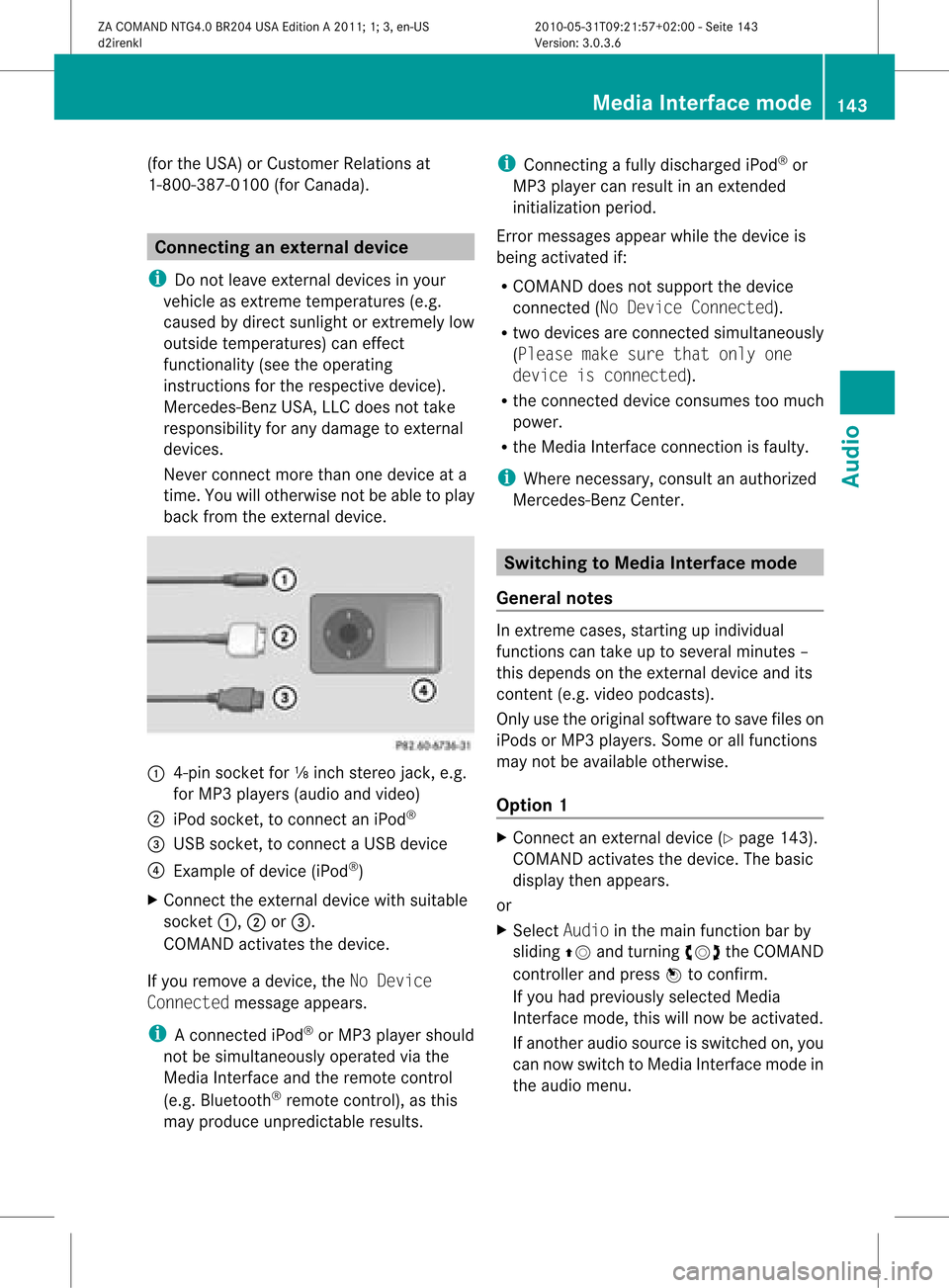
back fromtheexter naldevice. :
4-pin socket for⅛inch stereo jack,e.g.
for MP3 playe rs(audi oand video)
; iPod socket ,to conn ectaniPod ®
= USB socket ,to conn ectaUSBdevice
? Examp leof device (iPod ®
)
X Co nnect theexter naldevice with suita ble
socke t:, ;or=.
CO MAND activate sthe device .
If yo uremo veade vice ,the No Device
Connected messageappears.
i Aconn ected iPod®
or MP3 playershould
not besimultaneously operatedviathe
Media Interface andtheremote control
(e.g. Bluetooth ®
remote control), asthis
may produce unpredictable results. i
Connect ingafully discharged iPod®
or
MP3 playercan result inan exten ded
initialization period.
Error messages appearwhile thedevice is
being activated if:
R COMAND doesnotsupport thedevice
conn ected (No Device Connected).
R two devices areconn ected simultaneously
(Please makesurethatonlyone
device isconnected).
R the conn ected device consumes toomuch
power.
R the Media Interface connection isfaulty.
i Where necessary, consultanauthorized
Mercedes-Ben zCent er. Switching
toMedia Interfacemode
General notes In
ext reme cases, startingupindividual
func tionscan take uptoseveral minutes–
this depends onthe external device andits
con tent(e.g. video podcasts ).
Only usetheoriginal software tosave fileson
iPods orMP3 players. Someorall func tions
may notbeavailable otherwise.
Opt ion 1 X
Connec tan ext ernal device (Ypage 143).
COMAND activates thedevice. Thebasic
display thenappears.
or
X Select Audiointhe main function barby
sliding ZVandturningcVd theCOMAND
con troller andpress Wtocon firm.
If you had previously selectedMedia
Int erface mode,thiswillnow beactiv ated.
If anoth eraudio source isswitch edon, you
can now switch toMedia Interface modein
the audio menu. Media
Interfacemod e
143Audio
ZACOMAND NTG4.0BR204USAEdition A2011 ;1; 3,en-U S
d2irenk lV ersion:3.0.3.6
2010
-05-31T09 :21:57+0 2:00-Seite 143 Z