radio MERCEDES-BENZ C-Class 2011 W204 Comand Manual
[x] Cancel search | Manufacturer: MERCEDES-BENZ, Model Year: 2011, Model line: C-Class, Model: MERCEDES-BENZ C-Class 2011 W204Pages: 190, PDF Size: 2.21 MB
Page 24 of 190

X
To confi rm your selecti on:pre ssbutton
a.
X To confi rm the mes sage:pre ssthe
a or% button. Men
usand submen us
The num bero fm enus depends onthe vehicle
equipment. Menu Functions
andsubmenu s Navigation
system Navigation
systemdisplays Audio Select
sa stat ion
Operates theDVD changer ,
memory card,MUSIC
REGISTE R,Media Interface
Operates videoDVD Telephone Ac
cept s/rej ectsa call
Makes/ endsacall
Select sa phone bookentry
Redials Nav
igation system menu
Rout eguida nceinactive The
display showstheroad onwhich the
vehicle iscurren tlytravelin g,provided the
digital mapcontains it.
Rout eguida nceactive The
display shows:
R the distanc eto the destin ation
R the distanc eto the nextchange ofdirection
R current street
R the travel direction arrow If
achange ofdirection isimminent ,the
displa yshows:
R the road youwillbeturning onto
R the distance tothe next change ofdirection
and adistance graphic
R aright orleft-t urnarrow
Lane recommen dationsarealso shown inthe
displa y,provided thedigital mapcontains the
necessary data.During achange ofdirection,
the number oflanes mayincrease. Lane
recommen dationsareshown inthe displa yas
a line with anarrow. Audio
menu
Adjust ingthe volume X
Press theW orX button.
Setting thestat ion/c hannel X
Switch onCOMAND (Ypage 31).
X Switch onFM /AM radio (Ypage 120)or
SatRadio (Ypage 124).
X In the multifunction display,select the
audi omenu usingthe= or; button.
X To selec tthe next/ previo usstation /
chann elfrom thememory: brieflypress
the : or9 button.
X To selectthe next/ previo usstation /
chann el:press andhold the: or
9 button.
Operating theDVD chang er/memo ry
card/MUS ICREGI STER/Me dia
Inte rface X
Switch onCOMAND (Ypag e31).
X Switch onDisc, Memory
Card (Ypag e131), MUSIC
REGISTE R(Y pag e139) orMedia
Int. (Ypag e143).
X In the multifunction display, sele ctthe
au dio menu using the = or; button. 22
Multifunc
tionsteering wheelAtaglan ce
ZACOMAND NTG4.0BR204USAEdition A2011; 1;3,en-US
d2ire nkl Version:3.0.3.6
<003000230024002300250023002000250035002400490023002C002D00300024
002D00200034003300230030002D00230023V
-Seite 22
Page 27 of 190
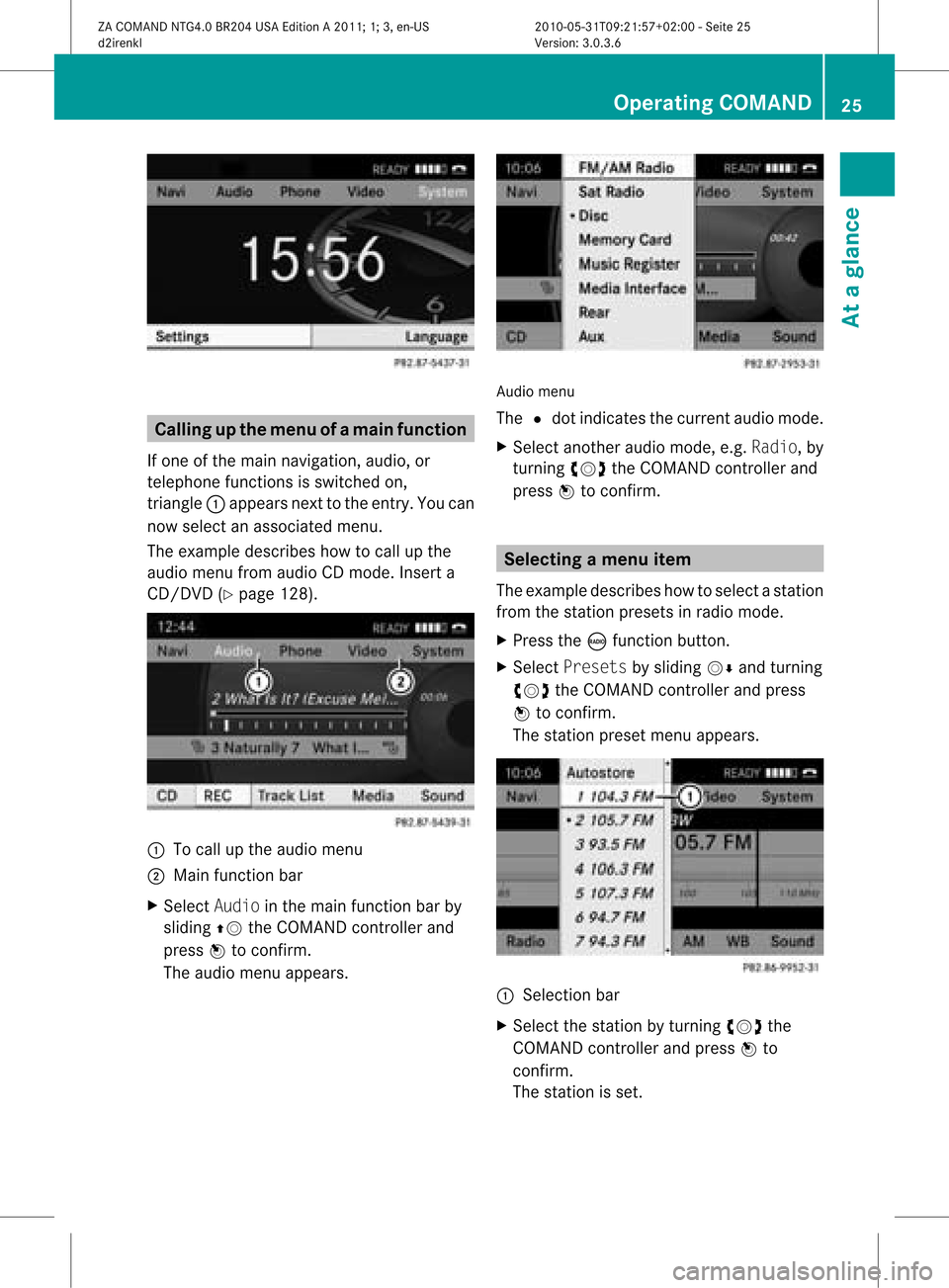
Callin
gup themen uofam ainfunc tion
If one ofthe mainnavigat ion,audio, or
te lepho nefun ction sis swit ched on,
tr iang le: appear sne xtto theen try. You can
no wselec tana ssociated menu.
The example describes howtocall upthe
audi omenu fromaudioCD mode. Inserta
CD/DVD (Ypage 128). :
Tocall upthe audi omenu
; Main function bar
X Select Audiointhe main function barby
sliding ZVtheCOMAND controller and
press Wtoconfirm.
The audi omenu appears. Audio
menu
The #dot indicates thecurrent audiomode.
X Select another audiomode, e.g.Radio, by
turning cVdtheCOMAND controller and
press Wtoconfirm. Selec
tingamenu item
The exam pledesc ribes howtoselec tastation
from thestation presets inradio mode.
X Press theófunction button.
X Select Presets bysliding VÆandturning
cVd theCOMAND controller andpress
W toconfirm.
The station presetmenuappears. :
Selection bar
X Select thestation byturning cVdthe
COMAND controller andpress Wto
confirm.
The station isset. Operat
ingCOMAND
25Ataglanc e
ZACOMAND NTG4.0BR204USAEdition A2011; 1;3,en-US
d2irenkl Version:3.0.3.6
2010-0
5-31T09 :21:57+02:0 0-Seite 25 Z
Page 28 of 190

Exam
pleofoper ation
Init ialsituation You
would liketoswit chfrom thesyst em
fun ction toradio mode andselec tastation,
for example.
The operating exampledescribes howto:
R call upthe audi ofunction
R switch onradio mode
R select astation System
menu
Callin gup the audio function X
Select Audiointhe main function barby
sliding ZVandturning cVdtheCOMAND
cont roller andpress Wtoconfirm.
The basic displa yof the current audio
operating mode,e.g.audioCD, appea rs. :
Selection bar Switching
torad iomode Option
1
X Press theófunction button.
The radio displa yappea rs.
i Repea tedlypressing thisfunction button
switches betweentheFM, AMand WB
waveba ndsinthat order andthen calls up
SatRadio mode.Pressing thebutton again
takes youback toFM radio mode.
Option 2
X Select Audioagainbyslid ing ZV the
COMA NDcontro ller and pressW to
co nfirm .
The audio menuappe ars.Rad iois
hig hlig hted. :
Curr enta udio operating mod e
; Main function bar
= Aud iomen u
X Pre ssW theCOMA NDcontrol ler and
co nfirm Radio.
The radio basic displayappear swit hth e
waveb andlastselected. 26
Op
era ting COMAN DAtaglan ce
ZACOMA NDNTG4 .0BR2 04USAEd ition A20 11;1; 3,en-US
d2i ren kl Version :3. 0.3.6
20
10-05-31 T09 :21:57 +02:00 -Sei te26
Page 34 of 190
You
canalso adjust thevolume forthe
followin g:
R navig ation announc emen ts
R phon ecalls
R the Voic eCont rolSyst em(see theseparat e
operat inginst ruct ions )
Adj usting thevolum efor naviga tion
annou ncement s Durin
ganavig ation announc emen t:
X Turn theqcon trol kn ob.
or
X Press theW orX buttononthe
multif unction steerin gwheel.
Adj usting thevolum efor telep hone
calls You
canadjust thevolume forhands -free
mode during atelep honecall.
X Turn theqcon trol kn ob.
or
X Press theW orX buttononthe
multif unction steerin gwheel. Adj
usting thesound settings
Calling upthesound menu You
canmake various soundsettings for the
diffe rentaudio andvide osour ces.This means
that itis possible toset more bassforradio
mode thanforaudi oCD mode, forexample.
You cancallupthe respective soundmenu
from themenu ofthe desired mode.
The example describes howtocall upthe
sound menuinradio mode.
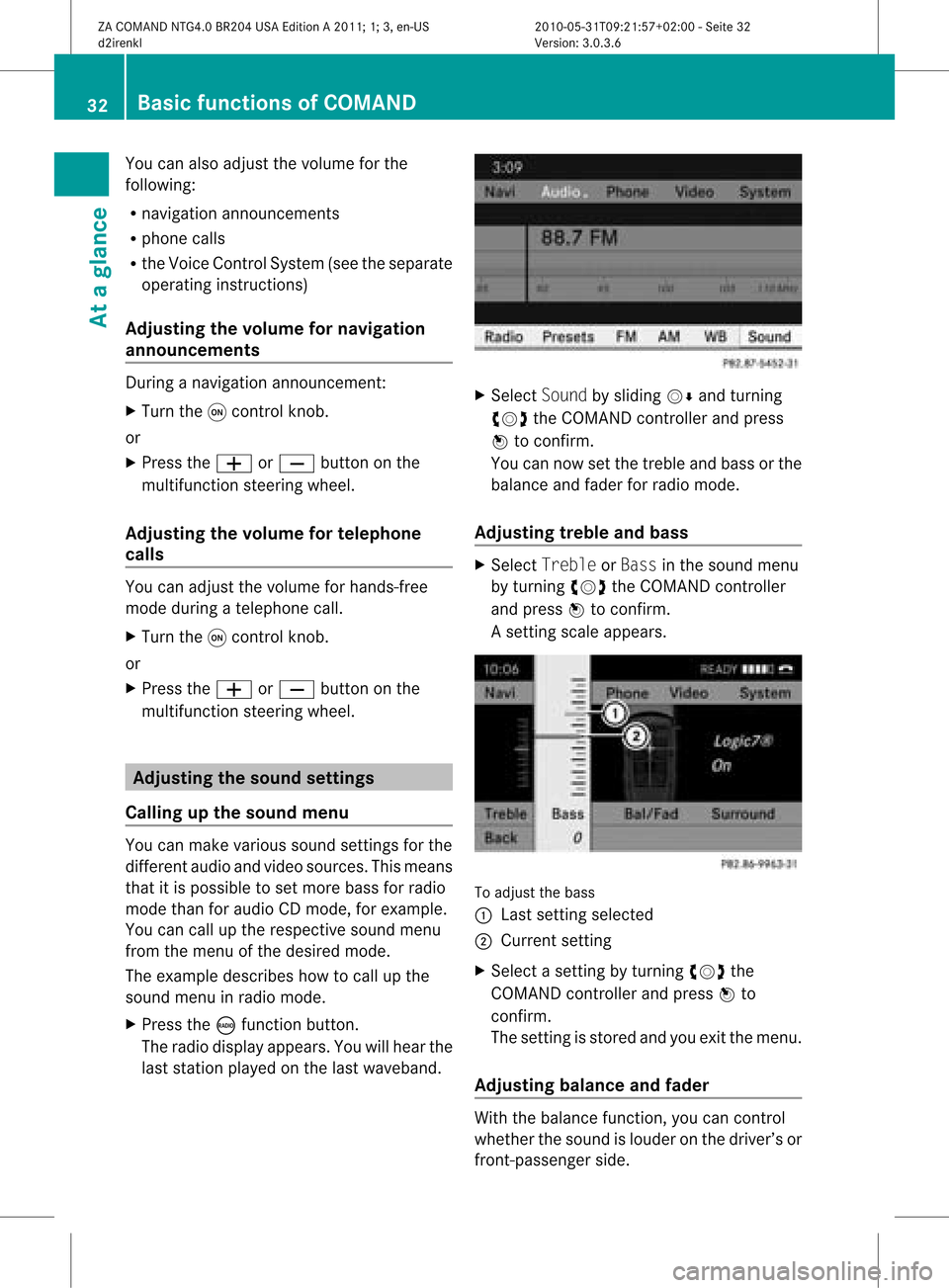
X Press theófunct ionbutton.
The radio displa yappea rs.You willhear the
last station playedon the last waveba nd. X
Select Soundbysliding VÆandturning
cVd theCOMAND controller andpress
W toconfirm .
You cannow setthe treble andbass orthe
bala nce and fader forradio mode.
Adjust ingtreble andbass X
Select Treble orBass inthe sound menu
by turning cVdtheCOMAND controller
and press Wtoconfirm .
As etting scale appears. To
adjust thebass
: Last settingselect ed
; Current setting
X Select asett ingbyturn ingcVd the
COMAND controller andpress Wto
con firm.
The settingisstor edand youexit themenu.
Adju sting balance andfader With
thebalance function,you can control
whether thesound islouder onthe driver’s or
fron t-passenger side. 32
Ba
sic functions ofCOMANDAt aglance
ZACOMAND NTG4.0BR204USAEdition A2011 ;1; 3,en-U S
d2irenk lV ersion:3.0.3.6
2010
-05-31T09 :21:57+0 2:00-Seite 32
Page 35 of 190

With
thefader function,you can control
whether thesound islouder inthe fron torthe
rear ofthe vehicle.
X Select Bal/Fad (balance/ fader) inthe
sound menubyturning cVdtheCOMAND
cont roller andpress Wtoconfirm . Adjustin
gbalance andfader
: Current setting
X Select asettin gby sliding ZVÆorturning
XVY theCOMAND controller andpress
W toconfirm .
The settin gis stored andyouexit themenu. Surr
ound sound
General notes If
your vehicle isequipp edwith theharman/
kardon ®
Logic 7®
surround soundsystem,
you can setthe optimum surround soundfor
every passenger.
The harman/kardon ®
Logic 7®
surround
sound system isavaila bleforthe following
operating modes:
R radio (FMonly)
R satellite radio
R audi oCD
R audi oDVD (MLP, dts,PCM andDolby
Digital audioformats)
R MP3 (including PCMCIAmemorycard)
R Media Interface R
video DVD(PCM, dtsand Dolby Digital
audi oformats)
R AUX
Because manyDVDscont ainboth stereo and
multi-chann elaudi oformats, itmay be
necessary toset the audi oformat
(Y page 136).
i The Logic7 ®
On funct ionenables
play back of,e.g. stereo recordings witha
surround soundexperience forevery
passenger. Itenables optimum playback of
music andfilms onCD, audi oDVD orvideo
DVD withmultichannel audioformats, such
as MLP, dtsorDolby Digital. Theresulting
audio experienc ereflect sthat inten dedby
the sound engineer duringtheoriginal
recordin g.
i Byselecting Logic7®
Off, playb ackofall
playa bleformats isas itis on the medium.
Due tothe design ofthe passenger
compart ment,an optimum audio
experienc ecann otbe guaranteed forall
passengers.
i Discs which support theaudio formats
ment ioned havethefollowing logos: Dolby
Digital dts Basic
functions ofCOMAND
33Ataglance
ZACOMAND NTG4.0BR204USAEdition A2011; 1;3,en-US
d2irenk lV ersion:3.0.3.6
2010
-05-31T09 :21:57+0 2:00-Seite 33 Z
Page 36 of 190
MLP
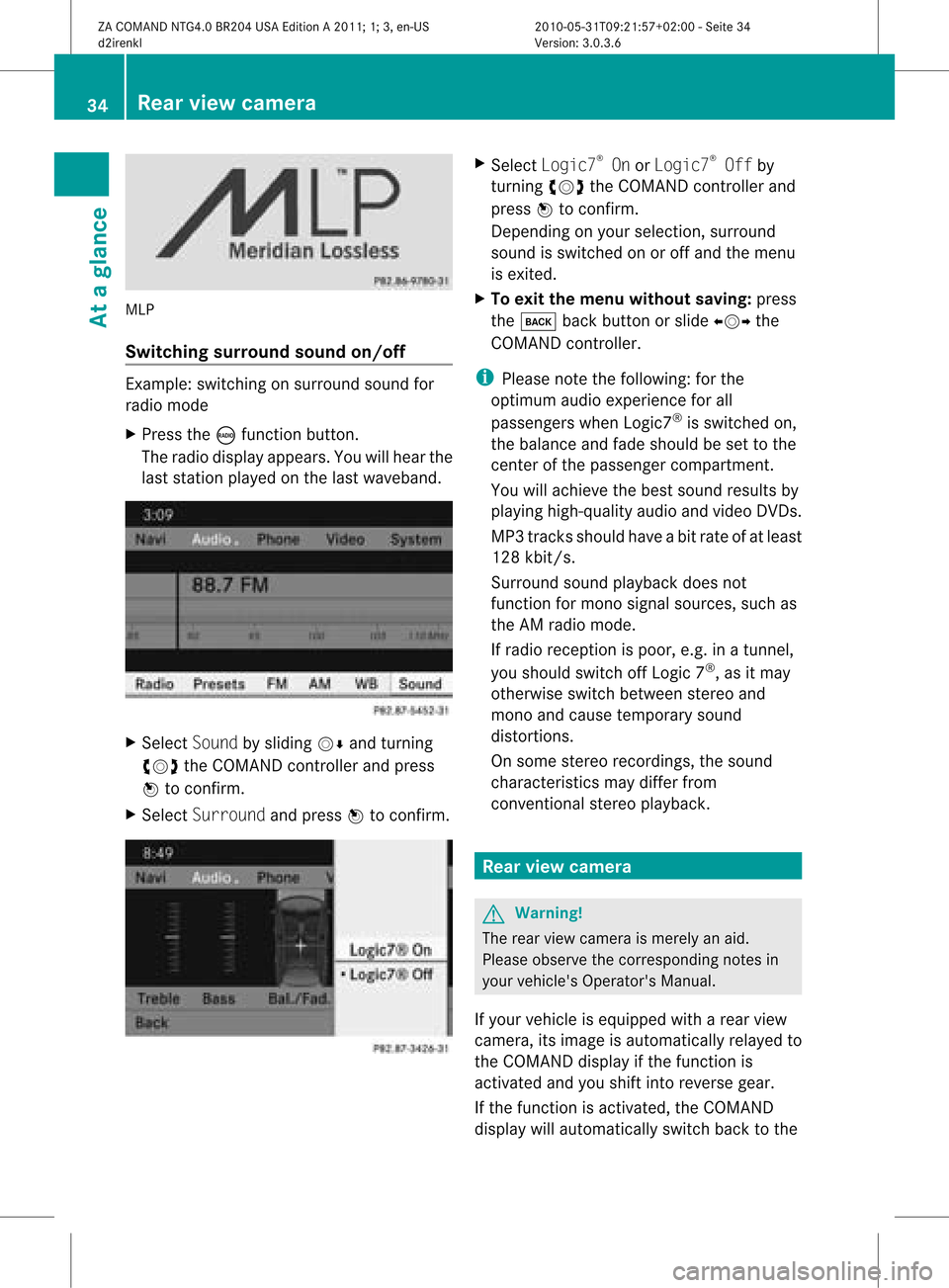
Switching surround sound on/off Example:
switching onsurround soundfor
radio mode
X Press theófunct ionbutton.
The radio displa yappea rs.You willhear the
last station playedon the last waveba nd. X
Select Soundbysliding VÆandturning
cVd theCOMAND controller andpress
W toconfirm .
X Select Surround andpress Wtoconfirm . X
Select Logic7 ®
On orLogic7 ®
Off by
turning cVdtheCOMAND controller and
press Wtoconfirm .
Depending onyour selection, surround
sound isswitched onoroff and themenu
is exited.
X To exit themenu without saving:press
the k backbutton orslide XVY the
COMAND controller.
i Please notethefollowing: forthe
optimum audioexperience forall
passengers whenLogic7 ®
is switched on,
the bala nce and fade should beset tothe
cent erofthe passenger compartmen t.
You willachieve thebest sound results by
play inghigh-quali tyaudi oand video DVDs.
MP3 track sshould haveabitrat eof at least
128 kbit/s.
Surr ound soundplayback doesnot
func tion formon osign alsourc es,such as
the AM radio mode.
If radio receptio nispoor, e.g.inatunnel,
you should switchoffLogic 7®
,as itmay
otherwise switchbetween stereoand
mono andcause temporary sound
distortions.
On some stereo recordings, thesound
characteristics maydiffer from
conven tionalstereo playback. Rear
view camera G
Warning!
The rear view camera ismerely anaid.
Please observe thecorresponding notesin
your vehicle's Operator's Manual.
If your vehicle isequip pedwith arear view
camera, itsimage isautomaticall yrelay edto
the COMAND displayif the function is
activated andyoushift intoreverse gear.
If the function isactivated, theCOMAND
displa ywill automaticall yswitch backtothe 34
Rear
view cameraAtaglanc e
ZACOMAND NTG4.0BR204USAEdition A2011; 1;3,en-US
d2irenkl Version:3.0.3.6
2010-0
5-31T09 :21:57+02:0 0-Seite 34
Page 42 of 190
X
Sel ect Settingsbyturni ngcVd the
CO MAND controllera nd pre ssW to
confi rm.
X Sel ect TextRea der Speedand pressW
to confi rm.
Al ist appears. The#dot indic ates the
curr entsetting.
X Selec ta set tingby turnin gcVd the
COMA NDcontroller andpress Wto
con firm . Voice
ControlSyst emsett ings Activa
ting/d eactivating thehelp
window
In additio ntothe audib leinstr uctions, the
help window willshow youother inform ation
during voicecontroloperation andthe
individuali zationprocess.
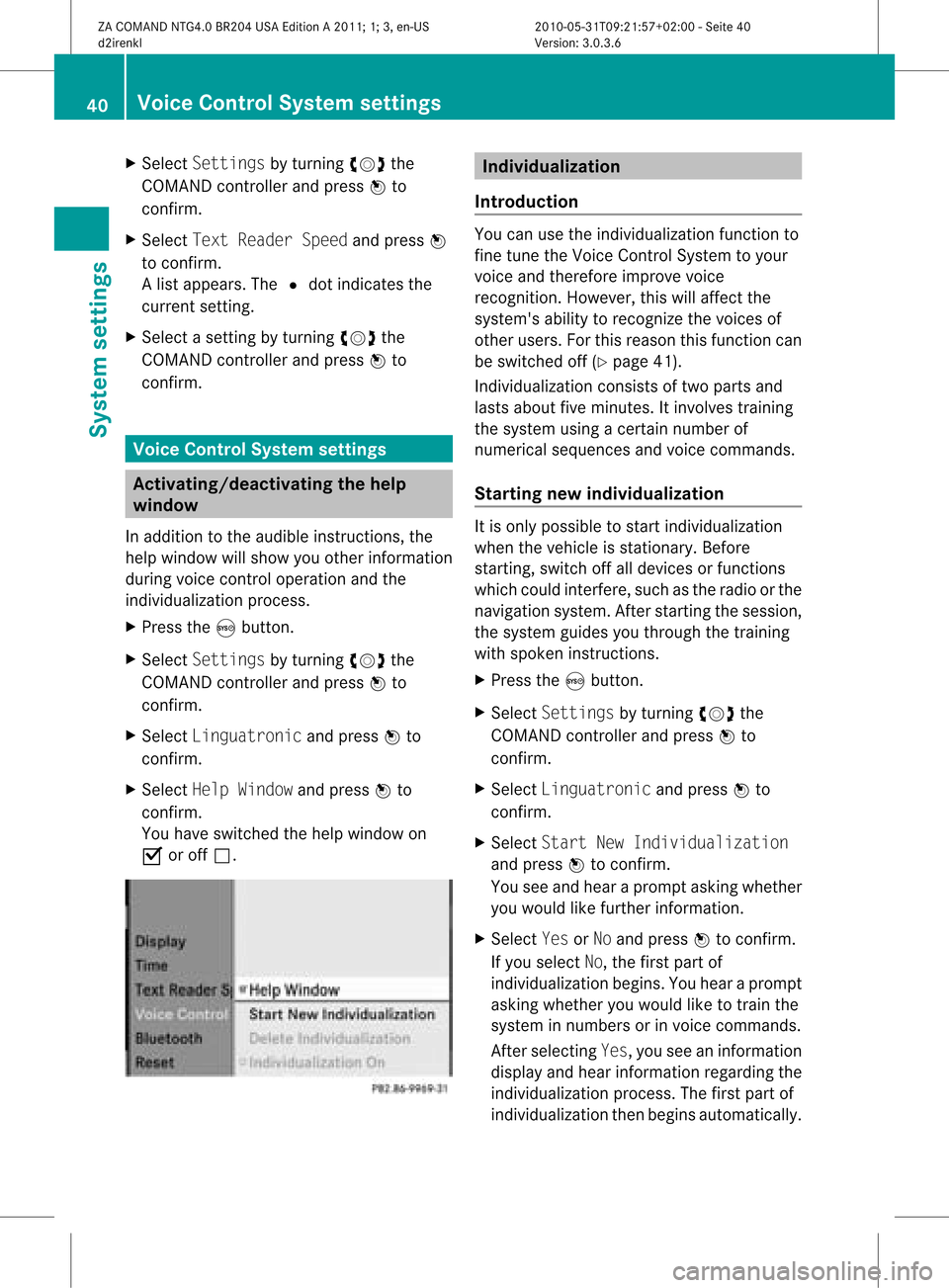
X Press theSbutton .
X Select Settings byturnin gcVd the
COMAND controller andpress Wto
conf irm.
X Select Linguatronic andpress Wto
conf irm.
X Select HelpWindow andpress Wto
conf irm.
You have switched thehelp window on
O oroff ª. Individualiza
tion
Introdu ction You
canusetheindividuali zationfunctionto
fine tune theVoice Control System toyour
voice andtherefor eimprove voice
recogn ition.However, thiswillaffect the
system's abilitytorecogn izethe voices of
other users. Forthis reason thisfunct ioncan
be switched off(Ypage 41).
<001E000E0004000900160009000400150001000C0009001C000100140009000F
000EV consistsof two parts and
lasts about fiveminutes. Itinvolves training
the system usingacert ainnumber of
numerical sequences andvoice comman ds.
Star ting new individualiza tion It
is only possible tostart individuali zation
when thevehicle isstation ary.Before
start ing,switch offalldevices orfunct ions
which couldinterfere,such asthe radio orthe
navigation system.Afterstart ingthe session,
the system guidesyouthrough thetrainin g
with spoken instructions.
X Press theSbutton .
X Select Settings byturnin gcVd the
COMAND controller andpress Wto
conf irm.
X Select Linguatronic andpress Wto
conf irm.
X Select Start NewIndividualiz ation
and press Wtoconf irm.
You seeand hear aprompt askingwhether
you would likefurther informat ion.
X Select YesorNo and press Wtoconf irm.
If you select No,the first part of
individuali zationbegins. Youhear aprompt
asking whether youwould liketotrain the
system innumbers orinvoice comman ds.
Aft erselecting Yes,youseeaninformat ion
display andhear informat ionregarding the
individuali zationprocess. Thefirst part of
individuali zationthenbegins automatically. 40
Voice
Control System settingsSystem settings
ZACOMAND NTG4.0BR204USAEdition A2011; 1;3,en-US
d2irenk lV ersion:3.0.3.6
2010
-05-31T09 :21:57+0 2:00-Seite 40
Page 72 of 190

Navi
gationann ounceme nts
Rep eatin gnav igatio nann ounceme nts G
Warn
ing
Na viga tio nanno unceme ntsareinte ndedto
di rec tyou while driving without diverting your
atten tionfrom theroad anddriving.
Please alwaysuse this feature instead of
consultin gthe map display fordirection s.
Consulting thesymbols ormap display for
direction smay cause youtodivert your
atten tionfrom driving andincrease yourrisk
of an accident .
i Audible navigation announcementsare
muted duringatelephone call.
If you have missed anannounc ement,you can
call upthe current announc ementatany
time.
X To show themenu: pressWthe COMAND
cont roller.
X Select +inthe navigation systemmenu
bar byturnin gcVd theCOMAND
cont roller andpress Wtoconf irm.
Switching navigation announcements
on/off X
To switch off:press theBbutton during
an announc ement.
You willbriefly seethemessage: The
guidance instructions havebeen
muted.
X To switch on:press Wthe COMAND
cont roller.
X Select +inthe navigation systemmenu
bar byturnin gcVd theCOMAND
cont roller andpress Wtoconf irm.
i COMAND automatically switchesthe
navigation announcementsback onif:
R you have anew route calculated.
R you switch COMAND backonagain or
start theengine. Reducing
volumeduring anavig ation
anno uncemen t The
volumeofan active radioof vide osou rce
can beautomatica llyredu cedduring a
navig ationannou ncement.
X Sele ctNavi inthe mainfunction barby
sli ding ZVandturning cVdtheCOM AND
controll erand pres sW toconfirm.
X Sele ctAudio Fadeoutand pres sW to
confirm.
The function isswi tched onO oroff ª,
dep endi ngon the previ ousstatus .
Settin gthe volume manuall y X
Adjust thevolu meusing the qcontrol
knob during anavig ationannou ncement.
or
X Sele ct+ inthe map view with the menu
show nand adjus tthe volume usingthe
q cont rolknob. Blocking
arout esecti onaffect edbya
tr af fic jam
This function bloc ksasec tiono fthe route
ahead ofyou. Thelength ofthe section of
route tobe blocked canbeadjusted. If
possible, COMAND calculates adetour
around theblocked sectionofthe route.
X To switch onnavigation mode:pressthe
g funct ionbutton.
X To show themenu: pressWthe COMAND
cont roller.
X Select Routeinthe navigation system
menu barbyturning cVdtheCOMAND
cont roller andpress Wtoconfirm .
X Select Detour andpress Wtoconfirm .
X To block asection ofthe route: select
Longer orShorter repeatedly andconfirm
using Wuntil thedesired sectionhasbeen
selected. 70
Route
guidanceNavigat ion
ZACOMAND NTG4.0BR204USAEdition A2011; 1;3,en-US
d2irenkl Version:3.0.3.6
2010-
05-31T09:21 :57+02:00-Seite 70
Page 75 of 190
If
the vehicle reaches anarea which isnot part
of the digitalmap, thedisp layapp ears asa
spli t-screen view.Onthe right-hand side,an
arrow appears which points tooff-road
destination :.Youwill hear the
announc ement:"Please followthearrow on
the display" .Asthe vehicle approachesthe
destination, theArea ofdestination
reached message appears.
Route guidance fromanoff-road
location toad esti nation If
th eveh icle posit ioniswith inthearea
cov ered bythedigit almap, butthemap does
no tcon tain anyinform ationabout that
locat ion,th eveh icle isin an off-road locat ion.
COMA NDisalso able toguide youtoa
dest inationeven from anoff-road locat ion.
At thest art oftherout eguidan ce,you willsee
th eOff Mapped Roadmes sage, anarro w
and thedist anceto thed estin ation. Thearrow
shows thecompass headingtothe actual
destin ation.
The route ishighlighted blue,startingfrom
the last recogn izedstreet the vehicle wason
before itleft themap.
As soon asthe vehicle isback onaroad
kn own tothe system, routeguidance
con tinues inthe usual way.
Rout eguida ncefrom anoff-m ap
location toad esti nation If
th eveh icle posit ionisouts idethearea
cov ered bythedigit almap, then theveh icle
is in an off-map locat ion.COMAND isalso
able toguide youtoadestination evenfrom
an off-map location.
At the start ofthe route guidance,youwillsee
the Off Mapped Roadmessage, anarrow
and thedistance tothe destination. Thearrow
shows thecompass headingtothe road left
last.
The route ishighlig htedbluefrom thenearest
road known tothe system. As
soon asthe vehicle isback onaroad
known tothe system, routeguidance
cont inues inthe usua lway .
Off-road duringrouteguidance Due
toroad const ruction work,forexample,
there maybedifferences betweenthedata
on the digital mapandtheactual course of
the road.
In such cases, thesystem willtemporarily be
unable tolocate thevehicle position onthe
digital mapandthus considers thevehicle to
be inan off-road position.
In the displa y,you willsee theOff Mapped
Road message, anarrow andthedistance to
the destination. Thearrow shows the
compass headingtothe actual destination.
As soon asthe system canassign thevehicle
position tothe map again,route guidance
cont inues inthe usua lway . Tra
ffic report s Condition
s
To receive real-time trafficreports via
satellite radio,yourequire:
R optionally available satellite radio
equi pment
R asubscription toSIRIUS XMSatellite Radio
Traffic Message Service
Further information onsatellite radiois
avail able inthe "Satellite radio"section
(Y page 123).
COMAND canreceive trafficreports via
satellite radioandtake these intoaccount for
route guidanceinthe navigation system.
Received trafficreports aredispla yedinthe
map either astext oras icons. Real-time
traffic report son the map
COMAND canshow certain trafficincidents
on the map. Traffic reports areshown onthe
map atscales of0.05 mito20 mi. Tr
affic report s
73Navigat ion
ZACOMAND NTG4.0BR204USAEdition A2011; 1;3,en-US
d2irenkl Version:3.0.3.6
2010-0
5-31T09: 21:57+02:00-Seite 73 Z
Page 94 of 190
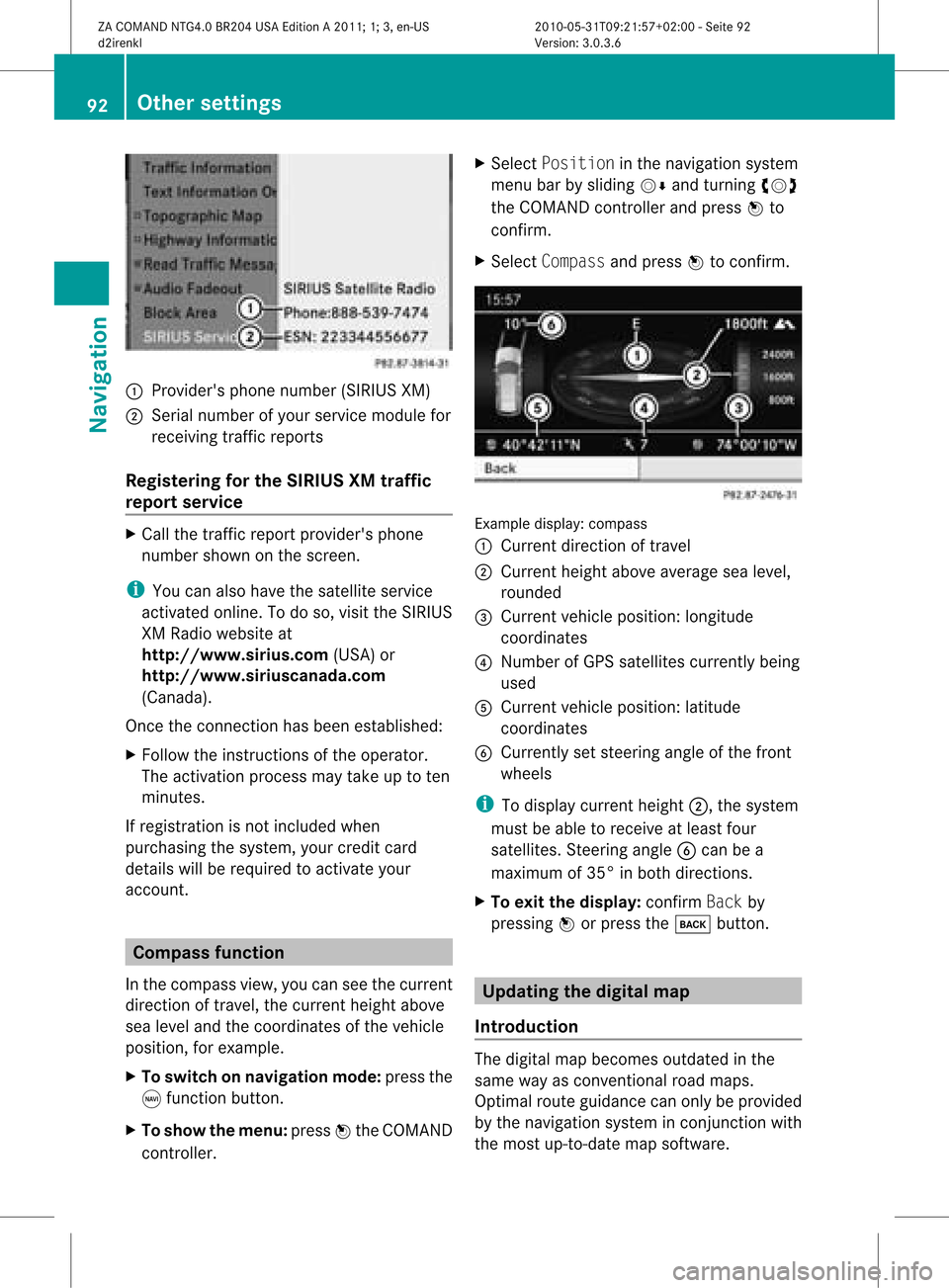
1
Provider's phonenumber (SIRIUSXM)
2 Serial number ofyour service module for
receivin gtraff icreport s
Registering forthe SIRIUS XMtraffic
repor tserv ice X
Call thetraff icrepo rtprov ider' sphon e
num bershown onthesc reen .
i You canalso have thesat ellit eser vice
act ivat edonline .Todo so, visit theSIRIUS
XM Radio website at
htt <0010002D00210021001700170017002000130009001200090015001300200003
000F000DF (USA)or
htt <0010002D00210021001700170017002000130009001200090015001300030001
000E000100040001F .com
(Canada) .
Once theconn ection hasbeen established:
X Follow theinstr uctions ofthe operator.
The activation processmaytake uptoten
minutes.
If registrat ionisnot included when
purchasing thesystem, yourcredit card
details willberequired toactivate your
account . Compass
function
In the compass view,youcan seethecurrent
direction oftravel, thecurrent heightabove
sea level andthecoordinat esofthe vehicle
position, forexample.
X To switch onnavigation mode:pressthe
g funct ionbutton .
X To show themenu: pressWthe COMAND
cont roller. X
Select Position inthe navigation system
menu barbysliding VÆandturnin gcVd
the COMAND controller andpress Wto
conf irm.
X Select Compass andpress Wtoconf irm. Example
display:compass
: Current direction oftravel
; Current heightaboveaverage sealevel,
rounded
= Current vehicleposition: longitude
coordinat es
? Number ofGPS satellites currentlybeing
used
A Current vehicleposition: latitude
coordinat es
B Currently setsteerin gangle ofthe front
wheels
i Todisplay current height;,thesystem
must beable toreceive atleast four
satellites. Steeringangle Bcan bea
maximum of35° inboth direction s.
X To exit thedisplay: confirmBack by
pressing Worpress thek button . Upda
tingthedigital map
Introdu ction The
digital mapbecomes outdatedinthe
same wayasconv ention alroad maps.
Optimal routeguidance canonly beprovided
by the navigation systeminconj unct ionwith
the most up-to- datemapsoftware. 92
Other
settingsNavigation
ZACOMAND NTG4.0BR204USAEdition A2011; 1;3,en-US
d2irenk lV ersion:3.0.3.6
2010
-05-31T09 :21:57+0 2:00-Seite 92