video MERCEDES-BENZ C-Class 2011 W204 Comand Manual
[x] Cancel search | Manufacturer: MERCEDES-BENZ, Model Year: 2011, Model line: C-Class, Model: MERCEDES-BENZ C-Class 2011 W204Pages: 190, PDF Size: 2.21 MB
Page 159 of 190

Make
aselection fromthefurther options,
if necessary.
COMAND thenswitches backtothe DVD
menu.
i Depending onthe DVD ,the menu items:
Back (tomovie), Play,
Stop, ., /orGo Upmay not
funct ionornot funct ionatcertain pointsin
the DVD menu. Youwillsee theKicon in
the displa yas an indicator.
Stopping afilm orskipping tothe
beginn ingorend ofas cene X
Se lec tany men uitem fromthe DVD menu .
Th emenu appe ars.
X To sto pthe film: select the Stopmenu
ite ma ndpre ssW toconfi rm.
X To skipto the endof asc en e:sel ect
the / menu itema ndpre ssW to
confi rm.
X To skiptoth ebeginnin gof as cene:
selec tthe . menu itemandpress Wto
confirm .
Moving upone level inthe DVD menu X
Press thek button.
or
X Select thecorresponding menuiteminthe
DVD menu andpress Wthe COMAND
cont roller toconfirm .
or
X Select anymenu iteminthe DVD menu and
press Wthe COMAND controller to
confirm .
X Select GoUpand press Wtoconfirm .
Going backtothe movie X
Press thek button repeatedly untilyou
see thefilm.
or
X Select thecorresponding menuiteminthe
DVD menu. X
Select theBack (tomovie) menuitemin
the menu andpress Wtoconfirm . Setting
thelanguage andaudio
forma t
This funct ionisnot availa bleonallDVD s.Ifit
is availa ble,youcan setthe DVD menu
language ,the audi olanguage orthe audi o
format. Thenumber ofsettin gsisdetermined
by the DVD content. Itis possible thatthe
settin gsmay alsobeaccessed inthe DVD
menu (Ypage 156).
X Press Wthe COMAND controller toshow
the menu.
X Select DVD-Video inthe menu byturning
cVd theCOMAND controller andpress
W toconfirm .
X Select DVDFunctions andpress Wto
confirm .
X Select MenuLanguage orAudio
Language andpress Wtoconfirm .
In both cases, amenu appearsafter afew
seconds. The#dot infront ofan entr y
indicates thecurrent lyselected language.
X Select asettin gby turning cVdthe
COMAND controller andpress Wto
confirm .
X To exit themenu: slideXVY theCOMAND
cont roller. Subtitles
andcamera angle
These functionsarenot availa bleonallDVD s.
The number ofsubtitle language sand camera
angles availabledepends onthe cont entof
the DVD .Iti spossible thatthesettings may
also beaccessed inthe DVD menu
(Y page 156).
X Press Wthe COMAND controller toshow
the menu.
X Select DVD-Video inthe menu byturning
cVd theCOMAND controller andpress
W toconfirm. DVD
video mode
157Video
ZACOMAND NTG4.0BR204USAEdition A2011; 1;3,en-US
d2irenkl Version:3.0.3.6
2010-0
5-31T09 :21:57+02:0 0-Seite 157 Z
Page 160 of 190

X
Sel ect DVD Functi ons andpressW to
confi rm.
X Sel ect Subtitles orCam era Angleand
pre ssW toconfi rm.
In both cases, amenu appe ars .The # dot
in front ofan entr yindicates thecurrent
settin g.
X Select asettin gby turning cVdthe
COMAND controller andpress Wto
confirm .
X To exit themenu: slideXVY theCOMAND
cont roller. Interactive
content
DVD scan cont aininteract ivecont ent(e.g. a
video game). Inavideo game, forexample,
you may beable toinfluence eventsby
selecting andtriggering actions.Thetype and
number ofactions depend onthe DVD .
X Select anaction bysliding ZVÆorXVY the
COMAND controller andpress Wto
execute it.
A menu appearsand thefirst entry,
Select, ishighlighted.
X Press theWCOMAND controller. 158
DVD
video modeVideo
ZACOMAND NTG4.0BR204USAEdition A2011; 1;3,en-US
d2irenkl Version:3.0.3.6
2010-
05-31T09:21 :57+02:00-Seite 158
Page 161 of 190

Vehi
cle equi pmen t<0021002100210021002100210021002100210021002100210021002100210021
002100210021002100210021002100210021002100210021V 160
General information<0021002100210021002100210021002100210021002100210021002100210021
002100210021002100210021002100210021V 160
Basic functions <0021002100210021002100210021002100210021002100210021002100210021
0021002100210021002100210021002100210021002100210021002100210021
0021> 167
System settings <0021002100210021002100210021002100210021002100210021002100210021
0021002100210021002100210021002100210021002100210021002100210021V 168
Audio CD/DVD andMP3 mode ........ 169
DVD video mode <0021002100210021002100210021002100210021002100210021002100210021
002100210021002100210021002100210021002100210021002100210021V 174
AUX mode <0021002100210021002100210021002100210021002100210021002100210021
0021002100210021002100210021002100210021002100210021002100210021
0021002100210021002100210021002100210021> 178 159Rear
SeatSystem
ZACOMAND NTG4.0BR204USAEditio nA 2011 ;1; 3,en-U S
d2iren kl Version:3.0 .3.6
2010
-05-31T09: 21:57+0 2:00-Seite 159
Page 162 of 190

Vehi
cle equi pmen t
i TheseOpe rating Instru ctionsdescri beall
sta nda rdand optio nal equipme ntava ilab le
for your veh icleat the time ofpurcha se.
Pl ea se note thatyour vehicle maynotbe
equipped withallfeatures described. General
information Import
antsafety notes G
War
ning
The RSE CD/D VDplayer isaClass 1laser
prod uct.There isadanger ofinvisible laser
radiation whenyouopen ordamage thecover.
Do not remove thecover. TheRSE CD/DVD
play erdoes notcont ainany parts which can
be serviced bythe user. Forsafety reasons,
have anynecessary serviceworkperformed
by qual ified personnel. G
Warning
The driver should notwear aRear Seat
Ent ertainment headsetwhileoperating the
vehicle underanycircumstan ces.Theuseof
a headset whiledriving thevehicle could
drastically impairtheabili tyto react toaudi ble
traffic conditions (e.g.emergency sirensfrom
<0010000F000C0009000300050022000600090012000500220001000D00020015
000C0001000E000300050032V anothercar’shorn,
etc. ). G
Warning
When notinuse, headsets orextern alvideo
sources shouldbestored inas afe locatio n
(e. g.on eof theveh icle’sstorag e
com partmen ts)so that they are notloose
within thepassenger compartmentduring
braking, vehiclemaneuvers oratraffic
accident .Object smoving withinthe
passenger compartmentcould cause serious
personal injurytovehicle occupant s. G
War
ning
Due toapotent ialchokin ghazar d,wired
heads etusage bychildre nshould onlyoccur
with adultsuper vision . Comp
onents
Over view The
Rear SeatEntertainm entSys tem
co mpr ises:
R two scree nsbehin dth efron t-seat head
res traint s
R therem oteco ntrol
R aCD/ DVDdriv e
R AU Xjac kson bot hsc ree ns(AU Xdispl ay)
and ontheCD/ DVDdriv e(AU Xdriv e)
R two setsof wirel essheadp hones 160
Gener
alinfor mationRea rSe at Syste m
ZACOMAN DNT G4 .0BR 204 USA Editio n A 201 1;1;3,en-US
d2 iren kl Version: 3.0 .3.6
201
0-05-31T09: 21:57+ 02:00-Se ite1 60
Page 165 of 190
Switching
thesound on/off (wired
headp hones only) X
Press button Bonthe remote control.
The sound isswitched on/off.
Selec tingamenu/m enuitem and
confir mingyour select ion X
Sele ctamen u/m enuitemusin gth e
=;9 :buttonsand pres s
th e9 butt ontocon firm. CD/DVD
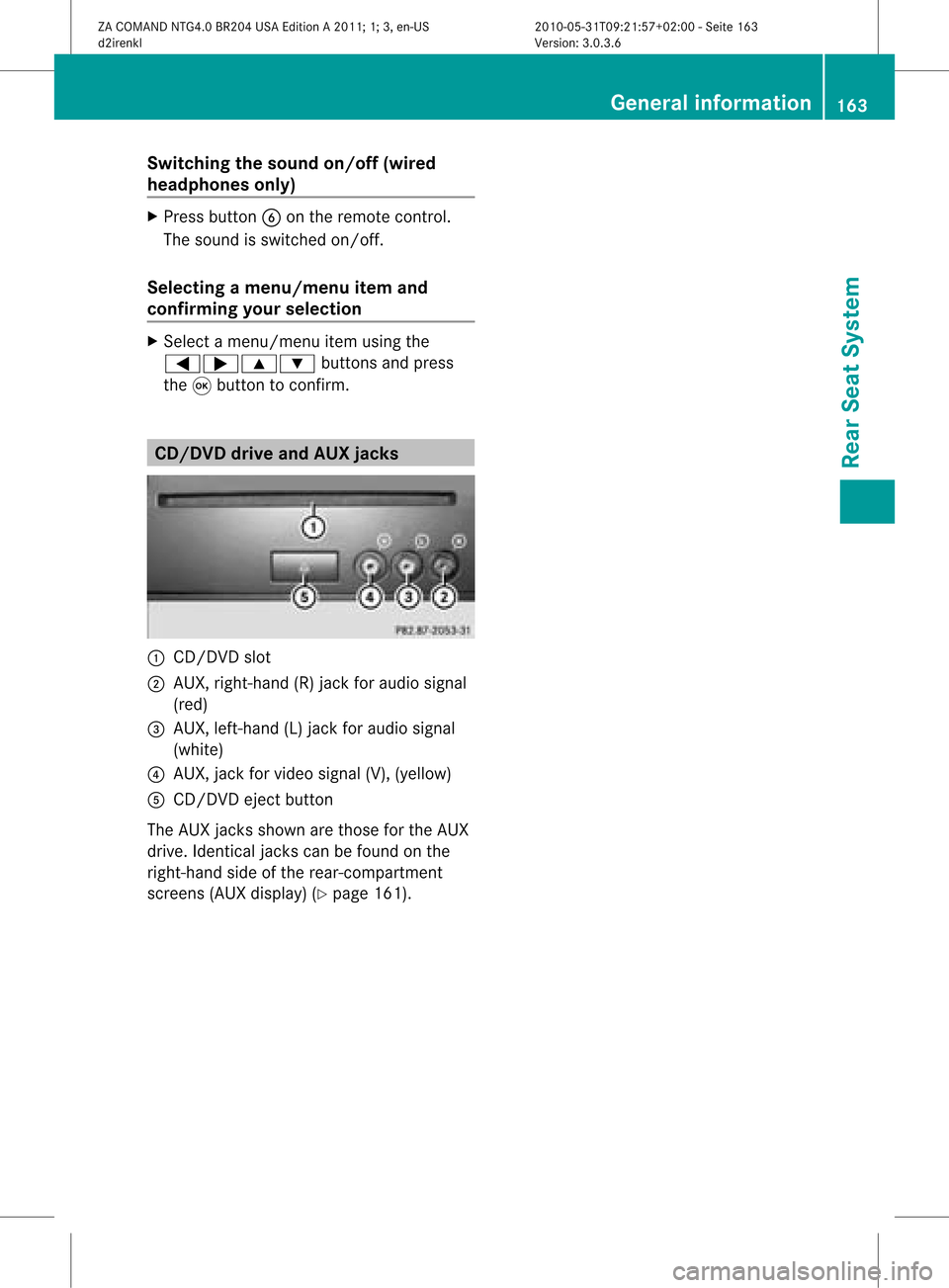
drive and AUX jacks :
CD/ DVDslot
; AUX,righ t-han d(R) jackfor audio signal
(red)
= AUX, left-hand (L)jack foraudio signal
(white)
? AUX, jackforvideo signal (V),(yellow )
A CD/D VDeject button
The AUX jacksshown arethose forthe AUX
drive. Identicaljack scan be foun don the
righ t-han dside oftherear -comp artmen t
sc ree ns(AU Xdispl ay)(Ypage 161). Gener
alinfor mation
163RearSeat System
ZACOMA NDNTG4 .0BR2 04USAEdi tionA 20 11;1; 3,en- US
d2ir enklV ersion:3.0.3.6
2010
-05-31T09 :21:57+0 2:00-Seite 163 Z
Page 169 of 190
Right
-hand battery: thepos itive pole (+)
mus tface down wards .
X To close thebat terycomp artm ent :
pres sth ebat tery compar tmentlid
downwar dsunt ilit clips intoplace.
If the batt eries havebeen inserted
cor rectly, the indic atorlamp willlight up
green whentheheadphon esare switc hed
on. Ba
sic functions Using
headphones
You canusethewireless headphon es
supplied and/orup totwo setsof wired
headphon escon nected tothe correspo nding
jac kof the rear- compartmen tscr eens
(Y page 161).
In for mat ionon:
R switc hingthewireless headphon eson/ off
R adjust ingthe volume ofthe headphon es
R selec tingascr een forthe headphon es
can befoun din the Wireles sheadphon es
sect ion(Ypage 164). Using
thema inloud spea kers
This function isavailable incon junction with
COMA ND.
You canusethevehic leloudspeak ersto
list en toadisc inserted inthe rear-
com partmen tdrive. Todo so, atlea stone of
the rear-compa rtmentscreens mustbeset to
disc mode.
X To set using COMA ND:press, for
exampl e,the efunction buttontoswi tch
on anaudio mode.
X Select Audiobyslid ing ZV theCOMAND
controller andpress Wtoconfirm.
The audio menu appears.
X Select Rearbyturning cVdtheCOMAND
controller andpress Wtoconfirm. i
The headpho nes'volumesetting doesnot
affect themain loudspe akers. Adjusting
thesoun dsettings
You canselec tthe sound settingsinthe audi o
CD/DV D/MP3, videoDVDandAUX modes.
X Switch onanoperating mode(e.g.audio
CD mode) (Ypage 170).
X Select Treble orBass using
the :=; buttonsonthe remote
cont roland press the9button toconfirm .
As etting scale appears.
X Select asett ingusing the9:
button sand press the9button tocon firm. Several
users
Simult aneous useofthe rear -
compa rtment drive The
two rear-c ompartm entscreen scan be
operated almostentirely independen tlyfrom
one anoth er.However, therecan beacon flict
in some menus ifthe two screen sare used at
the same time.
If the rear-c ompartm entdrive isbeing used
for both screen ssimultaneously, selecting
cert ainmenus orsett ings onone ofthe
screen salso affect sthe other screen .
The following functionsaffect bothscreen s:
R changin gplayback options
R select ingatrac k(from thetrac klist ora
folder)
R using theplay, pause andstop functions
R fast forwarding /rewindingor scrollin g
R calling upthe DVD menu andnavigatin g
within it
R sett ingthe language, subtitlesandcamera
angle
R calling upinteract iveDVD content Ba
sic functions
167RearSeatSystem
ZACOMAND NTG4.0BR204USAEdition A2011 ;1; 3,en-U S
d2irenk lV ersion:3.0.3.6
2010
-05-31T09 :21:57+0 2:00-Seite 167 Z
Page 170 of 190
The
following functionsaffect onlyone
screen :
R audio andvideo functionsaswell aspicture
sett ings
R switchin gbetween fullscreen andthe
menu
Switching betweenoperatingmodes The
curren tsett ings aresaved whenyouexit
an operatin gmode (e.g.audio CDmode). If
you callupthis operatin gmode againlater,
ther eare two possibilities:
R the operatin gmode hasbeen adjusted on
the other screen .
R the operatin gmode hasnotbeen adjusted.
In the first case, theoperatin gmode appears
as itis on the other screen .
In the secon dcase, thesett ingappears onthe
screen asitwas when youlast exitedthe
operatin gmode. Pictur
esettings
Overview You
canselect thesesettings invideo DVD
and AUX mode. Instruct ions forAUX mode
are detailed later(Y page 178).
Adju sting thebright ness,contra stand
color X
Switc hon video DVDmode (Ypage 174).
X To show themenu: pressthe9button
on the remot econ trol.
or
X Select Menuwhile thenavigation menu
(Y page 154)is shown andpress the9
button tocon firm.
X In both cases, selectDVD-Vid eousing
the :=; buttonsand press the
9 button tocon firm. X
Select Brightn ess,Contras tor Color
using the9: buttonsand press the
9 button tocon firm.
As etting scale appears.
X Select asett ingusing the9:
button sand press the9button tocon firm.
Changing thepictu reform at X
To show themenu: pressthe9button
on the remot econ trol.
or
X Select Menuwhile thenavigation menu
(Y page 154)is shown andpress the9
button tocon firm.
X Select DVD-Vid eousing
the :=; buttonsand press the
9 button tocon firm.
The äicon infron tof one ofthese menu
items –16:9 Optimiz ed,4:3 or
Widescr een–indicat esthe curren tly
select edformat .
X Select aformat usingthe9:
button sand press the9button tocon firm. System
settings Notes
You cansetallsystem settings individually for
each screen without affectingthe other
screen .You make these settings using the
remote control. Selecting
thedisplay language
X Select System usingthe9=;
button son the remote controland press
the 9button toconf irm.
The system menuwillappear onthe
selected rear-compartmentscreen . 168
System
settingsRearSeatSystem
ZACOMAND NTG4.0BR204USAEdition A2011; 1;3,en-US
d2irenk lV ersion:3.0.3.6
2010
-05-31T09 :21:57+0 2:00-Seite 168
Page 176 of 190
X
Sel ect CD,DVD -AorMP3 using
the :=; buttons onthe remo te
control andpressthe 9button toconfi rm.
The options list ap pe ars .A#dot indicates
the option currentlyselect ed.
X Select Normal TrackSequen ce,Random
Tracks orRandom Folderusingthe
9: buttonsand press the9butt on
to con firm.
The option isswitc hedon.Alloption s
exc ept Normal TrackSequencewill be
indicat edinthe display/select ionwindow.
i Ifyou chang ethe disc, theNormal
Track Sequenceoption isactiv ated
automatic ally.Ifan option isselect ed,it
remains selectedafter theRear Seat
En tert ainmen tSyst emisswitc hedonor
off. Switching
track inform ationon/off
(MP3 mode only)
If the func tionisswitc hedon,folder andtrack
names aredisplayed.
If the func tion isswitc hedoff,disc andfile
names aredisplayed.
X Select MP3using the:=;
butt ons onthe remot econ troland press
the 9butt ontocon firm.
X Select Displa yTrack Information
using the9: buttons and press the
9 butt ontocon firm.
The func tion isswitc hedonO oroff ª,
dependin gon the previous status. DVD
video mode General
notes
Here youwillfind further infor mation onthe
following topics:
R safety notes(Ypage 127)
R not eson DVD s(Ypage 152) DVD
playback conditions
There maybeplayback problems when
playing copieddiscs.Therearealarge variety
of discs, DVDauthorin gsoft ware, discwritin g
soft ware andwriter savailable. Thisvariety
means thatthereis no guarantee thatthe
Rear SeatEntert ainmen tSyst em will beable
to play video DVDs that you haveco pied
your self.
You willfindfur ther info rm ation intheVid eo
sec tion (Ypage 153). Info rm ation regard ing
COMA NDalso appli estotheRear Seat
En tertain men tSys tem. Fun
ction restricti ons
De pen dingon theDV D,itis pos sibleth at
ce rtain function sor act ionsdes cribed inthis
sec tion will betempo rarilybloc kedor may not
fun ction atall. Assoo nas you try to act ivat e
th ese function sor act ions,you willsee the
K sym bolinthedisp lay. Inser
ting andr emov ingaCD/DVD
X Proc eed asdes cribed inthe"Au dio CD/
DV Da ndMP3 mode"sec tion
(Y page 170) . Sw
itchin gto video DVD mode
X Inse rtavid eo DVD.
The RearSea tEnterta inmentSys tem load s
the disc.
If disc mod ewa sthe last mod esel ecte d,it
wi llnow beacti ve.
If it wa snot, switch onvideo DVD modeas
de scri bedin the followi ng instructio n.
X Sel ect Discin the menu using the
9=; buttons onthe rem ote
contro land pressthe 9button toconfi rm.
If the video DVD fulfills the play ba ck
cri teri a,the filme ithe rstar tsautoma tically
or the menu saved onthe DVD appe ars. If 17
4 DV
Dvid eomod eRear Seat Syste m
ZACOMAN DNT G4 .0BR 204 USA Edition A201 1;1;3,en- US
d2 irenk lV ersion:3.0.3.6
2010
-05-31T09 :21:57+0 2:00-Seite 174
Page 177 of 190
the
DVD menu appe ars, yo uwi llnee dto
sta rtthe film ma nua lly.
X Sel ect the corr espo ndi ngmenu itemi nthe
DVD menu. Showing
/hidingthenavigation menu
X To show: pressthe9 or: button
on the remote control.
X To hide: press the9 or: button.
or
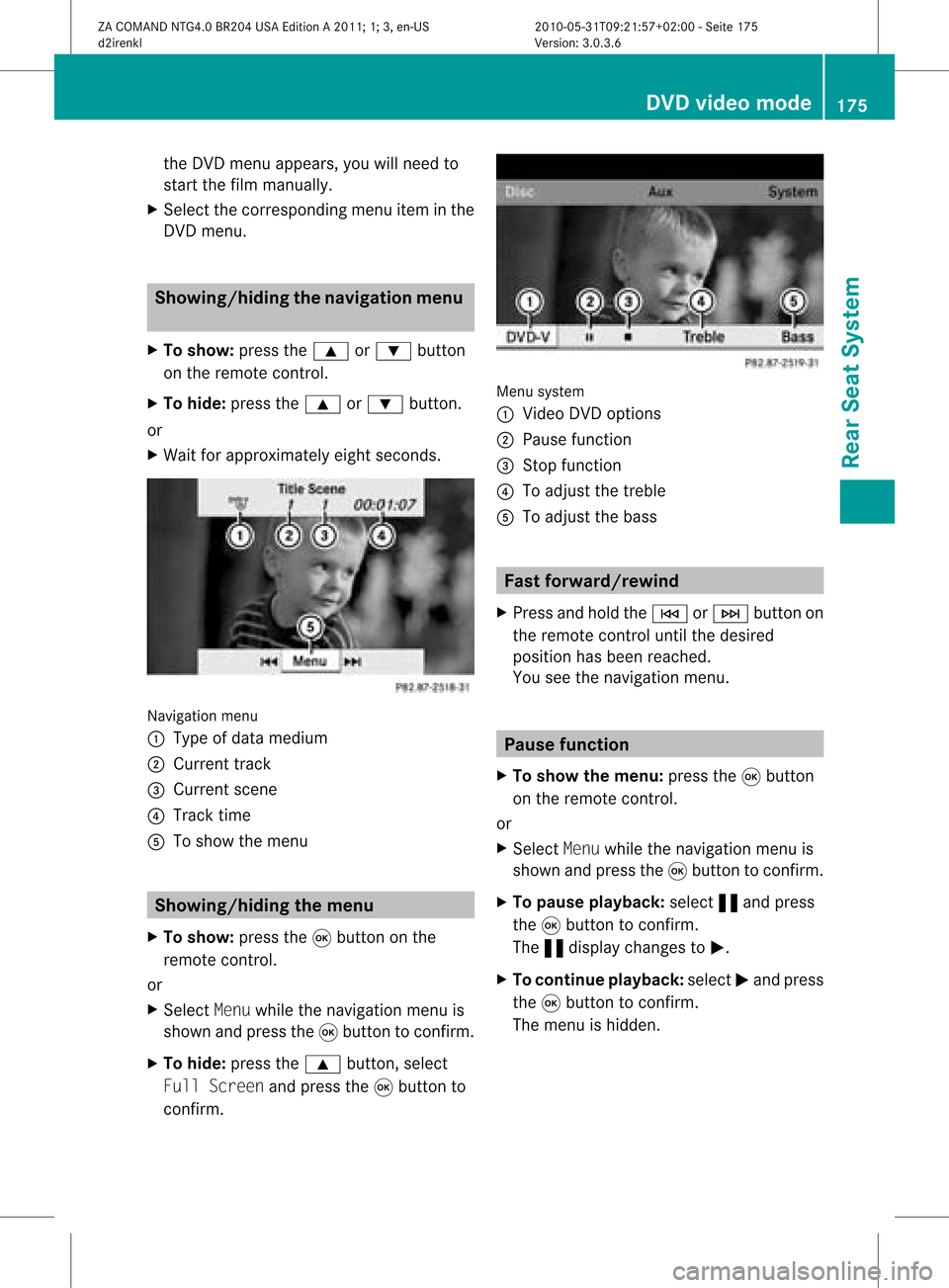
X Wait forapproximately eightseconds. Navigation
menu
: Type ofdata medium
; Current track
= Current scene
? Track time
A Toshow themenu Showing
/hidingthemenu
X To show: pressthe9button onthe
remote control.
or
X Select Menuwhile thenavigation menuis
shown andpress the9button toconfirm .
X To hide: press the9 button, select
Full Screen andpress the9button to
confirm . Menu
system
: Video DVDoptions
; Pause function
= Stop function
? Toadjust thetreble
A Toadjust thebass Fast
forward /rewind
X Press andhold theE orF button on
the remote controluntil thedesired
position hasbeen reached.
You seethenavigation menu. Pause
function
X To show themenu: pressthe9button
on the remote control.
or
X Select Menuwhile thenavigation menuis
shown andpress the9button toconfirm .
X To pause playback: select«and press
the 9button toconfirm .
The «displa ychanges toM.
X To continue playback: selectMand press
the 9button toconfirm .
The menu ishidden. DVD
video mode
175RearSeatSystem
ZACOMAND NTG4.0BR204USAEdition A2011; 1;3,en-US
d2irenkl Version:3.0.3.6
2010-
05-31T09:21 :57+02:00-Seite 175 Z
Page 178 of 190

Stop
function
X To show themenu: pressthe9button
on the remote control.
or
X Select Menuwhile thenavigation menuis
shown andpress the9button toconf irm.
X To interru ptplayback: select±and
press the9button toconf irm.
The «display changes toM.T hevideo
image ishidden.
X To continue playback: selectMand press
the 9button toconfirm .
Play back continues fromthepoint where it
was interrupted. Themenu ishidden.
X To stop playback: whileplayback is
interrupted, select±again andpress the
9 button toconfirm .
Play back stops andjumps tothe beginning
of the DVD .The selection markerisat M.
X To restar tplayback: selectMand press
the 9button toconfirm .
Play back starts fromthestart ofthe DVD . Selec
tingascene/ch apter
Not es Fur
ther inform ation on this fun ction is
availab lein theVide osec tion (Y page 155).
Ski pping forwar ds/back wards X
Pre ssthe= or; buttonon the
rem oteco ntrol .
or
X Pre sstheE orF button.
The navigat ionmen u(Y page 154)appear s
for appr oximat elyeigh tsecon ds.
Selecting ascene/ch apter directl y The
example sillust ratehow tosele ctscen e/
ch apt er5. X
Op tion1: while thefilm isplayin g,pre ss
th eh buttonon therem oteco ntrol .
X Pre sstheco rrespo nding num berkey,suc h
as ¿.
X Op tion2: while thefilm isplayin g,pre ss
th e9 buttonon therem oteco ntrol and
sho wthemen u.
X Se lec tDVD -Video andpressthe9 but ton
to confirm .
X Se lec tDVD Functions andpressthe9
but tonto confirm .
X Se lec tSce neSelection andpressthe
9 buttonto confirm .
X Se lec t5 usin gth e9 or: buttona nd
pre ssthe 9button toconfi rm.
In bo th cas es, play ba ck willbe gina fter a
short whilewith scene/chap ter5. Sel
ecting afilm/t itle
Not es Furt
herinformat iononthis func tion is
available inthe Video section(Y page 156).
Opt ion 1 X
Press the9butt onon the remo tecon trol
and show themen u.
X Selec tDVD- Videoand press the9butt on
on the remo tecon trol to con firm . 176
DVD
video modeRearSeat System
ZACOMAN DNTG4. 0BR20 4USA EditionA201 1;1;3,en- US
d2ire nklV ersion:3.0.3.6
2010
-05-31T09 :21:57+0 2:00-Seite 176