video MERCEDES-BENZ C-Class 2011 W204 Comand Manual
[x] Cancel search | Manufacturer: MERCEDES-BENZ, Model Year: 2011, Model line: C-Class, Model: MERCEDES-BENZ C-Class 2011 W204Pages: 190, PDF Size: 2.21 MB
Page 136 of 190

Media
list Maga
zinetrays ,posi tions 1to6: readable
data media areaudio CDs,MP3CDsorMP3
DVD s,audio DVDsand video DVDs. Memory
card,position 7 MUSIC
REGISTER, position8 Media
Interface, position 9 i
Ifadata medium isnot readable, anentr y
appears behindthemagazine trayoryou
receive amessage ifyou have selected the
memory card.
X Select thedata medium byturnin gcVd
the COMAND controller andpress Wto
conf irm.
i Ifyou select avideo DVD,the system
switches tovideo DVDmode
(Y page 152). Selecting
atrac k
Se lecti ng byskippin gto atrac k X
To ski pfo rwa rdsorbac kto atrac k:tur n
cVd theCOMAND controllerwh en the
di sp lay/ selectio nwindow isact ive.
or
X Press theE orF button.
Sk ipping forward skipsto the nexttr ack .
Sk ipping backwards restartsthe curr ent
tr ack (ifithas been playing formor ethan
8s econ ds)orstart sthe previous track(if
the curr enttrack hasonly been playing for
a shor tertime).
If you have switchedonthe Rand om
Trac ksplayback option, theorder ofthe
tr ack sis rand om.
Selecting bytrack list X
In audio CD/DVDm ode, select Track
List bysliding VÆandturnin gcVd the COMAND
controller andpress Wto
conf irm.
or
X Press Wthe COMAND controller inMP3
mode whenthedisplay /select ionwindow
is active.
The track listappears. The#dot indicates
the current track.
X Select thetrack byturnin gcVd andpress
W toconf irm.
i InMP3 mode, thelistshows allthe track s
in alphabetical order. Fast
forward /rewind
X While thedisplay /select ionwindow is
active, slideXVY andhold theCOMAND
cont roller untilthedesired position has
been reached.
or
X Press andhold theE orF button
until thedesired position hasbeen
reached. Selecting
afolder
This function ison lyavailable inMP3 mode .
X Swit chon MP3 mode (Ypage 131).
X Sele ctFol der byslidin gVÆ andturnin g
cVd theCOMA NDcontroller andpres s
W tocon firm.
or
X Pres sW theCOMA NDcontroller when the
display/ selectionw indow isact ive.
The contentofthe folder isdispla yed. 134
Audio
CD/DVD andMP3 modeAudio
ZACOMAND NTG4.0BR204USAEdition A2011; 1;3,en-US
d2irenkl Version:3.0.3.6
2010-
05-31T09:21 :57+02:00-Seite 134
Page 139 of 190

X
To select opti ons:sw itch onaudio CD/
DVD orMP3 mode(Y pa ge 131) .
X Sel ect CD,DVD -AorMP3 byslid ing VÆ and
tur ning cVd theCOMAND controller and
pre ssW toconfi rm.
The optio ns list appe ars. The #dot
ind icates the optio ns elected.
X Select anoption byturn ingcVd andpress
W tocon firm.
The option isswitch edon. For alloption s
exc ept "Normal tracksequence", youwill
see acorr espondin gdisplay inthe display/
select ionwindow. Seetheexample ofthe
display inaudio CDmode (Ypage 132).
i The "Normal tracksequence" optionis
automatic allyselect edwhen youchange
the medium youarecurren tlylisten ingto
or when youselect adifferen tmedium. If
an option isselect ed,itremains selected
after COMAND isswitch edon oroff. Notes
onMP3 mode
Perm issible discs R
CD-R andCD-RW
R DVD -Rand DVD -RW
R DVD +Rand DVD +RW
R PCMCIA memorycard
Perm issible filesystem s R
ISO9 660/Joliet forCDs
R UDF foraudio andvideo DVDs
R FA T16 orFA T32 forPCMCIA memorycards
with storage medium
Mult isession CDs For
multisession CDs,thecontentofthe first
session determines howCOMAND will
process theCD. COMAND playsonly one
session andgives priority tothe audi oCD
session.
If possible, useCOMAND toplay only CDs
which werewritten inone session. File
structure ofadisc When
youcreate adisc with compressed
music files,thetrack scan beorganized in
folders. Afolder canalso containsubfolders.
A disc cancont ainam axim umof25 5fold ers.
Eac hfold ercan contain amax imum of25 5
tr ack sand 255subf older s.
The disc may contain nomor eth an eigh t
dire ctory leve ls.File sbeyon dth eeigh thleve l
will notb erecogn izedbythe system.
Tr ack and filenames When
youcreat eadisc with compr essed
music files,youcan assign names tothe
trac ksand folders.
COMAND usesthese names accordingly for
the display. Folderswhichcontain data other
than MP3 orWMA tracksare not displayed by
COMAND .
If MP3 orWMA filesarestor edinthe root
direct oryitself, theroot direct orywill also be
treat edasafolder. COMAND willthen show
the name ofthe root direct oryasthe folder
name.
You must observe thefollowing when
assigning tracknames :
R track nam esmust haveatleast one
ch arac ter.
R track nam esmust havetheex tens ion
"mp3 "or "wma".
R there must beafull stop bet ween thetrack
nam eand theex tens ion .
Ex ample ofaco rrect track nam e:
"Trac k1.m p3"
i COMA NDdoes notsuppor tID3 tags.
Pe rmis sibl efo rmats CO
MAND supp orts thefollowi ng forma ts:
R MP EG1 AudioLayer3( MP3)
R Microsoft WindowsMediaAudioV2,V7,V8
and V9(WMA) Audio
CD/DVD andMP3 mode
137Audio
ZACOMAND NTG4.0BR204USAEdition A2011; 1;3,en-US
d2irenkl Version:3.0.3.6
2010-
05-31T09:21 :57+02:00-Seite 137 Z
Page 141 of 190

Switching
tothe MUSIC REGISTER
Option 1 X
Press theefunct ionbutton.
i This switches tothe last disc mode
selected (CD/audio DVD/video DVD/
MP3). COMAND willaccess alldiscs inthe
DVD changer, thememory card,theMUSIC
REGISTER orthe Media Interface.
X Select theMUSIC REGISTER positioninthe
media listand press Wthe COMAND
cont roller toconf irm(Ypage 133).
If there areany music files,youwillhear the
first track inthe first folder foundorplay back
will begin atthe point itwas lastinterr upted.
If there arenomusic files,youwillsee a
message tothis effect .
X Confirm themessage withtheCOMAND
cont roller Wand record themusic files
(Y page 139).
Option 2 X
Select Audiointhe main functionbar by
sliding ZVandturnin gcVd theCOMAND
cont roller andpress Wtoconf irm.
If MUSIC REGISTER wasthelast mode
selected, itis now switched on.
If another audiosource isswitched on,you
can now switch onthe MUSIC REGISTER in
the audi omenu.
X Select Audiobysliding ZVandturnin g
cVd theCOMAND controller andpress
W toconf irm.
The audi omenu appears.
X Select Music Register andpress Wto
conf irm. :
Type ofdata medium: MUSICREGISTER
; Track number
= CD orDVD inserted
? Track name
A Track time
B Visual timeandtrack display
C Current playback option
D Sound settings
E Media selection
F Current folder
G Folder functions
H Data medium positioninthe media list
I Tocall upthe MUSIC REGISTER menu Recording
musicfiles
Introduct ion CD
information suchasthe albu mname, disc
nam e,art ist and track nam eis pro vide dby
th eGrac enoteMedia Database
(Y page 135).
X Swit chon audio CDmod e(Y page 131).
X Wit han audio CDinserted, selec tREC inthe
CD basic displayby slidin gVÆ andturnin g
cVd theCOMA NDcontroll erand pres s
W toconfirm . MUS
ICREG ISTER
139Audio
ZACOMA NDNTG4 .0BR2 04USAEdi tionA 20 11;1; 3,en- US
d2ir enklV ersion:3.0.3.6
2010
-05-31T09 :21:57+0 2:00-Seite 139 Z
Page 145 of 190
(for
theUSA )or Custom erRelation sat
1- 800 -387- 010 0(for Canada). Connecting
anexter naldevice
i Donot leave extern aldevice sin your
vehic leas ext reme temperatur es(e.g.
caused bydirect sunlight orext remely low
outside temperatur es)can effec t
func tionality (see theoperat ing
inst ruct ions forthe respec tivedevice ).
Merc edes- BenzUSA ,LLC does nottake
respon sibility forany damage toext ern al
device s.
Never connectmore thanonedevice ata
time .You will otherwise notbeable toplay
back fromtheexter naldevice. :
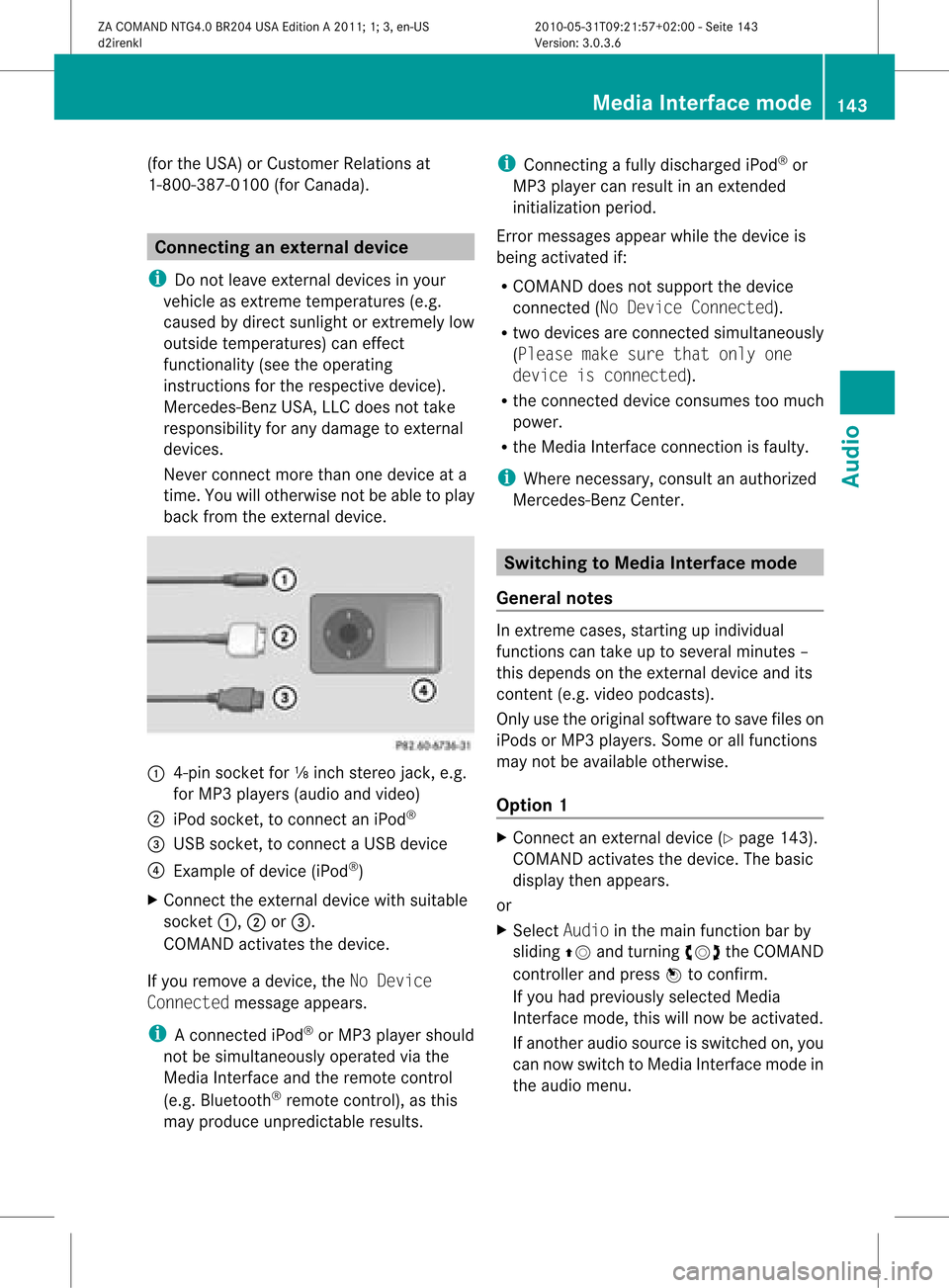
4-pin socket for⅛inch stereo jack,e.g.
for MP3 playe rs(audi oand video)
; iPod socket ,to conn ectaniPod ®
= USB socket ,to conn ectaUSBdevice
? Examp leof device (iPod ®
)
X Co nnect theexter naldevice with suita ble
socke t:, ;or=.
CO MAND activate sthe device .
If yo uremo veade vice ,the No Device
Connected messageappears.
i Aconn ected iPod®
or MP3 playershould
not besimultaneously operatedviathe
Media Interface andtheremote control
(e.g. Bluetooth ®
remote control), asthis
may produce unpredictable results. i
Connect ingafully discharged iPod®
or
MP3 playercan result inan exten ded
initialization period.
Error messages appearwhile thedevice is
being activated if:
R COMAND doesnotsupport thedevice
conn ected (No Device Connected).
R two devices areconn ected simultaneously
(Please makesurethatonlyone
device isconnected).
R the conn ected device consumes toomuch
power.
R the Media Interface connection isfaulty.
i Where necessary, consultanauthorized
Mercedes-Ben zCent er. Switching
toMedia Interfacemode
General notes In
ext reme cases, startingupindividual
func tionscan take uptoseveral minutes–
this depends onthe external device andits
con tent(e.g. video podcasts ).
Only usetheoriginal software tosave fileson
iPods orMP3 players. Someorall func tions
may notbeavailable otherwise.
Opt ion 1 X
Connec tan ext ernal device (Ypage 143).
COMAND activates thedevice. Thebasic
display thenappears.
or
X Select Audiointhe main function barby
sliding ZVandturningcVd theCOMAND
con troller andpress Wtocon firm.
If you had previously selectedMedia
Int erface mode,thiswillnow beactiv ated.
If anoth eraudio source isswitch edon, you
can now switch toMedia Interface modein
the audio menu. Media
Interfacemod e
143Audio
ZACOMAND NTG4.0BR204USAEdition A2011 ;1; 3,en-U S
d2irenk lV ersion:3.0.3.6
2010
-05-31T09 :21:57+0 2:00-Seite 143 Z
Page 153 of 190

Vehi
cle equi pmen t<0021002100210021002100210021002100210021002100210021002100210021
002100210021002100210021002100210021002100210021V 152
General information<0021002100210021002100210021002100210021002100210021002100210021
002100210021002100210021002100210021V 152
Basic settings ........ .......... .................. 152
DVD video mode <0021002100210021002100210021002100210021002100210021002100210021
002100210021002100210021002100210021002100210021002100210021V 152 151Vid
eo
ZACOMAND NTG4.0BR204USAEditio nA 2011 ;1; 3,en-U S
d2iren kl Version:3.0 .3.6
2010
-05-31T09: 21:57+0 2:00-Seite 151
Page 154 of 190

Vehi
cle equi pmen t
i TheseOpe rating Instru ctionsdescri beall
sta nda rdand optio nal equipme ntava ilab le
for your veh icleat the time ofpurcha se.
Pl ea se note thatyour vehicle maynotbe
equipped withallfeatures described. General
information Automa
ticpictur eshutoff
If the vehicle istraveling fasterthan
approximately 3mph,the image switchesoff
automatic allyinvideo DVDmode.
The following messageappearsinthe display:
In order nottodistra ctyou from
the traffi csituat ion,thepictur e
is faded outwhile thevehicl eis in
motion .
As soon asthe vehicle speedfallsbelow
approximat ely3m ph,the image switches
back on. Basic
settings Pictur
esett ings
Adju sting thebright ness,contra stor
color X
Press Wthe COMAND controller toshow
the menu.
X Select DVD-Vi deobysliding VÆand
turn ingcVd theCOMAND controller and
press Wtocon firm.
Am enu appears.
X Select Brightn ess,Contras tor Color by
turn ingcVd theCOMAND controller and
press Wtocon firm. Changing
thepictu reform at X
Press Wthe COMAND controller toshow
the menu.
X Select DVD-Vid eobysliding VÆand
turn ingcVd theCOMAND controller and
press Wtocon firm.
Am enu appears.
X Select 16:9Optimiz ed,4:3 or
Widescr eenandpress Wtocon firm.
The äicon indicat esthe format currently
select ed.
X Select asett ingbyturn ingcVd the
COMAND controller andpress Wto
con firm. DVD
video mode Safet
ynotes G
Wa
rning!
COMA NDisclas sified asaClass 1laser
prod uct.You must notopen thecasing. Ifyou
open thecasing, orifthe casing isfaulty or
damaged, thereisarisk ofexposure to
invisible laserradiation. Thismay damage
your eyes, orthose ofothers.
COMAND doesnotcont ainany parts thatcan
be serviced bythe user. Forsafety reasons,
all mainten ancework must becarried outby
quali fiedaftersales technicians. G
War
ning!
Only when thevehicle isstation aryshould
you:
R load adisc
R eject adisc
There isarisk ofbeing distract edfrom the
road andtraffic conditionsifthis isdone while
the vehicle isin motion . 152
DVD
video modeVideo
ZACOMAND NTG4.0BR204USAEdition A2011; 1;3,en-US
d2irenkl Version:3.0.3.6
2010-
05-31T09: 21:57+02: 00-Seite 152
Page 155 of 190

Note
son discs
Th ere maybe play ba ck pro blems when
pl ay ing cop ieddi scs .There arealarge variety
of discs, DVDauthoring software,writing
software andwriters available.This variety
means thatthere isno guarantee thatthe
system willbeable toplay discs thatyouhave
copied yourself.
! Donot affix stick ersorlabel sto the discs,
as they could peeloffand damage
COMAND. Stickers cancause thedisc to
bend, which canresult inread errors and
disc recognit ionproblems.
! COMAND isdesigned toaccommodate
discs which comply withtheEN60908
standard. Youcantherefore onlyusediscs
with amaximum thickness of1.3 mm.
If you insert thickerdiscs, e.g.those that
cont aindata onboth sides (DVD onone
side andaudiodata onthe other), they
cannot beeject edand candamage
COMAND.
Use round discswithadiameter of12 cm.
Do not use discs withadiameter of8cm,
even withanadapter. DVD
playback conditions
If video DVDsdon otconf orm tothe NTSC or
PAL TVstandards, theymaycreate picture,
sound orother problems duringplayback.
COMAND canplay back video DVDs
produced according tothe following
standards:
R Region code1orregion code0(no reg ion
cod e)
i Ifyo uins ert avid eo DVD with adi ffe rent
reg ionc ode, youwillsee amessage tothis
effect .
R PAL orNTSC TVstandard
You willgenerally findtherelevant details
either onthe DVD itself oron the DVD case. i
COMAND isset toregion code1at the
factor y.This settingcan bechanged atan
authorized Mercedes-B enzCenter. Thiswill
allow youtoplay video DVDswith a
different regioncode,provided thatthey
are produced inaccordanc ewith thePAL
or NTSC standard. Theregion codecanbe
changed amaximum offive times. Function
restrictions
Dependin gon the DVD ,it is possible that
cert ainfunct ionsoractions willbe
temporarily blockedormay notfunct ionatall.
As soon asyou trytoactivate thesefunctions
or actions ,you willsee theKsymbol inthe
display . Inserting
andejecting aDVD
X Pro cee das descri bedin the "Inser ting and
ejec ting CDs andDVDs" section
(Y page 128) . Sw
itchin gto video DVD mode
Opti on1 X
Inse rtavid eo DVD.
CO MAND load sthe med iumi nser tedand
sta rts toplay it.
X To dis play thepicture: pressthe e
bu tton.
Opti on2 X
Pre ssthe efunctio nbu tton.
CO MAND switch estothe previous disc
op era ting mod e.
If vid eo DVD modewa sthe last mod e
sel ecte d,itwi llnow beacti ve. DVD
video mode
153Vide o
ZACOMAND NTG4.0BR2 04USA EditionA 2011 ;1; 3,en-U S
d2i renkl Version: 3.0.3 .6
2010
-05-31 T09:21:57 +02:00-Sei te153 Z
Page 156 of 190

If
not, youcan switch onvideo DVDmode
as follo ws:
X Select Mediabyslid ing VÆ andturning
cVd theCOMAND controller andpress
W toconfirm.
X Select aý video DVDinthe media listby
turning cVdtheCOMAND controller and
press Wtoconfirm.
Option 3 X
Select Videointhe main function barby
slid ing ZV andturning cVdtheCOMAND
controller andpress Wtoconfirm.
Video DVDmode isswitched on. Show
ing/hiding thenavigatio nmenu
X To show :turn cVd orslid eZVÆ the
COMAND controller.
i This function isnot avai lablewhil ethe
DVD's ownmenu (Ypage 156)isbeing
disp layed.
X To hide: slideZVÆ theCOMAND
controller.
or
X Wai tfor approximately eightseconds. Navigation
menudisplaye d
: Type ofdata medium
; Current track
= Current scene ?
Track time
A Toshow themenu Showing/hiding
themenu
This funct ionisnot availa blewhile theDVD 's
own menu (Ypage 156)isbeing display ed.
X To show: pressWthe COMAND
cont roller.
or
X Select Menuwhile thenavigation menuis
shown andpress Wtoconf irm.
X To hide: slideZVtheCOMAND controller
and conf irmFull Screen bypressing W. Menu
shown
: Video DVDoptions
; Pause function
= Stop function
? Media selection
A Sound settings Fast
forward /rewind
X Slide XVY andhold theCOMAND
cont roller untilthedesired position is
reached.
or
X Press andhold theE orF button
until thedesired position hasbeen
reached.
You seethenavigation menu. 154
DVD
video modeVideo
ZACOMAND NTG4.0BR204USAEdition A2011; 1;3,en-US
d2irenk lV ersion:3.0.3.6
2010
-05-31T09 :21:57+0 2:00-Seite 154
Page 157 of 190

Selec
tingavideo DVD
X Press Wthe COMAN Dcon troller toshow
the men u.
X Selec tMedi aby sliding VÆandturning
cVd theCOMAN Dcon troller andpress
W tocon firm .
The media listappears. The#dot
indic atesthecurr entmedium beingplayed.
Video DVDsare indic ated bythe ý icon. :
ý symbol foravideo DVD
; Video DVDcurrentlyplaying
X Selec ta video DVDbyturn ingcVd the
COMAN Dcontroller andpress Wto
conf irm.
COMAND loadsthevideo DVDandbegins
playi ngit.
i Ifyou select aCD, anaudio DVDoran
MP3 medium, youswitch tothe audio mode
in question. Youcanfind further
inform ationabout themedia liston
(Y page 133). Stop
function
X Press Wthe COMAND controller toshow
the menu.
X To interr uptplayback: select±by
turnin gcVd theCOMAND controller and
press Wtoconf irm.
The «display changes toM.T hevideo
image ishidden.
X To continue playback: selectMand press
W toconfirm .
Play back continues fromthepoint where it
was interrupted.
X To stop playback: whileplayback is
interrupted, select±again andpress W
to confirm .
or
X During playback, confirm ±bypressing
W twice inrapid succession.
The Msymbol isshown.
X To restar tplayback: confirmMby
pressing W.
Play back restarts fromthebeginning. Pause
function
X Press Wthe COMAND controller toshow
the menu.
X To pause playback: select«byturning
cVd theCOMAND controller andpress
W toconfirm .
The «displa ychanges toM.
X To continue playback: selectMand press
W toconfirm .
The menu ishidden. Selec
tingascene/ch apter
If th efilm isdivi ded intosc en es orchapt ers,
th ese can bedire ctly sele cted oryou can skip
th roug hth em while thefilm isrun ning.So me
DV Ds disab lethis feat ure atsom epoin tsin
th eplaybac k(e.g. during theopenin gcredit s). DVD
video mode
155Vid eo
ZACOMAND NTG4.0BR204USAEdition A2011 ;1; 3,en-U S
d2irenk lV ersion:3.0.3.6
2010
-05-31T09 :21:57+0 2:00-Seite 155 Z
Page 158 of 190

Scene/
chapter selecti onmay also be
pos siblefrom theDVD menu storedon the
DVD itself.
X To skipforw ards orbac k:turn cVd or
sli de XVY theCOMAND controller.
or
X Pre ssthe E orF button onthe
control panel .
The navigation menu (Ypage 154) appe ars
for appro xima telyei ght seco nds. Se
lecti ng afilm/t itle
This function isonly available ifthe DVD is
divided intosever alfilms /titles .Ift he DVD
cont ains several films,these canbeselected
directly. Filmselection ispossible bothwhile
the DVD isstopped andwhile itis play ing.
Film selection mayalsobepossible fromthe
DVD menu onthe DVD itself.
X Press Wthe COMAND controller toshow
the menu.
X Select DVD-Video byturning cVdthe
COMAND controller andpress Wto
confirm .
X Select DVDFunctions andpress Wto
confirm .
Am enu appears.
X Select Title Selecti onbyturn ingcVd
the COMAND controller andpress Wto
con firm. X
Select afilm/t itleand press Wtocon firm. DVD
menu
Calling upthe DVD menu The
DVD menu isthe menu storedon the DVD
itself. Itis str uctured invarious ways
accor dingtothe individual DVDandpermit s
cert ainaction sand settings.
For multilingual DVDs,you can switch
between languages inthe DVD menu, for
example.
X Press Wthe COMAND controller toshow
the menu.
X Select DVD-Vid eointhe menu byturn ing
cVd theCOMAND controller andpress
W tocon firm.
X Select DVDFunctio nsand press Wto
con firm.
X Select Menuandpress Wtocon firm.
The DVD menu appears.
Selecting menuitemsinthe DVD menu X
Select amenu itembysliding ZVÆor
turn ingXVY theCOMAND controller and
press Wtocon firm.
The menu appears.
i Menu itemswhich cannotbe select edare
shown ingray. X
To reconfirm yourselection: confirm
Select bypressing W.
COMAND executes theaction . 156
DVD
video modeVideo
ZACOMAND NTG4.0BR204USAEdition A2011 ;1; 3,en-U S
d2irenk lV ersion:3.0.3.6
2010
-05-31T09 :21:57+0 2:00-Seite 156