playback MERCEDES-BENZ C-Class 2012 W204 Comand Manual
[x] Cancel search | Manufacturer: MERCEDES-BENZ, Model Year: 2012, Model line: C-Class, Model: MERCEDES-BENZ C-Class 2012 W204Pages: 234, PDF Size: 6.74 MB
Page 178 of 234
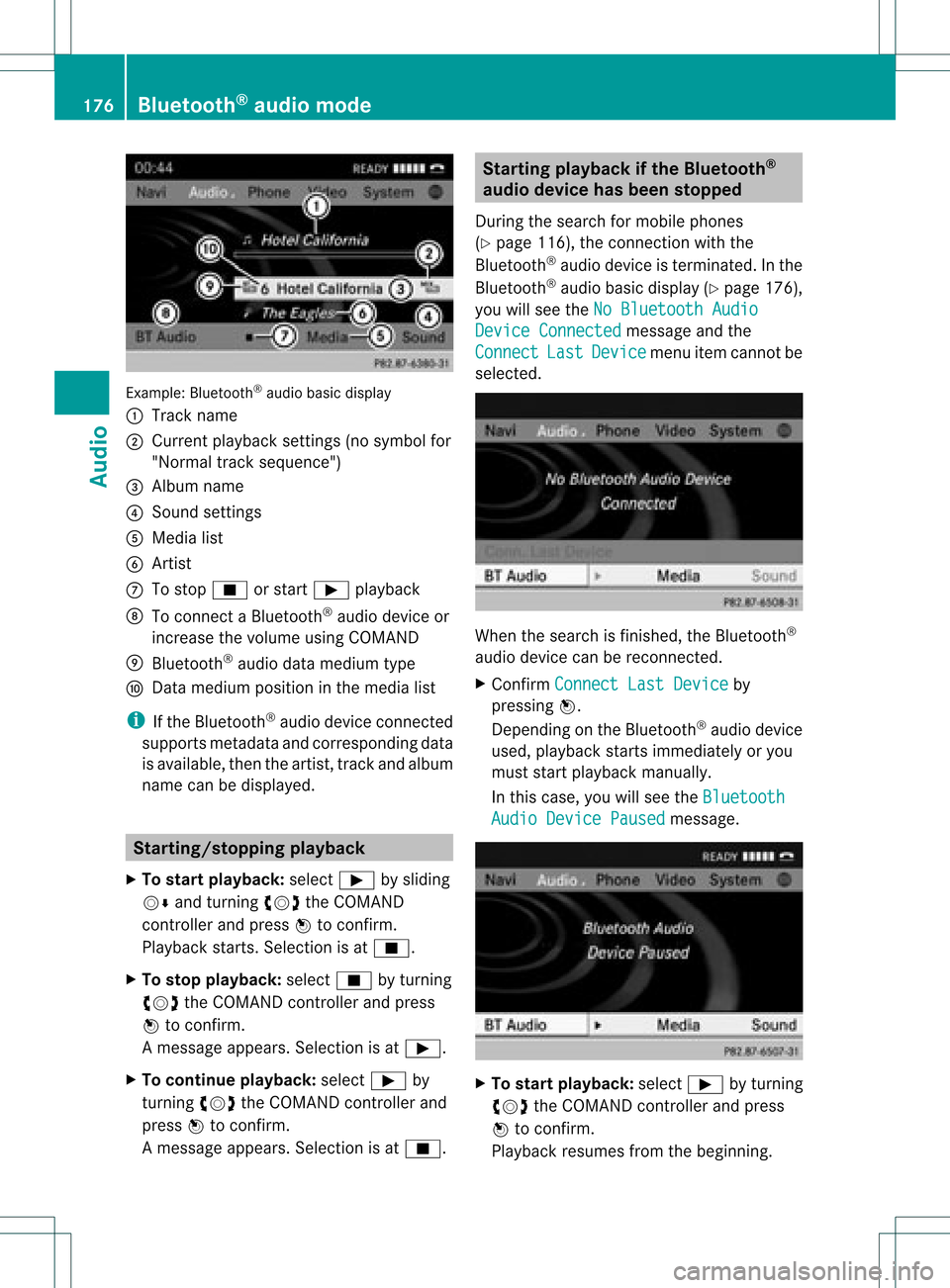
Exam
ple: Blu etoo th®
au dio ba sicd isplay
: Track name
; Curren tplayback settings (no symbol for
"Norm altrack sequen ce")
= Album name
? Soun dset tings
A Media list
B Artis t
C Tostop É orstart Ì playback
D Tocon necta Bluet ooth®
audio deviceor
inc rease thevolume usingCOMA ND
E Bluet ooth®
audio datamedium type
F Datamedium positioninthe media list
i Ifthe Bluet ooth®
audio devicecon nected
support smet adata andcorrespo ndingdata
is available, thenthe artist, trackandalbu m
name canbedispla yed. Star
ting/stopping playback
X To star tplayback: selectÌbysliding
VÆ andturning cVdtheCOMAND
cont roller andpress Wtoconfirm .
Play back starts. Selection isat É.
X To stop playback: selectÉbyturning
cVd theCOMAND controller andpress
W toconfirm .
Am essage appears. Selectionisat Ì.
X To continue playback:select Ìby
turn ingcVd theCOMAND controller and
press Wtocon firm.
Am essage appears. Selectionisat É. Sta
rting playba ckifthe Bluet ooth®
aud iodevice hasbeen stopp ed
Durin gthe search formobile phones
(Y page 116),the connection with the
Bluetoot h®
audio device isterm inated. Inthe
Bluetoot h®
audio basicdisplay (Ypage 176),
you willsee theNoBluetoo thAudio Device
Connected message
andthe
Connect Last Device menu
itemcannotbe
select ed. When
thesearch isfinished, theBluetoot h®
audio device canberecon nected.
X Confirm Connect LastDevice by
pressing W.
Depen dingonthe Bluetoot h®
audio device
used, playback startsimmediately oryou
must startplayback manually.
In this case, youwillsee theBluetoo th Audio
Device Paused message.
X
To star tplayba ck:select Ìbyturn ing
cVd theCOMAND controller andpress
W tocon firm.
Playback resumesfromthebeginn ing. 176
Bluetooth®
aud iomod eAudio
Page 179 of 234
Selec
tingatrac k
Th isfunctio nisnot supported byall
Bluetooth ®
audi odevices.
X To skip forwards orbackwards toa
tra ck: press theE orF button on
COMAND.
or
X Press the9 or: button brieflyon
the multifunction steeringwheel.
X Rapid scroll: pressandhold the9
or : button onthe multifunction
steering wheeluntilthedesired trackis
reached.
If you hold down the9 or: button,
the system runsthrough thelistmore
quickly. Selec
tingplayback options
If the Bluetooth ®
audi odevice supports the
corresponding function,the followi ngoptions
are avail able:
R Normal TrackSequence The
tracks areplay edinthe normal order
(e.g. track 1,2,3, etc. ).
Audio dataplayback isdetermined bythe
order inwhich thetracks arewritten tothe
data carrier. Alphabetical orderisthe most
common. Onceallthe tracks inafolder
have been played,the tracks inthe next
folder areplay ed.
R Random Tracks All
the tracks onthe medium areplay edin
random order(e.g.track 3,8, 5etc. ). X
Select BT Audio by
sliding VÆandturning
cVd theCOMAND controller andpress
W toconfirm.
The #dot indicates theoption selected.
X Select theoption byturning cVdthe
COMAND controller andpress Wto
confirm.
If you select Random Tracks ,
you willsee
a corresponding symbolinthe displa y/
selection window. Adjusting
thesound settings
The sound settings aredescribed usingradio
mode asan example inthe "Basic function s
of COMAND" section(Ypage 34). Increasin
gthe volume usingCOMAND
X Select BT Audio by
sliding VÆandturning
cVd theCOMAND controller andpress
W toconfirm.
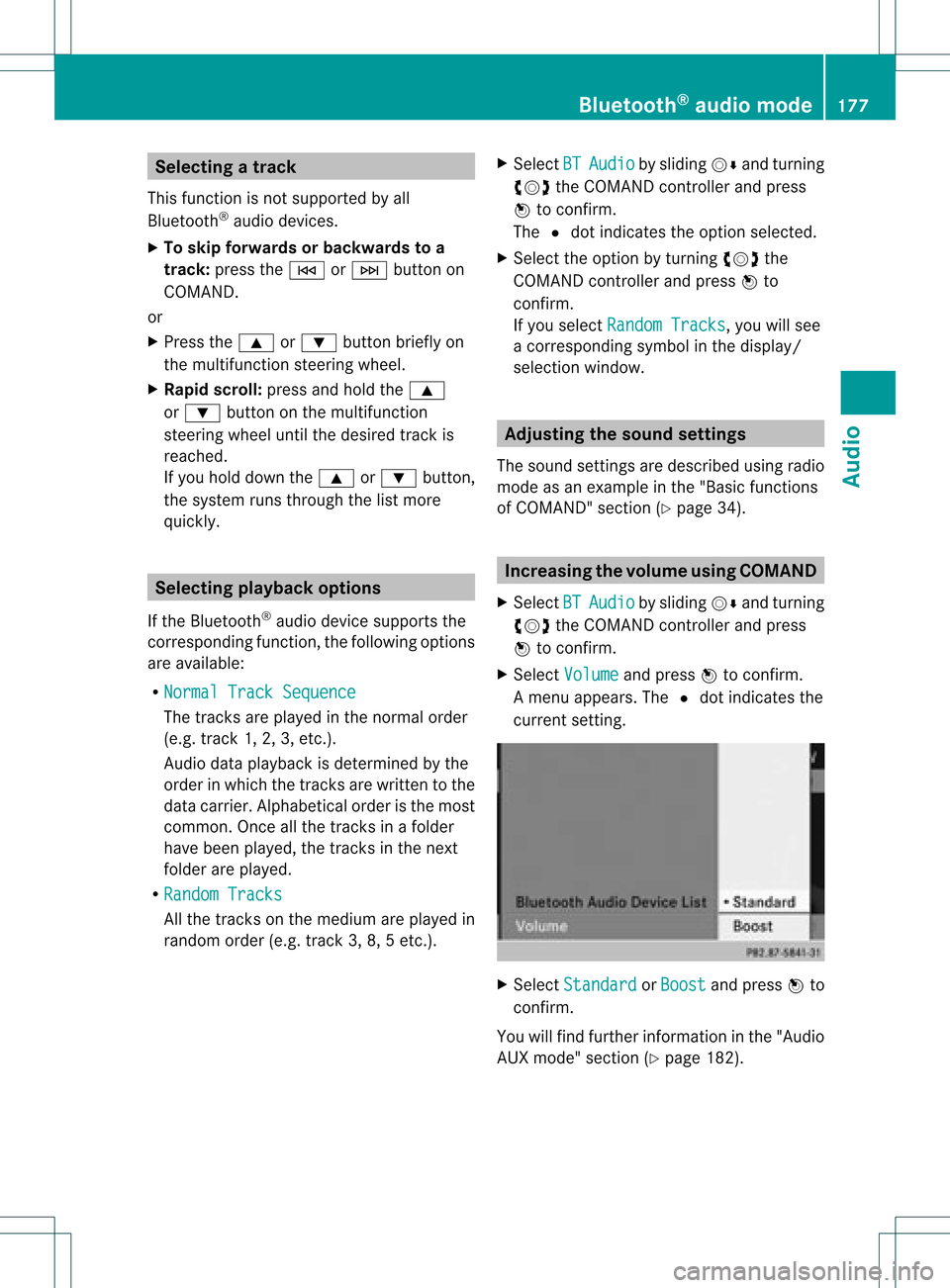
X Select Volume and
press Wtoconfirm.
Am enu appears. The#dot indicat esthe
curren tsett ing. X
Select Standar d or
Boost and
press Wto
con firm.
You willfind furth erinfor mation inthe "Audio
AUX mode" section(Ypage 182). Bluet
ooth®
aud iomod e177Audio Z
Page 182 of 234
The
curren tplayback option (Ypage 163)is
shown withasymbol behindalbum name
E (no display forNorm al Trac
k Sequ
ence ).
i Ifthe devic econ nected does notcontain
any playable track s,amess ageappears to
this effect . Selecting
music files
Not e COMA
NDdisplays thedata stored onthe
iPod ®
or MP3 player accordin gtothe filing
struct ureused inthe respect ivemedium.
Selecting byskipping toatrac k X
To ski pfo rwa rdsorbac kto atrac k:tur n
cVd theCOMAND controllerwh en the
di sp lay/ selectio nwindow isact ive.
or
X Press theE orF button.
The skip forward function skipsto the next
tr ack .The skip back function skipsto the
begin ningof the curr enttrack ifthe track
has been playing formor ethan eight
seco nds.Ift he track hasbeen playingfor
less than eight seconds, itskips tothe start
of the previous track.Ify ou have selected
a playb ackoption otherthanNormal Track
Sequence ,
the track sequence is
random.
Selecting usingthenumber keypad X
To mak eane ntr y:press thel button .
An input menu appears. Thenumber of
charact ersavailable forinput depends on
the number ofstor edtrac ks.
X To enter atr ack number :press anumber
key, e.g.q.
The digit isent ered inthe first position in
the input line.
i COMAND willignore andnotdisplay an
invalid digit. X
En ter more numbers ifdesired.
The trackplays afterthe last possible
numb erisent ered.
i Press ingand holdin ganumb erkey for
mor ethan twoseco ndscom plete sthe
ent ry,and thecorrespo ndingtrack is
played.
Fast forwar ding/r ewinding X
While thedisplay/s electionwindow is
act ive, slide XVY andhold theCOMA ND
con troller untilthe desire dposition has
been reached.
or
X Press andhold theF orE button
until thedesired position isreached.
i OnaniPod ®
/iPhone ®
,fast rewind only
funct ionswithin thecurrent track. Selecting
acatego ry/play list/fo lder
Ove rview iPo
d®
and certain MP3playe rs
For aniPo d®
or MP3 player,you can select
tracks using catego riesorfold ers.
Depend ingonthe devi ceconnected, the
foll owi ngcatego riesmay beava ilable ,for
examp le:
R Curre ntTrack list R
Playl ists (e.g.
All )
R Artis ts R
Album s R
Track s R
Podca sts R
Genre s R
Compo sers R
Audio books i
Some playback catego riescontain the
entry All .I
ft his entr yhas been selected,
the entire contentofthe category selected
will beplay ed. 180
Media
Interface modeAudio
Page 184 of 234
If
different sortingrulesare defined (e.g.in
iTu nes ®
), the search iscanceled without
any resul t. Playbac
koptio ns
The followi ng opti ons areavailab le:
R Nor mal TrackSequence Norm
altrack sequence: youhea rthe
track sin their normal order(e.g.numerical
or alpha betical).
R Random Medium All
the track son the medium areplay edin
random order.
R Random TrackList The
track sin the current lyactive category
or folder, including anysubfolders, are
play edinrandom order.
i For MP3 players, therandom playlists
offer amaximum of300 track schosen at
random.
X To selec ta playback option:select
Media Interface in
the basic displa yby
sliding VÆandturning cVdtheCOMAND
cont roller andpress Wtoconfirm .
The options listappea rs.The #dot
indicates theoption selected.
X Select anoption andpress Wtoconfirm . MP3
player instructions
Data forma ts MP3
andWMA aresupported asdata formats
with fixed andvariable bitrates (upto
320 kbits/s ).
Special considerationswhen using MP3
players Up
toeight directory levelswithupto1000
track sper directory aresupported.
Do not use USB exten sionleads oradapters.
They canimpair functionality. i
DRM (Digital RightsManagement)
protect edfiles arenot supported bythe
Media Interface. Audio
AUXmode Notes
onaudio AUXmode
You canconn ectanextern alaudi osource
(AUX) toCOMAND. Thesocket forthis is
located inthe glove box.
If COMAND isequipp edwith aMedia
Int erface, externalaudi osources are
conn ected usingthecorresponding cableset.
An AUX socket isnot provided. The
conn ections forthe Media Interface are
located inthe stowage compartmen tint he
cent erconsole.
i You willfind further information onlineat
htt <0010002C002100210017001700170020000D00020015001300010024000D000F
00020009000C000500200003000F000DH.O rcall
th eMer cedes-Ben zCust ome rAssistance
Center at1-80 0-FOR-ME RCedes
(1-800 -367-6372)(for theUSA) or
Customer Relations at1-80 0-387-0100
(for Canada ). Activating
audioAUXmode
When youconn ectanextern alaudi osource,
audi oAUX isnot selected automaticall y.
X Select Audio in
the main function barby
sliding ZVandturning cVdtheCOMAND
cont roller andpress Wtoconfirm.
If AUX mode wasthelast mode selected, it
will now beactive.
If another audiosource isswitched on,you
can now switch toaudi oAUX mode inthe
audi omenu.
X Select Audio using
ZVandpress Wto
confirm.
The audi omenu appears. 182
Audio
AUXmodeAudio
Page 185 of 234
X
Sel ect Aux us
ing cVd andpressW to
confi rm.
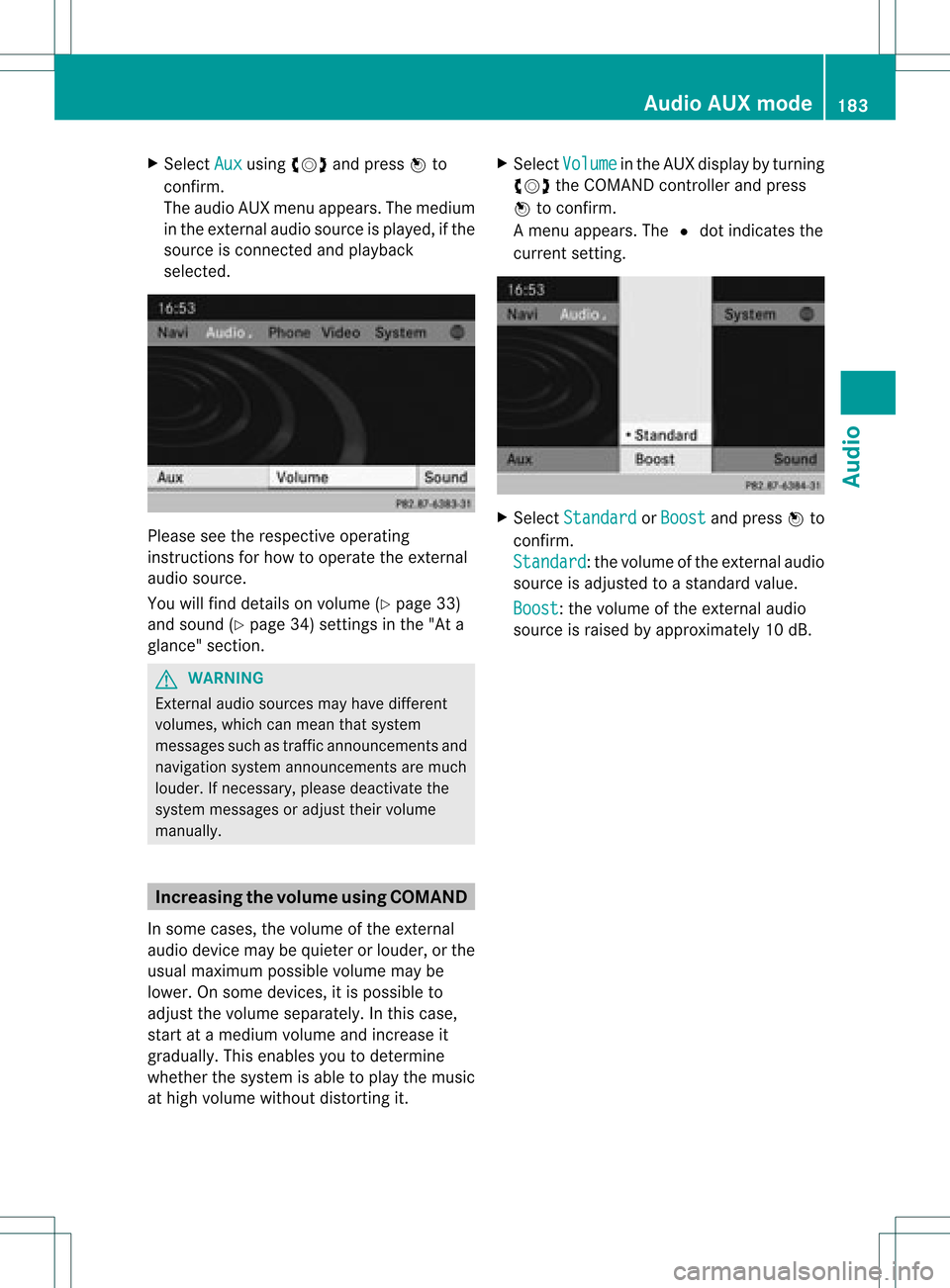
The audioAUX menu appe ars .The medium
in the extern alaudi osource isplay ed,ifthe
source isconn ected andplayback
selected. Please
seetherespective operating
instruct ionsforhow tooperate theextern al
audi osource.
You willfind details onvolume (Ypage 33)
and sound (Ypage 34)settin gsinthe "Ata
glance" section. G
WARNING
Ext ernal audiosources mayhave different
volumes, whichcanmean thatsystem
messages suchastraffic announcemen tsand
navigation systemannouncemen tsare much
louder. Ifnecessary, pleasedeactivate the
system messages oradjust theirvolume
manually . Increasing
thevolume usingCOMAND
In some cases, thevolume ofthe extern al
audi odevice maybequieter orlouder, orthe
usua lmaximum possiblevolumemaybe
lower. Onsome devices, itis possible to
adjust thevolume separately. Inthis case,
start atamedium volumeandincrease it
gradua lly.This enables youtodetermine
whether thesystem isable toplay themusic
at high volume without distorting it. X
Select Volume in
the AUX displa yby turning
cVd theCOMAND controller andpress
W toconfirm .
Am enu appears. The#dot indicat esthe
curren tsett ing. X
Select Standar d or
Boost and
press Wto
con firm.
Standar d :t
he volume ofthe extern alaudi o
source isadjusted toastandard value.
Boost :t
he volume ofthe extern alaudi o
source israised byapproximately 10dB. Audio
AUXmode
183Audio Z
Page 189 of 234
Note
sabo utdis cs
Pl ay ba ck pro blems mayoccu rwhen playing
copied discs.Therearealarge variety of
discs, DVDauthoring software,writing
software andwriters available.This variety
means thatthere isno guarantee thatthe
system willbeable toplay discs thatyouhave
copied yourself.
! Donot affix stick ersorlabel sto the discs,
as they could peeloffand damage
COMAND. Stickers cancause thedisc to
bend, which canresult inread errors and
disc recognit ionproblems.
! COMAND isdesigned toaccommodate
discs which comply withtheEN60908
standard. Youcantherefore onlyusediscs
with amaximum thickness of1.3 mm.
If you insert thickerdiscs, e.g.those that
cont aindata onboth sides (DVD onone
side andaudiodata onthe other), they
cannot beeject edand candamage
COMAND.
Use round discswithadiameter of12 cm.
Do not use discs withadiameter of8cm,
even withanadapter. DVD
playback conditions
If video DVDsdon otconf orm tothe NTSC or
PAL TVstandards, theymaycreate picture,
sound orother problems duringplayback.
COMAND canplay back video DVDs
produced according tothe following
standards:
R region code1orregion code0(no reg ion
cod e)
R PAL orNTSC standa rd
Yo uwi llge nera lly find thereleva ntdetai ls
ei ther onthe DVD itselfor on the DVD case.
i Ifyo uins ert avid eo DVD with adi ffe rent
reg ionc ode, youwillsee amessage tothis
effect . i
COMAND isset toregion code1at the
factor y.This settingcan bechanged atan
authorized Mercedes-B enzCenter. Thiswill
allow youtoplay video DVDswith a
different regioncode,provided thatthey
are produced inaccordanc ewith thePAL
or NTSC standard. Theregion codecanbe
changed uptofive times. Function
restrictions
Dependin gon the DVD ,it is possible that
cert ainfunct ionsoractions willbe
temporarily blockedormay notfunct ionatall.
As soon asyou trytoactivate thesefunctions
or actions ,you willsee theKsymbol inthe
display . Inserting
andremoving DVDs
X Proceed asdescribed inthe "Insert ingand
eject ingCDs andDVD s"section
(Y page 154). Switching
tovideo DVDmode
Option 1 X
DVD changer: insertavideo DVD.
X Press theh functionbutton orthe
% backbutton .
COMAND loadsthemedium insertedand
start sto play it.
Option 2 X
Press theh functionbutton oneormore
times.
COMAND switchestothe previous disc
operating mode. Video
DVDmode
187Video Z
Page 191 of 234
?
Media selection
A Sound settings Fast
forward ing/rew inding
X In full-screen mode,slideXVY andhold the
COMAND controller untilthedesired
position hasbeen reached.
or
X Press andhold theE orF button
until thedesired position isreached.
You seethenavigation menu. Stop
function
X Press Wthe COMAND controller toshow
the menu.
X To interru ptplayback: selectÉby
turning cVdtheCOMAND controller and
press Wtoconfirm .
The Ë displa ychanges toÌ.T he
video image ishidden.
X To continue playback: selectÌand
press Wtoconfirm .
Play back continues fromthepoint where it
was interrupted.
X To stop playback: whileplayback is
interrupted, selectÉagain andpress
W toconfirm .
or
X During playback, confirm Ébypressing
W twice inrapid succession.
Ì ishighlighted.
X To restar tplayback: confirmtheÌ
selection bypressing W.
Play back restarts fromthebeginning. Pause
function
X Press Wthe COMAND controller toshow
the menu.
X To pause playback: selectËby
turning cVdtheCOMAND controller and
press Wtoconfirm .
The Ë displa ychanges toÌ.
X To continue playback: selectÌand
press Wtoconfirm .
The menu ishidden. Selec
tingascene/ch apter
If th efilm isdivi ded intosc en es orchapt ers,
you can selectthem dire ctly while thefilm is
run ning,or skip for wards step- by-s tep. So me
DV Ds donotpermit thisatcert ainpoint s(e.g.
during theopenin gcredit s).
It may alsobepossible toselect thescen e/
chapter fromwithin themenu storedon the
DVD .
X To skip forwar dsorback: infull-scr een
mode, turncVd orslide XVY the
COMAND controller.
or
X Press theE orF button onthe
con trol panel.
The navigation menu(Ypage 188)appears
for approximat elyeight secon ds. Selecting
afilm/t itle
This function isonly available ifthe DVD is
divided intosever alfilms /titles .Ift he DVD
cont ains several films,these canbeselected
directly. Afilm can beselec tedeitherwhen
the DVDisbeing playedback orwhen itis
stopped.
The film canalso beselected fromthemenu
on the DVD itself. Video
DVDmode
189Video Z
Page 219 of 234
The
CD/D VDdrive plays thedisc:
R ifit has been insert edcorrec tlyand isa
permissible disc,and
R after youhave switched ondisc mode
(audio CD/audio DVD/MP3 mode)
(Y page 217).
Data onanMP3 CDfirst needs tobe loaded
by the drive. Loading maytake some time,
depending onthe number offolders and
track s. Removing
aCD/DV D
X Press theþ button.
The drive ejec ts thedis c.
X Tak eth edis co utofthes lot.
If you donot takethe disc outofthe slot,
the drive willdraw itin again autom atically
aft erashor twhile. Switching
toaudio CD,audio DVDor
MP3 mode
X Insert aCD/DV D(Y page 216).
The Rear SeatEntertainment Systemloads
the inserted disc.
X Select Disc in
the menu usingthe
9=; buttonsonthe remote
cont roland confirm bypressing the9
button.
The corresponding modeisswitched on.
The Rear SeatEntertainment Systemplays
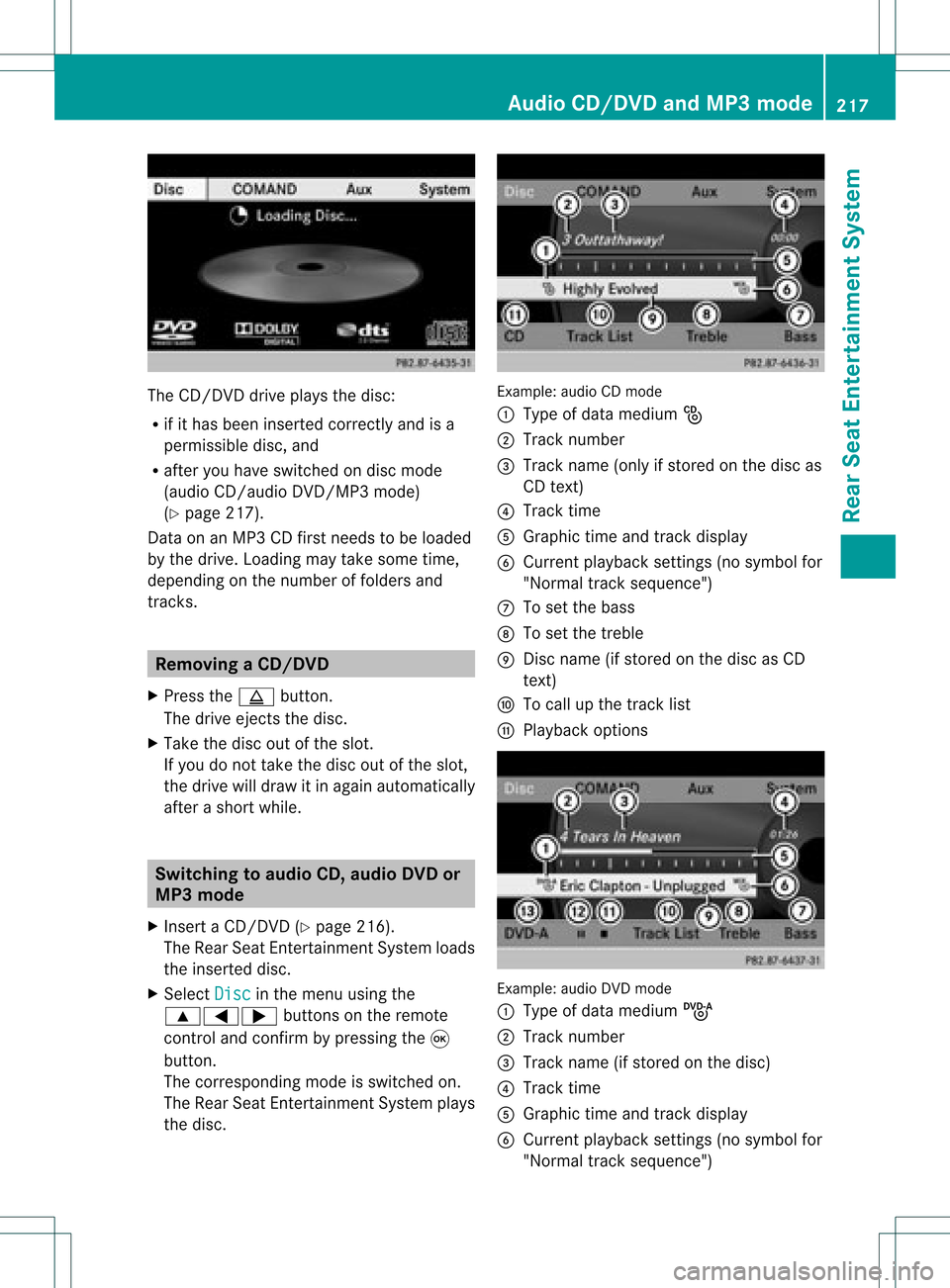
the disc. Example:
audioCDmode
: Type ofdata medium _
; Track number
= Track name (onlyifstored onthe disc as
CD text )
? Track time
A Graphic timeandtrack displa y
B Current playback settin gs(no symbol for
"Normal tracksequence")
C Toset the bass
D Toset the treble
E Disc name (ifstored onthe disc asCD
text )
F Tocall upthe track list
G Play back options Example:
audioDVDmode
: Type ofdata medium ü
; Track number
= Track name (ifstored onthe disc)
? Track time
A Graphic timeandtrack displa y
B Current playback settin gs(no symbol for
"Normal tracksequence") Audio
CD/DVD andMP3 mode
217RearSeatEnterta inment System Z
Page 220 of 234
C
Toset the bass
D Toset the treble
E Disc name (ifstored onthe disc)
F Tocall upthe track list
G Stop funct ion
H Pause function
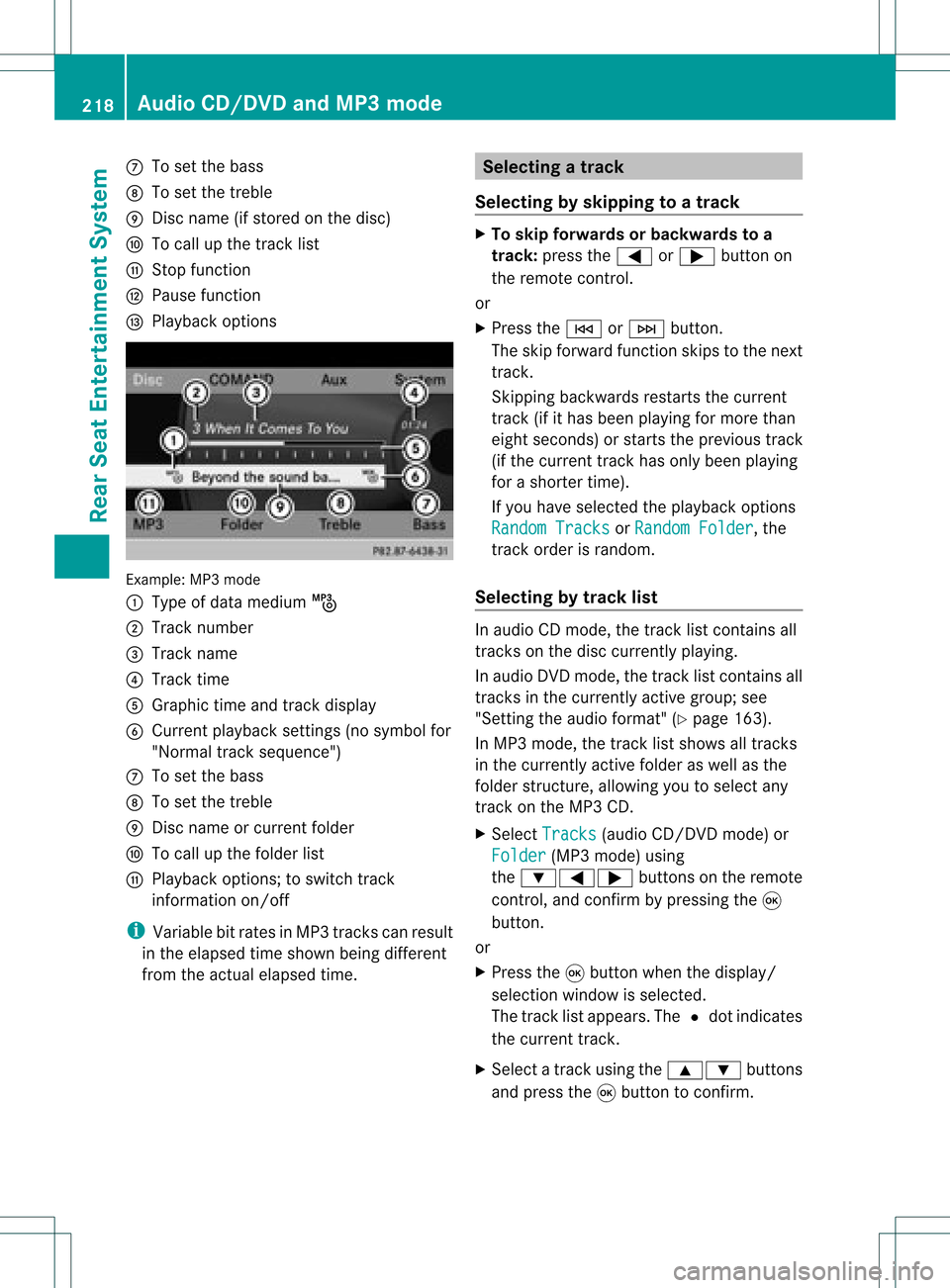
I Playba ckoptions Example:
MP3mode
: Type ofdata medium þ
; Track number
= Track name
? Track time
A Graphic timeandtrack display
B Current playbacksett ings (nosymbol for
"Normal tracksequence")
C Toset the bass
D Toset the treble
E Disc name orcurren tfolder
F Tocall upthe folder list
G Playba ckoptions; toswitch track
inform ationon/of f
i Variable bitrates inMP3 track scan result
in the elapsed timeshown beingdifferent
from theactual elapsed time. Selecting
atrac k
Se lecti ng byskippin gto atrac k X
To skipfo rwa rds orbac kwards toa
trac k:pre ssthe = or; button on
the rem otecontr ol.
or
X Pre ssthe E orF button.
Th eski pfor wa rdfunctio nskip sto the next
tra ck.
Skip ping backwa rdsrestartsthe current
tra ck (ifi th as been playin gfor mor eth an
eigh tsecon ds)orstart sthe previous track
(if the curren ttrack hasonly been playing
for ashorter time).
If you have selected theplayba ckoptions
Random Tracks or
Random Folder ,
the
track order israndom.
Sel ecting bytrack list In
audio CDmode, thetrack listcontains all
tracks onthe disc currently playing.
In au dio DVD mode, thetrack listcontains all
tracks inthe currently activegroup;see
"Setting theaudio format" (Ypag e163).
In MP3 mode, thetrack listshow sall tracks
in the currently activefolderaswell asthe
folder structure,allow ingyou toselect any
track onthe MP3 CD.
X Select Tracks (au
dio CD/DVD mode)or
Folder (MP3
mode) using
the :=; buttonsonthe remote
cont rol,and confirm bypressing the9
button.
or
X Press the9button whenthedispla y/
selection windowisselected.
The track listappea rs.The #dot indicates
the current track.
X Select atrack using the9: buttons
and press the9button toconfirm. 218
Audio
CD/DVD andMP3 modeRear SeatEntertainm entSystem
Page 222 of 234
X
To paus eplay back:sel ect Ë using
the :=; buttons onthe rem ote
contro land pressthe 9button toconfi rm.
The Ë displ aycha nge sto Ì.
X To conti nue playback:sel ect Ì and
pre ssthe 9button toconfi rm.
The Ì displ aycha nge sto Ë. Sto
pfuncti on
This function isonly available inaudio DVD
mode.
X To inte rrupt playbac k:sele ctÉ using
the :=; buttonsonthe remote
control andpress the9button toconfirm.
The Ë displaychange sto Ì.
X To continue playbac k:sele ctÌ and
press the9button toconfirm.
Pla yback continues fromthepointwhe reit
wa sinterrup ted.
X To stop playbac k:whi lepla yback is
interrup ted,selectÉ againand press
the 9button toconfirm.
Pla yback stops andreturns tothe
begi nning ofthe DVD. Ì ishigh lighted.
X To restart playbac k:sele ctÌ and
press the9button toconfirm.
Pla yback starts fromthebegi nning ofthe
DVD. Settin
gthe audio format
Further informationonaudio formats is
ava ilable inthe "Aud io"section
(Y pag e163).
X Select DVD-A usi
ng the :=;
buttons onthe remote controlle rand pre ss
9 toconfi rm.
X Sel ect Group us
ing the 9: buttons
and pressthe 9button toconfi rm.
The list of availabl eau dioform atsappe ars.
The #dotind icates the form atcur rentl y
sel ecte d. X
Sel ect anaudio form atusing the
9: buttons andpressthe 9button
to confi rm.
X To exitthe men u:pre ssthe =
or ; button. Pl
ayb acko ptio ns
Fur ther informa tion onplay ba ck opti ons is
ava ilab lein the "Audio" secti on
(Y page 163) .
X Sel ect CD ,
DVD -A or
MP3 us
ing
the :=; buttons onthe remo te
control andpressthe 9button toconfi rm.
The options list appe ars .The # dot
indicates theoption current lyselected.
X Select Normal Track Sequence ,
Random Tracks or
Random Folder using
the
9: buttonsandpress the9button
to confirm .
The option isswitched on.For alloptions
except Normal TrackSequence ,
you will
see acorresponding displayin the displa y/
selection window.
i Ifyou change thedisc, theNormal Track
Sequence option
isactivated
automatically .Ifa no ption isselect ed,it
remains selectedafter theRear Seat
En tert ainmen tSyst emisswitc hedonor
off. Switching
track inform ationon/off
(MP3 mode only)
If the func tionisswitc hedon,folder andtrack
names aredisplayed.
If the func tion isswitc hedoff,disc andfile
names aredisplayed.
X Select MP3 using
the:=;
butt ons onthe remot econ troller and press
the 9butt ontocon firm. 220
Audio
CD/DVDand MP3 modeRear SeatEntert ainmentSyst em