radio MERCEDES-BENZ C CLASS 2016 User Guide
[x] Cancel search | Manufacturer: MERCEDES-BENZ, Model Year: 2016, Model line: C CLASS, Model: MERCEDES-BENZ C CLASS 2016Pages: 398, PDF Size: 11.64 MB
Page 148 of 398
G WARNING
If you switch off the ignition while driving,
safety-relevant functions are only available
with limitations, or not at all. This could affect,
for example, the power steering and the brake
boosting effect. You will require considerably
more effort to steer and brake. There is a risk
of an accident.
Do not switch off the ignition while driving.
G WARNING
If the parking brake has not been fully
released when driving, the parking brake can: R
overheat and cause a fire R
lose its hold function.
There is a risk of fire and an accident. Release
the parking brake fully before driving off.
! Do not warm up the engine with the vehicle
stationary. Drive off immediately. Avoid high
engine speeds and driving at full throttle until
the engine has reached its operating temper-
ature.
Only shift the automatic transmission to the
desired drive position when the vehicle is sta-
tionary.
Where possible, avoid spinning the drive
wheels when pulling away on slippery roads.
You could otherwise damage the drive train.
! Mercedes-AMG vehicles: at low engine oil
temperatures below 68 ‡ (+20 †), the max-
imum engine speed is restricted in order to
protect the engine. To protect the engine and
maintain smooth engine operation, avoid driv-
ing at full throttle when the engine is cold.
Observe the important safety notes for PLUG-IN
HYBRID vehicles ( Y
page 44). SmartKey positions
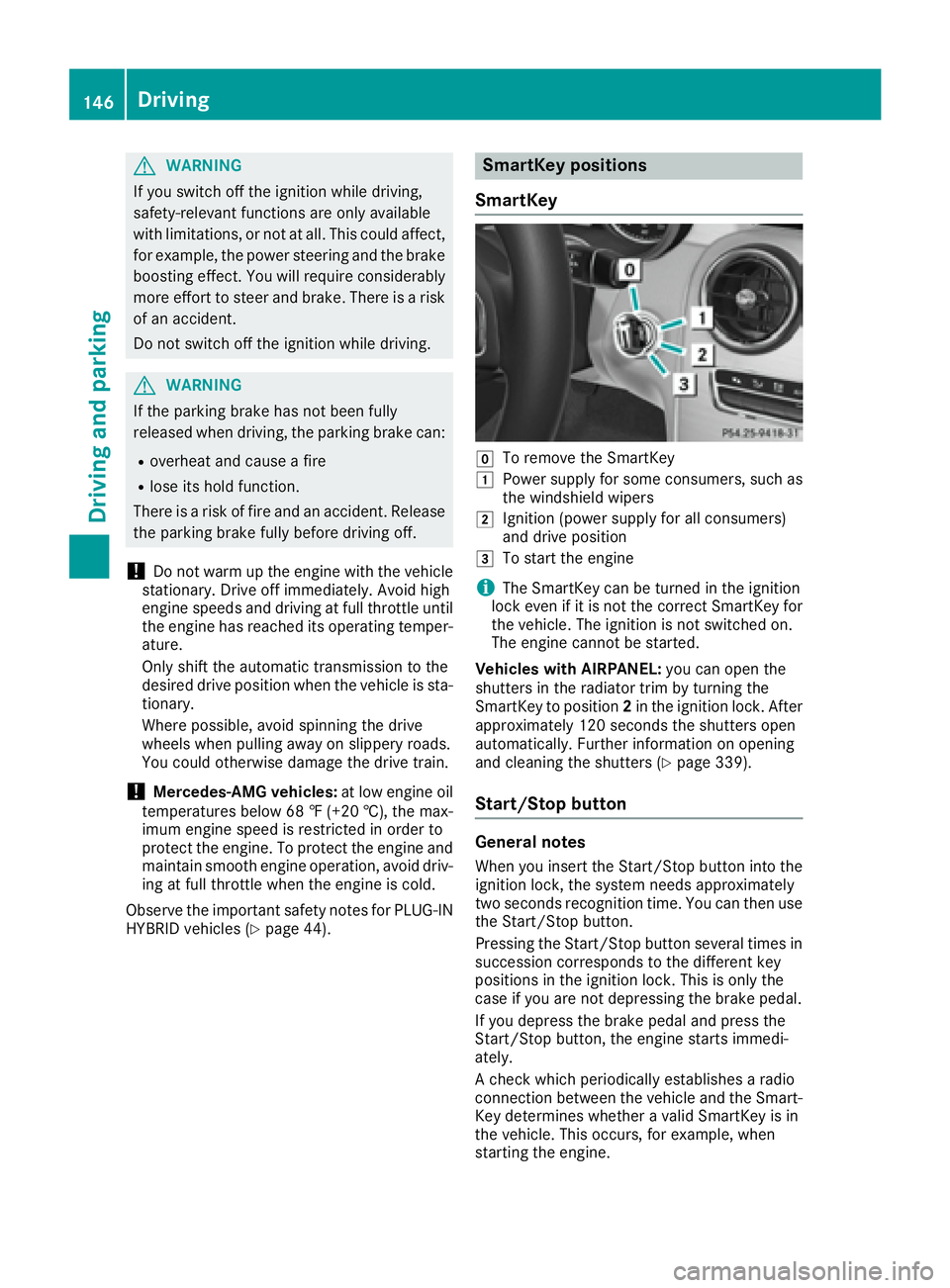
SmartKey
Z
To remove the SmartKey G
Power supply for some consumers, such as
the windshield wipers H
Ignition (power supply for all consumers)
and drive position I
To start the engine
i The SmartKey can be turned in the ignition
lock even if it is not the correct SmartKey for
the vehicle. The ignition is not switched on.
The engine cannot be started.
Vehicles with AIRPANEL: you can open the
shutters in the radiator trim by turning the
SmartKey to position 2 in the ignition lock. After
approximately 120 seconds the shutters open
automatically. Further information on opening
and cleaning the shutters ( Y
page 339).
Start/Stop button
General notes
When you insert the Start/Stop button into the
ignition lock, the system needs approximately
two seconds recognition time. You can then use
the Start/Stop button.
Pressing the Start/Stop button several times in
succession corresponds to the different key
positions in the ignition lock. This is only the
case if you are not depressing the brake pedal.
If you depress the brake pedal and press the
Start/Stop button, the engine starts immedi-
ately.
A check which periodically establishes a radio
connection between the vehicle and the Smart-
Key determines whether a valid SmartKey is in
the vehicle. This occurs, for example, when
starting the engine.146
Driving
Driving and parking
Page 178 of 398
Online access to the vehicle
General information
G WARNING
If you operate information systems and com-
munication equipment integrated in the vehi-
cle while driving, you will be distracted from
traffic conditions. You could also lose control
of the vehicle. There is a risk of an accident.
Only operate the equipment when the traffic
situation permits. If you are not sure that this
is possible, park the vehicle paying attention
to traffic conditions and operate the equip-
ment when the vehicle is stationary.
i Operation of integrated information sys-
tems and communications equipment in
the vehicle: you must observe the legal
requirements for the country in which you are
currently driving.
You can call up remote query and remote con-
figuration functions for your vehicle using online
access to the vehicle. This is possible from an
Internet-enabled computer, as well as many
modern smartphones.
Please call the Mercedes-Benz Customer Assis-
tance Center (USA) at the hotline number
1-800-FOR-MERCedes (1-800-367-6372) to
obtain the relevant Internet address.
Online access to the vehicle is restricted to the
contractual periods of mbrace. Activated
access to the mbrace emergency call system is
required for use.
In order to be able to use online access to the
vehicle, you must agree to the local terms of
use.
Further information on supported devices, avail-
able languages and contractual periods can be
obtained from any authorized Mercedes-Benz
Center.
In order to be able to call up online access to the
vehicle, the vehicle must be connected to the
Internet ( Y
page 176).
Notes on data protection
Remember that online access to the vehicle
offers access to your data.
i Prevent unauthorized persons from
accessing this data. Every person who has access to the informa-
tion stated can use the functions of the online
access to the vehicle.
i Information when selling a vehicle or
buying a used vehicle: R
If you sell your vehicle, you are obliged to
delete the vehicle from your personal area
on the online access to the vehicle. R
If you have bought a used vehicle, it is pos-
sible that the previous owner still has
access to the online access to the vehicle.
Calling up functions The online access to the vehicle allows you
access to your vehicle's information and func-
tions using remote query and remote configu-
ration.
The following functions can be accessed: R
request the current condition of charge of the
high-voltage battery R
program the departure time ( Y
page 249)R
set or activate the "Pre-entry climate control
at departure time" function (see the Digital
Operator's Manual)
Information on additional functions and operat-
ing instructions can be found within the online
access to the vehicle.
Connecting the vehicle to the Internet
i This function is not available in all countries
and requires activated access to the mbrace
emergency call system.
You can use the online access to the vehicle if
the vehicle has a connection to the Internet via a
mobile phone network. The necessary data is
transmitted by radio. The vehicle automatically
recognizes whether a connection to the Internet
is possible or not. No presets are necessary.
i Restrictions in reception are possible if the
vehicle is in an underground car park, for
example. Restrictions may also occur in areas
with poor mobile network coverage.176
Charging the high-voltage battery (PLUG-IN HYBRID vehicles)
Driving and parking
Page 204 of 398
Problems with PARKTRONIC Problem
Possible causes/consequences and P Solutions
Only the red segments in
the PARKTRONIC warn-
ing displays are lit. You
also hear a warning tone
for approximately two
seconds.
PARKTRONIC is then
deactivated and the indi-
cator lamp on the
PARKTRONIC button
lights up. PARKTRONIC has malfunctioned and has switched off. X
If problems persist, have PARKTRONIC checked at a qualified spe-
cialist workshop.
Only the red segments in
the PARKTRONIC warn-
ing displays are lit.
PARKTRONIC is then
deactivated. The PARKTRONIC sensors are dirty or there is interference. X
Clean the PARKTRONIC sensors ( Y
page 339).X
Switch the ignition back on.
The problem may be caused by an external source of radio or ultra-
sound waves. X
See if PARKTRONIC functions in a different location.
Active Parking Assist
General notes Active Parking Assist is an electronic parking aid
with ultrasound. It measures the road on both
sides of the vehicle. A parking symbol indicates
a suitable parking space. Active steering inter-
vention and brake application can assist you
during parking and when exiting a parking
space. You may also use PARKTRONIC
( Y
page 199).
Important safety notes Active Parking Assist is merely an aid. It is not a
replacement for your attention to your immedi-
ate surroundings. You are always responsible
for safe maneuvering, parking and exiting a
parking space. Make sure that no persons, ani-
mals or objects are in the maneuvering range.
When PARKTRONIC is switched off, Active Park-
ing Assist is also unavailable.
G WARNING
While parking or pulling out of a parking
space, the vehicle swings out and can drive
onto areas of the oncoming lane. This could result in a collision with another road user.
There is a risk of an accident.
Pay attention to other road users. Stop the
vehicle if necessary or cancel the Active Park-
ing Assist parking procedure.
! If unavoidable, you should drive over obsta-
cles such as curbs slowly and not at a sharp
angle. Otherwise, you may damage the
wheels or tires.
Active Parking Assist may also display spaces
not suitable for parking, e.g.: R
where parking or stopping is prohibited R
in front of driveways or entrances and exits R
on unsuitable surfaces
Parking tips: R
On narrow roads, drive as close to the parking
space as possible. R
Parking spaces that are littered or overgrown
might be identified or measured incorrectly. R
Parking spaces that are partially occupied by
trailer drawbars might not be identified as
such or be measured incorrectly. R
Snowfall or heavy rain may lead to a parking
space being measured inaccurately.202
Driving systems
Driving and parking
Page 239 of 398
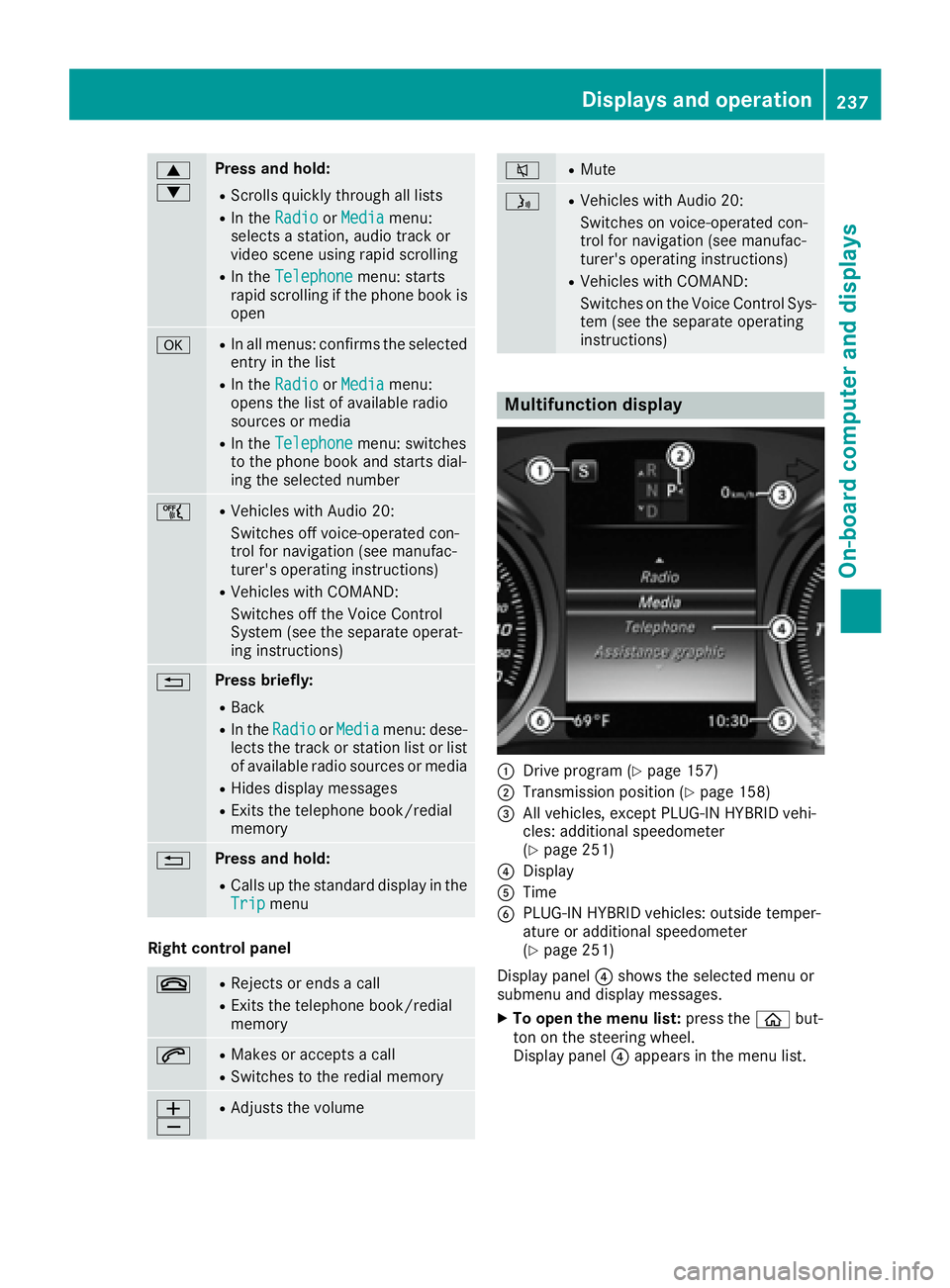
c
d Press and hold: R
Scrolls quickly through all lists R
In the Radio or Media menu:
selects a station, audio track or
video scene using rapid scrolling R
In the Telephone menu: starts
rapid scrolling if the phone book is
open
v R
In all menus: confirms the selected
entry in the list R
In the Radio or Media menu:
opens the list of available radio
sources or media R
In the Telephone menu: switches
to the phone book and starts dial-
ing the selected number
Page 245 of 398
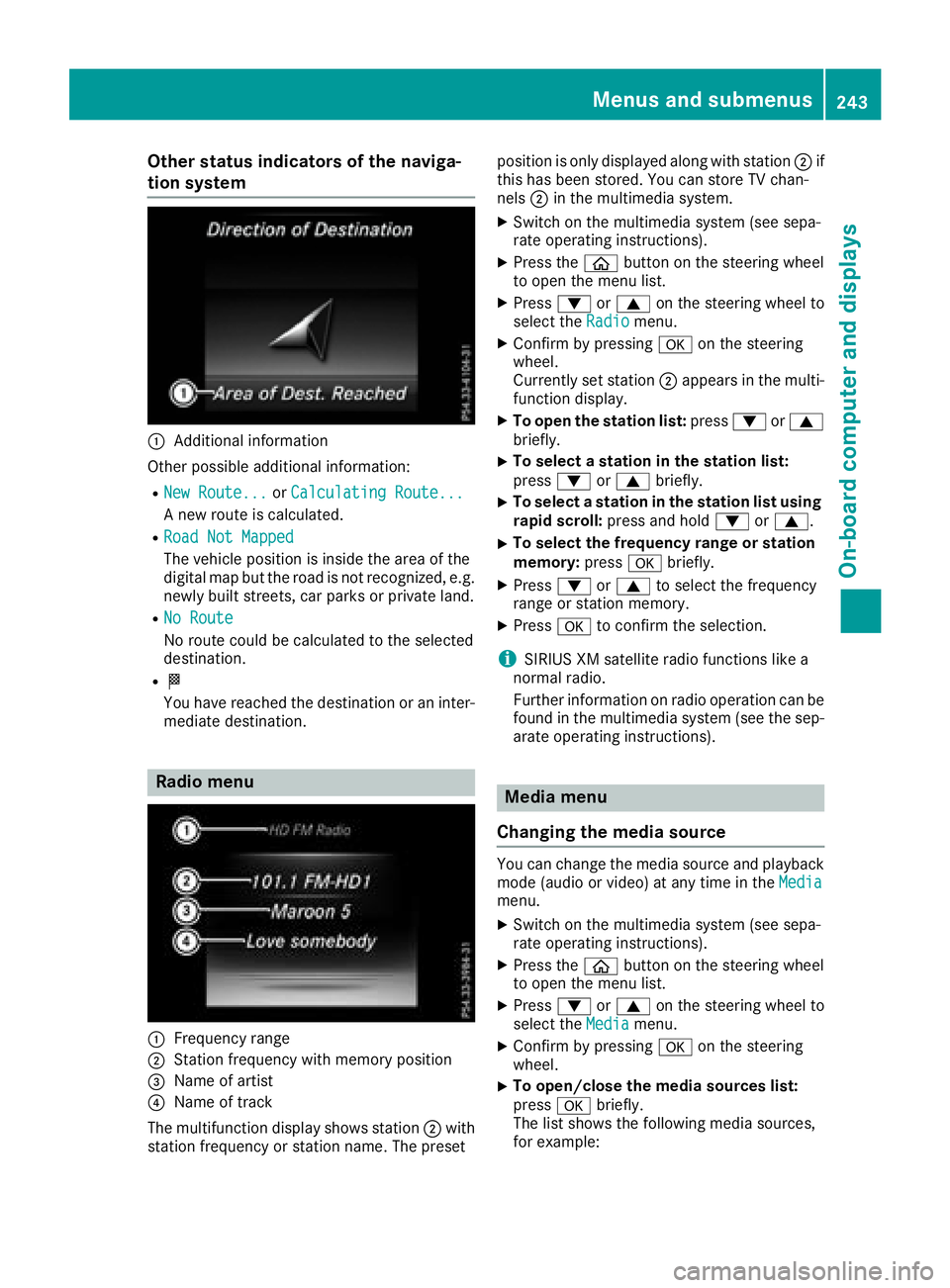
Other status indicators of the naviga-
tion system
C
Additional information
Other possible additional information: R
New Route... or Calculating Route...
A new route is calculated. R
Road Not Mapped
The vehicle position is inside the area of the
digital map but the road is not recognized, e.g.
newly built streets, car parks or private land. R
No Route
No route could be calculated to the selected
destination. R
K
You have reached the destination or an inter-
mediate destination.
Radio menu
C
Frequency range
D
Station frequency with memory position
Page 300 of 398
General notes The multimedia system section in this manual
describes the basic principles for operation.
More information can be found in the Digital
Operator's Manual.
Important safety notes
G WARNING
If you operate information systems and com-
munication equipment integrated in the vehi-
cle while driving, you will be distracted from
traffic conditions. You could also lose control
of the vehicle. There is a risk of an accident.
Only operate the equipment when the traffic
situation permits. If you are not sure that this
is possible, park the vehicle paying attention
to traffic conditions and operate the equip-
ment when the vehicle is stationary.
You must observe the legal requirements for the
country in which you are currently driving when
operating the multimedia system.
The multimedia system calculates the route to
the destination without taking the following into
account, for example: R
traffic lights R
stop and yield signs R
parking or stopping restrictions R
road narrowing R
other road and traffic rules and regulations
The multimedia system may give incorrect nav-
igation recommendations if the actual street/
traffic situation does not correspond with the
digital map's data.
For example: R
a diverted route R
the road layout or the direction of a one-way
street has been changed
For this reason, you must always observe road
and traffic rules and regulations during your
journey. Road and traffic rules and regulations
always have priority over multimedia system
driving recommendations.
Navigation announcements are intended to
direct you while driving without diverting your
attention from the road and driving. Please always use this feature instead of con-
sulting the map display for directions. Looking
at the icons or map display can distract you from
traffic conditions and driving, and increase the
risk of an accident.
This equipment complies with FCC radiation
exposure limits set forth for uncontrolled equip-
ment and meets the FCC radio frequency (RF)
Exposure Guidelines in Supplement C to OET65.
This equipment has very low levels of RF energy
that is deemed to comply without maximum
permissive exposure evaluation (MPE). But it is
desirabl e tha t it should be installed and oper-
a
ted with at least 8i nches (20 cm) and more
between the radiator and a person's body
(excluding extremities: hands, wrists, feet and
legs.)
G WARNING
Modifications to electronic components, their
software as well as wiring can impair their
function and/or the function of other net-
worked components. In particular, systems
relevant to safety could also be affected. As a
result, these may no longer function as inten-
ded and/or jeopardize the operating safety of
the vehicle. There is an increased risk of an
accident and injury.
Never tamper with the wiring as well as elec-
tronic components or their software. You
should have all work to electrical and elec-
tronic equipment carried out at a qualified
specialist workshop.
If you make any changes to the vehicle elec-
tronics, the general operating permit is ren-
dered invalid.
Function restrictions
For safety reasons, some functions are restric-
ted or unavailable while the vehicle is in motion.
You will notice this, for example, because either
you will not be able to select certain menu items
or a message will appear to this effect.298
Function restrictions
Multimedia system
Page 371 of 398
The tire pressure monitor has a yellow warning
lamp in the instrument cluster for indicating
pressure loss or a malfunction. Whether the
warning lamp flashes or lights up indicates
whether a tire pressure is too low or the tire
pressure monitor is malfunctioning: R
if the warning lamp is lit continuously, the tire
pressure on one or more tires is significantly
too low. The tire pressure monitor is not mal-
functioning. R
if the warning lamp flashes for around a
minute and then remains lit constantly, the
tire pressure monitor is malfunctioning.
In addition to the warning lamp, a message
appears in the multifunction display. Observe
the information on display messages
( Y
page 280).
It may take up to ten minutes for a malfunction
of the tire pressure monitor to be indicated. A
malfunction will be indicated by the tire pres-
sure warning lamp flashing for approximately
one minute and then remaining lit. When the
malfunction has been rectified, the tire pressure
warning lamp goes out after a few minutes of
driving.
The tire pressure values indicated by the on-
board computer may differ from those meas-
ured at a gas station with a pressure gauge. The
tire pressures shown by the on-board computer
refer to those measured at sea level. At high
altitudes, the tire pressure values indicated by a
pressure gauge are higher than those shown by
the on-board computer. In this case, do not
reduce the tire pressures.
The operation of the tire pressure monitor can
be affected by interference from radio transmit-
ting equipment (e.g. radio headphones, two-way
radios) that may be being operated in or near the
vehicle.
Checking the tire pressure electroni-
cally X
Make sure that the SmartKey is in position 2
in the ignition lock ( Y
page 146).X
Use
Page 388 of 398
Information regarding technical data
i The dat a state d her e specifically refers to a
vehicl e wit h standard equipment. Consult an
authorize d Mercedes-Ben z Cente r for th e
dat a for all vehicl e variants and trim levels.
Vehicle electronics
Retrofitting two-way radios and
mobile phones (RF transmitters)
G WARNIN G
The electromagneti c radiation from modifie d
or incorrectl y retrofitte d RF-transmitters can
interfere wit h th e vehicl e electronics . This can
compromise th e operational safet y of th e
vehicle. Ther e is a ris k of an accident.
You should hav e all wor k to electrical and
electronic equipmen t carried out at a qualified
specialist workshop.
G WARNIN G
The electromagneti c radiation from incor-
rectl y operate d RF transmitters can interfere
wit h th e vehicl e electronics , for example:R
if th e RF transmitte r is no t connecte d wit h
an exterio r antennaR
th e exterio r antenna has been installed
incorrectl y or is no t a low-reflection typ e
This can compromise th e operational safet y
of th e vehicle. Ther e is a ris k of an accident.
Hav e th e low-reflection exterio r antenna
mounte d at a qualified specialist workshop.
When operating RF transmitters in th e vehi-
cle , always connec t them wit h th e low-reflec -
tion exterio r antenna.
! The operating permit may be invalidated if
th e instruction s for installation and use of RF
transmitters are no t observed. In particular, th e followin g condition s must be
complied with: R
only approve d wavebands may be used. R
complianc e wit h th e maximum permissible
output in these wavebands is required. R
only approve d antenna position s may be
used.
Excessiv e levels of electromagneti c radiation
may caus e damag e to your healt h and th e healt h
of others. Using an exterio r antenna takes int o
accoun t curren t scientific discussion s relating
to th e possible healt h hazards tha t may result
fr om electromagneti c fields.
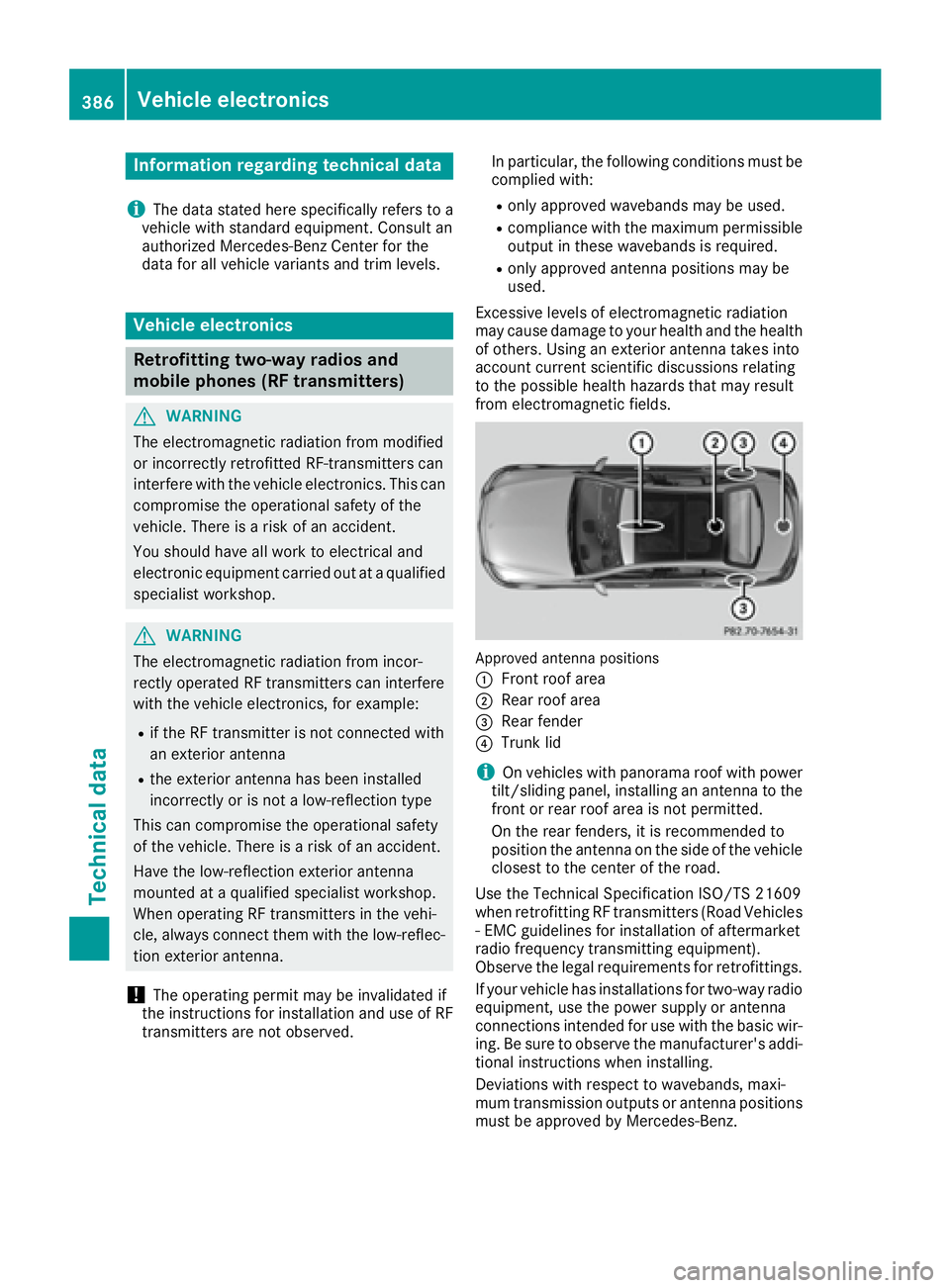
Approved antenna position s
C
Fron t roo f areaD
Rear roo f area
Page 389 of 398
The maximum transmission output (PEAK) at the
base of the antenna must not exceed the fol-
lowing values:
Waveband Maximum
transmission
output
Short wave
3 - 54 MHz 100 W
4 m waveband
74 - 88 MHz 30 W
2 m waveband
144 - 174 MHz 50 W
Trunked radio/Tetra
380 - 460 MHz 10 W
70 cm waveband
400 - 460 MHz 35 W
Mobile communications
(2G/3G/4G) 10 W
The following can be used in the vehicle without
restrictions: R
RF transmitters with a maximum transmis-
sion output of up to 100 mW R
RF transmitters with transmitter frequencies
in the 380 - 410 MHz waveband and a maxi-
mum transmission output of up to 2 W
(trunked radio/Tetra) R
Mobile telephones (2G/3G/4G)
There is no restriction for antenna positions on
the outside of the vehicle for the following wave-
bands: R
Trunked radio/Tetra R
70 cm waveband R
2G/3G/4G Identification plates
Vehicle identification plate with vehi-
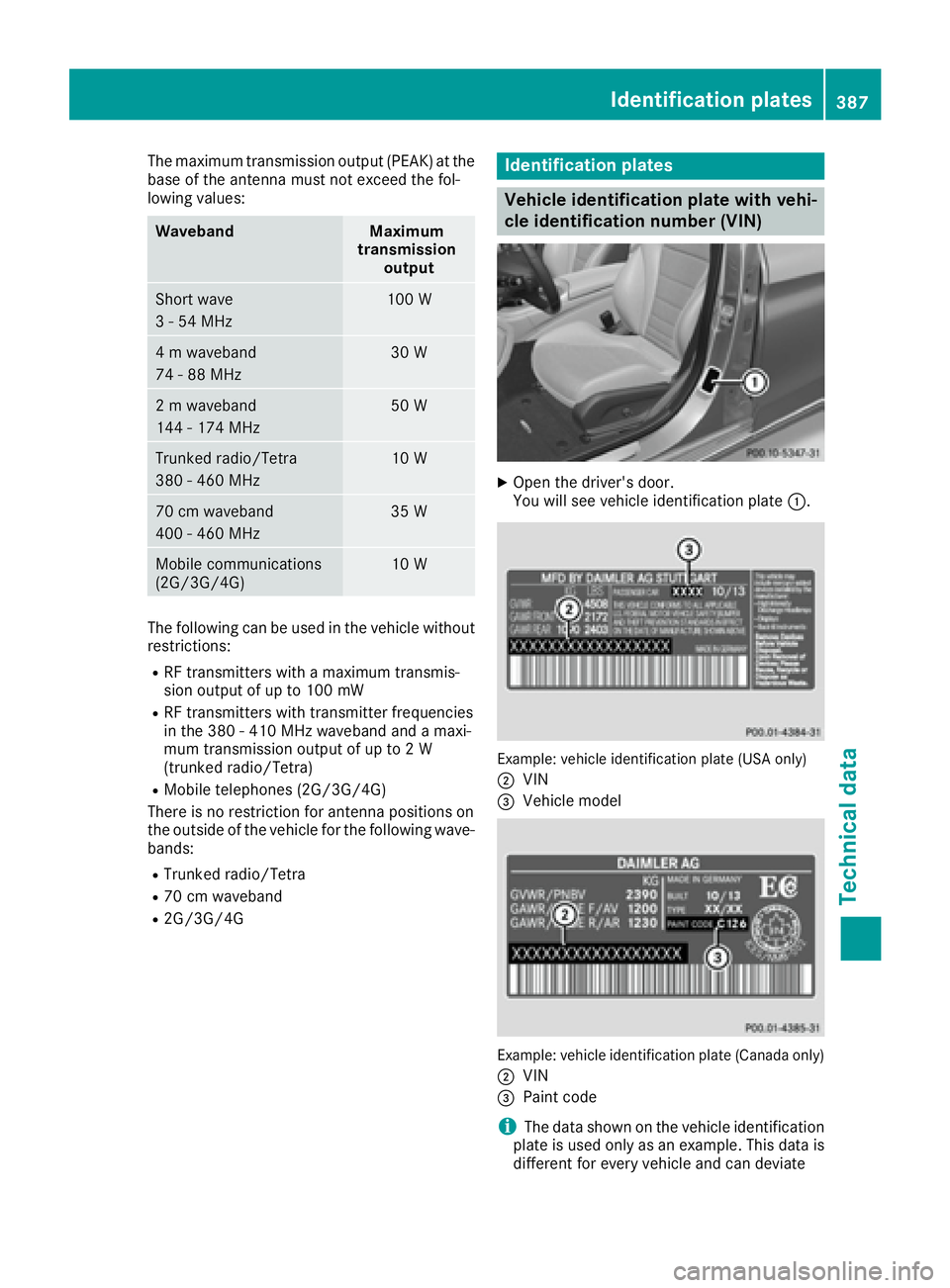
cle identification number (VIN) X
Open the driver's door.
You will see vehicle identification plate C .
Example: vehicle identification plate (USA only)
D
VIN