center console MERCEDES-BENZ C CLASS 2018 User Guide
[x] Cancel search | Manufacturer: MERCEDES-BENZ, Model Year: 2018, Model line: C CLASS, Model: MERCEDES-BENZ C CLASS 2018Pages: 370, PDF Size: 6.25 MB
Page 185 of 370
more comfortable driving style. Select comfort
mode also when driving fast on straight roads,
e.g. on straight stretches of highway.
XSelect theEor Cdrive program with the
DYNAMIC SELECT switch (Ypage 144).
The vehicle is raised to the normal level.
When driving at speeds above 78 mph
(125 km/h), the vehicle is automatically low-
ered by 0.6 in (15 mm) in the Eand Cdrive pro-
grams. When driving at speeds below 50 mph
(80 km/h) the vehicle is raised again.
AMG adaptive sport suspension sys-
tem
General notes
The electronically controlled damping system
works continuously. This improves driving
safety and ride comfort.
The damping is tuned individually to each wheel
and depends on:
Ryour driving style, e.g. sporty
Rthe road surface condition, e.g. bumps
Ryour individual selection of Sport, Sport + or
Comfort
The suspension setting is adjusted using the
corresponding button in the center console.
iThe mode can also be set using the
DYNAMIC SELECT switch (Ypage 144).
This is only possible if:
Rusing the AMG adaptive sport suspension
system button on the center console, and
Rusing the DYNAMIC SELECT switch, the
same mode is selected for the chassis. This
is the case, for example, when both are set
to Comfort mode.
Each time you start the engine with the Smart-
Key or the Start/Stop button, Comfort mode is
activated. For further information about starting
the engine, see (
Ypage 138).
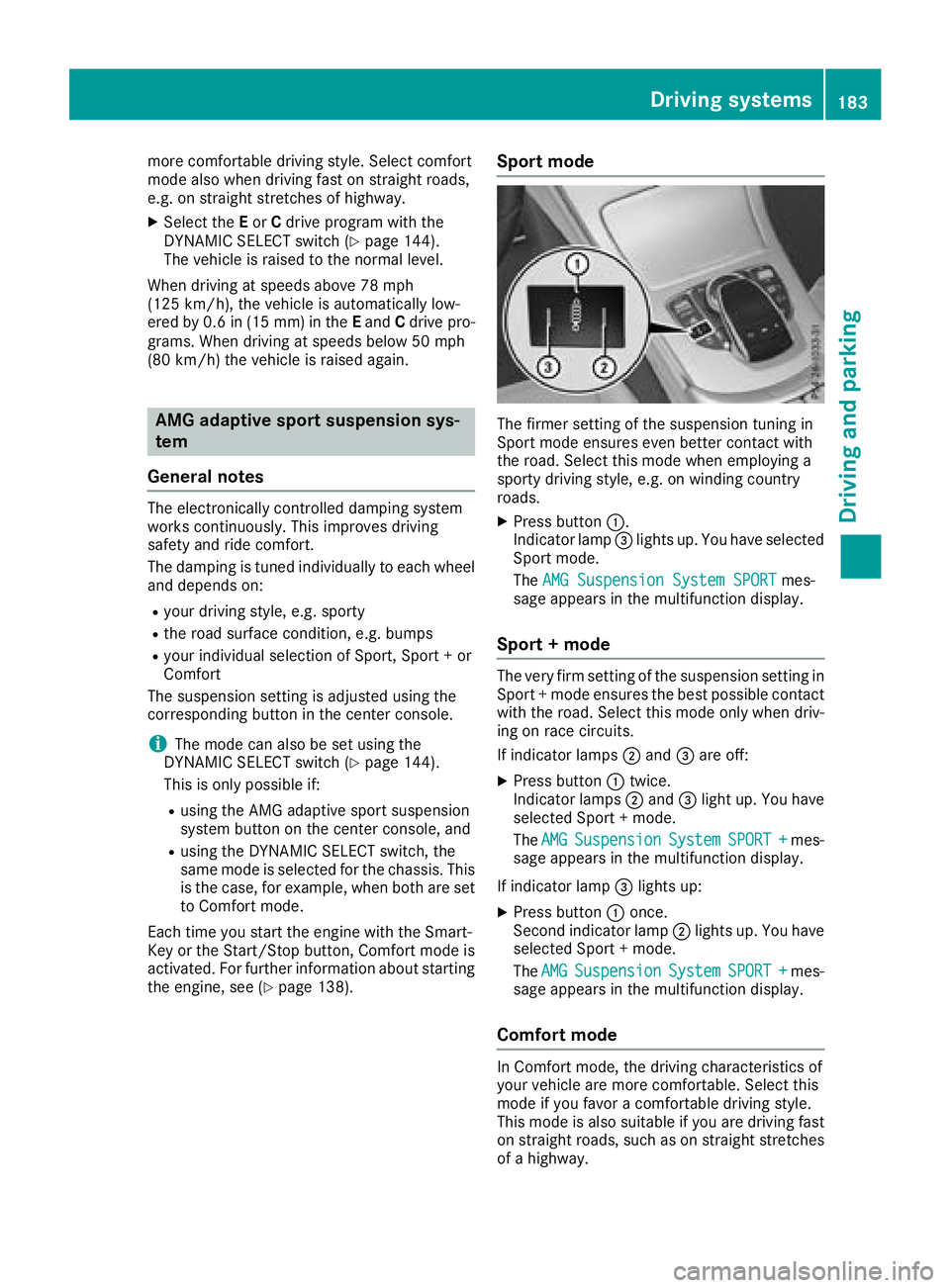
Sport mode
The firmer setting of the suspension tuning in
Sport mode ensures even better contact with
the road. Select this mode when employing a
sporty driving style, e.g. on winding country
roads.
XPress button :.
Indicator lamp =lights up. You have selected
Sport mode.
The AMG Suspension System SPORT
mes-
sage appears in the multifunction display.
Sport + mode
The very firm setting of the suspension setting in
Sport + mode ensures the best possible contact
with the road. Select this mode only when driv-
ing on race circuits.
If indicator lamps ;and =are off:
XPress button :twice.
Indicator lamps ;and =light up. You have
selected Sport + mode.
The AMG
SuspensionSystemSPORT +mes-
sage appears in the multifunction display.
If indicator lamp =lights up:
XPress button :once.
Second indicator lamp ;lights up. You have
selected Sport + mode.
The AMG
SuspensionSystemSPORT +mes-
sage appears in the multifunction display.
Comfort mode
In Comfort mode, the driving characteristics of
your vehicle are more comfortable. Select this
mode if you favor a comfortable driving style.
This mode is also suitable if you are driving fast
on straight roads, such as on straight stretches
of a highway.
Driving systems183
Driving and parking
Z
Page 192 of 370
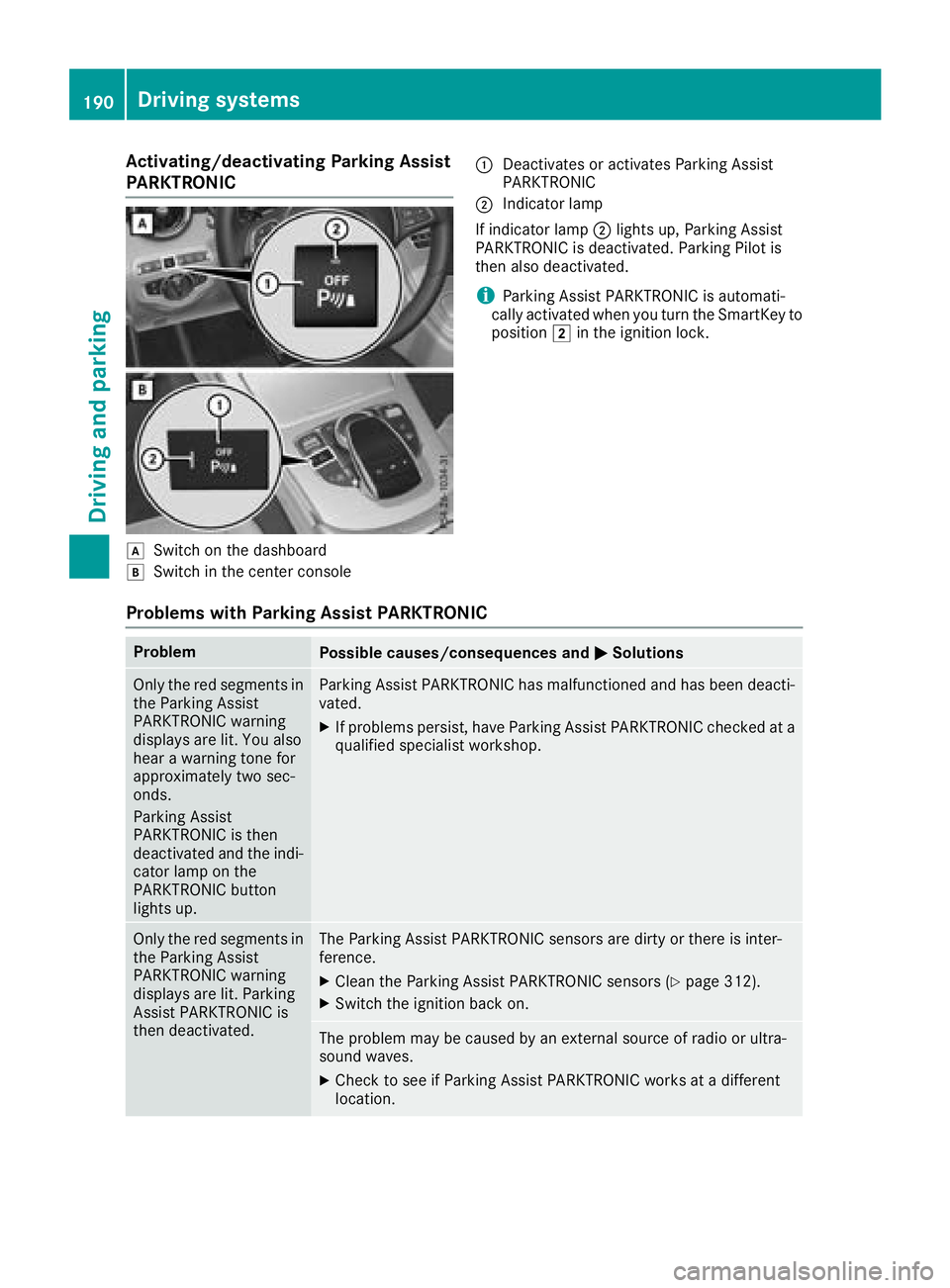
Activating/deactivating Parking Assist
PARKTRONIC
dSwitc hon th edashboar d
eSwitchin th ecenter console
:Deactivates or activates Parking Assis t
PARKTRONI C
;Indicatorlamp
If indicator lamp ;lights up, Parking Assis t
PARKTRONI Cis deactivated. Parking Pilo tis
then also deactivated.
iParking Assis tPARKTRONI Cis automati-
call yactivated when you tur nth eSmartKey to
position 2in th eignition lock.
Problems with Park ing Assist PARKTRONIC
ProblemPossible causes/consequences and MSolutions
Only thered segments in
th eParking Assis t
PARKTRONI Cwarning
displays are lit .You also
hear awarning tone for
approximately two sec -
onds.
Parking Assis t
PARKTRONI Cis then
deactivated and th eindi-
cator lamp on th e
PARKTRONI Cbutto n
lights up.Parking Assis tPARKTRONI Chas malfunctioned and has been deacti -
vated.
XIf problem spersist, hav eParking Assis tPARKTRONI Cchecke dat a
qualified specialis tworkshop .
Only thered segments in
th eParking Assis t
PARKTRONI Cwarning
displays are lit .Parking
Assis tPARKTRONI Cis
then deactivated.The Parking Assis tPARKTRONI Csensor sare dirty or there is inter-
ference .
XClean th eParking Assis tPARKTRONI Csensor s (Ypage 312).
XSwitchth eignition bac kon .
The problem may be caused by an external source of radi oor ultra-
soun dwaves.
XChec kto see if Parking Assis tPARKTRONI Cworks at adifferen t
location .
190Driving systems
Driving and parking
Page 242 of 370
Display messagesPossible causes/consequences andMSolutions
FrontPassengerAir‐bag Disabled SeeOperator' sManual
The front-passenger fron tair bag is deactivated during th ejourney,
eve nthough :
Ran adult
or
Raperson of th ecorrespondin gstatur eis on th efront-passenger seat
If additional force sare applie dto th eseat ,th esystem may interpret
th eoccupant's weigh tas lower than it actually is.
GWARNIN G
The front-passenger air bag does no tdeploy during an accident.
There is an increased ris kof injury.
XPull ove rand stop th evehicl esafely as soo nas possible, payin g
attention to roa dand traffic conditions.
XSecur eth evehicl eagainst rollin gaway (Ypage 161).
XSwitchth eignition off .
XHaveth eoccupant on th efront-passenger seat get out of th evehi-
cle .
XKee pth eseat unoccupied ,close th efront-passenger door and
switch on th eignition .
XObserveth ePASSENGER AI RBA Gindicator lamp sin th ecenter
console and th emultifunction display and chec kth efollowing:
Seat unoccupied and ignition switched on :
Raself-diagnosis is carrie dout .The PASSENGER AI RBA GOF Fand
PASSENGER AI RBA GON indicator lamp smus tligh tup simulta-
neousl yfor approximately six seconds
Rth ePASSENGER AI RBA GOF Findicator lamp mus tthen ligh tup
and remain lit after th eself-diagnosis .If th eindicator lamp is on ,
OCS (Occupant Classification System) has disabled th efront-
passenger fron tair bag (
Ypage 52)
Rthedisplay message sFront Passenger Airbag Enable dSee Operator'sManualor Front Passenger Airbag Dis ‐abled See Operator'sManualmus tno tappear in th emulti-
function display
XWait for aperiod of at least 60 seconds until th enecessar ysystem
checks hav ebeen completed.
XMak esur ethat th edisplay message sdo no tappear in th emulti-
function display.
If these condition sare fulfilled ,th efront-passenger seat can be occu-
pied again .Whether th ePASSENGER AI RBA GOF Findicator lamp
remain slit or goe sout depend son how OCS classifies th eoccupant .
If th econdition sare no tfulfilled ,th esystem is no toperating correctly.
XVisit aqualified specialist workshop immediately.
Fo rfurther information about th eOccupant Classification System, see
(
Ypage 52).
240Display messages
On-board computer and displays
Page 243 of 370
Display messagesPossible causes/consequences andMSolutions
FrontPassengerAir‐bag Enable dSeeOperator' sManual
The front-passenger fron tair bag is enabled during th ejourney, eve n
though :
Rachild, asmall adult or an objec tweighing less than th esystem' s
weigh tthreshold is locate don th efront-passenger seat
or
Rth efront-passenger seat is unoccupied
The system may detec tobjects or force sapplyin gadditional weigh ton
th eseat .
GWARNIN G
The front-passenger fron tair bag may deploy unintentionally.
There is an increased ris kof injury.
XPull ove rand stop th evehicl esafely as soo nas possible, payin g
attention to roa dand traffic conditions.
XSecur eth evehicl eagainst rollin gaway (Ypage 161).
XSwitchth eignition off .
XOpenth efront-passenger door .
XRemove thechild and th echild restrain tsystem from th efront-
passenger seat .
XMakesur ethat there are no objects on th eseat addin gto th e
weight.
The system might otherwise detec tth eadditional weigh tand inter-
pre tth eseat occupant's weigh tas greate rthan it actually is.
XKee pth eseat unoccupied ,close th efront-passenger door and
switch on th eignition .
XObserveth ePASSENGER AI RBA Gindicator lamp sin th ecenter
console and th emultifunction display and chec kth efollowing:
Seat unoccupied and ignition switched on :
Raself-diagnosis is carrie dout .The PASSENGER AI RBA GOF Fand
PASSENGER AI RBA GON indicator lamp smus tligh tup simulta-
neousl yfor approximately six seconds
Rth ePASSENGER AI RBA GOF Findicator lamp mus tthen ligh tup
and remain lit after th eself-diagnosis .If th eindicator lamp is on ,
OCS has disabled th efront-passenger fron tair bag (
Ypage 52)
Rthedisplay message sFront Passenger Airbag Enable dSee Operator'sManualor Front Passenger Airbag Dis ‐abled See Operator'sManualmus tno tappear in th emulti-
function display
XWait for aperiod of at least 60 seconds until th enecessar ysystem
checks hav ebeen completed.
XMak esur ethat th edisplay message sdo no tappear in th emulti-
function display.
If these condition sare fulfilled ,th efront-passenger seat can be occu-
pied again .Whether th ePASSENGER AI RBA GOF Findicator lamp
remain slit or goe sout depend son how OCS classifies th eoccupant .
If th econdition sare no tfulfilled ,th esystem is no toperating correctly.
XVisit aqualified specialist workshop immediately.
Display messages24 1
On-board computer and displays
Z
Page 273 of 370
Operating system
Overview
General notes
Wearing polarized sunglasses may impair your
ability to read the display.
The display has an automatic temperature-con-
trolled switch-off feature. The brightness is
automatically reduced if the temperature is too
high. The display may temporarily switch off
completely.
Cleaning instructions
!Do not touch the display. The display has a
very sensitive high-gloss surface; there is a
risk of scratching. If you have to clean the
screen, however, use a mild cleaning agent
and a soft, lint-free cloth.
The display must be switched off and have
cooled down before you start cleaning. Do not
apply pressure to the display surface when
cleaning it, as this could cause irreversible dam-
age to the display.
Switching the multimedia system
on/off
XPress the Übutton on the center console
to the right of the controller.
XFor Mercedes-AMG vehicles with a switch- able AMG Performance exhaust system:
press the thumbwheel which is to the right of
the controller.
Adjusts the volume
XTurn the thumbwheel to the right of the con-
troller.
The volume is adjusted:
Rfor the currently selected media source
Rduring traffic or navigation announcements
Rin hands-free mode during a phone call
Switching the sound on or off
This function is only available on the multifunc-
tion steering wheel for Mercedes-AMG vehicles
with a selectable AMG Performance exhaust
system.
XPress the thumbwheel to the right of the con-
troller.
or
XPress the 8button on the multifunction
steering wheel.
If the audio output is switched off, the status
line will show the 8symbol. If you switch
the media source or change the volume, the
sound is automatically switched on.
iNavigation announcements will be heard
even if the sound is muted.
Functions
The multimedia system has the following func-
tions:
RRadio mode
RMedia mode with media search
RSound system
RNavigation system
COMAND: navigation via the hard drive
Audio 20: navigation via SD card
RCommunication functions
RSIRIUS Weather (COMAND)
RVehicle functions with system settings
RFavorites functions
Controller
The controller in the center console lets you:
Rselect menu items on the display
Renter characters
Rselect a destination on the map
Rsave entries
The controller can be:
Rturned 3
Rslid left or right 1
Rslid forwards or back 4
Rslid diagonally2
Rpressed briefly or pressed and held 7
Back button
You can use the%button to exit a menu or to
call up the display of the current operating
mode.
Operating system271
Multimedia system
Z
Page 283 of 370
Stowage compartments in the front
Glove box
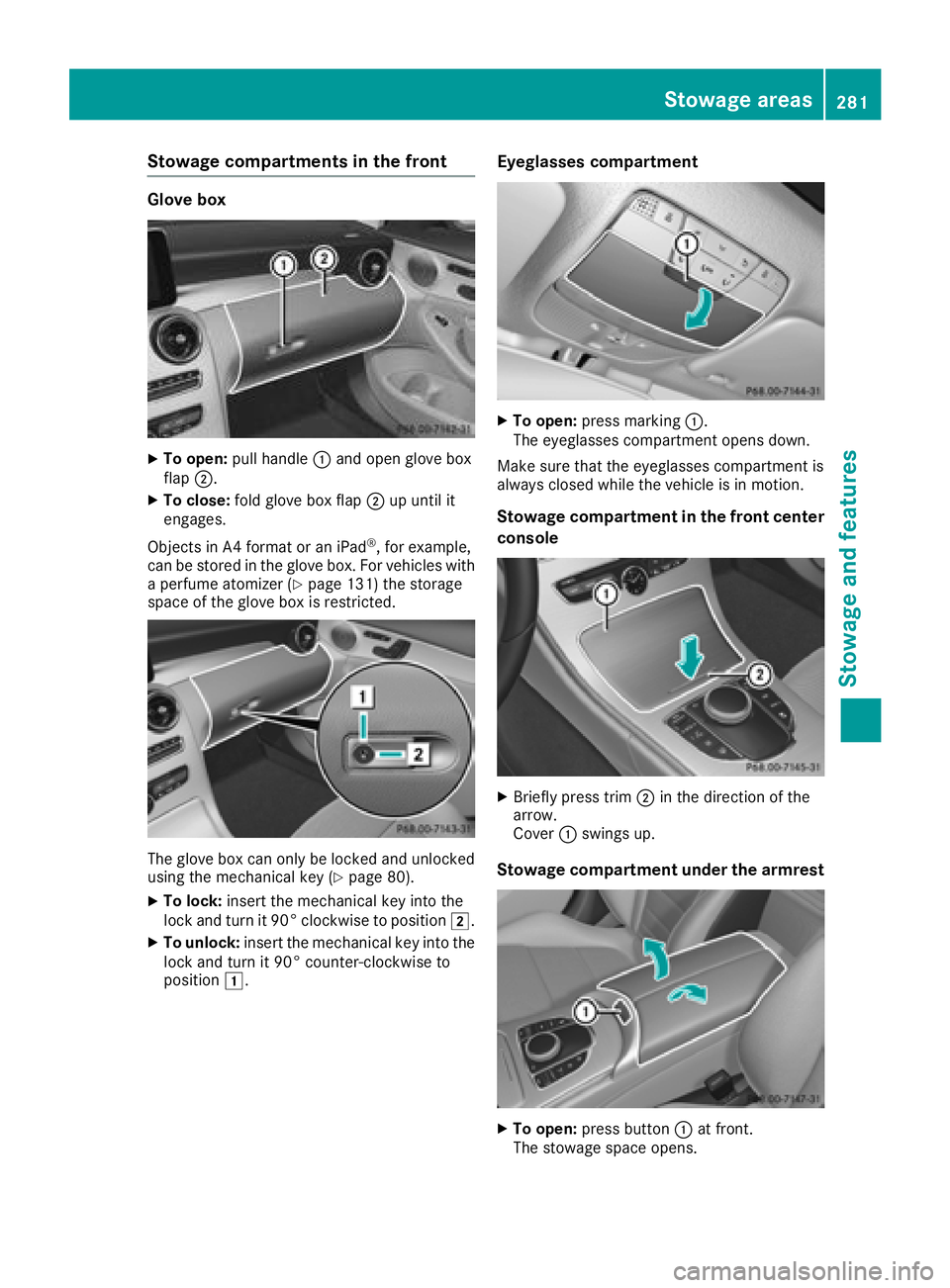
XTo open:pull handle :and open glove box
flap ;.
XTo close: fold glove box flap ;up until it
engages.
Objects in A4 format or an iPad
®, for example,
can be stored in the glove box. For vehicles with
a perfume atomizer (
Ypage 131) the storage
space of the glove box is restricted.
The glove box can only be locked and unlocked
using the mechanical key (Ypage 80).
XTo lock: insert the mechanical key into the
lock and turn it 90° clockwise to position 2.
XTo unlock:insert the mechanical key into the
lock and turn it 90° counter-clockwise to
position 1.
Eyeglasses compartment
XTo open: press marking :.
The eyeglasses compartment opens down.
Make sure that the eyeglasses compartment is
always closed while the vehicle is in motion.
Stowage compartment in the front center
console
XBriefly press trim ;in the direction of the
arrow.
Cover :swings up.
Stowage compartment under the armrest
XTo open: press button :at front.
The stowage space opens.
Stowage areas281
Stowage and features
Z
Page 284 of 370
Depending on the vehicle's equipment, the fol-
lowing may be in the stowage space:
Ran SD card slot
Ra multimedia connector unit with two USB
ports, e.g. for iPod®, iPhone®or MP3 player
(see the Digital Operator's Manual)
Ra mobile phone bracket
Ra small stowage space in the upper front sec-
tion
Stowage compartment in the doors
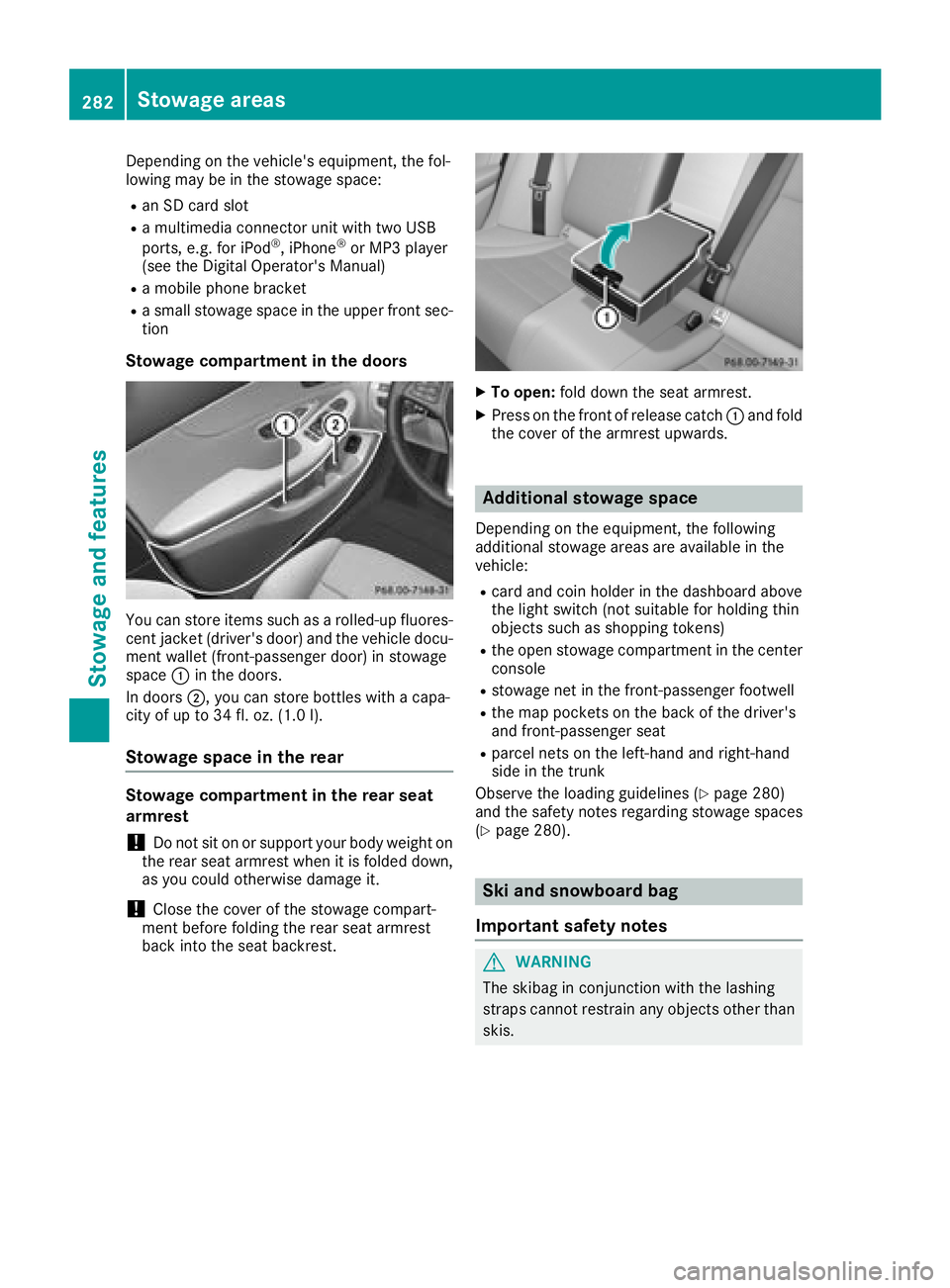
You can store items such as a rolled-up fluores-
cent jacket (driver's door) and the vehicle docu-
ment wallet (front-passenger door) in stowage
space :in the doors.
In doors ;, you can store bottles with a capa-
city of up to 34 fl. oz. (1.0 l).
Stowage space in the rear
Stowage compartment in the rear seat
armrest
!Do not sit on or support your body weight on
the rear seat armrest when it is folded down,
as you could otherwise damage it.
!Close the cover of the stowage compart-
ment before folding the rear seat armrest
back into the seat backrest.
XTo open: fold down the seat armrest.
XPress on the front of release catch :and fold
the cover of the armrest upwards.
Additional stowage space
Depending on the equipment, the following
additional stowage areas are available in the
vehicle:
Rcard and coin holder in the dashboard above
the light switch (not suitable for holding thin
objects such as shopping tokens)
Rthe open stowage compartment in the center
console
Rstowage net in the front-passenger footwell
Rthe map pockets on the back of the driver's
and front-passenger seat
Rparcel nets on the left-hand and right-hand
side in the trunk
Observe the loading guidelines (
Ypage 280)
and the safety notes regarding stowage spaces
(
Ypage 280).
Ski and snowboard bag
Important safety notes
GWARNING
The skibag in conjunction with the lashing
straps cannot restrain any objects other than
skis.
282Stowage areas
Stowage and features
Page 291 of 370
Features
Cup holder
Important safety notes
GWARNIN G
The cup holder canno thold acontainer secure
whils ttraveling .If you use acup holder whils t
traveling ,th econtainer may be flun garoun d
and liquid may be spilled. The vehicl eoccu-
pants may come int ocontact wit hth eliquid
and if it is hot ,they may be scalded. You may
be distracte dfrom th etraffic condition sand
you could lose control of th evehicle. Ther eis
a ris kof an acciden tand injury.
Only use th ecup holder when th evehicl eis
stationary. Only use th ecup holder for con-
tainers of th eright size. Always close th econ-
tainer, particularly if th eliquid is hot .
GWARNING
If object sin th epassenger compartmen tare
stowed incorrectly, they can slide or be
thrown aroun dand hit vehicl eoccupants. In
addition ,cupholders, open stowage spaces
and mobile phon ebrackets canno talways
retain all object sthey contain .Ther eis aris k
of injury, particularly in th eevent of sudde n
braking or asudde nchang ein direction .
RAlways stow object sso that they canno tbe
thrown aroun din suc hsituations.
RAlways mak esure that object sdo no tpro -
trude from stowage spaces, parcel nets or
stowage nets .
RClose thelockable stowage spaces before
starting ajourney.
RAlways stow and secure heavy, hard ,poin -
ted, sharp-edged, fragile or bulk yobject sin
th etrunk .
!Only use th ecup holders for containers of
th eright siz eand whic hhave lids. The drinks
could otherwise spill .
!Do notexpos edrinks bottles in th ecup
holder in th ecente rconsole to continuous,
stron gand direct sunlight. The passenger
compartmen tin th earea of th ecente rcon- sole can otherwise be damaged by th
econ-
centrate dand reflecte dsunlight.
Observ eth eloadin gguidelines (
Ypage 280).
Cup holder in the front center console
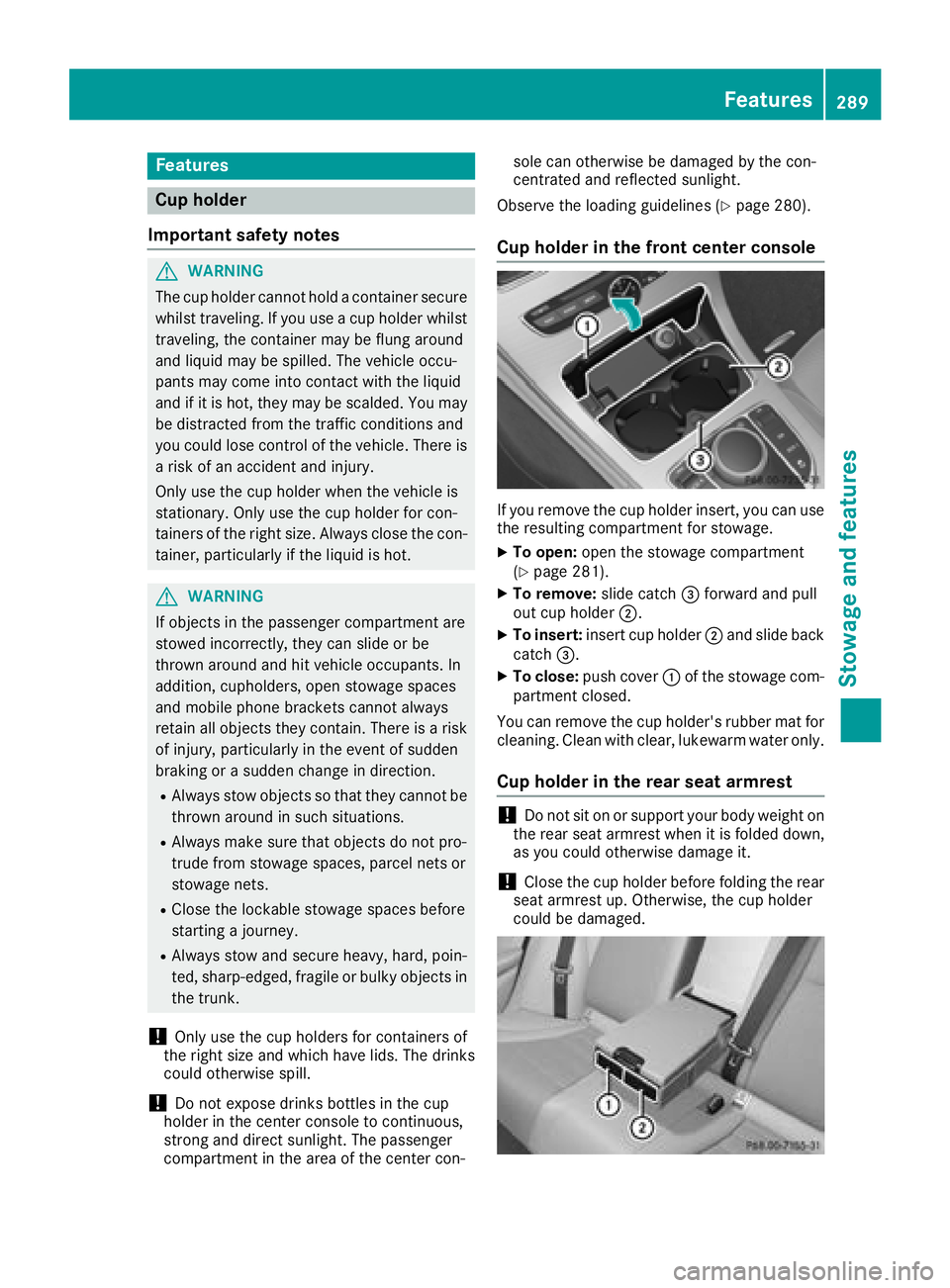
If you remove th ecup holder insert ,you can use
th eresulting compartmen tfor stowage .
XTo open:open th estowage compartmen t
(Ypage 281).
XTo remove: slide catch=forward and pull
out cup holder ;.
XTo insert:insert cup holder ;and slide bac k
catch =.
XTo close: push cover :of th estowage com-
partmen tclosed.
You can remove th ecup holder' srubber mat for
cleaning. Clean wit hclear, lukewarm water only.
Cup holder in the rear seat armrest
!Do no tsit on or support your body weigh ton
th erear seat armres twhen it is folded down ,
as you could otherwise damag eit.
!Close th ecup holder before foldin gth erear
seat armres tup. Otherwise, th ecup holder
could be damaged.
Features289
Stowage and features
Z
Page 294 of 370
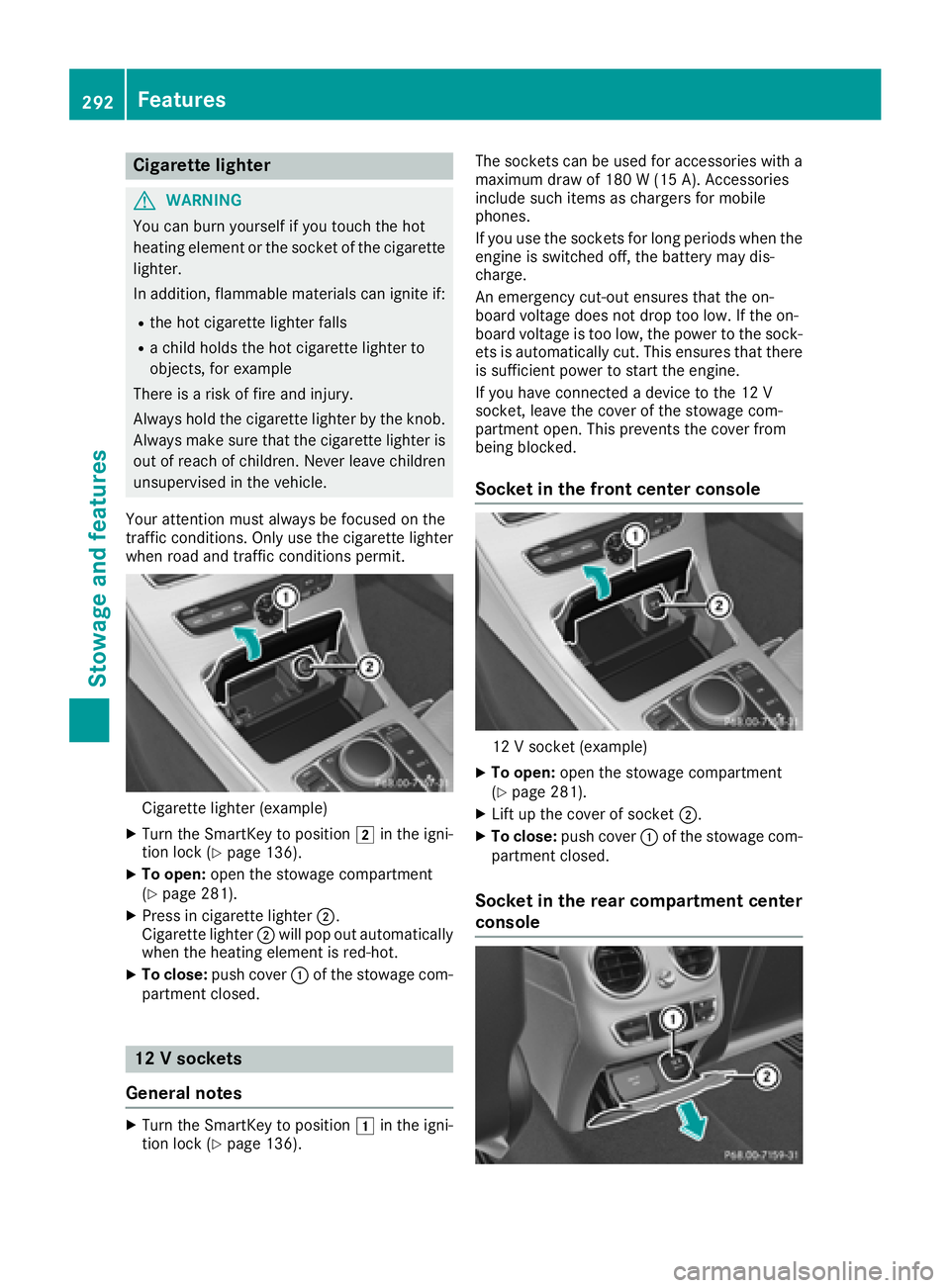
Cigarette lighter
GWARNING
You can burn yourself if you touch the hot
heating element or the socket of the cigarette lighter.
In addition, flammable materials can ignite if:
Rthe hot cigarette lighter falls
Ra child holds the hot cigarette lighter to
objects, for example
There is a risk of fire and injury.
Always hold the cigarette lighter by the knob.
Always make sure that the cigarette lighter is
out of reach of children. Never leave children
unsupervised in the vehicle.
Your attention must always be focused on the
traffic conditions. Only use the cigarette lighter when road and traffic conditions permit.
Cigarette lighter (example)
XTurn the SmartKey to position 2in the igni-
tion lock (Ypage 136).
XTo open: open the stowage compartment
(Ypage 281).
XPress in cigarette lighter ;.
Cigarette lighter ;will pop out automatically
when the heating element is red-hot.
XTo close: push cover :of the stowage com-
partment closed.
12 V sockets
General notes
XTurn the SmartKey to position 1in the igni-
tion lock (Ypage 136). The sockets can be used for accessories with a
maximum draw of 180 W (15 A). Accessories
include such items as chargers for mobile
phones.
If you use the sockets for long periods when the
engine is switched off, the battery may dis-
charge.
An emergency cut-out ensures that the on-
board voltage does not drop too low. If the on-
board voltage is too low, the power to the sock-
ets is automatically cut. This ensures that there
is sufficient power to start the engine.
If you have connected a device to the 12 V
socket, leave the cover of the stowage com-
partment open. This prevents the cover from
being blocked.
Socket in the front center console
12 V socket (example)
XTo open:
open the stowage compartment
(Ypage 281).
XLift up the cover of socket ;.
XTo close:push cover :of the stowage com-
partment closed.
Socket in the rear compartment center
console
292Features
Stowage and features