steering MERCEDES-BENZ C CLASS 2018 User Guide
[x] Cancel search | Manufacturer: MERCEDES-BENZ, Model Year: 2018, Model line: C CLASS, Model: MERCEDES-BENZ C CLASS 2018Pages: 370, PDF Size: 6.25 MB
Page 27 of 370
Vehicle data ................................... 367
Vehicle battery
see Battery (vehicle)
Vehicle data
Roof load (maximum) .....................3 67
Vehicle dimensions ........................... 367
Vehicle emergency locking ................ 85
Vehicle identification number
see VIN
Vehicle identification plate .............. 360
Vehicle level
AIRMATIC ...................................... 182
Display message ............................ 247
Video
Operating the DVD ......................... 219
see also Digital Operator's Man-
ual ..................................................2 70
VIN
Seat ............................................... 361
Type plate ...................................... 360
W
Warning and indicator lampsABS ................................................ 261
Active Brake Assist ........................ 267
Airbag ............................................ 264
Brakes ...........................................2 60
Coolant .......................................... 265
Distance warning ........................... 267
Engine diagnostics ......................... 265
ESP
®.............................................. 261
ESP®OFF ....................................... 263
Fuel tank ........................................ 265
General notes ................................ 258
Overview .......................................... 37
Parking brake ................................ 264
PASSENGER AIR BAG ......................4 5
Reserv efuel .................................. .265
Restraint system ............................ 264
Seat belt ........................................ 259
SPORT handling mode ................... 263
Steering ......................................... 269
Tire pressure monitor .................... 268
Warranty .............................................. 29
Washer fluid
Display message ............................ 257 Weather display (COMAND)
see also Digital Operator's Man-
ual .................................................. 270
Wheel and tire combinations
Tires ............................................... 357
Wheel bolt tightening torque ........... 357
Wheel chock ...................................... 353
Wheels
Changing a wheel .......................... 352
Checking ........................................ 334
Cleaning ......................................... 311
Important safety notes .................. 333
Information on driving .................... 333
Interchanging/changing ................ 352
Mounting a new wheel ................... 356
Mounting a wheel .......................... 353
Removing a wheel .......................... 356
Snow chains .................................. 336
Storing ........................................... 353
Tightening torque ........................... 357
Wheel size/tire size ....................... 357
Window curtain air bag
Display message ............................ 239
Operation ......................................... 51
Windows
see Side windows
Windshield
Defrosting ...................................... 129
Win dshie
ld washer fluid
see Windshield washer system
Windshield washer system
Adding washer fluid ....................... 307
Important safety notes .................. 366
Windshield wipers
Problem (malfunction) ................... 123
Replacing the wiper blades ............ 121
Switching on/off ........................... 120
Winter driving
Important safety notes .................. 335
Slippery road surfaces ................... 169
Snow chains .................................. 336
Winter operation
Radiator cover ............................... 304
Summer tires ................................. 335
Winter tires
M+S tires ....................................... 335
Wiper arm
Moving to a vertical position .......... 121
Index25
Page 38 of 370
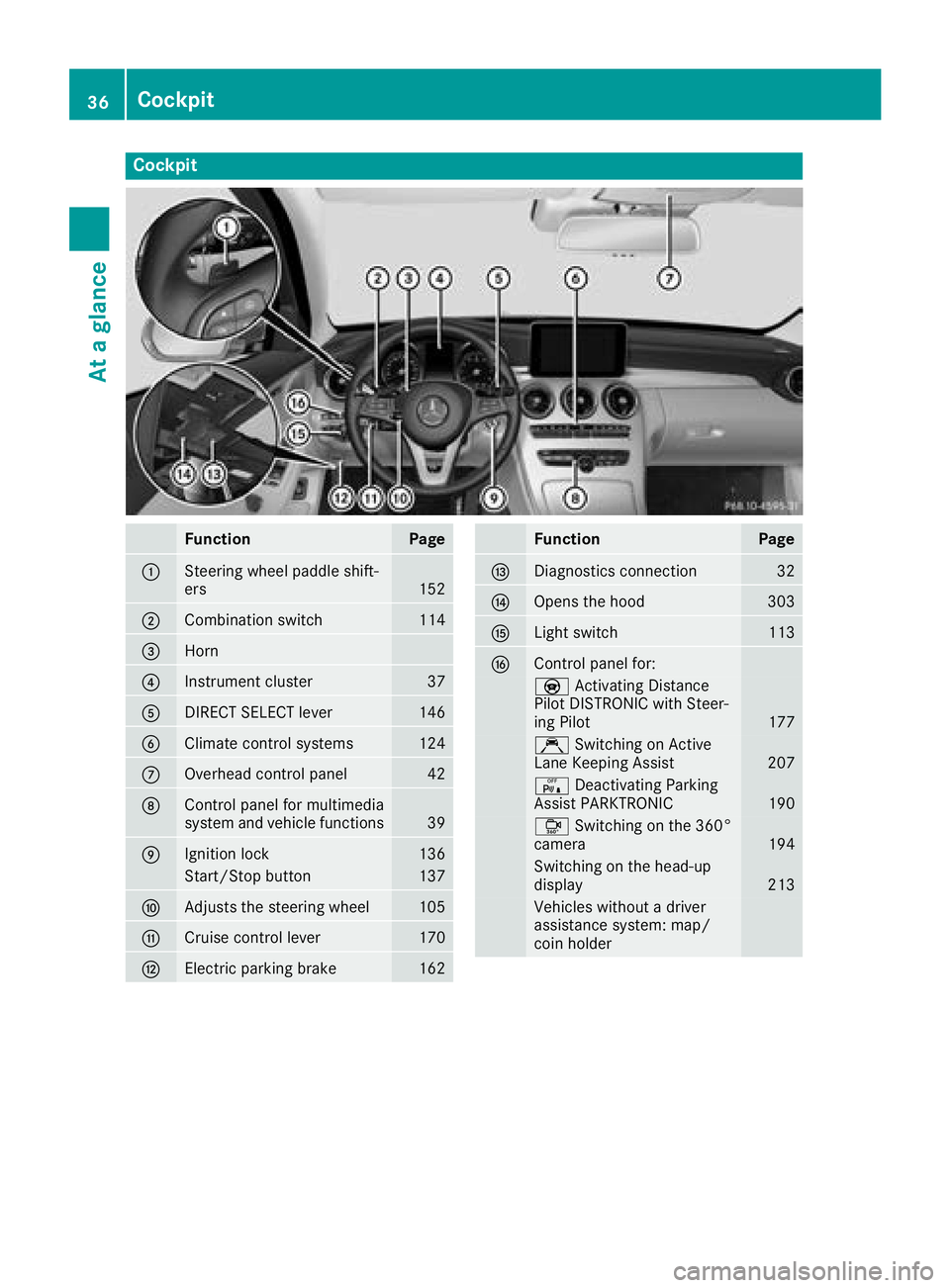
Cockpit
FunctionPage
:Steering wheel paddle shift-
ers152
;Combination switch114
=Horn
?Instrument cluster37
ADIRECT SELECT lever146
BClimate control systems124
COverhead control panel42
DControl panel for multimedia
system and vehicle functions39
EIgnition lock136
Start/Stop button137
FAdjusts the steering wheel105
GCruise control lever170
HElectric parking brake162
FunctionPage
IDiagnostics connection32
JOpens the hood303
KLight switch113
LControl panel for:
YActivating Distance
Pilot DISTRONIC with Steer-
ing Pilot
177
Ç Switching on Active
Lane Keeping Assist207
c Deactivating Parking
Assist PARKTRONIC190
Ô Switching on the 360°
camera194
Switching on the head-up
display213
Vehicles without a driver
assistance system: map/
coin holder
36Cockpit
At a glance
Page 39 of 370
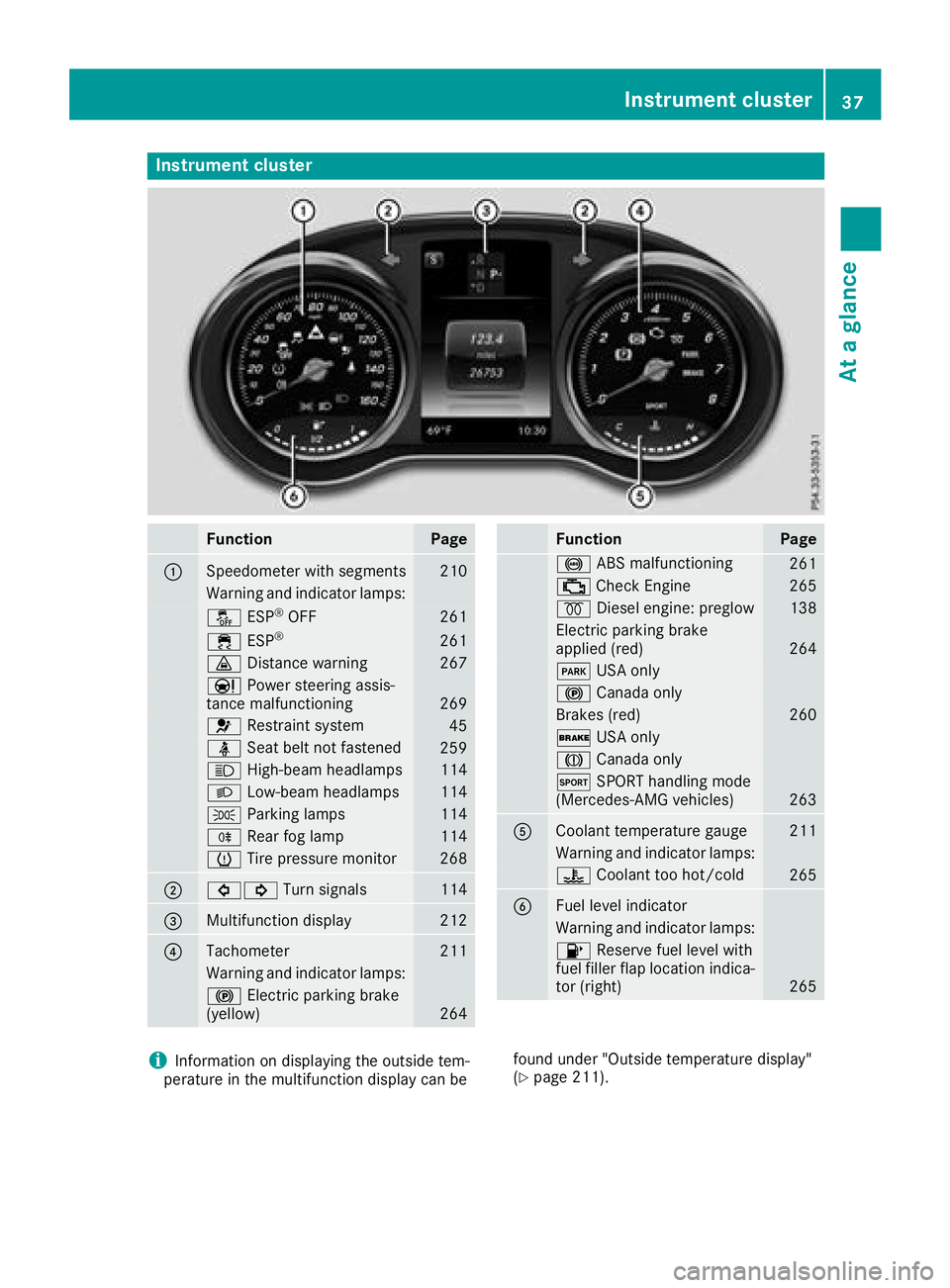
Instrument cluster
FunctionPage
:Speedometer wit hsegments21 0
Warning and indicator lamps:
å ESP®OF F261
÷ ESP®26 1
· Distanc ewarning26 7
Ð Powersteering assis-
tance malfunctioning26 9
6 Restrain tsystem45
ü Seat belt no tfastene d259
K High-beam headlamps114
L Low-beam headlamps114
T Parking lamp s114
R Rear fog lamp114
h Tirepressur emonitor26 8
;#! Turn signals114
=Multifunction display212
?Tachometer211
Warning and indicator lamps:
! Electric parking brak e
(yellow)26 4
FunctionPag e
! ABSmalfunctioning26 1
; CheckEngin e265
% Diesel engine: preglow138
Electric parking brak e
applie d(red)26 4
F USAonly
! Canad aonly
Brake s(red)26 0
$ USAonly
J Canad aonly
M SPORT handlin gmod e
(Mercedes-AM Gvehicles)26 3
ACoolan ttemperature gauge21 1
Warning and indicator lamps:
? Coolan tto ohot/cold26 5
BFue llevel indicator
Warning and indicator lamps:
8 Reserve fuel level wit h
fuel filler flap location indica-
to r(right )
265
iInformation on displayin gth eoutside tem-
peratur ein th emultifunction display can be foun
dunder "Outside temperature display"
(Ypage 211).
Instrument cluster37
At a glance
Page 40 of 370
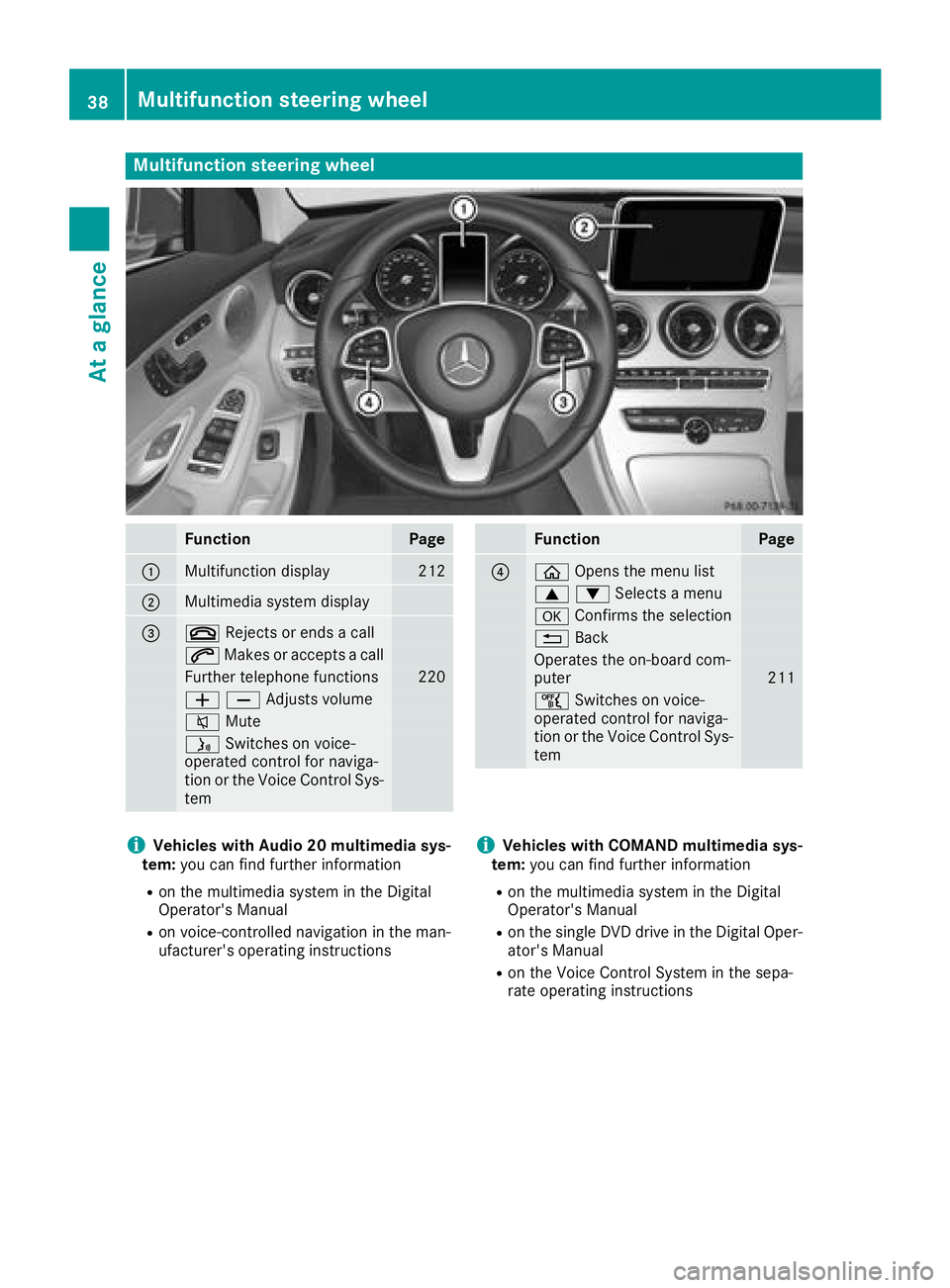
Multifunction steering wheel
FunctionPage
:Multifunction display212
;Multimedia system display
=~Rejects or ends a call
6Makes or accepts a call
Further telephone functions220
WXAdjusts volume
8 Mute
óSwitches on voice-
operated control for naviga-
tion or the Voice Control Sys-
tem
FunctionPage
?ò Opens the menu list
9:Selects a menu
aConfirms the selection
%Back
Operates the on-board com-
puter211
ñSwitches on voice-
operated control for naviga-
tion or the Voice Control Sys-
tem
iVehicles with Audio 20 multimedia sys-
tem: you can find further information
Ron the multimedia system in the Digital
Operator's Manual
Ron voice-controlled navigation in the man-
ufacturer's operating instructions
iVehicles with COMAND multimedia sys-
tem: you can find further information
Ron the multimedia system in the Digital
Operator's Manual
Ron the single DVD drive in the Digital Oper-
ator's Manual
Ron the Voice Control System in the sepa-
rate operating instructions
38Multifunction steering wheel
At a glance
Page 45 of 370
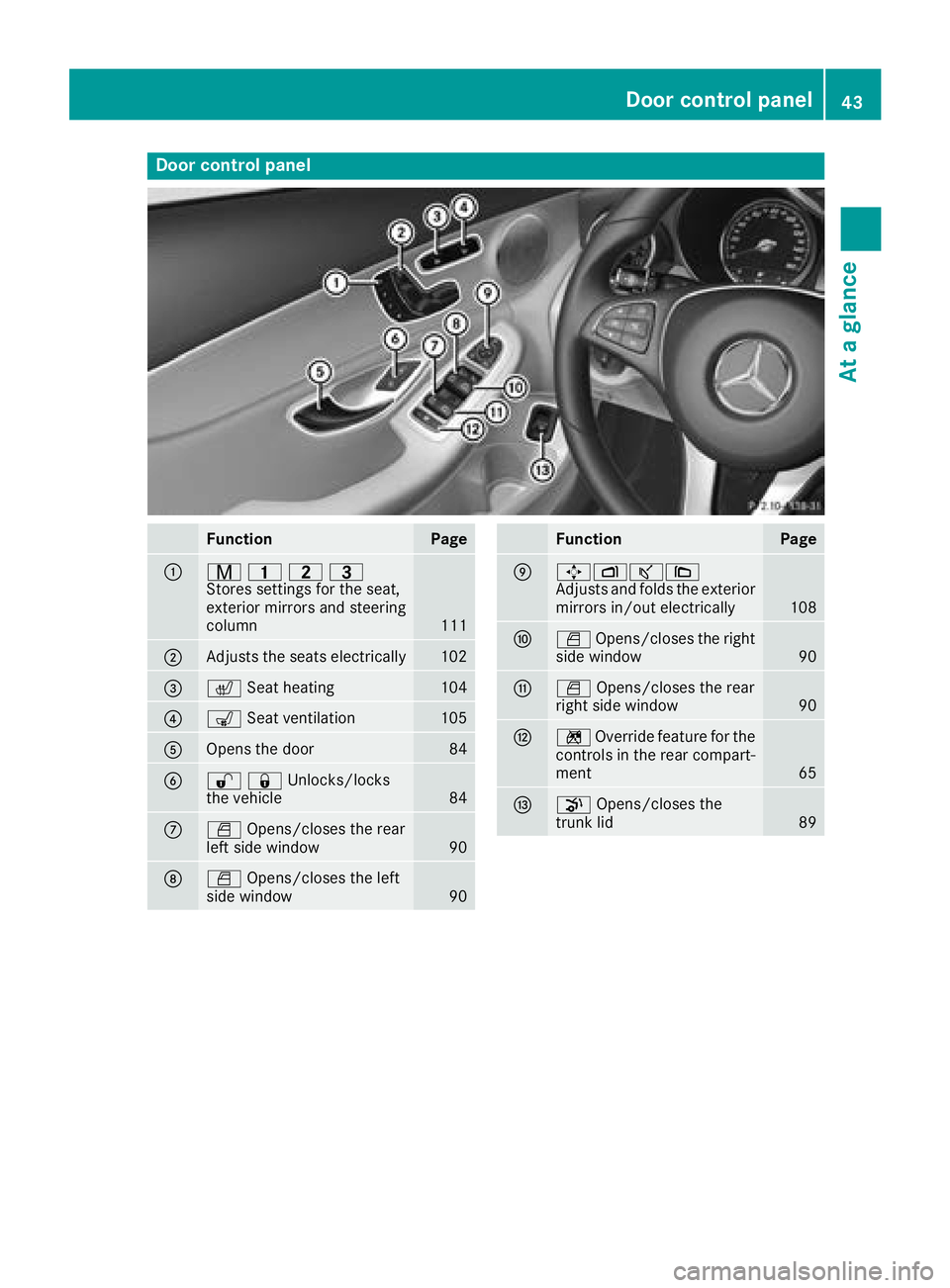
Door controlpanel
FunctionPage
:r 45=
Stores settings for the seat,
exterior mirrors and steering
column
111
;Adjusts the seats electrically102
=c Seat heating104
?sSeat ventilation105
AOpens the door84
B%&Unlocks/locks
the vehicle84
CWOpens/closes the rear
left side window90
DW Opens/closes the left
side window90
FunctionPage
E7Zª\
Adjusts and folds the exterior
mirrors in/out electrically
108
FW Opens/closes the right
side window90
GW Opens/closes the rear
right side window90
Hn Override feature for the
controls in the rear compart-
ment
65
Ip Opens/closes the
trunk lid89
Door control panel43
At a glance
Page 46 of 370
Panic alarm
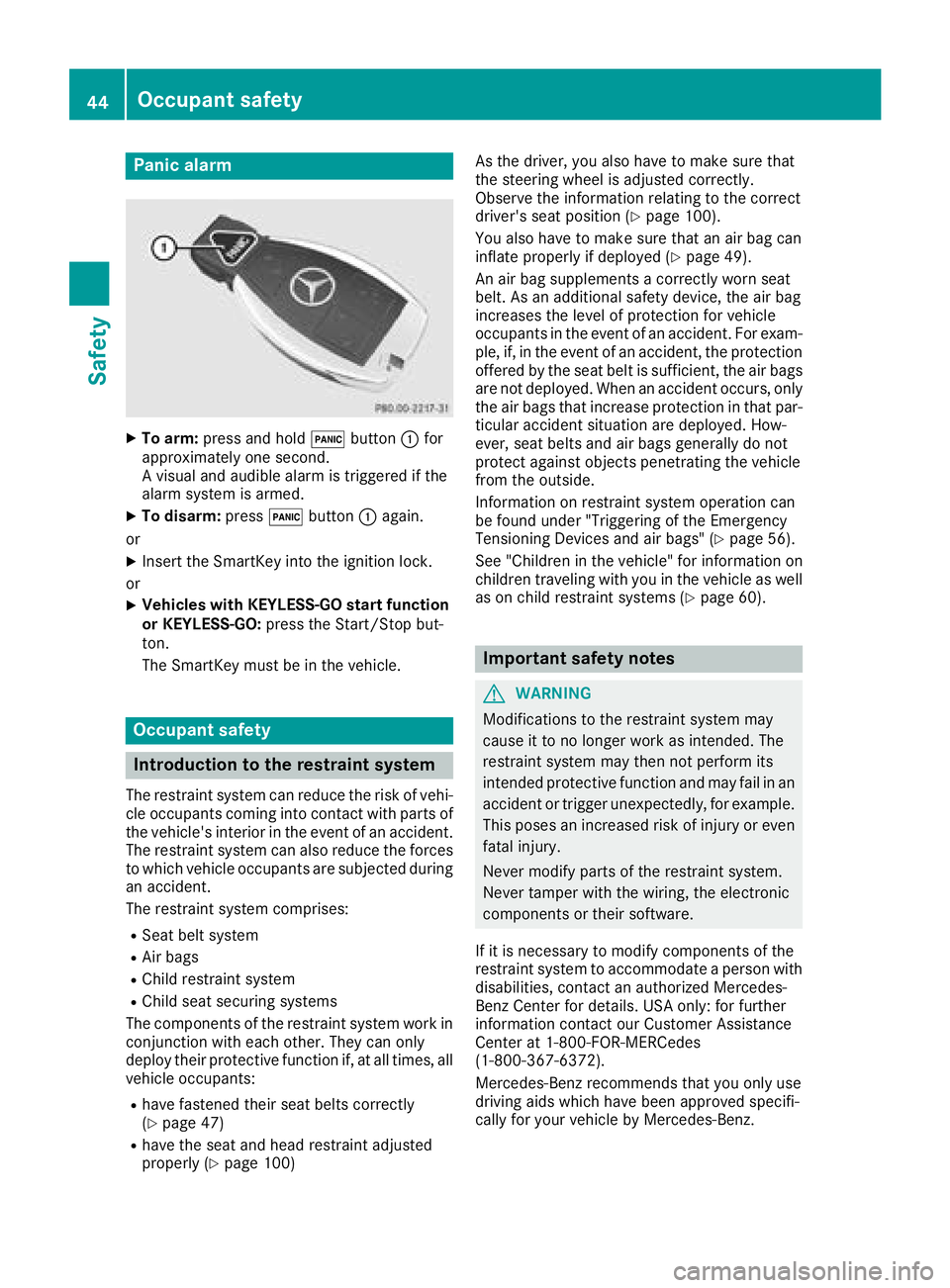
XTo arm:press and hold !button :for
approximately one second.
A visual and audible alarm is triggered if the
alarm system is armed.
XTo disarm: press!button :again.
or
XInsert the SmartKey into the ignition lock.
or
XVehicles with KEYLESS-GO start function
or KEYLESS-GO: press the Start/Stop but-
ton.
The SmartKey must be in the vehicle.
Occupant safety
Introduction to the restraint system
The restraint system can reduce the risk of vehi- cle occupants coming into contact with parts of
the vehicle's interior in the event of an accident.
The restraint system can also reduce the forces to which vehicle occupants are subjected during
an accident.
The restraint system comprises:
RSeat belt system
RAir bags
RChild restraint system
RChild seat securing systems
The components of the restraint system work in
conjunction with each other. They can only
deploy their protective function if, at all times, all
vehicle occupants:
Rhave fastened their seat belts correctly
(Ypage 47)
Rhave the seat and head restraint adjusted
properly (Ypage 100) As the driver, you also have to make sure that
the steering wheel is adjusted correctly.
Observe the information relating to the correct
driver's seat position (
Ypage 100).
You also have to make sure that an air bag can
inflate properly if deployed (
Ypage 49).
An air bag supplements a correctly worn seat
belt. As an additional safety device, the air bag
increases the level of protection for vehicle
occupants in the event of an accident. For exam-
ple, if, in the event of an accident, the protection
offered by the seat belt is sufficient, the air bags
are not deployed. When an accident occurs, only
the air bags that increase protection in that par- ticular accident situation are deployed. How-
ever, seat belts and air bags generally do not
protect against objects penetrating the vehicle
from the outside.
Information on restraint system operation can
be found under "Triggering of the Emergency
Tensioning Devices and air bags" (
Ypage 56).
See "Children in the vehicle" for information on
children traveling with you in the vehicle as well
as on child restraint systems (
Ypage 60).
Important safety notes
GWARNING
Modifications to the restraint system may
cause it to no longer work as intended. The
restraint system may then not perform its
intended protective function and may fail in an
accident or trigger unexpectedly, for example.
This poses an increased risk of injury or even fatal injury.
Never modify parts of the restraint system.
Never tamper with the wiring, the electronic
components or their software.
If it is necessary to modify components of the
restraint system to accommodate a person with
disabilities, contact an authorized Mercedes-
Benz Center for details. USA only: for further
information contact our Customer Assistance
Center at 1-800-FOR-MERCedes
(1‑800‑367‑6372).
Mercedes-Benz recommends that you only use
driving aids which have been approved specifi-
cally for your vehicle by Mercedes-Benz.
44Occupant safety
Safety
Page 51 of 370
The seat belt adjustment will apply a certain
tightening force if any slack is detected between
the vehicle occupant and the seat belt. Do not
grab hold of the seat belt.
You can switch the seat belt adjustment on and
off using the multimedia system. Information on
switching the seat belt adjustment on and off
can be found in the Digital Operating Instruc-
tions.
Belt warning for the driver and front
passenger
The7 seat belt warning lamp in the instru-
ment cluster is a reminder that all vehicle occu- pants must wear their seat belts. It may light up
continuously or flash. In addition, there may be
a warning tone.
Regardless of whether the driver's seat belt has
already been fastened, the 7seat belt warn-
ing lamp lights up for six seconds each time the engine is started. If the front doors are closed
and the driver's or front-passenger seat belt has
not been fastened, the 7seat belt warning
lamp lights up again after the six seconds. As
soon as the driver's and front-passenger seat
belts are fastened or a front door is opened
again, the 7seat belt warning lamp goes out.
If the driver's seat belt is not fastened after the
engine is started, an additional warning tone will sound. The warning tone switches off after six
seconds or once the driver's seat belt is fas-
tened.
If the vehicle's speed exceeds 15 mph
(25 km/h) once and the driver's and front-
passenger seat belts are not fastened, a warning
tone sounds. A warning tone also sounds with
increasing intensity for 60 seconds or until the
driver or front passenger have fastened their
seat belts.
If the driver or front passenger unfasten their
seat belts during the journey, the seat belt warn-
ing is activated again.
Air bags
Introduction
The installation point of an air bag can be rec-
ognized by the AIRBAG marking.
An air bag complements the correctly fastened
seat belt. It is no substitute for the seat belt. The air bag provides additional protection in appli-
cable accident situations.
Not all air bags are deployed in an accident. The
different air bag systems function independ-
ently from one another (
Ypage 56).
However, no system available today can com-
pletely eliminate injuries and fatalities.
It is also not possible to rule out a risk of injury
caused by an air bag due to the high speed at
which the air bag must be deployed.
Important safety notes
GWARNING
If you do not sit in the correct seat position,
the air bag cannot protect as intended and
could even cause additional injury when
deployed. This poses an increased risk of
injury or even fatal injury.
To avoid hazardous situations, always make
sure that all of the vehicle's occupants:
Rhave fastened their seat belts correctly,
including pregnant women
Rare sitting correctly and maintain the great-
est possible distance to the air bags
Rfollow the following instructions
Always make sure that there are no objects
between the air bag and the vehicle's occu-
pants.
RAdjust the seats properly before beginning
your journey. Always make sure that the seat
is in an almost upright position. The center of
the head restraint must support the head at
about eye level.
RMove the driver's and front-passenger seats
as far back as possible. The driver's seat posi-
tion must allow the vehicle to be driven safely.
ROnly hold the steering wheel on the outside.
This allows the air bag to be fully deployed.
RAlways lean against the backrest while driv-
ing. Do not lean forward or lean against the
door or side window. You may otherwise be in
the deployment area of the air bags.
RAlways keep your feet in the footwell in front
of the seat. Do not put your feet on the dash-
Occupant safety49
Safety
Z
Page 53 of 370
The front-passenger front air bag will only
deploy if:
Rthe system, based on the OCS weight sensor
readings, detects that the front-passenger
seat is occupied (
Ypage 52). The
PASSENGER AIR BAG OFF indicator lamp is
not lit (
Ypage 52)
Rthe restraint system control unit predicts a
high accident severity
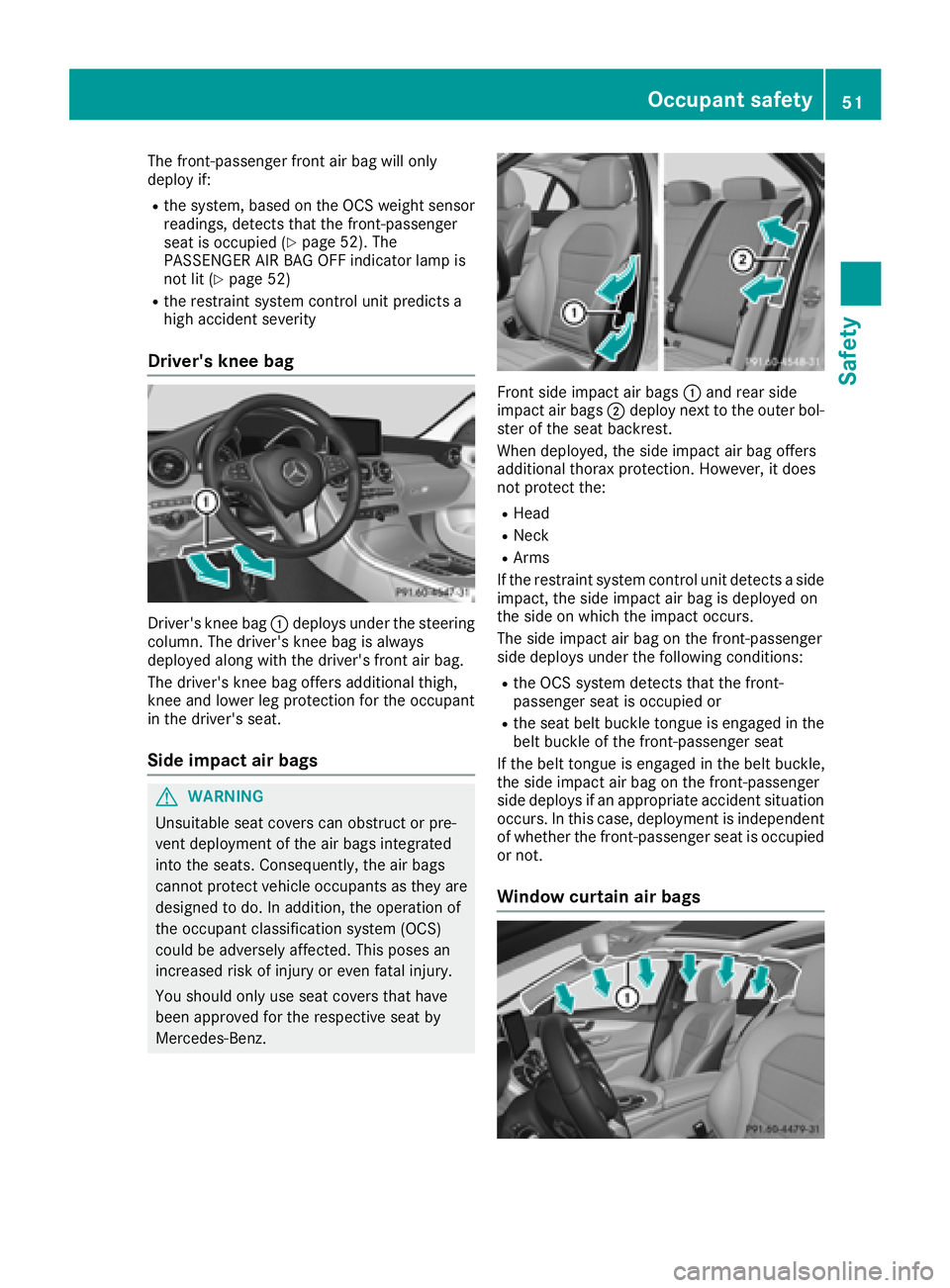
Driver's knee bag
Driver's knee bag :deploys under the steering
column. The driver's knee bag is always
deployed along with the driver's front air bag.
The driver's knee bag offers additional thigh,
knee and lower leg protection for the occupant
in the driver's seat.
Side impact air bags
GWARNING
Unsuitable seat covers can obstruct or pre-
vent deployment of the air bags integrated
into the seats. Consequently, the air bags
cannot protect vehicle occupants as they are designed to do. In addition, the operation of
the occupant classification system (OCS)
could be adversely affected. This poses an
increased risk of injury or even fatal injury.
You should only use seat covers that have
been approved for the respective seat by
Mercedes-Benz.
Front side impact air bags :and rear side
impact air bags ;deploy next to the outer bol-
ster of the seat backrest.
When deployed, the side impact air bag offers
additional thorax protection. However, it does
not protect the:
RHead
RNeck
RArms
If the restraint system control unit detects a side
impact, the side impact air bag is deployed on
the side on which the impact occurs.
The side impact air bag on the front-passenger
side deploys under the following conditions:
Rthe OCS system detects that the front-
passenger seat is occupied or
Rthe seat belt buckle tongue is engaged in the belt buckle of the front-passenger seat
If the belt tongue is engaged in the belt buckle,
the side impact air bag on the front-passenger
side deploys if an appropriate accident situation
occurs. In this case, deployment is independent
of whether the front-passenger seat is occupied
or not.
Window curtain air bags
Occupant safety51
Safety
Z
Page 61 of 370
PRE-SAFE®takes the following measures
depending on the hazardous situation detected:
Rthe front seat belts are pre-tensioned.
Rif the vehicle skids, the side windows and the
sliding sunroof are closed.
Rvehicles with the memory function for the
front-passenger seat: the front-passenger
seat is adjusted if it is in an unfavorable posi-
tion.
If the hazardous situation passes without result-
ing in an accident, PRE-SAFE
®slackens the belt
pre-tensioning. All settings made by PRE-SAFE®
can then be reversed.
If the seat belt pre-tensioning is not reduced:
XMove the seat backrest or seat back slightly
when the vehicle is stationary.
The seat belt pre-tensioning is reduced and
the locking mechanism is released.
The seat-belt adjustment is an integral part of
the PRE-SAFE
®convenience function. Informa-
tion about the convenience function can be
found under "Belt adjustment" (
Ypage 48).
PRE-SAFE®PLUS (anticipatory occu-
pant protection system PLUS)
Introduction
PRE-SAFE®PLUS is only available in vehicles
with the Driving Assistance package.
Using the radar sensor system, PRE-SAFE
®
PLUS is able to detect that a head-on or rear-end
collision is imminent. In certain hazardous sit-
uations, PRE-SAFE
®PLUS takes pre-emptive
measures to protect the vehicle occupants.
Important safety notes
The intervention of PRE-SAFE®PLUS cannot
prevent an imminent collision.
The driver is not warned about the intervention
of PRE-SAFE
®PLUS.
PRE-SAFE®PLUS does not intervene if the vehi-
cle is backing up.
When driving, or when parking or exiting a park-
ing space with assistance from Parking Pilot,
PRE-SAFE
®PLUS will not apply the brakes.
Function
PRE-SAFE®PLUS intervenes in certain situa-
tions if the radar sensor system detects an
imminent head-on or rear-end collision.
PRE-SAFE
®PLUS takes the following measures
depending on the hazardous situation detected:
Rif the radar sensor system detects that a
head-on collision is imminent, the seat belts
are pre-tensioned.
Rif the radar sensor system detects that a rear-
end collision is imminent:
-the brake pressure is increased if the driver
applies the brakes when the vehicle is sta- tionary.
-the seat belts are pre-tensioned.
The PRE-SAFE®PLUS braking application is can-
celed:
Rif the accelerator pedal is depressed when a
gear is engaged
Rif the risk of a collision passes or is no longer
detected
Rif Distance Pilot DISTRONIC indicates an
intention to pull away
If the hazardous situation passes without result-
ing in an accident, the original settings are
restored.
Automatic measures after an acci-
dent
Immediately after an accident, the following
measures are implemented, depending on the
type and severity of the impact:
Rthe hazard warning lamps are switched on
Rthe emergency lighting is activated
Rthe vehicle doors are unlocked
Rthe front side windows are lowered
Rvehicles with a memory function: the electri-
cally adjustable steering wheel is raised when
the driver's door is opened
Rthe engine is switched off and the fuel supply
is cut off
Rvehicles with mbrace: automatic emergency
call
Occupant safety59
Safety
Z
Page 67 of 370
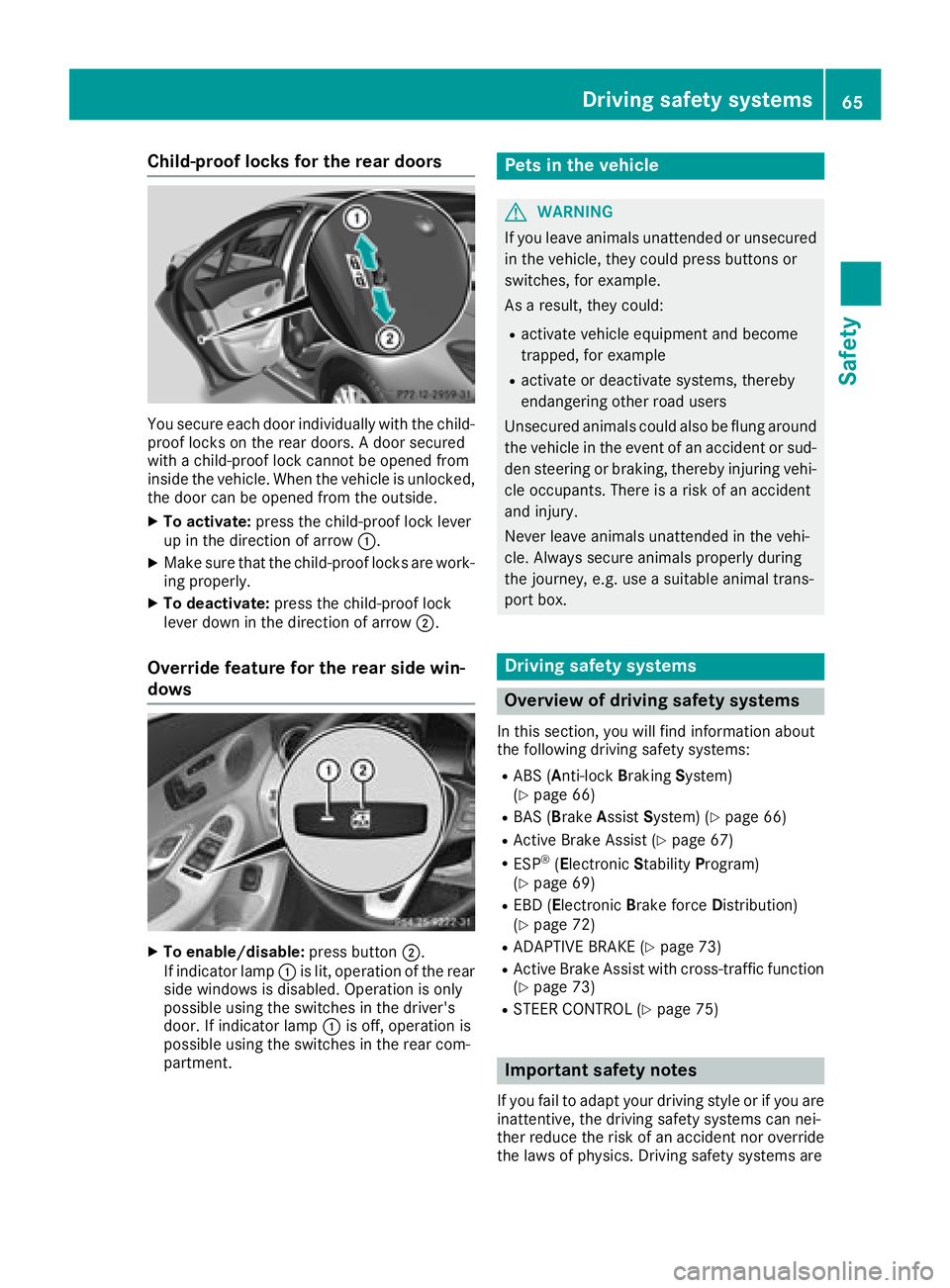
Child-proof locks for the rear doors
You secure each door individually with the child-
proof locks on the rear doors. A door secured
with a child-proof lock cannot be opened from
inside the vehicle. When the vehicle is unlocked,
the door can be opened from the outside.
XTo activate:press the child-proof lock lever
up in the direction of arrow :.
XMake sure that the child-proof locks are work-
ing properly.
XTo deactivate:press the child-proof lock
lever down in the direction of arrow ;.
Override feature for the rear side win-
dows
XTo enable/disable:press button;.
If indicator lamp :is lit, operation of the rear
side windows is disabled. Operation is only
possible using the switches in the driver's
door. If indicator lamp :is off, operation is
possible using the switches in the rear com-
partment.
Pets in the vehicle
GWARNING
If you leave animals unattended or unsecured
in the vehicle, they could press buttons or
switches, for example.
As a result, they could:
Ractivate vehicle equipment and become
trapped, for example
Ractivate or deactivate systems, thereby
endangering other road users
Unsecured animals could also be flung around
the vehicle in the event of an accident or sud-
den steering or braking, thereby injuring vehi-
cle occupants. There is a risk of an accident
and injury.
Never leave animals unattended in the vehi-
cle. Always secure animals properly during
the journey, e.g. use a suitable animal trans-
port box.
Driving safety systems
Overview of driving safety systems
In this section, you will find information about
the following driving safety systems:
RABS (Anti-lock Braking System)
(Ypage 66)
RBAS (B rakeAssist System) (Ypage 66)
RActive Brake Assist (Ypage 67)
RESP®(Electronic StabilityProgram)
(Ypage 69)
REBD (Electronic Brake force Distribution)
(Ypage 72)
RADAPTIVE BRAKE (Ypage 73)
RActive Brake Assist with cross-traffic function (Ypage 73)
RSTEER CONTROL (Ypage 75)
Important safety notes
If you fail to adapt your driving style or if you are
inattentive, the driving safety systems can nei-
ther reduce the risk of an accident nor overridethe laws of physics. Driving safety systems are
Driving safety systems65
Safety
Z