phone MERCEDES-BENZ C CLASS 2021 User Guide
[x] Cancel search | Manufacturer: MERCEDES-BENZ, Model Year: 2021, Model line: C CLASS, Model: MERCEDES-BENZ C CLASS 2021Pages: 478, PDF Size: 6.54 MB
Page 136 of 478
R
The fuel tank issu fficien tly full.
R The star terbatt eryis suf ficie ntly charge d.
Char ging thest ar terbatt erybe fore star ting
th ejou rney
If th eve hicle batteryis disc harged, youcan
re cei veames sageon your smar tphon e.Youcan
th en star tth eve hicle withth esmar tphon eto
ch arge thebatt ery. The vehicle isaut omatically
switc hedoffaf te rte nminu tes.
Ensur eth efo llo wing beforest ar tin gth eengine:
R The legalstipulation sin thear ea wher eyo ur
ve hicle ispar kedallo wengin est ar tin gvia
smar tphon e.
R Itis saf eto star tand runth eengine where
yo ur vehicle ispar ked.
R The fuel tank issu fficien tly full. St
arting theve hicl e(R emo teOnline) &
WARNIN GRisk ofcrus hing orentr ap‐
ment dueto unin tentio nalstar tin gof the
engine
Limbs couldbecrushed ortrapped ifth e
engine isstar tedunint entionall ydur ing
ser vice ormaint enanc ewo rk. #
Alw ayssecur eth eengine agains tunin‐
te ntio nalstar tin gbef orecar rying out
maint enanceorrepair work. Re
quirement s:
R Park position 005Disselect ed.
R The anti- theftalar msystem isno tactiv ated.
R The panic alarmisno tactiv ated.
R The hazar dwa rning light system isswitc hed
of f.
R The hood isclosed.
R The door sar eclosed andlocked.
R The windo wsand slidin gsun roof areclosed. #
Startth eve hicle using thesmar tphon e.
Af tereve ryengine star t,th eengine runs for
te nminu tes.
Yo ucan carryout amaximum oftwoconsec u‐
tiv est ar tin gatt em pts. Yo umus tst ar tth eve hicle
once withth eSmar tKey bef oretrying tostar t
th eengine again withth esmar tphon e.Youcan
st op theve hicle again atanytime.
% Further information canbefound inthe
smar tphone app.
Secur ingtheengine agains tst ar ting before
car rying out maintenance orrepair work: #
Swi tchon thehazar dwa rning light system.
or #
Unloc kth edoor s.
or #
Open aside windo wor thesliding sunroof. 13
4
Driving and parking
Page 226 of 478
Ac
tiv atin g/deac tivatin gBlue tooth®
Re quirement s:
R Deac tivateBlue tooth®
:Appl eCa rPlay®
is no t
act ive.
Multim ediasystem:
4 System 5
ö Connec tivity #
Activate0073 ordeacti vate 0053 Bluetoo th®
.
If Andr oidAutoisact ive, apr om ptappear sask ‐
ing whe ther Blue tooth®
should bedeactiv ated. #
Select Yes.
Andr oidAutoisclos edand Blue tooth®
is
deact ivat ed. Wi
-Fi Wi
-Fico nne ctio nove rview
Yo ucan useWi-Fi toestablish acon nection with
a Wi -Fi networkand toacc ess theInt erne tor
ot her networkde vices.
The follo wing connection option sar eav ailable:
R Wi-Fi conne ction The
Wi-Fi conne ctionto aWi -Fi-ca pable
de vice ,e.g .th ecus tomer's mobilephone or
a ta ble tPC ises tablished.
R Multimedia system asaWi -Fi hotspo t
Usi ngthis func tion,a ta ble tPC ornotebook
can becon nected, forex am ple.
To establish acon nection ,yo ucan usethefo l‐
lo wing methods:
R WPS PIN
The conn ection toasec ureWi -Fi networkis
mad evia aPIN .
R WPS PBC
The conne ctionto asec ureWi -Fi networkis
mad eby pressing abutt on(push button).
R Secur itykey
The conn ection toasec ureWi -Fi networkis
mad evia asecu rity key. Se
tting upWi-Fi
Re quirement s:
R The device tobe con nectedsuppor tsone of
th eth re emeans ofcon nect iondescr ibed
(/ page22 4).
Multimedia system:
4 System 5
ö Connec tivity
Ac tiv atin g/deac tivatin gWi -Fi #
Switc hWi-Fi on0073 oroff0053.
If Wi-Fi isdea ctivated 0053, communi cationvia
Wi -Fi toall devic es isint erru pte d.This also
means that acon nectionto theHERME S
comm unication modulecannotbe estab‐
lished. Thenfunctionssuc has dynamic route
guidan cewithLiv eTr af fic Inf ormati onareno t
av ailable.
Connect ingthemu ltim edia system witha
de vice viaWi-Fi
Thi sfunction isno tav ailable ifaHE RME Scom ‐
mun ication modul eis ins talled. 22
4
Multim ediasystem
Page 231 of 478
Depe
nding onthesour ce,youcan perform
va rious updates: Sour
ceofthe
updat e Up
dat etype
Up dat esvia mobile
phone Sy
stem updat es,Digi‐
ta lOpera tor's Manua l
Up dat esvia anexter‐
nal stor ag emedium,
e.g. anSD card Na
vig ation maps %
Softwareupd ates via mobil ephone requ ire
an act ive Int erne tcon nection forth eve hicle.
This isno tav ailable inall coun tries. Forfur‐
th er information oncon nect ingtotheInt er‐
ne t,see (/page27 9).
Ad vantag esofsof twareupd ates
Sof twareupdat esensur eyo ur vehicle's tech nol ‐
ogy isup -to-d ate.
In orde rto cons tantl yimpr ovethequ alit yof our
ser vices youwill recei vefutur esof twareupd ates
fo ryo ur mult imed iasystem, theMer cedes me
con nect services andyour vehicle's communica‐
tion module. Thesewillbesent toyouvia the mobil
ephone connection inyour vehicle and,as
an option, installed automat ically.Yo ucan mon i‐
to rth est atus ofyour sof twareupdat eson the
Mer cedes mePortal and find informa tionab ou t
po tentia linno vatio ns.
Yo ur adv antages ataglanc e:
R Con venie ntly recei vesof twareupda tesvia
th emobile phonenetwork
R Improve sth equ alit yand availabilit yof
Mer cedesme connectser vices
R Keeps your mult imed iasystem and comm uni‐
cation module up-to-dat e
Fu rther information aboutsoftwareupdat escan
be found athttp s:// me. secure.m erced es-
ben z.co m
Car rying out softwareupd ates
Re quirement s:
R Ther eis an Interne tcon nection
(/ page27 9).
R Foraut omat icso ftwa reupdat es:your
ve hicle hasaper manent lyins talled com mu‐
nic ation module. Multim
ediasystem:
4 System 5
Soft ware Update
Au tomatic softwa reupdat es #
Activate0073 Auto matic Onl ine Update.
Th esof twareup dateswill bedownloaded
and installed automat ically.
The current status ofthesof twareupdat eis
displa yed.
Manu alsof twareupd ates #
Switc hof f0053 Auto matic OnlineUpdate. #
Select asof twareupdat efrom thelis tand
st ar tth eupdat e.
Ac tiv atin gaso ftwa reupdat e #
Restar tth esy stem.
Fu nction ofimpor tant system updates
Im por tant system updat esma ybe neces saryfo r
th esecur ityofyour mult imed iasystem's data.
Please installth ese updat es,other wise the
secur ityofyour mult imed iasystem cann otbe
ensur ed. Multimedia
system 229
Page 232 of 478
%
Ifaut omatic onlineupdatesar eactiv ated,
th esy stem updat eswill bedownloaded auto‐
maticall y(/ page229).
As soon asasy stem updat eis available for
do wnload, acor responding messageappea rson
th emedia display.
Yo uha ve thefo llo wing selectionoption s:
R Down load
The system updat ewill bedownloaded inthe
bac kground .
R Detail s
In fo rm atio nabout thepending system
updat eis displa yed.
R Later
The system updat ecan bedownloaded man‐
uall yat alat er time (/page229).
Yo uwill beinformed when thedo wnload iscom‐
ple teand thesy stem updat eis ready forins talla‐
tion .
% Park theve hicle safely inasuit able location
bef orest ar tin gth eins tallation . Re
quiremen tsforth eins tallation :
R The ignit ionisswitc hedon.
R The engin eis no tru nning .
R Notesand warnings have been read and
acc epted.
R The parkingbr ak eis applied.
If all requ iremen tsareme t,th esy stem updat eis
ins talled. Themultim ediasystem cann otbe
oper ated dur ing theins tallation andvehicle func‐
tions arere strict ed.
If er ro rs should occurduring theins tallation ,th e
multime diasystem automaticall yatt em ptsto
re stor eth epr ev ious version. Ifre stor ation ofthe
pr ev ious version isno tpossible ,a symbol
appear son themultimedia system displa y.Con ‐
sult aqu alif ied spec ialistwo rkshop toresol ve
th epr oblem. Re
setfunction Multimedia
system:
4 System 5
Reset
Pe rsonal datais dele ted, forex am ple:
R Statio npr ese ts
R Con nectedmobile phones #
Select Yes.
If PIN protect ion isactiv ated, apr om ptappear s
ask ing ifyo ualso wish torestor eth is to thefa c‐
to ry settin gsdur ing are se t. #
Select Yes. #
Enterthecur rent PIN .
The PINisrese t.
or #
Select No.
The current PIN stay sth esame afte rre se t‐
ting.
% Ifyo uha ve forg ottenyo ur PIN ,an aut hor ized
Mer cedes-Ben zCen tercan deactivateth e
PIN protect ion foryo u. 230
Multimed iasystem
Page 239 of 478

Edit
ingintermed iatedes tinations
Re quirement s:
R The destination andatleas tone intermediat e
des tination have been entered.
Multimedia system:
4 Navigation 5
Way Point sand Info #
Tocall upthema p:highlig htthedes tinat ion
or theint ermediat edes tinat ion. #
Select ¥Map. #
Tochang eth eor der ofdes tina tions :high‐
light thedes tinat ionortheint ermediat edes‐
tinat ion. #
Select ¥Move . #
Movetheint ermediat edes tinat iontothe
desir edposition . #
Press theTo uc hCon trol, thecon troller orthe
to uc hpad. #
Todel eteades tina tion: highlig htthedes ti‐
nation ortheint ermediat edes tinat ion. #
Select ¥Delete. Calculating
aro ut ewith intermediat edes ti‐
nation s
Re quirement s:
R The destination andatleas tone intermediat e
des tination have been entered.
Multimedia system:
4 Navigation 5
Way Point sand Info #
Select Start New Route Guidance.
The routeis calc ulatedwithth ese tint er‐
mediat edes tinat ions.
Selecting acontact fordes tinatio nen try
Re quirement s:
R Amobile phoneis con nectedto themultime‐
dia system (/ page258).
R The "Navigat eto cont act" onlineser vice is
av ailable andactivat ed. Mult
imed iasystem:
4 Navigation
5 ¬ Previous andOther Destination s
5 Contac ts #
Select thecon tact.
The cont actdetails aredispla yed. #
Select theaddr ess.
The Please Wait...messag eappear s.The
sear chiscar ried out online. #
Select thedes tinat ion.
Fi lter ing disp lays forco ntac ts #
Enteranam eor telephon enumb er,fo rex am‐
ple, intoth esear chfield. #
Select ¡.
The firs tcont actinthelis tis highlight ed. #
Select thecon tact. #
Sele cttheaddr ess.
% Routeguidan cetoacon tact address isrelia‐
ble inthefo llo wing cases :
R The contact address iscom plet e.
R The contact data matc hesthemap data
in thedigit almap. Multimedia
system 23
7
Page 242 of 478

des
tinations aredele ted. Ro uteguidan ceto
th ene wdes tinat ionbegins.
Set asNext WayPoint :th eselect eddes tina‐
tion addr essissetas thene xt int ermediat e
des tinat ion.Routeguidan cebegin s.
Ta king alternativ ero ut es intoco nside ratio n #
Select analte rn ativ ero ute(/ page24 2).
Ot he rmen ufun ctions #
Tosave thedes tina tion: select¥ Store
in "Prev iousDestination s". #
Todispl ayon thema p:selec t¥ Map. #
Tocall ate lephone number: select
¥ Call(ifavailable). #
Tocall upanInterne tad dress: selec t
¥ www(ifavailable).
Select ingaro ut etype
Mul timedi asy stem:
4 Navigation 5
À Route andPosition #
Select RouteSetting s. #
Select thero utetyp e.
If ro uteguidan ceisact ive, thene wrouteis
calc ulatedwithth ene wroutetype .
If ro uteguidan ceisno tact ive, thene xt route
is calc ulatedwithth ene wroutetyp e.
Yo ucan choose from thefo llo wing routetype s:
R EcoRout e
An eco nomic alrouteis calc ulated. The jour‐
ne ytim ema ybe som ewhat long erthan for
qu icke rro utes.
The symb olforth ecur rent vehicle position is
displa yedin green.
R Fast Route
A ro utewit haqu ick jour neytim eis calc ula‐
te d.
R Shor tRoute
A ro utewit hasho rtdriving distance iscal cu‐
la te d.
Auto matic Traffic JamAvoidan cecan be
switc hedon0073 oroff0053 forth ese routetyp es.
If Aut omat icTraf ficJam Avoidan ceisswit ched on,
Ask inthe Even tof Traffic JamAvoidan cecan
be select ed.
The Autom aticTraffic JamAvoidan ceand Askin
the Even tof Traffic JamAvoidan cesettings are
no tav ailable ineverycount ry.
The settings enable thefo llo wing:
R Automat icTraff icJam Avoidanc e
The routeis calc ulatedwithth ecur rentl yse t
ro utetyp e.
Tr af fic re por tsvia LiveTr af fic Inf ormati onare
ta ke nint oacco unt.
Liv eTr af fic Inf ormati onisno tav ailable inall
coun tries.
R Askin theEv ent ofTraf ficJam Avoidan ce
A pr om ptappear swhen ane wrouteis de tec‐
te dwit hashor terjour neytime basedon traf‐
fi c re por ts.Youcan continue touse thecur‐
re nt routeor use thedynamic routeins tead. 24
0
Multimedia system
Page 247 of 478
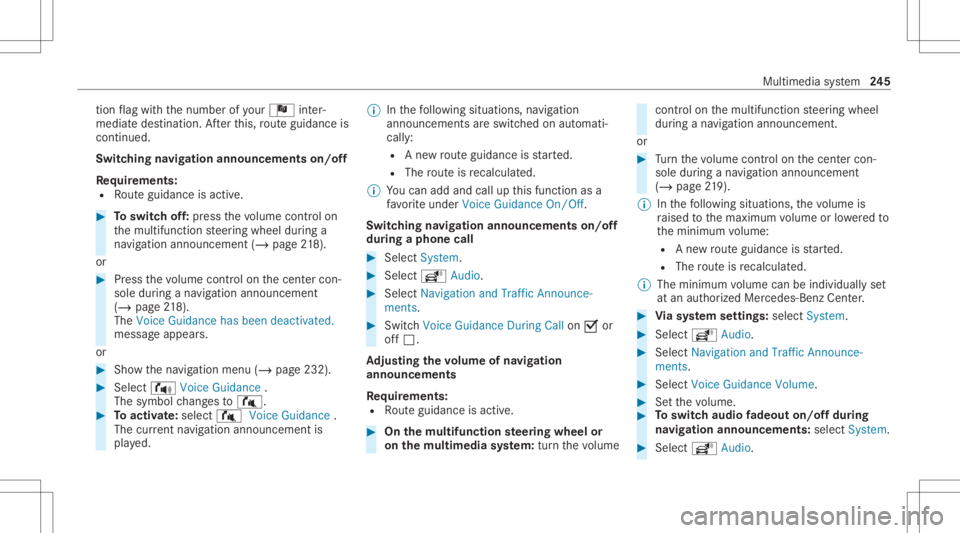
tio
nflag withth enumber ofyour Î inter‐
med iatedes tinatio n.Afterth is, routeguidan ceis
co ntinue d.
Swit ching navig ation announ cement son/of f
Re quirement s:
R Routeguidan ceisact ive. #
Toswitc hof f:pr ess thevo lume control on
th emultifunc tionsteer ing wheel during a
na vig ation announ cement(/ page21 8).
or #
Pres sth evo lume control on thecent ercon ‐
sole during ana vig ation announ cement
(/ page21 8).
Th eVo ice Gui dan cehasbee ndea ctiva ted.
mess ageap pea rs.
or #
Sho wthena vig ation menu (/page232). #
Select !Voice Guidance .
The symbol chang esto# . #
Toactiv ate: sele ct# VoiceGuida nce .
The current navig ation anno uncement is
pl ay ed. %
Inthefo llo wing situat ions,na vig ation
ann ounc emen tsareswitc hedonaut omat i‐
call y:
R Ane wrouteguidan ceisstar ted.
R The routeis recal cul ated.
% Youcan add andcallupthis func tion asa
fa vo rite und erVoic eGuidan ceOn/O ff.
Swit ching navig ation announ cement son/of f
dur ing aphone call #
Selec tSyst em. #
Selec tõ Audio. #
Selec tNavigat ionand Traff icAn noun ce-
men ts. #
Swit chVoice Guidance During Callon 0073 or
of f0053.
Ad jus tingthe volum eof navig ation
announ cement s
Re quirement s:
R Routeguidan ceisact ive. #
On themu ltifunct ionsteer ing wheel or
on themu ltim edia system: turnth evo lume con
trol on themultifunc tionsteer ing wheel
dur ing ana vig ation announ cement.
or #
Turn thevo lume control on thecent ercon ‐
sole during ana vig ation announ cement
(/ page21 9).
% Inthefo llo wing situat ions,th evo lume is
ra ised tothemaximum volume orlowe redto
th eminimum volume:
R Ane wrouteguidan ceisstar ted.
R The routeis recal cul ated.
% The mini mum volume canbeindiv iduall yse t
at an aut hor ized Mercedes -Benz Cent er. #
Viasy stem settings: selectSyst em. #
Sele ctõ Audio. #
Sele ctNavig ation andTrafficAnnoun ce-
men ts. #
Sele ctVoic eGuidanc eVolume . #
Setth evo lume. #
Toswitc haud iofadeo uton/o ffdur ing
na vig atio nanno unceme nts: select System . #
Select õ Audio. Mu
ltimed iasystem 24
5
Page 258 of 478

#
Ifwe ather informat iondispla y6 isavailable
in themap menu, activate0073(/ page250)
it.
Cur rent we ather informat ionisdispla yedon
th ena vig ation map,e.g.temp eratur eor
cloud cover.
% Weather informat ionisno tav ailable inall
coun tries. Te
lephone Te
lephon y No
teson telephon y &
WARNIN GRisk ofdist ra ction from oper‐
ati ng integr ated commu nication equip‐
ment whiletheve hicle isin mo tion
If yo uoper ateco mm unic ationeq uipme nt
int egrat edintheve hicle when driving, you
cou ldbe dist ra cted from thetra ffic situat ion.
This could alsocause youto lose control of
th eve hicle. #
Onlyoper ateth is eq uipmen twhen the
tr af fic situ ation per mits. #
Ifyo ucan notbe sur eof this, stop the
ve hicle whilstpa ying attention toroad
and traffic condi tions andoperate the
eq uipment withth eve hicle statio nary. &
WARNIN GRisk ofan acci dent from
ope rating mob ile comm unicati onequip ‐
ment while th eve hicle isin mo tion
Mobile communication sde vices distract the
dr iver from thetraf fic situ ation. Thiscou ld
al so cau sethedr iver tolose control of the
ve hicle. #
Asthedr iver ,onl yoper atemobile com‐
municat ionsdevices when theve hicle is
st atio nary. #
Asave hicle occupant, onlyuse mobile
communication sde vices inthear eas
int ended forth is pur pose, e.g.inthe
re ar passe nger com partment . Yo
umus tobse rveth eleg alrequ iremen tsforth e
cou ntryin whi chyouar ecur rentl ydr ivi ng when op
erati ng mob ile comm unicati onequip ment in
th eve hicle.
Fu rther information canbeobt ained from an
aut hor ized Mercedes-Ben zCent eror at:
https: //www .mercedes-benz -mobile.com/ 256
Multimedia system
Page 259 of 478

Te
lephone menuoverview 1
Blue tooth®
de vice name ofthecur rently
conne cted mob ile pho ne
2 Signal stre ngt hof themobile phonenetwork
fo rth ecur rently conne cted and select ed
mob ile pho ne
3 Batt eryst atus ofthecur rently conne cted
and select edmob ile pho ne
4 0071 (tel ep hone ready) or0097 (callactive) 5
Con tacts(/ page26 3)
6 Rece ntCalls (/page26 5)
7 TextMess age
8 Onemobi lephon econ nected: Ac tive Call.
Tw omobile phones connected: chang esview
be tween telephon e1 and 2or ActiveCall
9 Devices (/page258) A
Options
Symbo ls1 to4 areno tsho wnuntilaf te ra
mobil ephone hasbeen connect edtothemulti‐
media system. Thesymbols dependonyour
mob ilephon eand your mob ilephon ene twork
pr ov ider . Multim
ediasystem 25
7
Page 260 of 478

Blue
tooth®
pr ofile ove rview Blue
tooth®
pr ofile
of the mobi lephon eFu
nction
PB AP (Phone Book
Access Profile) Cont
actsar eaut o‐
matic allydispla yedin
th emultimedia sys‐
te m
MAP (Messag e
Access Profile) Messag
efunc tions
can beused Te
lephon yoper ating mod esove rview
Depen dingonyour equipme nt,th efo llo wing tel‐
ephon yoper atingmodes areav ailable:
R Amobi lephon eis con nectedto themultime‐
dia system viaBlue tooth®
(/ pag e258).
R Twomobile phones areconn ectedwithth e
multime diasystem viaBlue tooth®
(tw o
phone mode) (/page259 ). Inf
orma tion ontelephon y
The follo wing situat ionscanlead tothecall
being discon nectedwhile theve hicle isin
mo tion:
R Ther eis insuf ficie ntnetworkco verage inthe
ar ea
R Youmo vefrom one GSM orUMT Stransmit‐
te r/r eceiv erarea (cell )int oano ther and no
comm unication chann elsarefree
R The SIM car dused isno tcom patible withth e
ne tworkav ailable
R Amobi lephon ewit h"T winc ard" islogg ed
int oth ene tworkwit hth esecon dSIM cardat
th esame time
The multimedia system suppor tscalls inHD
Vo ice ®
forim prove dspeec hqu alit y.Arequ ire‐
men tfo rth is isthat themobile phoneandthe
mobil ephone networkpr ov ider oftheper son
yo uar ecalli ngsuppo rtHD Voice ®
.
Depe ndingon thequ alit yof thecon nect ion,the
vo ice qualit yma yfluct uate. Connect
ingamob ilephone (Bluetoo th®
te l‐
ephon y)
Re quirement s:
R Blue tooth®
is act ivat ed on themobile phone
(see themanuf acturer'soper ating instruc‐
tion s).
R Blue tooth®
is act ivat ed on themultimedia
sy stem (/ page22 4).
Multimedia system:
4 Phone 5
00A5 Devic es
Sear ching fora mob ile pho ne #
Select Connect NewDevice. #
Select Star tSea rch onSys tem .
The available mobilephon esaredispla yed. If
a ne wmobile phoneisfound ,it is ind icat ed
by the# symbol.
Connecting amobile phone(authorizat ion
using SecureSim plePairing) #
Selec tth emobile phone.
A code isdispla yedin themultimedia system
and onthemobile phone. 258
Multimedia system