warning light MERCEDES-BENZ C-CLASS CABRIOLET 2016 Owners Manual
[x] Cancel search | Manufacturer: MERCEDES-BENZ, Model Year: 2016, Model line: C-CLASS CABRIOLET, Model: MERCEDES-BENZ C-CLASS CABRIOLET 2016Pages: 377, PDF Size: 6.9 MB
Page 262 of 377
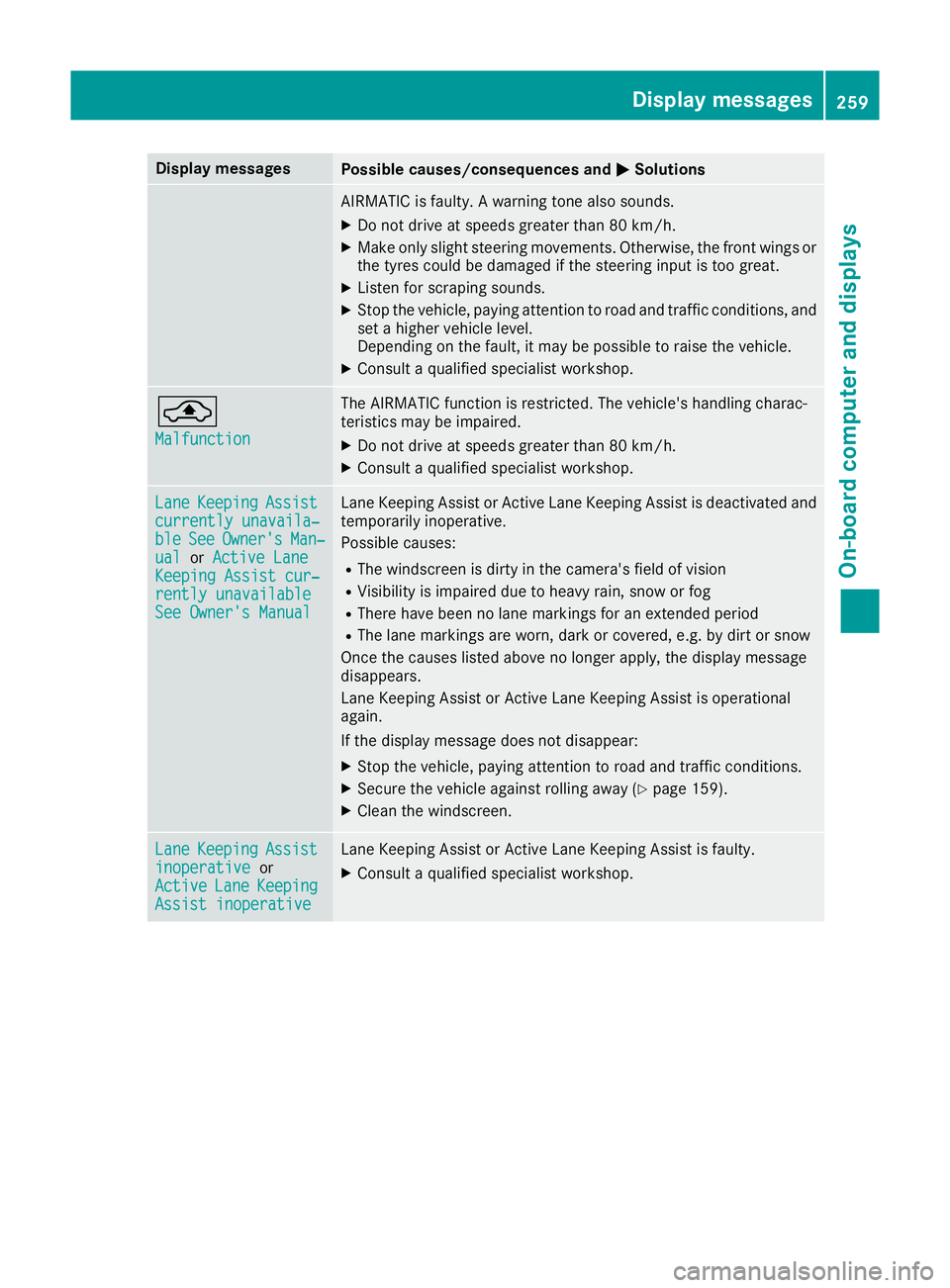
Display messages
Possible causes/consequences and
M
MSolutions AIRMATIC is faulty. A warning tone also sounds.
X Do not drive at speeds greater than 80 km/h.
X Make only slight steering movements. Otherwise, the front wings or
the tyres could be damaged if the steering input is too great.
X Listen for scraping sounds.
X Stop the vehicle, paying attention to road and traffic conditions, and
set a higher vehicle level.
Depending on the fault, it may be possible to raise the vehicle.
X Consult a qualified specialist workshop. ¨
Malfunction Malfunction The AIRMATIC function is restricted. The vehicle's handling charac-
teristics may be impaired.
X Do not drive at speeds greater than 80 km/h.
X Consult a qualified specialist workshop. Lane Lane
Keeping
Keeping Assist
Assist
currently unavaila‐
currently unavaila‐
ble ble See
SeeOwner's
Owner's Man‐
Man‐
ual
ual orActive Lane
Active Lane
Keeping Assist cur‐
Keeping Assist cur‐
rently unavailable
rently unavailable
See Owner's Manual
See Owner's Manual Lane Keeping Assist or Active Lane Keeping Assist is deactivated and
temporarily inoperative.
Possible causes:
R The windscreen is dirty in the camera's field of vision
R Visibility is impaired due to heavy rain, snow or fog
R There have been no lane markings for an extended period
R The lane markings are worn, dark or covered, e.g. by dirt or snow
Once the causes listed above no longer apply, the display message
disappears.
Lane Keeping Assist or Active Lane Keeping Assist is operational
again.
If the display message does not disappear:
X Stop the vehicle, paying attention to road and traffic conditions.
X Secure the vehicle against rolling away (Y page 159).
X Clean the windscreen. Lane Lane
Keeping
Keeping Assist
Assist
inoperative
inoperative or
Active
Active Lane
Lane Keeping
Keeping
Assist inoperative
Assist inoperative Lane Keeping Assist or Active Lane Keeping Assist is faulty.
X Consult a qualified specialist workshop. Display
messages
259On-board computer and displays Z
Page 273 of 377
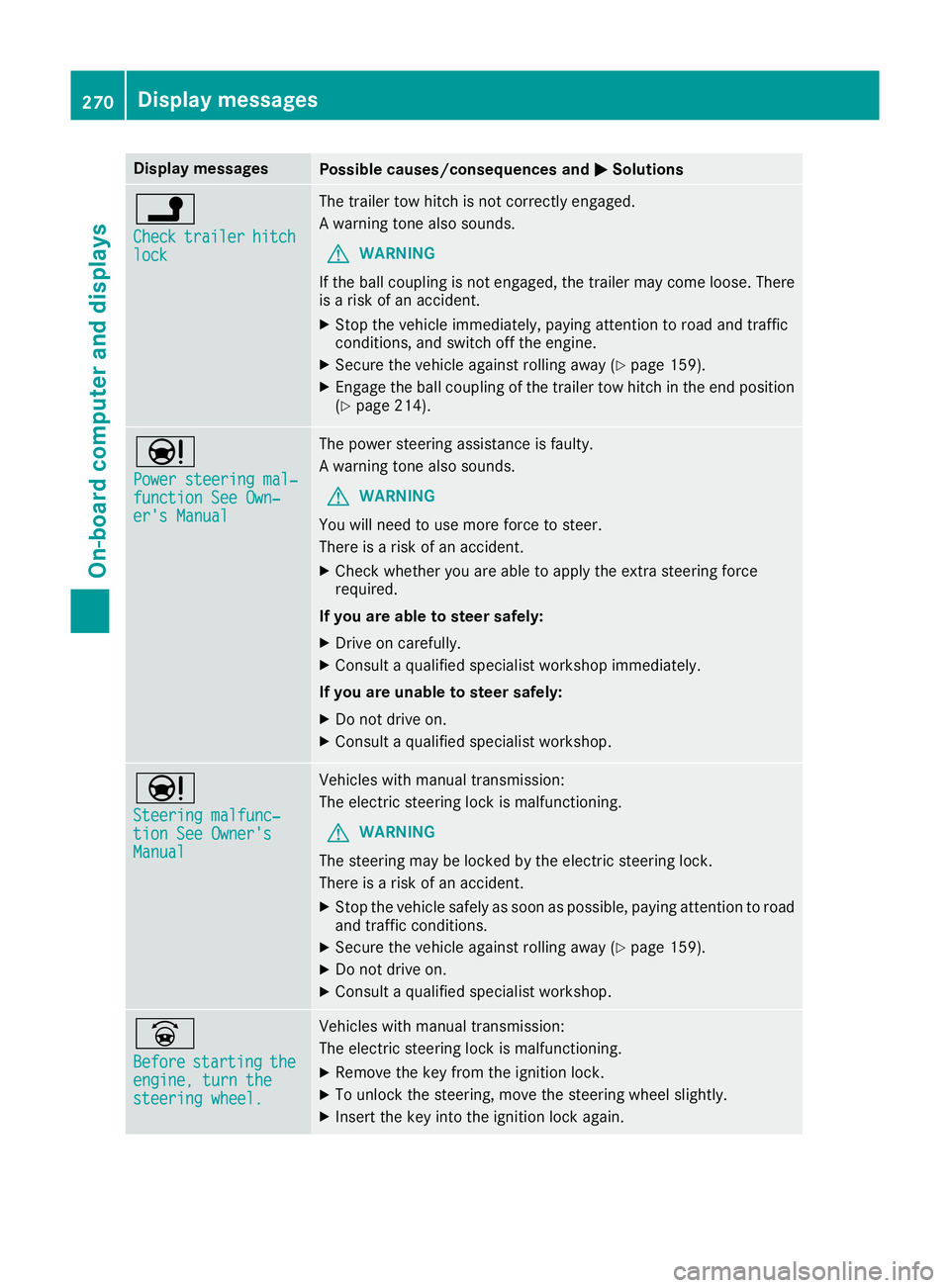
Display messages
Possible causes/consequences and
M
MSolutions j
Check Check
trailer
trailer hitch
hitch
lock
lock The trailer tow hitch is not correctly engaged.
A warning tone also sounds.
G WARNING
If the ball coupling is not engaged, the trailer may come loose. There
is a risk of an accident.
X Stop the vehicle immediately, paying attention to road and traffic
conditions, and switch off the engine.
X Secure the vehicle against rolling away (Y page 159).
X Engage the ball coupling of the trailer tow hitch in the end position
(Y page 214). Ð
Power steering mal‐ Power steering mal‐
function See Own‐ function See Own‐
er's Manual er's Manual The power steering assistance is faulty.
A warning tone also sounds.
G WARNING
You will need to use more force to steer.
There is a risk of an accident.
X Check whether you are able to apply the extra steering force
required.
If you are able to steer safely:
X Drive on carefully.
X Consult a qualified specialist workshop immediately.
If you are unable to steer safely:
X Do not drive on.
X Consult a qualified specialist workshop. Ð
Steering malfunc‐ Steering malfunc‐
tion See Owner's tion See Owner's
Manual Manual Vehicles with manual transmission:
The electric steering lock is malfunctioning.
G WARNING
The steering may be locked by the electric steering lock.
There is a risk of an accident.
X Stop the vehicle safely as soon as possible, paying attention to road
and traffic conditions.
X Secure the vehicle against rolling away (Y page 159).
X Do not drive on.
X Consult a qualified specialist workshop. _
Before Before
starting
starting the
the
engine, turn the
engine, turn the
steering wheel. steering wheel. Vehicles with manual transmission:
The electric steering lock is malfunctioning.
X Remove the key from the ignition lock.
X To unlock the steering, move the steering wheel slightly.
X Insert the key into the ignition lock again. 270
Display
messagesOn-board computer and displays
Page 276 of 377
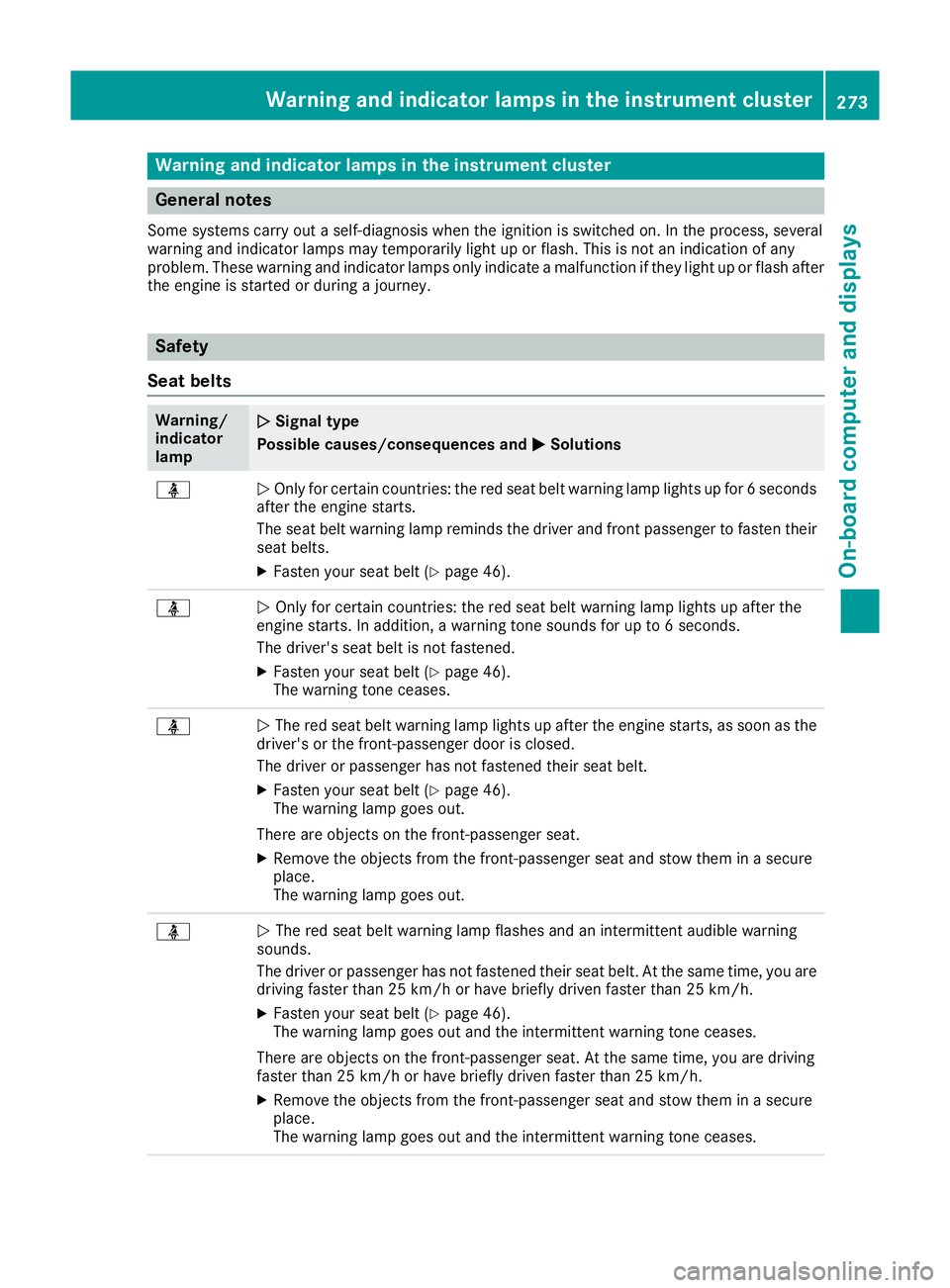
Warning and indicator lamps in the instrument cluster
General notes
Some systems carry out a self-diagnosis when the ignition is switched on. In the process, several
warning and indicator lamps may temporarily light up or flash. This is not an indication of any
problem. These warning and indicator lamps only indicate a malfunction if they light up or flash after
the engine is started or during a journey. Safety
Seat belts Warning/
indicator
lamp
N N
Signal type
Possible causes/consequences and M
MSolutions ü
N
Only for certain countries: the red seat belt warning lamp lights up for 6 seconds
after the engine starts.
The seat belt warning lamp reminds the driver and front passenger to fasten their
seat belts.
X Fasten your seat belt (Y page 46).ü
N
Only for certain countries: the red seat belt warning lamp lights up after the
engine starts. In addition, a warning tone sounds for up to 6 seconds.
The driver's seat belt is not fastened.
X Fasten your seat belt (Y page 46).
The warning tone ceases. ü
N
The red seat belt warning lamp lights up after the engine starts, as soon as the
driver's or the front-passenger door is closed.
The driver or passenger has not fastened their seat belt.
X Fasten your seat belt (Y page 46).
The warning lamp goes out.
There are objects on the front-passenger seat.
X Remove the objects from the front-passenger seat and stow them in a secure
place.
The warning lamp goes out. ü
N
The red seat belt warning lamp flashes and an intermittent audible warning
sounds.
The driver or passenger has not fastened their seat belt. At the same time, you are
driving faster than 25 km/h or have briefly driven faster than 25 km/h.
X Fasten your seat belt (Y page 46).
The warning lamp goes out and the intermittent warning tone ceases.
There are objects on the front-passenger seat. At the same time, you are driving
faster than 25 km/h or have briefly driven faster than 25 km/h.
X Remove the objects from the front-passenger seat and stow them in a secure
place.
The warning lamp goes out and the intermittent warning tone ceases. Warning and indicator lamps in the instrument cluster
273On-board computer and displays Z
Page 277 of 377
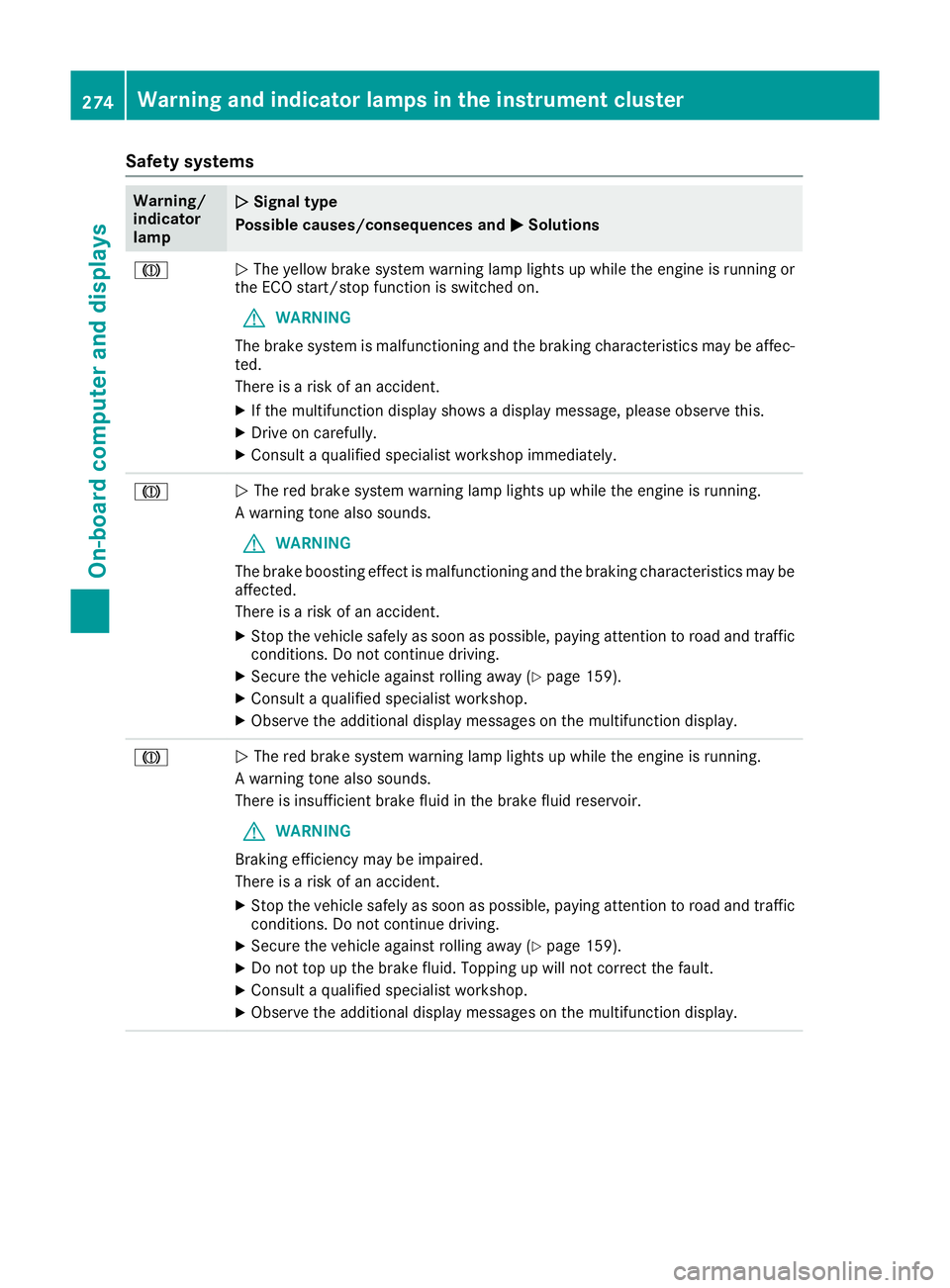
Safety systems
Warning/
indicator
lamp
N N
Signal type
Possible causes/consequences and M
MSolutions J
N
The yellow brake system warning lamp lights up while the engine is running or
the ECO start/stop function is switched on.
G WARNING
The brake system is malfunctioning and the braking characteristics may be affec- ted.
There is a risk of an accident.
X If the multifunction display shows a display message, please observe this.
X Drive on carefully.
X Consult a qualified specialist workshop immediately. J
N
The red brake system warning lamp lights up while the engine is running.
A warning tone also sounds.
G WARNING
The brake boosting effect is malfunctioning and the braking characteristics may be
affected.
There is a risk of an accident.
X Stop the vehicle safely as soon as possible, paying attention to road and traffic
conditions. Do not continue driving.
X Secure the vehicle against rolling away (Y page 159).
X Consult a qualified specialist workshop.
X Observe the additional display messages on the multifunction display. J
N
The red brake system warning lamp lights up while the engine is running.
A warning tone also sounds.
There is insufficient brake fluid in the brake fluid reservoir.
G WARNING
Braking efficiency may be impaired.
There is a risk of an accident.
X Stop the vehicle safely as soon as possible, paying attention to road and traffic
conditions. Do not continue driving.
X Secure the vehicle against rolling away (Y page 159).
X Do not top up the brake fluid. Topping up will not correct the fault.
X Consult a qualified specialist workshop.
X Observe the additional display messages on the multifunction display. 274
Warning and indicator lamps in the instrument clusterOn-board computer and displays
Page 278 of 377
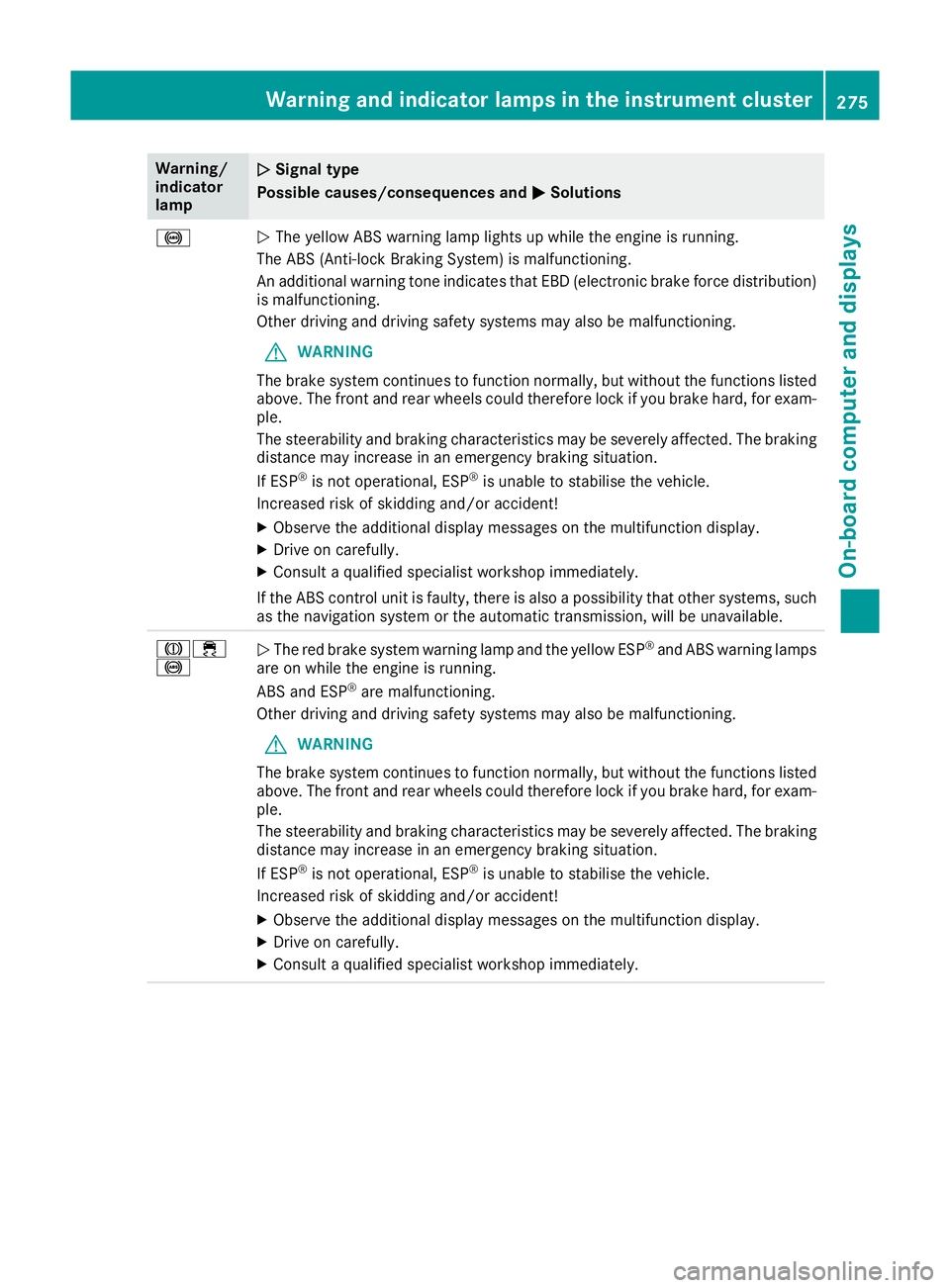
Warning/
indicator
lamp
N N
Signal type
Possible causes/consequences and M
MSolutions !
N
The yellow ABS warning lamp lights up while the engine is running.
The ABS (Anti-lock Braking System) is malfunctioning.
An additional warning tone indicates that EBD (electronic brake force distribution) is malfunctioning.
Other driving and driving safety systems may also be malfunctioning.
G WARNING
The brake system continues to function normally, but without the functions listed above. The front and rear wheels could therefore lock if you brake hard, for exam-
ple.
The steerability and braking characteristics may be severely affected. The braking
distance may increase in an emergency braking situation.
If ESP ®
is not operational, ESP ®
is unable to stabilise the vehicle.
Increased risk of skidding and/or accident!
X Observe the additional display messages on the multifunction display.
X Drive on carefully.
X Consult a qualified specialist workshop immediately.
If the ABS control unit is faulty, there is also a possibility that other systems, such
as the navigation system or the automatic transmission, will be unavailable. J÷
!
N
The red brake system warning lamp and the yellow ESP ®
and ABS warning lamps
are on while the engine is running.
ABS and ESP ®
are malfunctioning.
Other driving and driving safety systems may also be malfunctioning.
G WARNING
The brake system continues to function normally, but without the functions listed above. The front and rear wheels could therefore lock if you brake hard, for exam-
ple.
The steerability and braking characteristics may be severely affected. The braking
distance may increase in an emergency braking situation.
If ESP ®
is not operational, ESP ®
is unable to stabilise the vehicle.
Increased risk of skidding and/or accident!
X Observe the additional display messages on the multifunction display.
X Drive on carefully.
X Consult a qualified specialist workshop immediately. Warning and indicator lamps in the instrument cluster
275On-board computer and displays Z
Page 280 of 377
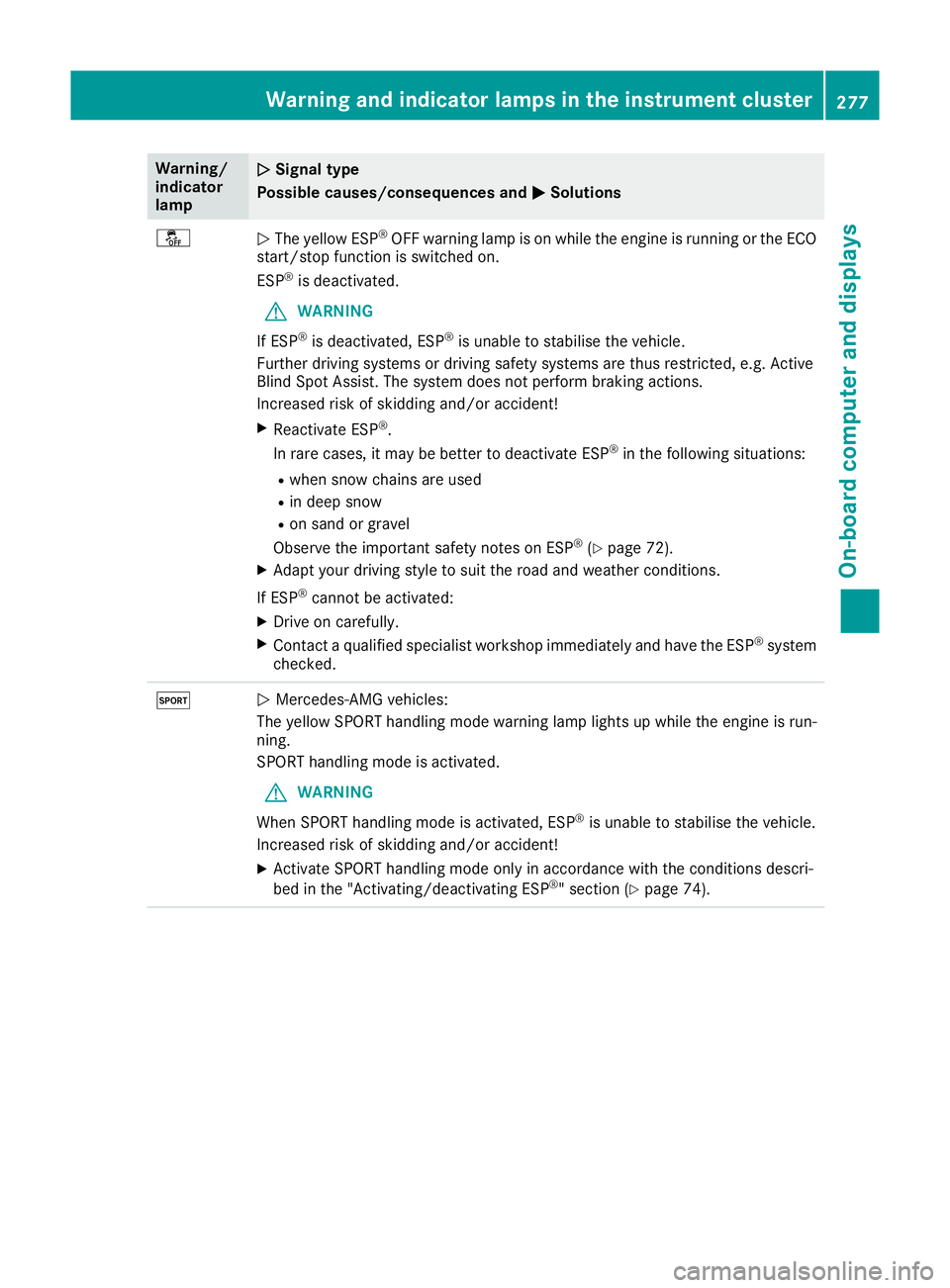
Warning/
indicator
lamp
N N
Signal type
Possible causes/consequences and M
MSolutions å
N
The yellow ESP ®
OFF warning lamp is on while the engine is running or the ECO
start/stop function is switched on.
ESP ®
is deactivated.
G WARNING
If ESP ®
is deactivated, ESP ®
is unable to stabilise the vehicle.
Further driving systems or driving safety systems are thus restricted, e.g. Active
Blind Spot Assist. The system does not perform braking actions.
Increased risk of skidding and/or accident!
X Reactivate ESP ®
.
In rare cases, it may be better to deactivate ESP ®
in the following situations:
R when snow chains are used
R in deep snow
R on sand or gravel
Observe the important safety notes on ESP ®
(Y page 72).
X Adapt your driving style to suit the road and weather conditions.
If ESP ®
cannot be activated:
X Drive on carefully.
X Contact a qualified specialist workshop immediately and have the ESP ®
system
checked. M
N
Mercedes-AMG vehicles:
The yellow SPORT handling mode warning lamp lights up while the engine is run-
ning.
SPORT handling mode is activated.
G WARNING
When SPORT handling mode is activated, ESP ®
is unable to stabilise the vehicle.
Increased risk of skidding and/or accident!
X Activate SPORT handling mode only in accordance with the conditions descri-
bed in the "Activating/deactivating ESP ®
" section (Y page 74). Warning and indicator lamps in the instrument cluster
277On-board computer and displays Z
Page 281 of 377
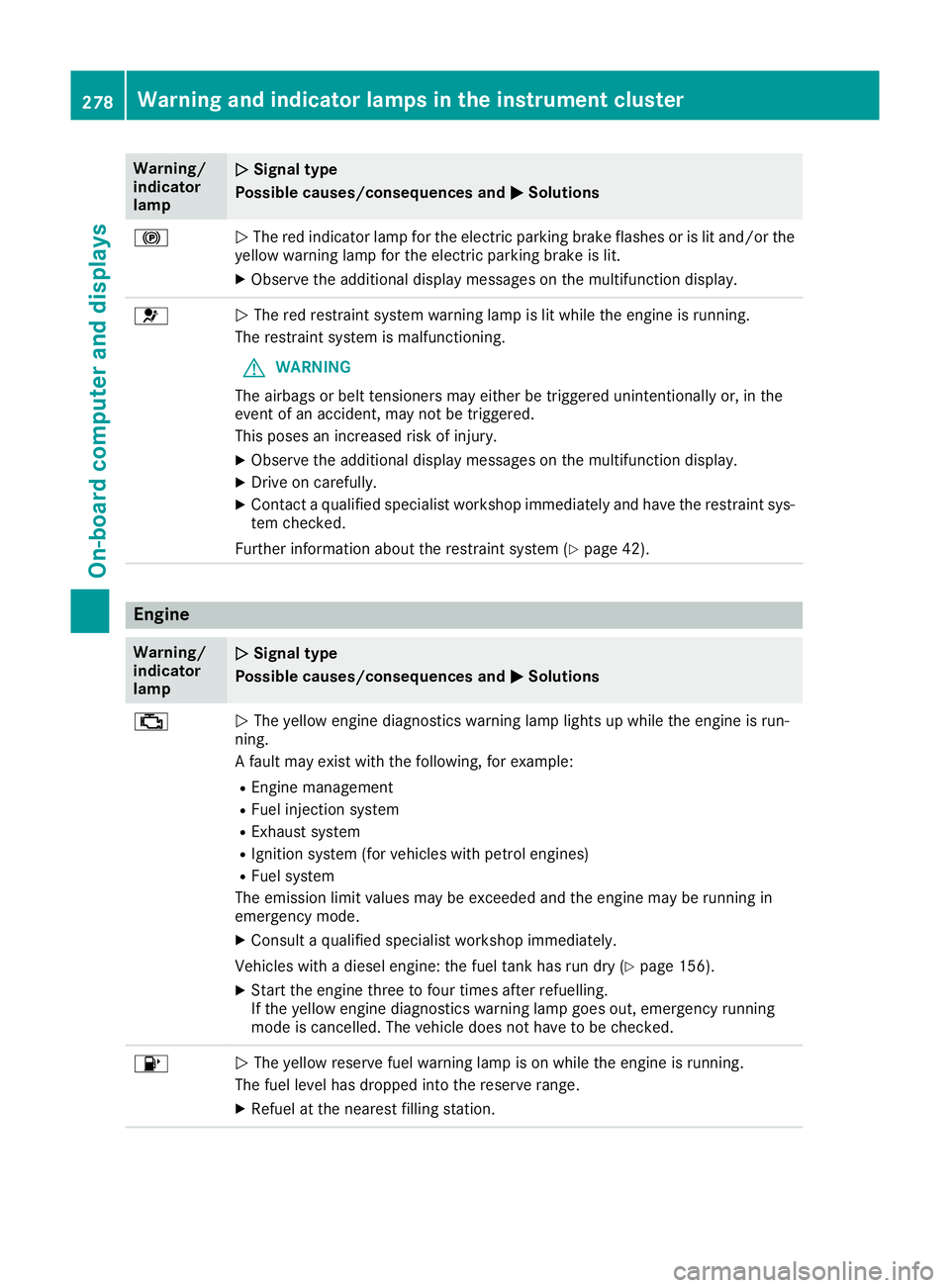
Warning/
indicator
lamp
N N
Signal type
Possible causes/consequences and M
M Solutions !
N
The red indicator lamp for the electric parking brake flashes or is lit and/or the
yellow warning lamp for the electric parking brake is lit.
X Observe the additional display messages on the multifunction display. 6
N
The red restraint system warning lamp is lit while the engine is running.
The restraint system is malfunctioning.
G WARNING
The airbags or belt tensioners may either be triggered unintentionally or, in the
event of an accident, may not be triggered.
This poses an increased risk of injury.
X Observe the additional display messages on the multifunction display.
X Drive on carefully.
X Contact a qualified specialist workshop immediately and have the restraint sys-
tem checked.
Further information about the restraint system (Y page 42).Engine
Warning/
indicator
lamp
N N
Signal type
Possible causes/consequences and M
M Solutions ;
N
The yellow engine diagnostics warning lamp lights up while the engine is run-
ning.
A fault may exist with the following, for example:
R Engine management
R Fuel injection system
R Exhaust system
R Ignition system (for vehicles with petrol engines)
R Fuel system
The emission limit values may be exceeded and the engine may be running in
emergency mode.
X Consult a qualified specialist workshop immediately.
Vehicles with a diesel engine: the fuel tank has run dry (Y page 156).
X Start the engine three to four times after refuelling.
If the yellow engine diagnostics warning lamp goes out, emergency running
mode is cancelled. The vehicle does not have to be checked. 8
N
The yellow reserve fuel warning lamp is on while the engine is running.
The fuel level has dropped into the reserve range.
X Refuel at the nearest filling station. 278
Warning and indicator lamps in the instrument clusterOn-board computer and displays
Page 282 of 377
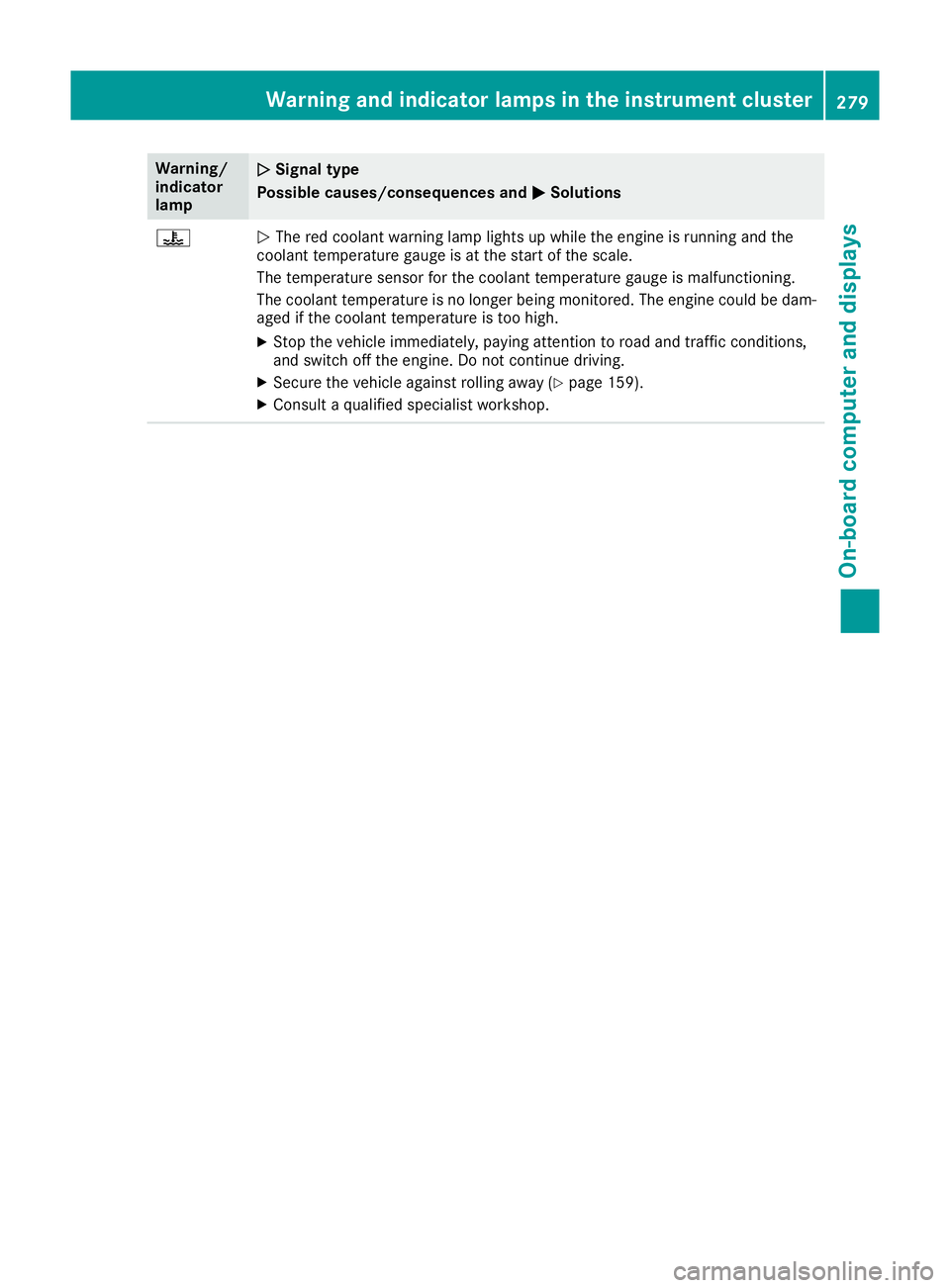
Warning/
indicator
lamp
N N
Signal type
Possible causes/consequences and M
MSolutions ?
N
The red coolant warning lamp lights up while the engine is running and the
coolant temperature gauge is at the start of the scale.
The temperature sensor for the coolant temperature gauge is malfunctioning.
The coolant temperature is no longer being monitored. The engine could be dam-
aged if the coolant temperature is too high.
X Stop the vehicle immediately, paying attention to road and traffic conditions,
and switch off the engine. Do not continue driving.
X Secure the vehicle against rolling away (Y page 159).
X Consult a qualified specialist workshop. Warning and indicator lamps in the instrument cluster
279On-board computer and displays Z
Page 284 of 377
Warning/
indicator
lamp
N N
Signal type
Possible causes/consequences and M
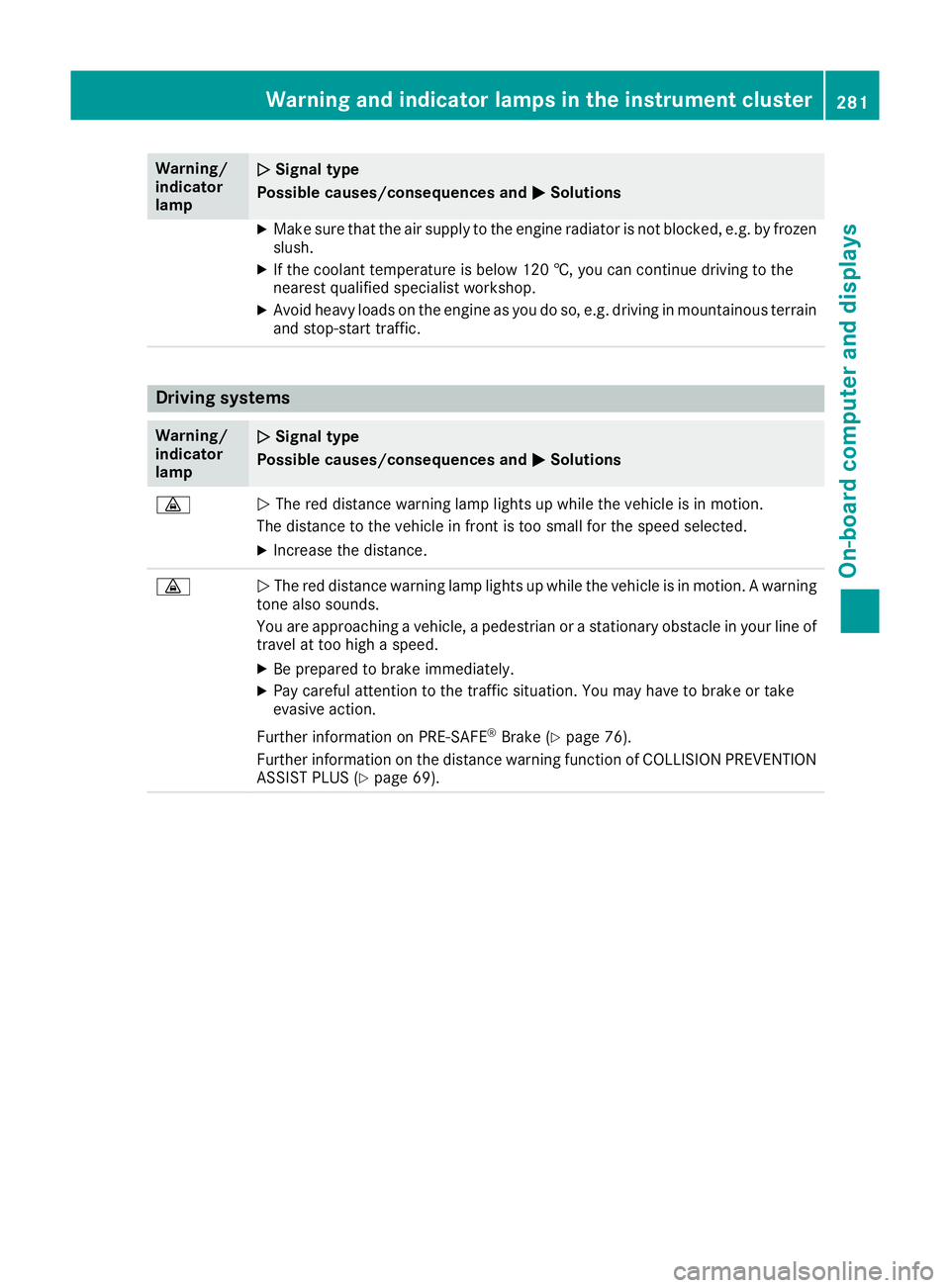
MSolutions X
Make sure that the air supply to the engine radiator is not blocked, e.g. by frozen
slush.
X If the coolant temperature is below 120 †, you can continue driving to the
nearest qualified specialist workshop.
X Avoid heavy loads on the engine as you do so, e.g. driving in mountainous terrain
and stop-start traffic. Driving systems
Warning/
indicator
lamp
N N
Signal type
Possible causes/consequences and M
MSolutions ·
N
The red distance warning lamp lights up while the vehicle is in motion.
The distance to the vehicle in front is too small for the speed selected.
X Increase the distance. ·
N
The red distance warning lamp lights up while the vehicle is in motion. A warning
tone also sounds.
You are approaching a vehicle, a pedestrian or a stationary obstacle in your line of travel at too high a speed.
X Be prepared to brake immediately.
X Pay careful attention to the traffic situation. You may have to brake or take
evasive action.
Further information on PRE ‑SAFE®
Brake (Y page 76).
Further information on the distance warning function of COLLISION PREVENTION ASSIST PLUS (Y page 69). Warning and indicator lamps in the instrument cluster
281On-board computer and displays Z
Page 287 of 377
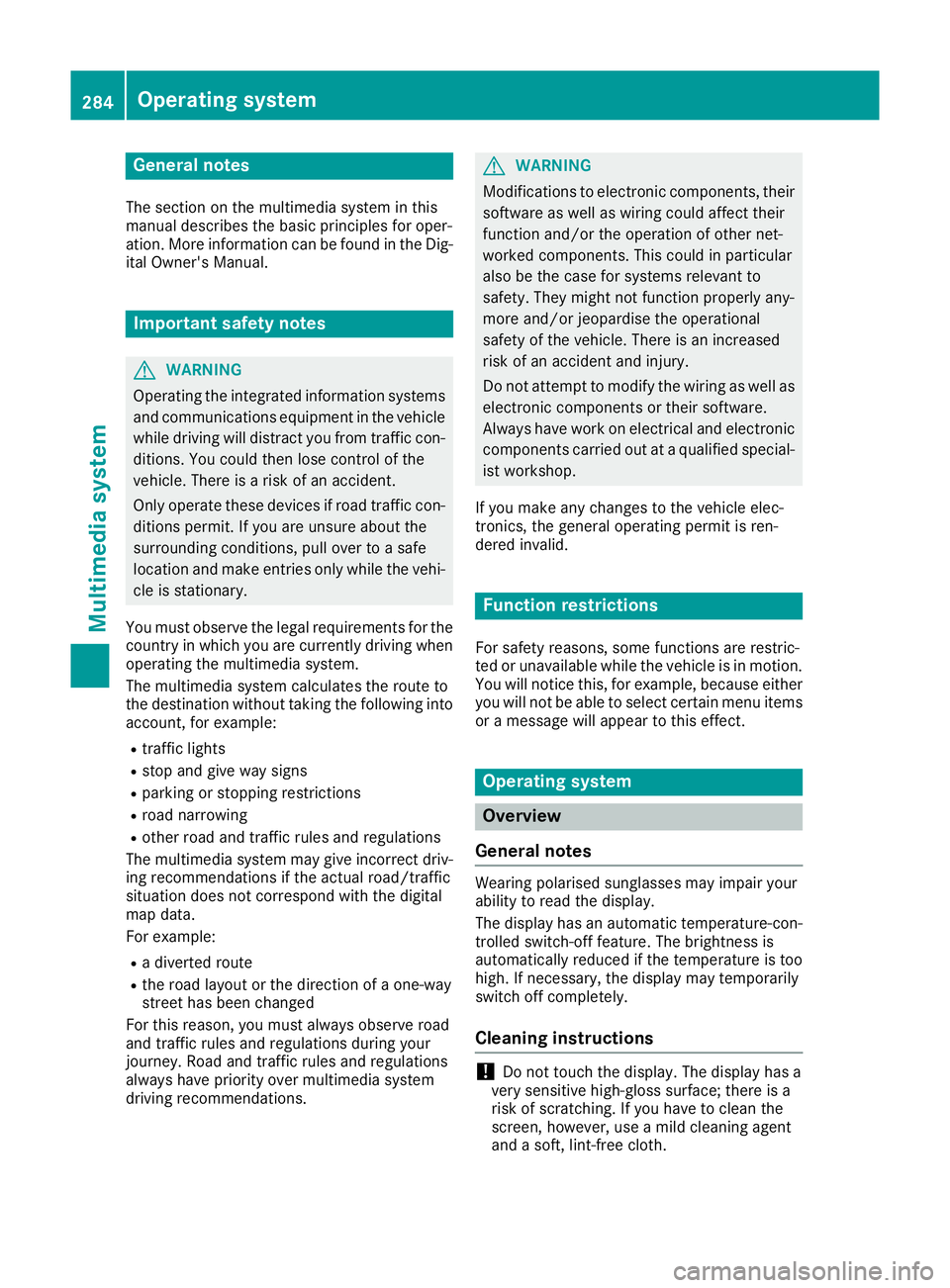
General notes
The section on the multimedia system in this
manual describes the basic principles for oper-
ation. More information can be found in the Dig-
ital Owner's Manual. Important safety notes
G
WARNING
Operating the integrated information systems and communications equipment in the vehicle
while driving will distract you from traffic con-
ditions. You could then lose control of the
vehicle. There is a risk of an accident.
Only operate these devices if road traffic con-
ditions permit. If you are unsure about the
surrounding conditions, pull over to a safe
location and make entries only while the vehi-
cle is stationary.
You must observe the legal requirements for the country in which you are currently driving whenoperating the multimedia system.
The multimedia system calculates the route to
the destination without taking the following into
account, for example:
R traffic lights
R stop and give way signs
R parking or stopping restrictions
R road narrowing
R other road and traffic rules and regulations
The multimedia system may give incorrect driv-
ing recommendations if the actual road/traffic
situation does not correspond with the digital
map data.
For example:
R a diverted route
R the road layout or the direction of a one-way
street has been changed
For this reason, you must always observe road
and traffic rules and regulations during your
journey. Road and traffic rules and regulations
always have priority over multimedia system
driving recommendations. G
WARNING
Modifications to electronic components, their software as well as wiring could affect their
function and/or the operation of other net-
worked components. This could in particular
also be the case for systems relevant to
safety. They might not function properly any-
more and/or jeopardise the operational
safety of the vehicle. There is an increased
risk of an accident and injury.
Do not attempt to modify the wiring as well as
electronic components or their software.
Always have work on electrical and electronic components carried out at a qualified special-
ist workshop.
If you make any changes to the vehicle elec-
tronics, the general operating permit is ren-
dered invalid. Function restrictions
For safety reasons, some functions are restric-
ted or unavailable while the vehicle is in motion.
You will notice this, for example, because either you will not be able to select certain menu items
or a message will appear to this effect. Operating system
Overview
General notes Wearing polarised sunglasses may impair your
ability to read the display.
The display has an automatic temperature-con-
trolled switch-off feature. The brightness is
automatically reduced if the temperature is too
high. If necessary, the display may temporarily
switch off completely.
Cleaning instructions !
Do not touch the display. The display has a
very sensitive high-gloss surface; there is a
risk of scratching. If you have to clean the
screen, however, use a mild cleaning agent
and a soft, lint-free cloth. 284
Operating systemMultimedia system