light MERCEDES-BENZ C-CLASS CABRIOLET 2016 Owners Manual
[x] Cancel search | Manufacturer: MERCEDES-BENZ, Model Year: 2016, Model line: C-CLASS CABRIOLET, Model: MERCEDES-BENZ C-CLASS CABRIOLET 2016Pages: 377, PDF Size: 6.9 MB
Page 239 of 377
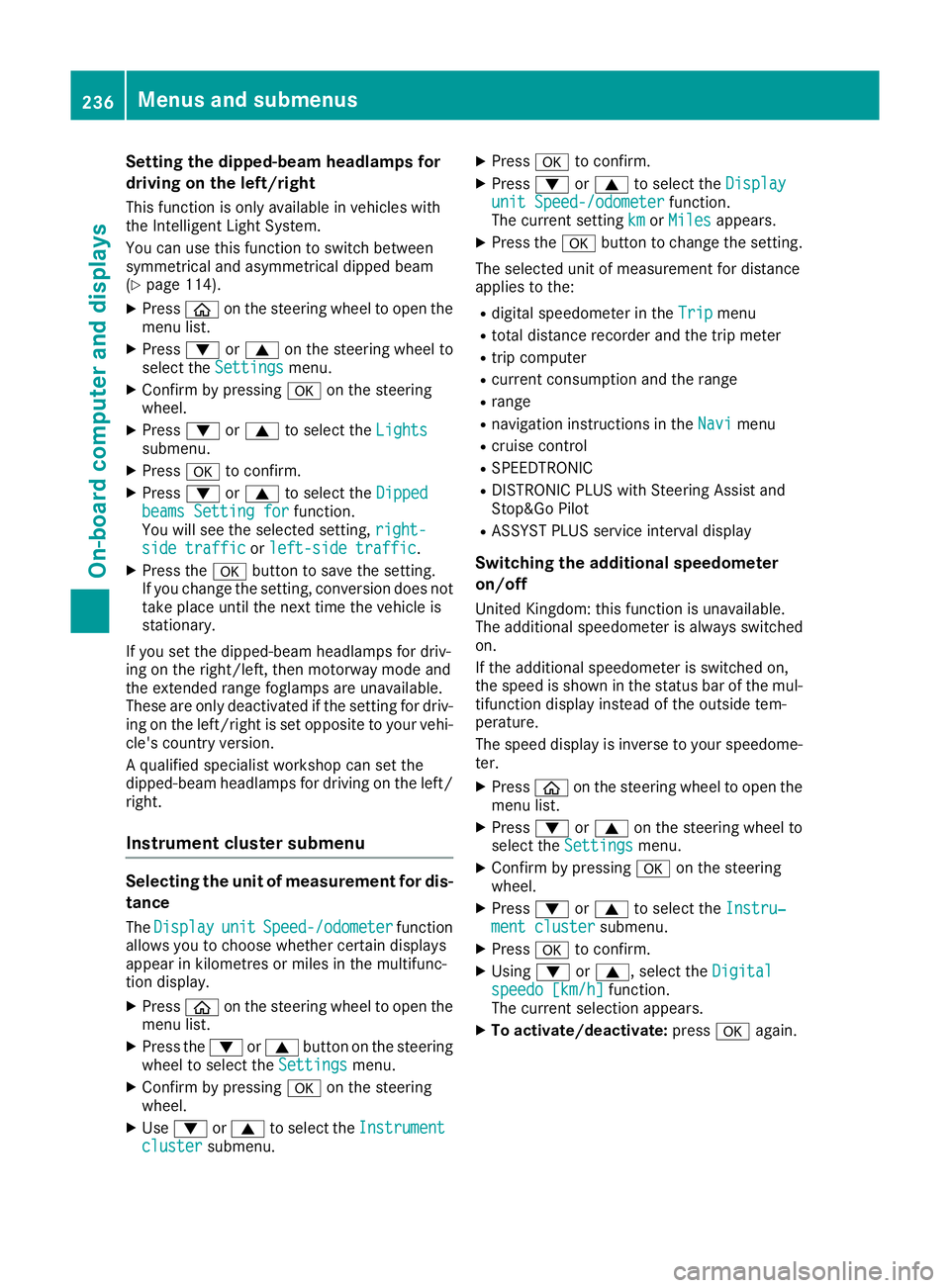
Setting the dipped-beam headlamps for
driving on the left/right
This function is only available in vehicles with
the Intelligent Light System.
You can use this function to switch between
symmetrical and asymmetrical dipped beam
(Y page 114).
X Press òon the steering wheel to open the
menu list.
X Press :or9 on the steering wheel to
select the Settings
Settings menu.
X Confirm by pressing aon the steering
wheel.
X Press :or9 to select the Lights Lights
submenu.
X Press ato confirm.
X Press :or9 to select the Dipped
Dipped
beams Setting for
beams Setting for function.
You will see the selected setting, right-
right-
side traffic
side traffic orleft-side traffic
left-side traffic.
X Press the abutton to save the setting.
If you change the setting, conversion does not
take place until the next time the vehicle is
stationary.
If you set the dipped-beam headlamps for driv-
ing on the right/left, then motorway mode and
the extended range foglamps are unavailable.
These are only deactivated if the setting for driv-
ing on the left/right is set opposite to your vehi- cle's country version.
A qualified specialist workshop can set the
dipped-beam headlamps for driving on the left/
right.
Instrument cluster submenu Selecting the unit of measurement for dis-
tance
The Display
Display unit unitSpeed-/odometer
Speed-/odometer function
allows you to choose whether certain displays
appear in kilometres or miles in the multifunc-
tion display.
X Press òon the steering wheel to open the
menu list.
X Press the :or9 button on the steering
wheel to select the Settings Settingsmenu.
X Confirm by pressing aon the steering
wheel.
X Use : or9 to select the Instrument
Instrument
cluster
cluster submenu. X
Press ato confirm.
X Press :or9 to select the Display Display
unit Speed-/odometer unit Speed-/odometer function.
The current setting km
kmorMiles
Miles appears.
X Press the abutton to change the setting.
The selected unit of measurement for distance
applies to the:
R digital speedometer in the Trip Tripmenu
R total distance recorder and the trip meter
R trip computer
R current consumption and the range
R range
R navigation instructions in the Navi
Navimenu
R cruise control
R SPEEDTRONIC
R DISTRONIC PLUS with Steering Assist and
Stop&Go Pilot
R ASSYST PLUS service interval display
Switching the additional speedometer
on/off
United Kingdom: this function is unavailable.
The additional speedometer is always switched
on.
If the additional speedometer is switched on,
the speed is shown in the status bar of the mul- tifunction display instead of the outside tem-
perature.
The speed display is inverse to your speedome-
ter.
X Press òon the steering wheel to open the
menu list.
X Press :or9 on the steering wheel to
select the Settings Settings menu.
X Confirm by pressing aon the steering
wheel.
X Press :or9 to select the Instru‐
Instru‐
ment cluster
ment cluster submenu.
X Press ato confirm.
X Using :or9, select the Digital
Digital
speedo [km/h]
speedo [km/h] function.
The current selection appears.
X To activate/deactivate: pressaagain. 236
Menus and submenusOn-board computer and displays
Page 245 of 377
Safety systems
Display messages
Possible causes/consequences and
M
MSolutions !÷
currently unavaila‐
currently unavaila‐
ble ble See
SeeOwner's
Owner's Man‐
Man‐
ual
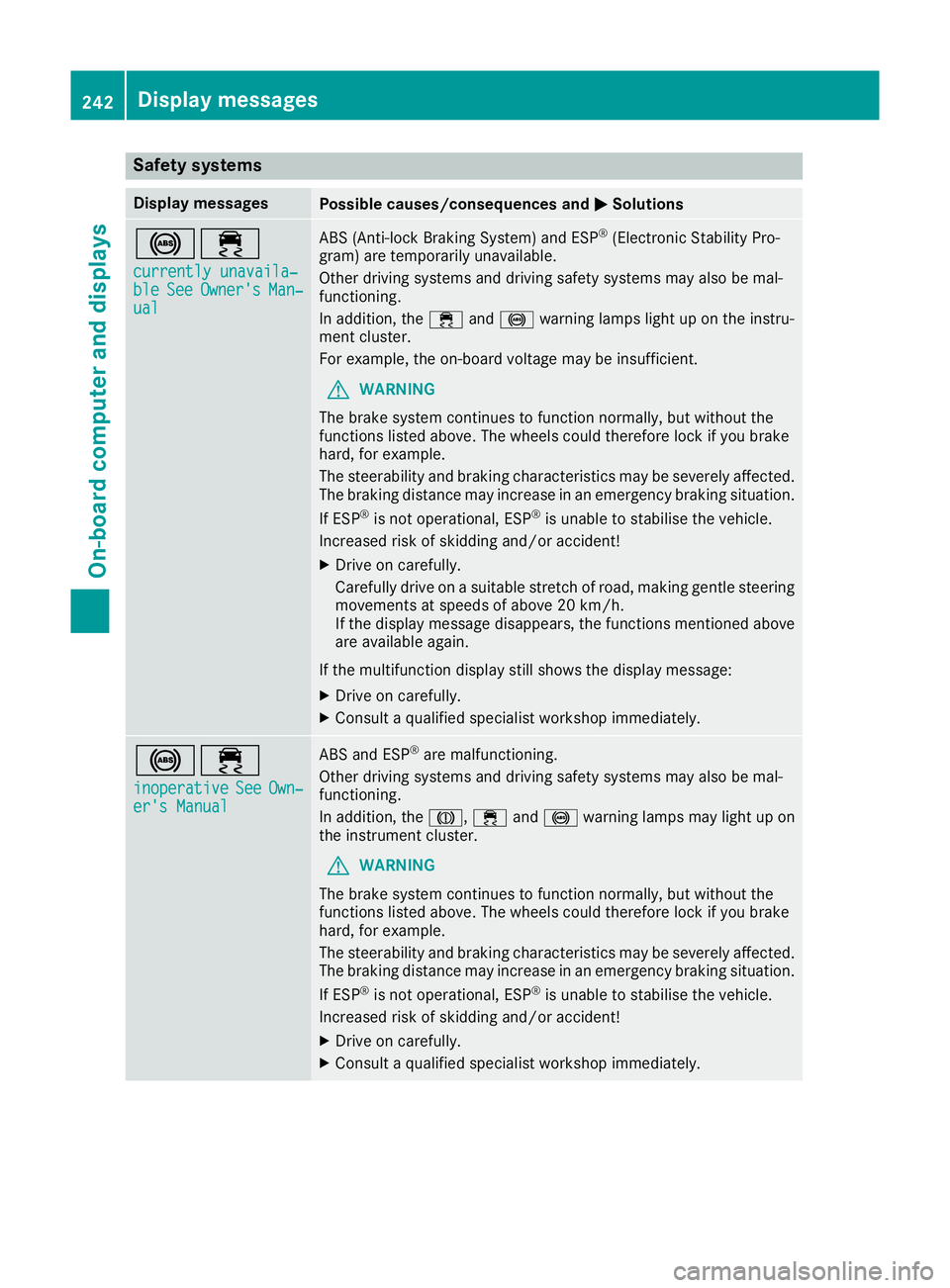
ual ABS (Anti-lock Braking System) and ESP
®
(Electronic Stability Pro-
gram) are temporarily unavailable.
Other driving systems and driving safety systems may also be mal-
functioning.
In addition, the ÷and! warning lamps light up on the instru-
ment cluster.
For example, the on-board voltage may be insufficient.
G WARNING
The brake system continues to function normally, but without the
functions listed above. The wheels could therefore lock if you brake
hard, for example.
The steerability and braking characteristics may be severely affected. The braking distance may increase in an emergency braking situation.
If ESP ®
is not operational, ESP ®
is unable to stabilise the vehicle.
Increased risk of skidding and/or accident!
X Drive on carefully.
Carefully drive on a suitable stretch of road, making gentle steering
movements at speeds of above 20 km/h.
If the display message disappears, the functions mentioned above
are available again.
If the multifunction display still shows the display message: X Drive on carefully.
X Consult a qualified specialist workshop immediately. !÷
inoperative inoperative See SeeOwn‐
Own‐
er's Manual
er's Manual ABS and ESP
®
are malfunctioning.
Other driving systems and driving safety systems may also be mal-
functioning.
In addition, the J,÷and! warning lamps may light up on
the instrument cluster.
G WARNING
The brake system continues to function normally, but without the
functions listed above. The wheels could therefore lock if you brake
hard, for example.
The steerability and braking characteristics may be severely affected. The braking distance may increase in an emergency braking situation.
If ESP ®
is not operational, ESP ®
is unable to stabilise the vehicle.
Increased risk of skidding and/or accident!
X Drive on carefully.
X Consult a qualified specialist workshop immediately. 242
Display messagesOn-board computer and displays
Page 246 of 377
Display messages
Possible causes/consequences and
M
MSolutions ÷
inoperative inoperative
See
SeeOwn‐
Own‐
er's Manual
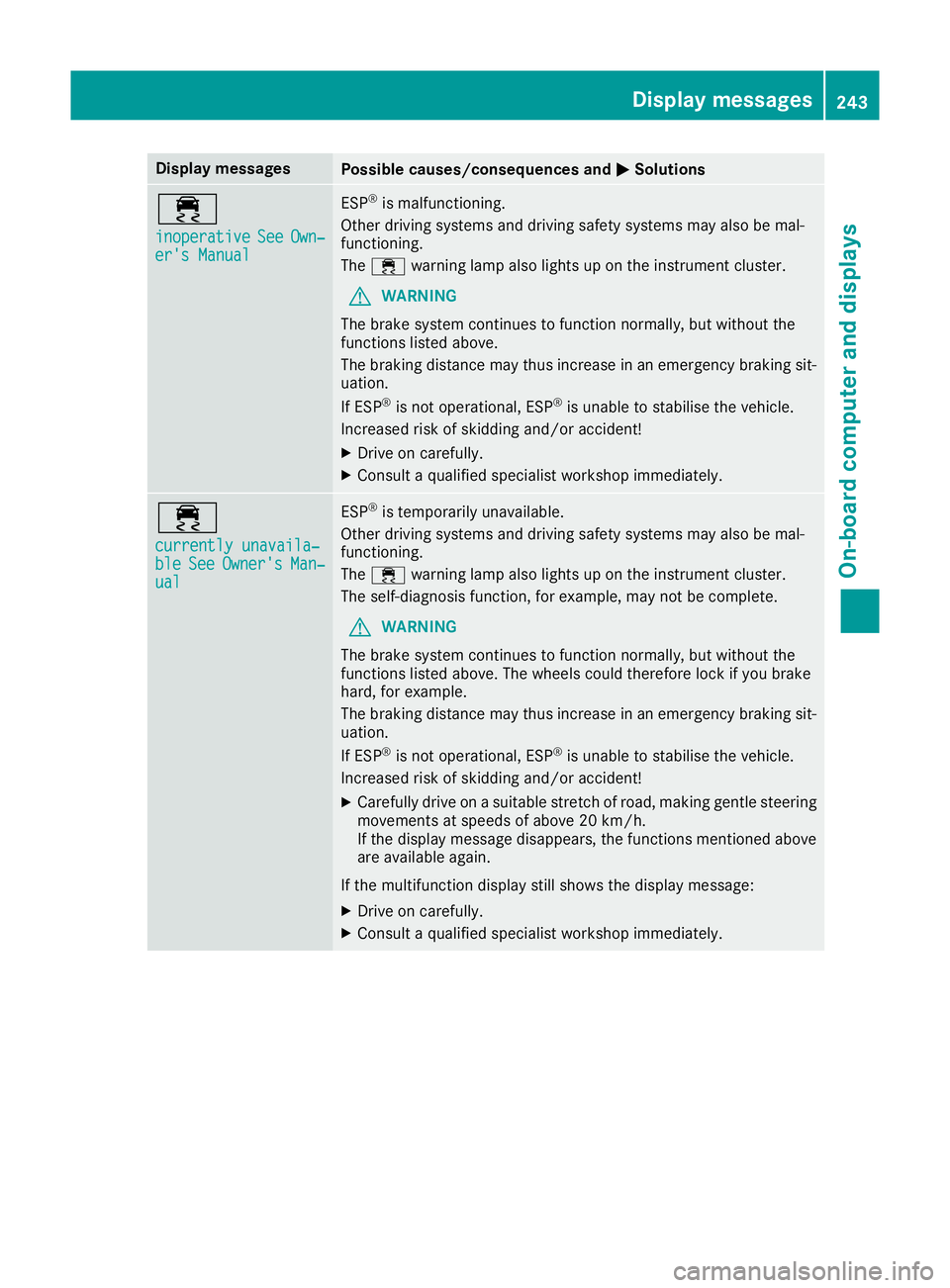
er's Manual ESP
®
is malfunctioning.
Other driving systems and driving safety systems may also be mal-
functioning.
The ÷ warning lamp also lights up on the instrument cluster.
G WARNING
The brake system continues to function normally, but without the
functions listed above.
The braking distance may thus increase in an emergency braking sit-
uation.
If ESP ®
is not operational, ESP ®
is unable to stabilise the vehicle.
Increased risk of skidding and/or accident!
X Drive on carefully.
X Consult a qualified specialist workshop immediately. ÷
currently unavaila‐ currently unavaila‐
ble ble
See
SeeOwner's
Owner's Man‐
Man‐
ual
ual ESP
®
is temporarily unavailable.
Other driving systems and driving safety systems may also be mal-
functioning.
The ÷ warning lamp also lights up on the instrument cluster.
The self-diagnosis function, for example, may not be complete.
G WARNING
The brake system continues to function normally, but without the
functions listed above. The wheels could therefore lock if you brake
hard, for example.
The braking distance may thus increase in an emergency braking sit-
uation.
If ESP ®
is not operational, ESP ®
is unable to stabilise the vehicle.
Increased risk of skidding and/or accident!
X Carefully drive on a suitable stretch of road, making gentle steering
movements at speeds of above 20 km/h.
If the display message disappears, the functions mentioned above
are available again.
If the multifunction display still shows the display message:
X Drive on carefully.
X Consult a qualified specialist workshop immediately. Display
messages
243On-board computer and displays Z
Page 247 of 377
Display messages
Possible causes/consequences and
M
MSolutions T!
÷
inoperative inoperative See
SeeOwn‐
Own‐
er's Manual
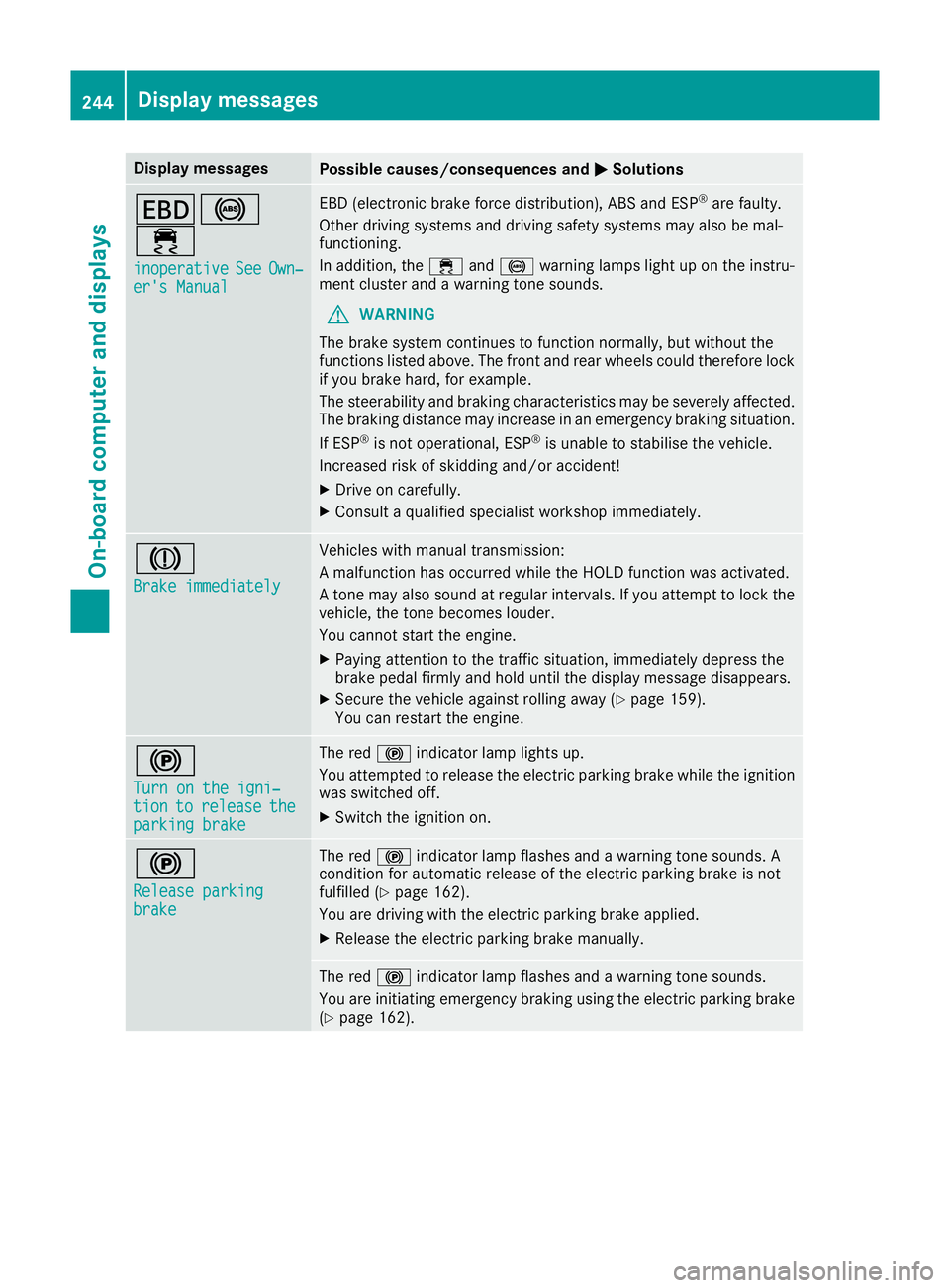
er's Manual EBD (electronic brake force distribution), ABS and ESP
®
are faulty.
Other driving systems and driving safety systems may also be mal-
functioning.
In addition, the ÷and! warning lamps light up on the instru-
ment cluster and a warning tone sounds.
G WARNING
The brake system continues to function normally, but without the
functions listed above. The front and rear wheels could therefore lock
if you brake hard, for example.
The steerability and braking characteristics may be severely affected. The braking distance may increase in an emergency braking situation.
If ESP ®
is not operational, ESP ®
is unable to stabilise the vehicle.
Increased risk of skidding and/or accident!
X Drive on carefully.
X Consult a qualified specialist workshop immediately. J
Brake immediately Brake immediately Vehicles with manual transmission:
A malfunction has occurred while the HOLD function was activated.
A tone may also sound at regular intervals. If you attempt to lock the
vehicle, the tone becomes louder.
You cannot start the engine.
X Paying attention to the traffic situation, immediately depress the
brake pedal firmly and hold until the display message disappears.
X Secure the vehicle against rolling away (Y page 159).
You can restart the engine. !
Turn on the igni‐ Turn on the igni‐
tion tion
to
torelease
release the
the
parking brake
parking brake The red
!indicator lamp lights up.
You attempted to release the electric parking brake while the ignition
was switched off.
X Switch the ignition on. !
Release parking Release parking
brake brake The red
!indicator lamp flashes and a warning tone sounds. A
condition for automatic release of the electric parking brake is not
fulfilled (Y page 162).
You are driving with the electric parking brake applied.
X Release the electric parking brake manually. The red
!indicator lamp flashes and a warning tone sounds.
You are initiating emergency braking using the electric parking brake
(Y page 162). 244
Display
messagesOn-board computer and displays
Page 248 of 377
Display messages
Possible causes/consequences and
M
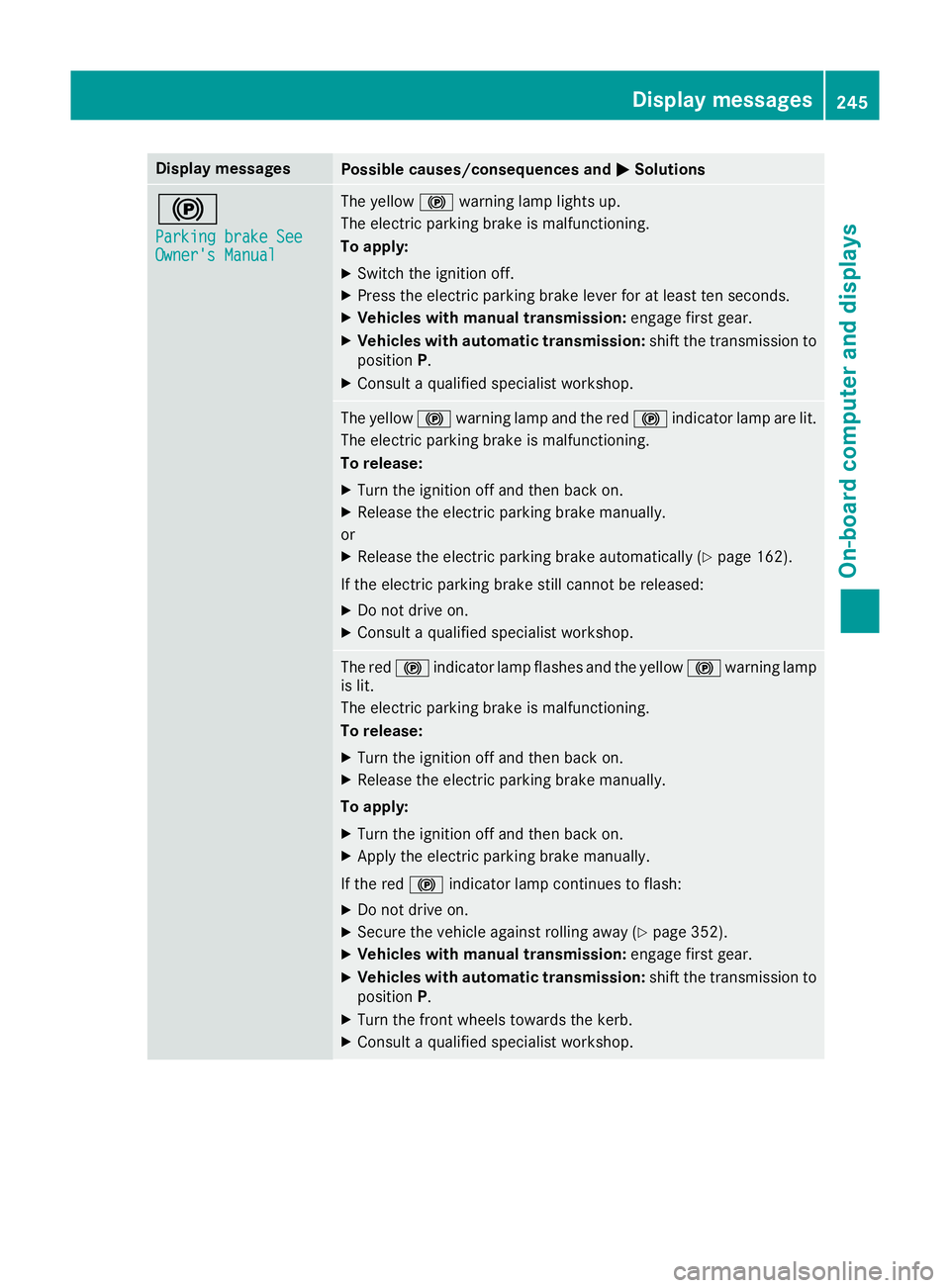
MSolutions !
Parking brake See Parking brake See
Owner's Manual Owner's Manual The yellow
!warning lamp lights up.
The electric parking brake is malfunctioning.
To apply:
X Switch the ignition off.
X Press the electric parking brake lever for at least ten seconds.
X Vehicles with manual transmission: engage first gear.
X Vehicles with automatic transmission: shift the transmission to
position P.
X Consult a qualified specialist workshop. The yellow
!warning lamp and the red !indicator lamp are lit.
The electric parking brake is malfunctioning.
To release:
X Turn the ignition off and then back on.
X Release the electric parking brake manually.
or
X Release the electric parking brake automatically (Y page 162).
If the electric parking brake still cannot be released:
X Do not drive on.
X Consult a qualified specialist workshop. The red
!indicator lamp flashes and the yellow !warning lamp
is lit.
The electric parking brake is malfunctioning.
To release:
X Turn the ignition off and then back on.
X Release the electric parking brake manually.
To apply: X Turn the ignition off and then back on.
X Apply the electric parking brake manually.
If the red !indicator lamp continues to flash:
X Do not drive on.
X Secure the vehicle against rolling away (Y page 352).
X Vehicles with manual transmission: engage first gear.
X Vehicles with automatic transmission: shift the transmission to
position P.
X Turn the front wheels towards the kerb.
X Consult a qualified specialist workshop. Display
messages
245On-board computer and displays Z
Page 249 of 377
Display messages
Possible causes/consequences and
M
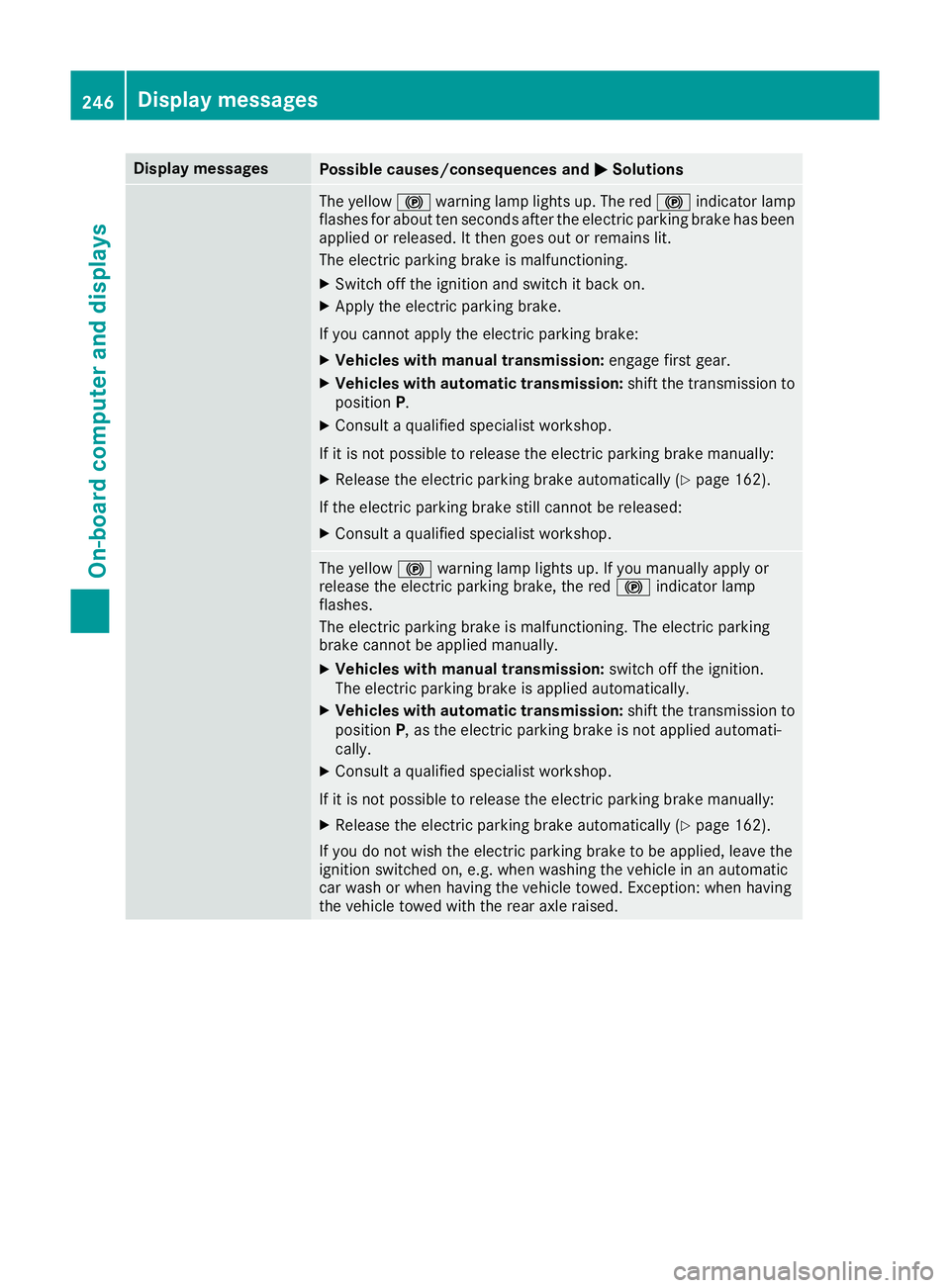
MSolutions The yellow
!warning lamp lights up. The red !indicator lamp
flashes for about ten seconds after the electric parking brake has been applied or released. It then goes out or remains lit.
The electric parking brake is malfunctioning.
X Switch off the ignition and switch it back on.
X Apply the electric parking brake.
If you cannot apply the electric parking brake:
X Vehicles with manual transmission: engage first gear.
X Vehicles with automatic transmission: shift the transmission to
position P.
X Consult a qualified specialist workshop.
If it is not possible to release the electric parking brake manually: X Release the electric parking brake automatically (Y page 162).
If the electric parking brake still cannot be released: X Consult a qualified specialist workshop. The yellow
!warning lamp lights up. If you manually apply or
release the electric parking brake, the red !indicator lamp
flashes.
The electric parking brake is malfunctioning. The electric parking
brake cannot be applied manually.
X Vehicles with manual transmission: switch off the ignition.
The electric parking brake is applied automatically.
X Vehicles with automatic transmission: shift the transmission to
position P, as the electric parking brake is not applied automati-
cally.
X Consult a qualified specialist workshop.
If it is not possible to release the electric parking brake manually: X Release the electric parking brake automatically (Y page 162).
If you do not wish the electric parking brake to be applied, leave the
ignition switched on, e.g. when washing the vehicle in an automatic
car wash or when having the vehicle towed. Exception: when having
the vehicle towed with the rear axle raised. 246
Display
messagesOn-board computer and displays
Page 250 of 377
Display messages
Possible causes/consequences and
M
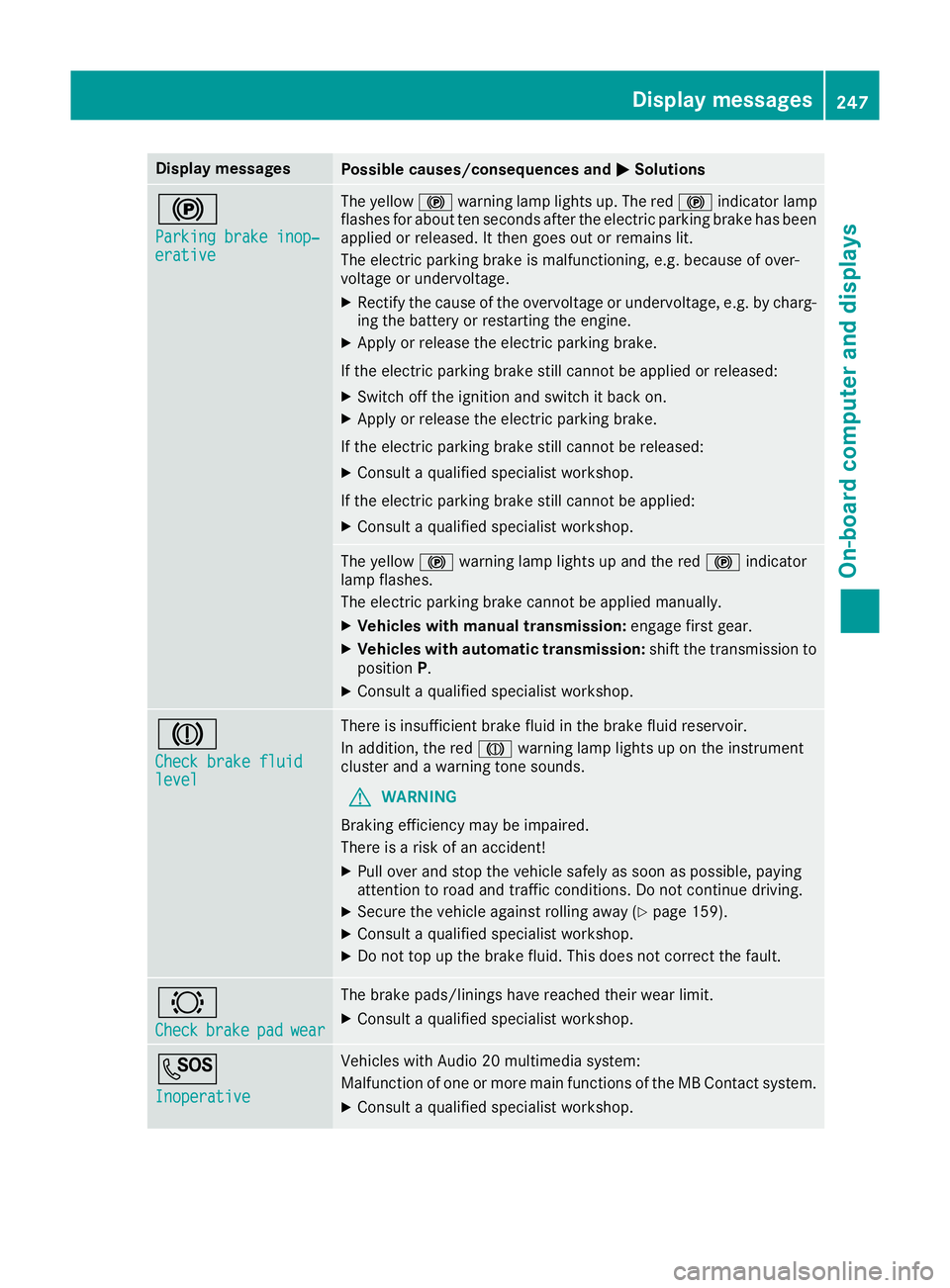
MSolutions !
Parking brake inop‐ Parking brake inop‐
erative erative The yellow
!warning lamp lights up. The red !indicator lamp
flashes for about ten seconds after the electric parking brake has been applied or released. It then goes out or remains lit.
The electric parking brake is malfunctioning, e.g. because of over-
voltage or undervoltage.
X Rectify the cause of the overvoltage or undervoltage, e.g. by charg-
ing the battery or restarting the engine.
X Apply or release the electric parking brake.
If the electric parking brake still cannot be applied or released: X Switch off the ignition and switch it back on.
X Apply or release the electric parking brake.
If the electric parking brake still cannot be released: X Consult a qualified specialist workshop.
If the electric parking brake still cannot be applied:
X Consult a qualified specialist workshop. The yellow
!warning lamp lights up and the red !indicator
lamp flashes.
The electric parking brake cannot be applied manually.
X Vehicles with manual transmission: engage first gear.
X Vehicles with automatic transmission: shift the transmission to
position P.
X Consult a qualified specialist workshop. J
Check brake fluid Check brake fluid
level level There is insufficient brake fluid in the brake fluid reservoir.
In addition, the red Jwarning lamp lights up on the instrument
cluster and a warning tone sounds.
G WARNING
Braking efficiency may be impaired.
There is a risk of an accident!
X Pull over and stop the vehicle safely as soon as possible, paying
attention to road and traffic conditions. Do not continue driving.
X Secure the vehicle against rolling away (Y page 159).
X Consult a qualified specialist workshop.
X Do not top up the brake fluid. This does not correct the fault. #
Check Check
brake
brakepad
padwear
wear The brake pads/linings have reached their wear limit.
X Consult a qualified specialist workshop. G
Inoperative Inoperative Vehicles with Audio 20 multimedia system:
Malfunction of one or more main functions of the MB Contact system.
X Consult a qualified specialist workshop. Display
messages
247On-board computer and displays Z
Page 252 of 377
Display messages
Possible causes/consequences and
M
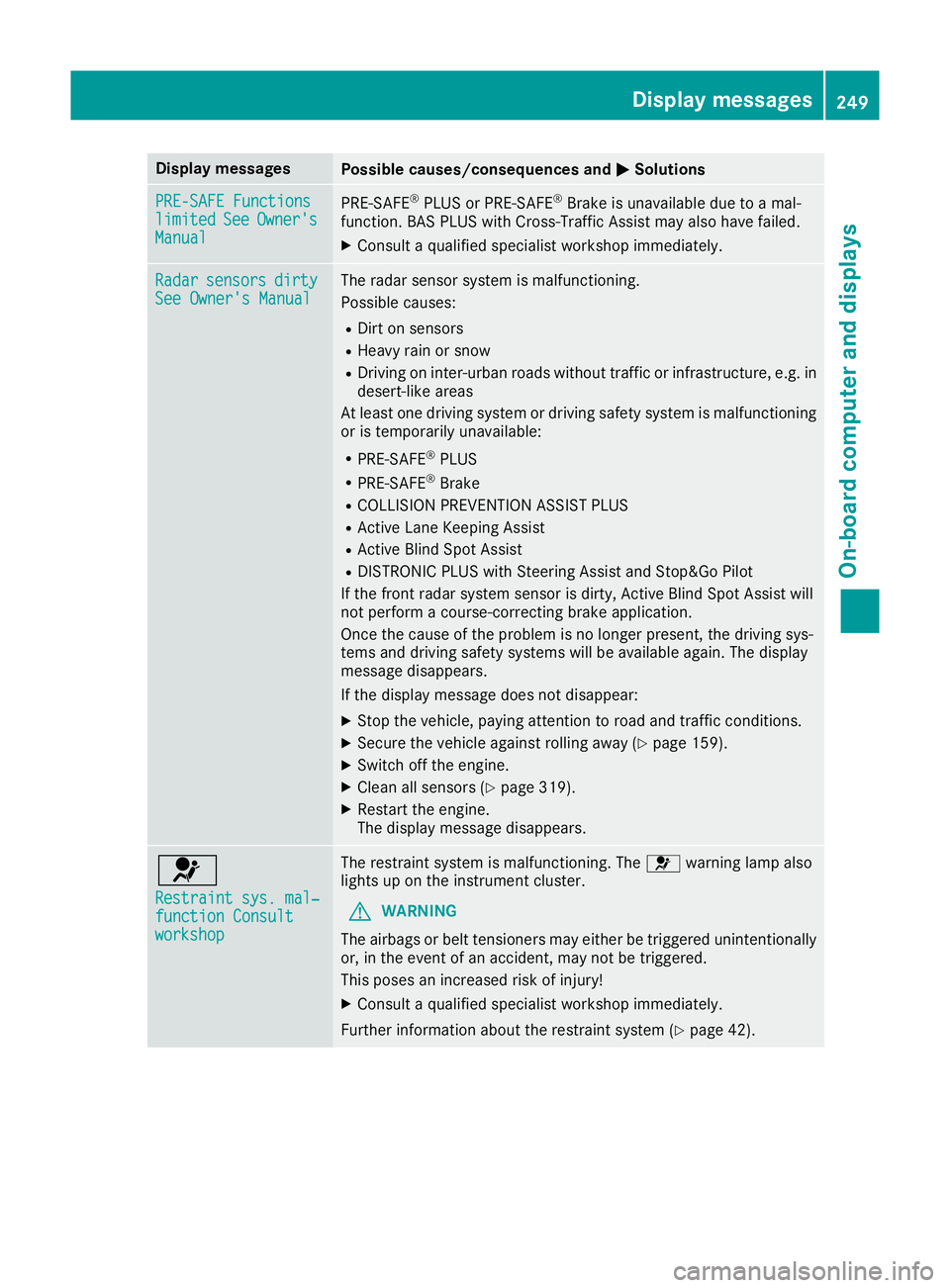
MSolutions PRE-SAFE Functions
PRE-SAFE Functions
limited limited
See
SeeOwner's
Owner's
Manual
Manual PRE
‑SAFE ®
PLUS or PRE‑ SAFE®
Brake is unavailable due to a mal-
function. BAS PLUS with Cross-Traffic Assist may also have failed.
X Consult a qualified specialist workshop immediately. Radar
Radar
sensors
sensors dirty
dirty
See Owner's Manual
See Owner's Manual The radar sensor system is malfunctioning.
Possible causes:
R Dirt on sensors
R Heavy rain or snow
R Driving on inter-urban roads without traffic or infrastructure, e.g. in
desert-like areas
At least one driving system or driving safety system is malfunctioning
or is temporarily unavailable:
R PRE-SAFE ®
PLUS
R PRE-SAFE ®
Brake
R COLLISION PREVENTION ASSIST PLUS
R Active Lane Keeping Assist
R Active Blind Spot Assist
R DISTRONIC PLUS with Steering Assist and Stop&Go Pilot
If the front radar system sensor is dirty, Active Blind Spot Assist will
not perform a course-correcting brake application.
Once the cause of the problem is no longer present, the driving sys-
tems and driving safety systems will be available again. The display
message disappears.
If the display message does not disappear:
X Stop the vehicle, paying attention to road and traffic conditions.
X Secure the vehicle against rolling away (Y page 159).
X Switch off the engine.
X Clean all sensors (Y page 319).
X Restart the engine.
The display message disappears. 6
Restraint sys. mal‐ Restraint sys. mal‐
function Consult function Consult
workshop workshop The restraint system is malfunctioning. The
6warning lamp also
lights up on the instrument cluster.
G WARNING
The airbags or belt tensioners may either be triggered unintentionally or, in the event of an accident, may not be triggered.
This poses an increased risk of injury!
X Consult a qualified specialist workshop immediately.
Further information about the restraint system (Y page 42). Display
messages
249On-board computer and displays Z
Page 253 of 377
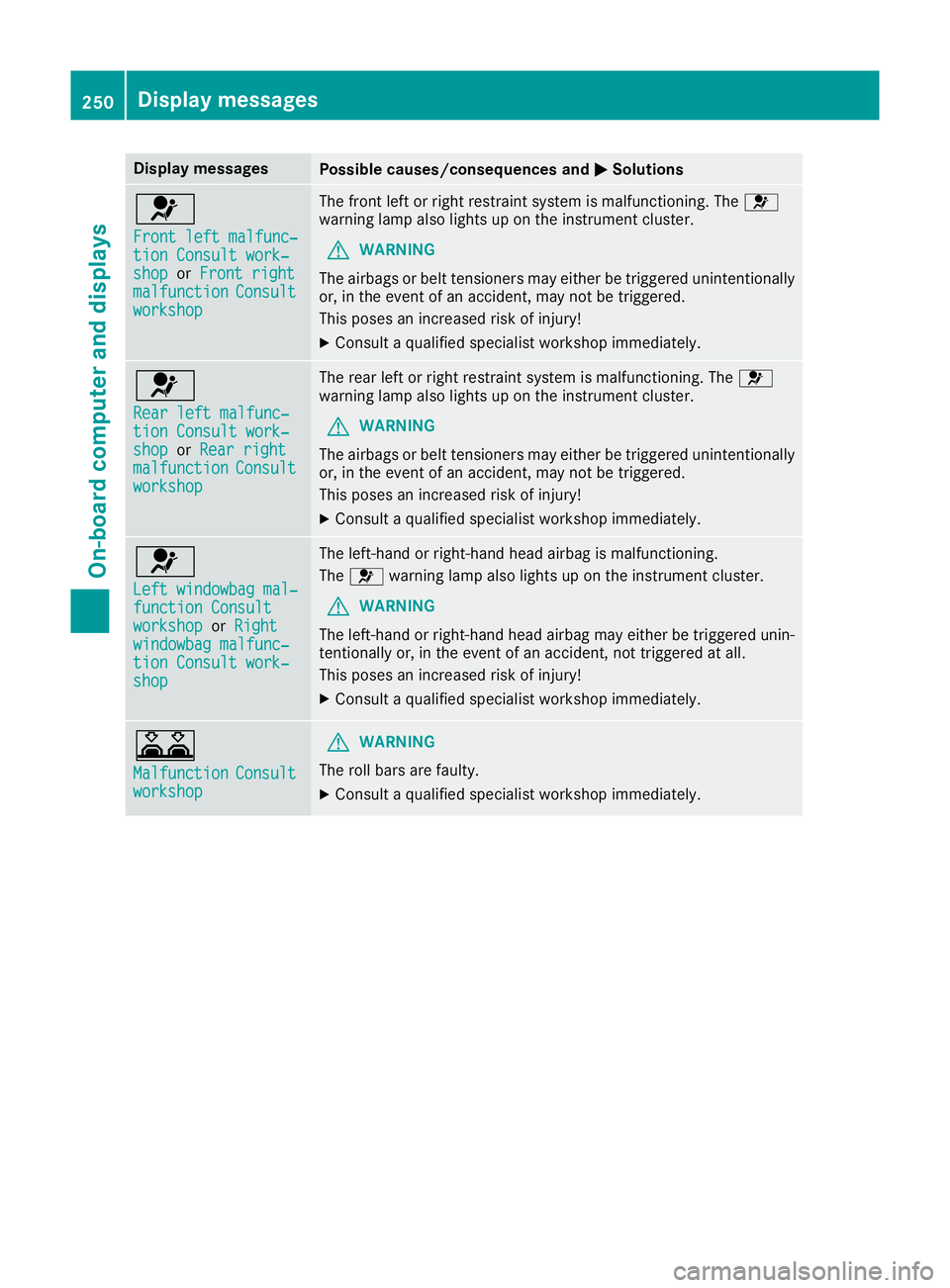
Display messages
Possible causes/consequences and
M
MSolutions 6
Front left malfunc‐ Front left malfunc‐
tion Consult work‐ tion Consult work‐
shop shop
orFront right
Front right
malfunction
malfunction Consult
Consult
workshop
workshop The front left or right restraint system is malfunctioning. The
6
warning lamp also lights up on the instrument cluster.
G WARNING
The airbags or belt tensioners may either be triggered unintentionally or, in the event of an accident, may not be triggered.
This poses an increased risk of injury!
X Consult a qualified specialist workshop immediately. 6
Rear left malfunc‐ Rear left malfunc‐
tion Consult work‐ tion Consult work‐
shop shop
orRear right
Rear right
malfunction
malfunction Consult
Consult
workshop
workshop The rear left or right restraint system is malfunctioning. The
6
warning lamp also lights up on the instrument cluster.
G WARNING
The airbags or belt tensioners may either be triggered unintentionally or, in the event of an accident, may not be triggered.
This poses an increased risk of injury!
X Consult a qualified specialist workshop immediately. 6
Left windowbag mal‐ Left windowbag mal‐
function Consult function Consult
workshop workshop
orRight
Right
windowbag malfunc‐
windowbag malfunc‐
tion Consult work‐ tion Consult work‐
shop shop The left-hand or right-hand head airbag is malfunctioning.
The
6 warning lamp also lights up on the instrument cluster.
G WARNING
The left-hand or right-hand head airbag may either be triggered unin-
tentionally or, in the event of an accident, not triggered at all.
This poses an increased risk of injury!
X Consult a qualified specialist workshop immediately. A
Malfunction Malfunction
Consult
Consult
workshop
workshop G
WARNING
The roll bars are faulty.
X Consult a qualified specialist workshop immediately. 250
Display
messagesOn-board computer and displays
Page 254 of 377
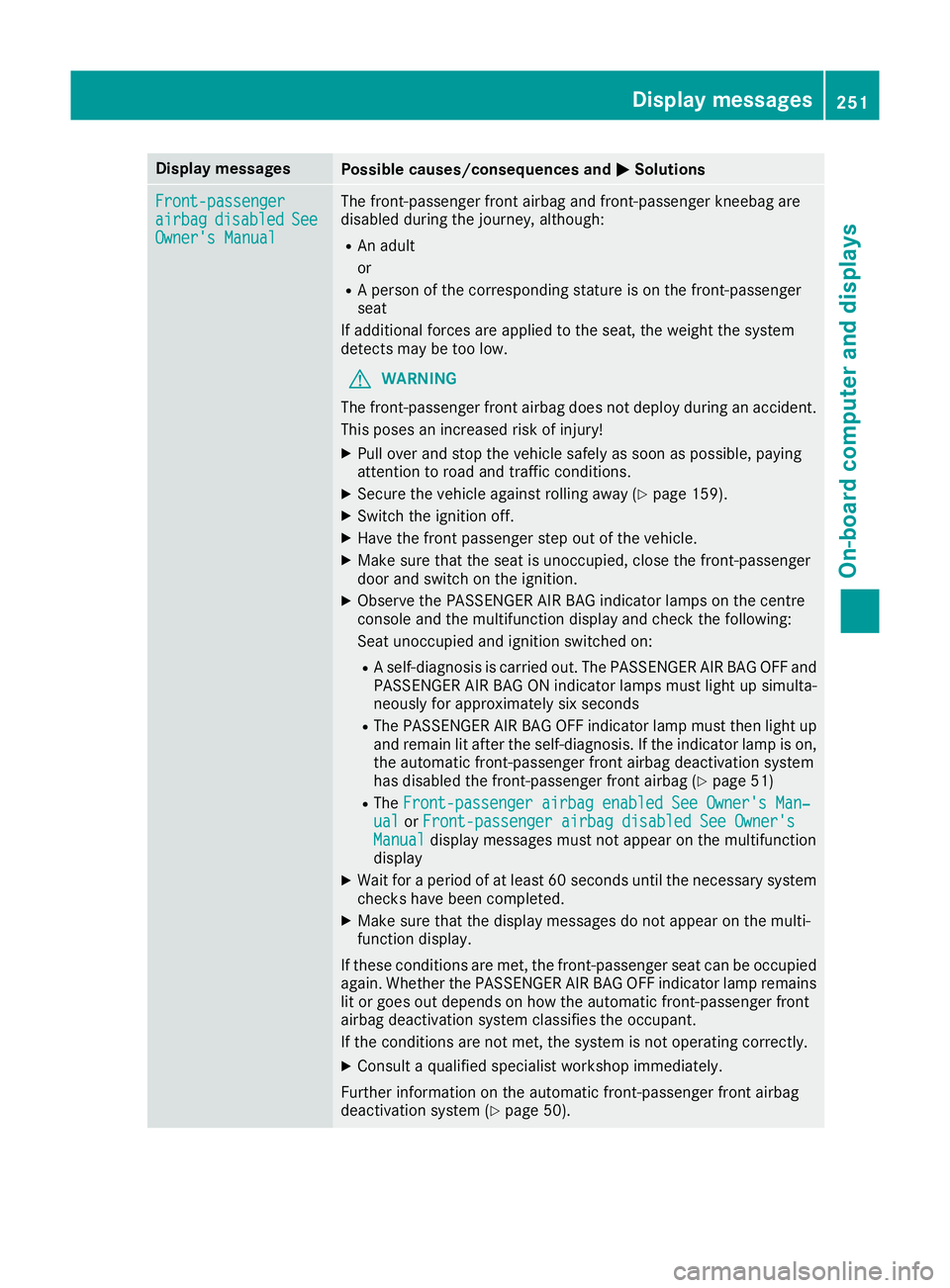
Display messages
Possible causes/consequences and
M
MSolutions Front-passenger
Front-passenger
airbag airbag
disabled
disabled See
See
Owner's Manual
Owner's Manual The front-passenger front airbag and front-passenger kneebag are
disabled during the journey, although:
R An adult
or
R A person of the corresponding stature is on the front-passenger
seat
If additional forces are applied to the seat, the weight the system
detects may be too low.
G WARNING
The front-passenger front airbag does not deploy during an accident.
This poses an increased risk of injury!
X Pull over and stop the vehicle safely as soon as possible, paying
attention to road and traffic conditions.
X Secure the vehicle against rolling away (Y page 159).
X Switch the ignition off.
X Have the front passenger step out of the vehicle.
X Make sure that the seat is unoccupied, close the front-passenger
door and switch on the ignition.
X Observe the PASSENGER AIR BAG indicator lamps on the centre
console and the multifunction display and check the following:
Seat unoccupied and ignition switched on:
R A self-diagnosis is carried out. The PASSENGER AIR BAG OFF and
PASSENGER AIR BAG ON indicator lamps must light up simulta-
neously for approximately six seconds
R The PASSENGER AIR BAG OFF indicator lamp must then light up
and remain lit after the self-diagnosis. If the indicator lamp is on,
the automatic front-passenger front airbag deactivation system
has disabled the front-passenger front airbag (Y page 51)
R The Front-passenger airbag enabled See Owner's Man‐
Front-passenger airbag enabled See Owner's Man‐
ual ual orFront-passenger airbag disabled See Owner's
Front-passenger airbag disabled See Owner's
Manual
Manual display messages must not appear on the multifunction
display
X Wait for a period of at least 60 seconds until the necessary system
checks have been completed.
X Make sure that the display messages do not appear on the multi-
function display.
If these conditions are met, the front-passenger seat can be occupied again. Whether the PASSENGER AIR BAG OFF indicator lamp remains lit or goes out depends on how the automatic front-passenger front
airbag deactivation system classifies the occupant.
If the conditions are not met, the system is not operating correctly.
X Consult a qualified specialist workshop immediately.
Further information on the automatic front-passenger front airbag
deactivation system (Y page 50). Display
messages
251On-board computer and displays Z