light MERCEDES-BENZ C-CLASS CABRIOLET 2016 User Guide
[x] Cancel search | Manufacturer: MERCEDES-BENZ, Model Year: 2016, Model line: C-CLASS CABRIOLET, Model: MERCEDES-BENZ C-CLASS CABRIOLET 2016Pages: 377, PDF Size: 6.9 MB
Page 20 of 377
On-board computer
AMG menu .....................................2 37
Assistance graphic menu .............. .231
Assistance menu ........................... 232
Display messages .......................... 240
Displaying a service message ....... .313
DISTRONIC PLUS ........................... 176
Factory settings ............................ .237
G-Meter ......................................... 238
Head-up displa y............................. 223
Important safety notes .................. 220
Instrument cluster menu ............... 236
Light menu ..................................... 235
Media menu ................................... 228
Menu overview .............................. 224
Message memory .......................... 241
Navigation menu ............................ 226
Operating the TV ............................ 230
Operating video DVD ..................... 229
Operation ....................................... 221
RACETIMER ................................... 239
Radio menu ................................... 228
Service menu ................................. 232
Settings menu ............................... 232
Standard display ............................ 224
Telephone menu ............................ 230
Trip menu ...................................... 224
Vehicle menu ................................. 237
Open/close
climate control (air-recirculation
mode) ............................................ 130
Operating instructions
Vehicle equipment ........................... 28
Operating safety
Declaration of conformity ................ 29
Important safety note ...................... 28
Operating system
see On-board computer
Operation
Digital Owner's Manua l.................... 26
Outside temperature display ........... 221
Overhead control panel ...................... 40
Owner's Manual
Overview .......................................... 28 P
Paint code .......................................... 359 Paintwork (cleaning instructions)
... 316
Panic alarm .......................................... 42
Parking
Important safety notes .................. 159
Parking brake ................................ 161
Parking position for the exterior
mirror on the front-passenger
side ................................................ 111
Reversing camera .......................... 193
Switching off the engine ................ 160
see PARKTRONIC
Parking aid
see 360° camera
see Active Parking Assist
see Exterior mirrors
see PARKTRONIC
see Reversing camera
Parking brake
Applying automatically (vehicles
with automatic transmission) ......... 161
Applying automatically (vehicles
with manual transmission) ............. 162
Applying or releasing manually ...... 161
Display message ............................ 244
Electric parking brake .................... 161
Emergency braking ........................ 162
General information ....................... 161
Releasing automaticall y................. 162
Warning lamp ................................. 278
Parking lamps
Display message ............................ 253
Switching on/of f........................... 115
PARKTRONIC
Deactivating/activating ................. 187
Driving system ............................... 185
Function/note s............................. 185
Important safety notes .................. 185
Problem (fault) ............................... 188
Sensor rang e................................. 185
Trailer towing ................................. 185
Warning display ............................. 186
PASSENGER AIR BAG
Display message ............................ 251
Indicator lamps ................................ 43
Problems (malfunctions) ................ 251
Petrol
Flexible fuel vehicles ...................... 363
Pets in the vehicle ............................... 66 Index
17
Page 26 of 377
Blind Spot Assist ............................ 206
Cleaning the trailer tow hitch ......... 320
Coupling up a traile
r...................... 215
Decoupling a trailer ....................... 216
Driving tips .................................... 214
Folding in the ball coupling ............ 215
Folding out the ball coupling .......... 214
Important safety notes .................. 213
Lights display message .................. 253
Parktronic ...................................... 185
Power supply ................................. 216
Problem (fault) ............................... 217
Trailer load s................................... 369
Transfer case ..................................... 153
Transmission
see Automatic transmission
see Manual transmission
Transmission position display ......... 146
Transporting the vehicle .................. 338
Trim pieces (cleaning instruc-
tions) .................................................. 321
Trip computer (on-board com-
puter) .................................................. 225
Trip meter
Calling up ....................................... 224
Resetting (on-board computer) ...... 226
Turn signals
Replacing bulbs (front) ................... 120
Switching on/of f........................... 116
TV
Operating (on-board computer) ..... 230
Two-way radio
Frequencies ................................... 358
Installation ..................................... 358
Transmission output (maximum) .... 358
Type identification plate
see Vehicle identification plate
Tyre changing tool kit ....................... 325
Tyre pressure
Calling up (on-board computer) ..... 348
Display message ............................ 265
Not reached (TIREFIT) .................... 329
Reached (TIREFIT) .......................... 329
Recommended ............................... 345
Tyre pressure loss warning
General notes ................................ 347
Important safety notes .................. 347 Restarting ...................................... 347
Tyre pressure monitor
Checking the tyre pressure elec-
tronically ........................................ 349
Function/note s............................. 348
General notes ................................ 348
Important safety notes .................. 348
Radio type approval for the tyre
pressure monitor ........................... 350
Restarting ...................................... 349
Warning lamp ................................. 282
Warning message .......................... 349
Tyres
Changing a whee l.......................... 350
Checking ........................................ 343
Direction of rotation ...................... 351
Display message ............................ 265
Important safety notes .................. 342
Information on driving .................... 342
MOExtended tyre s......................... 344
Replacing ....................................... 350
Service life ..................................... 343
Snow chains .................................. 345
Storing ........................................... 351
Summer tyres in winter ................. 344
Tyre size (data ).............................. 355
Tyre tread ...................................... 343
Wheel and tyre combinations ........ 355
see Flat tyre U
Unlocking Emergency unlocking ....................... 89
From inside the vehicle (central
unlocking button) ............................. 88
USB devices
Connecting to the Media Inter-
face ............................................... 295
Using the TIREFIT
tyre pressure kit ............................ 328 V
Vanity mirror (in sun visor) .............. 302
Variable SPEEDTRONIC
see SPEEDTRONIC
Vehicle
Correct use ...................................... 31 Index
23
Page 34 of 377
R
modifications, installations and conversions
R work on electronic components
Mercedes-Benz recommends that you use a
Mercedes-Benz Service Centre. Vehicle registration
Mercedes-Benz may ask its Service Centres to
carry out technical inspections on certain vehi-
cles. The quality or safety of the vehicle is
improved as a result of the inspection.
Mercedes-Benz can inform you about vehicle
inspections only if it has your registration data.
It is possible that your vehicle has not yet been
registered in your name in the following cases:
R if your vehicle was not purchased at an
authorised specialist dealer.
R if your vehicle has not yet been inspected at a
Mercedes-Benz Service Centre.
It is advisable to register your vehicle with a
Mercedes-Benz Service Centre.
Inform Mercedes-Benz as soon as possible
about any change in address or vehicle owner-
ship. You can do this at a Mercedes-Benz Ser-
vice Centre, for example. Correct use
If you remove any warning stickers, you or oth-
ers could fail to recognise certain dangers.
Leave warning stickers in position.
Observe the following information when driving
your vehicle:
R the safety notes in this manual
R technical data for the vehicle
R traffic rules and regulations
R laws and safety standards pertaining to motor
vehicles Implied warranty
! Follow the instructions in this manual about
the proper operation of your vehicle as well as
about possible vehicle damage. Damage to
your vehicle that arises from culpable contra- ventions against these instructions are not
covered either by Mercedes-Benz implied
warranty or by the New or Used-Vehicle War-
ranty. QR code for rescue card
The QR code is secured in the fuel filler flap and
on the opposite side on the B-pillar. In the event of an accident, rescue services can use the QR
code to quickly find the appropriate rescue card for your vehicle. The current rescue card con-
tains, in a compact form, the most important
information about your vehicle, e.g. the routing
of the electric cables.
You can find more information under
www.mercedes-benz.de/qr-code. Data stored in the vehicle
Many of the electronic components in your vehi-
cle can store data.
These data memories temporarily or perma-
nently store technical information about:
R the vehicle's operating state
R events
R faults
In general, this technical information docu-
ments the state of a component, a module, a
system or the surroundings.
These include, for example:
R operating conditions of system components –
for example, fluid levels
R status messages concerning the vehicle and
its individual components – for example,
wheel rotational speed, vehicle speed, decel-
eration in movement, lateral acceleration,
accelerator pedal position
R malfunctions and defects in important system
components, for example, lights, brakes
R vehicle reactions and operating conditions in
special driving situations – for example, air-
bag deployment, intervention of stability con-
trol systems
R ambient conditions – for example, outside
temperature
These data are of an exclusively technical nature
and can be used to:
R assist in detecting and rectifying faults and
defects
R analyse vehicle functions, e.g. after an acci-
dent
R optimise vehicle functions Data stored in the vehicle
31Introduction Z
Page 36 of 377
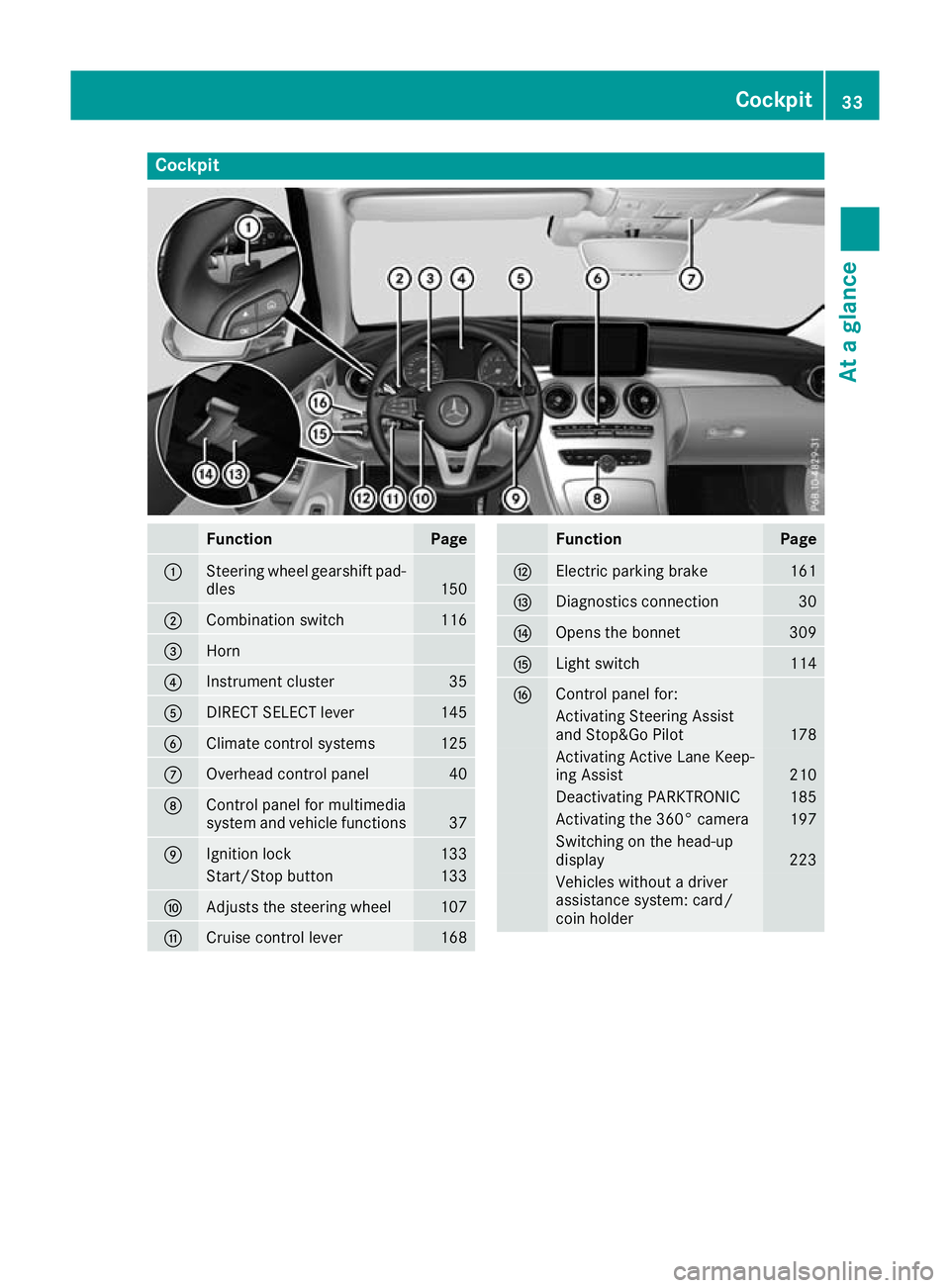
Cockpit
Function Page
:
Steering wheel gearshift pad-
dles 150
;
Combination switch 116
=
Horn
?
Instrument cluster 35
A
DIRECT SELECT lever 145
B
Climate control systems 125
C
Overhead control panel 40
D
Control panel for multimedia
system and vehicle functions 37
E
Ignition lock 133
Start/Stop button 133
F
Adjusts the steering wheel 107
G
Cruise control lever 168 Function Page
H
Electric parking brake 161
I
Diagnostics connection 30
J
Opens the bonnet 309
K
Light switch 114
L
Control panel for:
Activating Steering Assist
and Stop&Go Pilot
178
Activating Active Lane Keep-
ing Assist
210
Deactivating PARKTRONIC 185
Activating the 360° camera 197
Switching on the head-up
display
223
Vehicles without a driver
assistance system: card/
coin holder Cockpit
33At a glance
Page 37 of 377
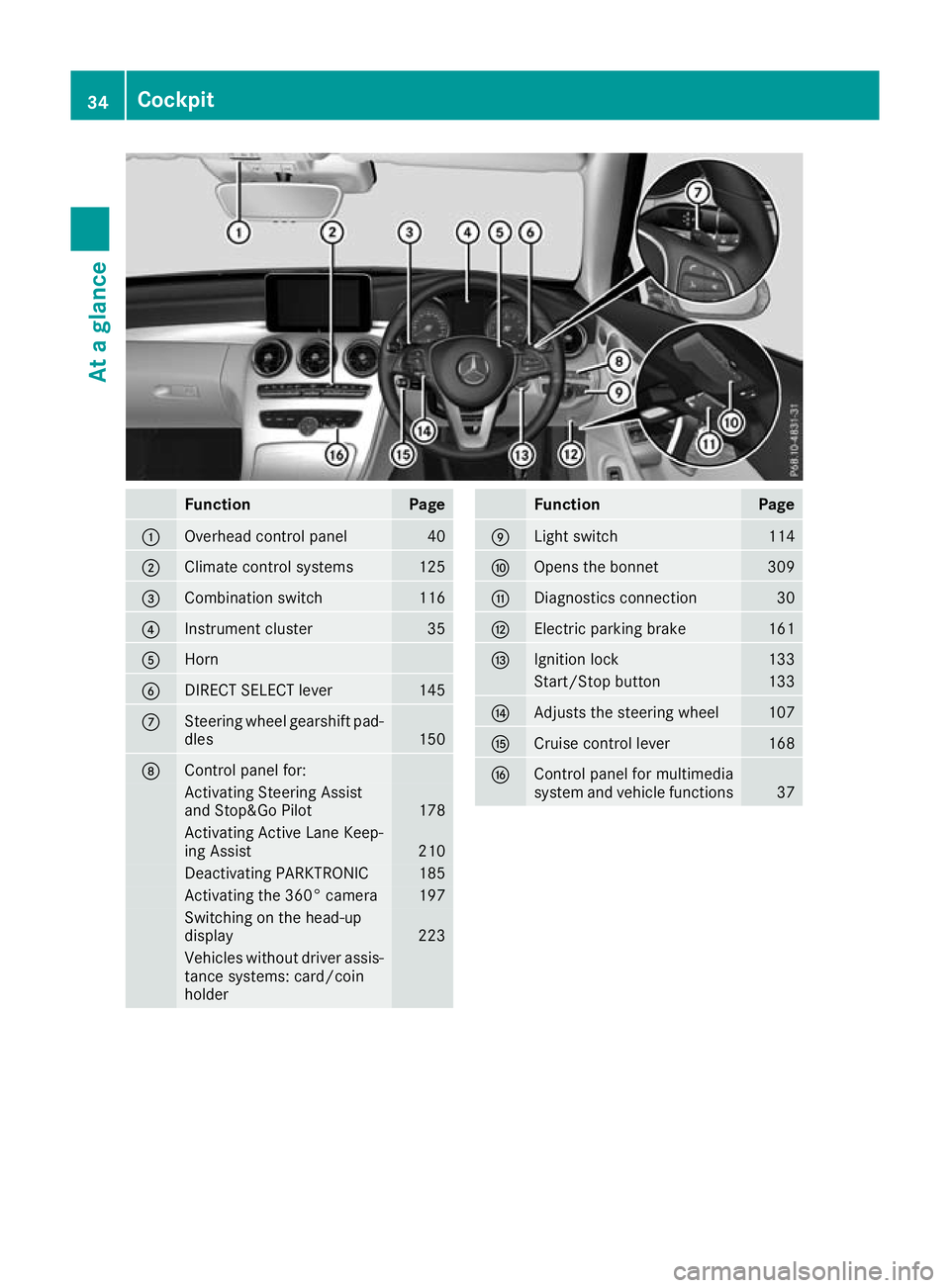
Function Page
:
Overhead control panel 40
;
Climate control systems 125
=
Combination switch 116
?
Instrument cluster 35
A
Horn
B
DIRECT SELECT lever 145
C
Steering wheel gearshift pad-
dles 150
D
Control panel for:
Activating Steering Assist
and Stop&Go Pilot
178
Activating Active Lane Keep-
ing Assist
210
Deactivating PARKTRONIC 185
Activating the 360° camera 197
Switching on the head-up
display 223
Vehicles without driver assis-
tance systems: card/coin
holder Function Page
E
Light switch 114
F
Opens the bonnet 309
G
Diagnostics connection 30
H
Electric parking brake 161
I
Ignition lock 133
Start/Stop button 133
J
Adjusts the steering wheel 107
K
Cruise control lever 168
L
Control panel for multimedia
system and vehicle functions
3734
CockpitAt a glance
Page 41 of 377

Centre console, lower section (except Mercedes-AMG vehicles)
i
Vehicles with DIRECT SELECT lever Function Page
:
Stowage compartment 296
Ashtray 302
Cigarette lighter 303
Power socket 303
Cup holders 301
;
Adjusting the volume 285
Switching the sound on/off 285
=
Ü
Switches the multime-
dia system on/off 285
?
Moves the seat-belt extender
forwards 46
A
Touchpad 285
B
Stowage space with media
interface
296 Function Page
C
AIRCAP 96
D
Opens and closes the soft
top 94
E
Opening and closing the side
windows 91
F
è
ECO start/stop func-
tion 137
G
É
Sets the vehicle level 182
c
Deactivates
PARKTRONIC 185
H
DYNAMIC SELECT switch 141
I
%
Back button 285
J
Controller 285
K
g
Favourites button 28738
Centre consoleAt a glance
Page 42 of 377

Centre console, lower section (Mercedes-AMG vehicles)
Function Page
:
Stowage compartment 296
Ashtray 302
Cigarette lighter 303
Power socket 303
Cup holders 301
;
Adjusting the volume 285
Switching the sound on/off 285
Vehicles with AMG Perform-
ance exhaust system:
Ü
Switches the multime-
dia system on/off 285
=
AMG Performance exhaust
system can be selected
139
Ü
Switches the multime-
dia system on/off 285
?
è
ECO start/stop func-
tion 137
A
Moves the seat-belt extender
forwards 46
B
Touchpad 285
C
Stowage space with media
interface
296 Function Page
D
AIRCAP 96
E
Opens and closes the soft
top
94
F
Opening and closing the side
windows 91
G
å
Activates/deactivates
ESP ® 74
M
Activates/deactivates
SPORT handling mode 74
H
AMG RIDE CONTROL (sus-
pension setting)
183
I
Manual gearshifting (perma-
nent setting)
150
J
DYNAMIC SELECT switch
(selects drive program)
141
K
%
Back button 285
L
Controller 285
M
g
Favourites button 287Centre console
39At a glance
Page 43 of 377

Overhead control panel
Function Page
:
p
Switches the left-hand
reading lamp on/off 119
;
c
Switches the interior
lighting on/off 119
=
|
Switches the automatic
interior lighting control
on/off 119
?
p
Switches the right-
hand reading lamp on/off 119 Function Page
A
Spectacles compartment 297
B
Rear-view mirror
Automatic anti-dazzle 111
Manual anti-dazzle 109
C
F
Breakdown assistance
call button 305
D
G
SOS button 304
E
ï
Info call button 30540
Overhead control panelAt a glance
Page 46 of 377

Mercedes-Benz recommends that you use only
driving aids that have been approved specifi-
cally for your vehicle by Mercedes-Benz. Restraint system warning lamp
The functions of the restraint system are
checked after the ignition is switched on and at regular intervals while the engine is running.
Therefore, malfunctions can be detected in
good time.
The 6 restraint system warning lamp on the
instrument cluster lights up when the ignition is
switched on. It goes out no later than a few sec- onds after the vehicle is started. The compo-
nents of the restraint system are in operational
readiness.
A malfunction has occurred if the 6restraint
system warning lamp:
R does not light up after the ignition is switched
on
R does not go out after a few seconds with the
engine running
R lights up again while the engine is running G
WARNING
If the restraint system is malfunctioning,
restraint system components may be trig-
gered unintentionally or may not deploy as
intended during an accident. This may affect
the seat belt tensioner or airbag, for example. This poses an increased risk of injury or even
fatal injury.
Have the restraint system checked and
repaired immediately at a qualified specialist
workshop. PASSENGER AIR BAG indicator lamp
PASSENGER AIR BAG ON indicator lamp
:and
PASSENGER AIR BAG OFF indicator lamp ;are
part of the automatic deactivation system of the front-passenger front airbag.
The indicator lamps display the status of the
front-passenger front airbag.
R PASSENGER AIR BAG ON lights up for 60 sec-
onds, then both indicator lamps are off
(PASSENGER AIR BAG ON and OFF): the front-
passenger front airbag is able to deploy in the event of an accident.
R PASSENGER AIR BAG OFF lights up: the front-
passenger front airbag is disabled. It will then
not be deployed in the event of an accident.
If the PASSENGER AIR BAG ON indicator lamp is off, only the PASSENGER AIR BAG OFF indicator
lamp shows the status of the front-passenger
front airbag. The PASSENGER AIR BAG OFF indi-
cator lamp may be lit continuously or be off.
Depending on the person in the front-passenger seat, the front-passenger front airbag must be
either disabled or enabled; see the following
points. You must make sure of this both before
and during a journey.
R Children in a rearward-facing child
restraint system: the PASSENGER AIR BAG
OFF indicator lamp must be lit. The front-
passenger front airbag is disabled. It is imper-
ative to observe the notes on the "Automatic front-passenger front airbag deactivation sys-
tem" (Y page 50) and on "Children in the
vehicle" (Y page 59).
R Children in a forward-facing child
restraint system: depending on the installed
child restraint system and the age and size of the child, the front-passenger front airbag is
either disabled or enabled. Therefore, it is
imperative to observe the notes on the "Auto-
matic front-passenger front airbag deactiva- Occupant safety
43Safety Z
Page 47 of 377

tion system" (Y
page 50) and on "Children in
the vehicle" (Y page 59).
R All other persons: the PASSENGER AIR BAG
OFF indicator lamp must be off. The front-
passenger front airbag is enabled. Depending
on the stature of the person on the front-
passenger seat, the PASSENGER AIR BAG
OFF indicator lamp may light up. The front-
passenger front airbag is disabled. It will then
not be deployed in the event of an accident. In this case, the front-passenger seat should not
be used.
It is imperative to observe the notes on the
"Automatic front-passenger front airbag
deactivation system" (Y page 50) as well as
on "Seat belts" (Y page 44) and "Airbags"
(Y page 47). There, you can also find infor-
mation on the correct seat position. Seat belts
Introduction A correctly worn seat belt is the most effective
means of restraining the movement of vehicle
occupants in the event of a collision or if the
vehicle overturns. This reduces the risk of vehi-
cle occupants coming into contact with parts of
the vehicle interior or being ejected from it. The seat belt also helps to keep the vehicle occu-
pants in the best position in relation to the air-
bag being deployed.
The seat belt system consists of:
R seat belts
R belt tensioners and belt force limiters
If the seat belt is pulled quickly or sharply from
the belt outlet, the inertia reel locks. The belt
strap cannot be pulled out any further.
The belt tensioner tightens the seat belt in the
event of a collision so that it fits tightly across
your body. However, it does not pull the vehicle occupants back in the direction of the seat
backrest.
The belt tensioner does not, however, correct an
incorrect seat position or correct the routing of
a seat belt that is worn incorrectly.
If the seat belt is also fitted with a belt force
limiter and this is triggered, the force exerted by the seat belt on the vehicle occupant is reduced.
The belt force limiters on the front seats are
synchronised with the front airbags, which take
on a part of the deceleration force. This can reduce the forces to which the vehicle occu-
pants are subjected during an accident.
! If the co-driver's seat is not occupied, do not
engage the seat belt tongue in the buckle on
the co-driver's seat. Otherwise, the belt ten-
sioner could be triggered in the event of an
accident and would have to be replaced.
Important safety notes G
WARNING
If the seat belt is worn incorrectly, it cannot
perform its intended protective function. Fur- thermore, an incorrectly worn seat belt can
cause additional injuries, e.g. in the event of
an accident, heavy braking or sudden
changes of direction. There is an increased
risk of injury, possibly even fatal.
Always ensure that all vehicle occupants havetheir seat belts fastened correctly and are sit-
ting properly. G
WARNING
The seat belt does not offer the intended level of protection if you have not moved the back-
rest to an almost vertical position. When brak-
ing or in the event of an accident, you could
slide underneath the seat belt and sustain
abdomen or neck injuries, for example. This
poses an increased risk of injury or even fatal injury.
Adjust the seat properly before beginning
your journey. Always ensure that the backrest
is in an almost vertical position and that the
shoulder section of your seatbelt is routed
across the centre of your shoulder. G
WARNING
Persons under 1.50 mtall cannot wear the
seat belts correctly without an additional suit- able restraint system. If the seat belt is worn
incorrectly, it cannot perform its intended
protective function. Furthermore, an incor-
rectly worn seat belt can cause additional
injuries, e.g. in the event of an accident, heavy braking or sudden changes of direction. There 44
Occupant safetySafety