stop start MERCEDES-BENZ C-CLASS CABRIOLET 2016 Owner's Manual
[x] Cancel search | Manufacturer: MERCEDES-BENZ, Model Year: 2016, Model line: C-CLASS CABRIOLET, Model: MERCEDES-BENZ C-CLASS CABRIOLET 2016Pages: 377, PDF Size: 6.9 MB
Page 95 of 377

:
Front left
; Front right
= Rear right
? Rear left
X Turn the key to position 1or 2in the ignition
lock.
X To open manually: press and hold the cor-
responding button.
X To open fully: press the button beyond the
point of resistance and release it.
Automatic operation is started.
X To close manually: pull the corresponding
button and hold it.
X To close fully: pull the button beyond the
point of resistance and release it.
Automatic operation is started.
X To interrupt automatic operation: press/
pull the corresponding switch again.
If you press/pull the switch beyond the point of resistance and release, automatic operation is
started in the corresponding direction. You can
stop automatic operation by pressing/pulling
again.
You can continue to operate the side windows
after switching off the engine or removing the
key. This function remains active for five
minutes or until the driver's or front-passenger
door is opened. Opening and closing all side windows
Using the switch on the centre console G
WARNING
While closing the side windows, body parts in the closing area could become trapped. There is a risk of injury. When closing make sure that no parts of the
body are in the closing area. If somebody
becomes trapped, release the switch or press the switch to open the side window again.
Only vehicles with automatic transmission have
this function. You can use button
:to open or close all side
windows simultaneously.
X Turn the key to position 1or 2in the ignition
lock.
X To open all side windows: press and hold
button :to the point of resistance.
X To open all side windows fully: press but-
ton :beyond the point of resistance.
X To close all side windows: pull and hold
button :.
Using KEYLESS-GO G
WARNING
When using convenience closing, you could
become trapped within the sweep of the clos- ing window. There is a risk of injury.
Monitor the entire closing procedure when
using convenience closing. When closing,
make sure that no one has any parts of the
body within the closing area.
The key must be outside the vehicle. All the
doors must be closed. 92
Side windowsOpening and closing
Page 100 of 377

AIRCAP has the following components:
R a wind deflector above the windscreen
R a draught stop behind the two rear-seat head
restraints
When AIRCAP has been activated, the draught
stop extends up between the two rear-seat head
restraints. At the same time, the wind deflector
extends out along the front windscreen.
AIRCAP can be activated or deactivated up to
speeds of approximately 160 km/h.
Activating and deactivating AIRCAP X
Turn the key to position 2in the ignition lock.
X To activate: pull switch:.
The draught stop behind the rear-seat headr-
ests and the wind deflector in the roof frame
extend simultaneously. The indicator lamp in
switch :lights up.
X To deactivate: press switch:.
The draught stop behind the rear-seat headr-
ests and the wind deflector in the roof frame
retract simultaneously. The indicator lamp in
switch :goes out.
If you park your vehicle with the soft top down
and remove the key, the wind deflector and the
draught stop retract automatically. When you
restart your engine after having been parked,
the wind deflector and the draught stop extend
again automatically.
AIRCAP cannot be extended or retracted if the
vehicle speed exceeds approximately
160 km/h. Folding draught stop
Important safety notes G
WARNING
If you use the draught stop in darkness or in
other conditions offering poor visibility, your
view to the rear is further impaired. There is a
risk of an accident.
Only use the draught stop when visibility con- ditions are good. G
WARNING
If the draught stop is not fitted correctly, it
could come loose during the journey and
endanger other road users. There is a risk of
an accident and injury.
Fit the draught stop as described.
! Fit or remove the draught stop only when
the soft top is open. You could otherwise
damage the draught stop or the vehicle inte-
rior.
! Observe the backrest position of the front
seats if the draught stop is installed, since the
backrest could collide with the draught stop
here.
! Mercedes-Benz recommends that you only
use draught stops which have been tested
and approved for Mercedes-Benz vehicles.
This helps to prevent damage to the vehicle.
The folding draught stop protects against wind
when driving with the soft top open. It is secured
above the rear bench seats. For this reason, only the driver and the front passenger can travel in
the vehicle when the folding draught stop is fit-
ted.
The folding draught stop can be fitted or
removed from the driver's side or passenger
side.
You should preferably perform operations
involving the folding draught stop on the side
facing away from traffic, after you have stopped the vehicle, paying attention to road and traffic
conditions. Convertible top
97Opening and closing Z
Page 111 of 377
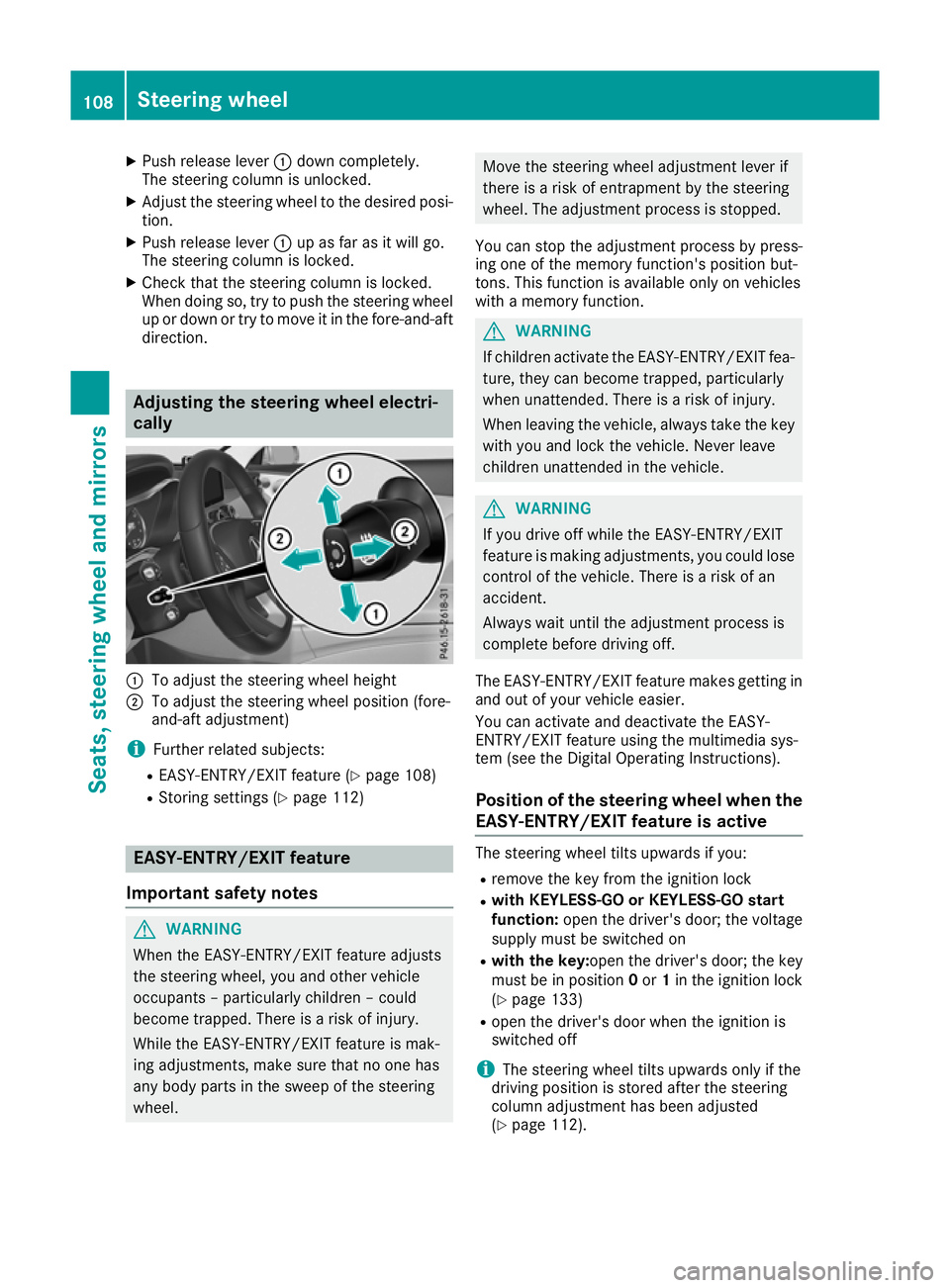
X
Push release lever :down completely.
The steering column is unlocked.
X Adjust the steering wheel to the desired posi-
tion.
X Push release lever :up as far as it will go.
The steering column is locked.
X Check that the steering column is locked.
When doing so, try to push the steering wheel up or down or try to move it in the fore-and-aft
direction. Adjusting the steering wheel electri-
cally
:
To adjust the steering wheel height
; To adjust the steering wheel position (fore-
and-aft adjustment)
i Further related subjects:
R EASY-ENTRY/EXIT feature (Y page 108)
R Storing settings (Y page 112)EASY-ENTRY/EXIT feature
Important safety notes G
WARNING
When the EASY-ENTRY/EXIT feature adjusts
the steering wheel, you and other vehicle
occupants – particularly children – could
become trapped. There is a risk of injury.
While the EASY-ENTRY/EXIT feature is mak-
ing adjustments, make sure that no one has
any body parts in the sweep of the steering
wheel. Move the steering wheel adjustment lever if
there is a risk of entrapment by the steering
wheel. The adjustment process is stopped.
You can stop the adjustment process by press-
ing one of the memory function's position but-
tons. This function is available only on vehicles
with a memory function. G
WARNING
If children activate the EASY-ENTRY/EXIT fea- ture, they can become trapped, particularly
when unattended. There is a risk of injury.
When leaving the vehicle, always take the key with you and lock the vehicle. Never leave
children unattended in the vehicle. G
WARNING
If you drive off while the EASY-ENTRY/EXIT
feature is making adjustments, you could lose
control of the vehicle. There is a risk of an
accident.
Always wait until the adjustment process is
complete before driving off.
The EASY-ENTRY/EXIT feature makes getting in
and out of your vehicle easier.
You can activate and deactivate the EASY-
ENTRY/EXIT feature using the multimedia sys-
tem (see the Digital Operating Instructions).
Position of the steering wheel when the
EASY-ENTRY/EXIT feature is active The steering wheel tilts upwards if you:
R remove the key from the ignition lock
R with KEYLESS-GO or KEYLESS-GO start
function: open the driver's door; the voltage
supply must be switched on
R with the key: open the driver's door; the key
must be in position 0or 1in the ignition lock
(Y page 133)
R open the driver's door when the ignition is
switched off
i The steering wheel tilts upwards only if the
driving position is stored after the steering
column adjustment has been adjusted
(Y page 112). 108
Steering wheelSeats, steering wheel and mirrors
Page 112 of 377
The most recent driving position of the steering
wheel is stored if:
R the ignition is switched off
R the setting is stored using the memory func-
tion (Y page 112)
i The steering wheel moves upwards only if it
has not already reached the upper steering
limiter.
Position of the steering wheel for driv-
ing The steering wheel is moved to the previously
set position if:
R the driver's door is closed and you insert the
key into the ignition lock
R you close the driver's door when the ignition
is switched on
R you press the Start/Stop button once in vehi-
cles with KEYLESS-GO or the KEYLESS-GO
start function
i The steering wheel returns to the last set
position only if the driving position is stored
after the seat or steering column has been
adjusted (Y page 112).
The most recent driving position of the steering
wheel is stored if:
R the ignition is switched off
R the setting is stored using the memory func-
tion (Y page 112)
Crash-responsive EASY-EXIT feature If the crash-responsive EASY-EXIT feature is trig-
gered in an accident, the steering column will
move upwards when the driver's door is opened
or the key is removed from the ignition lock. This
makes it easier to exit the vehicle and rescue the
occupants.
The crash-responsive EASY-EXIT feature is
operational only if the EASY-EXIT/ENTRY fea-
ture is activated in the multimedia system (see
Digital Operating Instructions). Mirrors
Rear-view mirror
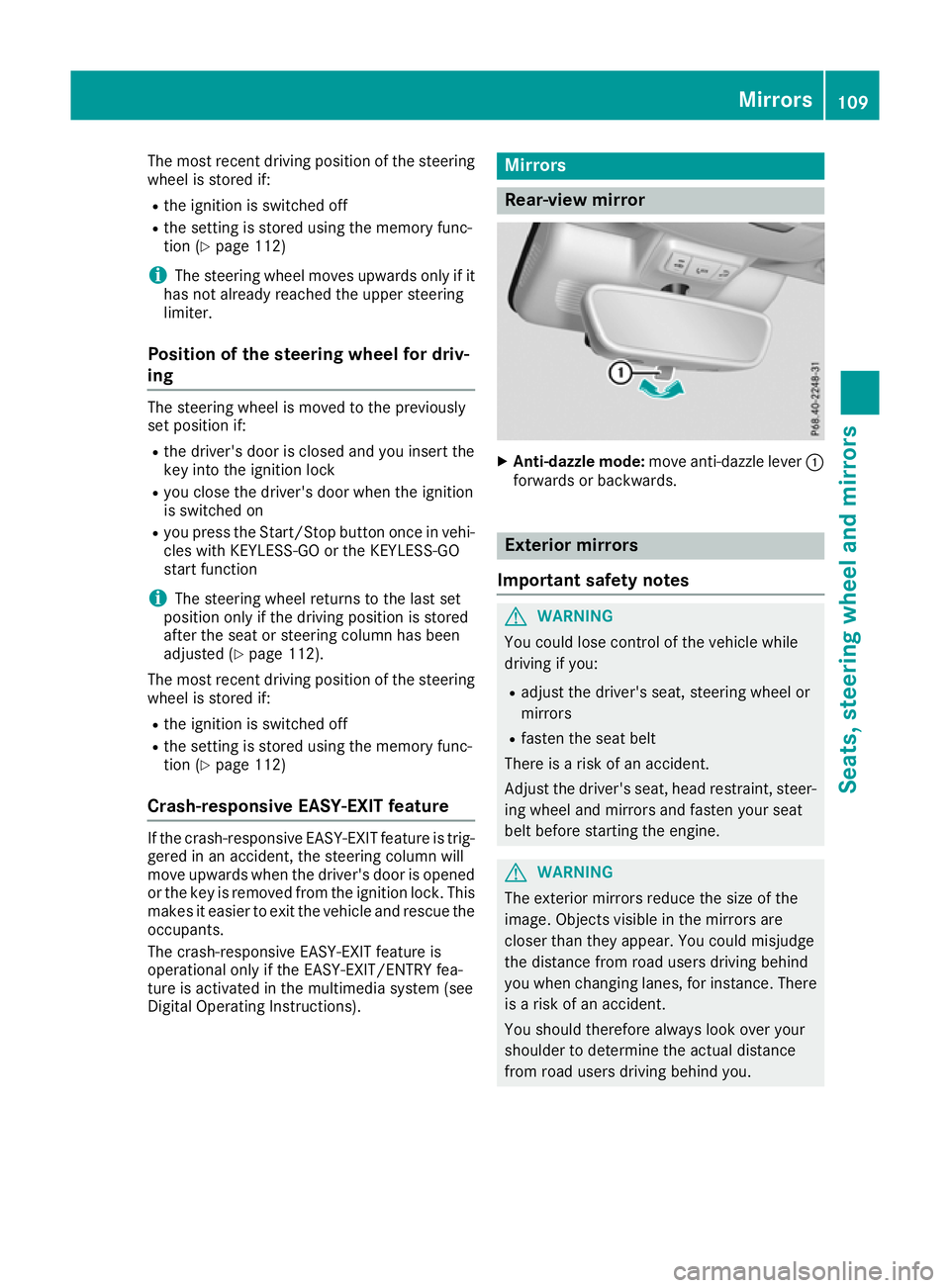
X
Anti-dazzle mode: move anti-dazzle lever :
forwards or backwards. Exterior mirrors
Important safety notes G
WARNING
You could lose control of the vehicle while
driving if you:
R adjust the driver's seat, steering wheel or
mirrors
R fasten the seat belt
There is a risk of an accident.
Adjust the driver's seat, head restraint, steer-
ing wheel and mirrors and fasten your seat
belt before starting the engine. G
WARNING
The exterior mirrors reduce the size of the
image. Objects visible in the mirrors are
closer than they appear. You could misjudge
the distance from road users driving behind
you when changing lanes, for instance. There is a risk of an accident.
You should therefore always look over your
shoulder to determine the actual distance
from road users driving behind you. Mirrors
109Seats, steering wheel and mirrors Z
Page 125 of 377

Replacing the wiper blades
Important safety notes G
WARNING
If the windscreen wipers begin to move while
you are changing the wiper blades, you can be trapped by the wiper arm. There is a risk of
injury.
Always switch off the windscreen wipers and
ignition before changing the wiper blades.
! Never open the bonnet if a windscreen
wiper arm has been folded away from the
windscreen.
Never fold a windscreen wiper arm without a
wiper blade back onto the windscreen.
Hold the windscreen wiper arm firmly when
you change the wiper blade. If you release the
windscreen wiper arm without a wiper blade
and it falls onto the windscreen, the wind-
screen may be damaged by the force of the
impact.
Mercedes-Benz recommends that you have
the wiper blades changed at a qualified spe-
cialist workshop.
! To avoid damaging the windscreen wiper
blades, make sure that you touch only the
wiper arm of the windscreen wiper.
Replacing the windscreen wiper blades Moving the wiper blades to the vertical
position
On vehicles without KEYLESS-GO or KEY-
LESS‑GO start function:
X Turn the key to position 1or 2in the ignition
lock (Y page 133).
X Set the windscreen wipers to the °posi-
tion on the combination switch.
X When the wiper arms have reached the verti-
cal position, turn the key to position 0in the
ignition lock and remove it.
X Fold the wiper arm away from the windscreen.
On vehicles with KEYLESS-GO or KEY-
LESS‑GO start function:
X Switch off the engine.
X Remove your foot from the brake pedal. X
Set the windscreen wipers to the °posi-
tion on the combination switch.
X Press the Start/Stop button repeatedly until
the windscreen wipers start.
X When the wiper arms have reached the verti-
cal position, press the Start/Stop button.
X Fold the wiper arm away from the windscreen.
Removing the wiper blades X
Hold on to the wiper arm with one hand. With
the other hand, turn the wiper blade in the
direction of arrow :away from the wiper arm
as far as it will go.
X Slide the catch ;in the direction of arrow =
until it engages in the removal position with a noticeable click. X
Remove the wiper blade in the direction of
arrow ?away from the wiper arm. 122
Windscreen wipersLights and windscreen wipers
Page 129 of 377
A
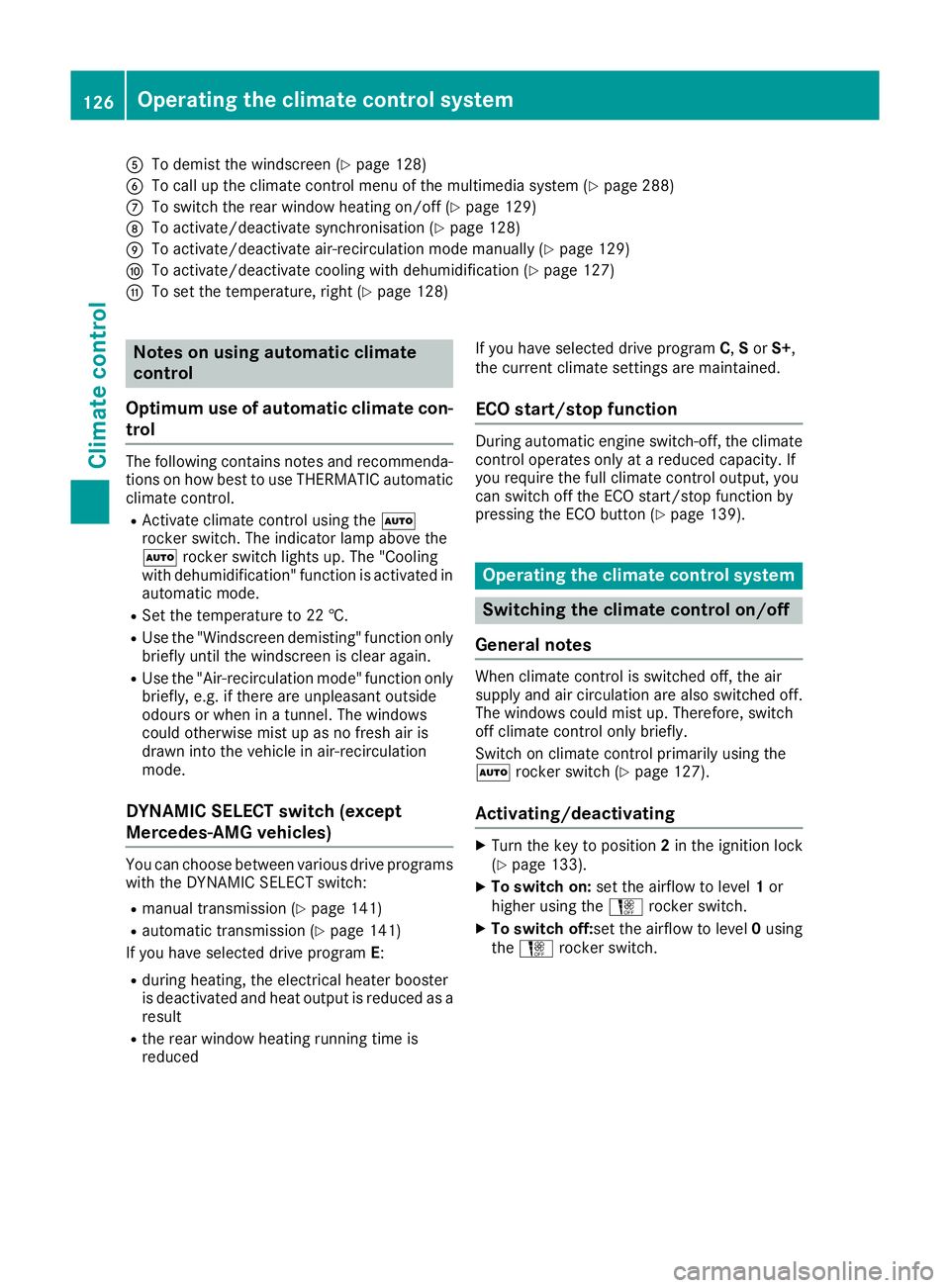
To demist the windscreen (Y page 128)
B To call up the climate control menu of the multimedia system (Y page 288)
C To switch the rear window heating on/off (Y page 129)
D To activate/deactivate synchronisation (Y page 128)
E To activate/deactivate air-recirculation mode manually (Y page 129)
F To activate/deactivate cooling with dehumidification (Y page 127)
G To set the temperature, right (Y page 128)Notes on using automatic climate
control
Optimum use of automatic climate con-
trol The following contains notes and recommenda-
tions on how best to use THERMATIC automatic
climate control.
R Activate climate control using the Ã
rocker switch. The indicator lamp above the
à rocker switch lights up. The "Cooling
with dehumidification" function is activated in
automatic mode.
R Set the temperature to 22 †.
R Use the "Windscreen demisting" function only
briefly until the windscreen is clear again.
R Use the "Air-recirculation mode" function only
briefly, e.g. if there are unpleasant outside
odours or when in a tunnel. The windows
could otherwise mist up as no fresh air is
drawn into the vehicle in air-recirculation
mode.
DYNAMIC SELECT switch (except
Mercedes-AMG vehicles) You can choose between various drive programs
with the DYNAMIC SELECT switch:
R manual transmission (Y page 141)
R automatic transmission (Y page 141)
If you have selected drive program E:
R during heating, the electrical heater booster
is deactivated and heat output is reduced as a
result
R the rear window heating running time is
reduced If you have selected drive program
C,Sor S+,
the current climate settings are maintained.
ECO start/stop function During automatic engine switch-off, the climate
control operates only at a reduced capacity. If
you require the full climate control output, you
can switch off the ECO start/stop function by
pressing the ECO button (Y page 139). Operating the climate control system
Switching the climate control on/off
General notes When climate control is switched off, the air
supply and air circulation are also switched off.
The windows could mist up. Therefore, switch
off climate control only briefly.
Switch on climate control primarily using the
à rocker switch (Y page 127).
Activating/deactivating X
Turn the key to position 2in the ignition lock
(Y page 133).
X To switch on: set the airflow to level 1or
higher using the Hrocker switch.
X To switch off: set the airflow to level 0using
the H rocker switch. 126
Operating the climate control systemClimate control
Page 136 of 377
for example, the power steering and the brake
boosting effect. You will require considerably
more effort to steer and brake. There is a risk of an accident.
Do not switch off the ignition while driving. G
WARNING
If the parking brake has not been fully
released when driving, the parking brake can:
R overheat and cause a fire
R lose its hold function.
There is a risk of fire and an accident. Release
the parking brake fully before driving off.
! Do not warm up the engine when the vehicle
is stationary. Drive off immediately. Avoid
high engine speeds and driving at full throttle
until the engine has reached its operating
temperature.
Only shift the automatic transmission to the
desired drive position when the vehicle is sta-
tionary.
Where possible, avoid spinning the drive
wheels when pulling away on slippery roads.
You could otherwise damage the drive train. Key positions
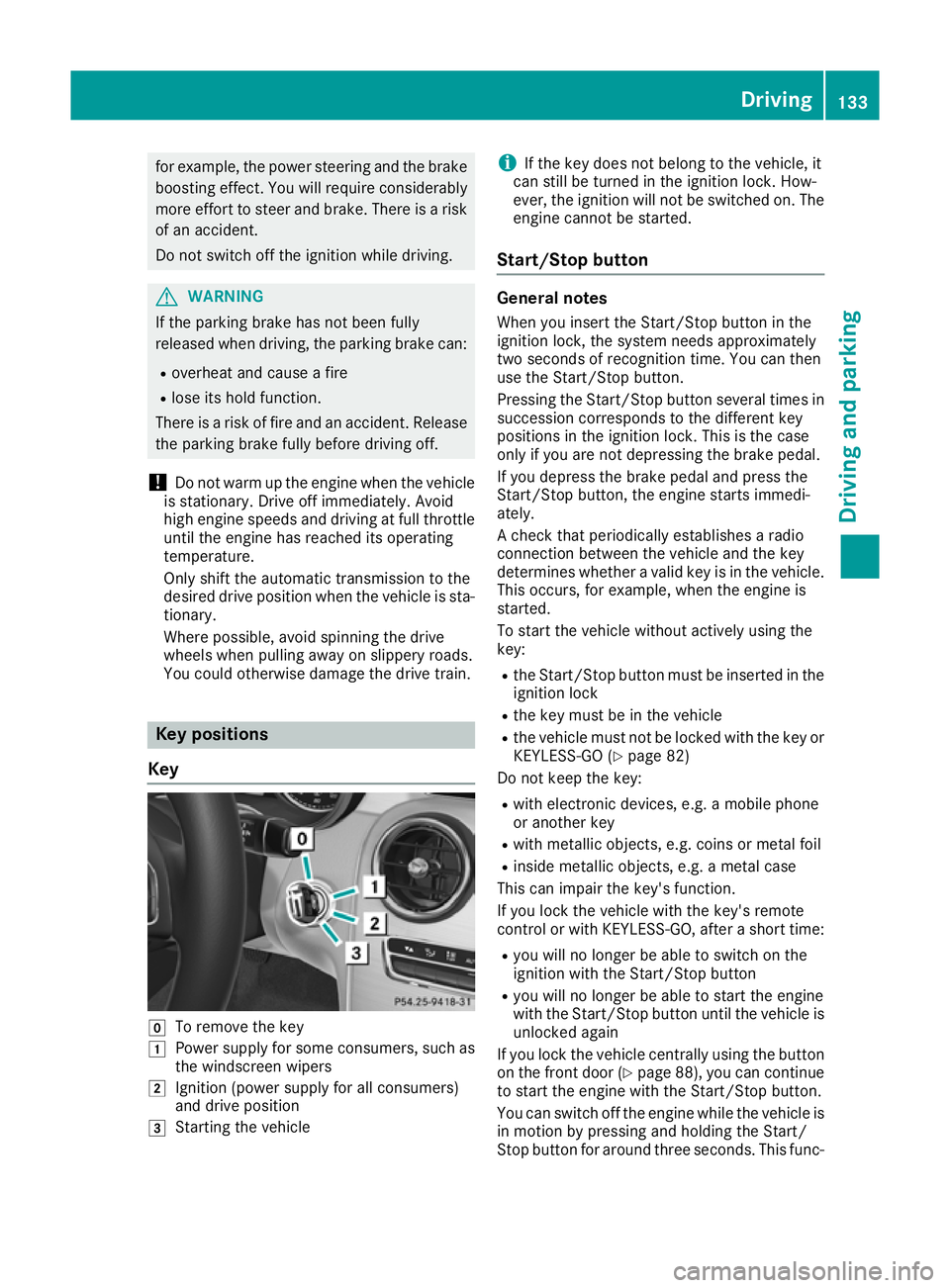
Key g
To remove the key
1 Power supply for some consumers, such as
the windscreen wipers
2 Ignition (power supply for all consumers)
and drive position
3 Starting the vehicle i
If the key does not belong to the vehicle, it
can still be turned in the ignition lock. How-
ever, the ignition will not be switched on. The
engine cannot be started.
Start/Stop button General notes
When you insert the Start/Stop button in the
ignition lock, the system needs approximately
two seconds of recognition time. You can then
use the Start/Stop button.
Pressing the Start/Stop button several times in succession corresponds to the different key
positions in the ignition lock. This is the case
only if you are not depressing the brake pedal.
If you depress the brake pedal and press the
Start/Stop button, the engine starts immedi-
ately.
A check that periodically establishes a radio
connection between the vehicle and the key
determines whether a valid key is in the vehicle.
This occurs, for example, when the engine is
started.
To start the vehicle without actively using the
key:
R the Start/Stop button must be inserted in the
ignition lock
R the key must be in the vehicle
R the vehicle must not be locked with the key or
KEYLESS-GO (Y page 82)
Do not keep the key:
R with electronic devices, e.g. a mobile phone
or another key
R with metallic objects, e.g. coins or metal foil
R inside metallic objects, e.g. a metal case
This can impair the key's function.
If you lock the vehicle with the key's remote
control or with KEYLESS-GO, after a short time:
R you will no longer be able to switch on the
ignition with the Start/Stop button
R you will no longer be able to start the engine
with the Start/Stop button until the vehicle is
unlocked again
If you lock the vehicle centrally using the button
on the front door (Y page 88), you can continue
to start the engine with the Start/Stop button.
You can switch off the engine while the vehicle is
in motion by pressing and holding the Start/
Stop button for around three seconds. This func- Driving
133Driving and parking Z
Page 137 of 377

tion operates independently of the ECO start/
stop automatic engine switch-off function.
Key positions with the Start/Stop button :
Start/Stop button
; Ignition lock
When you switch on the ignition, all the indicator lamps on the instrument cluster light up. For
warning and indicator lamps, see (Y page 273).
If Start/Stop button :has not yet been
pressed, this is the same as the key having been removed.
X To switch on the power supply: press
Start/Stop button :once.
The power supply is switched on. You can now
activate the windscreen wipers, for example.
The power supply is switched off again if:
R the driver's door is opened and
R you press Start/Stop button :twice when in
this position
X To switch on the ignition: press Start/Stop
button :twice.
The ignition is switched on.
The ignition is switched off again if:
R you do not start the engine from this position
within 15 minutes
R you press Start/Stop button :once when in
this position
The power supply is switched off again if:
R the driver's door is opened and
R you press Start/Stop button :once when in
this position
Removing the Start/Stop button
You can remove the Start/Stop button from the
ignition lock and start the vehicle as normal
using the key. It is possible to switch between Start/Stop but-
ton mode and key operation only when the
transmission is in position j.
X Remove Start/Stop button :from ignition
lock ;.
You do not have to remove the Start/Stop but-
ton from the ignition lock when you leave the
vehicle. You should, however, always take the
key with you when leaving the vehicle. As long as
the key is in the vehicle:
R the vehicle can be started using the Start/
Stop button
R the electrically powered equipment can be
operated Starting the vehicle
Important safety notes G
WARNING
If children are left unsupervised in the vehicle, they could:
R open doors, thereby endangering other per-
sons or road users
R get out and be struck by oncoming traffic
R operate vehicle equipment and become
trapped, for example
In addition, the children could also set the
vehicle in motion, for example, if they:
R release the parking brake
R shift the automatic transmission out of park
position P or shift manual transmission into
neutral
R start the engine
There is a risk of an accident and injury.
When leaving the vehicle, always take the key with you and lock the vehicle. Never leave
children and animals unattended in the vehi-
cle. Keep the keys out of the reach of children. G
WARNING
Combustion engines emit poisonous exhaust
gases such as carbon monoxide. Inhaling
these exhaust gases leads to poisoning. There is a risk of fatal injury. Therefore never leave 134
DrivingDriving an
d parking
Page 138 of 377

the engine running in enclosed spaces with-
out sufficient ventilation. G
WARNING
Flammable materials introduced through
environmental influence or by animals can
ignite if in contact with the exhaust system or parts of the engine that heat up. There is a risk
of fire.
Carry out regular checks to make sure that
there are no flammable foreign materials in
the engine compartment or in the exhaust
system.
General notes Vehicles with a petrol engine:
the catalytic
converter is preheated for up to 30 seconds
after a cold start. The sound of the engine may
change during this time.
Manual transmission X
Depress the brake pedal and keep it
depressed.
X Fully depress the clutch pedal.
X Engage neutral i.
Automatic transmission X
Shift the transmission to position j
(Y page 145).
The transmission position indicator on the
multifunction display shows j
(Y page 146).
i You can start the engine in transmission
position jand i.
Starting procedure using the key To start the engine using the key instead of the
Start/Stop button, pull the Start/Stop button
out of the ignition lock.
X To start a diesel engine: turn the key to
position 2in the ignition lock (Y page 133).
The % preglow indicator lamp on the
instrument cluster lights up.
X Turn the key to position 3in the ignition lock
(Y page 133) and release it as soon as the
engine is running. i
Vehicles with a diesel engine:
you can
start the engine without preglow if the engine
is warm.
If the engine will not start:
X Remove the key from the ignition lock.
X Reinsert the key in the ignition lock after wait-
ing for a short period.
X Turn the key to position 2in the ignition lock
(Y page 133).
The indicator lamps on the instrument cluster
light up (Y page 273).
X Turn the key to position 3in the ignition lock
(Y page 133) and release it as soon as the
engine is running.
Starting procedure using the Start/
Stop button The Start/Stop button is available only on vehi-
cles with KEYLESS-GO or the KEYLESS-GO start
function.
The Start/Stop button can be used to start the
vehicle manually without inserting the key in the ignition lock. The key must be in the vehicle and
the Start/Stop button must be inserted in the
ignition lock. This mode for starting the engine
manually operates independently of the ECO
start/stop automatic engine start function.
You can start the engine if a valid key is in the
vehicle. Switch off the engine and always take
the key with you when leaving the vehicle, even
if you leave it for only a short time. Observe the important safety notes.
X Depress the brake pedal and keep it
depressed.
X Press the Start/Stop button once
(Y page 133).
Vehicles with a petrol engine: the engine
starts.
Vehicles with a diesel engine: preglow is
activated and the engine starts. Pulling away
General notes G
WARNING
Vehicles with automatic transmission: Driving
135Driving an d parking
Z
Page 140 of 377
ECO start/stop function
Introduction The ECO start/stop function switches the
engine off automatically if the vehicle is stopped
under certain conditions.
When the vehicle pulls away again, the engine
starts automatically. The ECO start/stop func-
tion thereby helps you to reduce the fuel con-
sumption and emissions of your vehicle.
Important safety notes G
WARNING
If the engine is switched off automatically and you exit the vehicle, the engine is restarted
automatically. The vehicle may begin moving. There is a risk of accident and injury.
If you wish to exit the vehicle, always turn off
the ignition and secure the vehicle against
rolling away.
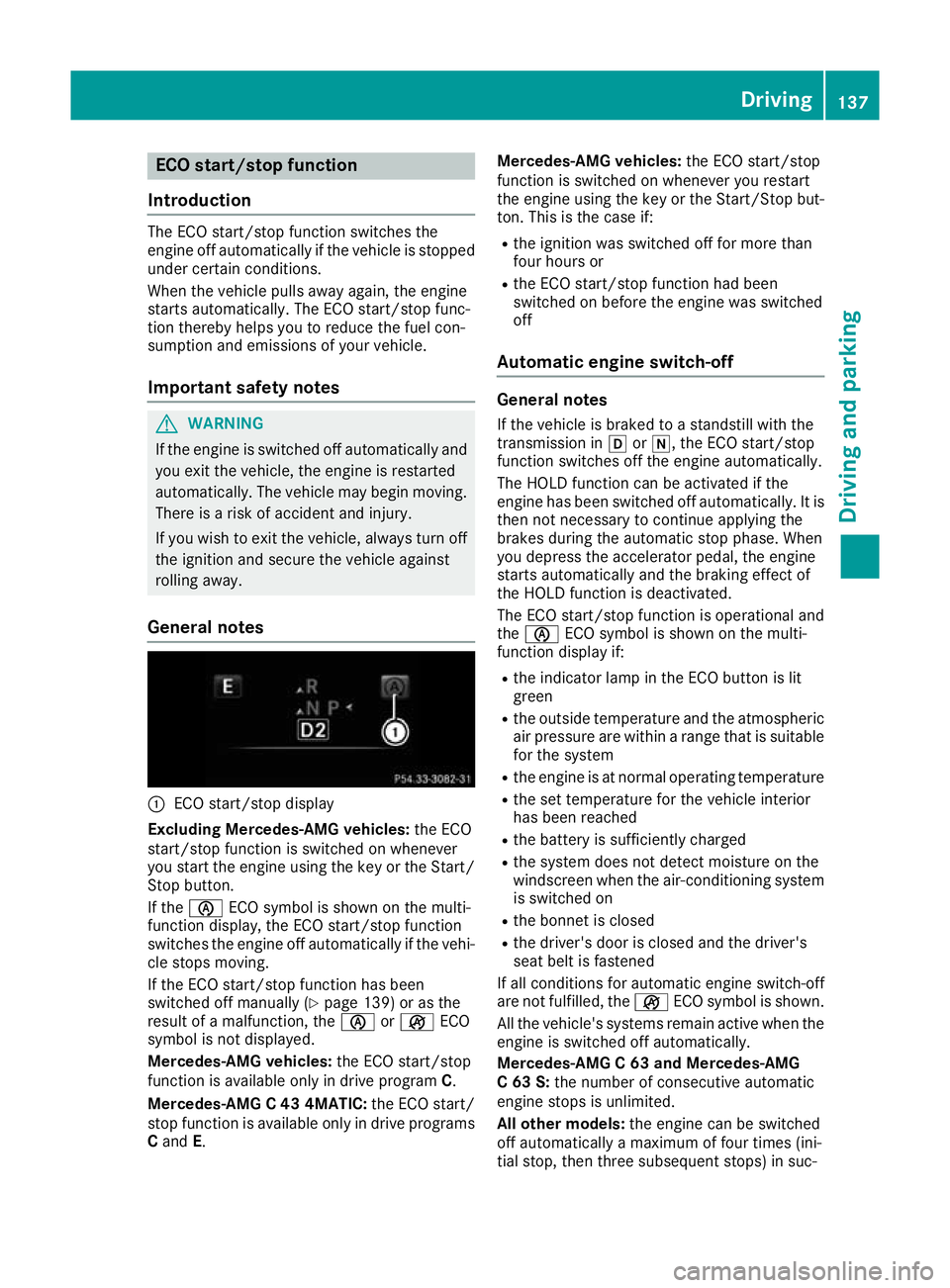
General notes :
ECO start/stop display
Excluding Mercedes-AMG vehicles: the ECO
start/stop function is switched on whenever
you start the engine using the key or the Start/ Stop button.
If the è ECO symbol is shown on the multi-
function display, the ECO start/stop function
switches the engine off automatically if the vehi-
cle stops moving.
If the ECO start/stop function has been
switched off manually (Y page 139) or as the
result of a malfunction, the èorç ECO
symbol is not displayed.
Mercedes-AMG vehicles: the ECO start/stop
function is available only in drive program C.
Mercedes-AMG C 43 4MATIC: the ECO start/
stop function is available only in drive programs
C and E. Mercedes-AMG vehicles:
the ECO start/stop
function is switched on whenever you restart
the engine using the key or the Start/Stop but- ton. This is the case if:
R the ignition was switched off for more than
four hours or
R the ECO start/stop function had been
switched on before the engine was switched
off
Automatic engine switch-off General notes
If the vehicle is braked to a standstill with the
transmission in hori, the ECO start/stop
function switches off the engine automatically.
The HOLD function can be activated if the
engine has been switched off automatically. It is then not necessary to continue applying the
brakes during the automatic stop phase. When
you depress the accelerator pedal, the engine
starts automatically and the braking effect of
the HOLD function is deactivated.
The ECO start/stop function is operational and
the è ECO symbol is shown on the multi-
function display if:
R the indicator lamp in the ECO button is lit
green
R the outside temperature and the atmospheric
air pressure are within a range that is suitable for the system
R the engine is at normal operating temperature
R the set temperature for the vehicle interior
has been reached
R the battery is sufficiently charged
R the system does not detect moisture on the
windscreen when the air-conditioning system
is switched on
R the bonnet is closed
R the driver's door is closed and the driver's
seat belt is fastened
If all conditions for automatic engine switch-off
are not fulfilled, the çECO symbol is shown.
All the vehicle's systems remain active when the engine is switched off automatically.
Mercedes-AMG C 63 and Mercedes-AMG
C 63 S: the number of consecutive automatic
engine stops is unlimited.
All other models: the engine can be switched
off automatically a maximum of four times (ini-
tial stop, then three subsequent stops) in suc- Driving
137Driving and parking Z