cruise control MERCEDES-BENZ C-CLASS CABRIOLET 2016 Owners Manual
[x] Cancel search | Manufacturer: MERCEDES-BENZ, Model Year: 2016, Model line: C-CLASS CABRIOLET, Model: MERCEDES-BENZ C-CLASS CABRIOLET 2016Pages: 377, PDF Size: 6.9 MB
Page 11 of 377
Charge-air pressure (on-board
computer, Mercedes-Benz C 450
AMG 4MATIC)
.................................... .237
Child
Restraint system .............................. 60
Child seat
Forward-facing restraint system ...... 62
ISOFIX .............................................. 60
On the front-passenger sea t............ 61
Rearward-facing restraint system .... 62
Recommendations ........................... 65
Suitable positions ............................ 62
Children in the vehicle
Important safety notes .................... 59
Cigarette lighter ................................ 303
Cleaning
Mirror turn signal ........................... 319
Trailer tow hitch ............................. 320
Cleaning the folding draught
stop ............................................... 318
Climate control
Control panel for THERMATIC
automatic climate control (2-
zone) .............................................. 125
Controlling automaticall y............... 127
Cooling with air dehumidification .. 127
Cooling with air dehumidification
(multimedia system) ...................... 289
Demisting the windows .................. 129
Demisting the windscreen ............. 128
ECO start/stop function ................ 126
Indicator lamp ................................ 127
Ionisation ....................................... 130
Ionisation (multimedia system) ...... 288
Notes on using the automatic cli-
mate control .................................. 126
Overview ........................................ 288
Overview of systems ...................... 125
Problem with the rear window
heating .......................................... 129
Problems with cooling with air
dehumidification ............................ 127
Setting the air distribution ............. 128
Setting the air vents ...................... 130
Setting the airflow ......................... 128
Setting the climate mode (multi-
media system) ............................... 288
Setting the temperature ................ 128 Switching air-recirculation mode
on/of f............................................ 129
Switching on/of f........................... 126
Switching the rear window heat-
ing on/of f...................................... 129
Switching the synchronisation
function on and off ........................ 128
Synchronisation function (multi-
media system) ............................... 289
THERMATIC control panel (1-zone
automatic climate control) ............. 125
Climate control settings
Multimedia system ........................ 288
Cockpit
Overview .......................................... 33
COLLISION PREVENTION ASSIST
PLUS
Activating/deactivating ................. 233
Display message ............................ 248
Operation/note s.............................. 69
COMAND display
Cleaning ......................................... 321
Combination switch .......................... 116
Connecting a USB device
See also Digital Owner's Manua l... 284
Consumption statistics (on-board
computer) .......................................... 225
Controller ........................................... 285
Controlling speed
see DISTRONIC PLUS
Convenience opening feature ............ 95
Coolant (engine)
Checking the level ......................... 312
Display message ............................ 254
Important safety notes .................. 366
Temperature display in the instru-
ment cluster .................................. 221
Warning lamp ................................. 279
Cooling
see Climate control
Copyright ............................................. 32
Cornering light function
Display message ............................ 253
Function/note s............................. 117
Crosswind Assist ................................. 75
Cruise control
Cruise control lever ....................... 168 8
Index
Page 12 of 377
Deactivating ................................... 169
Display message ............................ 263
Driving system ............................... 167
General notes ................................ 167
Important safety note
s.................. 167
LIM indicator lamp ......................... 168
Selecting ........................................ 168
Setting a speed .............................. 169
Storing and maintaining current
speed ............................................. 168
Storing the current speed or call-
ing up the last stored speed .......... 168
Cup holder
Centre console .............................. 301
Important safety notes .................. 301
Cycle rack .......................................... 217 D
Data see Technical data
Data carrier
Selecting ........................................ 229
Data modem mode
Telephone with Bluetooth ®
(SAP
profile) ........................................... 294
Daytime driving lights
Display message ............................ 253
Function/note s............................. 114
Dealership
see Qualified specialist workshop
Declarations of conformity ................. 29
Diagnostics connection ...................... 30
Diesel .................................................. 363
Digital Owner's Manual
Help ................................................. 26
Introduction ..................................... 26
Digital speedometer ......................... 225
Dipped-beam headlamps
Display message ............................ 253
Replacing bulb s............................. 120
Setting for driving abroad (sym-
metrical) ........................................ 114
Setting for driving on the right/
left ................................................. 236
Switching on/of f........................... 115
DIRECT SELECT lever
Automatic transmission ................. 145 Display
see Display message
see Warning and indicator lamps
Display message
Driving systems ............................. 258
Display messages
ASSYST PLUS ................................ 313
Calling up (on-board computer) ..... 241
Engine ............................................ 254
General information ....................... 240
Hiding (on-board computer) ........... 241
Introduction ................................... 240
Key ................................................ 272
Lights ............................................. 253
Safety systems .............................. 242
Tyres .............................................. 265
Vehicle ........................................... 267
Distance warning function
Function/note s................................ 70
Distance warning signal (warning
lamp) .................................................. 281
Distance warning system
see COLLISION PREVENTION
ASSIST PLUS
DISTRONIC PLUS
Activating ....................................... 173
Activation conditions ..................... 173
Cruise control lever ....................... 172
Deactivating ................................... 177
Display message ............................ 261
Displays in the instrument cluster .. 176
Driving tip s.................................... 177
Driving with DISTRONIC PLUS ....... 174
Function/note s............................. 171
Important safety notes .................. 171
Selecting ........................................ 173
Setting the specified minimum
distance ......................................... 175
Setting the speed .......................... 175
Stopping ........................................ 175
with Steering Assist and Stop&Go Pilot ............................................... 178
Door
Automatic locking (switch) ............... 88
Central locking/unlocking (key) ...... 82
Control panel ................................... 41
Display message ............................ 269
Emergency locking ........................... 89 Index
9
Page 13 of 377
Emergency unlocking ....................... 89
Important safety note s.................... 87
Opening (from the inside) ................ 87
Draught stop ........................................ 97
Draught stop (cleaning instruc-
tions) .................................................. 318
Drive program
Manual transmission ...................... 144
Drive programs
Automatic transmission ................. 148
Display (DIRECT SELECT lever) ...... 146
DYNAMIC SELECT switch .............. 141
Driver's door
see Door
Driving abroad
Mercedes-Benz Service ................. 314
Symmetrical dipped beam ............. 114
Driving Assistance Plus package ..... 207
Driving on flooded roads .................. 166
Driving safety system
BAS PLUS with Cross-Traffic
Assist ............................................... 68
COLLISION PREVENTION ASSIST
PLUS ................................................ 69
EBD (electronic brake force distri- bution) ............................................. 75
STEER CONTROL ............................. 78
Driving safety systems
ABS (Anti-lock Braking System) ....... 67
ADAPTIVE BRAK E............................. 76
Adaptive Brake Assist ...................... 71
Adaptive brake lights ....................... 72
BAS (Brake Assist System) .............. 67
Distance warning function ......... 69, 70
ESP ®
(Electronic Stability Pro-
gram) ............................................... 72
Important safety guidelines ............. 67
Overview .......................................... 66
PRE-SAFE ®
Brake ............................. 76
Driving system
DISTRONIC PLUS with Steering
Assist and Stop&Go Pilot ............... 178
Driving Assistance Plus package ... 207
RACE START (Mercedes-AMG
vehicles) ........................................ 181
Driving systems
360°camera .................................. 197 Active Blind Spot Assist ................. 207
Active Lane Keeping Assist ............ 210
Active Parking Assist ..................... 188
AIRMATIC ...................................... 182
AMG RIDE CONTROL sports sus-
pension .......................................... 183
ATTENTION ASSIST ........................ 201
Blind Spot Assist ............................ 204
Cruise control ................................ 167
Display message ............................ 258
Distronic Plus ................................ 171
HOLD function ............................... 179
Lane Keeping Assist ...................... 206
Lane package ................................ 204
PARKTRONIC ................................. 185
Reversing camera .......................... 193
SPEEDTRONIC ............................... 169
Traffic Sign Assist .......................... 202
Driving tips
AMG ceramic brakes ..................... 166
Aquaplaning ................................... 166
Automatic transmission ................. 147
Brakes ........................................... 164
DISTRONIC PLUS ........................... 177
Downhill gradient ........................... 164
Driving abroad ............................... 114
Driving in winter ............................. 166
Driving on flooded roads ................ 166
Driving on wet roads ...................... 166
Fuel ................................................ 163
General .......................................... 163
Icy road surfaces ........................... 166
Important safety notes .................. 132
Limited braking efficiency on sal-
ted roads ....................................... 165
New brake disks ............................ 165
New brake pads/linings ................ 165
Running-in tips ............................... 132
Snow chains .................................. 345
Subjecting brakes to a load ........... 165
Symmetrical dipped beam ............. 114
The first 1500 km .......................... 132
Towing a trailer .............................. 214
Wet road surface ........................... 165
DVD video
Operating (on-board computer) ..... 229
See also Digital Owner's Manua l... 284 10
Index
Page 18 of 377
Lap time (RACETIMER)
...................... 239
Lashing eyelets ................................ .299
Licence plate lamp (display mes-
sage) ................................................... 253
Light sensor (display message) ....... 253
Light switch
operation ....................................... 114
Lighting
see Lights
Lights
Activating/deactivating the Intel-
ligent Light System ........................ 235
Active light function ....................... 117
Adaptive Highbeam Assist PLUS .... 117
Automatic headlamp mode ............ 114
Cornering light function ................. 117
Dipped-beam headlamps .............. .115
Driving abroad ............................... 114
Foglamps (extended range) ........... 117
General notes ................................ 114
Hazard warning lamps ................... 116
Headlamp flasher ........................... 116
Headlamp range ............................ 116
Intelligent Light System (func-
tion) ............................................... 117
Light switch ................................... 114
Main-beam headlamps ................... 116
Misted up headlamps .................... 118
Motorway mode ............................ .117
Parking lamps ................................ 115
Rear foglamp ................................. 115
Setting exterior lighting ................. 114
Side lamps ..................................... 115
Turn signals ................................... 116
see Interior lighting
LIM indicator lamp
Cruise control ................................ 168
DISTRONIC PLUS ........................... 172
Variable SPEEDTRONIC ................. 170
Limiting the speed
see SPEEDTRONIC
Loading guidelines ............................ 296
Locking
see Central locking
Locking (doors)
Automatic ........................................ 88
Emergency locking ........................... 89 From inside (central locking but-
ton) .................................................
.88
Locking centrally
see Central locking
Luggage cover
see Boot separator
Luggage net ...................................... .300
Lumbar support
Adjusting the 4-way lumbar sup-
port ................................................ 105 M
M+S tyres .......................................... .344
Main-beam headlamps
Adaptive Highbeam Assist PLUS .... 117
Display message ............................ 253
Replacing bulbs ............................ .120
Switching on/off ........................... 116
Manual transmission
Drive program ................................ 144
DYNAMIC SELECT switch .............. 141
Engaging reverse gear ................... 143
Gear leve r...................................... 143
Pulling away ................................... 135
Shift recommendation ................... 144
Shifting to neutral .......................... 143
Starting the engine ........................ 135
Matt finish (cleaning instructions) .. 316
MB Contact
Breakdown assistance call but-
ton ................................................. 305
Display message ............................ 247
General notes ................................ 304
Info call button .............................. 305
Media Interface
see Digital Owner's Manual
Memory card (audio) ......................... 229
Memory function
Seats, steering wheel, exterior
mirrors ........................................... 112
Mercedes connect me
display message ............................ 248
Mercedes me connect
Breakdown assistance call but-
ton ................................................. 305
General notes ................................ 304
Info call button .............................. 305 Index
15
Page 27 of 377
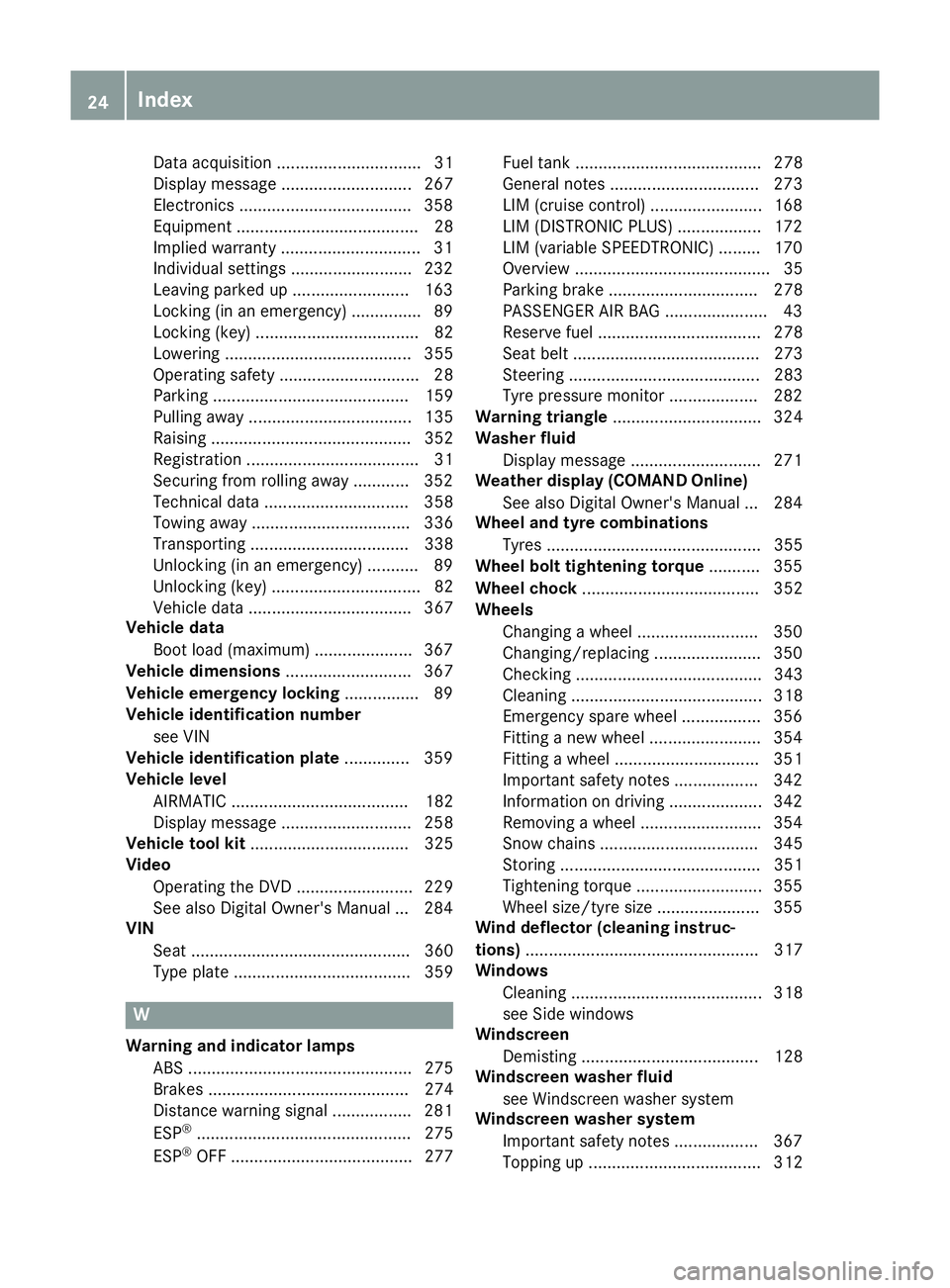
Data acquisition ............................... 31
Display message ............................ 267
Electronics ....................................
.358
Equipment ....................................... 28
Implied warranty .............................. 31
Individual settings .......................... 232
Leaving parked up ......................... 163
Locking (in an emergency) .............. .89
Locking (key) ................................... 82
Lowering ........................................ 355
Operating safety .............................. 28
Parking .......................................... 159
Pulling away ................................... 135
Raising ........................................... 352
Registration ..................................... 31
Securing from rolling away ............ 352
Technical data ............................... 358
Towing away .................................. 336
Transporting .................................. 338
Unlocking (in an emergency) ........... 89
Unlocking (key) ................................ 82
Vehicle data ................................... 367
Vehicle data
Boot load (maximum) ..................... 367
Vehicle dimensions ........................... 367
Vehicle emergency locking ................ 89
Vehicle identification number
see VIN
Vehicle identification plate .............. 359
Vehicle level
AIRMATIC ...................................... 182
Display message ............................ 258
Vehicle tool kit .................................. 325
Video
Operating the DVD ......................... 229
See also Digital Owner's Manua l... 284
VIN
Seat ............................................... 360
Type plate ...................................... 359 W
Warning and indicator lamps ABS ................................................ 275
Brakes ........................................... 274
Distance warning signal ................. 281
ESP ®
.............................................. 275
ESP ®
OFF ....................................... 277 Fuel tank ........................................ 278
General notes ................................ 273
LIM (cruise control) ........................ 168
LIM (DISTRONIC PLUS) .................. 172
LIM (variable SPEEDTRONIC) ......... 170
Overview .......................................... 35
Parking brake ................................ 278
PASSENGER AIR BAG ...................... 43
Reserve fue
l................................... 278
Seat belt ........................................ 273
Steering ......................................... 283
Tyre pressure monitor ................... 282
Warning triangle ................................ 324
Washer fluid
Display message ............................ 271
Weather display (COMAND Online)
See also Digital Owner's Manua l... 284
Wheel and tyre combinations
Tyres .............................................. 355
Wheel bolt tightening torque ........... 355
Wheel chock ...................................... 352
Wheels
Changing a whee l.......................... 350
Changing/replacing ....................... 350
Checking ........................................ 343
Cleaning ......................................... 318
Emergency spare whee l................. 356
Fitting a new wheel ........................ 354
Fitting a wheel ............................... 351
Important safety notes .................. 342
Information on driving .................... 342
Removing a whee l.......................... 354
Snow chains .................................. 345
Storing ........................................... 351
Tightening torque ........................... 355
Wheel size/tyre size ...................... 355
Wind deflector (cleaning instruc-
tions) .................................................. 317
Windows
Cleaning ......................................... 318
see Side windows
Windscreen
Demisting ...................................... 128
Windscreen washer fluid
see Windscreen washer system
Windscreen washer system
Important safety notes .................. 367
Topping up ..................................... 312 24
Index
Page 36 of 377
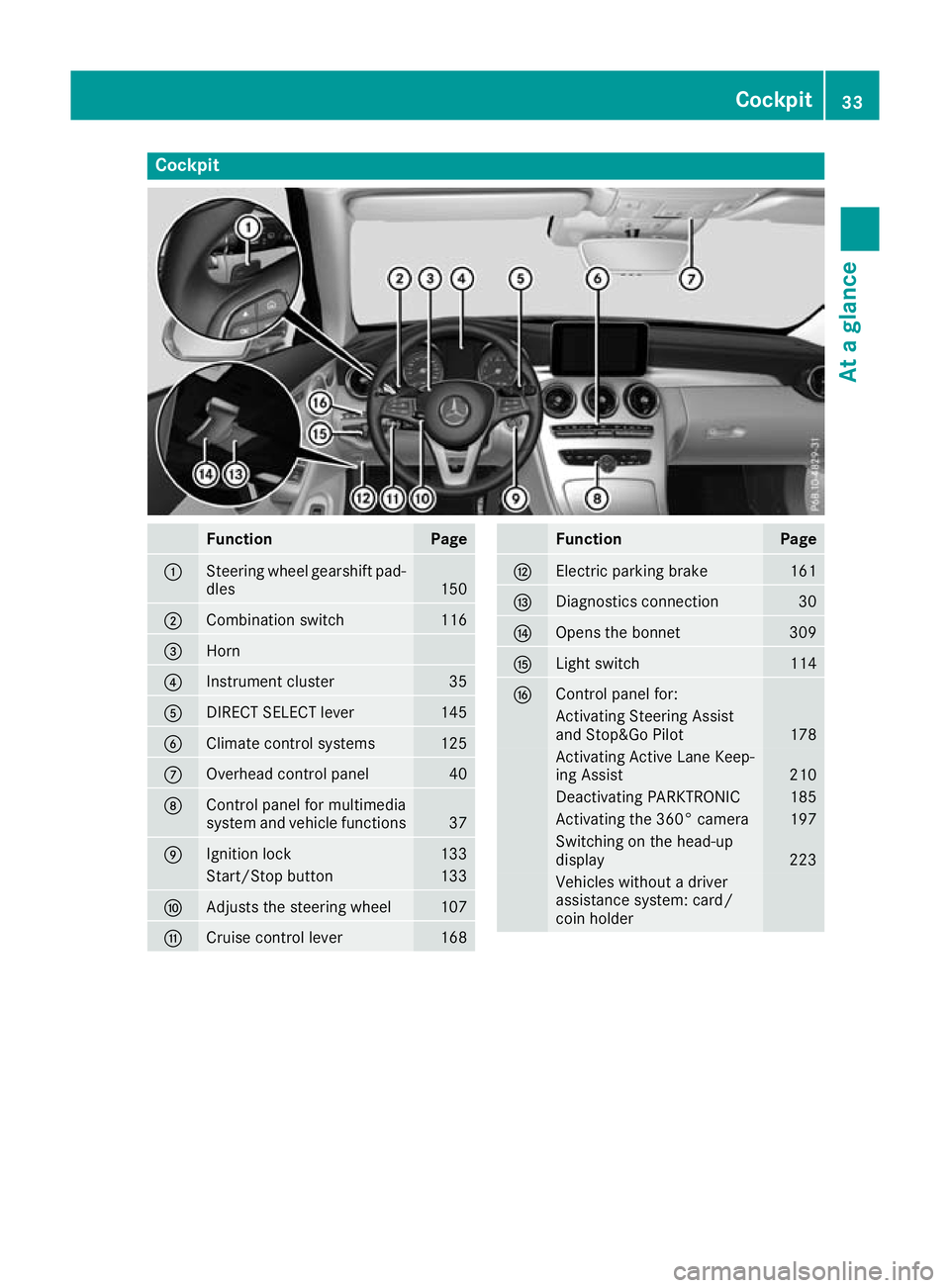
Cockpit
Function Page
:
Steering wheel gearshift pad-
dles 150
;
Combination switch 116
=
Horn
?
Instrument cluster 35
A
DIRECT SELECT lever 145
B
Climate control systems 125
C
Overhead control panel 40
D
Control panel for multimedia
system and vehicle functions 37
E
Ignition lock 133
Start/Stop button 133
F
Adjusts the steering wheel 107
G
Cruise control lever 168 Function Page
H
Electric parking brake 161
I
Diagnostics connection 30
J
Opens the bonnet 309
K
Light switch 114
L
Control panel for:
Activating Steering Assist
and Stop&Go Pilot
178
Activating Active Lane Keep-
ing Assist
210
Deactivating PARKTRONIC 185
Activating the 360° camera 197
Switching on the head-up
display
223
Vehicles without a driver
assistance system: card/
coin holder Cockpit
33At a glance
Page 37 of 377
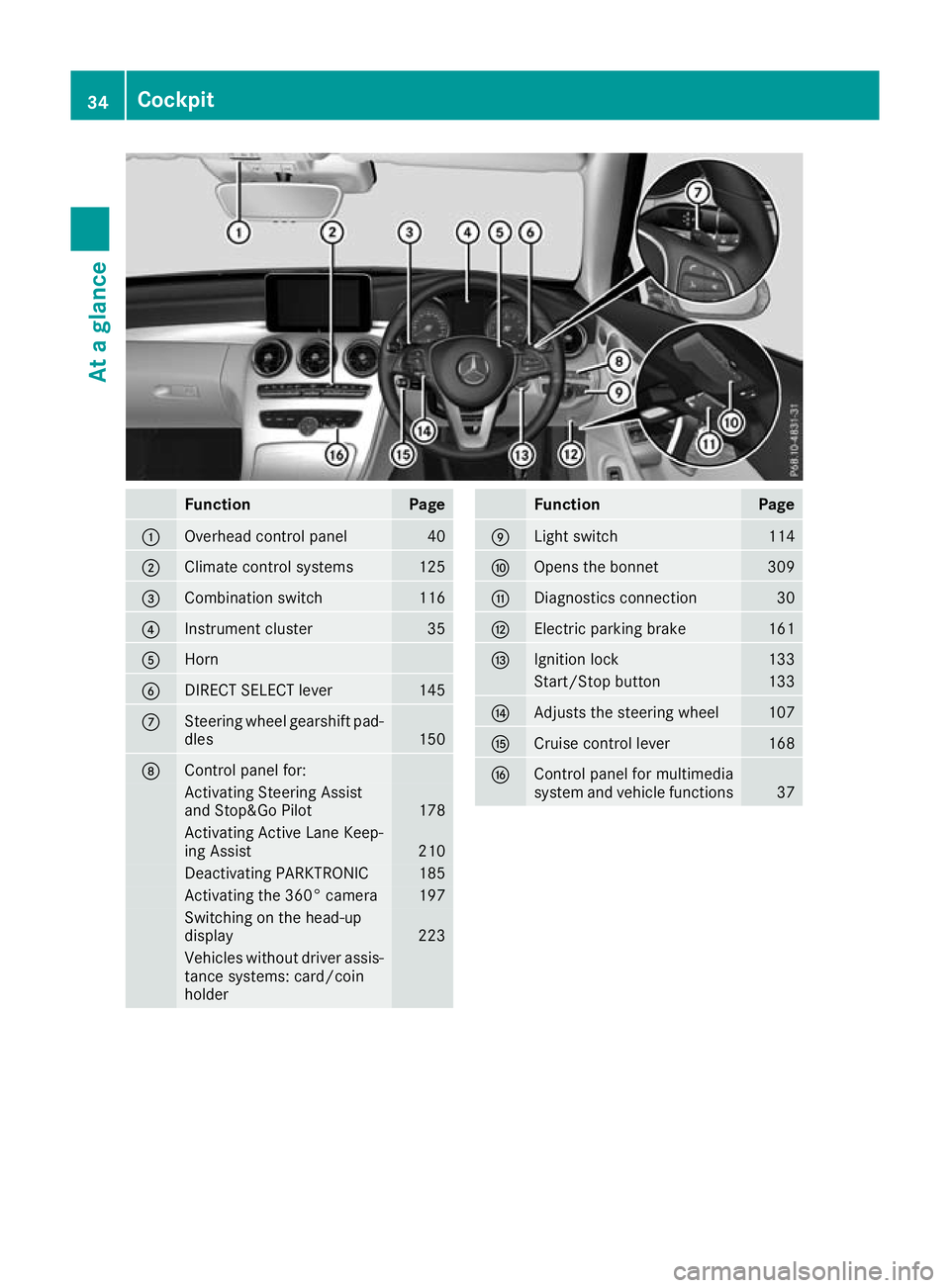
Function Page
:
Overhead control panel 40
;
Climate control systems 125
=
Combination switch 116
?
Instrument cluster 35
A
Horn
B
DIRECT SELECT lever 145
C
Steering wheel gearshift pad-
dles 150
D
Control panel for:
Activating Steering Assist
and Stop&Go Pilot
178
Activating Active Lane Keep-
ing Assist
210
Deactivating PARKTRONIC 185
Activating the 360° camera 197
Switching on the head-up
display 223
Vehicles without driver assis-
tance systems: card/coin
holder Function Page
E
Light switch 114
F
Opens the bonnet 309
G
Diagnostics connection 30
H
Electric parking brake 161
I
Ignition lock 133
Start/Stop button 133
J
Adjusts the steering wheel 107
K
Cruise control lever 168
L
Control panel for multimedia
system and vehicle functions
3734
CockpitAt a glance
Page 151 of 377

reactions and is conducive to a sporty driving
style. The sound generated by the double-clutch
function depends on the drive program.
Kickdown Use kickdown for maximum acceleration:
X Depress the accelerator pedal beyond the
pressure point.
The automatic transmission shifts to a lower
gear depending on the engine speed.
X Ease off the accelerator pedal once the
desired speed is reached.
The automatic transmission shifts back up.
Gliding mode Gliding mode is characterised by the following:
R the combustion engine is disconnected from
the drive train
R the engine speed is equal to the engine idling
speed
R the multifunction display hides the gear indi-
cator and shows transmission position Din
green (Y page 146)
R Mercedes-AMG vehicles: the multifunction
display shows :as the status icon for the
drive program
In drive program Eand drive program C
(Mercedes-AMG vehicles) you can activate and
deactivate gliding mode using the ECO button
(Y page 139).
Gliding mode can be activated under the follow-
ing conditions:
R the speed is within a suitable range
R the type of road is suitable, e.g. no steep uphill
or downhill gradients
R you are no longer depressing the accelerator
pedal
Gliding mode is deactivated under the following
conditions:
R you depress the accelerator pedal
R you depress the brake pedal R
you change the transmission position
(Y page 145)
R you switch to drive program RACE
(Mercedes-AMG C 63 S), S+orS
(Y page 141)
R you activate manual gearshifting
(Y page 150)
R you leave the suitable speed range
i If you have selected the "Comfort" setting
for the drive (engine management) in drive
program I, you can also activate gliding mode.
You can find information about this in the Dig- ital Owner's Manual.
Towing a trailer Towing a trailer is not possible with all models.
Further information (Y
page 214).
X Drive in the middle of the engine speed range
on uphill gradients.
X Manual gearshifting: depending on the
uphill or downhill gradient, shift to a gear
(Y page 150) in which the engine will run in
the middle of the engine speed range.
This also applies if cruise control, DISTRONIC PLUS or SPEEDTRONIC are activated. Drive programs
All vehicles (except Mercedes-AMG
C 63 /C63S) Drive program I (Individual)
In drive program I, the following properties of
the drive program can be selected:
R the drive (engine and transmission manage-
ment)
R the suspension
R the steering
R the availability of the ECO start/stop function
R the climate control
Information on configuring drive program Iwith
the multimedia system can be found under
"DYNAMIC SELECT" in the vehicle's Digital Own- er's Manual.
i To permanently shift the gears manually in
drive program Iusing the steering wheel gear-
shift paddles, select the M(Manual) setting
for the drive. 148
Automatic transmissionDriving and pa
rking
Page 168 of 377

note of this when driving a laden vehicle and
when towing a trailer.
This also applies if cruise control, DISTRONIC
PLUS or SPEEDTRONIC is activated.
This will use the braking effect of the engine, so
less braking will be required to maintain vehicle
speed. This relieves the load on the brake sys-
tem and prevents the brakes from overheating
and wearing too quickly.
Heavy and light loads G
WARNING
The braking system can overheat if you leave your foot on the brake pedal while driving.
This increases the braking distance and could
even cause the braking system to fail. There is
a risk of an accident.
Never use the brake pedal as a footrest. Do
not simultaneously depress both the brake
pedal and the accelerator pedal while driving.
! Depressing the brake pedal constantly
results in excessive and premature wear to
the brake pads.
If heavy demands are made on the brakes, do
not park the vehicle immediately. Drive on for a
short while. This allows the airflow to cool the
brakes more quickly.
If the brakes have been used only moderately,
you should occasionally test their effectiveness.
To do this, brake more firmly from a higher
speed while paying attention to the traffic con-
ditions. This improves the grip of the brakes.
Wet road surfaces If you have driven for a long time in heavy rain
without braking, there may be a delayed reac-
tion from the brakes when braking for the first
time. This may also occur after a car wash or
after driving through deep water.
You will have to depress the brake pedal more
firmly. Maintain a greater distance to the vehicle in front.
After driving on a wet road or having the vehicle
washed, brake firmly while paying attention to
the traffic conditions. This will warm up the
brake discs, thereby drying them more quickly
and protecting them against corrosion. Limited braking performance on salt-
treated roads If you drive on salt-treated roads, a layer of salt
may form on the brake discs and pads. This can
increase the braking distance considerably.
R In order to prevent any salt build-up, apply the
brakes occasionally while paying attention to
the traffic conditions.
R Carefully depress the brake pedal at the end
of the journey and when starting the next
journey.
R Maintain a much greater distance to the vehi-
cle in front.
New brake discs and brake pads/
linings Brake pads/linings and discs that are either new
or have been replaced achieve optimum braking
effect only after several hundred kilometres of
driving. Compensate for the reduced braking
effect by applying greater force to the brake
pedal.
For safety reasons, Mercedes-Benz recom-
mends only fitting the following brake discs and brake pads/linings:
R brake discs that have been approved by
Mercedes-Benz
R brake pads/linings that have been approved
by Mercedes-Benz or that are of an equivalent
standard of quality
Other brake discs or brake pads/linings can
compromise the safety of your vehicle.
Always replace all brake discs and brake pads/
linings on an axle at the same time. Always fit
new brake pads/linings when replacing brake
discs.
The vehicle is equipped with lightweight brake
discs to which the wheel assembly with rim and threaded connection is matched.
The use of brake discs other than those
approved by Mercedes-Benz may alter track
width and is subject to approval, if applicable.
Shock-type loads when handling the brake
discs, such as when changing wheels, can lead
to a reduction in comfort when driving with light-
weight brake discs. Avoid shock-type loads on
the lightweight brake discs, particularly on the
brake plate. Driving tips
165Driving and parking Z
Page 170 of 377

You should drive particularly carefully on slip-
pery road surfaces. Avoid sudden acceleration,
steering and braking manoeuvres. Do not use
cruise control or DISTRONIC PLUS.
If the vehicle threatens to skid or cannot be
stopped when moving at low speed:
X Vehicles with manual transmission: shift
to neutral.
X Vehicles with automatic transmission:
shift the transmission to position
N.
X Try to bring the vehicle under control by using
corrective steering.
The outside temperature indicator is not
designed to serve as an ice-warning device and
is therefore unsuitable for that purpose.
Changes in the outside temperature are dis-
played after a short delay.
Indicated temperatures just above the freezing
point do not guarantee that the road surface is
free of ice. The road may still be icy, especially in wooded areas or on bridges. The vehicle could
skid if you fail to adapt your driving style. Always adapt your driving style and drive at a speed to
suit the prevailing weather conditions.
You should pay special attention to road condi-
tions when temperatures are around freezing
point.
Further information on driving with snow chains
(Y page 345).
Further information on driving with summer
tyres (Y page 344).
Observe the notes in the "Winter operation" sec-
tion (Y page 344). Driving systems
Mercedes-Benz Intelligent Drive
Mercedes-Benz Intelligent Drive stands for inno-
vative driver assistance and safety systems
which enhance comfort and support the driver in critical situations. With these intelligent co-ordi-
nated systems Mercedes-Benz has set a mile-
stone on the path towards autonomous driving.
Mercedes-Benz Intelligent Drive embraces all
elements of active and passive safety in one well
thought-out system – for the safety of the vehi-
cle occupants and that of other road users.
Further information on driving safety systems
(Y page 66). Cruise control
General notes Cruise control maintains a constant road speed
for you. It brakes automatically in order to avoid
exceeding the set speed. Shift to a lower gear in
good time on long and steep downhill gradients.
Take particular note of this when driving a laden vehicle and when towing a trailer. By doing so,
you will make use of the braking effect of the
engine. This relieves the load on the brake sys-
tem and prevents the brakes from overheating
and wearing too quickly.
Use cruise control only if road and traffic con-
ditions are appropriate for maintaining a steadyspeed for a prolonged period. You can store anyroad speed above 30 km/h. If you have set a
permanent limit speed, you cannot set the
speed any higher than the fixed limit speed
(Y page 171).
Important safety notes Cruise control can neither reduce the risk of an
accident if you fail to adapt your driving style nor
override the laws of physics. Cruise control can- not take into account road, weather or traffic
conditions. Cruise control is only an aid. You are
responsible for maintaining a safe distance from the vehicle in front, for vehicle speed, for brak-
ing in good time and for staying in lane.
Do not use cruise control:
R in road and traffic conditions that do not allow
you to maintain a constant speed, e.g. in
heavy traffic or on winding roads.
R on smooth or slippery roads. Braking or accel-
erating can cause the drive wheels to lose
traction and the vehicle could then skid.
R when there is poor visibility, e.g. due to fog,
heavy rain or snow.
If there is a change of drivers, advise the new
driver of the speed stored.
i The speed indicated in the speedometer
may differ slightly from the speed stored. Driving systems
167Driving and parking Z