ad blue MERCEDES-BENZ C-CLASS CABRIOLET 2018 Owner's Manual
[x] Cancel search | Manufacturer: MERCEDES-BENZ, Model Year: 2018, Model line: C-CLASS CABRIOLET, Model: MERCEDES-BENZ C-CLASS CABRIOLET 2018Pages: 350, PDF Size: 5.73 MB
Page 8 of 350
Drive program ................................ 136
Drive program display .................... 134
Driving tips .................................... 135
DYNAMIC SELECT switch .............. 130
Emergency running mode .............. 141
Engaging drive position .................. 134
Engaging neutral ............................ 133
Engaging park position automati-
cally ............................................... 133
Engaging reverse gear ................... 133
Engaging the park position ............ 133
Gearshift recommendation ............ 140
Gliding mode ................................. 136
Kickdown ....................................... 136
Manual shifting .............................. 138
Oil temperature (on-board com-
puter, Mercedes-AMG vehicles) ..... 208
Overview ........................................ 132
Permanent setting ......................... 139
Problem (malfunction) ................... 141
Pulling away ................................... 126
Starting the engine ........................ 125
Steering wheel paddle shifters ...... 138
Transmission position display
(DIRECT SELECT lever) ................... 134
Transmission positions .................. 135
Automatic transmission emer-
gency mode ....................................... 141
B
Back button ....................................... 254
Backup lamp
Display message ............................ 224
BAS (Brake Assist System) ................. 65
Basic settings
see Settings
Battery (SmartKey)
Checking .......................................... 79
Important safety notes .................... 78
Replacing ......................................... 79
Battery (vehicle)
Charging ........................................ 303
Display message ............................ 226
Important safety notes .................. 301
Jump starting ................................. 304
Belt
see Seat belts Belt warning
......................................... 48
Blind Spot Assist
Activating/deactivating (on-
board computer) ............................ 205
Display message ............................ 230
Notes/function .............................. 182
see Active Blind Spot Assist
Blower
see Climate control
Bluetooth
®
Connecting a different mobile
phone ............................................ 261
Searching for a mobile phone ........ 260
see also Digital Operator's Man-
ual .................................................. 253
Telephony ...................................... 260
Brake
Active Brake Assist with cross-
traffic function ................................. 71
Brake Assist
see BAS (Brake Assist System)
Brake assistance
see BAS (Brake Assist System)
Brake fluid
Display message ............................ 218
Notes ............................................. 343
Brake force distribution
see EBD (electronic brake force
distribution)
Brake linings
Display message ............................ 218
Brakes
ABS .................................................. 64
Adaptive Brake Assist ...................... 67
BAS .................................................. 65
Brake fluid (notes) ......................... 343
Display message ............................ 213
EBD .................................................. 71
High-performance brake system .... 150
Hill start assist ............................... 127
HOLD function ............................... 161
Important safety notes .................. 148
Maintenance .................................. 149
Parking brake ................................ 145
Riding tips ...................................... 148
Warning lamp ................................. 243
Breakdown
Where will I find...? ........................ 295
6Index
Page 17 of 350
Memory functionSeats, steering wheel, exterior
mirrors ........................................... 105
Mercedes-Benz Intelligent Drive
360°camera .................................. 176
Active Blind Spot Assist ................. 186
Active Lane Keeping Assist ............ 189
ATTENTION ASSIST ........................ 180
Blind Spot Assist ............................ 182
Distance Pilot DISTRONIC ............. 153
Distance Pilot DISTRONIC with
Steering Pilot ................................. 159
General notes ................................ 151
Lane Keeping Assist ...................... 184
Parking Assist PARKTRONIC .......... 170
Parking Pilot .................................. 166
PRE-SAFE
®(anticipatory occu-
pant protection) ...............................5 8
PRE-SAFE
®PLUS (anticipatory
occupant protection PLUS) .............. 58
Rear view camera .......................... 173
Traffic Sign Assist .......................... 182
Message memory (on-board com-
puter) .................................................. 212
Messages
see Display messages
see Warning and indicator lamps
Mirror turn signal
Cleaning ......................................... 292
Mirrors
see Exterior mirrors
see Vanity mirror (in the sun visor)
Mobile phone
Connecting (Bluetooth
®inter-
face) ..............................................2 60
Connecting another mobile
phone ............................................ 261
Frequencies ................................... 338
Installation ..................................... 338
Menu (on-board computer) ............ 202
Transmission output (maximum) .... 338
Model type
see Vehicle identification plate
Modifying the programming
(SmartKey) ...........................................7 8
MOExtended tires .............................. 297 Mounting wheels
Lowering the vehicle ...................... 336
Mounting a new wheel ................... 335
Preparing the vehicle ..... ................3
32
R
aising the vehicle ......................... 333
Removing a wheel .......................... 335
Securing the vehicle against roll-
ing away ........................................ 332
MP3
Operation ....................................... 201
see also Digital Operator's Man-
ual ..................................................2 53
Multifunction display
Function/notes .............................1 94
Multifunction steering wheel
Operating the on-board computer .. 193
Overview .......................................... 37
Multimedia system
Switching on and off ......................2 54
Music files
see also Digital Operator's Man-
ual ..................................................2 53
N
Navigation
Displaying (on-board computer) ..... 198
Menu (on-board computer) ............ 198
see also Digital Operator's Man-
ual ..................................................2 53
Notes on breaking-in a new vehi-
cle ....................................................... 122
O
Occupant Classification System
(OCS)
Conditions ....................................... 51
Faults ............................................... 55
Operation ......................................... 52
System self-test ............................... 54
Occupant safety
Air bags ...........................................4 8
Automatic measures after an acci-
dent ................................................. 59
Belt warning ..................................... 48
Children in the vehicle ..................... 59
Important safety notes .................... 43
Index15
Page 36 of 350
Information on copyright
Free and open-source software
Information on license for free and open-source
software used in your vehicl ecan be foun don
th edat acarrier in your vehicl edocumen twallet
and ,includin gupdates, on th efollowin gweb-
site:
http://www.mercedes-benz.com/opensource
Registered trademarks
Registered trademarks:
RBluetoot h®isaregistere dtrademark of Blue -
toot hSI G Inc.
RDTS™ is aregistere dtrademark of DTS, Inc.
RDolby®and MLP ™are registere dtrademark s
of DOLB YLaboratories.
RBabySmart™, ES P®and PRE-SAFE®are reg-
istere dtrademark sof Daimler AG.
RHomeLink®is aregistere dtrademark of John -
son Controls.
RiPod®and iTunes®are registere dtrademark s
of Apple Inc.
RBurmeste r®isaregistere dtrademark of
Burmeste rAudiosysteme GmbH .
RMicrosoft®and Windows media®are regis-
tered trademark sof Microsoft Corporation .
RSIRIUS®isaregistere dtrademark of Sirius
XM Radio Inc.
RHD Radio™ is aregistere dtrademark of iBiq-
uit yDigital Corporation .
RGracenote®isaregistere dtrademark of
Gracenote, Inc.
RZAGA TSurvey®and relate dbrands are regis-
tered trademark sof Zagat Survey, LLC.
34Information on copyright
Introduction
Page 101 of 350

Switching the seat heating on/off
Switching on/off
GWARNING
Repeatedly switching on the seat heating can
cause the seat cushion and backrest pads to
become very hot. The health of persons with
limited temperature sensitivity or a limited
ability to react to high temperatures may be
affected or they may even suffer burn-like
injuries. There is a risk of injury.
Therefore, do not switch the seat heating on
repeatedly.
The three red indicator lamps in the button indi-
cate the heating level you have selected.
The system automatically switches down from
level 3to level 2after approximately eight
minutes.
The system automatically switches down from
level 2to level 1after approximately ten
minutes.
The system automatically switches off approx-
imately 20 minutes after it is set to level 1.
XTurn the SmartKey to position1or2 in the
ignition lock (Ypage 123).
XTo switch on: press button:repeatedly
until the desired heating level is set.
XTo switch off: press button:repeatedly
until all the indicator lamps go out.
iIf the battery voltage is too low, the seat
heating may switch off.
iIf drive program Eis selected, the power of
the seat heating is reduced.
Switching the seat ventilation on/off
Switching on/off
The blue indicator lamps in the button indicate
the ventilation level you have selected.
XTurn the SmartKey to position 1or2 in the
ignition lock (Ypage 123).
XTo switch on: press button:repeatedly
until the desired ventilation level is set.
XTo switch off: press button:repeatedly
until all the indicator lamps go out.
iIf the battery voltage is too low, the seat
ventilation may switch off.
iYou can open the side windows and the soft
top with the SmartKey (Ypage 90). The seat
ventilation of the driver's seat automatically
switches to the highest level.
iWhen the vehicle is stationary, the fan
speed can be reduced automatically. This
reduces the noises of the seat ventilation.
Seats99
Seats, steering wheel and mirrors
Z
Page 111 of 350

=High-beam flasher
?Turn signal, left
XTo indicate briefly:press the combination
switch briefly to the pressure point in the
direction of arrow ;or?.
The corresponding turn signal flashes three
times.
XTo indicate: press the combination switch
beyond the pressure point in the direction of
arrow ;or?.
XTo switch on the high-beam headlamps:
turn the light switch to the LorÃ
position.
XPress the combination switch beyond the
pressure point in the direction of arrow :.
In the Ãposition, the high-beam head-
lamps are switched on only when it is dark and
the engine is running.
The blue Kindicator lamp on the instru-
ment cluster lights up when the high-beam
headlamps are switched on.
XTo switch off the high-beam headlamps:
move the combination switch back to its nor-
mal position.
The blue Kindicator lamp on the instru-
ment cluster goes out.
Vehicles with Adaptive Highbeam Assist:
If Adaptive Highbeam Assist is active, it auto-
matically controls activation and deactivation of
the high-beam headlamps (
Ypage 109).
XHigh-beam flasher: pull the combination
switch in the direction of arrow =.
Hazard warning lamps
XTo switch the hazard warning lamps on or
off: press button :.
The turn signal lamps flash when the hazard
warning lamps are switched on. If you now switch on a turn signal lamp using the com-
bination switch, only the turn signal lamp on
the corresponding side of the vehicle will
flash.
The hazard warning lamps switch on automati-
cally if an air bag is deployed.
The hazard warning lamps still operate if the
ignition is switched off.
Cornering light function
The cornering light function improves the illu-
mination of the road over a wide angle in the
direction you are turning, enabling better visi-
bility in tight bends, for example. It can only be
activated when the low-beam headlamps are
switched on.
Active:
Rif you are driving at speeds below 25 mph
(40 km/h) and switch on the turn signal or
turn the steering wheel
Rif you are driving at speeds between 25 mph
(40 km/h) and 45 mph (70 km/h) and turn
the steering wheel
The cornering lamp may remain lit for a short
time, but is automatically switched off after no
more than three minutes.
Adaptive Highbeam Assist
General notes
You can use this function to set the headlamps
to change between low beam and high beam
automatically. The system recognizes vehicles
with their lights on, either approaching from the
opposite direction or traveling in front of your
vehicle, and consequently switches the head-
lamps from high beam to low beam.
The system automatically adapts the low-beam
headlamp range depending on the distance to
the other vehicle. Once the system no longer
detects any other vehicles, it reactivates the
high-beam headlamps.
The system's optical sensor is located behind
the windshield near the overhead control panel.
Exterior lighting109
Lights and windshield wipers
Z
Page 203 of 350
XConfirmbypressing aon the steering
wheel.
XTo open the media sources list: pressa
brie fly.
The listshows the following media sources,
for example:
RCD or DVD (DVD only in the COMAND mul-
tim edia system)
RSDcard
RMedia Register (only in the COMAND mul-
tim edia system)
RUSB storage device
RBluetooth®capab leaudio device
Please observe further information on media
support and media operation inthe multimedia
system (see the Digital Operator's Manual).
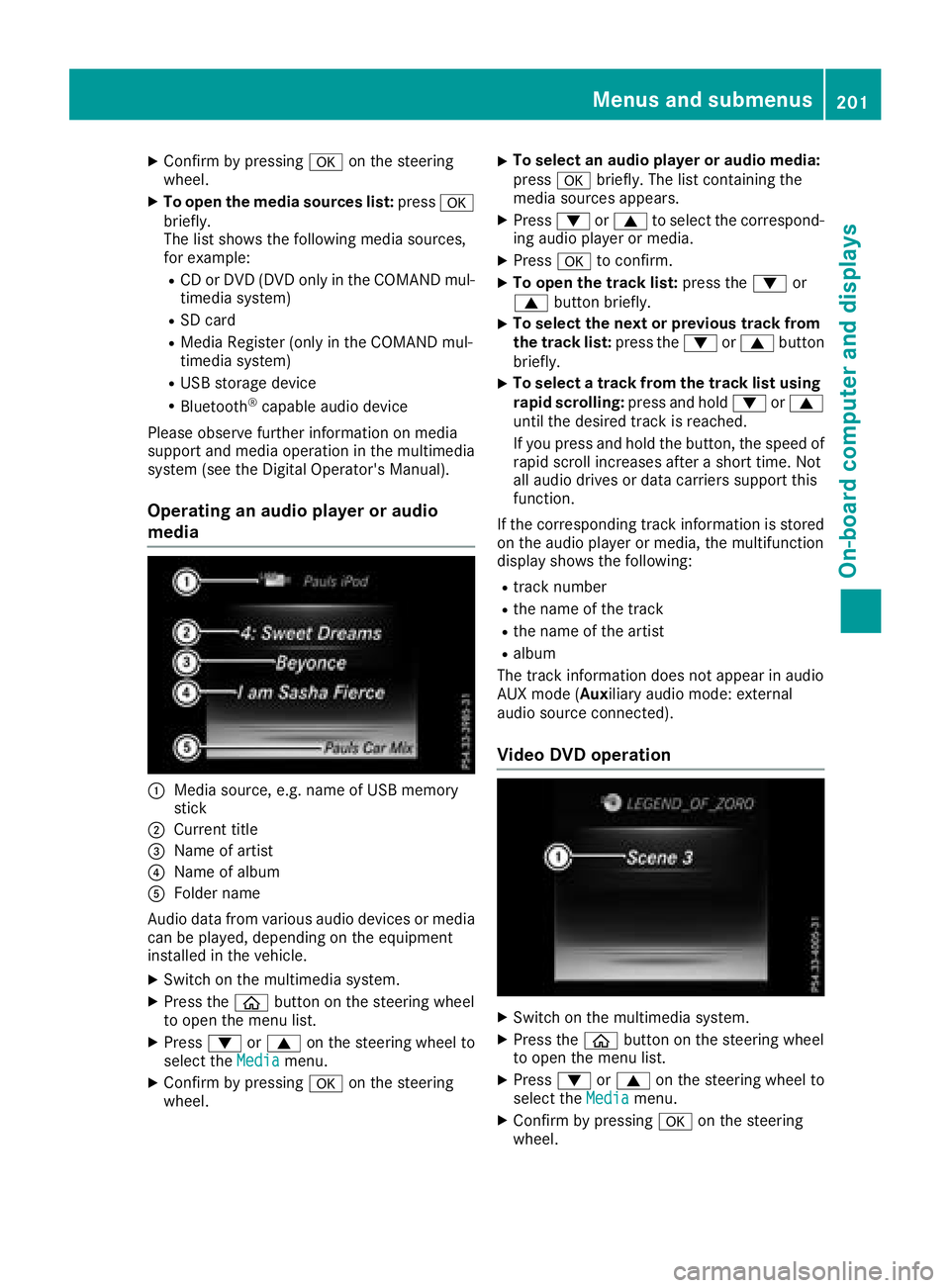
Operating an audio player or audio
media
:Media source, e.g. name of USB memory
stick
;Current tit le
=Name of artist
?Name of album
AFolder name
Aud iodata from various audio devices or media
can beplayed, dependin g on theequipment
installed inthe veh icle.
XSwit ch on the multimed iasystem.
XPress the òbutton on the steering wheel
to open the menu list.
XPress :or9 on the steering wheel to
select the Mediamenu.
XConfirmbypressing aon the steering
wheel.
XTo select an audio player oraudio media:
press abriefly. The list containing the
media sources appears.
XPress :or9 to select the correspond-
ing audio player or media.
XPress ato confirm.
XTo open the track list: press the:or
9 button briefly.
XTo select the next orprevious track fr om
th etr ack list: press the :or9 button
briefly.
XTo select a track fr om the track list using
ra pid scrolling: press and hold :or9
until the desired track isreached.
If you press and hold the button, the speed of
rapid scroll increases after a short time. Not
all audio drives or data carriers support this
function.
If the corresponding track information is stored
on the audio player or media, the multifunction
display shows the following:
Rtrack number
Rthe name of the track
Rthe name of the artist
Ralbum
The track information does not appear inaudio
AUX mode (Aux iliary audio mode: external
audio source connect ed).
Video DVD operation
XSwitch on the multimedia system.
XPress the òbutton on the steering wheel
to open the menu list.
XPress :or9 on the steering wheel to
select the Mediamenu.
XConfirm by pressing aon the steering
wheel.
Menus and submenus201
On-board computer and displays
Z
Page 204 of 350
XTo select a DVD drive or DVD media:press
a briefly. The list containing the media
sources appears.
XPress :or9 to select the correspond-
ing DVD single drive or disc.
XPress ato confirm.
XTo open the scene list: press the:or
9 button briefly.
XTo select the next or previous scene in the
scene list: press the:or9 button
briefly.
XTo select a scene from the scene list using
rapid scrolling: press and hold:or9
until desired scene :is reached.
XPress ato confirm your selection.
Telephone menu
Introduction
GWARNING
If you operate information systems and com-
munication equipment integrated in the vehi-
cle when driving, you may be distracted from
the traffic situation. You could also lose con-
trol of the vehicle. There is a risk of an acci-
dent.
Only operate this equipment when the traffic
situation permits. If you are not sure that this
is possible, park the vehicle paying attention
to traffic conditions and operate the equip-
ment when the vehicle is stationary.
When telephoning, you must observe the legal
requirements for the country in which you are
currently driving.
XSwitch on the mobile phone (see the manu-
facturer’s operating instructions).
XSwitch on the multimedia system.
XEstablish a Bluetooth®connection to the mul-
timedia system (see the Digital Operator's
Manual).
XPress the òbutton on the steering wheel
to open the menu list.
XPress :or9 on the steering wheel to
select the Telephonemenu.
XConfirm by pressing aon the steering
wheel. You will see one of the following display mes-
sages in the multifunction display:
RPhone READYor the name of the network
provider: the mobile phone has found a net-
work and is ready to receive.
RPhone No Service: there is no network
available or the mobile phone is searching for a network.
Accepting a call
If someone calls you when you are in the Tele‐phonemenu, a display message appears in the
multifunction display.
You can accept a call at any time regardless of
the menu selected.
XPress the 6button on the steering wheel
to accept an incoming call.
Rejecting or ending a call
XPress the ~button on the steering wheel
to reject or end a call.
Selecting an entry in the phone book
XPress the òbutton on the steering wheel
to open the menu list.
XPress the :or9 button on the steering
wheel to select the Telephonemenu.
XConfirm by pressing aon the steering
wheel.
XPress the :or9 ora button to
switch to the phone book.
XPress the :or9 button to select the
names one after the other.
or
XTo start rapid scrolling: press and hold:
or 9 for longer than one second.
The names are displayed quickly one after the
other in the phone book.
If you press and hold the :or9 button
for longer than five seconds, the name with
the next or previous initial letter in the alpha-
bet appears.
Rapid scrolling stops when you release the
button or reach the end of the list.
XIf only one telephone number is stored for
a name: press the 6ora button to
start dialing.
or
202Menus and submenus
On-board computer and displays
Page 210 of 350
XPressato confirm.
The Reset All Settings?function
appears.
XPress :or9 to select NoorYes.
XPress ato confirm the selection.
If you have selected Yes, the multifunction
display shows a confirmation message.
For safety reasons, the Daytime Running
Lightsfunction in theLightssubmenu is only
reset when the vehicle is stationary.
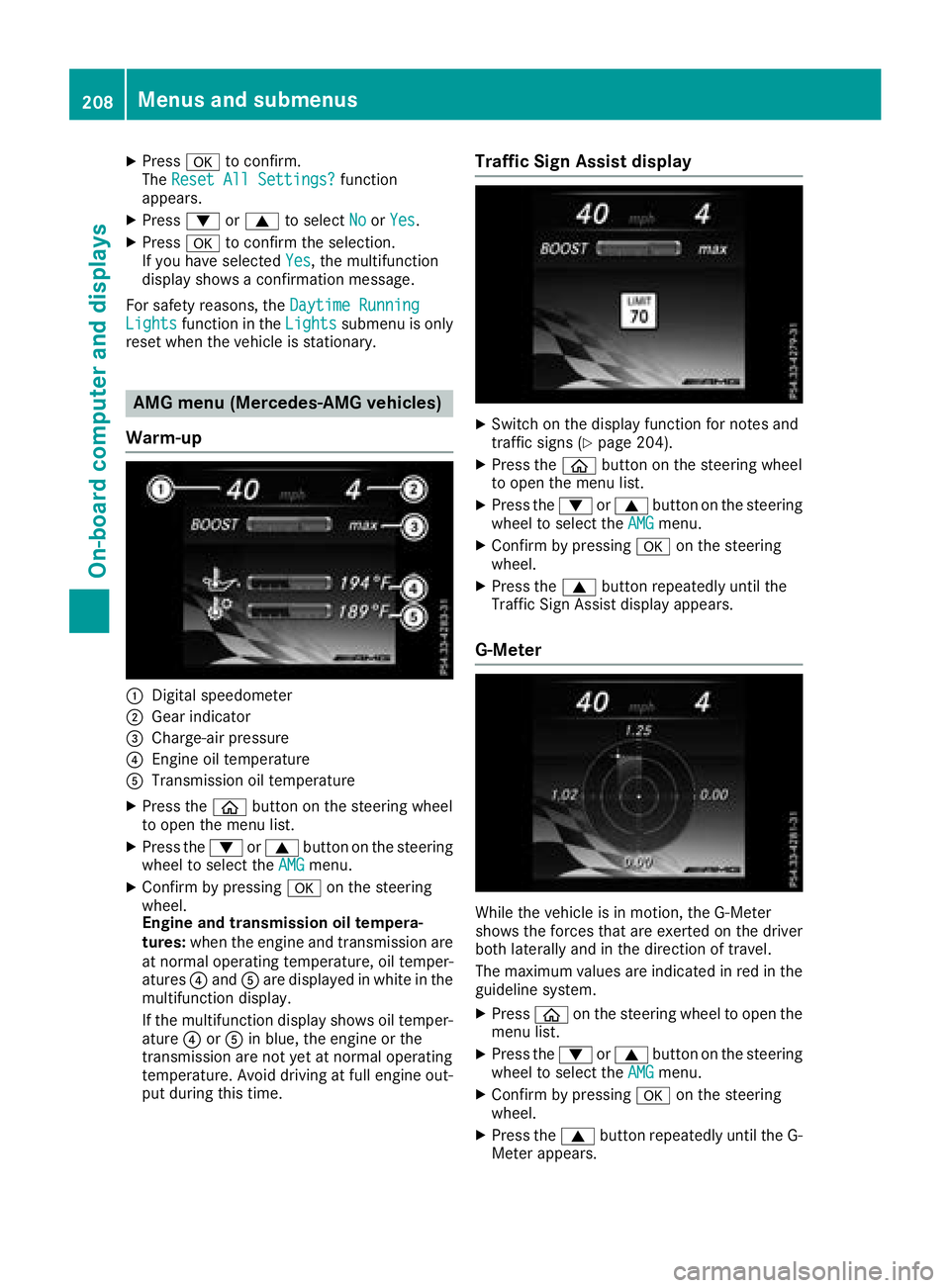
AMG menu (Mercedes-AMG vehicles)
Warm-up
:Digital speedometer
;Gear indicator
=Charge-air pressure
?Engine oil temperature
ATransmission oil temperature
XPress the òbutton on the steering wheel
to open the menu list.
XPress the :or9 button on the steering
wheel to select the AMGmenu.
XConfirm by pressing aon the steering
wheel.
Engine and transmission oil tempera-
tures: when the engine and transmission are
at normal operating temperature, oil temper-
atures ?and Aare displayed in white in the
multifunction display.
If the multifunction display shows oil temper-
ature ?orA in blue, the engine or the
transmission are not yet at normal operating
temperature. Avoid driving at full engine out-
put during this time.
Traffic Sign Assist display
XSwitch on the display function for notes and
traffic signs (Ypage 204).
XPress the òbutton on the steering wheel
to open the menu list.
XPress the :or9 button on the steering
wheel to select the AMGmenu.
XConfirm by pressing aon the steering
wheel.
XPress the 9button repeatedly until the
Traffic Sign Assist display appears.
G-Meter
While the vehicle is in motion, the G-Meter
shows the forces that are exerted on the driver
both laterally and in the direction of travel.
The maximum values are indicated in red in the
guideline system.
XPress òon the steering wheel to open the
menu list.
XPress the :or9 button on the steering
wheel to select the AMGmenu.
XConfirm by pressing aon the steering
wheel.
XPress the 9button repeatedly until the G-
Meter appears.
208Menus and submenus
On-board computer and displays
Page 262 of 350
Rselect a contact
Rselect a POI
You can search for a POI by location, name or
telephone number.
Rselect destination on the map
Renter intermediate destination
You can map the route to the destination
yourself with up to four intermediate destina-
tions.
Rselect destinations from Mercedes-Benz
Apps
Rselect geo-coordinates
Calculating the route
Prerequisite: the address has been entered and
is in the menu.
XSelect StartorContinue.
The route is calculated with the selected route
type and the selected route options.
If route guidance has already been activated,
a prompt will appear asking whether you wish
to end the current route guidance.
XSelect YesorSet as Intermediate Des‐tination.
Yescancels the current route guidance and
starts route calculation to the new destina-
tion.
Set as Intermediate Destination
adds
the new destination in addition to the existing
destination and opens the intermediate des-
tinations list.
Connecting a mobile phone
Requirements
Note: this segment describes connecting of a
mobile phone with COMAND. To connect a
mobile phone with Audio 20 (see the Digital
Operator's Manual).
For telephony via the Bluetooth
®interface, you
require a Bluetooth®-capable mobile phone. The
mobile phone must support Hands-Free Profile
1.0 or above.
Multimedia system:
XSelect VehicleQSystem Set‐tingsQActivate Bluetooth.
XActivate Bluetooth®O. Mobile phone:
XActivate Bluetooth®and, if necessary, Blue-
tooth®visibility for other devices (see the
manufacturer's operating instructions).
The Bluetooth
®device names for all of one man-
ufacturer's products might be identical. To
make it possible to clearly identify your mobile
phone, change the device name (see the man-
ufacturer's operating instructions).
If the mobile phone supports the PBAP (Phone
Book Access Profile) and MAP (Message
Access Profile) Bluetooth
®profiles, the follow-
ing information will be transmitted after you
connect:
RPhone book
RCall lists
RMessages
iFurther information on suitable mobile
phones can be obtained on the Internet at:
http://www.mercedes-benz.com/
connect
iIn the USA, you can get in touch with the
Mercedes-Benz Customer Assistance Center
on 1-800-FOR-MERCedes (1-800-367-6372).
In Canada, you can get in touch with the Cus-
tomer Relations Center on 1-800-387-0100.
Searching for and authorizing a mobile
phone
Before using your mobile phone with the multi-
media system for the first time, you will need to
search for the phone and then authorize (con-
nect) it. Depending on the mobile phone, author- ization either takes place by means of Secure
Simple Pairing or by entering a passkey. The
multimedia system automatically makes the
procedure that is relevant for your mobile phone
available. The mobile phone is always connec-
ted automatically after authorization. Further
information on using a mobile phone with the
multimedia system (see the Digital Operator's
Manual).
If the multimedia system does not detect your
mobile phone, this may be due to particular
security settings on your mobile phone (see the
manufacturer's operating instructions).
Only one mobile phone can be connected to the
multimedia system at any one time.
Searching for a mobile phone
260Operating system
Multimedia system
Page 263 of 350
Multimedia system:
XSelectPhoneQConnectDeviceQSearch for PhonesQStartSearch.
The available mobile phones are displayed.
Symbols in the device list
Sym-
bolExplanation
ÏNew mobile phone found, not yet
authorized.
ÑMobile phone is authorized, but is
not connected.
#Mobile phone is authorized and
connected.
Connecting a mobile phone
Authorization using Secure Simple Pairing:
XSelect mobile phone.
A code is displayed in the multimedia system
and on the mobile phone.
XIf codes match: selectYeson the multimedia
system.
XConfirm code on the mobile phone. Depend-
ing on the mobile phone used, confirm the
connection to the multimedia system and for
the PBAP and MAP Bluetooth
®profiles. The
prompt to confirm may take up to two
minutes to be displayed (see the manufactur-
er's operating instructions).
XIf the codes are different: selectNoon the
multimedia system.
The process is canceled.
Repeat authorization.
Authorization by entering a passkey (passcode):
XSelect Bluetooth®name of the mobile phone.
The input menu for the passkey is displayed.
XChoose a one to sixteen-digit number combi- nation as a passkey.
XEnter the passkey on the multimedia system.
XPress ¬to confirm.
XEnter and confirm the passkey on the mobile
phone. Depending on the mobile phone used,
confirm the connection to the multimedia sys-
tem and for the PBAP and MAP Bluetooth
®
profiles. The prompt to confirm may take up
to two minutes to be displayed (see the man-
ufacturer's operating instructions).
Switching between mobile phones
If you have authorized more than one mobile
phone, you can switch between the individual
phones.
Multimedia system:
XSelect PhoneQConnect Device.
XSelect a mobile phone from the device list.
Media mode
General notes
If you wish to play external media sources, the
appropriate media mode must already be turned
on. Further information on media mode (see the
Digital Operator's Manual).
The following external media sources can be
used:
RApple®devices (e.g. iPhone®)
RUSB devices (e.g. USB stick, MP3 player)
RCD
RDVD (COMAND)
RSD cards
Rvia devices connected by Bluetooth®
iInformation on the single DVD drive (see the
Digital Operator's Manual).
Activating media mode
Multimedia system:
XSelect MediaQDevices.
The available media sources will be shown.
XSelect the media source.
Playable files are played.
Inserting and removing an SD card
Important safety notes
GWARNING
SD cards are small parts. They can be swal-
lowed and cause choking. This poses an
increased risk of injury or even fatal injury.
Keep the SD card out of the reach of children. If a SD card is swallowed, seek medical atten-
tion immediately.
Operating system261
Multimedia system
Z