oil MERCEDES-BENZ C-CLASS CABRIOLET 2018 Owner's Manual
[x] Cancel search | Manufacturer: MERCEDES-BENZ, Model Year: 2018, Model line: C-CLASS CABRIOLET, Model: MERCEDES-BENZ C-CLASS CABRIOLET 2018Pages: 350, PDF Size: 5.73 MB
Page 6 of 350
1, 2, 3 ...
4ETS (Electronic Traction System)see ETS/4ETS (Electronic Trac-
tion System)
4MATIC (permanent four-wheel
drive) .................................................. 166
12 V socket
see Socket (12 V)
360° camera
Cleaning .........................................2 92
Display in the multimedia system .. 178
Function/notes .............................1 76
A
ABS (Anti-lock Braking System)
Display message ............................ 213
Function/notes ................................ 64
Warning lamp ................................. 244
Acceleration
see Kickdown
Accident
Automatic measures after an acci-
dent ................................................. 59
Accident warning
see Driving safety system
Activating media mode
General notes ................................ 261
Activating/deactivating cooling
with air dehumidification ................. 117
Active Blind Spot Assist
Activating/deactivating (on-
board computer) ............................ 205
Display message ............................ 230
Function/notes .............................1 86
Active Brake Assist
Activating or deactivating .............. 204
Display message ............................ 218
Function/notes ................................ 65
Active Brake Assist with cross-
traffic function
Activating or deactivating .............. 205
Display message ............................ 219
Function/notes ................................ 71
Important safety notes .................... 72
Warning lamp ................................. 250 Active Lane Keeping Assist
Activating/deactivating (on-
board computer) ............................ 205
Display message ............................ 229
Function/information .................... 189
Active light function
Display message ............................ 224
Active Service System PLUS
see ASSYST PLUS
ADAPTIVE BRAKE ................................. 71
Adaptive Brake Assist
Function/notes ................................ 67
Adaptive Damping System
Function/notes ............................. 165
Adaptive Damping System with
continuous damping adjustment
(ADS PLUS) ........................................ 164
Adaptive Highbeam Assist
Display message ............................ 224
Function/notes ............................. 109
Switching on/off ........................... 110
Additional speedometer ................... 207
Additives (engine oil) ........................ 343
Address book
see also Digital Operator's Man-
ual .................................................. 253
A
djusting the volume
Multimedia system ........................ 254
After-sales service center
see ASSYST PLUS
Air bags
Deployment ..................................... 56
Display message ............................ 222
Front air bag (driver, front
passenger) ....................................... 50
Head bag ......................................... 51
Important safety notes .................... 49
Introduction ..................................... 48
Knee bag .......................................... 50
Occupant Classification System
(OCS) ............................................... 51
PASSENGER AIR BAG indicator
lamps ............................................... 44
Side impact air bag .......................... 50
Air vents
Important safety notes .................. 120
Rear ............................................... 120
Setting ........................................... 120
4Index
Page 8 of 350
Drive program ................................ 136
Drive program display .................... 134
Driving tips .................................... 135
DYNAMIC SELECT switch .............. 130
Emergency running mode .............. 141
Engaging drive position .................. 134
Engaging neutral ............................ 133
Engaging park position automati-
cally ............................................... 133
Engaging reverse gear ................... 133
Engaging the park position ............ 133
Gearshift recommendation ............ 140
Gliding mode ................................. 136
Kickdown ....................................... 136
Manual shifting .............................. 138
Oil temperature (on-board com-
puter, Mercedes-AMG vehicles) ..... 208
Overview ........................................ 132
Permanent setting ......................... 139
Problem (malfunction) ................... 141
Pulling away ................................... 126
Starting the engine ........................ 125
Steering wheel paddle shifters ...... 138
Transmission position display
(DIRECT SELECT lever) ................... 134
Transmission positions .................. 135
Automatic transmission emer-
gency mode ....................................... 141
B
Back button ....................................... 254
Backup lamp
Display message ............................ 224
BAS (Brake Assist System) ................. 65
Basic settings
see Settings
Battery (SmartKey)
Checking .......................................... 79
Important safety notes .................... 78
Replacing ......................................... 79
Battery (vehicle)
Charging ........................................ 303
Display message ............................ 226
Important safety notes .................. 301
Jump starting ................................. 304
Belt
see Seat belts Belt warning
......................................... 48
Blind Spot Assist
Activating/deactivating (on-
board computer) ............................ 205
Display message ............................ 230
Notes/function .............................. 182
see Active Blind Spot Assist
Blower
see Climate control
Bluetooth
®
Connecting a different mobile
phone ............................................ 261
Searching for a mobile phone ........ 260
see also Digital Operator's Man-
ual .................................................. 253
Telephony ...................................... 260
Brake
Active Brake Assist with cross-
traffic function ................................. 71
Brake Assist
see BAS (Brake Assist System)
Brake assistance
see BAS (Brake Assist System)
Brake fluid
Display message ............................ 218
Notes ............................................. 343
Brake force distribution
see EBD (electronic brake force
distribution)
Brake linings
Display message ............................ 218
Brakes
ABS .................................................. 64
Adaptive Brake Assist ...................... 67
BAS .................................................. 65
Brake fluid (notes) ......................... 343
Display message ............................ 213
EBD .................................................. 71
High-performance brake system .... 150
Hill start assist ............................... 127
HOLD function ............................... 161
Important safety notes .................. 148
Maintenance .................................. 149
Parking brake ................................ 145
Riding tips ...................................... 148
Warning lamp ................................. 243
Breakdown
Where will I find...? ........................ 295
6Index
Page 13 of 350

Emergency releaseDriver's door .................................... 83
Trunk .............................................. .85
Vehicle .............................................8 3
Emergency Tensioning Devices
Activation ........................................ .56
Emissions control
Service and warranty information .... 28
Engine
Check Engine warning lamp .......... .247
Display message ............................ 225
ECO start/stop function ................ 127
Engine number ............................... 340
Irregular running ............................ 129
Jump-starting ................................. 304
Starting (important safety notes) ... 125
Starting problems .......................... 129
Starting the engine with the
SmartKey ....................................... 125
Starting via smartphone ................ 126
Starting with the Start/Stop but-
ton ................................................. 125
Switching off .................................. 144
Tow-starting (vehicle) ..................... 309
Engine electronics
Problem (malfunction) ................... 129
Engine jump starting
see Jump starting (engine)
Engine oil
Adding ...........................................2 83
Additives ........................................ 343
Checking the oil level ..................... 282
Checking the oil level using the
dipstick .......................................... 283
Display message ............................ 227
Filling capacity ............................... 343
General notes ................................ 342
Notes about oil grades ................... 342
Notes on oil level/consumption .... 282
Temperature (on-board computer,
Mercedes-AMG vehicles) ...............2 08
Engine oil additives
see Additives (engine oil)
Entering an address
see also Digital Operator's Ma
n-
ual ..................................................2 53
ESC (Electronic Stability Control)
see ESP
®(Electronic Stability Program) ESP
®(Electronic Stability Pro-
gram)
AMG menu (on-board computer) ... 209
Characteristics ................................. 68
Crosswind Assist .............................7 1
Deactivating/activating (button
in Mercedes-AMG vehicles) .............6 9
Deactivating/activating (notes,
except Mercedes-AMG vehicles) ...... 68
Deactivating/activating (on-
board computer, except
Mercedes-AMG vehicles) ............... 204
Display message ............................ 213
Function/notes ................................ 67
General notes .................................. 67
Important safety information ........... 68
Trailer stabilization ........................... 70
Warning lamp ................................. 244
ETS/4ETS (Electronic Traction Sys-
tem) ...................................................... 68
Exhaust
see Exhaust pipe
Exhaust check ................................... 147
Exhaust pipe
Cleaning ......................................... 292
Exterior lighting
Cleaning ......................................... 291
Setting options .............................. 107
see Lights
Exterior mirrors
Adjusting ....................................... 103
Dipping (automatic) ....................... 104
Folding in/out (automatically) ....... 104
Folding in/out (electrically) ........... 103
Out of position (troubleshooting) ... 104
Setting ........................................... 103
Storing settings (memory func-
tion) ............................................... 106
Storing the parking position .......... 104
Eyeglasses compartment ................. 264
F
Favorites
Overview ........................................ 256
Features ............................................. 267
Filler cap
see Refueling
Index11
Page 16 of 350
Activating/deactivating (on-
board computer) ............................ 205
Display message ............................ 229
Function/information .................... 184
see Active Lane Keeping Assist
Lane Tracking package ..................... 182
Lap time (RACETIMER) ...................... 210
LATCH-type (ISOFIX) child seat
anchors ................................................ 61
License plate lamp (display mes-
sage) ................................................... 224
Light function, active
Display message ............................ 224
Light switch
Operation ....................................... 107
Lights
Adaptive Highbeam Assist ............. 109
Automatic headlamp mode ............ 107
Cornering light function ................. 109
Fogged up headlamps .................... 110
General notes ................................ 107
Hazard warning lamps ...................1 09
High beam flasher .......................... 108
High-beam headlamps ................... 108
Light switch ................................... 107
Low-beam headlamps .................... 108
Parking lamps ................................ 108
Rear fog lamp ................................ 108
Setting exterior lighting ................. 107
Standing lamps .............................. 108
Switching the daytime running
lamps on/off (on-board com-
puter) ............................................. 207
Turn signals ................................... 108
see Interior lighting
see Replacing bulbs
Loading guidelines ............................ 263
Locking
see Central locking
Locking (doors)
Automatic ........................................ 82
Emergency locking ........................... 83
From inside (central locking but-
ton) ..................................................8 2
Locking centrally
see Central locking Low-beam headlamps
Display message ............................ 224
Switc
hing on/off .......................... .108
Lubricant additives
see Additives (engine oil)
Luggage cover
see Trunk partition
Lumbar support
Adjusting the 4-way lumbar sup-
port ..................................................9 8
M
M+S tires............................................ 314
Malfunction message
see Display messages
Matte finish (cleaning instruc-
tions) .................................................. 289
mbrace
Call priority ....................................2 74
Display message ............................ 218
Downloading destinations
(COMAND) ..................................... 274
Downloading routes ....................... 277
Emergency call .............................. 272
General notes ................................ 271
Geo fencing ................................... 277
Info call button .............................. 273
Locating a stolen vehicle ...............2 76
Remote fault diagnosis .................. 276
Remote vehicle locking .................. 275
Roadside assistance button ........... 273
Search & Send ............................... 275
Self-test ......................................... 271
Speed alert .................................... 277
System .......................................... 271
Triggering the vehicle alarm ........... 277
Vehicle remote unlocking .............. 275
Mechanical key
Function/notes ................................ 78
General notes .................................. 78
Inserting .......................................... 78
Locking vehicle ................................ 83
Removing ......................................... 78
Unlocking the driver's door .............. 83
Media Interface
see Digital Operator's Manual
Memory card (audio) ......................... 201
14Index
Page 18 of 350
Introduction to the restraint sys-
tem .................................................. 43
Occupant Classification System
(OCS) ............................................... 51
PASSENGER AIR BAG indicator
lamps ............................................... 44
Pets in the vehicle ........................... 64
PRE-SAFE
®(anticipatory occu-
pant protection) ............................... 58
PRE-SAFE
®PLUS (anticipatory
occupant protection PLUS) .............. 58
Restraint system warning lamp ........ 44
Seat belt .......................................... 44
OCS
Conditions ....................................... 51
Faults ............................................... 55
Operation .........................................5 2
System self-test ............................... 54
Odometer ........................................... 196
Oil
see Engine oil
On-board computer
AMG menu ..................................... 208
Assistance graphic menu ............... 203
Assistance menu ........................... 204
Display messages .......................... 211
Displaying a service message ........ 285
Displays and operation .................. 192
Distance Pilot DISTRONIC ............. 158
Factory settings ............................. 207
G-Meter ......................................... 208
Head-up display ............................. 195
Important safety notes .................. 192
Instrument cluster menu ............... 207
Lights menu ................................... 207
Media menu ................................... 200
Menu overview .............................. 196
Message memory .......................... 212
Navigation menu ............................ 198
RACETIMER ................................... 210
Radio menu ................................... 200
Service menu ................................. 203
Settings menu ............................... 203
Standard display ............................ 196
Telephone menu ............................ 202
Trip menu ...................................... 196
Video DVD operation ..................... 201 On-board diagnostic interface
see Diagnostics connection
Operating safety
Declaration of conformity ................ 30
Important safety notes .................... 30
Operating system
see On-board computer
Operatio n
Di
gital Operator's Manual ................ 26
Operator's Manual
Overview .......................................... 28
Vehicle equipment ........................... 28
Outside temperature display ........... 193
Overhead control panel ...................... 41
P
Paddle shifters
see Steering wheel paddle shifters
Paint code number ............................ 339
Paintwork (cleaning instructions) ... 288
Panic alarm .......................................... 43
Parcel net ........................................... 267
Parking
Important safety notes .................. 143
Parking brake ................................ 145
Parking position for the exterior
mirror on the front-passenger
side ................................................ 104
Rear view camera .......................... 173
Switching off the engine ................ 144
see Parking Assist PARKTRONIC
Parking aid
see 360° camera
see Exterior mirrors
see Parking Assist PARKTRONIC
see Parking Pilot
see Rear view camera
Parking Assist
Display message ............................ 230
Parking Assist PARKTRONIC
Deactivating/activating ................. 172
Driving system ............................... 170
Function/notes ............................. 170
Important safety notes .................. 170
Problems (malfunctions) ................ 172
Sensor range ................................. 170
Warning display ............................. 171
16Index
Page 21 of 350
Adjusting the 4-way lumbar sup-
port .................................................. 98
Adjusting the head restraint ............ 96
Calling up a stored setting (mem-
ory function) .................................. 106
Cleaning the cover ......................... 294
Folding the backrest (rear com-
partment) forwards/back .............. 265
Folding the backrests forward/
back ................................................. 97
Important safety notes .................... 94
Seat backrest display message ..... 238
Seat heating .................................... 99
Seat heating problem .................... 100
Seat ventilation ................................ 99
Seat ventilation problem ................ 100
Storing settings (memory func-
tion) ............................................... 106
Switching AIRSCARF on/off .......... 100
Securing a load
see Securing cargo
Securing cargo .................................. 266
Selecting a gear
see Automatic transmission
Selector lever
Cleaning ......................................... 293
see Automatic transmission
Sensors (cleaning instructions) ....... 292
Service center
see Qualified specialist workshop
Service Center
see Qualified specialist workshop
Service menu (on-board com-
puter) .................................................. 203
Service message
see ASSYST PLUS
Service products
Brake fluid ..................................... 343
Coolant (engine) ............................ 343
Engine oil ....................................... 342
Fuel ................................................ 340
Important safety notes .................. 340
Refrigerant (air-conditioning sys-
tem) ............................................... 344
Washer fluid ................................... 344
Setting the date/time format
see also Digital Operator's Man-
ual .................................................. 253 Setting the language
see also Digital Operator's Man-
ual .................................................. 253
Setting the time
see also Digital Operator's Man-
ual .................................................. 253
Se
ttings
Factory (on-board computer) ......... 207
On-board computer ....................... 203
SETUP (on-board computer,
Mercedes-AMG vehicles) .................. 209
Side impact air bag ............................. 50
Side marker lamp (display mes-
sage) ................................................... 224
Side windows
Cleaning ......................................... 291
Important safety information ........... 85
Opening/closing .............................. 86
Opening/closing (all) ....................... 86
Problem (malfunction) ..................... 87
Resetting ......................................... 87
Reversing feature ............................. 85
SIRIUS services
see also Digital Operator's Man-
ual .................................................. 253
SmartKey
Changing the battery ....................... 79
Changing the programming ............. 78
Checking the battery ....................... 79
Display message ............................ 240
Door central locking/unlocking ....... 76
Important safety notes .................... 76
KEYLESS-GO start function .............. 77
Loss ................................................. 80
Mechanical key ................................ 78
Opening/closing soft top ................. 90
Overview .......................................... 76
Positions (ignition lock) ................. 123
Problem (malfunction) ..................... 80
Starting the engine ........................ 125
Smartphone
Starting the engine ........................ 126
SMS
see also Digital Operator's Man-
ual .................................................. 253
Snow chains ...................................... 315
Socket (12 V)
Center console .............................. 270
Index19
Page 23 of 350
Suspension tuningSETUP (on-board computer,
Mercedes-AMG vehicles) ............... 209
Switching air-recirculation mode
on/off .................................................1 20
Switching on media mode
Via the device list .......................... 261
T
Tachometer ........................................ 193
Tail lamps
Display message ............................ 224
Tank
see Fuel tank
Tank content
Fuel gauge ....................................... 36
Technical data
Capacities ...................................... 340
Information .................................... 338
Vehicle data ................................... 345
Telephone
Accepting a call (multifunction
steering wheel) .............................. 202
Authorizing a mobile phone (con-
necting) ......................................... 260
Connecting a mobile phone (gen-
eral information) ............................ 260
Display message ............................ 239
Introduction ................................... 202
Menu (on-board computer) ............ 202
Number from the phone book ........ 202
Redialing ........................................ 203
Rejecting/ending a call ................. 202
see also Digital Operator's Man-
ual .................................................. 253
Switching between mobile
phones ........................................... 261
see Mobile phone
Temperature
Coolant (display in the instrument
cluster) .......................................... 193
Engine oil (on-board computer,
Mercedes-AMG vehicles) ............... 208
Outside temperature ...................... 193
Setting (climate control) ................ 118
Transmission oil (on-board com-
puter, Mercedes-AMG vehicles) ..... 208 Through-loading feature
................... 265
Timing (RACETIMER) ......................... 210
Tire pressure
Calling up (on-board computer) ..... 319
Checking manually ........................ 318
Display message ............................ 234
Maximum ....................................... 318
Not reached (TIREFIT) .................... 299
Notes ............................................. 316
Reached (TIREFIT) .......................... 300
Recommended ............................... 315
Using the TIREFIT kit ...................... 298
Tire pressure loss warning system
General notes ................................ 318
Important safety notes .................. 318
Restarting ...................................... 319
Tire pressure monitor
Checking the tire pressure elec-
tronically ........................................ 321
Function/notes ............................. 319
Genera l note
s ................................ 319
Important safety notes .................. 319
Radio type approval for the tire
pressure monitor ........................... 322
Restarting ...................................... 321
Warning lamp ................................. 251
Warning message .......................... 321
Tire pressure sensors
Display message ............................ 235
Tire-change tool kit ........................... 296
TIREFIT kit
Important safety notes .................. 298
Storage location ............................ 296
Tire pressure not reached .............. 299
Tire pressure reached .................... 300
Using ............................................. 298
Tires
Aspect ratio (definition) ................. 331
Average weight of the vehicle
occupants (definition) .................... 329
Bar (definition) ............................... 329
Changing a wheel .......................... 331
Characteristics .............................. 329
Checking ........................................ 313
Curb weight (definition) ................. 330
Definition of terms ......................... 329
Direction of rotation ...................... 332
Display message ............................ 234
Index21
Page 25 of 350
Traction systemsee ETS/4ETS (Electronic Trac-
tion System)
Traffic reports
see also Digital Operator's Man-
ual .................................................. 253
Traffic Sign Assist
Activating/deactivating the warn-
ing function .................................... 204
Display message ............................ 231
Function/notes ............................. 182
Important safety notes .................. 182
Instrument cluster display ............. 182
Transfer case ..................................... 141
Transmission
Display message ............................ 237
see Automatic transmission
Transmission oil
Temperature (on-board computer,
Mercedes-AMG vehicles) ............... 208
Transmission position display ......... 134
Transporting the vehicle .................. 308
Trim pieces (cleaning instruc-
tions) .................................................. 293
Trip computer (on-board com-
puter) .................................................. 197
Trip odometer
Calling up ....................................... 196
Resetting (on-board computer) ...... 198
Trunk
Important safety notes .................... 83
Locking separately ........................... 84
Opening (automatically from
inside) .............................................. 84
Opening (automatically from out-
side) ................................................. 84
Opening/closing (manually from
outside) ............................................ 83
Trunk lid
Display message ............................ 238
Opening dimensions ...................... 345
Trunk partition
Display message ............................ 239
General notes .................................. 90
Opening/closing .............................. 90
Turn signals
Display message ............................ 224 Switching on/off ........................... 108
Two-way radio
Frequencies ................................... 338
Installation ..................................... 338
Transmission output (maximum) .... 338
Type identification plate
see Vehicle identification plate
U
UnlockingEmergency unlocking ....................... 83
From inside the vehicle (central
unlocking button) ............................. 82
USB devices
Connecting to the Media Inter-
face ............................................... 262
V
Vanity mirror (in the sun visor) ........ 269
Vehicle
Correct use ...................................... 31
Data acquisition ............................... 32
Display message ............................ 236
Electronics ..................................... 338
Equipment ....................................... 28
Individual settings .......................... 203
Limited Warranty ............................. 32
Loading .......................................... 322
Locking (in an emergency) ............... 83
Locking (SmartKey) .......................... 76
Lowering ........................................ 336
Maintenance .................................... 29
Operating safety .............................. 30
Operation outside the USA/
Canada ............................................ 29
Parking .......................................... 143
Parking for a long period ................ 146
Pulling away ................................... 126
Raising ........................................... 333
Reporting problems ......................... 31
Securing from rolling away ............ 332
Technical data ............................... 338
Towing away .................................. 306
Transporting .................................. 308
Unlocking (in an emergency) ........... 83
Unlocking (SmartKey) ...................... 76
Vehicle data ................................... 345
Index23
Page 78 of 350
SmartKey
Important safety notes
GWARNING
If children are left unsupervised in the vehicle,
they could:
Ropen the doors, thus endangering other
people or road users.
Rget out and disrupt traffic.
Roperate the vehicle's equipment.
Additionally, children could set the vehicle in
motion if, for example, they:
Rrelease the parking brake.
Rshifting the automatic transmission out of
park position P
RStart the engine.
There is a risk of an accident and injury.
When leaving the vehicle, always take the
SmartKey with you and lock the vehicle. Never
leave children or animals unattended in the
vehicle. Always keep the SmartKey out of
reach of children.
GWARNING
If you attach heavy or large objects to the
SmartKey, the SmartKey could be uninten-
tionally turned in the ignition lock. This could
cause the engine to be switched off. There is a risk of an accident.
Do not attach any heavy or large objects to the
SmartKey. Remove any bulky key rings before
inserting the SmartKey into the ignition lock.
!Keep the SmartKey away from strong mag-
netic fields. Otherwise, the remote control
function could be affected.
Strong magnetic fields can occur in the vicin-
ity of powerful electrical installations.
Do not keep the SmartKey:
Rwith electronic devices, e.g. a mobile phone
or another SmartKey.
Rwith metallic objects, e.g. coins or metal foil.
Rinside metallic objects, e.g. a metal case.
This can affect the functionality of the Smart- Key. Vehicles with KEYLESS-GO start function:
do
not keep the SmartKey in the cargo compart-
ment. Otherwise, the SmartKey may not be
detected, e.g. when starting the engine using
the Start/Stop button.
A brief radio connection between the vehicle
and the SmartKey determines whether a valid
SmartKey is in, or in the direct vicinity of, the
vehicle. This occurs, for example:
Rwhen starting the engine
Rwhile driving
Rwhen the external door handles are touched
Rduring convenience closing
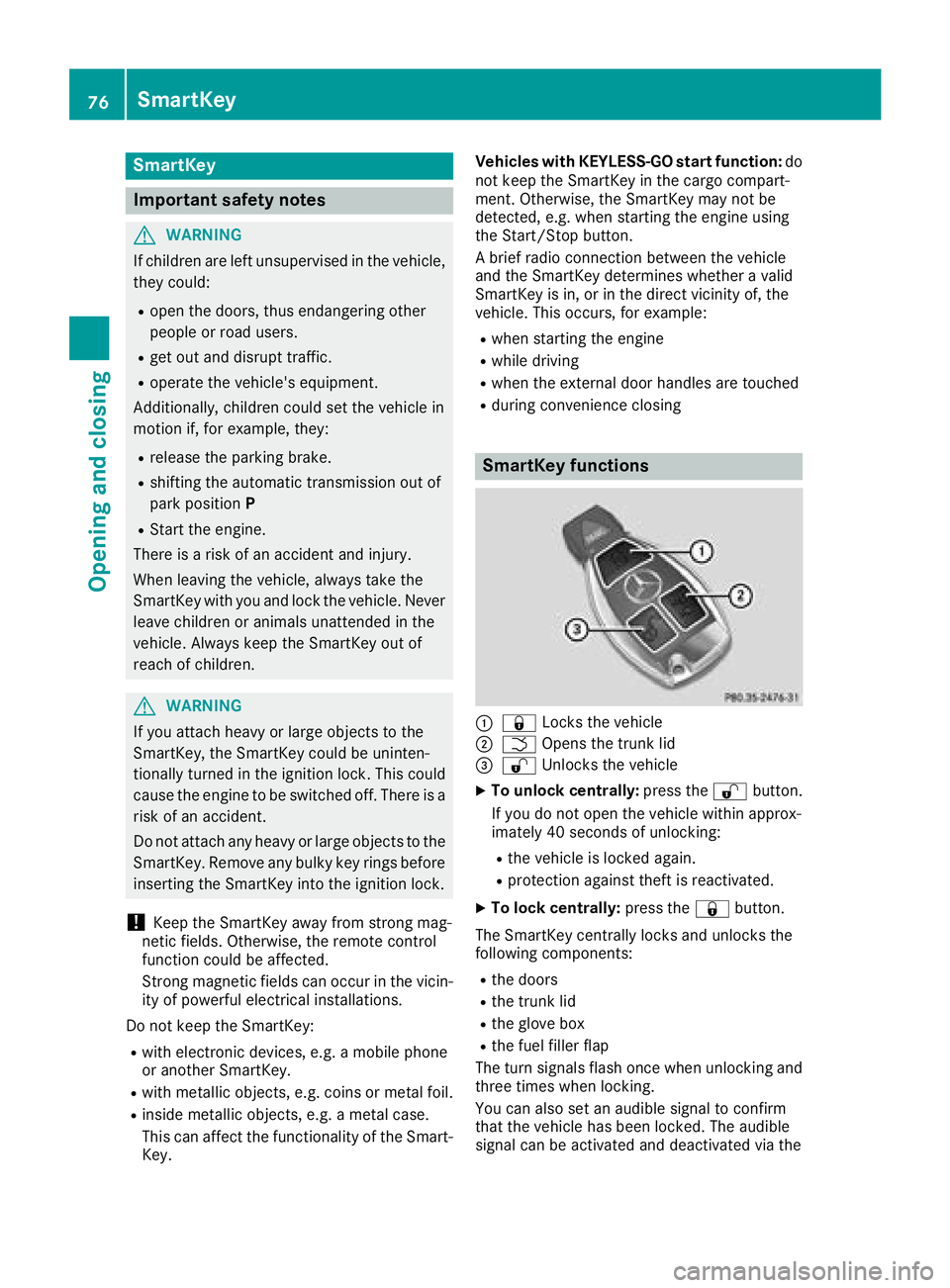
SmartKey functions
:& Locks the vehicle
;FOpens the trunk lid
=%Unlocks the vehicle
XTo unlock centrally: press the%button.
If you do not open the vehicle within approx-
imately 40 seconds of unlocking:
Rthe vehicle is locked again.
Rprotection against theft is reactivated.
XTo lock centrally: press the&button.
The SmartKey centrally locks and unlocks the
following components:
Rthe doors
Rthe trunk lid
Rthe glove box
Rthe fuel filler flap
The turn signals flash once when unlocking and
three times when locking.
You can also set an audible signal to confirm
that the vehicle has been locked. The audible
signal can be activated and deactivated via the
76SmartKey
Opening and closing
Page 124 of 350

Notes on breaking-in a new vehicle
Important safety notes
The sensor system of some driving and driving
safety systems adjusts automatically while a
certain distance is being driven after the vehiclehas been delivered or after repairs. Full system
effectiveness is not reached until the end of this
teach-in procedure.
New and replaced brake pads and discs only
reach their optimum braking effect after several hundred kilometers of driving. Compensate for
this by applying greater force to the brake pedal.
The first 1000 miles (1500 km)
The more you look after the engine when it is
new, the more satisfied you will be with its per-
formance in the future.
RYou should therefore drive at varying vehicle
and engine speeds for the first 1000 miles
(1500 km).
RAvoid heavy loads, e.g. driving at full throttle,during this period.
RWhen changing gears manually, change up in
good time, before the tachometer needle rea-
ches Ôof the way to the red area of the tach-
ometer.
RDo not manually shift to a lower gear to brake
the vehicle.
RTry to avoid depressing the accelerator pedal
beyond the pressure point (kickdown).
RAll vehicles (except Mercedes-AMG vehi-
cles): ideally, for the first 1,000 miles
(1,500 km), drive in drive program E.
Additional breaking-in notes for Mercedes-AMG
vehicles:
RDo not drive faster than 85 mph (140 km/h)
for the first 1,000 miles (1,500 km).
ROnly briefly allow the engine to reach a max-
imum engine speed of 4,500 rpm briefly.
RChange gear in good time.
RIdeally, for the first 1,000 miles (1,500 km),
drive in program C.
After 1000 miles (1500 km), you ca
n increase
the engine speed gradually and accelerate the
vehicle to full speed.
You should also observe these notes on break-
ing in if the engine or parts of the drive train on
your vehicle have been replaced. Always observe the maximum permissible
speed.
Locking rear axle differential
(Mercedes-AMG C 63/C 63 S)
Your vehicle is equipped with a self-locking dif-
ferential on the rear axle.
Change the oil to improve protection of the rear
axle differential:
Rafter a breaking-in period of 1,850 miles
(3,000 km)
Revery 31,000 miles (50,000 km) or 3 years
These oil changes prolong the service life of the
differential. Have the oil change carried out at a
qualified specialist workshop.
Driving
Important safety notes
GWARNING
Objects in the driver's footwell may restrict
the clearance around the pedals or block a
depressed pedal. This jeopardizes the oper-
ating and road safety of the vehicle. There is a risk of an accident.
Stow all objects securely in the vehicle so that
they do not get into the driver's footwell.
When using floormats or carpets, make sure
that they are properly secured so that they do not slip or obstruct the pedals. Do not place
several floormats or carpets on top of one
another.
GWARNING
Unsuitable footwear can hinder correct usage of the pedals, e.g.:
Rshoes with thick soles
Rshoes with high heels
Rslippers
There is a risk of an accident.
Wear suitable footwear to ensure correct
usage of the pedals.
122Driving
Dr iving an d parking