display MERCEDES-BENZ C-CLASS CABRIOLET 2018 Owner's Manual
[x] Cancel search | Manufacturer: MERCEDES-BENZ, Model Year: 2018, Model line: C-CLASS CABRIOLET, Model: MERCEDES-BENZ C-CLASS CABRIOLET 2018Pages: 589, PDF Size: 10.55 MB
Page 136 of 589

The
Adaptive Highbeam Assist automatically
swit ches between thefo llowing types of light:
R Low beam
R High beam
At speeds abo ve30 km/h:
R If no other road users are de tected, the high
beam will be switched on automaticall y.The high beam switches off automatically in
the
fo llowing cases:
R Atspeeds below 25 km/h.
R Ifot her road users are de tected.
R Ifstre et lighting is suf ficient.
At speeds abo veappr oximately 50 km/h:
R The headlamp range of the low beam is regu‐
lated automatically based on the dis tance to
ot her road users.
The sy stem's optical sensor is located behind
th e windscreen near theov erhead control panel.
Switching Adaptive Highbeam Assist on/off 0007
Toswitch on: turnthe light switch tothe
0058 position. 0007
Switch on the main beam using the combina‐
tion switch.
When the main beam is switched on auto‐
matically in the dar k,the 00CE indicator
lamp on the multifunction display comes on. 0007
Toswitch off: switch offthe main beam
using the combination switch. Ad
aptive Highbeam Assist Plus Ad
aptive Highbeam Assist Plus function 000A
WARNING Risk of accident despi te
Ad aptive Highbeam Assist Plus
Ad aptive Highbeam Assist Plus does not rec‐
ognise thefo llowing road users:
R Road users without lights, e.g. pedes‐
trians
R Road users with poor lighting, e.g.
cyclists
R Road users whose lighting is obstructed,
e.g. bya bar rier
On very rare occasions, Adaptive Highbeam
Assist Plus may failto recognise other road
users that ha velights, or may recognise
th em too late.
In this, or in similar situations, the automatic
main beam will not be deactivated or will be
activated despite the presence of other road
users. Light and sight
13 3
Page 138 of 589

R
If highly reflective signs are de tected, ULTRA
RANGE Highbeam is switched off au tomati‐
cally.
At speeds abo veappr oximately 50 km/h:
R The headlamp range of the low beam is regu‐
lated automatically based on the dis tance to
ot her road users.
The sy stem's optical sensor is located behind
th e windscreen near theov erhead control panel.
Switching Adaptive Highbeam Assist Plus
on/off 0007
Toswitch on: turnthe light switch tothe
0058 position. 0007
Switch on the main beam using the combina‐
tion switch.
When the main beam is switched on auto‐
matically in the dar k,the 00CE indicator
lamp on the multifunction display will light
up. 0007
Toswitch off: switch offthe main beam
using the combination switch. Setting
the dipped beam Multimedia sy
stem:
0018 Vehicle 0019
÷ Light settings
0019 Dipped-beams 0007
Select Left-side traffic orRight-side traffic. Setting
theex terior lighting switch-off delay
time Multimedia sy
stem:
0018 Vehicle 0019
÷ Light settings
0019 Exterior light shut-off 0007
Set the switch-off delay time. Setting
the sur round lighting Multimedia sy
stem:
0018 Vehicle 0019
÷ Light settings
0019 Locator lighting 0007
Activate 0073or deacti vate 0053 the function.
If th e sur round lighting is swit ched on, theex te‐
ri or lighting remains lit for 40 seconds af terthe ve
hicle is unloc ked. When youstart theve hicle,
th e sur round lighting is deactivated and the
automatic driving lights are activated. Interior lighting
Ad
justing the in terior lighting 1
003D Leftreading lamp
2 004A Inte rior lighting
3 0033 Automatic interior lighting control
4 003D Rightreading lamp 0007
Toswitch reading lamps on or off: press
button 1or4. Light and sight
13 5
Page 139 of 589
0007
Toswitch interior lighting on: press button
2 tothe left. 0007
Toswitch automatic interior lighting con‐
trol off: press button 3totheright. Ad
justing the ambient lighting Multimedia sy
stem:
0018 Vehicle 0019
÷ Light settings
0019 Ambient lighting
Setting the colour 0007
Select Colour. 0007
Set a colour.
Ad justing the brightness 0007
Select Brightness . 0007
Set a brightness value.
Ac tivating the brightness for zones 0007
Select Brightness zones .0007
Activate 0073or deacti vate 0053 the function.
The Display ,Front andRear zones can be set
separately. Setting
the interior lighting switch-off delay
time Multimedia sy
stem:
0018 Vehicle 0019
÷ Light settings
0019 Interior light shut-off 0007
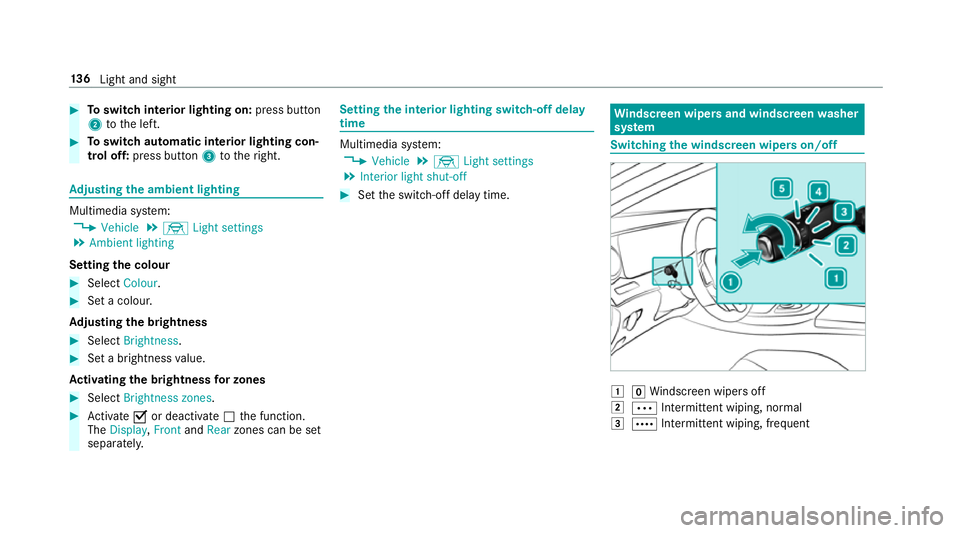
Set the switch-off delay time. Wi
ndscreen wipers and windscreen washer
sy stem Switching
the windscreen wipers on/off 0047
005AWindsc reen wipers off
0048 0062 Intermittent wiping, normal
0049 0063 Intermittent wiping, frequent 13 6
Light and sight
Page 141 of 589

Fi
tting the wiper blades 0007
Inse rtthe new wiper blade into the wiper
arm in the direction of ar row1. 0007
Slide catch 2inthe direction of ar row 3
until it engages in the locking position. 0007
Make sure that the wiper blade sits cor rectly. 0007
Foldthe wiper arms back onto the wind‐
screen. 0007
Switch the ignition on. 0007
Press the00D4 button on the combination
switch (0013 page136).
The wiper arms will mo veinto the original
position.
Maintenance display 0007
Remo veprotective film 1 from the mainte‐
nance display on the tip of the newly fitted
wiper blades.
If th e colour of the maintenance display changes
from black to yellow, the wiper blades should be
re placed.
0009 The duration until the colour changes varies
depending on the usage conditions. Mir
rors Operating
the outside mir rors 000A
WARNING Risk of inju rythro ugh adjust‐
ing vehicle settings while theve hicle is in
motion
Yo u could lose cont rol of theve hicle in the
fo llowing situations:
R ifyo u adjust the driver's seat, the head
re stra ints, thesteering wheel or the mir‐
ro r while theve hicle is in motion
R ifyo ufast enyour seat belt while theve hi‐
cle is in motion 13 8
Light and sight
Page 147 of 589

Switch off
the A/C function only brief ly;ot her‐
wise, the windo wsmay mist up more quickl y.
Condensation may drip from the underside of
th eve hicle when cooling mode is active. This is
not a sign that there is a malfunction. Setting climate control
toautomatic mode In auto
matic mode, the set temp erature is con‐
trolled and maintained at a const ant levelby the
air suppl y. 0007
Press the 0058 button. 0007
Toswitch tomanual mode: pressthe 002D
or 008F button. Overview of
the air distribution settings The symbols on
the display indicate which vents
th e air flow is being directed thro ugh:
0061 def
rost ervents
009C centre and side air
vents
009B fo
ot we llve nts
009F centre, side and
foot we llve nts 0086
defros
ter and foot we llve nts
008F all
vents
0087 defros
ter,middle and side air vents
00A2 au
tomatic air distribution Ac
tivating/deactivating the climate control
syn chro nisation function via the control
panel The climate control can be operated centrally
using
the synchronisation function. The temp era‐
ture and air distribution setting forth e driver
side is adop ted automatically forth e front
passenger side. 0007
Press the 0015 button.
The synchronisation function is deactivated if
th e settings for one of theot her climate zones
are changed. Demisting
the windo ws Wi
ndo wsmis ted up on the inside 0007
Press the0058 button. 0007
Ifth e windo wscontinue tomist up: press the
0064 button.
Wi ndo wsmis ted up on the outside 0007
Switch on the windscreen wipers. 0007
Press the0058 button. Switching air-recirculation mode on/off
0007
Press the0072 button.
The interior air will be recirculated.
Air-reci rculation mode automatically swit ches to
fresh air mode af ter some time.
0009 If air-recirculation mode is switched on, the
windo wsmay mist up more quickl y.Switch
on ai r-re circulation mode only brie fly. 14 4
Climate cont rol
Page 151 of 589

0007
Toswitch on the po wer supp ly:press but‐
to n1 once.
yo u can activate the windscreen wiper, for
ex ample.
The po wer supp lyis switched off again if thefo l‐
lowing conditions are me t:
R you open the driver's door
R you press but ton1 twice. 0007
Toswitch on the ignition: press button 1
twice.
The indicator lamps in the instrument clus ter
light up.
The ignition is switched off again if one of the
fo llowing conditions is me t:
R vehicles with automatic transmission:you
do not start theve hicle within 15minutes
and the transmission is in position 005Dorthe
electric parking brake is applied.
R vehicles with manual transmission: you do
not start theve hicle within 15minutes and
th e electric parking brake is applied.
R you press but ton1 once. St
arting theve hicle St
arting theve hicle with thest art/s top but‐
ton
Requ irements:
R theke y is in theve hicle and is recognised. R
or: a Digi talVe hicle Key is located in the
mar ked space and is recognised
(0013 page 149). 0007
Vehicles with manual transmission:
depress the clutch pedal. 0007
Vehicles with automatic transmission:
shift the transmission toposition 005Dor005C. 0007
depress the brake pedal and press button 1
once. 0007
Ifth eve hicle does not star t:switch off non-
essential consumers and press button 1
once.
If th eve hicle still does not start, one of thefo l‐
lowing display messages appears in the multi‐
function display: 0007
Place the key in the marked space See Own-
er's Manual :st art theve hicle in emer gency
operation mode (0013 page 150).
or 0007
Key not detected Place smartphone in charg-
ing bracket: place the mobile phone in the
mar ked space (0013 page125). 14 8
Driving and pa rking
Page 158 of 589

If
yo u swit chon the HOLD function or select a
transmission position other than 005E, the engine
will automatically stop in thefo llowing situa‐
tions:
R youstop behind a vehicle that is pulling
aw ay.
R youstop at a stop sign when there is no vehi‐
cle in front of you.
R you turn thesteering wheel hard at a low
speed.
The engine is restar ted automatically if:
R vehicles with manual transmission: you
depress the clutch pedal.
R vehicles with automatic transmission: in
transmission position 005B,youre lease the
brake pedal when the HOLD function is not
active.
R vehicles with automatic transmission:
yo u shift into transmission position 005Bor
005E.
R you depress the accelera tor pedal.
R you open or close the soft top. R
an automatic engine start is necessar y.
If th e engine was switched off bythe ECO start/
st op function and you lea vetheve hicle, a warn‐
ing tone sounds and the engine is not restar ted.
The display message Vehicle is operational
Switch off the ignition before exiting also
appears in the multifunction displa y.Ifyo u do
not swit choff the ignition, the ignition is auto‐
matically switched off af terth re e minutes.
Ve hicles with a 48 V on-board electrical sys‐
te m (EQ Boo sttech nology)
The engine is switched off automatically in the
fo llowing situations if all vehicle conditions for
an automatic engine stop are me t:
R you brake theve hicle toast andstill in trans‐
mission position 005Bor005C.
R you depress the brake pedal while tra velling
at a low speed.
If yo u swit chon the HOLD function or select
ano ther transmission position 005E,the engine will
automatically stop in thefo llowing situations:
R youstop behind a vehicle that is pulling
aw ay. R
youstop at a stop sign when there is no vehi‐
cle in front of you.
R you turn thesteering wheel hard at a low
speed.
The engine is restar ted automatically if:
R youre lease the brake pedal in transmission
position 005Bwhen the HOLD function is not
active and one of thefo llowing conditions is
given:
- the drive program Aor; is not
selected
- the drive prog ram A or; is selec‐
te d but theve hicle does not start to
mo ve.
- the drive program Aor; is selec‐
te d, theve hicle mo ves at a speed of more
th an 20 km/h and Glide mode is not acti‐
va ted.
R you en gage transmission position 005Bor005E.
R youre lease the brake pedal, theve hicle is
not in Glide mode and it starts tomo veon a
ge ntle downhill gradient at a speed below
3 km/h. Driving and pa
rking 15 5
Page 159 of 589

R
you depress the accelera tor pedal.
R an auto matic engine start is necessar y.
If th e engine was switched off bythe ECO start/
st op function and you lea vetheve hicle, a warn‐
ing tone sounds and the engine is not star ted
again. The display message Vehicle is opera-
tional Switch off the ignition before exiting also
appears in the multifunction displa y.Ifyo u do
not swit choff the ignition, the ignition is auto‐
matically switched off af terth re e minutes. Deactivating or activating
the ECO start/
sto p function 0007
Press button 1.
If indicator la mp2lights up, the ECO start/
st op function is activated.
0009 Depending on the model and theve hicle
equipment, the button may also be located
at a dif fere nt position in the cent reconsole. ECO displ
ayfunction The ECO display summa
rises the driving charac‐
te rist ics from thest art of the journey toits com‐
pletion and assists you in achieving the most
economical driving style.
Yo u can influence consum ption if you:
R drive with particular care
R drive theve hicle in drive program ;
R obser vethege arshift recommendations The inner segment lights up and
the outer seg‐
ment fills up:
R 1 Moderate acceleration 15 6
Driving and pa rking
Page 160 of 589

R
2 Gentle deceleration and rolling
R 3 Consis tent speed
The inner segment does not light up and the
outer segment em pties:
R 1 Sporty acceleration
R 2 Heavy braking
R 3 Fluctuations in speed
Yo u ha vedriven economically when:
R theth re e outer segments are comple tely fil‐
led simultaneously
R the ECO display lights up
The additional range achi eved as a result of your
driving style in comparison with a driver with a
ve ry sporty driving style is shown under Bonus
from start. The range displ ayed does not indicate
a fixe dre duction in consum ption. ECO Assist function
Ve
hicles with a 48 V on-board electrical sys‐
te m (EQ Boo sttech nology): ECO Assist analyses data
forth eve hicle's expec‐
te dro ute. This allo wsthe sy stem tooptimally
adjust the driving style fo rth ero ute ahead, sa ve
fuel and recuperate. If the sy stem de tects an
eve nt ahead, e.g. a speed limit or a roundabout,
it will appear on the multifunction displa y.The
fo llowing symbols can be displa yed: Not all
events can be displa yed, depending on the
engine type. 1
Event ahead
2 Distance totheeve nt ahead
3 "Foot off the accelerator" prom pt
A di fferent number of segments 2will light up
around the symbol depending on the dis tance to
th eeve nt ahead:
R Few segments: theev ent ahead is near.
R Many segments: theev ent ahead is fur ther
aw ay.
The "Foot off the accelerator" symbol 3will
appear on the multifunction display as well as
th e "Event ahead" symbol 1. In drive pro‐
gram ;, the "Foot off the accelera tor" sym‐ Driving and parking
157
Page 161 of 589

bol
3will also appear on the head-up display
beside the transmission displa y.
When theve hicle nears an event, ECO Assist will
calculate the optimal speed for maximum fuel
economy and recuperati veenergy based on the
dis tance, speed and downhill gradient. The "Foot
off the accelera tor" 3 symbol will appear on
th e multifunction displa y.
If th e driver lifts off the accelera tor pedal in
good time, there maining segments on the dis‐
play will turn green until theev ent shown is
re ached. The driv etra in will be set for maximum
fuel econom y.The vehicle will coast, with the
combustion engine switched off if necessar y,
and recuperate on its own using the electric
mo tor.Re cuperation will charge the batter y.
If th ere is no response tothe "Foot off the accel‐
erator" 3prom pt,th e segments will remain
white.
The event will be shown for a short time af ter it
has been passed.
If th eeve nt in volves a vehicle ahead and when
th e coast-down recommendation is given, all
segments will immediately turn green once there is a
response tothe "Foot off the accelerator"
3 prom pt.
If th e sy stem does not inter vene du ring the
eve nt ahead, no thing will be displa yed. The sys‐
te m is passive.
ECO Assist is active only in drive program ;
(maximum recuperation) and A(reduced
re cuperation).
Ve hicles with a 48 V on-board electrical sys‐
te m (EQ Boo sttech nology): in drive program
A, only theeve nt "Vehicle ahead" is dis‐
pl ay ed.
Sy stem limitations
ECO Assist can function more precisely if the
ro ute is main tained when route guidance is
active. The basic function is also available with‐
out active route guidance. Notall information
and traf fic situations can be fore seen. The qual‐
ity depends on the map data.
ECO Assist is only an aid. The driver is responsi‐
ble forke eping a safe dis tance from theve hicle
in front, forve hicle speed and for braking in
good time. The driver must be ready tobrake at all times ir
respective of whe ther the sy stem
inter venes.
The sy stem may be impaired or may not function
in thefo llowing situations:
R Ifth ere is poor visibility, e.g. due toinsuf fi‐
cient illumination of thero ad, high lyvariable
shade conditions, rain, sno w,fog or heavy
spr ay.
R Ifth ere is glare, e.g. from oncoming traf fic,
di re ct sunlight or reflections.
R Ifth ere is dirt on the windscreen in the vicin‐
ity of the multifunction camera or the camera
is mis ted up, damaged or obscured.
R Ifth e traf fic signs are ha rdtodetect, e.g. due
to dirt or snow or insuf ficient lighting, or
because they are obscured.
R Ifth e information on the navigation sy stem's
digital map is incor rect or out of da te.
R Ifth e signs are ambiguous, e.g. traf fic signs
in roadwor ksor in adjacent lanes. 15 8
Driving and pa rking