display MERCEDES-BENZ C-CLASS CABRIOLET 2018 User Guide
[x] Cancel search | Manufacturer: MERCEDES-BENZ, Model Year: 2018, Model line: C-CLASS CABRIOLET, Model: MERCEDES-BENZ C-CLASS CABRIOLET 2018Pages: 589, PDF Size: 10.55 MB
Page 42 of 589
Ac
tivating/deactivating seat belt adjustment
via the multimedia sy stem Multimedia sy
stem:
0018 Vehicle 0019
î Vehicle settings
0019 Belt adjustment 0007
Activate 0073or deacti vate 0053 the function. Seat belt
warning function for the driver and
front passen ger The
00E9 seat belt warning lamp in the instru‐
ment display is a reminder that all vehicle occu‐
pants must weartheir seat belts cor rectly.
In addition, a warning tone may sound.
As soon as the driver and front passenger fasten
th eir seat belts, the seat belt warning goes out. Fu
nction of there ar seat belt status display The
rear seat belt status display is on lyavailable
fo r cer tain countries. The
rear seat belt status display informs you
which rear seat belt is not fastened.
Yo u can immediately dismiss there ar seat belt
st atus display using the back button on the left-
hand side of thesteering wheel
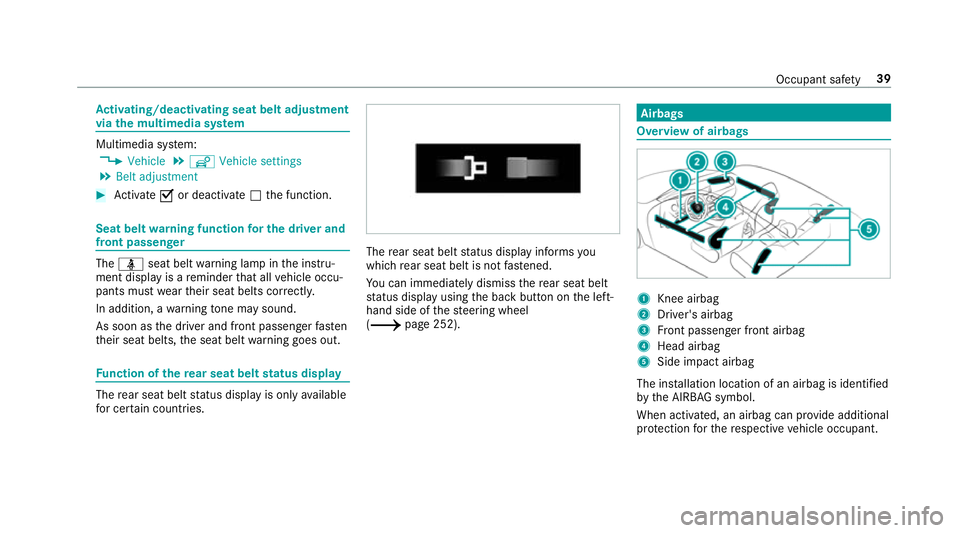
(0013 page 252). Airbags
Overview of airbags
1
Knee airbag
2 Driver's airbag
3 Front passenger front airbag
4 Head airbag
5 Side impact airbag
The ins tallation location of an airbag is identified
by the AIRB AGsymbol.
When activated, an airbag can pr ovide additional
pr otection forth ere spective vehicle occupant. Occupant saf
ety39
Page 47 of 589

play
thest atus of the front passenger front air‐
bag.
Alw ays obser vethe no tes on the function of the
PA SSENGER AIR BAG indicator lamps
(0013 page44).
Fu nction of thePA SSENGER AIR BAG indica‐
to r lamps Ve
hicles without automatic front passenger front
airbag shutoff ha vea special sticke r af fixe dto
th e side of the cockpit on the front passenger
side (0013 page71).
Self-test of automatic front passenger front
airbag shutoff
When the ignition is switched on, a self-test is
per form ed during which the two PASSENGER
AIR BAG ON and OFF indicator lamps light up
simul taneously.
The status of the front passenger front airbag is
displa yed af terth e self-tes t:
R PASSENGER AIR BAG ON lights up for
60 seconds, subsequently bo thindicator
lamps are off (PASSENGER AIR BAG ON and
OFF): the front passenger front airbag is able
to deploy in theeve nt of an accident.
R PASSENGER AIR BAG OFF lights up continu‐
ously: the front passenger front airbag is dis‐
abled. It will then not be deplo yed in the
eve nt of an accident.
If th ePA SSENGER AIR BAG ON indicator lamp is
off, on lythePA SSENGER AIR BAG OFF indicator
lamp sho wsthest atus of the front passenger front airbag. The
PASSENGER AIR BAG OFF indi‐
cator lamp may be lit continuously or be off.
If th ePA SSENGER AIR BAG OFF indicator lamp
and the0075 restra int sy stem warning lamp
light up simultaneousl y,the front passenger seat
may not be used. Also in this case, do not fit a
ch ild restra int sy stem tothe front passenger
seat. Ha veautomatic front passenger front air‐
bag shutoff checked and repaired immediately at
a qu alified specialist workshop.
St atus display
If th e front passenger seat is occupied, ensure,
bo th before and during the journe y,that thest a‐
tus of the front passenger front airbag is cor rect
fo rth e cur rent situation.
Af terfitting a rear wa rd-facing child restra int
sy stem tothe front passenger seat:
PA SSENGER AIR BAG OFF must be lit continu‐
ousl y. 44
Occupant saf ety
Page 93 of 589

000E
NO
TEPossible damage tothe soft top
when opening or closing The soft
top can be damaged when opening
or closing. 0007
Make sure there is suf ficient clearance
ab ove it. 0007
Only load the boot below the boot sepa‐
ra tor so that it will not be pushed
upwards. 0007
Make sure that the boot lid is closed. 0007
Ifth e soft top is dirty, wet or frozen, do
not open the soft top. 000E
NO
TEDama getothe soft top caused by
heavy objects Heavy objects placed on
the soft-to p com‐
partment co ver can dama gethe soft top or
soft-to p compartment co ver. 0007
Do not place he avy objects on the soft-
to p compartment co ver. 0007
Do not sit on the soft-to p compartment
co ver. Fo
r saf etyre asons, Mercedes-Benz recommends
opening or closing the soft top when theve hicle
is stationar y.
To open or close the soft top while you are driv‐
ing, do not exceed a maximum speed of
50 km/h. Toavo id inter rupting the closing proc‐
ess while you are slightly exceeding this speed,
do not drive at a speed greater than 60 km/h. 0007
Make sure that the boot separator is closed. 0007
Close the boot lid. 0007
Switch on the ignition. 0007
Keep the brake pedal depressed when the
ve hicle is stationar y. 0007
Toopen: pull and hold the soft-to p switch
1 until the soft top is fully opened.
The multifunction display sho wsthe opening
process of the soft top. 0007
Toclose: press and hold the soft-to p switch
1 until the soft top is fully closed.
The multifunction display sho wsthe closing
process of the soft top. 90
Opening and closing
Page 94 of 589

000A
WARNING Risk of accident due to
exc essive speed during the soft-top
opening or closing procedure
If th eve hicle speed exceeds 60 km/h, the
soft topstops during the opening or closing
procedure.
This impairs your view tothere ar. 0007
Reduce theve hicle speed tobelow
60 km/h or stop theve hicle, paying
attention toroad and traf fic conditions. 0007
Ope rate the soft-to p switch again in
order toopen or close the soft top full y. The cur
rent procedu reisstopped at a speed
abo ve60 km/h. The Open/close top completely
messa gewill be shown on the multifunction dis‐
pla y. 0007
Reduce your speed and press or pull the soft-
to p switch 1again.
If th e soft top does not close fully because of
stro ng headwinds, drive more sl owly or stop. Re
locking the soft top 000A
WARNING Risk of becoming trapped
due tothe soft top lo wering unexpect‐
ed ly
If yo u do not fully open/close the soft top,
th e soft-to phy draulics depressurise af ter a
short time.
This causes the soft topto lowe r unexpect‐
edly and may cause you or others tobe trap‐
ped. 0007
Alw ays fully open or close the soft top. If
th e soft top has not been comple tely lo cked,
th e multifunction display sho ws theOpen/close
top completely message. In addition, you will
hear a warning tone for up toten seconds while
driving. 0007
Reduce theve hicle speed tobelow 60 km/h
or stop theve hicle, paying attention toroad
and traf fic conditions. 0007
Ope rate the soft-to p switch again toopen or
close the soft top full y. Opening and closing
the boot sepa rator The boot separator co
vers luggage or loads in
th e boot.
Depending on the equipment, theve hicle may be
equipped with a manual or partially electric boot
separator.
The soft top can be opened only when the man‐
ual boot separator is closed.
In vehicles with a partially electric boot separa‐
to r,th is automatically closes when the soft top
is opened.
000E NO
TEDama getothe soft top or load
due tolong objects The soft
top or load may be damaged with
th e soft top open. 0007
Do not place any overly long objects
inside or behind the side luggage nets
when the boot separator is open. 0007
Make sure that the load does not push
th e boot separator upwards. Opening and closing
91
Page 110 of 589

0007
Tofold forw ards: pullthe seat release han‐
dle 1and fold the seat backrest forw ards
as far as it will go.
The seat will mo veautomatically tothefo re‐
most position. 0007
Tofold back: swing back the seat backrest
horizon tally.
If th e seat backrest is not engaged, this will
be shown on the multifunction display of the instrument clus
ter.A wa rning tone will also
sound.
The seat will mo veautomatically tothe
st ored position.
If th e set seat position can no longer be reached,
e.g. because of luggage in there ar foot we ll or
af te r occupants ha veentered there ar of the
ve hicle: 0007
Pull the seat release handle 1again and
re turn the seat backrest toan upright posi‐
tion.
The seat will lock in the new fore -and-aft
position. Fo
lding the front seat backrest forw ards/
backwards (vehicles with out memory func‐
tion) Fo
lding forw ards
Wi th th e EASY -ENTRY function, the seat will
mo veforw ards if you ha vefolded the seat back‐
re st forw ards. This makes it easier for passen‐
ge rs to get into and out of there ar of theve hi‐
cle. 0007
If necessar y,release the head restra int and
push it down. 0007
Pull the seat release handle 1and fold the
seat backrest forw ards until the seat back‐
re st engages. 0007
Push the seat as farfo rw ards as it will go. Seats and
stowing 107
Page 111 of 589

Fo
lding back 0007
Push the seat back horizon tally by the seat
backrest until it reaches the seat position
th at wa s pr eviously set. 0007
Foldthe seat backrest back until it engages.
Do so as smoo thly as possible.
If th e seat backrest is not engaged, this will
be shown on the multifunction display of the
instrument clus ter.A wa rning tone will also
sound. 0007
Afterth e seat backrest has been folded
bac k,check the position of the head restra int
and set it tothe cor rect position.
If th e set seat position can no longer be reached,
e.g. because of luggage in there ar foot we ll or
af te r occupants ha veentered there ar of the
ve hicle: 0007
Pull the seat release handle 1again and
re turn the seat backrest toan upright posi‐
tion.
The seat will lock in the new fore -and-aft
position. Switching the seat heating on/o
ff 000A
WARNING Risk of bu rns due torepeat‐
edly switching on the seat heater
Re peatedly switching on the seat heater can
cause the seat cushion and seat backrest
padding tobecome very hot.
The health of persons with limited temp era‐
ture sensitivity or a limited ability toreact to
high temp eratures may be af fected or they
may even su ffer burn-like injuries. 0007
Do not repeatedly switch on the seat
heater. To
protect against overheating, the seat heating
may be temp orarily deactivated af ter it is
switched on repeatedly.
000E NO
TEDama getothe seats caused by
objects or documents when the seat
heater is switched on When
the seat heater is switched on, over‐
heating can occur due toobjects or docu‐ ments placed on
the seats e.g. seat cushions
or child seats. This could cause damage to
th e seat sur face. 0007
Makesure that no objects or docu‐
ments are on the seats when the seat
heater is switched on. Re
quirements:
R the po wer supp lyis switched on 108
Seats and stowing
Page 117 of 589

0007
When leaving theve hicle, alw aysta ke
th eke y with you and lock theve hicle.
This also applies tothe digital vehicle
ke y if the "Digital Vehicle Key" function
is activated via Mercedes me connect. The memory function can be used when
the igni‐
tion is switched off.
St oring
Seat adjustments for up tothre e people can be
st ored and called up using the memory function.
The following sy stems can be selected:
R Seat, backrest and head restra int
R Steering wheel
R Outside mir rors
R Head-up display 0007
Set the seat, thesteering wheel, the head-up
display and the outside mir rors to the
desired position. 0007
Press memory button M and then press pre‐
set position button 1,2 or 3 within thre e sec‐
onds.
An acoustic signal sounds. The settings are
st ored. 0007
Tocall up: press and hold there leva nt pre‐
set position button 1,2 or 3 until the front
seat, thesteering wheel, head-up display and
outside mir ror are in thestored position.
0009 When youre lease the preset position button,
st eering wheel, the seat and mir ror setting
functions stop immediatel y.The head-up dis‐
play continues tobe adjus ted. St
ow age areas Note
s on loading theve hicle 000A
DANG ER Risk of exhaust gas poisoning
Combustion engines emit poisonous exhaust
ga ses such as carbon monoxide. Exhaust
ga ses can enter theve hicle interior if the
boot lid is open when the engine is running,
especially if theve hicle is in motion. 0007
Alw ays switch off the engine before
opening the boot lid. 0007
Never drive with the boot lid open. 11 4
Seats and stowing
Page 120 of 589

wa
rds, e.g. when braking suddenly or in the
ev ent of an accident.
R Ifth is is the case, theve hicle occupant
wo uld be forc ed into the seat belt bythe
re ar ben chseat/rear seat or bythe seat
backrest. The seat belt cann otprotect as
intended and could result in additional
injur y.
R Objects or loads in the boot/load com‐
partment cann otbe restra ined bythe
seat backrest. 0007
Make sure that the seat backrest and
th ere ar ben chseat/rear seat are
engaged before everytrip. If
th e left and right seat backrests are not
engaged and loc ked, this will be shown on the
multifunction display of the instrument clus ter. A
wa rning tone will also sound.
The seat ba ckrests can be folded forw ards sepa‐
ra tely. 0007
Vehicles without a memory function:
mo vethe driver's or front passenger seat for‐
wa rds, if necessar y. 0007
Vehicles with a memory function: if at
lea stone section of there ar seat backrest is
fo lded forw ards, the cor responding front seat
will mo veforw ards slightl y,if necessar y,to
av oid a collision. 0007
Left and right seat backres t:pull the but‐
to n on theright or left 1.
The cor responding rear seat backrest will be
unlo cked. 0007
Foldthe cor responding seat backrest 2for‐
wa rds. 0007
If necessar y,reset the driver's or front
passenger seat. Seats and
stowing 117
Page 121 of 589

Fo
lding there ar seat backrest back
000E NO
TEDama getothe seat belt The seat belt could become trapped and
thus
damaged when folding back the seat back‐
re st. 0007
Make sure that the seat belt is not trap‐
ped when folding back the seat back‐
re st. 0007
Movethe driver's or front passenger seat for‐
wa rds, if necessar y. 0007
Foldthe cor responding seat backrest 1
back until it engages.
Left and right seat backrests: ifth e seat
backrest is not engaged and loc ked, this will
be shown on the multifunction display on the
instrument clus ter.
A wa rning tone will also sound. Overvi
ewofthe tie-down eyes Obser
vethe no tes on loading theve hicle
(0013 page114). 1
Tie-down eyes Hooking
the luggage net 000A
WARNING Risk of inju rydue toobjects
being stowed incor rectly
If yo u inadequately stowobjects in theve hi‐
cle interior, they could slip or be tossed 11 8
Seats and stowing
Page 128 of 589

000E
NO
TEDama getoobjects caused by
placing them in the mobile phone stow‐
age compartment If objects are placed in
the mobile phone
stow age compartment, they may be dam‐
aged byelectromagnetic fields. 0007
Do not place credit cards, storage
media or other objects sensitive to
electromagnetic fields in the mobile
phone stowage compartment. 000E
NO
TEDama getothe mobile phone
stow age compartment caused byliquids If liquids enter
the mobile phone stowage
compartment, the compartment may be
damaged. 0007
Ensure that no liquids enter the mobile
phone stowage compartment. R
Depending on theve hicle equipment, the
mobile phone is connected totheve hicle's
ex terior aerial via thech arging module. R
The charging function and wireless connec‐
tion of the mobile phone totheve hicle's
ex terior aerial are only available if the ignition
is switched on.
R Small mobile phones may not be able tobe
ch arge d in everyposition of the mobile
phone stowage compartment.
R Largemobile phones which do not rest flat in
th e mobile phone stowage compartment may
not be able tobe charge d or connec ted with
th eve hicle's exterior aerial.
R The mobile phone may heat up during the
ch arging process. This may also depend on
th e applications (apps) cur rently open.
R Toensure more ef ficient charging and con‐
nection with theve hicle's exterior aerial,
re mo vethe pr otective co ver from the mobile
phone. Pr otective co vers which are neces‐
sary for wireless charging are excluded. Wire
lesscharging of the mobile phone Re
quirements:
R The mobile phone is suitable for wireless
ch arging. You can find a li stof compatible
mobile phones at:
http://www.mercedes-benz.com/connect 0007
Place the mobile phone as close tothe
centre of mat 1as possible wi th the display
fa cing up wards.
When thech arging symbol is shown in the
multimedia sy stem, the mobile phone is
being charge d. Seats and
stowing 12 5