alarm MERCEDES-BENZ C-CLASS CABRIOLET 2018 Owners Manual
[x] Cancel search | Manufacturer: MERCEDES-BENZ, Model Year: 2018, Model line: C-CLASS CABRIOLET, Model: MERCEDES-BENZ C-CLASS CABRIOLET 2018Pages: 589, PDF Size: 10.55 MB
Page 78 of 589
If
th eve hicle is not opened within appr oximately
40 seconds af ter unlocking, it loc ksagain. Anti-
th eft pr otection is primed again.
Do not keep theke yto ge ther with electronic
devices or me tal objects. This can af fect the
ke y's functionalit y.
0009 If battery check lamp 2does not light up
af te r pressing the0036 or0037 button, the
battery is dischar ged.
Re placing theke y bat tery ( 0013 page76). Ac
tivating/deactivating the acoustic lo cking
ve rification signal Multimedia sy
stem:
0018 Vehicle 0019
î Vehicle settings
0019 Acoustic lock 0007
Activate 0073or deacti vate 0053 the function. Ac
tivating/deactivating the panic alarm Re
quirements:
R The ignition is switched off 0009
The panic alarm function is only available in
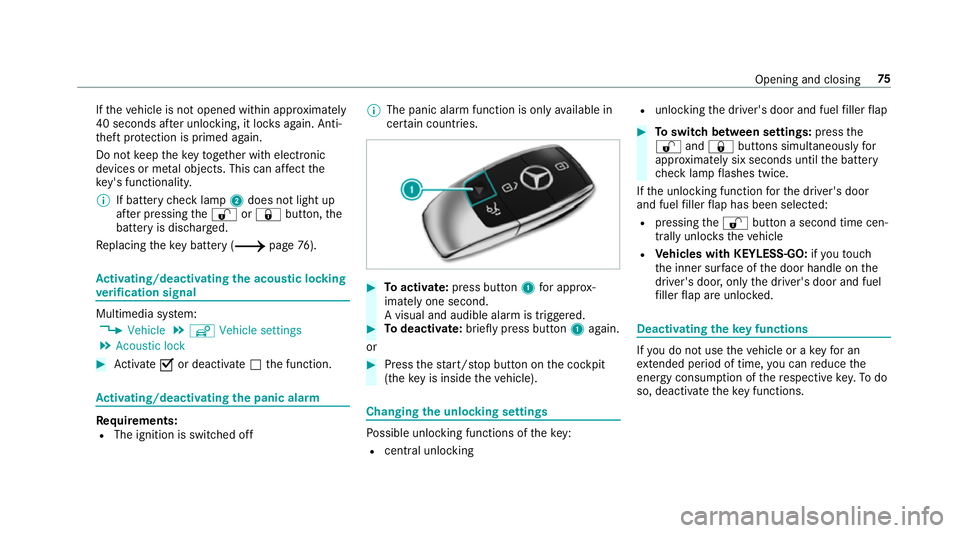
cer tain countries. 0007
Toactivate: press button 1for appro x‐
ima tely one second.
A visual and audible alarm is triggered. 0007
Todeactivate: briefly press but ton1 again.
or 0007
Press thest art/ stop button on the cockpit
(the key is inside theve hicle). Changing
the unlocking settings Po
ssible unlocking functions of theke y:
R cent ral unlocking R
unlocking the driver's door and fuel filler flap 0007
Toswitch between settings: pressthe
0036 and0037 buttons simultaneously for
appr oximately six seconds until the battery
ch eck lamp flashes twice.
If th e unlocking function forth e driver's door
and fuel filler flap has been selec ted:
R pressing the0036 button a second time cen‐
trally unloc kstheve hicle
R Vehicles with KEYLESS-GO: ifyo uto uch
th e inner sur face of the door handle on the
driver's door, only the driver's door and fuel
fi ller flap are unlo cked. Deactivating
theke y functions If
yo u do not use theve hicle or a keyfo r an
ex tended pe riod of time, you can reduce the
energy consum ption of there spective key.Todo
so, deactivate theke y functions. Opening and closing
75
Page 99 of 589
Problem
Possible causes/consequences and 0050
0050Solutions
The soft top has been opened and closed se veral times in a row. The soft-top drive has been switched off
au tomatical lyand will be available again af ter appro ximately ten minu tes. 0007
Repeat the opening or closing procedure af ter appro ximately ten minu tes.
The boot separator is not closed. 0007
Remo ve ov erhanging luggage and close the boot separator.
The boot lid is open. 0007
Close the boot lid (0013 page84).
The mechanical soft-to p components or control sy stem are defective. 0007
Consult a qualified specialist workshop.
Yo u are driving at a speed greaterth an 60 km/h. 0007
Reduce your speed tobelow 60 km/h. Anti-theft pr
otection Fu
nction of the immobiliser The immobiliser pr
events your vehicle from
being star ted without the cor rect key. The immobiliser is automatically activated when
th e ignition is switched off and deactivated when
th e ignition is switched on. ATA
(Anti-Theft Alarm sy stem) Fu
nction of theATA system
If th eATA system is primed, a visual and audible
alarm is triggered in thefo llowing situations:
R when a door is opened 96
Opening and closing
Page 100 of 589

R
when the boot lid is opened
R when the bonn etis opened
R when interior pr otection is triggered
(0013 page 98)
R when tow- aw ay protection is triggered
(0013 page97)
The ATA sy stem is primed automatically af ter
appr oximately ten seconds in thefo llowing situa‐
tions:
R afte r locking theve hicle with thekey
R afte r locking theve hicle using KEYLESS-GO Indicator lamp
1flashes when theAT A sy stem
is primed.
The ATA sy stem is deactivated automatically in
th efo llowing situations:
R afte r unlocking theve hicle with thekey
R afte r pressing thest art/ stop button with the
ke y in thestow age compartment
(0013 page150) R
afte r unlocking theve hicle using KEYLESS-
GO
0009 When the Mercedes‑Benz emer gency call
sy stem is active and the alarm stay s on for
more than 30 seconds, a message is auto‐
matically sent tothe Cus tomer Assis tance
Centre (0013 page 350).
Deactivating theATA 0007
Press the0036, 0037or008B button on the
key.
or 0007
Press thest art/ stop button with theke y in
th estow age compartment (0013 page150)
Deactivating the ala rmusing KEYLESS-GO: 0007
Grasp the outside door handle with thekey
outside theve hicle. Fu
nction of tow- aw ay protection An audible and visual alarm is triggered if an
alteration
to yourvehicle's angle of inclination is
de tected while tow- aw ay protection is primed. Opening and closing
97
Page 101 of 589

To
w- aw ay protection is automatically primed
af te r about 60 seconds:
R afte r locking theve hicle with thekey
R afte r locking theve hicle using KEYLESS-GO
To w- aw ay protection is only primed when thefo l‐
lowing components are closed:
R the doors
R the boot lid
To w- aw ay protection is automatically deactiva‐
te d:
R afte r pressing the0036 or008B button on
th ekey
R afte r pressing thest art/ stop button with the
ke y in thestow age compartment
(0013 page150)
R afte r unlocking theve hicle using KEYLESS-
GO
Information on de tecting damage on a pa rked
ve hicle (0013 page182). Priming/deactivating
tow- aw ay protection Multimedia sy
stem:
0018 Vehicle 0019
î Vehicle settings
0019 Tow-away protection 0007
Activate 0073or deacti vate 0053 the function.
To w- aw ay protection is primed again in thefo l‐
lowing cases:
R The vehicle is unloc ked again.
R A door is opened.
R The vehicle is loc ked again. Fu
nction of interior pr otection When interior pr
otection is primed, a visual and
audible alarm is triggered if mo vement is de tec‐
te d in theve hicle interior.
Interior pr otection is primed automatically af ter
appr oximately ten seconds:
R afte r locking theve hicle with thekey
R afte r locking theve hicle using KEYLESS-GO Interior pr
otection is only primed when thefo l‐
lowing components are closed:
R the doors
R the boot lid
Interior pr otection is automatically deactivated:
R afte r pressing the0036 or008B button on
th ekey
R afte r pressing thest art/ stop button with the
ke y in thestow age compartment
(0013 page150)
R afte r unlocking theve hicle using KEYLESS-
GO
The following situations can lead toafa lse
alarm:
R moving objects such as masc ots in theve hi‐
cle interior
R when the side window is open 98
Opening and closing
Page 154 of 589

If
yo ustart theve hicle via your smartphone, the
pr ev iously selec ted air conditioning adjustment
is active.
Ensure thefo llowing before starting the engine:
R the legal stipulations in the area where your
ve hicle is par ked allow engine starting via
smartphone.
R it is safe tostart and runth e engine where
yo ur vehicle is par ked.
R the fuel tank is su fficiently filled.
R thest ar ter battery is suf ficiently charge d.
0009 You can also set thete mp erature with your
smartphone. In form ation on Mercedes me
connect and other services: http://
www.mercedes.me
This function is not available for all models.
Charging the bat tery before commencing
yo ur journey
R Ifth eve hicle battery is discharged, you
re cei vea message on your smartphone.
R You can then start theve hicle with the
smartphone tocharge the batter y. R
The vehicle is automatically switched off
af te rte n minu tes.
Ensure thefo llowing before starting the engine:
R the legal stipulations in the area where your
ve hicle is par ked allow engine starting via
smartphone.
R it is safe tostart and runth e engine where
yo ur vehicle is par ked.
R the fuel tank is su fficiently filled.
St arting theve hicle 000A
WARNING Risk of crushing or entrap‐
ment due tounin tentional starting of the
engine
Limbs could be crushed or trapped if the
engine is star ted unintentionally during
service or maintenance work. 0007
Alw ays secure the engine against unin‐
te ntional starting before car rying out
maintenance or repair work. Re
quirements:
R park position 005Dis selected. R
the anti- theft alarm sy stem is not activated.
R the panic alarm is not activated.
R the hazard warning lights are switched off.
R the bonn etis closed.
R the doors are closed and loc ked.
R the windo wsand soft top are closed. 0007
Start theve hicle using the smartphone:
R afte reve ryvehicle start, the engine runs for
te n minu tes.
R you can car ryout a maximum of two consec‐
utive starting attem pts. The vehicle must be
st ar ted once with theke y before trying to
st art theve hicle again with the smartphone.
R you can stop theve hicle again at any time.
R further information can be found in the
smartphone app.
Securing the engine against starting before
car rying out maintenance or repair work: 0007
switch on the hazard warning lights.
or 0007
unlock the doors. Driving and parking
151
Page 546 of 589
ADS PLUS da
mping sy stem
see AIRMATIC
Ad versewe ather light ............................ .132
Af ter-sales service centre
see ASS YST PLUS
Air conditioning sy stem
see Climate control
Air distribution Setting ................................................ .143
Air inl et
see Air-water duct
Air pressure see Tyre pressure
Air suspension see AIRMATIC
Air vents ................................................... 14 5
Ad justing (front) .................................. 14 5
Ad justing (rear) .................................... 14 5
Ad justing the AIRSCARF vents ............. 14 6
Air vents
see Air vents
Ai r-re circulation mode ............................ 14 4Air-water duct
.......................................... 395
Ke eping free ........................................3 95
Airbag ........................................................ .39
Ac tivation .............................................. 33
Fr ont airbag ...........................................39
Head airbag ........................................... 39
Ins tallation locations ............................ .39
Knee airbag ........................................... 39
Overview ............................................... 39
PA SSENGER AIR BAG indicator lamp .... .44
Pr otection ..............................................40
Re duced pr otection ...............................41
Side impact airbag ................................ 39
AI RC AP
Ac tivating .............................................. 92
Deactivating .......................................... 92
Ai rflow
Setting ................................................ .143
AIRMATIC ................................................. .213
Setting ................................................. 215
Suspension .......................................... 213
AIRS CARF
Ad justing the outlets ........................... 14 6
Switching on/off ................................. 109Alarm
see Panic alarm
Alarm sy stem
see ATA (anti-theft alarm sy stem)
All-wheel drive see 4MATIC
Alternative route
see Route
Ambient lighting Setting (multimedia sy stem) ................1 36
Android Auto ............................................ 343
Connecting a mobile phone ................. 344
Ending ................................................. 345
Information .......................................... 344
Overview ............................................. 343
Sound settings .................................... 345
Tr ans ferred vehicle data ......................3 45
Animals Pets in theve hicle ................................. 73
Anti-lock braking sy stem
see ABS (Anti-lock Braking Sy stem)
Anti-skid chains
see Snow chains Index
543
Page 547 of 589
Anti-theft ala
rmsystem
see ATA (anti-theft alarm sy stem)
Anti-theft pr otection
Ad ditional door lock .............................. 78
Immobiliser ...........................................96
Anti-theft pr otection
see ATA (anti-theft alarm sy stem)
Anticipatory occupant pr otection
see PRE- SAFE®
(anticipatory occu‐
pant pr otection)
see PRE-SAFE ®
PLUS (anticipatory
occupant pr otection plus)
Apple CarPlay™ ....................................... 342
Connecting an iPhone ®
....................... 342
Ending .................................................3 43
No tes .................................................. 342
Overview ............................................. 342
Sound settings .................................... 343
Tr ans ferred vehicle data ......................3 45
Ashtr ay
Fr ont centre console ........................... 12 2
Re ar passenger compartment ............ .122
Using ................................................... 12 2Assistance sy
stems
see Driving saf ety sy stem
Assistant display Menu (on-board computer) .................. 255
ASS YST PLUS ........................................... 387
Battery disconnection pe riods .............3 88
Displ aying the service due date ........... 387
Fu nction/no tes ................................... 387
Re gular maintenance work .................. 387
Special service requ irements .............. 387
ATA (anti-theft ala rmsystem) .................. 96
Deactivating the alarm .......................... 97
Fu nction ................................................ 96
Fu nction of interior pr otection ............... 98
Priming/deactivating interior pr otec‐
tion ........................................................ 99
Priming/deactivating tow- aw ay pro‐
te ction ................................................... 98
To w- aw ay protection function ................97
AT TENTION ASSI ST......................... 233, 234
Fu nction .............................................. 233
Setting ................................................. 234
Sy stem limitations ...............................2 33At
tention assistant
see ATTENTION ASSIST
Au dio mode
Connecting USB devices ..................... 364
Co pyrights ...........................................3 61
Information ..........................................3 60
Inserting/removing an SD card ........... 361
Media sea rch ....................................... 367
Overview ............................................. 363
Pa use and playback function .............. .364
Selecting a track ................................. 364
Selecting pl ayback options .................. 364
Switching on media mode ...................3 61
Tr ack list .............................................. 364
Au thorised workshop
see Qualified specialist workshop
Au tomatic distance control
see Active Dis tance Assi stDISTRONIC
Au tomatic driving lights .........................12 8
Au tomatic engine start (ECO start/
sto p function) .......................................... 154
Au tomatic engine stop (ECO start/
sto p function) .......................................... 154544
Index
Page 552 of 589

Importing (o
verview) .......................... .336
Information .......................................... 335
Making a call ....................................... 337
Na me form at ...................................... .336
Options ................................................ 337
St oring .................................................3 37
Controller Operating ............................................ 280
Con venience closing ................................. 87
Con venience opening ................................ 87
Coolant (engine) Check le vel .......................................... 394
No tes .................................................. 466
Cooling see Climate control
Co pyright .................................................... 31
Cornering light ........................................ .131
Cross Traf fic Alert .................................. .232
Crosswind Assist Function/no tes ................................... 188
Cruise control .......................................... 19 5
Ac tivating ............................................ .197 Buttons ................................................
197
Calling up a speed .............................. .197
Deactivating ......................................... 197
Fu nction .............................................. 19 5
Re quirements ...................................... 197
Selecting .............................................. 197
Setting a speed .................................... 197
St oring a speed .................................... 197
Sy stem limitations ...............................1 95
Cup holder Rear ben chseat ................................... 121
Cup holder in the centre console
In stalling/removing ............................ .120
ins talling/ removing (auto matic
transmission) ....................................... 12 0 D
Damage de tection (pa rked vehicle) .......182
Dashboard see Cockpit
Dashboard lighting see Instrument lighting
Data acquisition Vehicle .................................................. 29 Data import/export
................................ 293
Fu nction/no tes ................................... 293
Importing/exporting ........................... 294
Data storage
Electronic control units ........................ .29
Online services ...................................... 30
Ve hicle .................................................. 29
Date Setting the time and date automati‐
cally ..................................................... 288
Deactivating the alarm (A TA).................... 97
Deale rship
see Qualified speciali stwo rkshop
Declaration of conformity Electromagnetic compatibility ............... 25
Jack .......................................................25
TIREFIT kit ............................................. 26
Wi reless vehicle components ................25
Decorative foil (cleaning instructions)
.................................................................. .399
DeNO x agent
see AdBlue ® Index
549
Page 564 of 589
Switching Blu
etoo th®
profile (DUN/
PA N) .................................................... 354
Internet radio
Calling up ............................................ 358
Deleting stations ................................ .359
Logging out ......................................... 360
Overview ............................................. 359
Re gis tering .......................................... 360
Saving stations .................................... 359
Selecting and connecting toast ation
............................................................ .359
Selecting stre am ................................ .360
Setting options ................................... .360
Te rm s of use ........................................3 60
Ionisation Activating/deactivating (multimedia
sy stem) ................................................ 14 5
iPhone ®
see Apple CarPlay™
see Mercedes-Benz Link
ISOFIX child seat securing sy stem
Fitting .................................................... 63
Seats suitable for attaching ................... 58 J
Jack Declaration of conformity ...................... 25
Storage location ..................................4 44
Jump-start connection ............................420
Gene ral no tes ...................................... 41 8 K
Ke y.............................................................. 74
Ac oustic locking verification signal ........ 75
Battery ................................................... 76
Emergency key ...................................... .76
Energy consumption .............................. 75
Fe atures ................................................ 74
Ke yring attachment .............................. 76
Overview ................................................ 74
Pa nic alarm ............................................ 75
Problem .................................................77
Un locking setting .................................. .75
Ke y functions
Deactivating .......................................... 75
KEYLESS-GO Locking theve hicle ................................ 80
Problem .................................................81 Un
locking setting .................................. .75
Un locking theve hicle ............................80
Kickd own.................................................1 65
Using ................................................... 16 5
Knee airbag ................................................ 39 L
Lamp see In terior lighting
Lamps (instrument display) see Warning/indicator lamps
Lane de tection (au tomatic)
see Active Lane Keeping Assist
Lane Keeping Assist
see Active Lane Keeping Assist
Language .................................................2 93
No tes .................................................. 293
Setting .................................................2 93
LED light see Intelligent Light Sy stem
Le vel control sy stem
see AIRMATIC Index
561
Page 570 of 589
Te
lephone menu .................................. 260
Tr ip menu ............................................ 256
On-boa rddiagno stics inter face
see Diagno stics connection
On-boa rdelectronics
Engine electronics .............................. .454
No tes ................................................... 454
Tw o-w ayradios .................................... 454
Open-source software ...............................31
Operating fluids
Ad Blue ®
............................................... 463
Ad ditives (fuel) .....................................4 61
Brake fluid .......................................... .465
Coolant (engine) .................................. 466
Engine oil ............................................. 464
Fu el (diesel) ......................................... 461
Fu el (petrol) ......................................... 460
No tes .................................................. 458
Wi ndsc reen washer fluid .................... .467
Operating saf ety
48 V on-board electrical sy stem ............ 23
Declaration of Conformity (electro‐
magnetic compatibility) .........................25
Declaration of conformity (ja ck) ............ 25 Declaration of con
form ity (TIREFIT kit) .. 26
Declaration of con form ity (wireless
ve hicle components) ............................. 25
EQ Boost ............................................... 23
Information ............................................ 23
Operating sy stem
see On-board computer
Outside mir rors ............................... 138, 13 9
Anti-dazzle mode (automatic) .............. 13 9
Au tomatic mir rorfo lding function ........ 141
Fo lding in/out .................................... .138
Operating the memory function ........... 11 3
Pa rking position .................................. .140
Setting ................................................. 13 8
Overhead control panel Making calls (Mercedes me connect).............................................................3 46
Overview ................................................ 14
Owner's Manual Vehicle equipment ................................. 23
Owner's Manual (digital) .......................... 20 P
Pa int code ................................................ 456 Pa
intwork (cleaning instructions) .........398
Pa nel heating
Setting .................................................1 09
Pa nic alarm ................................................ 75
Ac tivating/deactivating ......................... 75
Pa rk position
Inserting .............................................. 16 4
Selecting au tomatically ....................... 16 4
Pa rking
see Electric parking brake
Pa rking aid
see Parking Assist PARKTRONIC
Pa rking Assist PARKTRONIC ................... 216
Ac tivating ............................................ .219
Ad justing warning tones ...................... 219
Deactivating ......................................... 219
Fu nction ............................................... 216
Side impact pr otection .........................2 17
Sy stem limitations ...............................2 16
Pa rking assistance sy stems
see Active Parking Assist
Pa rking brake
see Electric parking brake Index
567