ignition MERCEDES-BENZ C-CLASS CABRIOLET 2021 Service Manual
[x] Cancel search | Manufacturer: MERCEDES-BENZ, Model Year: 2021, Model line: C-CLASS CABRIOLET, Model: MERCEDES-BENZ C-CLASS CABRIOLET 2021Pages: 545, PDF Size: 9.48 MB
Page 235 of 545
Note
s on operating saf ety&
WARNING Risk of di stra ction from infor‐
mation sy stems and communications
equipment
If yo u operate information and communica‐
tion equipment integ rated in theve hicle
when driving, you will be distracted from the
traf fic situation. This could also cause youto
lose control of theve hicle. #
Only operate this equipment when the
traf fic situation permits. #
Ifyo u cannot be sure of this, stop the
ve hicle whilst paying attention toroad
and traf fic conditions and ope rate the
equipment with theve hicle stationar y. &
WARNING Risk of an accident from
ope rating mobile communication equip‐
ment while theve hicle is in motion
Mobile communications devices distract the
driver from the traf fic situation. This could also cause
the driver tolose control of the
ve hicle. #
Asthe driver, only operate mobile com‐
munications devices when theve hicle is
st ationar y. #
As a vehicle occupant, only use mobile
communications devices in the areas
intended forth is purpose, e.g. in the
re ar passenger compartment. Fo
ryo ur ow n sa fety, al ways obser vethefo llow‐
ing points when operating mobile communica‐
tions equipment and especially your voice con‐
trol sy stem:
R Obser vethe legal requ irements forth e coun‐
try in which you are driving.
R Ifyo u use thevo ice control sy stem in an
emer gency your voice can change and your
te lephone call, e.g. an emer gency call, can
th ereby be unnecessarily dela yed.
R Familiarise yourself with thevo ice control
sy stem functions before starting the journe y. Operation
Overview of operation of LINGU
ATRO NIC on
the multifunction steering wheel LINGU
ATRO NIC is operational appr oximately
th irty seconds af terth e ignition is switched on. 232
LINGU ATRO NIC
Page 266 of 545
Importing/exporting data
* NO
TELoss of da tadue topremature
re mo val #
Do not remo vethe data storage
medium when data is being expor ted.
Mercedes-Benz is not liable for any loss of
data. Re
quirements:
R The vehicle is stationar y.
R The ignition is switched on or theve hicle has
been star ted.
R The SD card is inser ted (/ page 329) or the
USB device is connecte d (/page 331).
Multimedia sy stem:
4 System 5
System backup #
Select Import data orExport data.
Importing #
Select a data storage medium.
A prom ptappears asking whe ther youre ally
wish to overwrite the cur rent da ta. If da ta originates from ano
ther vehicle, this is recog‐
nised du ring da tareading.
The multimedia sy stem is restar ted once the
data has been impor ted.
% Current vehicle settings can be edited af ter
th e import.
Exporting
If PIN pr otection is activated, your PIN is reques‐
te d. #
Ente rth efo ur-digit PIN. #
Select a data storage medium.
The data is expor ted. The data export may
ta ke several minutes. Ac
tivating/deactivating PIN pr otection Re
quirements:
To unlo ckthe PIN:
R There is an Internet connection.
R A Mercedes me account exists at https://
me.secure.mercedes-benz.com. R
The Personalisation service is active
(/ page 264).
Multimedia sy stem:
4 System 5
PIN protection
Setting the PIN #
Select Set PIN. #
Enter a four-digit PIN. #
Enterth efo ur-digit PIN again.
If bo thPINs match, PIN pr otection is active.
Changing the PIN #
Select Change settings. #
Enterth e cur rent PIN. #
Select Change PIN . #
Set a new PIN.
Ac tivating PIN pr otection for data export #
Select Change settings .
Confirm wi th the PIN. #
Select Protect data export.
Ac tivate Oor deacti vate ª the function. Multimedia sy
stem 263
Page 267 of 545
Un
blocking the PIN
If th e PIN has been entered incor rectly three
times, the PIN will be bloc ked. You can ha ve a
single-use password sent to you via the
Mercedes me connect online por talto reset the
PIN pr otection. #
Select Unblock PIN. #
Ente rth e single-use password.
PIN pr otection is reset, and you can set a
new PIN.
% The availability of this function is country
dependent and may not be available in your
count ry.
Alternati vely, you can ha vePIN pr otection
re set at a Mercedes-Benz service centre. User profile
Setting a user profile
Multimedia sy
stem:
4 System 5
g Personalisation
Displaying a user profile when starting
If th is function is active, a prom ptappears when
st arting the sy stem asking which user profile to
use. #
Select Display profile list after start . #
Activate Oor deacti vate ª the function.
Selecting a user profile #
Select Guestor individual profile #.
% Some settings from the user profile are only
loaded when theve hicle is stationary or
when the ignition is switched on.
Au tomatic syn chronisation
Each time the ignition is switched off or on, the
individual user profiles are synchronised on the
multimedia sy stem and on the ser ver.This
ensures that the latest user profiles are availa‐
ble. #
Select Automatic synchronisation. #
Activate Oor deacti vate ª the function.
% For more information about importing/
ex porting user profiles (/ page 265).
Creating a user profile
Multimedia sy stem:
4 System 5
g Personalisation
5 Create profile #
Ente r a name. #
Select a.
The following information is sa ved in the user
profile, forex ample:
R System settings
R Settings in theTV tuner's channel list
R Navigation and traf fic information
The settings di ffer depending on theve hicle
equipment. 264
Multimedia sy stem
Page 270 of 545
The sy
stem update can be downloaded man‐
ually at a later time (/ page 266).
Yo u will be informed when the download is com‐
ple teand the sy stem update is ready for ins talla‐
tion.
% Park theve hicle safely in a suitable location
before starting the ins tallation.
Re quirements forth e ins tallation:
R The ignition is switched on.
R The engine is not running.
R Notes and warnings ha vebeen read and
accep ted.
R The parking brake is applied.
If all requirements are met, the sy stem update is
ins talled. The multimedia sy stem cann otbe
operated during the ins tallation and vehicle func‐
tions are restricted.
If er rors should occur during the ins tallation, the
multimedia sy stem automatically attem ptsto
re store the pr evious version. If restoration of the
pr ev ious version is not possible, a symbol
appears on the multimedia sy stem displa y.Con‐ sult a
qualified specialist workshop toresol ve
th e problem. Re
set function &
WARNING Risk of accidents due tofail‐
ure of multimedia display functions
While the multimedia sy stem is being reset,
its functions such as there ve rsing camera
are not available. #
Only re setthe multimedia sy stem when
th eve hicle is stationar y. Multimedia sy
stem:
4 System 5
Reset
Pe rsonal data is dele ted, forex ample:
R Station presets
R Connec ted mobile phones #
Select Yes.
If PIN pr otection is activated, a prom ptappears
asking if you also wish torestore this to thefa c‐
to ry settings during a reset. #
Select Yes. #
Enter the cur rent PIN.
The PIN is reset.
or #
Select No.
The cur rent PIN stay sth e same af terre set‐
ting.
% Ifyo u ha veforg ottenyo ur PIN, a Mercedes-
Benz service centre can deactivate the PIN
pr otection foryo u.
A prom ptappears again asking whe ther you
re ally wish toreset. #
Select Yes.
The multimedia sy stem is reset tothefa ctory
settings. Multimedia sy
stem 267
Page 271 of 545
Fi
t & Healthy ENE
RGIZING COMFORT Overview of
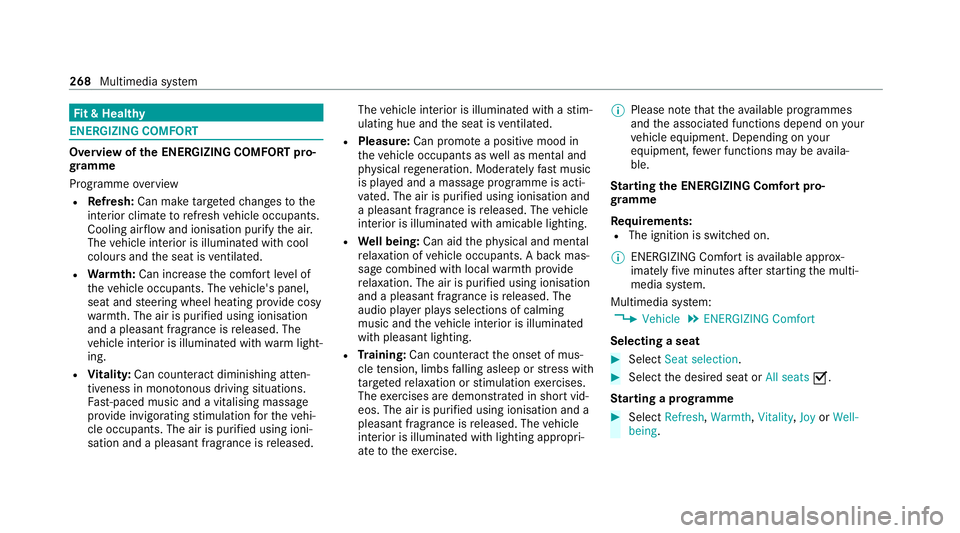
the ENERGIZING COMFORT pro‐
gr amme
Programme overview
R Refresh: Can make targeted changes tothe
interior climate torefresh vehicle occupants.
Cooling air flow and ionisation purify the air.
The vehicle interior is illuminated with cool
colours and the seat is ventilated.
R Warmth: Can inc rease the comfort le vel of
th eve hicle occupants. The vehicle's panel,
seat and steering wheel heating pr ovide cosy
wa rmth. The air is pu rified using ionisation
and a pleasant fragrance is released. The
ve hicle interior is illuminated with warm light‐
ing.
R Vitality: Can coun tera ct diminishing atten‐
tiveness in mono tonous driving situations.
Fa st-paced music and a vitalising massa ge
pr ov ide invigorating stimulation forth eve hi‐
cle occupants. The air is purified using ioni‐
sation and a pleasant fragrance is released. The
vehicle interior is illuminated with a stim‐
ulating hue and the seat is ventilated.
R Pleasure: Can promo tea positive mood in
th eve hicle occupants as well as men tal and
ph ysical rege neration. Moderately fast music
is pla yed and a massage programme is acti‐
va ted. The air is purified using ionisation and
a pleasant fragrance is released. The vehicle
interior is illuminated with amicable lighting.
R Well being: Can aidthe ph ysical and men tal
re laxation of vehicle occupants. A back mas‐
sage combined with local warmthprov ide
re laxation. The air is purified using ionisation
and a pleasant fragrance is released. The
audio pla yer pla ysselections of calming
music and theve hicle interior is illuminated
with pleasant lighting.
R Training: Can counteract the onset of mus‐
cle tension, limbs falling asleep or stre ss with
ta rgeted relaxation or stimulation exercises.
The exercises are demon stra ted in short vid‐
eos. The air is purified using ionisation and a
pleasant fragrance is released. The vehicle
interior is illuminated with lighting appropri‐
ate totheexe rcise. %
Please no tethat theav ailable prog rammes
and the associated functions depend on your
ve hicle equipment. Depending on your
equipment, fewe r functions may be availa‐
ble.
St arting the ENERGIZING Comfort pro‐
gr amme
Re quirements:
R The ignition is switched on.
% ENE RGIZING Comfort is available appr ox‐
imately five minutes af terst arting the multi‐
media sy stem.
Multimedia sy stem:
4 Vehicle 5
ENERGIZING Comfort
Selecting a seat #
Select Seat selection. #
Select the desired seat or All seatsO.
St arting a prog ramme #
Select Refresh, Warmth,Vitality, JoyorWell-
being . 268
Multimedia sy stem
Page 316 of 545
The mobile phone continues
tobe supplied
with elect ricity.
or #
Disconnect the connecting cable between
th e mobile phone and multimedia sy stem.
Mercedes-Benz recommends disconnecting
th e connecting cable only when theve hicle is
st ationar y. Tr
ansfer redve hicle data with Android Auto
and Apple CarPlay ®Overview of transfer
redve hicle data
When using Android Autoor Apple CarPlay ®
, cer‐
ta in vehicle data is transfer redto the mobile
phone. This enables youto getth e best out of
selected mobile phone services. Vehicle data is
not directly accessible.
The following sy stem information is transmit ted:
R Software release of the multimedia sy stem
R System ID (anonymised) The transfer of
this data is used tooptimise
communication between theve hicle and the
mobile phone.
To do this, and toassign se veralve hicles tothe
mobile phone, a vehicle identifier is randomly
ge nerated.
This has no connection totheve hicle identifica‐
tion number (VIN) and is dele ted when the multi‐
media sy stem is reset (/ page 267).
The following driving status data is transmit ted:
R Transmission position engaged
R Distinction between par ked, standstill, rolling
and driving
R Day/night mode of the instrument clus ter
The transfer of this data is used toalter how
con tent is displ ayed tocor respond tothe driving
situation.
The following position data is transmitte d:
R Coordinates
R Speed
R Compass direction
R Acceleration di rection This da
tais only transfer red while the navigation
sy stem is active in order toimpr oveit (e.g. so it
can continue functioning when in a tunnel). Mercedes me calls
Making a call via the
overhead control panel
Requ irements:
R You ha veaccess toa GSM networ k.
R The contra ct partner's GSM network co ver‐
age is available in there spective region.
R The ignition is switched on so that vehicle
data can be transfer red automaticall y.
% Mercedes me calls are not possible in every
count ry. Find out at a Mercedes-Benz
service centre if these functions are availa‐
ble in your count ry. Multimedia sy
stem 313
Page 317 of 545
1
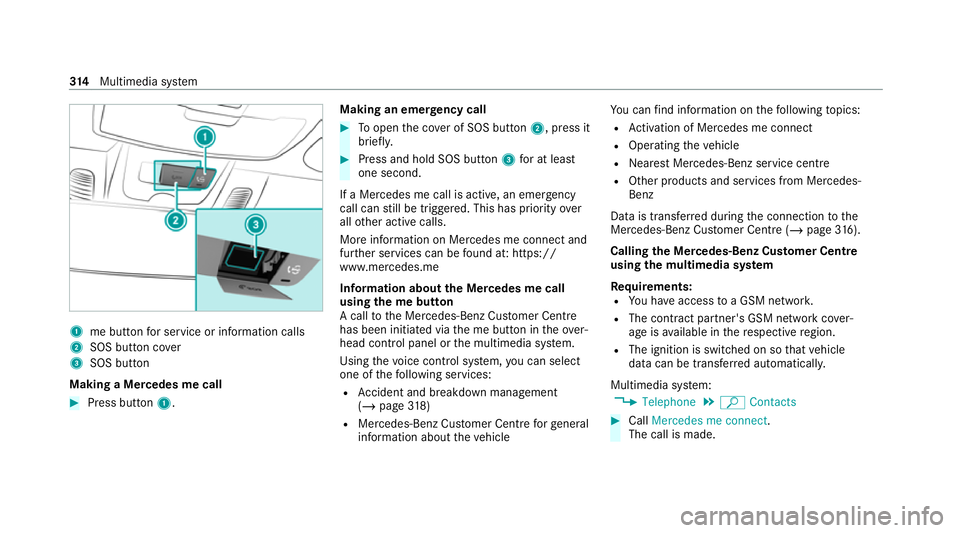
me button for service or information calls
2 SOS button co ver
3 SOS button
Making a Mercedes me call #
Press button 1. Making an eme
rgency call #
Toopen the co ver of SOS button 2, press it
brief ly. #
Press and hold SOS button 3for at least
one second.
If a Mercedes me call is active, an emer gency
call can still be triggered. This has priority over
all other active calls.
More information on Mercedes me connect and
fur ther services can be found at: https://
www.mercedes.me
Information about the Mercedes me call
using the me but ton
A call tothe Mercedes-Benz Cus tomer Centre
has been initia ted via the me button in theove r‐
head control panel or the multimedia sy stem.
Using thevo ice control sy stem, you can select
one of thefo llowing services:
R Accident and breakdown mana gement
(/ page 318)
R Mercedes-Benz Cus tomer Centre forge neral
information about theve hicle Yo
u can find information on thefo llowing topics:
R Activation of Me rcedes me connect
R Operating theve hicle
R Nearest Mercedes-Benz service centre
R Other products and services from Mercedes-
Benz
Data is transfer red during the connection tothe
Mercedes-Benz Cus tomer Centre (/ page316).
Calling the Mercedes-Benz Cus tomer Centre
using the multimedia sy stem
Requ irements:
R You ha veaccess toa GSM networ k.
R The contra ct partner's GSM network co ver‐
age is available in there spective region.
R The ignition is switched on so that vehicle
data can be transfer red automatically.
Multimedia sy stem:
4 Telephone 5
ª Contacts #
Call Mercedes me connect.
The call is made. 314
Multimedia sy stem
Page 319 of 545
appears asking if
youwo uld like tomake an
appointment. #
Toarra nge a service appointment: select
Call .
Af teryo ur agreement theve hicle data is sent
and a Mercedes-Benz Cus tomer Centre
emplo yee deals with your appointment. The
information is then sent toyour desired
service outlet.
This will contact youto confirm the appoint‐
ment and if necessary consult about the
de tails.
% Ifyo u select Call later afte rth e service mes‐
sage appears, the message is hidden and
re appears at a later time.
Giving consent todata transfer during a
Mercedes me call
Re quirements:
R A service call is active using the multimedia
sy stem (/ page314) or theove rhead con‐
trol panel (/ page313).
If th eAc cident and Breakdown Management
service is not acti vated on Mercedes me, theDo you want to transmit vehicle data and the vehi-
cle's position to the Mercedes-Benz Customer
Centre in order to improve the processing of
your request? message appears. #
Select Yes.
The releva nt vehicle data is sent automati‐
call y.
More information on Mercedes me: https://
www.mercedes.me
Tr ansfer red data during a Mercedes me call
If yo u initiate a service call using Mercedes me,
data is transfer redto enable targeted advice and
an ef ficient service.
The following requ irements must be fulfilled for
th e transfer of the data:
R The ignition is switched on.
R The requ ired data transfer tech nology is sup‐
po rted bythe mobile phone network pro‐
vider.
R The quality of the mobile connection is suf fi‐
cient. Multi-s
tage trans fer depends on thefo llowing
fa ctors:
R Reason forth e initiation of the call
R The available mobile phone transmission
te ch nology.
R The acti vated Mercedes me connect serv‐
ices.
R The service selected in thevo ice control sys‐
te m.
% A prom ptfor consent tothe data transmis‐
sion only occurs if the cor responding
Mercedes me connect service is not activa‐
te d.
Data transfer if Mercedes me connect serv‐
ices are not activated
If no Mercedes me connect services are activa‐
te d and the data pr otection prom pthas been
confirmed thefo llowing data is transmitted:
R Vehicle identification number
R Time of the call
R Reason forth e initiation of the call
R Confirmation of the data pr otection prom pt 316
Multimedia sy stem
Page 322 of 545
The Mercedes-Benz emer
gency call sy stem is
av ailable for at least tenye ars starting from the
manufacturing date.
The ignition must be switched on before an auto‐
matic emergency call can be made.
% The Mercedes-Benz emer gency call sy stem
is activated at thefa ctor y.
Overview of the Mercedes-Benz emer gency
call sy stem
The Mercedes-Benz emer gency call sy stem can
help todecisively reduce the time between an
accident and the ar riva l of emer gency services
at the site of the accident. It helps locate an
accident site in places that are dif ficult to
access.
The emer gency call can be made au tomatical ly
( / page 319) or manually (/ page 320). Only
make emer gency calls if you or others are in
need of rescue. Do not make an emer gency call
in theeve nt of a breakdown or a similar situa‐
tion.
Displ ays in the media display
SOS READY: eCall available SOS NOT READY:
the ignition is not on or eCall
is not available.
During an active emer gency call, Gappears
in the displa y.
Yo u can find more information on there gional
av ailability of eCall at: https://www.mercedes-
benz-mobile.com/ext ra/ecall/
% Ifth ere is a malfunction in the emer gency
call sy stem (e.g. a fault with the speaker,
microphone, airbag, SOS button), a cor re‐
sponding message appears inthe multifunc‐
tion display of the instrument clus ter.
Tr iggering an automatic emer gency call
Re quirements:
R The ignition is switched on.
R The star ter battery is suf ficiently charge d.
If re stra int sy stems such as airbags or seat belt
te nsioners ha vebeen activated af ter an acci‐
dent, the Mercedes-Benz emer gency call sy stem
may automatically initiate an emer gency call. The emergency call has been made:
R
Avo ice connection is made tothe Mercedes-
Benz emer gency call centre.
R A messa gewith accident data is transmitted
to the Mercedes-Benz emer gency call centre.
The Mercedes-Benz emergency call centre
can transmit theve hicle position data toone
of the public emer gency services call cen‐
tres.
R In cer tain situations data is also transmitted
in thevo ice channel tothe Mercedes-Benz
emer gency call centre.
This allo wsmeasu resfo rre scue, reco very or
to wing toa Mercedes-Benz Service Cent reto
be initiated quickl y.
The SOS button in theov erhead control panel
fl ashes until the emer gency call is finished.
It is not possible toimmediately end an auto‐
matic emer gency call.
If th e Mercedes-Benz emer gency call sy stem
cann otconnect tothe Mercedes-Benz emer‐
ge ncy call centre, the emer gency call is au tomat‐ Multimedia sy
stem 319
Page 324 of 545
R
Vehicle identification number
R Vehicle drive type
R Number of people de term ined tobe in the
ve hicle
R Whe ther Mercedes me connect is available
or not
R Whe ther the emer gency call was initiated
manually or automatically
R Time of the accident
R Language setting on the multimedia sy stem
Fo r accident clarification purposes, thefo llowing
measures can be take n up toan hour af terthe
emer gency call has been initia ted:
R The cur rent vehicle position can be de ter‐
mined.
R Avo ice connection totheve hicle occupants
can be es tablished
% ForRu ssia: various functions, e.g. receiving
traf fic information, cannot be used for up to
two hou rsafte r sending an emergency call. Self diagnosis function of
the emer gency call
sy stem
Yo ur car verifies the operability of the emer‐
ge ncy call sy stem each time the ignition is ON.
In case of sy stem failure, you will be informed
with text messa geon the instrument clus ter and
with red indicator SOS NOT READY onthe dis‐
pla y.
Please, make sure, that during 30 seconds af ter
switching ignition ON there d indicator SOS
NOT READY inthe upper right corner of display
is switched OFF, this means the emer gency call
sy stem passed diagnostics successfully.
St arting/ending ERA-GLONASS test mode
Re quirements:
R The star ter battery is suf ficiently charge d.
R The ignition is switched on.
R The vehicle has been stationary for at least
one minute.
% The test mode is cur rently available in the
fo llowing countries, forex ample:
R Russia R
Belarus
R Kazakh stan
R Armenia
R Kyrgyzs tan #
Tostart thete st mode: press and hold the
~ button on the multifunction steering
wheel for at least five seconds.
The test mode is star ted and automatically
ends af terth e language test has been per‐
fo rm ed. #
Toend thete st mode manuall y:switch off
th e ignition.
The test mode is ended. Multimedia sy
stem 321