climate control MERCEDES-BENZ C-CLASS CABRIOLET 2021 Owners Manual
[x] Cancel search | Manufacturer: MERCEDES-BENZ, Model Year: 2021, Model line: C-CLASS CABRIOLET, Model: MERCEDES-BENZ C-CLASS CABRIOLET 2021Pages: 545, PDF Size: 9.48 MB
Page 6 of 545
Climate control
........................................ 13 3
Overview of climate contro l systems ..........1 33
Operating the climate control sy stem ......... 13 3 Driving and pa
rking .................................. 137
Driving ........................................................ 137
DY NA MIC SELECT switch ............................1 48
Au tomatic transmission .............................. 15 0
Fu nction of the 4MATIC .............................. 15 5
Re fuelling .................................................... 15 5
Pa rking ........................................................ 161
Driving and driving sa fety sy stems .............1 68
Tr ailer hit ch................................................. 219
Bicycle rack function .................................. 224
Ve hicle towing instructions ........................ .225 Instrument display and on-board
comp
uter.................................................. 226
No tes on the instrument display and on-
board computer .......................................... 226
Instrument display overview ...................... .227
Overview of buttons on thesteering
wheel ..........................................................2 28
Operating the on-board computer .............. 228 Overview of displa
yson the multifunc‐
tion display .................................................2 29
Head-up display .......................................... 230 LING
UATRONIC ........................................ 232
No tes on operating saf ety .......................... 232
Ope ration ................................................... 232
Using LINGU ATRO NIC ef fectively ............... 234
Essential voice commands ........................ .235 Multimedia sy
stem .................................. 247
Overview and operation .............................. 247
Sy stem settings .......................................... 256
Fit & Healt hy............................................... 268
Na vigation .................................................. 269
Te lephone .................................................. .295
Online and Internet functions ..................... 322
Media ........................................................ .327
Ra dio .......................................................... 340
TV ............................................................... 343
Sound ......................................................... 351 Main
tenance and care ............................. 354
ASS YST PLUS service inter val display ........ 354
Engine compartment .................................. 355
Cleaning and care ...................................... .362 Breakdown assi
stance ............................ 372
Emergency ................................................. .372
Flat tyre ...................................................... 374
Battery (vehicle) .......................................... 381
To w- starting or towing away ....................... 386
Electrical fuses ........................................... 391 Wheels and tyres
..................................... 395
No tes on noise or unusual handling char‐
acteristics .................................................. .395
No tes on regular lyinspecting wheels and
tyres .......................................................... .395
No tes on snow chains ................................ 395
Ty re pressure .............................................. 396
Wheel change ............................................ .400
Emergency spa rewheel .............................. 41 0 Con
tents 3
Page 10 of 545
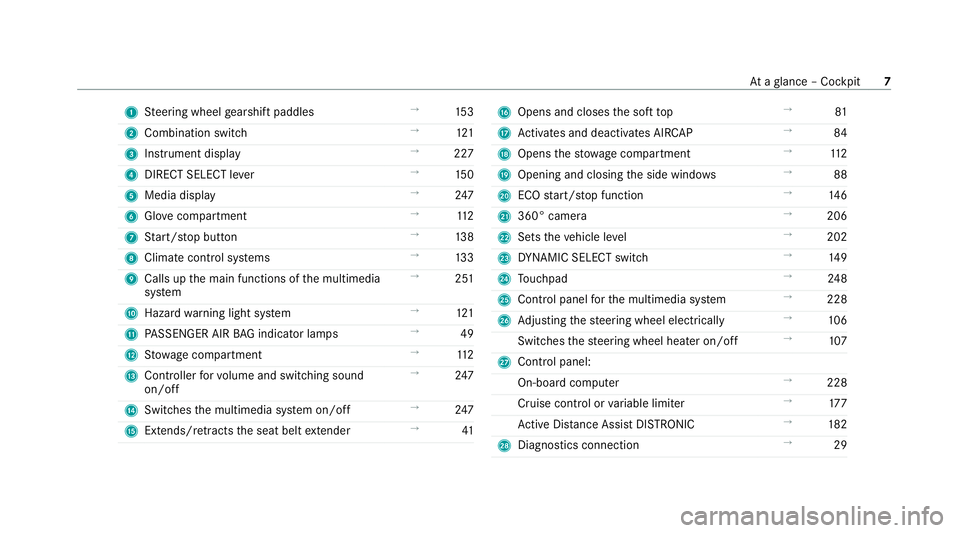
1
Steering wheel gearshift paddles →
15 3
2 Combination swit ch →
121
3 Instrument display →
227
4 DIRECT SELECT le ver →
15 0
5 Media display →
247
6 Glovecompa rtment →
11 2
7 Start/ stop button →
13 8
8 Climate cont rol sy stems →
13 3
9 Calls up the main functions of the multimedia
sy stem →
251
A Hazard warning light sy stem →
121
B PASSENGER AIR BAG indicator lamps →
49
C Stow age compartment →
11 2
D Controller forvo lume and switching sound
on/off →
247
E Switches the multimedia sy stem on/off →
247
F Extends/r etra cts the seat belt extender →
41 G
Opens and closes the soft top →
81
H Activates and deacti vates AIR CAP →
84
I Opens thestow age compartment →
11 2
J Opening and closing the side windo ws →
88
K ECO start/ stop function →
14 6
L 360° camera →
206
M Sets theve hicle le vel →
202
N DYNA MIC SELECT switch →
14 9
O Touchpad →
24 8
P Control panel forth e multimedia sy stem →
228
Q Adjusting thesteering wheel electrically →
106
Switches thesteering wheel heater on/off →
107
R Control panel:
On-board co mputer →
228
Cruise cont rol or variable limiter →
17 7
Ac tive Dis tance Assi stDISTRONIC →
182
S Diagno stics connection →
29 At
aglance – Cockpit 7
Page 37 of 545

tion, number of wheel
revo lutions or thefa s‐
te ned seat belts displ ay
R ambient conditions, such as temp erature,
ra in sensor or dis tance sensor
General ly,th e use of these data is temp orar y;
th ey will not be stored be yond the period of
operation and will only be processed within the
ve hicle itself. Control units of ten contain da ta
memories forve hicle keys,fo rex ample. Their
use permits thete mp orary or permanent docu‐
mentation of tech nical information about the
ve hicle's operating state, component loads,
main tenance requ irements and tech nical events
or faults.
Depending on theve hicle equipment, thefo llow‐
ing data are stored:
R operating status of sy stem components,
such as fill le vels, tyre pressure or battery
st atus
R malfunctions or faults in impor tant sy stem
components, such as lights or brakes
R system reactions in special driving situations,
such as airbag deployment or the inter ven‐
tion of stability control sy stems R
information on events leading tovehicle
damage
In cer tain cases, it may be requiredtostore data
th at wo uld ha veotherwise been used only tem‐
poraril y.This may be the case if theve hicle has
de tected a malfunction, forex ample.
If yo u use services, such as repair services and
maintenance work,st ored operational data as
we ll as theve hicle identification number can be
re ad out and used. They can be read out by
service network emplo yees, such as workshops
and manufacturers or third parties, such as
breakdown services. The same is true in the
case of warranty claims and quality assurance
measures.
In general, there adout is per form ed via the
legally prescribed port forth e diagnostics con‐
nection in theve hicle. The operational data that
are read out document tech nical states of the
ve hicle or of individual components and assist in
th e diagnosis of malfunctions, compliance with
wa rranty obligations and quality impr ovement.
To that end, these data, in particular information
about component loads, tech nical events, mal‐ functions and
other faults may be transmitted
along with theve hicle identification number to
th e manufacturer. Furthermore, the manufac‐
turer is subject toproduct liability. Forth is rea‐
son the manufacturer also uses operational data
from theve hicle, forex ample, forre calls. These
da ta can also be used toexamine the cus tom‐
er's warranty and guarantee claims.
Fa ult memories in theve hicle can be reset by a
service outlet or at your requ est as part of repair
or maintenance work.
Con venience and inf otainment functions
Yo u can store con venience settings and individ‐
ual settings in theve hicle and change or reset
th em at any time.
Depending on theve hicle equipment, this
includes thefo llowing settings, forex ample:
R seat and steering wheel positions
R suspension and climate control settings
R individual settings, such as interior lighting
Depending on the selected equipment, you can
import data into vehicle inf otainment functions
yo urself. 34
General no tes
Page 136 of 545

Overview of climate control sy
stems Note
s on climate control An interior air
filter in combination with the pre‐
fi lter in the engine compartment must alw ays be
used so that the air conditioning sy stem, pollu‐
tion le vel monitoring and the air filtration work
cor rectl y.Use filters recommended and
appr ovedby Mercedes-Benz. Alw ays ha vemain‐
te nance workcar ried out at a qualified specialist
wo rkshop. Overview of
the air conditioning control
panel The indicator lamps on
the buttons indicate that
th e cor responding function is activated. THERMATIC air conditioning contro
l panel
without stationary heater
1 w Setsthete mp erature on the driver's
side
2 _ Setsthe air distribution
3 H Setsthe air flow or switches off climate
control
4 Ã Sets climate control toautomatic
(/ page 134)
5 ¬ Demists the windscreen
6 A Calls up the air conditioning menu
7 ¤ Switches there ar wind owheater
on/off 8
0 Switches synchronisation on/off
(/ page 134)
9 g Switches air- recirculation mode on/off
(/ page 134)
A ¿ Switches the A/C function on/off
(/ page 134)
B w Setsthete mp erature on the front
passenger side Operating
the clima tecont rol sy stem Switching clima
tecont rol on/off #
Toswitch on: setthe air flow toleve l 1 or
higher using theH button. #
Toswitch off: setthe air flow toleve l 0 using
th eH button.
If climate control is switched off, the windo ws
may mist up more quickl y.Switch climate con‐
trol off only brie fly. Climate cont
rol13 3
Page 137 of 545

Switching
the A/C function on/off using the
air conditioning control panel The A/C function heats, cools and dehumidi
fies
th eve hicle's interior air. #
Press the¿ button.
Switch off the A/C function only brief ly;ot her‐
wise, the windo wsmay mist up more quickl y.
Condensation may drip from the underside of
th eve hicle when cooling mode is active. This is
not indicative of a fault. Setting climate cont
rolto automatic mode In auto
matic mode, the set temp erature is con‐
trolled and maintained at a const ant levelby the
air suppl y. #
Press the à button. #
Toswitch tomanual mode: pressthe H
or _ button. Ac
tivating/deactivating the climate control
syn chro nisation function via the air condi‐
tioning control panel Climate control can be set centrally using
the
synchronisation function. The temp erature and
air distribution settings forth e driver's side will
be adop ted automatically forth e front passenger
side. #
Press the0 button.
The synchronisation function will be deactivated
if th e settings for one of theot her climate con‐
trol zones are changed. Demisting
the windo ws Wi
ndo wsmis ted up on the inside #
Press theà button. #
Ifth e windo wscontinue tomist up: press the
¬ button.
Wi ndo wsmis ted up on the outside #
Switch on the windscreen wipers. #
Press theà button. Switching air-recirculation mode on/off
#
Press theg button.
The interior air will be recirculated.
Air-reci rculation mode automatically swit ches to
fresh air mode af ter some time.
% If air-recirculation mode is switched on, the
windo wsmay mist up more quickl y.Switch
on ai r-re circulation mode only brie fly. Ac
tivating/deactivating ionisation Multimedia sy
stem:
4 Vehicle 5
b Climate control
5 Ionisation
Ionisation cleans and refreshes the interior air of
th eve hicle. Ionisation of the interior air is odour‐
less. #
Activate Oor deacti vate ª the function. 134
Climate cont rol
Page 138 of 545

Air
vents Ad
justing the front air vents &
WARNING Risk of bu rns and frostbite
due tobeing too close tothe air vents
Ve ry hot or very cold air can flow from the air
ve nts. #
Makesure that all vehicle occupants
alw ays maintain a suf ficient di stance
from the air vents. #
If necessa ry, direct the air flow to
ano ther area of theve hicle interior. To
guarantee theflow of fresh air thro ugh the air
ve nts into theve hicle interior, comply with the
fo llowing:
R Alw ayske ep theve nts and ventilation grilles
in theve hicle interior free.
R Keep the air inlet free of residue build-up
(/ page 362). #
Toopen or close: hold airvent 1 inthe
centre and turn it tothe left (open) or right
(closed) as far as it will go. #
Toset the air flow direction: hold air
ve nt 1 inthe cent reand mo veit up or down
or tothe left or right. Ad
justing the rear air vents #
Toopen or close: turn controller2tothe
left or right as far as it will go. #
Toset the air flow direction: hold air
ve nt 1 inthe cent reand mo veit up or down
or tothe left or right. Climate control
13 5
Page 248 of 545

Vo
ice command Function
Scent menu To
display fragrance settings
Energy flow To
display energy flow settings
Ionisation menu To
display ionisation settings
Climate control menu To
display climate control settings
Automatic climate control driver on To
switch on the automatic climate control settings on the driver's side
Light menu To
display light settings
Massage menu To
display massage settings
Massage driver's seat on To
switch on the massage function forth e driver's seat
Massage driver's seat off To
switch off the massage function forth e driver's seat
Outside temperature To
display the outside temp erature
Engine data Displaying engine data
Seats menu To
display seat adjustment settings
Seat heating front passenger level "2" To
set the seat heating forth e front passenger seat toleve l 2 LINGU
ATRO NIC 245
Page 294 of 545
Selecting
the map orientation
Multimedia sy stem:
4 Navigation 5
Z Options
5 Map menu #
Alternatively, if the map is displa yed in full
screen mode, press the cent ral control ele‐
ment.
The map menu appears. #
In map menu 3, select N,2D or
3D( /page 289).
R N:the 2D map view is displa yed so that
no rth is alw ays at theto p.
R 2D: the 2D map view is aligned tothe
direction of tr avel.
R 3D: the 3D map view is aligned tothe
direction of tr avel.
Selecting POI symbols
Multimedia sy stem:
4 Navigation 5
Z Options
5 Map content
POIs include filling stations and ho tels which can
be displa yed as symbols on the map, forex am‐
ple. Not all POIs are available everywhere. #
Select POI symbols .
The #dot indicates the cur rent setting.
Standard displays symbols of predefined cat‐
egories on the map.
User defined allowsyouto personally select
th e symbols forth eav ailable categories.
None switches the display off. #
Select a setting. #
User defined : select categories.
The POI symbols of the selected categories
are displa yedO or not displa yedª.
Selecting the display of text information in
th e map
Multimedia sy stem:
4 Navigation 5
Z Options
5 Text information #
Select text information.
Current street showsthest re et you are cur‐
re ntly driving on at the bottom of the displa y.
When the map is mo ved, thefo llowing infor‐
mation appears under the crosshair:
R stre et name R
POI name
R area name
Geo-coordinates displaysth efo llowing infor‐
mation:
R longitude and latitude
R elevation
The el evation shown may deviate from
th e actual ele vation.
R number of sa tellites from which a signal
can be recei ved
When the map is mo ved, this information
does not appear.
Climate control displays the cur rent clima te
control settings.
None switches the display off.
Displaying the next intersecting stre et
Requ irements:
R Route guidance is not active. Multimedia sy
stem 291
Page 505 of 545
Ad
justing treble, mid-range and bass
setting s................................................. 353
Calling up the sound menu.................... 353
Information............................................ 353
Switching volume adjustment on/of f.... 353
Af ter-sales service centre
see ASS YST PLUS
Air distribution Setting................................................... 13 3
Air inlet see Air-water duct
Air pressu re
see Tyre pressure
Air suspension see AIRMATIC
Air vents
Ad justing (front).................................... 13 5
Ad justing (rear)..................................... .135
Ad justing the AIRSCARF vents............... 13 6
Air vents
see Air vents
Ai r-conditioning sy stem
see Climate control Air-recirculation mode..............................
13 4
Air-water duct Keeping free.......................................... 362
Airbag Activation................................................ 38
Fr ont airbag (driver, front passenger)...... 44
Head airba g............................................. 44
Ins tallation locations.............................. .44
Knee airbag............................................ .44
Overview................................................. 44
PA SSENGER AIR BAG indicator lamp....... 49
Pr otection................................................ 45
Re duced pr otection.................................46
Side airba g.............................................. 44
AIR CAP
Ac tivating................................................ 84
Deactivating............................................ 84
Airflow Setting................................................... 13 3
AIRM ATIC
Setting.................................................. .202
Suspension............................................ 201
AIRSCARF Adjusting the outlets............................. 13 6Switching on/of
f................................... 105
Alarm sy stem
see ATA (anti-theft alarm sy stem)
All-wheel drive see 4MATIC
Alternative route
see Route
Ambient lighting Setting (MBUX multimedia sy stem)....... 127
Android Auto
Connecting a mobile phone (wireless).. .312
Ending.................................................... 312
Information............................................ 312
Overview................................................3 11
Sound settings....................................... 312
Tr ans ferred vehicle data........................3 13
Animals Pets in theve hicle................................... 71
Anti-lock braking sy stem
see ABS (Anti-lock Braking Sy stem)
Anti-skid chains
see Snow chains 502
Index
Page 507 of 545
Au
tomatic mir rorfo lding function
Ac tivating/deactivating......................... 13 2
Au tomatic transmission
DIRECT SELECT le ver............................. 15 0
Drive program display............................ 14 9
Drive programs...................................... 14 8
DY NA MIC SELECT switch...................... 14 8
Engaging drive position........................ .152
Engaging neutral................................... .151
Engaging pa rkposition.......................... 15 2
Engaging reve rsege ar........................... .151
Kickdown............................................... 154
Manual gear changing.......................... .153
St eering wheel gearshift paddles.......... 15 3
Tr ansmission position displa y................ 15 0
Tr ansmission position s..........................15 0
Au tomatic transmission (problem)
see Transmission (problem)
Axle load Perm issible............................................ 414
Tr ailer operation.................................... 429 B
Bad weather light...................................... 124Ball ne
ck
Fo lding out/in....................................... 220
BA S (Brake Assist Sy stem)....................... 17 0
Battery see Battery (vehicle)
Battery (k ey)
Re placing.................................................74
Battery (vehicle) Charging................................................ 384
Charging (Remo teOnline)...................... 13 9
No tes..................................................... 381
No tes (s tarting assis tance and
ch arging)............................................... 382
Re placing.............................................. 386
St arting assis tance................................ 384
Belt see Seat belt
Bic ycle rack
Load capacity........................................ 428
Tr ailer operation.................................... 224
Blind Spot Assist Activating/deactivating......................... 19 8
Fu nction................................................ 19 5Sy
stem limitations................................. 19 5
Blo wer
see Climate control
BlueTEC see AdBlue ®
Blue tooth ®
Information............................................ 258
Setting up an Internet connection.........3 23
Switching on/off.................................. .258
Switching profile (DUN/PAN)................ 324
Blue tooth ®
audio
Ac tivating.............................................. 339
De-authorising (de-regis tering) the
device.................................................... 340
Information............................................ 337
Overview............................................... 338
Sear ching for a track............................. 340
Sear ching for and auth orisingthe
device.................................................... 338
Selecting a media pla yer....................... 339
Switching device via NFC...................... 340
Bonnet Resetting (active bonnet)...................... 355 504
Index